

Programvare for administrasjon av IT-drift hjelper deg med å administrere og forstå hele IT-infrastrukturen din, inkludert overvåking, automatisering, sikkerhet og tjenestetilstand på tvers av lokale og skybaserte miljøer.
Denne listen er laget for teknologidirektører og IT-ledere som trenger samlet innsikt, raskere analyse av grunnårsaker og løsninger som er klare for hybrid- og multiskyoperasjoner. Her finner du alternativer for KI-drevet automatisering, dyp observasjon, integrerte sikkerhetsintegrasjoner og tilpasningsmulighetene du trenger for å skalere det som betyr noe.
Why Trust Our Software Recommendations
6,700+
Reviews
20
Industry experts
16+
Evaluation factors
14
Years
Our team has been testing and reviewing software since 2012. As tech leaders ourselves, we know how difficult—and important—it is to choose the right software.
For this guide, we evaluated tools using hands-on testing and independent research, scoring tools using our selection criteria.
Our reviews reflect our human editorial judgment, not a sales pitch.
Expert reviewers:
- Paulo Gardini MiguelTech Director
 Tim FisherVP of AI
 Gabriel RosasTech Lead & Software Architect
 Christhian GruhnTech Lead & Platform Architect

Sammenligningstabell for programvare for administrasjon av IT-drift
Sammenlign priser og viktige spesifikasjoner for mine beste valg av programvare for administrasjon av IT-drift i tabellen nedenfor.
| Tool | Best For | Trial Info | Price | ||
|---|---|---|---|---|---|
| 1 | Best for AI-driven full-stack release validation | 15-day free trial | From $7/month | Website | |
| 2 | Best for unified telemetry with FinOps built in | Free plan available | From $15/month (billed annually) | Website | |
| 3 | Best for SecOps-fused log and metrics ops | Free trial available | From $0.15/credit | Website | |
| 4 | Best for OTel-native full-stack ops visibility | 7-day free trial | From $0.07/GB | Website | |
| 5 | Best for MSP-grade multi-tenant hybrid ITOps | Free demo available | Pricing upon request | Website | |
| 6 | Best for AI-driven alert-to-topology root cause ops | 14-day free trial | Pricing upon request | Website | |
| 7 | Best for transaction-level full-stack observability | Free plan available | From $10/user/month | Website | |
| 8 | Best for CMDB-anchored hybrid IT ops at scale | Free demo available | Pricing upon request | Website | |
| 9 | Best for Cisco-native cross-domain service health ops | Free demo available | Pricing upon request | Website | |
| 10 | Best for agentic AI across mainframe-to-cloud ops | Free demo available | Pricing upon request | Website |


Anmeldelser av den beste programvaren for administrasjon av IT-drift
Nedenfor finner du mine detaljerte oppsummeringer av den beste programvaren for administrasjon av IT-drift som kom med på kortlisten. Anmeldelsene mine gir en grundig gjennomgang av funksjonene, de beste bruksområdene og integrasjonene for hver plattform, slik at du kan finne den som passer best for deg.
 Best for AI-driven full-stack release validation
- 15-day free trial
- From $7/month
Visit WebsiteCustomer Rating:4.5/5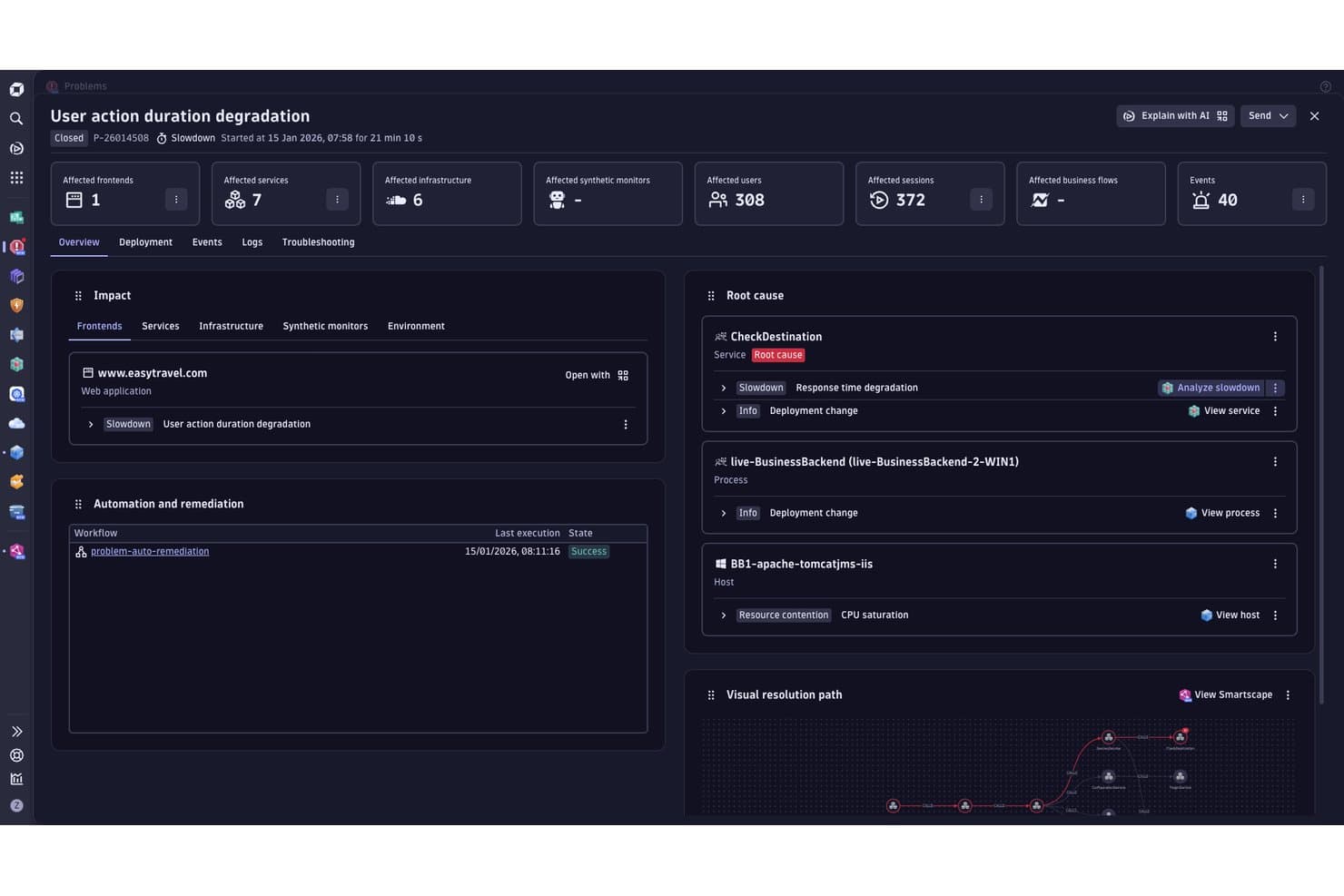
Dynatrace pinpoints root causes of performance issues automatically. Dynatrace is a full-stack IT operations management platform that spans infrastructure monitoring, AIOps-driven incident detection, log analytics, and workflow automation across hybrid and multi-cloud environments.
Who Is Dynatrace Best For?
Dynatrace is a strong fit for enterprise IT and SRE teams managing complex hybrid or multi-cloud environments who need AI-driven observability, automated incident response, and release validation at scale.
Why I Picked Dynatrace
I picked Dynatrace as one of the best because its Site Reliability Guardian is the most thorough release validation setup I've seen in this category: it automatically evaluates every deployment against predefined SLOs and KPIs before code reaches production, blocking bad releases without manual review. Pair that with Davis AI's ability to trace a production anomaly back to a single root cause across billions of live dependencies, and you get a platform that catches what slips past quality gates and explains exactly why.
Dynatrace Key Features
- Smartscape topology mapping: Auto-discovers and visualizes real-time dependencies across hosts, containers, services, and processes in hybrid and multi-cloud environments.
- Grail data lakehouse: Unifies metrics, logs, traces, events, and security signals in a single index-free store, queryable via DQL without schema configuration.
- AutomationEngine workflow builder: A no-code/low-code visual editor for building event-driven or scheduled automation workflows grounded in live observability data.
- Predictive alerting: Forecasts capacity and performance violations before they occur using continuously learned behavioral baselines across every monitored component.
Dynatrace Integrations
Dynatrace offers 900+ integrations through Dynatrace Hub, including ServiceNow, Jira Service Management, PagerDuty, Slack, Microsoft Teams, AWS, Azure, Google Cloud, and OpenTelemetry. Its REST API, webhooks, and AppEngine SDK support custom integrations.
Pros and Cons
Pros:
- Automated remediation with human-in-the-loop controls
- Davis AI pinpoints true root cause
- Single agent auto-discovers full-stack assets
Cons:
- SaaS-only limits options for air-gapped needs
- Consumption pricing difficult for budgeting
 Best for unified telemetry with FinOps built in
- Free plan available
- From $15/month (billed annually)
Visit WebsiteCustomer Rating:4.5/5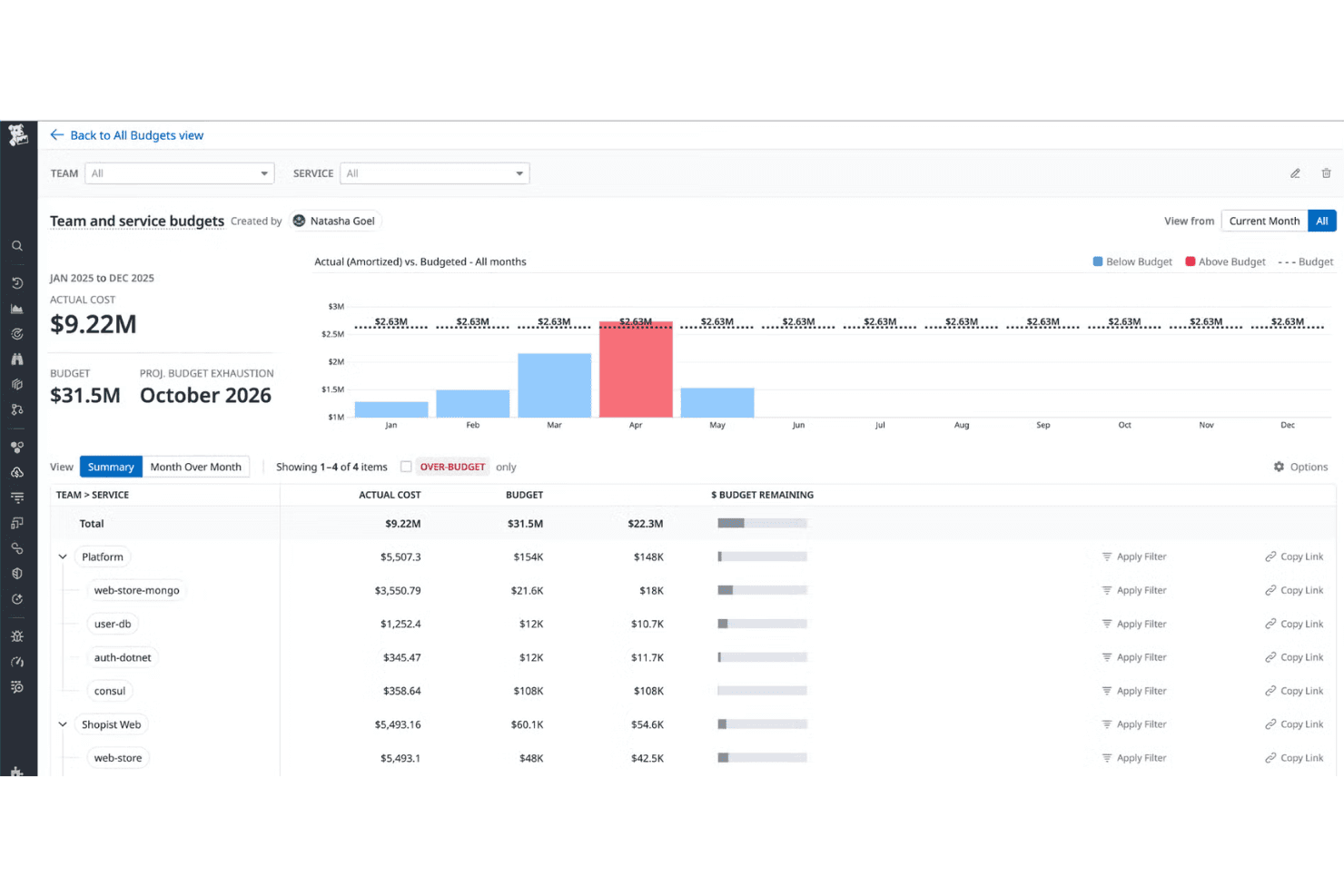
Datadog tracks team and service budgets against actual cloud spending. Datadog is a cloud-based IT operations management and observability platform that unifies infrastructure monitoring, APM, log management, network monitoring, incident management, AIOps, and workflow automation across hybrid and multi-cloud environments.
Who Is Datadog Best For?
Datadog is a strong fit for engineering and IT operations teams managing complex, multi-cloud or hybrid environments who need infrastructure monitoring, APM, and cloud cost visibility in one place.
Why I Picked Datadog
Datadog earns its spot on my shortlist because it's the only platform I've used where full-stack telemetry and cloud cost visibility genuinely live in the same place. I love that Cloud Cost Management ties infrastructure metrics directly to spend across AWS, Azure, GCP, and OCI, so when Watchdog flags a CPU anomaly on a Kubernetes cluster, I can see the cost impact without switching tools. The built-in FinOps layer, combined with AI-powered anomaly detection across metrics, logs, and traces, makes it uniquely suited to teams who need operational and financial accountability in one view.
Datadog Key Features
- Watchdog anomaly detection: An AI engine that automatically identifies performance anomalies across infrastructure metrics, APM traces, and logs without requiring manual threshold configuration.
- On-call scheduling and escalation policies: Configurable on-call rotations with routing rules and multi-channel notifications via SMS, voice, push, and email.
- Workflow Automation builder: A visual, low-code interface with 1,750+ prebuilt actions and 150+ blueprints for automating incident response, DevOps, and security workflows.
- Cloud Security Posture Management (CSPM): Continuous configuration checks across cloud accounts and containers mapped to 15+ compliance frameworks, including PCI DSS, HIPAA, and SOC 2.
Datadog Integrations
Datadog offers 1,000+ vendor-backed integrations, including AWS, Microsoft Azure, Google Cloud Platform, ServiceNow, Jira, PagerDuty, Slack, Microsoft Teams, Kubernetes, and Prometheus. Its REST API and SDKs support custom integrations.
Pros and Cons
Pros:
- End-to-end incident management built in
- AI anomaly detection helps reduce alert noise
- Unified view of infrastructure, apps, and costs
Cons:
- No self-hosted deployment for non-government users
- Modular pricing leads to unpredictable costs
 Best for SecOps-fused log and metrics ops
- Free trial available
- From $0.15/credit
Visit WebsiteCustomer Rating:4.3/5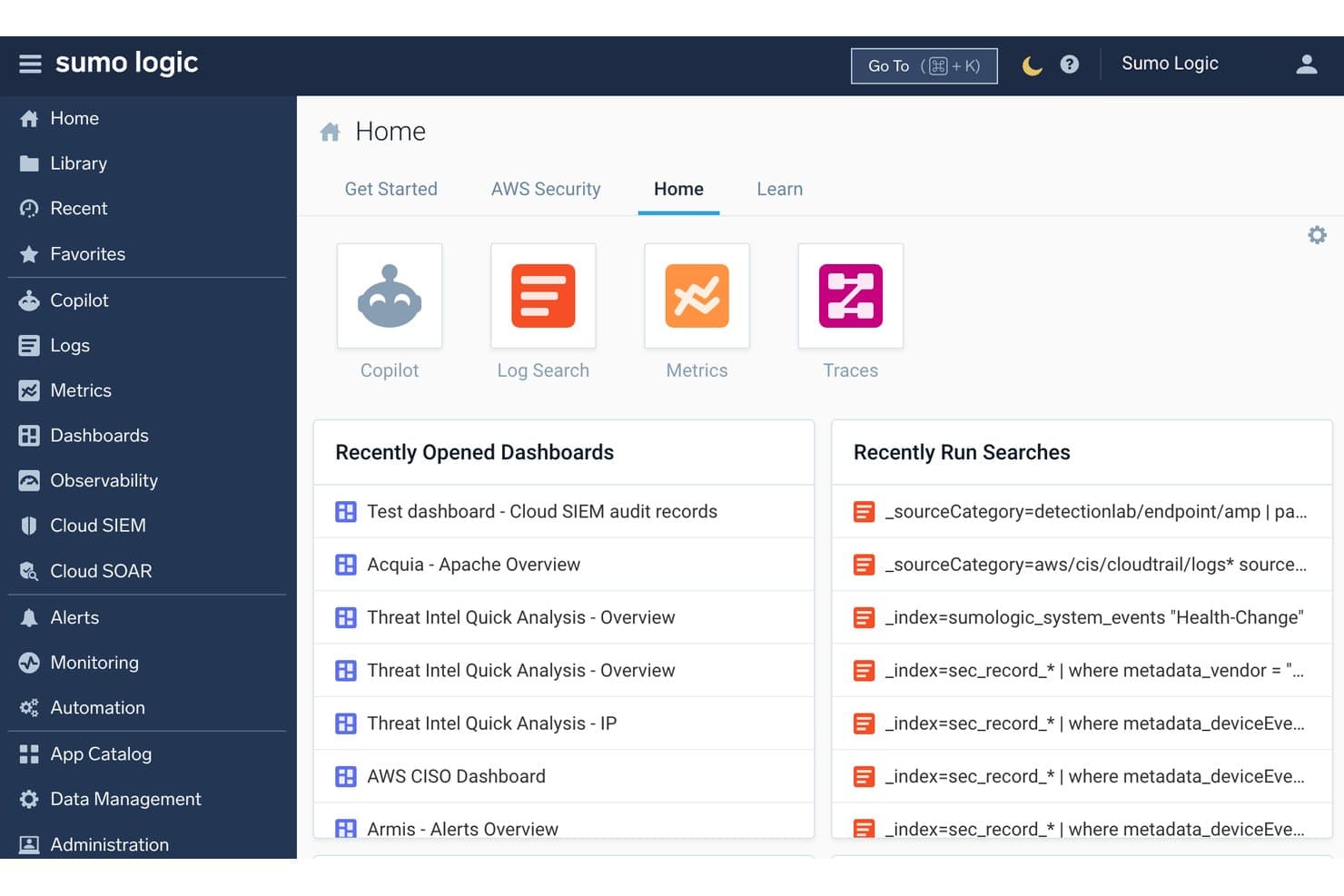
Sumo Logic gives teams quick access to log search, metrics, and recent activity. Sumo Logic is a cloud-native IT operations management platform that unifies log analytics, infrastructure monitoring, metrics, distributed tracing, and security operations into a single SaaS-based observability and SIEM solution.
Who Is Sumo Logic Best For?
Sumo Logic is a strong fit for security-conscious IT and operations teams that need log analytics, metrics, and SIEM capabilities in a single SaaS platform.
Why I Picked Sumo Logic
Sumo Logic earns its spot on my shortlist because it's one of the few platforms that collapses log analytics and security operations into a single, genuinely unified SaaS tool. I like how its patented LogReduce and LogExplain operators surface root causes directly from raw log data, cutting the manual pattern-hunting that slows incident resolution. The Dojo AI multi-agent platform also stands out: the SOC Analyst Agent automates tier-1 alert triage and delivers evidence-backed verdicts, which my team finds invaluable when SecOps and ITOps workflows overlap.
Sumo Logic Key Features
- AI-driven metrics monitors: ML-based anomaly detection auto-tunes seasonal baselines on your metrics data, cutting false-positive alert volume.
- Multi-org management: A parent org controls monitors, dashboards, roles, and access across child organizations from a single centralized interface.
- Compliance reporting dashboards: Prebuilt dashboards map your data against PCI, HIPAA, GDPR, SOX, and ISO frameworks for continuous posture visibility.
- OpenTelemetry Distribution Agent: A single unified agent collects logs, metrics, and traces across Linux, Windows, macOS, and 25+ source configurations.
Sumo Logic Integrations
Sumo Logic offers 450+ integrations, including ServiceNow, PagerDuty, Jira, Slack, Microsoft Teams, AWS, Microsoft Azure, Google Cloud Platform, Kubernetes, and Docker. It also provides REST APIs, webhooks, Terraform, SumoQL, and an Open Integration Framework for custom connectivity.
Pros and Cons
Pros:
- Centralizes logs, metrics, and traces in one platform
- Compliance dashboards map directly to major frameworks
- Dojo AI automates incident triage and resolution
Cons:
- Querying large historical data sets can be slow
- Advanced automation favors security over IT operations
 Best for OTel-native full-stack ops visibility
- 7-day free trial
- From $0.07/GB
Visit WebsiteCustomer Rating:4.3/5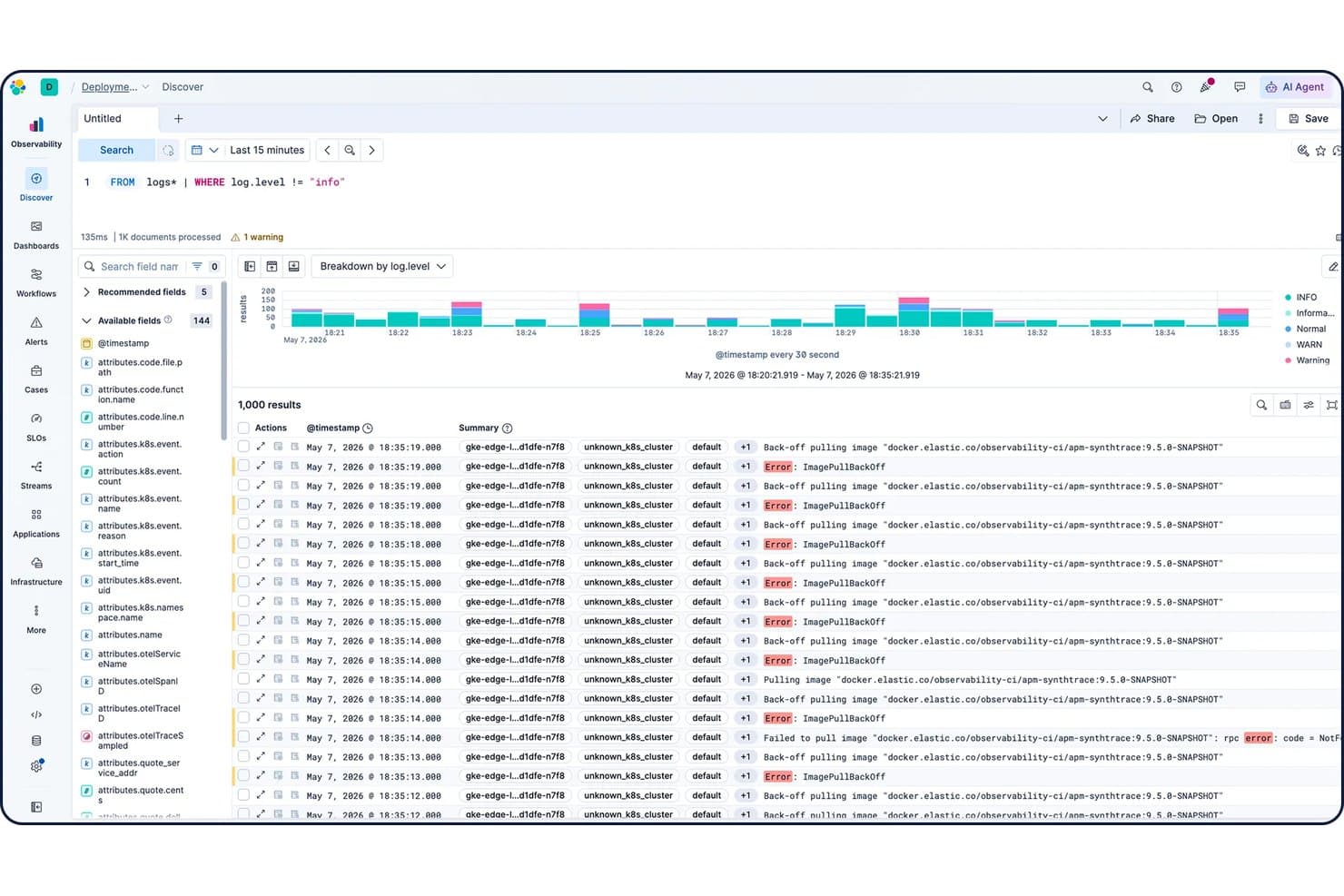
Elastic Observability filters logs by level in the Discover view. Elastic Observability is a full-stack observability platform that unifies log monitoring, infrastructure metrics, APM, distributed tracing, synthetic monitoring, and AIOps across on-premises, cloud, and hybrid environments.
Who Is Elastic Observability Best For?
Elastic Observability is a strong fit for SREs and infrastructure engineers at mid-to-large enterprises who need unified log, metric, trace, and APM visibility across hybrid and multi-cloud environments—especially teams already invested in OpenTelemetry.
Why I Picked Elastic Observability
Elastic Observability earns its spot on my shortlist because it's one of the few platforms built OpenTelemetry-first, meaning your logs, metrics, traces, and APM data all land in a single schema without forcing you to wrestle with proprietary agents. I particularly like the zero-config ML layer: 100+ preconfigured anomaly detection jobs run automatically across every data stream, so when Comcast-scale ingestion happens, your team isn't manually tuning models. The Streams-based log parsing and ES|QL query engine make pinpointing root causes across hybrid environments genuinely fast.
Elastic Observability Key Features
- Synthetic monitoring: Run lightweight and full browser tests against user journeys using a global managed testing infrastructure or private on-premises locations.
- Service Level Objective (SLO) tracking: Define, monitor, and report on reliability targets directly within Kibana alongside your existing dashboards and alerts.
- Kibana alerting: Configure rule-based alerts across APM, metrics, uptime, and security data using form-based setup with multi-channel notification support.
- 550+ prebuilt integrations: Connect to cloud providers, ITSM tools, security platforms, and data sources using prebuilt agents and agentless collectors.
Elastic Observability Integrations
Elastic Observability offers 550+ prebuilt integrations, including AWS, Microsoft Azure, Google Cloud Platform, ServiceNow, Jira, PagerDuty, Slack, Microsoft Teams, Kubernetes, and OpenTelemetry. It also supports REST APIs, webhooks, Elastic Agent, Logstash, Beats, and OpenTelemetry collectors for custom connectivity.
Pros and Cons
Pros:
- OTel-native ingestion avoids vendor lock-in
- Zero-config ML detects anomalies automatically
- Unified visibility across hybrid and multi-cloud
Cons:
- Documentation lacking for complex OTel setups
- Native on-call scheduling is not included
Learn more about Elastic Observability: Best for MSP-grade multi-tenant hybrid ITOps
- Free demo available
- Pricing upon request
Visit WebsiteCustomer Rating:4.1/5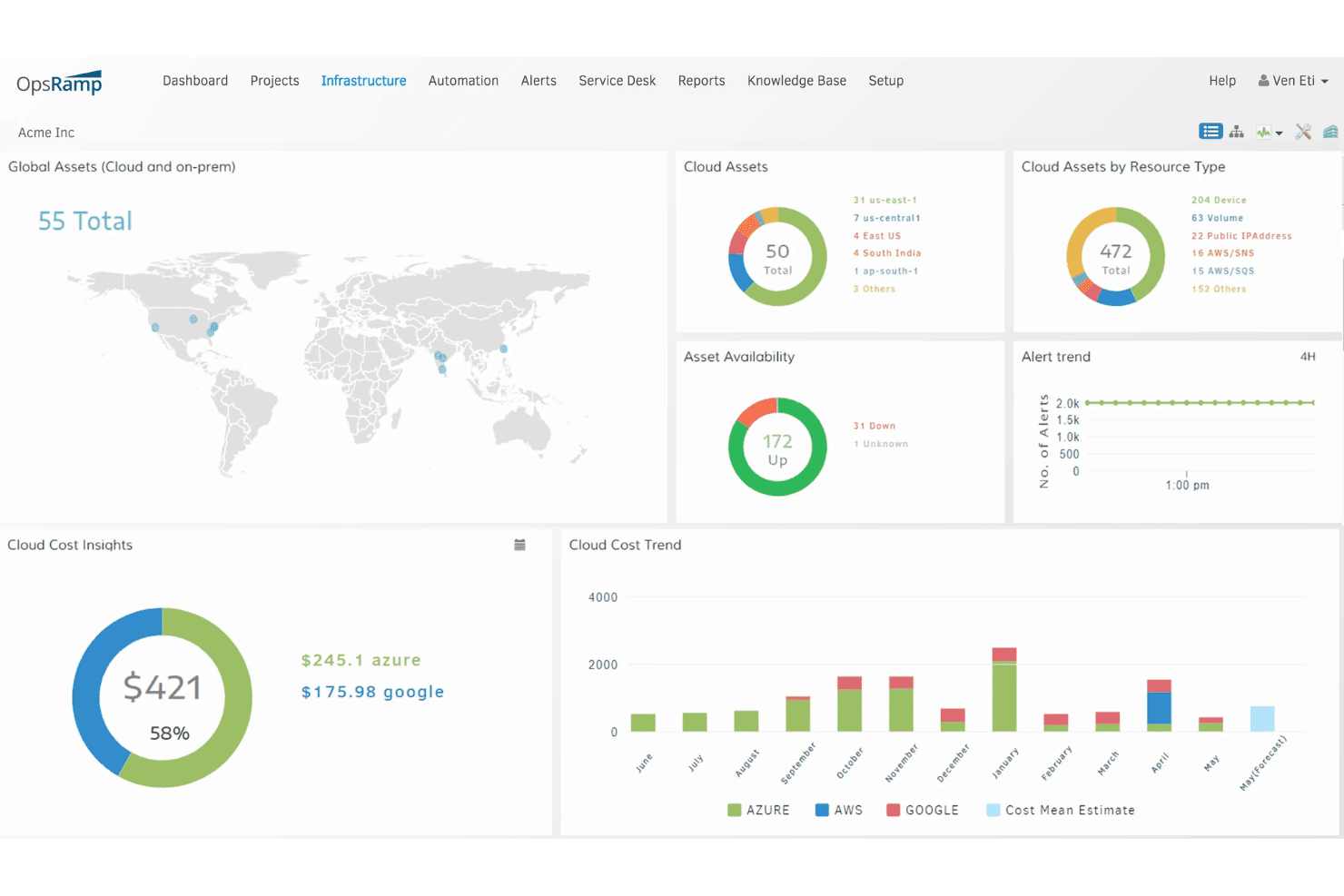
OpsRamp gives users a unified view of cloud costs, assets, and alerts. HPE OpsRamp is an AIOps-driven IT operations management platform that unifies infrastructure monitoring, event correlation, incident management, runbook automation, and hybrid/multi-cloud visibility across on-premises, private cloud, and public cloud environments.
Who Is OpsRamp Best For?
OpsRamp is a strong fit for managed service providers and large enterprises running complex hybrid IT estates across on-premises and multi-cloud environments.
Why I Picked OpsRamp
OpsRamp earns its spot on my shortlist because its multi-tenant architecture is purpose-built for MSPs managing dozens of client environments from a single pane of glass. I particularly like its AIOps event correlation engine, which groups related alerts across tenants and cuts noise by up to 90%, so your team isn't drowning in tickets across client accounts. Its topology and service maps give you a live dependency view across hybrid estates spanning AWS, Azure, GCP, and on-prem, which is genuinely hard to replicate at that scale.
OpsRamp Key Features
- Runbook automation engine: Execute predefined remediation scripts automatically in response to detected issues, with RBAC-governed access to jobs and process workflows.
- Multi-tenant client management: Manage multiple client environments from a single platform instance, with per-tenant integration configuration and isolated data handling.
- Cloud cost reporting: Break down cloud spend by account, region, service, and instance type across AWS, Azure, and GCP with customizable date ranges.
- OpenTelemetry intake: Ingest metrics, logs, and traces from any OpenTelemetry-compatible source alongside eBPF-assisted auto-instrumentation for deep workload visibility.
OpsRamp Integrations
OpsRamp offers 3,000+ integrations, including ServiceNow, Jira Service Management, Zendesk, AWS, Microsoft Azure, Google Cloud Platform, Kubernetes, OpenTelemetry, and Prometheus. Its OAuth 2.0 REST API, webhooks, and JSON import/export support custom connections.
Pros and Cons
Pros:
- Hybrid and multi-cloud topology visualizations
- Up to 90 percent alert noise reduction
- Multi-tenant management for MSP client environments
Cons:
- Dashboard performance can lag at large scale
- Application monitoring features still maturing
Learn more about OpsRamp: Best for AI-driven alert-to-topology root cause ops
- 14-day free trial
- Pricing upon request
Visit WebsiteCustomer Rating:4.5/5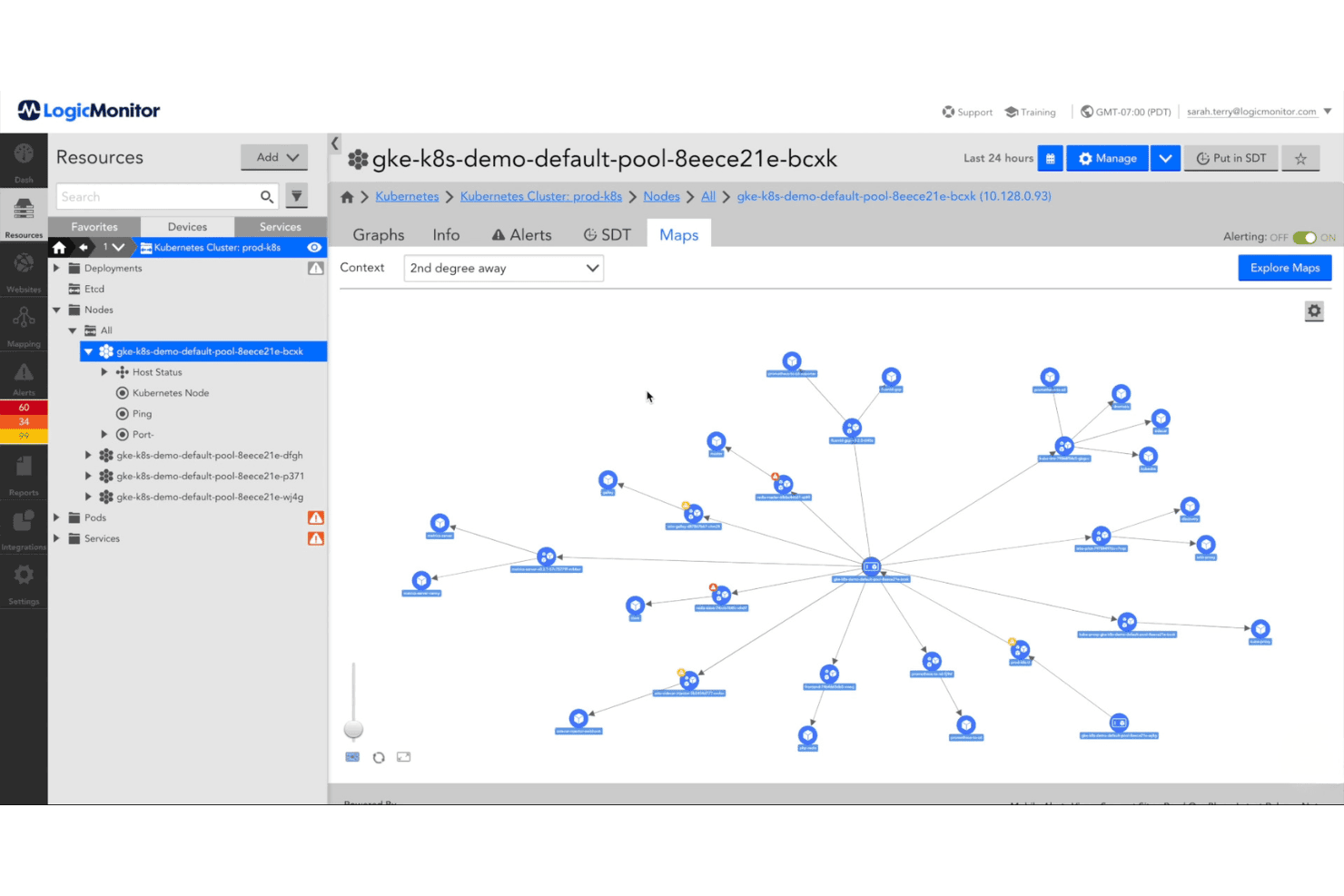
LogicMonitor maps Kubernetes node relationships with interactive network topology views. LogicMonitor is a full-stack IT operations management platform that covers infrastructure, network, cloud, container, and application monitoring alongside AIOps-driven alert correlation, topology mapping, and log analytics in a single unified platform.
Who Is LogicMonitor Best For?
LogicMonitor is a strong fit for infrastructure and network operations teams managing large, hybrid environments across on-premises and multi-cloud.
Why I Picked LogicMonitor
LogicMonitor earns its spot on my shortlist because of how tightly it connects alert correlation to topology-aware root cause analysis. Edwin AI compresses alert storms into prioritized, explainable incidents, and the ITOps Context Graph layers topology, telemetry, and change data together so you can pinpoint a probable root cause in minutes rather than hours. I've seen teams cut alert noise by 78% after deploying Edwin AI, which means on-call engineers spend less time triaging noise and more time resolving the actual issue.
LogicMonitor Key Features
- Full-stack infrastructure monitoring: Tracks servers, network devices, VMs, databases, storage, and containers across hybrid environments from a single platform.
- LM Exchange: Gives you access to over 2,000 pre-built LogicModules covering cloud providers, networking gear, databases, and applications.
- Log Analytics & Intelligence: Correlates log data with metrics in real time so you can investigate incidents without switching tools.
- Bidirectional ITSM integrations: Syncs alert and ticket lifecycles with ServiceNow, Jira Service Management, PagerDuty, ConnectWise, and Autotask.
LogicMonitor Integrations
LogicMonitor offers 2,000+ marketplace integrations through LM Exchange, plus native integrations with ServiceNow, Jira Service Management, PagerDuty, ConnectWise, and Datto Autotask. A documented REST API supports custom integrations.
Pros and Cons
Pros:
- Customizable dashboards for various IT roles
- Maps topology for fast root cause analysis
- Reduces alert noise with Edwin AI
Cons:
- Interface changes make navigation challenging
- Pricing structure is difficult to understand
Learn more about LogicMonitor: Best for transaction-level full-stack observability
- Free plan available
- From $10/user/month
Visit WebsiteCustomer Rating:4.3/5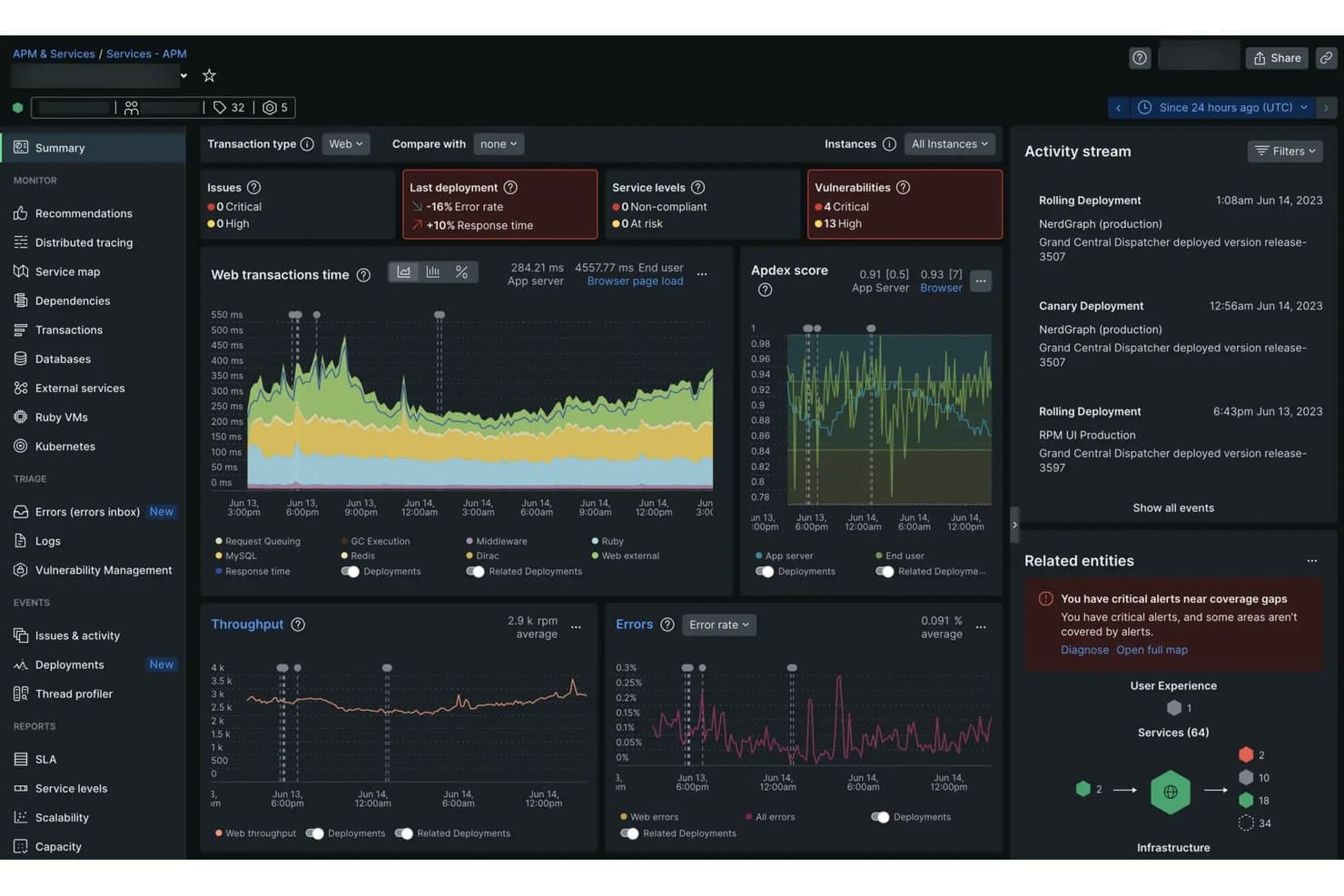
New Relic provides a full APM summary with performance metrics. New Relic is a full-stack observability platform that unifies metrics, logs, traces, and digital experience data across infrastructure, applications, cloud environments, and networks in a single interface.
Who Is New Relic Best For?
New Relic is a strong fit for SREs and infrastructure engineers managing complex, high-traffic production environments where transaction-level visibility across the full stack is non-negotiable.
Why I Picked New Relic
New Relic earns its spot on my shortlist because of Transaction 360, which correlates telemetry, alerts, and deployment changes at the individual transaction level and cuts MTTR by up to 5x. I also like how Autopilot agents autonomously investigate incidents using live telemetry and runbooks, then surface transparent, auditable reasoning rather than just firing off a remediation action. That combination of transaction-level tracing and agentic incident resolution is what makes New Relic my go-to for full-stack observability.
New Relic Key Features
- Smart Alerts: Dynamic threshold tuning uses historical volatility to minimize false positives and automatically routes alerts to the right team using entity tags.
- Cloud Cost Intelligence: Real-time cost tracking across AWS, Azure, GCP, and Kubernetes, with right-sizing recommendations tied to actual usage patterns and budget threshold alerts.
- Workflow Automation: A no-code, drag-and-drop canvas lets you build multi-step remediation workflows with conditional logic, loops, and live NRQL queries.
- Federated Logs: Query logs directly from S3 buckets without re-ingestion or data movement, supporting data residency and compliance requirements.
New Relic Integrations
New Relic offers 800+ pre-built integrations, including ServiceNow, Jira, PagerDuty, Slack, Microsoft Teams, AWS, Azure, Google Cloud Platform, Kubernetes, and VMware. NerdGraph, REST API, webhooks, OpenTelemetry, and Prometheus support custom connectivity.
Pros and Cons
Pros:
- Transparent AI-driven incident investigation
- Automates alert routing using entity tags
- Correlates metrics, logs, and traces instantly
Cons:
- Extended data retention needs paid upgrade
- Consumption-based pricing can escalate quickly
Learn more about New Relic: Best for CMDB-anchored hybrid IT ops at scale
- Free demo available
- Pricing upon request
Visit WebsiteCustomer Rating:4.4/5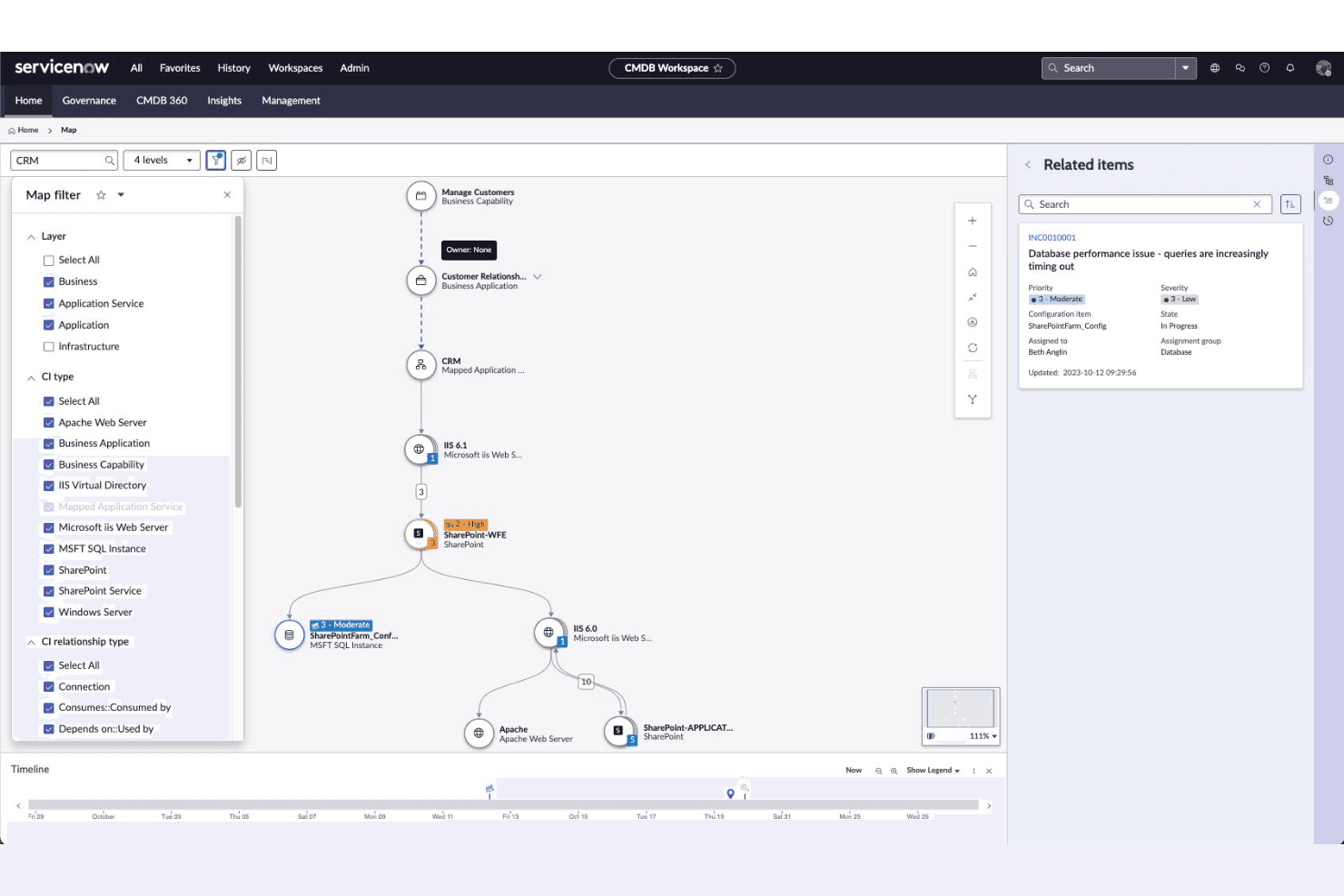
ServiceNow ITOM maps CRM app dependencies across infrastructure layers. ServiceNow ITOM is an enterprise IT operations management platform built around a continuously updated CMDB, offering agentless discovery, AIOps-powered event management, service mapping, cloud visibility, and automated orchestration across hybrid and multi-cloud environments.
Who Is ServiceNow ITOM Best For?
ServiceNow ITOM is built for large enterprises running complex hybrid IT estates where a continuously updated CMDB is the operational backbone.
Why I Picked ServiceNow ITOM
ServiceNow ITOM earns its spot on my shortlist because the CMDB isn't just a database here—it's the live operational backbone that Discovery and Service Graph Connectors continuously feed with real data from across your hybrid estate. I particularly like how Service Mapping automatically builds dependency visualizations between infrastructure and business services, so when an AWS instance degrades, you can see exactly which services are impacted before users notice. AIOps LEAP takes it further by mining closed incidents to generate and deploy automated remediation playbooks, complete with an ROI dashboard tracking what's actually been saved.
ServiceNow ITOM Key Features
- Health Log Analytics: Uses AI to analyze log data in real time, flagging anomalies and surfacing remediation recommendations before issues escalate.
- Synthetic Monitoring: Simulates end-user transactions to detect availability and performance problems before real users are affected.
- Cloud Accelerate: Automates cloud resource provisioning and deprovisioning while enforcing tagging, cost, and security policies across AWS, Azure, and GCP.
- Certificate Management: Automatically discovers and tracks TLS/PKI certificates across your environment and triggers renewal workflows before expiration.
ServiceNow ITOM Integrations
ServiceNow ITOM integrates with AWS, Microsoft Azure, Google Cloud Platform, Alibaba Cloud, Datadog, Dynatrace, Splunk, PagerDuty, Jenkins, and GitHub. REST and SOAP APIs, webhooks, and ServiceNow Store integrations support custom connectivity.
Pros and Cons
Pros:
- Multi-cloud discovery spans AWS, Azure, GCP
- GenAI automates incident triage and remediation
- CMDB drives real-time operations visibility
Cons:
- Advanced features require separate module licensing
- SaaS-only with no self-hosted option
Learn more about ServiceNow ITOM: Best for Cisco-native cross-domain service health ops
- Free demo available
- Pricing upon request
Visit WebsiteCustomer Rating:4.9/5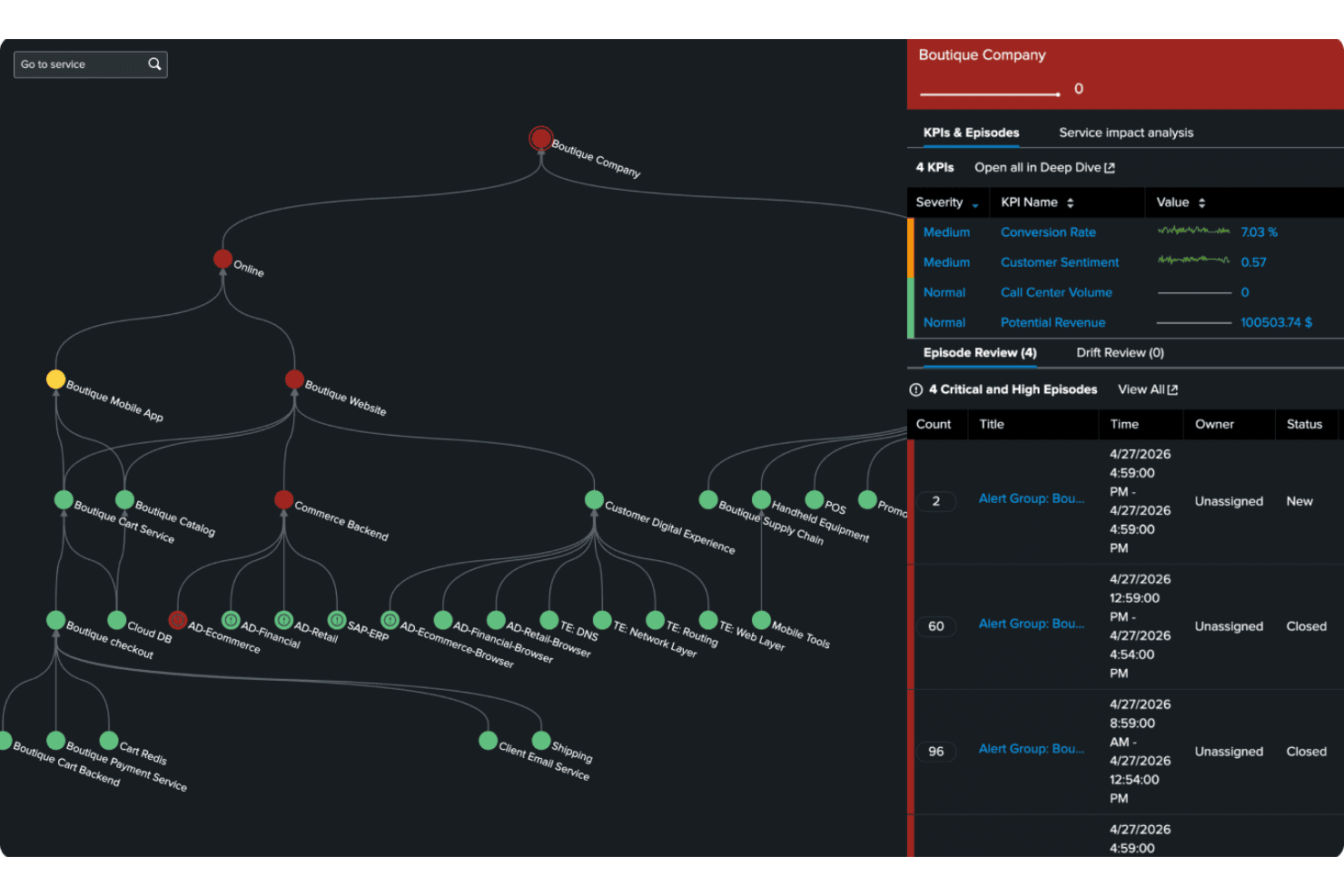
Splunk ITSI visualizes service health and episodes in a dependency map. Splunk IT Service Intelligence (ITSI) is an AIOps-driven IT operations management platform that delivers KPI-based service health scoring, AI-powered alert correlation, topology mapping, and cross-domain visibility across infrastructure, applications, and networks.
Who Is Splunk IT Service Intelligence Best For?
Splunk ITSI is a strong fit for enterprise IT operations teams—particularly those already running Splunk or operating within Cisco environments—who need to correlate service health across infrastructure, applications, and networks at scale.
Why I Picked Splunk IT Service Intelligence
Splunk ITSI earns its spot on my shortlist because of how it handles cross-domain service health in Cisco-native environments. I love that it pulls signals from Cisco ThousandEyes, Meraki, and Catalyst Center directly into its KPI-based health scoring model, so network-to-application visibility isn't stitched together manually. Its Event iQ engine then correlates those signals into consolidated episodes, cutting through alert noise before your team wastes time on duplicates.
Splunk IT Service Intelligence Key Features
- Glass Tables: Build pixel-perfect, drag-and-drop dashboards that map live service health scores to business KPIs like SLA attainment or revenue impact.
- Adaptive thresholding: ML models baseline each KPI's normal behavior over time, triggering alerts on statistical deviations rather than fixed thresholds.
- Episode Review workspace: A centralized triage interface where AI-correlated alert groups surface with severity scoring, impacted service context, and recommended next steps.
- Service dependency modeling: Define and visualize hierarchical relationships between business services, sub-services, hosts, and network devices to isolate root causes faster.
Splunk IT Service Intelligence Integrations
Splunk IT Service Intelligence integrates with ServiceNow, PagerDuty, Jira Cloud, Cisco ThousandEyes, Cisco Catalyst Center, Cisco Meraki, Splunk Observability Cloud, AppDynamics, and Red Hat Ansible Automation Platform. It also offers Splunkbase marketplace integrations, REST API access, Python SDKs, webhooks, and Kafka.
Pros and Cons
Pros:
- Highly customizable dashboards for business metrics
- Unified cross-domain monitoring for Cisco environments
- Advanced AI-driven alert correlation and triage
Cons:
- Implementation complexity for service and entity modeling
- High resource requirements for large deployments
Learn more about Splunk IT Service Intelligence: Best for agentic AI across mainframe-to-cloud ops
- Free demo available
- Pricing upon request
Visit WebsiteCustomer Rating:4/5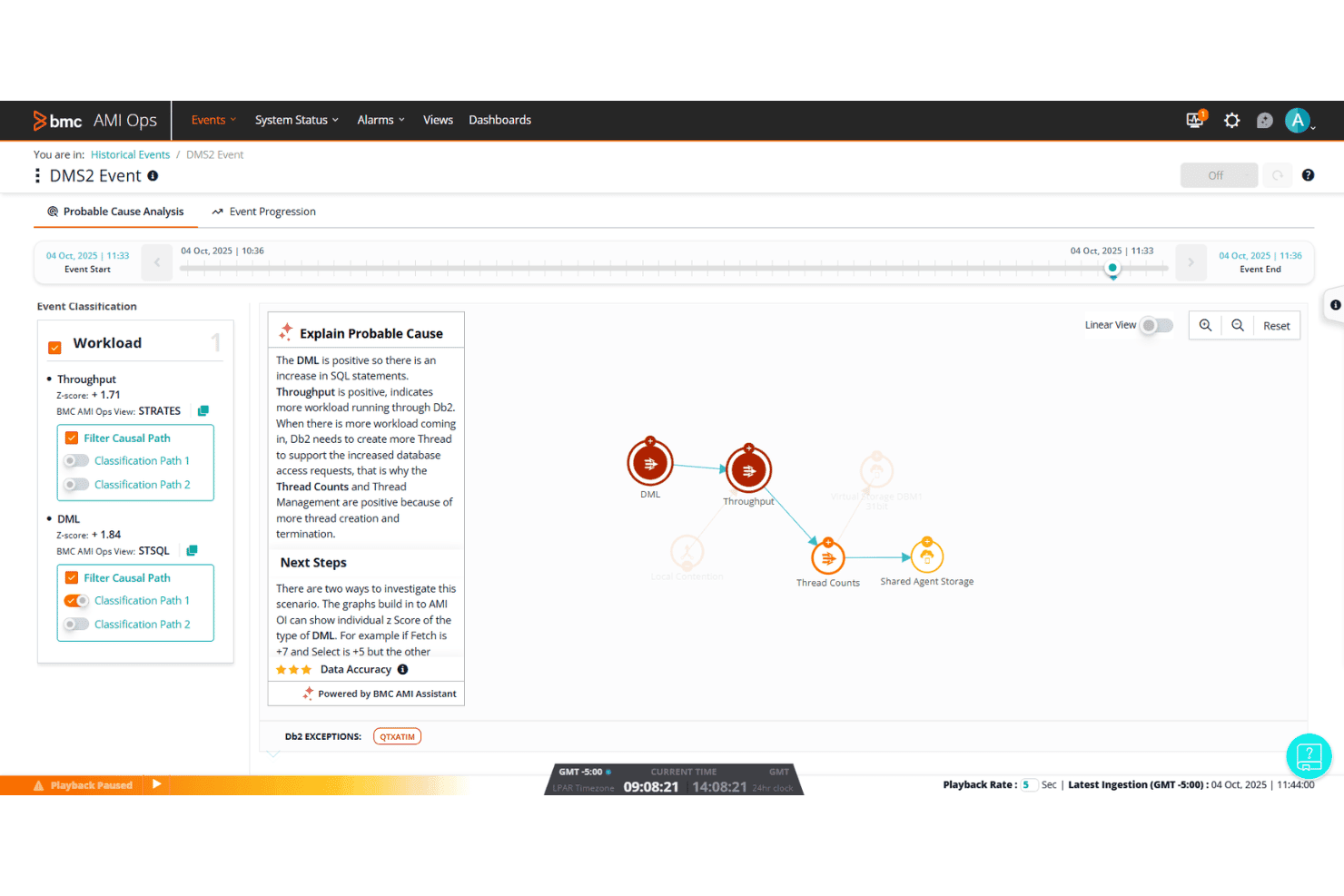
BMC Helix AIOps explains probable causes with AI-driven event analysis. BMC Helix AIOps is a cloud-native IT operations management platform that unifies event monitoring, AI-driven incident correlation, automated remediation, and topology mapping across on-premises, cloud, and mainframe environments.
Who Is BMC Helix AIOps Best For?
BMC Helix AIOps is built for large enterprises running complex hybrid environments that span mainframe systems, on-premises infrastructure, and multiple public clouds.
Why I Picked BMC Helix AIOps
BMC Helix AIOps earns its spot on my shortlist because it's one of the only platforms I've seen that genuinely spans mainframe-to-cloud without treating either end as an afterthought. I rely on HelixGPT's agentic AI capabilities, specifically the Agent Builder and Ops Swarmer, to handle autonomous incident triage across z/OS environments and Kubernetes clusters in the same workflow. The AI-driven situation correlation cuts alert noise by up to 90%, which in practice means my team isn't drowning in duplicate alerts across 600 dashboards.
BMC Helix AIOps Key Features
- Probable cause analysis: AI correlates topology and event data to identify the most likely root cause of a situation before manual investigation begins.
- HelixGPT Post Mortem Analyzer: Automatically generates detailed post-incident review summaries to support SRE and ops teams after resolution.
- Dynamic service blueprinting: Integrates with BMC Helix Discovery to auto-generate and continuously update service models that map dependencies across your hybrid environment.
- Role-based dashboard views: Segments operational data and reporting by role, giving each team member a filtered view of the metrics and events relevant to their function.
BMC Helix AIOps Integrations
BMC Helix AIOps integrates with BMC Helix ITSM, ServiceNow, AWS, Azure, Google Cloud Platform, Microsoft Teams, Slack, BMC Helix Discovery, and Jitterbit. It also supports REST APIs, CMDB connectivity, third-party monitoring tools, and AWS Marketplace deployment.
Pros and Cons
Pros:
- Automated topology and dependency mapping included
- AI-driven alert noise reduction up to 90%
- Native mainframe and hybrid cloud monitoring
Cons:
- Dashboard customization less intuitive than competitors
- Configuration requires significant technical expertise
Learn more about BMC Helix AIOps:
Annen programvare for administrasjon av IT-drift
Her er noen flere alternativer for programvare for administrasjon av IT-drift som ikke kom med på kortlisten min, men som likevel er verdt å se nærmere på:
- 11VirtanaBest for deep storage and GPU ops visibility
- 12ManageEngine OpManagerBest for no-code fault-to-fix workflow automation
- 13BigPandaBest for AI-driven change risk scoring
- 14PagerDutyBest for on-call incident response at scale
- 15ZabbixBest for open-source ops monitoring at any scale
- 16MoogsoftBest for ML-driven alert noise reduction
- 17CheckmkBest for service-based pricing across hybrid infra
- 18Ivanti NeuronsBest for ITSM-anchored IT and SecOps automation
- 19Grafana CloudBest for ML-guided full-stack ops observability
- 20SolarWinds Observability SaaSBest for NetOps-rooted full-stack observability
How I Evaluate IT Operations Management Software
When an alert storm hits at 2 a.m. and your team needs to trace a degraded API back to a misconfigured container in a hybrid cluster, the tools either hold up or they don't—so I split my evaluation into baseline functionality every platform must cover and the differentiators that separate good from great.
Core Functionality (Table Stakes For This List)
When I'm selecting tools for my list, I rank each one on a scale from 0 (does not offer the functionality) to 5 (excels in this area) for each core functionality listed below. I then calculate the tool's total score into a percentage, using 75% as a benchmark to help assess its overall fit for the list.
- Infrastructure & App Monitoring: I check whether the platform covers servers, networks, apps, and cloud resources with real-time metrics, logs, and traces.
- Alerting & Incident Management: Each tool's alert correlation, escalation policies, and incident workflows matter—especially how well it cuts through noise during an outage.
- IT Automation & Orchestration: I look for visual workflow builders, auto-remediation playbooks, and cross-platform runbooks that reduce manual toil on recurring tasks.
- Hybrid & Multi-Cloud Visibility: Unified dashboards across on-prem, AWS, Azure, and GCP are table stakes—I evaluate topology mapping and dynamic discovery depth.
- Reporting & Analytics Dashboards: Customizable dashboards with drill-downs, SLA/SLO tracking, and capacity forecasting tell me how well a tool supports planning conversations.
- Integrations & API Access: I evaluate prebuilt connectors to ITSM, DevOps, and chatops tools, plus REST API coverage for teams that need to build custom workflows.
Once I have a list of tools that meet the criteria, I consider what sets each platform apart.
Differentiating Factors (What Sets Vendors Apart)
Here's how I compare and contrast different vendors:
Standout Features
I evaluate how well each platform's AIOps engine baselines normal behavior and correlates related events into a single incident—during a noisy outage, the difference between 200 alerts and one actionable incident is hours of recovery time. Topology and dependency mapping matters just as much: I check whether the tool auto-discovers relationships across containers, hosts, and network paths so you can trace a failing checkout API back to an undersized pod without switching screens. I also look at built-in cloud cost visibility, since platforms like Datadog and Dynatrace now tie resource utilization directly to spend, helping you spot idle workloads before finance does.
Beyond Features
I evaluate total cost of ownership closely because ingestion-based pricing can spiral fast—adding custom metrics or doubling log volume in platforms like Datadog or New Relic often triggers surprise overages that dwarf the original quote. Deployment flexibility matters just as much; I check whether a vendor offers SaaS, self-hosted, and air-gapped options, since regulated industries frequently need on-prem control that pure-SaaS tools can't deliver. I also look at ecosystem depth, specifically bidirectional ITSM integrations and open API coverage, so operations data flows into existing DevOps and ChatOps workflows without custom glue code.
Slik velger du programvare for administrasjon av IT-drift
Når du skal avgjøre hvilken programvare for administrasjon av IT-drift som passer best for miljøet ditt, bør du først fokusere på de mest presserende driftsutfordringene:
| Hvis prioriteten din er … | Se etter … |
|---|---|
| Hvis prioriteten din er …Rask og nøyaktig analyse av grunnårsaker | Se etter …KI-basert hendelseskorrelasjon og automatiserte kjøreplaner |
| Hvis prioriteten din er …Hybride miljøer og multiskymiljøer | Se etter …Integrerte koblinger for lokale miljøer, AWS, Azure og GCP |
| Hvis prioriteten din er …Redusere manuelle gjenopprettingsoppgaver | Se etter …Visuelle arbeidsflytverktøy med forhåndsbygd automatisering |
| Hvis prioriteten din er …Kontrollere kostnadene knyttet til overvåking | Se etter …Gjennomsiktig, bruksbasert prising og kostnadsdashbord |
| Hvis prioriteten din er …Omfattende integrasjoner med ITSM-verktøy | Se etter …Forhåndsbygde koblinger og åpen API-dokumentasjon |
Slik vurderer du kortlisten din
- Test arbeidsflyter for hendelseshåndtering: Kjør en 48-timers prøveperiode og simuler minst tre typer driftsavbrudd for å kontrollere gruppering av hendelser og automatiserte svar.
- Be om en demonstrasjon av topologikartet: Be leverandøren generere et ende-til-ende-avhengighetskart – inkludert hybridklynger – ved hjelp av aktive eller anonymiserte eksempeldata.
- Opprett en plattformuavhengig supportsak: Åpne en supportsak med henvisning til en multiskyintegrasjon, og dokumenter nøyaktigheten på svarene og tjenestenivåavtalene over en periode på tre dager.
- Vurder hvor fullstendig rapporteringen er: Se gjennom eller eksporter et eksempel på et analysedashbord, og bekreft at du får innsyn i kostnader, tjenestenivåavtaler og egendefinerte måleverdier for den faktiske teknologistakken din.
- SaaS-smidighet kontra kontroll ved egen drift: Avgjør om rask funksjonslevering i SaaS veier tyngre enn behovene for samsvar og tilgang som oppfylles av lokale eller fysisk isolerte distribusjoner.
Hva er programvare for administrasjon av IT-drift?
Programvare for IT-drift er en kategori verktøy utviklet for å overvåke, automatisere og administrere IT-infrastruktur, applikasjoner, nettverk og tjenester på tvers av lokale og skybaserte miljøer. Disse plattformene hjelper teamet ditt med å sentralisere varsler, opprettholde systemtilstand, håndtere hendelser og optimalisere ressursbruken. Ved å samle driftsdata og automatisering støtter programvare for IT-drift raskere feilsøking, øker effektiviteten og gjør det mulig for organisasjonen din å skalere teknologien på en pålitelig måte.
Funksjoner i programvare for IT-drift
Når du velger programvare for IT-drift, bør du se etter følgende viktige funksjoner:
- Overvåking av infrastruktur og applikasjoner: Sporer servere, nettverk, containere og applikasjoner i sanntid. Hjelper deg med å oppdage unormal systematferd, redusert ytelse eller driftsavbrudd før brukerne blir berørt.
- Varsling og hendelseshåndtering: Sentraliserer varsler og effektiviserer arbeidsflyter for eskalering. Gjør det mulig for teamet ditt å reagere raskt, sette hendelser i kontekst og spore løsningen fra start til slutt.
- Automatisering og orkestrering: Tilbyr verktøy for å automatisere rutineoppgaver og koordinere arbeidsflyter på tvers av ulike miljøer. Reduserer manuelt arbeid og begrenser menneskelige feil under distribusjoner eller vedlikehold.
- Støtte for hybride miljøer og flere skyer: Tilbyr samlet oversikt over lokal infrastruktur, privat sky og offentlig sky. Hjelper deg med å administrere komplekse miljøer som én samlet driftsenhet.
- Tilpassbare instrumentbord og rapportering: Lar deg bygge instrumentbord og rapporter tilpasset behovene dine. Støtter trendanalyse, SLA-overvåking og deling av innsikt med tekniske og forretningsmessige interessenter.
- Integrasjon og API-tilgang: Kobler seg til ITSM-, DevOps- og samarbeidsplattformer. Gjør det mulig for teamet ditt å bygge inn IT-driftsdata direkte i systemer for saksbehandling, chat og andre systemer.
- Topologi- og avhengighetskartlegging: Visualiserer forholdene mellom systemer, tjenester og infrastrukturkomponenter. Gjør det enklere å spore den grunnleggende årsaken til hendelser og forstå driftsrisiko.
- Bruker- og rollebasert tilgangskontroll: Lar deg definere hvem som kan se eller redigere deler av miljøet ditt. Beskytter sensitive data og begrenser eksponeringen basert på brukernes ansvarsområder.
- Kapasitetsplanlegging og prognoser: Analyserer trender i ressursforbruket for å forutsi fremtidige behov. Hjelper deg med å forutse oppgraderinger av infrastrukturen og budsjettere for vekst.
- Endringssporing og revisjonslogger: Registrerer konfigurasjonsendringer og brukerhandlinger. Støtter krav til samsvar og hjelper med å feilsøke tidligere hendelser ved å tilby en tydelig endringshistorikk.
Vanlige AI-funksjoner i programvare for IT-drift
I tillegg til standardfunksjonene i programvare for IT-drift som er nevnt ovenfor, innlemmer mange av disse løsningene AI med funksjoner som:
- AI-drevet avviksdeteksjon: Bruker maskinlæring til automatisk å identifisere uvanlige mønstre eller atferd i systemmålinger, logger eller nettverkstrafikk. Dette hjelper teamet ditt med å oppdage nye problemer før de eskalerer, selv når tersklene ikke er angitt manuelt.
- Automatisert analyse av grunnleggende årsak: Bruker AI-algoritmer til å korrelere hendelser, logger og ytelsesdata på tvers av hele teknologistakken. Denne funksjonen identifiserer den sannsynlige kilden til hendelser, reduserer tiden teamet ditt bruker på undersøkelser og fremskynder gjenopprettingen.
- Prediktiv prognostisering av hendelser: Utnytter historiske data og AI-modeller til å forutse mulige driftsavbrudd eller forringet ytelse. Dette gjør det mulig for deg å iverksette proaktive tiltak for å forhindre hendelser og planlegge vedlikehold mer effektivt.
- Intelligent reduksjon av varslingsstøy: Bruker AI til å gruppere relaterte varsler, undertrykke duplikater og prioritere varsler basert på påvirkning og kontekst. Dette reduserer varslingstretthet og sikrer at teamet ditt fokuserer på de viktigste problemene.
- AI-drevne forslag til utbedring: Analyserer hendelsesdata og tidligere løsninger for å anbefale neste trinn eller automatiserte rettinger. Dette hjelper teamet ditt med å reagere raskere og standardiserer beste praksis på tvers av driften.
Fordeler med programvare for IT-drift
Implementering av programvare for IT-drift gir flere fordeler for teamet og virksomheten din. Her er noen av fordelene du kan se frem til:
- Sentralisert oversikt: Samle overvåkingen av servere, nettverk, applikasjoner og skyressurser i ett enkelt dashbord, slik at teamet ditt ligger i forkant av problemer på tvers av miljøer.
- Raskere løsning av hendelser: Bruk funksjoner for samling av varsler, AI-drevet korrelasjon og automatisert rotårsaksanalyse for raskt å identifisere, prioritere og håndtere driftsproblemer.
- Mindre manuelt arbeid: Automatiser tilbakevendende vedlikeholds-, utbedrings- og arbeidsflytoppgaver ved hjelp av forhåndsbygde verktøy for automatisering og orkestrering, slik at du frigjør tid til initiativer med høyere verdi.
- Proaktiv risikohåndtering: Forutse driftsavbrudd og ressursflaskehalser med AI-drevne verktøy for avviksdeteksjon og prognoser som avdekker potensielle problemer før de eskalerer.
- Optimalisering av kostnader og ressurser: Følg med på infrastrukturbruk, applikasjonsytelse og ressurskostnader gjennom rapporterings- og analysefunksjoner, slik at du kan styre budsjetter og kapasitetsplanlegging.
- Styrket sikkerhet og samsvar: Stol på tilgangskontroller for brukere, revisjonslogger og funksjoner for endringssporing for å beskytte sensitive data og støtte regulatoriske krav.
- Sømløs integrasjon med økosystemet: Koble sammen ITSM-, DevOps- og chat-plattformer ved hjelp av forhåndsbygde integrasjoner og åpne API-er, slik at det blir enklere å integrere driftsdata i måten teamet ditt allerede arbeider på.
Kostnader og priser for programvare for IT-drift
Valg av programvare for IT-drift krever en forståelse av de ulike prismodellene og abonnementene som er tilgjengelige. Kostnadene varierer basert på funksjoner, teamstørrelse, tillegg og mer. Tabellen nedenfor oppsummerer vanlige abonnementer, gjennomsnittsprisene deres og typiske funksjoner som er inkludert i programvareløsninger for IT-drift:
Sammenligningstabell for programvare for IT-drift
| Abonnementstype | Gjennomsnittspris | Vanlige funksjoner |
|---|---|---|
| AbonnementstypeGratisabonnement | Gjennomsnittspris$0 | Vanlige funksjonerGrunnleggende infrastrukturovervåking, begrenset varsling, tilgang for små team og brukerstøtte fra fellesskapet. |
| AbonnementstypePersonlig abonnement | Gjennomsnittspris$10–$30/bruker/måned | Vanlige funksjonerSanntidsovervåking, automatisering på grunnleggende nivå, enkle dashbord, integrasjon med populære verktøy og brukerstøtte via e-post. |
| AbonnementstypeBedriftsabonnement | Gjennomsnittspris$40–$80/bruker/måned | Vanlige funksjonerOvervåking av hele stakken, varsling og hendelseshåndtering, automatisering av arbeidsflyter, avanserte dashbord, API-tilgang og rollebasert tilgangskontroll. |
| AbonnementstypeEnterprise-abonnement | Gjennomsnittspris$90–$200/bruker/måned | Vanlige funksjonerOversikt over hybride miljøer og flere skyer, AI-drevne funksjoner, tilpassede SLA-er, støtte for samsvar, dedikerte integrasjoner og prioritert brukerstøtte. |
Vanlige spørsmål om programvare for IT-drift
Her er noen svar på vanlige spørsmål om programvare for IT-drift:
Hvordan sammenligner man ulike plattformer for programvare for IT-drift?
Begynn med å lage en liste over funksjonene dere må ha – som støtte for flere skymiljøer, automatisering og omfattende integrasjonsmuligheter. Test deretter plattformene med vanlige hendelsesscenarioer, og sammenlign hvordan hvert verktøy håndterer varsler, analyse av rotårsaker og rapportering. Totale eierkostnader, integrasjoner i økosystemet og fleksibilitet ved implementering er også viktig å undersøke før dere tar den endelige avgjørelsen.
Kan programvare for IT-drift automatisere hendelseshåndtering?
Ja, med de fleste moderne løsninger for programvare for IT-drift kan dere automatisere hendelseshåndtering gjennom kjøreplaner, arbeidsflytbyggere og til og med AI-drevet automatisk feilretting. Dette bidrar til å redusere manuelle trinn og sikrer en konsekvent respons på tilbakevendende problemer.
Hvilke integrasjoner bør jeg se etter i programvare for IT-drift?
Se etter API-tilgang, ferdigbygde koblinger til ITSM-verktøy (som ServiceNow), chatplattformer (som Slack eller Microsoft Teams) og DevOps-pipeliner. Omfattende integrasjoner gjør det mulig for teamet å sende varsler, utløse arbeidsflyter og synkronisere saker på tvers av eksisterende systemer uten egendefinert mellomvare.
Bidrar programvare for IT-drift til samsvar og revisjon?
Ja, robust programvare for IT-drift sporer systemendringer og brukerhandlinger og tilbyr revisjonslogger som kreves for å dokumentere samsvar. Dette er spesielt nyttig i regulerte sektorer der dere trenger tydelige bevis på kontroller og en fullstendig endringshistorikk for rapportering.
Hvordan kan jeg forhindre uventede kostnader med programvare for IT-drift?
Gå alltid gjennom hvordan plattformen fakturerer for datainnhenting, egendefinerte måleverdier og brukerplasser. Velg verktøy med transparente, bruksbaserte priser og kostnadsdashbord i appen, slik at dere kan overvåke forbruket og unngå uventede ekstrakostnader etter hvert som miljøet vokser.
Hva er den beste måten å få støtte fra interessenter for en ny plattform for IT-drift?
Vis hvordan plattformen bidrar til å nå forretningsmålene: raskere løsning av hendelser, proaktiv risikohåndtering og bedre rapportering. Del resultatene fra en demonstrasjon eller pilot, fremhev forventede effektivitetsgevinster og knytt funksjonene til problemer interessentene kjenner igjen.