

Det kan være krevende å navigere i verdenen av plattformer for kunstig intelligens. Du møter utfordringer som datahåndtering, automatisering og beslutningstaking. Det er her KI-plattformer kommer inn, med løsninger på disse problemene.
Basert på min erfaring kan det å velge riktig plattform endre hvordan teamet ditt arbeider. Jeg har testet og vurdert ulike alternativer, med fokus på det som virkelig betyr noe for teknologieksperter som deg.
I denne artikkelen finner du en upartisk vurdering av de beste KI-plattformene. Jeg går gjennom funksjoner, fordeler og hva som skiller hver av dem fra de andre. Enten du ønsker å øke effektiviteten eller forbedre nøyaktigheten, finner du noe her som passer for deg. La oss se nærmere på alternativene som kan styrke teamets kapasitet.
Why Trust Our Software Recommendations
6,700+
Reviews
20
Industry experts
16+
Evaluation factors
14
Years
Our team has been testing and reviewing software since 2012. As tech leaders ourselves, we know how difficult—and important—it is to choose the right software.
For this guide, we evaluated tools using hands-on testing and independent research, scoring tools using our selection criteria.
Our reviews reflect our human editorial judgment, not a sales pitch.
Expert reviewers:
- Paulo Gardini MiguelTech Director
 Tim FisherVP of AI
 Gabriel RosasTech Lead & Software Architect
 Christhian GruhnTech Lead & Platform Architect

Sammenligningstabell: Plattform for kunstig intelligens
Denne sammenligningstabellen oppsummerer prisopplysningene for mine beste utvalgte plattformer for kunstig intelligens.
| Tool | Best For | Trial Info | Price | ||
|---|---|---|---|---|---|
| 1 | Best for automating complex financial workflows | Free demo available | Pricing upon request | Website | |
| 2 | Best for automated AI risk assessment | Free demo available | Pricing upon request | Website | |
| 3 | Best for simplifying complex ML processes | Free trial available + free demo | Pricing upon request | Website | |
| 4 | Best for secure data sharing and collaboration | Free trial available | From $2.00/credit | Website | |
| 5 | Best for end-to-end AI deployment | Free plan available | Pricing upon request | Website | |
| 6 | Best for governed enterprise AI collaboration | 14-day free trial | Pricing upon request | Website | |
| 7 | Best for AI-driven business intelligence | Free demo available | Pricing upon request | Website | |
| 8 | Best for MLOps acceleration | 14-day free trial | Pricing upon request | Website | |
| 9 | Best for conversational AI applications | Pricing upon request | Website | ||
| 10 | Best for research-driven AI models | Free plan available | From $20/user/month | Website |


Oversikt over de beste plattformene for kunstig intelligens
Nedenfor finner du mine detaljerte sammendrag av de beste plattformene for kunstig intelligens som kom med på kortlisten. I vurderingene mine får du en detaljert gjennomgang av de viktigste funksjonene, fordelene og ulempene, integrasjonene og de ideelle bruksområdene for hvert verktøy, slik at du kan finne det beste alternativet for deg.
 Best for automating complex financial workflows
- Free demo available
- Pricing upon request
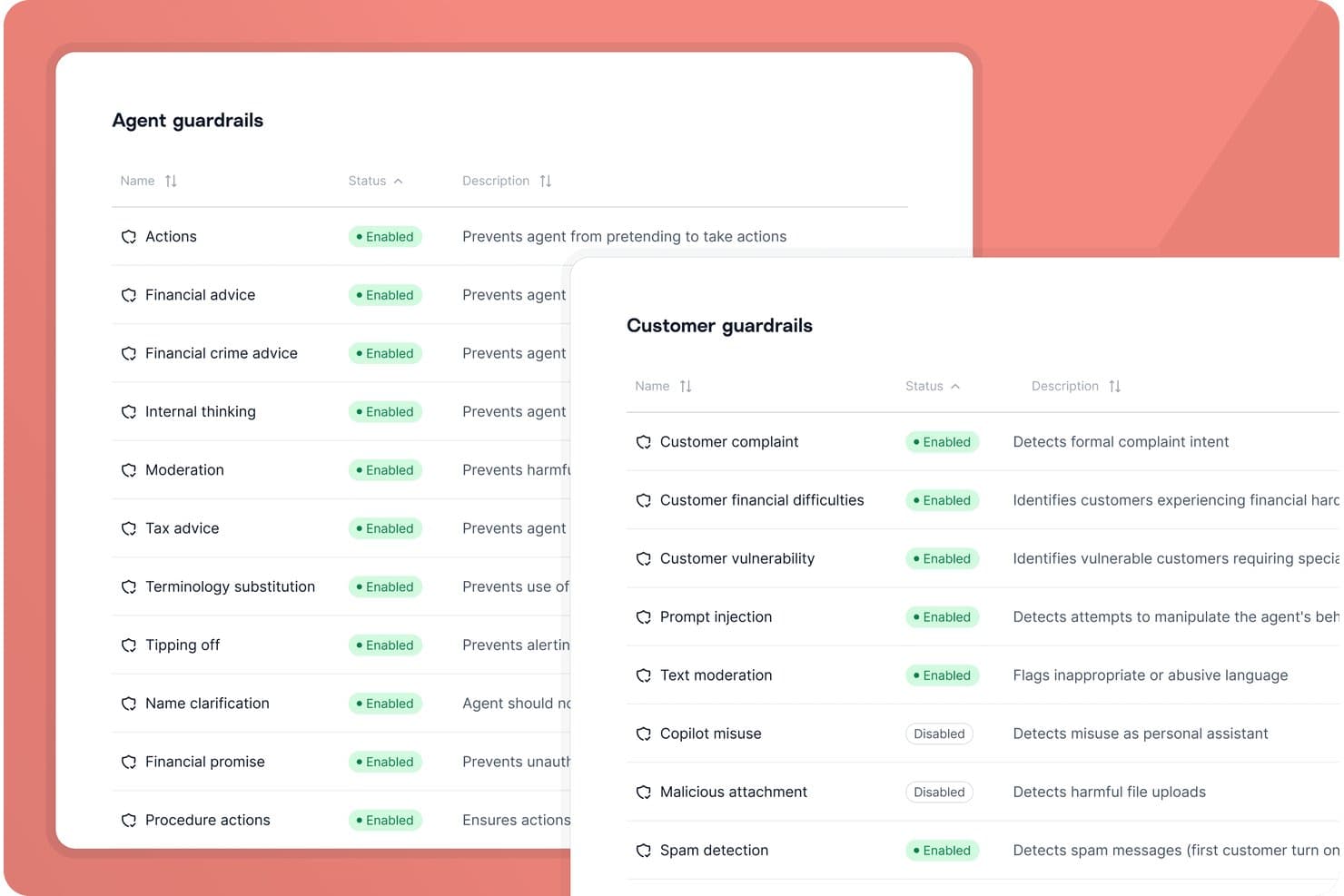
Gradient Labs offers configurable agent and customer guardrails with enabled/disabled status controls for AI safety and compliance. Gradient Labs is an AI automation platform designed for financial services teams, delivering specialist agents that handle everything from customer onboarding to dispute management and compliance workflow integrations.
Who Is Gradient Labs Best For?
Financial operations and customer service teams at regulated banks, fintechs, and lenders needing AI-driven workflow automation and compliance support.
Why I Picked Gradient Labs
I picked Gradient Labs as one of the best because it delivers financial-specialist AI agents that fully automate lending operations, KYC, and payment disputes. In practice, my team is able to deploy agents trained on our workflows and regulatory requirements.
Gradient Labs Key Features
- Multi-channel communication: Agents can work seamlessly over email, SMS, chat, and voice.
- Compliance guardrails: AI models come pre-configured with 20+ controls for SOC 2, GDPR, and other regulations.
- Automated quality assurance: The platform monitors and reviews every agent interaction for consistency and compliance.
- API and CSV support: Integrate with existing systems or upload bulk data directly for workflow automation.
Gradient Labs Integrations
Gradient Labs offers native integrations with Intercom, Zendesk, Freshdesk, Salesforce, Twilio, RingCentral, Genesys, Visa, Mastercard, and more, and provides an API for custom integrations.
Pros and Cons
Pros:
- Built-in regulatory guardrails for financial services
- Delivers high resolution rates in production use
- Automates complex financial and compliance workflows
Cons:
- Few independent public user reviews available
- Lacks copilot or assistive agent capabilities
Learn more about Gradient Labs: Best for automated AI risk assessment
- Free demo available
- Pricing upon request
Visit WebsiteCustomer Rating:5/5
Trustible provides executives with a centralized dashboard to monitor AI use cases, vendors, risks, and business impact across the organization. Trustible is an AI governance platform that centralizes AI use case intake, automated risk scoring, regulatory compliance tracking, vendor evaluations, and policy management across an enterprise AI portfolio.
Who Is Trustible Best For?
Trustible is a good fit for AI governance leads, risk officers, and compliance teams at mid-to-large enterprises deploying multiple AI systems across business functions.
Why I Picked Trustible
I picked Trustible as one of the best for automated AI risk assessment because its rules-based scoring engine does the heavy lifting the moment a use case arrives. It maps every intake response across five risk categories (Performance, Data Privacy, Cybersecurity, Ethical, and Legal), assigns an inherent risk tier, and automatically recommends the right governance response. What I find especially valuable is how high-risk use cases trigger structured impact assessments automatically, so nothing slips into production without proper scrutiny.
Trustible Key Features
- AI inventory: Centralized registry that tracks every AI use case, model, and vendor across the organization.
- Vendor documentation analysis: AI-assisted review of third-party vendor documentation against your governance requirements.
- Regulatory framework mapping: Pre-built mappings to frameworks like the EU AI Act, NIST AI RMF, and ISO 42001.
- Periodic review scheduling: Scheduled check-ins that prompt use case owners to confirm or update AI system status.
Trustible Integrations
Native integrations are not clearly documented. Trustible is designed as a standalone AI governance platform, and its FAQ confirms it doesn't require technical integration with MLOps pipelines. Trustible does offer an AI literacy and compliance training module that integrates with organizations' learning management systems (LMS). The platform is designed for fast time-to-value without heavy IT integration. API and Zapier support are not clearly available.
Pros and Cons
Pros:
- Built specifically for governance, not MLOps
- Expert-curated AI risk and mitigation taxonomies
- Maps controls across 10+ regulatory frameworks
Cons:
- No free trial to evaluate before buying
- Limited native integrations with external tools
Learn more about Trustible: Best for simplifying complex ML processes
- Free trial available + free demo
- Pricing upon request
Visit WebsiteCustomer Rating:4.9/5
Nanonets provides a no-code AI platform that allows you to automate various workflows and business processes. Nanonets is an AI platform that automates document processing and data extraction using Optical Character Recognition (OCR) and deep learning models.
Why I Picked Nanonets: Nanonets stands out with its ability to simplify complex machine-learning processes, making them accessible without demanding extensive technical expertise. This is particularly beneficial for businesses seeking to integrate AI technologies into their operations without the need for in-depth knowledge or resources. Nanonets' features, such as object detection, image classification, text extraction, and Optical Character Recognition (OCR), are designed to enhance data quality and streamline workflows.
Standout Features & Integrations:
Features include AI data extraction from various document types like invoices, bills of lading, purchase orders, and receipts, and automated workflows for a range of tasks like invoice processing, data extraction, document approvals, and accounts payable. It also utilizes AI to transform unstructured data into actionable insights.
Pros and Cons
Pros:
- Simple API for easy integration
- Customizable workflows for document processing
- Automated data extraction features
Cons:
- While generally customizable, there are limitations for specific use-cases
- Potential performance issues during high load operations
Learn more about TrailHQ: Best for secure data sharing and collaboration
- Free trial available
- From $2.00/credit
Visit WebsiteCustomer Rating:4.7/5
Snowflake Data Cloud offers an AI-powered intelligence interface with skills, connectors, agents, and data artifact visualizations for business analysis. Snowflake Data Cloud is a cloud-based AI and data platform that combines data warehousing, machine learning, and generative AI development with governed access to structured and unstructured data across multiple cloud environments.
Who is Snowflake Data Cloud Best For?
Snowflake serves data engineering, data science, and IT teams at mid-to-large enterprises managing large volumes of data across multiple cloud environments.
Why I Picked Snowflake Data Cloud
I picked Snowflake Data Cloud as one of the best for secure data sharing and collaboration because of how well it handles live data access without ever moving or copying the underlying data. The zero-copy sharing model means partners and internal teams query the same data directly from the provider's account, so there's no version drift and no duplication risk. I also like the Data Clean Room feature, which lets you collaborate with external parties on sensitive datasets while defining exactly what analyses they can run, keeping raw data out of reach.
Snowflake Data Cloud Key Features
- Snowflake Cortex AI: Built-in LLM functions let you run text summarization, sentiment analysis, and translation directly on your data using SQL.
- Snowpark: Create ML pipelines in Python, Java, or Scala and run them inside Snowflake without moving data to an external environment.
- Model registry: Store, version, and manage ML models in one place so your team can track deployments and roll back when needed.
- Document AI: Extract structured data from unstructured documents like PDFs using built-in machine learning models.
Snowflake Data Cloud Integrations
Snowflake has a partner ecosystem of more than 14,000 partners, with certified integrations spanning data integration, BI, ML, and security categories. Technology integrations include Matillion, dbt, Fivetran, and Talend, as well as tools such as SAP through zero-copy data sharing, Tableau, Informatica, Salesforce, Power BI, and Apache Kafka. Snowflake also connects with Zapier, and provides native drivers for JDBC, ODBC, Python, Node.js, Go, and .NET for custom integrations.
Pros and Cons
Pros:
- Shares data securely without moving it
- Connects to multiple LLMs through Cortex
- Runs Python and ML workloads directly on data
Cons:
- Costs can rise unpredictably at scale
- AI debugging and error tracing remain underdeveloped
Learn more about Snowflake Data Cloud: Best for end-to-end AI deployment
- Free plan available
- Pricing upon request
Visit WebsiteCustomer Rating:4.3/5
Here's how to create a dataset in Vertex AI. Vertex AI is a managed machine learning (ML) platform provided by Google Cloud, facilitating the entire process of building, deploying, and maintaining AI models. Given its comprehensive toolset that supports every stage of ML development, it's notably effective for businesses aiming for a streamlined, end-to-end AI deployment journey.
Why I Picked Vertex AI: In my quest to identify tools that excel in AI deployment, Vertex AI stood out for its cohesive environment. I determined that its unified interface for training, validation, and prediction makes the ML process more intuitive. Furthermore, I judged Vertex AI to be the tool that aligns perfectly with the need for an end-to-end AI deployment solution, based on its offerings and user feedback.
Standout Features & Integrations:
Vertex AI offers AutoML capabilities, enabling users to train high-quality custom ML models with minimal code. It also features Vertex Pipelines, which simplifies the ML workflow by orchestrating the entire ML process. Integration-wise, Vertex AI connects with other Google Cloud services, particularly BigQuery and Dataflow, which further enriches its data processing and training capabilities.
Pros and Cons
Pros:
- Strong integration with other Google Cloud services
- In-built tools like AutoML simplify model creation
- Comprehensive suite that supports all phases of the ML process
Cons:
- Dependency on the Google Cloud ecosystem can be limiting for some
- Pricing can be intricate based on the breadth of services used
- Might be overwhelming for newcomers to the ML field
Learn more about Vertex AI: Best for governed enterprise AI collaboration
- 14-day free trial
- Pricing upon request
Visit WebsiteCustomer Rating:4.6/5
Dataiku offers a centralized Agent Management dashboard to monitor behavioral stability, operational health, and risk across thousands of AI agents deployed on multiple platforms. Dataiku is an end-to-end AI platform where data teams design, deploy, and govern machine learning models, LLM-powered applications, and AI agents using both visual and code-based development tools.
Who Is Dataiku Best For?
Dataiku is a strong fit for large enterprises where data scientists, ML engineers, and business analysts need to collaborate on AI projects within a governed, centralized environment.
Why I Picked Dataiku
Dataiku is one of my top picks because I love how governance isn't a separate layer you bolt on after the fact—it's built directly into every AI project from the start. In practice, that means my team can assign stakeholders, enforce sign-off rules, and block deployments until policy checks are met, all within the same workspace where the work actually happens. The bundle, model, and LLM registries give us a unified place to track every AI asset across the organization, which makes cross-team collaboration far less chaotic.
Dataiku Key Features
- LLM Mesh: Routes requests across multiple LLM providers from a single control point, with built-in usage tracking and cost monitoring.
- Visual Flow builder: A drag-and-drop canvas for designing end-to-end data and ML pipelines without writing code.
- AutoML: Automates model training, algorithm selection, and hyperparameter tuning across structured datasets.
- Model monitoring: Tracks deployed models for data drift, performance degradation, and prediction quality in production environments.
Dataiku Integrations
Dataiku offers 40+ native data connectors, including Snowflake, Databricks, Google BigQuery, Amazon Redshift, and Amazon S3, along with application connectors for Salesforce, Jira, Google Sheets, ServiceNow, and SharePoint Online. It also integrates with Anthropic, OpenAI, Mistral, NVIDIA, AWS, Google Cloud, and Microsoft Azure as technology partners, and provides Python, R, and REST APIs for custom integrations. Zapier support is not clearly documented.
Pros and Cons
Pros:
- Works across any cloud provider
- Supports both ML and generative AI
- Visual workflows accessible to non-coders
Cons:
- Demands heavy compute and infrastructure resources
- Visualization weak compared to dedicated BI tools
Learn more about Dataiku: Best for AI-driven business intelligence
- Free demo available
- Pricing upon request
Visit WebsiteCustomer Rating:4.4/5
Athenic provides AI-generated dashboards and reports for business insights. Athenic is an artificial intelligence platform designed to change how you interact with your data. By leveraging advanced AI models, it lets you gain rapid insights and make data-driven decisions across various sectors including SaaS, CPG, and manufacturing.
Why I Picked Athenic: I picked Athenic because of its AI-driven business intelligence, which provides instant and accurate answers to complex data inquiries, thanks to its use of a knowledge graph. This feature is particularly beneficial as it enables your team to make informed decisions without waiting for lengthy data processing times. Additionally, the platform is tailored to meet specific business needs, allowing for customized data analysis that aligns with your unique objectives.
Another reason for choosing Athenic is its focus on accessibility for non-technical users. The platform's design promotes wider data access across teams, empowering everyone to create visualizations and conduct in-depth analyses. This democratization of data not only enhances business intelligence adoption but also fosters a culture of informed decision-making within your organization.
Standout Features & Integrations:
Features include the platform's ability to autonomously conduct deep research, which means you can rely on it to handle complex data analysis without manual intervention. It delivers findings in a user-friendly format, using tables and charts that make data interpretation straightforward. Athenic is also known for its speed, offering analysis times that are significantly faster than traditional methods, which is crucial for timely decision-making.
Integrations include Google Sheets, Facebook, Slack, Salesforce CRM, Notion, Stripe, AWeber, Asana, Zoho CRM, Google Calendar, Smartlead, and Getsitecontrol.
Pros and Cons
Pros:
- User-friendly interface simplifies data analysis for non-technical users.
- Supports product and customer growth planning
- Functions as an AI-powered English-to-SQL translator, enhancing data querying
Cons:
- Requires internet access for optimal functionality
- Limited features compared to more advanced analytics tools
Learn more about Athenic:

Iguazio allows for continuous training and evaluation of models. The Iguazio MLOps Platform is a comprehensive tool designed to accelerate and scale the development, deployment, and management of machine learning and generative AI applications. It offers end-to-end automation of machine and deep learning pipelines, allowing users to transform AI projects into real-world business outcomes
Why I Picked Iguazio: I like the platform's methodology for accelerating MLOps through various mechanisms. For example, its integrated feature store automates offline and online feature engineering for real-time and batch data while its serverless technology facilitates the rapid development of scalable data and ML pipelines in real-time.
Iguazio also integrates CI/CD across code, data, and models and supports mainstream ML frameworks, enabling users to automate the testing and deployment of ML models and their associated data pipelines.
Standout Features & Integrations:
Iguazio provides robust monitoring and re-training capabilities, including codeless model monitoring, drift detection, and automated re-training to ensure model accuracy over time.
Integrations include major cloud platforms such as AWS, Microsoft Azure, and Google, as well as NVIDIA, NetApp, Dell, and MongoDB.
Pros and Cons
Pros:
- Central metadata management
- Dynamic scaling capacity
- Real-time data and model pipeline
Cons:
- The user interface could be easier to navigate
- Proprietary backup solutions may be limiting
Learn more about iguazio:

Here's an overview of the different analytics for assets such as users, conversations, and requests. IBM Watson Assistant is a robust solution that facilitates the design, development, and deployment of AI-powered chatbots and virtual assistants. Given its tailored focus on creating conversational interfaces, it is uniquely positioned for businesses seeking a leading edge in conversational AI applications.
Why I Picked IBM Watson Assistant: During my process of selecting tools, IBM Watson Assistant became a prime contender due to its depth in handling natural language processing tasks. I judged its capabilities to be a cut above many of its peers, especially in the conversational AI domain.
This tool aligns with the need for conversational AI applications, as it not only understands user inputs but also learns from them to offer better responses over time.
Standout Features & Integrations:
IBM Watson Assistant supports multi-turn conversations, ensuring users receive context-aware responses. With its integrated analytics dashboard, businesses can monitor and improve their bot's performance by analyzing user interactions.
As for integrations, Watson Assistant can be integrated with most messaging channels, CRM solutions, and voice channels, making it versatile for diverse business needs.
Pros and Cons
Pros:
- Comprehensive analytics dashboard for performance insights
- upports multi-turn conversations for context-rich interactions
- In-depth natural language understanding
Cons:
- The platform can be resource-intensive for larger implementations
- Some users might find its configuration options complex
- Steeper learning curve for beginners
Learn more about IBM Watson Assistant:

When visiting the website of OpenAI, you will be greeted with a video to get to know more about its features and models. OpenAI is a renowned organization that propels the boundaries of artificial intelligence through research and development. Given its commitment to evolving AI in an open and ethical manner, OpenAI stands as a forerunner for those wanting cutting-edge, research-driven AI models.
Why I Picked OpenAI: When determining which platform offered the pinnacle of research-driven AI models, OpenAI was my choice. This organization has consistently demonstrated dedication to pushing the envelope of AI research, making it distinct from its counterparts. For those who seek the forefront of AI development rooted in extensive research, OpenAI is undoubtedly the best.
Standout Features & Integrations:
OpenAI boasts a myriad of state-of-the-art models, most notably the GPT series, which have set benchmarks in natural language processing. They have also made significant strides in reinforcement learning and robotics. Integration-wise, OpenAI has made its models accessible via APIs, ensuring developers can embed these powerful tools into various applications and platforms.
Pros and Cons
Pros:
- API accessibility facilitates smooth integration into diverse applications
- Commitment to open research ensures continuous innovation
- State-of-the-art models like the GPT series redefine the capabilities of A
Cons:
- API rate limits can sometimes hinder heavy-duty tasks
- The cutting-edge nature may demand users to stay constantly updated
- Cost structure can be ambiguous without direct inquiry
Learn more about OpenAI:
Andre bemerkelsesverdige plattformer for kunstig intelligens
Her er noen flere alternativer for plattformer for kunstig intelligens som ikke kom med på kortlisten min, men som likevel er verdt å undersøke:
- 11Microsoft Azure AIBest for scalable AI solutions in the cloud
- 12SAP HANA CloudBest for real-time database management
- 13Google Cloud AI PlatformBest for integrating AI into cloud services
- 14Databricks Lakehouse PlatformBest for combining data lakes and data warehouses
- 15PyTorchBest for dynamic neural network graphs
- 16KerasBest for deep learning model flexibility
- 17Alteryx Intelligence SuiteBest for data blending and advanced analytics
- 18DataRobotBest for automated machine learning
- 19AporiaBest for monitoring machine learning in production
- 20elvexBest for enterprise AI adoption
- 21TestGridBest for software testing
- 22RapidMinerGood for collaborative data science operations
- 23H2O.aiGood for scalable open-source machine learning
- 24TensorFlowGood for large-scale machine learning deployments
- 25AWS SageMakerGood for full-cycle machine learning workflows
- 26SAS Model ManagerGood for robust model management and governance
- 27BigMLGood for visual-based machine learning models
- 28NVIDIA Deep Learning AIGood for GPU-accelerated deep learning performance
- 29Intel AIGood for leveraging hardware-optimized AI processing
- 30Salesforce Einstein AIGood for CRM-integrated AI insights
How I Evaluate Artificial Intelligence Platforms
I split my evaluation into two layers: baseline requirements—model training, deployment, and MLOps—every platform must meet, and differentiators like LLM tooling and governance that separate the best from the rest.
Core Functionality (Table Stakes for This List)
These core capabilities serve as the acceptance criteria for inclusion on my list of artificial intelligence platforms:
- Model Development Environment: I evaluate whether platforms offer integrated notebooks, multi-framework support (PyTorch, TensorFlow, scikit-learn), and AutoML so teams can prototype and train models without stitching together separate tools.
- Model Deployment & Serving: Each platform should let you push a trained model to a scalable API endpoint with support for real-time and batch inference across cloud, edge, or on-prem targets.
- MLOps & Lifecycle Management: I look for experiment tracking, model versioning, and CI/CD pipeline support—the kind of tooling that keeps a model reproducible from notebook to production retraining.
- Data Integration & Management: Platforms need connectors to common data sources like Snowflake, BigQuery, and S3, plus built-in data prep and feature store capabilities for reusable feature pipelines.
- Pre-Built AI Services & Models: A catalog of pre-trained or foundation models matters—especially for teams that need NLP, vision, or generative AI capabilities they can fine-tune rather than build from scratch.
- Model Monitoring & Governance: I check for drift detection, bias monitoring, RBAC, and audit logging—everything you need to keep production models compliant and performing as expected over time.
I rank each vendor on a scale from 0 (does not offer the functionality) to 5 (excels in this area) for each criterion.
Vendors need to achieve a minimum average score to be considered for inclusion on my list. From there, I consider what sets each platform apart.
Differentiating Factors (What Sets Vendors Apart)
Once I've curated my list, here's how I contrast and compare different vendors in the artificial intelligence platform space:
Standout Features
I pay close attention to generative AI and LLM tooling, since being able to quickly build or orchestrate with large language models opens up advanced use cases like RAG, custom chatbots, or AI-driven search. Distributed training features—like multi-GPU support and hardware optimization—matter for teams working on large-model experimentation. I also check for responsible AI toolkits supporting explainability and bias mitigation, which are key for highly regulated or public-facing deployments.
Beyond Features
Deployment flexibility is a big one—I evaluate whether a platform supports cloud, hybrid, and on-prem models, since many enterprise teams need to keep sensitive data behind their own firewall. Security and compliance certifications like SOC 2, HIPAA, and FedRAMP also carry weight, especially for teams in regulated industries. Pricing transparency matters too. I look at whether consumption-based or seat-based models are clear enough to forecast GPU costs before a project scales.
Slik velger du en plattform for kunstig intelligens
Det er lett å gå seg vill i lange funksjonslister og kompliserte prisstrukturer. For å hjelpe deg med å holde fokus mens du arbeider deg gjennom din unike prosess for valg av programvare, får du her en sjekkliste over faktorer du bør ha i bakhodet:
| Faktor | Dette bør du vurdere |
|---|---|
| FaktorSkalerbarhet | Dette bør du vurdereKan plattformen vokse med virksomheten din? Vurder hvordan den håndterer økt datamengde og flere brukere. Se etter tegn på redusert ytelse når omfanget øker. |
| FaktorIntegrasjoner | Dette bør du vurdereKan den kobles til de eksisterende verktøyene dine? Sjekk om den støtter programvarestakken din, eller om den krever omveier som kan komplisere arbeidsflytene. |
| FaktorTilpasningsmuligheter | Dette bør du vurdereKan du tilpasse den etter behovene dine? Sørg for at den tilbyr fleksibilitet uten at det kreves omfattende koding eller hjelp fra tredjeparter. |
| FaktorBrukervennlighet | Dette bør du vurdereEr grensesnittet intuitivt for teamet ditt? Unngå bratte læringskurver som forsinker innføringen og reduserer produktiviteten. |
| FaktorImplementering og opplæring | Dette bør du vurdereHvor lang tid tar det å komme i gang? Vurder tilgangen på ressurser som opplæringsmateriell og støtte i overgangsperioden. |
| FaktorKostnad | Dette bør du vurderePasser prisen inn i budsjettet ditt? Sammenlign kostnadene med funksjonene som tilbys, og vær oppmerksom på skjulte gebyrer som kan øke de totale utgiftene. |
| FaktorSikkerhetstiltak | Dette bør du vurdereHvordan beskytter den dataene dine? Sørg for at den overholder sikkerhetsstandardene i bransjen din og tilbyr robuste tiltak for databeskyttelse. |
| FaktorTilgjengelig support | Dette bør du vurdereEr det hjelp tilgjengelig når du trenger det? Sjekk om brukerstøtten er tilpasset arbeidstidene dine og de foretrukne kommunikasjonskanalene dine. |
Hva er en plattform for kunstig intelligens?
En plattform for kunstig intelligens er programvare som muliggjør utvikling, distribusjon og administrasjon av AI-modeller og -applikasjoner. Disse verktøyene brukes vanligvis av dataforskere, utviklere og IT-fagfolk for å forbedre beslutningstaking og automatisere oppgaver. Dataanalyse, prediktiv analyse og integrasjon av maskinlæring bidrar til behandling av store datasett, forbedret nøyaktighet og automatisering av komplekse prosesser. Samlet sett gir disse verktøyene betydelig verdi ved å øke effektiviteten og muliggjøre datadrevet innsikt.
Funksjoner
Når du velger en plattform for kunstig intelligens, bør du se etter følgende viktige funksjoner:
- Dataanalyse: Tilbyr verktøy for å behandle og tolke store datasett, slik at brukerne kan trekke ut meningsfull innsikt.
- Prediktiv modellering: Bruker algoritmer til å forutsi fremtidige trender og legger til rette for proaktiv beslutningstaking.
- Integrasjon av maskinlæring: Støtter bygging og distribusjon av maskinlæringsmodeller, noe som muliggjør automatisering av komplekse oppgaver.
- Programvare for samtaleintelligens: Gjør det mulig for systemer å forstå og svare på menneskelig språk, noe som forbedrer brukerinteraksjonen.
- Tilpassbare algoritmer: Gir fleksibilitet til å tilpasse AI-funksjoner til spesifikke forretningsbehov uten omfattende koding.
- Sanntidsdatabehandling: Sikrer umiddelbar analyse av data og gir oppdatert innsikt for beslutninger i rett tid.
- Avanserte visualiseringsverktøy: Bidrar til å representere data i visuelle formater, slik at det blir enklere å forstå kompleks informasjon.
- Støtte for flere språk: Tilrettelegger for arbeid med mangfoldige datasett ved å støtte flere språk.
- Skalerbarhet i skyen: Gjør det mulig å utvide kapasiteten sømløst etter hvert som forretningsbehovene vokser, uten maskinvarebegrensninger.
- Sikkerhetstiltak: Beskytter sensitive data gjennom kryptering og samsvar med bransjestandarder.
Fordeler
Implementering av AI-programvare gir flere fordeler for teamet og virksomheten din. Her er noen av fordelene du kan se frem til:
- Forbedret beslutningstaking: Prediktiv modellering og dataanalyse bidrar til å ta informerte beslutninger raskt og nøyaktig.
- Økt effektivitet: Automatisering av oppgaver gjennom integrasjon av maskinlæring reduserer den manuelle arbeidsmengden og sparer tid.
- Forbedret brukerinteraksjon: Naturlig språkbehandling muliggjør bedre kommunikasjon og engasjement med brukerne.
- Skalerbarhet: Skalerbarhet i skyen gjør det mulig for virksomheten din å vokse uten maskinvarebegrensninger, samtidig som den tilpasser seg endrede behov.
- Datasikkerhet: Innebygde sikkerhetstiltak beskytter sensitiv informasjon og sikrer samsvar med bransjestandarder.
- Kostnadsbesparelser: Effektiv databehandling og automatisering av oppgaver kan føre til reduserte driftskostnader over tid.
Kostnader og priser
Valg av en plattform for kunstig intelligens krever en forståelse av de ulike prismodellene og abonnementene som er tilgjengelige. Kostnadene varierer basert på funksjoner, teamstørrelse, tillegg og mer. Tabellen nedenfor oppsummerer vanlige abonnementer, gjennomsnittsprisene deres og typiske funksjoner som inngår i plattformløsninger for kunstig intelligens:
Sammenligningstabell for abonnementer for plattformer for kunstig intelligens
| Abonnementstype | Gjennomsnittspris | Vanlige funksjoner |
|---|---|---|
| AbonnementstypeGratisabonnement | Gjennomsnittspris$0 | Vanlige funksjonerGrunnleggende dataanalyse, begrensede maskinlæringsmodeller og brukerstøtte fra fellesskapet. |
| AbonnementstypePersonlig abonnement | Gjennomsnittspris$10-$30/bruker/måned | Vanlige funksjonerAvansert databehandling, tilpassbare algoritmer og brukerstøtte via e-post. |
| AbonnementstypeBedriftsabonnement | Gjennomsnittspris$50-$100/bruker/måned | Vanlige funksjonerSanntidsdatabehandling, støtte for flere språk og prioritert kundeservice. |
| AbonnementstypeVirksomhetsabonnement | Gjennomsnittspris$150-$300/bruker/måned | Vanlige funksjonerFull integrasjonsstøtte, dedikert kundeansvarlig og forbedret sikkerhet. |
Vanlige spørsmål om plattformer for kunstig intelligens
Her er noen svar på vanlige spørsmål om plattformer for kunstig intelligens:
Hvordan sikrer jeg personvernet for data med AI-plattformer?
For å beskytte dataene dine bør du unngå å legge inn konfidensiell eller personlig informasjon i AI-systemer. Reserver deg mot funksjoner for datainnsamling når det er mulig, og bruk unike påloggingsopplysninger i stedet for kontoer på sosiale medier. Gå regelmessig gjennom og tilbakekall apptillatelser for å forhindre uautorisert tilgang.
Finnes det juridiske utfordringer ved bruk av AI-generert innhold?
Ja, bruk av AI-generert kunst eller innhold kan ha juridiske konsekvenser, særlig når det gjelder opphavsrett. Sjekk alltid bruksvilkårene for hver plattform, og unngå å bruke AI-genererte bilder til kommersielle formål før de juridiske retningslinjene er tydelige.
Hva bør jeg vurdere når jeg integrerer AI med eksisterende systemer?
Sørg for at AI-plattformen integreres sømløst med de eksisterende verktøyene og arbeidsflytene dine. Kompatibilitet er avgjørende for å unngå datasiloer og sikre effektiv drift. Test integrasjonene i løpet av en prøveperiode for å vurdere funksjonaliteten og løse problemer på et tidlig tidspunkt.
Hvordan kan AI-plattformer påvirke virksomheten min økonomisk?
AI-plattformer kan forbedre effektiviteten og redusere kostnadene, men datainnbrudd kan få betydelige økonomiske konsekvenser. Invester i plattformer med sterke sikkerhetstiltak, og oppdater systemene regelmessig for å beskytte mot potensielle trusler.
Hva er vanlige fallgruver ved implementering av AI-plattformer?
Vanlige problemer omfatter mangelfull opplæring av teamet og at man undervurderer hvor lang tid implementeringen tar. Planlegg en grundig innføringsprosess, og sett av ressurser til løpende opplæring og støtte for å sikre en vellykket implementering.
Hvordan kan jeg få best mulig resultater fra AI-verktøy?
Nøye utformede instruksjoner og faktasjekking er avgjørende for optimale resultater. Bruk flere AI-plattformer for å få varierte tilbakemeldinger, og rådfør deg med fagpersoner i juridiske spørsmål og HR-spørsmål for å sikre nøyaktighet og etterlevelse.