

Når man utforsker kunstig intelligens, møter man ofte et vell av verktøy for naturlig språkbehandling, som alle kan skilte med unike egenskaper. Fra roboter drevet av avanserte NLP-modeller til apper som legger til rette for maskinoversettelse og oppsummering, er disse verktøyene ryggraden i dagens automatiseringslandskap.
Med utgangspunkt i min erfaring med naturlig språkforståelse, spørsmålssvar, entitetsuttrekking og programmeringsspråkets særegenheter har jeg sett hvordan virtuelle assistenter og NLP-applikasjoner har revolusjonert samhandling. Ved å se nærmere på disse alternativene kan du slippe å gå gjennom data manuelt og bygge bro mellom enorme informasjonsmengder og innsikter du kan handle på.
Why Trust Our Software Recommendations
6,700+
Reviews
20
Industry experts
16+
Evaluation factors
14
Years
Our team has been testing and reviewing software since 2012. As tech leaders ourselves, we know how difficult—and important—it is to choose the right software.
For this guide, we evaluated tools using hands-on testing and independent research, scoring tools using our selection criteria.
Our reviews reflect our human editorial judgment, not a sales pitch.
Expert reviewers:
- Paulo Gardini MiguelTech Director
 Tim FisherVP of AI
 Gabriel RosasTech Lead & Software Architect
 Christhian GruhnTech Lead & Platform Architect

Sammenligningstabell: NLP-programvare
Denne sammenligningstabellen oppsummerer prisopplysningene for mine utvalgte NLP-programvarer.
| Tool | Best For | Trial Info | Price | ||
|---|---|---|---|---|---|
| 1 | Best for on-prem conversational NLP deployment | Free plan + free demo available | Pricing upon request | Website | |
| 2 | Best for frontier LLM access via API | Free plan available | From $20/user/month | Website | |
| 3 | Best for unified text and structured data analysis | 14-day free trial + free demo available | Pricing upon request | Website | |
| 4 | Best for long-context document processing via open LLMs | Not available | Pricing upon request | Website | |
| 5 | Best for end-to-end LLM fine-tuning at scale | Free plan available | From $0.04/credit | Website | |
| 6 | Best for AWS-native text insights at scale | Free plan available | From $0.0001/unit | Website | |
| 7 | Best for production-ready NLP pipeline deployment | Free plan available | Free plan available | Website | |
| 8 | Best for governed NLP across hybrid cloud deployments | Free plan available | From $1,110/month | Website | |
| 9 | Best for GCP-native text analysis pipelines | Free plan available | From $0.90/1,000 characters (billed annually) | Website | |
| 10 | Best for open-source model fine-tuning at scale | Free plan available | From $9/month | Website |





Anmeldelser av den beste NLP-programvaren
 1Best for on-prem conversational NLP deployment
Rasa
- Free plan + free demo available
- Pricing upon request
Visit WebsiteCustomer Rating:4.2/5
Rasa lets users configure conversational flows with a visual flow builder. Rasa is an open-source conversational NLP framework that offers a modular NLU pipeline, custom intent classification, named entity recognition, LLM integration via its CALM architecture, and production-grade deployment options including on-premises and air-gapped environments.
Who Is Rasa Best For?
Rasa is a strong fit for ML/NLP engineers and DevOps teams in regulated industries that need full control over their conversational AI deployment environment.
Why I Picked Rasa
I've included Rasa in my top picks because it's the strongest option I've found for teams that need to deploy conversational NLP entirely on their own infrastructure. Its Kubernetes-native deployment via Helm charts, air-gapped environment support, and HashiCorp Vault secrets management make it a natural fit for regulated industries like healthcare and finance where data never leaves your perimeter. I also appreciate the CALM architecture, which separates LLM-driven language understanding from deterministic business logic, keeping agent behaviour predictable and auditable in production.
Rasa Key Features
- DIET classifier: A transformer-based model that handles intent classification and entity extraction simultaneously within a single, trainable architecture.
- Multi-LLM routing: Lets you assign different LLMs to different tasks within the same agent, giving you control over cost and latency tradeoffs.
- Enterprise RAG module: Connects to custom vector databases for real-time knowledge retrieval, grounding responses in your own data without model retraining.
- Multilingual flow reuse: Deploys the same conversation flows across multiple languages and supports mid-conversation language switching without losing context.
Rasa Integrations
Rasa documents integrations with Hugging Face Transformers, spaCy, scikit-learn, Duckling, GPT-4, Llama, Redis, Apache Kafka, HashiCorp Vault, and OpenTelemetry. REST and WebSocket APIs support custom integrations.
Pros and Cons
Pros:
- Multilingual flow reuse with context retention
- Fully open-source with customizable pipelines
- On-premises and air-gapped deployment supported
Cons:
- Open source edition is in maintenance mode
- No native sentiment analysis or summarization
Learn more about Rasa:

OpenAI's Playground lets users run code interpreter queries via assistants. OpenAI is an AI platform that gives developers API access to a broad catalogue of large language models, embedding models, and speech models for building NLP applications across tasks like text classification, entity extraction, summarization, translation, and semantic search.
Who Is OpenAI Best For?
OpenAI is a strong fit for ML engineers and development teams who need reliable, scalable API access to frontier language models without managing any underlying infrastructure.
Why I Picked OpenAI
OpenAI earns its spot on my shortlist because no other platform gives you direct API access to a broader catalogue of frontier models at this level of quality. I particularly like how the Responses API, Batch API, and embeddings models work together: you can run high-volume NER or classification jobs at 50% cost via the Batch API, then feed outputs into
text-embedding-3-largefor semantic clustering, all without managing any infrastructure. The Custom Models Program is another standout, with proven production results like Harvey's 83% accuracy gain in legal NLP.OpenAI Key Features
- Tiktoken tokenizer: An open-source BPE tokenizer that mirrors OpenAI's internal tokenization, letting you count tokens and manage context window limits before making API calls.
- Structured outputs via JSON mode: Forces model responses into a defined JSON schema, making it reliable for extracting entities or classification labels at scale.
- Embeddings API: Generates dense vector representations of text using
text-embedding-3-smallortext-embedding-3-largefor semantic search, clustering, and classification tasks. - Batch API: Processes large volumes of inference requests asynchronously at a 50% cost discount compared to synchronous API calls.
OpenAI Integrations
OpenAI integrates with LangChain, LlamaIndex, Azure OpenAI Service, Pinecone, Weaviate, Qdrant, Chroma, and Temporal. Its APIs and official SDKs support custom connections to vector databases, enterprise systems, and CI/CD workflows.
Pros and Cons
Pros:
- Fine-tuning with proven enterprise case studies
- Batch API reduces large-scale processing costs
- Frontier LLMs updated with best-in-class benchmarks
Cons:
- No classical NLP preprocessing pipeline exposed
- No on-premise or private cloud hosting
Learn more about OpenAI: Best for unified text and structured data analysis
- 14-day free trial + free demo available
- Pricing upon request

SAS Model Studio lets users organize text analytics projects in one place. SAS Visual Analytics is an enterprise analytics and NLP platform that combines visual data exploration, text analytics, topic modelling, sentiment analysis, and NER with a no-code pipeline builder and generative AI assistant.
Who Is SAS Visual Analytics Best For?
SAS Visual Analytics is a strong fit for enterprise data science teams that need to analyze structured and unstructured text data within a single governed platform.
Why I Picked SAS Visual Analytics
I picked SAS Visual Analytics because it's one of the few NLP platforms that genuinely unifies structured data analysis and text analytics without forcing you to stitch together separate tools. SAS Visual Text Analytics, which runs alongside it, handles NER, BERT-based sentiment analysis, and topic modelling within the same governed environment where your structured data already lives. I particularly like the LLM calibration feature, which lets you tune model behaviour for RAG pipelines without touching the base model itself, a real advantage when working with sensitive enterprise data.
SAS Visual Analytics Key Features
- 33-language text preprocessing: Tokenization, lemmatization, and POS tagging are available natively across 33 languages, including Arabic, Hindi, Thai, and Vietnamese.
- Hybrid NLP pipeline builder: A no-code visual interface lets you combine rule-based, ML, and deep learning nodes into a single text analytics pipeline.
- SAS Micro Analytic Score API: A stateless, memory-resident scoring API built for high-performance, real-time model inference in production environments.
- ASTORE portable model files: Trained models are exported as ASTORE binary files, enabling scoring outside the SAS environment across cloud and on-premises targets.
SAS Visual Analytics Integrations
SAS Visual Analytics has native integrations across the Microsoft ecosystem, including Microsoft 365 and Azure, plus AWS, Google Cloud Platform, and Red Hat OpenShift deployment support. SAS Viya REST APIs and SDKs support custom integrations.
Pros and Cons
Pros:
- Generative AI with built-in bias controls
- Unified platform for text and structured data
- Native multilingual support for 33 languages
Cons:
- Less flexible than open-source NLP frameworks
- Advanced NLP features require separate add-on
Learn more about SAS Visual Analytics: Best for long-context document processing via open LLMs
- Not available
- Pricing upon request

AI21 Studio lets users define explicit output requirements per API run. AI21 Studio is an LLM platform built around the Jamba family of hybrid Mamba-Transformer models, offering text generation, summarization, question answering, classification, RAG orchestration, and multi-tier fine-tuning via API, SDK, and managed cloud services.
Who Is AI21 Studio Best For?
AI21 Studio is a strong fit for ML engineers and enterprise teams building RAG pipelines or knowledge workflows on top of large, unstructured document corpora.
Why I Picked AI21 Studio
AI21 Studio earns its spot on my shortlist because of how well the Jamba model family handles genuinely large document workloads. The 256K token context window is the largest available among open-weight models, which means I can feed entire contracts, clinical trial reports, or M&A filings into a single inference call without chunking. Pair that with the Maestro RAG orchestration layer, which dynamically routes between file search, web search, and LLMs while providing a visual execution graph, and you have a strong pipeline for extracting structured insights from dense, unstructured corpora.
AI21 Studio Key Features
- Jamba hybrid architecture: Jamba models combine Mamba SSM layers with Transformer attention in a Mixture of Experts design, delivering up to 2.5× faster inference than comparably sized transformer-only models.
- Multi-tier fine-tuning API: Supports full fine-tuning, LoRA, and QLoRA via standard HuggingFace libraries, plus a managed Post-Training service for enterprise teams that want to own the resulting model.
- Intelligent Gateway: A drop-in routing layer that profiles cost per agent, compacts redundant context, and adaptively selects models per turn—currently free during beta.
- Open model weights on Hugging Face: Jamba models are publicly available under the Jamba Open Model License, letting your team self-host, inspect, or further customize without vendor lock-in.
AI21 Studio Integrations
AI21 Studio integrates with AWS, Microsoft Azure, Google Cloud, NVIDIA NIM, Hugging Face, LangChain, LlamaIndex, Pinecone, Snowflake, and Databricks. Its REST API, Python SDK, and TypeScript SDK support custom integrations and deployment workflows.
Pros and Cons
Pros:
- Open model weights for self-hosting
- Supports full, LoRA, and QLoRA fine-tuning
- Handles 256K token long document inputs
Cons:
- Lacks visual no-code NLP pipeline builder
- No dedicated NER or sentiment API
Learn more about AI21 Studio: Best for end-to-end LLM fine-tuning at scale
- Free plan available
- From $0.04/credit
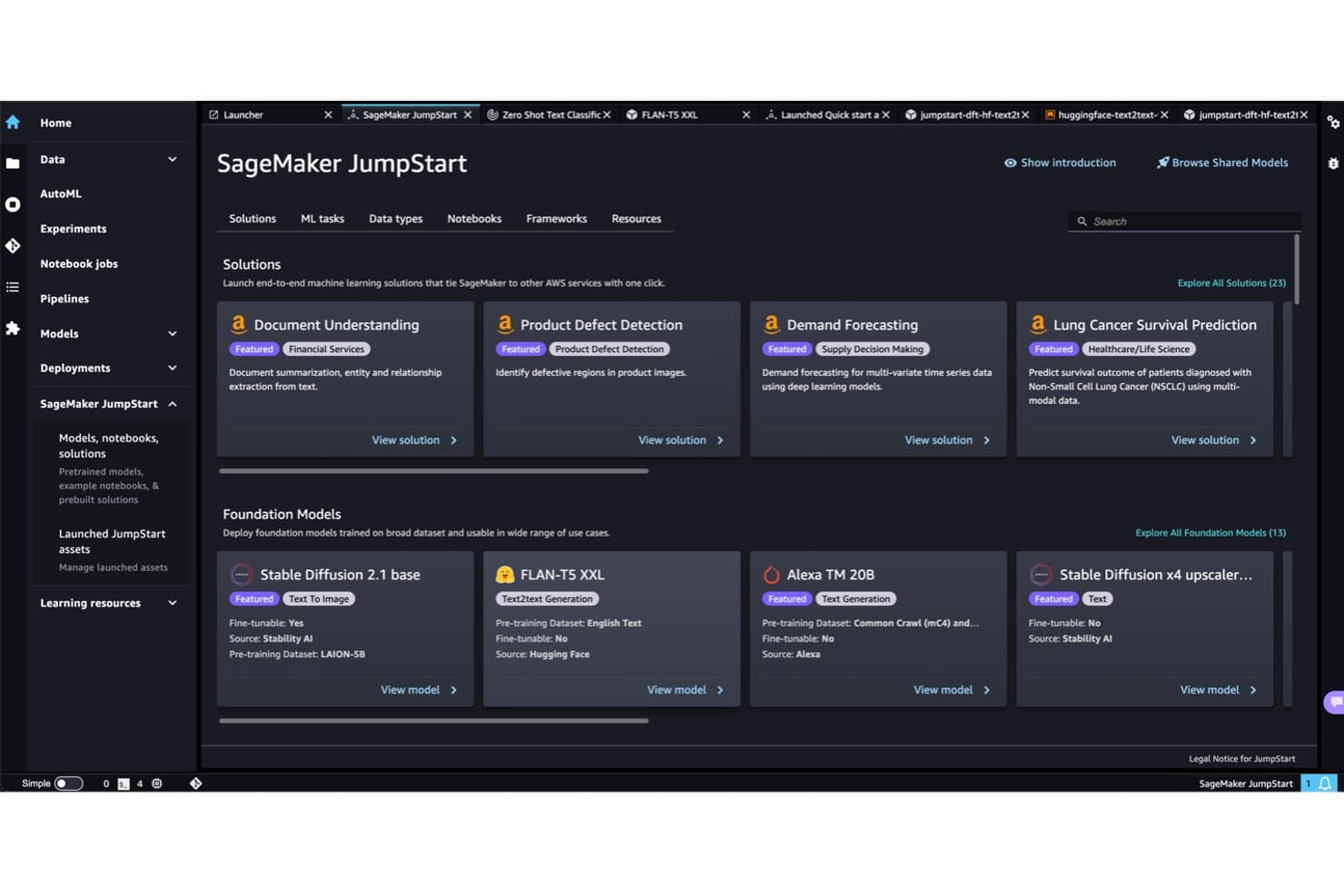
Amazon SageMaker JumpStart offers pre-built NLP models ready to deploy. Amazon SageMaker is AWS's managed ML platform that covers the full NLP model lifecycle—from data preprocessing and tokenization to training, fine-tuning, and deploying large language models at scale via tools like JumpStart, HyperPod, and Hugging Face-native integrations.
Who Is Amazon SageMaker Best For?
Amazon SageMaker is the right fit for ML engineers and MLOps teams at mid-to-large enterprises who need a single platform to take LLMs from raw data to production at scale.
Why I Picked Amazon SageMaker
Amazon SageMaker earns its spot on my shortlist because no other managed ML platform matches its depth for end-to-end LLM fine-tuning at scale. I'm particularly impressed by HyperPod, which lets you run distributed fine-tuning across hundreds of accelerators with checkpointless, elastic training that cuts training time by up to 40%. JumpStart's catalog of 1,000+ models, including Llama 4, DeepSeek R1, and John Snow Labs Medical LLMs, means I can go from selecting a domain-specific base model to fine-tuning it on custom data without leaving the platform.
Amazon SageMaker Key Features
- SageMaker Clarify: Detects bias and generates explainability reports for NLP models across training, evaluation, and post-deployment monitoring.
- SageMaker Data Wrangler: Provides a low-code interface for importing, transforming, and preparing text data before model training.
- Multi-mode inference endpoints: Supports real-time, serverless, asynchronous, and batch inference options on 70+ instance types including Inferentia and Trainium chips.
- Managed MLflow integration: Tracks experiments, compares model runs, and manages versioning across NLP workflows without requiring separate infrastructure.
Amazon SageMaker Integrations
Amazon SageMaker has native integrations with Amazon S3, Amazon Bedrock, Amazon OpenSearch Service, Amazon EKS, AWS Lambda, Amazon CloudWatch, AWS IAM, Hugging Face, and MLflow. It also offers REST APIs, SDKs, and AWS CLI access for custom integrations.
Pros and Cons
Pros:
- End-to-end lifecycle with explainability tools
- HyperPod supports massive distributed LLM training
- Largest pre-trained model catalog available
Cons:
- Vendor lock-in risk for multi-cloud shops
- Cost tracking is difficult for most teams
Learn more about Amazon SageMaker: Best for AWS-native text insights at scale
- Free plan available
- From $0.0001/unit
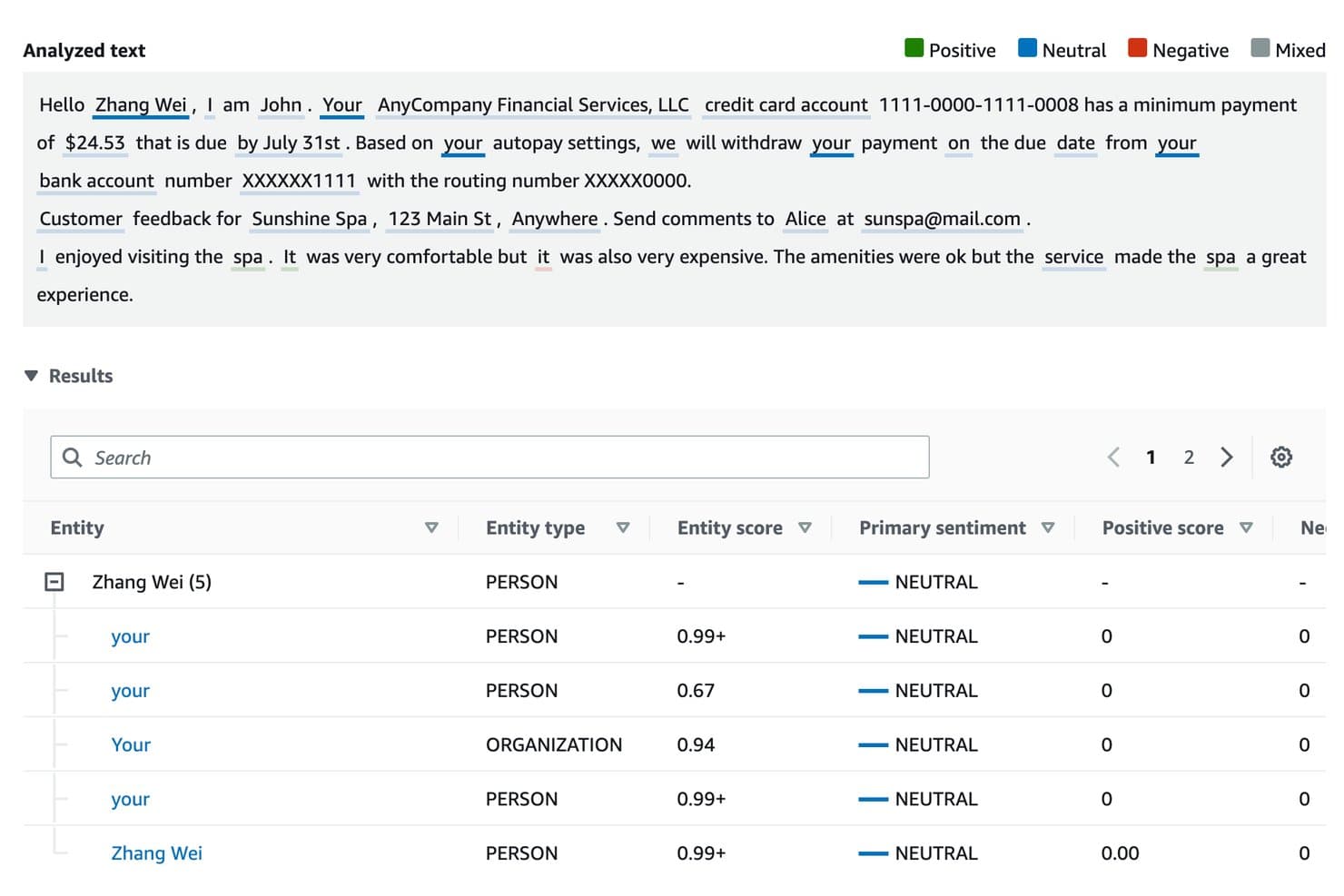
Amazon Comprehend identifies entities and sentiments in analyzed text. Amazon Comprehend is a fully managed AWS NLP service that delivers pre-built API-driven text analysis capabilities—including sentiment analysis, named entity recognition, PII detection, key phrase extraction, and custom model training via AutoML—without requiring you to manage any underlying infrastructure.
Who Is Amazon Comprehend Best For?
Amazon Comprehend is a strong fit for engineering and DevOps teams already running workloads in AWS who need production-ready NLP without managing any ML infrastructure.
Why I Picked Amazon Comprehend
Amazon Comprehend earns its spot on my shortlist because it's the most natural fit for AWS-native text analysis at scale. I like that you can run sentiment analysis, targeted entity recognition, and PII redaction directly through managed API endpoints without provisioning a single server. In practice, that means my team can process millions of customer records from S3 asynchronously, with volume-tiered pricing that actually gets cheaper the more you analyze.
Amazon Comprehend Key Features
- Custom entity recognition: Train a domain-specific entity recognizer on your own labelled examples to extract terms like policy numbers or internal codes that pre-built models won't catch.
- PII detection and redaction: Identify and automatically redact sensitive personal data—names, SSNs, credit card numbers—directly within your document processing pipeline.
- Flywheel MLOps automation: Manage the full custom model lifecycle, from data ingestion through retraining and version promotion, without building a separate MLOps layer.
- Comprehend Medical ontology linking: Map extracted clinical entities to standardized coding systems like ICD-10-CM, RxNorm, and SNOMED CT for healthcare-specific NLP workflows.
Amazon Comprehend Integrations
Amazon Comprehend has native integrations with Amazon S3, AWS Lambda, AWS KMS, AWS IAM, Amazon Kendra, Amazon Lex, Amazon Connect, AWS CloudTrail, and Amazon CloudWatch. Its REST API, AWS SDKs, AWS CLI, Step Functions, and EventBridge support custom pipelines and workflow automation.
Pros and Cons
Pros:
- Built-in PII detection and redaction
- Healthcare NLP with clinical ontology mapping
- Native fit for AWS-centric NLP workflows
Cons:
- Limited fine-tuning beyond basic AutoML
- No access to model internals
Learn more about Amazon Comprehend: Best for production-ready NLP pipeline deployment
- Free plan available
- Free plan available
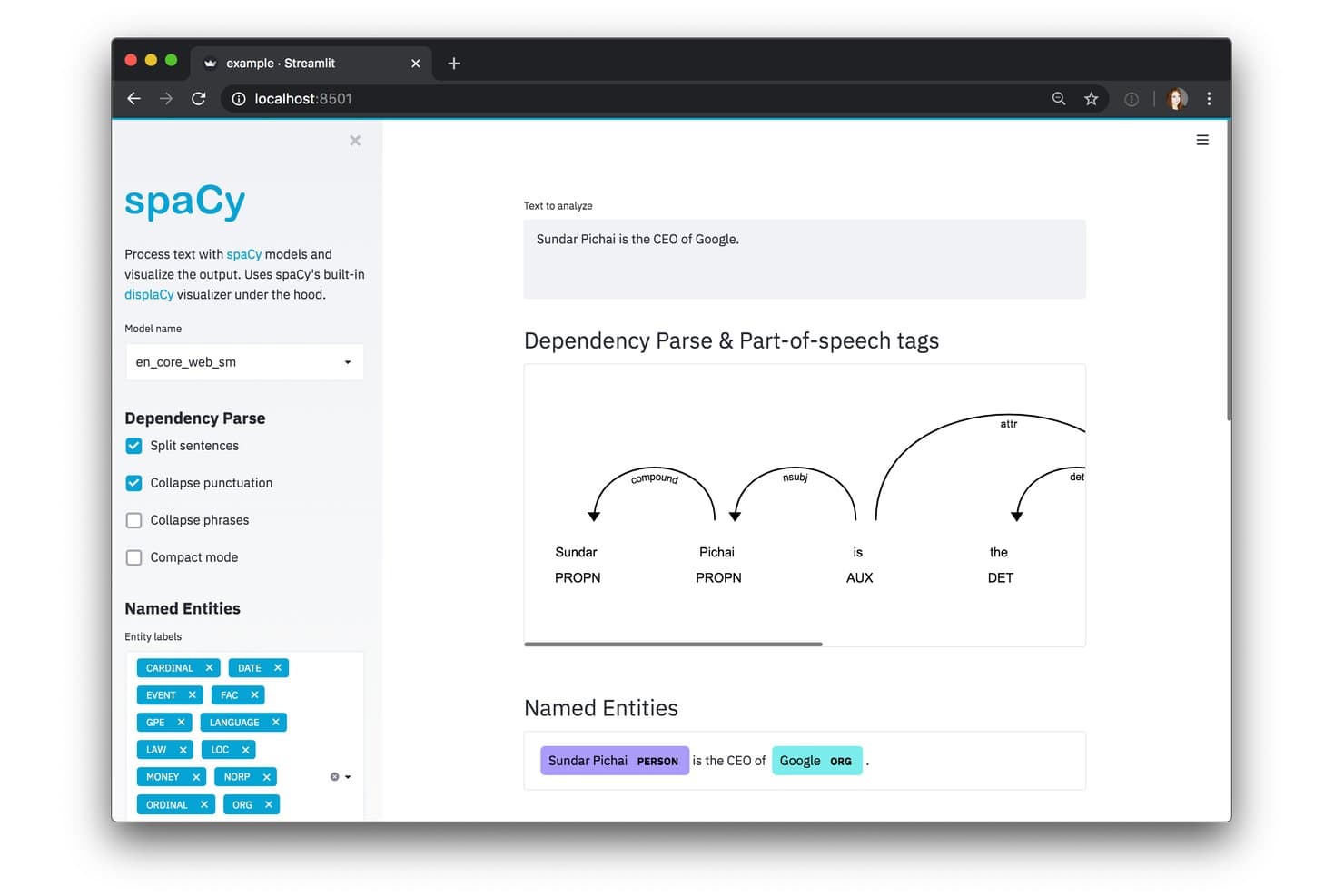
spaCy visualizes dependency parsing and named entities interactively. spaCy is an open-source Python NLP library that covers tokenization, named entity recognition, dependency parsing, text classification, and transformer-based model training across 75+ languages.
Who Is spaCy Best For?
spaCy is a strong fit for ML engineers and data scientists who need to build, train, and ship NLP pipelines in Python without relying on a managed platform.
Why I Picked spaCy
spaCy earns its spot on my shortlist because it's built from the ground up for production, not just experimentation. I love how trained pipelines package as installable Python modules, which means deploying a custom NER model to a Docker container or AWS Lambda layer is a repeatable, versioned process rather than a one-off scramble. The config-driven
spaCy trainsystem keeps every hyperparameter and architecture choice in a single file, so my pipelines are reproducible across environments. That combination of packaging discipline and Cython-powered batch throughput vianlp.pipe()is what makes spaCy genuinely production-ready.spaCy Key Features
- 84 pretrained pipelines: Download and run pretrained pipelines across 25 languages, ranging from compact CPU-optimized models to full transformer-based variants built on RoBERTa and BERT.
spaCy-LLMintegration: Connect spaCy pipelines directly to hosted LLM APIs (OpenAI, Anthropic, Cohere) or open-source models to run NLP tasks without requiring labelled training data.- displaCy visualizer: Render named entity annotations and dependency parse trees in the browser using spaCy's built-in visualization component.
- Domain-specific pipeline ecosystem: Access ready-to-use community pipelines for healthcare (medspaCy) and legal text (Blackstone) through the spaCy Universe library.
spaCy Integrations
spaCy integrates with Hugging Face Transformers, PyTorch, TensorFlow, OpenAI, Anthropic, Cohere, LangChain, Prodigy, DVC, Prefect, and Ray. Its Python API supports custom integrations, but it doesn’t include a native REST API.
Pros and Cons
Pros:
- Packaging enables reproducible, versioned model deployments
- Offers domain-specific pipelines for healthcare and legal
- Runs entirely on your own infrastructure
Cons:
- No no-code or visual workflow interface
- No built-in REST API for serving
Learn more about spaCy: Best for governed NLP across hybrid cloud deployments
- Free plan available
- From $1,110/month

IBM watsonx.ai extracts structured facts from SEC 10-K filings using few-shot prompts. IBM watsonx.ai is an enterprise AI platform that combines a multi-vendor foundation model catalogue, the Watson NLP library, LoRA/QLoRA fine-tuning, AutoML, and flexible SaaS, on-premises, and hybrid cloud deployment options for building and scaling NLP workloads.
Who Is IBM watsonx.ai Best For?
IBM watsonx.ai is a strong fit for enterprise IT and data science teams that need to build, fine-tune, and deploy NLP workloads across on-premises, hybrid, and cloud environments with strict governance and compliance requirements.
Why I Picked IBM watsonx.ai
IBM watsonx.ai earns its spot on my shortlist because of how well it handles governed NLP across hybrid cloud environments, which is a real differentiator for enterprise teams with strict compliance requirements. I'm particularly impressed by the Watson NLP library, which covers NER, sentiment analysis, tone classification, and semantic role labelling across 20+ languages within a single, auditable pipeline. Pair that with CP4D on Red Hat OpenShift for on-premises or hybrid deployments and AI Factsheets for model audit trails, and you get end-to-end governance baked into every layer.
IBM watsonx.ai Key Features
- Multi-vendor foundation model catalogue: Access pre-trained models from IBM Granite, Meta Llama, Mistral, DeepSeek, and NVIDIA from a single hosted library.
- LoRA/QLoRA fine-tuning: Adapt foundation models to domain-specific NLP tasks using parameter-efficient fine-tuning on GPU-accelerated environments.
- AutoAI pipeline builder: Automatically handles data preparation, feature engineering, model selection, and hyperparameter tuning for predictive ML workflows.
- OpenAI-compatible API endpoint: Connect existing applications to watsonx.ai inference using an OpenAI-compatible REST API format alongside Python, Node.js, and Java SDKs.
IBM watsonx.ai Integrations
IBM watsonx.ai integrates with Hugging Face, Red Hat OpenShift, watsonx.data, Watson Assistant, watsonx Orchestrate, Watson Discovery, and IBM Cloud Object Storage. Its REST API, plus Python, Node.js, and Java SDKs, support custom integrations.
Pros and Cons
Pros:
- Native RAG and vector search support
- IP indemnification for enterprise IBM models
- Broad NLP task coverage in 20+ languages
Cons:
- Interface can be confusing for new users
- IBM proprietary models not available for AWS
Learn more about IBM watsonx.ai: Best for GCP-native text analysis pipelines
- Free plan available
- From $0.90/1,000 characters (billed annually)

Google Cloud Natural Language AI annotates resume entities like skills and employers. Google Cloud Natural Language AI is a managed NLP API from Google that delivers pre-trained sentiment analysis, entity recognition, syntax parsing, content classification, and text moderation via REST and gRPC interfaces with client libraries across eight programming languages.
Who Is Google Cloud Natural Language AI Best For?
Google Cloud Natural Language AI is a strong fit for engineering teams already running workloads on GCP who need production-ready NLP without managing infrastructure.
Why I Picked Google Cloud Natural Language AI
Google Cloud Natural Language AI earns its spot on my shortlist because of how naturally it fits into GCP-native text analysis pipelines. If your team is already running data through BigQuery, you can call
ML.UNDERSTAND_TEXTdirectly in SQL to run sentiment or entity analysis without ever leaving the warehouse. I also like that the v2 API uses a PaLM-based model for entity and sentiment tasks, and theannotateTextmethod lets you pull multiple NLP features in a single API call, which cuts down round-trip overhead significantly.Google Cloud Natural Language AI Key Features
- Entity sentiment analysis: Detects the sentiment associated with each named entity in a text, returning per-entity scores for English, Japanese, and Spanish.
- AutoML Natural Language: Lets you train custom text classification and entity extraction models on your own labeled datasets through a no-code visual interface via Vertex AI.
- Multi-region endpoints: Routes API requests through US or EU endpoints to keep data processed and stored within a specific region for data residency compliance.
- HIPAA-eligible API: Covered under Google Cloud's Business Associate Agreement, making it usable for workflows that handle protected health information.
Google Cloud Natural Language AI Integrations
Google Cloud Natural Language AI integrates with Vertex AI, BigQuery, Cloud Composer, Speech-to-Text, Translation API, Vision API, Dataflow, Cloud Run, and Cloud Functions. REST, gRPC, and eight client libraries support custom integrations.
Pros and Cons
Pros:
- Multilingual support for key NLP features
- Data never stored after API processing
- Pre-trained models require no training data
Cons:
- Fine-tuning only available via Vertex AI
- No model explainability or bias metrics
Learn more about Google Cloud Natural Language AI: Best for open-source model fine-tuning at scale
- Free plan available
- From $9/month

HuggingChat lets users query AI models via a web chat interface. Hugging Face is an open-source NLP platform that gives you access to over 2 million pre-trained models alongside a full suite of tools for tokenization, fine-tuning, and model deployment across cloud and on-premises environments.
Who Is Hugging Face Best For?
Hugging Face is the go-to platform for ML and NLP engineers who need direct access to open-source models and the full toolchain to fine-tune, evaluate, and deploy them at scale.
Why I Picked Hugging Face
Hugging Face earns its spot on my shortlist because no other platform comes close for open-source model fine-tuning at scale. I love that PEFT and QLoRA let you fine-tune billion-parameter LLMs like LLaMA or Mistral on a single GPU, which cuts compute costs dramatically without sacrificing quality. The TRL library adds full RLHF and DPO support on top of that, so you can align domain-specific models with minimal overhead.
Hugging Face Key Features
- Transformers Pipeline API: A single-line interface for running NLP tasks—classification, NER, summarization, translation, and QA—against any model on the Hub.
- AutoTrain: A no-code training interface where you upload a labelled dataset, select a task, and the platform handles model selection and training automatically.
- Text Embeddings Inference (TEI): A dedicated inference engine optimized for high-throughput embedding generation, supporting semantic search and RAG pipelines at scale.
- Inference Providers API: An OpenAI-compatible unified endpoint that routes requests across providers like Groq, Together AI, and Cerebras using a single Hugging Face token.
Hugging Face Integrations
Hugging Face integrates with PyTorch, TensorFlow, JAX, AWS SageMaker, Google Cloud, Azure, Weights & Biases, MLflow, and Snowflake. Its Python, JavaScript, REST, and CLI APIs support custom integrations and deployment workflows.
Pros and Cons
Pros:
- AutoTrain allows no-code model training
- Enables fine-tuning giant models on one GPU
- Unmatched selection of open-source NLP models
Cons:
- Enterprise-ready deployment requires DevOps expertise
- Community models vary in quality and security
Learn more about Hugging Face:
Annen NLP-programvare
Nedenfor finner du en liste over annen NLP-programvare som jeg tok med på kortlisten, men som ikke kom med blant de 10 beste. De er absolutt verdt å sjekke ut.
- 11NLP CloudBest for privacy-first NLP API deployment
- 12SnorkelBest for programmatic labeling at enterprise scale
- 13ClaudeBest for safety-first NLP across all major clouds
- 14Cohere NorthBest for air-gapped NLP model deployment
- 15Microsoft Azure AI LanguageBest for air-gapped NLP in regulated industries
- 16NLTKBest for classical NLP with zero infrastructure cost
- 17Stanford NLPBest for linguistic precision across 80+ languages
How I Evaluate NLP Software
From NER pipelines to production transformer deployments, I evaluate NLP tools in two layers: the baseline every platform must clear to make the list and the differentiators that set the best apart.
Core Functionality (Table Stakes For This List)
When I'm selecting tools for my list, I rank each one on a scale from 0 (does not offer the functionality) to 5 (excels in this area) for each core functionality listed below. Then, I calculate the tool's total score into a percentage. Each tool needs to achieve a minimum total score of 75% to be considered for inclusion.
- Text Preprocessing & Tokenization: I check whether a platform handles the full cleanup chain—tokenization, stemming, lemmatization, stopword removal—so raw text is pipeline-ready across multiple languages.
- Pre-trained Language Models: Access to current transformer architectures matters. I look for a broad, regularly updated model catalogue rather than a handful of outdated options.
- Core NLP Task Coverage: Each tool should support foundational tasks like NER, sentiment analysis, classification, and summarization—the building blocks of most production NLP workflows.
- Model Training & Fine-tuning: I evaluate whether you can bring your own dataset and fine-tune models with real hyperparameter control, not just toggle a few presets behind a wizard.
- API & SDK Access: Good NLP tools expose REST APIs and SDKs in languages like Python and Java. I look for clear documentation, versioned endpoints, and framework compatibility.
- Deployment & Scalability: I consider how each platform handles production workloads—whether it supports auto-scaling inference, batch processing, and flexible compute options like GPU or TPU provisioning.
Once I have a list of tools that meet the criteria, I consider what sets each platform apart.
Differentiating Factors (What Sets Vendors Apart)
Here's how I compare and contrast different vendors:
Standout Features
RAG frameworks and vector search support are a big differentiator right now. Teams building LLM-powered apps need native embedding generation and retrieval pipelines, not bolted-on workarounds. I also look for explainability and bias detection tools—when you're deploying sentiment models in production, stakeholders want to understand why a prediction was made. Domain-specific model zoos save real time too, especially for teams in healthcare or legal who'd otherwise spend weeks fine-tuning general-purpose models.
Beyond Features
Deployment flexibility matters when your security team mandates on-premises hosting or air-gapped environments. I evaluate whether a platform supports cloud, hybrid, and self-hosted options alongside Kubernetes orchestration. Data privacy controls are equally important—I check for SOC 2 compliance, data residency options, and zero-retention policies, especially when pipelines process sensitive text like medical records. Ecosystem fit rounds it out: a tool that plugs into your MLOps stack and data infrastructure saves months of custom integration work.
Slik velger du NLP-programvare
Det er lett å gå seg vill i lange funksjonslister og kompliserte prisstrukturer. For å hjelpe deg med å holde fokus mens du går gjennom din unike prosess for valg av programvare, får du her en sjekkliste over faktorer du bør ha i mente:
| Faktor | Hva bør du vurdere? |
|---|---|
| FaktorSkalerbarhet | Hva bør du vurdere?Kan programvaren vokse sammen med teamet ditt? Se etter verktøy som håndterer økte datamengder uten ekstra kostnader. Ta hensyn til fremtidige behov og mulige utvidelser. |
| FaktorIntegrasjoner | Hva bør du vurdere?Fungerer den med de eksisterende systemene dine? Kontroller at den er kompatibel med verktøyene du bruker i dag, slik at du unngår avbrudd i arbeidsflyten. |
| FaktorTilpasningsmuligheter | Hva bør du vurdere?Kan du tilpasse den til behovene dine? Sørg for at du kan justere innstillinger eller funksjoner slik at de passer til de spesifikke prosessene dine. |
| FaktorBrukervennlighet | Hva bør du vurdere?Er grensesnittet brukervennlig? Komplekse verktøy kan forsinke innføringen. Se etter intuitive utforminger som krever minimal opplæring. |
| FaktorImplementering og oppstart | Hva bør du vurdere?Hvor lang tid tar det å komme i gang? Vurder hvor mye tid som trengs til oppsett og opplæring. En rask oppstart kan spare tid og ressurser. |
| FaktorKostnad | Hva bør du vurdere?Passer den innenfor budsjettet ditt? Sammenlign prisplaner og se opp for skjulte gebyrer. Ta hensyn til de totale eierkostnadene, ikke bare den opprinnelige prisen. |
| FaktorSikkerhetstiltak | Hva bør du vurdere?Er dataene dine beskyttet? Sørg for at kravene til personvern overholdes, og se etter kryptering og andre sikkerhetsfunksjoner. |
| FaktorTilgjengelig kundestøtte | Hva bør du vurdere?Er kundestøtten tilgjengelig når du trenger den? Vurder tilgjengeligheten og kvaliteten på kundestøttekanaler som chat, e-post eller telefon. |
Hva er NLP-programvare?
NLP-programvare er et verktøy som behandler og analyserer menneskelige språkdata. Fagpersoner som dataforskere, markedsførere og kundeserviceteam bruker disse verktøyene til å hente ut innsikter og forbedre kommunikasjonen. Funksjoner for tekstanalyse, sentimentanalyse og språkoversettelse bidrar til å forstå og svare på brukernes behov.
Samlet sett forbedrer disse verktøyene, inkludert programvare for samtaleintelligens, beslutningstaking og effektivitet i språkrelaterte oppgaver.
Funksjoner
Når du velger NLP-programvare, bør du se etter følgende viktige funksjoner:
- Tekstanalyse: Behandler store mengder tekstdata for å hente ut meningsfulle innsikter og hjelper team med å forstå trender og mønstre.
- Sentimentanalyse: Identifiserer og kategoriserer meninger som uttrykkes i tekst, for å kartlegge kundeholdninger og forbedre strategier for kundeengasjement.
- Språkoversettelse: Konverterer tekst fra ett språk til et annet og legger til rette for global kommunikasjon og tilgjengelighet.
- Programvare for stemmegjenkjenning: Transkriberer talespråk til tekst, muliggjør taleinndata og forbedrer tilgjengeligheten.
- Entitetsgjenkjenning: Identifiserer og klassifiserer viktige elementer i tekst, for eksempel navn og datoer, for bedre dataorganisering.
- Flerspråklig støtte: Tilbyr funksjonalitet på flere språk, noe som muliggjør bredere bruk på tvers av ulike regioner.
- Tilpassbare modeller: Lar brukerne tilpasse algoritmer til spesifikke behov, noe som forbedrer relevansen og nøyaktigheten til resultatene.
- Sanntidsbehandling: Gir umiddelbar analyse og tilbakemelding, noe som er avgjørende for tidssensitive bruksområder og beslutningstaking.
- Innstillinger for personvern: Sikrer samsvar med regelverk for databeskyttelse og beskytter sensitiv informasjon.
- Skyintegrasjon: Muliggjør sømløst samarbeid og tilgang til data på tvers av ulike plattformer og enheter.
Fordeler
Implementering av NLP-programvare gir flere fordeler for teamet og virksomheten din. Her er noen av fordelene du kan se frem til:
- Forbedret kommunikasjon: Programvare for naturlig språkgenerering og talegjenkjenning gjør global og tilgjengelig kommunikasjon enklere.
- Bedre beslutningstaking: Tekstanalyse og sentimentanalyse gir innsikter som danner grunnlag for strategier og tiltak.
- Tidsbesparelser: Sanntidsbehandling gir rask tilbakemelding, slik at responser og tiltak kan iverksettes raskere.
- Kostnadseffektivitet: Automatisering av oppgaver som entitetsgjenkjenning reduserer behovet for manuell datahåndtering og sparer ressurser.
- Økt nøyaktighet: Tilpassbare modeller sikrer at resultatene skreddersys etter spesifikke behov, noe som forbedrer presisjonen til resultatene.
- Datasikkerhet: Innstillinger for personvern bidrar til å holde sensitiv informasjon trygg og i samsvar med regelverket.
- Skalerbarhet: Flerspråklig støtte og skyintegrasjon muliggjør vekst og tilpasning på tvers av ulike markeder.
Kostnader og priser
Valg av NLP-programvare krever en forståelse av de ulike prismodellene og abonnementene som er tilgjengelige. Kostnadene varierer basert på funksjoner, teamstørrelse, tillegg og mer. Tabellen nedenfor oppsummerer vanlige abonnementer, gjennomsnittsprisene deres og typiske funksjoner som er inkludert i NLP-programvareløsninger:
Sammenligningstabell for abonnementer for NLP-programvare
| Abonnementstype | Gjennomsnittspris | Vanlige funksjoner |
|---|---|---|
| AbonnementstypeGratisabonnement | Gjennomsnittspris$0 | Vanlige funksjonerGrunnleggende tekstanalyse, begrenset språkstøtte og brukerstøtte fra fellesskapet. |
| AbonnementstypePersonlig abonnement | Gjennomsnittspris$10-$30/user/month | Vanlige funksjonerSentimentanalyse, språkoversettelse og brukerstøtte via e-post. |
| AbonnementstypeBedriftsabonnement | Gjennomsnittspris$40-$100/user/month | Vanlige funksjonerTalegjenkjenning, entitetsgjenkjenning og brukerstøtte via telefon. |
| AbonnementstypeVirksomhetsabonnement | Gjennomsnittspris$150+/user/month | Vanlige funksjonerTilpassbare modeller, sanntidsbehandling og dedikert kontoadministrasjon. |
Vanlige spørsmål om NLP-programvare
Her er noen svar på vanlige spørsmål om NLP-programvare:
Kan NLP-programvare integreres med verktøyene jeg allerede bruker?
De fleste NLP-programmer tilbyr integrasjonsmuligheter med populære plattformer som CRM-systemer og verktøy for dataanalyse. Sjekk kompatibiliteten med den nåværende teknologistakken for å sikre en smidig arbeidsflyt og deling av data. Noen løsninger kan kreve utvikling av et tilpasset API for integrasjon.
Hvor sikker er NLP-programvare?
Sikkerhetsfunksjonene varierer fra leverandør til leverandør, men se etter datakryptering, samsvar med personvernregler og regelmessige sikkerhetsoppdateringer. Sørg for at programvaren oppfyller bransjestandardene dine for personvern og databeskyttelse, spesielt hvis den håndterer sensitiv informasjon.
Er tilpasning mulig med NLP-programvare?
Mange NLP-verktøy tilbyr tilpasningsmuligheter for å skreddersy funksjoner og modeller etter behovene dine. Dette kan innebære justering av algoritmer eller opprettelse av spesifikke arbeidsflyter for databehandling. Tilpasningsnivået kan imidlertid variere, så bekreft funksjonaliteten før du velger en løsning.
Hvilken type brukerstøtte er tilgjengelig for brukere av NLP-programvare?
Støttetjenestene varierer fra nettressurser som vanlige spørsmål og veiledninger til direkte kundestøtte via chat, e-post eller telefon. Vurder hvor tilgjengelige og raske disse tjenestene er, og tenk over hvor viktig det er å ha dedikert støtte, spesielt under implementeringen.
Er NLP det samme som kunstig intelligens?
NLP er et underfelt av kunstig intelligens. Mens AI-programvare dekker et bredt spekter av funksjoner, handler NLP spesifikt om behandling av menneskelig språk.
Kan NLP-programvare forstå slang eller uformelt språk?
Noen NLP-verktøy er opplært til å gjenkjenne uformelt språk, slang eller regionale uttrykk, men nøyaktigheten kan variere avhengig av dataene som ble brukt til å trene modellen.