

Det kan være krevende å navigere i verdenen av brukerstøtteløsninger, spesielt når du støtter sluttbrukere som arbeider på tvers av flere plattformer som Microsoft Windows, Android, iOS og Linux. Som en som har brukt en stor del av karrieren på å hjelpe IT-administratorer, forstår jeg fullt ut behovet for pålitelige og effektive verktøy som tilbyr varsler og målinger. De er allsidige når det gjelder rapporter og målinger, men også når det gjelder implementering, enten lokalt eller som SaaS.
Det er en økende trend mot verktøy med åpen kildekode og en voksende etterspørsel etter robust administrasjon av IT-infrastruktur, strømlinjeformet meldingshåndtering og omfattende funksjonalitet for servicedesk. Atera er et flott verktøy for IT-fagfolk som skal overvåke og administrere systemene sine. Likevel er det lurt å vurdere andre alternativer som kan passe IT-miljøene dine bedre, for eksempel alternative løsninger med bedre priser, kompatibilitet eller bestemte funksjonsbehov. Jeg vil se nærmere på de beste Atera-alternativene for å finne ut om de passer bedre for deg.
Hva er Atera?
Atera er en IT-administrasjonsplattform som kombinerer fjernovervåking og -administrasjon, brukerstøtte og automatiseringsverktøy på ett sted. Den brukes av leverandører av administrerte tjenester (MSP-er) og IT-team som trenger å administrere flere endepunkter, håndtere brukerstøttehenvendelser og automatisere rutineoppgaver. Verktøy for fjerntilgang, oppdateringsadministrasjon og rapportering bidrar til feilsøking, systemvedlikehold og til å synliggjøre verdien for interessenter. Alt i alt hjelper Atera teamet ditt med å holde oversikt over IT-driften uten å måtte håndtere flere verktøy.
Hvorfor du kan stole på våre programvareanbefalinger
6,700+
Reviews
20
Industry experts
16+
Evaluation factors
14
Years
Teamet vårt har testet og anmeldt programvare siden 2012. Vi er selv teknologiledere, så vi vet hvor vanskelig og hvor viktig det er å velge riktig programvare.
I denne guiden har vi vurdert verktøyene gjennom praktisk testing og uavhengig research og gitt dem poeng ut fra våre utvelgelseskriterier.
Anmeldelsene våre bygger på vår egen redaksjonelle vurdering. De er ikke et salgsargument.
Ekspertanmeldere:
- Paulo Gardini MiguelTech Director
 Tim FisherVP of AI
 Gabriel RosasTech Lead & Software Architect
 Christhian GruhnTech Lead & Platform Architect

Sammenligningstabell for Atera-alternativer
Denne sammenligningstabellen oppsummerer prisopplysningene for mine beste utvalgte Atera-alternativer:
| Tool | Best For | Trial Info | Price | ||
|---|---|---|---|---|---|
| 1 | Best for automated ticket management | Free demo available | From $89/agent/month | Website | |
| 2 | Best for ITIL-aligned service desk management | 14-day free trial | From $19/user/month (billed annually) | Website | |
| 3 | Best for advanced policy management | 14-day free trial | Pricing upon request | Website | |
| 4 | Best for network infrastructure management | 14-day free trial | From $35/month | Website | |
| 5 | Best for Apple device management | 14-day free trial | From $4/device/month | Website | |
| 6 | Best for mobile-first IT management | Free demo available | Pricing upon request | Website | |
| 7 | Best for robust remote monitoring management | 14-day free trial | Pricing upon request | Website | |
| 8 | Best for unified IT management | Free demo available | Pricing upon request | Website | |
| 9 | Best for comprehensive IT troubleshooting | Not available | Pricing upon request | Website | |
| 10 | Best for scalable IT service delivery | 30-day free trial | Pricing upon request | Website |


Anmeldelser av de beste Atera-alternativene
Nedenfor finner du mine detaljerte sammendrag av de beste Atera-alternativene som kom med på kortlisten. Anmeldelsene mine gir en detaljert gjennomgang av de viktigste funksjonene, fordeler & ulemper, integrasjoner og ideelle bruksområder for hvert verktøy, slik at du kan finne det beste alternativet for deg.
 Best for automated ticket management
- Free demo available
- From $89/agent/month
Visit WebsiteCustomer Rating:4.5/5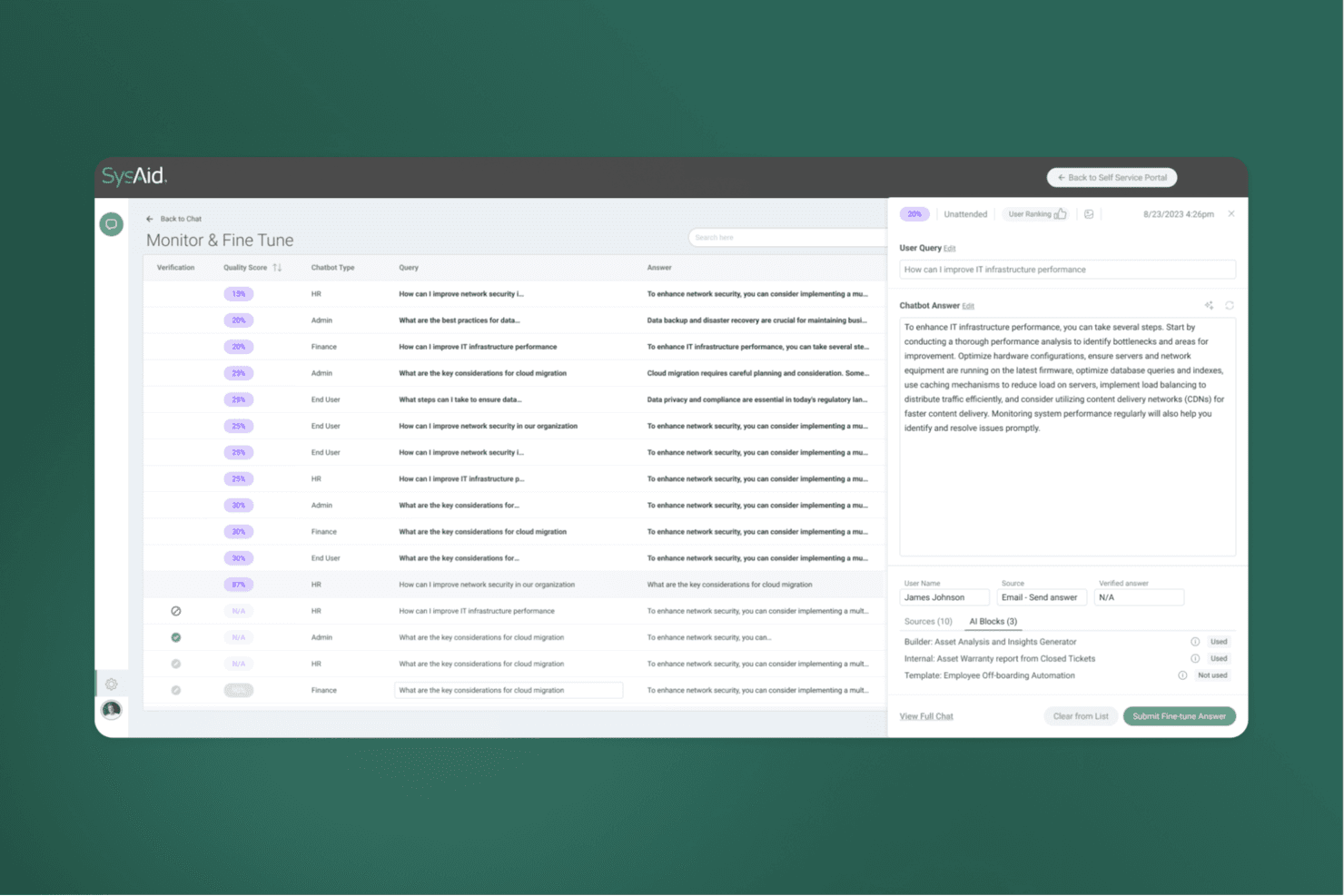
SysAid lets users monitor and fine-tune AI chatbot responses by quality score. SysAid is an ITSM platform for IT support teams that need to manage service requests, incidents, and routine workflows from one service desk.
Who Is SysAid Best For?
SysAid is a good fit for IT service desk teams that want to automate ticket assignment and routine request handling.
Why I Picked SysAid
I picked SysAid as an Atera alternative for its “Best for automated ticket management” focus. I like that it automates ticket assignment and routine request handling from one service desk, helping route incoming incidents without manual sorting. That gives my team more time to resolve user-impacting issues.
SysAid Key Features
- IT asset management: Track physical and digital assets throughout their lifecycle.
- Knowledge base: Create and maintain articles for IT support topics.
- Change management: Document changes, assess risk, and manage approval workflows.
- Configuration management database: Map configuration items and their relationships.
SysAid Integrations
SysAid Connect supports integrations with 1,000+ apps through embedded Workato, including Jira, Microsoft Teams, Azure DevOps, Slack, Salesforce, Zoom, Asana, HubSpot, Workday, and Zendesk; plug-and-play add-ons include Jira and Lansweeper. SysAid also provides an API for custom integrations.
Pros and Cons
Pros:
- Supports detailed ITSM workflows beyond remote monitoring
- Links incidents to assets for audit traceability
- Automates ticket routing and repetitive requests
Cons:
- Complex workflow setup can slow deployment
- Interface can feel dated and rigid
 Best for ITIL-aligned service desk management
- 14-day free trial
- From $19/user/month (billed annually)
Visit WebsiteCustomer Rating:4.6/5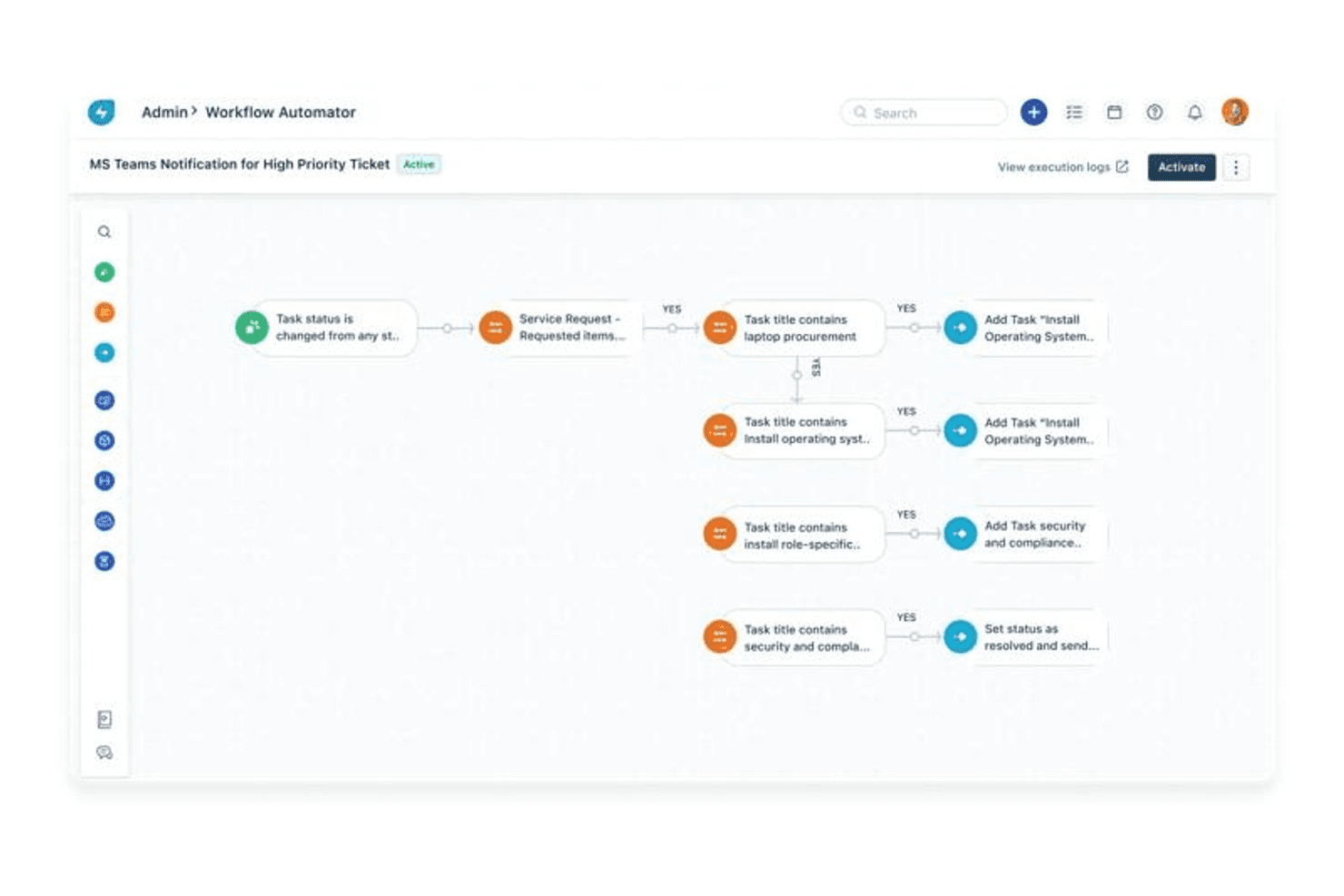
Freshservice automates ticket workflows with conditional task routing. For IT teams comparing Atera alternatives, Freshservice offers a cloud-based service management platform to organize support requests, incidents, and day-to-day IT operations.
Who Is Freshservice Best For?
Freshservice suits IT service desk leaders who need structured, ITIL-aligned processes for managing service delivery across teams.
Why I Picked Freshservice
I picked Freshservice for its focus: Best for ITIL-aligned service desk management. I like its incident and service request workflows for routing outages and employee issues, plus change management for recording approvals before infrastructure updates. It’s an Atera alternative when you need governed ticket and change processes more than endpoint monitoring or remote access.
Freshservice Key Features
- Asset management: Track hardware and software records, ownership, and lifecycle details.
- CMDB: Map configuration items and their relationships across your environment.
- Asset discovery: Use discovery tools to identify network devices and add them to your inventory.
- Knowledge base: Publish searchable articles for common IT procedures and fixes.
Freshservice Integrations
Freshservice offers 1,000+ ready-to-install integrations through Freshworks Marketplace, including Microsoft Teams, Slack, Jira, TeamViewer, SecPod, and Azure AD. It also provides APIs and low-code connectors for custom integrations.
Pros and Cons
Pros:
- Automation supports ticket routing and self-service
- CMDB maps configuration item relationships
- ITIL-aligned incident and change workflows
Cons:
- Users report asset management and change-form issues
- No native endpoint monitoring or remote access
Learn more about Freshservice: Best for advanced policy management
- 14-day free trial
- Pricing upon request
Visit WebsiteCustomer Rating:4.6/5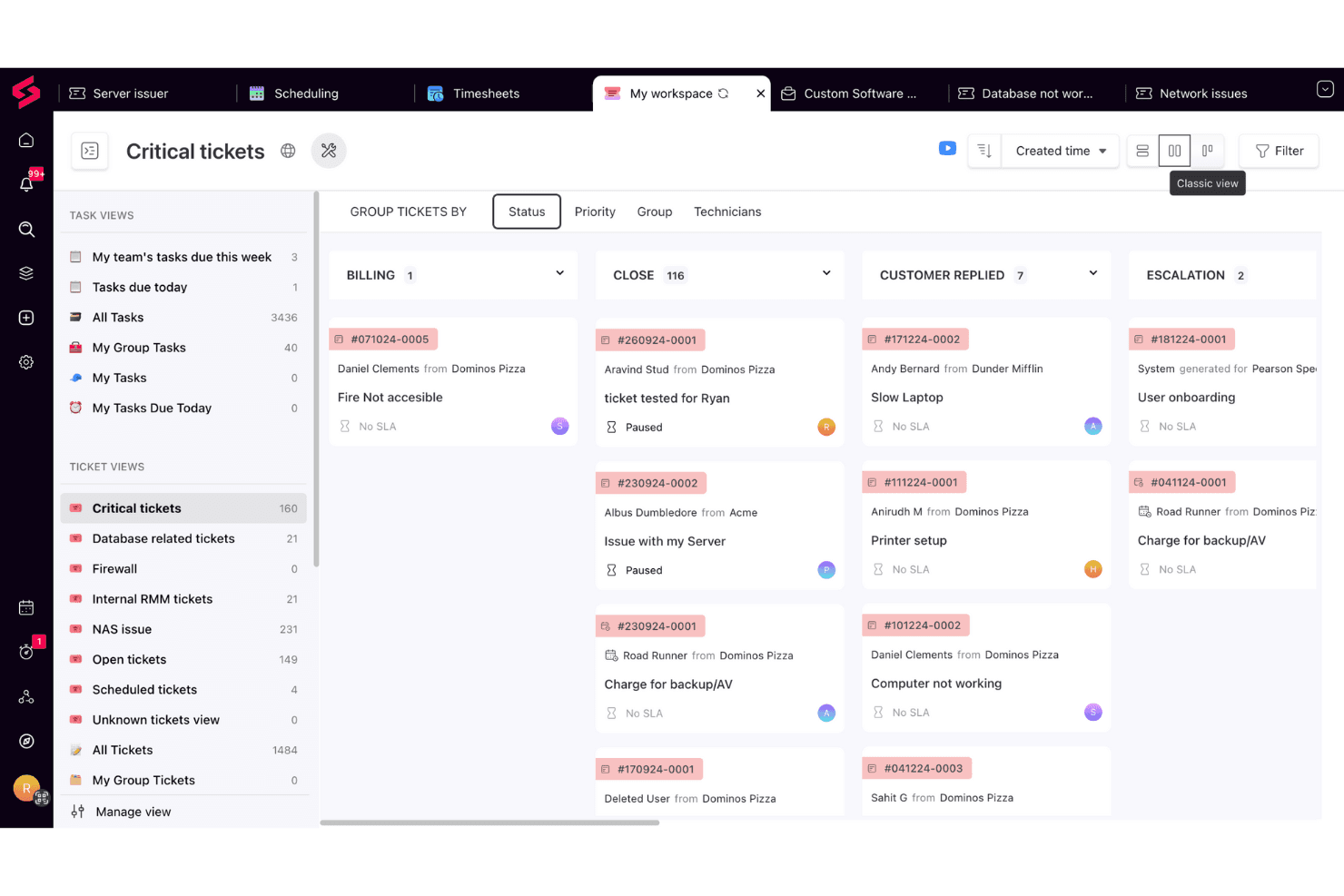
SuperOps organizes critical tickets by status in a kanban-style board. SuperOps is a cloud-based RMM platform for managed service providers that helps monitor and manage client endpoints while organizing day-to-day IT support operations.
Who Is SuperOps Best For?
SuperOps suits MSP teams that need to apply and manage endpoint policies across multiple client environments.
Why I Picked SuperOps
I picked SuperOps as an Atera alternative because its advanced policy management gives me finer control across client environments. I can organize policies by device category, then use parent and child policy sets to inherit baseline alert and patch settings while tailoring exceptions for VIP workstations or specific clients. Changes apply to the associated devices, rather than requiring individual edits.
SuperOps Key Features
- Asset management: Monitor workstations, servers, and network devices from one dashboard.
- Remote access: Start remote sessions and troubleshoot endpoints through built-in tools and integrations.
- Network monitoring: Monitor network devices across multiple protocols.
- Cross-OS MDM: Manage mobile devices across operating systems.
SuperOps Integrations
SuperOps lists marketplace integrations with TeamViewer, Splashtop, ConnectWise Control, Bitdefender, Huntress, IT Glue, Pax8, and Microsoft Teams. It also connects with Zapier and offers a GraphQL API for custom integrations.
Pros and Cons
Pros:
- Responsive support assists onboarding and troubleshooting
- RMM and PSA share one workspace
- Hierarchical policies support targeted client overrides
Cons:
- Ticket filters and automatic assignment remain limited
- Mobile app complicates ticket search and navigation
Learn more about SuperOps: Best for network infrastructure management
- 14-day free trial
- From $35/month
Visit WebsiteCustomer Rating:4.9/5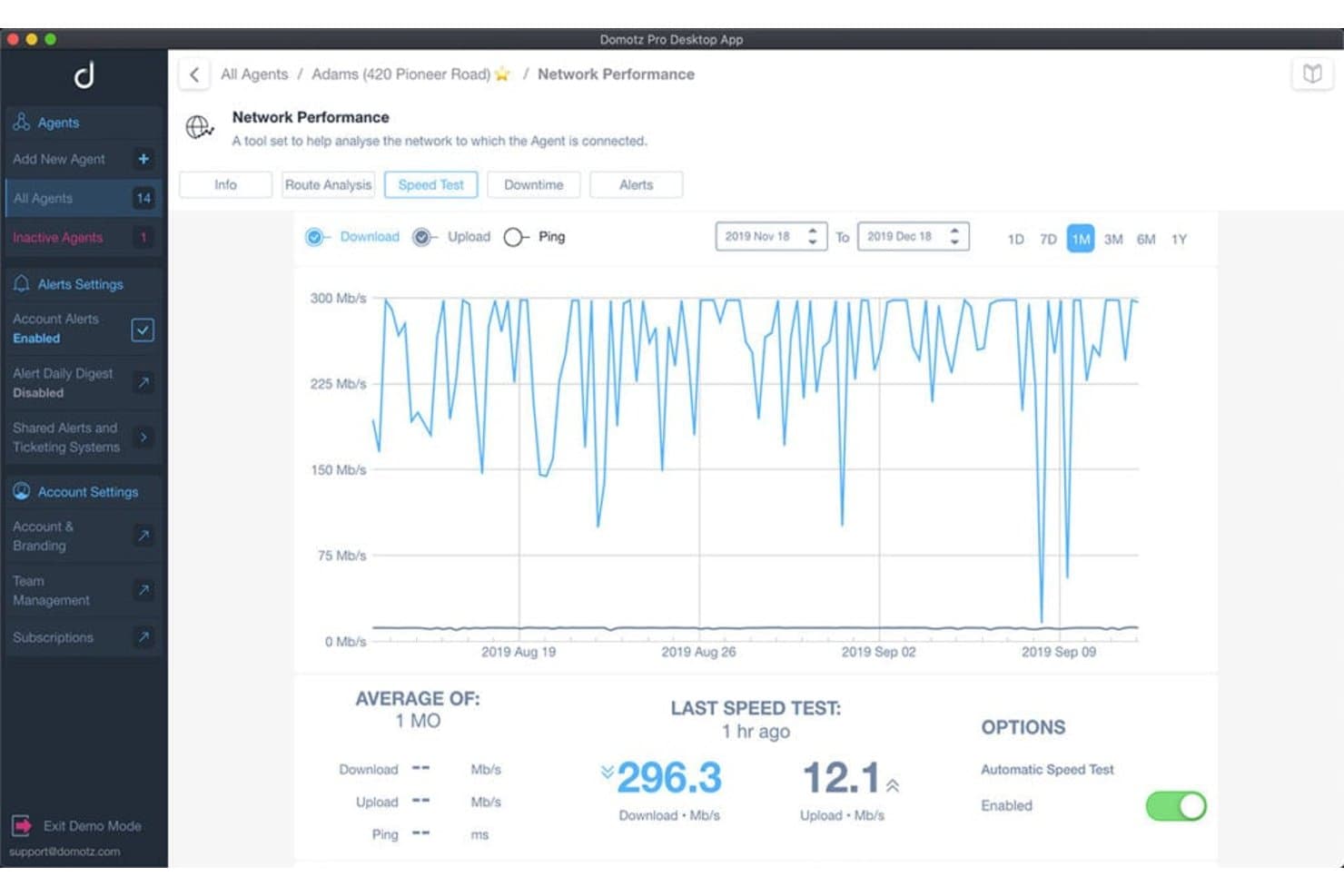
Domotz tracks network speed with download and upload performance graphs. For MSPs and IT teams comparing Atera alternatives, Domotz is a remote monitoring and management platform for discovering connected devices, tracking their status, and troubleshooting issues across client environments.
Who Is Domotz Best For?
Domotz suits MSPs and network administrators who need to monitor and troubleshoot network infrastructure across multiple client sites.
Why I Picked Domotz
I picked Domotz as an Atera alternative because it focuses on network infrastructure management. I like how its device discovery and status monitoring help me spot offline equipment across client sites, while remote troubleshooting gives me a way to investigate network issues without traveling to each location.
Domotz Key Features
- SNMP monitoring: Track metrics such as CPU load, temperature, memory, and battery health.
- Configuration backups: Back up, compare, and restore supported network device configurations.
- PoE management: Control power on individual ports of managed switches.
- Custom scripting: Run scripts to extend monitoring and automate network tasks.
Domotz Integrations
Domotz lists 100+ vendor integrations, including ConnectWise PSA, Datto Autotask, Power BI, Node-RED, and Make. It also offers a REST API and webhooks for custom connections.
Pros and Cons
Pros:
- Configuration backups and remote PoE control
- VPN-free SSH and RDP device access
- Detailed SNMP visibility across client networks
Cons:
- Topology maps and device identification can mislead
- No full endpoint patching or helpdesk RMM
Learn more about Domotz: 5Best for Apple device management
Jamf
- 14-day free trial
- From $4/device/month
Visit WebsiteCustomer Rating:4.7/5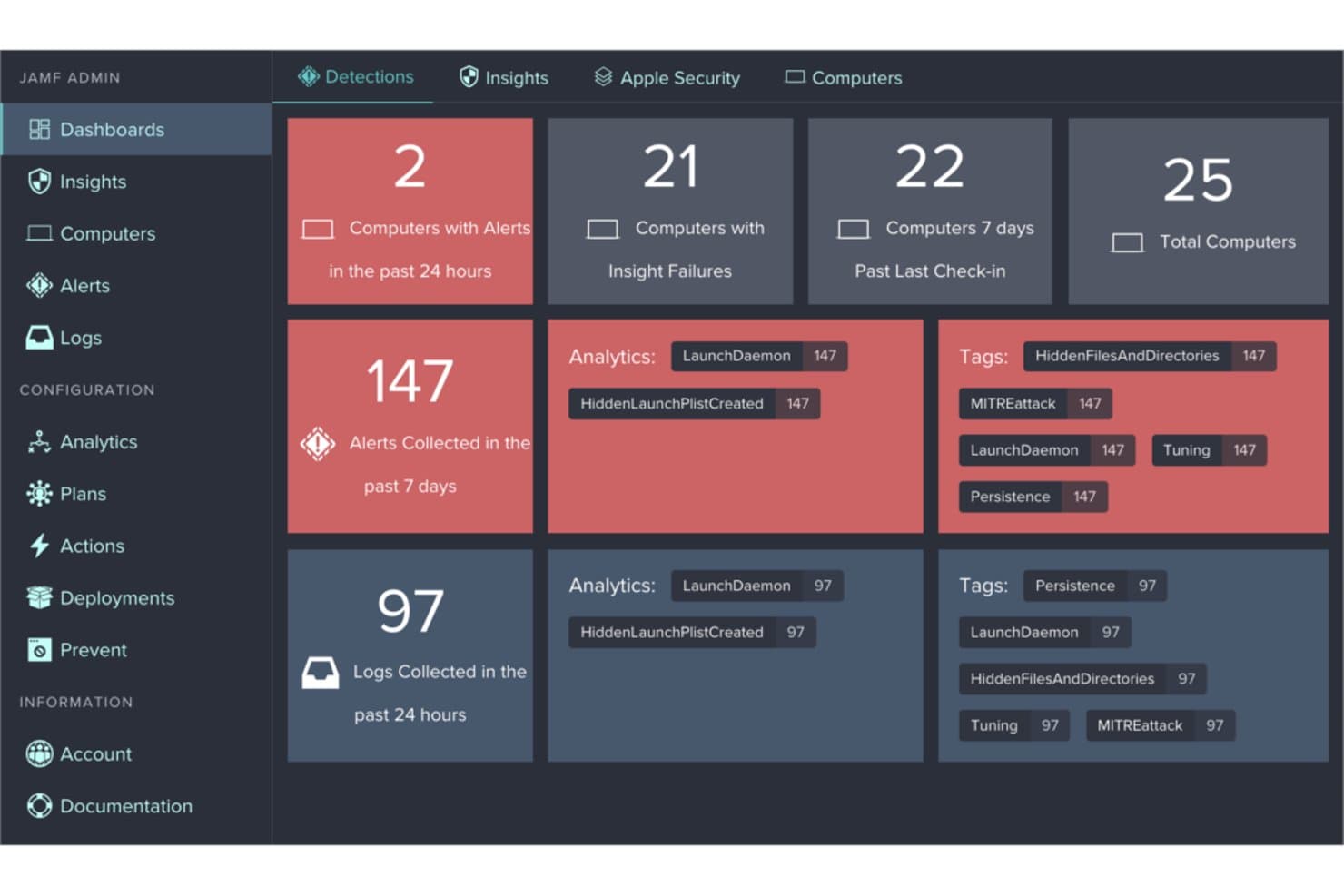
Jamf provides a security dashboard to monitor alerts, logs, and detections. Jamf gives IT teams managing Apple-heavy environments device management and security controls to deploy configurations, support users, and keep Mac and mobile fleets consistent as an alternative to general-purpose RMM software.
Who Is Jamf Best For?
IT teams responsible for Mac, iPhone, and iPad fleets will find Jamf a good fit for Apple-focused endpoint administration.
Why I Picked Jamf
I picked Jamf as an Atera alternative because its focus is Apple device management. I like that IT teams can deploy configurations and security controls across Mac, iPhone, and iPad fleets, then support users while keeping device settings consistent.
Jamf Key Features
- Inventory management: Collects hardware, software, and security configuration details for managed devices.
- Patch management: Tracks and deploys software updates across managed devices.
- Remote commands: Sends commands to lock or wipe managed computers remotely.
- Self Service: Lets users install approved apps and update software on their devices.
Jamf Integrations
Jamf lists 150+ integrations in its Marketplace, including ServiceNow, Google Workspace, Google Cloud Identity, Chrome, BeyondCorp, and Okta, with additional integrations across the Microsoft ecosystem. Jamf also provides APIs for custom integrations.
Pros and Cons
Pros:
- Same-day support for new Apple OS releases
- Zero-touch setup speeds Mac deployment
- Apple-native enrollment scales across large fleets
Cons:
- Advanced policies can demand scripting expertise
- Windows and Linux require separate management tools
Learn more about Jamf: Best for mobile-first IT management
- Free demo available
- Pricing upon request
Visit WebsiteCustomer Rating:4.7/5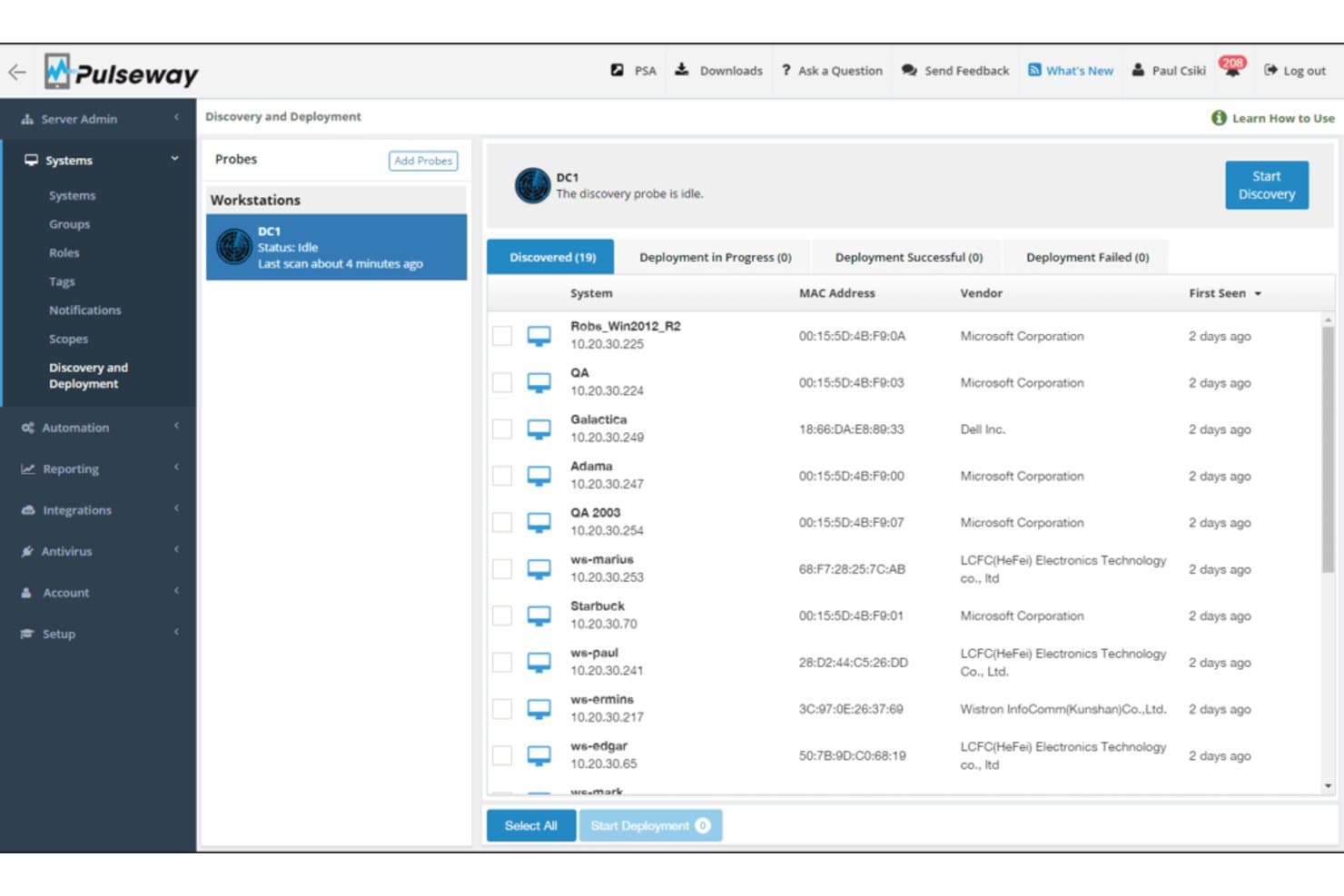
Pulseway lets users discover and deploy agents across networked workstations. Pulseway is an RMM platform for IT teams and managed service providers that need to monitor endpoints, manage systems, and resolve support issues across distributed environments.
Who Is Pulseway Best For?
IT administrators and MSP technicians who need to monitor endpoints and handle support tasks from a phone are a good fit for Pulseway.
Why I Picked Pulseway
I picked Pulseway as an Atera alternative for “Best for mobile-first IT management.” Its app sends instant push notifications and gives me a system overview, built-in commands, and mobile remote-control sessions. I can check an endpoint alert and act on a server or workstation issue from my phone.
Pulseway Key Features
- Patch management: Install, uninstall, and update software across managed systems.
- IT automation: Build workflows and schedule recurring tasks with the scripting engine.
- Network monitoring: Use an agent as a probe to discover and identify network devices.
- Ransomware detection: Monitor Windows devices for file behavior that can signal ransomware.
Pulseway Integrations
Pulseway lists eight integrations: Autotask, Zendesk, PagerDuty, Webroot, Slack, IT Glue, Warranty Master, and ConnectWise Manage. Its REST API v3 supports custom connections and webhooks for interacting with monitored instances in real time.
Pros and Cons
Pros:
- Patch policies cover Windows and third-party software
- Scheduled scripts automate recurring endpoint maintenance
- Mobile alerts enable remote reboots and updates
Cons:
- Remote control can lag or disconnect
- Reports offer limited flexibility
Learn more about Pulseway: Best for robust remote monitoring management
- 14-day free trial
- Pricing upon request
Visit WebsiteCustomer Rating:4.3/5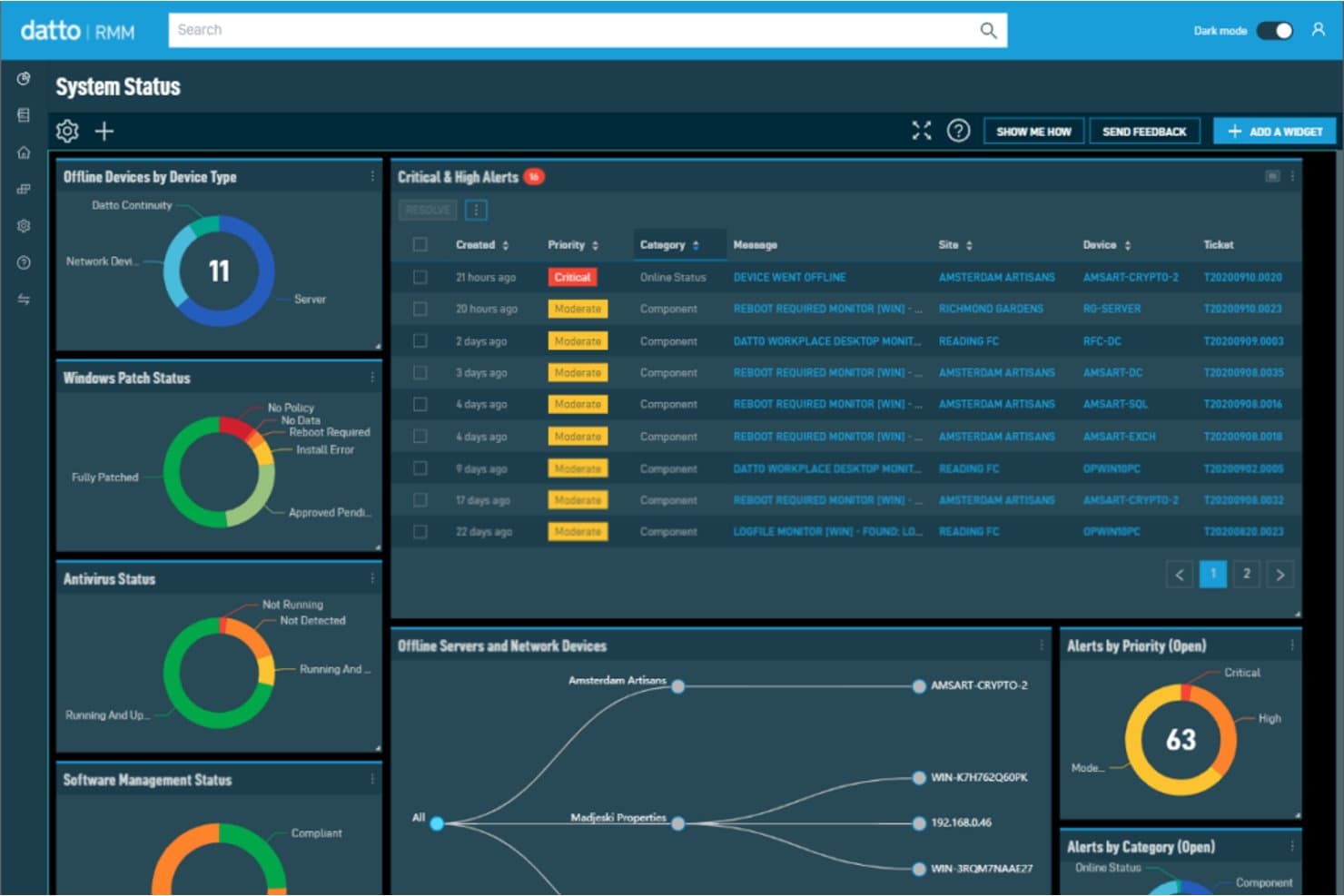
Datto RMM centralizes system health, alerts, and patch status in one dashboard. Datto RMM gives managed service providers and IT teams a platform to monitor client endpoints, automate routine maintenance, and address device issues remotely as an alternative to Atera.
Who Is Datto RMM Best For?
Datto RMM suits MSPs supporting distributed client networks where technicians need to resolve issues without onsite visits.
Why I Picked Datto RMM
I picked Datto RMM for “Best for robust remote monitoring management” because its endpoint dashboards pair intelligent alerts with automated patching and policy-based scripts. When a client server needs attention, browser-based Web Remote lets me connect to online devices and work on the issue without an onsite visit.
Datto RMM Key Features
- Microsoft 365 management: Onboard and offboard users, reset passwords, and quarantine accounts.
- Network topology maps: View mapped network devices and their connections.
- Ransomware detection: Detect ransomware activity and send automated client alerts.
- Autotask PSA integration: Sync data and actions, triage tickets, and access IT asset information.
Datto RMM Integrations
Datto RMM integrates with Autotask PSA, Kaseya BMS, Microsoft 365, IT Glue, and Datto products including Continuity, EDR, and Networking; supported third-party integrations include ConnectWise PSA, Apple MDM, and Splashtop. It also provides a REST API for custom integrations.
Pros and Cons
Pros:
- Automates maintenance through policy-based scripts
- Remote file, registry, and process tools
- Clear endpoint dashboards surface device alerts
Cons:
- Web Remote can feel laggy
- Patch deployment can be inconsistent
Learn more about Datto RMM: Best for unified IT management
- Free demo available
- Pricing upon request
Visit WebsiteCustomer Rating:4/5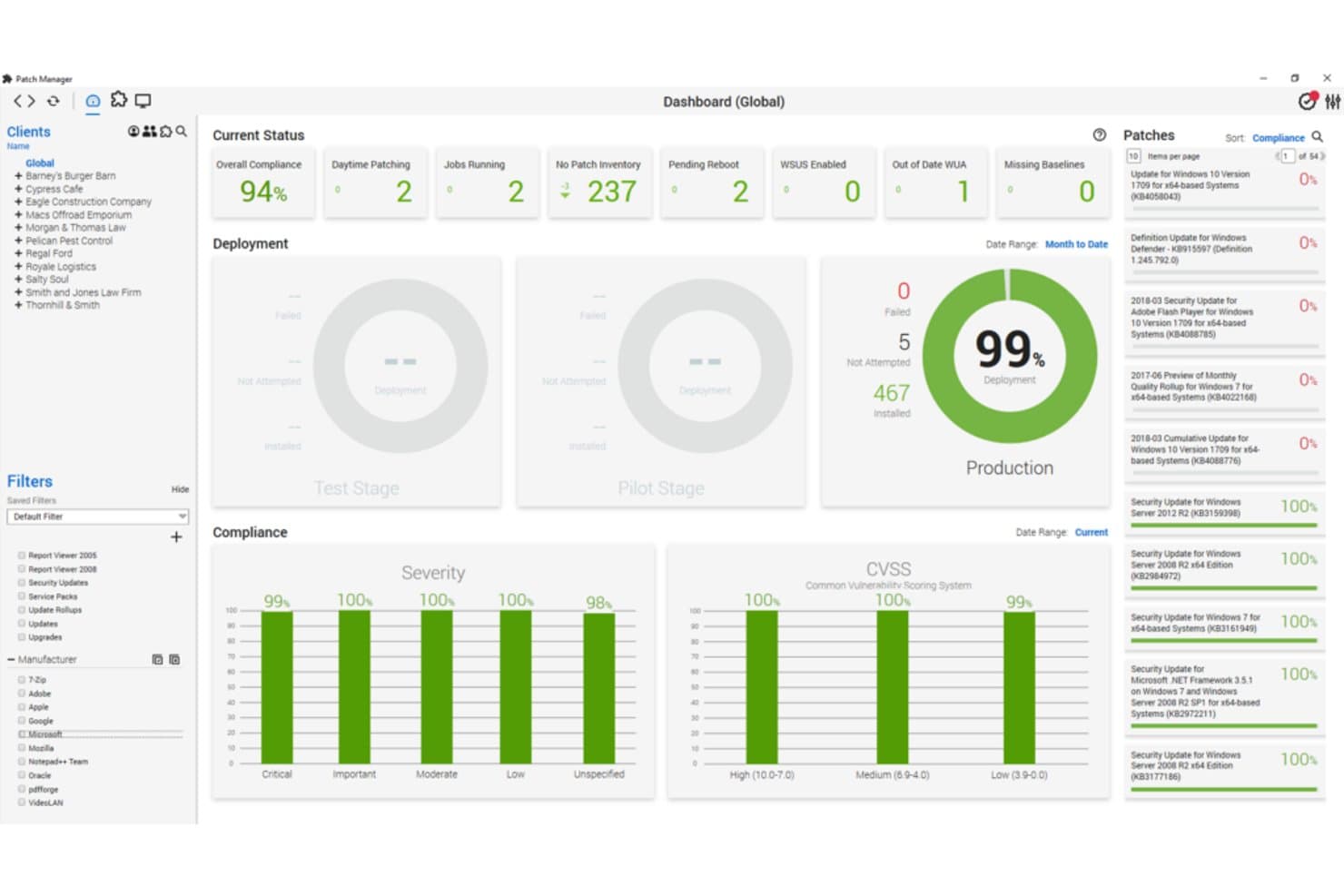
ConnectWise Automate tracks patch compliance and deployment across all clients. ConnectWise Automate is an RMM platform for managed service providers and IT teams that need to monitor endpoints, automate routine maintenance, and address support issues across client environments.
Who Is ConnectWise Automate Best For?
ConnectWise Automate suits MSP service desk and infrastructure teams that need a shared platform to manage IT across multiple client environments.
Why I Picked ConnectWise Automate
I picked ConnectWise Automate as an Atera alternative for Best for unified IT management. Its endpoint monitoring, patch management, and scripting help me oversee client systems and automate routine maintenance from one RMM platform. I value that combination when a service desk needs to spot issues and apply fixes across multiple environments.
ConnectWise Automate Key Features
- Network discovery: Scans networks to identify and catalog connected devices.
- Remote control: ConnectWise Control provides remote access to managed endpoints.
- Virtualization management: Manages Hyper-V and VMware environments from the platform.
- Reporting: Includes data views and reports for reviewing managed environments.
ConnectWise Automate Integrations
ConnectWise Automate integrates with ConnectWise Manage, now ConnectWise PSA, through open APIs. ConnectWise also provides SDK and API access for custom integrations, and third-party integrations are available through the ConnectWise Marketplace.
Pros and Cons
Pros:
- Centralized inventory pairs monitoring with remote remediation
- Endpoint scripting automates fixes across environments
- Customizable monitoring supports granular client policies
Cons:
- Dated interface and uneven web feature parity
- Initial setup demands substantial administrator time
Learn more about ConnectWise Automate: Best for comprehensive IT troubleshooting
- Not available
- Pricing upon request
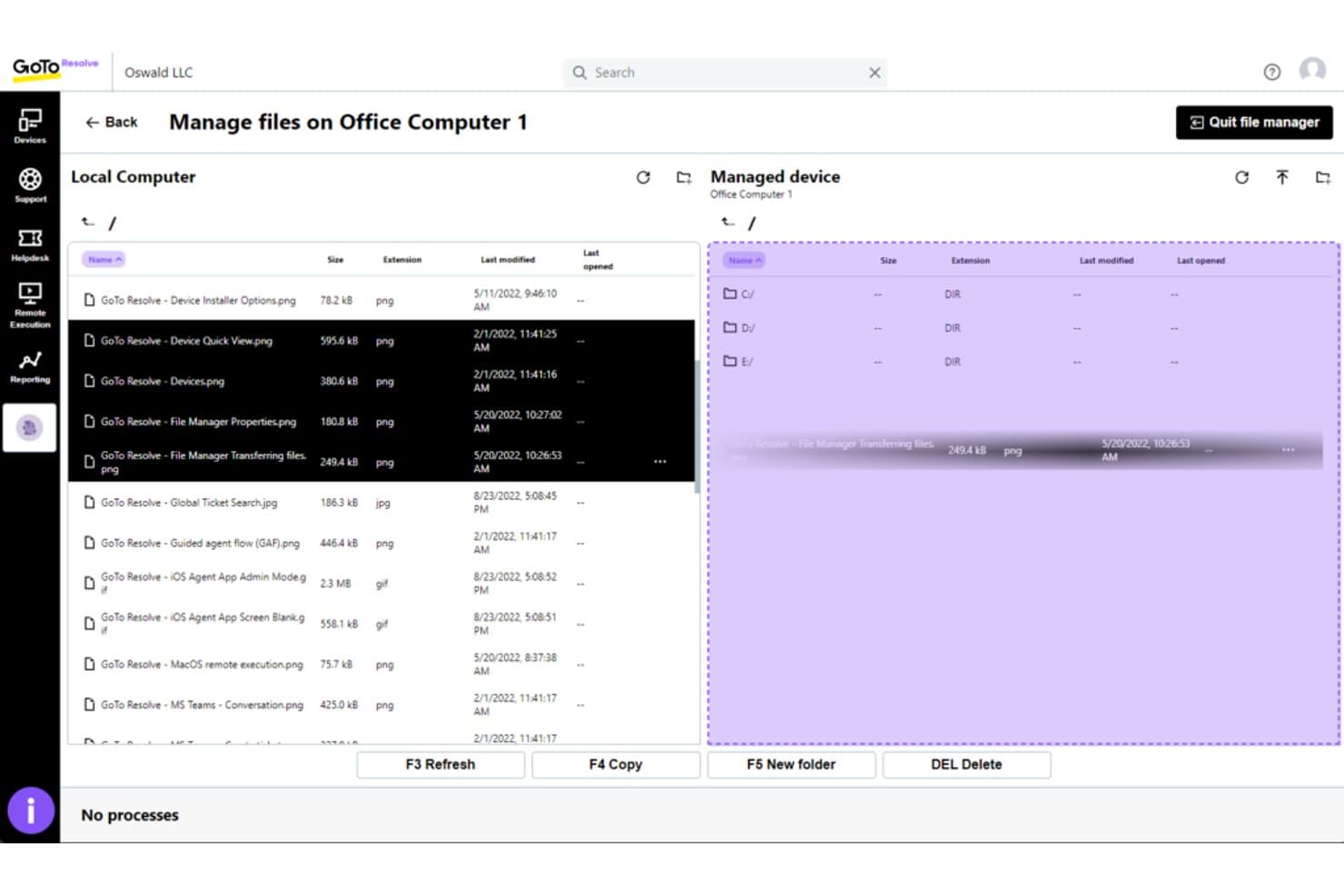
GoTo Resolve lets users transfer files between local and remote devices. For IT teams evaluating Atera alternatives, GoTo Resolve is a remote monitoring and management platform that helps support staff manage endpoints, assist users, and address device issues across distributed environments.
Who Is GoTo Resolve Best For?
GoTo Resolve suits IT support and help desk teams that need to diagnose and fix endpoint issues remotely.
Why I Picked GoTo Resolve
I picked GoTo Resolve as my “Best for comprehensive IT troubleshooting” choice because remote device access, endpoint alerts, and remote execution help me investigate workstation issues. When a device flags a problem, I can connect and run commands without asking the user to perform each diagnostic step.
GoTo Resolve Key Features
- Windows patch management: Review, approve, schedule, and deploy Windows updates across devices.
- Antivirus management: Monitor antivirus status and manage definitions from a central dashboard.
- Conversational ticketing: Handle help desk tickets through messaging apps such as Microsoft Teams.
- Multi-agent collaboration: Work with other support agents on user issues.
GoTo Resolve Integrations
GoTo Resolve integrates with Microsoft Teams, where employees can submit and follow up on tickets, while agents manage ticket queues and start remote support sessions. It also provides APIs for custom integrations.
Pros and Cons
Pros:
- Centralized patching and alerts aid endpoint upkeep
- Unattended access supports after-hours fixes
- Remote execution speeds workstation diagnosis
Cons:
- Sessions can lag or disconnect unexpectedly
- macOS support can require extra user steps
Learn more about GoTo Resolve:
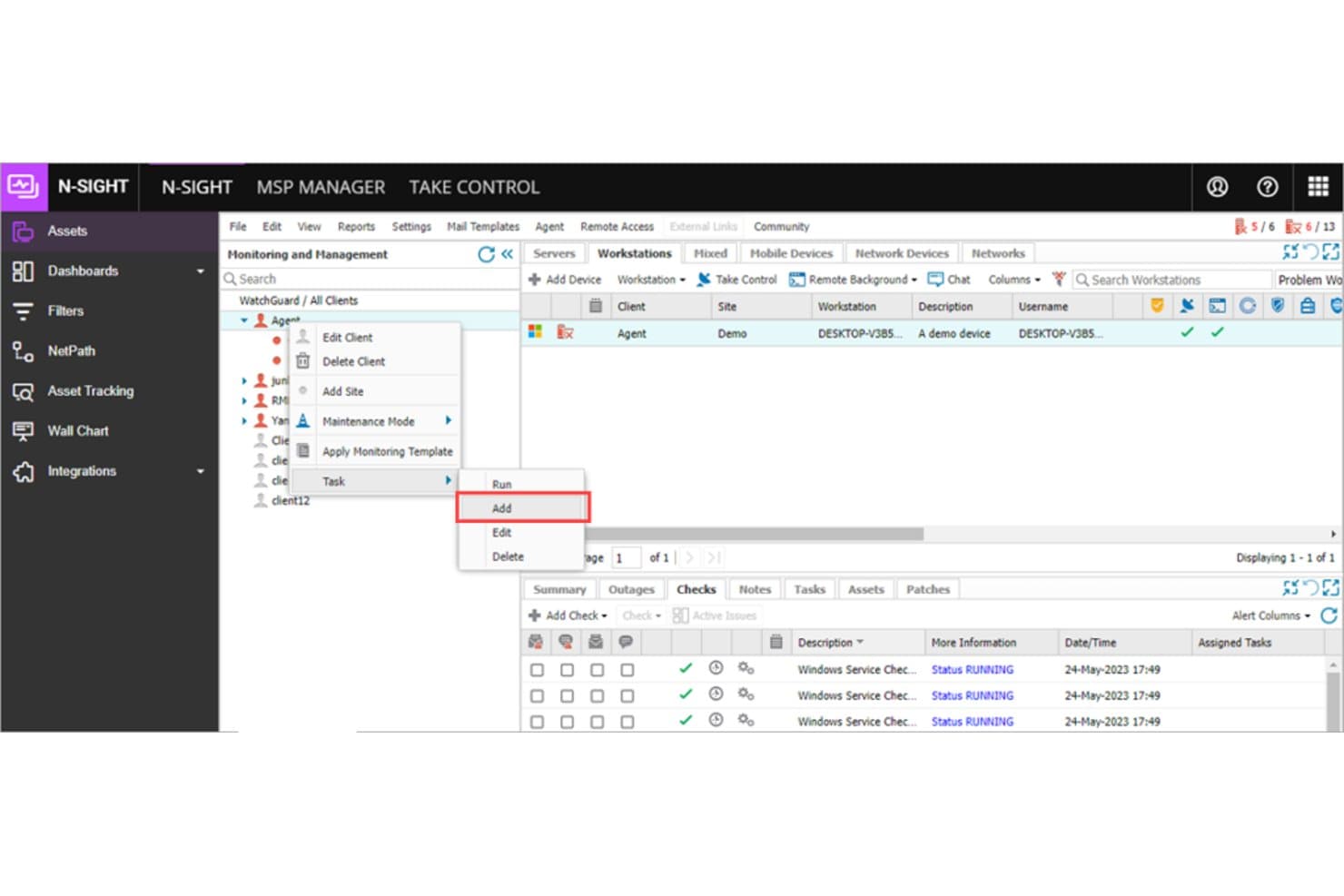
N-sight lets users add and manage scheduled tasks per client. N-sight is an RMM platform for MSPs and internal IT teams that brings endpoint monitoring, remote access, and patch management together to help manage distributed devices and resolve support issues.
Who Is N-sight Best For?
N-sight suits MSPs that need to standardize service delivery as their client and endpoint estates grow.
Why I Picked N-sight
I picked N-sight as an Atera alternative because it’s built for scalable IT service delivery. I like that endpoint monitoring, remote access, and patch management sit in one RMM platform, so my team can track distributed devices, troubleshoot support issues remotely, and keep systems updated as client estates grow.
N-sight Key Features
- Automation manager: Build and run tasks with a drag-and-drop interface.
- Multiplatform dashboard: View Windows, macOS, and Linux devices in one console.
- Integrated ticketing: Manage help desk tickets through the platform.
- Reporting and dashboards: Review service and device data in reports and dashboards.
N-sight Integrations
N-sight supports integrations with ConnectWise Manage, Autotask PSA, Accelo, HaloPSA, IT Glue, Hudu, BrightGauge, ESET, and Kaspersky. It also provides REST and GraphQL APIs for custom integrations.
Pros and Cons
Pros:
- Remote access options support distributed troubleshooting
- Drag-and-drop automation reduces repetitive endpoint tasks
- Centralizes monitoring across Windows, macOS, and Linux
Cons:
- Patch management receives recurring user complaints
- Dashboard alerts can desync from device status
Learn more about N-sight:
Andre Atera-alternativer
Her er noen flere Atera-alternativer som ikke kom med på kortlisten min, men som likevel er verdt å undersøke:
- 11SyncroBest for combined RMM and PSA functionality
- 12PDQBest for automated patch management
- 13NinjaOneBest for integrated IT monitoring and management
- 14TeramindBest for insider threat detection
- 15SyncroBest for integrated billing workflows
- 16ManageEngine Endpoint CentralBest for endpoint management and security
- 17New RelicGood for detailed server monitoring and performance analytics
- 18DatadogGood for cloud monitoring and analytics
- 19IT GlueGood for information management with robust documentation features
- 20AuvikGood for managing and automating network infrastructure
- 21Site24x7Good for monitoring the health and performance of websites
- 22LogicMonitorGood for cloud-based network monitoring and management
- 23ITarianGood for a free all-in-one IT operating platform
- 24Kaseya VSAGood for unifying IT management and network monitoring
- 25ISL OnlineGood for secure and reliable remote desktop support
- 26OptiTuneGood for providing IT management for MSPs and IT departments
- 27SolarWinds RMMGood for combining remote access with system management
- 28Kaseya RMMGood for automated IT management and security
- 29GoverlanGood for IT remote administration and management
- 30Comodo OneGood for providing endpoint security management
Andre programvareanmeldelser
- Verktøy for infrastrukturovervåking
- Programvare for kapitalforvaltning
- Programvare for lisensadministrasjon
How I Evaluate Atera Alternatives
I look at these tools in two layers: the baseline RMM and PSA capabilities a platform needs to qualify, and the differentiators—like pricing model and integrations—that determine the best fit.
Core Functionality (Table Stakes For This List)
When I'm selecting tools for my list, I rank each one on a scale from 0 (does not offer the functionality) to 5 (excels in this area) for each core functionality listed below. Then, I calculate the tool's total score into a percentage. Each tool needs to achieve a minimum total score of 75% to be considered for inclusion.
- Remote Monitoring & Management: I evaluate alerting depth, supported device types, and whether technicians can monitor servers, workstations, and SNMP devices from a single dashboard.
- Remote Access & Control: Unattended access across Windows, Mac, and Linux matters here—I check for file transfer, multi-monitor support, and session reliability.
- Patch Management: I look at whether the tool automates OS and third-party patching with scheduling and approval policies, not just one-off manual deployments.
- IT Automation & Scripting: Good platforms let you run PowerShell, Bash, or Python scripts on schedules or triggers—I check for a script library and policy engine.
- PSA & Ticketing: I evaluate ticket workflows, SLA tracking, and client portal options, especially for MSPs juggling multiple client environments at once.
- Billing & Reporting: For MSPs, I look at contract management, time tracking, and integrations with accounting tools like QuickBooks or Xero for invoicing.
Once I have a list of tools that meet this criteria, I consider what sets each platform apart.
Differentiating Factors (What Sets Vendors Apart)
Here's how I compare and contrast different vendors:
Standout Features
AI-powered features are a big differentiator right now. I check whether a platform offers script generation, ticket summarization, or troubleshooting suggestions that actually save technicians time during live sessions. Integrated endpoint security is another area I evaluate closely—tools that bundle antivirus, EDR, or backup reduce the number of third-party add-ons an MSP needs to manage. I also look at network discovery capabilities, since auto-mapping devices and visualizing topology can cut hours off onboarding a new client site.
Beyond Features
Pricing model is one of the first things I evaluate. Per-technician pricing works well for smaller MSPs, but per-endpoint models can be more predictable as your device count grows across clients. I also look at the integration ecosystem—whether a platform connects with documentation tools like IT Glue, security layers like Bitdefender, and accounting software matters when you're building out a full stack. Finally, I consider segment fit. A solo MSP needs a different experience than a 50-technician operation, so multi-tenant depth and scalability weigh heavily in my assessment.
Hvorfor se etter et Atera-alternativ?
Atera er en omfattende IT-administrasjonsplattform for leverandører av administrerte tjenester (MSP-er) og IT-fagfolk. Den tilbyr en alt-i-ett-løsning for fjernovervåking, automatisering av profesjonelle tjenester (PSA) og fjerntilgang. Det brede bruksområdet passer imidlertid kanskje ikke for virksomheter som ønsker spesialiserte løsninger eller bestemte funksjoner som ikke er tilgjengelige i Atera-pakken.
Ateras prismodell passer kanskje ikke med selskapets budsjett, eller brukerne kan ønske funksjoner som er skreddersydd for bestemte bransjebehov. Jakten på et Atera-alternativ skyldes disse faktorene og viser behovet for et verktøy som i større grad samsvarer med unike forretningskrav eller preferanser, på samme måte som tilbudene du finner når du sammenligner NinjaOne og Atera.
Viktige funksjoner i Atera
Her er noen av de viktigste funksjonene i Atera, slik at du kan sammenligne hva alternative løsninger tilbyr:
- Tredjepartsintegrasjoner: Kobler til verktøy som Splashtop, AnyDesk og flere for å utvide funksjonaliteten.
- Fjernovervåking og -administrasjon: Lar deg overvåke og administrere enheter og systemer fra hvor som helst.
- Støttesystem: Hjelper teamet ditt med å organisere, spore og løse supportsaker enklere.
- Automatisert oppdateringsadministrasjon: Holder enheter oppdatert ved å distribuere oppdateringer automatisk.
- Nettverksoppdagelse: Skanner og kartlegger alle tilkoblede enheter, slik at ingenting blir oversett.
- Regler for IT-automatisering: Lar deg sette opp skript for å håndtere rutineoppgaver og spare tid.
- Varsler i sanntid: Varsler deg når noe går galt, slik at du kan reagere raskt.
- Fjerntilgang: Lar deg feilsøke enheter uten å være fysisk til stede.
- Rapportering og analyse: Gir teamet ditt innsikt i systemenes tilstand og ytelse.
- Skriptbibliotek: Tilbyr ferdiglagde skript som du kan bruke eller tilpasse etter egne behov.
Sammendrag
Etter hvert som jakten på det beste alternativet til Atera utfolder seg, blir det tydelig at det finnes mange verktøy for IT-administrasjon på markedet, hver med sine unike tilbud. Når du skal velge, er det viktig å vurdere hva som betyr mest for organisasjonen din: fjernovervåking, integrasjonsmuligheter, administrasjon av IT-ressurser eller kanskje et brukervennlig grensesnitt. En grundig forståelse av behovene dine vil hjelpe deg med å ta en beslutning.
Her er de tre viktigste punktene fra denne veiledningen:
- Identifiser behovene dine: Ikke alle verktøy for IT-administrasjon er like, og det beste verktøyet for deg avhenger av de spesifikke behovene dine. Finn ut hvilke kjernefunksjoner og kritiske egenskaper du trenger i et verktøy for IT-administrasjon. Dette kan være alt fra et robust supportsystem til omfattende funksjoner for IT-automatisering. For ekstern nettverksadministrasjon kan RMM-programvare være et godt alternativ, avhengig av IT-miljøet ditt.
- Vurder brukervennligheten: Brukervennlighet er en viktig faktor når du velger et verktøy for IT-administrasjon. Se etter intuitive brukergrensesnitt, enkle introduksjonsprosesser, pålitelig kundestøtte og skalerbarhet for å sikre at programvaren kan vokse sammen med organisasjonen din.
- Vurder prisene: Prismodellene for disse verktøyene kan variere betydelig, og det er viktig å finne et alternativ som passer budsjettet ditt. Husk at den laveste prisen ikke alltid gir best verdi, og at det dyreste alternativet ikke nødvendigvis tilbyr funksjonene du trenger. Sett alltid prisen i sammenheng med funksjonene, fordelene og den samlede verdien programvaren gir organisasjonen din.