
Recensione di Veracode: vantaggi, svantaggi, funzionalità e prezzi spiegati
Get my no-nonsense take on Veracode: what it nails, where it misses, and whether its security tools actually deliver peace of mind for dev teams in 2026.

Recensiamo gli strumenti in modo indipendente e le commissioni ci aiutano a finanziare i nostri test. Consulta la nostra politica sulla trasparenza, la nostra metodologia, oppure suggerisci uno strumento.
Veracode is an application security software for development and security teams that need to scan code, open source dependencies, and running applications for vulnerabilities across the software development lifecycle. I'd reach for it when you want a unified platform that combines SAST, DAST, SCA, and container scanning under one policy engine, rather than stitching together point tools.
Compared to Checkmarx, which leans heavily on on-prem deployments and deeper tuning work, Veracode gives you a SaaS-first setup that gets your team scanning and triaging findings faster without standing up scan infrastructure yourself.
Veracode Evaluation Summary
3.8/5
- Pricing upon request
- Free demo available
Perché fidarsi dei nostri consigli sui software
6,700+
Reviews
20
Industry experts
16+
Evaluation factors
14
Years
Il nostro team testa e recensisce software dal 2012. In quanto leader tecnologici noi stessi, sappiamo quanto sia difficile — e importante — scegliere il software giusto.
Per questa guida, abbiamo valutato gli strumenti attraverso test praticie ricerche indipendenti, assegnando un punteggio agli strumenti in base ai nostri criteri di selezione.
Le nostre recensioni riflettono il nostro giudizio editoriale umano, non un discorso di vendita.
Revisori esperti:
- Paulo Gardini MiguelDirettore tecnico
 Tim FisherVP dell'IA
 Gabriel RosasTech Lead e architetto software
 Christhian GruhnTech Lead e architetto della piattaforma

Veracode Overview
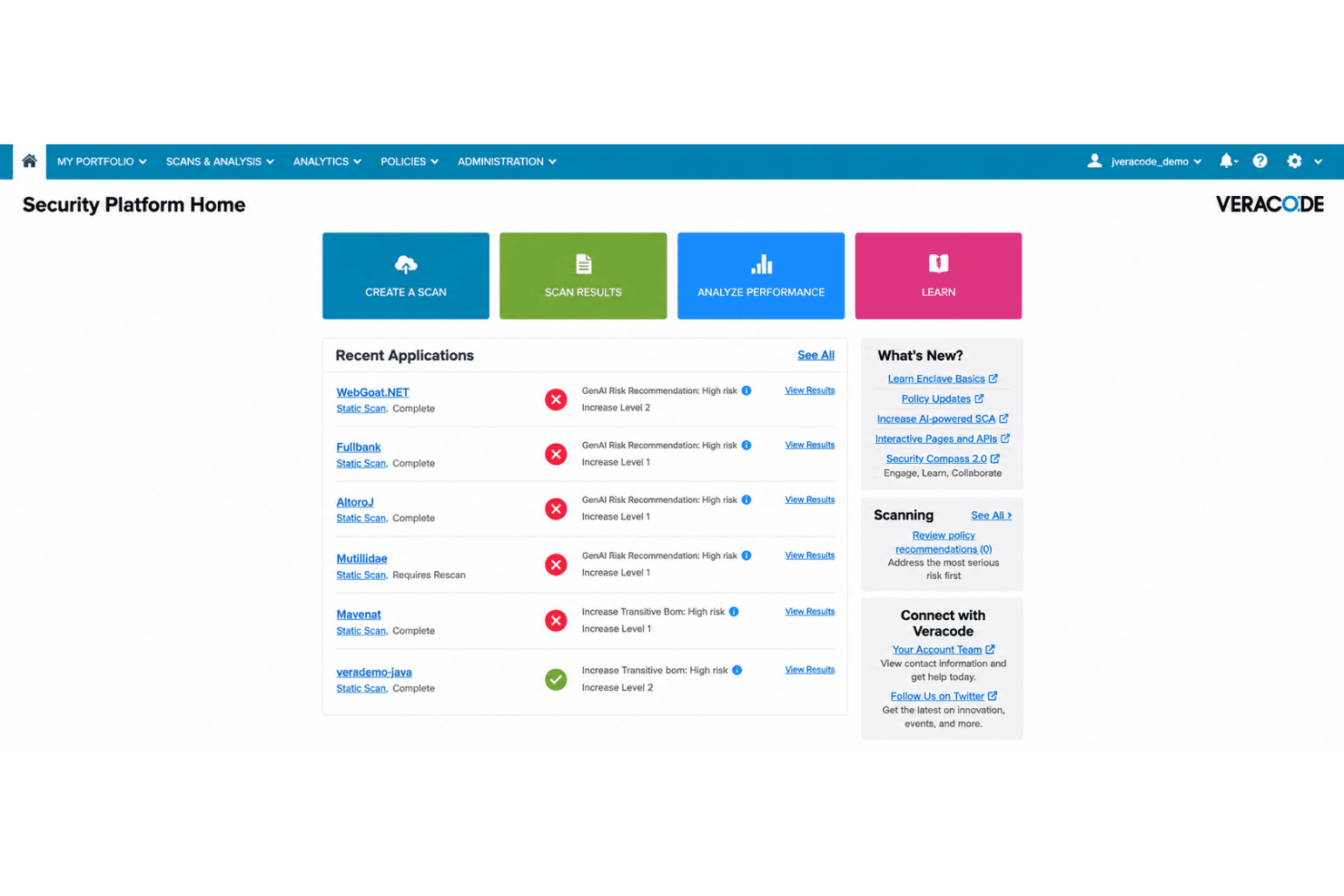
I think Veracode stands out for its SaaS-first approach, letting teams start scanning without heavy setup or infrastructure. Its all-in-one dashboard ties together static, dynamic, software composition, and container analysis, which saves time compared to juggling separate tools. I find the interface approachable, with policy management and triage features that suit larger DevSecOps and development teams. Pricing can be high for smaller teams, and limits on customization occasionally frustrate power users. Still, if you want fast onboarding, strong coverage across modern application stacks, and dependable support, Veracode should be at the top of your list for enterprise and mid-size environments.
Pros
- SaaS delivery skips on-prem setup and maintenance costs
- Unified dashboard covers SAST, DAST, SCA, and container scanning
- Policy management centralizes governance for large application portfolios
Cons
- Scan times can be lengthy for large codebases
- API coverage lags behind leading competitors
- False positives require extra manual triage effort
Is Veracode Right For Your Needs?
Who Would be a Good Fit for Veracode?
Veracode works best for mid to large businesses in regulated or security-driven sectors with complex development environments and clear compliance needs. Application security teams, DevOps-driven product companies, and organizations running critical cloud-native infrastructure will find real value because Veracode’s SaaS-based scanning, wide integration support, and built-in eLearning can handle compliance demands, varied tech stacks, and skills gaps. Regulated firms and those scaling app security across multiple business units get consistent policies, ASPM visibility, and audit trails. If your team needs less operational overhead and more out-of-the-box guidance, Veracode lines up well.
- Enterprise Software VendorsVeracode’s scalable scanning and API integrations help large software companies enforce security policies across many products and codebases.
- Finance and BankingBuilt-in compliance reporting, policy templates, and audit support make Veracode a solid option for banks needing to meet regulatory standards.
- SaaS ProvidersSaaS vendors who release frequently can run automated SAST, DAST, and container scans without on-premise overhead, speeding up release cycles.
- Healthcare IT TeamsHealthcare teams will find preconfigured compliance tools, transparent reporting, and eLearning useful for meeting HIPAA and similar requirements.
- DevOps OrganizationsDevOps teams cut down context-switching and manual steps thanks to Veracode’s integrations with GitHub and Jira.
- Global EnterprisesLarge organizations managing multiple app portfolios benefit from centralized dashboards, customizable policies, and multi-team onboarding.
Who Would be a Bad Fit for Veracode?
Veracode isn’t a great choice for small teams, legacy workloads, or companies with minimal regulatory or security demands. Early-stage startups, non-technical departments, and businesses working with closed-source or highly niche platforms won’t get full value—mainly because of pricing, the all-in focus on modern SDLC integration, and the way onboarding and learning programs assume some existing security maturity. Simple applications and teams who rarely update their codebase may find the feature set excessive for their needs and budget.
- Small Development TeamsEntry pricing and broad feature sets can be overkill for startups with only a single app and minimal formal security requirements.
- Legacy System OperatorsOrganizations focused on legacy platforms may struggle as Veracode’s integrations and policy workflows are built for modern frameworks and languages.
- Marketing AgenciesAgencies creating static sites or simple web apps won’t benefit from multi-layer scanning, policy controls, or deep SAST features.
- Academic InstitutionsUniversities and schools working on non-commercial apps or prototypes won’t use advanced scanning, compliance, or team management features.
- On-Premise-Only EnvironmentsCompanies who cannot use SaaS solutions due to data residency or regulatory constraints will hit a wall, since Veracode is delivered via the cloud.
- Freelance DevelopersSolo developers will find built-in eLearning and policy automation unnecessary, and the user minimums will put Veracode out of budget.
La Nostra Metodologia di Recensione
Come Testiamo e Valutiamo gli Strumenti
Abbiamo trascorso anni a costruire, perfezionare e migliorare il nostro sistema di testing e valutazione del software. Il nostro schema è progettato per cogliere le sfumature della selezione software e cosa rende efficace uno strumento, focalizzandosi sugli aspetti critici del processo decisionale.
Di seguito, puoi vedere esattamente come funziona il nostro testing e punteggio su sette criteri. Ci permette di offrire una valutazione imparziale del software basata su funzionalità principali, caratteristiche distintive, facilità d’uso, onboarding, assistenza clienti, integrazioni, recensioni dei clienti e rapporto qualità-prezzo.
Funzionalità Principali (25% del punteggio finale)
Il punto di partenza della nostra valutazione è sempre la funzionalità principale dello strumento. Ha le funzioni e caratteristiche base che ci si aspetta? Alcune di queste caratteristiche sono limitate ai piani tariffari superiori? Fondamentalmente, ci aspettiamo che uno strumento regga il confronto rispetto alle capacità di base dei concorrenti.
Caratteristiche Distintive (25% del punteggio finale)
Successivamente, valutiamo le caratteristiche distintive e non comuni che vanno oltre la funzionalità base tipicamente trovata negli strumenti di questa categoria. Un punteggio alto riflette funzionalità specializzate o uniche che rendono il prodotto più veloce, efficiente o offrono ulteriore valore all’utente.
Valutiamo inoltre quanto sia semplice integrare altri strumenti tipicamente utilizzati nell’infrastruttura tecnologica per espandere la funzionalità e l’utilità del software. Gli strumenti che offrono numerose integrazioni native, connessioni di terze parti e accesso API per creare integrazioni personalizzate ottengono i punteggi migliori.
Facilità d’Uso (10% del punteggio finale)
Consideriamo quanto sia rapido e semplice svolgere i compiti definiti nella funzionalità principale utilizzando lo strumento. Il software con punteggio alto è ben progettato, intuitivo da usare, offre app mobili, fornisce modelli e rende semplici attività relativamente complesse.
Onboarding (10% del punteggio finale)
Sappiamo quanto sia importante l’adozione rapida da parte del team per una nuova piattaforma, quindi valutiamo quanto sia facile imparare e utilizzare uno strumento con formazione minima. Valutiamo quanto velocemente un membro del team possa iniziare a usare lo strumento anche senza esperienza. Soluzioni con punteggio alto indicano che sono richiesti pochi o nessun supporto.
Assistenza Clienti (10% del punteggio finale)
Esaminiamo quanto sia veloce e facile ricevere assistenza e risolvere problemi tramite telefono, live chat o knowledge base. Gli strumenti e le aziende che garantiscono supporto in tempo reale ottengono il miglior punteggio, mentre i chatbot ottengono il peggiore.
Recensioni dei Clienti (10% del punteggio finale)
Oltre ai nostri test e valutazioni, prendiamo in considerazione il net promoter score dei clienti attuali e passati. Valutiamo la probabilità che, data la scelta, selezionerebbero nuovamente lo strumento per la funzionalità principale. Un software con punteggio alto riflette un alto net promoter score da parte dei clienti attuali o passati.
Rapporto Qualità-Prezzo (10% del punteggio finale)
Infine, considerando tutti gli altri criteri, analizziamo il prezzo medio dei piani base rispetto alle funzionalità principali e consideriamo il valore degli altri criteri di valutazione. Il software che offre di più a meno otterrà un punteggio più alto.
Core Features
Static Application Security Testing (SAST)
Static analysis scans source code and compiled code for security flaws during development without running the application. This helps your team catch vulnerabilities and code quality issues early before code moves to production.
Dynamic Application Security Testing (DAST)
Dynamic analysis tests live, running applications for exploitable vulnerabilities from an attacker’s perspective. You can assess web apps for common issues like SQL injection or cross-site scripting in staging or production environments.
Software Composition Analysis (SCA)
Analyze open source components to identify outdated libraries, known vulnerabilities, and license compliance issues. This helps you manage risk from third-party dependencies automatically across your entire application portfolio.
Container Security Scanning
Scan container images for vulnerabilities, configuration risks, and policy violations before deployment. Teams get actionable feedback to secure containers integrated directly into CI/CD pipelines.
Centralized Policy Management
Define and enforce security policies across multiple projects and teams through one dashboard. You can set risk thresholds, remediation targets, and track your security posture for every application in your portfolio.
Triage and Remediation Guidance
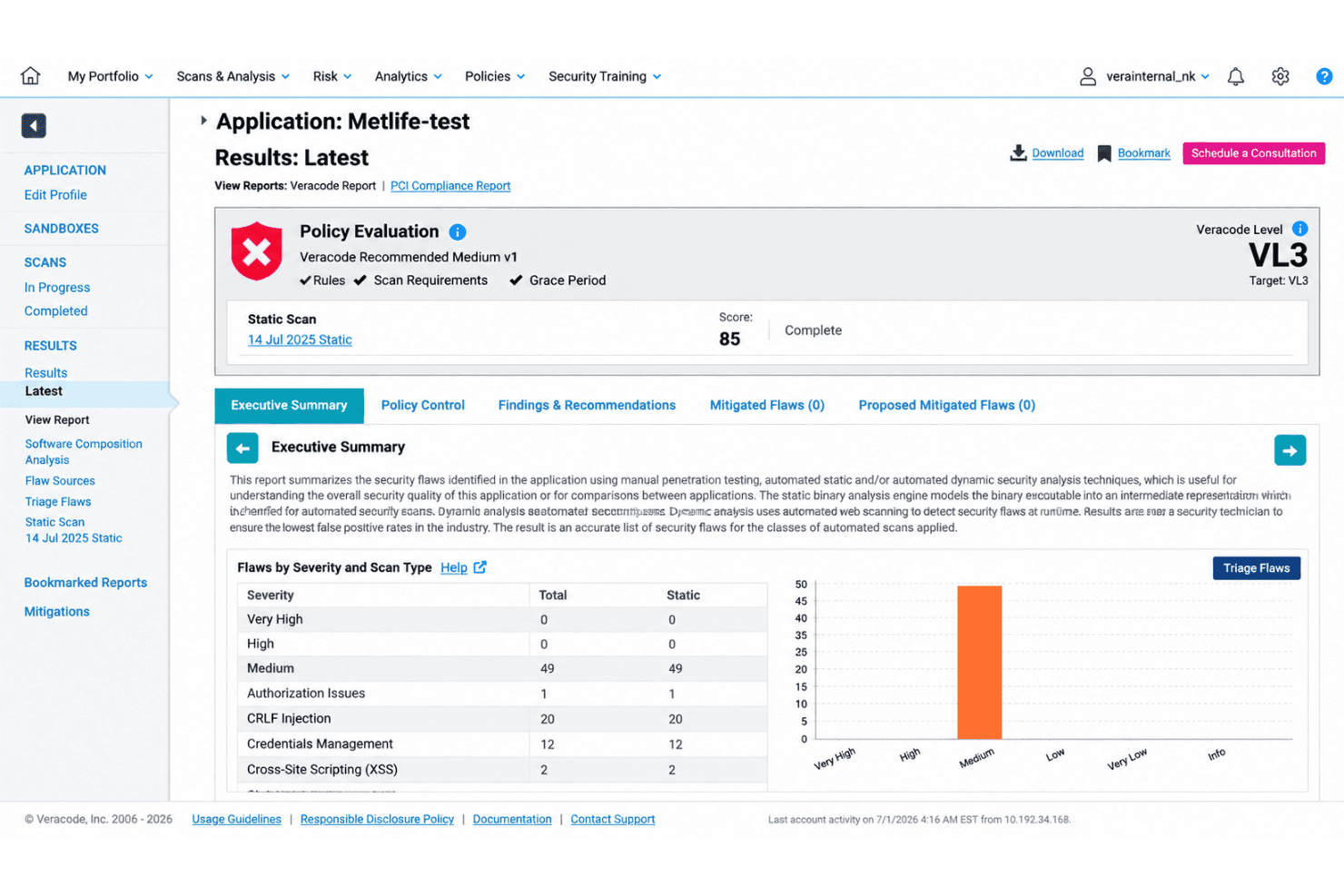
Prioritize findings by risk and get specific remediation advice for developers right in the platform. This speeds up response times and helps your team focus on the most urgent vulnerabilities.
Ease of Use
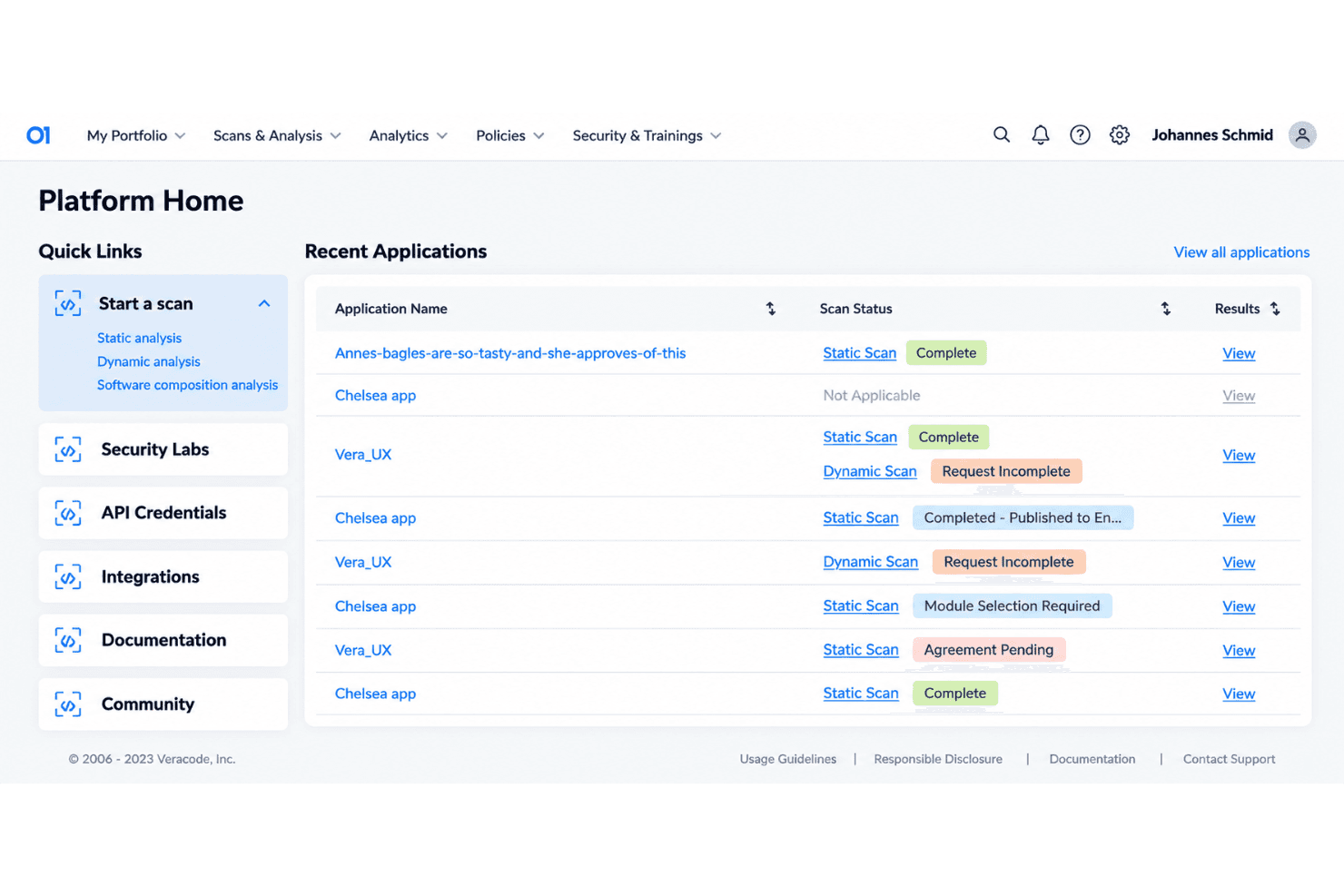
Veracode is easy to onboard for most teams, with a SaaS delivery model that skips manual setup or complex infrastructure. The dashboard brings SAST, DAST, SCA, and container scanning into one view, making it simple to manage policies and findings. Some users mention that large codebase scans take time and that false positives add extra triage, but the platform’s organized interface and clear workflows keep day-to-day usage straightforward.
Integrations
Veracode integrates with Jira, GitHub, GitLab, Azure DevOps, AWS, Bitbucket, ServiceNow, and Snyk, among others.
Veracode also provides both XML and REST API and supports integration with third-party tools for expanded connectivity.
Veracode Specs
- A/B Testing: Yes
- API: Yes
- Automated Testing: Yes
- Browser Compatibility Testing: Yes
- Bug Tracking: Yes
- Calendar Management: Yes
- CI/CD Integration: Yes
- Dashboard: Yes
- Data Export: Yes
- Data Import: Yes
- Data Visualization: Yes
- Developer Tools: Yes
- External Integrations: Yes
- History/Version Control: Yes
- Manual Testing: Yes
- Multi-User: Yes
- Notifications: Yes
- Performance Testing: Yes
- Regression Testing: Yes
- Scheduling: Yes
- Status Notifications: Yes
- Third-Party Plugins/Add-Ons: Yes


