

Gli strumenti per il monitoraggio degli esperimenti di ML ti aiutano a registrare, organizzare e confrontare gli esperimenti di apprendimento automatico, così puoi gestire i risultati e riprodurre le scoperte con sicurezza. Se cerchi metodi pratici per monitorare gli esperimenti, condividere i progressi con il tuo team o mantenere organizzati i tuoi modelli e set di dati, lo strumento giusto può fare una grande differenza.
In questo elenco troverai soluzioni adatte a diversi ambienti tecnici e flussi di lavoro, che ti aiuteranno a ridurre gli ostacoli, semplificare la reportistica e concentrarti su una gestione affidabile degli esperimenti di apprendimento automatico.
Perché fidarsi dei nostri consigli sui software
6,700+
Reviews
20
Industry experts
16+
Evaluation factors
14
Years
Il nostro team testa e recensisce software dal 2012. In quanto leader tecnologici noi stessi, sappiamo quanto sia difficile — e importante — scegliere il software giusto.
Per questa guida, abbiamo valutato gli strumenti attraverso test praticie ricerche indipendenti, assegnando un punteggio agli strumenti in base ai nostri criteri di selezione.
Le nostre recensioni riflettono il nostro giudizio editoriale umano, non un discorso di vendita.
Revisori esperti:
- Paulo Gardini MiguelDirettore tecnico
 Tim FisherVP dell'IA
 Gabriel RosasTech Lead e architetto software
 Christhian GruhnTech Lead e architetto della piattaforma

Riepilogo dei migliori strumenti per il monitoraggio degli esperimenti di ML
Questa tabella comparativa riassume i dettagli dei prezzi dei migliori strumenti per il monitoraggio degli esperimenti di ML che ho selezionato, per aiutarti a trovare quello più adatto al tuo budget e alle esigenze della tua azienda.
| Tool | Best For | Trial Info | Price | ||
|---|---|---|---|---|---|
| 1 | Ideale per il confronto in tempo reale degli esperimenti | Piano gratuito disponibile | Da $19/utente/mese | Website | |
| 2 | Ideale per dashboard di visualizzazione personalizzabili | Piano gratuito disponibile | Da $60/mese | Website | |
| 3 | Ideale per il versionamento automatico delle pipeline | Prova gratuita di 14 giorni disponibile | Prezzi su richiesta | Website | |
| 4 | Ideale per l'orchestrazione automatica delle pipeline | Piano gratuito disponibile | Da $15/utente/mese | Website | |
| 5 | Ideale per il supporto open-source al ciclo di vita dei modelli | Demo gratuita + piano gratuito per sempre disponibile | Gratis per sempre (open-source) | Website | |
| 6 | Ideale per l'integrazione con i framework di apprendimento profondo | Piano gratuito per sempre disponibile | Gratis per sempre (a codice aperto) | Website | |
| 7 | Ideale per la gestione dei flussi di lavoro nativa di Kubernetes | Piano gratuito disponibile | Gratuito e open source | Website | |
| 8 | Ideale per l'integrazione con l'ecosistema cloud AWS | Piano gratuito disponibile | Da $0.204/ora | Website | |
| 9 | Ideale per architettura a plugin e grande estendibilità | Piano gratuito disponibile | Da $399/mese | Website | |
| 10 | Ideale per opzioni di deployment ibrido e on-premise | Piano gratuito + demo gratuita disponibile | Da $450/mese (fatturazione annuale) | Website |


Recensioni dei migliori strumenti per il monitoraggio degli esperimenti di ML
Di seguito trovi i miei riepiloghi dettagliati dei migliori strumenti per il monitoraggio degli esperimenti di ML inclusi nella mia selezione. Le mie recensioni offrono uno sguardo approfondito sulle funzionalità, le integrazioni e i casi d’uso migliori di ogni piattaforma, per aiutarti a trovare quella più adatta a te.
 Ideale per il confronto in tempo reale degli esperimenti
- Piano gratuito disponibile
- Da $19/utente/mese
Visit WebsiteCustomer Rating:4.4/5
Traccia esperimenti ML, performance dei modelli e valutazione LLM. Comet è una piattaforma per il monitoraggio degli esperimenti di Machine Learning e la valutazione dei modelli che registra metriche, iperparametri e artefatti delle sessioni di addestramento ed estende la sua funzionalità all’osservabilità dei LLM e alla valutazione dell’IA agentica tramite il prodotto Opik.
Per chi è Comet?
Comet è particolarmente adatto a team di ML e AI in aziende in crescita o enterprise che effettuano un elevato volume di esperimenti e necessitano di una visibilità in tempo reale sulle sessioni di addestramento.
Perché ho scelto Comet
Ho scelto Comet tra i migliori perché il suo dashboard di monitoraggio live degli esperimenti aggiorna le metriche durante l’addestramento, consentendo al mio team di individuare subito una curva di perdita divergente e interrompere una sessione problematica prima di sprecare risorse computazionali. Utilizzo anche la visualizzazione di confronto affiancato degli esperimenti per filtrare tra decine di sessioni in base al valore dell’iperparametro e isolare subito quale configurazione ha portato alla migliore accuratezza di validazione. Oltre alle funzionalità classiche di MLOps, Comet ora si estende anche alla valutazione dei LLM tramite Opik, così non devo cambiare strumento quando passo dall’addestramento del modello al monitoraggio degli agenti in produzione.
Caratteristiche principali di Comet
- Registro dei modelli: Salva, versiona e gestisci i modelli addestrati in un registro centralizzato con etichette di stato come staging e produzione.
- Registrazione degli artefatti: Registra e versiona dataset, immagini, matrici di confusione e file audio direttamente insieme alle sessioni di esperimento.
- Pannelli personalizzati: Crea visualizzazioni personalizzate all’interno della UI di Comet usando JavaScript per andare oltre i grafici metrici predefiniti.
- Monitoraggio delle metriche di sistema: Rileva automaticamente l’utilizzo della GPU, il carico della CPU e l’utilizzo della memoria per ogni sessione senza necessità di ulteriore strumentazione.
Integrazioni di Comet
Comet offre oltre 30 integrazioni native, tra cui PyTorch, TensorFlow, Keras, Scikit-learn, XGBoost, Hugging Face Transformers, Ray, Kubeflow, Snowflake e Vertex AI. È disponibile su Zapier e propone una REST API, oltre a SDK Python, Java, JavaScript e R per integrazioni personalizzate.
Pros and Cons
Pros:
- Registrazione automatica delle metriche con pochissimo codice
- Visualizzazione in tempo reale delle sessioni di addestramento
- Traccia sia esperimenti ML che LLM
Cons:
- Il piano Pro limita i team a 10 utenti
- Le opzioni di personalizzazione della UI sono limitate
Learn more about Comet: Ideale per dashboard di visualizzazione personalizzabili
- Piano gratuito disponibile
- Da $60/mese

Weights and Biases traccia esperimenti ML, metriche e confronta diverse esecuzioni di modelli. Weights & Biases è una piattaforma di tracciamento degli esperimenti di apprendimento automatico che registra metriche, iperparametri e checkpoint dei modelli, permettendo di visualizzare e confrontare le esecuzioni tramite dashboard interattive.
A chi è ideale Weights & Biases?
Weights & Biases si adatta perfettamente a data scientist e ingegneri ML che effettuano frequenti esperimenti e necessitano di confronti dettagliati tra diverse esecuzioni all'interno di team numerosi.
Perché ho scelto Weights & Biases
Weights & Biases è una delle mie scelte preferite perché apprezzo molto le dashboard di visualizzazione personalizzabili che offre. Posso visualizzare in tempo reale l'utilizzo delle GPU, le curve di perdita e le previsioni di esempio in un'unica dashboard interattiva durante l'addestramento, il che rende rapido individuare i colli di bottiglia. La funzione Sweeps mi permette di visualizzare i risultati della ricerca degli iperparametri direttamente accanto alle metriche dell'esperimento, così posso confrontare tutto in un'unica schermata. I report consentono inoltre al mio team di annotare e condividere queste dashboard senza uscire dalla piattaforma.
Funzionalità chiave di Weights & Biases
- Artifacts: Versiona e traccia set di dati, modelli e risultati di valutazione attraverso gli esperimenti.
- Registro dei modelli: Centralizza i modelli addestrati e collegali direttamente agli esperimenti che li hanno generati.
- Raggruppamento delle esecuzioni: Organizza le esecuzioni correlate in gruppi per confrontare i risultati tra diverse configurazioni di addestramento.
- Avvisi: Imposta notifiche automatiche per soglie metriche, errori di esecuzione o eventi di completamento dei job.
Integrazioni di Weights & Biases
Weights & Biases offre integrazioni native con PyTorch, Keras, TensorFlow, Scikit-learn, XGBoost, Hugging Face Transformers e PyTorch Lightning, oltre a strumenti LLM come LangChain e LlamaIndex. Si integra anche con Kubeflow, Jenkins, Airflow, GitHub Actions, AWS SageMaker e Google Vertex AI. Sono disponibili una API e un SDK Python per integrazioni personalizzate.
Pros and Cons
Pros:
- Streaming in tempo reale delle metriche alle dashboard
- Registrazione automatica dei commit git e della configurazione
- Report collaborativi ricchi di grafici integrati
Cons:
- L'interfaccia web rallenta con molte esecuzioni in parallelo
- Documentazione carente sulle funzionalità di base
Learn more about Weights & Biases: Ideale per il versionamento automatico delle pipeline
- Prova gratuita di 14 giorni disponibile
- Prezzi su richiesta

Valohai offre una piattaforma di machine learning per il monitoraggio degli esperimenti e l'addestramento dei modelli. Valohai è una piattaforma di machine learning che combina il monitoraggio automatico degli esperimenti, il versionamento dei dataset, la tracciabilità della discendenza dei modelli e l'orchestrazione delle risorse di calcolo cloud per i team che sviluppano e addestrano modelli su larga scala.
Per chi è più adatto Valohai?
Valohai è particolarmente adatto ai team di ingegneria del machine learning di aziende di medie e grandi dimensioni che eseguono frequentemente processi di addestramento in diversi ambienti cloud.
Perché ho scelto Valohai
Ho scelto Valohai come una delle migliori soluzioni perché il versionamento automatico è realmente integrato in ogni esecuzione. Metriche, metadati, log e iperparametri vengono sottoposti a versionamento senza alcuna etichettatura manuale, quindi non devo mai ricostruire cosa è stato eseguito e quando. Mi piace anche il fatto che Valohai tenga traccia della discendenza completa di dataset e modelli, permettendomi di risalire esattamente alla versione del dataset che ha prodotto un determinato modello. Ogni esecuzione è riproducibile per sua natura, eliminando le congetture che rendono difficili gli audit degli esperimenti.
Caratteristiche principali di Valohai
- Visualizzazione comparativa degli esperimenti: Mostra più esecuzioni affiancate, consentendo di confrontare iperparametri, metriche e risultati di diversi esperimenti in un'unica tabella.
- Strumento per la creazione di pipeline: Un editor visivo per creare pipeline di machine learning composte da più fasi, in cui ogni nodo corrisponde a una fase di esecuzione sottoposta a versionamento.
- Orchestrazione delle risorse di calcolo cloud: Fornisce e termina automaticamente le istanze cloud su AWS, GCP o Azure per ogni esecuzione di addestramento.
- Attivatori della distribuzione: Promuove i modelli addestrati direttamente a un endpoint di distribuzione dalla stessa piattaforma utilizzata per l'addestramento.
Integrazioni di Valohai
Valohai offre una selezione ridotta di integrazioni predefinite tramite la sua libreria Ecosystem, inclusi connettori per Snowflake, BigQuery e Redshift, un modello per Hugging Face e integrazioni con Slurm e OVHcloud. Funziona su AWS, GCP, Azure e Oracle Cloud Infrastructure e fornisce un'API REST per creare integrazioni personalizzate.
Pros and Cons
Pros:
- Registra automaticamente le metriche dai JSON stampati
- Funziona su qualsiasi cloud o hardware locale
- Tracciabilità completa della discendenza dal modello al dataset
Cons:
- Adattare gli script al formato Valohai richiede impegno
- La vista principale degli esperimenti è visivamente poco entusiasmante
Learn more about Valohai: Ideale per l'orchestrazione automatica delle pipeline
- Piano gratuito disponibile
- Da $15/utente/mese

Piattaforma MLOps open source per tracking ML, pipeline e gestione modelli. ClearML è una piattaforma MLOps open-source che copre il tracciamento degli esperimenti, la gestione delle versioni dei dataset, la gestione dei modelli e l'orchestrazione delle pipeline lungo tutto il ciclo di vita del machine learning.
Per chi è ideale ClearML?
ClearML è particolarmente adatto per ingegneri ML e data scientist all'interno di organizzazioni che ospitano autonomamente le infrastrutture MLOps e necessitano di pieno controllo sulle proprie pipeline.
Perché ho scelto ClearML
ClearML si è guadagnato un posto nella mia lista perché la sua orchestrazione automatica delle pipeline è davvero priva di intervento manuale. Quando aggiungo un job a una coda, ClearML lo containerizza con il suo intero ambiente e gestisce automaticamente pianificazione e risorse. Non devo riscrivere il codice per passare da on-premise, cloud o cluster HPC. Inoltre, apprezzo che i componenti delle pipeline memorizzati in cache consentano di saltare passaggi ridondanti durante i riavvii, riducendo sensibilmente i tempi di ciclo nei flussi di lavoro di training iterativo.
Caratteristiche principali di ClearML
- Auto-logging degli esperimenti: Cattura automaticamente metriche, iperparametri, output della console e codice sorgente da ogni sessione di training senza bisogno di strumenti aggiuntivi.
- Gestione delle versioni dei dati con ClearML: Gestisce la versionatura e il tracciamento completo dei dataset, collegando ogni versione del dataset direttamente agli esperimenti che l’hanno utilizzata.
- Registro dei modelli: Conserva, etichetta e recupera modelli addestrati, tenendo traccia delle versioni e dello stato in ogni fase dello sviluppo.
- Ottimizzazione degli iperparametri: Esegui ricerche HPO automatiche tra esperimenti utilizzando strategie integrate come ottimizzazione bayesiana e ricerca casuale.
Integrazioni ClearML
ClearML offre integrazioni native con PyTorch, TensorFlow, Keras, Scikit-learn, XGBoost, Hugging Face Transformers, FastAI, Optuna e Hydra, oltre a strumenti di visualizzazione come Matplotlib e TensorBoard. Sono disponibili un'API e un SDK Python per integrazioni personalizzate.
Pros and Cons
Pros:
- Server open source self-hostable elimina i costi di abbonamento
- Registra automaticamente codice, dataset e iperparametri senza strumenti aggiuntivi
- Il design modulare permette di adottare singoli componenti
Cons:
- Lacune nella documentazione rallentano l’onboarding dei nuovi utenti
- La navigazione tra i moduli risulta disorganica su larga scala
Learn more about ClearML: Ideale per il supporto open-source al ciclo di vita dei modelli
- Demo gratuita + piano gratuito per sempre disponibile
- Gratis per sempre (open-source)

MLflow traccia esperimenti ML, versioni di modelli e distribuzione. MLflow è una piattaforma open-source per il tracciamento di esperimenti di apprendimento automatico che copre l'intero ciclo di vita del modello, dalla registrazione degli esperimenti e il confronto delle esecuzioni fino al packaging dei modelli, versionamento e distribuzione.
Per chi è ideale MLflow?
MLflow è la scelta naturale per ingegneri ML e data scientist presso organizzazioni che desiderano ospitare autonomamente i propri strumenti e avere il pieno controllo sull'infrastruttura di tracciamento degli esperimenti, evitando il lock-in dei fornitori.
Perché ho scelto MLflow
MLflow merita il suo posto nella mia shortlist perché copre l'intero ciclo di vita del modello in un unico framework open-source. Utilizzo l'API di MLflow Tracking per registrare parametri, metriche e artefatti nelle varie esecuzioni, poi il Model Registry per versionare e far passare i modelli dallo sviluppo alla produzione. Ciò che apprezzo davvero è la possibilità di impacchettare i modelli utilizzando il formato standard di MLflow e distribuirli su qualsiasi obiettivo senza dover riscrivere il codice di serving.
Caratteristiche principali di MLflow
- Autologging: Acquisisce automaticamente parametri, metriche e artefatti da librerie supportate come Scikit-learn, XGBoost e PyTorch senza bisogno di chiamate manuali di logging.
- Interfaccia di confronto delle esecuzioni: Visualizza e confronta le metriche tra più sessioni di addestramento fianco a fianco nell'interfaccia web integrata di MLflow.
- MLflow Projects: Permette di impacchettare il codice ML con le sue dipendenze e i punti di ingresso, così ogni esecuzione può essere riprodotta esattamente su qualsiasi macchina.
- Sistema di plugin: Estende il comportamento di tracking, storage e deployment di MLflow tramite plugin sviluppati dalla comunità senza modificare il codice principale.
Integrazioni di MLflow
MLflow offre oltre 60 integrazioni native tra cui PyTorch, TensorFlow, Scikit-learn, XGBoost, LightGBM, Hugging Face Transformers, LangChain, LlamaIndex e OpenAI. Supporta anche AWS SageMaker, Azure ML, Databricks e OpenTelemetry. Sono disponibili una REST API e una Python SDK per integrazioni personalizzate.
Pros and Cons
Pros:
- Registrazione agnostica rispetto al framework tra varie librerie ML
- Versionamento completo dei modelli con transizioni di stato
- Ospitabile autonomamente su qualsiasi infrastruttura
Cons:
- Richiede sforzi DevOps per l'ambiente di produzione
- Visualizzazione limitata della profilazione hardware integrata
Learn more about MLflow: Ideale per l'integrazione con i framework di apprendimento profondo
- Piano gratuito per sempre disponibile
- Gratis per sempre (a codice aperto)
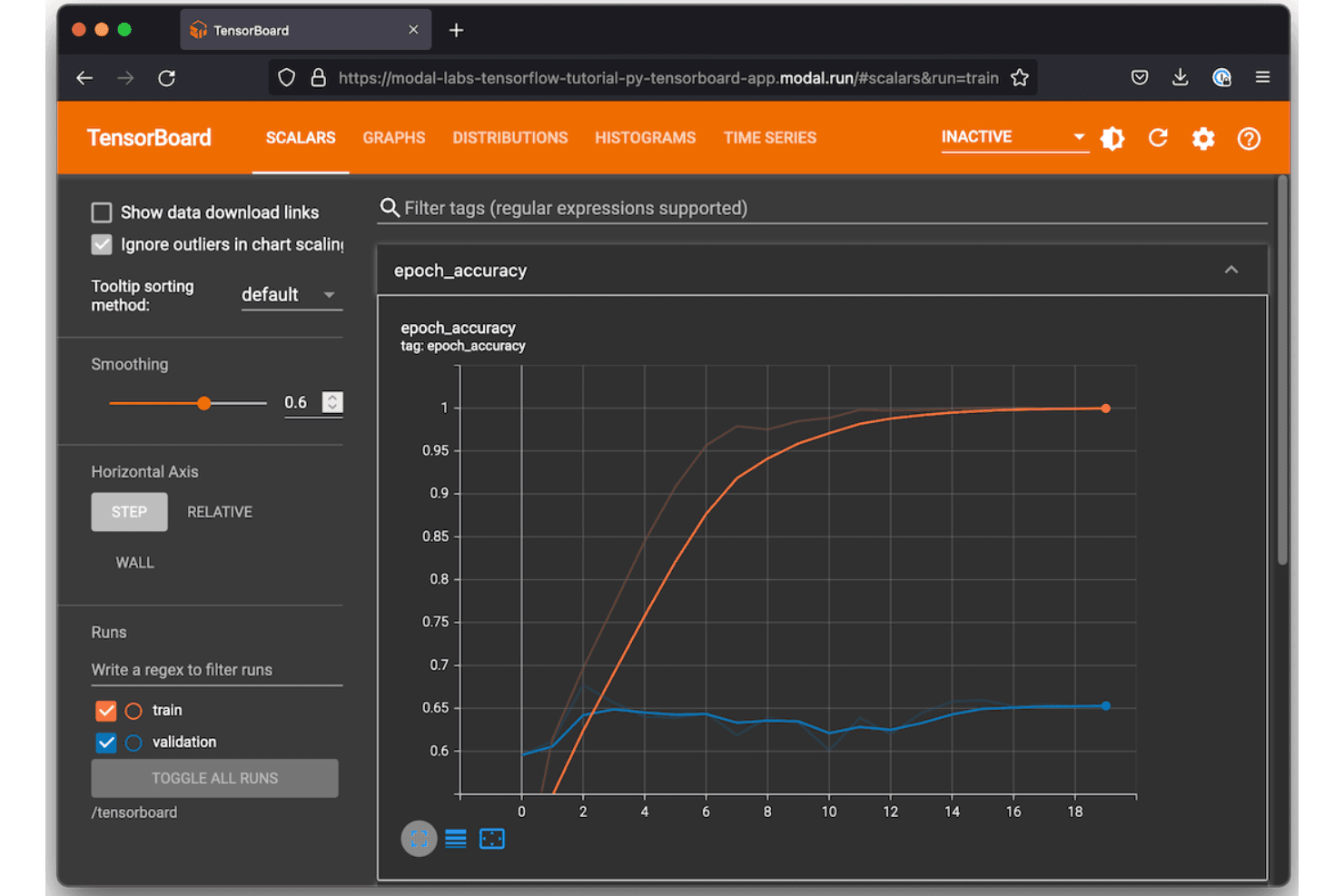
TensorFlow (il framework a codice aperto di Google) offre lo sviluppo di modelli di intelligenza artificiale. TensorFlow è un framework a codice aperto per l'apprendimento automatico sviluppato da Google, che copre la progettazione, l'addestramento, la valutazione e la distribuzione dei modelli nei flussi di lavoro dell'apprendimento profondo e delle reti neurali.
Per chi è più adatto TensorFlow?
TensorFlow è particolarmente adatto ai team di ricerca e agli ingegneri dell'apprendimento automatico che sviluppano e addestrano modelli di apprendimento profondo su larga scala, soprattutto in ambienti di produzione.
Perché ho scelto TensorFlow
Ho incluso TensorFlow tra le mie scelte principali perché la sua API Keras nativa mi consente di creare e perfezionare architetture di apprendimento profondo senza cambiare contesto o framework. Mi affido inoltre a TensorBoard direttamente all'interno di TensorFlow per monitorare le metriche di addestramento, visualizzare i grafi di calcolo e confrontare le esecuzioni fianco a fianco. TensorFlow Hub mi dà accesso a modelli pre-addestrati che posso perfezionare, riducendo significativamente i tempi di addestramento per gli esperimenti di trasferimento dell'apprendimento.
Funzionalità principali di TensorFlow
- TensorFlow Extended (TFX): un framework per pipeline di apprendimento automatico in produzione che orchestra le fasi di convalida dei dati, trasformazione, addestramento e valutazione dei modelli.
- API tf.data: crea pipeline di input scalabili per il caricamento, la pre-elaborazione e il raggruppamento in batch dei set di dati durante le esecuzioni di addestramento dei modelli.
- TensorFlow Serving: distribuisce i modelli addestrati in produzione tramite endpoint REST o gRPC senza modificare il codice del modello.
- Formato SavedModel: serializza i modelli addestrati con grafi di calcolo e pesi completi per consentirne il ricaricamento e la condivisione riproducibili.
Integrazioni di TensorFlow
TensorFlow è un framework a codice aperto anziché una piattaforma SaaS, quindi non offre integrazioni native tradizionali con strumenti di terze parti. Il suo ecosistema include invece librerie integrate come TensorBoard, TFX, TensorFlow.js, TensorFlow Serving, Keras e ML Metadata, che gestiscono il monitoraggio degli esperimenti, l'orchestrazione delle pipeline e la distribuzione dei modelli all'interno del framework stesso. Gli strumenti di terze parti per il monitoraggio degli esperimenti, come MLflow e Weights & Biases, forniscono integrazioni proprie con TensorFlow, mentre è disponibile un'API Python per le estensioni personalizzate.
Pros and Cons
Pros:
- Visualizzazione in tempo reale delle metriche e dei grafi di addestramento
- Strumenti integrati per la regolazione e l'ottimizzazione degli iperparametri
- Distribuzione su CPU, GPU e TPU
Cons:
- TensorBoard rallenta con numerosi esperimenti
- Archivia i dati localmente senza funzionalità di collaborazione integrate
Learn more about TensorFlow: Ideale per la gestione dei flussi di lavoro nativa di Kubernetes
- Piano gratuito disponibile
- Gratuito e open source

Kubeflow offre una piattaforma ML open source per i flussi di lavoro Kubernetes. Kubeflow è una piattaforma ML open source basata su Kubernetes che copre nativamente l'orchestrazione delle pipeline, il monitoraggio degli esperimenti, l'addestramento dei modelli e l'ottimizzazione degli iperparametri all'interno di un'infrastruttura containerizzata.
A chi è più adatto Kubeflow?
Kubeflow è particolarmente adatto ai team di ingegneria ML che eseguono già carichi di lavoro su Kubernetes e vogliono mantenere l'infrastruttura per il monitoraggio degli esperimenti sulla stessa piattaforma.
Perché ho scelto Kubeflow
Kubeflow si è guadagnato un posto nella mia selezione perché associa ogni fase della pipeline direttamente a un pod Kubernetes, offrendo alle esecuzioni degli esperimenti gli stessi controlli sulle risorse di qualsiasi altro carico di lavoro del cluster. Utilizzo Kubeflow Pipelines per creare versioni ed eseguire nuovamente le sessioni di addestramento senza uscire dall'ambiente Kubernetes. Il componente Katib esegue prove parallele di ottimizzazione degli iperparametri come job Kubernetes nativi, senza richiedere un'infrastruttura separata.
Funzionalità principali di Kubeflow
- Isolamento dei namespace multiutente: Separa esperimenti e pipeline per team o progetto utilizzando i controlli di accesso a livello di namespace di Kubernetes.
- Notebook Kubeflow: Avvia server per notebook Jupyter direttamente nel cluster, mantenendo l'esplorazione dei dati nello stesso ambiente delle sessioni di addestramento.
- Tracciamento della provenienza degli artefatti: Registra input, output e metadati per ogni fase della pipeline, collegando set di dati e modelli a esecuzioni specifiche.
- Operatore di addestramento: Gestisce job di addestramento distribuito per framework come PyTorch, TensorFlow e XGBoost come risorse personalizzate native di Kubernetes.
Integrazioni di Kubeflow
Kubeflow non offre integrazioni native tradizionali; opera invece all'interno dell'ecosistema Kubernetes e supporta framework ML come TensorFlow, PyTorch, JAX, XGBoost, HuggingFace e Apache Spark tramite gli operatori dei suoi sottoprogetti. È inoltre possibile distribuirlo su servizi Kubernetes gestiti di AWS, Google Cloud, Microsoft Azure e Red Hat OpenShift.
Pros and Cons
Pros:
- Esegue gli esperimenti direttamente sui pod Kubernetes
- La gestione delle versioni delle pipeline tiene traccia di ogni sessione di addestramento
- Ottimizzazione parallela degli iperparametri tramite il componente Katib
Cons:
- La configurazione del cluster richiede una conoscenza approfondita di Kubernetes
- L'interfaccia utente sembra datata rispetto alle alternative commerciali
Learn more about Kubeflow: Ideale per l'integrazione con l'ecosistema cloud AWS
- Piano gratuito disponibile
- Da $0.204/ora

Amazon SageMaker gestisce training, ottimizzazione e deployment di ML. Amazon SageMaker è una piattaforma ML completamente gestita su AWS che copre il tracciamento degli esperimenti, l'addestramento dei modelli, l'ottimizzazione degli iperparametri, il registro dei modelli e il deployment lungo l'intero ciclo di vita del machine learning.
Per chi è più indicato Amazon SageMaker?
Amazon SageMaker è una scelta naturale per i team di data science e ingegneria ML che già eseguono carichi di lavoro su infrastruttura AWS.
Perché ho scelto Amazon SageMaker
Ho incluso Amazon SageMaker tra le mie scelte principali perché il suo tracciamento degli esperimenti è direttamente integrato nell'ecosistema AWS in modi che altri strumenti non possono replicare. SageMaker Experiments registra esecuzioni, parametri e metriche nativamente insieme allo storage di artefatti S3 e all'accesso controllato tramite IAM, quindi non c'è alcuna infrastruttura separata da gestire. Il mio team utilizza anche SageMaker Pipelines per concatenare lavori di training, valutazioni e registrazione dei modelli in un unico flusso di lavoro verificabile senza uscire da AWS.
Funzionalità principali di Amazon SageMaker
- Registro modelli SageMaker: Versiona, approva e gestisci i modelli addestrati con tracciamento dei metadati per l'intero ciclo di vita del modello.
- Ottimizzazione automatica dei modelli: Esegui ottimizzazioni degli iperparametri utilizzando strategie bayesiane, casuali o grid search su larga scala.
- SageMaker Debugger: Monitora i job di training in tempo reale per rilevare problemi come gradienti in dissolvenza o overfitting mentre si verificano.
- SageMaker Feature Store: Archivia, condividi e recupera le feature ML tra workload di training e inferenza da un repository centralizzato.
Integrazioni di Amazon SageMaker
Amazon SageMaker si integra nativamente in tutto l'ecosistema AWS, tra cui Amazon S3, Amazon Redshift, AWS Glue, Amazon EMR, Amazon Athena, Amazon ECR, AWS Lambda, Amazon CloudWatch e MLflow. È disponibile una API per integrazioni personalizzate.
Pros and Cons
Pros:
- Tiene traccia di parametri, dati e versioni del codice per ogni esecuzione
- Checkpointing automatico durante i long job di training
- Monitoraggio modello integrato insieme ai log degli esperimenti
Cons:
- Le risorse inutilizzate possono accumulare costi di fatturazione senza avviso
- Gli artefatti del modello utilizzano formati specifici AWS, limitando la portabilità
Learn more about Amazon SageMaker: Ideale per architettura a plugin e grande estendibilità
- Piano gratuito disponibile
- Da $399/mese

Orchestrazione open-source delle pipeline ML con tracciabilità e storicità dei modelli. ZenML è una piattaforma open-source per l'orchestrazione di pipeline di machine learning che gestisce l'orchestrazione dei flussi di lavoro, il versionamento degli artefatti, la tracciabilità dei modelli e il monitoraggio degli esperimenti su qualsiasi infrastruttura cloud o stack ML.
Per chi è più adatto ZenML?
ZenML è particolarmente adatto a ingegneri ML e team di data science che devono standardizzare e scalare pipeline di machine learning su diversi ambienti cloud o stack infrastrutturali.
Perché ho scelto ZenML
ZenML merita un posto nella mia shortlist perché la sua architettura a componenti di stack mi permette di sostituire qualsiasi parte dell'infrastruttura ML senza dover riscrivere il codice della pipeline. Posso collegare MLflow o Weights & Biases come sistema di monitoraggio esperimenti, cambiare l'archivio degli artefatti da locale a S3 e modificare l'orchestratore in Kubeflow, tutto semplicemente cambiando lo stack attivo. Utilizzo inoltre le versioni personalizzate dei componenti di ZenML per costruire integrazioni di monitoraggio proprietarie che si adattano perfettamente alla stessa astrazione di pipeline.
Funzionalità principali di ZenML
- Caching dei passaggi della pipeline: Memorizza automaticamente nella cache gli output dei passaggi già eseguiti, così i passaggi invariati non vengono rieseguiti durante gli esperimenti iterativi.
- Versionamento degli artefatti: Tiene traccia di ogni artefatto prodotto da un'esecuzione della pipeline, inclusi dataset, modelli e metriche, con tracciabilità completa verso il passaggio di origine.
- Registro dei modelli: Archivia e versiona i modelli addestrati insieme ai relativi metadati, esecuzioni di pipeline e storico dei deployment in un registro centrale.
- Dashboard di ZenML: Fornisce un'interfaccia web per sfogliare le esecuzioni delle pipeline, confrontare gli output degli esperimenti e ispezionare i metadati degli artefatti tra gli stack.
Integrazioni ZenML
ZenML offre 66 integrazioni native nell'ecosistema ML, tra cui MLflow, Weights & Biases, Neptune, Comet e TensorBoard, oltre a orchestratori come Kubeflow, Apache Airflow, Kubernetes e Databricks, e infrastrutture cloud come AWS, Google Cloud e Microsoft Azure. È disponibile anche un'API per integrazioni personalizzate.
Pros and Cons
Pros:
- Cambio dell'infrastruttura senza riscrivere il codice della pipeline
- Stack cloud-agnostic che evita il lock-in del fornitore
- Versionamento automatico degli artefatti tra le esecuzioni della pipeline
Cons:
- Si basa su strumenti di terze parti per la visualizzazione degli esperimenti
- La configurazione iniziale dello stack richiede un elevato sforzo di setup
Learn more about ZenML: 10Ideale per opzioni di deployment ibrido e on-premise
Polyaxon
- Piano gratuito + demo gratuita disponibile
- Da $450/mese (fatturazione annuale)

Polyaxon tiene traccia di esperimenti ML, pipeline e modelli attraverso ambienti cloud. Polyaxon è una piattaforma per il tracciamento di esperimenti ML e l'orchestrazione di pipeline che copre il monitoraggio degli esperimenti, l'ottimizzazione degli iperparametri, la versionizzazione degli artefatti, il registro dei modelli e la pianificazione distribuita delle attività su infrastrutture cloud e locali.
Per chi è Polyaxon?
Polyaxon è particolarmente indicato per gli ingegneri ML all'interno di organizzazioni enterprise che operano con rigorosi requisiti di governance dei dati o necessitano di eseguire carichi di lavoro su infrastrutture private.
Perché ho scelto Polyaxon
Ho incluso Polyaxon tra le mie scelte migliori perché è una delle poche piattaforme di tracciamento esperimenti ML costruite da zero per funzionare interamente all'interno della propria infrastruttura. Lo gestisco su un cluster Kubernetes privato, e ogni log di esperimento, artefatto e modello rimane all'interno della nostra rete. La sua architettura basata su agenti mi permette di collegare ambienti on-prem isolati a un piano di controllo centrale senza esporre dati grezzi all'esterno, il che è un vero requisito nei settori regolamentati.
Funzionalità principali di Polyaxon
- Ricerca e ottimizzazione degli iperparametri: Esegui gruppi di esperimenti in parallelo utilizzando strategie di ricerca distribuite per trovare le configurazioni ottimali dei modelli.
- Component hub: Definisci moduli riutilizzabili con input e output tipizzati che possono essere condivisi e versionati nelle pipeline del tuo team.
- Ricerca avanzata: Filtra le esecuzioni per nome, descrizione, regex, campi specifici, metriche o configurazioni per trovare rapidamente gli esperimenti.
- Applicazione delle SLA: Applica policy di TTL, timeout e retry alle singole operazioni per mantenere le pipeline entro i limiti definiti.
Integrazioni Polyaxon
Polyaxon offre un ampio set di integrazioni native per il tracciamento ML, l'orchestrazione e l'infrastruttura, tra cui TensorBoard, PyTorch, TensorFlow, Keras, XGBoost, Hugging Face, Kubeflow, Slack, GitHub e Jenkins. Si collega inoltre con Zapier e mette a disposizione un'API per integrazioni personalizzate e l'automazione CI/CD.
Pros and Cons
Pros:
- Pianificazione di job di training distribuiti nativa su Kubernetes
- Multi-tenancy integrata con controlli granulari degli accessi
- Supporta deployment on-premise, cloud e ibrido
Cons:
- Richiede una profonda conoscenza di Kubernetes per l'operatività
- Comunità più piccola rispetto a MLflow o W&B
Learn more about Polyaxon:
Altri strumenti per il monitoraggio degli esperimenti di ML
Ecco alcuni strumenti aggiuntivi per il monitoraggio degli esperimenti di ML che non sono stati inclusi nella mia selezione, ma che vale comunque la pena prendere in considerazione:
- 11DatabricksIdeale per uno spazio di lavoro di analisi unificato per i team
- 12Domino Data LabIdeale per il controllo centralizzato nella ricerca collaborativa
- 13iguazioIdeale per il monitoraggio in tempo reale dei modelli su larga scala
- 14DagsterIdeale per la creazione programmatica di pipeline di dati
Come valuto gli strumenti per il tracciamento degli esperimenti di ML
Divido la mia valutazione in due livelli: ciò che ogni strumento deve necessariamente fare (come il logging automatico delle esecuzioni PyTorch) e ciò che distingue i migliori tool.
Funzionalità di base (Requisiti minimi per questa lista)
Quando seleziono gli strumenti per la mia lista, assegno a ciascuno un punteggio da 0 (non offre la funzionalità) a 5 (eccelle in quell'area) per ogni funzionalità di base elencata di seguito. Poi calcolo il punteggio totale dello strumento come percentuale. Ogni tool deve raggiungere un punteggio minimo totale del 65% per essere preso in considerazione.
- Registrazione degli esperimenti: Controllo se lo strumento acquisisce automaticamente metriche, iperparametri e telemetria a livello di sistema dalle esecuzioni di training o se richiede l'inserimento manuale tramite SDK per ogni dato.
- Confronto e visualizzazione delle esecuzioni: Tabelle di confronto affiancato sono solo un punto di partenza; cerco grafici interattivi come i diagrammi delle coordinate parallele che aiutano a individuare pattern tra decine di esecuzioni nei progetti ML.
- Versionamento di artefatti e modelli: Valuto come ciascun tool gestisce le versioni di dataset, checkpoint di modello e output, incluso se collega gli artefatti all'esecuzione specifica che li ha prodotti.
- Supporto per i framework di ML: Lo strumento dovrebbe coprire i framework effettivamente usati dal tuo team, da PyTorch e TensorFlow a Hugging Face Transformers e XGBoost, con un codice wrapper minimo.
- Riproducibilità e tracciabilità: Cerco strumenti che catturino commit di codice, snapshot delle dipendenze e stato dei dataset insieme, in modo da poter rieseguire un esperimento di sei mesi fa ottenendo lo stesso risultato.
- Collaborazione e condivisione: Per team in fusi orari diversi sono fondamentali workspace condivisi, accessi basati su ruoli e la possibilità di commentare o condividere esecuzioni specifiche senza esportare CSV avanti e indietro.
Dopo aver stilato la lista degli strumenti che rispettano questi criteri, passo a considerare cosa distingue davvero ciascuna piattaforma.
Fattori distintivi (Cosa differenzia i vendor)
Ecco come metto a confronto i diversi fornitori:
Funzionalità uniche
L'ottimizzazione degli iperparametri è un fattore chiave di differenziazione. Cerco funzionalità di sweep integrate che automatizzino la ricerca su più esecuzioni distribuite e visualizzino le performance delle diverse configurazioni in un'unica vista. Anche il monitoraggio live delle risorse può aggiungere molto valore: quando puoi tenere sotto controllo GPU e memoria mentre l'addestramento è in corso, puoi individuare colli di bottiglia prima di sprecare ore di calcolo. Infine, report collaborativi sono fondamentali per i team numerosi: dashboard condivisibili sostituiscono i fogli di calcolo manuali e consentono a data scientist e stakeholder di discutere i risultati senza cambiare strumenti.
Oltre le funzionalità
La flessibilità di deployment è più importante di quanto molte squadre si aspettino. Valuto se uno strumento supporta installazioni self-hosted o ambienti isolati (air-gapped) per team che lavorano con IP sensibile o dati regolamentati. La scalabilità è un altro aspetto che considero: il logging di migliaia di esecuzioni concorrenti non dovrebbe degradare le prestazioni delle query o provocare picchi di costo imprevedibili. Anche l'esperienza d'onboarding distingue gli strumenti: ottime guide rapide e forum comunitari attivi consentono al team di strumentare gli script di training in ore, non settimane.
Come scegliere gli strumenti per il monitoraggio degli esperimenti di ML
È facile perdersi tra lunghi elenchi di funzionalità e strutture tariffarie complesse. Per aiutarti a rimanere concentrato mentre affronti il tuo specifico processo di selezione del software, ecco un elenco dei fattori da tenere a mente:
| Fattore | Cosa considerare |
|---|---|
| FattoreScalabilità | Cosa considerareLo strumento è in grado di gestire il volume e la frequenza degli esperimenti previsti man mano che il team e i dati crescono? |
| FattoreIntegrazioni | Cosa considerareSi collegherà direttamente alle strutture di ML, agli strumenti di orchestrazione e ai sistemi di distribuzione che preferisci? |
| FattorePersonalizzazione | Cosa considerarePuoi adattare i campi dei metadati, le fasi del flusso di lavoro e la reportistica alle esigenze specifiche del tuo team? |
| FattoreSemplicità d'uso | Cosa considerareI ricercatori e gli ingegneri troveranno l'interfaccia intuitiva oppure la curva di apprendimento è ripida? |
| FattoreImplementazione e inserimento | Cosa considerareQuanto tempo serve dall'acquisto al monitoraggio del primo esperimento? Quali risorse sono necessarie per la configurazione? |
| FattoreCosto | Cosa considerareI prezzi basati sull'utilizzo, i costi di archiviazione o gli eventuali componenti aggiuntivi obbligatori sono chiari e prevedibili in base alle esigenze previste? |
| FattoreMisure di sicurezza | Cosa considerareLo strumento supporta la crittografia, autorizzazioni granulari e l'autenticazione per proteggere i dati sensibili? |
| FattoreRequisiti di conformità | Cosa considerareLo strumento ti aiuterà a rispettare le normative del settore, dei clienti o geografiche (SOC 2, ISO 27001, GDPR)? |
Cosa sono gli strumenti per il monitoraggio degli esperimenti di ML?
Gli strumenti per il monitoraggio degli esperimenti di ML sono piattaforme software che registrano, organizzano e gestiscono le versioni degli esperimenti dei modelli di apprendimento automatico, inclusi parametri, codice, set di dati e metriche. Questi strumenti aiutano il tuo team a conservare la cronologia degli esperimenti, confrontare i risultati e riprodurre completamente le esecuzioni passate, facilitando la collaborazione e la verifica man mano che i flussi di lavoro dei progetti diventano più complessi.
Funzionalità
Quando selezioni gli strumenti di monitoraggio degli esperimenti di ML, presta attenzione alle seguenti caratteristiche chiave:
- Registrazione degli esperimenti: Registra i parametri, le configurazioni, i riferimenti al codice sorgente e le metriche di ogni esecuzione di addestramento, conservando una traccia di controllo chiara.
- Confronto delle esecuzioni: Consente di visualizzare e analizzare più esperimenti affiancati per comprendere in che modo impostazioni o modifiche diverse influenzano i risultati.
- Versionamento degli artefatti: Crea automaticamente versioni dei set di dati, dei modelli di ML versionati e di altri output, così puoi sempre riprodurre o sviluppare il lavoro precedente.
- Integrazioni con i framework: Si connette direttamente ai framework di ML più diffusi, rendendo semplice iniziare il monitoraggio con modifiche minime al flusso di lavoro.
- Monitoraggio della provenienza: Mappa l'intera catena dai dati grezzi al modello finale, supportando la riproducibilità e i requisiti di conformità normativa.
- Strumenti di collaborazione: Consente a più utenti di commentare, documentare gli approfondimenti e condividere i risultati all'interno del team.
- Metadati personalizzati: Permette di aggiungere campi o tag specifici del progetto, così puoi categorizzare gli esperimenti in base alle esigenze del tuo flusso di lavoro.
- Controllo degli accessi basato sui ruoli: Limita l'accesso ai dati e alle azioni sensibili, supportando la governance a livello organizzativo e gli standard di sicurezza.
- Dashboard e visualizzazioni: Genera report e visualizzazioni dei dati personalizzabili per evidenziare rapidamente tendenze e anomalie nei dati degli esperimenti.
- Ricerca e filtraggio: Consente al team di trovare facilmente esperimenti, esecuzioni e artefatti pertinenti in base a parametri, date o altri criteri, risparmiando tempo man mano che il progetto cresce.
Funzionalità di IA degli strumenti comuni di monitoraggio degli esperimenti di ML
Oltre alle funzionalità standard degli strumenti di monitoraggio degli esperimenti di ML elencate sopra, molte di queste soluzioni stanno integrando l'IA con funzionalità come:
- Rilevamento automatizzato delle anomalie: Utilizza l'IA per monitorare le metriche degli esperimenti e segnalare schemi insoliti o valori anomali, aiutando i team a individuare tempestivamente la deriva dei dati o comportamenti imprevisti del modello.
- Suggerimenti intelligenti per gli iperparametri: Applica l'apprendimento automatico per consigliare valori ottimali degli iperparametri sulla base dei dati storici degli esperimenti, riducendo le supposizioni manuali e velocizzando l'ottimizzazione del modello.
- Query degli esperimenti in linguaggio naturale: Consente agli utenti di cercare e filtrare gli esperimenti utilizzando il linguaggio conversazionale, facilitando l'accesso e la comprensione dei risultati degli esperimenti da parte degli interlocutori non tecnici.
- Allocazione predittiva delle risorse: Utilizza l'IA per prevedere le esigenze di calcolo e memoria delle esecuzioni future, aiutando i team a pianificare le risorse ed evitare colli di bottiglia.
- Riepilogo automatizzato degli esperimenti: Sfrutta l'IA per generare riepiloghi concisi dei risultati degli esperimenti, evidenziando scoperte e tendenze principali per velocizzare la reportistica e il processo decisionale.
Vantaggi
L'implementazione di strumenti di monitoraggio degli esperimenti di ML offre diversi vantaggi al team e all'azienda. Ecco alcuni dei benefici che puoi aspettarti:
- Riproducibilità degli esperimenti: Tieni traccia dei parametri, dei set di dati e dei dettagli dell'ambiente per ricreare e convalidare facilmente gli esperimenti precedenti.
- Collaborazione semplificata: Dashboard condivise, commenti e documentazione del progetto aiutano i team a lavorare insieme e a comunicare efficacemente i risultati.
- Sviluppo più rapido dei modelli: I confronti affiancati delle esecuzioni e il versionamento automatizzato degli artefatti accelerano i cicli di sperimentazione e il processo decisionale.
- Gestione centralizzata della conoscenza: L'intera cronologia del progetto e i metadati degli esperimenti vengono archiviati in un unico luogo, preservando il patrimonio di conoscenze dell'organizzazione man mano che i team crescono.
- Maggiore conformità e verificabilità: Il monitoraggio integrato della provenienza e i registri di controllo supportano le esigenze normative e gli standard di governance aziendale.
- Controllo dei costi delle risorse: Il monitoraggio delle risorse in tempo reale e le funzionalità di allocazione predittiva consentono ai team di ottimizzare l'utilizzo dell'hardware e prevenire spese non necessarie.
- Supporto a flussi di lavoro personalizzabili: Campi flessibili per i metadati e opzioni del flusso di lavoro si adattano ai processi e alle preferenze già in uso nel team.
Costi e prezzi
La selezione degli strumenti di monitoraggio degli esperimenti di ML richiede la comprensione dei vari modelli e piani tariffari disponibili. I costi variano in base alle funzionalità, alle dimensioni del team, agli extra e ad altri fattori. La tabella seguente riassume i piani comuni, i relativi prezzi medi e le funzionalità tipicamente incluse nelle soluzioni di strumenti di monitoraggio degli esperimenti di ML:
Tabella di confronto dei piani per gli strumenti di monitoraggio degli esperimenti di ML
| Tipo di piano | Prezzo medio | Caratteristiche comuni |
|---|---|---|
| Tipo di pianoPiano gratuito | Prezzo medio$0 | Caratteristiche comuniMonitoraggio di base degli esperimenti, utenti limitati, assistenza della community e progetti pubblici. |
| Tipo di pianoPiano personale | Prezzo medio$5-$25/user/month | Caratteristiche comuniEsperimenti illimitati, maggiore spazio di archiviazione, progetti privati e integrazioni di base. |
| Tipo di pianoPiano aziendale | Prezzo medio$30-$70/user/month | Caratteristiche comuniStrumenti per la collaborazione nella squadra, accesso basato sui ruoli, integrazioni avanzate, sicurezza rafforzata e registri di controllo. |
| Tipo di pianoPiano per grandi imprese | Prezzo medio$80-$150/user/month | Caratteristiche comuniOpzioni di distribuzione personalizzate, SSO/SAML, strumenti per la conformità, assistenza premium e personalizzazione avanzata. |
Domande frequenti sugli strumenti di monitoraggio degli esperimenti di ML
Ecco alcune risposte alle domande comuni sugli strumenti di monitoraggio degli esperimenti di ML:
Questi strumenti richiedono molta configurazione o modifiche al codice?
No, la maggior parte degli strumenti offre SDK o componenti aggiuntivi leggeri che consentono di iniziare a registrare gli esperimenti con modifiche minime al codice. Spesso è possibile integrare il monitoraggio negli script con appena poche righe di codice.
In che modo questi strumenti aiutano la squadra a gestire la conformità e gli audit?
Registrano i parametri, il codice e i risultati di ogni esecuzione, creano cronologie tracciabili degli esperimenti e mantengono tracce di controllo, facilitando la documentazione della conformità e la condivisione delle prove durante revisioni o audit.
Queste soluzioni funzionano con i taccuini Jupyter?
Sì, la maggior parte degli strumenti di monitoraggio degli esperimenti di ML è progettata per funzionare direttamente nei taccuini Jupyter, oltre che con script e pipeline, quindi non è necessario modificare il proprio flusso di lavoro.
Cosa succede se la mia squadra supera il piano gratuito?
È possibile passare a un piano a pagamento per ottenere più utenti, limiti di archiviazione più elevati, integrazioni avanzate e funzionalità aziendali. Esamina attentamente i prezzi per evitare sorprese durante il passaggio.
Posso archiviare dati sensibili o proprietari con questi strumenti?
Sì, ma è opportuno esaminare le misure di sicurezza del fornitore, come crittografia, controlli degli accessi e certificazioni di conformità, per assicurarsi che i dati rimangano protetti. Le opzioni in sede o di cloud privato possono offrire un controllo ancora maggiore.