

Se il tuo team ha mai dovuto affrontare conflitti di unione che hanno rallentato uno sprint o ha visto ore di lavoro scomparire a causa di un monitoraggio inadeguato delle versioni, sai già perché è importante scegliere lo strumento giusto per la gestione del controllo del codice sorgente (SCM). Che tu lavori da solo o all’interno di un team distribuito a livello globale, gestire i contributi al codice, monitorare le modifiche e applicare le migliori pratiche può diventare rapidamente complicato.
Ho collaborato a stretto contatto con team di sviluppo per valutare e implementare strumenti SCM che migliorano concretamente la collaborazione e riducono gli ostacoli. Ho testato questi strumenti nel mondo reale, non solo in un ambiente di prova, e so quali funzionalità semplificano il lavoro e quali aggiungono soltanto altri pulsanti.
In questa guida ti presenterò gli strumenti SCM che si distinguono per affidabilità, facilità d’uso e supporto alla collaborazione. Che tu gestisca un monorepo o ti occupi di microservizi, queste soluzioni ti aiuteranno a gestire la tua base di codice con maggiore sicurezza.
Perché fidarsi dei nostri consigli sui software
6,700+
Reviews
20
Industry experts
16+
Evaluation factors
14
Years
Il nostro team testa e recensisce software dal 2012. In quanto leader tecnologici noi stessi, sappiamo quanto sia difficile — e importante — scegliere il software giusto.
Per questa guida, abbiamo valutato gli strumenti attraverso test praticie ricerche indipendenti, assegnando un punteggio agli strumenti in base ai nostri criteri di selezione.
Le nostre recensioni riflettono il nostro giudizio editoriale umano, non un discorso di vendita.
Revisori esperti:
- Paulo Gardini MiguelDirettore tecnico
 Tim FisherVP dell'IA
 Gabriel RosasTech Lead e architetto software
 Christhian GruhnTech Lead e architetto della piattaforma

Tabella di confronto degli strumenti SCM
Questa tabella di confronto riassume i dettagli sui prezzi delle mie migliori selezioni di strumenti SCM:
| Tool | Best For | Trial Info | Price | ||
|---|---|---|---|---|---|
| 1 | Ideale per i team Git e SVN in un'unica piattaforma | Prova gratuita di 30 giorni e piano gratuito disponibili | A partire da $35/mese | Website | |
| 2 | Ideale per team multi-VCS in ambienti isolati | Prova gratuita di 30 giorni | A partire da $75/utente/anno (fatturato annualmente) | Website | |
| 3 | Ideale per team multi-VCS su cloud gestito | Prova gratuita di 14 giorni | A partire da $12.50/utente/mese | Website | |
| 4 | Ideale per lo sviluppo di videogiochi e i flussi di lavoro dei team di artisti | Piano gratuito disponibile | Da $38/postazione/mese | Website | |
| 5 | Ideale per la gestione autonoma dei repository Git su infrastrutture minime | Prova gratuita di 30 giorni | A partire da $9.50/utente/mese (con fatturazione annuale) | Website | |
| 6 | Ideale per la revisione del codice nativa per l'IA su larga scala | Sì | $4/user/month | Website | |
| 7 | La scelta migliore per la tracciabilità del codice nell'ecosistema Atlassian | Piano gratuito disponibile | A partire da $3.65/utente/mese | Website | |
| 8 | Ideale per la gestione del codice sorgente DevSecOps tutto-in-uno | Piano gratuito disponibile | A partire da $29/user/month (con fatturazione annuale) | Website | |
| 9 | Ideale per la revisione del codice pre-unione su larga scala | Prova gratuita di 30 giorni | A partire da $18,000/all'anno (fatturato annualmente) | Website | |
| 10 | Ideale per i team di sviluppo che utilizzano lo stack Microsoft | Piano gratuito disponibile | A partire da $6.00/utente/mese | Website |


Recensioni dei migliori strumenti SCM
Di seguito trovi i miei riepiloghi dettagliati dei migliori strumenti SCM entrati nella mia selezione. Le mie recensioni offrono un’analisi approfondita delle funzionalità principali, dei vantaggi & degli svantaggi, delle integrazioni e dei casi d’uso ideali di ogni strumento, per aiutarti a trovare quello più adatto a te.
 Ideale per i team Git e SVN in un'unica piattaforma
- Prova gratuita di 30 giorni e piano gratuito disponibili
- A partire da $35/mese
Visit WebsiteCustomer Rating:4.5/5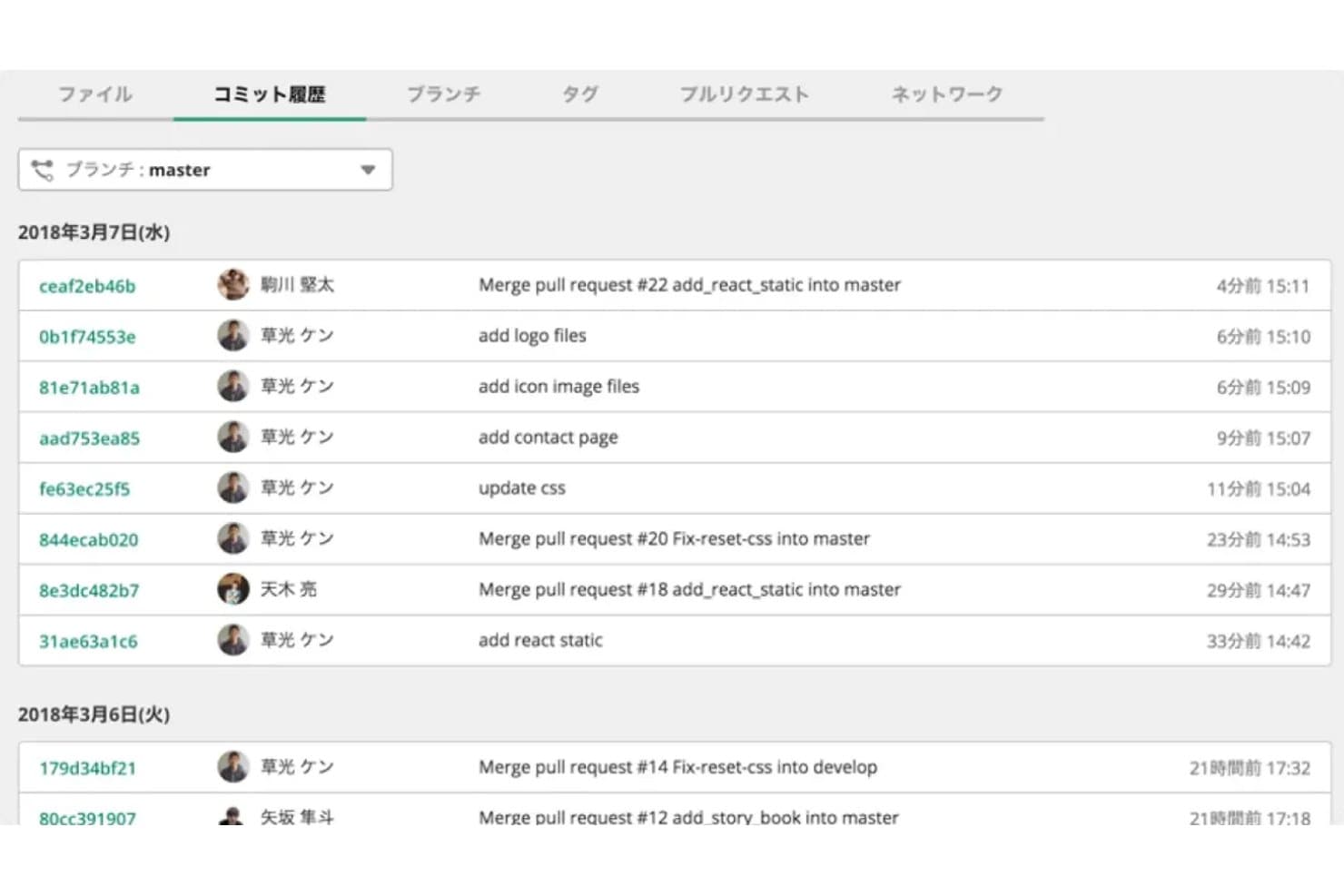
Backlog mostra una cronologia completa dei commit Git con autore e data e ora. Backlog è una piattaforma di gestione dei progetti e del codice sorgente che combina l'hosting di repository Git e SVN con il monitoraggio integrato dei problemi, flussi di lavoro per le richieste di pull e gestione dei rami.
Per chi è più adatto Backlog?
Backlog è adatto ai team che utilizzano Git e SVN parallelamente, soprattutto a quelli nel pieno della transizione dal controllo di versione centralizzato a quello distribuito e che hanno bisogno del monitoraggio dei problemi integrato nello stesso strumento.
Perché ho scelto Backlog
Backlog si è guadagnato un posto nella mia rosa ristretta perché è uno dei pochi strumenti di gestione del codice sorgente che supporta concretamente Git e SVN parallelamente, nella stessa piattaforma e nello stesso progetto. Apprezzo il fatto che i commit siano collegati direttamente ai problemi senza dover configurare alcun plugin, quindi quando uno sviluppatore invia una correzione a un ramo protetto, il collegamento tra codice ed elemento di lavoro è già disponibile. I team in transizione da SVN non devono dividere il proprio flusso di lavoro tra due strumenti durante la migrazione.
Funzionalità principali di Backlog
- Rami protetti: gli amministratori possono limitare l'accesso in scrittura e alla cancellazione a rami specifici, assegnando le autorizzazioni a livello di utente o di team.
- Flusso di lavoro delle richieste di pull: i repository Git supportano unioni basate su richieste di pull con commenti incorporati, confronti affiancati, assegnazione dei revisori e azioni di approvazione o rifiuto.
- Controlli di accesso aziendali: SAML SSO, provisioning SCIM, integrazione con Active Directory, inserimento di indirizzi IP in una lista consentita e registri di audit sono disponibili nei piani Enterprise.
- Prezzi fissi per account: i piani Standard, Premium ed Enterprise supportano utenti illimitati, quindi i costi non aumentano in base al numero di dipendenti.
Integrazioni di Backlog
Backlog offre integrazioni documentate con Jenkins, Slack, Microsoft Teams, Google Chat, Cacoo, Google Drive, Microsoft OneDrive, Dropbox e LambdaTest. La connettività con GitHub Actions, l'API REST OAuth 2.0 e il supporto per i webhook consentono di creare flussi di lavoro CI/CD personalizzati.
Pros and Cons
Pros:
- Supporta i flussi di lavoro Git e SVN
- Combina la gestione del codice con il monitoraggio dei problemi
- I prezzi fissi consentono utenti illimitati per piano
Cons:
- Nessun CI/CD integrato o strumento di scansione della sicurezza
- Il flusso di lavoro delle richieste di pull è limitato al solo Git
Learn more about Backlog: Ideale per team multi-VCS in ambienti isolati
- Prova gratuita di 30 giorni
- A partire da $75/utente/anno (fatturato annualmente)
Visit WebsiteCustomer Rating:4.8/5
RhodeCode consente agli utenti di lasciare commenti in linea sulla revisione del codice nelle richieste pull. RhodeCode è una piattaforma di gestione del codice sorgente autogestita che supporta repository Git, Mercurial e SVN da un'unica interfaccia, con revisione del codice integrata, controllo degli accessi e analisi delle richieste pull assistita dall'IA.
Per chi è più adatto RhodeCode?
RhodeCode è particolarmente adatto ai team di ingegneria nei settori della difesa, fintech o in industrie regolamentate che devono gestire repository Git, Mercurial e SVN dietro un firewall.
Perché ho scelto RhodeCode
RhodeCode è entrato nella mia lista ristretta perché è una delle poche piattaforme SCM in grado di gestire Git, Mercurial e SVN da un'unica interfaccia, un aspetto molto importante quando il team è nel bel mezzo di una migrazione e non può permettersi di abbandonare i repository legacy. Apprezzo anche il fatto che il programma di installazione Docker RCstack funzioni completamente offline, così i team in ambienti isolati non sono costretti a dipendere dal cloud. La revisione del codice assistita dall'IA, che supporta l'implementazione di modelli locali, fa sì che il codice sensibile non lasci mai la rete.
Funzionalità principali di RhodeCode
- Autorizzazioni sui rami e applicazione delle regole di fusione: Protegge i rami dai force push e richiede l'approvazione della revisione del codice prima che qualsiasi modifica possa essere integrata.
- Sistema di gestione degli artefatti: Archivia file binari come output delle compilazioni e log al di fuori del controllo versione, con accesso controllato tramite ACL e supporto per file di dimensioni illimitate.
- Selezione automatica dei revisori: Assegna revisori alle richieste pull in base a regole configurabili legate ai percorsi dei file, ai team o ai singoli utenti.
- Registri di audit e report sulle attività: Registra gli accessi e le attività dei repository nell'intero ambiente per supportare le verifiche di conformità e sicurezza.
Integrazioni di RhodeCode
RhodeCode si integra con Jenkins, TeamCity, Travis CI, JIRA, Slack, Redmine, Trello e GitHub Issues. La sua API JSON-RPC e i webhook supportano connessioni CI/CD personalizzate e l'automazione dei repository.
Pros and Cons
Pros:
- Gestisce Git, Mercurial e SVN insieme
- Implementazione in ambienti isolati per contesti regolamentati
- La revisione del codice assistita dall'IA viene eseguita interamente on-premise
Cons:
- Nessuna pipeline CI/CD integrata
- L'interfaccia utente appare datata e macchinosa
Learn more about RhodeCode: Ideale per team multi-VCS su cloud gestito
- Prova gratuita di 14 giorni
- A partire da $12.50/utente/mese
Visit WebsiteCustomer Rating:4.2/5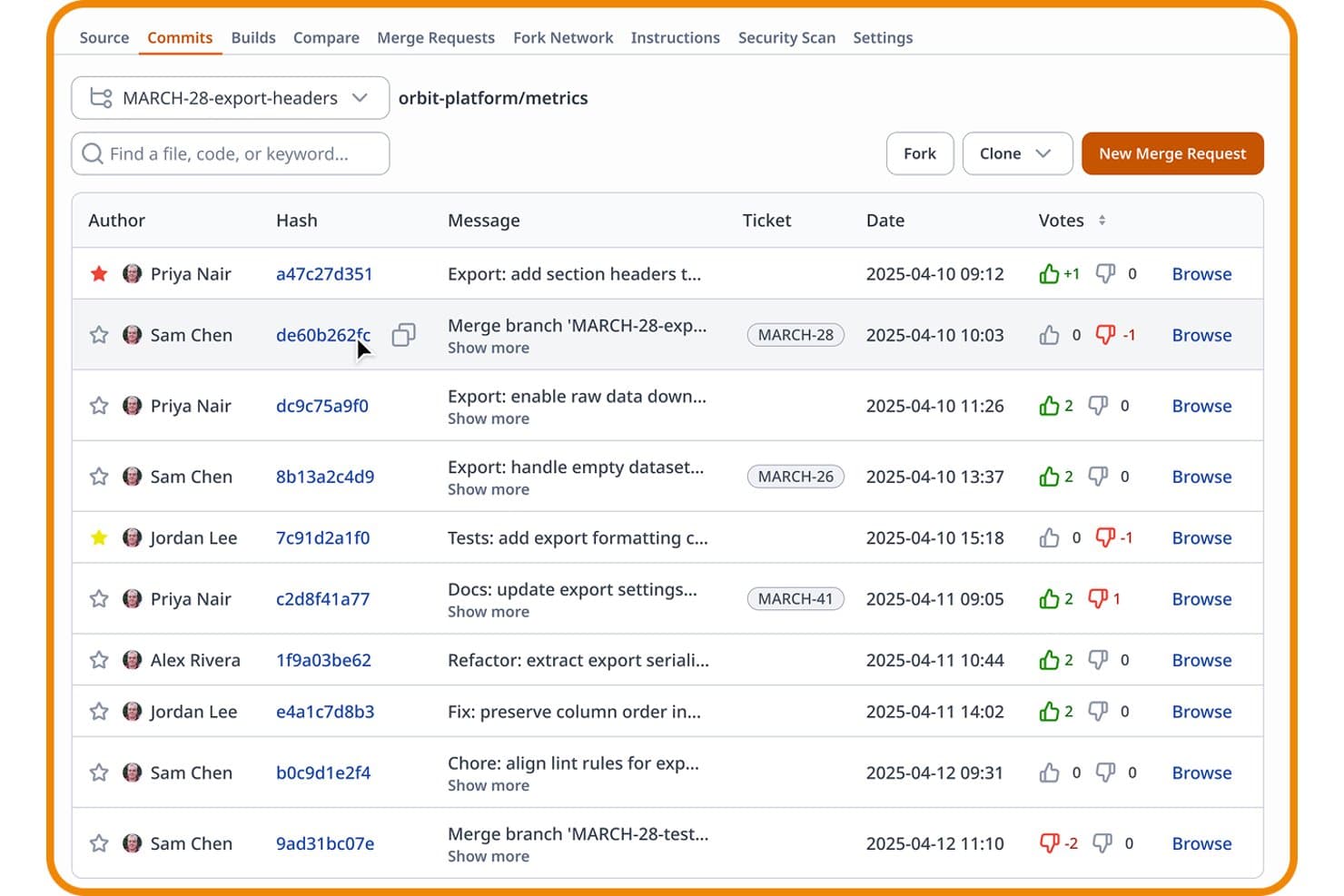
Assembla consente agli utenti di monitorare commit, voti e ticket in un'unica vista. Assembla è una piattaforma SCM gestita che supporta Git, SVN e Perforce in un unico ambiente ospitato, con flussi di lavoro integrati per la revisione del codice, controlli degli accessi, gestione dei progetti e integrazioni per le pipeline CI/CD.
Per chi è più indicata Assembla?
Assembla è particolarmente adatta ai team di ingegneria nei settori dei videogiochi, degli effetti visivi e delle industrie regolamentate che utilizzano Git, SVN e Perforce parallelamente e hanno bisogno di un'unica piattaforma gestita per amministrarli tutti.
Perché ho scelto Assembla
Ho incluso Assembla tra le mie scelte principali perché è una delle poche piattaforme SCM gestite che esegue Git, SVN e Perforce sotto lo stesso tetto, una caratteristica davvero rara. Apprezzo il fatto che i team SVN possano usufruire di richieste di integrazione, blocco dei file e accantonamento senza abbandonare il flusso di lavoro esistente, mentre Perforce offre istanze edge replicate globalmente su AWS per commit a bassa latenza tra gli studi di videogiochi e le pipeline VFX. I ticket si collegano direttamente ai commit e alle richieste di unione in tutti e tre i tipi di VCS, quindi la tracciabilità non viene meno quando il team non utilizza esclusivamente Git.
Funzionalità principali di Assembla
- Scansione dei segreti: Assembla analizza automaticamente ogni commit per rilevare chiavi API e password codificate prima che raggiungano l'ambiente di produzione.
- Protezione dei branch e approvazioni delle richieste di unione: È possibile imporre l'approvazione obbligatoria dei revisori e gli hook lato server nei repository Git, SVN e Perforce prima che venga eseguita qualsiasi unione.
- Bacheche sprint e Kanban integrate: I piani Growth e Custom Cloud includono pianificazione degli sprint, gestione del backlog, grafici burndown e bacheche Kanban direttamente nella piattaforma.
- SSO SAML 2.0 con RBAC e autorizzazione degli indirizzi IP: Assembla supporta l'integrazione con Active Directory e LDAP, oltre a autorizzazioni granulari basate sui ruoli e restrizioni degli accessi a livello di rete.
Integrazioni di Assembla
Assembla offre otto integrazioni native documentate, tra cui Jenkins, Travis CI, GitHub, Slack, Jira, TestRail, Trello e Zapier. La sua API REST e i webhook supportano flussi di lavoro CI/CD personalizzati e l'automazione.
Pros and Cons
Pros:
- Esegue Git, SVN e Perforce insieme
- Gestione dei progetti integrata nella piattaforma
- Scansione dei segreti a ogni commit di codice
Cons:
- Nessuno strumento nativo per le pipeline CI/CD
- Non offre un piano gratuito permanente
Learn more about Assembla: Ideale per lo sviluppo di videogiochi e i flussi di lavoro dei team di artisti
- Piano gratuito disponibile
- Da $38/postazione/mese
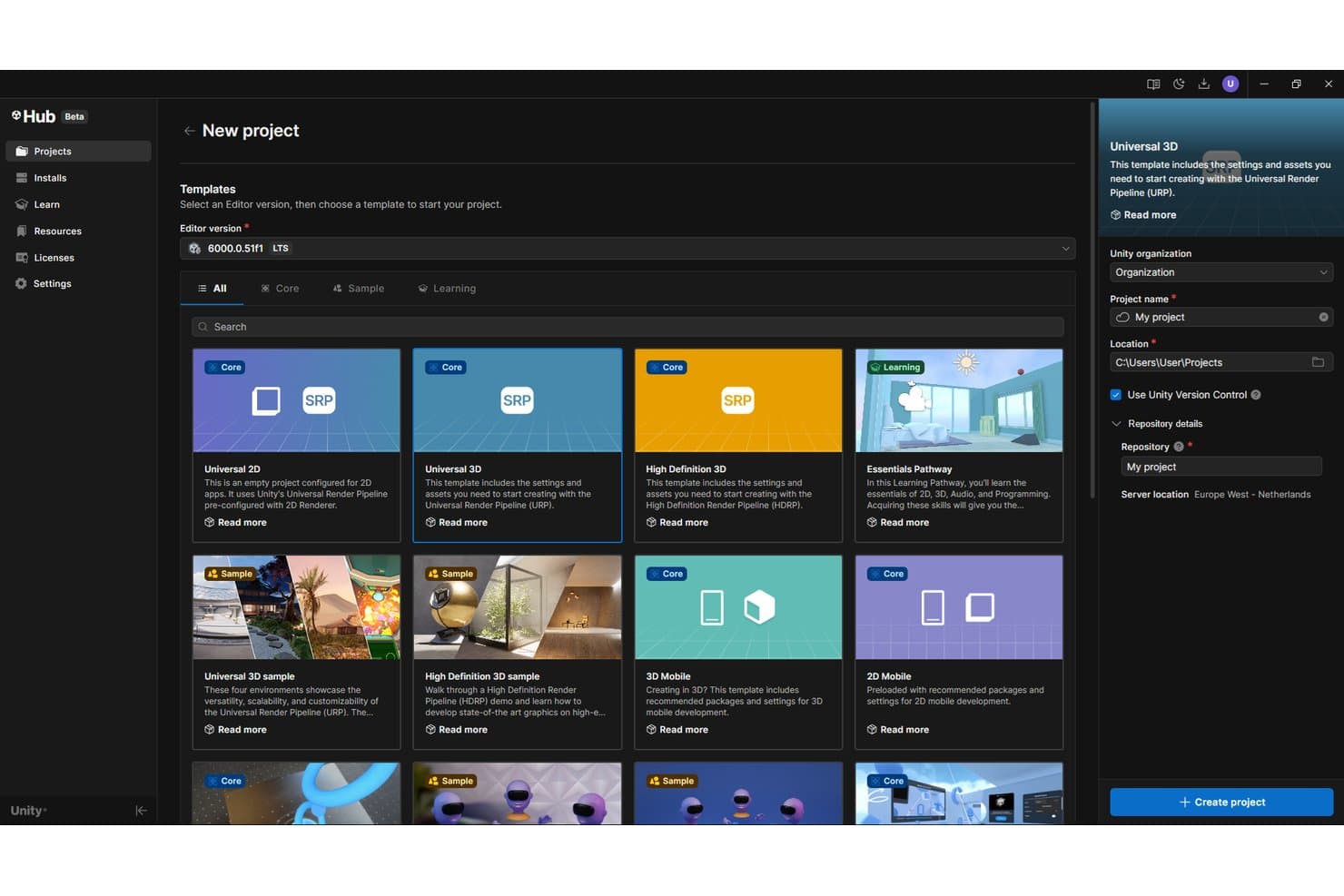
Unity Version Control consente agli utenti di creare progetti con il controllo di versione abilitato per impostazione predefinita. Unity Version Control è un sistema di controllo di versione distribuito progettato per gli studi di videogiochi e i team composti da sviluppatori e artisti, che offre ramificazione e unione, blocco dei file, gestione di grandi risorse binarie e flussi di unione automatizzati tramite MergeBot.
Per chi è più adatto Unity Version Control?
Unity Version Control è particolarmente adatto agli studi di videogiochi e ai team di media interattivi che gestiscono grandi risorse binarie e flussi di lavoro misti tra sviluppatori e artisti nello stesso archivio.
Perché ho scelto Unity Version Control
Unity Version Control è entrato nella mia rosa di preferiti perché nessun altro strumento SCM gestisce in modo altrettanto efficace la divisione tra artisti e sviluppatori. Apprezzo in particolare il client Gluon: gli artisti bloccano e archiviano direttamente le risorse binarie senza dover gestire l'intero archivio, mentre i programmatori eseguono flussi di ramificazione paralleli nella stessa base di codice. I blocchi intelligenti vengono trasferiti automaticamente tra i rami, quindi un rig di un personaggio bloccato rimane bloccato anche dopo l'unione di un ramo, uno scenario di conflitto che gli strumenti basati su Git semplicemente non possono risolvere in modo nativo.
Funzionalità principali di Unity Version Control
- SemanticMerge: uno strumento di confronto e unione consapevole del linguaggio, che risolve i conflitti a livello di metodo e funzione, riducendo i falsi positivi durante l'unione del codice.
- Esploratore visivo dei rami: un'interfaccia grafica basata su una sequenza temporale che mostra la cronologia dei rami, le unioni e i set di modifiche nell'intero archivio.
- Automazione con MergeBot: bot configurabili che uniscono automaticamente i rami delle attività dopo il soddisfacimento di condizioni come lo stato della build CI o l'approvazione della revisione del codice.
- Replica dei server multisito: due o più server locali si sincronizzano tra sedi geografiche diverse, offrendo ai team distribuiti un accesso a bassa latenza a un archivio condiviso.
Integrazioni di Unity Version Control
Unity Version Control offre integrazioni documentate con Jenkins, TeamCity, Bamboo, Unity Build Automation, Jira e Slack. La sua API REST supporta l'automazione personalizzata e i webhook, mentre GitSync e GitServer forniscono l'interoperabilità con Git.
Pros and Cons
Pros:
- Gestisce nativamente i file binari di grandi dimensioni
- Flussi di lavoro di artisti e sviluppatori in un unico archivio
- I blocchi intelligenti impediscono i conflitti dovuti alla sovrascrittura delle risorse
Cons:
- Possibilità limitate di perfezionare la revisione del codice per le risorse testuali
- Ecosistema di integrazioni più limitato rispetto agli strumenti basati su Git
Learn more about Unity Version Control: Ideale per la gestione autonoma dei repository Git su infrastrutture minime
- Prova gratuita di 30 giorni
- A partire da $9.50/utente/mese (con fatturazione annuale)
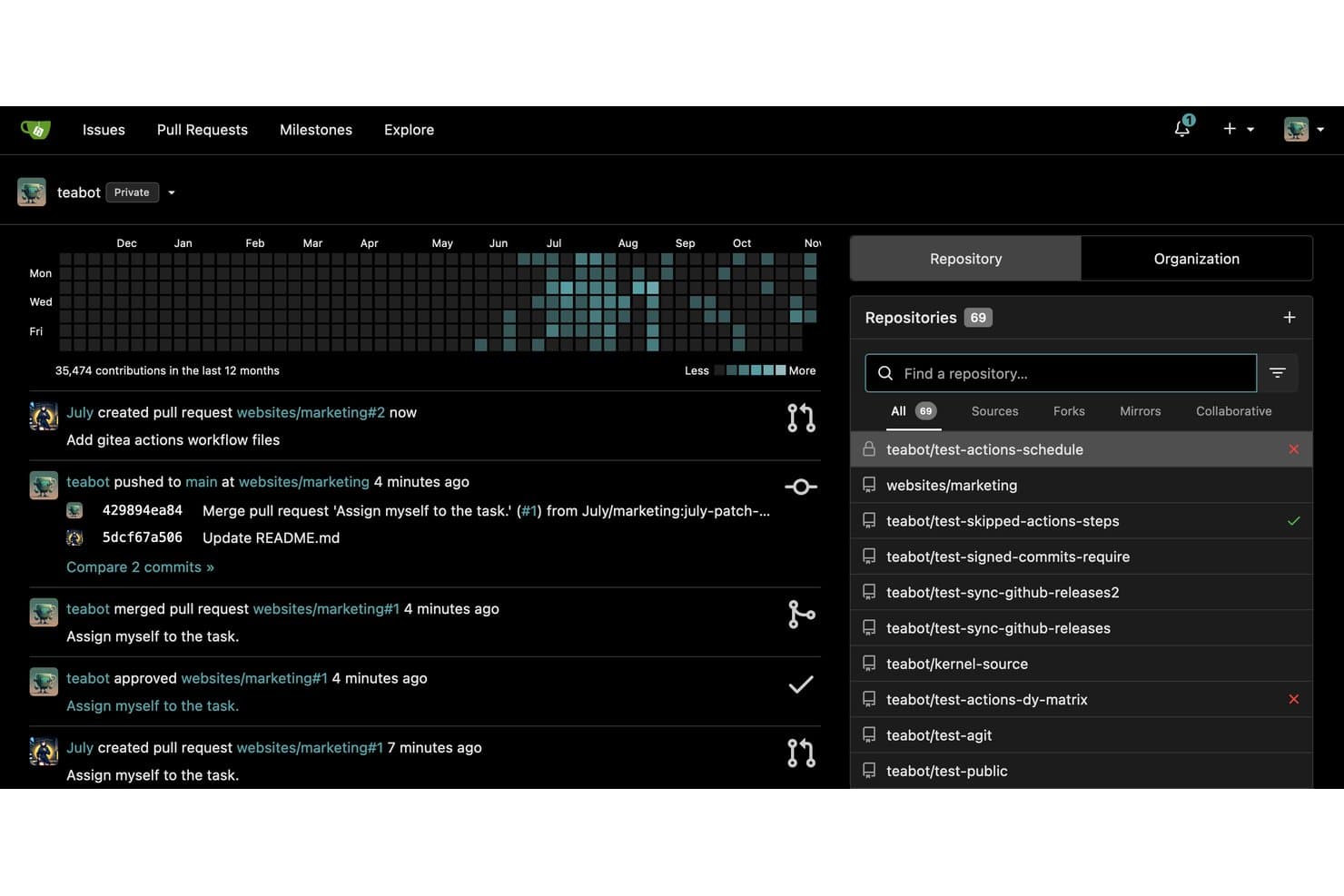
Gitea centralizza la gestione dei repository e il monitoraggio delle attività in un unico pannello. Gitea è una piattaforma Git autogestita che riunisce la gestione del codice, la revisione del codice basata sulle richieste di integrazione, la CI/CD integrata tramite Gitea Actions, la gestione dei problemi, le bacheche Kanban e un registro di pacchetti multiformato in un unico binario leggero.
Per chi è più indicato Gitea?
Gitea è particolarmente adatto ai team che si occupano di piattaforme e infrastrutture e che necessitano di una soluzione completa per la gestione di Git su infrastrutture con risorse limitate o isolate, senza il sovraccarico delle piattaforme più pesanti.
Perché ho scelto Gitea
Gitea si è guadagnato un posto nella mia selezione perché racchiude la gestione completa di Git, Gitea Actions (CI/CD compatibile con GitHub Actions), la gestione integrata dei problemi e un registro di pacchetti in oltre 20 formati in un unico binario Go, che funziona con appena 150–200 MB di RAM. L'ho scelto nello specifico per i team che operano in ambienti isolati o con risorse limitate, dove avviare un'istanza GitLab semplicemente non è realistico. Le regole di protezione dei rami si applicano a tutta l'organizzazione e l'intera piattaforma viene distribuita senza dipendenze esterne.
Funzionalità principali di Gitea
- Regole di protezione dei rami: Imposta le condizioni da soddisfare prima che il codice possa essere integrato nei rami protetti, incluse le approvazioni obbligatorie e i controlli dello stato.
- Flusso di lavoro AGit: Invia patch per la revisione senza creare una biforcazione di un repository, consentendo ai collaboratori di aprire richieste di integrazione direttamente dal proprio ramo locale con un unico invio.
- Registro di pacchetti multiformato: Ospita e distribuisci pacchetti in oltre 20 formati, tra cui npm, PyPI, Maven, Helm e Docker/OCI, dalla stessa istanza che contiene il tuo codice.
- Bacheche di progetto Kanban: Organizza problemi e richieste di integrazione in colonne visive per monitorare l'avanzamento dello sviluppo tra sprint o traguardi.
Integrazioni di Gitea
Gitea si integra con Drone, Woodpecker CI, Argo CD, Jenkins, Slack, Discord, Microsoft Teams e Lark, offrendo API REST e webhook per connessioni CI/CD personalizzate.
Pros and Cons
Pros:
- Funziona con risorse server minime
- Flussi di lavoro CI/CD compatibili con GitHub Actions inclusi
- Gestione completa dei repository Git in un unico binario
Cons:
- Nessuna revisione del codice assistita dall'IA integrata
- Le funzionalità aziendali sono disponibili solo nei piani a pagamento
Learn more about Gitea: Ideale per la revisione del codice nativa per l'IA su larga scala
- Sì
- $4/user/month
Visit WebsiteCustomer Rating:4.8/5
Ecco la funzionalità di gestione del codice in GitHub. GitHub è una piattaforma di gestione del codice sorgente nativa di Git che combina hosting dei repository, flussi di lavoro per la creazione di branch e la fusione, revisione del codice basata su richieste pull, CI/CD tramite GitHub Actions e sviluppo assistito dall'IA attraverso GitHub Copilot.
Per chi è più adatto GitHub?
GitHub è una scelta ideale per i team di ingegneria che hanno bisogno di revisione del codice assistita dall'IA, scansione della sicurezza e CI/CD integrati in un'unica piattaforma.
Perché ho scelto GitHub
GitHub si è guadagnato un posto tra i migliori della mia selezione perché la sua revisione del codice nativa per l'IA è realmente integrata nel flusso di lavoro delle richieste pull, anziché essere aggiunta in un secondo momento. Apprezzo il fatto che Copilot funzioni come un vero revisore: segnala i problemi, suggerisce correzioni e genera automaticamente correzioni per circa il 90% dei tipi di avvisi rilevati tramite Copilot Autofix. Abbinando questa funzionalità alle code di fusione e a CODEOWNERS, si ottiene una pipeline di revisione regolata da criteri che si adatta facilmente a centinaia di repository.
Funzionalità principali di GitHub
- GitHub Actions: Una piattaforma CI/CD nativa che consente di creare, testare e distribuire il codice utilizzando flussi di lavoro basati su YAML, attivati da eventi di push, richieste pull, pianificazioni o avvii manuali.
- GitHub Advanced Security: Una suite aggiuntiva che include la scansione SAST con CodeQL, la scansione dei segreti con protezione dei push e gli aggiornamenti automatici delle dipendenze di Dependabot eseguiti direttamente nelle richieste pull.
- Utenti gestiti dall'azienda Enterprise (EMU): Un modello di provisioning che collega gli account degli sviluppatori al provider di identità dell'azienda, offrendo al team IT il pieno controllo del ciclo di vita degli accessi degli utenti tramite SAML SSO e SCIM.
- GitHub Projects: Uno strumento integrato per il monitoraggio dei progetti con viste tabella, bacheca e roadmap, campi personalizzati e automazione dei flussi di lavoro per gestire problemi e richieste pull tra i repository.
Integrazioni di GitHub
GitHub offre integrazioni native con Jira e Slack, oltre a integrazioni del Marketplace per Jenkins, CircleCI, Azure Pipelines, Snyk e Datadog. Le API REST e GraphQL, i webhook e le GitHub Apps supportano connessioni personalizzate per la gestione del codice sorgente, CI/CD, sicurezza e flussi di lavoro.
Pros and Cons
Pros:
- La revisione del codice basata sull'IA segnala e corregge i problemi
- Piattaforma end-to-end dal repository alla distribuzione
- Solida conformità per i settori regolamentati
Cons:
- I file dei flussi di lavoro YAML richiedono competenze di scripting
- Manca una dashboard integrata per le metriche DORA
 La scelta migliore per la tracciabilità del codice nell'ecosistema Atlassian
- Piano gratuito disponibile
- A partire da $3.65/utente/mese
Visit WebsiteCustomer Rating:4.5/5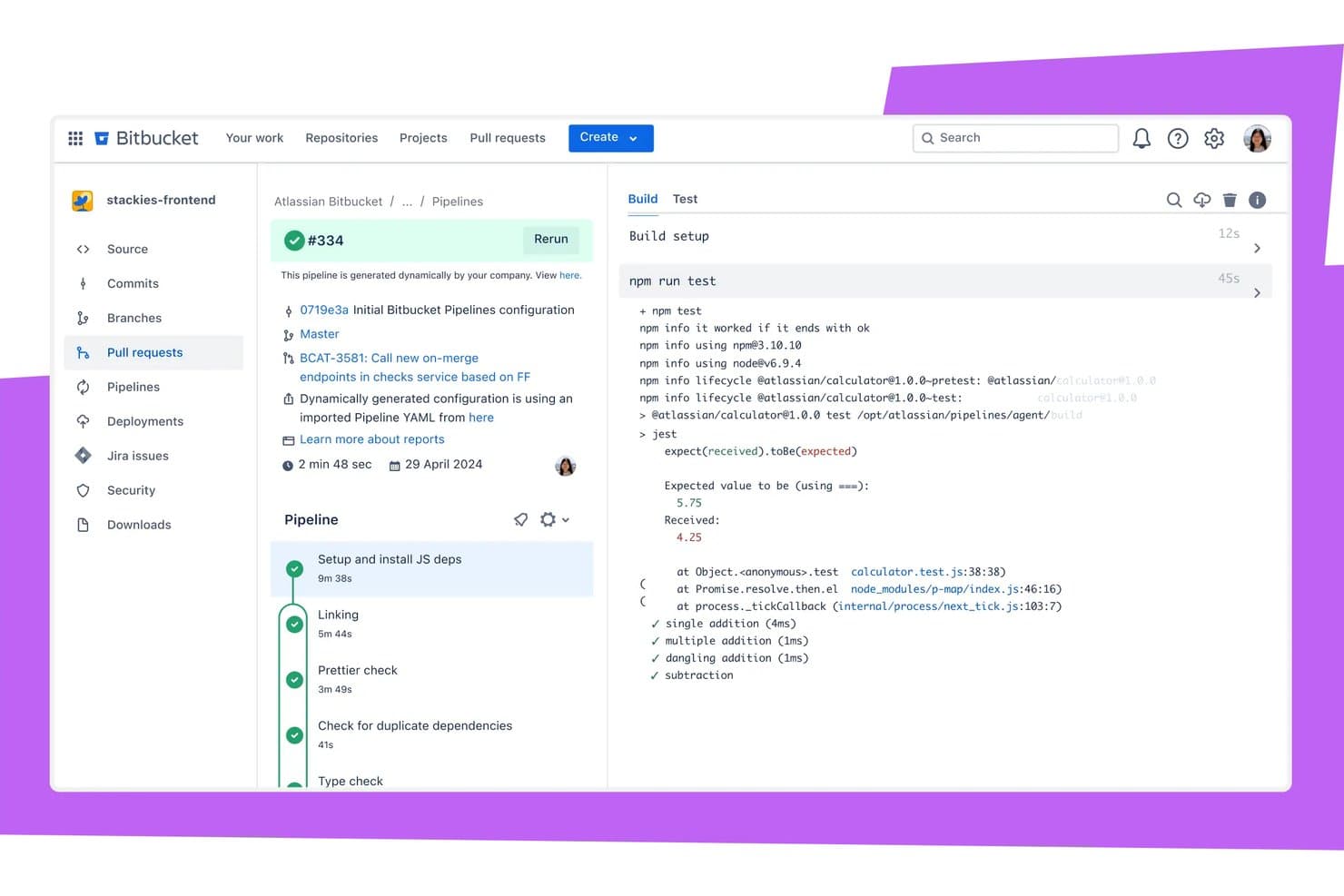
Bitbucket visualizza gli errori dei test direttamente nei log di build della pipeline. Bitbucket è una piattaforma di gestione e collaborazione del codice sorgente basata su Git, che combina hosting dei repository, flussi di lavoro con branching, revisioni delle richieste di pull, pipeline CI/CD integrate e scansione DevSecOps nativa in un unico strumento.
Per chi è più adatto Bitbucket?
Bitbucket è la scelta giusta per i team di ingegneria che utilizzano già Jira, Confluence o altri strumenti Atlassian e hanno bisogno che la tracciabilità del codice sia integrata direttamente nel flusso di lavoro esistente.
Perché ho scelto Bitbucket
Bitbucket si è guadagnato un posto nella mia rosa di finalisti grazie alla stretta connessione tra il codice e il lavoro all'interno dell'ecosistema Atlassian. Quando uno sviluppatore esegue il commit utilizzando una chiave di issue Jira, il commit aggiorna automaticamente lo stato dell'issue, mentre lo stato del branch, della build e della distribuzione viene visualizzato direttamente nel ticket Jira. Apprezzo anche la funzionalità Code Insights, che importa i risultati delle scansioni di sicurezza nelle richieste di pull e può bloccare i merge quando vengono rilevate vulnerabilità, mantenendo una tracciabilità impeccabile dal codice alla produzione.
Funzionalità principali di Bitbucket
- Scansione DevSecOps nativa: le Pipes integrate rilevano segreti, configurazioni errate IaC e vulnerabilità delle dipendenze direttamente all'interno di Bitbucket Pipelines.
- Controlli di merge obbligatori: il piano Premium consente agli amministratori di bloccare i merge delle richieste di pull finché le build non vengono completate correttamente, le approvazioni obbligatorie non vengono ottenute e i commenti non vengono risolti.
- Agente IA Rovo Dev: riassume gli errori di build, genera note di distribuzione e collega i risultati alle issue Jira senza uscire da Bitbucket.
- Runner autogestiti: i team possono collegare la propria infrastruttura a Bitbucket Pipelines, con fino a 100 runner standard disponibili senza costi aggiuntivi.
Integrazioni di Bitbucket
Bitbucket offre integrazioni native con Jira Software, Jira Service Management, Confluence, Jenkins, AWS, Azure e Google Cloud, oltre a più di 50 Pipes. Le API REST e i webhook supportano integrazioni personalizzate e flussi di lavoro CI/CD.
Pros and Cons
Pros:
- Integrazione profonda con Jira per la tracciabilità del codice
- Scansione DevSecOps integrata e blocco delle richieste di pull
- Opzioni di distribuzione ibrida per cloud e data center
Cons:
- L'SSO SAML richiede un abbonamento separato
- Problemi di prestazioni con repository molto grandi
Learn more about Bitbucket: Ideale per la gestione del codice sorgente DevSecOps tutto-in-uno
- Piano gratuito disponibile
- A partire da $29/user/month (con fatturazione annuale)
Visit WebsiteCustomer Rating:4.5/5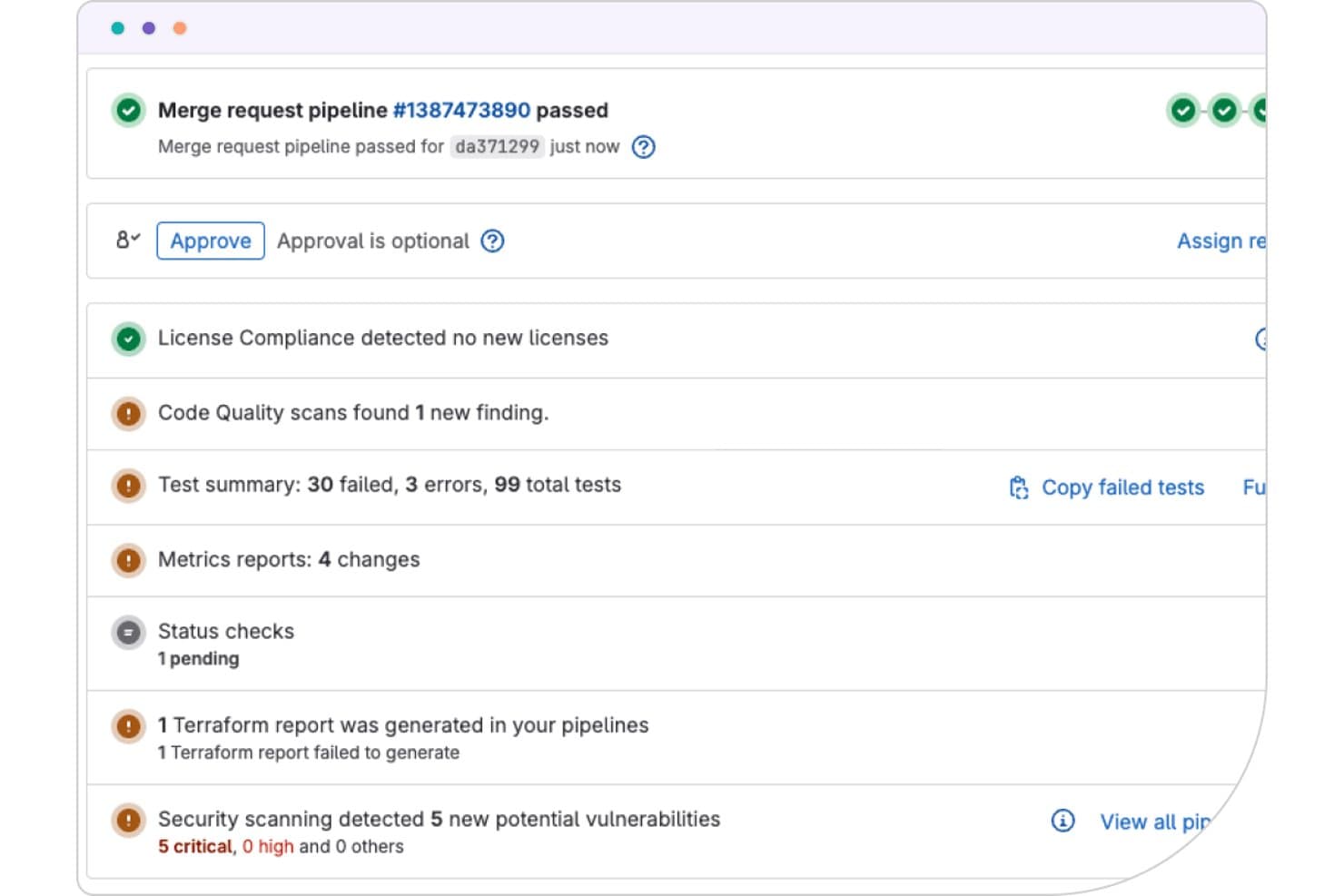
GitLab mostra i risultati di sicurezza, test e conformità direttamente nelle richieste di merge. GitLab è una piattaforma DevSecOps che unifica la gestione del codice sorgente, le pipeline CI/CD, la scansione della sicurezza e la pianificazione dei progetti in un'unica applicazione.
Per chi è più adatto GitLab?
GitLab è adatto ai team DevOps e di ingegneria delle piattaforme che desiderano controllo del codice sorgente, CI/CD e scansione della sicurezza in un unico luogo, invece di assemblare strumenti separati.
Perché ho scelto GitLab
GitLab si è guadagnato un posto nella mia lista ristretta perché è l'unico strumento SCM che offre controllo del codice sorgente, CI/CD e scansione della sicurezza come un'unica applicazione, anziché come un insieme frammentato di servizi collegati. Sono particolarmente colpito dalla sua suite di sicurezza nativa: SAST, DAST, scansione dei container e rilevamento dei segreti mostrano tutti i risultati direttamente all'interno delle richieste di merge. I treni di merge sono un altro elemento di spicco, poiché mantengono verde il ramo principale anche in presenza di volumi elevati di commit.
Funzionalità principali di GitLab
- Treni di merge: Testa e unisci in sequenza le modifiche in coda per mantenere stabile il ramo principale in presenza di volumi elevati di commit.
- Dashboard delle metriche DORA4: Monitora la frequenza di distribuzione, il tempo di consegna, il tasso di errore delle modifiche e il tempo di ripristino direttamente all'interno della piattaforma.
- Analisi del flusso di valore: Visualizza e misura ogni fase del ciclo di vita dello sviluppo software per identificare i punti in cui il lavoro rallenta.
- Piattaforma per agenti GitLab Duo: Consente agli agenti di IA di aprire autonomamente richieste di merge, eseguire revisioni del codice e risolvere le vulnerabilità all'interno del framework di governance esistente.
Integrazioni di GitLab
GitLab si integra con Jira, Jenkins, Kubernetes, AWS, Google Cloud, Azure, JetBrains, VS Code, Slack e Checkmarx tramite integrazioni documentate e il suo ecosistema di partner. Le API REST e GraphQL supportano flussi di lavoro personalizzati.
Pros and Cons
Pros:
- CI/CD e DevSecOps nativi in un unico strumento
- Risultati della scansione della sicurezza incorporati nelle richieste di merge
- Distribuzione su SaaS, ambienti autogestiti e cloud governativi
Cons:
- L'interfaccia utente può risultare disordinata
- Il riquadro di revisione del codice non dispone del filtraggio per tipo di file
 Ideale per la revisione del codice pre-unione su larga scala
- Prova gratuita di 30 giorni
- A partire da $18,000/all'anno (fatturato annualmente)
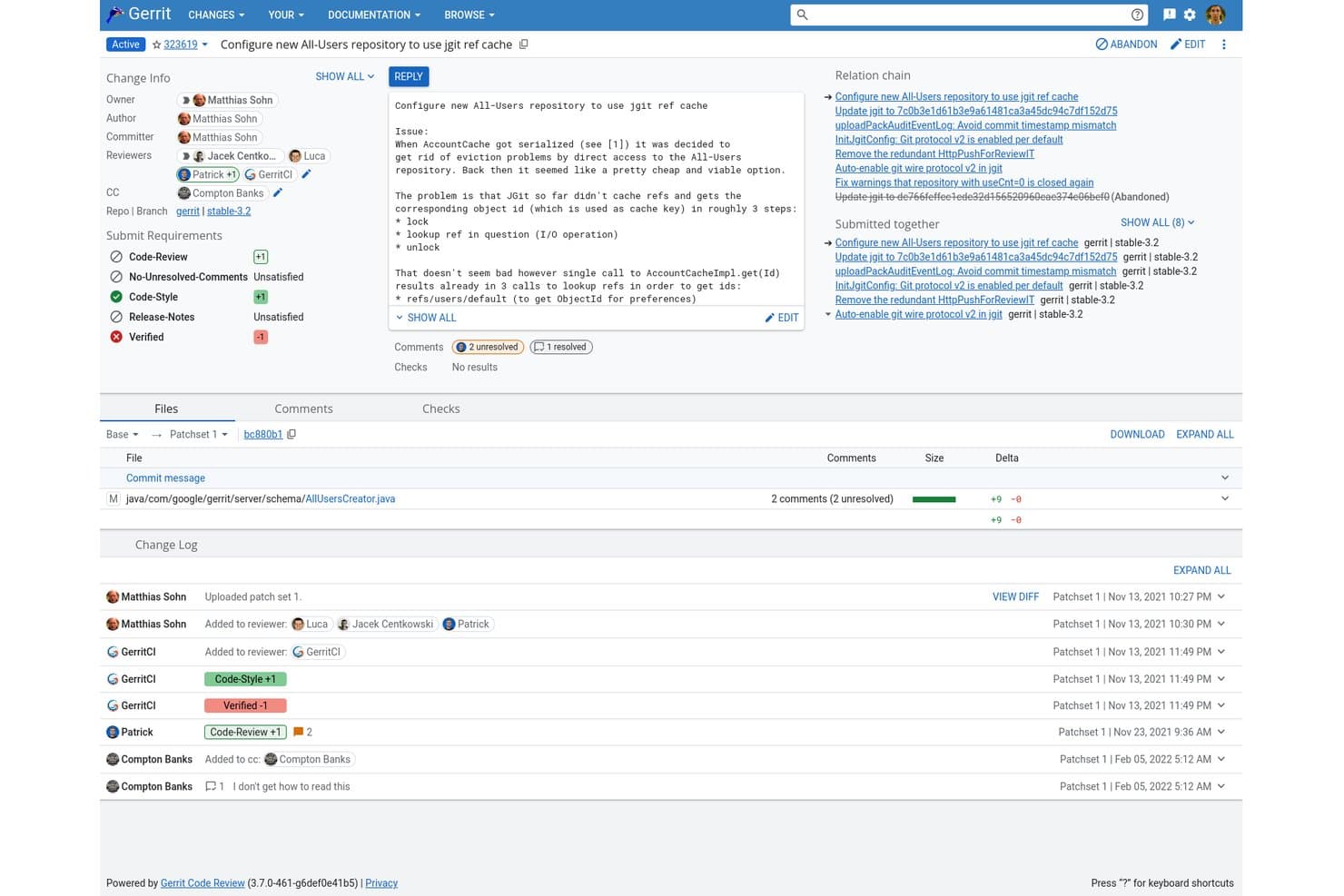
Gerrit centralizza in un'unica vista la revisione del codice, i commenti e i controlli CI. Gerrit è una piattaforma a codice sorgente aperto per la revisione del codice, nativa di Git, che combina la revisione pre-unione basata su patchset, il controllo granulare degli accessi a livello di riferimento, l'hosting flessibile dei repository e le integrazioni CI/CD tramite un ricco ecosistema di plugin.
Per chi è più adatto Gerrit?
Gerrit è la scelta ideale per gli ingegneri delle piattaforme e DevOps che gestiscono Git su scala aziendale, dove controlli rigorosi prima dell'unione e un controllo granulare degli accessi sono imprescindibili.
Perché ho scelto Gerrit
Gerrit si è guadagnato un posto nella mia selezione perché il suo modello di revisione basato su patchset è progettato appositamente per applicare controlli di qualità prima dell'unione su una scala che la maggior parte delle piattaforme non riesce a eguagliare. Mi piace molto il modo in cui le etichette di approvazione configurabili e i requisiti di invio consentono ai team di definire esattamente cosa significhi 'pronto per l'unione', fino a richiedere un voto
non_author. Il clustering attivo-attivo e la replica su più siti consentono di gestire basi di codice come AOSP senza difficoltà.Funzionalità principali di Gerrit
- Replica globale su più siti: Gerrit replica i repository tra nodi primari distribuiti geograficamente utilizzando plugin Kafka e Zookeeper, mantenendo sincronizzati i team distribuiti.
- Autenticazione tramite token OAuth Bearer: I token con durata limitata, revocabili e con ambito definito sostituiscono le password HTTP di lunga durata, offrendo un controllo più rigoroso sull'accesso alle API e agli utenti dei servizi.
- Automazione dei flussi Gerrit: Un motore sperimentale di regole che attiva azioni sulle modifiche quando vengono soddisfatte condizioni definite, consentendo di automatizzare i passaggi ripetitivi del flusso di lavoro di revisione.
- Clustering attivo-attivo: Gerrit supporta configurazioni di cluster attivo-attivo multi-primarie con aggiornamenti senza tempi di inattività, mantenendo disponibile l'ambiente SCM durante le finestre di manutenzione.
Integrazioni di Gerrit
Gerrit si integra con Jenkins, Zuul CI, GitHub Actions, Kafka, Zookeeper, LDAP, OAuth e Kubernetes. Supporta oltre 100 plugin della community, oltre a un'API REST e webhook per integrazioni CI/CD personalizzate.
Pros and Cons
Pros:
- Le revisioni basate su patchset applicano rigorosi controlli di qualità prima dell'unione
- ACL a livello di riferimento per un controllo granulare degli accessi
- Affidabilità comprovata su monorepository aziendali su larga scala
Cons:
- Nessun tracciamento dei problemi o scansione di sicurezza integrati
- Il complesso flusso di lavoro Git differisce dalle richieste pull
Learn more about Gerrit: Ideale per i team di sviluppo che utilizzano lo stack Microsoft
- Piano gratuito disponibile
- A partire da $6.00/utente/mese
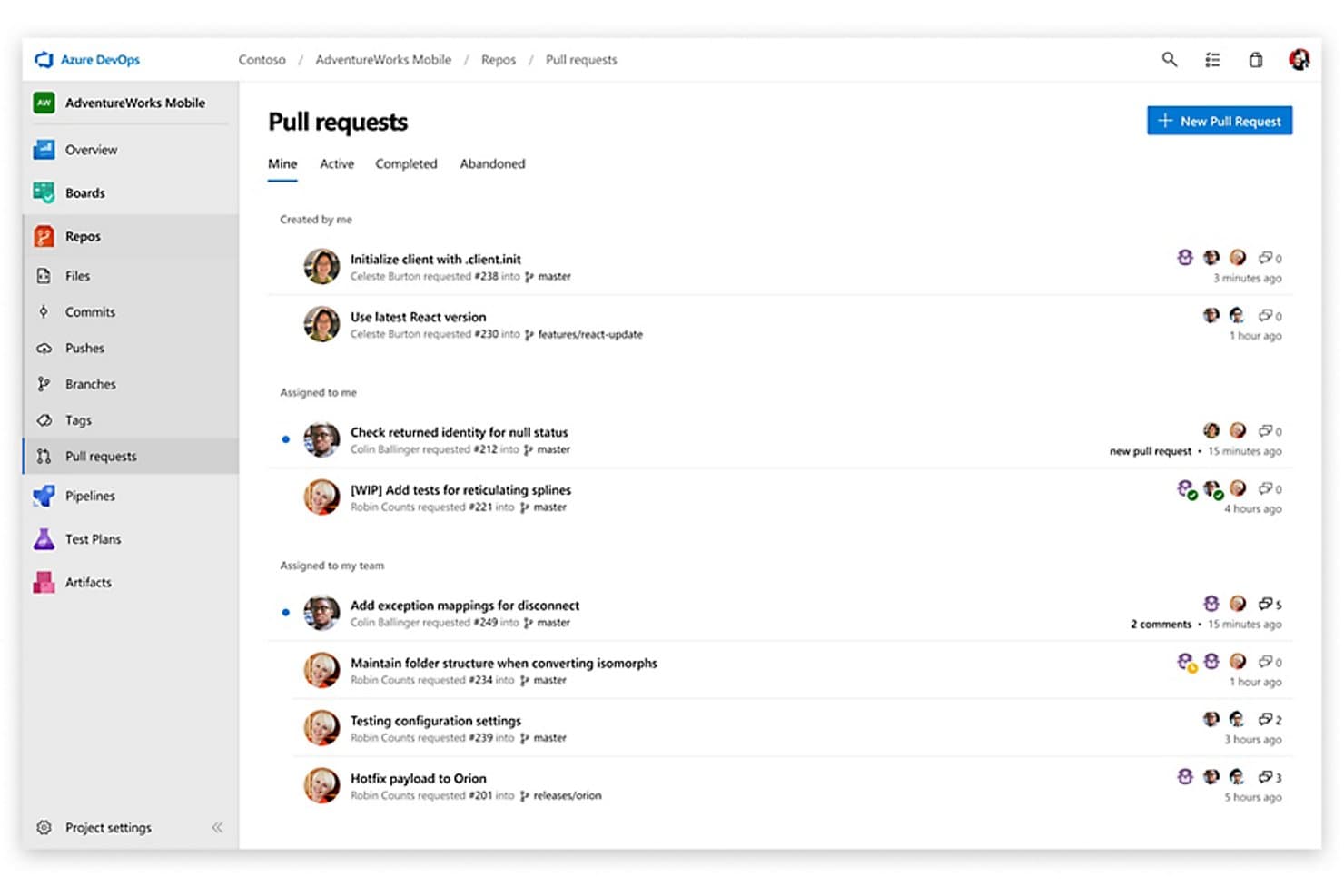
Azure Repos centralizza il monitoraggio delle richieste pull tra branch e membri del team. Azure Repos è la soluzione di gestione del codice sorgente di Microsoft all'interno della suite Azure DevOps, che offre hosting per repository Git e TFVC, criteri di branch configurabili, flussi di lavoro per le richieste pull e integrazione CI/CD nativa tramite Azure Pipelines.
Per chi è più adatto Azure Repos?
Azure Repos è la scelta naturale per i team che utilizzano già strumenti Microsoft come Azure, Visual Studio e Microsoft Entra ID e desiderano gestire il controllo del codice sorgente, la CI/CD e il monitoraggio del lavoro in un unico ambiente.
Perché ho scelto Azure Repos
Azure Repos è presente nella mia lista perché è l'unico strumento SCM integrato nativamente in una suite SDLC completa progettata attorno all'ecosistema Microsoft. Apprezzo particolarmente il modo in cui i criteri di branch si collegano direttamente alla convalida delle build di Azure Pipelines, così un'esecuzione CI non riuscita blocca fisicamente un'unione senza alcuna configurazione esterna. A questo si aggiungono Scalar per le prestazioni dei monorepo e l'analisi CodeQL di GitHub Advanced Security, disponibile direttamente nel flusso di lavoro delle richieste pull: i team che utilizzano lo stack Microsoft ottengono una governance rigorosa del codice senza dover aggiungere strumenti separati.
Funzionalità principali di Azure Repos
- Supporto per due sistemi di controllo delle versioni: Azure Repos consente ai team di ospitare repository Git e TFVC all'interno dello stesso progetto, supportando affiancati flussi di lavoro distribuiti e centralizzati.
- Analisi con GitHub Advanced Security: L'analisi statica CodeQL integrata, la scansione delle vulnerabilità delle dipendenze e la protezione contro l'inserimento di segreti rilevano i problemi di sicurezza direttamente nel flusso di lavoro delle richieste pull.
- Assegnazione automatica dei revisori: I criteri di branch possono assegnare automaticamente i revisori del codice in base ai percorsi dei file modificati, coinvolgendo le persone giuste senza interventi manuali.
- Collegamento agli elementi di lavoro di Azure Boards: I commit, i branch e le richieste pull possono essere collegati agli elementi di lavoro di Azure Boards; inoltre, i criteri di branch possono imporre che ogni richiesta pull faccia riferimento ad almeno un elemento monitorato.
Integrazioni di Azure Repos
Azure Repos offre integrazioni native nell'ecosistema Microsoft, tra cui Azure Boards, Azure Pipelines, Azure Artifacts, Azure Test Plans, Visual Studio e Microsoft Entra ID. La sua API REST, la CLI, i webhook e le integrazioni del Marketplace si collegano a Jenkins, CircleCI, GitHub Actions e altri strumenti.
Pros and Cons
Pros:
- Supporto per il controllo delle versioni Git e TFVC
- Integrazione profonda con Azure e l'ecosistema Microsoft
- Scansione di sicurezza e protezione dei segreti integrate
Cons:
- L'esperienza utente delle richieste pull è inferiore a quella dei concorrenti
- Le funzionalità di sicurezza avanzate sono disponibili solo come SaaS
Learn more about Azure Repos:
Altri strumenti SCM
Ecco alcune ulteriori opzioni di strumenti SCM che non sono entrate nella mia selezione, ma che vale comunque la pena esaminare:
- 11ForgejoIdeale per Git autogestito senza costi di licenza
- 12PerforceIdeale per il controllo versione di grandi file binari e monorepository
- 13SubversionIdeale per il controllo centralizzato delle versioni nei team regolamentati
- 14AWS CodeCommitIdeale per il controllo del codice sorgente nativo AWS governato da IAM
- 15GitKrakenIdeale per flussi di lavoro Git nativi per l'IA su qualsiasi host
- 16Fossil SCMIdeale per il controllo del codice sorgente pronto per l'audit in team con reti isolate
- 17CodebergIdeale per i team open source che evitano la dipendenza da un fornitore
- 18Micro Focus AccuRevIdeale per il controllo delle versioni
Come valuto gli strumenti SCM
Divido la mia valutazione in due livelli: requisiti di base, come il controllo delle versioni e le policy dei branch, e fattori distintivi, come la scansione della sicurezza e la profondità delle funzionalità CI/CD.
Funzionalità principali (Requisiti fondamentali per questo elenco)
Quando seleziono gli strumenti per il mio elenco, assegno a ciascuno un punteggio su una scala da 0 (non offre la funzionalità) a 5 (eccelle in quest'area) per ogni funzionalità principale elencata di seguito. Successivamente, calcolo il punteggio totale dello strumento sotto forma di percentuale. Ogni strumento deve raggiungere un punteggio totale minimo del 75% per essere preso in considerazione.
- Controllo delle versioni: Do valore agli strumenti che offrono funzionalità di scansione della sicurezza integrate, come SAST, DAST e il rilevamento dei segreti all'interno del flusso di lavoro SCM, assicurando che le vulnerabilità vengano individuate tempestivamente. Le funzionalità avanzate di controllo delle versioni che supportano monorepository di grandi dimensioni con estrazioni parziali e LFS sono essenziali per gestire in modo efficiente basi di codice di livello aziendale.
- Ramificazione e unione: Cerco modelli di ramificazione che integrino funzionalità di sviluppo assistito dall'IA, come riepiloghi automatici delle PR e assistenza intelligente nelle revisioni, per accelerare i flussi di lavoro e ridurre l'affaticamento dei revisori, insieme a solide strategie di unione e al rilevamento dei conflitti.
- Hosting dei repository: Do priorità alle opzioni di hosting che offrono distribuzioni SaaS, autogestite e ibride, con certificazioni di conformità come SOC 2 e ISO 27001, oltre alla residenza geografica dei dati per soddisfare le esigenze aziendali. Il supporto per installazioni isolate o locali è un fattore cruciale per gli ambienti regolamentati.
- Controllo degli accessi e autorizzazioni: Mi concentro su autorizzazioni granulari con gestione delle identità di livello aziendale, inclusi SSO, SAML e provisioning SCIM, assicurando un accesso sicuro e conforme tra i reparti che gestiscono basi di codice sensibili.
- Flussi di lavoro per la revisione del codice: Mi aspetto funzionalità solide per le pull request, integrate con miglioramenti basati sull'IA, revisori obbligatori, commenti inline e controlli dello stato, per facilitare revisioni approfondite e collaborative che vadano oltre le approvazioni di base.
- Integrazioni CI/CD e DevOps: Valuto gli strumenti in base alle integrazioni del loro ecosistema con IDE, gestione dei progetti e piattaforme di osservabilità, oltre a solide API e al supporto dei webhook per l'automazione personalizzata. Anche le funzionalità CI/CD integrate e una scalabilità affidabile con il supporto di CDN globali svolgono un ruolo fondamentale nella gestione fluida delle pipeline.
Una volta ottenuto un elenco di strumenti che soddisfano questi criteri, considero ciò che distingue ciascuna piattaforma.
Fattori distintivi (Ciò che distingue i fornitori)
Ecco come confronto e metto in evidenza le differenze tra i vari fornitori:
Funzionalità di spicco
La scansione della sicurezza integrata è un importante fattore distintivo. Gli strumenti che individuano le vulnerabilità delle dipendenze o i segreti divulgati all'interno del flusso di lavoro SCM evitano ai team di dover aggiungere separatamente strumenti SAST. Valuto anche funzionalità di sviluppo assistito dall'IA, come i suggerimenti sul codice e i riepiloghi automatici delle PR, che riducono l'affaticamento dei revisori nei repository ad alto volume. La ricerca nel codice e gli approfondimenti sull'ingegneria completano il quadro: le metriche DORA e le analisi dei contributori aiutano i responsabili dei team a individuare i colli di bottiglia prima che rallentino la distribuzione.
Oltre le funzionalità
La flessibilità di distribuzione è molto importante: alcuni team hanno bisogno del SaaS, mentre altri, operanti in settori regolamentati, richiedono installazioni autogestite o isolate. Verifico se un fornitore offre entrambe le opzioni. Anche le certificazioni di conformità come SOC 2 e ISO 27001 hanno un peso, soprattutto per i team che gestiscono proprietà intellettuale sensibile o lavorano secondo rigorosi requisiti di audit. La struttura dei prezzi è un altro fattore che valuto attentamente, poiché i modelli per utente possono aumentare rapidamente per le organizzazioni di ingegneria in crescita. Un generoso piano gratuito per i team più piccoli o per i progetti a codice aperto è un fattore distintivo significativo.
Come scegliere uno strumento SCM
È facile lasciarsi sopraffare da lunghi elenchi di funzionalità e strutture tariffarie complesse. Per aiutarti a rimanere concentrato mentre affronti il tuo specifico processo di selezione del software, ecco un elenco di fattori da tenere a mente:
| Fattore | Cosa considerare |
| Scalabilità | Assicurati che lo strumento possa crescere insieme al tuo team. Verifica se è in grado di gestire basi di codice e un numero crescente di utenti senza problemi di prestazioni. |
| Integrazioni | Verifica se si integra con gli strumenti esistenti, come le pipeline CI/CD, i software di gestione dei progetti e le altre piattaforme essenziali che utilizzi. |
| Personalizzazione | Cerca funzionalità che ti consentano di adattare i flussi di lavoro e i pannelli di controllo ai processi e alle preferenze del tuo team. |
| Facilità d'uso | Valuta l'intuitività dell'interfaccia dello strumento. Un design intuitivo può ridurre la curva di apprendimento e aiutare il team ad adottarlo rapidamente. |
| Budget | Allinea il costo dello strumento al tuo budget. Considera sia i costi iniziali sia le spese continuative e assicurati che rientrino nel tuo piano finanziario. |
| Misure di sicurezza | Esamina le misure di sicurezza adottate. Assicurati che offra funzionalità come la crittografia, i controlli degli accessi e la conformità agli standard del settore. |
| Supporto & formazione | Considera la disponibilità del supporto clienti e delle risorse di formazione per aiutare il team a utilizzare efficacemente lo strumento e a risolvere tempestivamente eventuali problemi. |
| Prestazioni | Valuta il comportamento dello strumento sotto stress. Deve essere affidabile e coerente anche nei periodi di utilizzo massimo, per mantenere i tuoi progetti nei tempi previsti. |
Tendenze degli strumenti SCM
Nella mia ricerca ho raccolto innumerevoli aggiornamenti di prodotto, comunicati stampa e registri delle versioni da diversi fornitori di strumenti SCM. Ecco alcune delle tendenze emergenti che sto tenendo d'occhio:
- Sviluppo nativo del cloud: un numero crescente di strumenti SCM sta adottando architetture native del cloud, consentendo ai team di collaborare in tempo reale da qualsiasi luogo. Questa tendenza aiuta le aziende a ridurre i costi dell'infrastruttura e a migliorare l'accessibilità, con fornitori come GitHub e GitLab che offrono solide soluzioni basate sul cloud. Esistono anche alternative a Git per i team IT che non lavorano nel framework Git.
- Informazioni basate sull'IA: i fornitori stanno integrando l'IA per offrire informazioni predittive e suggerimenti sulla qualità del codice. Questo aiuta i team a individuare tempestivamente i potenziali problemi e a migliorare l'efficienza del codice. Ad esempio, alcuni strumenti offrono ora funzionalità di revisione del codice basate sull'IA che evidenziano gli errori e suggeriscono miglioramenti.
- Funzionalità di sicurezza avanzate: con l'aumento delle minacce informatiche, gli strumenti SCM si concentrano maggiormente sulla sicurezza. Funzionalità come la scansione integrata delle vulnerabilità e i controlli di conformità stanno diventando standard. Strumenti come Azure DevOps le stanno integrando per proteggere le basi di codice da potenziali violazioni.
- Integrazione con DevOps: l'integrazione tra gli strumenti SCM e le pratiche DevOps sta diventando sempre più stretta. Questa tendenza supporta l'integrazione e la distribuzione continue, rendendo più semplice per i team distribuire rapidamente le modifiche. Piattaforme come Bitbucket stanno potenziando le proprie funzionalità DevOps per sostenere questa tendenza.
- Supporto per i microservizi: poiché sempre più aziende adottano architetture a microservizi, gli strumenti SCM si stanno evolvendo per supportare questi ambienti. Ciò consente agli sviluppatori di gestire più basi di codice in modo efficiente. Soluzioni come AWS CodePipeline si stanno adattando per soddisfare questa esigenza crescente.
Che cos'è uno strumento SCM?
Uno strumento SCM è un software utilizzato per la gestione del codice sorgente e il monitoraggio delle modifiche nei progetti di sviluppo software. Gli sviluppatori, gli ingegneri DevOps e i professionisti IT utilizzano generalmente questi strumenti per collaborare sul codice e mantenere il controllo delle versioni.
Funzionalità come il controllo delle versioni, la gestione dei rami e la revisione del codice favoriscono la collaborazione e il mantenimento della qualità del codice. Nel complesso, questi strumenti forniscono un supporto essenziale per processi efficienti e organizzati di sviluppo software.
Funzionalità
Ecco le funzionalità fondamentali che ogni ottimo strumento SCM dovrebbe avere:
- Gestione dei rami: consente agli sviluppatori di lavorare contemporaneamente su funzionalità o correzioni diverse senza influire sulla base di codice principale.
- Revisione del codice: facilita le revisioni tra pari per garantire la qualità del codice e individuare tempestivamente potenziali problemi.
- Gestione della configurazione: gestisce e mantiene configurazioni coerenti negli ambienti di sviluppo.
- Supporto all'integrazione: si connette facilmente ad altri strumenti, come le pipeline CI/CD e i software di gestione dei progetti, per migliorare l'efficienza del flusso di lavoro.
- Strumenti di controllo della versione: tiene traccia delle modifiche al codice nel tempo, aiutando i team a gestire e ripristinare le versioni precedenti quando necessario.
- Funzionalità di sicurezza: fornisce strumenti integrati per la scansione delle vulnerabilità e i controlli di conformità, proteggendo le basi di codice.
- Flussi di lavoro automatizzati: semplificano le attività ripetitive, riducendo il lavoro manuale e aumentando la produttività.
- Analisi e report: offre informazioni sulle prestazioni del codice e sulla produttività del team attraverso report dettagliati.
- Scalabilità: supporta la crescita gestendo in modo efficiente un numero maggiore di utenti e basi di codice più ampie man mano che il team si espande.
- Collaborazione in tempo reale: consente ai membri del team di lavorare insieme contemporaneamente sul codice, migliorando la comunicazione e riducendo i ritardi.
Vantaggi
L'implementazione di uno strumento SCM offre diversi vantaggi al team e all'azienda. Eccone alcuni:
- Collaborazione migliorata: le funzionalità di collaborazione in tempo reale consentono al team di lavorare insieme in modo efficiente, riducendo i ritardi e migliorando la comunicazione.
- Qualità del codice migliorata: i processi di revisione del codice aiutano a mantenere standard elevati individuando gli errori e suggerendo miglioramenti.
- Gestione efficiente delle versioni: i sistemi di controllo della versione consentono di monitorare le modifiche e ripristinare le versioni precedenti, garantendo stabilità e coerenza nei progetti.
- Produttività aumentata: i flussi di lavoro automatizzati riducono le attività manuali, liberando tempo affinché il team possa concentrarsi su attività di sviluppo più importanti.
- Scalabilità: supporta i team in crescita gestendo un numero maggiore di utenti e basi di codice più ampie senza problemi di prestazioni.
- Maggiore sicurezza: le funzionalità di sicurezza integrate, come la scansione delle vulnerabilità, aiutano a proteggere la base di codice da potenziali minacce.
- Analisi approfondite: analisi e report dettagliati forniscono informazioni preziose sulle prestazioni del team e sull'efficienza del codice, favorendo decisioni migliori.
Costi e prezzi
La scelta di uno strumento SCM richiede la comprensione dei diversi modelli e piani tariffari disponibili. I costi variano in base alle funzionalità, alle dimensioni del team, ai componenti aggiuntivi e ad altri fattori. La tabella seguente riassume i piani più comuni, i relativi prezzi medi e le funzionalità tipicamente incluse nelle soluzioni degli strumenti SCM:
Tabella comparativa dei piani per gli strumenti SCM
| Tipo di piano | Prezzo medio | Funzionalità comuni |
| Piano gratuito | $0 | Controllo della versione di base, utenti limitati e strumenti essenziali per la collaborazione. |
| Piano personale | $5-$25 /utente /mese | Controllo della versione avanzato, gestione dei rami e revisione del codice di base. |
| Piano aziendale | $30-$60 /utente /mese | Strumenti avanzati per la revisione del codice, funzionalità di sicurezza e supporto all'integrazione. |
| Piano aziendale avanzato | $70-$100 /utente /mese | Analisi complete, ampia personalizzazione e supporto dedicato. |
Domande frequenti
Ecco alcune risposte alle domande comuni sugli strumenti SCM:
In che modo SCM supporta le pratiche DevOps?
Gli strumenti SCM svolgono un ruolo fondamentale in DevOps, facilitando l’integrazione continua e la distribuzione continua (CI/CD). Aiutano a gestire le modifiche al codice, ad automatizzare i flussi di lavoro e a favorire la collaborazione tra i membri del team. Questa integrazione supporta rilasci più rapidi e una distribuzione del software più affidabile, in linea con gli obiettivi DevOps.
Gli strumenti SCM sono in grado di gestire progetti su larga scala?
Sì, molti strumenti SCM sono progettati per adattarsi alle esigenze del team. Possono gestire efficacemente basi di codice di grandi dimensioni e numerosi collaboratori. Funzionalità come la gestione dei rami e il controllo delle versioni garantiscono che anche i progetti complessi rimangano organizzati e gestibili, rendendoli adatti alle operazioni su larga scala.
Quali misure di sicurezza sono presenti negli strumenti SCM?
Gli strumenti SCM spesso includono funzionalità di sicurezza come controlli degli accessi, crittografia e registri di audit per proteggere la base di codice. Inoltre, molti di essi possono essere integrati con il software di automazione della rete per un monitoraggio completo. Queste misure aiutano a prevenire gli accessi non autorizzati e garantiscono la conformità agli standard del settore. Offrono tranquillità proteggendo la proprietà intellettuale e le informazioni sensibili.
In che modo gli strumenti SCM si integrano con altri software?
Gli strumenti SCM offrono generalmente integrazioni con diverse piattaforme di sviluppo e gestione dei progetti. Questa connettività consente uno scambio di dati fluido e una maggiore efficienza del flusso di lavoro. Integrandosi con strumenti come le pipeline CI/CD e i sistemi di gestione delle segnalazioni, le soluzioni SCM aiutano a ottimizzare i processi di sviluppo. Per quanto riguarda il networking e la distribuzione, il software RMM può essere un’ottima aggiunta al tuo insieme di tecnologie per la gestione del codice.
L'utilizzo degli strumenti SCM comporta dei costi?
Sebbene alcuni strumenti SCM offrano piani gratuiti, le funzionalità avanzate e il supporto per team più numerosi comportano solitamente un costo. I modelli di prezzo variano e spesso si basano sul numero di utenti o sull’accesso alle funzionalità. È essenziale valutare la struttura dei prezzi in relazione alle esigenze e al budget del team per assicurarsi di ottenere un buon rapporto qualità-prezzo.
Quali risorse di formazione sono disponibili per gli strumenti SCM?
Molti fornitori di SCM offrono una vasta gamma di risorse formative, tra cui tutorial, documentazione, webinar e forum della comunità. Queste risorse aiutano gli utenti a diventare rapidamente ed efficacemente operativi. L’accesso a materiali formativi completi può facilitare notevolmente il processo di inserimento e migliorare l’adozione dello strumento.