

Esplorando il mondo dei software per la gestione del codice sorgente, mi sono confrontato con le esigenze dei sistemi Windows e Mac. Avendo una profonda esperienza nei team di sviluppo software, comprendo la necessità di strumenti efficienti per il monitoraggio dei bug, il controllo degli accessi e una solida collaborazione, sia che si preferisca la riga di comando sia che si opti per un'interfaccia grafica.
Con strumenti come le opzioni software open source e Team Foundation Server, i team possono gestire meticolosamente le directory, assicurandosi che i progetti di sviluppo procedano senza intoppi. E credetemi, è la differenza tra dover continuamente gestire le emergenze e guidare con fluidità i progetti software verso il successo.
Perché fidarsi dei nostri consigli sui software
6,700+
Reviews
20
Industry experts
16+
Evaluation factors
14
Years
Il nostro team testa e recensisce software dal 2012. In quanto leader tecnologici noi stessi, sappiamo quanto sia difficile — e importante — scegliere il software giusto.
Per questa guida, abbiamo valutato gli strumenti attraverso test praticie ricerche indipendenti, assegnando un punteggio agli strumenti in base ai nostri criteri di selezione.
Le nostre recensioni riflettono il nostro giudizio editoriale umano, non un discorso di vendita.
Revisori esperti:
- Paulo Gardini MiguelDirettore tecnico
 Tim FisherVP dell'IA
 Gabriel RosasTech Lead e architetto software
 Christhian GruhnTech Lead e architetto della piattaforma

Tabella comparativa: software per la gestione del codice sorgente
Questa tabella comparativa riassume i dettagli dei prezzi delle mie migliori selezioni di software per la gestione del codice sorgente.
| Tool | Best For | Trial Info | Price | ||
|---|---|---|---|---|---|
| 1 | Ideale per migrare repository SVN legacy a Git | È disponibile una prova gratuita di 30 giorni | A partire da $75/utente/anno (fatturato annualmente) | Website | |
| 2 | Ideale per il controllo delle versioni basato sul cloud | No | Prezzo su richiesta | Website | |
| 3 | Ideale per Git autogestito su un'infrastruttura minima | Prova gratuita di 30 giorni | A partire da $9.50/utente/mese | Website | |
| 4 | Ideale per la scalabilità nelle grandi aziende | Piano gratuito disponibile | A partire da $39/utente/mese | Website | |
| 5 | Ideale per revisioni del codice su più repository e tra diversi tipi di VCS | Non disponibile | Prezzi su richiesta | Website | |
| 6 | Ideale per la revisione del codice nativa dell'IA su larga scala | Prova gratuita di 30 giorni | A partire da $21/utente/mese | Website | |
| 7 | Ideale per l'integrazione con Jira Software | No | A partire da $3/user/month (con fatturazione annuale) | Website | |
| 8 | Ideale per DevOps dall'inizio alla fine nello stack Microsoft | Piano gratuito disponibile | A partire da $6/utente/mese | Website | |
| 9 | Ideale per combinare CI/CD e gestione del codice | No | A partire da $4/utente/mese (con fatturazione annuale) | Website | |
| 10 | Ideale per usare Git e TFVC in un unico repository ospitato | Piano gratuito disponibile | A partire da $6/utente/mese | Website |


Recensioni dei migliori software per la gestione del codice sorgente
Di seguito sono riportati i miei riepiloghi dettagliati dei migliori software per la gestione del codice sorgente inclusi nella mia selezione. Le mie recensioni offrono un’analisi dettagliata delle funzionalità principali, dei pro e dei contro, delle integrazioni e dei casi d’uso ideali di ogni strumento, per aiutarti a trovare quello più adatto a te.
 Ideale per migrare repository SVN legacy a Git
- È disponibile una prova gratuita di 30 giorni
- A partire da $75/utente/anno (fatturato annualmente)
Visit WebsiteCustomer Rating:4.8/5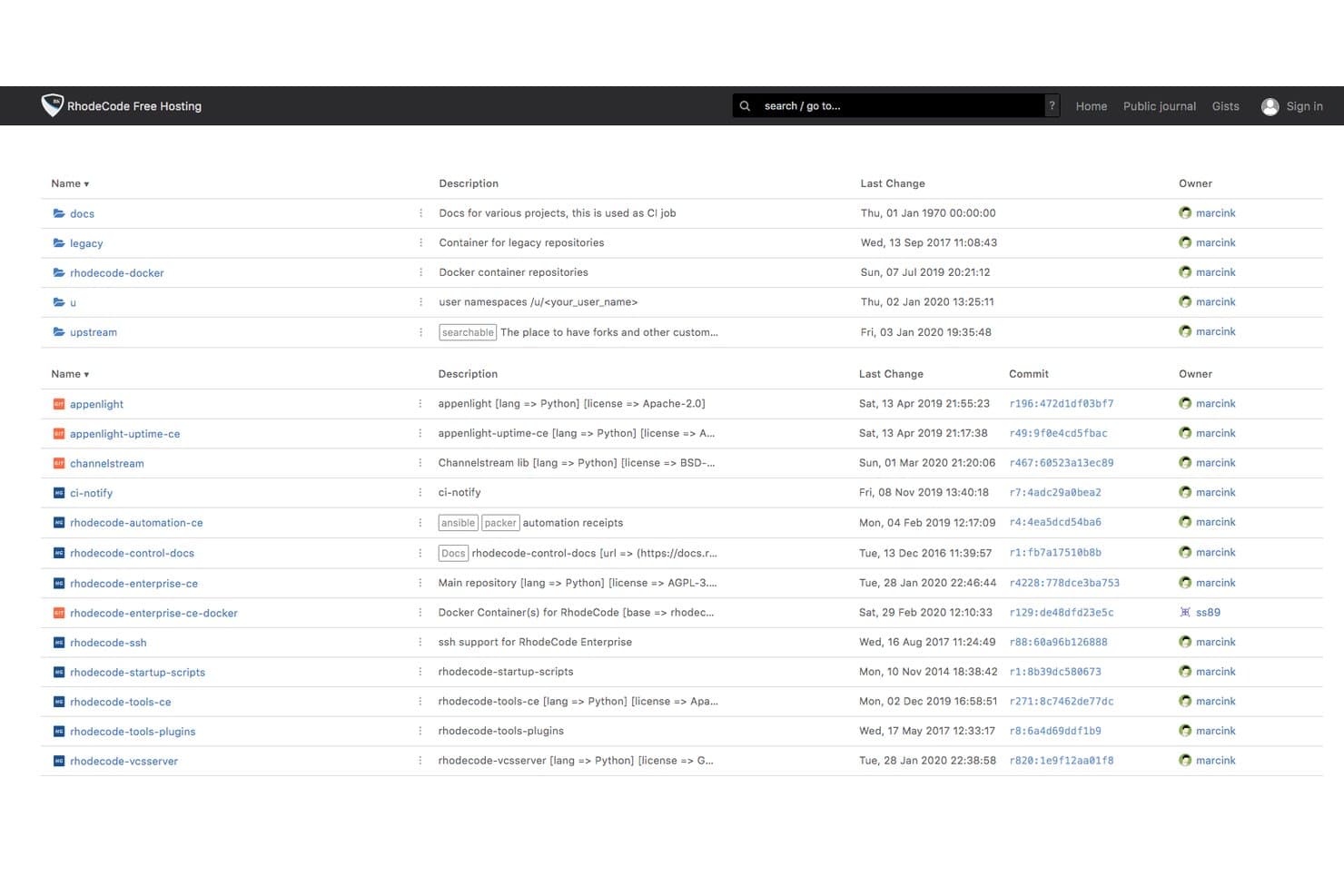
RhodeCode organizza repository e gruppi mostrando dettagli sulla proprietà e sui commit. RhodeCode è una piattaforma di gestione del codice sorgente ospitata internamente che supporta Git, Mercurial e SVN tramite un'unica interfaccia, con revisione del codice, autorizzazioni dei rami, controllo degli accessi e revisione assistita dall'IA integrati.
Per chi è più adatto RhodeCode?
RhodeCode è particolarmente adatto alle aziende di settori regolamentati—banche, difesa e fintech—che necessitano di un controllo delle versioni ospitato internamente con rigidi controlli degli accessi e di migrare infrastrutture SVN legacy.
Perché ho scelto RhodeCode
RhodeCode è entrato nella mia lista ristretta perché è l'unica piattaforma SCM che ho trovato a permettere di eseguire Git, Mercurial e SVN affiancati tramite un'unica interfaccia, il che la rende concretamente utile per i team ancora legati a infrastrutture SVN legacy. Apprezzo particolarmente la sua funzionalità di migrazione con sincronizzazione doppia: il repository SVN e un repository Git rimangono sincronizzati simultaneamente, consentendo di effettuare il passaggio gradualmente senza una rischiosa migrazione in un'unica fase. Le autorizzazioni dei rami e i registri di audit rimangono intatti durante tutto il processo, un aspetto importante quando si opera in ambienti bancari o della difesa.
Funzionalità principali di RhodeCode
- Revisione del codice assistita dall'IA: Assegna un revisore IA alle richieste pull; analizza le differenze e pubblica commenti contestuali utilizzando ChatGPT, Gemini, Claude o il tuo modello interno.
- Assegnazione intelligente dei revisori: Suggerisce automaticamente i revisori più adatti per ogni richiesta pull in base ai file e alle modifiche incluse.
- Ricerca a testo completo nel codice: Cerca in tutti i repository, commenti, gist e file utilizzando Elasticsearch nell'Edizione Enterprise.
- Registri di audit con esportazione: Ogni azione dell'utente viene registrata con indirizzo IP e modifiche ai dati, con supporto all'esportazione verso sistemi di conformità di terze parti.
Integrazioni di RhodeCode
RhodeCode offre integrazioni documentate con Jenkins, TeamCity, Travis CI, JIRA, Slack e Confluence. Le API JSON-RPC e REST, i webhook e le RhodeCode Extensions supportano connessioni personalizzate con strumenti CI/CD e per sviluppatori.
Pros and Cons
Pros:
- Supporta Git, Mercurial e SVN insieme
- Consente flussi di lavoro per la migrazione graduale da SVN a Git
- Controlli avanzati sui rami e sugli accessi
Cons:
- Nessuna integrazione continua integrata
- Meno integrazioni dal marketplace rispetto alla concorrenza
Learn more about RhodeCode: Ideale per il controllo delle versioni basato sul cloud
- No
- Prezzo su richiesta
Visit WebsiteCustomer Rating:4.2/5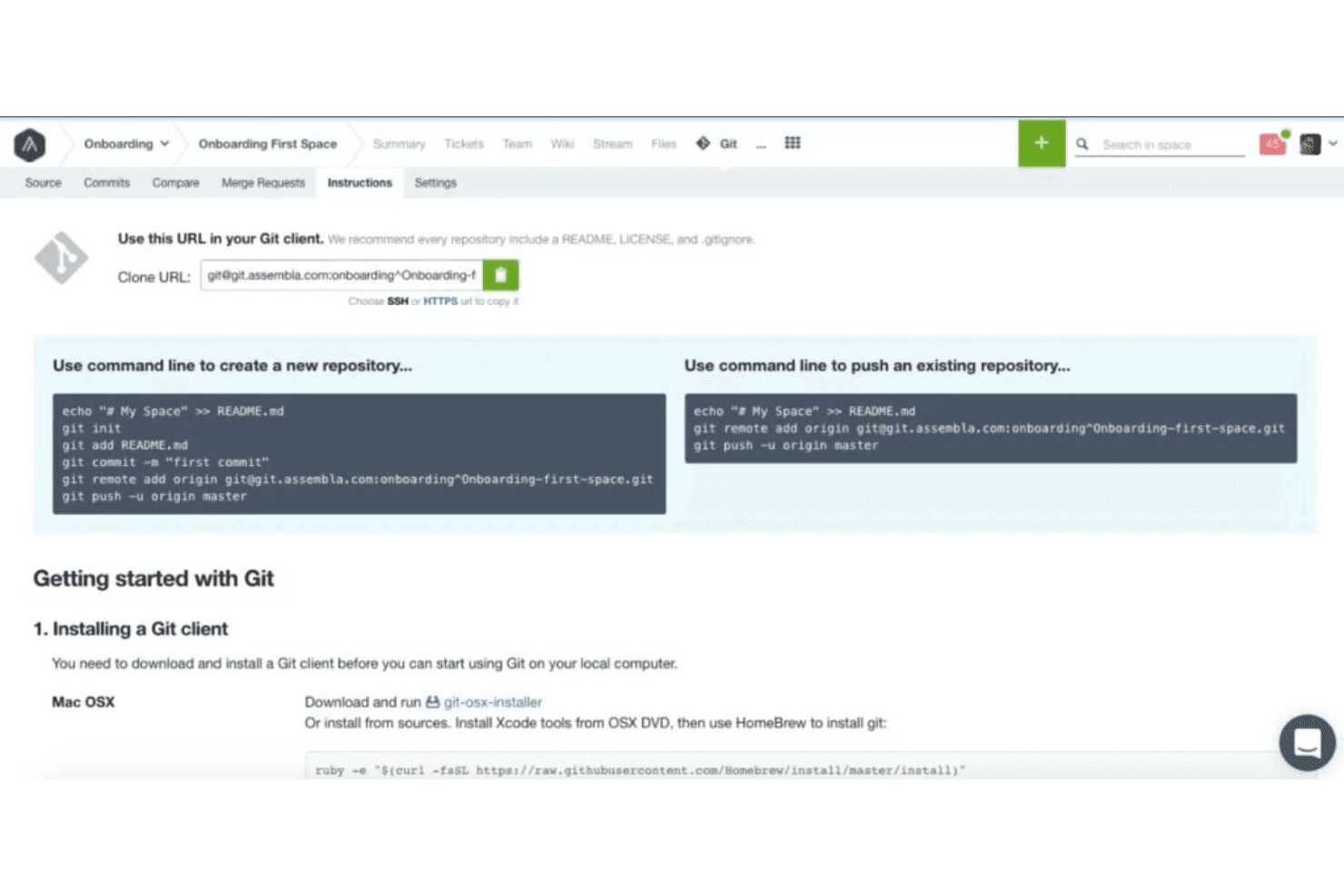
I repository Git, SVN e Perforce di Assembla offrono istruzioni di configurazione semplici, visualizzazione e ricerca del codice nel browser, cronologia dei commit e flussi di lavoro per la revisione del codice tramite richieste di unione. Assembla è una piattaforma di gestione del codice sorgente basata sul cloud che ospita nativamente repository Git, SVN e Perforce in un unico ambiente gestito, con revisione del codice, ramificazione e strumenti integrati di gestione dei progetti.
Per chi è più adatto Assembla?
Assembla è particolarmente adatto ai team di ingegneria che gestiscono ambienti VCS misti, soprattutto quelli che utilizzano ancora SVN o Perforce insieme a Git, e che desiderano un hosting nel cloud completamente gestito senza l'onere di mantenere la propria infrastruttura.
Perché ho scelto Assembla
Assembla si è guadagnato un posto nella mia lista ristretta perché è l'unica piattaforma SCM ospitata nel cloud che conosco in grado di eseguire nativamente Git, SVN e Perforce fianco a fianco in un unico ambiente gestito. Lo trovo particolarmente utile per i team che dispongono ancora di basi di codice SVN o Perforce attive e non possono permettersi una migrazione completa. Assembla supporta persino le richieste di unione per SVN, una funzionalità che non è disponibile immediatamente in nessun altro servizio.
Funzionalità principali di Assembla
- Protezione dei rami: impone revisioni del codice obbligatorie prima che possa essere completata qualsiasi unione, impedendo al codice non revisionato di raggiungere i rami protetti.
- SSO SAML 2.0: incluso in tutti i piani, consente ai team di collegare il proprio provider di identità esistente senza passare a un livello enterprise.
- Registri di audit di 60 giorni: acquisisce eventi di accesso, modifiche al codice, unioni e azioni degli amministratori con tutti i dettagli necessari per le esigenze di conformità e governance.
- Gestione agile dei progetti: integra la pianificazione degli sprint, le board Kanban, i grafici burndown e il rilevamento del tempo direttamente insieme ai repository.
Integrazioni di Assembla
Assembla si integra con Jenkins, Travis CI, GitHub Actions, Jira, Slack e TestRail. Fornisce inoltre accesso REST API, webhook e connettività Zapier per flussi di lavoro personalizzati.
Pros and Cons
Pros:
- Esegue Git, SVN e Perforce insieme
- Protezione dei rami e RBAC in tutti i piani
- Strumenti integrati di gestione agile dei progetti
Cons:
- Nessuna pipeline CI/CD integrata
- Nessun piano gratuito permanente disponibile
Learn more about Assembla: Ideale per Git autogestito su un'infrastruttura minima
- Prova gratuita di 30 giorni
- A partire da $9.50/utente/mese
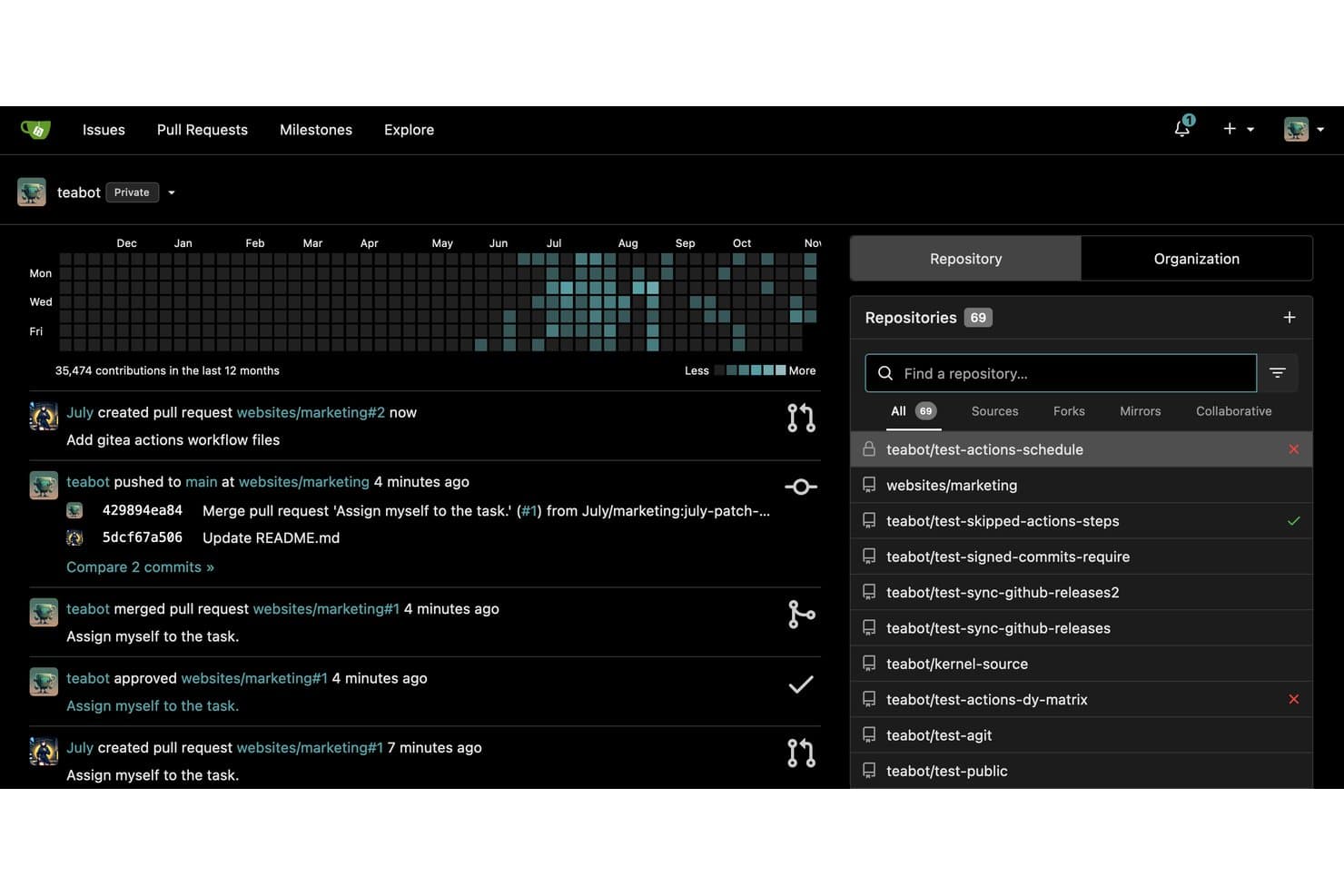
Gitea monitora i contributi e l'attività delle richieste pull tra i repository. Gitea è una piattaforma open source e autogestita per la gestione del codice sorgente, che include hosting di repository Git, flussi di lavoro per le richieste pull, revisione del codice, gestione dei branch, CI/CD integrata tramite Gitea Actions e un registro dei pacchetti che supporta oltre 20 tipi di artefatti.
Per chi è più adatto Gitea?
Gitea è ideale per i team DevOps e di ingegneria delle piattaforme che hanno bisogno di una piattaforma Git completa, ma vogliono ridurre al minimo il carico dell'infrastruttura.
Perché ho scelto Gitea
Gitea è entrato nella mia selezione perché è l'unica piattaforma Git autogestita che conosco in grado di funzionare comodamente su un Raspberry Pi offrendo al contempo un set completo di funzionalità SCM. Apprezzo in particolare il fatto che Gitea Actions sia direttamente compatibile con la sintassi di GitHub Actions, quindi i flussi di lavoro CI/CD esistenti possono essere migrati senza essere riscritti. La protezione dei branch, le code di integrazione e un registro dei pacchetti integrato che copre oltre 20 tipi di artefatti completano una piattaforma che offre prestazioni nettamente superiori a quanto ci si aspetterebbe dal suo ingombro infrastrutturale.
Funzionalità principali di Gitea
- Supporto per i flussi di lavoro con richieste pull e AGit: Gitea consente ai revisori di lasciare commenti in linea e di richiedere approvazioni prima dell'integrazione, con la possibilità di utilizzare sia i flussi di lavoro standard con richieste pull sia quelli AGit.
- Registro dei pacchetti integrato: Gitea ospita oltre 20 tipi di artefatti, tra cui Docker, npm, Maven, PyPI ed Helm, direttamente insieme ai repository.
- Mirroring dei repository: Il mirroring in entrata e in uscita mantiene automaticamente sincronizzati i repository con i servizi Git esterni.
- Controllo degli accessi basato sui ruoli: Gitea applica autorizzazioni granulari a livello di repository e branch, con integrazione AD/LDAP e OAuth 2.0 per la gestione delle identità.
Integrazioni di Gitea
Gitea supporta integrazioni con Jenkins, Drone, Woodpecker, Argo CD, Slack, Discord, Microsoft Teams e Lark. Offre inoltre Gitea Actions, webhook, hook Git, un'API REST e la CLI Tea per la connettività personalizzata.
Pros and Cons
Pros:
- Funziona senza problemi su hardware minimo
- Compatibile con i flussi di lavoro di GitHub Actions
- Completamente open source con licenza MIT
Cons:
- Nessun suggerimento di codice basato sull'IA integrato
- L'SSO SAML richiede il passaggio alla versione enterprise
Learn more about Gitea: Ideale per la scalabilità nelle grandi aziende
- Piano gratuito disponibile
- A partire da $39/utente/mese
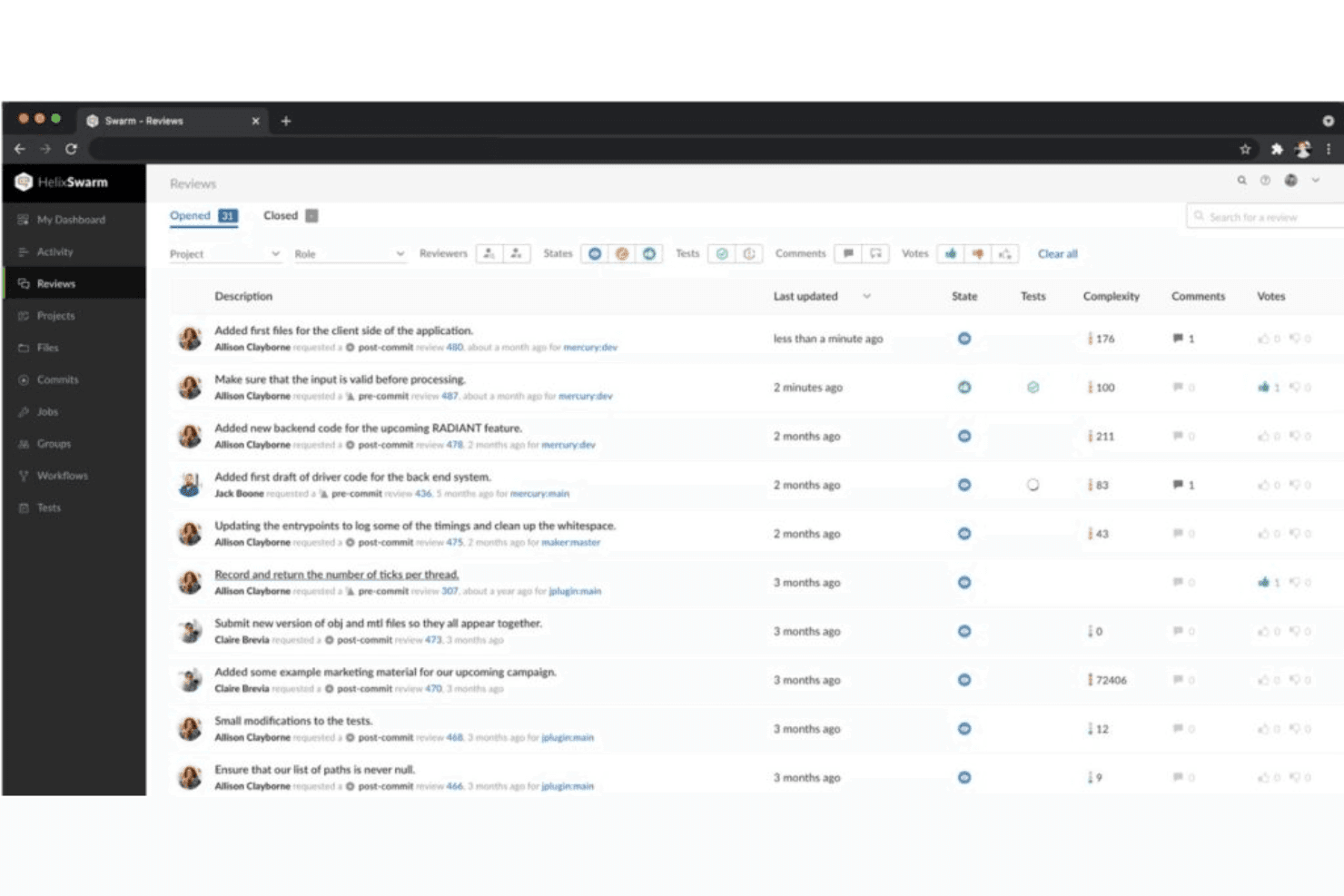
Questa è una schermata della pagina di revisione del codice Perforce Helix Swarm, che consente agli utenti di effettuare più revisioni, indipendentemente dalle dimensioni del team. Perforce Helix Core è un sistema centralizzato di gestione del codice sorgente progettato per ambienti su larga scala, che offre controllo delle versioni basato su liste di modifiche, ramificazione strutturata tramite Perforce Streams, gestione delle versioni dei file binari e revisione del codice tramite Helix Swarm.
Per chi è più indicato Perforce Helix Core?
Perforce Helix Core è la scelta ideale per le grandi aziende che gestiscono basi di codice enormi, risorse binarie o team eterogenei composti da sviluppatori e artisti nei settori dei videogiochi, automobilistico e dei semiconduttori.
Perché ho scelto Perforce Helix Core
Perforce Helix Core si è guadagnato un posto nella mia lista ristretta perché nessun altro strumento di gestione del codice sorgente gestisce repository su scala petabyte con la stessa affidabilità. Sono particolarmente colpito da Perforce Streams, che impone criteri strutturati per la ramificazione su basi di codice enormi, evitando che i team precipitino nel caos delle fusioni con l'aumentare delle dimensioni. Se a questo si aggiungono il controllo degli accessi a livello di file e il blocco esclusivo dei file per le risorse binarie, si ottiene un livello di precisione che le piattaforme native Git semplicemente non riescono a eguagliare.
Funzionalità principali di Perforce Helix Core
- Commit atomici basati su liste di modifiche: Raggruppano tutte le modifiche correlate ai file in un'unica istantanea numerata che riesce o fallisce come un'unità.
- Revisione del codice con Helix Swarm: Uno strumento di revisione basato sul Web che supporta commenti in linea, votazioni, discussioni a thread e flussi di lavoro di revisione prima del commit.
- Connettore P4 Git: Collega i repository basati su Git di GitHub, GitLab e Bitbucket direttamente a un server Helix Core centralizzato.
- Topologia distribuita globale: I server proxy, le repliche di inoltro e i server edge consentono ai team distribuiti di sincronizzare e inviare modifiche ad alta velocità senza trasferire i dati dell'intero repository.
Integrazioni di Perforce Helix Core
Perforce Helix Core offre integrazioni native con Jenkins, TeamCity, Unreal Engine, Unity, Visual Studio, gli IDE JetBrains, Eclipse, Jira e Slack. La sua API REST, l'interfaccia a riga di comando e i webhook supportano flussi di lavoro CI/CD personalizzati e l'automazione.
Pros and Cons
Pros:
- Gestisce codice e file binari su scala petabyte
- Offre il controllo degli accessi e il blocco a livello di file
- Offre una ramificazione strutturata con Perforce Streams
Cons:
- La fase iniziale di apprendimento è più impegnativa per i team che non conoscono P4
- Il modello centralizzato limita le opzioni di commit offline
Learn more about Perforce Helix Core: Ideale per revisioni del codice su più repository e tra diversi tipi di VCS
- Non disponibile
- Prezzi su richiesta
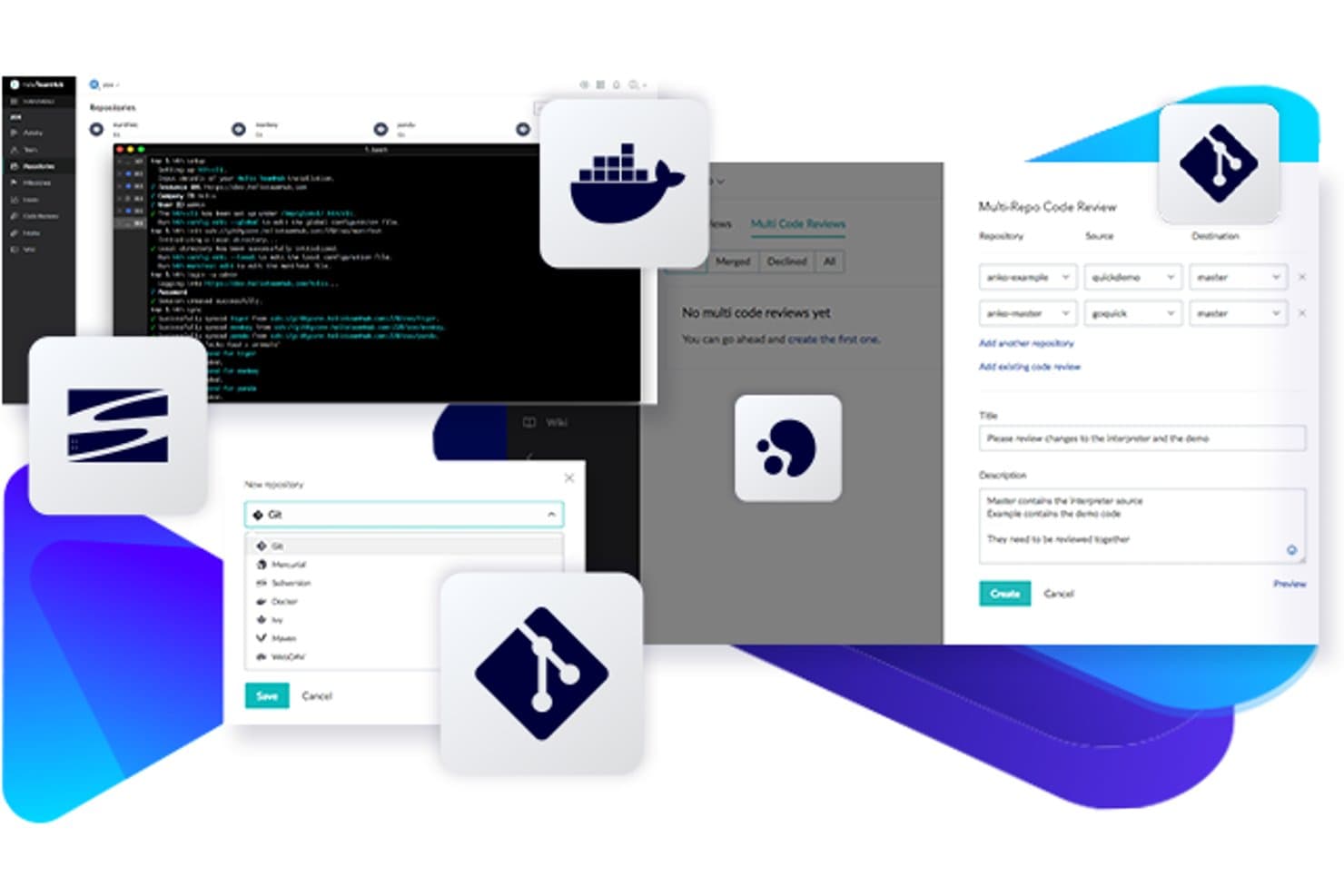
Perforce Helix TeamHub supporta Git, Docker e le revisioni del codice su più repository in un unico spazio. Perforce Helix TeamHub è una piattaforma di gestione del codice sorgente che ospita nativamente repository Git, Mercurial e SVN insieme a repository di artefatti, registri Docker e file binari, tutto all'interno di un'unica interfaccia.
Per chi è più adatto Perforce Helix TeamHub?
Helix TeamHub è una soluzione particolarmente adatta ai team di progettazione e sviluppo nei settori dello sviluppo di videogiochi, dei media o delle industrie regolamentate, che devono gestire repository Git, Mercurial e SVN in un unico ambiente.
Perché ho scelto Perforce Helix TeamHub
Ho incluso Helix TeamHub tra le mie scelte principali perché è una delle poche piattaforme che consente di esaminare le modifiche al codice provenienti da più repository durante un'unica sessione di revisione del codice, una funzionalità che i team che lavorano su una base di codice complessa e distribuita su più repository apprezzeranno immediatamente. La sua funzionalità di revisione del codice su più repository (MRCR), disponibile nel piano Enterprise, consente di evitare di unire revisioni separate quando una funzionalità interessa contemporaneamente sei repository. Inoltre, ospita nativamente Git, Mercurial e SVN affiancati, una caratteristica davvero utile se il team sta effettuando una migrazione da SVN o Mercurial e non può completare il passaggio in modo lineare.
Funzionalità principali di Perforce Helix TeamHub
- Hosting nativo di SVN, Git e Mercurial: Ospita tutti e tre i tipi di VCS nello stesso ambiente di progetto, senza dover utilizzare piattaforme separate per ciascuno.
- Autorizzazioni granulari a livello di repository e di ramo: Assegna gli accessi utilizzando cinque ruoli distinti e dieci livelli di autorizzazione sia a livello di repository sia a livello di ramo.
- Riquadri Kanban e gestione dei problemi integrati: Gestisci attività, traguardi e problemi direttamente insieme ai repository senza aggiungere uno strumento separato per la gestione dei progetti.
- Ricerca del codice tra i repository: Cerca nei repository Git e Mercurial per nome del file, messaggio di commit o progetto in qualsiasi livello di piano.
Integrazioni di Perforce Helix TeamHub
Perforce Helix TeamHub offre integrazioni native con Jenkins, Jira, Slack e Perforce P4 tramite P4 Git Connector. I webhook generici, la sua API REST e il supporto per hth-cli consentono di realizzare automazioni personalizzate per CI/CD e per più repository.
Pros and Cons
Pros:
- Supporta Git, Mercurial e SVN affiancati
- Consente revisioni del codice su più repository in un unico flusso di lavoro
- Offre controlli granulari degli accessi a livello di ramo
Cons:
- Nessun motore integrato per le pipeline CI/CD
- Le revisioni su più repository richiedono il livello di piano più alto
Learn more about Perforce Helix TeamHub: Ideale per la revisione del codice nativa dell'IA su larga scala
- Prova gratuita di 30 giorni
- A partire da $21/utente/mese
Visit WebsiteCustomer Rating:4.8/5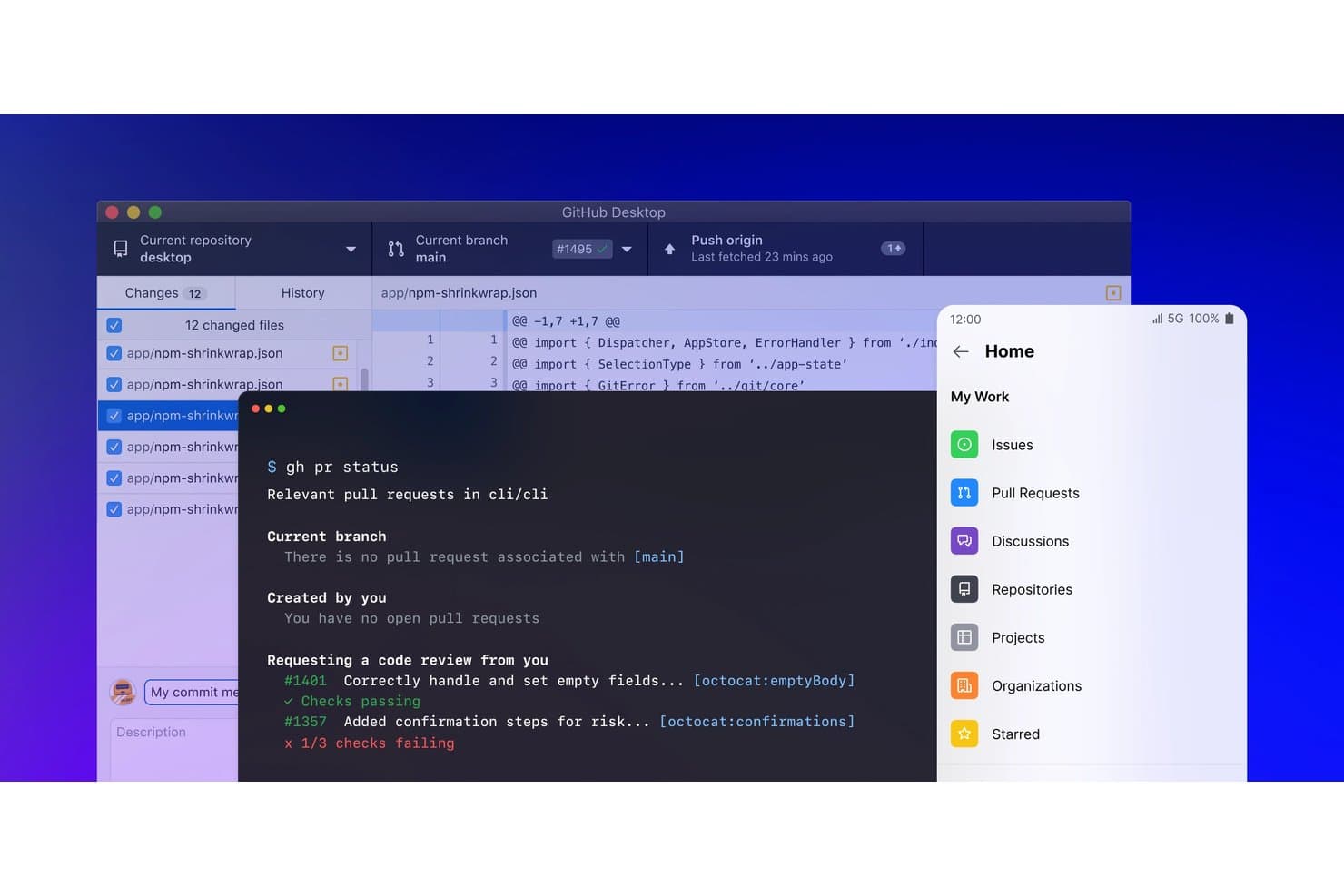
GitHub riunisce strumenti desktop, CLI e mobile per una gestione del codice semplificata. GitHub è una piattaforma di gestione del codice sorgente basata su Git che combina hosting dei repository, flussi di lavoro con ramificazione e richieste pull, revisione del codice, CI/CD tramite GitHub Actions e sviluppo assistito dall'IA attraverso GitHub Copilot.
Per chi è più adatto GitHub?
GitHub è una soluzione ideale per team di ingegneria di qualsiasi dimensione che desiderano revisione del codice assistita dall'IA, scansione della sicurezza e CI/CD in un'unica piattaforma strettamente integrata.
Perché ho scelto GitHub
GitHub si è guadagnato un posto nella mia lista ristretta perché nessun'altra piattaforma abbina la revisione del codice nativa dell'IA alla scalabilità di cui hanno realmente bisogno i grandi team di ingegneria. La revisione del codice di Copilot genera automaticamente suggerimenti in linea su ogni PR e Copilot Autofix risolve circa il 90% degli avvisi di sicurezza rilevati da CodeQL prima ancora che raggiungano un revisore umano. Apprezzo anche il modo in cui le code di unione e i set di regole per la protezione dei rami collaborano per impedire che le basi di codice ad alta velocità e con più team si trasformino in un incubo durante l'unione.
Funzionalità principali di GitHub
- Ricerca del codice tra repository: Cerca simultaneamente in tutti i tuoi repository utilizzando espressioni regolari, operatori booleani e indicizzazione a livello di simbolo in oltre 10 linguaggi di programmazione.
- Code di unione: Raggruppa e convalida automaticamente le richieste pull prima dell'unione, mantenendo stabile il ramo principale nelle basi di codice ad alta velocità e con più team.
- Utenti gestiti aziendali (EMU): Esegui il provisioning e gestisci l'intero ciclo di vita degli account degli sviluppatori direttamente tramite il tuo provider di identità, ottenendo un controllo completo su chi può accedere a cosa.
- GitHub Codespaces: Avvia in pochi secondi un ambiente di sviluppo completamente configurato e ospitato nel cloud da qualsiasi repository, senza bisogno di alcuna configurazione locale.
Integrazioni di GitHub
GitHub Actions è nativo, mentre le integrazioni del Marketplace includono Jira, Slack, Microsoft Teams, Jenkins, CircleCI, Azure Pipelines, AWS, Azure e Google Cloud. Le API REST e GraphQL, i webhook e il supporto per GitHub CLI consentono integrazioni personalizzate.
Pros and Cons
Pros:
- L'IA di Copilot suggerisce correzioni in linea nelle PR
- Si adatta facilmente a basi di codice monorepo di dimensioni enormi
- Scansione nativa della sicurezza del codice con correzione automatica
Cons:
- Le funzionalità di sicurezza avanzate richiedono un componente aggiuntivo a pagamento
- La gestione dell'autenticazione e dei PAT può essere complessa
 Ideale per l'integrazione con Jira Software
- No
- A partire da $3/user/month (con fatturazione annuale)
Visit WebsiteCustomer Rating:4.5/5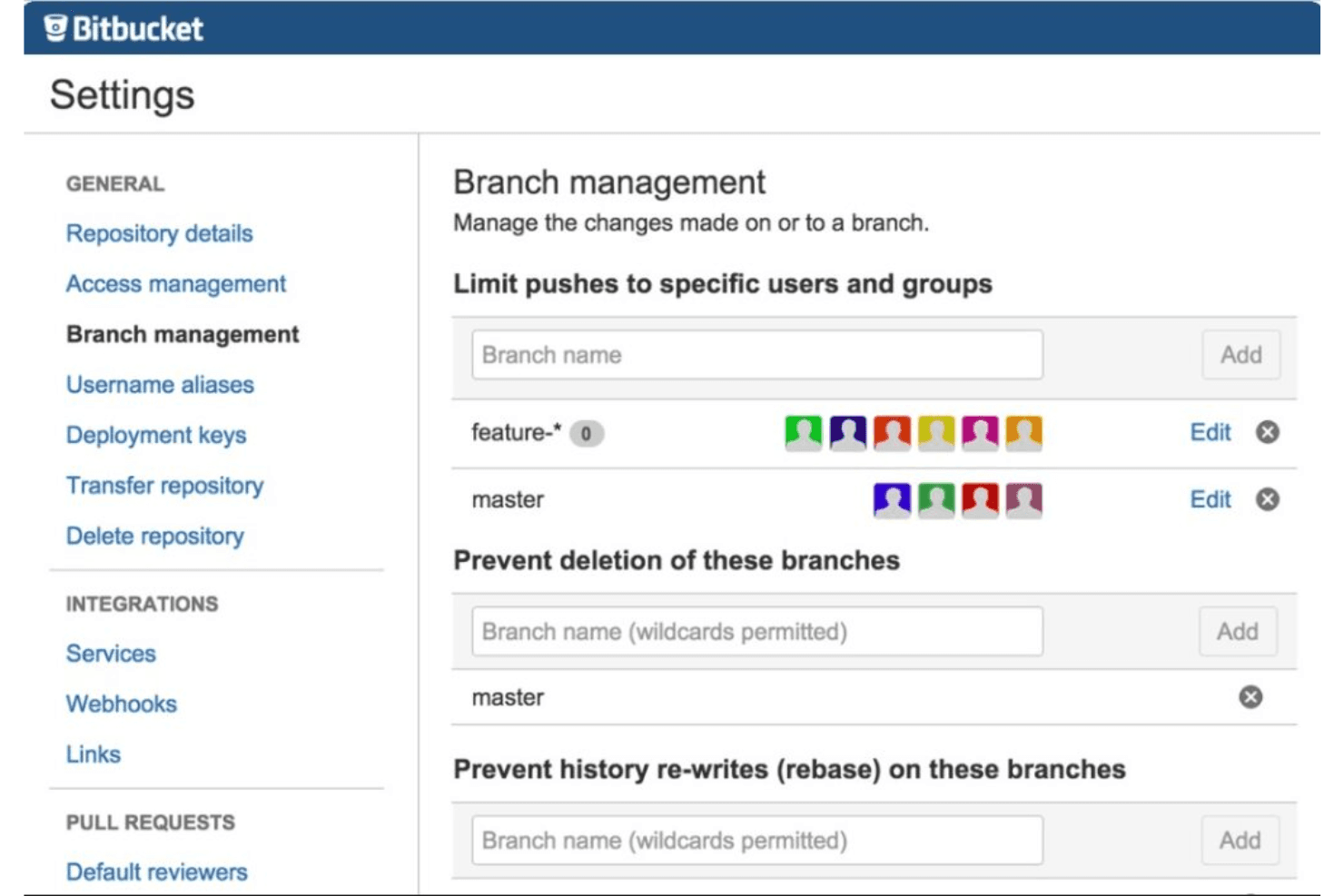
Ecco uno screenshot della scheda di gestione dei branch di Bitbucket. Bitbucket è una piattaforma di gestione del codice sorgente basata su Git di Atlassian, che offre ai team un controllo completo delle versioni, CI/CD integrato tramite Bitbucket Pipelines, flussi di lavoro per le richieste pull, strumenti per la revisione del codice e un'integrazione approfondita nell'ecosistema Atlassian.
Per chi è più indicato Bitbucket?
Bitbucket è particolarmente adatto ai team di ingegneria che utilizzano già Jira e desiderano collegare il controllo delle versioni, la CI/CD e il monitoraggio dei problemi all'interno di un unico ecosistema Atlassian.
Perché ho scelto Bitbucket
Bitbucket si è guadagnato un posto nella mia lista perché l'integrazione con Jira va ben oltre un semplice collegamento. Posso visualizzare gli stati dei problemi Jira direttamente nella vista di una richiesta pull e ogni riga di codice modificata risale al ticket di origine, offrendo al mio team una visibilità completa dall'inizio alla fine, dalla pianificazione dello sprint fino alla distribuzione. Inoltre, le descrizioni delle PR generate dall'IA e i riepiloghi automatici delle distribuzioni (con i problemi Jira collegati) riducono il carico di documentazione che un tempo temevo dopo ogni rilascio.
Funzionalità principali di Bitbucket
- Autorizzazioni dei branch: controlla chi può eseguire il push, unire o eliminare branch specifici a livello di repository o di modello di branch.
- Bitbucket Pipelines: uno strumento CI/CD nativo configurato tramite YAML, con runner gestiti e autogestiti, pipeline principali e secondarie e passaggi dinamici.
- Scansione di sicurezza integrata: rileva segreti esposti, dipendenze vulnerabili e configurazioni errate dell'IaC direttamente nel piano Premium.
- Richieste pull in bozza: apri una PR in stato di bozza per segnalare che il lavoro è in corso prima di richiedere una revisione formale ai membri del team.
Integrazioni di Bitbucket
Bitbucket offre integrazioni native con Jira Software, Jira Service Management, Confluence e Snyk, oltre a integrazioni con Jenkins, Datadog, Slack, AWS, Azure e Google Cloud. La sua API REST, i webhook e il supporto Marketplace consentono connessioni personalizzate.
Pros and Cons
Pros:
- Collegamento approfondito degli stati dei problemi Jira nelle PR
- Revisioni del codice e note di rilascio basate sull'IA
- Applicazione centralizzata delle politiche CI/CD e dei branch
Cons:
- SAML SSO richiede un abbonamento separato ad Atlassian Guard
- Problemi di prestazioni con repository molto grandi
Learn more about Bitbucket: Ideale per DevOps dall'inizio alla fine nello stack Microsoft
- Piano gratuito disponibile
- A partire da $6/utente/mese
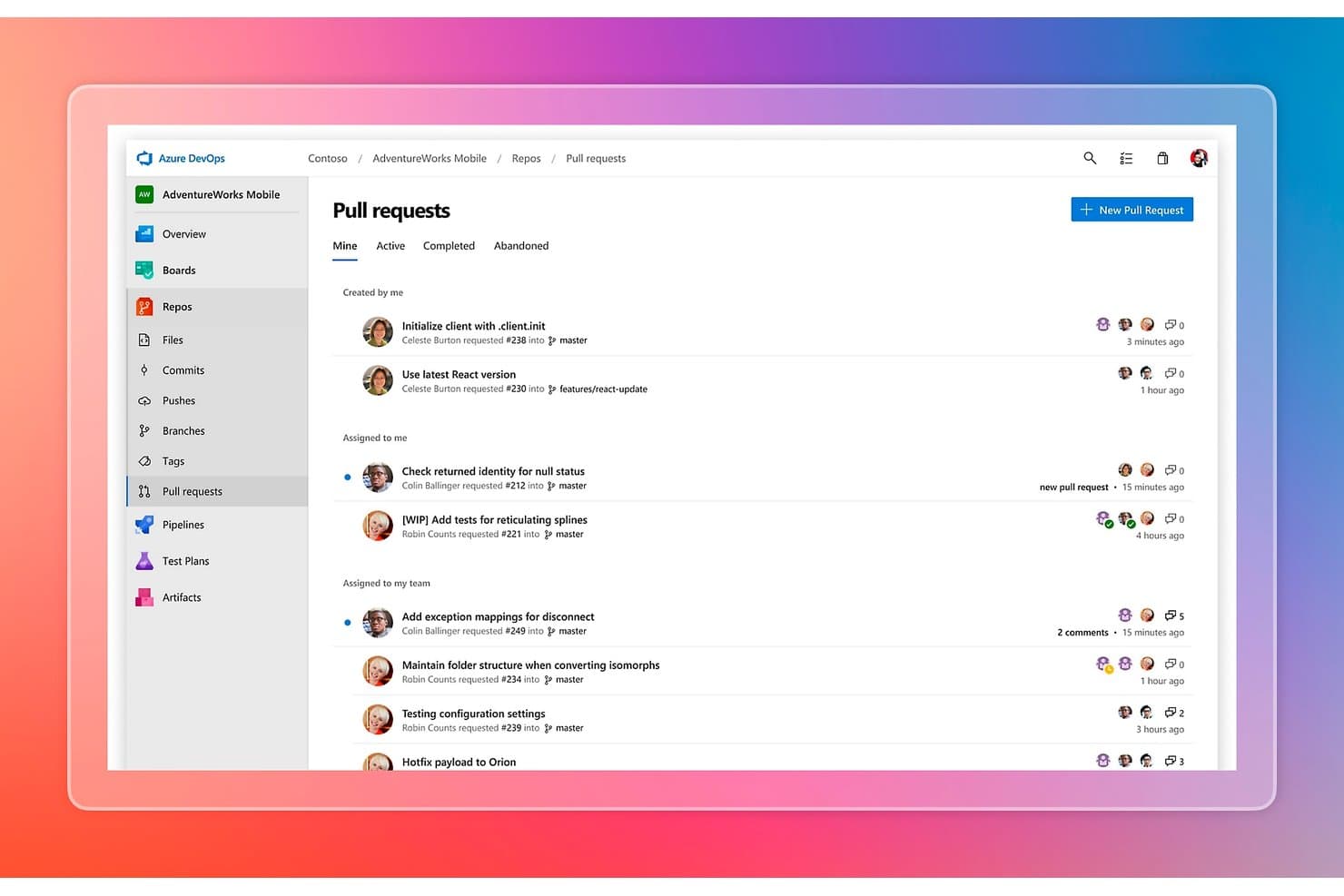
Azure DevOps organizza le richieste pull per stato, assegnatario e team. Azure DevOps è una piattaforma di gestione del codice sorgente di Microsoft che combina l'hosting di repository Git e TFVC, criteri per i rami, flussi di lavoro per le richieste pull, pipeline CI/CD, gestione dei pacchetti e monitoraggio integrato dei progetti in un'unica suite.
Per chi è più adatto Azure DevOps?
Azure DevOps è la scelta giusta per i team di ingegneria che operano già nell'ecosistema Microsoft e hanno bisogno di un'unica piattaforma che copra il controllo del codice sorgente, CI/CD e monitoraggio dei progetti senza dover collegare strumenti separati.
Perché ho scelto Azure DevOps
Azure DevOps è presente nella mia selezione perché copre l'intero ciclo di vita della distribuzione del software in un unico luogo, una caratteristica rara e davvero utile per i team che utilizzano lo stack Microsoft. Apprezzo in particolare il modo in cui Azure Repos abbina l'hosting Git a criteri per i rami che impongono requisiti per i revisori, convalida delle build e regole per la strategia di unione prima che qualsiasi codice venga inserito in
main. Inoltre, Azure Pipelines si collega direttamente a questi repository con CI/CD basato su YAML e articolato in più fasi, così il mio team passa dal commit alla distribuzione senza uscire dalla piattaforma.Funzionalità principali di Azure DevOps
- Supporto per due sistemi di controllo delle versioni: Azure Repos ospita repository Git e TFVC, consentendo ai team che utilizzano flussi di lavoro centralizzati precedenti di migrare a Git secondo i propri ritmi.
- Componente aggiuntivo GitHub Advanced Security: Aggiunge l'analisi statica CodeQL, la scansione dei segreti con protezione dei push e il rilevamento delle vulnerabilità nelle dipendenze direttamente nel flusso di lavoro di Azure DevOps.
- Integrazione con Azure Boards: Gli elementi di lavoro, le epiche e i bug si collegano direttamente ai commit e alle richieste pull, offrendo ai team una tracciabilità completa dalla pianificazione alla distribuzione.
- Gestione dei pacchetti con Azure Artifacts: Ospita pacchetti NuGet, npm, Maven, Python e pacchetti universali in flussi che si collegano in modo nativo alle pipeline CI/CD.
Integrazioni di Azure DevOps
Azure DevOps offre integrazioni native nell'ecosistema Microsoft, tra cui Azure, Visual Studio, VS Code, Microsoft Teams, Microsoft 365, GitHub e Microsoft Entra ID. Le integrazioni del Marketplace includono Jira, Slack, Jenkins e SonarQube, con API REST, CLI, hook di servizio e webhook per la connettività CI/CD personalizzata.
Pros and Cons
Pros:
- Integrazione approfondita con gli strumenti di sviluppo Microsoft
- Supporta repository Git e TFVC
- Funzionalità di sicurezza di livello aziendale e registrazione degli audit
Cons:
- Pannello di controllo nativo per le metriche DORA non disponibile
- La revisione del codice tramite IA è ancora in anteprima limitata
Learn more about Azure DevOps: Ideale per combinare CI/CD e gestione del codice
- No
- A partire da $4/utente/mese (con fatturazione annuale)
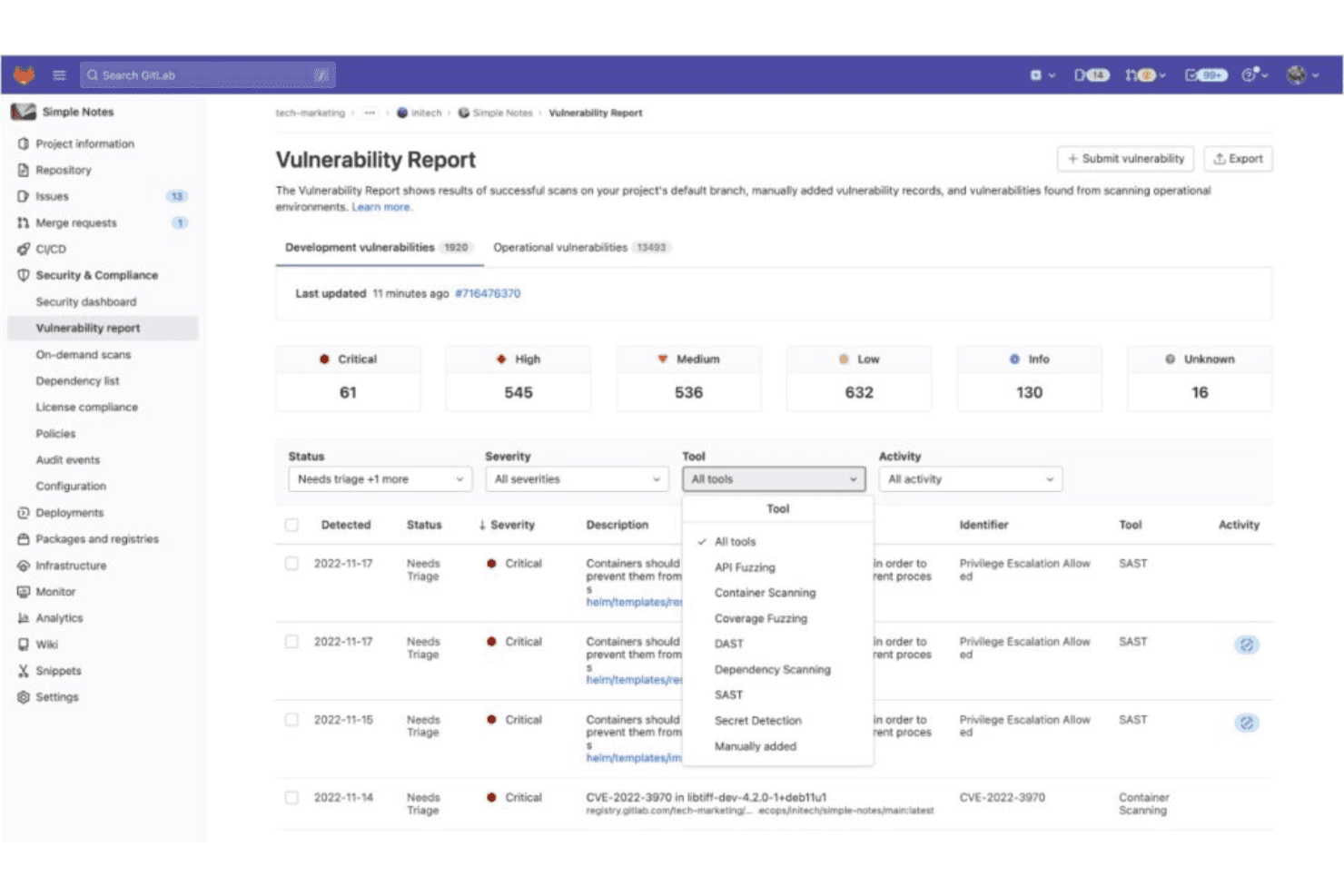
Questa è una vista della dashboard dei report sulle vulnerabilità di GitLab e offre ai team di sicurezza report dettagliati delle scansioni. GitLab è una piattaforma DevSecOps che offre gestione del codice sorgente basata su Git, pipeline CI/CD native, scansione della sicurezza e analisi per sviluppatori in un'unica applicazione.
Per chi è più adatto GitLab?
GitLab è una soluzione particolarmente adatta ai team di ingegneria DevOps e delle piattaforme che desiderano CI/CD e gestione del codice sorgente in un unico posto, senza dover integrare strumenti separati.
Perché ho scelto GitLab
GitLab si è guadagnato un posto nella mia selezione perché la CI/CD non è stata aggiunta come ripensamento: è nativa della piattaforma. Apprezzo il fatto che la pipeline
.gitlab-ci.ymlvenga eseguita direttamente insieme alle richieste di merge, mostrando i risultati SAST e della qualità del codice direttamente al loro interno prima che venga eseguito qualsiasi merge. I treni di merge sono particolarmente utili quando più team effettuano commit rapidamente, mantenendo automaticamente verde il ramo principale senza coordinamento manuale.Funzionalità principali di GitLab
- File CODEOWNERS: assegna automaticamente i revisori richiesti alle richieste di merge in base alle regole di proprietà dei file definite in un unico file di configurazione.
- Analisi del flusso di valore: monitora il tempo mediano trascorso in ogni fase del flusso di lavoro di sviluppo, dalla creazione del problema fino alla distribuzione in produzione.
- Treni di merge: mettono in coda le richieste di merge in sequenza per verificare ciascuna di esse rispetto a un ramo principale aggiornato prima dell'integrazione, mantenendo automaticamente verde la pipeline.
- Catalogo CI/CD: una libreria condivisa e versionata di componenti di pipeline riutilizzabili che i team possono adottare e standardizzare tra i progetti senza duplicare la configurazione.
Integrazioni di GitLab
GitLab si integra con Jira, Slack, Jenkins, VS Code, gli IDE JetBrains, AWS, Google Cloud e Microsoft Azure. Le API REST e GraphQL, i webhook e la CLI di GitLab supportano integrazioni personalizzate e flussi di lavoro CI/CD.
Pros and Cons
Pros:
- La CI/CD nativa si integra direttamente con il codice
- I treni di merge mantengono sempre verde il ramo principale
- Scansione della sicurezza approfondita integrata nelle pipeline
Cons:
- Il piano gratuito limita le dimensioni dei team e le funzionalità
- La complessità dell'interfaccia può rallentare l'introduzione
Learn more about GitLab: Ideale per usare Git e TFVC in un unico repository ospitato
- Piano gratuito disponibile
- A partire da $6/utente/mese
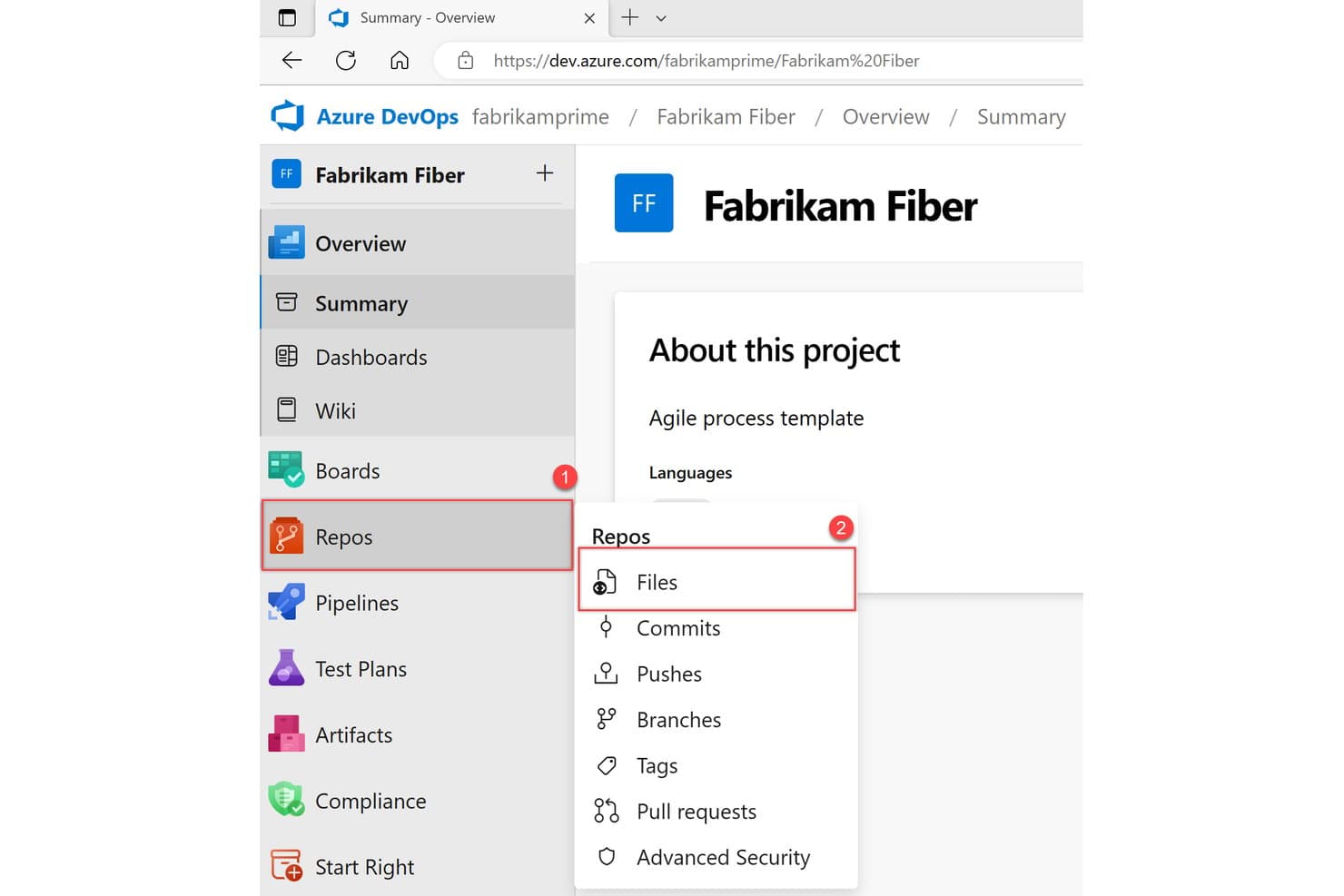
Azure Repos organizza file di codice, commit, rami e richieste pull in un unico posto. Azure Repos è la soluzione di gestione del codice sorgente di Microsoft all'interno di Azure DevOps, che supporta il controllo della versione Git e TFVC, l'hosting dei repository, i criteri dei rami, i flussi di lavoro delle richieste pull e l'integrazione CI/CD tramite Azure Pipelines.
Per chi è più adatto Azure Repos?
Azure Repos è una scelta ideale per i team aziendali che utilizzano già lo stack Microsoft e hanno bisogno di un'unica piattaforma per gestire sia i moderni flussi di lavoro Git sia i repository TFVC legacy, senza dover abbandonare il controllo della versione centralizzato.
Perché ho scelto Azure Repos
Azure Repos si è guadagnato un posto nella mia lista perché è l'unica grande piattaforma ospitata che supporta Git e TFVC in un singolo servizio di repository, un aspetto importante quando l'organizzazione utilizza ancora flussi di lavoro centralizzati legacy insieme a quelli moderni distribuiti. Apprezzo soprattutto il modo in cui i criteri dei rami consentono di imporre la convalida delle compilazioni e un numero obbligatorio di revisori a livello di ramo, così i controlli sulla qualità del codice sono integrati nel processo delle richieste pull anziché essere lasciati alle consuetudini. La funzionalità di revisione del codice di Copilot (ora in anteprima pubblica) aggiunge l'analisi automatizzata del codice direttamente alla creazione delle richieste pull; la trovo davvero utile per individuare i problemi prima ancora che i revisori umani aprano il confronto delle modifiche.
Funzionalità principali di Azure Repos
- Integrazione con GitHub Advanced Security: aggiunge la scansione dei segreti, la scansione delle dipendenze e l'analisi statica CodeQL direttamente al flusso di lavoro del repository, con annotazioni nelle richieste pull e controlli di stato che bloccano l'unione.
- Supporto per Git LFS: gestisce file binari di grandi dimensioni all'interno dei repository Git, mantenendo inalterate le prestazioni del repository per i team che lavorano con risorse o file di dati di grandi dimensioni.
- Ricerca del codice tra repository: un'estensione gratuita del Marketplace consente di cercare simultaneamente in tutti i progetti e repository, con filtri per ramo, percorso del file e tipo di codice.
- Distribuzione di Azure DevOps Server (in sede): consente al team di eseguire l'intera esperienza Azure Repos sulla propria infrastruttura, per esigenze di sovranità dei dati o di ambienti isolati.
Integrazioni di Azure Repos
Azure Repos offre integrazioni native nell'ecosistema Microsoft, tra cui Azure Pipelines, Azure Boards, Azure Artifacts, Visual Studio, Visual Studio Code e Microsoft Entra ID. Le integrazioni del Marketplace includono Jenkins, Terraform, Jira, Slack e Microsoft Teams, con API REST, CLI e webhook per connessioni personalizzate.
Pros and Cons
Pros:
- Supporta il controllo della versione Git e TFVC
- Criteri dei rami altamente configurabili per i controlli di qualità
- Anteprima della revisione del codice assistita dall'IA
Cons:
- La scansione della sicurezza non è disponibile per le installazioni in sede
- Non dispone di un cruscotto nativo per le metriche DORA
Learn more about Azure Repos:
Altri software per la gestione del codice sorgente
Di seguito è riportato un elenco di altri software per la gestione del codice sorgente che ho selezionato, ma che non sono rientrati tra i primi 10. Vale sicuramente la pena prenderli in considerazione.
- 11PerforceIdeale per il controllo delle versioni di file binari di grandi dimensioni
- 12GerritIdeale per processi di revisione del codice imposti dal server
- 13BacklogIdeale per tenere traccia del codice e dei progetti in un unico strumento
- 14Unity Version ControlIdeale per i team di sviluppo di videogiochi che combinano risorse artistiche e di codice
- 15Plastic SCMIdeale per versioning visivo e team distribuiti
- 16ForgejoIdeale per Git auto-ospitato senza costi di licenza
Come valuto il software per la gestione del codice sorgente
Divido la mia valutazione in criteri di base che ogni strumento SCM deve soddisfare, come l'hosting Git e i flussi di lavoro delle PR, e fattori distintivi come la revisione assistita dall'IA, la scansione della sicurezza e la flessibilità di distribuzione.
Funzionalità fondamentali (Requisiti essenziali per questo elenco)
Quando seleziono gli strumenti per il mio elenco, assegno a ciascuno un punteggio su una scala da 0 (non offre la funzionalità) a 5 (eccelle in quest'area) per ogni funzionalità fondamentale elencata di seguito. Quindi calcolo il punteggio totale dello strumento e lo converto in percentuale. Ogni strumento deve raggiungere un punteggio totale minimo del 75% per essere preso in considerazione per l'inclusione.
- Ricerca e navigazione nel codice: Valuto le piattaforme dotate di funzionalità avanzate di ricerca del codice, tra cui l'indicizzazione a livello di simbolo e la ricerca tra repository, che consentono agli sviluppatori di trovare e comprendere rapidamente il codice.
- Sviluppo assistito dall'IA: Cerco funzionalità di IA integrate, come il completamento del codice, la sintesi delle PR e i suggerimenti automatici per la revisione, per migliorare la produttività e accelerare i cicli di sviluppo.
- Scansione della sicurezza: Verifico la presenza di strumenti di sicurezza nativi, come SAST, la scansione dei segreti e gli avvisi sulle vulnerabilità delle dipendenze, integrati direttamente nel flusso di lavoro del repository.
- Monitoraggio di problemi e progetti: Preferisco strumenti integrati per il monitoraggio dei problemi e la gestione dei progetti, collegati ai commit e alle richieste pull per garantire una tracciabilità fluida.
- Approfondimenti e analisi sugli sviluppatori: Mi affido a piattaforme che offrono metriche come DORA, l'attività dei collaboratori, il tempo di ciclo e dashboard sulla qualità del codice per monitorare e migliorare le prestazioni del team.
Una volta ottenuto un elenco di strumenti che soddisfano i criteri, considero ciò che distingue ciascuna piattaforma.
Fattori distintivi (Ciò che differenzia i fornitori)
Ecco come confronto e metto a confronto i diversi fornitori:
Funzionalità distintive
La scansione della sicurezza integrata è un importante fattore distintivo: cerco il rilevamento nativo dei segreti, gli avvisi sulle dipendenze e SAST, che segnalino le vulnerabilità direttamente nel flusso di lavoro delle PR. Vale inoltre la pena valutare le funzionalità assistite dall'IA, poiché le sintesi automatiche delle PR e i suggerimenti sul codice possono ridurre significativamente i cicli di revisione per i team con carichi di lavoro elevati. Per i responsabili dell'ingegneria, verifico se le piattaforme offrono approfondimenti sugli sviluppatori, come metriche DORA e dashboard sul tempo di ciclo, che mostrino dati concreti sulla produttività del team.
Oltre le funzionalità
La flessibilità di distribuzione è molto importante: alcuni team hanno bisogno di SaaS ospitato nel cloud, mentre altri, operanti in settori regolamentati, richiedono installazioni autogestite o isolate. Valuto anche il livello di conformità, verificando la presenza di attestazioni SOC 2, ISO 27001 o FedRAMP, a seconda dei requisiti dell'organizzazione. Anche la struttura dei prezzi è un fattore che pondero attentamente, poiché i costi per utente, inclusi i minuti CI/CD e i limiti di archiviazione, possono rendere una piattaforma conveniente con 10 utenti ma costosa con 200.
Come scegliere un software per la gestione del codice sorgente
È facile perdersi in lunghi elenchi di funzionalità e strutture tariffarie complesse. Per aiutarti a rimanere concentrato mentre affronti il tuo processo di selezione del software, ecco una lista di fattori da tenere a mente:
| Fattore | Cosa considerare |
|---|---|
| FattoreScalabilità | Cosa considerareIl software può crescere insieme al tuo team? Cerca opzioni che supportino un aumento degli utenti e dei progetti senza intoppi. Evita gli strumenti che potrebbero limitare la crescita futura. |
| FattoreIntegrazioni | Cosa considerareSi integra bene con gli strumenti che già utilizzi? Verifica che si integri con il tuo ambiente di sviluppo, le pipeline CI/CD e gli altri strumenti essenziali. |
| FattorePersonalizzazione | Cosa considerarePuoi adattarlo al flusso di lavoro del tuo team? Assicurati che il software consenta la personalizzazione dei flussi di lavoro, delle autorizzazioni e delle notifiche. |
| FattoreSemplicità d'uso | Cosa considerareÈ facile da usare? Valuta l'interfaccia e la navigazione. Uno strumento difficile da utilizzare può rallentare il tuo team. |
| FattoreImplementazione e inserimento | Cosa considerareQuanto rapidamente puoi iniziare? Considera il tempo e le risorse necessari per la configurazione e la formazione. Cerca piattaforme con un solido supporto per l'inserimento. |
| FattoreCosto | Cosa considerareRientra nel tuo budget? Confronta i modelli tariffari e considera il costo totale di proprietà, comprese eventuali commissioni nascoste o risparmi a lungo termine. |
| FattoreMisure di sicurezza | Cosa considerareIl tuo codice è al sicuro? Valuta le misure di sicurezza del software, come la crittografia e i controlli degli accessi, per proteggere il codice sorgente. |
| FattoreDisponibilità dell'assistenza | Cosa considerarePuoi ricevere aiuto quando ne hai bisogno? Verifica se il fornitore offre assistenza 24 ore su 24, 7 giorni su 7, attraverso diversi canali come chat, e-mail o telefono. |
Che cos'è un software per la gestione del codice sorgente?
Il software per la gestione del codice sorgente, spesso definito software di controllo versione, organizza e tiene traccia delle modifiche apportate al codice di programmazione. Gli sviluppatori utilizzano questi strumenti per collaborare ai progetti, garantendo che le modifiche al codice apportate dai vari membri del team non entrino in conflitto. Oltre a facilitare la collaborazione, queste piattaforme conservano anche una cronologia delle versioni del codice, consentendo ai team di ripristinare gli stati precedenti quando necessario, unire le modifiche provenienti da fonti diverse e garantire che la base di codice finale rimanga coerente e priva di errori.
L'obiettivo principale è aumentare l'efficienza, ridurre i rischi di sovrascrittura e facilitare il lavoro simultaneo su progetti di grandi dimensioni. Un sistema di controllo delle revisioni non solo consente ai team di sviluppo di tenere traccia delle modifiche e gestire le dipendenze, ma protegge anche le versioni precedenti dei progetti software. Che si tratti di stabilire autorizzazioni precise, gestire le dipendenze o utilizzare funzionalità avanzate del software a codice aperto, il giusto sistema di gestione del codice sorgente trasforma attività complesse in processi intuitivi.
Funzionalità
Quando si seleziona un software per la gestione del codice sorgente, è bene prestare attenzione alle seguenti funzionalità chiave:
- Controllo versione: tiene traccia delle modifiche al codice nel tempo, consentendo a più sviluppatori di lavorare contemporaneamente senza sovrascrivere il lavoro degli altri.
- Gestione dei rami: consente agli sviluppatori di creare rami di codice separati per nuove funzionalità o correzioni di errori, facilitando lo sviluppo e i test organizzati.
- Unione del codice: combina le modifiche al codice provenienti da rami diversi, garantendo un prodotto finale coerente e risolvendo i conflitti.
- Controllo degli accessi: gestisce chi può visualizzare o modificare il codice, mantenendo la sicurezza e l'integrità all'interno del team di sviluppo.
- Tracciamento della cronologia del codice: fornisce un registro dettagliato di tutte le modifiche al codice, aiutando gli sviluppatori a comprendere l'evoluzione della base di codice.
- Supporto per le integrazioni: si collega ad altri strumenti di sviluppo, come le pipeline CI/CD, per un flusso di lavoro più agevole.
- Personalizzazione: consente ai team di adattare lo strumento ai propri flussi di lavoro specifici, migliorando la produttività e l'efficienza.
- Interfaccia intuitiva: semplifica la navigazione e riduce la curva di apprendimento, consentendo un'adozione più rapida da parte del team.
- Misure di sicurezza: protegge il codice con funzionalità come la crittografia e i controlli degli accessi per impedire accessi non autorizzati.
- Risorse per l'inserimento: offre materiali di formazione e supporto per aiutare i nuovi utenti a diventare rapidamente ed efficacemente operativi.
Vantaggi
L'implementazione di un software per la gestione del codice sorgente offre diversi vantaggi al team e all'azienda. Ecco alcuni dei risultati che ci si può aspettare:
- Collaborazione migliorata: consente a più sviluppatori di lavorare sullo stesso progetto senza conflitti, grazie al controllo versione e alla gestione dei rami.
- Integrità del codice: mantiene una base di codice affidabile tenendo traccia delle modifiche e offrendo una cronologia dettagliata, garantendo che nulla venga perso o sovrascritto.
- Sicurezza rafforzata: protegge il codice con controlli degli accessi e crittografia, riducendo il rischio di accessi non autorizzati.
- Sviluppo efficiente: semplifica il processo di sviluppo integrandosi con altri strumenti e fornendo funzionalità come l'unione del codice.
- Inserimento più rapido: aiuta i nuovi membri del team a diventare rapidamente operativi grazie ai materiali di formazione e a un'interfaccia intuitiva.
- Adattamento del flusso di lavoro: consente la personalizzazione per soddisfare le esigenze specifiche del team, aumentando la produttività e l'efficienza.
- Visione storica: offre informazioni preziose sull'evoluzione del codice, aiutando a comprendere le decisioni passate e a migliorare lo sviluppo futuro.
Costi e prezzi
La scelta di un software per la gestione del codice sorgente richiede la comprensione dei vari modelli e piani tariffari disponibili. I costi variano in base alle funzionalità, alle dimensioni del team, ai componenti aggiuntivi e ad altri fattori. La tabella seguente riassume i piani più comuni, i relativi prezzi medi e le funzionalità tipicamente incluse nelle soluzioni software per la gestione del codice sorgente:
Tabella comparativa dei piani per il software di gestione del codice sorgente
| Tipo di piano | Prezzo medio | Funzionalità comuni |
|---|---|---|
| Tipo di pianoPiano gratuito | Prezzo medio$0 | Funzionalità comuniControllo versione di base, spazio di archiviazione limitato e gestione di base dei rami. |
| Tipo di pianoPiano personale | Prezzo medio$5-$25/utente/mese | Funzionalità comuniControllo versione avanzato, maggiore spazio di archiviazione e supporto di base. |
| Tipo di pianoPiano aziendale | Prezzo medio$25-$50/utente/mese | Funzionalità comuniSicurezza rafforzata, integrazioni, supporto prioritario e maggiore spazio di archiviazione. |
| Tipo di pianoPiano per grandi aziende | Prezzo medio$50-$100/utente/mese | Funzionalità comuniFunzionalità personalizzabili, supporto dedicato, analisi avanzate e spazio di archiviazione illimitato. |
Domande frequenti sul software di gestione del codice sorgente
Ecco alcune risposte alle domande più comuni sul software di gestione del codice sorgente:
In che modo la gestione del codice sorgente può migliorare la capacità di più programmatori di lavorare insieme su una porzione di codice?
SCM consente agli sviluppatori di lavorare sul codice in parallelo, impedendo la sovrascrittura delle modifiche. Gestisce l’unione del codice, tiene traccia delle modifiche e facilita la correzione dei bug e i rilasci. Questa funzionalità garantisce un lavoro di squadra efficiente e mantiene il processo di sviluppo organizzato e privo di conflitti.
Qual è lo scopo della gestione del codice sorgente in DevOps?
SCM in DevOps facilita la collaborazione rapida all’interno dei flussi di lavoro. Consente ai team di lavorare in modo efficiente, gestire le modifiche al codice e integrarsi senza problemi con altri strumenti DevOps. Questa integrazione contribuisce a mantenere pratiche di sviluppo coerenti e supporta la distribuzione continua.
Quali sono gli strumenti SCM più economici e quelli più costosi?
Questo può variare in base ai nuovi strumenti SCM che entrano nel mercato e agli strumenti esistenti che modificano i propri prezzi. Tuttavia, al momento del mio ultimo aggiornamento, strumenti come Git e Mercurial SCM dispongono di versioni gratuite. Tra le opzioni più costose, le soluzioni aziendali di fornitori come IBM Rational ClearCase possono avere prezzi elevati e spesso richiedono un preventivo per conoscere il costo esatto.
Sono disponibili opzioni gratuite?
Sì, diversi strumenti SCM offrono versioni gratuite. Git, ad esempio, è open source e gratuito. Anche Mercurial SCM è gratuito. Tuttavia, è importante notare che, sebbene le funzionalità principali possano essere gratuite, alcune funzionalità aggiuntive o integrazioni potrebbero essere a pagamento.
Quali sono le difficoltà più comuni nell'implementazione del software di gestione del codice sorgente?
Le difficoltà possono includere la gestione di integrazioni complesse, la garanzia della sicurezza dei dati e la gestione della curva di apprendimento per i nuovi utenti. È importante disporre di un piano di inserimento chiaro e di risorse per la formazione, così da affrontare questi problemi e garantire una transizione fluida per il team.