

10 Migliori Software Helpdesk per Imprese Recensiti nel 2026

Migliori software enterprise per helpdesk - Shortlist


Gestire un'azienda di grandi dimensioni comporta numerose sfide, soprattutto quando si tratta di organizzare l’assistenza clienti. Serve una soluzione che aiuti il tuo team a gestire le richieste senza aggiungere ulteriore caos. È qui che entra in gioco il software enterprise per helpdesk.
Nella mia esperienza, il software giusto può fare davvero la differenza per migliorare i tempi di risposta e mantenere i tuoi clienti soddisfatti. Ho testato e recensito numerose soluzioni per aiutarti a trovare quella più adatta alle tue esigenze.
In questo articolo, condividerò le mie principali scelte per i software enterprise helpdesk. Troverai recensioni imparziali e ben documentate su ciascuna opzione, con particolare attenzione a come possono risolvere le problematiche specifiche del tuo team. Scopriamo insieme quale strumento è perfetto per la tua azienda.
Perché fidarsi dei nostri consigli sui software
Il nostro team testa e recensisce software dal 2012. In quanto leader tecnologici noi stessi, sappiamo quanto sia difficile — e importante — scegliere il software giusto.
Per questa guida, abbiamo valutato gli strumenti attraverso test praticie ricerche indipendenti, assegnando un punteggio agli strumenti in base ai nostri criteri di selezione.
Le nostre recensioni riflettono il nostro giudizio editoriale umano, non un discorso di vendita.
Revisori esperti:
Riepilogo dei migliori software enterprise per helpdesk
Questa tabella comparativa riepiloga i dettagli sui prezzi delle migliori soluzioni enterprise per helpdesk secondo la mia selezione, così potrai trovare la più adatta alle tue esigenze di budget e aziendali.
| Tool | Best For | Trial Info | Price | ||
|---|---|---|---|---|---|
| 1 | Il migliore con gestione integrata del portfolio progetti | Prova gratuita di 14 giorni + demo gratuita disponibile | Da $19/agente/mese (fatturazione annuale) | Website | |
| 2 | Ideale per la prioritizzazione intelligente dei ticket | Prova gratuita di 21 giorni + demo gratuita disponibile | Da $149/tecnico/mese (fatturazione annuale) | Website | |
| 3 | Ideale per il supporto omnicanale | Prova gratuita di 14 giorni + demo gratuita disponibile | A partire da $19/agente/mese (fatturazione annuale) | Website | |
| 4 | Ideale per distribuire chatbot AI su dati personalizzati | Disponibile un piano gratuito | A partire da $32/mese (fatturazione annuale) | Website | |
| 5 | Miglior help desk a configurazione rapida per piccoli team | Piano gratuito + demo gratuita disponibile | A partire da $29/utente/mese | Website | |
| 6 | La migliore assistenza intuitiva per team non tecnici | Piano gratuito + demo gratuita disponibile | A partire da $39.99/mese (fatturato annualmente) | Website | |
| 7 | Ideale per raccogliere feedback dalla community e trasformarli in roadmap di prodotto | Prova gratuita di 14 giorni + demo gratuita disponibile | Da $49/agente/mese (fatturati annualmente) | Website | |
| 8 | Ideale per un supporto clienti basato su CRM nativo | Prova gratuita di 14 giorni + piano gratuito + demo gratuita disponibile | Da $20/mese/postazione | Website | |
| 9 | Ideale per la gestione automatizzata dei servizi IT | Prova gratuita di 14 giorni + demo gratuita disponibile | Prezzi su richiesta | Website | |
| 10 | Ideale per servizi aziendali conformi a livello globale | Prova gratuita di 30 giorni + demo gratuita disponibile | Prezzo su richiesta | Website |


Recensioni dei migliori software enterprise per helpdesk
Di seguito trovi le mie recensioni dettagliate dei migliori software enterprise per helpdesk che sono entrati nella mia shortlist. Le review ti offrono una panoramica sui punti di forza, vantaggi e svantaggi, integrazioni e casi d’uso ideali di ogni strumento, per aiutarti a trovare la soluzione migliore per te.

Il migliore con gestione integrata del portfolio progetti

Freshservice è una piattaforma software di helpdesk aziendale che riunisce la gestione dei servizi IT, l'automazione dei flussi di lavoro, il monitoraggio degli asset e un ampio marketplace di integrazioni per le grandi organizzazioni.
Per chi è ideale Freshservice?
Freshservice è adatto ai team IT di medie e grandi imprese che necessitano di una gestione centralizzata dei servizi e di automazione.
Perché ho scelto Freshservice
Ho scelto Freshservice tra i migliori perché posso gestire sia le richieste di servizio IT che i portfolio di progetti in un unico posto. La gestione integrata del portfolio progetti consente al mio team di monitorare l'avanzamento dei progetti, allocare le risorse e allineare i progetti IT con le operazioni di servizio. Mi piace poter visualizzare le tempistiche dei progetti insieme alla gestione degli incidenti e dei cambiamenti, così da mantenere tutto coordinato.
Caratteristiche principali di Freshservice
- Catalogo dei servizi: Consente agli utenti di inviare e monitorare le richieste di servizio tramite un portale personalizzabile.
- Assegnazione automatica dei ticket: Smista i ticket in arrivo ai giusti agenti in base a regole preimpostate.
- Gestione degli asset: Traccia gli asset hardware e software durante il loro ciclo di vita.
- Gestione dei cambiamenti: Fornisce flussi di lavoro per pianificare, approvare e implementare i cambiamenti IT.
Integrazioni di Freshservice
Freshservice offre oltre 200 integrazioni native, inclusi Jira, Slack, Microsoft Teams, Azure Active Directory, Google Workspace, Salesforce, Okta, GitHub, Trello e Dropbox. È disponibile un'API per integrazioni personalizzate e si collega con Zapier.
Pros and Cons
Pros:
- Smistamento intelligente dei ticket per bilanciare il carico degli agenti
- CMDB nativa per tracciamento asset e relazioni
- Flussi di lavoro per approvazione automatica delle richieste di servizio
Cons:
- Le integrazioni dal marketplace talvolta richiedono configurazioni aggiuntive
- Le funzionalità dell'app mobile sono meno complete
New Product Updates from Freshservice
 Experience)
Freshservice Introduces a Reimagined IT Asset Management (ITAM) Experience
Freshservice introduces a reimagined IT Asset Management (ITAM) experience with continuous infrastructure discovery, dependency mapping, IPAM, and Software License Management. This update helps teams improve asset visibility and manage connected IT environments more effectively. For more information, visit Freshservice’s official site.

SuperOps
Ideale per la prioritizzazione intelligente dei ticket
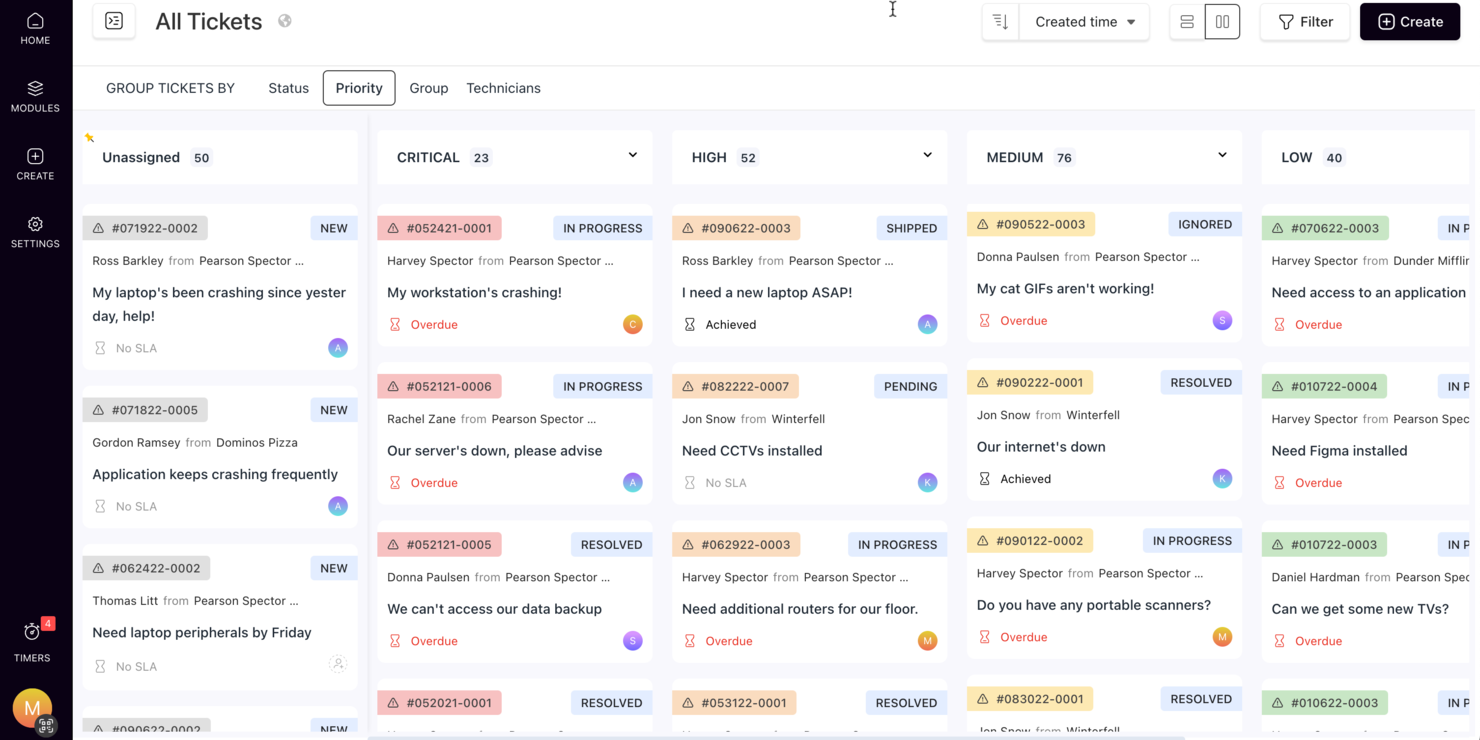
SuperOps si rivolge a fornitori di servizi gestiti (MSP) e team IT che necessitano di una soluzione affidabile di helpdesk aziendale. Semplifica le operazioni IT grazie a una gestione integrata della service desk, automazione e funzionalità potenziate dall’IA. Le organizzazioni possono aumentare l’efficienza e la qualità dei servizi, gestendo facilmente i ticket, automatizzando i flussi di lavoro e mantenendo una comunicazione efficace.
Perché ho scelto SuperOps
Ho scelto SuperOps per la sua intelligente prioritizzazione dei ticket e il sistema di ticketing automatizzato che sfrutta l’IA per ottimizzare il processo di helpdesk. Il chatbot Monica AI gestisce rapidamente le attività di routine, lasciando al tuo team il tempo di concentrarsi su questioni più complesse. Inoltre, la funzione di tracciamento del tempo offre approfondimenti precisi sull’allocazione delle risorse, rendendolo prezioso per le operazioni di supporto a livello aziendale.
Funzionalità chiave di SuperOps
Oltre al suo sistema di ticketing d’eccellenza, ho trovato anche diverse altre funzionalità che ne aumentano il valore:
- Runbook unificati: Consentono di standardizzare e automatizzare i processi ripetitivi, riducendo il tempo dedicato dal team alle attività di routine.
- Comunicazione centralizzata: Questa funzione garantisce che tutti i membri del team abbiano accesso alle stesse informazioni, facilitando una migliore collaborazione e processi decisionali.
- Gestione degli SLA: SuperOps aiuta a monitorare e gestire gli accordi sui livelli di servizio, assicurando il rispetto delle aspettative dei clienti e degli standard di conformità.
- Timer mobili: Questo strumento consente ai tecnici di tracciare accuratamente il tempo di lavoro anche in mobilità, migliorando la precisione della fatturazione e la gestione delle risorse.
Integrazioni di SuperOps
Le integrazioni includono BambooHR, Google Sheets, Microsoft Office 365, Slack, PandaDoc, Dialpad, Google Workspace Admin, Microsoft Outlook e Airtable.
Pros and Cons
Pros:
- Gestione integrata dei dispositivi mobili
- Strumenti avanzati di automazione e intelligenza artificiale
- Gestione patch ed endpoint inclusa
Cons:
- Potrebbe richiedere un periodo di onboarding
- Basato su cloud, richiede accesso a Internet
New Product Updates from SuperOps

SuperOps Improves Ticket Visibility, Dynamic Forms, and Dashboard Views
SuperOps introduces improvements to ticket visibility, dynamic forms, and dashboard visualizations. These updates help technicians manage customer conversations, simplify ticket creation, and keep dashboard views consistent across teams. For more information, visit SuperOps' official site.
 .
.
Ideale per il supporto omnicanale
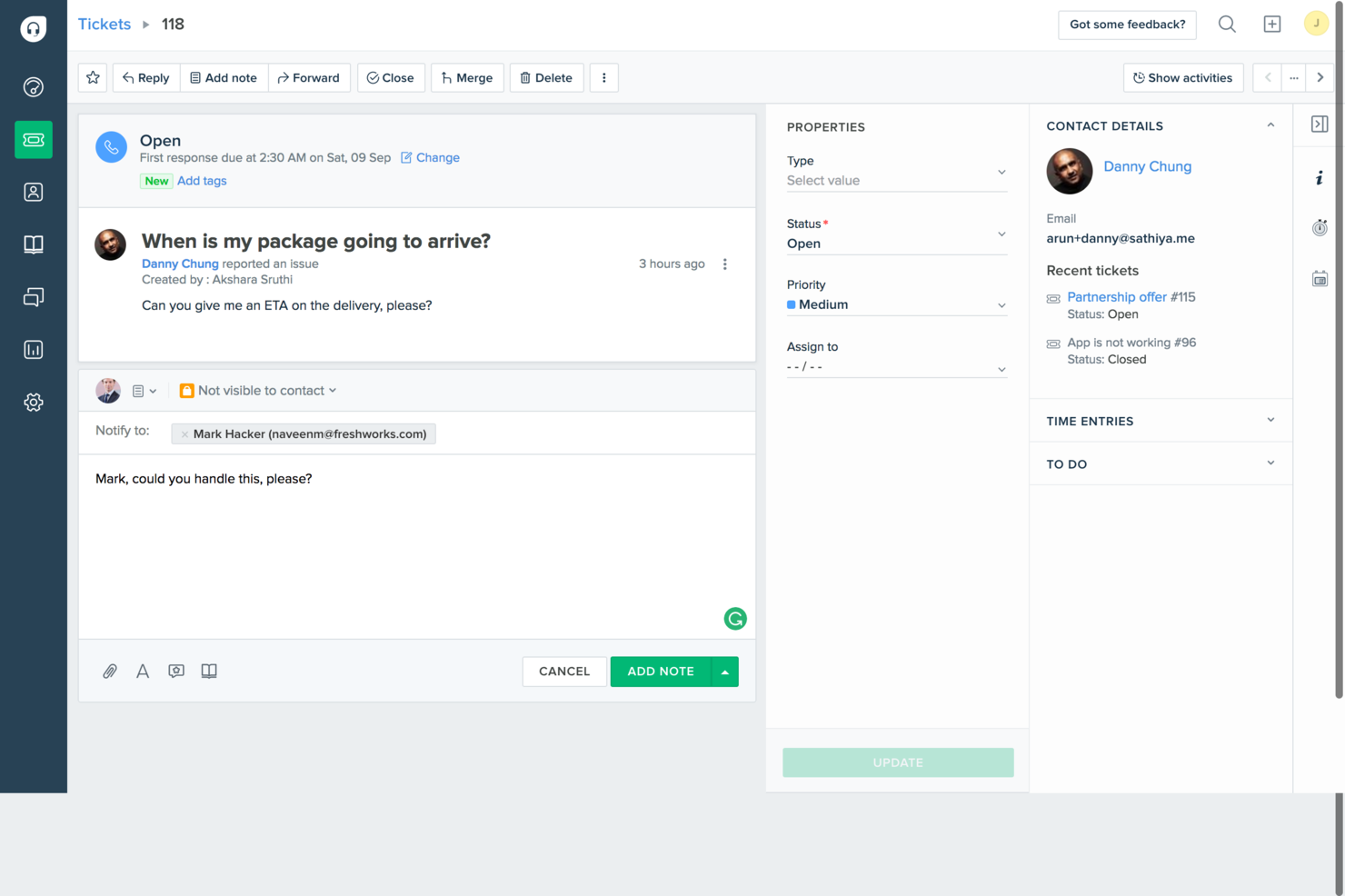
Freshdesk è un software di assistenza clienti alimentato dall'intelligenza artificiale, progettato per i team aziendali che devono gestire operazioni di supporto su larga scala e su più canali in modo efficiente. Fornisce uno spazio di lavoro centralizzato per la gestione dei ticket tramite email, chat, telefono e social media, utilizzando l'AI per automatizzare l'instradamento, suggerire risposte e dare priorità alle questioni urgenti. Con funzionalità come l'automazione dei flussi di lavoro, il monitoraggio degli SLA, l'analisi, una knowledge base self-service e le firme elettroniche dei documenti, Freshdesk aiuta le grandi organizzazioni a migliorare i tempi di risposta, mantenere la coerenza del servizio e scalare il supporto clienti senza aumentare la complessità operativa.
Perché ho scelto Freshdesk
Ho scelto Freshdesk per le sue funzionalità basate sull'AI che migliorano in modo significativo le operazioni degli helpdesk aziendali. Il Freddy AI Copilot della piattaforma automatizza le attività di routine, permettendo al tuo team di concentrarsi su questioni più complesse e dunque aumentare la produttività. Inoltre, il suo avanzato sistema di gestione dei ticket, che include l'assegnazione in base alle competenze e il supporto multi-brand, assicura che le richieste vengano gestite e risolte in modo efficiente. Queste caratteristiche rispondono alle esigenze delle aziende che cercano soluzioni di supporto intelligenti e scalabili.
Caratteristiche principali di Freshdesk
Oltre alle sue funzionalità basate sull'AI, Freshdesk offre diverse caratteristiche pensate per le esigenze aziendali:
- Supporto omnicanale: Questa funzione centralizza le interazioni con i clienti attraverso vari canali come email, chat e social media, garantendo una comunicazione senza interruzioni.
- Dashboard personalizzabili: Puoi personalizzare i dashboard per monitorare i principali indicatori e ottenere approfondimenti sulle prestazioni del team e la soddisfazione dei clienti.
- Strumenti di collaborazione: Note interne e riunioni di team facilitano una collaborazione efficace tra gli agenti di supporto, accelerando la risoluzione delle problematiche.
- Funzionalità di sicurezza: Freshdesk fornisce log di audit e whitelist degli IP per aumentare la sicurezza dei dati e garantire la conformità per i clienti aziendali.
Integrazioni di Freshdesk
Le integrazioni includono Slack, MS Teams, Shopify, Confluence, Google Docs, Playvox, Dropbox Sign 2 e altro ancora, con un'API disponibile per integrazioni personalizzate.
Pros and Cons
Pros:
- Strumenti di automazione dei ticket alimentati da AI
- Flussi di lavoro per l'assegnazione dei ticket basati sulle competenze
- Solide funzionalità di sicurezza e conformità
Cons:
- Le funzionalità avanzate richiedono livelli superiori
- La personalizzazione dei report può essere limitata
New Product Updates from Freshdesk

Freshdesk Adds Voice AI Agents in Freshcaller
Freshdesk introduces Voice AI Agents available through Freshcaller Marketplace apps to handle routine calls and reduce queues. This feature enables automated call handling with real-time, conversational support. For more information, visit Freshdesk's official site.

Chatbase
Ideale per distribuire chatbot AI su dati personalizzati
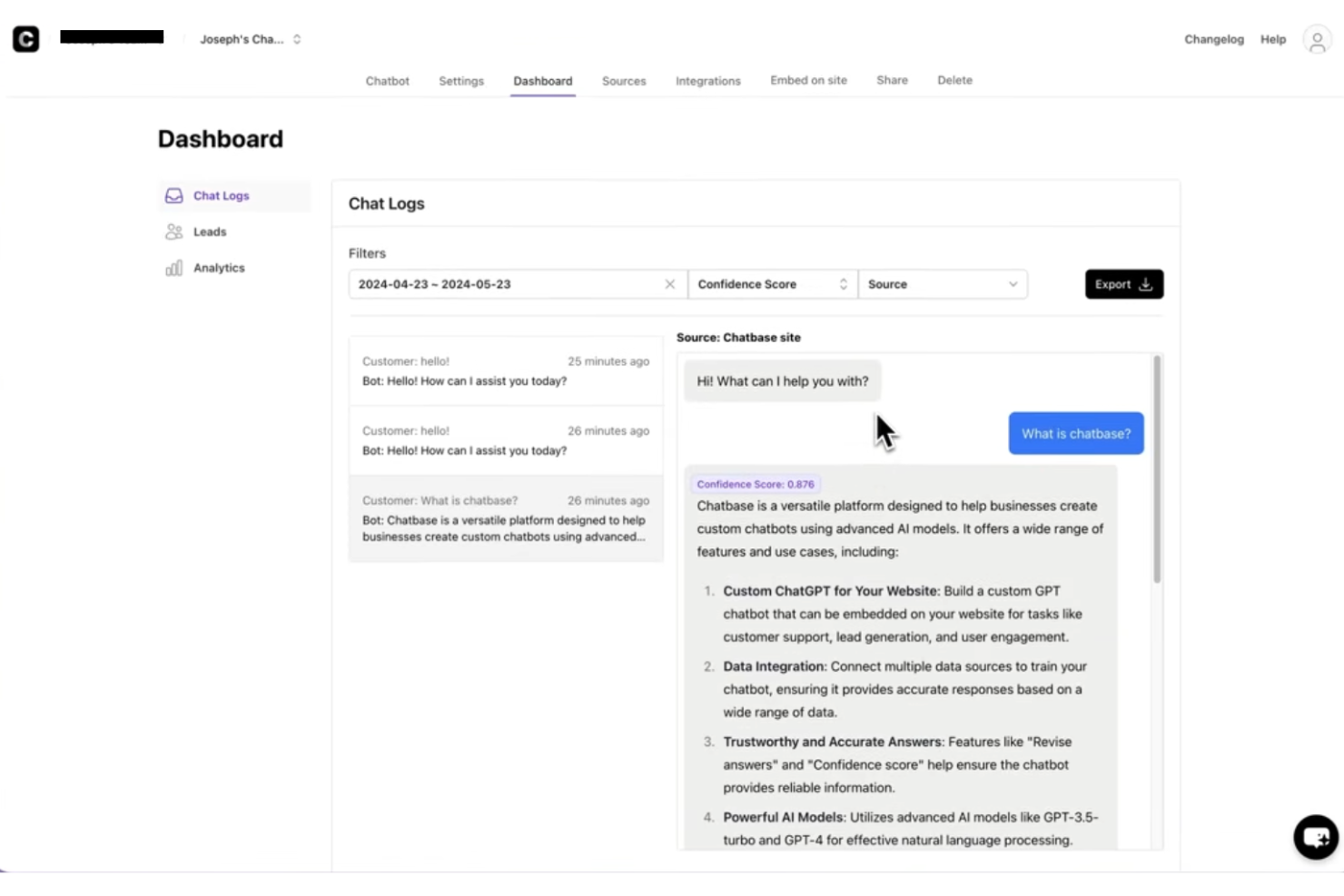
Chatbase è una piattaforma helpdesk aziendale basata sull'intelligenza artificiale che consente ai team di creare, distribuire e gestire chatbot conversazionali addestrati su fonti di dati aziendali specifiche e dati esterni.
Per chi è ideale Chatbase?
Chatbase è indicato per i team IT e di supporto di aziende di medie e grandi dimensioni che hanno la necessità di distribuire chatbot AI addestrati sui propri dati e sulla documentazione interna.
Perché ho scelto Chatbase
Ho scelto Chatbase come uno dei migliori per il modo in cui gestisce l’addestramento personalizzato dei dati per agenti di supporto AI. Puoi fornire all'agente la tua documentazione interna, gli articoli della knowledge base e le fonti di dati collegate, così risponde alle domande basandosi esclusivamente su quei contenuti e non su output generici generati dall'AI. Mi piace anche la sua integrazione con sistemi in tempo reale come CRM e strumenti di gestione degli ordini, così l'agente può estrarre dati aggiornati sul cliente durante la conversazione invece di affidarsi solo a informazioni statiche. Per i team di supporto enterprise che gestiscono knowledge base ampie e frequentemente aggiornate, questa combinazione di addestramento personalizzato e accesso ai dati in tempo reale è davvero difficile da replicare.
Funzionalità principali di Chatbase
- Form di acquisizione lead: Inserisci moduli direttamente nelle conversazioni del chatbot per raccogliere informazioni dagli utenti senza uscire dall’interfaccia della chat.
- Passaggio a operatore umano: Inoltra le conversazioni a un agente reale quando il chatbot raggiunge i limiti delle sue conoscenze o l’utente richiede assistenza umana.
- Personalizzazione del brand: Personalizza aspetto, nome e tono del chatbot per rispecchiare il brand e lo stile di comunicazione della tua organizzazione.
- Storico delle conversazioni: Accedi alle trascrizioni complete delle interazioni precedenti del chatbot per rivedere le conversazioni di supporto e individuare eventuali lacune informative.
Integrazioni Chatbase
Chatbase offre integrazioni native con Make, Zendesk, Notion, Slack, Stripe, Salesforce e altri. È disponibile anche una API per integrazioni personalizzate.
Pros and Cons
Pros:
- Permette di addestrare chatbot su documenti proprietari
- Dashboard di analytics che traccia metriche a livello di conversazione
- Accesso API flessibile per workflow personalizzati
Cons:
- L’escalation agli operatori umani non è automatica
- Nessun sistema di ticketing o gestione dei casi integrato

HelpDesk
Miglior help desk a configurazione rapida per piccoli team
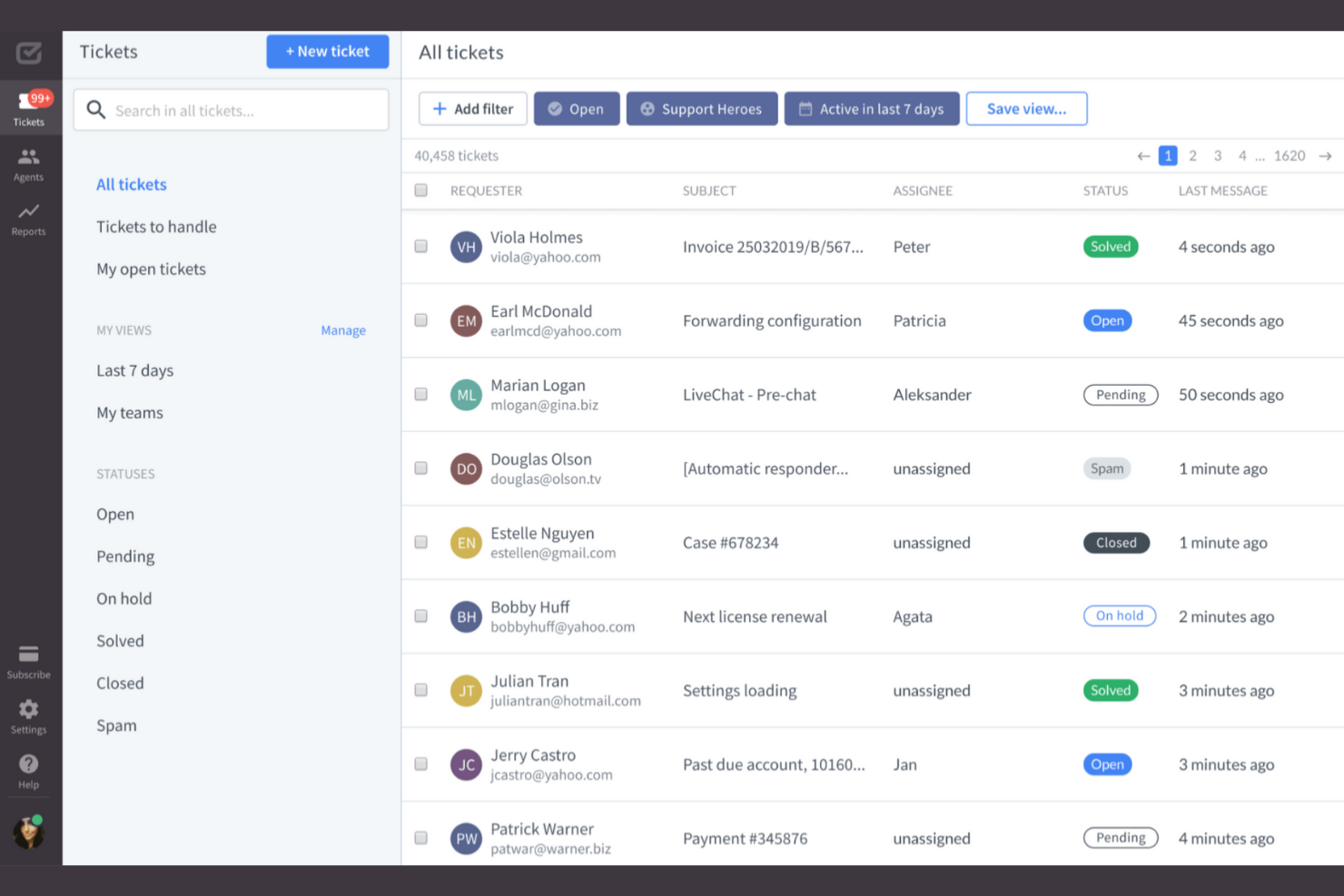
HelpDesk è un software di ticketing progettato per piccole imprese e team di supporto in vari settori, tra cui IT e vendite. Facilita la gestione dei ticket e la collaborazione tra i membri del team per rafforzare le operazioni di supporto.
Perché ho scelto HelpDesk: È ideale per piccoli team, offrendo semplicità ed efficienza nella gestione delle richieste dei clienti. Il software offre assistenza multicanale, permettendo al tuo team di gestire le richieste tramite email e moduli web. Le sue funzionalità di automazione riducono il lavoro manuale per un'assegnazione dei ticket più efficiente. Gli strumenti di analisi di HelpDesk offrono approfondimenti sulle prestazioni del team e sulla soddisfazione dei clienti.
Funzionalità principali e integrazioni:
Funzionalità includono il rilevamento della lingua per supportare utenti globali, il monitoraggio di ticket simili per una risoluzione più efficiente e suggerimenti di tag basati su AI che aiutano a organizzare le richieste.
Integrazioni includono LiveChat, HubSpot, Salesforce, Slack e altro ancora.
Pros and Cons
Pros:
- Facile da configurare e utilizzare per piccoli team
- Opzioni di supporto multicanale centralizzate
- Automazione e organizzazione dei ticket avanzata
Cons:
- Manca l'automazione AI avanzata
- Nessuna creazione di ticket da social media

La migliore assistenza intuitiva per team non tecnici

ProProfs Help Desk è una soluzione di assistenza clienti basata su cloud pensata per aziende di piccole e medie dimensioni. Aiuta a gestire le richieste dei clienti tramite ticketing, caselle di posta condivise e strumenti di collaborazione.
Perché ho scelto ProProfs Help Desk: È riconosciuto per la sua facilità d'uso, rendendolo accessibile a team senza grandi competenze tecniche. La funzione di casella di posta condivisa permette al tuo team di collaborare efficacemente sulle richieste dei clienti. Le regole di automazione migliorano la gestione dei ticket, riducendo le attività manuali. Gli strumenti di reportistica offrono approfondimenti sulle prestazioni dell'assistenza per consentire al team di migliorare costantemente la qualità del servizio offerto.
Funzionalità e integrazioni principali:
Le funzionalità includono una knowledge base che aiuta gli utenti a trovare soluzioni in autonomia, un sistema di chat che facilita la comunicazione in tempo reale e un'app mobile che permette al tuo team di gestire i ticket ovunque si trovi.
Le integrazioni includono Salesforce, Slack, Shopify, Microsoft Dynamics CRM e molto altro.
Pros and Cons
Pros:
- Configurazione e dashboard semplici e intuitive
- Casella di posta condivisa favorisce la collaborazione
- Knowledge base self-service
Cons:
- Mancanza di strumenti avanzati di reportistica
- Nessun instradamento dei ticket in base alle competenze

Ideale per raccogliere feedback dalla community e trasformarli in roadmap di prodotto
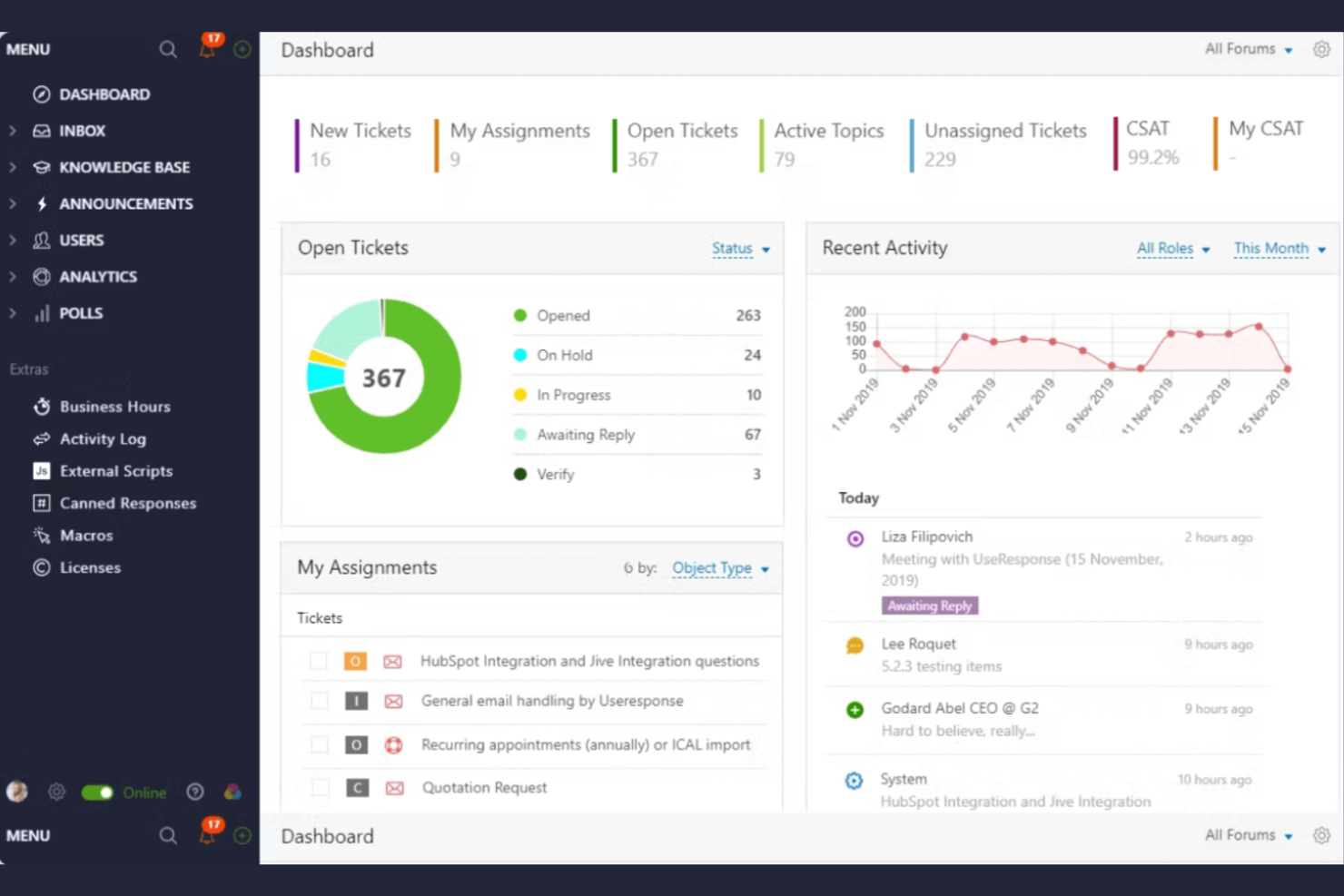
UseResponse è una piattaforma di gestione del supporto clienti e del feedback pensata per le aziende che desiderano coinvolgere la propria community. Facilita la raccolta dei feedback dei clienti, la gestione dei ticket di help desk e l'organizzazione di una knowledge base.
Perché ho scelto UseResponse: Eccelle nella raccolta di feedback dalla community, consentendo al tuo team di interagire direttamente con gli utenti. La piattaforma offre forum community personalizzabili per raccogliere feedback, idee e suggerimenti. Il sistema di ticketing di UseResponse si integra con la gestione dei feedback, garantendo una risoluzione efficiente delle problematiche. Lo strumento offre anche analisi per monitorare il coinvolgimento della community e migliorare i servizi offerti.
Funzionalità principali e integrazioni:
Le funzionalità includono un portale self-service che riduce le richieste di supporto, una knowledge base che aiuta gli utenti a trovare rapidamente risposte e flussi di lavoro personalizzabili che si adattano ai processi del tuo team.
Le integrazioni includono Slack, Atlassian Jira, Salesforce e altro ancora.
Pros and Cons
Pros:
- Potenti funzionalità di supporto alla community
- Analisi dettagliate sull'engagement della community
- Workflow altamente adattabili
Cons:
- L'automazione non è adatta a processi complessi
- Dipendenza dalla partecipazione degli utenti

Ideale per un supporto clienti basato su CRM nativo
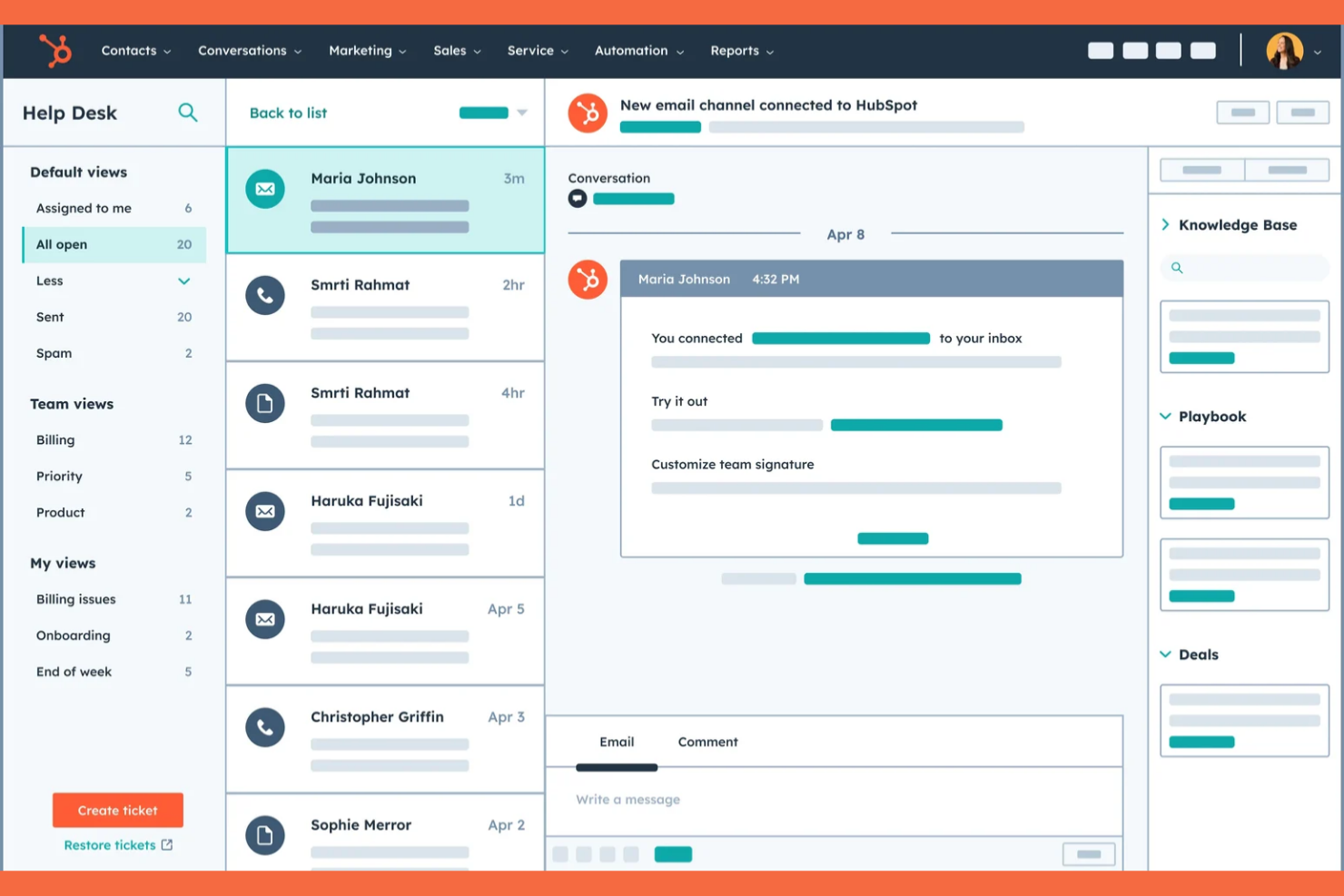
HubSpot Service Hub è un software di assistenza clienti pensato per le aziende che desiderano rafforzare le relazioni e il supporto ai clienti. Offre strumenti per la gestione dei ticket, la raccolta dei feedback dei clienti e la gestione della knowledge base.
Perché ho scelto HubSpot Service Hub: È noto per la sua integrazione avanzata con HubSpot CRM, che fornisce una piattaforma unificata per la gestione delle interazioni con i clienti. Il software include un sistema di ticketing che organizza in modo efficiente le richieste di supporto. Gli strumenti per il feedback dei clienti aiutano a raccogliere informazioni preziose direttamente dai tuoi clienti. La funzionalità di knowledge base di HubSpot consente agli utenti di trovare autonomamente le risposte, riducendo il carico di lavoro del team di supporto.
Caratteristiche principali e integrazioni:
Le funzionalità includono un portale clienti che consente ai clienti di monitorare i propri ticket, strumenti di automazione che aiutano a gestire le attività ripetitive e dashboard di reportistica che forniscono insight sulle performance del supporto clienti.
Le integrazioni includono Salesforce, Slack, Zapier, Shopify, Mailchimp, Microsoft Dynamics e altre ancora.
Pros and Cons
Pros:
- Integrazioni nell'ecosistema HubSpot
- Portale clienti e knowledge base integrata
- Dashboard di reportistica personalizzabili
Cons:
- I prezzi crescono rapidamente
- Funzionalità mancanti possono limitare flussi di lavoro e integrazioni

SysAid
Ideale per la gestione automatizzata dei servizi IT
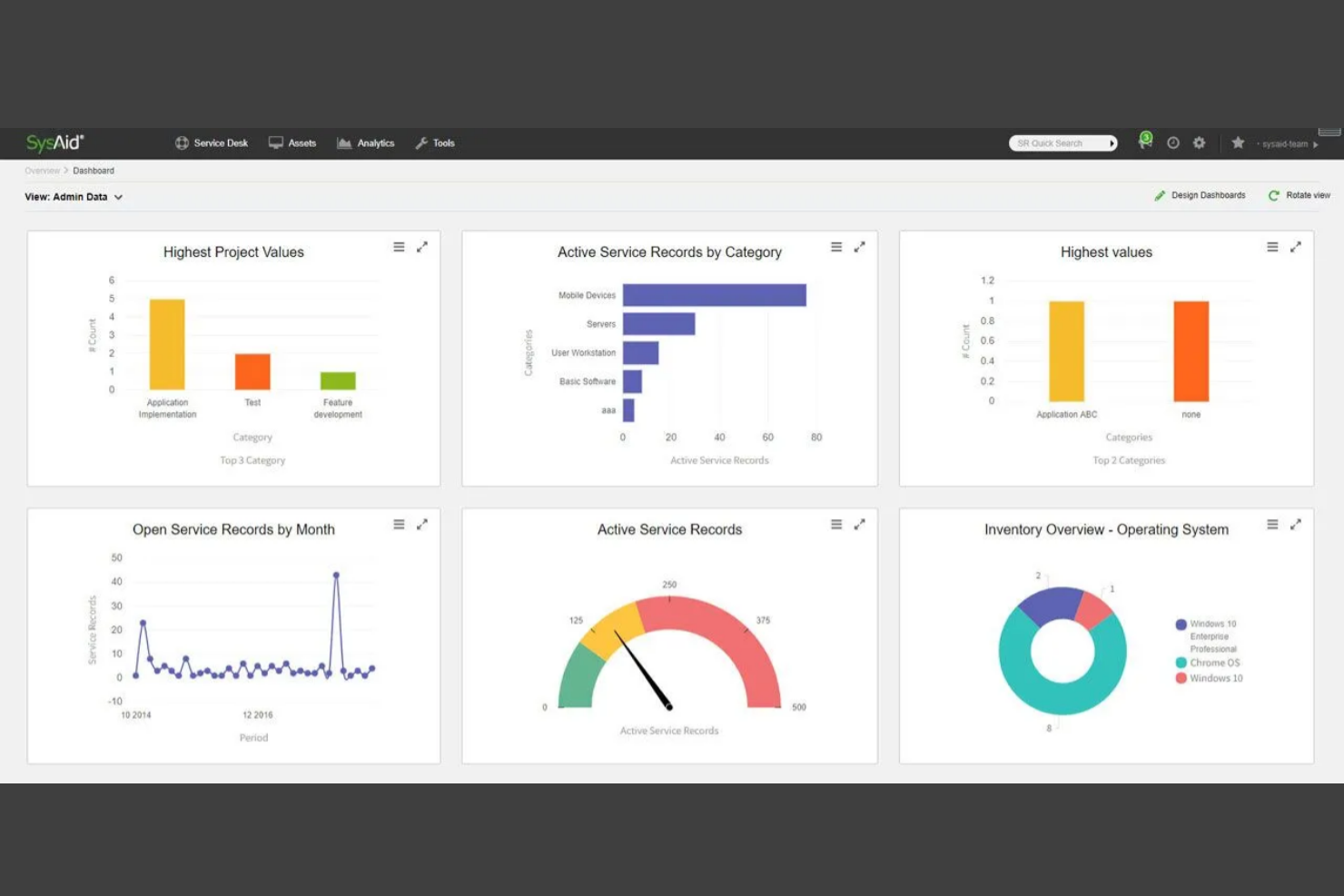
SysAid è uno strumento di gestione dei servizi IT progettato per i reparti IT in vari settori. Supporta le operazioni IT offrendo soluzioni per il service desk e la gestione degli asset.
Perché ho scelto SysAid: Eccelle nell’ITSM, fornendo strumenti per automatizzare e migliorare i flussi di lavoro IT. Il software include un sistema di gestione degli asset integrato che aiuta a tracciare asset hardware e software. Le funzionalità del service desk di SysAid includono la gestione automatizzata dei ticket, riducendo le attività manuali per il tuo team. Le sue capacità di reportistica offrono informazioni sulle prestazioni IT e sull’utilizzo delle risorse.
Funzionalità principali e integrazioni:
Funzionalità includono un portale self-service che consente agli utenti di risolvere autonomamente i problemi, una knowledge base che archivia soluzioni a problematiche comuni e un modulo di gestione dei cambi che traccia efficacemente le modifiche IT.
Integrazioni includono Microsoft Active Directory, Microsoft SCCM, Google Workspace e altre ancora.
Pros and Cons
Pros:
- Ottime capacità di ITSM e gestione degli asset
- Forte automazione dei flussi di lavoro IT
- Knowledge base integrata per la risoluzione autonoma dei problemi
Cons:
- Interfaccia utente complessa e datata
- Prezzi poco trasparenti, basati su preventivo

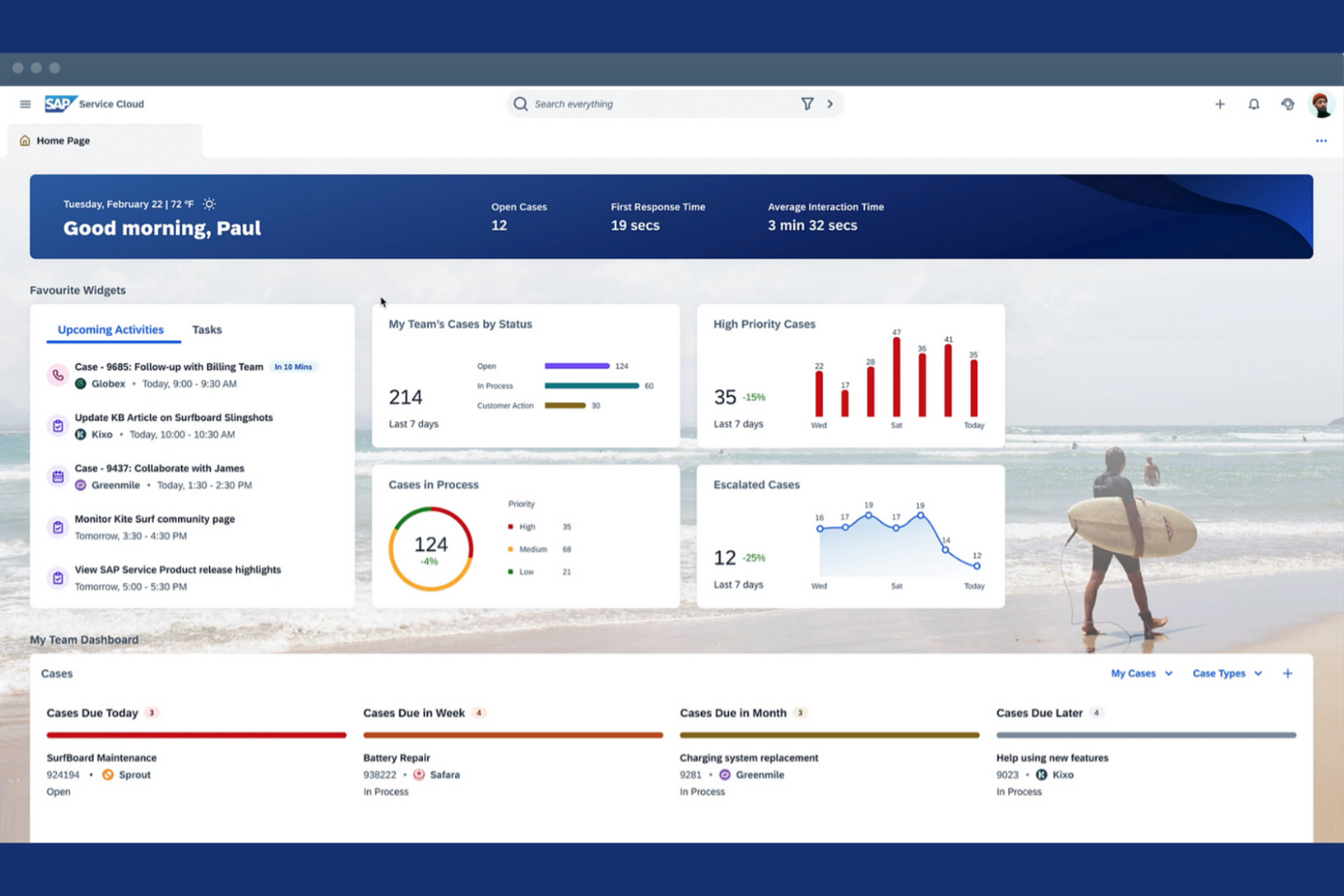
SAP Service Cloud è una soluzione per l'assistenza clienti progettata per grandi aziende che desiderano rafforzare le proprie operazioni di supporto. Offre strumenti per la gestione dei ticket, il coinvolgimento dei clienti e l'analisi dei servizi.
Perché ho scelto SAP Service Cloud: È noto per le sue caratteristiche di conformità globale, che lo rendono adatto alle aziende internazionali. La piattaforma offre funzionalità avanzate di gestione dei ticket che aiutano a gestire efficacemente le richieste dei clienti. Le analisi in tempo reale forniscono approfondimenti sulle prestazioni del servizio e sulla soddisfazione dei clienti. SAP Service Cloud include anche strumenti di coinvolgimento dei clienti che facilitano interazioni personalizzate con i tuoi clienti.
Caratteristiche distintive e integrazioni:
Le caratteristiche includono uno strumento di gestione degli accordi sul livello di servizio (SLA) che garantisce che il tuo team soddisfi le aspettative dei clienti, un sistema di gestione della conoscenza che memorizza informazioni preziose e un design reattivo sui dispositivi mobili che consente l’accesso ovunque tu sia.
Le integrazioni includono SAP S/4HANA, SAP ERP, SAP CRM, soluzioni cloud di SAP e altro ancora.
Pros and Cons
Pros:
- Estese funzionalità di conformità globale
- Strumenti basati su AI per migliorare i processi di escalation
- Strumenti personalizzati per il coinvolgimento dei clienti
Cons:
- Implementazione complessa e costosa
- Dipendenza dall’ecosistema SAP più ampio
Altri software enterprise per helpdesk
Ecco alcune altre soluzioni enterprise per helpdesk che non sono entrate nella mia shortlist, ma che comunque vale la pena considerare:
- Zendesk
Ideale per il supporto enterprise con automazione AI
- SolarWinds Web Help Desk
Ideale per ticket collegati alla gestione degli asset IT
- HappyFox Help Desk
Ideale per agenti illimitati e supporto scalabile
- ScienceSoft
Ideale per piattaforme personalizzate per esigenze complesse
- Freshdesk
Ideale per conversazioni clienti omnicanale
- InvGate
Ideale per flussi di lavoro personalizzabili senza codice


Come Valuto il Software di Helpdesk Aziendale
Valuto gli strumenti di helpdesk su due livelli: requisiti fondamentali come i workflow ITIL e l'automazione degli SLA che qualificano un fornitore, poi i fattori distintivi importanti quando si scala l'IT a livello globale.
Funzionalità di Base (Requisiti Essenziali per Questa Lista)
Quando seleziono gli strumenti per la mia lista, valuto ciascuno su una scala da 0 (non offre la funzionalità) a 5 (eccelle in quest'area) per ogni funzionalità di base elencata di seguito. Poi, calcolo il punteggio totale dello strumento in percentuale. Ogni strumento deve raggiungere un punteggio totale minimo del 65% per essere preso in considerazione.
- Gestione e Assegnazione Ticket: Verifico l'acquisizione multicanale e le regole di instradamento automatico che gestiscono grandi volumi, come la classificazione di migliaia di reset password su code regionali.
- ITSM e Workflow ITIL: Ogni strumento deve includere moduli per la gestione di incidenti, problemi e cambiamenti. Analizzo la maturità del CMDB e se le risorse sono collegate ai ticket.
- Gestione SLA e Automazione: Valuto se le policy SLA supportano percorsi multi-livello di escalation, come tempistiche separate per richieste di dirigenti VIP rispetto al personale generale.
- Portale Self-Service e Knowledge Base: Un portale ricercabile con un catalogo di servizi è importante. Cerco strumenti dove i dipendenti possano richiedere hardware o software senza dover inviare email all’IT.
- Integrazioni Aziendali e API: Lo strumento deve collegarsi agli stack già in uso dalle aziende, come Azure AD, Okta, Jira e Slack. Controllo la presenza di API aperte e la profondità del marketplace.
- Sicurezza Aziendale e Reporting: Cerco certificazioni di conformità come SOC 2 e ISO 27001, insieme a RBAC, log di audit e dashboard che mostrino le tendenze degli SLA.
Dopo aver stilato una lista di strumenti che rispettano questi criteri, prendo in considerazione ciò che distingue ogni piattaforma.
Fattori Distintivi (Cosa Distingue i Fornitori)
Ecco come confronto e metto a confronto i diversi fornitori:
Funzionalità Notevoli
L’assistenza guidata dall’AI è un grande punto di differenziazione. Valuto se una piattaforma può auto-sintetizzare ticket o redigere risposte per gli agenti, il che fa davvero risparmiare tempo in caso di picchi di incidenti. Analizzo inoltre se lo strumento si estende oltre l’IT verso la gestione dei servizi aziendali, permettendo a team HR o facility di gestire i propri cataloghi di servizi da un'unica piattaforma. Anche i builder di workflow low-code sono importanti. Quando un amministratore riesce a costruire un flusso di approvazione personalizzato per richieste di modifica al firewall senza scrivere codice, questa è una differenza significativa tra i fornitori.
Oltre le Funzionalità
Valuto con attenzione il costo totale di proprietà. Le piattaforme helpdesk aziendali spesso fanno pagare per agente, ma i costi reali derivano dai moduli aggiuntivi per la gestione degli asset, ITOM, o funzionalità AI. Anche la flessibilità di implementazione conta. Alcune organizzazioni hanno bisogno di hosting on-premise o ibrido per rispettare i requisiti di residenza dei dati. Controllo se il fornitore offre programmi strutturati di implementazione, perché distribuire un helpdesk a 5.000 dipendenti su più sedi è una sfida molto diversa rispetto ad un setup per 50 persone. L'accesso a consulenti certificati ed ecosistemi di partner può fare la differenza nel successo della distribuzione.
Come scegliere un software enterprise per helpdesk
È facile perdersi tra liste infinite di funzionalità e strutture di prezzi complesse. Per aiutarti a restare concentrato durante il processo di selezione del software più adatto alla tua situazione, ecco una checklist di fattori da tenere in considerazione:
| Fattore | Cosa Considerare |
|---|---|
| Scalabilità | Il software può crescere insieme alla tua azienda? Verifica se è in grado di gestire volumi di richieste più elevati e supportare utenti aggiuntivi senza problemi. |
| Integrazioni | Si collega con i tuoi strumenti esistenti? Controlla la compatibilità con CRM, piattaforme di comunicazione e altre soluzioni essenziali per il business. |
| Personalizzazione | Puoi adattarlo ai tuoi processi? Cerca la possibilità di modificare flussi di lavoro, dashboard e permessi utente per rispondere alle esigenze del tuo team. |
| Facilità d’uso | È intuitivo per il tuo team? Valuta l’interfaccia e i requisiti di formazione per assicurarti che tutti possano adottarlo rapidamente. |
| Implementazione e onboarding | Quanto tempo sarà necessario per iniziare? Considera tempi e risorse richiesti per l’installazione, inclusa la migrazione dei dati e la formazione degli utenti. |
| Costo | Rientra nel budget? Confronta piani tariffari, inclusi componenti aggiuntivi e spese nascoste, per verificarne la compatibilità economica. |
| Tutele di sicurezza | Le tue esigenze di protezione dei dati sono soddisfatte? Verifica le funzionalità di sicurezza come la crittografia e il controllo degli accessi per proteggere le informazioni sensibili. |
| Disponibilità del supporto | Quali opzioni di supporto sono offerte? Assicurati di poter accedere ad assistenza tempestiva tramite chat, telefono o email quando sorgono problemi. |
Che cos’è un software helpdesk aziendale?
Il software helpdesk aziendale è uno strumento progettato per gestire le richieste e le domande dei clienti all’interno di grandi organizzazioni. Questi strumenti sono tipicamente utilizzati da professionisti IT, team di supporto clienti e responsabili del servizio per aumentare l’efficienza del servizio e la soddisfazione dei clienti. Gestione dei ticket, supporto multicanale e funzionalità di automazione aiutano a organizzare le richieste, migliorare i tempi di risposta e ridurre le attività manuali. Nel complesso, questi strumenti offrono una soluzione centralizzata per gestire le interazioni con i clienti e mantenere alta la qualità del servizio.
Caratteristiche del software helpdesk aziendale
Quando scegli un software helpdesk aziendale, tieni d’occhio le seguenti funzionalità chiave:
- Gestione dei ticket: Organizza e traccia le richieste dei clienti per garantire risposte e soluzioni tempestive.
- Supporto multicanale: Permette di gestire le interazioni con i clienti tramite email, chat, telefono e social media per una comunicazione integrata.
- Funzionalità di automazione: Automatizza le attività ripetitive, come l’assegnazione dei ticket, per migliorare l’efficienza e liberare risorse del team.
- Portale self-service: Consente ai clienti di trovare autonomamente le risposte, riducendo il volume di ticket di supporto.
- Flussi di lavoro personalizzabili: Consentono ai team di adattare i processi alle esigenze specifiche dell’azienda, migliorando così l’efficienza operativa.
- Opzioni di integrazione: Collegamento con strumenti già in uso come CRM e piattaforme di comunicazione, per garantire un flusso dati senza interruzioni.
- Analisi e reportistica: Offrono informazioni sulle performance del team e sul livello di soddisfazione dei clienti, utili per migliorare il servizio.
- Tutele di sicurezza: Proteggono i dati sensibili dei clienti tramite crittografia e controllo degli accessi, garantendo il rispetto delle normative sui dati.
- Knowledge base: Conserva informazioni e soluzioni utili per aiutare clienti e operatori a trovare rapidamente le risposte.
- Strumenti di collaborazione: Favoriscono il lavoro di squadra attraverso caselle di posta condivise e note interne, migliorando qualità e rapidità delle risposte.
Vantaggi del software helpdesk aziendale
L’implementazione di un software helpdesk aziendale apporta numerosi vantaggi al tuo team e alla tua azienda. Ecco alcuni benefici a cui puoi puntare:
- Efficienza migliorata: Le funzionalità di automazione riducono le attività manuali, permettendo al team di concentrarsi sulla risoluzione dei problemi dei clienti in modo più efficace.
- Maggiore soddisfazione dei clienti: Il supporto multicanale assicura che i clienti possano contattarti come preferiscono, ottenendo risposte più rapide.
- Migliore gestione dei dati: Le opzioni di integrazione via API centralizzano i dati dei clienti, facilitandone l’accesso e la gestione.
- Maggior autosufficienza del cliente: Un portale self-service permette ai clienti di trovare risposte in autonomia, riducendo il numero di richieste di supporto in entrata.
- Decisioni più informate: Analisi e reportistica offrono una panoramica delle performance del team e delle interazioni con i clienti, aiutandoti a migliorare tramite dati concreti.
- Maggiore sicurezza: Le tutele di sicurezza proteggono le informazioni sensibili e assicurano la conformità alle normative sulla protezione dei dati.
- Collaborazione rafforzata: Gli strumenti di collaborazione permettono al tuo team di lavorare insieme in modo efficiente, migliorando qualità e velocità delle risposte.
Costi e prezzi del software helpdesk aziendale
Selezionare un software di helpdesk aziendale richiede la comprensione dei vari modelli di prezzo e piani disponibili. I costi variano in base alle funzionalità, alla dimensione del team, agli add-on e altro ancora. La tabella sottostante riassume i piani più comuni, i loro prezzi medi e le funzionalità tipiche incluse nelle soluzioni di helpdesk enterprise:
Tabella Comparativa dei Piani per Software di Helpdesk Aziendale
| Tipo di Piano | Prezzo Medio | Funzionalità Comuni |
|---|---|---|
| Piano Gratuito | $0 | Gestione base dei ticket, supporto via email e integrazioni limitate. |
| Piano Personale | $9-$21/utente/mese | Gestione dei ticket, supporto multicanale e reportistica di base. |
| Piano Business | $40-$155/utente/mese | Automazione avanzata, flussi di lavoro personalizzabili, analisi e report. |
| Piano Enterprise | $150+/utente/mese | Personalizzazione completa, supporto dedicato e funzionalità di sicurezza avanzate. |
Domande Frequenti sul Software di Helpdesk Aziendale
Ecco alcune risposte alle domande più comuni sul software di helpdesk enterprise:
A cosa devo prestare attenzione nella scelta di un fornitore?
Scegli un fornitore che offra un supporto clienti affidabile e abbia una solida reputazione. Considera la loro storia di aggiornamenti e miglioramenti al software. Verifica se forniscono risorse, come tutorial e webinar, per aiutare te e il tuo team a sfruttare al meglio il software. È anche importante valutare la trasparenza del fornitore riguardo a prezzi e condizioni contrattuali. Parla con altri utenti o leggi le recensioni per valutare il loro livello di soddisfazione e i potenziali problemi riscontrati.
Come faccio a sapere se una soluzione è scalabile?
La scalabilità è essenziale per le aziende in crescita. Verifica se il software consente di aggiungere utenti e gestire un aumento del volume di ticket senza perdita di prestazioni. Chiedi ai fornitori quali sono i loro clienti più grandi e come gestiscono la scalabilità. Cerca funzionalità come il bilanciamento del carico e licenze utente flessibili. Se possibile, testa le prestazioni del software durante i periodi di massimo carico tramite una demo o una versione di prova. Valuta la capacità del fornitore di supportare la tua crescita con aggiornamenti regolari e miglioramenti all’infrastruttura.
Come misuro il ROI di un software di helpdesk enterprise?
Tieni traccia di metriche come il tempo medio di risoluzione dei ticket, la produttività degli agenti, la soddisfazione dei clienti e i tassi di risposta agli incidenti prima e dopo l’implementazione. Confronta questi miglioramenti con le spese del software e operative per valutare il ROI. Alcune piattaforme forniscono analisi integrate per semplificare questo processo.
Posso migrare i miei dati esistenti su un nuovo sistema di helpdesk?
Sì, la maggior parte dei software di helpdesk enterprise offre strumenti per la migrazione dei dati. Verifica se il fornitore mette a disposizione guide dettagliate o supporto per migrare i dati dal tuo sistema attuale. Prima di iniziare, esegui un backup completo dei dati per evitare perdite. Cerca software che supportino l’importazione da file CSV o offrano integrazione con il sistema in uso. Chiedi quanto tempo richiede la migrazione e se sono previsti periodi di inattività. Una pianificazione e dei test adeguati garantiscono una transizione senza intoppi.
Cosa devo considerare quando passo da un helpdesk legacy a uno nuovo?
Inizia con una verifica dei dati e dei flussi di lavoro esistenti. Scegli una nuova piattaforma con solidi strumenti di importazione e supporto per il mapping dei dati. Pianifica la migrazione nei periodi di bassa attività e fai funzionare i due sistemi in parallelo per evitare disservizi. Forma il tuo team e documenta i nuovi processi per facilitare l’adozione.
Con quale frequenza il mio team deve aggiornare il software?
Aggiornamenti regolari sono essenziali per mantenere il software sicuro ed efficiente. La maggior parte dei fornitori rilascia update più volte l’anno per risolvere bug e aggiungere funzionalità. Definisci una routine per controllare e installare gli aggiornamenti. Gli aggiornamenti automatici semplificano il processo, ma leggi sempre le note di rilascio per conoscere le modifiche apportate. Assicurati che il team sia formato sulle nuove funzionalità introdotte. Restare aggiornati ti permette di sfruttare gli ultimi progressi e mantenere la sicurezza.
Ecco cosa fare ora:
Se sei nella fase di ricerca di software di helpdesk aziendale, mettiti in contatto con un consulente SoftwareSelect per ricevere consigli gratuiti.
Compila un modulo e fai una breve chiacchierata in cui approfondiranno le tue esigenze specifiche. In seguito riceverai una lista ristretta di software da valutare. Ti supporteranno anche durante l’intero processo d’acquisto, incluse le trattative sul prezzo.