

Le 10 migliori piattaforme di integrazione cloud recensite nel 2026

10 Selezione delle migliori piattaforme di integrazione cloud


Le piattaforme di integrazione cloud sono risorse preziose per qualsiasi azienda. Con il software giusto, i team possono migliorare la connettività dei dati e aumentare l'efficienza dei flussi di lavoro. Tuttavia, trovare la piattaforma di integrazione cloud giusta può essere difficile, soprattutto considerando le numerose opzioni disponibili.
Basandomi sulla mia esperienza con i software per le operazioni sui ricavi, ho testato e confrontato alcune delle principali piattaforme di integrazione cloud disponibili. Ho quindi raccolto i risultati in recensioni dettagliate per aiutarti a trovare il software più adatto alle tue esigenze.
Perché fidarsi dei nostri consigli sui software
Il nostro team testa e recensisce software dal 2012. In quanto leader tecnologici noi stessi, sappiamo quanto sia difficile — e importante — scegliere il software giusto.
Per questa guida, abbiamo valutato gli strumenti attraverso test praticie ricerche indipendenti, assegnando un punteggio agli strumenti in base ai nostri criteri di selezione.
Le nostre recensioni riflettono il nostro giudizio editoriale umano, non un discorso di vendita.
Riepilogo delle migliori piattaforme di integrazione cloud
Questa tabella comparativa riassume i dettagli sui prezzi delle mie migliori piattaforme di integrazione cloud selezionate, aiutandoti a trovare quella più adatta al tuo budget e alle esigenze della tua azienda.
| Tool | Best For | Trial Info | Price | ||
|---|---|---|---|---|---|
| 1 | Ideale per l'integrazione autonoma dei dati con governance | Demo gratuita disponibile | Prezzo su richiesta | Website | |
| 2 | Ideale per utenti NetSuite | Demo gratuita disponibile | Prezzo su richiesta | Website | |
| 3 | Ideale per l'orchestrazione della supply chain | Demo gratuita disponibile | Prezzo su richiesta | Website | |
| 4 | Ideale per l'integrazione dei dati in cloud | Piano gratuito disponibile | Da $79/mese (fatturato annualmente) | Website | |
| 5 | Ideale per la semplicità di automazione | Piano gratuito + demo gratuita disponibile | Da $9/mese (fatturazione annuale) | Website | |
| 6 | Ideale per la creazione visiva di integrazioni | Prova gratuita disponibile | Da $1.595/anno | Website | |
| 7 | Ideale per soluzioni low-code | Demo gratuita disponibile | Da $149/mese | Website | |
| 8 | Ideale per flussi di lavoro complessi | Demo gratuita disponibile | Prezzi su richiesta | Website | |
| 9 | Ideale per integrazione guidata dall'IA | Demo gratuita disponibile | Prezzo su richiesta | Website | |
| 10 | Ideale per la creazione di API | Demo gratuita disponibile | Prezzi su richiesta | Website |
Recensioni delle migliori piattaforme di integrazione cloud
Di seguito trovi i miei riepiloghi dettagliati delle migliori piattaforme di integrazione cloud incluse nella mia selezione. Le mie recensioni offrono un’analisi approfondita delle funzionalità principali, dei vantaggi e degli svantaggi, delle integrazioni e dei casi d’uso ideali di ogni strumento, per aiutarti a trovare quello più adatto a te.
Nexla
Ideale per l'integrazione autonoma dei dati con governance

Nexla è una piattaforma di integrazione dati convergente che supporta ETL, ELT, CDC, streaming e integrazione API tramite oltre 600 connettori, con governance dei dati integrata, creazione di pipeline no-code e implementazione multi-cloud o on-premise.
Per chi è Nexla?
Nexla è particolarmente adatta ai team di ingegneria dei dati e IT di aziende medio-grandi che gestiscono pipeline di dati complesse e di alto volume attraverso diversi ambienti cloud e sistemi locali.
Perché ho scelto Nexla
Ho scelto Nexla come una delle migliori soluzioni per l'integrazione autonoma dei dati con governance perché gestisce accesso e governance insieme, senza costringere i team a scegliere tra i due aspetti. Nexla genera automaticamente Nexsets (prodotti dati virtuali governati con schema, metadati, genealogia e controlli di accesso) ogni volta che viene connessa una nuova fonte, quindi la governance non è un passaggio manuale. I team possono quindi pubblicare questi Nexsets in un Data Product Marketplace privato, dove le richieste di accesso passano attraverso flussi di approvazione e le policy vengono applicate a ogni destinatario a valle, che sia una pipeline Snowflake, una dashboard BI o un agente AI.
Caratteristiche principali di Nexla
- Connettori bidirezionali universali: Connessione a oltre 600 fonti e destinazioni, inclusi app cloud, API, database, data warehouse, file system e SFTP, in entrambe le direzioni.
- Costruttore di pipeline alimentato da AI: Crea pipeline di dati utilizzando prompt in linguaggio naturale o tramite interfaccia no-code, con l'opzione di passare al codice quando necessario.
- Rilevamento evoluzione dello schema: Nexla monitora gli schemi delle fonti e segnala o adatta automaticamente le pipeline quando cambiano le strutture dei dati a monte.
- Rilevamento e mascheramento PII: Identifica e maschera automaticamente i campi sensibili all'interno dei flussi di dati prima che raggiungano i destinatari a valle.
Integrazioni di Nexla
Nexla offre oltre 600 connettori bidirezionali che coprono database, app SaaS, API, file system, LLM e database vettoriali. Questi includono connettori per Snowflake, Salesforce, Amazon S3, Google BigQuery, Kafka, Databricks, SAP, Oracle, HubSpot e Slack, tra molti altri. Nexla supporta inoltre la connessione a qualsiasi API REST o SOAP per integrazioni personalizzate. Il supporto per Zapier non è chiaramente documentato.
Pros and Cons
Pros:
- Nexsets generano automaticamente schema e metadati
- Distribuisce i data worker all'interno del tuo VPC
- Supporta nativamente tutti gli stili di integrazione
Cons:
- Ha difficoltà con trasferimenti di dati molto grandi
- Il debug degli errori nelle pipeline manca di trasparenza


Celigo è una piattaforma di integrazione che semplifica la connettività tra applicazioni e l'automazione dei processi aziendali. Si concentra principalmente sugli utenti NetSuite e serve aziende di dimensioni medio-grandi che vogliono migliorare l'efficienza operativa tramite applicazioni cloud e automazione dei processi.
Perché ho scelto Celigo: È pensata per gli utenti NetSuite e offre integrazione con questo sistema ERP. La piattaforma propone strumenti intuitivi che semplificano le integrazioni complesse e automatizzano i flussi di lavoro. I modelli preconfigurati permettono al tuo team di configurare rapidamente le integrazioni. La flessibilità di Celigo consente di personalizzare i flussi di lavoro secondo le esigenze specifiche del business, rendendola una soluzione versatile.
Caratteristiche e integrazioni principali:
Caratteristiche: include modelli di integrazione preconfigurati, riducendo il tempo necessario al tuo team per impostare le connessioni. Celigo offre strumenti di automazione che aiutano a semplificare i processi aziendali. La piattaforma mette a disposizione opzioni di personalizzazione, consentendo al tuo team di adattare i flussi di lavoro alle necessità operative.
Integrazioni: includono Salesforce, Shopify, Amazon, Zendesk, Google Workspace, Jira, Slack, QuickBooks, HubSpot e Microsoft Dynamics 365.
Pros and Cons
Pros:
- Supporta automazioni complesse
- Flussi di lavoro personalizzabili
- Modelli di integrazione preconfigurati
Cons:
- Potrebbe richiedere competenze tecniche
- Limitato alle applicazioni cloud
New Product Updates from Celigo
Celigo Adds API Group Assignment During API Setup
Celigo adds API group assignment during create, clone, and move actions. This reduces extra setup steps by letting teams organize APIs before the relative URI is defined. For more information, visit Celigo’s official site.
 .
.
Ideale per l'orchestrazione della supply chain
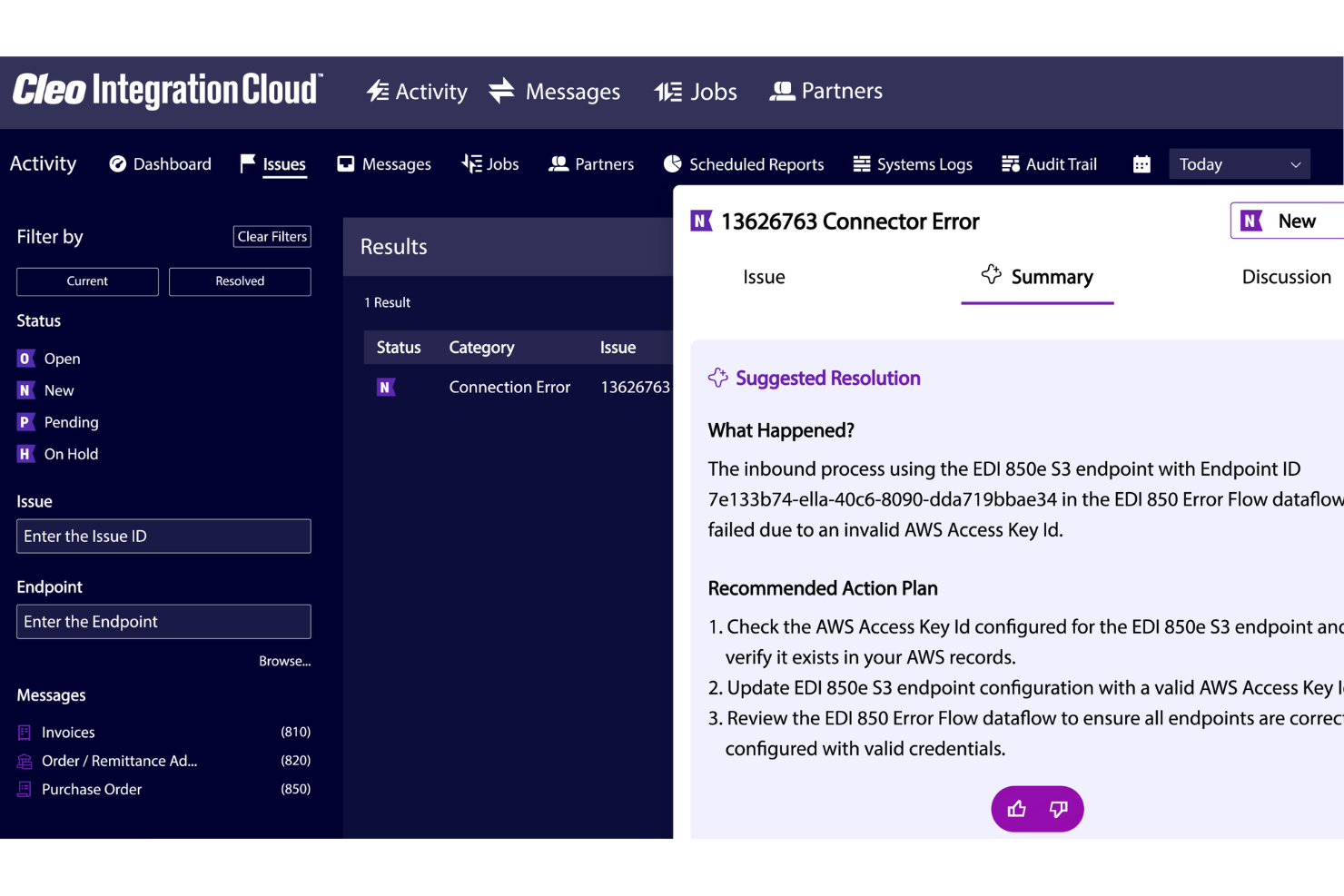
Per le aziende che desiderano ottimizzare l'orchestrazione della propria supply chain, Cleo Integration Cloud offre una soluzione interessante. È progettata per collegarti con migliaia di partner commerciali in diversi settori, come logistica, manifatturiero, retail e sanitario. La piattaforma affronta sfide quali la ricezione automatizzata degli ordini e l'orchestrazione degli approvvigionamenti, fornendo gli strumenti necessari per migliorare l'efficienza operativa e la conformità.
Perché ho scelto Cleo Integration Cloud
Ho scelto Cleo Integration Cloud per la sua forte attenzione all'orchestrazione della supply chain, fondamentale per le aziende che vogliono rafforzare le proprie capacità di integrazione cloud. La conformità EDI della piattaforma e l'integrazione API consentono connessioni fluide a una vasta rete di partner commerciali. Inoltre, la funzionalità di visibilità in tempo reale offre informazioni cruciali per prendere decisioni e migliorare l'efficienza complessiva della supply chain.
Caratteristiche principali di Cleo Integration Cloud
Oltre all'orchestrazione della supply chain, Cleo Integration Cloud offre:
- Ricezione automatizzata degli ordini: Semplifica il processo di ricezione e gestione degli ordini, riducendo l'intervento manuale.
- Orchestrazione degli approvvigionamenti: Facilita processi di approvvigionamento efficienti automatizzando le attività di routine e garantendo la conformità.
- Prevenzione del chargeback: Riduce le perdite economiche identificando e affrontando potenziali chargeback prima che si verifichino.
- Integrazioni predefinite: Offre connettori pronti per applicazioni come Dynamics 365, NetSuite e SAP, semplificando il processo di integrazione.
Integrazioni di Cleo Integration Cloud
Le integrazioni di Cleo Integration Cloud includono Dynamics 365, NetSuite, SAP, FedEx, UPS e connettori per piattaforme ecommerce, sistemi CRM/ERP, piattaforme TMS/WMS, database e soluzioni di archiviazione cloud.
Pros and Cons
Pros:
- Potenti strumenti di mappatura EDI supportano integrazioni rapide tra più sistemi
- Riduce i tempi di elaborazione grazie all'automatizzazione della trasformazione dei dati e dei flussi di integrazione
- Configurazione rapida delle mappature EDI rispetto alle piattaforme di integrazione tradizionali
Cons:
- Alcune integrazioni richiedono troubleshooting a causa della complessità della terminologia e delle configurazioni
- Le funzionalità di integrazione avanzate richiedono formazione e una comprensione tecnica più profonda
New Product Updates from Cleo Integration Cloud
Cleo Integration Cloud Improves File Transfer Speeds
Cleo Integration Cloud improves file transfer speeds. This significantly reduces processing time for large files, improving overall efficiency. For more information, visit Cleo Integration Cloud’s official site.
 .
.
Skyvia
Ideale per l'integrazione dei dati in cloud
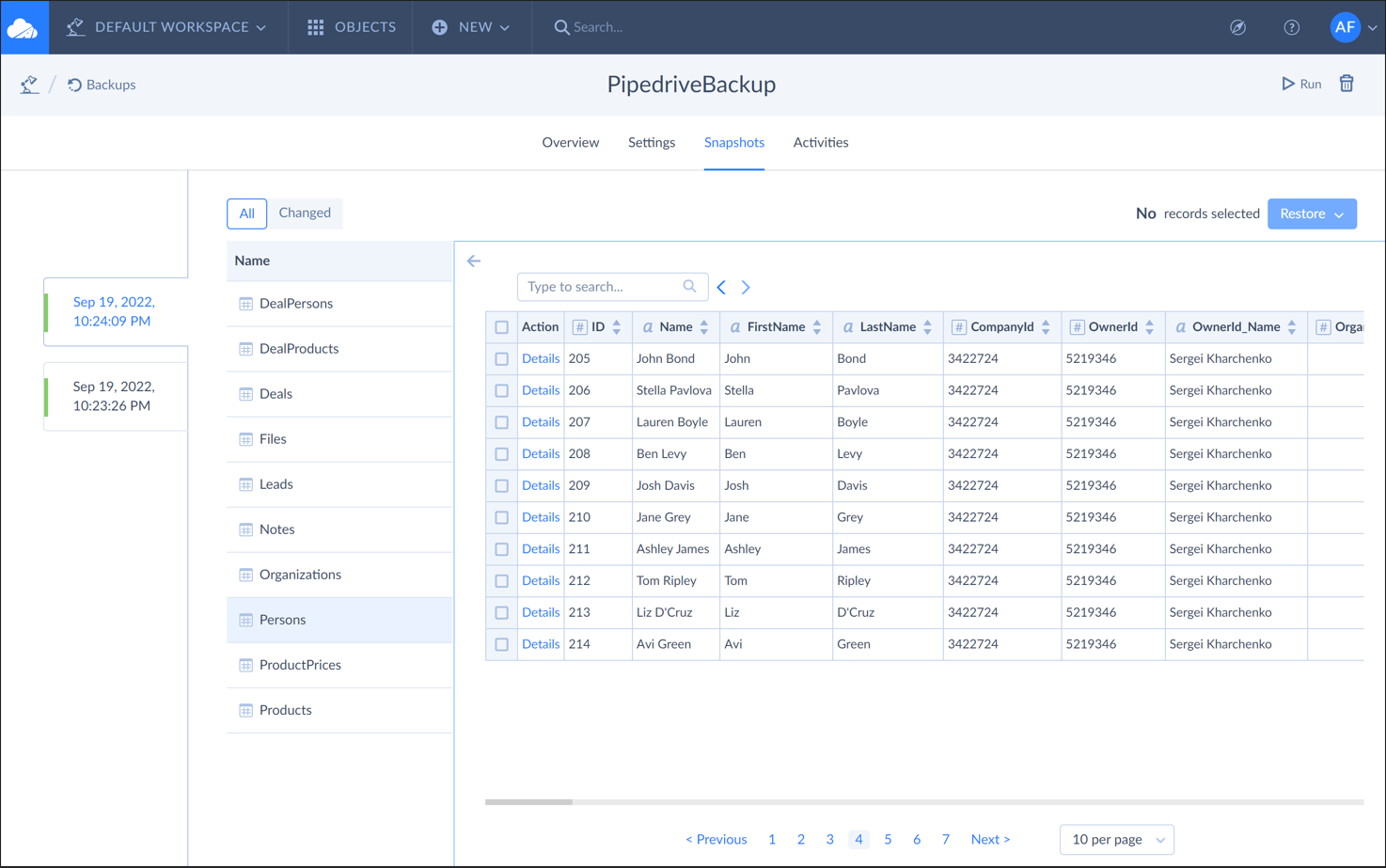
Skyvia è una piattaforma cloud per l'integrazione dei dati progettata per le aziende che necessitano di connettere e gestire dati tra diversi servizi cloud. Si rivolge ad analisti di dati e professionisti IT che desiderano automatizzare i flussi di lavoro e garantire la connettività dei dati.
Perché ho scelto Skyvia: Fornisce integrazione dei dati in cloud, permettendo al tuo team di collegare facilmente vari servizi cloud. Offre un'interfaccia intuitiva che semplifica il processo di integrazione. Con funzionalità come backup dei dati e importazione/esportazione, Skyvia garantisce che i tuoi dati siano accessibili e sicuri. La capacità di gestire trasformazioni dati complesse lo rende una scelta affidabile per le aziende orientate ai dati.
Funzionalità e integrazioni principali:
Funzionalità includono la possibilità di effettuare backup dei dati, consentendo al tuo team di mettere al sicuro le informazioni. Skyvia offre opzioni di importazione/esportazione dati rendendo la gestione dei dati più semplice. I suoi strumenti di trasformazione dati aiutano a modificare e adattare i dati in base alle esigenze aziendali.
Integrazioni includono Salesforce, QuickBooks Online, Google BigQuery, HubSpot, Dynamics 365, Shopify, MySQL, PostgreSQL, Oracle e SQL Server.
Pros and Cons
Pros:
- Opzioni sicure di backup dei dati
- Importazione/esportazione dati semplice
- Forte orientamento ai dati cloud
Cons:
- Nessun supporto per app mobile
- Può richiedere competenze tecniche

Make
Ideale per la semplicità di automazione
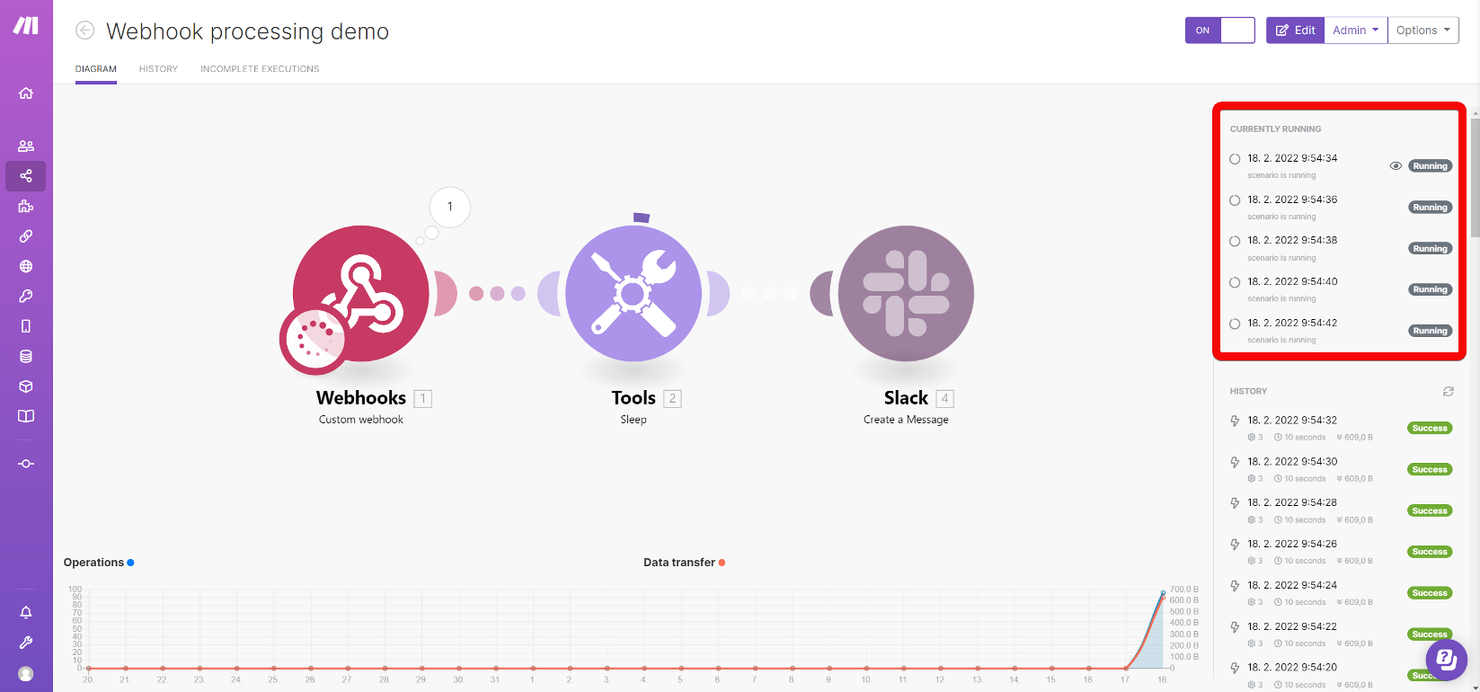
Make è una piattaforma di automazione basata su cloud progettata per aiutare le aziende ad automatizzare i flussi di lavoro e collegare diverse applicazioni. Si rivolge a team di piccole e medie dimensioni che desiderano semplificare i processi e ridurre le attività manuali grazie a strumenti di automazione facili da usare.
Perché ho scelto Make: Offre un approccio diretto all'automazione, rendendola accessibile ai team senza competenze tecniche approfondite. Il suo costruttore visivo consente al tuo team di progettare i flussi di lavoro con facilità. La piattaforma supporta numerose applicazioni, garantendo flessibilità nella connessione dei tuoi strumenti. Le funzionalità di automazione di Make sono ideali per semplificare le attività di routine, permettendo al tuo team di concentrarsi su lavori più strategici.
Funzionalità e integrazioni principali:
Funzionalità include un costruttore visivo di flussi di lavoro che semplifica la creazione di automazioni. Make supporta la logica condizionale, aiutando il tuo team a creare flussi di lavoro dinamici. Offre analisi dettagliate che forniscono approfondimenti sui tuoi processi automatizzati.
Integrazioni includono Google Workspace, Slack, Trello, Dropbox, Shopify, Mailchimp, Salesforce, Zendesk e QuickBooks.
Pros and Cons
Pros:
- Fornisce analisi dettagliate
- Supporta logica condizionale
- Configurazione delle automazioni semplice
Cons:
- Nessuna funzionalità offline
- Non ideale per team di grandi dimensioni
Cyclr
Ideale per la creazione visiva di integrazioni
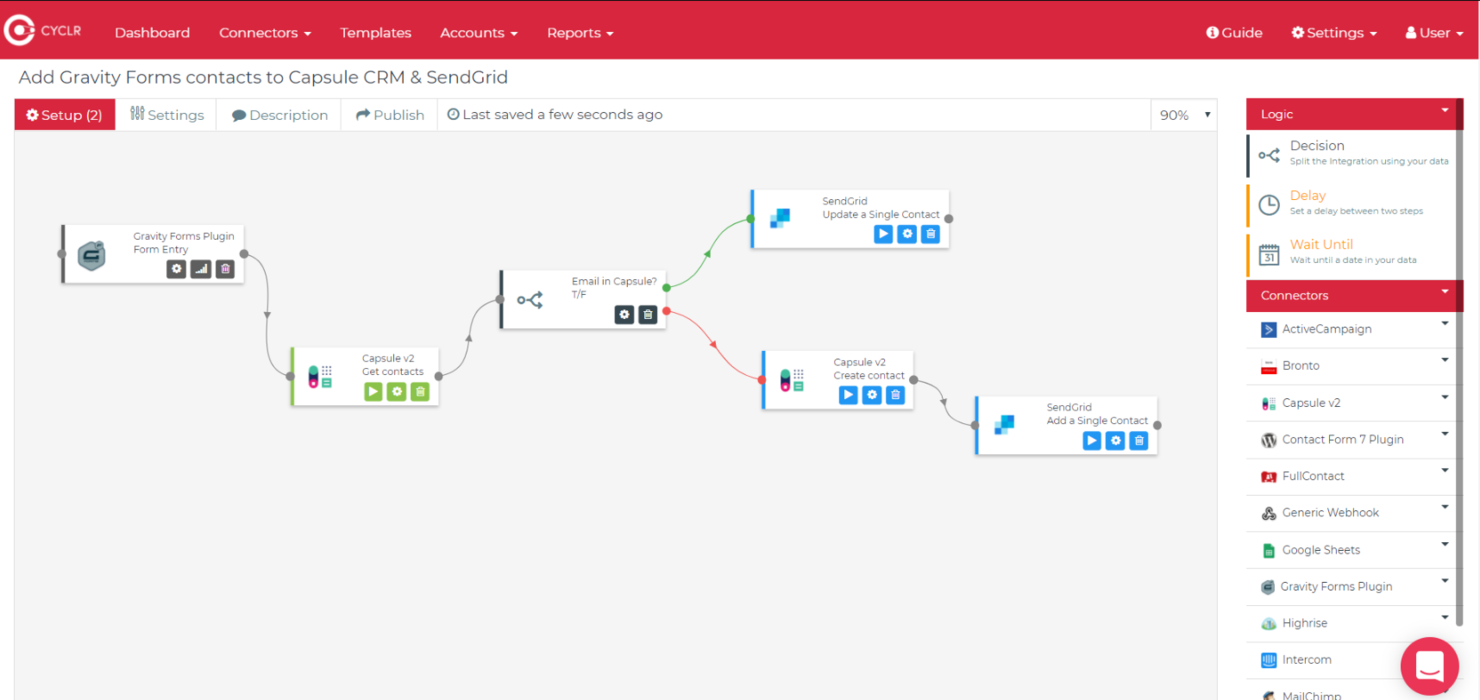
Cyclr è una piattaforma di integrazione incorporata progettata per le aziende SaaS B2B. Offre una soluzione low-code che semplifica i processi di integrazione e migliora l'efficienza operativa. Fornisce uno strato di orchestrazione intuitivo e un'estesa libreria di connettori API, rendendola ideale per i fornitori SaaS che desiderano potenziare le proprie capacità di integrazione.
Perché ho scelto Cyclr: Offre un approccio low-code, permettendo al tuo team di creare integrazioni senza profonde conoscenze di programmazione. Il suo builder di integrazioni visuale consente un modo semplice per progettare e gestire i flussi di lavoro. L'ampia libreria della piattaforma, con oltre 500 connettori API, la distingue, consentendo connessioni di dati rapide e flessibili. Le opzioni di incorporamento di Cyclr ti permettono di personalizzare l'esperienza di integrazione, rendendola versatile per diverse esigenze aziendali.
Caratteristiche e integrazioni principali:
Caratteristiche includono uno strato di orchestrazione user-friendly che semplifica la gestione dei flussi di lavoro. La piattaforma supporta la creazione di connettori personalizzati, offrendo al tuo team flessibilità nell'integrazione. Fornisce opzioni di incorporamento white-label, consentendo di adattare l'esperienza utente al tuo marchio.
Integrazioni includono Salesforce, HubSpot, Shopify, Microsoft Dynamics, QuickBooks, Xero, Slack, Zendesk, Mailchimp e Stripe.
Pros and Cons
Pros:
- Builder di integrazioni low-code
- Opzioni di incorporamento flessibili
- Ampia libreria di connettori API
Cons:
- Curva di apprendimento per le funzionalità avanzate
- Focalizzazione limitata al SaaS B2B

Linx
Ideale per soluzioni low-code
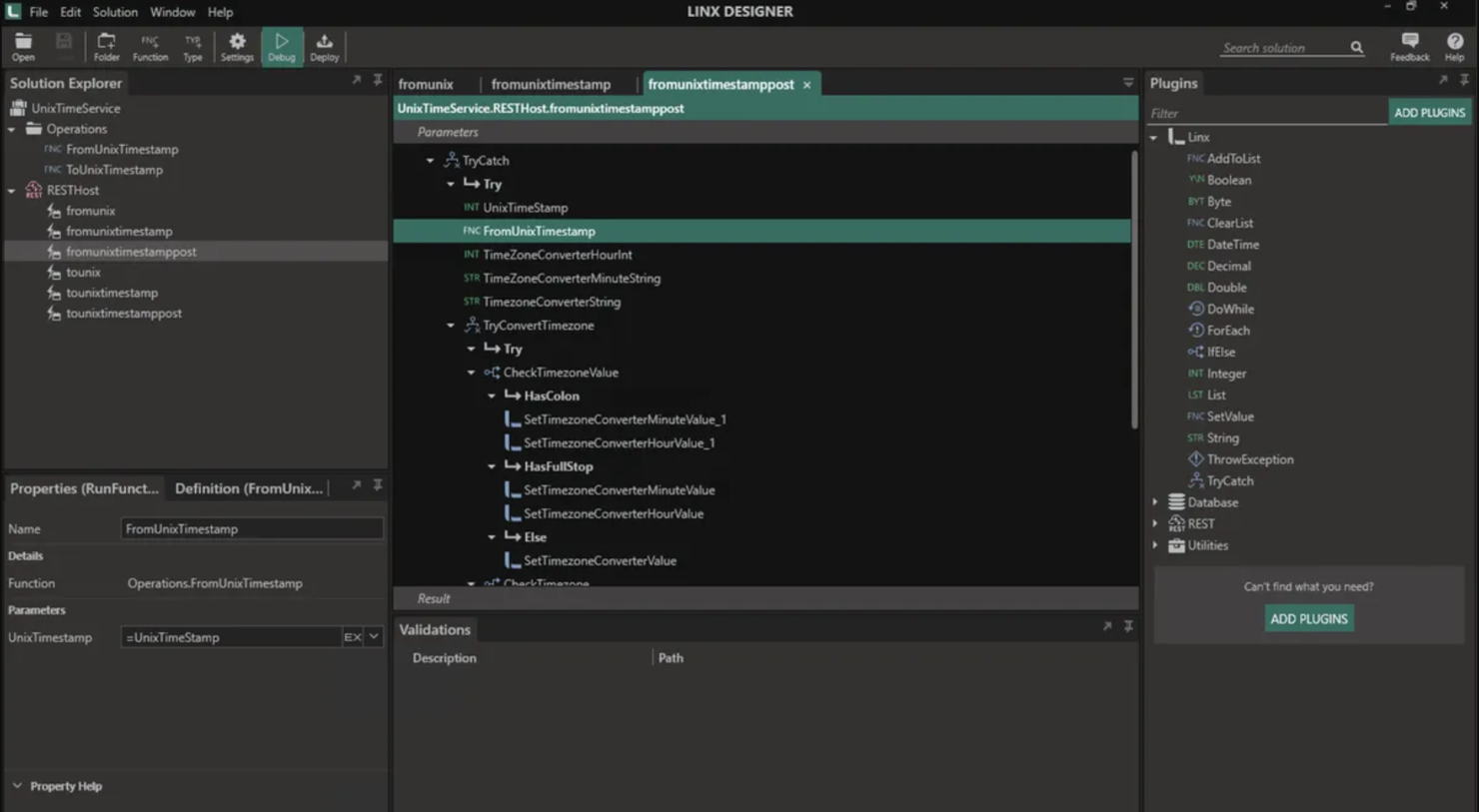
Linx è una piattaforma di sviluppo low-code pensata per professionisti IT e sviluppatori che necessitano di automatizzare rapidamente i processi e integrare applicazioni. È adatta anche alle aziende che desiderano migliorare l’efficienza operativa semplificando lo sviluppo e la distribuzione di applicazioni back-end.
Perché ho scelto Linx: Offre un ambiente low-code che semplifica il processo di sviluppo per i team IT. L’interfaccia drag-and-drop permette al tuo team di automatizzare processi con il minimo utilizzo di codice. I plugin predefiniti della piattaforma aiutano ad accelerare l’integrazione delle applicazioni. Linx è progettato per essere scalabile, supportando la crescita e le esigenze mutevoli della tua organizzazione.
Caratteristiche principali & integrazioni:
Caratteristiche includono un designer drag-and-drop che consente al tuo team di costruire applicazioni senza dover scrivere molto codice. La piattaforma offre plugin predefiniti per velocizzare il processo di integrazione. Linx supporta il debug in tempo reale, permettendoti di identificare e risolvere rapidamente i problemi durante lo sviluppo.
Integrazioni includono Amazon S3, Microsoft SQL Server, MySQL, PostgreSQL, Oracle, Microsoft Dynamics 365, Salesforce, Azure, AWS Lambda e Google Cloud Storage.
Pros and Cons
Pros:
- Scalabile per esigenze di crescita
- Supporta il debug in tempo reale
- Ambiente di sviluppo low-code
Cons:
- Limitato ad applicazioni back-end
- Richiede competenze tecniche

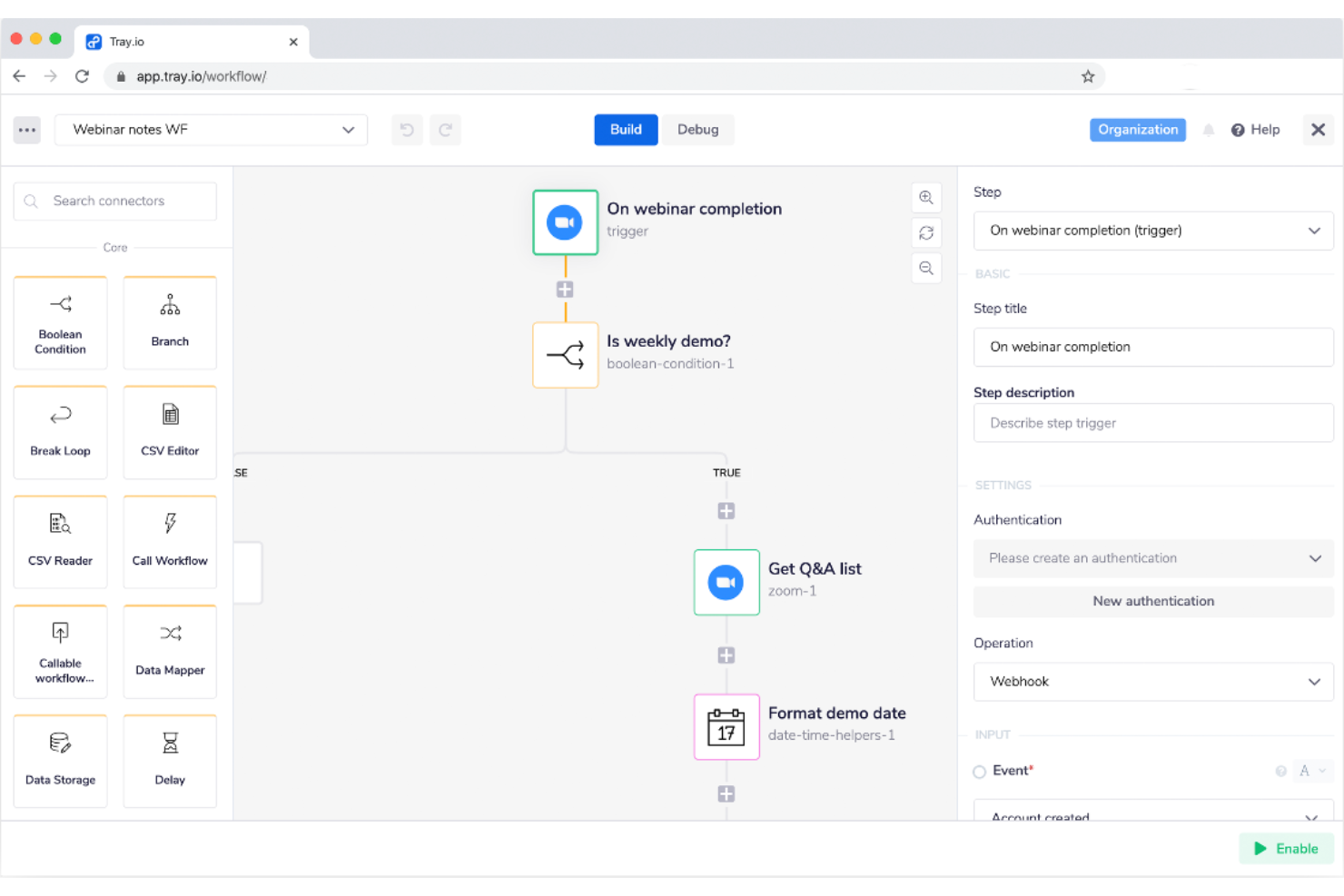
Tray.ai è una piattaforma di integrazione cloud pensata per le aziende che necessitano di automazione avanzata e connettività tra applicazioni. Si rivolge a imprese e società in crescita che desiderano automatizzare flussi di lavoro complessi e aumentare l'efficienza operativa tramite l'integrazione.
Perché ho scelto Tray.ai: Tray.ai si distingue nella gestione di flussi di lavoro complessi, offrendo una piattaforma flessibile che consente al tuo team di creare processi di automazione articolati. La sua interfaccia low-code ti permette di costruire workflow senza particolari conoscenze di programmazione. La capacità di Tray.ai di collegare applicazioni tramite API lo rende versatile per numerose esigenze aziendali. La scalabilità della piattaforma assicura una gestione efficiente anche quando la richiesta cresce.
Funzionalità principali e integrazioni:
Funzionalità includono un builder visuale per workflow che semplifica la creazione di processi complessi. Tray.io offre elaborazione dati in tempo reale, fornendo sempre informazioni aggiornate al tuo team. Le sue capacità di gestione degli errori facilitano l’identificazione e la risoluzione rapida dei problemi, mantenendo le operazioni fluide.
Integrazioni includono Salesforce, Slack, Shopify, Marketo, HubSpot, Zendesk, Google Sheets, Microsoft Dynamics 365, ServiceNow e QuickBooks.
Pros and Cons
Pros:
- Gestisce efficacemente flussi di lavoro complessi
- Interfaccia low-code facile da usare
- Elaborazione dati in tempo reale
Cons:
- Complessità nella configurazione iniziale
- Supporto offline limitato

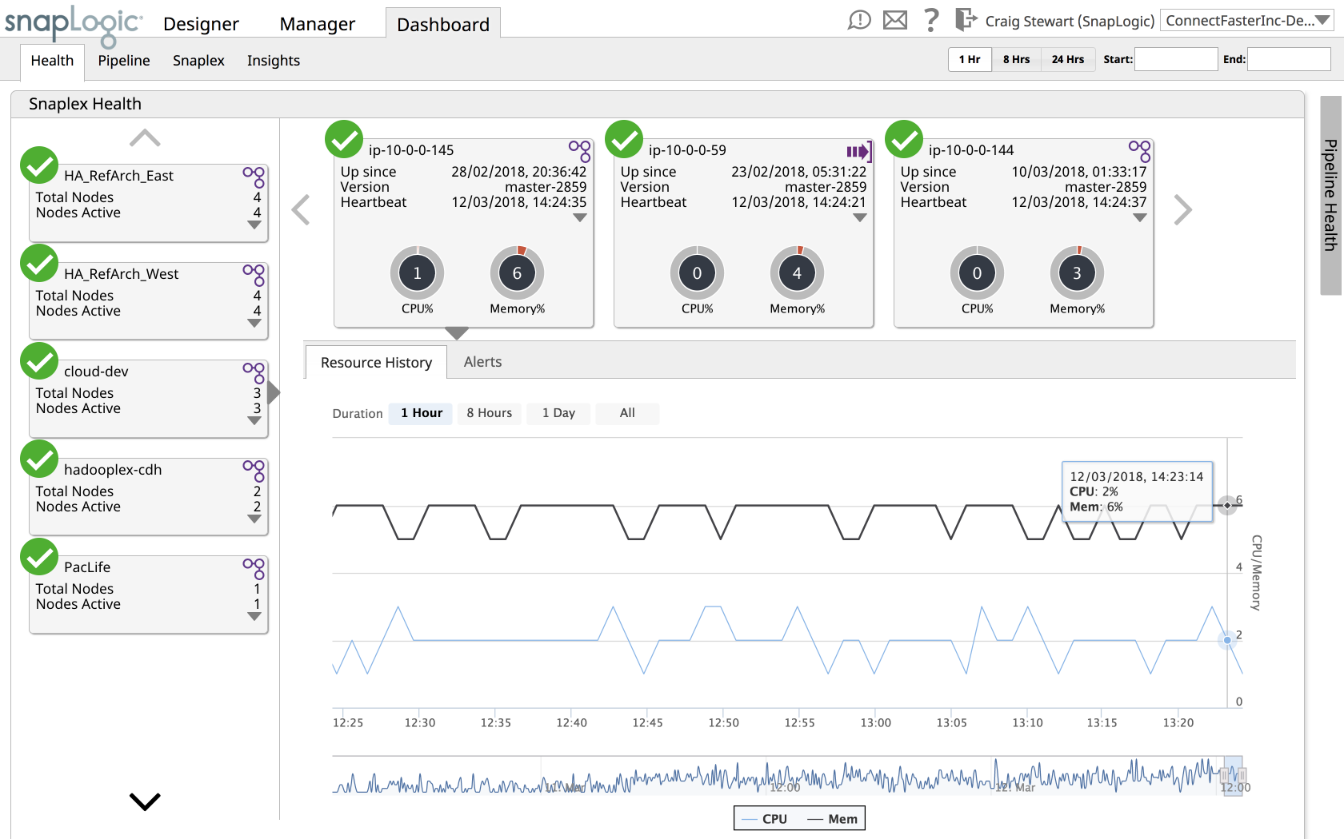
SnapLogic è una piattaforma di integrazione basata su cloud progettata per le aziende che necessitano di un'integrazione avanzata dei dati e di connettività tra applicazioni. È rivolta alle imprese che desiderano accelerare la trasformazione digitale tramite soluzioni intelligenti di integrazione e automazione.
Perché ho scelto SnapLogic: Integra l'integrazione guidata dall'IA, offrendo strumenti che sfruttano il machine learning per ottimizzare i processi di gestione dei dati. La sua interfaccia intuitiva consente una configurazione e una gestione rapide delle integrazioni. La scalabilità della piattaforma è ideale per gestire grandi volumi di dati su workflow complessi. Le capacità analitiche di SnapLogic forniscono preziose informazioni sulle prestazioni delle integrazioni, aiutando il tuo team a prendere decisioni più informate.
Funzionalità e integrazioni principali:
Le funzionalità includono insight basati sull'IA che aiutano a ottimizzare i processi di integrazione. SnapLogic offre un'architettura scalabile in grado di supportare grandi volumi di dati. La piattaforma fornisce analisi dettagliate, offrendo al tuo team una comprensione più approfondita dell'efficienza dei workflow.
Le integrazioni includono Salesforce, SAP, Oracle, Microsoft Dynamics 365, Amazon Web Services, Google Cloud Platform, Workday, ServiceNow, Marketo e Slack.
Pros and Cons
Pros:
- Configurazione e gestione rapida
- Supporta workflow complessi
- Fornisce analisi dettagliate
Cons:
- Capacità offline limitate
- Focalizzato principalmente sulle aziende

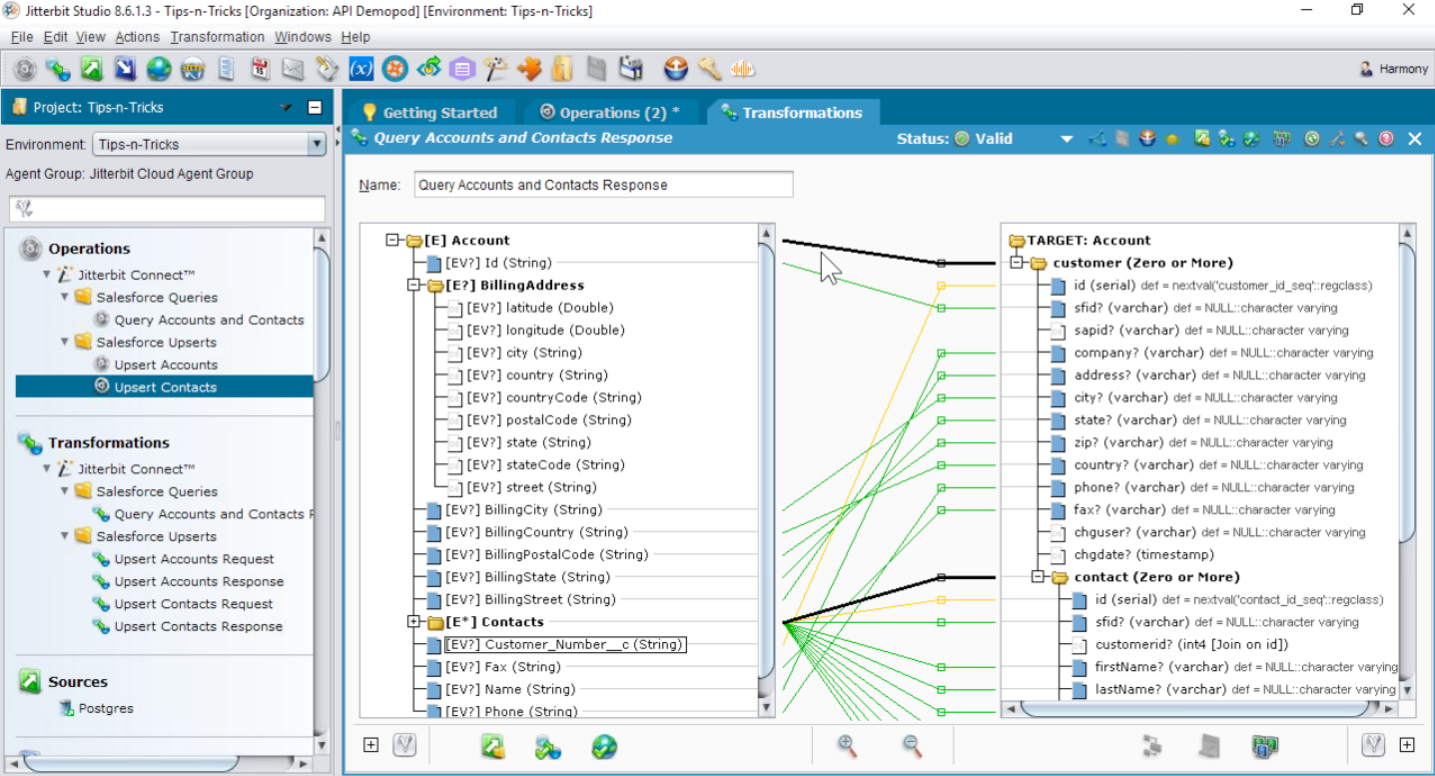
Jitterbit è una piattaforma di integrazione focalizzata sul collegamento delle applicazioni e sull'automazione dei flussi di lavoro per le aziende, con particolare attenzione alla creazione di API. Serve le imprese che vogliono migliorare le operazioni digitali integrando diverse applicazioni e creando API personalizzate per uno scambio efficiente dei dati.
Perché ho scelto Jitterbit: Si distingue nella creazione di API, offrendo strumenti che consentono al tuo team di progettare, testare e gestire le API in modo efficace. La sua interfaccia intuitiva semplifica il processo di collegamento delle applicazioni e di automazione dei flussi di lavoro. Jitterbit supporta l'elaborazione dei dati in tempo reale, garantendo che il tuo team possa accedere a dati aggiornati. La scalabilità della piattaforma assicura che possa soddisfare le esigenze di aziende in crescita in diversi settori.
Funzionalità e integrazioni principali:
Funzionalità includono un'interfaccia intuitiva di progettazione API che rende semplice per il tuo team la creazione e gestione delle API. Jitterbit offre elaborazione dei dati in tempo reale, che aiuta a mantenere operative le attività aziendali. La sua scalabilità sostiene la crescita dell'impresa, adattandosi a un aumento di dati e richieste degli utenti.
Integrazioni prevedono Salesforce, SAP, Oracle, Microsoft Dynamics 365, NetSuite, Workday, ServiceNow, Marketo, Amazon Web Services e Google Cloud Platform.
Pros and Cons
Pros:
- Scalabile per aziende in crescita
- Elaborazione dati in tempo reale
- Solide capacità di progettazione API
Cons:
- Funzionalità offline limitate
- Configurazione iniziale complessa
Altre piattaforme di integrazione cloud
Ecco alcune ulteriori opzioni di piattaforme di integrazione cloud che non sono entrate nella mia selezione, ma che vale comunque la pena esplorare.


Come Valuto le Piattaforme di Integrazione Cloud
Valuto queste piattaforme su due livelli: la base minima che ogni strumento deve raggiungere per entrare nella lista e i fattori differenzianti—come la mappatura assistita dall’IA o il supporto B2B/EDI—che distinguono i migliori.
Funzionalità Fondamentali (Requisiti Minimi per Questa Lista)
Quando seleziono gli strumenti per la mia lista, valuto ognuno su una scala da 0 (la funzionalità non è presente) a 5 (eccelle in questo ambito) per ciascuna delle funzionalità fondamentali elencate di seguito. Poi calcolo il punteggio totale dello strumento come percentuale. Ogni piattaforma deve ottenere un punteggio minimo totale del 75% per essere considerata.
- Libreria di Connettori Predefiniti: Controllo l’ampiezza e la profondità dei connettori disponibili—verifico se la piattaforma copre le app comunemente usate nel tuo stack, come Salesforce, SAP, NetSuite o Snowflake.
- Capacità di Gestione delle API: Qui conta la progettazione, pubblicazione e sicurezza delle API. Ricerco il supporto al ciclo di vita completo, incluse policy gateway, versionamento e analisi sull’utilizzo.
- Trasformazione e Mappatura dei Dati: Le integrazioni complesse richiedono più di una semplice corrispondenza campo a campo. Valuto se la piattaforma gestisce la conversione tra formati come JSON, XML, EDI e file flat.
- Strumenti di Orchestrazione dei Flussi di Lavoro: Cerco un builder visuale low-code con logica condizionale e trigger basati su eventi—uno strumento che consenta sia agli sviluppatori sia agli utenti meno tecnici di progettare i flussi.
- Supporto all’Implementazione Ibrida: La maggior parte dei team utilizza una combinazione di sistemi cloud e on-premise. Valuto se la piattaforma offre agenti o gateway sicuri per collegare istanze legacy di ERP o database.
- Monitoraggio e Gestione degli Errori: Dashboard in tempo reale, alert e logica di auto-retry sono aree fondamentali che controllo. Una sincronizzazione d’ordine fallita alle 2 di notte dovrebbe generare un avviso, non aspettare che qualcuno se ne accorga.
Una volta che ho una lista di strumenti che soddisfano questi criteri, considero cosa distingue ciascuna piattaforma.
Fattori di Differenziazione (Cosa Distingue i Fornitori)
Ecco come confronto e metto a confronto i diversi fornitori:
Funzionalità Distintive
L’integrazione assistita dall’IA è un elemento di grande differenziazione. Le piattaforme che suggeriscono mappature di campi o rilevano automaticamente le modifiche degli schemi fanno risparmiare ore durante le migrazioni complesse. Cerco anche il supporto all’architettura event-driven, come trigger nativi Kafka o webhook, che sono essenziali quando hai bisogno di sincronizzazioni in tempo reale di ordini o inventario. L’estendibilità per sviluppatori completa il quadro. Strumenti CLI, controllo versione basato su Git e SDK per connettori personalizzati danno ai team di ingegneria la flessibilità di andare oltre ciò che offre il builder visuale.
Oltre le Funzionalità
Sicurezza e certificazioni di conformità qui sono fondamentali. Controllo se una piattaforma possiede SOC 2 Type II e ISO 27001, e se offre controlli sulla residenza dei dati per i team che gestiscono workload regolamentati. La trasparenza nei prezzi è un altro aspetto che valuto attentamente—alcuni fornitori applicano tariffe per connettore, altri per volume di messaggi, e questa distinzione influisce sui costi a lungo termine man mano che cresce il numero di integrazioni. Considero anche l’ecosistema di partner, poiché una forte rete di partner certificati per l’implementazione può fare la differenza tra un rollout fluido e uno bloccato.
Come scegliere una piattaforma di integrazione cloud
È facile perdersi in lunghi elenchi di funzionalità e strutture tariffarie complesse. Ecco una lista di controllo dei fattori da ricordare, che ti aiuterà a rimanere concentrato mentre affronti il tuo specifico processo di selezione del software.
| Fattore | Cosa considerare |
| Scalabilità | Assicurati che la piattaforma possa crescere insieme alla tua azienda. Cerca funzionalità che supportino un aumento del volume dei dati e degli utenti senza compromettere le prestazioni. |
| Integrazioni | Verifica se la piattaforma si integra con gli strumenti che già utilizzi, come software CRM, ERP o di marketing. Connessioni fluide fanno risparmiare tempo e fatica al tuo team. A seconda del tipo e delle dimensioni della tua azienda, le piattaforme multi-cloud B2B potrebbero essere la soluzione migliore. |
| Personalizzazione | Le esigenze del tuo team sono uniche. Scegli una piattaforma che ti consenta di adattare flussi di lavoro e processi ai tuoi specifici requisiti operativi. |
| Semplicità d'uso | Scegli interfacce intuitive che non richiedano una formazione approfondita. In questo modo il tuo team potrà iniziare a lavorare rapidamente, riducendo i tempi di inattività. |
| Budget | Confronta i modelli tariffari per assicurarti che la piattaforma rientri nel tuo piano finanziario. Fai attenzione ai costi nascosti, come le commissioni di configurazione o gli addebiti per le funzionalità aggiuntive. |
| Misure di sicurezza | La protezione dei dati è essenziale. Cerca piattaforme che offrano misure di sicurezza come crittografia, certificazioni di conformità e audit regolari. |
Tendenze nelle piattaforme di integrazione cloud
Durante la mia ricerca, ho raccolto innumerevoli aggiornamenti dei prodotti, comunicati stampa e registri delle versioni di diversi fornitori di piattaforme di integrazione cloud. Ecco alcune delle tendenze emergenti che sto tenendo d'occhio.
- Integrazione potenziata dall'AI: l'AI ottimizza l'elaborazione dei dati e automatizza le attività ripetitive, rendendo le integrazioni più efficienti. Alcuni fornitori integrano l'AI per fornire informazioni utili e migliorare l'efficienza dei flussi di lavoro.
- Sviluppo a basso codice/senza codice: un numero maggiore di piattaforme offre ambienti a basso codice o senza codice, consentendo ai non sviluppatori di creare e gestire integrazioni. Questa tendenza rende gli strumenti di integrazione più accessibili a una gamma più ampia di utenti.
- Privacy e conformità dei dati: con l'aumento delle normative sui dati, le piattaforme si concentrano su funzionalità che garantiscono la conformità a leggi come il GDPR e il CCPA. Queste funzionalità sono fondamentali per le aziende che gestiscono dati sensibili oltre i confini nazionali.
- Integrazione dei dispositivi IoT: con la crescente diffusione dell'IoT, le piattaforme di integrazione iniziano a supportare l'elaborazione dei dati IoT. Ciò consente alle aziende di connettere e gestire i dati provenienti da vari dispositivi intelligenti e sensori.
- Analisi in tempo reale: è in aumento la domanda di piattaforme per l'analisi dei dati in tempo reale, che aiutano le aziende a prendere rapidamente decisioni informate. Questa tendenza è particolarmente rilevante per le aziende che necessitano di informazioni immediate dai dati integrati.
Che cos'è una piattaforma di integrazione basata sul cloud?
Una piattaforma di integrazione basata sul cloud è uno strumento che connette diverse applicazioni e fonti di dati per consentire un flusso uniforme dei dati e l'automazione dei processi. I professionisti IT, gli analisti dei dati e i responsabili aziendali utilizzano generalmente questi strumenti per migliorare l'efficienza operativa e la gestione dei dati.
La sincronizzazione dei dati in tempo reale, lo sviluppo a basso codice/senza codice e l'integrazione potenziata dall'AI contribuiscono a ottimizzare i flussi di lavoro e a garantire la conformità alle normative sui dati. Analogamente alle piattaforme di integrazione SaaS, questi strumenti consentono alle aziende di connettere sistemi eterogenei e automatizzare in modo efficiente processi complessi.
Funzionalità delle piattaforme di integrazione basate sul cloud
Quando scegli una piattaforma di integrazione basata sul cloud, cerca le seguenti funzionalità principali.
- Sincronizzazione dei dati in tempo reale: aggiorna istantaneamente i dati tra i sistemi connessi, garantendo l'accesso alle informazioni più aggiornate.
- Sviluppo a basso codice/senza codice: consente agli utenti non tecnici di creare e gestire integrazioni con una codifica minima.
- Integrazione potenziata dall'AI: ottimizza l'elaborazione dei dati e automatizza le attività ripetitive utilizzando l'intelligenza artificiale.
- Privacy e conformità dei dati: garantisce che le integrazioni siano conformi alle normative sulla protezione dei dati, tutelando le informazioni sensibili.
- Gestione delle API: facilita la creazione, la distribuzione e la gestione delle API per uno scambio efficiente dei dati.
- Scalabilità: supporta la crescita aziendale gestendo volumi di dati e richieste degli utenti maggiori senza riduzioni delle prestazioni.
- Dati IoT integrati: elabora e gestisce i dati provenienti dai dispositivi dell'Internet delle cose per ampliare i casi d'uso.
- Strumento visivo per i flussi di lavoro: offre un'interfaccia intuitiva per progettare e gestire i flussi di lavoro.
- Misure di sicurezza avanzate: protegge i dati durante i trasferimenti e le integrazioni mediante crittografia e protocolli di sicurezza.
- Analisi dettagliate: fornisce informazioni sulle prestazioni dell'integrazione e sul flusso dei dati per prendere decisioni informate.
- Connettori predefiniti e adattatori: include connettori pronti all'uso per le applicazioni basate sul cloud più diffuse, riducendo i tempi di configurazione.
- Architettura basata sugli eventi: supporta flussi di integrazione attivati da eventi in tempo reale per un'automazione avanzata.
- Pannello di controllo: centralizza il monitoraggio dei flussi di integrazione e delle metriche delle prestazioni.
- EDI (scambio elettronico di dati): semplifica la comunicazione e lo scambio di dati, in particolare nella catena di approvvigionamento e nella logistica.
- Soluzioni di integrazione da un'estremità all'altra: gestisce l'intero ciclo di vita delle integrazioni e dell'iPaaS integrato, dalla distribuzione al monitoraggio e all'ottimizzazione.
- Funzionalità di messaggistica: fornisce una messaggistica sicura ed efficiente tra applicazioni e sistemi.
- Integrazione del middleware: collega i sistemi legacy alle applicazioni moderne, garantendo compatibilità e un flusso uniforme dei dati.
- Integrazione della catena di approvvigionamento: connette i sistemi per semplificare i processi della catena di approvvigionamento, riducendo le inefficienze.
- Interfacce di programmazione delle applicazioni (API): supporta la creazione e la gestione delle API per interazioni fluide tra i sistemi.
Vantaggi delle piattaforme di integrazione basate sul cloud
L'implementazione di una piattaforma di integrazione cloud offre vantaggi al tuo team e alla tua azienda. Eccone alcuni di cui potrai beneficiare.
- Maggiore accuratezza dei dati: la sincronizzazione dei dati in tempo reale garantisce a tutti l'accesso alle informazioni più aggiornate, riducendo gli errori.
- Maggiore efficienza: lo sviluppo con poco codice/senza codice consente al tuo team di configurare rapidamente le integrazioni, risparmiando tempo e risorse.
- Conformità migliorata: funzionalità come la privacy dei dati e la conformità aiutano la tua azienda a rispettare le normative necessarie, proteggendo i dati sensibili.
- Scalabilità per la crescita: la scalabilità della piattaforma supporta l'aumento delle esigenze relative a dati e utenti, adattandosi alla crescita della tua azienda.
- Migliore processo decisionale: analisi dettagliate forniscono informazioni sui flussi di dati e sulle prestazioni delle integrazioni, aiutandoti a prendere decisioni informate.
- Risparmio sui costi: l'automazione dei flussi di lavoro con un'integrazione potenziata dall'IA riduce la necessità di interventi manuali, abbassando i costi operativi.
- Funzionalità ampliate: l'integrazione dei dati IoT apre nuove opportunità per la gestione di dispositivi e sensori intelligenti, ampliando il potenziale della tua azienda.
Costi e prezzi delle piattaforme di integrazione cloud
La scelta di una piattaforma di integrazione cloud richiede la comprensione dei vari modelli e piani tariffari. I costi variano in base alle funzionalità, alle dimensioni del team, ai componenti aggiuntivi e ad altri fattori. La tabella seguente riassume i piani standard, i relativi prezzi medi e le funzionalità tipicamente incluse nelle soluzioni di piattaforma di integrazione cloud.
Tabella comparativa dei piani per le piattaforme di integrazione cloud
| Tipo di piano | Prezzo medio | Funzionalità comuni |
| Piano gratuito | $0 | Integrazioni di base, supporto della comunità e attività limitate. |
| Piano personale | $10-$30 /utente /mese | Più integrazioni, sincronizzazione dei dati in tempo reale e analisi di base. |
| Piano aziendale | $50-$150 /utente /mese | Integrazioni avanzate, accesso API e sicurezza avanzata. |
| Piano aziendale | $200-$500 /utente /mese | Integrazioni personalizzate, supporto dedicato e strumenti per la conformità. |
Qual è il prossimo passo?
Vuoi portare la tua strategia RevOps a un livello superiore?
Iscriviti alla newsletter di The CRO Club per ricevere consigli di esperti, recensioni di software e altre risorse che ti aiuteranno a ottenere una crescita prevedibile su larga scala.