

20 Meilleurs Outils d’Automatisation des Tests Mobiles en 2026

10 Meilleurs outils d'automatisation des tests mobiles : la sélection
Here's my pick of the 10 best software from the 20 tools reviewed.


Avec autant d'outils d'automatisation des tests mobiles différents sur le marché, il peut être difficile de déterminer lequel vous convient le mieux. Vous savez que vous souhaitez exécuter automatiquement des cas de test sur vos applications mobiles, mais il vous faut choisir le meilleur outil. Laissez-moi vous aider ! Dans cet article, je vais vous faciliter la tâche en partageant mes expériences personnelles d’utilisation de dizaines de logiciels d’automatisation des tests mobiles avec diverses équipes et projets, et en vous proposant ma sélection des meilleurs outils d’automatisation des tests mobiles.
Qu'est-ce qu'un outil d'automatisation des tests mobiles ?
Les outils d'automatisation des tests mobiles sont des logiciels qui automatisent le processus de test pour les applications mobiles. Ils réalisent divers tests automatisés sur les applications afin de vérifier leur fonctionnalité, leur performance, leur compatibilité et leur interface utilisateur sur différents appareils et systèmes d’exploitation. Ces outils exécutent des scripts de test prédéfinis, simulant les interactions des utilisateurs avec l’application et validant son comportement selon divers scénarios.
L’utilisation d’outils d’automatisation des tests mobiles présente de nombreux avantages, notamment une efficacité accrue des processus de tests, en particulier pour les scénarios répétitifs et complexes. Ils fournissent des résultats de test cohérents et précis, réduisant ainsi les risques d’erreurs humaines. Ces outils permettent une couverture de tests complète sur de nombreuses plateformes et appareils, garantissant ainsi de bonnes performances pour tous les utilisateurs. En facilitant un retour rapide auprès des développeurs, ils accélèrent le cycle de développement et d’amélioration des applications mobiles. Globalement, ils contribuent à la qualité et à la fiabilité des applications mobiles, tout en optimisant le flux de travail de développement.
-

Site24x7
Visit WebsiteThis is an aggregated rating for this tool including ratings from Crozdesk users and ratings from other sites.4.7 -
GitHub Actions
Visit WebsiteThis is an aggregated rating for this tool including ratings from Crozdesk users and ratings from other sites.4.8 -
Docker
Visit WebsiteThis is an aggregated rating for this tool including ratings from Crozdesk users and ratings from other sites.4.6





Présentation des 10 meilleurs outils d'automatisation des tests mobiles
Voici une brève description de chaque logiciel d’automatisation des tests mobiles présentant le cas d’utilisation optimal de chaque outil, ses fonctionnalités notables, ainsi que quelques avantages et inconvénients. J’ai également inclus des captures d’écran pour vous donner un aperçu de leur interface utilisateur.

For businesses seeking a mobile test automation solution, Autify Aximo stands out with its AI-driven capabilities designed to simplify the testing process across web, mobile, and desktop platforms. Aximo's unique approach of executing tests based on plain English descriptions appeals to professionals who want to minimize the complexities associated with scripted automation. This tool is particularly beneficial for teams looking to reduce maintenance efforts and ensure robust testing across iOS and Android applications.
Why I Picked Autify Aximo
I picked Autify Aximo for its innovative AI-driven approach that streamlines mobile test automation by eliminating the need for scripting. This feature allows you to describe test scenarios in natural language, making it accessible to a broader range of team members. Additionally, Aximo's ability to autonomously execute tests and mimic real user interactions significantly reduces the time spent on maintenance and the likelihood of failures due to UI changes. These capabilities are particularly advantageous for teams focused on delivering consistent and reliable mobile applications.
Autify Aximo Key Features
In addition to its AI-driven testing approach, I also found several other features that enhance its mobile test automation capabilities:
- Platform Compatibility: Supports a wide range of platforms, including iOS, Android, Windows, and macOS, ensuring comprehensive testing across different environments.
- Autonomous Execution: Executes tests autonomously, reducing the need for constant human intervention and allowing your team to focus on other critical tasks.
- Scenario Description: Allows test scenarios to be described in plain English, making it accessible for team members who may not have a technical background.
- Maintenance Reduction: Minimizes maintenance efforts by adapting to UI changes, ensuring tests remain valid over time.
Autify Aximo Integrations
Native integrations are not currently listed by Autify Aximo.
Pros and Cons
Pros:
- Supports web, mobile, desktop
- CI/CD pipeline integrations available
- AI-driven automated test creation
Cons:
- Limited traditional scripting control
- Pricing not publicly available


QA Wolf is a managed service that provides end-to-end automated test coverage for web and mobile applications. By handling the creation, maintenance, and execution of tests, QA Wolf allows your team to focus on development while ensuring your applications are thoroughly tested.
Why I picked QA Wolf: QA Wolf's ability to execute your entire test suite in full parallel significantly reduces testing time. This means you can run thousands of tests in minutes without the need for a device farm or complex infrastructure, allowing for faster feedback and quicker releases. Another standout feature is QA Wolf's comprehensive support for various app types and functionalities. Whether your app is native, web-based, or a hybrid, QA Wolf can build tests that cover gestures, camera functions, sensor interactions, and more.
QA Wolf Standout Features and Integrations
Standout features include 24-hour test maintenance. They continuously update your tests to align with new functionality as your app evolves, ensuring they remain relevant and effective. They also offer quick test failure resolution. When a test fails, they promptly resolve the issue to avoid unnecessary workflow disruptions.
Integrations include Jira, Asana, Linear, Slack, Microsoft Teams, GitHub, GitLab, Bitbucket, Jenkins, CircleCI, Travis CI, and Azure DevOps.
Pros and Cons
Pros:
- Easy to collaborate with the QA Wolf team via Slack or Teams
- All bugs are human-verified
- 24-hour test maintenance
Cons:
- Not ideal for development teams wanting full control over tests
- Less flexibility to customize testing
New Product Updates from QA Wolf

QA Wolf Adds Android Emulator Infrastructure for Device Testing
QA Wolf introduces Android emulator infrastructure with expanded device and OS testing support. These updates enable teams to test across real-world device conditions and improve test coverage. For more information, visit QA Wolf’s official site.
 .
.
Best for efficient, AI-powered automation of mobile application testing processes
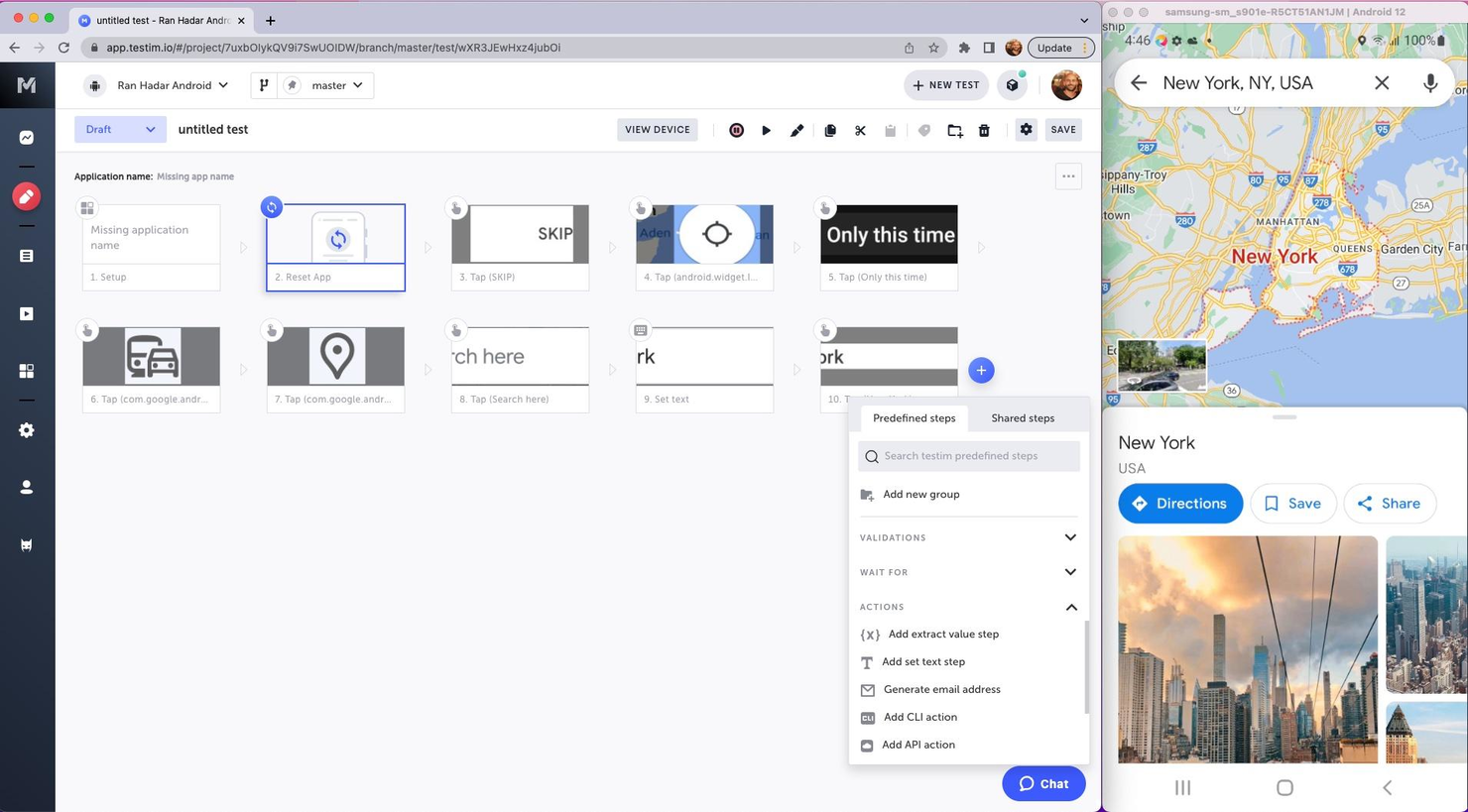
Tricentis Testim Mobile is a software-as-a-service (SaaS) product that's designed to automate mobile testing. It's a part of the Tricentis suite of testing tools and is specifically geared towards mobile applications.
Why I picked Tricentis Testim Mobile: It allows you to create, execute, and analyze tests for mobile apps, both native and hybrid. It's all about making the process of testing mobile apps quicker, more efficient, and more reliable. It uses machine learning to improve test stability and it's got a really intuitive interface that makes creating and managing tests a whole lot easier. Plus, it supports both Android and iOS, which makes it more versatile.
Tricentis Testim Mobile Standout Features and Integrations
Standout features: There are a few features that really make Tricentis Testim Mobile stand out. First off, there's the AI-based test creation and execution. This means that the tool can learn from your tests and improve them over time, making them more reliable and efficient. Then there's the visual test editor, which allows you to create and edit tests visually, without needing to write any code. And then there's the real device testing. This feature allows you to test your apps on real devices, which gives you a much more accurate idea of how your app will perform in the real world.
Integrations include Bamboo, Azure DevOps, Circle CI, Jenkins, GitHub, Saucelabs, LambdaTest, and Bitbucket. If you cannot find the app you are looking for, you can also use its REST API to build custom integrations with your tech stack.
Pros and Cons
Pros:
- Has an API
- Has plenty of integrations
- Free plan available
Cons:
- Bit of a learning curve
- Price might be a bit high for some businesses


LambdaTest is a comprehensive platform for mobile apps and cross-browser testing, offering features for automation testing, live interactive testing, and visual regression testing. With its AI-powered test execution and ability to run tests on 3000+ browsers and devices, it is the best choice for cross-browser testing automation, ensuring exceptional user experience across all devices and browsers.
Why I picked LambdaTest: I chose LambdaTest for mobile test automation because of its comprehensive testing capabilities and the HyperExecute feature, which delivers fast AI-powered testing on the cloud. LambdaTest is an excellent tool for cross-browser testing automation due to its real device cloud for mobile app testing, visual regression testing capabilities, and AI-powered test analytics, all of which are essential for maintaining high-quality mobile applications.
LambdaTest Standout Features and Integrations
Standout features: Their cloud-based infrastructure supports manual and automated cross-browser testing, including the execution of Selenium, Cypress, Playwright, and HyperExecute scripts. The platform also provides an on-premise Selenium Grid for secure testing within a user's network, live-interactive testing of native mobile apps, and access to a real device cloud for accurate test results.
Integrations include project management tools like Jira, Asana, Trello, GitHub, GitLab, and Bitbucket, CI/CD tools such as Jenkins, CircleCI, and Travis CI, and communication platforms like Slack and Microsoft Teams.
Pros and Cons
Pros:
- Fast and helpful customer service
- Low barrier to entry for engineers
- Affordably priced
Cons:
- Limited support for older browser versions
- Occasional issues with simulators not accurately reflecting real devices


testRigor is an AI-driven test automation tool designed to simplify the creation and execution of automated tests for web, mobile, desktop, API, email, and SMS platforms. It allows users to write tests in plain English, making it accessible for non-technical team members.
Why I picked testRigor: The ability to generate tests using plain English commands lowers the barrier to entry for non-technical team members, allowing manual testers, product managers, and other stakeholders to participate in the test creation process. Additionally, the use of Generative AI for testing enables the generation of tests based on documented cases, which accelerates the test creation process.
testRigor Standout Features and Integrations
Standout features include self-healing capabilities that automatically adjust tests in response to application changes, reducing maintenance efforts. Additionally, testRigor supports multi-platform testing, enabling comprehensive testing across web, mobile, and desktop applications, which ensures thorough test coverage and reliability.
Integrations include Jira, TestRail, Zephyr, XRay, ReportPortal, Google Cloud Build, SauceLabs, LambdaTest, BrowserStack, Gitlab, Github Actions, Jenkins, Spinnaker, AWS CodePipeline, Travis, and CircleCI.
Pros and Cons
Pros:
- Offers features to modify custom steps for easier testing
- Allows writing tests in plain English
- Provides detailed analytics on test results
Cons:
- Effectiveness may vary based on the complexity of test scenarios
- May not suit teams requiring extensive customization capabilities

Best mobile test automation tool for cross-functional testing

Katalon Studio is an AI-powered platform that provides a leading mobile test automation tool that lets you plan, author, and execute automated tests. It offers click-and-run cloud environments for automating various forms of mobile testing, including cross-functional testing.
Why I picked Katalon Studio: From cross-functional testing to cross-environment execution and cloud-based mobile platform integration, Katalon offers everything you need to create and run mobile tests reliably and efficiently. It comes with components and prebuilt keywords that help streamline your mobile test automation processes.
Additionally, Katalon enables you to generate tests with a mobile recorder. You can store all UI elements to be reused in future test cases.
Katalon Studio Standout Features and Integrations
Standout features: The cross-environment execution feature allows you to implement tests locally and remotely with real devices, cloud-based devices, or simulators. It offers advanced features like object spying utility and recording utility.
Integrations are available with AppDynamics, Applitools, Atlassian Bamboo, Atlassian Bitbucket, AWS CodeCommit, AWS Device Farm, Azure DevOps, Azure Repos, BrowserStack, and CeeView.
Pros and Cons
Pros:
- Testing on real devices and emulators
- Test automation for native apps, mobile web apps, and hybrid apps
- It supports multiple OSs (Windows, macOS, and Linux)
Cons:
- Some configurations are complex
- There is no massive community support


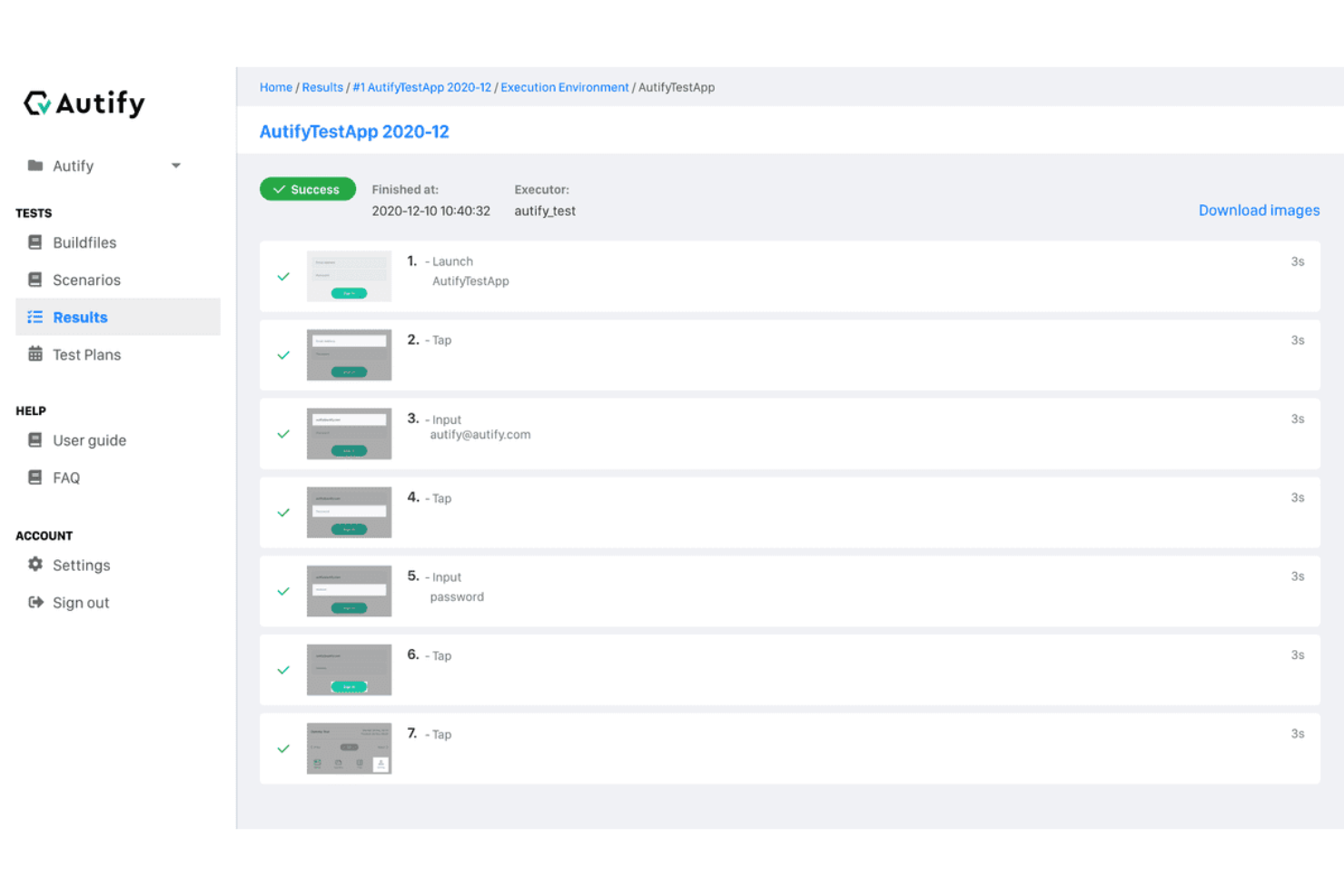
Autify is an AI-powered, no-code platform that automates software testing for web and mobile applications. It enables your team to create, execute, and manage tests without the need for programming skills.
Why I picked Autify: Autify's codeless automation allows you to create test scenarios by simply interacting with your mobile app through a web browser. This approach eliminates the need for real devices during test creation, streamlining the setup process. Additionally, Autify's AI detects changes in your app's source code and UI, automatically updating test scenarios to reduce maintenance efforts. I also like its parallel execution capability. You can run multiple tests simultaneously on various devices and emulators, maximizing test coverage and frequency.
Autify Standout Features and Integrations
Standout features include environment variables that let you pass data during test creation and execution, terminal operation capture to record actions like shaking the device or app backgrounding, and visual regression testing to automatically detect UI changes across app versions.
Integrations include GitHub Actions, CircleCI, Jenkins, Bitrise, and Autify CLI.
Pros and Cons
Pros:
- Test creation without coding knowledge
- Cross-browser and multi-device testing
- Detects visual changes to maintain UI consistency
Cons:
- Offers a narrower range of integrations compared to some competitors
- Lacks integrated tracking for issues discovered during tests


Kobiton enables you to run manual and automated testing on real devices, providing ultra-fast
performance and wide market coverage. It offers scriptless automation, which helps you overcome scripting complexity to get things done faster.
Why I picked Kobiton: This platform supports scriptless automation and allows you to integrate major QA tools, such as Appium, XCUI, and Espresso. Kobiton provides testing capabilities and integrations required to streamline and execute real device testing - in addition to running automation scripts on emulators or simulators.
With Kobiton, you can run tests without coding. Its Intelligent Test Automation lets you create automated test scripts without requiring tedious scripting.
Kobiton Standout Features and Integrations
Standout features include scriptless automation, Intelligent Test Automation, and Appium Anywhere technology. It stands out with its ability to put an end to flaky tests. Kobiton’s industry-first Appium Anywhere technology prevents flaky test scripts by ensuring that the test runs the same across all devices.
Integrations include Appium, Azure DevOps, Espresso, JetBrains, Jira, TeamCity, Travis CI, Visual Studio, XCTest, XCUI, and others.
Pros and Cons
Pros:
- Simplified test scripts creation processes
- Integration with automation frameworks
- No code automation
Cons:
- Doesn’t support delayed test runs
- It can be slow at times


Robotium is a leading Android test automation framework. It’s designed to enable you to automate UI tests for native and hybrid Android applications.
Why I picked Robotium: This solution has the industry-leading features you need to create and execute Android UI automated tests. I added Robotium to my list because it provides seamless, easy ways to write automatic black-box UI tests for Android apps. With this tool, you can write a wide range of function, system, and user acceptance test scenarios.
Another reason I like Robotium is that it lets you execute and manage multiple Android activities automatically.
Robotium Standout Features and Integrations
Standout features include support for native and hybrid applications, fast test case execution, and integration with Maven, Gradle, and Ant. Unlike some alternatives with a steep learning curve, Robotium makes getting started easy with great tutorials. There are instructions and examples to help you get started with your first tests.
Integrations include Android Studio, Appium, Selendroid, TestNG, Gradle, Jenkins, Jira, and Slack.
Pros and Cons
Pros:
- Speedy test case execution
- Improved readability of test cases
- Tests both native and hybrid apps
Cons:
- Its capabilities are limited to Android
- Not highly customizable


Calabash is a BDD framework for mobile operating systems (iOS and Android). This platform provides automated functional testing tools for Android and iOS native and hybrid applications using Cucumber.
Why I picked Calabash: I added Calabash to my list because it offers a simple and powerful set of features for automating mobile app functional testing. Being a BBD framework, the software uses Cucumber to streamline and optimize the testing process. The Cucumber integration gives you a good level of visibility and control of your test cases.
Calabash Standout Features and Integrations
Standout features: Calabash, being an open-source project, gives you access to industry-standard mobile testing solutions for free. It has comprehensive documentation that is split into well-organized sections. As a result, you can easily get started with Calabash by simply browsing through the documentation.
Integrations include Cucumber, Appium, Sauce Labs, CircleCI, Xamarin Test Cloud, Jenkins, Slack, and Travis CI.
Pros and Cons
Pros:
- Improved collaboration
- Easy to understand
- Open-source project
Cons:
- Writing test cases can be challenging at times
- Limited customization
Résumé des meilleurs outils d'automatisation des tests mobiles
| Tool | Best For | Trial Info | Price | ||
|---|---|---|---|---|---|
| 1 | Best for AI-driven scriptless testing | Free plan available | From $3,600/year | Website | |
| 2 | Best for comprehensive app testing | Free demo available | Pricing upon request | Website | |
| 3 | Best for efficient, AI-powered automation of mobile application testing processes | Free trial + free demo available | Pricing upon request | Website | |
| 4 | Best for cross-browser testing automation | Free plan available + free demo | From $15/user/month (billed annually) | Website | |
| 5 | Best for plain English test creation | Free open source access available + 14-day free trial | Pricing upon request | Website | |
| 6 | Best mobile test automation tool for cross-functional testing | Free plan available + free demo | From $183/user/month | Website | |
| 7 | Best for codeless mobile test automation | Free plan available | From $99/month (billed annually) | Website | |
| 8 | Best scriptless mobile test automation platform | Free trial available | From $83/month | Website | |
| 9 | Best test automation solution for Android UI testing | Not available | Free to use | Website | |
| 10 | Best for automated functional testing of mobile apps | Not available | Free to use | Website |
Autres options
Voici quelques autres options intéressantes qui n’ont pas été sélectionnées parmi les meilleurs outils d’automatisation des tests mobiles :
- TestComplete Mobile
For automating your mobile GUI tests on real devices
- UFT Mobile
For integrating open-source testing tools
- Appium
Tool for facilitating UI automation of many app platforms
- Digital.ai
For increasing test coverage and velocity
- Test.io
Fully managed test automation solution
- Selendroid
For native or hybrid Android apps and the mobile web
- Mobot
For running automated tests on 200+ mobile devices simultaneously
- GPT Driver
For AI-native mobile testing
- Eggplant
AI-driven mobile test automation tool
- Ranorex Studio
Low-code/no-code test automation platform for mobile apps and mobile web


Critères de sélection des outils d'automatisation des tests mobiles
Voici un résumé des principaux critères de sélection et d’évaluation que j’ai utilisés pour établir ma liste des meilleurs outils d’automatisation des tests mobiles pour cet article :
Fonctionnalités de base
J’ai recherché et soigneusement évalué de nombreuses solutions d’automatisation des tests mobiles. Je n’ai retenu dans ma sélection que les outils offrant les fonctionnalités de base suivantes :
- Automatisation intelligente
- Création, exécution et gestion des tests simplifiées
- Tests sur appareils réels
- Fonctionnalités de gestion et de suivi des tests
Fonctionnalités clés
J’ai minutieusement vérifié que les outils disposent des fonctionnalités incontournables permettant aux testeurs d’évaluer correctement leurs produits mobiles. Les principales caractéristiques d’un bon outil d’automatisation des tests mobiles incluent :
- Tests fonctionnels : Il s’agit d’un processus d’assurance qualité visant à vérifier les spécifications ou fonctions de votre application mobile.
- Tests en parallèle : Cette fonctionnalité vous permet d’utiliser l’automatisation pour exécuter les mêmes tests simultanément sur plusieurs environnements — appareils et configurations de navigateurs.
- Gestion des tests : Les fonctionnalités de gestion des tests vous aident à organiser vos cas de tests et suivre les activités depuis le tableau de bord ou le centre de contrôle de l’outil.
- Test d’utilisabilité : Également appelé test d’expérience utilisateur, le test d’utilisabilité vous permet d’évaluer la simplicité d’utilisation d’une fonctionnalité ou d’un design en mettant le produit entre les mains d’un groupe d’utilisateurs.
- Test de régression : Cela consiste à recommencer des tests fonctionnels et non-fonctionnels afin de revalider les fonctionnalités d’un produit après des modifications de code.
- Rapport & analyse : Comme son nom l’indique, les testeurs utilisent cette fonctionnalité pour rendre compte et analyser les cas de test, documenter les activités et obtenir des informations sur les opérations.
Utilisabilité
C’est un indicateur de la facilité d’utilisation d’un produit mobile. En prenant en compte ce facteur, j’ai privilégié les outils avec une interface simple, une documentation complète, une communauté active, un service client réactif et un flux de travail optimisé. Ainsi, tous les outils listés sont simples à prendre en main. Et si vous rencontrez un problème, chaque outil dispose de tutoriels, de communautés d’utilisateurs, ou de conseillers clientèle pour vous épauler et relever vos défis.
Personnalisation
J’ai privilégié les solutions facilement personnalisables. Les outils personnalisables vous permettent d’adapter leurs fonctionnalités aux besoins et préférences de votre équipe. Ils offrent la flexibilité nécessaire pour effectuer des tests selon vos exigences et les spécificités de votre mode de travail.
Intégration logicielle
Votre équipe utilise déjà une variété de logiciels de développement, d’assurance qualité ou de productivité. Pouvoir intégrer le logiciel d’automatisation mobile à vos autres outils vous permet d’optimiser le processus QA et d’éviter à vos collègues de jongler entre plusieurs logiciels. C’est pourquoi j’ai retenu des solutions capables de s’intégrer à d’autres outils – vous permettant d’exécuter des tests rapidement et de façon économique.
Tests multi-plateformes
Une fonctionnalité essentielle d’un bon logiciel d’automatisation de test est la capacité à effectuer des tests sur plusieurs plateformes. Il s’agit de pouvoir lancer des tests sur les principaux systèmes d’exploitation, appareils, navigateurs et réseaux. J’ai sélectionné des solutions qui permettent de tester sur toutes les plateformes ou appareils mobiles. Plus besoin d’utiliser plusieurs outils : un ou deux logiciels tout-en-un suffisent pour réaliser l’ensemble des tests.
Questions fréquemment posées
Voici des réponses à certaines des questions fréquemment posées sur les outils d’automatisation de tests mobiles :
Quels sont les avantages des outils d’automatisation de tests mobiles ?
Les avantages des logiciels d’automatisation de tests mobiles incluent un déploiement plus rapide des applications, une efficacité accrue, des tests mieux organisés, des retours en temps réel et une réduction des coûts de l’assurance qualité.
Quelles sont les principales fonctionnalités des outils d’automatisation de tests mobiles ?
Les fonctions clés des solutions d’automatisation de tests mobiles incluent la gestion des tests, les tests fonctionnels, les tests parallèles, l’utilisabilité, la sécurité, le reporting et l’analyse, et les tests de régression.
Comment choisir le meilleur outil d’automatisation mobile ?
Pour choisir le meilleur logiciel d’automatisation mobile pour votre projet, identifiez les tests à automatiser, parcourez la liste ci-dessus pour trouver les outils qui répondent à vos besoins, essayez-en un ou deux, puis sélectionnez celui qui correspond à vos exigences et à votre budget.
Autres avis sur les meilleurs outils d’automatisation de tests mobiles
Conclusion
Les outils d’automatisation des tests mobiles vous aident à éliminer les inconvénients des tests manuels. Ces derniers sont chronophages, coûteux en main-d’œuvre, et sujets à l’erreur humaine. Les tests automatisés permettent de résoudre ces problèmes et de tester les applications plus rapidement, de façon fiable et économique.
Découvrez mes recommandations pour trouver l’outil qui correspond à vos besoins, à votre projet et à votre budget. Si vous souhaitez approfondir vos connaissances en automatisation des tests et en assurance qualité, abonnez-vous à la newsletter The QA Lead afin de recevoir les derniers articles et podcasts des experts du secteur.