

Les meilleures alternatives à Nagios aident les équipes à surveiller leurs systèmes sans avoir à gérer des exigences de configuration complexes ni à se heurter à des limites d'évolutivité. Elles offrent des tableaux de bord plus clairs, des configurations plus simples et des intégrations flexibles qui facilitent le suivi des performances sur les serveurs, les réseaux et les applications.
De nombreuses organisations commencent à rechercher des alternatives après avoir rencontré des problèmes tels que la configuration de modules d’extension Nagios qui ne s’intègrent pas correctement, la perte de temps consacrée au dépannage de messages d'erreur obscurs ou les limites de performances à mesure que les besoins de surveillance augmentent. Ces difficultés ralentissent les opérations et compliquent le maintien d'une visibilité à grande échelle pour les équipes informatiques.
J'ai testé des plateformes de surveillance dans des environnements de production réels, accompagné des équipes migrant depuis des déploiements Nagios hérités et évalué les performances de ces outils sur des infrastructures hybrides et cloud. Ces expériences m'ont montré quelles solutions réduisent réellement la charge liée à la surveillance et lesquelles créent de nouvelles complexités.
Dans ce guide, vous découvrirez quelles alternatives à Nagios offrent une configuration plus simple, une meilleure évolutivité et des informations plus exploitables, afin que votre équipe puisse se concentrer sur la résolution des problèmes plutôt que sur la gestion du système de surveillance.
Qu'est-ce que Nagios ?
Nagios est une plateforme open source de surveillance et de gestion des réseaux, conçue pour la surveillance des réseaux et des systèmes. Les professionnels de l'informatique et les administrateurs système utilisent généralement Nagios pour surveiller les infrastructures critiques et garantir le bon déroulement des opérations.
Ses fonctionnalités d'alerte, de création de rapports et de surveillance vous aident à détecter les problèmes, à analyser les performances et à gérer efficacement les ressources réseau. Globalement, Nagios apporte de la valeur en aidant votre équipe à maintenir la fiabilité des systèmes et à réduire les temps d'arrêt.
Tableau comparatif des alternatives à Nagios
Ce tableau comparatif résume les détails tarifaires de ma sélection des meilleures alternatives à Nagios :
| Tool | Best For | Trial Info | Price | ||
|---|---|---|---|---|---|
| 1 | Idéal pour la surveillance unifiée des appareils et des capteurs | Essai gratuit de 30 jours | À partir de 200 $/mois (facturé annuellement) | Website | |
| 2 | Idéal pour les infrastructures informatiques complexes | Formule gratuite disponible | Tarification sur demande | Website | |
| 3 | Idéal pour la supervision multicloud | Essai gratuit de 30 jours + démonstration gratuite disponible | À partir de $10/mois (facturé annuellement) | Website | |
| 4 | Idéal pour la surveillance des applications web | Essai gratuit de 30 jours + offre gratuite + démo gratuite disponible | À partir de $19.99/mois | Website | |
| 5 | Idéal pour une configuration plug-and-play | Démo gratuite disponible | Tarification sur demande | Website | |
| 6 | Idéal pour l’observabilité de bout en bout | Essai gratuit de 14 jours | À partir de $5/mois | Website | |
| 7 | Idéal pour les capacités de création de graphiques | Téléchargement gratuit | Gratuit à utiliser | Website | |
| 8 | Idéal pour l’AIOps et l’observabilité | Démo gratuite disponible | Tarification sur demande | Website | |
| 9 | Idéal pour une surveillance de bout en bout | Essai gratuit de 7 jours | Tarification sur demande | Website | |
| 10 | Idéal pour les réseaux distribués | Consultation gratuite disponible | Tarification sur demande | Website |


Pourquoi faire confiance à nos recommandations de logiciels
6,700+
Reviews
20
Industry experts
16+
Evaluation factors
14
Years
Notre équipe teste et évalue des logiciels depuis 2012. En tant que leaders technologiques nous-mêmes, nous savons à quel point il est difficile — et important — de choisir le bon logiciel.
Pour ce guide, nous avons évalué les outils grâce à des tests pratiques et une recherche indépendante, en notant les outils selon nos critères de sélection.
Nos avis reflètent notre jugement éditorial humain, et non un argumentaire de vente.
Réviseurs experts:
- Paulo Gardini MiguelDirecteur technique
 Tim FisherVP de l'IA
 Gabriel RosasTech Lead et architecte logiciel
 Christhian GruhnTech Lead et architecte plateforme

Avis sur les meilleures alternatives à Nagios
Vous trouverez ci-dessous mes résumés détaillés des meilleures alternatives à Nagios qui ont intégré ma sélection. Mes avis proposent une analyse approfondie des principales fonctionnalités, des avantages & inconvénients, des intégrations et des cas d’utilisation idéaux de chaque outil afin de vous aider à trouver celui qui vous convient le mieux.
 Idéal pour la surveillance unifiée des appareils et des capteurs
- Essai gratuit de 30 jours
- À partir de 200 $/mois (facturé annuellement)
Visit WebsiteCustomer Rating:4.6/5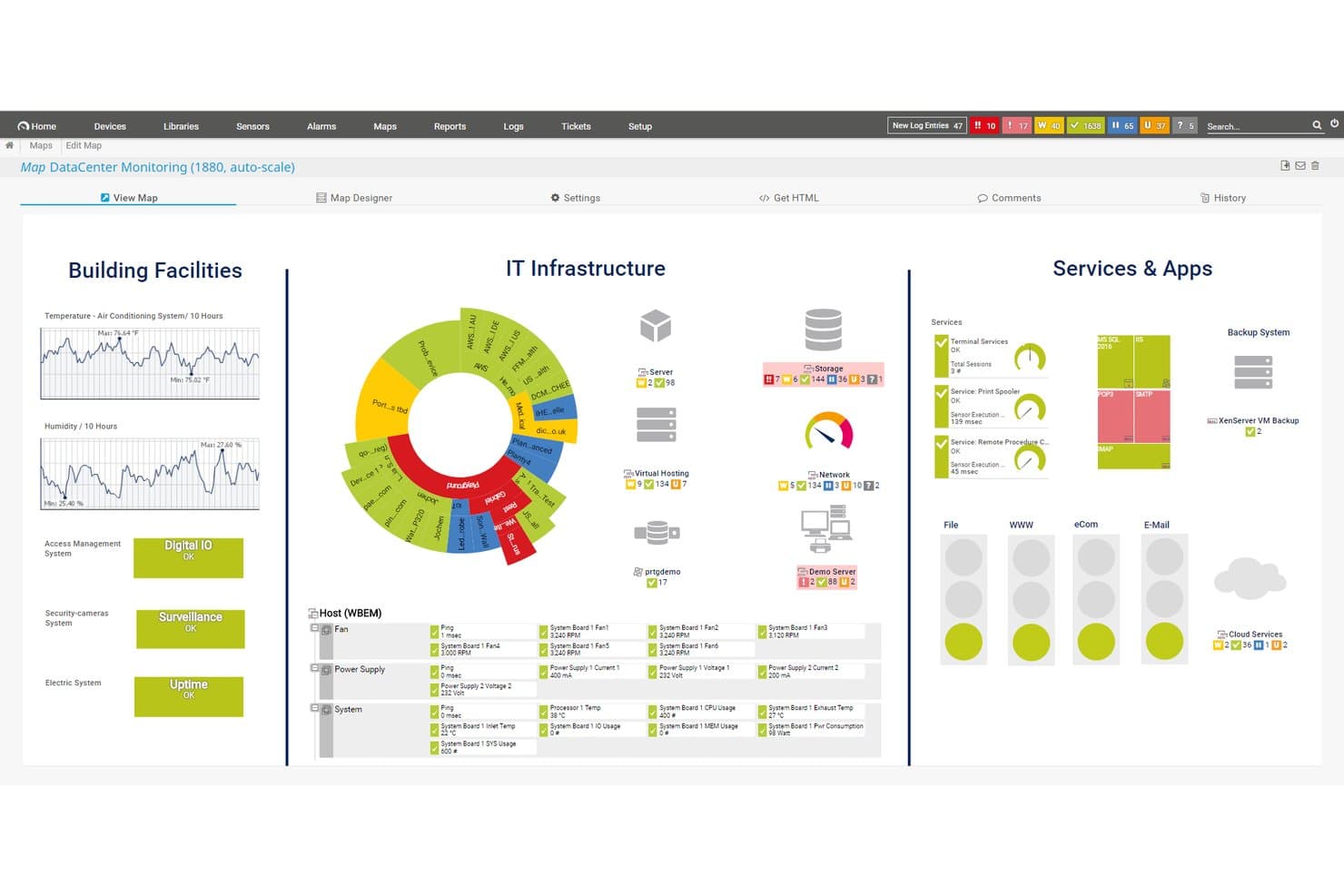
Paessler PRTG propose une carte de surveillance de centre de données personnalisable affichant les installations du bâtiment, l'infrastructure informatique, ainsi que les services et applications dans une vue de tableau de bord unifiée. Paessler PRTG est une plateforme de surveillance sur site et hébergée dans le cloud qui aide les équipes informatiques et les gestionnaires de centres d'exploitation réseau (NOC) à suivre les réseaux, serveurs, applications et appareils à partir d'une interface unique, sans la configuration manuelle complexe exigée par des outils comme Nagios.
Pour qui Paessler PRTG est-il le mieux adapté ?
PRTG convient particulièrement aux équipes d'infrastructure informatique de taille moyenne à grande qui gèrent des environnements mixtes et vastes, sur site et hybrides.
Pourquoi Paessler PRTG est une bonne alternative à Nagios
J'ai choisi Paessler PRTG car son architecture basée sur les capteurs le distingue de façon significative de Nagios. Alors que Nagios nécessite une configuration manuelle de modules complémentaires pour chaque vérification, la fonction de découverte automatique de PRTG balaie votre réseau et crée des capteurs sur les appareils, serveurs et services automatiquement. J'apprécie également qu'un déploiement unique de PRTG couvre les actifs IT, OT et IoT en utilisant des protocoles tels que SNMP, WMI, NetFlow et OPC UA, sans avoir besoin d'outils séparés pour chaque environnement.
Fonctionnalités clés de Paessler PRTG
- Surveillance distribuée via sondes distantes : Déployez des sondes à distance pour étendre la couverture de surveillance à plusieurs emplacements et réseaux.
- Éditeur de cartes personnalisables : Créez des cartes réseau interactives en temps réel avec un éditeur glisser-déposer.
- Contrôle d'accès basé sur les rôles : Attribuez des permissions utilisateurs pour contrôler qui peut consulter ou gérer certains tableaux de bord et capteurs.
- Journal d'audit et authentification unique : Assurez un accès sécurisé et suivez l'activité des utilisateurs avec les fonctionnalités d'authentification d'entreprise et de conformité.
Intégrations Paessler PRTG
Paessler PRTG propose des intégrations natives avec AWS, Microsoft Azure, VMware, Siemens Industrial Edge, Cisco Meraki, HPE, Dell EMC, OPC UA et MQTT. Une API est disponible pour des intégrations personnalisées.
Pros and Cons
Pros:
- Découverte automatique des appareils sans configuration manuelle de modules complémentaires
- Surveille nativement IT, OT et IoT
- Une seule interface couvre tous les niveaux d'infrastructure
Cons:
- Les coûts augmentent rapidement avec le nombre de capteurs
- Le composant serveur nécessite une installation sur Windows
Learn more about Paessler PRTG: Idéal pour les infrastructures informatiques complexes
- Formule gratuite disponible
- Tarification sur demande
Visit WebsiteCustomer Rating:4.7/5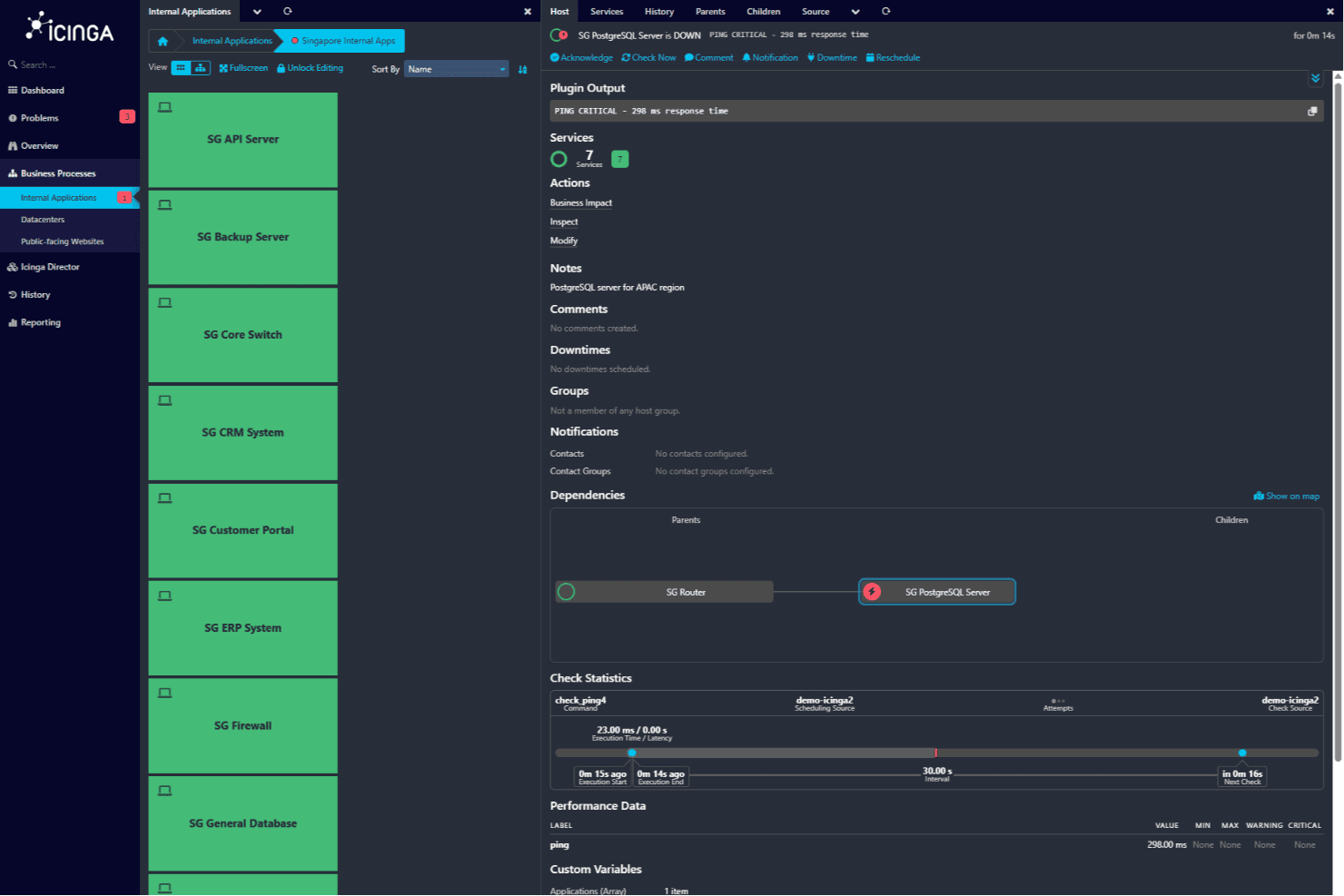
Écran de détails de l'hôte affichant l'état du serveur PostgreSQL SG avec une alerte de ping critique et une chaîne de dépendances reliant au routeur SG. Icinga est une solution de surveillance open source conçue pour les infrastructures informatiques complexes, principalement utilisée par les professionnels de l'informatique et les organisations. Elle surveille les serveurs, les réseaux, les applications et les environnements cloud.
Pourquoi c'est une bonne alternative à Nagios : Icinga excelle dans les environnements informatiques complexes grâce à la surveillance de l'infrastructure, à l'automatisation et aux notifications. Il offre une surveillance spécialisée de Kubernetes, des bases de données et de VMware, ce qui le rend idéal pour les environnements complexes. Ses outils d'analyse ainsi que sa gestion des métriques et des journaux aident votre équipe à obtenir des informations précieuses. La plateforme s'intègre également aux outils de gestion des services informatiques, ce qui renforce son utilité.
Fonctionnalités et intégrations remarquables :
Fonctionnalités : surveillance de l'infrastructure, automatisation et surveillance du cloud. La solution propose également des outils d'analyse ainsi que la gestion des métriques et des journaux, avec une prise en charge de la surveillance spécialisée de Kubernetes, des bases de données et de VMware.
Intégrations : Puppet, Ansible, Chef, SaltStack, Grafana, Graylog, Elasticsearch, InfluxDB, Jira et Slack.
Pros and Cons
Pros:
- Flexibilité de l'open source
- Prend en charge les environnements complexes
- Compatibilité avec les plug-ins Nagios
Cons:
- Courbe d'apprentissage plus prononcée
- Nécessite une expertise technique
Learn more about Icinga: Idéal pour la supervision multicloud
- Essai gratuit de 30 jours + démonstration gratuite disponible
- À partir de $10/mois (facturé annuellement)
Visit WebsiteCustomer Rating:4.7/5
Site24x7 suit les performances et la disponibilité des infrastructures multicloud. Pour les entreprises à la recherche d’une alternative fiable à Nagios, Site24x7 offre un mélange convaincant de capacités de supervision et de fonctionnalités conviviales. Cette solution basée sur le cloud s’adresse aux professionnels de l’informatique et aux organisations qui nécessitent une supervision étendue des serveurs, des réseaux, des applications et des sites web dans divers environnements. Site24x7 répond à des enjeux tels que la gestion des environnements multicloud et l’automatisation des tâches répétitives, en fournissant un moyen économique de superviser l’infrastructure informatique avec un seul forfait.
Pourquoi j’ai choisi Site24x7
J’ai choisi Site24x7 comme principale alternative à Nagios pour ses capacités fiables de supervision multicloud et ses fonctionnalités d’automatisation. Avec Site24x7, vous pouvez superviser de manière fluide des environnements tels qu’AWS, Azure et GCP depuis une console unique, ce qui facilite la gestion des infrastructures complexes. De plus, l’automatisation des tâches répétitives par la plateforme contribue à réduire les efforts manuels, permettant à votre équipe de se concentrer sur des initiatives plus stratégiques. Ces fonctionnalités sont essentielles pour les organisations qui souhaitent améliorer leur efficacité et rationaliser leurs processus de supervision.
Principales fonctionnalités de Site24x7
En plus de la supervision multicloud et de l’automatisation, Site24x7 propose :
- Gestion des journaux : fournit des informations sur l’ensemble de votre environnement technologique pour améliorer l’analyse et le dépannage.
- Supervision des API : garantit le bon fonctionnement de vos API afin de maintenir la fiabilité des services.
- Pages d’état : vous permet de créer des pages personnalisables pour communiquer les interruptions de service et renforcer la confiance des utilisateurs.
- Gestion des incidents : facilite le traitement efficace des incidents grâce à une documentation détaillée, comprenant les journaux d’erreurs et les chronologies.
Intégrations de Site24x7
Les intégrations comprennent AWS, Azure, Google Cloud Platform, Docker, Kubernetes, Microsoft Exchange, Microsoft SharePoint et bien plus encore.
Pros and Cons
Pros:
- Supervision complète de différents systèmes
- La supervision complète de la pile, optimisée par l’IA, prend en charge la gestion des infrastructures multicloud
- La supervision flexible s’intègre facilement à plusieurs composants de l’infrastructure
Cons:
- Des bogues liés aux alertes provoquent des problèmes lors de l’ajout de nouvelles configurations de supervision
- La configuration complexe ralentit la mise en place initiale et la compréhension de la plateforme
Learn more about Site24x7: Idéal pour la surveillance des applications web
- Essai gratuit de 30 jours + offre gratuite + démo gratuite disponible
- À partir de $19.99/mois
Visit WebsiteCustomer Rating:4.5/5
Dotcom-Monitor surveille la disponibilité, les performances et la fonctionnalité des sites web pour les équipes informatiques et de développement. Dotcom-Monitor est un outil de surveillance des performances web destiné aux développeurs, équipes informatiques et spécialistes du marketing numérique. Il aide à garantir la disponibilité, la performance et la fonctionnalité des sites web.
Pourquoi c'est une bonne alternative à Nagios : Dotcom-Monitor est spécialisé dans la surveillance des applications web en offrant des analyses de performances en temps réel. Ses capacités de surveillance synthétique permettent à votre équipe de simuler des interactions utilisateur et de détecter les problèmes de manière proactive. L'outil fournit des rapports complets, vous aidant à comprendre les tendances de performance au fil du temps. En se concentrant sur la surveillance des applications web, il propose une approche spécialisée qui diffère des capacités de surveillance générale de Nagios.
Fonctionnalités et intégrations remarquables :
Fonctionnalités incluent la surveillance synthétique qui simule les interactions utilisateur pour détecter les problèmes avant qu'ils n'impactent les utilisateurs réels. Il propose également des rapports complets pour vous aider à comprendre les tendances de performance dans le temps. Les analyses de performances en temps réel vous assurent de pouvoir réagir rapidement aux problèmes.
Intégrations incluent Amazon Web Services, Microsoft Azure, Google Cloud Platform, Jenkins, PagerDuty, Slack, Splunk, New Relic, ServiceNow et Atlassian Jira.
Pros and Cons
Pros:
- Surveillance spécialisée des applications web
- Analyses de performances en temps réel
- Rapports complets
Cons:
- Nécessite certaines connaissances techniques
- Limité aux applications web
Learn more about Dotcom-Monitor: Idéal pour une configuration plug-and-play
- Démo gratuite disponible
- Tarification sur demande

Munin suit la performance du système et l'utilisation des ressources pour les administrateurs et équipes IT. Munin est un outil de surveillance des ressources réseau conçu pour les administrateurs système et les professionnels de l'informatique. Il offre des informations sur les performances du système et l'utilisation des ressources.
Pourquoi c'est une bonne alternative à Nagios : Munin propose une configuration plug-and-play simple, permettant à votre équipe de démarrer la surveillance rapidement. Il crée automatiquement des graphiques pour les données de performance, afin de visualiser facilement les tendances. L'outil est léger, réduisant ainsi la consommation de ressources sur vos systèmes. Sa simplicité d'utilisation et sa configuration minimale en font un choix pratique pour ceux qui recherchent une alternative simple à Nagios.
Fonctionnalités phares & intégrations :
Fonctionnalités : création automatisée de graphiques, facilitant la visualisation des tendances des données au fil du temps. Il prend également en charge une architecture légère, qui minimise la consommation des ressources système. La configuration simple de l'outil vous permet de commencer rapidement, sans installation complexe.
Intégrations : Nagios, Cacti, Zabbix, Graphite, InfluxDB, Prometheus, Elasticsearch, Grafana, Jenkins et Docker.
Pros and Cons
Pros:
- Processus de configuration simple
- Architecture légère
- Création automatisée de graphiques
Cons:
- Scalabilité limitée
- Jeu de fonctionnalités basique
Learn more about Munin: Idéal pour l’observabilité de bout en bout
- Essai gratuit de 14 jours
- À partir de $5/mois

Sematext assure la surveillance et la journalisation dans le cloud des applications, de l’infrastructure et des journaux. Sematext est une plateforme de surveillance et de journalisation basée sur le cloud, destinée aux développeurs, aux équipes chargées des opérations informatiques et aux équipes DevOps. Elle fournit des informations sur les performances des applications, la surveillance de l’infrastructure et la gestion des journaux.
Pourquoi c’est une bonne alternative à Nagios : Sematext offre une observabilité de bout en bout, permettant à votre équipe de surveiller les applications, l’infrastructure et les journaux au même endroit. Ses analyses en temps réel aident à identifier rapidement les problèmes de performance. Les tableaux de bord conviviaux de l’outil facilitent la visualisation des données et le suivi des indicateurs. Grâce à ses capacités de surveillance complètes, Sematext propose une approche plus intégrée que Nagios.
Fonctionnalités et intégrations remarquables :
Les fonctionnalités comprennent des analyses en temps réel qui aident votre équipe à identifier rapidement les problèmes. Les tableaux de bord conviviaux simplifient la visualisation des données, vous permettant de suivre facilement les indicateurs. Ses capacités de surveillance complètes garantissent une vue d’ensemble de vos systèmes.
Les intégrations comprennent AWS, Azure, Google Cloud Platform, Kubernetes, Docker, Elasticsearch, Apache Kafka, NGINX, Redis et MySQL.
Pros and Cons
Pros:
- Observabilité de bout en bout
- Analyses en temps réel
- Tableaux de bord conviviaux
Cons:
- Nécessite une période d’apprentissage
- Fonctionnalités hors ligne limitées
Learn more about Sematext: Idéal pour les capacités de création de graphiques
- Téléchargement gratuit
- Gratuit à utiliser

Cacti propose une surveillance réseau et des graphiques avec des visuels de performance détaillés. Cacti est un outil de surveillance réseau et de création de graphiques conçu pour les administrateurs informatiques et les responsables réseau. Il fournit des visualisations détaillées des données réseau et des performances système.
Pourquoi c'est une bonne alternative à Nagios : Cacti se distingue par ses capacités de création de graphiques, permettant de créer des représentations visuelles détaillées de vos données réseau. Son interface intuitive facilite la configuration et la gestion des graphiques, même pour des jeux de données complexes. L'outil prend en charge la collecte de données via SNMP, ce qui améliore la précision de ses graphiques. Avec son accent mis sur la visualisation, Cacti offre un avantage certain aux équipes ayant besoin d'une vue graphique et claire de leurs réseaux.
Fonctionnalités remarquables & intégrations :
Fonctionnalités comprennent des capacités avancées de création de graphiques permettant de visualiser facilement des données complexes. Il prend en charge SNMP pour une collecte de données précise, améliorant la justesse de vos graphiques. L'interface intuitive simplifie la configuration et la gestion de ces visualisations.
Intégrations incluent Nagios, InfluxDB, Graphite, Prometheus, Elasticsearch, Grafana, OpenNMS, Zabbix, SolarWinds et Splunk.
Pros and Cons
Pros:
- Excellentes capacités de création de graphiques
- Interface intuitive
- Prend en charge la collecte de données SNMP
Cons:
- Scalabilité limitée
- Fonctionnalités d'alerte de base
Learn more about Cacti: Idéal pour l’AIOps et l’observabilité
- Démo gratuite disponible
- Tarification sur demande

Zenoss Core surveille l'infrastructure informatique hybride et fournit des informations de performance en temps réel. Zenoss Core est une plateforme hybride de surveillance et d'analyse informatique conçue pour les équipes d'exploitation IT. Elle fournit des informations sur les performances de l'infrastructure et aide à détecter et résoudre les problèmes en temps réel.
Pourquoi c'est une bonne alternative à Nagios : Zenoss Core intègre des capacités AIOps, offrant des analyses avancées pour prédire et prévenir les problèmes avant qu'ils n'impactent vos opérations. Sa surveillance en temps réel fournit une vue d'ensemble de votre infrastructure, aidant votre équipe à réagir rapidement aux incidents. Les fonctionnalités d'observabilité de la plateforme garantissent un suivi des indicateurs de performance et permettent d'obtenir des informations sur l'état du système. Grâce à son accent porté sur l’analytique et l’observabilité, Zenoss Core propose une approche plus proactive comparée à Nagios.
Fonctionnalités & Intégrations remarquables :
Fonctionnalités comprenant des analyses avancées qui aident à prédire et à prévenir les problèmes potentiels. La surveillance en temps réel offre une visibilité complète sur votre infrastructure. Les capacités d'observabilité de la plateforme garantissent un suivi efficace des indicateurs de performance et de la santé du système.
Intégrations comprennent Amazon Web Services, Microsoft Azure, Google Cloud Platform, VMware, Docker, Kubernetes, ServiceNow, Splunk, PagerDuty et Slack.
Pros and Cons
Pros:
- Capacités analytiques avancées
- Surveillance en temps réel
- Détection proactive des problèmes
Cons:
- Nécessite une expertise technique
- Complexité de la mise en place initiale
Learn more about Zenoss Core: Idéal pour une surveillance de bout en bout
- Essai gratuit de 7 jours
- Tarification sur demande

Centreon surveille l'infrastructure, les applications et les réseaux afin de fournir une visibilité complète aux équipes informatiques. Centreon est une solution de surveillance informatique conçue pour les entreprises ayant besoin d'une visibilité de bout en bout, principalement utilisée par les équipes d'exploitation informatique. Elle surveille l'infrastructure IT, les applications et les réseaux pour assurer des performances optimales.
Pourquoi c'est une bonne alternative à Nagios : Centreon propose une surveillance de bout en bout avec des fonctionnalités telles que l'auto-découverte et des tableaux de bord centralisés. Il offre des informations en temps réel sur votre environnement informatique, aidant votre équipe à identifier et résoudre rapidement les problèmes. La plateforme est évolutive pour accompagner la croissance des entreprises, ce qui vous permet de surveiller de vastes réseaux. Son interface conviviale et ses alertes personnalisables facilitent l'adaptation du système à vos besoins.
Fonctionnalités remarquables & Intégrations :
Fonctionnalités incluant l'auto-découverte, les tableaux de bord centralisés et les alertes personnalisables. Elle offre également des informations en temps réel et une évolutivité pour accompagner la croissance des entreprises.
Intégrations incluant Amazon Web Services, Microsoft Azure, Google Cloud Platform, Docker, Kubernetes, VMware, Cisco, Juniper, Slack et ServiceNow.
Pros and Cons
Pros:
- Visibilité de bout en bout
- Fonction d'auto-découverte
- Évolutif pour les entreprises en croissance
Cons:
- Nécessite une expertise technique
- Complexité lors de l'installation initiale
Learn more about Centreon:

OpenNMS gère les réseaux distribués grâce à des outils de surveillance, de gestion des événements et des performances. OpenNMS est une plateforme de gestion de réseau open-source conçue pour les réseaux distribués, principalement utilisée par les administrateurs réseau et les professionnels de l'informatique. Elle assure la surveillance du réseau, la gestion des événements et la mesure des performances.
Pourquoi c'est une bonne alternative à Nagios : OpenNMS est spécialement conçu pour les réseaux distribués avec des fonctionnalités telles que la gestion des événements et la surveillance des services. Il prend en charge les déploiements à grande échelle, ce qui le rend idéal pour gérer des structures réseau complexes. La plateforme propose la collecte et la visualisation des données de performance pour aider votre équipe à gérer la santé du réseau. Sa scalabilité et sa capacité à gérer les systèmes distribués le distinguent de Nagios.
Fonctionnalités et intégrations remarquables :
Fonctionnalités : gestion des événements, surveillance des services et collecte de données de performance. Elle propose également des outils de visualisation pour l'état du réseau et prend en charge les déploiements à grande échelle pour les réseaux complexes.
Intégrations : Grafana, Elasticsearch, Prometheus, Kafka, PagerDuty, Slack, Jenkins, AWS, Azure et Google Cloud Platforms
Pros and Cons
Pros:
- Prise en charge des réseaux à grande échelle
- Flexibilité open-source
- Métriques de performance détaillées
Cons:
- Nécessite une expertise technique
- Courbe d'apprentissage abrupte
Learn more about OpenNMS:
Autres alternatives à Nagios
Voici quelques alternatives supplémentaires à Nagios qui n’ont pas intégré ma sélection, mais qui méritent tout de même votre attention :
- 11MonitorixIdéal pour une surveillance légère
- 12op5 MonitorIdéal pour la scalabilité en entreprise
- 13NaemonIdéal pour une architecture modulaireTarification sur demande
- 14ArgusIdéal pour la surveillance système et réseau
Come Valuto le Alternative a Nagios
Divido la mia valutazione in due livelli: la base che ogni strumento deve superare—alerting in tempo reale, copertura multi-ambiente, auto-discovery—e i fattori differenzianti che separano i migliori dagli altri.
Funzionalità di Base (Requisiti Fondamentali per questa Lista)
Quando seleziono gli strumenti per la mia lista, valuto ognuno su una scala da 0 (non offre la funzionalità) a 5 (eccelle in quest'area) per ciascuna delle funzionalità di base riportate di seguito. Poi, calcolo il punteggio totale dello strumento in percentuale. Ogni strumento deve raggiungere un punteggio minimo totale del 75% per essere incluso.
- Monitoraggio dell’Infrastruttura: Verifico se uno strumento controlla server, dispositivi di rete e servizi con controlli di integrità in tempo reale e metriche di performance—come CPU, memoria, disco e utilizzo delle interfacce su un parco misto di host Linux e Windows.
- Alerting & Notifiche: Ogni strumento dovrebbe supportare avvisi multi-canale (email, Slack, PagerDuty, SMS) con soglie configurabili e politiche di escalation, così che l’ingegnere reperibile giusto venga avvisato quando un disco si riempie alle 2 di notte.
- Dashboard & Visualizzazione: Valuto se le dashboard sono abbastanza personalizzabili da costruire viste specifiche per ruolo—come un pannello per il NOC che mostra lo stato della rete rispetto a un pannello sulle performance dei container per il team DevOps, ad esempio.
- Auto-Discovery & Supporto Agent: Gli strumenti che individuano automaticamente host e servizi tramite SNMP, WMI o API dei provider cloud fanno risparmiare ore di configurazione manuale, e cerco sia opzioni agent-based che agentless per coprire segmenti protetti da firewall e VPC cloud.
- Integrazioni & Estendibilità: Guardo alle integrazioni predefinite con piattaforme ITSM come ServiceNow o Jira Service Management, oltre all’accesso API e al supporto plugin per creare controlli personalizzati o alimentare dati in strumenti come Grafana.
- Copertura Multi-Ambiente: Se gestisci server bare-metal, workload multi-cloud tra AWS e Azure, o cluster Kubernetes, valuto quanto bene ogni strumento monitora ambienti on-premises, cloud e containerizzati.
Una volta che ho una lista di strumenti che soddisfano questi criteri, considero ciò che distingue ogni piattaforma.
Fattori di Differenziazione (Cosa Distingue i Vendor)
Ecco come confronto e metto a confronto i vari vendor:
Funzionalità Distintive
Le capacità di AIOps sono molto importanti qui. Gli strumenti che utilizzano il machine learning per definire il comportamento normale e segnalare vere anomalie riducono il rumore degli avvisi in modo molto più efficace delle soglie statiche. Valuto anche il mapping delle dipendenze e la topologia—quando uno switch principale va offline, vedere l’impatto a cascata sui servizi dipendenti accelera notevolmente il triage. L’automazione e l’auto-riparazione completano il quadro. Cerco strumenti che possano attivare azioni di runbook automaticamente, come riavviare un servizio guasto o svuotare una directory temporanea prima ancora che un alert raggiunga il team reperibile.
Oltre le Funzionalità
Il supporto alla migrazione è fondamentale quando si abbandona Nagios. Verifico se uno strumento può importare configurazioni di check esistenti o riutilizzare plugin personalizzati per evitare di dover ricostruire tutto da capo. La trasparenza dei prezzi è altrettanto importante—gli utenti Nagios sono abituati ai costi open source, quindi valuto se i vendor offrono una versione gratuita o un prezzo prevedibile per host che non aumenti all’aumentare dell’ambiente. Anche la salute della community e dell’ecosistema hanno il loro peso. Un marketplace di plugin attivo e un ritmo di rilascio frequente sono segno di solidità nel lungo periodo.
Pourquoi chercher une alternative à Nagios ?
Bien que Nagios soit un bon choix de logiciel de développement, plusieurs raisons peuvent pousser certains utilisateurs à rechercher des solutions alternatives. Vous cherchez peut-être une alternative à Nagios parce que…
- Vous avez besoin d'interfaces utilisateur plus intuitives
- Votre équipe a besoin d'une meilleure évolutivité
- Vous recherchez une configuration plus simple
- Vous souhaitez disposer de fonctionnalités d'analyse avancées
- Votre entreprise a besoin de systèmes d'alerte plus rapides
Si certaines de ces situations vous correspondent, vous êtes au bon endroit. Ma liste contient plusieurs options de développement logiciel mieux adaptées aux équipes confrontées à ces difficultés avec Nagios et à la recherche de solutions alternatives. Pour les équipes qui envisagent des solutions de surveillance plus étendues, l’exploration des alternatives à New Relic peut offrir des options supplémentaires pour une surveillance complète des performances des applications.
Principales fonctionnalités de Nagios
Voici quelques-unes des principales fonctionnalités de Nagios, afin de vous aider à comparer les offres des solutions alternatives :
- Capacités de surveillance : suit les performances et la disponibilité des serveurs, des applications et des appareils réseau.
- Système d’alerte : envoie des notifications par e-mail ou SMS lorsque des problèmes surviennent, ce qui permet de réagir rapidement.
- Interface web : fournit un tableau de bord convivial pour la surveillance et la création de rapports en temps réel.
- Plug-ins personnalisables : prend en charge divers plug-ins pour étendre les fonctionnalités en fonction de besoins spécifiques.
- Évolutivité : peut être mis à l’échelle pour surveiller de grands environnements comprenant de nombreux appareils.
- Assistance de la communauté : bénéficie du soutien d’une communauté active pour le dépannage et les améliorations.
- Correction des problèmes : propose des fonctionnalités telles que l’accusé de réception des alertes et des gestionnaires d’événements pour résoudre automatiquement les problèmes.
- Planification proactive : fournit des outils de suivi des tendances, de planification de la capacité et de gestion des périodes d’indisponibilité planifiées.
- Rapports : génère des rapports sur la disponibilité et l’historique afin de suivre les performances et la conformité aux accords de niveau de service (SLA).
- Fonctionnalités multiclient : permettent à plusieurs utilisateurs d’accéder à des vues personnalisées de l’infrastructure.