

Si vous gérez des opérations informatiques, vous connaissez les difficultés liées au maintien du bon fonctionnement des systèmes tout en vous adaptant aux nouvelles exigences technologiques. Vous avez peut-être utilisé ManageEngine, mais constaté des lacunes dans certains domaines.
Trouver le bon logiciel de gestion informatique peut faire une grande différence pour votre équipe. Il vous aide pour tout, de la surveillance des systèmes à la gestion des appareils, en passant par le respect des exigences de conformité.
D'après mon expérience, étudier les alternatives peut vous permettre de mieux répondre à vos besoins spécifiques. Je vais vous présenter certaines des meilleures alternatives à ManageEngine disponibles sur le marché, en me concentrant sur ce qui distingue chacune d'elles et sur la manière dont elles peuvent répondre aux défis de votre entreprise.
Examinons ces options afin que vous puissiez trouver une solution qui soutienne réellement vos objectifs.
Qu'est-ce que ManageEngine ?
ManageEngine est un logiciel de gestion informatique conçu pour aider les entreprises à superviser efficacement leurs opérations informatiques. Il est couramment utilisé par les professionnels de l'informatique, les administrateurs réseau et les responsables des systèmes qui doivent gérer des infrastructures informatiques complexes.
Ses fonctionnalités de gestion des actifs, de surveillance du réseau et de centre d'assistance permettent à votre équipe de maintenir l'état de santé des systèmes et de résoudre rapidement les problèmes. Dans l'ensemble, ManageEngine offre une solution centralisée pour gérer divers besoins informatiques, ce qui vous permet de garder plus facilement le contrôle de vos systèmes.
Tableau comparatif des alternatives à ManageEngine
Ce tableau comparatif résume les informations tarifaires de ma sélection des meilleures alternatives à ManageEngine :
| Tool | Best For | Trial Info | Price | ||
|---|---|---|---|---|---|
| 1 | Idéal pour une visibilité approfondie de l'infrastructure | Essai gratuit de 30 jours | À partir de 200 $/mois (facturé annuellement) | Website | |
| 2 | Idéal pour les outils de diagnostic réseau | Essai gratuit de 14 jours | À partir de 1,50 $/mois/appareil géré | Website | |
| 3 | Idéal pour le suivi des flux de travail en entreprise | Démo gratuite disponible | Tarification sur demande | Website | |
| 4 | Idéal pour le suivi d’actifs personnalisable | Essai gratuit de 7 jours + démo gratuite disponible | Tarification sur demande | Website | |
| 5 | Idéal pour l'auto-guérison automatisée | Démo gratuite disponible | Tarification sur demande | Website | |
| 6 | Idéal pour l’intégration à l’écosystème Microsoft | Essai gratuit de 30 jours disponible | À partir de $4/utilisateur/mois (facturation annuelle) | Website | |
| 7 | Idéal pour la gestion des services informatiques pilotée par l’IA | Essai gratuit + démo gratuite disponible | Tarification sur demande | Website | |
| 8 | Idéal pour l’ITSM et la collaboration d’équipe | Essai gratuit de 14 jours + offre gratuite + démo gratuite disponible | À partir de $20/agent/mois | Website | |
| 9 | Idéal pour la gestion des applications SaaS | Démo gratuite disponible | Tarification sur demande | Website | |
| 10 | Idéal pour une configuration d'accès à distance simple | Essai gratuit de 30 jours + démo gratuite disponible | À partir de 129$/technicien/mois (facturé annuellement) | Website |


Pourquoi faire confiance à nos recommandations de logiciels
6,700+
Reviews
20
Industry experts
16+
Evaluation factors
14
Years
Notre équipe teste et évalue des logiciels depuis 2012. En tant que leaders technologiques nous-mêmes, nous savons à quel point il est difficile — et important — de choisir le bon logiciel.
Pour ce guide, nous avons évalué les outils grâce à des tests pratiques et une recherche indépendante, en notant les outils selon nos critères de sélection.
Nos avis reflètent notre jugement éditorial humain, et non un argumentaire de vente.
Réviseurs experts:
- Paulo Gardini MiguelDirecteur technique
 Tim FisherVP de l'IA
 Gabriel RosasTech Lead et architecte logiciel
 Christhian GruhnTech Lead et architecte plateforme

Avis sur les meilleures alternatives à ManageEngine
Vous trouverez ci-dessous mes résumés détaillés des meilleures alternatives à ManageEngine qui ont été retenues dans ma sélection. Mes avis présentent en détail les principales fonctionnalités, les avantages et les inconvénients, les intégrations et les cas d’utilisation idéaux de chaque outil afin de vous aider à trouver celui qui vous convient le mieux.
 Idéal pour une visibilité approfondie de l'infrastructure
- Essai gratuit de 30 jours
- À partir de 200 $/mois (facturé annuellement)
Visit WebsiteCustomer Rating:4.6/5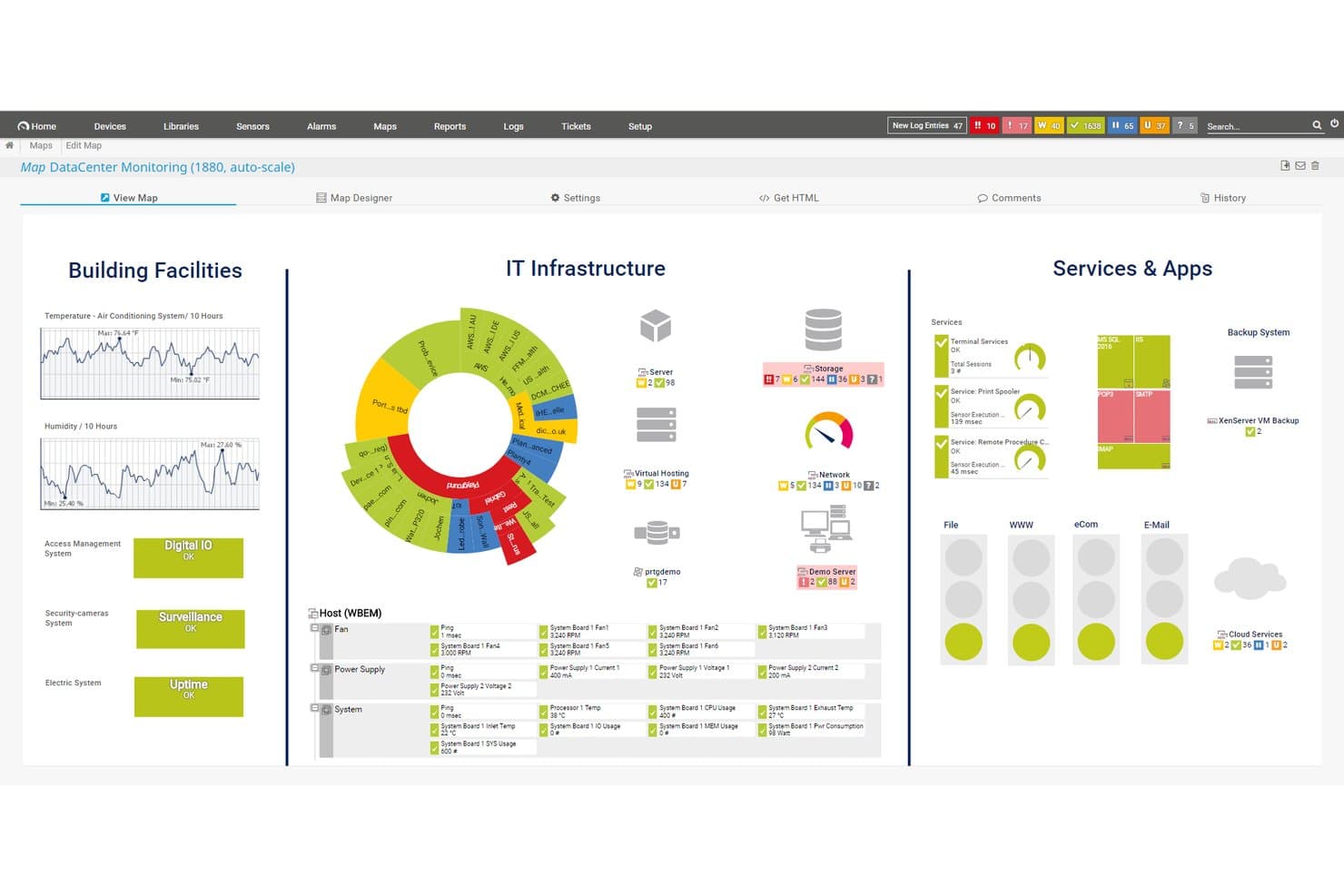
Paessler PRTG propose une carte personnalisable de surveillance du centre de données affichant installations, infrastructure IT, services et applications dans une vue unifiée du tableau de bord. Paessler PRTG est une plateforme de surveillance d'infrastructure sans agent conçue pour les administrateurs réseau et systèmes qui ont besoin d'une visibilité unifiée sur les appareils, serveurs, applications et environnements cloud sans multiplier les outils.
Pour qui Paessler PRTG est-il le mieux adapté ?
Il convient particulièrement aux organisations de taille moyenne à grande qui opèrent des infrastructures complexes sur site ou hybrides, dans des secteurs comme la fabrication, la santé et les télécommunications.
Pourquoi Paessler PRTG est une bonne alternative à ManageEngine
J'ai inclus Paessler PRTG dans ma sélection principale en raison de son architecture basée sur des capteurs, qui couvre les équipements réseau, les serveurs, les machines virtuelles, les applications et les systèmes OT comme Modbus et OPC UA à partir d'une seule console. J'apprécie particulièrement la fonction de cartographie des dépendances, qui montre comment les appareils sont liés les uns aux autres afin que mon équipe puisse identifier les causes premières sans courir après de fausses alertes. Le modèle de sonde distante distribuée nous permet également de surveiller plusieurs sites sans déployer de piles de supervision distinctes à chaque emplacement.
Fonctionnalités clés de Paessler PRTG
- Prise en charge multi-plateforme des sondes : Exécutez des sondes distribuées sur Linux, Windows, NAS ou conteneurs pour un déploiement flexible dans différents environnements.
- Concepteur de cartes personnalisables : Créez des cartes et tableaux de bord d'infrastructure en temps réel, par glisser-déposer, pour visualiser le statut et les relations.
- Journalisation des audits : Suivez les actions des utilisateurs et les événements système directement sur la plateforme pour améliorer la conformité et la surveillance de la sécurité.
- API et capteurs personnalisés : Étendez la surveillance via l'accès API HTTP et construisez des capteurs personnalisés pour des appareils, applications ou protocoles spécifiques.
Intégrations de Paessler PRTG
Paessler PRTG propose des intégrations natives avec AWS, Microsoft Azure, VMware, Siemens Industrial Edge, Cisco Meraki, HPE, Dell EMC, OPC UA et MQTT. Une API est disponible pour des intégrations personnalisées.
Pros and Cons
Pros:
- Réduit les charges de déploiement sur les points de terminaison
- Prise en charge native des protocoles OT et IoT
- L'architecture basée sur les capteurs s'adapte à tous les environnements
Cons:
- Pas de module de ticketing ou d'ITSM intégré
- La tarification selon le nombre de capteurs devient coûteuse à grande échelle
Learn more about Paessler PRTG: Idéal pour les outils de diagnostic réseau
- Essai gratuit de 14 jours
- À partir de 1,50 $/mois/appareil géré
Visit WebsiteCustomer Rating:4.9/5
Domotz prend en charge le diagnostic et la surveillance à distance pour maintenir des réseaux fiables Domotz est un logiciel de surveillance et de gestion de réseau destiné aux fournisseurs de services gérés et aux professionnels de l'informatique. Il propose des outils pour le diagnostic réseau, la surveillance à distance et le dépannage afin d’assurer la fiabilité et la performance du réseau.
Pourquoi c’est une bonne alternative à ManageEngine : Domotz fournit des outils de diagnostic réseau spécialisés qui renforcent votre capacité à surveiller et résoudre les problèmes de réseau. Avec des alertes en temps réel, vous pouvez réagir rapidement à tout souci réseau. Les fonctionnalités de surveillance à distance de la plateforme vous permettent de gérer vos réseaux de n'importe où. L’accent mis par Domotz sur le diagnostic réseau en fait une alternative efficace pour ceux recherchant des analyses réseau détaillées.
Fonctionnalités et intégrations principales :
Fonctionnalités : découverte automatique des appareils, facilitant l’identification de tous les équipements présents sur le réseau. La plateforme propose des outils de reporting avancés, offrant des analyses sur les performances du réseau et les problèmes potentiels. En outre, Domotz prend en charge la gestion multisite, permettant de superviser plusieurs réseaux depuis une seule interface.
Intégrations : Slack, Amazon Alexa, Google Assistant, Control4, Crestron, Sonos, Luxul, Ruckus, Ubiquiti et Cisco Meraki.
Pros and Cons
Pros:
- Outils de diagnostic réseau intégrés et détaillés pour une analyse en profondeur
- Notifications d’alertes en temps réel envoyées par email, SMS, Slack ou application mobile
- Prise en charge de la gestion multisite pour la scalabilité et l’efficacité
Cons:
- Nécessite des connaissances en gestion de réseau
- La configuration de l’agent virtuel peut manquer de régularité
Learn more about Domotz: Idéal pour le suivi des flux de travail en entreprise
- Démo gratuite disponible
- Tarification sur demande
Visit WebsiteCustomer Rating:4.4/5
ServiceNow simplifie les flux de travail en entreprise pour l’informatique, les RH et d’autres départements ServiceNow est une plateforme cloud conçue pour automatiser et gérer les flux de travail en entreprise à travers tous les départements. Elle aide les organisations à gérer la gestion des services informatiques, la gestion des opérations, les ressources humaines, le service client, ainsi que d'autres processus métiers depuis une plateforme centralisée.
Pourquoi c’est une bonne alternative à ManageEngine : ServiceNow est idéale pour les équipes qui ont besoin d’une supervision unifiée de nombreux processus et souhaitent tout gérer au même endroit. Son automatisation des flux de travail basée sur l’IA permet d’optimiser les opérations, tandis que ses flux de travail personnalisables et prédéfinis permettent d’adapter les processus à tous les départements. Grâce à un espace de travail partagé pour les données, les tâches et les validations, les équipes bénéficient d’une visibilité claire sur le travail, les demandes et l’avancement dans toute l’organisation.
Fonctionnalités phares & intégrations :
Fonctionnalités : moteur de flux de travail unifié qui s’adapte à l’informatique, aux RH, au service client, à la sécurité et aux opérations. Ses outils low-code/no-code permettent de créer facilement des formulaires, flux de travail et automatisations personnalisés. ServiceNow offre également des tableaux de bord et une base de données centrale pour que votre équipe puisse visualiser tâches, demandes et statuts en un seul endroit.
Intégrations : Slack, Jira, Azure DevOps, GitHub, Microsoft Teams, Splunk, GitLab, Salesforce, Microsoft Dynamics, SAP, Zendesk, Okta et Datadog.
Pros and Cons
Pros:
- Flux de travail unifiés entre départements
- Workflows personnalisés sans codage complexe
- Automatisation des processus renforcée par l’IA
Cons:
- La mise en place complexe requiert une expertise technique
- Le module de rapports manque de flexibilité
 Idéal pour le suivi d’actifs personnalisable
- Essai gratuit de 7 jours + démo gratuite disponible
- Tarification sur demande
Visit WebsiteCustomer Rating:4.2/5
Asset Panda propose un tableau de bord avec suivi du matériel, enregistrement de l’inventaire et gestion du cycle de vie. Asset Panda se distingue auprès des équipes informatiques recherchant un suivi flexible pour une large gamme de matériels, de logiciels et d'infrastructures. Si vous avez besoin d’historiques détaillés des actifs, de pistes d’audit ou de workflows personnalisés pour la gestion des actifs, cette plateforme vous offre une forte maîtrise et une totale transparence.
Pour qui Asset Panda est-il le mieux adapté ?
Les gestionnaires de parcs informatiques et les équipes de gestion des installations dans les organisations de taille moyenne à grande qui cherchent un suivi d'inventaire configurable et des capacités d'audit.
Pourquoi Asset Panda est une bonne alternative à ManageEngine
J’ai choisi Asset Panda, car la profondeur de personnalisation qu’il offre le distingue des plateformes de gestion informatique plus rigides. Vous pouvez définir des champs personnalisés, des actions et des workflows pour chaque type d'actif — ainsi, un ordinateur portable, une licence logicielle ou un équipement terrain disposent de structures de données adaptées à leur nature. Je trouve également l’historique complet des actions effectuées sur chaque actif particulièrement utile : chaque prise en charge, retour, réparation et changement de statut est consigné, ce qui rend les audits de conformité beaucoup moins fastidieux. L’application mobile avec lecture de codes-barres permet en outre à mon équipe de mettre à jour les enregistrements directement sur le terrain sans avoir à retourner à leur bureau.
Fonctionnalités clés d’Asset Panda
- Suivi de maintenance : Planifiez et suivez les tâches de maintenance préventive grâce à des notifications automatiques avant l’expiration de la garantie ou la date limite de maintenance.
- Kit d’actifs : Regroupez plusieurs actifs afin que votre équipe puisse effectuer des actions sur un ensemble d’équipements en une seule étape.
- Capture de signature : Capturez électroniquement des signatures à tout moment dans un workflow pour garantir la responsabilité lors de l’affectation ou du transfert d’un actif.
- Rôles et autorisations : Limitez l’accès des utilisateurs à certains outils, groupes, champs et rapports selon les responsabilités de chacun.
Intégrations d’Asset Panda
Asset Panda propose plus de 20 intégrations natives avec des plateformes professionnelles, informatiques et de productivité courantes. Parmi elles : Dell, ArcGIS Online, Oracle NetSuite, Hexnode, Dell Warranty, Google Calendar, Microsoft Entra ID, Microsoft Intune, Google Workspace, Zendesk, Freshservice, ServiceNow, Slack, Jira, QuickBooks, Microsoft Teams, et bien d’autres.
Pros and Cons
Pros:
- Prise en charge du suivi des actifs sur un nombre illimité de sites
- Champs personnalisés et workflows disponibles pour chaque actif
- Application mobile avec lecture de codes-barres incluse
Cons:
- Options limitées de personnalisation des rapports
- Pas de surveillance intégrée des appareils réseau
Learn more about Asset Panda: Idéal pour l'auto-guérison automatisée
- Démo gratuite disponible
- Tarification sur demande
Visit WebsiteCustomer Rating:4/5
Ivanti Neurons automatise les opérations informatiques avec des outils de gestion des incidents, des actifs et des services Ivanti Neurons est une plateforme de gestion des services informatiques conçue pour les entreprises souhaitant optimiser leurs opérations informatiques grâce à l'automatisation et à des analyses intelligentes. Elle s'adresse aux départements informatiques en proposant des outils pour la gestion des incidents, des actifs et l'automatisation des services.
Pourquoi c'est une bonne alternative à ManageEngine : Ivanti Neurons propose des capacités proactives d'auto-guérison qui permettent à votre équipe de résoudre automatiquement les problèmes avant qu'ils n'affectent les utilisateurs. Ses fonctionnalités d'automatisation réduisent les tâches manuelles répétitives, permettant à votre équipe de se concentrer sur des initiatives stratégiques. Les analyses intelligentes de la plateforme fournissent des données précieuses pour améliorer la prise de décision et optimiser la performance informatique. Avec ses outils de gestion des actifs, vous pouvez suivre et gérer efficacement les actifs informatiques tout au long de leur cycle de vie.
Fonctionnalités et intégrations phares :
Fonctionnalités comprennent un système complet de gestion des incidents qui vous aide à résoudre rapidement les problèmes informatiques. La plateforme propose également des outils de reporting avancés, offrant des analyses sur la performance des services informatiques et les axes d'amélioration. De plus, les capacités de gestion des changements d'Ivanti Neurons vous permettent de planifier et mettre en œuvre des évolutions avec un minimum de perturbations.
Intégrations incluent Microsoft 365, ServiceNow, Salesforce, Google Workspace, Slack, VMware, Cisco, et Amazon Web Services.
Pros and Cons
Pros:
- Capacités proactives d'auto-guérison
- Outils de gestion des actifs informatiques et des logiciels
- L'hyper-automatisation réduit l'intervention humaine sur les tâches informatiques routinières
Cons:
- Configuration automatisée complexe
- De grands volumes de données peuvent entraîner des temps de chargement plus longs
Learn more about Ivanti Neurons: Idéal pour l’intégration à l’écosystème Microsoft
- Essai gratuit de 30 jours disponible
- À partir de $4/utilisateur/mois (facturation annuelle)

Microsoft Intune propose un tableau de bord avec des informations sur la conformité, l'enrôlement et l'analyse des appareils. Microsoft Intune vous offre un contrôle centralisé de la configuration des appareils, de la gestion des applications et de la sécurité des terminaux depuis le cloud. Les équipes informatiques qui gèrent des environnements Windows, des appareils mobiles ou BYOD l'utilisent souvent pour appliquer la conformité, déployer des mises à jour et sécuriser les collaborateurs à distance.
Pour qui Microsoft Intune est-il le mieux adapté ?
Départements informatiques qui gèrent des appareils Windows et des terminaux mobiles au sein d'organisations en croissance ou réparties.
Pourquoi Microsoft Intune est une bonne alternative à ManageEngine
J'ai choisi Microsoft Intune car il s’intègre naturellement aux environnements déjà basés sur l’infrastructure Microsoft. L’intégration de l’accès conditionnel avec Microsoft Entra ID est selon moi la plus pratique : l’état de conformité de l’appareil influence directement les décisions d’accès, donc un terminal non conforme est bloqué de façon automatique sans aucune intervention manuelle. J’utilise aussi Windows Autopilot pour le déploiement sans intervention, ce qui élimine le besoin de configurer les machines manuellement avant la mise en service. Pour les équipes qui gèrent à la fois BYOD et appareils d’entreprise, la séparation entre les politiques MDM et MAM permet de protéger les données professionnelles dans Outlook ou Microsoft Teams sans toucher au contenu personnel des employés.
Fonctionnalités clés de Microsoft Intune
- Analytique des terminaux : Surveillez la santé des appareils, les temps de démarrage et la fiabilité des applications sur l’ensemble de votre parc grâce à des données en temps réel.
- Déploiement et gestion des applications : Déployez, mettez à jour et supprimez des applications sur les appareils gérés sans accès physique requis.
- Gestion des privilèges sur les terminaux : Contrôlez quels utilisateurs peuvent exécuter certaines tâches avec des privilèges élevés sur les appareils Windows, sans octroyer des droits d’administration locaux complets.
- Application de configurations de sécurité de référence : Appliquez des politiques de sécurité prédéfinies selon les recommandations Microsoft pour Windows et d’autres plateformes gérées.
Intégrations de Microsoft Intune
Microsoft Intune propose des intégrations natives avec l’ensemble de l’écosystème Microsoft, y compris Microsoft 365 et Azure. Une API est disponible pour des intégrations personnalisées. Vous pouvez également le connecter à des sources de données comme Microsoft Access, SharePoint, SQL Server, Exchange Server et Microsoft Entra ID.
Pros and Cons
Pros:
- Politiques de conformité prêtes à l’emploi pour Microsoft 365
- Mise à jour automatisée des appareils Windows
- Intégration poussée avec Azure Active Directory
Cons:
- Prise en charge limitée pour les systèmes d’exploitation non-Microsoft
- Peu d’options de personnalisation des rapports
Learn more about Microsoft Intune: Idéal pour la gestion des services informatiques pilotée par l’IA
- Essai gratuit + démo gratuite disponible
- Tarification sur demande

BMC Helix aide les entreprises à automatiser et améliorer leurs opérations de services IT BMC Helix est une plateforme cloud de gestion des services informatiques conçue pour les entreprises souhaitant automatiser et renforcer leurs opérations IT. Elle s'adresse aux services informatiques en offrant des outils pour la gestion des services, la gestion des opérations et l'automatisation.
Pourquoi c'est une bonne alternative à ManageEngine : BMC Helix exploite l'IA pour offrir une gestion prédictive des services, aidant votre équipe à anticiper et traiter les problèmes avant qu'ils n'affectent les opérations. Ses capacités d'automatisation réduisent le besoin d'interventions manuelles, permettant à votre équipe de se concentrer sur des tâches stratégiques. Les outils de gestion des incidents de la plateforme assurent une résolution rapide des problèmes IT, minimisant les temps d'arrêt. Des tableaux de bord intuitifs offrent une vue d'ensemble des environnements informatiques pour éclairer la prise de décision.
Fonctionnalités et intégrations phares :
Fonctionnalités incluent un module de gestion des changements qui vous aide à planifier et suivre efficacement les modifications. La plateforme propose également des analyses avancées, fournissant des informations sur la performance des services et les axes d'amélioration. En outre, le portail libre-service de BMC Helix permet aux utilisateurs de résoudre eux-mêmes les problèmes courants, réduisant ainsi la charge de travail de votre équipe IT.
Intégrations incluent Microsoft Azure, Amazon Web Services, Salesforce, ServiceNow, Google Cloud, Cisco, Splunk, IBM, Oracle et VMware.
Pros and Cons
Pros:
- La gestion des services IT pilotée par l’IA automatise la détection des incidents, leur résolution et propose des recommandations intelligentes
- Création automatisée des tickets pour la surveillance d’alertes en temps réel
- L’IA intégrée et l'apprentissage automatique offrent des analyses opérationnelles approfondies
Cons:
- Des ralentissements de performances sur de grands ensembles de données
- Les mises à jour du module d'actifs peuvent être lentes
Learn more about BMC Helix: Idéal pour l’ITSM et la collaboration d’équipe
- Essai gratuit de 14 jours + offre gratuite + démo gratuite disponible
- À partir de $20/agent/mois

Jira Service Management propose un tableau de bord avec des analyses sur les incidents et des informations sur l’équipe. Jira Service Management aide les équipes informatiques à gérer les demandes de service, les incidents et les processus de changement sur une plateforme collaborative unique. C’est un choix pratique pour les organisations qui ont besoin de workflows personnalisables et d’une forte intégration avec les outils de développement.
Pour qui Jira Service Management est-il le mieux adapté ?
Les équipes d’exploitation informatique et les centres de support qui gèrent les incidents, les changements et les demandes dans des environnements d’entreprise dynamiques et collaboratifs.
Pourquoi Jira Service Management constitue une bonne alternative à ManageEngine
J’ai choisi Jira Service Management parce que le lien qu’il établit entre les opérations informatiques et les équipes de développement est difficile à reproduire ailleurs. Lorsqu’un incident survient, mon équipe peut faire appel directement à des ingénieurs issus de projets Jira Software liés, ce qui permet de garder le contexte au même endroit sans avoir à changer de système. Je m’appuie également sur ses workflows de gestion des changements, qui affichent les données de déploiement des pipelines CI/CD connectés afin que nous puissions évaluer les risques avant d’approuver des modifications. Ce cycle de retour d’information entre le développement et les opérations est ce qui fait ressortir Jira Service Management comme alternative à ManageEngine pour les équipes déjà en environnement agile.
- Gestion des actifs : Suivez les actifs matériels et logiciels, y compris la propriété, l’état du cycle de vie et l’inventaire, directement depuis la plateforme.
- Gestion des problèmes : Regroupez les incidents liés en problèmes, réalisez des analyses de causes racines et documentez des solutions de contournement pour réduire la répétition des perturbations.
- Gestion des connaissances : Créez et affichez des articles de connaissances pour favoriser l’autonomie des utilisateurs et réduire le volume des demandes entrantes.
- Gestion de la configuration : Cartographiez les dépendances des services et les relations d’infrastructure afin de comprendre l’impact d’un changement avant qu’il ne survienne.
Intégrations Jira Service Management
Jira Service Management propose des intégrations natives avec Jira Software, Confluence, Slack, Microsoft 365, Opsgenie, Trello, GitHub, Bitbucket, AWS, Azure et Google Cloud Platform. Une API est également disponible pour des intégrations personnalisées.
Pros and Cons
Pros:
- Escalade facile vers les équipes de développement de logiciels
- Workflows robustes de gestion des incidents et des changements
- Portails de demandes de service personnalisables
Cons:
- La configuration initiale des workflows peut être complexe
- Les fonctionnalités de suivi des actifs sont moins avancées que celles des concurrents
Learn more about Jira Service Management: Idéal pour la gestion des applications SaaS
- Démo gratuite disponible
- Tarification sur demande

Zluri aide les équipes informatiques à suivre, gérer et optimiser les applications SaaS pour plus d’efficacité Zluri est une plateforme de gestion SaaS conçue pour les équipes informatiques et les organisations qui ont besoin de gérer et d’optimiser leurs applications logicielles. Elle fournit des outils pour la découverte d’applications, le suivi d’utilisation et l’optimisation des coûts afin d’améliorer l’efficacité des logiciels.
Pourquoi c’est une bonne alternative à ManageEngine : Zluri excelle dans la gestion des applications SaaS, offrant des fonctionnalités qui vous aident à découvrir et suivre l’utilisation des logiciels au sein de votre organisation. Ses outils d’optimisation des coûts vous permettent d’identifier les dépenses inutiles et de réajuster votre budget logiciel. La gestion de la conformité de la plateforme garantit que toutes vos applications respectent les normes du secteur. Grâce à des analyses détaillées de l’utilisation, vous pouvez prendre des décisions éclairées concernant vos investissements logiciels.
Fonctionnalités et intégrations remarquables :
Fonctionnalités comprennent la découverte automatique d’applications, qui vous aide à identifier tous les outils SaaS utilisés dans votre organisation. La plateforme propose aussi des analyses de dépenses, fournissant des informations sur vos coûts logiciels et les économies potentielles. De plus, la surveillance de la conformité par Zluri assure que vos applications respectent les exigences réglementaires.
Intégrations incluent Microsoft 365, Google Workspace, Salesforce, Slack, Zoom, Atlassian, Dropbox, GitHub, Okta et Zendesk.
Pros and Cons
Pros:
- Gestion robuste des applications SaaS couvrant l’ensemble du cycle de vie
- Analyses détaillées de l’utilisation sur l’activité des utilisateurs en temps réel
- Les outils d’optimisation des coûts permettent de réduire significativement les dépenses logicielles
Cons:
- Les rapports d’export sont moins avancés
- La personnalisation du tableau de bord n’est pas aussi poussée que d’autres outils
Learn more about Zluri: 10Idéal pour une configuration d'accès à distance simple
Atera
- Essai gratuit de 30 jours + démo gratuite disponible
- À partir de 129$/technicien/mois (facturé annuellement)
Visit WebsiteCustomer Rating:4.6/5
Atera permet aux équipes IT de gérer les appareils, de surveiller les réseaux et d'automatiser les tâches d'assistance Atera est une plateforme tout-en-un de gestion et de support informatique conçue pour les équipes IT et les fournisseurs de services managés (MSP). Elle vous aide à gérer les appareils, surveiller les réseaux, traiter les tickets de support et automatiser les tâches informatiques depuis un tableau de bord unifié.
Pourquoi c'est une bonne alternative à ManageEngine : Atera est une alternative solide si vous souhaitez une gestion IT unifiée avec un accès à distance simplifié. Elle regroupe la surveillance, l'assistance et la maintenance sur une seule plateforme, permettant à votre équipe d'accéder aux appareils à distance, de déployer des logiciels et des correctifs depuis n'importe où, et d'automatiser les tâches récurrentes. Vous pouvez suivre l'état des appareils, recevoir des alertes de santé système et gérer les tickets de support sans passer d'un outil à l'autre. L'approche tout-en-un d'Atera en fait une option idéale pour les équipes qui privilégient une gestion IT centralisée et un contrôle à distance facile.
Fonctionnalités et intégrations remarquables :
Fonctionnalités : surveillance en temps réel des appareils et serveurs avec alertes automatisées, accès à distance, contrôle sans surveillance pour un dépannage rapide, et déploiement automatique de logiciels avec gestion des correctifs pour plusieurs systèmes d'exploitation. Elle propose également un système intégré de ticketing et d'assistance pour traiter les incidents, suivre les demandes et gérer les flux de travail informatiques.
Intégrations : Splashtop, IT-Glue, Domotz, Bitdefender, Acronis, Keeper et Zapier.
Pros and Cons
Pros:
- Les utilisateurs de toutes les formules peuvent gérer un nombre illimité d'appareils
- Fonctionnalité d'accès à distance intégrée pour un dépannage et une maintenance efficaces
- Correctifs et installations automatisés sur Windows, macOS et Linux
Cons:
- Personnalisation des rapports limitée
- Pas de surveillance réseau avancée
Autres alternatives à ManageEngine
Voici quelques alternatives supplémentaires à ManageEngine qui n’ont pas été retenues dans ma sélection, mais qui méritent tout de même votre attention :
- 11ConnectWiseIdéal pour les outils d'automatisation informatique
- 12SyncroIdéal pour l'intégration de la facturation MSP
- 13TaniumMeilleure visibilité en temps réel des points de terminaison à l'échelle de l'entreprise
- 14LogMeIn ResolveIdéal pour les capacités de support à distance
Comment j'évalue les alternatives à ManageEngine
Je divise mon évaluation en deux niveaux : les capacités de base qu’un outil doit impérativement proposer — ITSM, supervision, gestion des terminaux — et les éléments différenciateurs qui distinguent les meilleures options.
Fonctionnalités de base (Critères indispensables pour cette liste)
Lorsque je sélectionne les outils de ma liste, j’attribue à chacun une note de 0 (fonctionnalité absente) à 5 (excellence dans ce domaine) pour chaque fonctionnalité de base ci-dessous. Ensuite, je calcule le score total de l’outil en pourcentage. Il faut qu’un outil atteigne un score total minimum de 75 % pour être pris en compte.
- Gestion des services informatiques : Je recherche une gestion des tickets, incidents, problèmes et changements alignée ITIL — c’est-à-dire les workflows sur lesquels une équipe de support s’appuie au quotidien pour suivre les interruptions et les escalades.
- Gestion des terminaux et des actifs : Ici, la découverte automatisée, l’inventaire et la gestion des correctifs sont primordiaux. Je vérifie si l’outil peut détecter de nouveaux appareils sur le réseau et déployer des correctifs sans intervention manuelle.
- Supervision réseau et infrastructure : J’évalue les alertes en temps réel et les tableaux de bord de performance pour les serveurs, commutateurs et applications — et, plus particulièrement, la rapidité de la plateforme à faire remonter les services dégradés.
- Assistance et contrôle à distance : Que vos techniciens aient besoin de dépanner l’ordinateur portable d’un utilisateur ou de gérer un serveur sans surveillance, j’étudie la qualité des sessions, le transfert de fichiers et la couverture multiplateforme.
- Automatisation et orchestration de workflows : J’évalue si la plateforme permet de construire des automatisations basées sur des règles — par exemple, l’attribution automatique de tickets par catégorie ou la planification de tâches de maintenance récurrentes sur l’ensemble des terminaux.
- Rapports et intégrations : Les connecteurs préintégrés vers des outils comme Active Directory, Jira, Slack et les plateformes cloud comptent. Je vérifie aussi la présence de tableaux de bord personnalisés et l’accès aux API pour extraire des données vers des systèmes externes.
Une fois la liste d’outils répondant à ces critères établie, j’analyse les éléments qui différencient chaque plateforme.
Facteurs différenciateurs (Ce qui distingue les éditeurs)
Voici comment je compare et distingue les différents éditeurs :
Fonctionnalités remarquables
L’architecture multi-locataires est un différenciateur important — surtout pour les MSP qui gèrent des dizaines d’environnements clients depuis une seule console. J’évalue aussi la présence de fonctions IA, comme l’alerte prédictive ou la classification automatique des tickets, qui peuvent réduire considérablement le temps de tri. Un portail en libre-service bien conçu est aussi essentiel. Si les utilisateurs finaux peuvent consulter une base de connaissances ou soumettre des demandes via un catalogue de services, l’équipe support traite beaucoup moins de tickets répétitifs.
Au-delà des fonctionnalités
La flexibilité du déploiement est l’un des premiers aspects que je vérifie. Certaines équipes ont besoin d’un hébergement sur site pour la souveraineté des données, d’autres souhaitent du SaaS pur — des outils comme NinjaOne et Freshservice adoptent ici des approches différentes. La tarification et les modèles de licence varient fortement aussi. J’étudie si un éditeur facture par technicien, par terminal ou par module, car une plateforme qui impose un pack tout compris peut vite faire grimper les coûts. Enfin, les certifications de conformité telles que SOC 2 ou ISO 27001 font partie de mon évaluation, car elles témoignent du sérieux de l’éditeur concernant la sécurité.
Pourquoi chercher une alternative à ManageEngine ?
Bien que ManageEngine soit une plateforme de gestion informatique reconnue, certaines équipes se tournent vers des alternatives lorsque leurs exigences dépassent les fonctionnalités ou le modèle de prestation actuels. Vous envisagez peut-être une alternative à ManageEngine si :
- Vous avez besoin d'une meilleure évolutivité pour accompagner le développement de votre environnement informatique
- La facilité d'utilisation est une priorité pour les administrateurs informatiques comme pour les utilisateurs finaux
- Votre organisation a besoin de fonctionnalités plus avancées de gestion des appareils mobiles ou de gestion à distance des appareils
- Vous devez respecter des exigences spécifiques en matière de cybersécurité, de conformité ou de SLA
- Vous souhaitez disposer d'outils spécifiques à votre secteur plutôt que d'une approche ITSM généraliste
- Votre équipe a besoin d'un modèle tarifaire plus flexible ou de moins de modules complémentaires
Si ces difficultés vous semblent familières, des outils ITSM, RMM ou de gestion des terminaux alternatifs peuvent mieux répondre à vos besoins en matière de prestation de services.
Fonctionnalités
Voici quelques-unes des principales fonctionnalités de ManageEngine, pour vous aider à comparer les offres des solutions alternatives :
- Gestion des terminaux : gère et sécurise les terminaux sur plusieurs systèmes d’exploitation, en prenant en charge les environnements sur site et hybrides.
- Gestion des correctifs : automatise le déploiement et la remédiation des correctifs afin de réduire les vulnérabilités sur les serveurs, les ordinateurs de bureau et les appareils distants.
- Gestion des identités et des accès : contrôle les accès et les autorisations des utilisateurs, aidant les organisations à satisfaire leurs exigences en matière de sécurité et de conformité.
- Gestion des actifs informatiques : suit les actifs matériels et logiciels tout au long de leur cycle de vie, en prenant en charge la gestion des configurations et le contrôle des coûts.
- Gestion des informations et des événements de sécurité (SIEM) : surveille les événements de sécurité et les signaux de conformité afin d’aider les équipes à réagir plus rapidement aux menaces potentielles.
- Surveillance des performances : offre une visibilité sur l’état des systèmes et les performances des services, aidant les équipes informatiques à respecter les attentes en matière de SLA.
- Protection des données : contribue à protéger les données sensibles grâce à des outils de détection des menaces, de prévention des logiciels malveillants et d’application des politiques.
- Gestion des coûts du cloud : utilise des analyses basées sur l’IA pour surveiller et optimiser les dépenses liées au cloud dans plusieurs environnements.
- Contrôle des applications : gère les accès et les privilèges liés aux applications afin de réduire les risques et d’améliorer la sécurité des terminaux.
- Accès à distance : permet aux équipes informatiques de dépanner et de gérer les systèmes à distance, en prenant en charge les équipes distribuées et les effectifs travaillant à distance.