

Las mejores herramientas de gestión de listas de pendientes reseñadas para 2026

Las mejores herramientas de gestión de listas de tareas pendientes: selección


Con tantas herramientas diferentes de gestión de listas de tareas pendientes disponibles, es difícil determinar cuál es la adecuada para ti. Sabes que tus proyectos de desarrollo de productos se vuelven complejos de gestionar, pero necesitas averiguar qué herramienta es la mejor para ayudarte. ¡Yo puedo ayudarte! En esta publicación facilitaré tu elección al compartir mis experiencias personales utilizando docenas de herramientas diferentes de gestión de listas de tareas pendientes con equipos y proyectos grandes, junto con mis selecciones de las mejores herramientas de gestión de listas de tareas pendientes.
Con funciones como mensajería fácil de usar, notificaciones oportunas e incluso un plan gratuito que admite usuarios ilimitados, navegar por las listas de tareas pendientes de productos y de sprints se vuelve intuitivo. Si eres un equipo ágil que busca simplificar las iteraciones, los permisos y las métricas de colaboración, estas herramientas ofrecen la solución.
Por qué confiar en nuestras recomendaciones de software
Nuestro equipo lleva probando y evaluando software desde 2012. Como líderes tecnológicos, sabemos lo difícil —y lo importante— que es elegir el software adecuado.
Para esta guía, evaluamos las herramientas mediante pruebas prácticas e investigación independiente, puntuando las herramientas según nuestros criterios de selección.
Nuestras reseñas reflejan nuestro criterio editorial humano, no un discurso de ventas.
Revisores expertos:
Resumen de las mejores herramientas de gestión de listas de tareas pendientes
| Tool | Best For | Trial Info | Price | ||
|---|---|---|---|---|---|
| 1 | Ideal para listas de tareas anidadas infinitas | Prueba gratuita de 30 días + plan gratuito disponible | Desde $7.65/miembro/mes (facturado anualmente) | Website | |
| 2 | La mejor para soluciones de gestión de proyectos todo en uno | Plan gratuito + demo gratis disponible | Desde $5/usuario/mes | Website | |
| 3 | Ideal para gestionar proyectos, tareas y errores en un solo lugar | Plan gratuito + prueba gratuita de 30 días disponible | Desde $35/mes para hasta 30 usuarios | Website | |
| 4 | Mejor para la gestión de productos y la visualización de la hoja de ruta | Prueba gratuita de 14 días + plan gratuito + demo gratis disponible | Desde $20/usuario/mes (facturación anual) | Website | |
| 5 | Ideal para la colaboración documental integrada | Prueba gratuita de 7 días + plan gratuito disponible | Desde $5/usuario/mes (mínimo 5 plazas) | Website | |
| 6 | Ideal para la gestión ágil de proyectos con tableros visuales | Prueba gratuita de 30 días | Desde $5/usuario/mes (mínimo 5 usuarios) | Website | |
| 7 | Ideal para la gestión de proyectos de código abierto | Plan gratuito para siempre disponible | Gratis (código abierto) | Website | |
| 8 | Ideal para la organización de tareas sencilla y basada en tarjetas | Plan gratuito disponible | Desde $10/usuario/mes (facturado anualmente) | Website | |
| 9 | Ideal para proyectos ágiles a gran escala | Not available | Precio a consultar | Website | |
| 10 | La mejor para la gestión detallada de proyectos de software | Plan gratuito disponible | Desde $7/usuario/mes | Website |
Reseñas de las mejores herramientas de gestión de listas de tareas pendientes

Quire
Ideal para listas de tareas anidadas infinitas
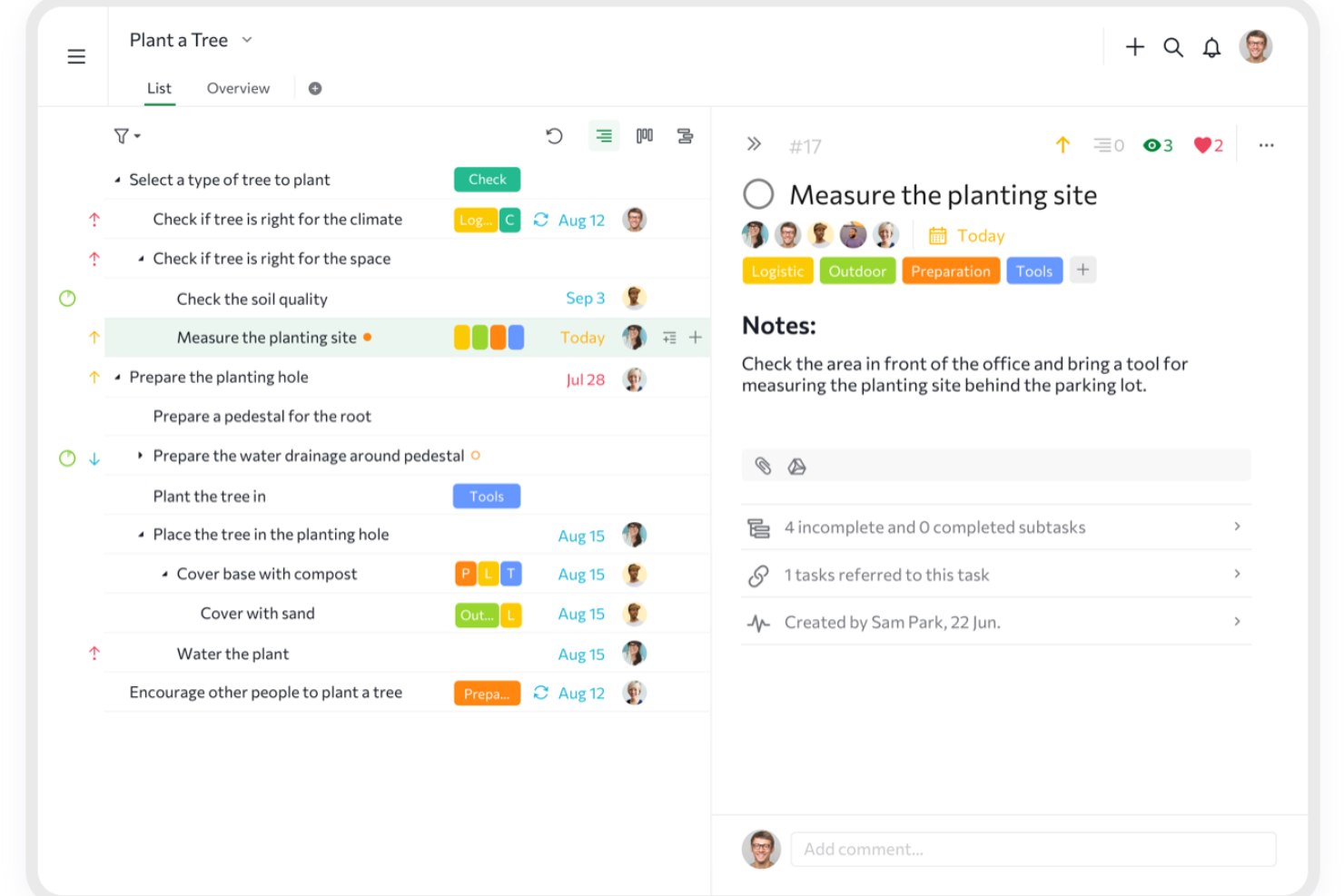
Quire es una herramienta colaborativa de gestión de tareas y proyectos diseñada para ayudar a los equipos a organizar ideas, planificar proyectos y hacer seguimiento del trabajo de principio a fin.
Por qué elegí Quire:
La vista de lista infinita y anidada de Quire es una característica especialmente destacada para la gestión de pendientes (backlog). Permite crear una jerarquía de tareas y subtareas, lo que facilita organizar y priorizar los elementos de tu backlog. Esta estructura te ayuda a descomponer grandes proyectos en pasos más pequeños y accionables, asegurando que nada se quede en el tintero. Además, el tablero Kanban de Quire se integra con la vista de lista anidada. Esta combinación te permite visualizar los elementos de tu backlog a medida que avanzan por las distintas etapas de desarrollo.
Características destacadas e integraciones:
Otras funciones incluyen la posibilidad de crear sublistas personalizadas a partir de tu lista principal de tareas, ayudándote a centrarte en tareas o prioridades específicas. Quire también ofrece una función de cronograma que te permite visualizar el recorrido de tu proyecto, cumplir plazos y alcanzar hitos. Algunas integraciones incluyen Google Calendar, Gmail, Slack, Outlook, Zoho Flow, GitHub, sincronización con Apple Calendar, Box, Dropbox, Google Drive y Microsoft Teams.
Pros and Cons
Pros:
- Fácil colaboración con los miembros del equipo
- Múltiples vistas de proyecto, incluyendo listas, tableros y cronogramas
- Posibilidad de crear tareas y subtareas anidadas para desglosar proyectos en detalle
Cons:
- La versión móvil carece de algunas funciones que están disponibles en el escritorio
- Posible exceso de notificaciones, especialmente al trabajar con equipos grandes
New Product Updates from Quire

Quire Adds Task and Standalone Reminders
Quire adds task reminders and standalone reminders with shared notifications, recurring schedules, and automatic date tracking. These updates help teams stay ahead of deadlines and manage reminders that do not need a task. For more information, visit Quire’s official site.
 .
.
ClickUp
La mejor para soluciones de gestión de proyectos todo en uno
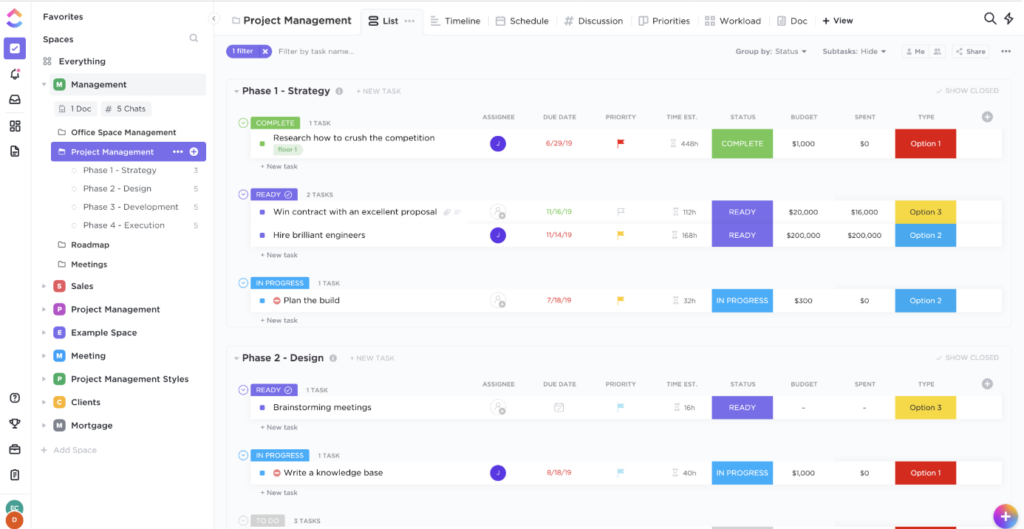
En el extenso ámbito de la gestión de proyectos, ClickUp se destaca como una herramienta integral, que ofrece una suite de funciones para una amplia gama de necesidades. Está diseñada para abarcar todos los aspectos de la gestión de proyectos, lo cual respalda su posición como la opción preferida para equipos que buscan una solución todo en uno.
Por qué elegí ClickUp:
Al navegar entre una infinidad de herramientas de gestión de proyectos, elegí ClickUp principalmente por su enfoque integral. Al comparar la amplitud de sus funciones y su adaptabilidad con otras plataformas, ClickUp se diferenció claramente. Opino que ClickUp es la mejor opción para equipos que desean una herramienta de gestión de proyectos completa sin tener que alternar entre varias plataformas.
Funciones destacadas e integraciones:
ClickUp sobresale por sus vistas personalizables que van desde listas, tableros hasta calendarios. Sus capacidades de seguimiento de objetivos y mapas mentales mejoran aún más el proceso de planeación de proyectos. Las integraciones son amplias, ya que ClickUp se conecta fácilmente con herramientas como Slack, GitHub y Google Drive.
Pros and Cons
Pros:
- Un conjunto completo de funciones para diversas necesidades
- Vistas personalizables para una gestión personalizada
- Opciones de integración extensas
Cons:
- Puede resultar abrumador para nuevos usuarios
- La experiencia en la app móvil puede mejorar
- Algunas funciones avanzadas están tras muros de pago

Backlog
Ideal para gestionar proyectos, tareas y errores en un solo lugar
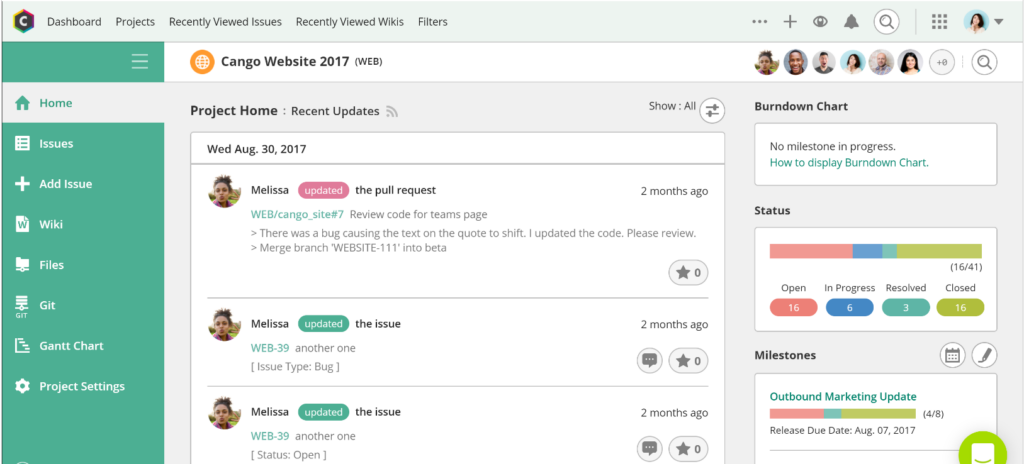
Backlog se presenta como una plataforma centralizada que entrelaza la gestión de proyectos, el seguimiento de tareas y la resolución de errores. Consolida adecuadamente estas funcionalidades, lo que lo hace invaluable para los equipos que buscan una solución integrada para sus diversos desafíos operativos.
Por qué elegí Backlog:
En mi búsqueda de herramientas que ofrezcan una experiencia cohesiva, Backlog fue una opción destacada. Lo elegí tras evaluar su capacidad para unir diferentes necesidades operativas en una sola plataforma. Dadas sus funciones integradas, considero que Backlog es ideal para equipos interesados en monitorear proyectos, tareas y errores desde un solo lugar.
Características destacadas e integraciones:
Backlog destaca por su sistema integrado de seguimiento de errores, que garantiza una rápida identificación y resolución de los problemas. Además, facilita líneas de tiempo visuales para los proyectos y ofrece amplias prestaciones colaborativas como wikis compartidas. Las principales integraciones incluyen Slack, Typetalk y Jenkins para mejorar la fluidez operativa.
Pros and Cons
Pros:
- Panel completo con vistas de proyectos, tareas y errores
- Sistema de wiki integrado para compartir el conocimiento del equipo
- Funcionalidades visuales de diagrama de Gantt y gráfico de burndown
Cons:
- La interfaz puede ser menos intuitiva para los nuevos usuarios
- Opciones de personalización limitadas en comparación con la competencia
- La experiencia móvil podría mejorar

Mejor para la gestión de productos y la visualización de la hoja de ruta
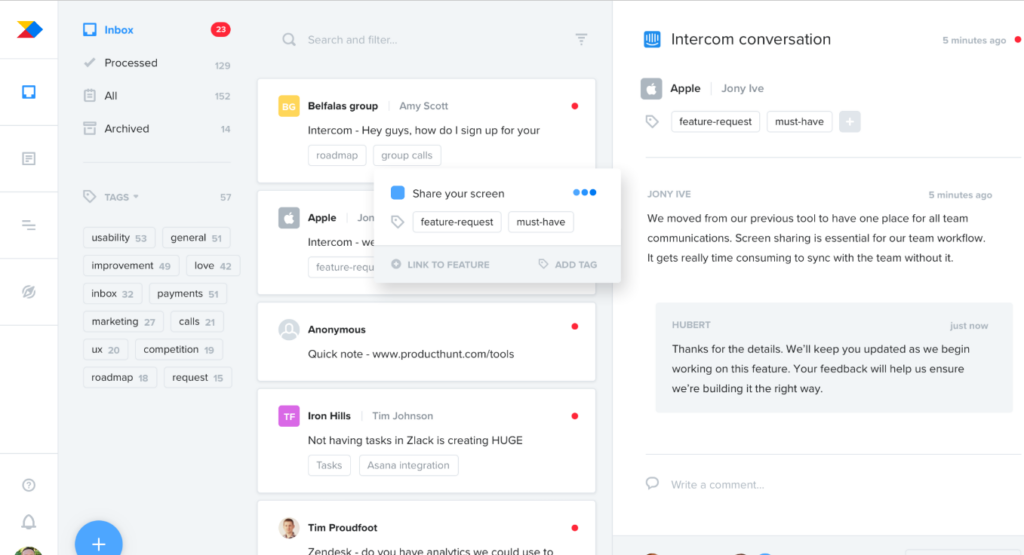
Cada equipo de producto eficaz necesita un proceso optimizado para visualizar y gestionar su hoja de ruta. ProductBoard cumple con esto, ofreciendo una plataforma donde la gestión de productos se combina perfectamente con las herramientas de visualización. Su destreza para mostrar las fases de gestión de productos, junto con la visualización de la hoja de ruta, lo distingue para quienes desean ver el panorama completo.
Por qué elegí ProductBoard:
Al examinar numerosas plataformas, elegí ProductBoard porque logró un equilibrio entre la gestión de productos y la claridad de la hoja de ruta. Al comparar su interfaz y capacidades con otras, destacó por su enfoque único centrado en el producto. Mi valoración de ProductBoard se basa en su capacidad de cohesionar la gestión de productos y la visualización de la hoja de ruta, asegurando así que sea la mejor opción para los equipos de producto que requieren esa sinergia.
Características destacadas e integraciones:
ProductBoard sobresale con sus herramientas para priorizar funcionalidades, permitiendo a los equipos evaluar y decidir sobre los cambios más impactantes. Su portal para la retroalimentación de usuarios garantiza que los productos estén siempre alineados con las necesidades de los clientes. En cuanto a integraciones, se conecta con herramientas como Jira, Trello y Slack, facilitando el flujo de datos y permitiendo acciones concretas.
Pros and Cons
Pros:
- Visualización clara de la hoja de ruta del producto
- Herramientas efectivas para priorizar funcionalidades
- Portal directo para recopilar comentarios de usuarios
Cons:
- Puede ser excesivo para equipos muy pequeños
- Requiere curva de aprendizaje para su aprovechamiento total
- La facturación anual puede desalentar a algunos usuarios

Ideal para la colaboración documental integrada
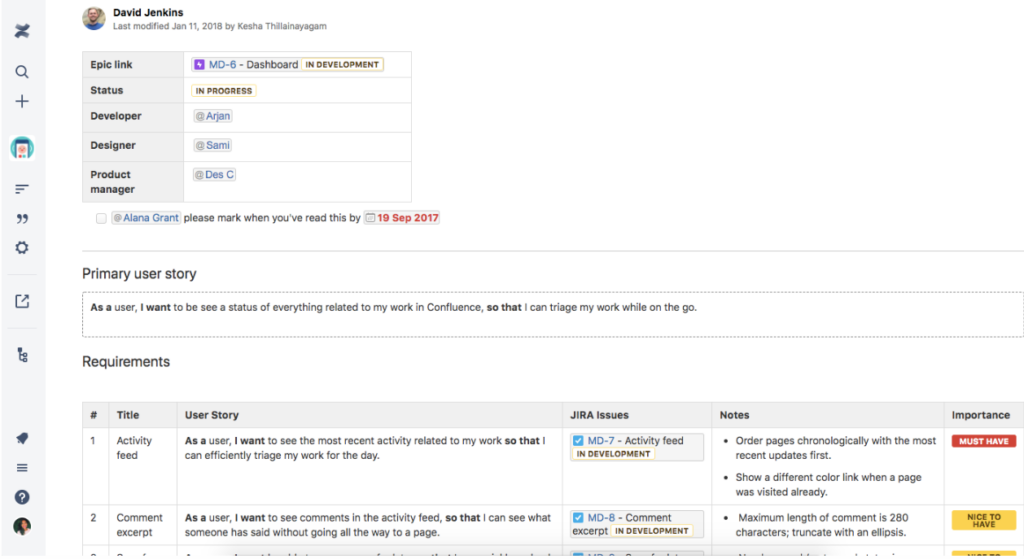
En el corazón de cada equipo eficiente se encuentra un sistema sólido de documentación. Confluence sobresale como una plataforma dedicada a esto, ayudando a los equipos a documentar, colaborar y compartir el trabajo. Su principal fortaleza radica en la colaboración integrada en documentos, lo que la convierte en una opción ideal para equipos que priorizan la gestión documental estructurada y colaborativa.
Por qué elegí Confluence:
En el vasto mar de herramientas colaborativas, seleccioné Confluence por su enfoque distintivo en la documentación. Tras comparar y evaluar múltiples plataformas, Confluence destacó notablemente debido a su énfasis en crear un entorno integrado de documentación. Este enfoque central, respaldado por opiniones de usuarios y sus amplias funcionalidades, consolidó firmemente mi opinión de que es realmente la mejor para equipos que buscan un centro colaborativo de documentación.
Características e integraciones destacadas:
Confluence sobresale ofreciendo plantillas personalizables, asegurando que los equipos puedan mantener estándares de documentación consistentes. La función de edición en tiempo real es otro punto relevante, permitiendo que varios miembros del equipo trabajen de forma cohesionada en un documento. En cuanto a integraciones, se sincroniza bien con el ecosistema de Atlassian, incluyendo Jira, Trello y Bitbucket. Además, su extenso marketplace garantiza que los equipos dispongan de una gran variedad de complementos para personalizar su espacio de trabajo.
Pros and Cons
Pros:
- Plantillas personalizables para documentación estandarizada
- La edición en tiempo real facilita la colaboración simultánea
- Gran variedad de complementos en el marketplace
Cons:
- Puede resultar abrumador para equipos pequeños o usuarios individuales
- La configuración inicial puede requerir cierto aprendizaje
- El costo se vuelve un factor a considerar para equipos muy grandes

Yodiz
Ideal para la gestión ágil de proyectos con tableros visuales

Para los equipos acostumbrados a las metodologías ágiles, los tableros visuales se convierten en un recurso indispensable. Yodiz se presenta como una potente solución para la gestión ágil de proyectos utilizando tableros vívidos e intuitivos. Con su énfasis en las representaciones visuales de los procesos ágiles, Yodiz resuena con aquellos equipos que prefieren un toque gráfico en sus flujos de trabajo.
Por qué elegí Yodiz:
Al explorar el panorama de herramientas de gestión ágil, Yodiz llamó mi atención por sus destacadas capacidades visuales. Determiné que sus tableros visuales no solo son atractivos, sino también superiores en funcionalidad, simplificando procesos ágiles complejos. Esta combinación solidificó mi opinión de que Yodiz es ideal para equipos que buscan una experiencia de gestión ágil con un alto componente visual.
Características destacadas e integraciones:
Yodiz ofrece un tablero scrum escalable, adaptándose a equipos de diversos tamaños y niveles de complejidad. Sus funcionalidades para la gestión de épicas y releases son notables, brindando una visión amplia de los proyectos. En cuanto a integraciones, Yodiz permite la conexión con plataformas populares como Slack, GitHub y Jenkins, aumentando su versatilidad operativa.
Pros and Cons
Pros:
- Tableros visuales escalables e intuitivos
- Gestión integral de épicas y releases
- Amplia gama de integraciones con terceros
Cons:
- La interfaz puede resultar densa en ocasiones
- La personalización tiene ciertos límites
- La configuración inicial requiere tiempo y paciencia

Redmine
Ideal para la gestión de proyectos de código abierto
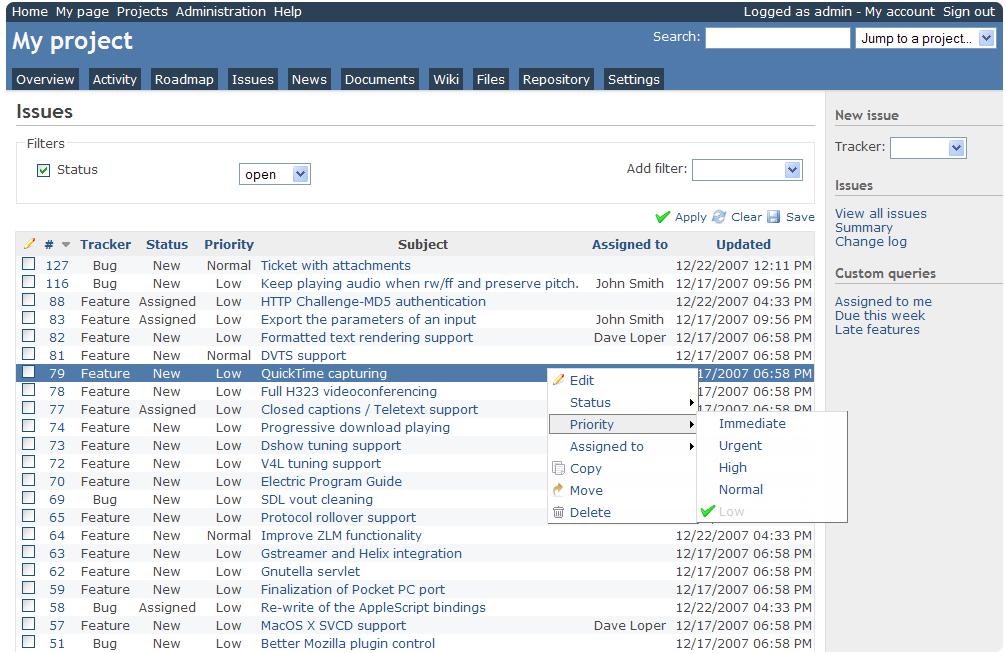
Las soluciones de código abierto aportan flexibilidad y personalización, y Redmine encarna estos beneficios en el ámbito de la gestión de proyectos. Como una herramienta de código abierto, Redmine ofrece adaptabilidad y libertad, lo que la hace ideal para equipos que priorizan la personalización y el control directo.
Por qué elegí Redmine:
Seleccioné Redmine para esta lista tras considerar su sólido respaldo comunitario y su naturaleza de código abierto. Me quedó claro que su potencial de personalización y extensibilidad supera al de muchas herramientas propietarias. Dadas estas fortalezas, considero que Redmine es la mejor opción para organizaciones o equipos que valoran las libertades del software de código abierto.
Características e integraciones destacadas:
Redmine presume de una arquitectura modular, lo que permite a los equipos añadir diversas funciones según sus necesidades. Admite múltiples proyectos, ofrece una variedad de herramientas de seguimiento y posee un sólido sistema de gestión de incidencias. En cuanto a integraciones, su naturaleza de código abierto permite integrarlo con multitud de herramientas, aunque las más populares incluyen Git, Subversion y LDAP.
Pros and Cons
Pros:
- Altamente personalizable gracias a su naturaleza de código abierto
- Sólido soporte de la comunidad
- Arquitectura modular para conjuntos de funciones específicas
Cons:
- Puede requerir experiencia técnica para su configuración
- La interfaz de usuario se siente anticuada
- Soporte oficial limitado


En el ámbito de la organización de tareas, la simplicidad suele superar a la complejidad. Trello lo ejemplifica con su sistema basado en tarjetas, que permite a los equipos gestionar tareas en un entorno sencillo de arrastrar y soltar. Su apuesta por la simplicidad, junto con la organización por tarjetas, es la razón por la que es uno de los favoritos para quienes buscan una experiencia de gestión sin desorden.
Por qué elegí Trello:
A través de un proceso de selección y evaluación, Trello surgió como una herramienta que domina el arte de la sencillez. En mis comparaciones, la organización por tarjetas de Trello fue insuperable en su capacidad para simplificar flujos de trabajo complejos. Considero que Trello es, sin duda, el mejor para quienes buscan un método de organización de tareas directo y sin complicaciones.
Funciones destacadas e integraciones:
La fortaleza de Trello radica en sus tableros, listas y tarjetas, que ofrecen una estructura clara para la gestión de tareas. La función Power-Ups, que permite a los equipos integrar y automatizar sus flujos de trabajo, marca una gran diferencia. En cuanto a integraciones, Trello se conecta sin problemas con herramientas como Dropbox, Google Drive y Slack, enriqueciendo su ecosistema.
Pros and Cons
Pros:
- Sistema de tarjetas intuitivo
- Los Power-Ups aportan versatilidad a los tableros
- Numerosas opciones de integración
Cons:
- Las funciones avanzadas están tras muros de pago
- Puede carecer de profundidad para proyectos complejos
- Las herramientas de colaboración pueden ser básicas para equipos grandes

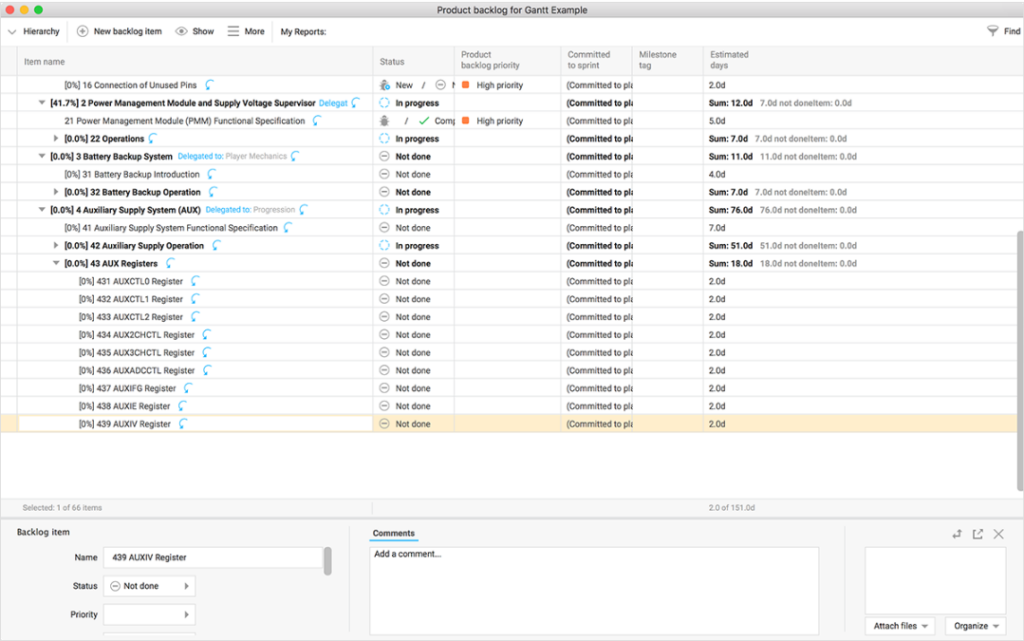
Hansoft, de Perforce, se destaca en la gestión de proyectos ágiles a gran escala. Está diseñado para ayudar a equipos extensos con marcos ágiles detallados, lo que lo convierte en un fuerte competidor para organizaciones con proyectos vastos que requieren metodologías ágiles.
Por qué elegí Hansoft:
Al evaluar herramientas para la gestión integral de proyectos, Hansoft destacó entre el resto. Mi elección de Hansoft se basa en su capacidad para manejar la complejidad de proyectos grandes sin perder los principios ágiles. Por eso, mantengo la opinión de que Hansoft es la herramienta ideal para aquellas entidades que necesitan una solución completa para iniciativas ágiles de gran envergadura.
Funciones destacadas e integraciones:
Hansoft sobresale con su gestión combinada de backlog y cronograma, permitiendo vistas simultáneas tanto generales como detalladas. También ofrece asignación de recursos y herramientas de colaboración en tiempo real, mejorando la sinergia del equipo. En cuanto a integraciones, Hansoft se conecta eficientemente con Jira, Perforce Helix Core y Jenkins.
Pros and Cons
Pros:
- Combina vistas de backlog y cronograma para un mejor control
- Herramientas de asignación de recursos en profundidad
- La colaboración en tiempo real fomenta la comunicación del equipo
Cons:
- La curva de aprendizaje es más pronunciada para los nuevos usuarios
- El modelo de precios puede no ser transparente
- La interfaz puede parecer compleja para proyectos simples

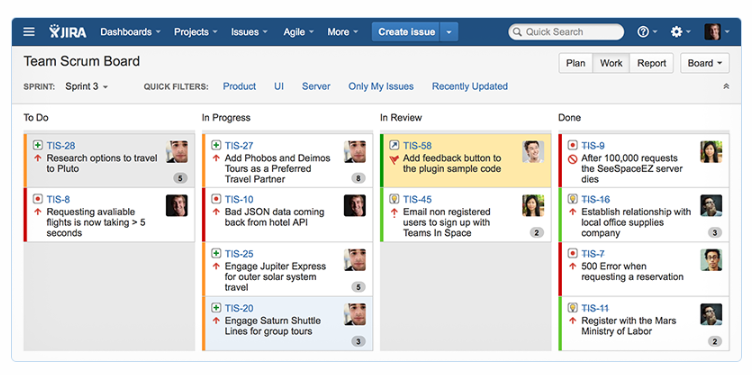
Jira, un producto de Atlassian, ha sido durante mucho tiempo un referente en el panorama de la gestión de proyectos de software. Ofrece herramientas detalladas orientadas al ciclo de vida del desarrollo de software, lo que lo convierte en la opción predilecta para equipos de desarrollo que necesitan un control robusto de sus proyectos.
Por qué elegí Jira:
Al analizar las fortalezas de varias herramientas, Jira destacó en el ámbito de la gestión de proyectos de software. Lo elegí por su reconocida reputación en la industria del software. Reflexionando sobre sus características, considero que Jira es la mejor herramienta para los equipos que buscan un enfoque profundo en la gestión de proyectos de software.
Características destacadas e integraciones:
Jira es conocido por sus flujos de trabajo personalizables que se adaptan a diferentes metodologías de desarrollo. Su seguimiento de incidencias y de proyectos, combinado con herramientas de informes ágiles, ofrece un control detallado del proyecto. Integraciones notables incluyen Confluence, Bitbucket y Slack, lo que refuerza su posición en el ecosistema de software.
Pros and Cons
Pros:
- Flujos de trabajo personalizables que se adaptan a diferentes metodologías
- Seguimiento robusto de incidencias y herramientas de informes ágiles
- Integración con otros productos de Atlassian
Cons:
- Puede ser excesivo para proyectos pequeños
- La configuración puede llevar mucho tiempo
- El precio puede ser elevado para equipos grandes.
Otras herramientas de gestión de listas de tareas pendientes
A continuación se muestra una lista de herramientas adicionales de gestión de listas de tareas pendientes que seleccioné, pero que no llegaron a estar entre las 12 mejores. Sin duda vale la pena echarles un vistazo.
- Axosoft
Ideal para equipos de desarrollo de software y planificación de lanzamientos
- Teamhood
Ideal para la gestión de acumulaciones impulsada por Kanban
- Celoxis
Ideal para el seguimiento de proyectos orientado al cliente
- Canny
Ideal para priorizar solicitudes de nuevas funciones de producto
- Wrike
Ideal para la colaboración en tiempo real y la gestión de la carga laboral
- Craft.io
Mejor para la organización jerárquica del backlog
- monday.com
Ideal para la automatización de flujos de trabajo personalizables


Reseñas relacionadas de herramientas y software
Si aún no has encontrado aquí lo que buscas, consulta estos otros tipos de herramientas que hemos probado y evaluado.
- Software de monitorización de redes
- Software de monitorización de servidores
- Soluciones SD-WAN
- Herramientas de monitorización de infraestructuras
- Analizador de paquetes
- Herramientas de monitorización de aplicaciones
Criterios de Selección
Divido mi evaluación en criterios básicos—como la planificación de sprints y la jerarquía del backlog—y aspectos diferenciadores que separan las herramientas adecuadas para un solo equipo Scrum de aquellas pensadas para una cartera empresarial a gran escala.
Funcionalidad Central (Lo Esencial para Esta Lista)
Cuando selecciono herramientas para mi lista, califico cada una en una escala de 0 (no ofrece la funcionalidad) a 5 (destaca en esta área) según cada funcionalidad central indicada abajo. Luego, calculo la puntuación total de la herramienta en porcentaje. Toda herramienta debe alcanzar una puntuación mínima total del 65% para ser considerada en la selección.
- Gestión de Elementos del Backlog: Verifico si las herramientas permiten jerarquías estructuradas—épicas divididas en historias, tareas y errores—con campos personalizados para etiquetar la propiedad por equipo o componentes.
- Priorización y Orden: La reorganización por arrastrar y soltar es el punto de partida, pero también busco marcos de puntuación integrados como WSJF o RICE que ayudan a los product owners a tomar decisiones respaldadas por datos.
- Planificación de Sprint e Iteración: Evalúo cómo maneja cada herramienta la creación de sprints, la estimación de puntos de historia y el seguimiento de la capacidad, especialmente cuando los equipos necesitan planificar varios sprints por adelantado.
- Vistas y Tableros Ágiles: Ya sea que tu equipo trabaje con Kanban, Scrum o un modelo híbrido, busco múltiples vistas de tablero, además de cronogramas o paneles de ruta para visibilidad transversal.
- Seguimiento de Dependencias y Relaciones: La vinculación padre-hijo, las banderas de bloqueo y las dependencias entre elementos son fundamentales aquí, particularmente al coordinar el trabajo entre varios equipos.
- Informes y Seguimiento del Progreso: Deben estar disponibles los informes ágiles estándar como gráficos de evolución y tendencias de velocidad, y reviso si los tableros pueden personalizarse para reuniones de revisión de sprint.
Una vez tengo la lista de herramientas que cumplen estos criterios, considero qué distingue a cada plataforma.
Factores Diferenciadores (Qué Distingue a los Proveedores)
Así es como comparo y contrasto distintos proveedores:
Características Destacadas
La visualización de hojas de ruta es un gran diferenciador: busco herramientas que conecten elementos del backlog con temas estratégicos, de modo que los product owners puedan compartir planes basados en tiempos con los interesados durante la planificación trimestral. La sincronización con herramientas de desarrollo es igualmente crucial. Los enlaces bidireccionales entre elementos del backlog y commits en GitHub o GitLab brindan a los gerentes de ingeniería contexto de entrega en tiempo real. Para las organizaciones con varios equipos, también evalúo las vistas de cartera inter-equipo que agregan diferentes backlogs en tableros a nivel de programa, aptos para flujos de trabajo SAFe o LeSS.
Más Allá de las Funcionalidades
Las integraciones determinan lo bien que una herramienta de backlog se adapta a tu flujo de trabajo actual. Verifico la conexión nativa con pipelines de CI/CD, Slack o Microsoft Teams y plataformas de control de versiones—ya que una herramienta desconectada solo genera más actualizaciones manuales de estado. La escalabilidad es otro factor clave. Una herramienta adecuada para un equipo de 5 personas puede fallar cuando los backlogs crecen a miles de elementos en múltiples equipos. También evalúo la seguridad, específicamente soporte SSO, permisos basados en roles y cumplimiento SOC 2, lo que la mayoría de los departamentos de TI empresariales exigen antes de aprobar una nueva plataforma.
Cómo elegir una herramienta de gestión de listas de tareas pendientes
Es fácil perderse entre largas listas de funciones y estructuras de precios complejas. Para ayudarte a mantener la concentración mientras avanzas en tu proceso único de selección de software, aquí tienes una lista de factores que debes tener en cuenta:
| Factor | Qué considerar |
|---|---|
| Escalabilidad | ¿Puede la herramienta crecer con tu equipo? Considera el volumen de proyectos y el tamaño del equipo futuros. Busca herramientas que ofrezcan planes escalables o recursos adicionales. |
| Integraciones | ¿Funciona con tu software actual? Comprueba si se integra con las herramientas esenciales de tu equipo, como Slack, Jira o Trello. |
| Personalización | ¿Puedes adaptar la herramienta a tu flujo de trabajo? Evalúa si puedes ajustar los paneles, los campos y los procesos para adaptarlos a las necesidades de tu equipo. |
| Facilidad de uso | ¿La herramienta es fácil de usar? Evalúa la curva de aprendizaje y comprueba si tu equipo puede adaptarse rápidamente sin una formación exhaustiva. |
| Implementación e incorporación | ¿Qué tan sencillo es el proceso de configuración? Busca herramientas con recursos claros para la incorporación, como tutoriales y asistencia, para poner en marcha rápidamente a tu equipo. |
| Coste | ¿El precio se ajusta a tu presupuesto? Compara los costes de herramientas similares y considera el valor ofrecido en cada nivel de precios. |
| Medidas de seguridad | ¿Tus datos y proyectos están seguros? Asegúrate de que la herramienta cumpla con los estándares de seguridad y ofrezca funciones como el cifrado y los controles de acceso. |
¿Qué son las herramientas de gestión de listas de pendientes?
Las herramientas de gestión de listas de pendientes son soluciones de software que ayudan a los equipos a organizar, priorizar y realizar un seguimiento de las tareas y los proyectos. Estas herramientas suelen ser utilizadas por gestores de proyectos, desarrolladores y equipos de producto, ya que les proporcionan un mayor control sobre sus flujos de trabajo y los plazos de los proyectos. La priorización de tareas, las capacidades de integración y los flujos de trabajo personalizables ayudan a mantener los proyectos organizados y los equipos eficientes. En general, estas herramientas permiten a los equipos gestionar sus cargas de trabajo de forma más eficaz y cumplir los plazos.
Funciones
Al seleccionar herramientas de gestión de listas de pendientes, presta atención a las siguientes funciones clave:
- Priorización de tareas: Ayuda a los equipos a organizar las tareas según su importancia, garantizando que el trabajo crítico se complete primero.
- Capacidades de integración: Permite una conexión fluida con otras herramientas, como Slack, Jira y Trello, para agilizar los flujos de trabajo.
- Flujos de trabajo personalizables: Permite a los equipos adaptar los procesos y los paneles para ajustarlos a las necesidades específicas de sus proyectos.
- Colaboración en tiempo real: Facilita la comunicación y las actualizaciones del equipo, manteniendo a todos informados.
- Informes avanzados: Proporciona información y análisis para supervisar el progreso de los proyectos y el rendimiento del equipo.
- Escalabilidad: Favorece el crecimiento al admitir un mayor volumen de proyectos y un aumento del tamaño del equipo.
- Interfaz fácil de usar: Garantiza que los miembros del equipo puedan navegar por la herramienta y utilizarla fácilmente sin una formación exhaustiva.
- Medidas de seguridad: Protege los datos mediante funciones como el cifrado y los controles de acceso para garantizar la seguridad de la información.
- Recursos de incorporación: Ofrece tutoriales, recorridos por el producto y plantillas para ayudar a los nuevos usuarios a comenzar rápidamente.
- Precios rentables: Ofrece distintos niveles de precios con opciones adecuadas para diferentes presupuestos, lo que la hace accesible a equipos de diversos tamaños.
Beneficios
La implementación de herramientas de gestión de listas de pendientes ofrece varias ventajas para tu equipo y tu empresa. Estas son algunas de las que puedes esperar:
- Mejor organización: La priorización de tareas y los flujos de trabajo personalizables ayudan a mantener organizados los proyectos y las tareas, reduciendo el caos.
- Colaboración mejorada: Las funciones de colaboración en tiempo real mantienen conectados e informados a los miembros del equipo, mejorando el trabajo conjunto.
- Mayor eficiencia: Las integraciones con otras herramientas agilizan los procesos y reducen el tiempo dedicado a cambiar de una plataforma a otra.
- Mejor toma de decisiones: Los informes avanzados proporcionan información sobre el progreso de los proyectos, ayudando a los equipos a tomar decisiones fundamentadas.
- Compatibilidad con el crecimiento: A medida que crece tu equipo, las herramientas escalables pueden adaptarse al aumento del volumen de proyectos y del tamaño de los equipos.
- Ahorro de tiempo: Las interfaces fáciles de usar y los recursos de incorporación minimizan el tiempo necesario para aprender a utilizar e implementar la herramienta.
- Seguridad de los datos: Las medidas de seguridad garantizan la protección de los datos de tu equipo, fomentando la confianza y el cumplimiento normativo.
Costes y precios
Seleccionar herramientas de gestión de listas de pendientes requiere comprender los distintos modelos de precios y planes disponibles. Los costes varían según las funciones, el tamaño del equipo, los complementos y otros factores. La siguiente tabla resume los planes habituales, sus precios medios y las funciones que suelen incluir las soluciones de herramientas de gestión de listas de pendientes:
Tabla comparativa de planes para herramientas de gestión de listas de pendientes
| Tipo de plan | Precio medio | Funciones habituales |
|---|---|---|
| Plan gratuito | $0 | Gestión básica de tareas, integraciones limitadas y asistencia de la comunidad. |
| Plan personal | $5-$25/usuario/mes | Priorización de tareas, informes básicos y asistencia por correo electrónico. |
| Plan empresarial | $30-$60/usuario/mes | Informes avanzados, flujos de trabajo personalizados e integraciones premium. |
| Plan corporativo | $70-$100/usuario/mes | Personalización completa, asistencia dedicada y funciones de seguridad mejoradas. |
Preguntas frecuentes sobre las herramientas de gestión de listas de pendientes
Respuestas a algunas de las principales preguntas relacionadas con las soluciones de gestión de listas de pendientes.
¿Cuáles son los tipos de herramientas de gestión de listas de pendientes?
¿Hay herramientas gratuitas de gestión de listas de pendientes disponibles?
¿Es el precio un indicador de calidad?
¿Qué sigue?
Si estás investigando herramientas de gestión de listas de pendientes, conecta con un asesor de SoftwareSelect para obtener recomendaciones gratuitas.
Rellenas un formulario y mantienes una breve conversación en la que se profundiza en los detalles de tus necesidades. Después, recibirás una lista de preselección de software para revisar. También te ayudarán durante todo el proceso de compra, incluidas las negociaciones de precios.