

Como profesional de TI, entiendo la necesidad de contar con soluciones integrales capaces de gestionar los diversos requisitos del trabajo. Herramientas como ConnectWise son fundamentales para muchos equipos de TI, ya que ofrecen una amplia variedad de funciones, desde la creación de scripts hasta la mensajería, todo ello integrado en una plataforma basada en la web accesible desde aplicaciones de escritorio y móviles. Sin embargo, aunque ConnectWise puede ser una herramienta valiosa, quizá haya opciones que se adapten mejor a algunos equipos o casos de uso.
Creo que es fundamental explorar alternativas a ConnectWise que se ajusten mejor a las necesidades específicas de tu equipo. Busca herramientas con una integración sencilla, un soporte remoto superior e interfaces fáciles de usar. Identificar la opción más adecuada para tu equipo es esencial para mejorar tu experiencia de gestión de TI.
¿Qué es ConnectWise?
ConnectWise es una plataforma de gestión de TI que ayuda a las empresas a ofrecer y dar soporte a servicios tecnológicos. La utilizan principalmente los proveedores de servicios gestionados (MSP), los proveedores de servicios de TI y los equipos internos de TI para estar al día de los tickets, los activos y los sistemas de los clientes. El acceso remoto, las herramientas de automatización y las funciones de generación de informes ayudan a gestionar dispositivos, resolver problemas más rápidamente y mantener todo organizado. En general, ConnectWise facilita que tu equipo mantenga su productividad y ofrezca un soporte fiable.
Por qué confiar en nuestras recomendaciones de software
6,700+
Reviews
20
Industry experts
16+
Evaluation factors
14
Years
Nuestro equipo lleva probando y evaluando software desde 2012. Como líderes tecnológicos, sabemos lo difícil —y lo importante— que es elegir el software adecuado.
Para esta guía, evaluamos las herramientas mediante pruebas prácticas e investigación independiente, puntuando las herramientas según nuestros criterios de selección.
Nuestras reseñas reflejan nuestro criterio editorial humano, no un discurso de ventas.
Revisores expertos:
- Paulo Gardini MiguelDirector técnico
 Tim FisherVP de IA
 Gabriel RosasTech Lead y arquitecto de software
 Christhian GruhnTech Lead y arquitecto de plataforma

Tabla comparativa de alternativas a ConnectWise
Esta tabla comparativa resume los detalles de precios de mis principales alternativas seleccionadas a ConnectWise:
| Tool | Best For | Trial Info | Price | ||
|---|---|---|---|---|---|
| 1 | Ideal para la gestión de dispositivos e identidades impulsada por RR. HH. | Demostración gratuita disponible | Desde $8/usuario/mes (más una tarifa base mensual) | Website | |
| 2 | La mejor para la gestión remota de puntos finales | No | $79/user/month | Website | |
| 3 | Ideal para la automatización de tareas con IA | Prueba gratuita de 21 días + demo gratis disponible | Desde $149/técnico/mes (facturado anualmente) | Website | |
| 4 | Mejor con conectores preconstruidos para una integración rápida | Demostración gratuita disponible | Precios bajo solicitud | Website | |
| 5 | Ideal para la gestión completa de negocios de TI | No | $39/usuario/mes | Website | |
| 6 | La mejor opción para la gestión ágil de servicios de TI | No | $10/usuario/mes (para los primeros tres agentes) | Website | |
| 7 | Mejor para la gestión de servicios de TI impulsada por IA | No | Precio bajo solicitud | Website | |
| 8 | Ideal para la gestión de dispositivos móviles y computadoras de escritorio basada en la nube | No | $6/usuario/mes | Website | |
| 9 | Ideal para la optimización de terminales impulsada por IA | No | Precio a consultar | Website | |
| 10 | La mejor para la gestión y seguridad unificada de endpoints | No | $1/usuario/mes (mínimo 50 usuarios) | Website |


Reseñas de las mejores alternativas a ConnectWise
A continuación encontrarás mis resúmenes detallados de las mejores alternativas a ConnectWise que han entrado en mi lista. En mis reseñas analizo detalladamente las funciones principales, las ventajas y desventajas, las integraciones y los casos de uso ideales de cada herramienta para ayudarte a encontrar la más adecuada para ti.
 Ideal para la gestión de dispositivos e identidades impulsada por RR. HH.
- Demostración gratuita disponible
- Desde $8/usuario/mes (más una tarifa base mensual)
Visit WebsiteCustomer Rating:4.8/5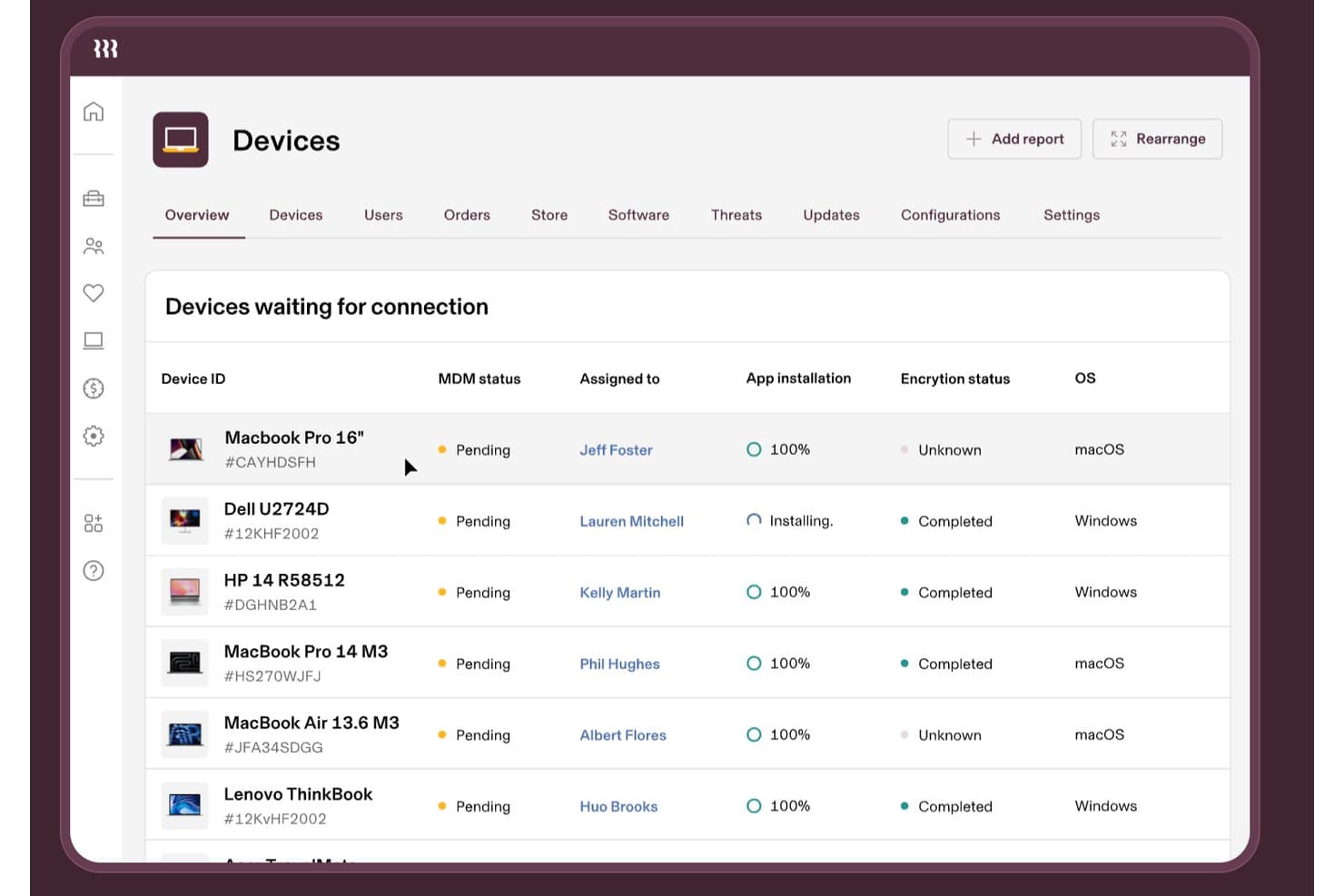
Rippling IT realiza un seguimiento del estado de MDM de los dispositivos, el cifrado y las instalaciones de aplicaciones. Rippling IT es una plataforma de gestión de TI para empresas en crecimiento que conecta los datos de los empleados con los flujos de trabajo de dispositivos y acceso, ayudando a los equipos de TI a simplificar la incorporación, la desvinculación y la administración diaria de dispositivos finales.
¿Para quién es más adecuado Rippling IT?
Rippling IT es adecuado para empresas en crecimiento en las que los equipos de RR. HH. y TI comparten la responsabilidad de los dispositivos, el acceso, la incorporación y la desvinculación de los empleados.
Por qué Rippling IT es una buena alternativa a ConnectWise
Elegí Rippling IT porque su gestión de dispositivos e identidades impulsada por RR. HH. conecta los registros de los empleados con los flujos de trabajo de dispositivos y acceso. Lo uso para coordinar la incorporación, la desvinculación, la administración de dispositivos finales y los cambios de acceso entre RR. HH. y TI. Esto ayuda a evitar que los antiguos empleados conserven el acceso cuando cambia su estado.
Funciones principales de Rippling IT
- Inventario de software: Consulta las aplicaciones instaladas en los dispositivos de la empresa.
- Bloqueo y borrado remotos: Protege de forma remota los dispositivos perdidos o comprometidos.
- Supervisión del estado de los dispositivos: Comprueba el estado de los dispositivos finales y los detalles de configuración.
- Aplicación automatizada de parches: Aplica actualizaciones del sistema operativo en los dispositivos administrados.
Integraciones de Rippling IT
Rippling IT ofrece más de 650 integraciones nativas con aplicaciones, incluidas GitHub, Slack, Jira, AWS, Zoom y Microsoft 365. También proporciona una API REST para integraciones personalizadas y automatización de flujos de trabajo.
Pros and Cons
Pros:
- Flujos de trabajo de incorporación y desvinculación activados por RR. HH.
- Cambios automatizados en el acceso a las aplicaciones
- Controles de bloqueo y borrado remotos
Cons:
- Los errores recurrentes afectan a la administración diaria
- Las respuestas del soporte pueden tardar
Learn more about Rippling IT:

Esta es una visión general de la monitorización de disponibilidad de Atera. Atera es una plataforma de gestión de Tecnologías de la Información (TI) basada en la nube que reúne en una sola solución la Monitorización y Gestión Remota (RMM), la Automatización de Servicios Profesionales (PSA) y el acceso remoto. Está diseñada para ayudar a los profesionales de TI y Proveedores de Servicios Gestionados (MSP) a gestionar sistemas de manera proactiva, automatizar tareas y brindar soporte eficiente a los usuarios finales.
Por qué es una buena alternativa a ConnectWise:
Seleccioné Atera para esta lista porque simplifica la gestión de TI con su plataforma todo en uno, especialmente para MSP y equipos de TI más pequeños. Su conjunto integrado de Monitorización y Gestión Remota (RMM), Automatización de Servicios Profesionales (PSA) y herramientas de acceso remoto ofrece un contraste frente al enfoque más modular de ConnectWise. Para los MSP que buscan gestionar puntos finales de forma remota sin tener que usar múltiples plataformas, Atera es la mejor opción para la monitorización y gestión remota de TI para MSP.
Características destacadas e integraciones:
Atera ofrece funciones esenciales como monitorización de sistemas en tiempo real, gestión de actualizaciones, acceso remoto y flujos de trabajo de tickets automatizados. Sus capacidades de automatización reducen tareas manuales mediante scripts personalizables y diagnósticos impulsados por IA. Las integraciones incluyen Microsoft Teams, Slack, ServiceNow, Salesforce, HubSpot, ClickUp y Acronis Cyber Protect Cloud, entre otras, lo que ayuda a los MSP a ampliar la funcionalidad sobre su stack tecnológico actual.
Pros and Cons
Pros:
- Plataforma unificada con RMM, PSA y acceso remoto
- Capacidades eficientes de automatización de TI
- Sólidas integraciones con herramientas empresariales
Cons:
- La interfaz puede parecer compleja para usuarios nuevos
- Las opciones de personalización podrían mejorarse
- Las funciones avanzadas de informes pueden ser limitadas en comparación con otras herramientas.
 Ideal para la automatización de tareas con IA
- Prueba gratuita de 21 días + demo gratis disponible
- Desde $149/técnico/mes (facturado anualmente)
Visit WebsiteCustomer Rating:4.6/5
Panel de gestión de tickets de SuperOps que muestra solicitudes de soporte de TI organizadas por prioridad, con seguimiento de estado e indicadores de SLA para operaciones optimizadas de la mesa de servicios. Para los equipos de TI y Proveedores de Servicios Gestionados (MSP) que buscan una solución moderna impulsada por IA para mejorar sus operaciones, SuperOps ofrece una alternativa atractiva a las plataformas tradicionales. Integra la Automatización de Servicios Profesionales (PSA) con el Monitoreo y Gestión Remota (RMM), proporcionando una plataforma unificada diseñada para optimizar la entrega de servicios y mejorar la eficiencia. Con funciones como flujos de trabajo automatizados e información estratégica para el negocio, SuperOps resulta especialmente atractivo para quienes desean reducir la sobrecarga de herramientas mientras mantienen un alto nivel de calidad en el servicio.
Por qué elegí SuperOps
Elegí SuperOps como alternativa a ConnectWise por su innovadora integración de automatización impulsada por IA y la gestión de TI. La función Agentic AI te resultará particularmente útil para automatizar tareas repetitivas, lo que puede liberar a tu equipo para que se enfoque en iniciativas más estratégicas. La gestión de la mesa de servicios de la plataforma es otro aspecto destacado, ya que proporciona un espacio centralizado para gestionar problemas y tickets de los clientes de manera más efectiva. Además, sus herramientas de seguridad para endpoints garantizan que tu entorno de TI permanezca seguro sin necesidad de múltiples sistemas dispares.
Características clave de SuperOps
Además de sus capacidades de IA y la gestión de la mesa de servicios, también encontré útiles las siguientes características:
- Gestión de activos: Permite rastrear y gestionar los activos de TI en toda la organización, proporcionando información sobre el rendimiento y el ciclo de vida de los activos.
- Gestión de parches: Automatiza el despliegue de actualizaciones de software, ayudando a mantener la seguridad y el cumplimiento del sistema con una intervención manual mínima.
- Programación de eventos: Facilita la planificación y gestión de eventos de TI, asegurando que tu equipo esté siempre alineado con las prioridades de la organización.
- Gestión de contratos: Optimiza el proceso de gestión de contratos con clientes, haciendo más fácil rastrear condiciones, renovaciones y cumplimiento.
Integraciones de SuperOps
Las integraciones incluyen ConnectWise Control, Xero, QuickBooks, Bitdefender, TeamViewer, SentinelOne, Azure AD, Stripe, Acronis y Splashtop.
Pros and Cons
Pros:
- Gestión de dispositivos móviles incorporada
- Herramientas sólidas de automatización e IA
- Gestión de parches y endpoints incluida
Cons:
- Puede requerir tiempo de incorporación
- Basado en la nube, requiere acceso a internet
Learn more about SuperOps: Mejor con conectores preconstruidos para una integración rápida
- Demostración gratuita disponible
- Precios bajo solicitud

Descubre una alternativa más inteligente y flexible a ConnectWise con Celigo. Celigo es una plataforma de integración diseñada para equipos de TI y empresas que necesitan conectar y automatizar flujos de trabajo entre múltiples aplicaciones en la nube. Si buscas una alternativa a ConnectWise que enfatice la flexibilidad y el control sobre las integraciones, Celigo merece una mirada detenida.
¿Para quién es mejor Celigo?
Equipos de TI en empresas medianas y grandes que necesiten integrar rápidamente aplicaciones empresariales en la nube.
Por qué Celigo es una buena alternativa a ConnectWise
Elegí Celigo porque sus conectores preconstruidos permiten que mi equipo integre nuevas aplicaciones en la nube en cuestión de horas, no semanas. Aprecio que podemos conectar Salesforce, NetSuite y Microsoft Dynamics sin programación personalizada. En la práctica, eso significa que automatizamos la sincronización de datos y los flujos de trabajo desde el principio. Esta rapidez es una gran ventaja sobre ConnectWise para necesidades de despliegue rápido.
Características clave de Celigo
- Constructor visual de flujos: Diseña y gestiona integraciones con una interfaz de arrastrar y soltar.
- Panel de gestión de errores: Supervisa y resuelve errores de integración en tiempo real.
- Controles de acceso basados en roles: Asigna permisos a usuarios y equipos a través de las integraciones.
- Herramientas de transformación de datos: Asocia y convierte formatos de datos entre sistemas conectados.
Integraciones de Celigo
Las integraciones incluyen Salesforce, Microsoft Dynamics 365 Business Central, Oracle NetSuite, Walmart, SAP, Snowflake, Acumatica, Adobe, ADP y 3M.
Pros and Cons
Pros:
- Herramientas de monitorización en tiempo real y gestión de errores
- Compatible con integraciones de varios pasos y múltiples aplicaciones
- Opciones flexibles de mapeo y transformación de datos
Cons:
- La configuración inicial puede requerir mucho tiempo
- Integración limitada con sistemas locales
Learn more about Celigo:

Aquí se muestra la función de HaloPSA que gestiona el service desk con funcionalidad alineada a ITIL. HaloPSA es una solución de automatización de servicios profesionales que funciona como una plataforma todo en uno para gestionar todos los aspectos de un negocio de TI. Atiende las necesidades de las empresas de servicios de TI ofreciendo capacidades integrales de gestión de TI.
Pros and Cons
Pros:
- Conjunto integral de herramientas para la gestión de negocios de TI
- Amplia gama de integraciones
- Servicio al cliente robusto
Cons:
- Puede resultar abrumador para pequeñas empresas
- La interfaz podría ser más intuitiva.
- Algunas funciones pueden requerir un costo adicional.
Learn more about HaloPSA: La mejor opción para la gestión ágil de servicios de TI
- No
- $10/usuario/mes (para los primeros tres agentes)
Visit WebsiteCustomer Rating:4/5
Mejora los equipos de operaciones de TI con información contextual para una mejor toma de decisiones y reducción de riesgos en Jira Service Management. Jira Service Management, de Atlassian, es una popular herramienta de gestión de servicios de TI diseñada para integrarse con otros productos de Atlassian, ofreciendo prácticas ágiles para la gestión de servicios. Reúne a los desarrolladores y las operaciones de TI para colaborar y resolver problemas de manera más rápida y eficiente.
Pros and Cons
Pros:
- Capacidades ágiles para la gestión de servicios de TI
- Excelente integración con la suite de Atlassian
- Procesos certificados por ITIL
Cons:
- Puede tener demasiadas funciones para las pequeñas empresas
- La interfaz de usuario podría ser más intuitiva.
- Costo más alto para equipos pequeños debido al requisito mínimo de agentes
Learn more about Jira Service Management: Mejor para la gestión de servicios de TI impulsada por IA
- No
- Precio bajo solicitud
Visit WebsiteCustomer Rating:4.1/5
Al utilizar la automatización inteligente de servicios, puedes mejorar la experiencia del agente con BMC Helix ITSM. BMC Helix ITSM es una herramienta integral de gestión de servicios de TI que aprovecha la inteligencia artificial para automatizar la entrega y gestión de servicios. Ofrece capacidades de gestión de servicios predictivas, lo que la convierte en una opción sólida para las empresas que buscan incorporar IA en sus procesos de TI.
Pros and Cons
Pros:
- Robustas capacidades de gestión de servicios potenciadas por IA
- Gestión integral de incidentes y problemas
- Amplia gama de integraciones con plataformas en la nube y otras aplicaciones
Cons:
- Falta de transparencia en la fijación de precios
- Podría tener demasiadas funciones para empresas pequeñas.
- Algunos usuarios informan un proceso de configuración complejo.
Learn more about BMC Helix ITSM: Ideal para la gestión de dispositivos móviles y computadoras de escritorio basada en la nube
- No
- $6/usuario/mes

Aquí se muestra Microsoft Intune con productividad móvil segura, seguridad basada en la identidad y gestión moderna de Windows/Mac. Microsoft Intune es un servicio basado en la nube dentro del sector de gestión de movilidad empresarial (EMM) que ayuda a que su fuerza laboral sea productiva mientras protege los datos corporativos. Es especialmente conocido por sus sólidas funciones de gestión de dispositivos móviles y computadoras de escritorio.
Pros and Cons
Pros:
- Potentes funciones de gestión de dispositivos móviles y computadoras de escritorio
- Excelente integración con el ecosistema de Microsoft
- Capacidades de seguridad robustas
Cons:
- Requiere cierta curva de aprendizaje para usuarios no técnicos
- Más caro que algunas otras opciones
- Podría ofrecer mejor soporte para plataformas que no sean de Microsoft
Learn more about Microsoft Intune: Ideal para la optimización de terminales impulsada por IA
- No
- Precio a consultar

Aquí se muestra el control integrado e inteligente de Ivanti Neurons for UEM sobre las numerosas plataformas de escritorio y móviles utilizadas por sus usuarios. Ivanti Neurons for UEM ofrece una plataforma que combina la gestión unificada de terminales (UEM) y capacidades de seguridad, con un enfoque en el aprovechamiento de la IA para la optimización de terminales. Está dirigida a organizaciones de todos los tamaños que necesitan gestionar y proteger diversos dispositivos asegurando un rendimiento óptimo.
Pros and Cons
Pros:
- Potentes capacidades de automatización impulsadas por IA
- Gestión integral de dispositivos y seguridad
- Amplias posibilidades de integración
Cons:
- Los detalles de precios no son transparentes.
- Puede tener una curva de aprendizaje pronunciada.
- La configuración puede ser compleja para usuarios nuevos
Learn more about Ivanti Neurons for UEM: La mejor para la gestión y seguridad unificada de endpoints
- No
- $1/usuario/mes (mínimo 50 usuarios)

Aquí están las funciones de ManageEngine Desktop Central para gestionar servidores, computadoras de escritorio, portátiles, smartphones, tabletas y dispositivos POS. ManageEngine Desktop Central es una solución de gestión unificada de endpoints (UEM) que ofrece una amplia gama de herramientas para gestionar y proteger tus endpoints. Su especialización tanto en UEM como en seguridad de endpoints la convierte en una opción práctica para empresas que requieren una solución integral de gestión y seguridad.
Pros and Cons
Pros:
- Herramientas integrales de gestión y seguridad de endpoints
- Admite múltiples sistemas operativos y dispositivos
- Proporciona gestión automatizada de parches
Cons:
- Requiere un mínimo de 50 usuarios
- Puede ser complejo para empresas más pequeñas.
- Algunos usuarios reportan dificultades con la configuración inicial.
Learn more about ManageEngine Desktop Central:
Otras alternativas a ConnectWise
Estas son algunas alternativas adicionales a ConnectWise que no han entrado en mi lista, pero que merece la pena conocer:
- 11Quest KACELa mejor opción para la gestión integral de activos de TI
- 12N-able MSP ManagerIdeal para la gestión de servicios de TI escalable para MSPs
- 13Tanium XEMMejor para la seguridad y gestión de endpoints integradas
- 14NinjaOneIdeal para simplificar las tareas de los proveedores de servicios gestionados
- 15RepairShoprLa mejor para la automatización de pequeños negocios de reparación
- 16SyncroIdeal para flujos de trabajo de servicios de TI automatizados
Otras reseñas de software
Cómo evalúo las alternativas a ConnectWise
Evalúo estas herramientas en dos capas: las capacidades principales de RMM y PSA que toda opción debe tener, y los diferenciadores que importan cuando gestionas más de 50 clientes o migras un historial de tickets.
Funcionalidad básica (Requisitos indispensables para esta lista)
Cuando selecciono herramientas para mi lista, califico cada una en una escala de 0 (no ofrece la funcionalidad) a 5 (destaca en esta área) para cada funcionalidad principal que se menciona a continuación. Luego, calculo la puntuación total de la herramienta en porcentaje. Cada herramienta debe alcanzar una puntuación mínima total del 65% para ser considerada para su inclusión.
- Supervisión y gestión remota: Verifico si la plataforma puede monitorear endpoints, servidores y dispositivos de red con alertas proactivas y gestión de parches en múltiples entornos de sistema operativo.
- PSA y gestión de tickets: Toda herramienta debe ofrecer una mesa de servicio con seguimiento SLA, enrutamiento de tickets y flujos de despacho que permitan a los técnicos avanzar a través de las colas.
- Acceso y control remoto: Evalúo el soporte para sesiones atendidas y no atendidas, revisando características como transferencia de archivos, grabación de sesiones y manejo de múltiples monitores durante la resolución de problemas en tiempo real.
- Automatización y scripting: Herramientas como Datto RMM y NinjaOne abordan el scripting de manera diferente, por lo que reviso bibliotecas de scripts, tareas programadas y opciones de automatización basadas en políticas.
- Facturación y gestión de clientes: Busco seguimiento del tiempo vinculado a tickets, gestión de contratos y funciones de facturación que ayuden a los MSP a vincular la prestación de servicios con el ingreso.
- Informes e integraciones: La herramienta debe ofrecer paneles personalizables y conectarse con las plataformas que los MSP ya utilizan, como IT Glue, QuickBooks o soluciones de respaldo.
Una vez tengo una lista de herramientas que cumplen con este criterio, considero qué distingue a cada plataforma.
Factores diferenciadores (Lo que distingue a los proveedores)
Así es como comparo y contrasto diferentes proveedores:
Características destacadas
Un paquete de seguridad integrado es un gran diferenciador: las plataformas con detección de endpoints nativa reducen la sobrecarga de agentes en las máquinas de los clientes en comparación con añadir herramientas de terceros. También reviso las funciones de descubrimiento y mapeo de red, que agilizan la incorporación de nuevos clientes al detectar automáticamente dispositivos y dependencias. Una app móvil completa también es relevante, especialmente para los técnicos de campo que necesitan gestionar tickets o iniciar sesiones remotas desde el teléfono entre visitas a sitios.
Más allá de las características
El modelo de precios es clave aquí. El precio por técnico favorece a equipos pequeños, mientras que el modelo por endpoint puede funcionar mejor a gran escala, así que evalúo qué estructura se adapta mejor a diferentes tamaños de MSP. También reviso el soporte de migración: cambiar de ConnectWise significa mover historiales de tickets, configuraciones de clientes y datos contractuales, y algunos proveedores ofrecen rutas de migración dedicadas mientras que otros dejan todo a tu cargo. También es importante revisar certificaciones de cumplimiento como SOC 2 y preparación para HIPAA, especialmente si atiendes clientes en sectores regulados como salud o finanzas.
¿Por qué buscar una alternativa a ConnectWise?
Aunque ConnectWise es una buena opción como plataforma de gestión de TI, hay varios motivos por los que algunos usuarios buscan soluciones alternativas. Es posible que estés buscando una alternativa a ConnectWise porque…
- Necesitas una herramienta más sencilla y fácil de configurar y utilizar.
- Tu equipo no necesita todas las herramientas adicionales incluidas.
- Te encuentras con problemas de rendimiento lento o con errores.
- Quieres un servicio de atención al cliente más rápido o útil.
- Buscas un modelo de precios más asequible.
- Necesitas funciones más adecuadas para los equipos internos de TI que para los MSP.
Si te identificas con alguno de estos puntos, has llegado al lugar adecuado. Mi lista incluye varias opciones de plataformas de gestión de TI más apropiadas para los equipos que afrontan estos problemas con ConnectWise y buscan soluciones alternativas.
Funciones principales de ConnectWise
Estas son algunas de las características clave de ConnectWise que te ayudarán a contrastar y comparar lo que ofrecen las soluciones alternativas:
- Supervisión y gestión remotas: Te permite supervisar los dispositivos finales de los clientes y solucionar problemas sin tener que desplazarte.
- Sistema de tickets: Ayuda a tu equipo a realizar el seguimiento, gestionar y resolver las solicitudes de asistencia desde un solo lugar.
- Automatización de TI: Te permite configurar reglas para gestionar tareas repetitivas, como la aplicación de parches y el mantenimiento.
- Facturación y emisión de facturas: Genera facturas en función del trabajo realizado para que tu equipo reciba el pago correcto.
- Gestión de activos: Mantiene un registro de todo el hardware y el software para facilitar las auditorías y la planificación.
- Descubrimiento de redes: Encuentra todos los dispositivos de una red para que nada quede fuera de control.
- Informes y paneles: Muestra a tu equipo cómo está funcionando todo en lo que respecta a los tickets, el seguimiento del tiempo y la prestación de servicios.
- Gestión de parches: Te permite implementar actualizaciones de seguridad en los sistemas para mantenerlos al día.
- Integraciones con terceros: Se conecta con otras herramientas que utiliza tu equipo para que no tengas que cambiar de una aplicación a otra.
- Herramientas de seguridad de dispositivos finales: Ayuda a proteger los sistemas de los clientes con funciones antivirus y de detección de amenazas.