

20 Beste Testmanagement-Tools für Jira im Jahr 2026

Beste Testmanagement-Tools für Jira: Shortlist
Hier ist eine Shortlist der besten Management-Tools für Jira:


Wenn Sie Test-Workflows in Jira verwalten, haben Sie vermutlich schon die Frustration über die Einschränkungen in Bezug auf Testmanagement gespürt. Jira eignet sich hervorragend zur Nachverfolgung von Issues und für die Team-Zusammenarbeit, doch sobald es darum geht, Testfälle zu organisieren, Fortschritte zu verfolgen oder detaillierte Berichte zu erstellen, zeigen sich die Schwächen. Hier kommen speziell für Jira konzipierte Testmanagement-Tools ins Spiel – sie schließen die Lücken und verwandeln Jira in ein leistungsfähiges Zentrum für Testing und Qualitätssicherung.
Meiner Erfahrung nach helfen diese Tools dabei, Ihre Testaktivitäten effizient zu organisieren und nachzuverfolgen. Sie sind auf die besonderen Bedürfnisse Ihres Teams zugeschnitten, egal ob Sie mit komplexen Testumgebungen arbeiten oder anpassbare Lösungen benötigen. Im Folgenden stelle ich Ihnen meine Top-Auswahl an Testmanagement-Tools für Jira vor und gebe Einblicke, was jedes Tool besonders macht – damit Sie das passende für Ihr Team finden.
Why Trust Our Software Reviews
We’ve been testing and reviewing software since 2023. As tech leaders ourselves, we know how critical and difficult it is to make the right decision when selecting software.
We invest in deep research to help our audience make better software purchasing decisions. We’ve tested more than 2,000 tools for different tech use cases and written over 1,000 comprehensive software reviews. Learn how we stay transparent & our software review methodology.
Zusammenfassung: Die besten Testmanagement-Tools für Jira
Diese Vergleichstabelle fasst die Preisinformationen meiner Top-Auswahl an Testmanagement-Tools für Jira zusammen, um Ihnen die Suche nach dem besten Tool passend zu Ihrem Budget und Geschäftsanforderungen zu erleichtern.
| Tool | Best For | Trial Info | Price | ||
|---|---|---|---|---|---|
| 1 | Am besten geeignet für ein benutzerfreundliches Dashboard | 14-tägige kostenlose Testversion | Preise auf Anfrage | Website | |
| 2 | Am besten mit kostenlosem Tarif für bis zu 3 Nutzer | Kostenloser Tarif verfügbar | Ab $15,42/Nutzer/Monat (jährlich abgerechnet) | Website | |
| 3 | Am besten geeignet für das Synchronisieren von Vorgängen und Anforderungen in Jira | 14-tägige kostenlose Testversion | Ab $36/Nutzer/Monat | Website | |
| 4 | Am besten geeignet zur Verwaltung von Testfällen und Anforderungen als Jira-Vorgänge | 30-tägige kostenlose Testversion | Ab $1,38/Benutzer/Monat (erste 100 Benutzer) | Website | |
| 5 | Bester Incident-Aggregator zur Weiterleitung von Jira-Vorfällen | Kostenlose Testversion + kostenlose Demo verfügbar | Preis auf Anfrage | Website | |
| 6 | Am besten für agentenbasiertes Testmanagement | Kostenloser Plan verfügbar | Ab $8/Nutzer/Monat (jährliche Abrechnung) | Website | |
| 7 | Am besten für BDD- und Testmanagement innerhalb von Jira mit Cucumber-Unterstützung | 30-tägige kostenlose Testversion | Preise auf Anfrage | Website | |
| 8 | Beste Benutzerfreundlichkeit für kleine Teams | Kostenlos für bis zu 10 Benutzer | $1.50 pro Nutzer/Monat | Website | |
| 9 | Am besten geeignet, um Jira-native Vorgangstypen zur Verwaltung von Testartefakten einzusetzen | 30-tägige kostenlose Testversion | Ab $8.33/Nutzer/Monat (jährlich abgerechnet) | Website | |
| 10 | Am besten geeignet für kleine agile Testteams | 30 Tage kostenlose Testversion | $10/Monat für bis zu 10 Benutzer und $4,55/Benutzer/Monat danach und wird günstiger, je mehr Benutzer Sie hinzufügen. | Website | |
| 11 | Am besten geeignet für Anforderungs-, Testfall- und Defektmanagement | 30 Tage kostenlos testen | Ab $38/Monat | Website | |
| 12 | Am besten geeignet für integriertes Anforderungsmanagement | Not available | Website | ||
| 13 | Am besten geeignet für Testmanagement-Teams mit unterschiedlichen Erfahrungsstufen | 30 Tage kostenlose Testversion | $3590/Jahr | Website | |
| 14 | Am besten für Anpassung & Flexibilität | Not available | $18 pro Monat | Website | |
| 15 | Am besten geeignet für die Verwaltung von Testumgebungsdetails | Not available | Apwide Golive kostet ab $7.70/Monat (pro 11 Benutzer in Jira Cloud) und/oder $750/Jahr (50 Benutzer im Jira Data Center) und/oder $10 einmalige unbefristete Lizenz + $10/Jahr Wartungsgebühr (10 Benutzer auf Jira Server). | Website | |
| 16 | Bester Testmanagement-Service für Teams, die Jira nutzen | Kostenlose Demo verfügbar | Preis auf Anfrage | Website | |
| 17 | Am besten geeignet für die Echtzeitsynchronisierung von Testfällen | Not available | Ab $29/Benutzer/Monat (mindestens 3 Nutzer) | Website | |
| 18 | Am besten geeignet, um Anforderungen & User Stories mit Tests zu verknüpfen | 14-tägige kostenlose Testphase | Ab $49/Nutzer/Jahr (mindestens 5 Nutzer) | Website | |
| 19 | Am besten geeignet zur Nachverfolgung von manuellen & automatisierten Tests | 30-tägige kostenlose Testphase | Ab $38/Nutzer/Monat (jährliche Abrechnung) | Website | |
| 20 | Am besten für kontinuierliche Testautomatisierung | 14-tägige kostenlose Testversion + kostenlose Demo | Preis auf Anfrage | Website |
-

Site24x7
Visit WebsiteThis is an aggregated rating for this tool including ratings from Crozdesk users and ratings from other sites.4.7 -
GitHub Actions
Visit WebsiteThis is an aggregated rating for this tool including ratings from Crozdesk users and ratings from other sites.4.8 -
Docker
Visit WebsiteThis is an aggregated rating for this tool including ratings from Crozdesk users and ratings from other sites.4.6





Testmanagement-Tool für Jira: Bewertungen
Nachfolgend finden Sie meine detaillierten Zusammenfassungen der besten Testmanagement-Tools für Jira, die es auf meine Shortlist geschafft haben. Meine Bewertungen bieten einen genauen Blick auf die wichtigsten Funktionen, Vor- und Nachteile, Integrationen und ideale Anwendungsfälle jedes Tools, damit Sie das optimale für sich finden können.

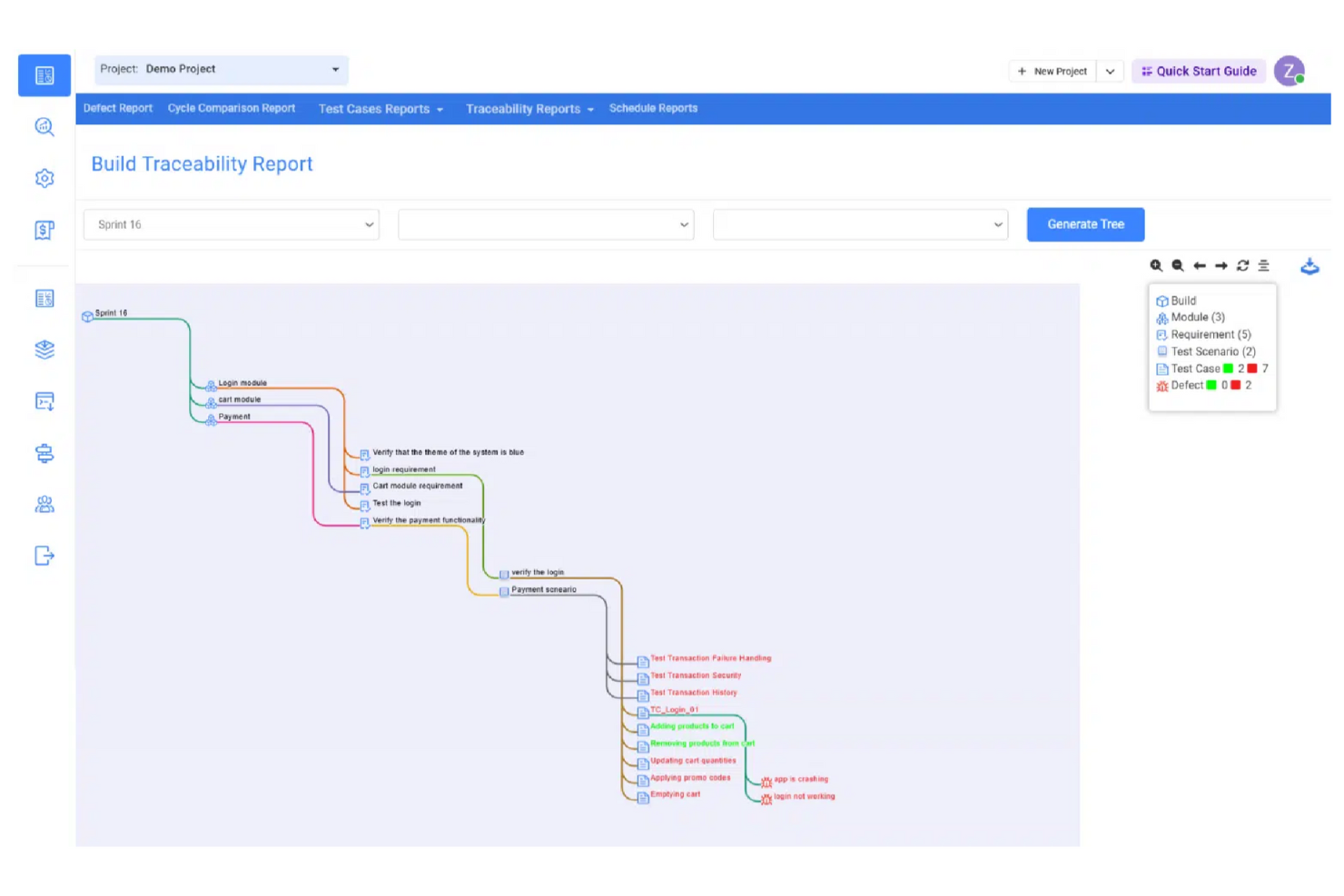
Kualitee ist ein Testmanagement-Tool, das Ihren Testprozess erleichtert, einschließlich Ihrer Datenverwaltung, Test-Suiten und Testskripte (sowohl automatisiert als auch manuell). Kualitee integriert sich mit führenden Tools, darunter Jira, und bietet eine exklusive Zwei-Wege-Integration, die es Ihnen ermöglicht, alle Issues in beiden Tools über die Auto-Sync-Funktion zu synchronisieren.
Kualitee integriert sich mit Asana, GitLab, JIRA, Redmine, Selenium, GitHub und Jenkins.
Kualitee kostet ab $15/Nutzer/Monat und bietet eine kostenlose 7-Tage-Testversion an.

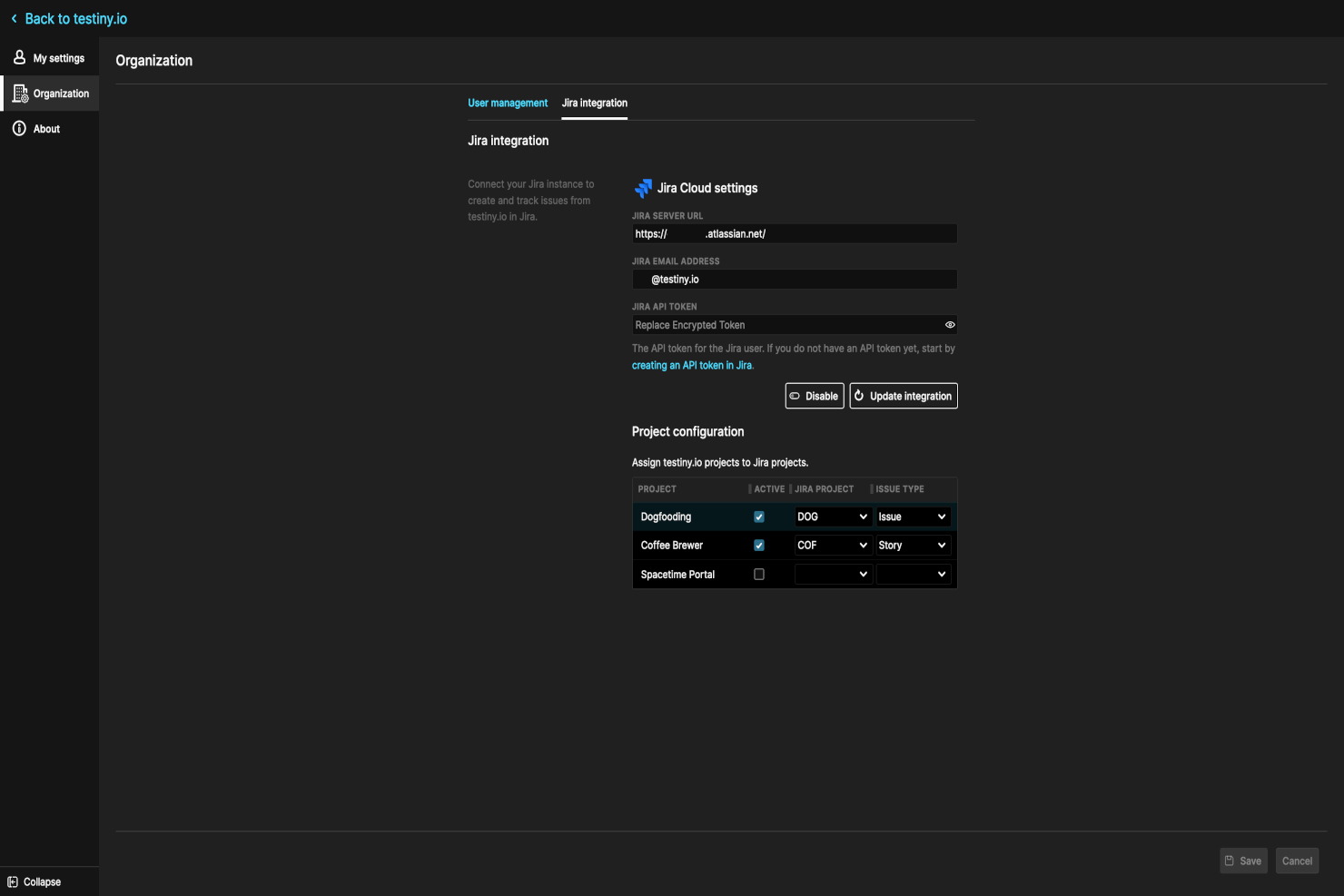
Testiny ist ein automatisiertes Software-Testtool, das Tests für Webanwendungen, mobile Anwendungen und APIs ausführen kann. Es bietet den Nutzern ein Framework zum Schreiben und Ausführen automatisierter Testscripte, die nur minimale menschliche Eingriffe erfordern. Nutzer können auch vorhandene Testscripte hochladen und sie zusammen mit manuellen Tests ausführen.
Die Software verfügt über eine bidirektionale Jira-Integration, die es den Nutzern ermöglicht, Testfallanforderungen hinzuzufügen und nach einem Testdurchlauf Issues zu melden. Nutzer können Testfälle und Testpläne mit Jira erstellen, verwalten und ausführen, einschließlich der Erstellung von Testschritten und Testdurchführungen. Teams können zudem die Automatisierungsfunktionen von Jira nutzen, um Tests basierend auf bestimmten Ereignissen oder Änderungen an Issues automatisch auszulösen.
Ein Dashboard bietet einen Überblick über alle Testaktivitäten, einschließlich Testfälle, Testläufe und Testberichte. Nutzer können den Fortschritt ihrer Testbemühungen nachverfolgen und erhalten einen umfassenden Überblick über den Qualitätsstatus des Projekts. Verschiedene fertige Reporting-Optionen stehen zur Verfügung und können an die Anforderungen des Teams angepasst werden. Berichte lassen sich in verschiedenen Formaten exportieren, darunter PDF, Excel oder CSV.
Die Software bietet einen kostenlosen Tarif für bis zu 3 Nutzer, und kostenpflichtige Tarife beginnen ab $17 pro Nutzer und Monat. Eine 14-tägige kostenlose Testphase ist ebenfalls für die kostenpflichtigen Tarife verfügbar.
New Product Updates from Testiny
Testiny Improves Test Case Filtering and CSV Import With Jira Links
Testiny introduces Enhanced Test Case Filtering and CSV Import with Jira Requirement Links. These updates improve how you select test cases and strengthen integration with Jira-based workflows, improving test management. For more information, visit Testiny’s official site.
 .
.
Am besten geeignet für das Synchronisieren von Vorgängen und Anforderungen in Jira
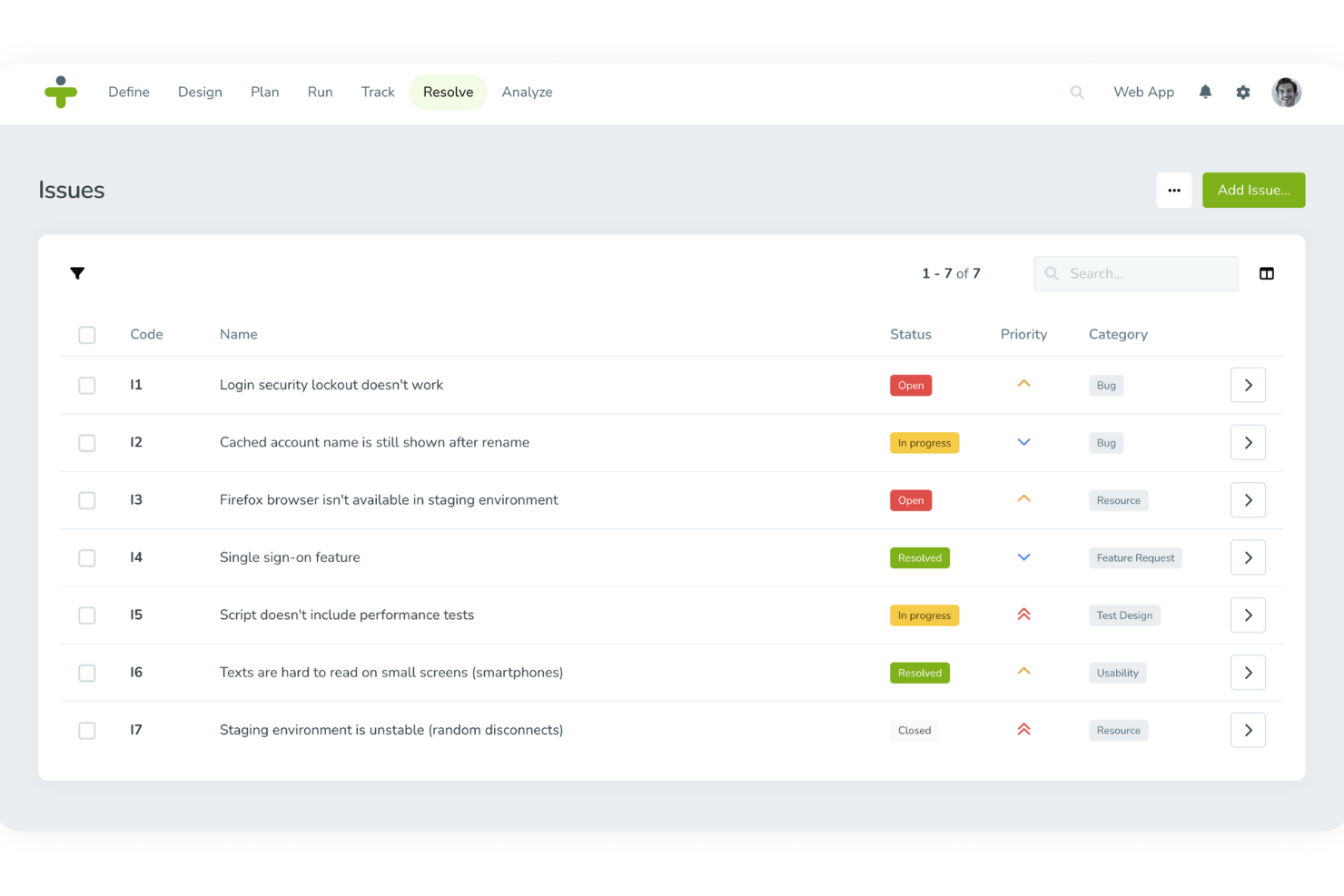
TestMonitor ist eine umfassende Testmanagement-Software, die entwickelt wurde, um die Qualitätssicherung von Software in verschiedenen Branchen wie Gesundheitswesen, Finanzen, Bildung und Regierung zu verbessern. Sie bietet zahlreiche Funktionen wie Anforderungs- und Risikomanagement, Testfallverwaltung, Meilensteinplanung, Nachverfolgung von Testläufen, Fehlerverfolgung sowie die Erstellung von Berichten und Kennzahlen.
TestMonitor ermöglicht es Nutzern, Probleme direkt an Jira zu senden, Jira-Vorgänge mit Problemen oder Anforderungen innerhalb von TestMonitor zu verknüpfen und sogar Jira-Vorgänge als Probleme oder Anforderungen in TestMonitor zu importieren. Dies trägt dazu bei, das Projektmanagement zu optimieren, indem sichergestellt wird, dass alle relevanten Informationen zwischen den beiden Plattformen synchronisiert werden. Dadurch wird der Bedarf an manuellen Aktualisierungen reduziert und das Risiko von Datenabweichungen minimiert.
Darüber hinaus gewährleistet die Synchronisierung des Fehlerstatus von Jira zu TestMonitor, dass das Team stets über den aktuellen Stand aller Vorgänge informiert ist. Dies fördert eine bessere Zusammenarbeit und Effizienz. Ein weiterer bedeutender Vorteil der Nutzung von TestMonitor ist das umfassende Testfallmanagement, das die Plattform bietet. TestMonitor vereinfacht die Erstellung, Sequenzierung und Verwaltung von Testfällen, wodurch es Teams leichter fällt, die Qualität während des gesamten Softwareentwicklungszyklus sicherzustellen. Die Plattform unterstützt sowohl manuelles als auch automatisiertes Testen, sodass Teams die beste Vorgehensweise für ihre spezifischen Anforderungen wählen können.
Neben Jira integriert sich TestMonitor außerdem in Azure DevOps, Slack, Asana, ClickUp, DoneDone, Mantis, Microsoft Teams, TOPdesk und Zapier.

Am besten geeignet zur Verwaltung von Testfällen und Anforderungen als Jira-Vorgänge
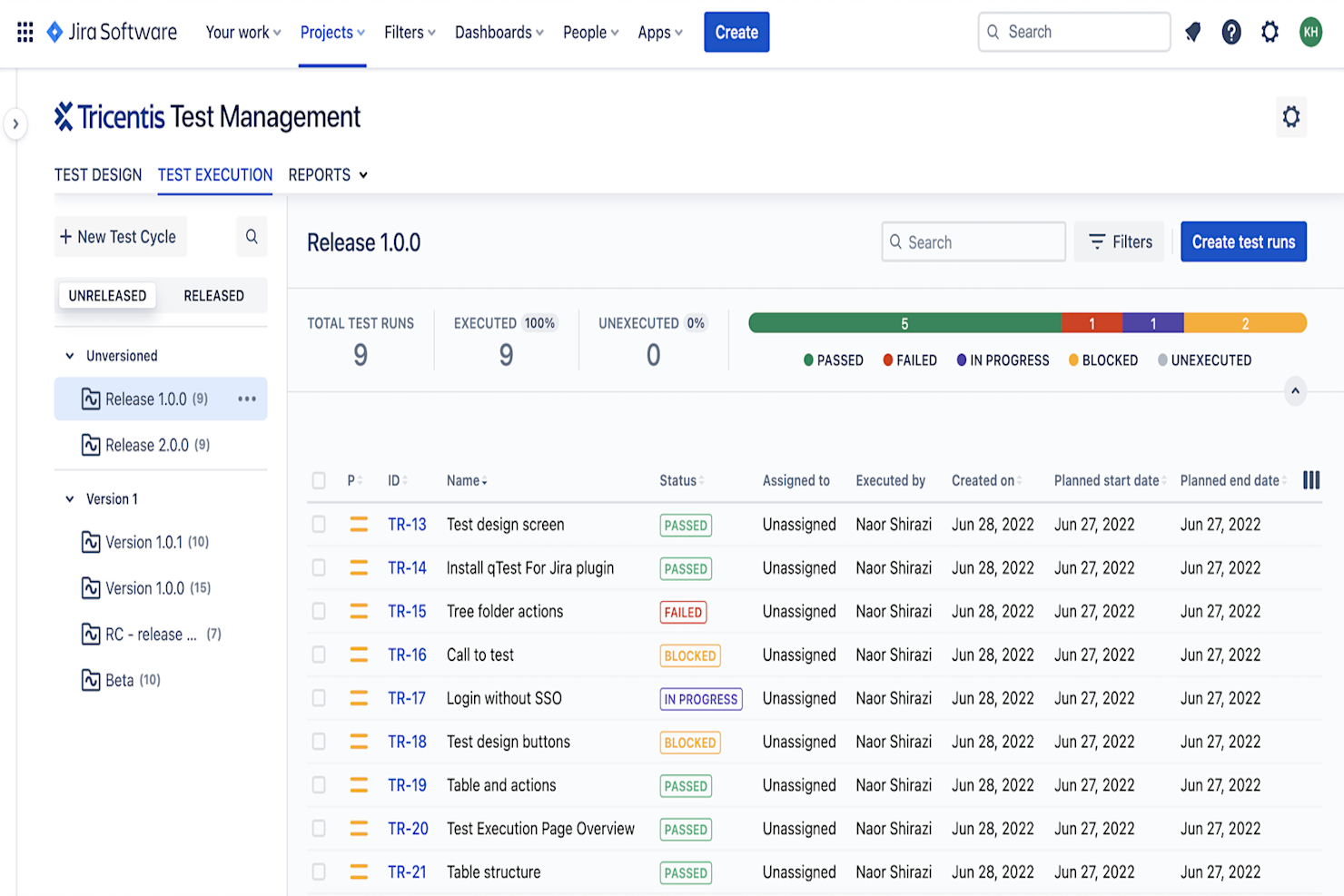
Tricentis Test Management ist eine ganzheitliche Testmanagement-Lösung, die sich mit DevOps-Tools wie Jira integriert, um Teams einen vollständigen und einheitlichen Überblick über die Testphase im Softwareentwicklungszyklus zu geben. Testpläne und Berichte werden in Jira gespeichert, sodass QA, Entwicklung und andere relevante Teams hinsichtlich des Softwarestatus synchron bleiben – besonders, wenn Teams Jira bereits als ihr DevOps-Tool nutzen.
Tricentis verfügt über eine benutzerfreundliche Oberfläche, die sich nahtlos in Jira einfügt und es Teams ermöglicht, sich schnell auf die Qualitätssicherung in jeder Phase des Test- und Entwicklungszyklus eines Produkts zu konzentrieren. Dadurch bleiben Teams koordiniert und können Entscheidungen zum Testen auf Grundlage von Echtzeitdaten treffen, die durch Berichte zu Test-Erstellung, Testausführung und -status erfasst werden.
Tricentis ermöglicht es Nutzern, die die Arbeit mit Jira gewohnt sind, die beiden Lösungen zu integrieren: Informationen können effektiv aus Jira abgerufen werden und der Zugriff auf Tests ist auch dann weiterhin möglich, wenn der Jira-Server ausfällt. Diese Integration bietet große Flexibilität, indem Aufgaben situationsabhängig jeweils mit einer Lösung erledigt werden können – beispielsweise für Fehlerberichte Jira und für die Zuweisung von Testfällen an Tester und das Erstellen von Testplänen für verschiedene Releases Tricentis.
Eine Testmanagement-Softwarelösung für ein Vorgangsverwaltungstool wie Jira erleichtert es Teams, sich abzustimmen, die Struktur eines Tests zu planen, Anforderungen in Tricentis qTest zu übernehmen, QA und Entwicklung auf einer Plattform zu vereinen und hochwertige Software schneller zu entwickeln.
Tricentis Test Management ist für bis zu 10 Benutzer kostenlos.

Bester Incident-Aggregator zur Weiterleitung von Jira-Vorfällen
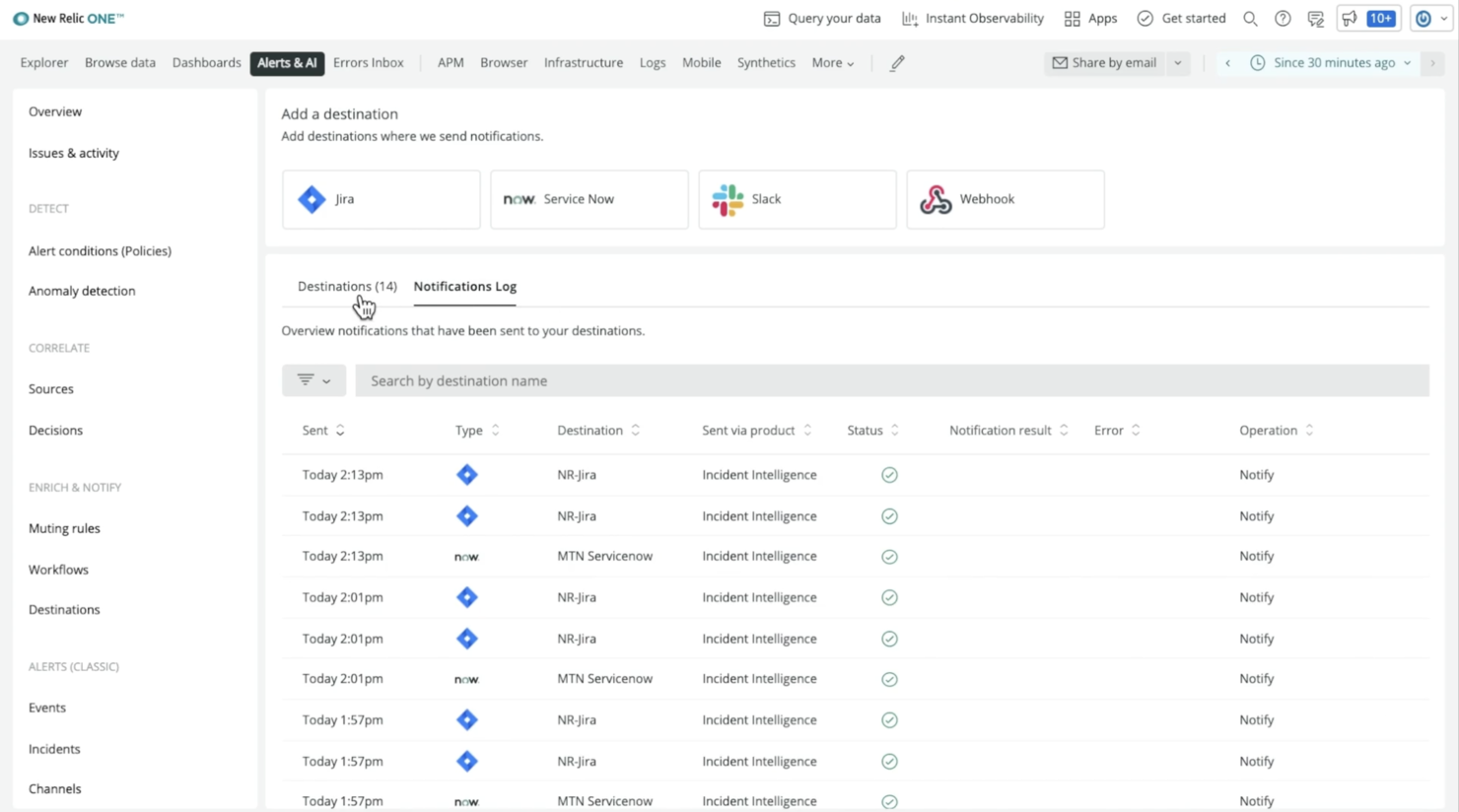
New Relic ist ein SaaS-Produkt, das Tools für das Application Performance Monitoring (APM) und die Überwachung der Infrastruktur bereitstellt. Es bietet Einblicke in die Leistung Ihrer Anwendungen, hilft Ihnen, Engpässe zu identifizieren, Probleme zu beheben und die gesamte Benutzererfahrung zu verbessern.
Es eignet sich hervorragend für Unternehmen jeder Größe, von Startups bis hin zu Großunternehmen, und ist besonders nützlich für Teams, die Jira für Projektmanagement und Problemverfolgung nutzen. Die Integration von New Relic mit Jira erleichtert es, die Leistung Ihrer Anwendungen im Rahmen der Entwicklungs- und Testprozesse zu überwachen und zu verwalten.
Das herausragende Merkmal, das Sie kennen sollten, ist Destinations. Destinations in New Relic werden verwendet, um relevante Daten an ein Team oder eine Person in externer Software zu senden. Daher müssen Sie Ihre aktuelle Jira-Instanz mit New Relic verbinden und die bidirektionale Synchronisation aktivieren, um das Produkt voll auszuschöpfen.
Sobald dies eingerichtet ist, können Sie Workflows hinzufügen, um bestimmte Verhaltensweisen für New Relic festzulegen, wenn Einzelpersonen oder Teams benachrichtigt werden sollen. Alles, was bleibt, ist, Ihr Destination zu aktivieren. New Relic überwacht Telemetriedaten, erkennt Probleme und generiert automatisch Warnmeldungen, damit Sie Ihre Tests stets im Blick behalten.
Hervorstechende Eigenschaften dieser Software sind Echtzeitüberwachung, anpassbare Dashboards, Benachrichtigungen und Alarmierungen, erweiterte Analysen und Unterstützung für mehrere Sprachen und Plattformen.
New Relic lässt sich mit anderen beliebten Tools und Diensten wie Slack, PagerDuty und AWS integrieren und ist damit eine flexible und leistungsstarke Lösung für Teams, die ihre Anwendungs- und Infrastrukturüberwachung optimieren möchten.

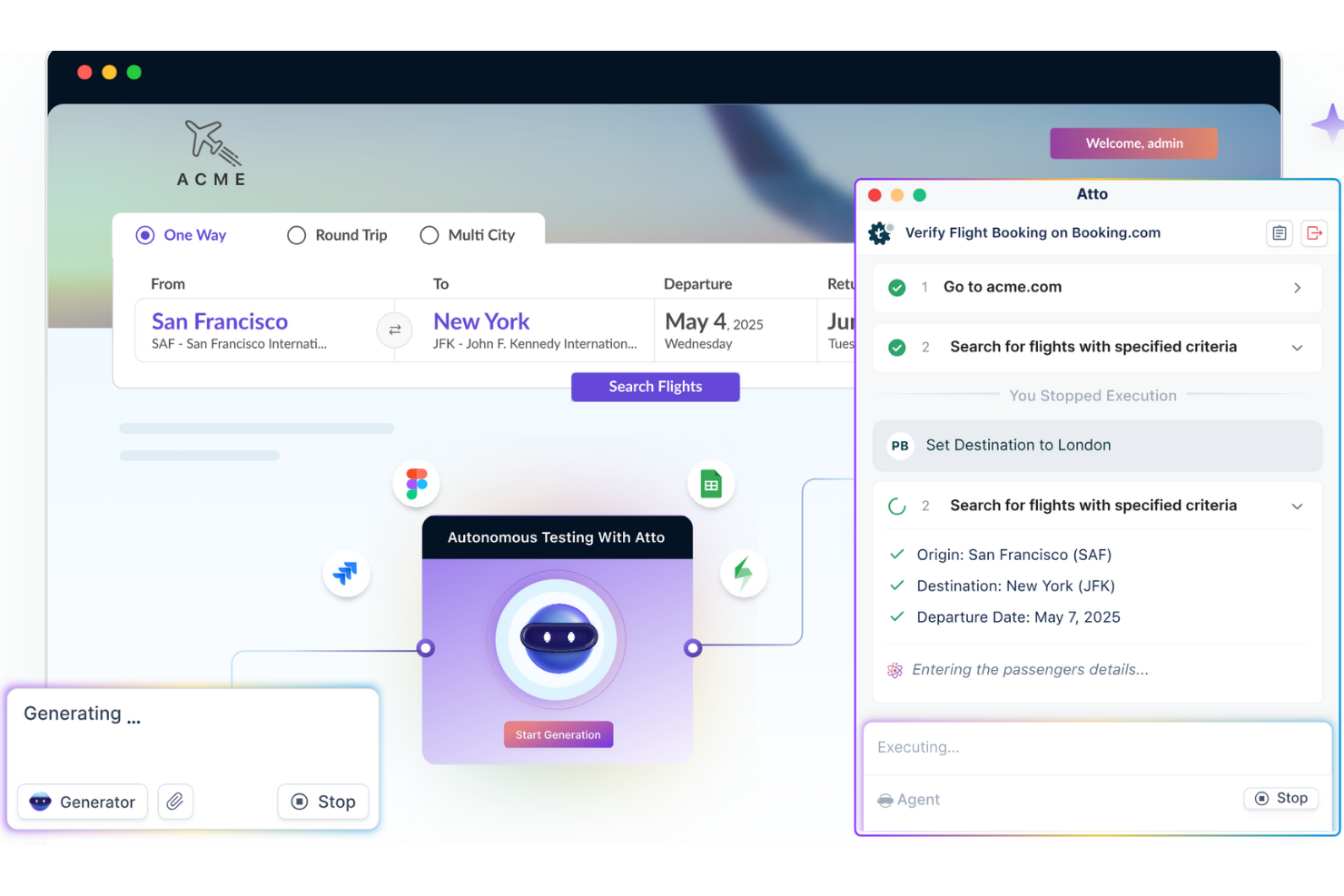
Testsigma ist ein Testmanagement-Tool, das mit Jira zusammenarbeitet und KI-Agenten in Ihre Testabläufe integriert. Es verwaltet manuelle, automatisierte und explorative Tests – von der Planung über die Ausführung bis zur Fehlerberichterstattung – und bleibt dabei stets mit Ihren Jira-Projekten verbunden.
Mir gefällt Testsigma wegen seiner agentenbasierten Testmanagement-Funktionen – sein KI-Mitarbeiter Atto arbeitet aktiv mit Ihrem Team zusammen und entlastet Sie bei der Arbeit. Sein Generator-Agent liest Jira-Storys, Designs und sogar Videos und wandelt sie automatisch in Testfälle um, sodass Ihr Team eine bessere Testabdeckung erreicht, ohne Code schreiben zu müssen.
Es gibt außerdem einen Executor-Agenten und einen Fehlerbericht-Agenten, die dafür sorgen, dass alles weiterläuft, ohne dass Sie die Tests ständig überwachen müssen. Tests werden im Browser oder auf Geräten ausgeführt, und Fehlschläge werden automatisch mit vollständigen Reproduktionsdetails in Jira protokolliert. Das bedeutet weniger manuellen Aufwand, weniger fehlerhafte Tests und schnellere Feedback-Schleifen.
Zu den Integrationen von Testsigma gehören Jira, Jenkins, CircleCI, Azure DevOps, Bamboo, AWS, Travis CI, Codeship, FreshRelease, YouTrack, Mantis Bug Tracker und Backlog.

Am besten für BDD- und Testmanagement innerhalb von Jira mit Cucumber-Unterstützung
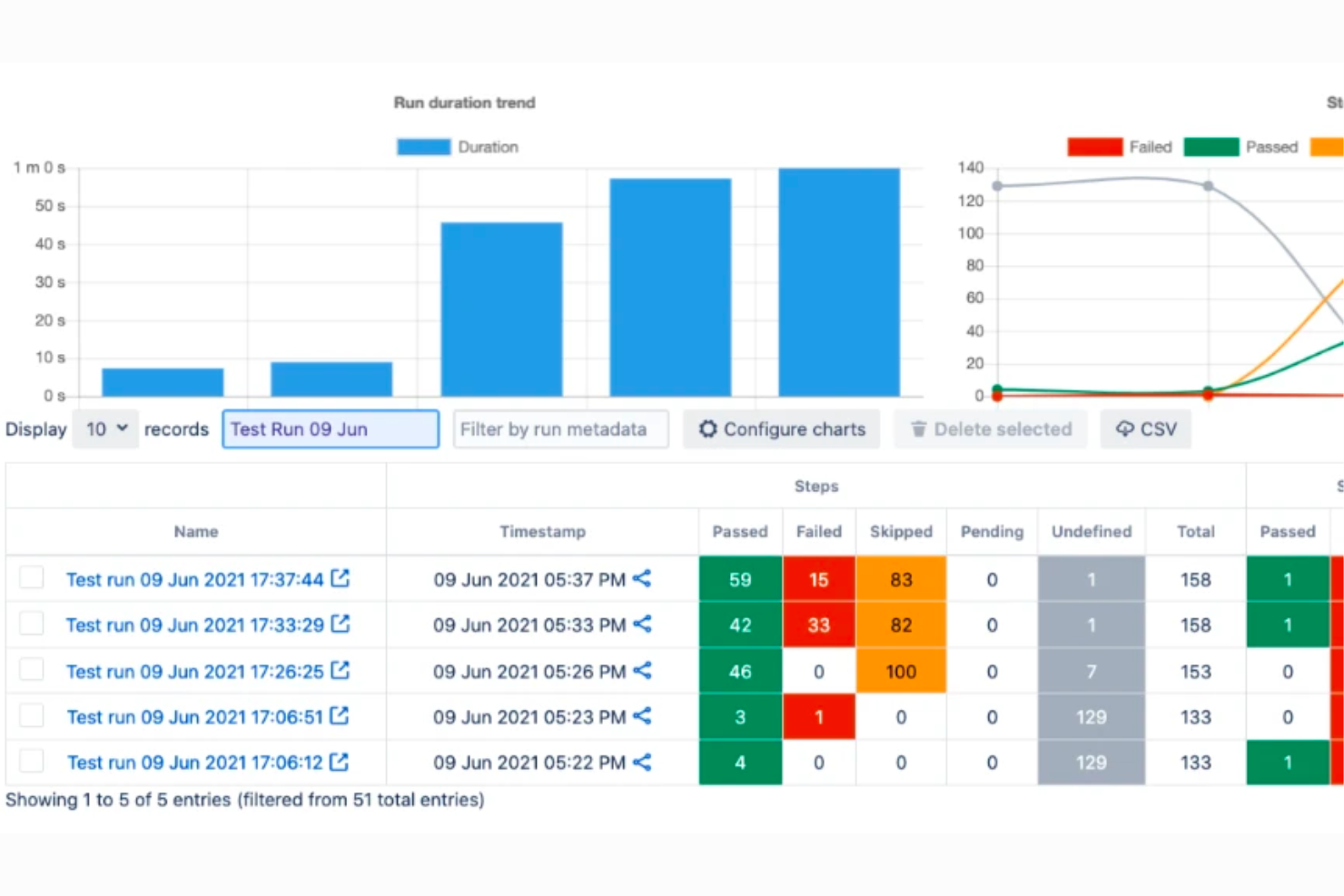
AssertThat ist ein BDD-Kollaborationstool, das sich in Jira integriert und Teams ermöglicht, BDD-Anforderungen direkt innerhalb der Jira-Umgebung zu verwalten. Es bietet Funktionen zur Erstellung von Gherkin-Szenarien, Integration in Continuous-Integration- und Delivery-Pipelines sowie zur Erstellung detaillierter BDD-Nachverfolgungsberichte und positioniert sich damit als hervorragende Lösung für BDD- und Testmanagement in Jira.
Mit AssertThat können BDD-Anforderungen direkt in der Jira-Umgebung definiert werden. Benutzer können BDD-Anforderungen direkt auf der Plattform definieren und sie dann zusammen mit Features und Szenarien bestimmten Jira-Tickets zuordnen. Die Plattform bietet einen Gherkin-Editor mit Autovervollständigung, um beim Schreiben von BDD-Szenarien zu unterstützen, und unterstützt die Integration in CI/CD-Pipelines und Cucumber zur Automatisierung dieser Szenarien. Cucumber wird ebenfalls unterstützt, sodass automatisierte Tests, die in Gherkin geschrieben wurden, ausgeführt werden können. Benutzer können sich auch mit GitHub und über Kommandozeilenschnittstellen integrieren, was die Einbindung von AssertThat in bestehende Arbeitsabläufe ermöglicht.
AssertThat bietet Integrationen mit verschiedenen Tools und Plattformen, die für BDD und Testmanagement entscheidend sind. Es gibt eine native Jira-Integration, die eine effiziente Nachverfolgbarkeit und Verwaltung von BDD-Szenarien im Jira-Ökosystem ermöglicht. Das Tool unterstützt zudem die Integration in CI/CD-Pipelines und ist kompatibel mit Cucumber, um Szenarien auszuführen und die Zusammenarbeit über das Cucumber BDD Plugin zu fördern. Zusätzlich kann AssertThat mit Enterprise-Tools zur Aktualisierung von BDD-Szenarien verwendet werden und integriert sich mit verschiedenen Testautomatisierungs-Frameworks.
AssertThat ist über den Atlassian Marketplace für bis zu 10 Benutzer kostenlos nutzbar. Die Preise beginnen bei $2,50 für die ersten 100 Benutzer.

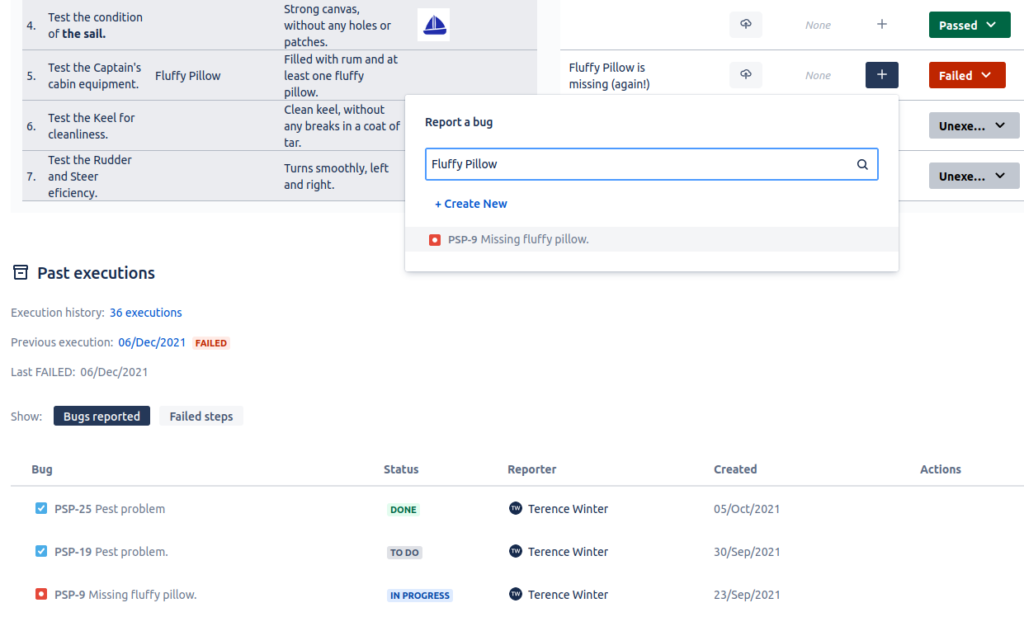
QAlity Plus ist ein Testmanagement-Tool, das in Jira integriert ist. Es unterstützt Tester, indem es Einblicke in die Testergebnisse und frühere Testdurchläufe bietet. Darüber hinaus ermöglicht es ein einfaches Melden, Verknüpfen und Durchsuchen vorhandener Fehler, um die Effizienz der Tests zu maximieren. QAlity Plus fördert außerdem die Transparenz zwischen Testern und dem Team, indem Testdefinitionen direkt in Aufgaben eingebunden werden, was die Zusammenarbeit und das gemeinsame Arbeiten aller erleichtert.
QAlity Plus ist für bis zu 10 Benutzer kostenlos, danach $1.50 pro Nutzer/Monat. Bei mehr als 100 Nutzern wird es günstiger.

Xray
Am besten geeignet, um Jira-native Vorgangstypen zur Verwaltung von Testartefakten einzusetzen
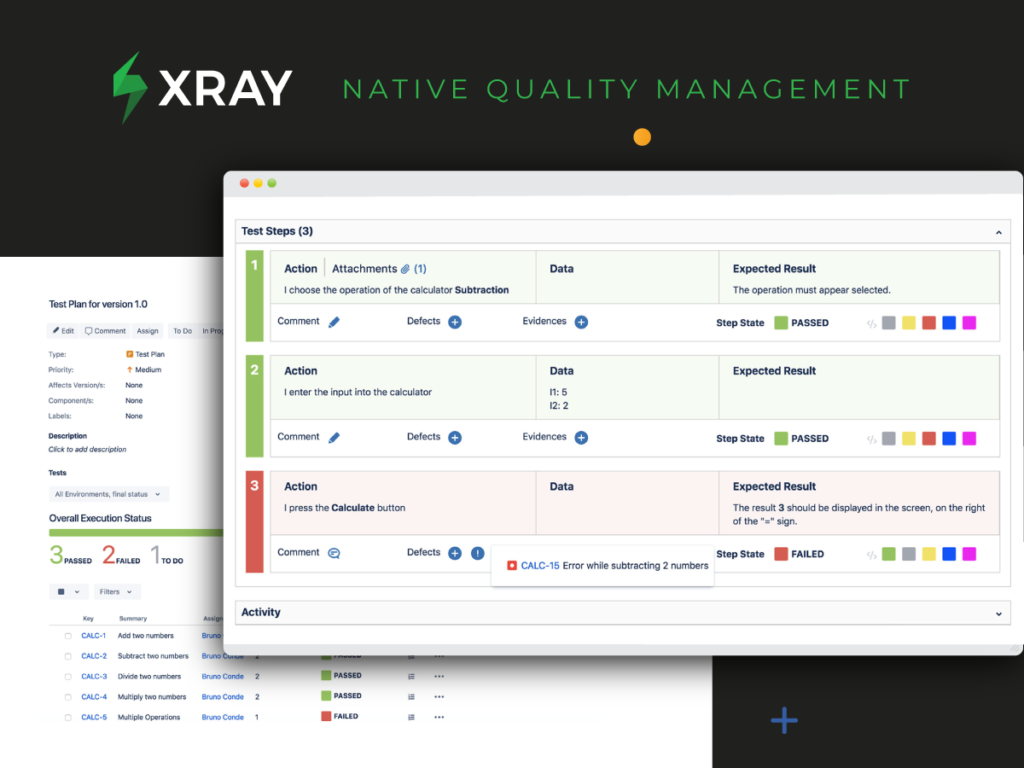
Xray für Jira ist ein umfassendes Testmanagement-Tool, mit dem Sie Tests organisieren, planen, ausführen und den Fortschritt sowie die Einsatzbereitschaft berichten können.
Xray verwendet die nativen Vorgangstypen von Jira, und alle Anforderungen werden mit Testfällen verknüpft, sodass Ihnen kein Test entgeht. Da Xray nativ in Jira integriert ist, arbeiten Entwickler und Tester in demselben einheitlichen Ökosystem, was Transparenz, Sichtbarkeit des Testfortschritts und Zusammenarbeit zwischen Entwicklern und Testern ermöglicht. Dadurch wird jeder Test erfasst, jede Aufgabe lebt im gleichen Workflow und alle sprechen die gleiche Sprache.
Mit Xray können Manager mithilfe von agilen Boards den Status der Anforderungen und den Fortschritt der Testausführungen in Echtzeit verfolgen. Außerdem stehen Ihnen leistungsstarke Berichtsfunktionen mit integrierten Berichten zur Rückverfolgbarkeit und Abdeckungsanalyse sowie ein Dashboard mit Gadgets zur Verfügung, um den Teststatus einfach zu beurteilen. Xray unterstützt zudem datengesteuerte Tests mit parametrisierten Tests, sodass Sie große Iterationsmengen schnell und einfach testen können.
Die Integration mit Ihren bevorzugten Continuous Integration-Tools, einschließlich Cucumber und Jenkins, ist dank der integrierten REST-API unkompliziert. Xray integriert sich auch mit führenden Testautomatisierungs-Frameworks wie Cucumber, JUnit, NUnit, Robot Framework und unterstützt außerdem BDD-Tests mit Gherkin-basierten Frameworks.
Xray bietet eine 30-tägige kostenlose Testversion an.

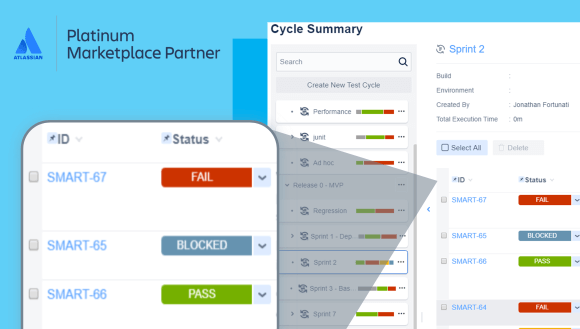
Zephyr Squad ist die beliebteste Testmanagement-Lösung innerhalb von Jira für kleine agile Teams, die Testfalldesign, Ausführung und Reporting direkt in Jira ermöglichen – genau dort, wo das agile Team seine Arbeit koordiniert. Außerdem bietet es eine leistungsstarke Integration für Testautomatisierung und BDD und führt alle relevanten Informationen zusammen.
Zephyr Squad kostet ab $10/Monat für bis zu 10 Benutzer und $4,55/Benutzer/Monat danach und wird günstiger, je mehr Benutzer Sie hinzufügen. Zephyr Squad bietet eine 30-tägige kostenlose Testversion.

aqua ALM
Am besten geeignet für Anforderungs-, Testfall- und Defektmanagement
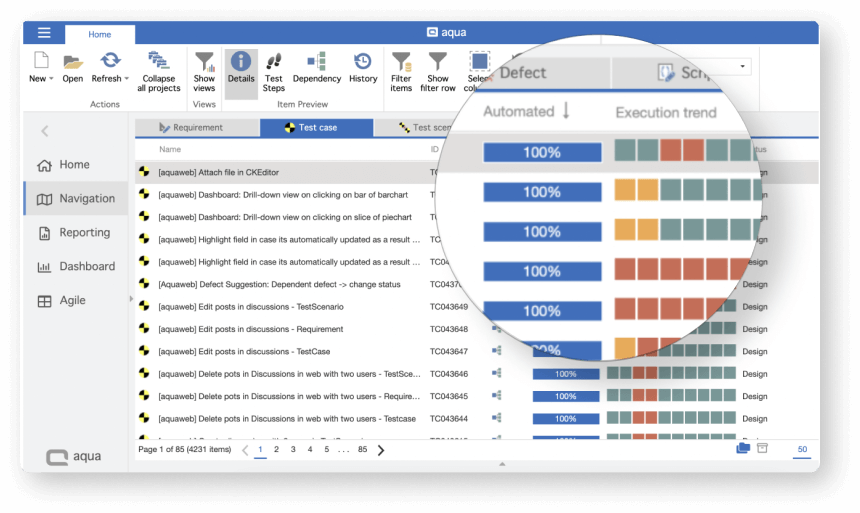
aqua ist ein benutzerfreundliches deutsches Testmanagement-System, das für alle Pakete einen Service auf Enterprise-Niveau zu einem erschwinglichen Preis bietet (Pakete ab 39 Euro/Monat). Mit aqua können Sie Tests und Teams organisieren, Testszenarien beliebiger Komplexität und Größe durchführen und problemlos von manuellen auf automatisierte Tests umsteigen. Die Echtzeit-Analysen und Berichte auf Enterprise-Niveau von aqua sorgen für Transparenz in QA- und Entwicklungs-Workflows: Sie sehen, was verbessert und automatisiert werden kann.
Seit 2008 dient aqua als Testmanagement- und ALM-Lösung für die größten Unternehmen in Deutschland. Seit 2022 wurde zudem eine Cloud-Lösung für kleine und mittelständische Unternehmen eingeführt, die Enterprise-Support und Flexibilität zu einem erschwinglichen Preis bietet (ab 39 Euro/Nutzer/Monat).
Jedes Paket ermöglicht es, eine unbegrenzte Anzahl von kostenlosen 'Basic'-Nutzern hinzuzufügen, die Berichte einsehen und Testfälle erstellen sowie ausführen können (ideal für manuelle Tester). So sparen Sie Kosten, da die kostenpflichtige aqua-Version nur für Testmanager und Automatisierungstester benötigt wird.

Am besten geeignet für integriertes Anforderungsmanagement
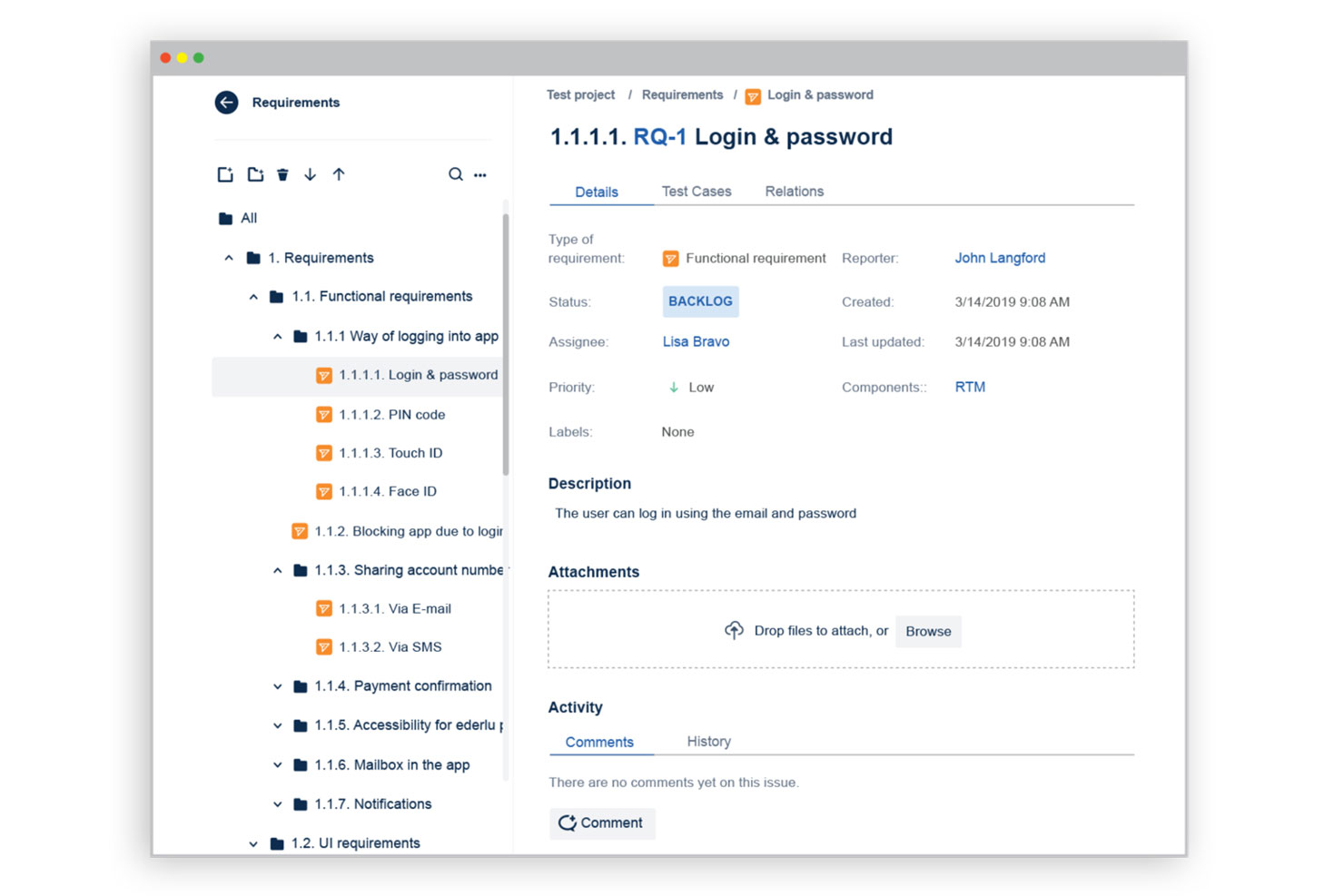
Requirements and Test Management (RTM) ist eine Webanwendung, mit der Qualitätssicherer (QAs) Software-Testprojekte in Jira organisieren und verfolgen können. Testende haben innerhalb von RTM Zugriff auf alle nativen Jira-Funktionen, was die Integration von Tests mit Anforderungen, Entwicklung und Berichterstattung ermöglicht. Eine beliebte Funktionalität sind Jira-Automatisierungsregeln, die den Zeitaufwand für wiederkehrende Aufgaben wie das Aktualisieren von Vorgangsstatus oder das Benachrichtigen von Nutzern über Änderungen an Anforderungen reduzieren. Die Preisgestaltung für RTM ist auf Anfrage erhältlich.

Ranorex
Am besten geeignet für Testmanagement-Teams mit unterschiedlichen Erfahrungsstufen
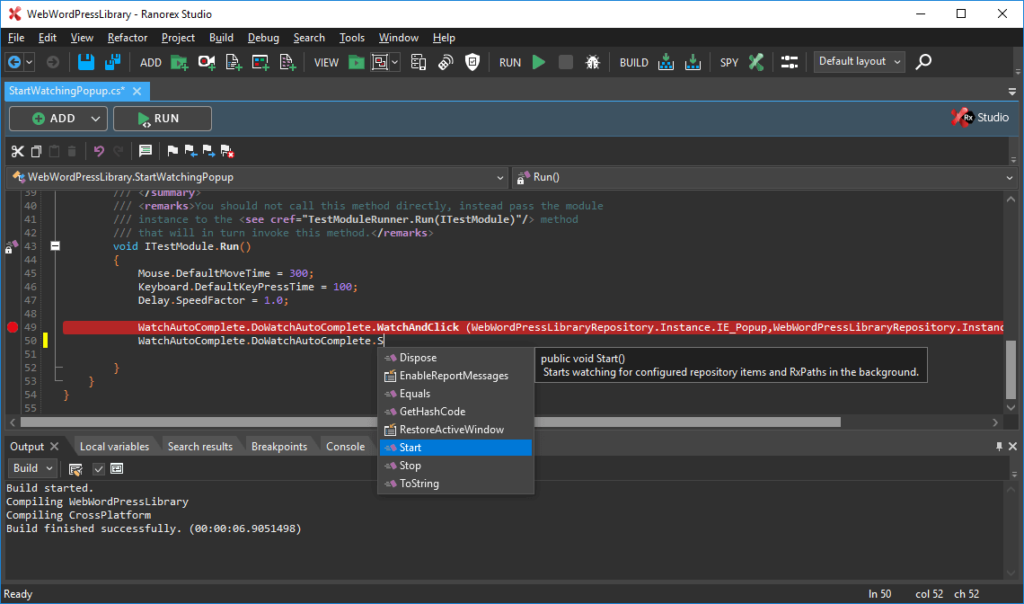
Ranorex ist die richtige Wahl, wenn Sie eine Lösung für verschiedene Testarten suchen: Regressionstests, datengesteuerte Tests, Keyword-Tests oder plattformübergreifende Browser-Tests. Dieses Testmanagement-Tool für Jira ist in der Cloud für verschiedene Geräte verfügbar, darunter Desktop und Mobilgeräte.
Ranorex bietet drei Preiskategorien, beginnend bei $3.450 für eine unbefristete Lizenz. Es gibt eine 30-tägige kostenlose Testversion, für die keine Eingabe Ihrer Kreditkartendaten erforderlich ist.

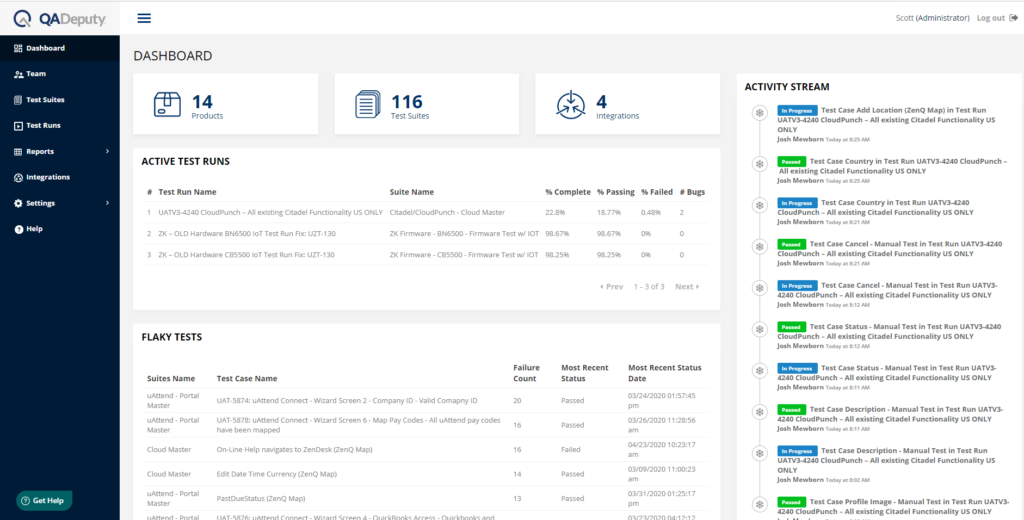
QADeputy ist ein Testmanagement-Tool, das sich in bestehende Automatisierungs- und Fehlererkennungstools integrieren lässt. Darüber hinaus können Sie das Tool automatisieren und automatisierte Benachrichtigungen an verschiedene Stakeholder senden, die mit Ihnen zusammenarbeiten.
QADeputy bietet einen kostenlosen Plan, der Ihnen einen einzelnen Benutzer, eine Testsuite und 100 Testfälle ermöglicht. Das Tool wirbt mit einem kostenpflichtigen Plan für $18 pro Monat, mit dem Sie unbegrenzt viele bezahlte Benutzer, Testsuites und Testfälle erhalten.

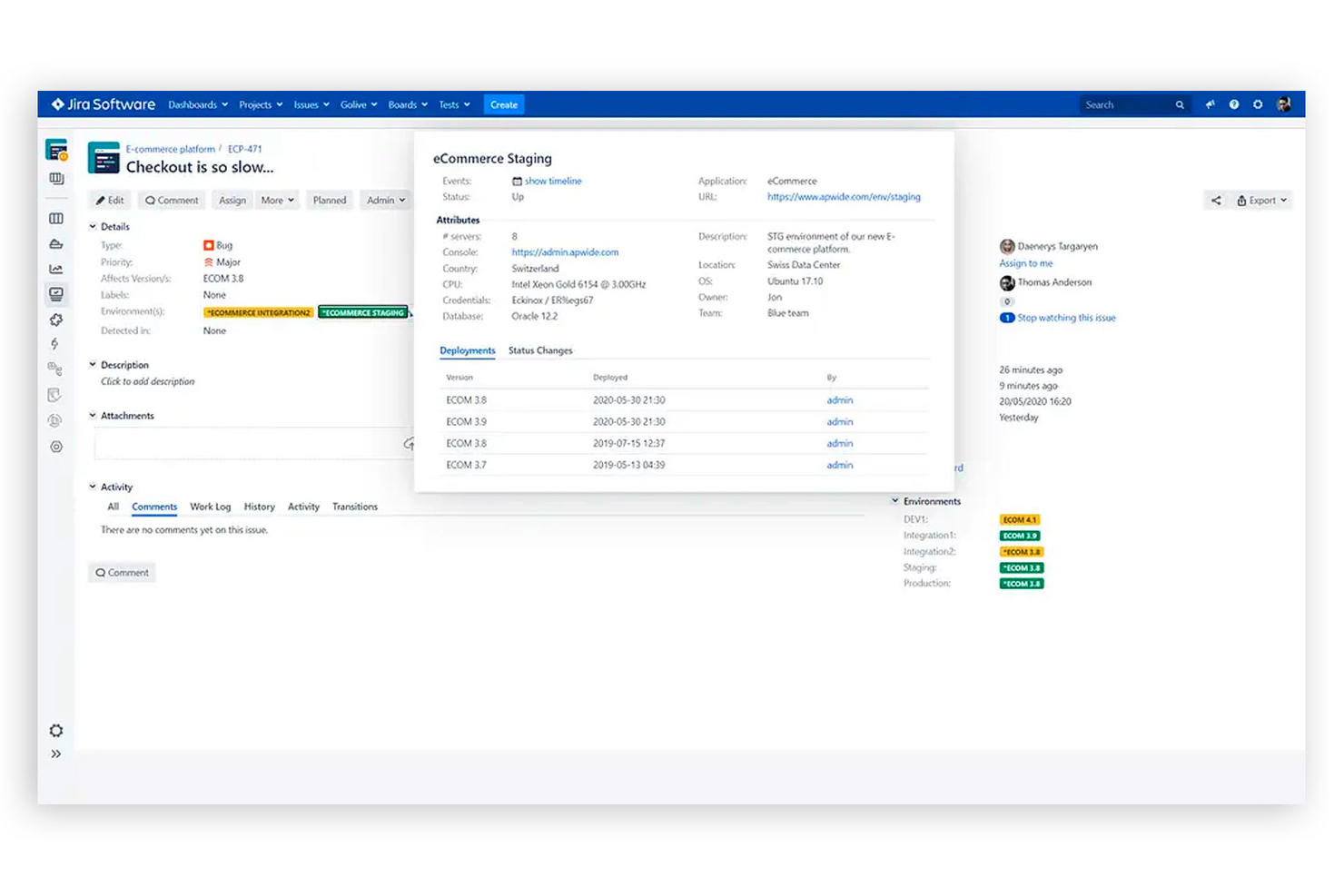
Apwide Golive ist eine Enterprise-Lösung zur Verwaltung von Software-Testumgebungen in Jira. Mit Apwide kann Ihr Team Software-Bereitstellungen, Konfigurationsänderungen und Release-Automatisierung an einem Ort verwalten. Teams können Jira-Vorgänge mit einzelnen Testumgebungen verknüpfen, um Fehler im Blick zu behalten. Apwide ermöglicht es Nutzern außerdem, agile Boards direkt für jede Testumgebung in Jira zu veröffentlichen, damit Teams stets auf dem neuesten Stand bleiben. Apwide Golive kostet ab $7.70/Monat (pro 11 Benutzer in Jira Cloud) und/oder $750/Jahr (50 Benutzer im Jira Data Center) und/oder $10 einmalige unbefristete Lizenz + $10/Jahr Wartungsgebühr (10 Benutzer auf Jira Server).

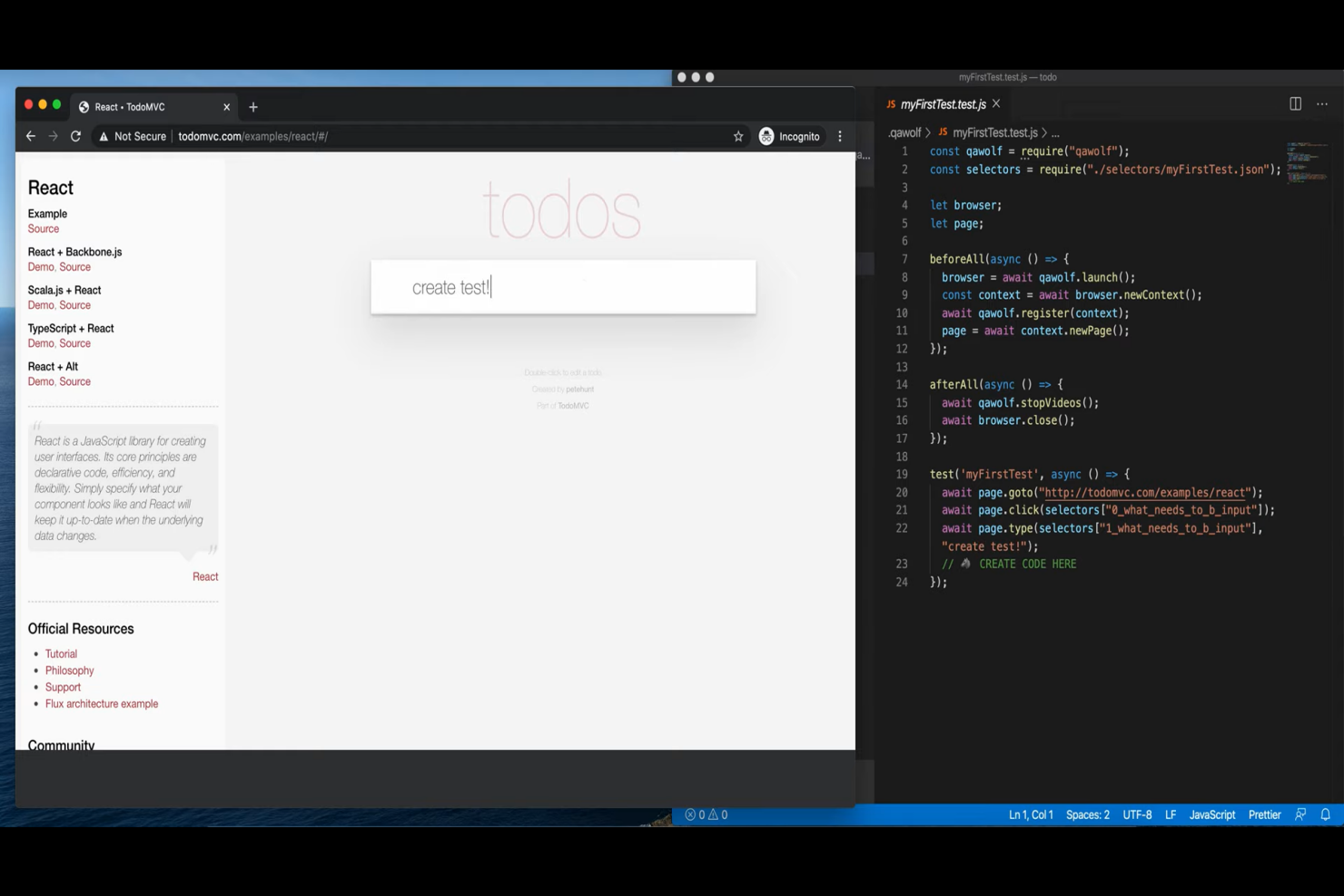
QA Wolf ist ein Anbieter von End-to-End-Testmanagement und Automatisierungsdienstleistungen, der Organisationen mit einem Team erfahrener QA-Ingenieure unterstützt, um kritische Tests zu schreiben, auszuführen und zu wiederholen. Ihr Service nimmt internen Teams die Belastung der eigenen QA-Arbeit ab und stellt wertvolle Ressourcen für sämtliche End-to-End-Testanforderungen bereit.
Ein Aspekt, den ich an ihrem Service besonders schätze, ist, dass ihr Team eine Integration mit Ihrer Jira-Instanz einrichtet, sodass Testberichte automatisch zu Ihrem Issue-Tracker hinzugefügt werden. Anschließend beginnt ihr Team mit dem Testen, indem es Tests ausführt, Fehler untersucht und einen Bug-/Fehlerbericht mit Reproduktionsschritten, einer Videoaufzeichnung, Logs und allen weiteren benötigten Daten erstellt.
Und ihr Team integriert mehr als nur Jira: Sie verbinden sich mit Ihrem bestehenden Technologie-Stack, um Ihnen einen Echtzeit-Überblick über die Performance Ihrer Software zu geben. QA Wolf nutzt einen Demon Ihrer Software, um einen Testplan zu erstellen und mit der Programmierung automatisierter Testsuiten zu beginnen, sodass sie Ihre Testanforderungen vollständig verstehen und bedienen können.

testomat.io
Am besten geeignet für die Echtzeitsynchronisierung von Testfällen
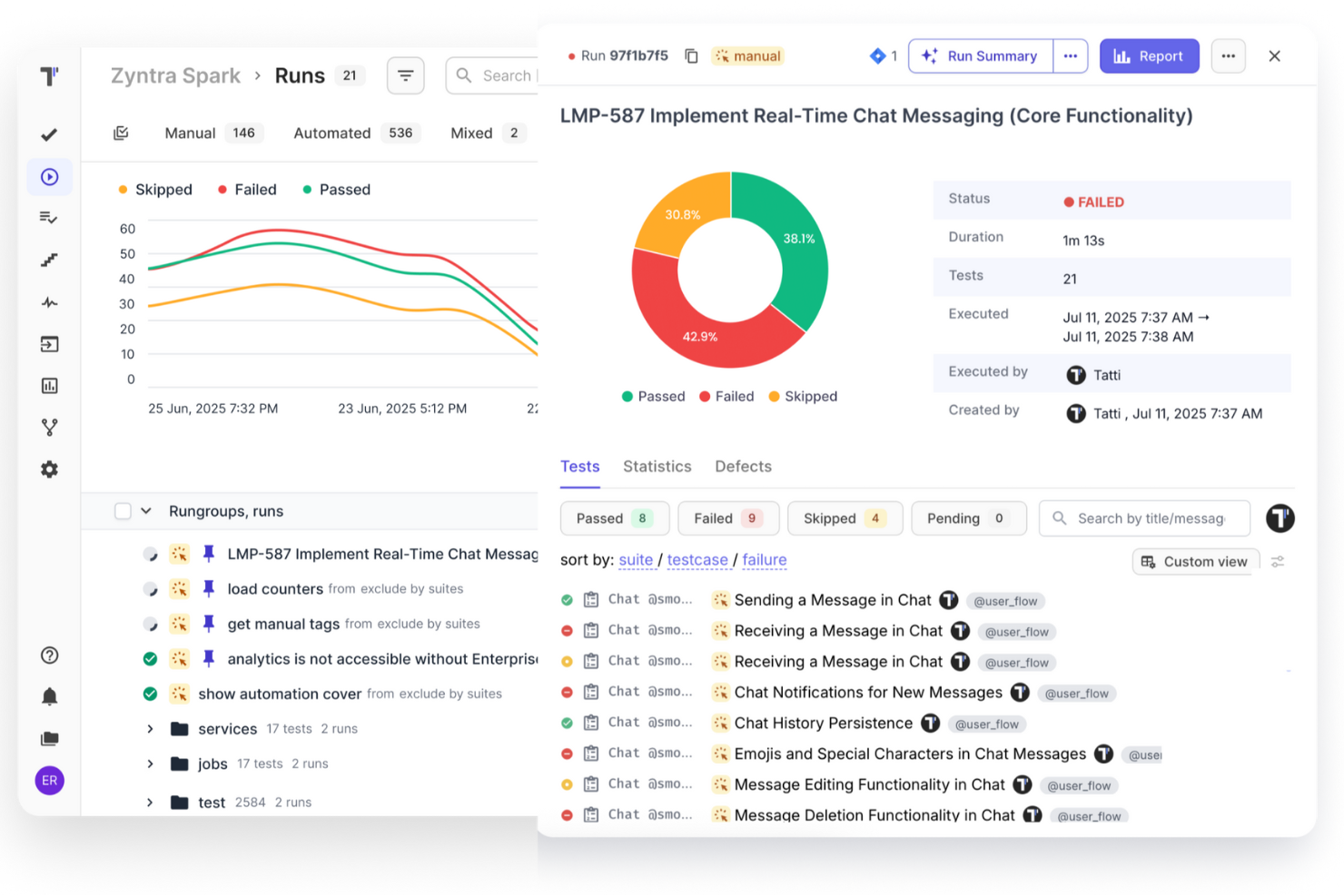
Testomat.io bietet KI-gestütztes Testmanagement für manuelle und automatisierte Tests, sodass QA-Teams alles an einem Ort organisieren, ausführen und verfolgen können. Es lässt sich nahtlos in Jira Cloud, Data Center und Server integrieren und ermöglicht die Echtzeitsynchronisierung von Testfällen, Vorgängen und Ergebnissen. Sie können Testzyklen verwalten, die automatische Erstellung von Vorgängen bei fehlgeschlagenen Tests einrichten und eine lebende Dokumentation generieren, die sich im Verlauf der Tests automatisch aktualisiert.
Testomat.io stellt zudem KI-Tools zur Verfügung, die Tests generieren, Verbesserungen vorschlagen und potenzielle Probleme frühzeitig aufzeigen. Es unterstützt flexible Ausführungseinstellungen, unbegrenzte Durchläufe (bis zu 100.000 pro Lauf) und liefert Analysen in Echtzeit, Heatmaps und Einblicke in die Testabdeckung. Die Integration mit Tools wie Cypress, Playwright und CI/CD-Plattformen sorgt für reibungslose Arbeitsabläufe. Für kleine Teams gibt es einen kostenlosen Tarif, kostenpflichtige Optionen bieten erweiterte Funktionen. Der Support reagiert schnell per E-Mail und Live-Chat.

PractiTest
Am besten geeignet, um Anforderungen & User Stories mit Tests zu verknüpfen
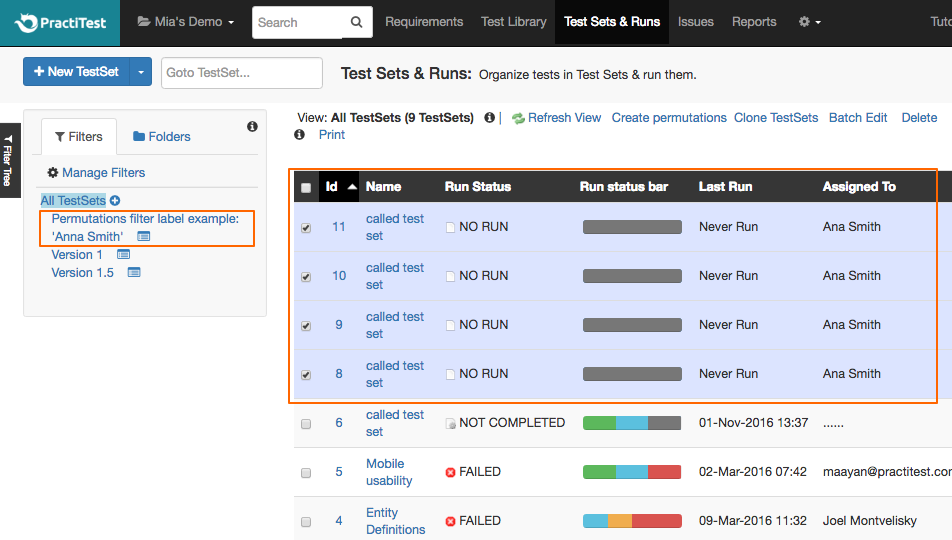
PractiTest bietet zentralisiertes Testmanagement für automatisierte und manuelle Testprozesse.
Dies ist ein hervorragendes Tool, um es mit Jira zu verwenden—es ist bekannt dafür, einfach zu konfigurieren und zu integrieren. Sobald es eingerichtet ist, ist es vollständig mit Jira synchronisiert. Das bedeutet, dass jede Änderung, die in PractiTest vorgenommen wird, in Jira aktualisiert wird und jede Aktualisierung des Jira-Projekts in PractiTest übernommen wird. Die Integration ermöglicht Echtzeit-Updates zwischen den beiden Systemen, unabhängig davon, ob Sie Jira Cloud, Jira Data Center oder Jira Server verwenden.
Über die Integration mit Jira können Sie Anforderungen und User Stories aus Jira importieren und mit Testfällen in PractiTest verknüpfen. Sie können auch Jira-Filter nach PractiTest importieren und Jira-Felder mit PractiTest-Feldern abgleichen, was Ihnen hilft, individuell anzupassen, welche Informationen aus Jira Sie in PractiTest anzeigen. Sie können außerdem Probleme, die Sie bei Tests in PractiTest feststellen, direkt an Ihr Jira-Projekt melden; das Tool fügt dabei automatisch auch die durchgeführten Schritte zu Jira hinzu.
Die Tarife beginnen bei $498/Nutzer/Jahr. Es gibt eine 14-tägige kostenlose Testphase.

TestRail
Am besten geeignet zur Nachverfolgung von manuellen & automatisierten Tests
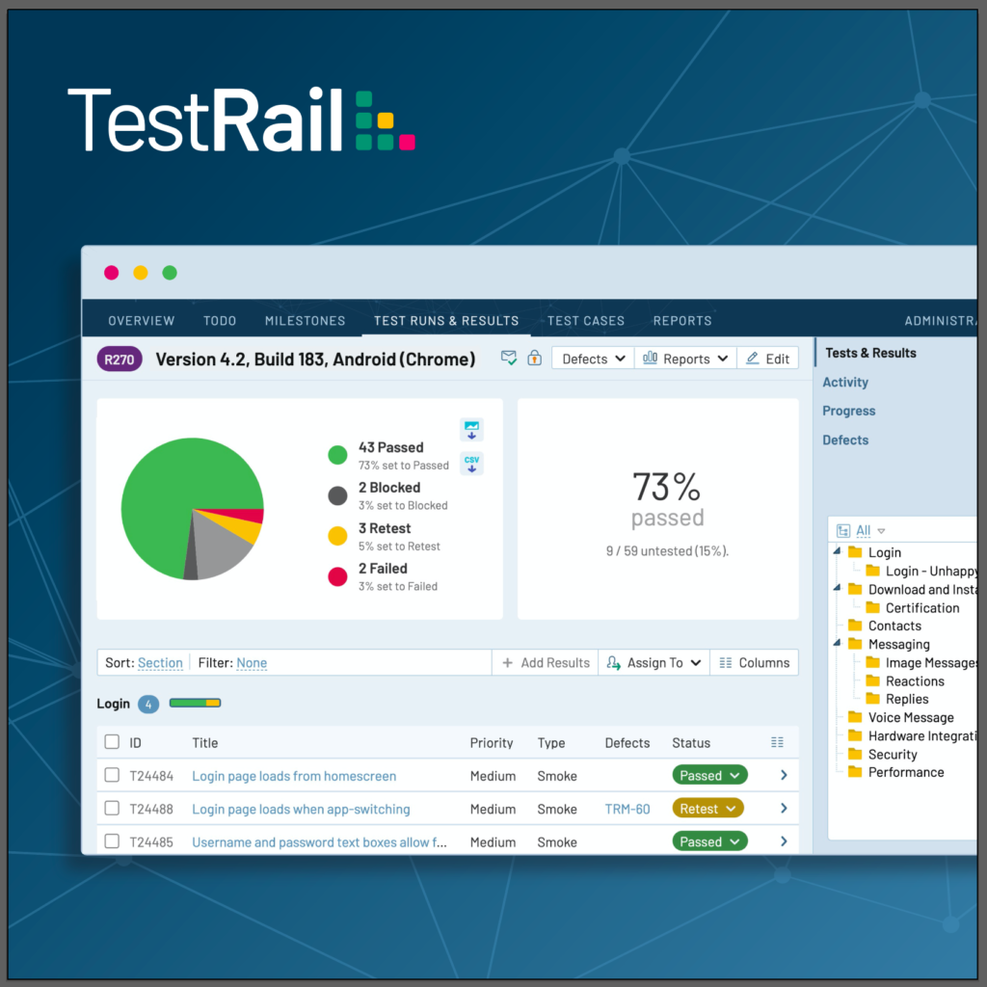
TestRail ist eine Testmanagement-Plattform für QA- und Entwicklungsteams, um Testfälle zu verwalten, Tests zu planen und durchzuführen sowie Ergebnisse aus manuellen und automatisierten Tests nachzuverfolgen. Es kann in Wasserfall- oder agilen Projekten eingesetzt werden. Sie können Testfälle in Ordnern und Abschnitten organisieren und Testfälle mit Vorlagen, Status und Feldern individuell anpassen.
TestRail ermöglicht die Integration mit Jira, sodass Sie Tests und Ergebnisse an einem Ort verwalten können. Sie können direkt alle verknüpften Jira-Tickets in TestRail einsehen und Fehlerberichte von TestRail an Jira übermitteln.
TestRail integriert sich außerdem mit GitHub, GitLab, Asana und über 20 weiteren Tools zur Fehler- oder Aufgabenverwaltung. Es unterstützt die Berichterstattung von Tests, die über Selenium, Cypress, Appium, Cucumber, Junit, TestNG, Pytest oder jedes andere Testautomatisierungstool bzw. Framework mithilfe der TestRail API ausgeführt werden. Sie können TestRail auch mit CI/CD-Pipelines wie Jenkins, GitHub Actions, GitLab CI, Azure DevOps und anderen integrieren.
TestRail kostet ab $36/Nutzer/Monat und bietet eine 14-tägige kostenlose Testphase an.

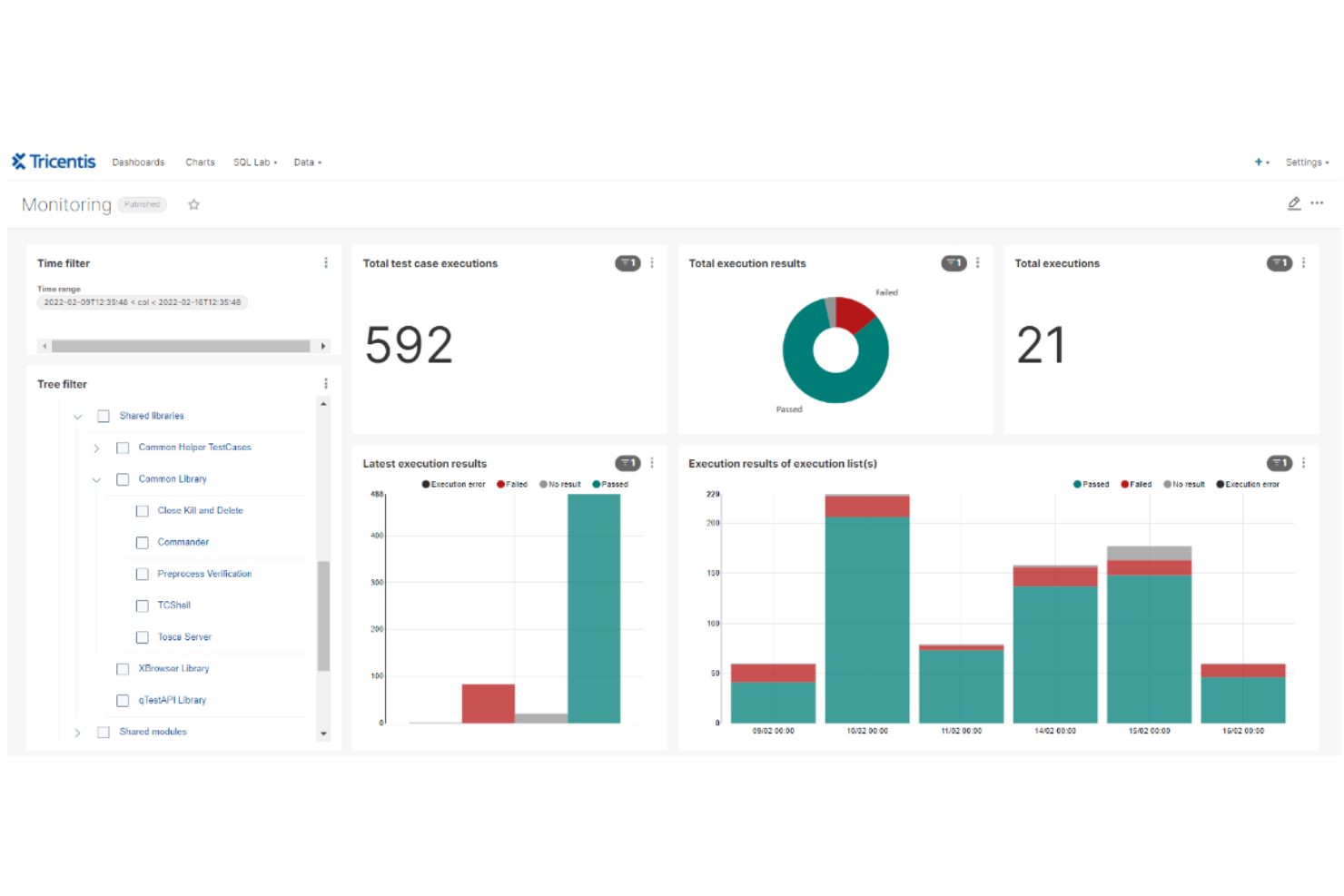
Tricentis Tosca ist eine kontinuierliche Softwaretestplattform, die sich auf automatisierte End-to-End-Tests für Softwareanwendungen spezialisiert hat. Sie verwendet einen modellbasierten Ansatz für die Testautomatisierung, der die Erstellung wiederverwendbarer Testfälle ermöglicht, die unabhängig von der zugrunde liegenden Technologie sind. Sie wurde entwickelt, um Organisationen dabei zu unterstützen, die Softwarequalität während des gesamten Entwicklungsprozesses aufrechtzuerhalten, insbesondere in agilen und DevOps-Umgebungen.
Tricentis Tosca unterstützt eine Vielzahl von Technologien und Plattformen, darunter Web-, API-, Mobil- und Unternehmensanwendungen. Es bietet zudem Funktionen für risikobasiertes Testen, Testdatenmanagement und Service-Virtualisierung, um bei der Identifizierung von Fehlern zu helfen und sicherzustellen, dass die kritischsten Tests durchgeführt werden.
Tricentis Tosca verbessert zudem das Testmanagement innerhalb von Jira durch eine Integration, die eine Synchronisierung zwischen beiden Plattformen ermöglicht. Wenn das Testteam Probleme identifiziert, werden alle Testdetails und Aktualisierungen, die mit der Anforderung verknüpft sind, zurück nach Jira synchronisiert. Dies erleichtert die Zusammenarbeit zwischen den Teams, da Testfälle und Fehler direkt in Jira verwaltet werden können und so Transparenz und Nachverfolgbarkeit während des gesamten Testprozesses bieten.
Weitere Integrationen umfassen Selenium, Cucumber, VersionONe, Vera, Testim, Jenkins, Neoload und qTest.
Tricentis Tosca kostet ab $29/Monat. Eine kostenlose Testversion ist ebenfalls verfügbar.
Weitere Testmanagement-Tools für Jira
Meiner Erfahrung nach helfen diese Tools dabei, Ihre Testaktivitäten effizient zu organisieren und nachzuverfolgen. Sie sind auf die besonderen Bedürfnisse Ihres Teams zugeschnitten, egal ob Sie mit komplexen Testumgebungen arbeiten oder anpassbare Lösungen benötigen.rnrnIn diesem Artikel stelle ich Ihnen meine Top-Auswahl an Testmanagement-Tools für Jira vor und gebe Einblicke, was jedes Tool besonders macht – damit Sie das richtige für Ihr Team finden.rnrnHier sind einige zusätzliche Testmanagement-Tools für Jira, die es zwar nicht auf meine Shortlist geschafft haben, aber trotzdem einen Blick wert sind:
- Tricentis qTest
Am besten geeignet für das Testen von Unternehmenssoftware
- Zephyr Scale
Am besten geeignet für Skalierung und große Teams in Jira
- Jama Software
Am besten geeignet für durchgängige Rückverfolgbarkeit von Anforderungen
- Owlity
Am besten für die autonome Erstellung von Testscripten geeignet


Auswahlkriterien für Testmanagement-Tools für Jira
Bei der Auswahl der besten Testmanagement-Tools für Jira auf dieser Liste habe ich gängige Bedürfnisse und Herausforderungen von Käufern wie Integrationsmöglichkeiten und Benutzerfreundlichkeit berücksichtigt. Außerdem habe ich nachfolgendes Bewertungsraster angewandt, um meine Auswahl strukturiert und fair zu gestalten:
Kernfunktionen (25 % der Gesamtbewertung)
Um in diese Liste aufgenommen zu werden, musste jede Lösung folgende Anwendungsfälle abdecken:
- Testfallverwaltung
- Testdurchführung und -verfolgung
- Integration mit Jira
- Berichterstattung und Analysen
- Anforderungsnachverfolgung
Zusätzliche herausragende Funktionen (25 % der Gesamtbewertung)
Um die Auswahl weiter einzugrenzen, habe ich auch auf folgende Besonderheiten geachtet:
- Automatisierungsfunktionen
- Erweiterte Anpassungsmöglichkeiten
- Echtzeit-Kollaborationstools
- Unterstützung mehrerer Projekte
- KI-gestützte Erkenntnisse
Benutzerfreundlichkeit (10 % der Gesamtbewertung)
Um mir einen Eindruck von der Benutzerfreundlichkeit der einzelnen Systeme zu verschaffen, habe ich folgende Aspekte betrachtet:
- Intuitive Benutzeroberfläche
- Einfache Navigation
- Klare Beschriftung
- Minimale Lernkurve
- Responsives Design
Onboarding (10 % der Gesamtbewertung)
Zur Bewertung der Onboarding-Erfahrung jeder Plattform habe ich Folgendes berücksichtigt:
- Verfügbarkeit von Trainingsvideos
- Interaktive Produkttouren
- Zugriff auf Vorlagen
- Chatbot-Unterstützung
- Webinare und Workshops
Kundensupport (10 % der Gesamtbewertung)
Um den Kundensupport jedes Softwareanbieters zu beurteilen, habe ich Folgendes berücksichtigt:
- 24/7 Verfügbarkeit
- Mehrere Kontaktkanäle
- Reaktionszeit
- Qualität der Support-Ressourcen
- Dedizierte Account Manager
Preis-Leistungs-Verhältnis (10 % der Gesamtbewertung)
Um das Preis-Leistungs-Verhältnis jeder Plattform zu bewerten, habe ich Folgendes berücksichtigt:
- Wettbewerbsfähige Preisgestaltung
- Transparente Preisstruktur
- In den Preispaketen enthaltene Funktionen
- Kosten-Nutzen-Verhältnis
- Verfügbarkeit einer kostenlosen Testversion
Kundenbewertungen (10 % der Gesamtbewertung)
Um einen Gesamteindruck der Kundenzufriedenheit zu erhalten, habe ich bei der Auswertung der Nutzerbewertungen Folgendes berücksichtigt:
- Zufriedenheitsbewertungen der Nutzer
- Feedback zur Benutzerfreundlichkeit
- Kommentare zur Nützlichkeit der Funktionen
- Berichte über die Erfahrungen mit dem Kundenservice
- Referenzen zur Zuverlässigkeit und Leistung
Wie wählt man ein Testmanagement-Tool für Jira aus?
Es ist leicht, sich von langen Funktionslisten und komplexen Preismodellen überfordern zu lassen. Damit Sie den Überblick behalten und Ihren individuellen Auswahlprozess strukturieren können, finden Sie hier eine Checkliste mit wichtigen Kriterien:
| Kriterium | Zu beachten |
|---|---|
| Skalierbarkeit | Kann das Tool mit Ihrem Team wachsen? Beachten Sie Nutzerbegrenzungen und Datenkapazität. Suchen Sie nach Tools, die zunehmendes Testaufkommen und eine größere Teamgröße problemlos bewältigen. |
| Integrationen | Funktioniert es mit Ihren bestehenden Tools? Prüfen Sie, ob es sich reibungslos mit Jira und anderer für Ihr Team wichtiger Software verbinden lässt. |
| Anpassbarkeit | Lässt es sich auf Ihre Anforderungen abstimmen? Achten Sie auf Möglichkeiten, Workflows, Felder und Berichte an die Prozesse Ihres Teams anzupassen. |
| Benutzerfreundlichkeit | Ist es für Ihr Team intuitiv bedienbar? Die Oberfläche sollte nutzerfreundlich sein und nur minimale Schulung erfordern, sodass die Einarbeitungszeit gering gehalten wird. |
| Implementierung und Onboarding | Wie lange dauert der Einstieg? Bewerten Sie den Einrichtungsaufwand und die notwendigen Ressourcen beim Onboarding. Ein schneller Start spart Zeit und reduziert Frustration. |
| Kosten | Passt es in Ihr Budget? Vergleichen Sie Preismodelle, betrachten Sie die Gesamtkosten und achten Sie auf versteckte Gebühren. |
| Sicherheitsmaßnahmen | Schützt es Ihre Daten? Achten Sie auf Einhaltung von Sicherheitsstandards und Funktionen wie Verschlüsselung und Zugriffsrechte. |
| Support-Verfügbarkeit | Erhalten Sie Unterstützung bei Bedarf? Prüfen Sie, ob der Anbieter Support in Ihrer Zeitzone und über bevorzugte Kanäle wie Chat oder Telefon anbietet. |
Was sind Testmanagement-Tools für Jira?
Testmanagement-Tools für Jira sind Erweiterungen oder Plugins, die Jiras Funktionalität um ein Testfallmanagement ergänzen. Diese Tools integrieren sich direkt in Jira, eine beliebte Plattform für Projektmanagement und Vorgangsverfolgung, um Softwaretests zu verwalten und nachzuverfolgen.
Sie bieten Funktionen zum Erstellen, Organisieren, Ausführen und Überwachen von Testfällen – alles innerhalb der Jira-Umgebung.
Funktionen
Achten Sie bei der Auswahl von Testmanagement-Tools für Jira auf folgende wichtige Funktionen:
- Testfallmanagement: Ermöglicht das Erstellen, Bearbeiten und Organisieren von Testfällen, was die Verwaltung der Testaktivitäten erleichtert.
- Ausführungsüberwachung: Bietet die Möglichkeit, den Status und die Ergebnisse der Testdurchführung zu verfolgen, sodass Teams Fortschritte und Resultate überwachen können.
- Integration mit Jira: Gewährleistet nahtlose Anbindung an Jira, wodurch Daten synchronisiert und die Workflow-Effizienz verbessert werden.
- Berichte und Analysen: Bietet detaillierte Berichte und Einblicke, unterstützt bei Entscheidungen und zeigt Optimierungspotenziale auf.
- Anpassungsmöglichkeiten: Ermöglicht die Anpassung von Workflows, Feldern und Berichten an spezifische Teamprozesse und Anforderungen.
- Automatisierungsmöglichkeiten: Unterstützt automatisierte Testprozesse, reduziert manuellen Aufwand und erhöht die Testeffizienz.
- Kollaborationswerkzeuge: Fördert die Kommunikation und Koordination im Team und verbessert so die Zusammenarbeit zwischen den Mitgliedern.
- Sicherheitsfunktionen: Schützt Daten durch Verschlüsselung und Zugriffskontrollen und sorgt für die Einhaltung von Sicherheitsstandards.
- Benutzerfreundliche Oberfläche: Stellt ein intuitives und leicht navigierbares Design bereit, sodass neue Nutzer schnell eingearbeitet werden können.
- Skalierbarkeit: Unterstützt wachsende Teams und Testanforderungen, sodass das Tool mit Ihrer Organisation mitwachsen kann.
Vorteile
Die Implementierung von Testmanagement-Tools für Jira bietet zahlreiche Vorteile für Ihr Team und Ihr Unternehmen. Hier einige, auf die Sie sich freuen können:
- Verbesserte Organisation: Durch die zentrale Verwaltung von Testfällen und Ausführungen behalten Teams besseren Überblick und Kontrolle.
- Stärkere Zusammenarbeit: Funktionen, die die Teamkommunikation fördern, verbessern die Zusammenarbeit zwischen Entwicklern, QA und Projektmanagern.
- Höhere Effizienz: Automatisierungsmöglichkeiten reduzieren manuellen Aufwand, beschleunigen den Testprozess und schaffen Ressourcen frei.
- Bessere Einblicke: Berichte und Analysen liefern wertvolle Einblicke in Testfortschritt und -ergebnisse, was fundierte Entscheidungen unterstützt.
- Skalierbarkeit: Die Möglichkeit, mit Ihrem Team zu wachsen, sichert die Effizienz des Tools auch bei steigenden Anforderungen.
- Datensicherheit: Integrierte Sicherheitsfunktionen schützen sensible Daten und stellen die Einhaltung von Branchenstandards sicher.
- Anpassbarkeit: Anpassungsmöglichkeiten ermöglichen es Teams, das Tool auf ihre spezifischen Workflows und Anforderungen zuzuschneiden.
Kosten & Preise
Die Auswahl von Testmanagement-Tools für Jira erfordert ein Verständnis für die verschiedenen verfügbaren Preismodelle und Tarife. Die Kosten variieren je nach Funktionsumfang, Teamgröße, Erweiterungen und mehr. Die nachfolgende Tabelle fasst gängige Pläne, deren durchschnittliche Preise und typische Funktionen zusammen, die in Lösungen für Testmanagement-Tools für Jira enthalten sind:
Vergleichstabelle für Testmanagement-Tools für Jira
| Tarifart | Durchschnittspreis | Typische Funktionen |
|---|---|---|
| Kostenloser Tarif | $0 | Basis-Testfallverwaltung, eingeschränkte Ausführungsüberwachung und Integration mit Jira. |
| Persönlicher Tarif | $5-$25/user/month | Testfallmanagement, Ausführungsüberwachung, Basisberichte und Jira-Integration. |
| Business-Tarif | $25-$50/user/month | Erweiterte Berichterstattung, Anpassungsmöglichkeiten, Automatisierungsfunktionen und verbesserte Sicherheitsmerkmale. |
| Enterprise-Tarif | $50+/user/month | Volle Anpassbarkeit, umfassende Analysen, dedizierter Support und unternehmensweite Sicherheitsvorkehrungen. |
FAQs zu Testmanagement-Tools für Jira
Hier finden Sie Antworten auf häufig gestellte Fragen zu Testmanagement-Tools für Jira:
Wie hoch ist der Return on Investment (ROI) bei der Nutzung von Testmanagement-Tools für Jira?
Return on Investment (ROI) ist eine Kennzahl zur Bewertung der Effizienz einer Investition. Im Kontext von u003cspan style=u0022background-color: #fff2ccu0022 data-action=u0022click-u0026gt;dropdown#toggleu0022 data-dropdown-placement-param=u0022topu0022 data-term-id=u0022197859987u0022u003eTestmanagement-Toolsu003c/spanu003e für u003cspan style=u0022background-color: #fff2ccu0022 data-action=u0022click-u0026gt;dropdown#toggleu0022 data-dropdown-placement-param=u0022topu0022 data-term-id=u0022197859986u0022u003eJirau003c/spanu003e lässt sich der ROI ermitteln, indem der durch verbesserte Qualität, Geschwindigkeit und Effizienz im u003cspan style=u0022background-color: #fff2ccu0022 data-action=u0022click-u0026gt;dropdown#toggleu0022 data-dropdown-placement-param=u0022topu0022 data-term-id=u0022197860012u0022u003eTestprozessu003c/spanu003e generierte Mehrwert den Kosten des Tools gegenübergestellt wird.rnu003ch4u003eROI berechnenu003c/h4u003ernDie Grundformel zur Berechnung des ROI lautet:rnrnROI = ((Gewinn aus der Investition – Kosten der Investition) / (Kosten der Investition)) × 100rnrnSo wenden Sie diese Formel auf u003cspan style=u0022background-color: #fff2ccu0022 data-action=u0022click-u0026gt;dropdown#toggleu0022 data-dropdown-placement-param=u0022topu0022 data-term-id=u0022197859986u0022u003eJirau003c/spanu003e-u003cspan style=u0022background-color: #fff2ccu0022 data-action=u0022click-u0026gt;dropdown#toggleu0022 data-dropdown-placement-param=u0022topu0022 data-term-id=u0022197859987u0022u003eTestmanagement-Toolsu003c/spanu003e an:rnu003colu003ern tu003cliu003eu003cstrongu003eGewinn aus der Investitionu003c/strongu003e: Dazu können eingesparte Zeit durch automatisierte Tests, weniger Fehler, erhöhte Teamproduktivität und weitere quantifizierbare Vorteile zählen.u003c/liu003ern tu003cliu003eu003cstrongu003eKosten der Investitionu003c/strongu003e: Dazu gehören die Lizenzkosten für das Tool, Schulungsausgaben und alle weiteren damit verbundenen Kosten.u003c/liu003ernu003c/olu003ernu003ch4u003eFaktoren, die den ROI beeinflussenu003c/h4u003ernu003colu003ern tu003cliu003eu003cstrongu003eEffizienz des Toolsu003c/strongu003e: Wie gut lässt sich das Tool in Ihre bestehenden Systeme integrieren? Je reibungsloser die Integration, desto höher der ROI.u003c/liu003ern tu003cliu003eu003cstrongu003eAkzeptanz im Teamu003c/strongu003e: Der ROI hängt auch davon ab, wie schnell Ihr Team sich an das neue Tool gewöhnt. Schnellere Akzeptanz bedeutet meist einen schnelleren ROI.u003c/liu003ern tu003cliu003eu003cstrongu003eSkalierbarkeitu003c/strongu003e: Das Tool sollte mit Ihren Projekten mitwachsen können. Ein Tool mit guter Skalierbarkeit bietet einen besseren langfristigen ROI.u003c/liu003ernu003c/olu003ernu003ch4u003ePraktisches Beispielu003c/h4u003ernWenn ein u003cspan style=u0022background-color: #fff2ccu0022 data-action=u0022click-u0026gt;dropdown#toggleu0022 data-dropdown-placement-param=u0022topu0022 data-term-id=u0022197859987u0022u003eTestmanagement-Toolu003c/spanu003e 1.000 $ pro Monat kostet und Ihrem Team 50 Stunden pro Monat einspart, wobei eine Stunde mit 50 $ bewertet wird, dann erhalten Sie für jeden investierten Dollar 1,50 $ zurück.rnrnDurch das Verständnis und die Berechnung des ROI können Sie eine fundiertere Entscheidung bei der Auswahl eines u003cspan style=u0022background-color: #fff2ccu0022 data-action=u0022click-u0026gt;dropdown#toggleu0022 data-dropdown-placement-param=u0022topu0022 data-term-id=u0022197859987u0022u003eTestmanagement-Toolsu003c/spanu003e für u003cspan style=u0022background-color: #fff2ccu0022 data-action=u0022click-u0026gt;dropdown#toggleu0022 data-dropdown-placement-param=u0022topu0022 data-term-id=u0022197859986u0022u003eJirau003c/spanu003e treffen und sicherstellen, dass es zu den Bedürfnissen Ihres Teams und den Budgetvorgaben passt.
Wie unterstützen Testmanagement-Tools für Jira das parallele Testen?
Testmanagement-Tools für Jira ermöglichen häufig paralleles Testen, indem sie die gleichzeitige Ausführung mehrerer Testfälle erlauben. Dies geschieht in der Regel durch die Integration in CI/CD-Pipelines und Funktionen für verteilte Testdurchführung.
Kann ich Drittanbieter-Sicherheitstest-Tools mit diesen Jira-basierten Testmanagement-Lösungen integrieren?
Ja, viele Testmanagement-Tools für Jira bieten APIs und Plugins, die die Integration von Drittanbieter-Sicherheitstest-Tools ermöglichen. So können Sie Sicherheitstests in Ihren bestehenden Testmanagement-Workflow integrieren.rnrnu0026nbsp;
Kann ich Testmanagement-Tools für Jira an meine Bedürfnisse anpassen?
Ja, viele Testmanagement-Tools für Jira bieten Anpassungsmöglichkeiten. Workflows, Felder und Berichte lassen sich an die spezifischen Prozesse Ihres Teams anpassen. Diese Flexibilität unterstützt Sie dabei, eine Testumgebung zu schaffen, die den individuellen Anforderungen Ihrer Organisation entspricht und die Effizienz insgesamt steigert.
Kann ich bestehende Testfälle von einer anderen Plattform in ein Jira-gebundenes Testmanagement-Tool migrieren? Wie läuft das ab?
Die meisten Jira-integrierten Testmanagement-Tools bieten Importfunktionen, mit deren Hilfe Sie bestehende Testfälle migrieren können. Im Regelfall werden die Testfälle dazu in ein kompatibles Format (z. B. CSV, XML) exportiert und anschließend in das Jira-basierte Tool importiert.
Bieten diese Tools KI- oder Machine-Learning-Funktionen für prädiktive Analysen im Testen?
Einige fortschrittliche Testmanagement-Tools für Jira beginnen, KI- und Machine-Learning-Funktionen für prädiktive Analysen zu integrieren. Diese Funktionen helfen dabei, Muster zu erkennen, Testergebnisse vorherzusagen und sogar Testszenarien auf Basis historischer Daten vorzuschlagen.
Wie geht es weiter:
Wenn Sie gerade dabei sind, Testmanagement-Tools für Jira zu recherchieren, verbinden Sie sich mit einem SoftwareSelect-Berater für kostenlose Empfehlungen.
Sie füllen ein Formular aus und führen ein kurzes Gespräch, in dem Ihre spezifischen Anforderungen besprochen werden. Anschließend erhalten Sie eine Auswahlliste passender Software, die Sie überprüfen können. Sie werden sogar während des gesamten Kaufprozesses unterstützt, einschließlich Preisverhandlungen.