

15 beste mobile Test-Tools im Test 2026

Beste Mobile Testing Tools Kurzliste
Hier ist meine Kurzliste der besten Mobile Testing Tools:


Es ist keine leichte Aufgabe, sicherzustellen, dass Ihre App auf allen Geräten reibungslos funktioniert. Sie benötigen Tools, die zu den Anforderungen Ihres Teams passen und Fehler aufspüren, bevor Ihre Nutzer es tun. Genau hier kommen Mobile Testing Tools ins Spiel. Sie sparen Zeit, reduzieren Stress und steigern die Qualität Ihrer App.
Ich habe jahrelang Software getestet und kenne die Herausforderungen, mit denen Sie konfrontiert sind. Mein Ziel ist es, Ihnen ehrliche und unabhängige Bewertungen der besten Mobile Testing Tools bereitzustellen. Sie erhalten Einblicke in Funktionen, Benutzerfreundlichkeit und wie diese Tools in Ihren Workflow passen können.
Werfen Sie einen Blick auf meine Top-Auswahl und finden Sie die passende Lösung für Ihr Team. Machen wir das Mobile Testing kinderleicht.
Why Trust Our Software Reviews
We’ve been testing and reviewing software since 2023. As tech leaders ourselves, we know how critical and difficult it is to make the right decision when selecting software.
We invest in deep research to help our audience make better software purchasing decisions. We’ve tested more than 2,000 tools for different tech use cases and written over 1,000 comprehensive software reviews. Learn how we stay transparent & our software review methodology.
Zusammenfassung der besten Mobile Testing Tools
Diese Vergleichstabelle fasst die Preisdetails meiner Top-Auswahl an Mobile Testing Tools zusammen, um Ihnen die beste Lösung für Ihr Budget und Ihre geschäftlichen Anforderungen aufzuzeigen.
| Tool | Best For | Trial Info | Price | ||
|---|---|---|---|---|---|
| 1 | Best for team collaboration | Free demo available | Pricing upon request | Website | |
| 2 | Best for AI-powered real device testing | Free trial + free demo available | From $15/month (billed annually) | Website | |
| 3 | Best for agile teams | Free trial + free demo available | Pricing upon request | Website | |
| 4 | Best for cross-browser testing | Free plan available + free demo | From $15/user/month (billed annually) | Website | |
| 5 | Best for live device testing | Free trial available | From $29/month (billed annually) | Website | |
| 6 | Best for global device access | Free demo available | From $39/month (billed annually) | Website | |
| 7 | Best for no-code automation | Free open source access available + 14-day free trial | Pricing upon request | Website | |
| 8 | Best for beginners | Free plan available + free demo | From $183/user/month | Website | |
| 9 | Best for performance monitoring | Free trial + free demo available | Pricing upon request | Website | |
| 10 | Best for AI-driven testing | Free plan available | From $99/month (billed annually) | Website | |
| 11 | Best for real device testing | Free trial available | From $83/month | Website | |
| 12 | Best for Android app testing | Not available | Free to use | Website | |
| 13 | Best for performance testing | Free trial available | From $99/month | Website | |
| 14 | Best for CI/CD integration | Free plan available | From $99/month | Website | |
| 15 | Best for crowdtesting solutions | Not available | From $990/month (crowd testing); $19/month (QA management) | Website |
-

Site24x7
Visit WebsiteThis is an aggregated rating for this tool including ratings from Crozdesk users and ratings from other sites.4.7 -
GitHub Actions
Visit WebsiteThis is an aggregated rating for this tool including ratings from Crozdesk users and ratings from other sites.4.8 -
Docker
Visit WebsiteThis is an aggregated rating for this tool including ratings from Crozdesk users and ratings from other sites.4.6





Bewertungen der besten Mobile Testing Tools
Im Folgenden finden Sie meine ausführlichen Zusammenfassungen der besten Mobile Testing Tools aus meiner Kurzliste. Meine Bewertungen bieten einen detaillierten Einblick in die wichtigsten Funktionen, Vor- & Nachteile, Integrationen und idealen Einsatzbereiche jedes Tools, damit Sie die beste Lösung für sich finden.


QA Wolf is a hybrid test automation service and platform built for web and mobile application testing. It uses the Playwright framework to support test creation, execution, monitoring, and ongoing test maintenance in one environment.
Why I picked QA Wolf: I picked QA Wolf because it offers more than automated tests—it pairs those tests with a dedicated team that helps maintain and monitor them 24/7. You can rely on performance testing that checks API response time, rendering speed, and CRUD operations across different devices. The team also verifies each bug before it gets reported, so you don’t waste time on false alarms. This mix of automation and real-time support makes collaboration between your developers and testers much smoother.
Standout features & integrations:
Features include in-depth performance testing that measures how your app handles traffic loads. It also provides round-the-clock test maintenance, so your team doesn’t have to worry about tests breaking. Another feature is automatic bug verification, which makes your bug reports more accurate.
Integrations include Azure DevOps, Travis CI, Jenkins, GitHub, GitLab, Bitbucket, Jira, Asana, Linear, Slack, Microsoft Teams, and CircleCI.
Pros and Cons
Pros:
- Strong support for performance testing
- Human QA team verifies bug reports
- 24/7 test maintenance and monitoring
Cons:
- Setup requires QA Wolf involvement
- Heavy reliance on Playwright framework
New Product Updates from QA Wolf

QA Wolf Adds Android Emulator Infrastructure for Device Testing
QA Wolf introduces Android emulator infrastructure with expanded device and OS testing support. These updates enable teams to test across real-world device conditions and improve test coverage. For more information, visit QA Wolf’s official site.
 .
.

Pcloudy is a cloud-based mobile and web app testing platform designed for use on real devices. It gives you access to a large device library so you can validate app behavior across diverse hardware and OS versions.
Why I picked Pcloudy: I picked Pcloudy because of features that directly help your mobile testing efforts in ways many tools don’t. Its AI Agent lets you build automated flows without writing code, which helps if some of your team aren't familiar with scripting. The self-healing element identification helps reduce script breakage when UI layouts change over time. Also, Pcloudy's performance testing tracks over 60 metrics (CPU, memory, network, frame rendering) and uses ML to detect anomalies, helping you catch performance issues early.
Standout features & integrations:
Features include real device cloud testing (you get access to 5,000+ Android and iOS devices, so you can test on actual hardware rather than emulators). It also supports live interactive testing, letting you remotely control devices, capture screenshots/videos, simulate gestures, rotation, GPS location, and more.
Integrations include Appium, Jira, Android Studio, GitHub, Slack, TestComplete, UI Path, Playwright, and Katalon Studio.
Pros and Cons
Pros:
- Good integration with Appium and CI/CD
- Detailed logs, screenshots, video support
- Access to large device pool
Cons:
- Reports and dashboards lack advanced filtering/searching features
- Web portal/UI can lag under low bandwidth

Tricentis Testim Mobile is a cloud-based testing solution for iOS and Android apps, designed for teams seeking efficient test automation. It serves businesses needing to automate testing across native, hybrid, and cross-platform applications. The tool supports the testing process without requiring complex installations or coding expertise.
Why I picked Tricentis Testim Mobile: It offers a Virtual Mobile Grid for seamless test execution, which is ideal for agile teams. The platform integrates well with CI/CD pipelines, enhancing test management and stability. It provides comprehensive dashboards that help your team quickly diagnose and debug failures. This makes it a valuable tool for teams facing challenges in mobile testing complexity and scalability.
Standout features & integrations:
Features include automated testing that saves your team time and effort. It enhances test stability, ensuring reliable test outcomes. The platform also supports quick debugging through detailed dashboards, streamlining the testing process.
Integrations include Jira, GitHub, Jenkins, Azure DevOps, CircleCI, Bitbucket, TestRail, Slack, GitLab, and Sauce Labs.
Pros and Cons
Pros:
- Integrates with CI/CD pipelines
- Supports hybrid apps
- Virtual Mobile Grid feature
Cons:
- May need initial training
- Limited to mobile platforms


mobot-live/LambdaTest is a cloud-based platform designed to help teams perform automated and manual cross-browser testing. It is ideal for businesses needing to ensure their apps work consistently across different browsers and devices. The platform allows for both mobile and web app testing with ease.
Why I picked mobot-live/LambdaTest: It provides a wide range of browser and OS combinations, making it an excellent choice for cross-browser testing. With real-time testing capabilities, your team can quickly identify and fix issues. The platform supports parallel testing, which speeds up the testing process significantly. It's a straightforward solution for teams aiming to enhance app compatibility across multiple environments.
Standout features & integrations:
Features include real-time testing, which allows your team to catch bugs as they happen. It offers parallel testing to speed up the process and improve efficiency. The platform also provides a wide range of browser and OS combinations to ensure thorough coverage.
Integrations include Jira, GitHub, Slack, CircleCI, Jenkins, Bitbucket, GitLab, Azure DevOps, Asana, and Trello.
Pros and Cons
Pros:
- Parallel testing capability
- Real-time testing feature
- Wide browser support
Cons:
- Occasional latency issues
- Not ideal for non-web applications

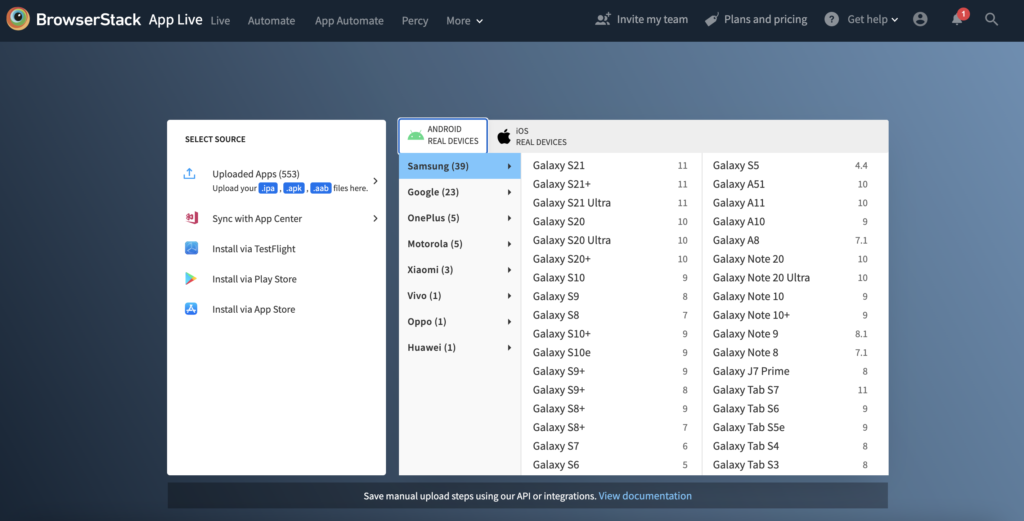
BrowserStack is a cloud-based testing platform that allows teams to test their mobile applications on real devices. It caters to developers and QA teams who need to ensure app functionality across various devices and platforms. This tool provides access to a wide range of real devices for testing purposes.
Why I picked BrowserStack: It offers real device testing, providing your team with the ability to test apps in real-world conditions. The platform includes a vast selection of devices, ensuring comprehensive coverage for your testing needs. With instant access to new devices and OS versions, your team can keep up with the latest changes. This makes it a reliable choice for teams aiming for thorough testing and quality assurance.
Standout features & integrations:
Features include instant access to a wide variety of devices, which ensures your app is tested across multiple environments. It also offers real-time debugging, allowing your team to identify and fix issues on the spot. Additionally, BrowserStack provides access to the latest OS versions as soon as they are released.
Integrations include Jira, Jenkins, Slack, GitHub, GitLab, Trello, Bitbucket, Azure DevOps, CircleCI, and Asana.
Pros and Cons
Pros:
- Real-time debugging
- Instant access to new devices
- Wide device selection
Cons:
- Limited offline capabilities
- Occasional latency issues


Headspin is a testing platform that provides real-world user experience insights across various devices and networks. It's designed for teams who need to understand app performance in different global locations. The platform offers the ability to test on real devices, providing valuable data for improving user experience.
Why I picked Headspin: It enables your team to access devices globally, ensuring comprehensive testing across different regions. The tool offers real-time performance monitoring, so you can quickly identify and address issues affecting user experience. With its detailed analytics, your team gains insights into app performance, which aids in making informed improvements. This makes Headspin a strong choice for teams prioritizing global reach and detailed performance data.
Standout features & integrations:
Features include real-time performance monitoring, which helps your team catch issues as they happen. It provides detailed analytics that offer insights into user experience across various devices. Additionally, the platform allows for testing on real devices, ensuring accurate performance data.
Integrations include Jira, Jenkins, Slack, GitHub, GitLab, Azure DevOps, CircleCI, Bitbucket, Asana, and Trello.
Pros and Cons
Pros:
- Detailed analytics
- Real-time performance insights
- Global device access
Cons:
- May require technical expertise
- Complex setup requirements

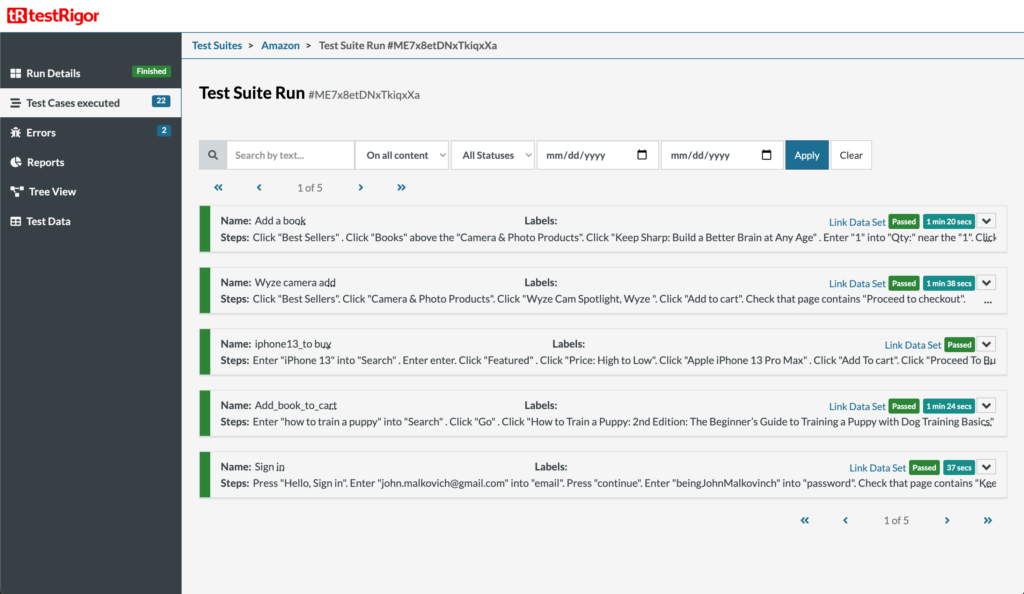
testRigor is an AI-driven test automation tool designed for teams that want to create tests using plain English. It's ideal for organizations looking to automate testing across web, mobile, and other platforms without coding expertise. It focuses on reducing maintenance time and improving test coverage.
Why I picked testRigor: It offers no-code testing, allowing your team to create tests using natural language. The platform's AI-driven capabilities automatically generate stable tests based on user behavior, which enhances the testing process. It supports multiple platforms, including web and mobile, without requiring coding skills. This makes it accessible and efficient for diverse teams.
Standout features & integrations:
Features include the ability to automate tests using plain English, which simplifies the process for non-technical users. It also provides support for testing across web, mobile, desktop, and APIs. High security standards, including SOC2 and HIPAA compliance, ensure data protection.
Integrations include GitHub, Jenkins, Jira, Slack, CircleCI, TestRail, Bitbucket, GitLab, Azure DevOps, and BrowserStack.
Pros and Cons
Pros:
- High test coverage
- Plain English instructions
- No-code test creation
Cons:
- Requires annual commitment
- Limited to non-game testing
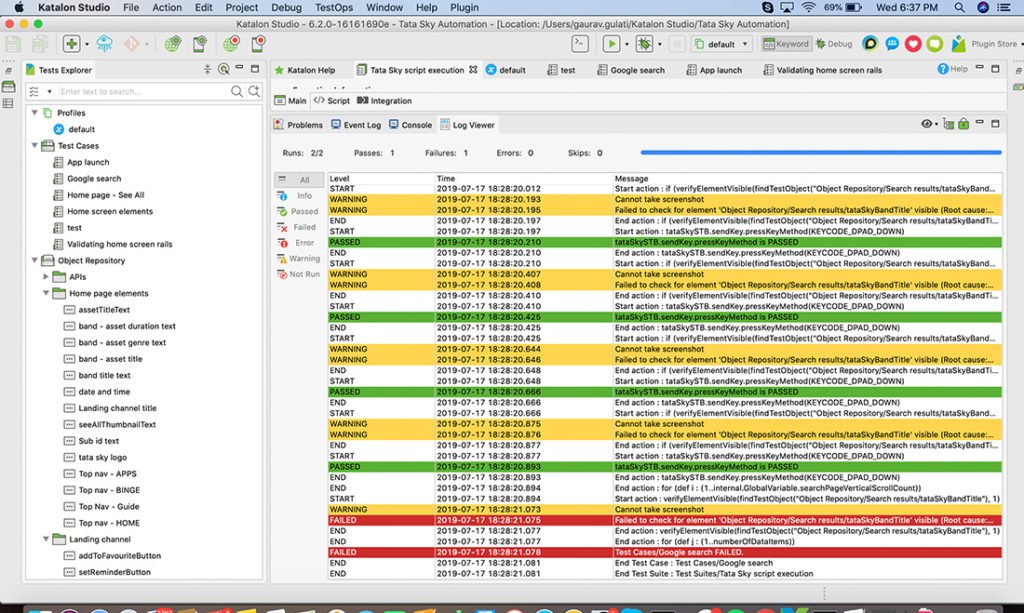
Katalon Studio is an all-in-one automation testing solution designed for testers and developers, particularly those new to automation. It supports web, API, mobile, and desktop testing, making it versatile for various testing needs. The platform aims to simplify the testing process with its user-friendly interface and comprehensive features.
Why I picked Katalon Studio: It's beginner-friendly, offering a simple setup and a straightforward interface. The tool provides built-in keywords, which help your team create tests without writing extensive code. With its record and playback feature, you can quickly capture test scenarios, making it easier for those new to testing. This makes it an accessible option for teams just starting with automation.
Standout features & integrations:
Features include a record and playback feature, which simplifies capturing test scenarios for your team. It offers built-in keywords that reduce the need for coding, speeding up test creation. The platform also provides cross-platform testing, ensuring your applications are tested across different environments.
Integrations include Jira, Jenkins, Slack, GitHub, TestRail, qTest, Azure DevOps, Kobiton, GitLab, Bitbucket, and Sauce Labs.
Pros and Cons
Pros:
- Supports multiple platforms
- Built-in keywords
- Beginner-friendly interface
Cons:
- May require initial learning
- Limited advanced features


New Relic is a performance monitoring tool designed for developers and IT operations teams to gain insights into application performance and infrastructure. It helps businesses identify and resolve issues quickly, ensuring optimal user experience. The platform provides detailed analytics and monitoring capabilities across various environments.
Why I picked New Relic: It offers comprehensive performance monitoring, allowing your team to track application health in real-time. The tool provides detailed insights into application performance, helping you identify bottlenecks and improve efficiency. With its scalable architecture, New Relic supports businesses of all sizes, making it versatile for different needs. This makes it an excellent choice for teams focused on maintaining high application performance.
Standout features & integrations:
Features include real-time monitoring, which helps your team keep track of application performance as it happens. It provides detailed analytics that offer insights into various performance metrics. The platform is also scalable, making it suitable for businesses of different sizes.
Integrations include AWS, Azure, Google Cloud Platform, Slack, PagerDuty, Jira, GitHub, Jenkins, Kubernetes, and Datadog.
Pros and Cons
Pros:
- Real-time monitoring capabilities
- Scalable for all business sizes
- Comprehensive performance insights
Cons:
- Requires technical expertise
- Can be resource-intensive


Autify is a no-code testing platform designed for teams looking to enhance their testing efficiency. It serves businesses aiming to automate their testing processes with minimal technical expertise. The tool offers AI-driven capabilities for faster test creation and maintenance.
Why I picked Autify: It offers a no-code interface, making it accessible for teams without deep technical skills. The self-healing AI feature reduces maintenance time by automatically adapting to changes in the app's UI. Autify's 15-minute learning curve ensures quick onboarding for your team. Excellent customer support provides assistance when needed, enhancing the user experience.
Standout features & integrations:
Features include a 15-minute learning curve, which helps your team get started quickly. Autify also offers self-healing AI to adapt to changes, reducing manual intervention. Additionally, it provides excellent support to ensure any challenges are addressed promptly.
Integrations include Slack, JIRA, GitHub, CircleCI, Jenkins, Bitbucket, TestRail, GitLab, Azure DevOps, and BrowserStack.
Pros and Cons
Pros:
- Self-healing tests
- Responsive support
- Quick setup time
Cons:
- Requires annual billing
- Limited customization options

Kobiton is a mobile testing platform that enables teams to conduct tests on real devices. It caters to QA teams and developers who need to ensure their apps function well across different devices and operating systems. The platform provides access to a wide array of real devices, ensuring accurate testing results.
Why I picked Kobiton: It offers real device testing, which is critical for accurate app performance assessments. Your team can access a broad range of devices, ensuring comprehensive coverage. The platform supports both manual and automated testing, allowing flexibility in how you approach testing. This makes it a valuable tool for ensuring app compatibility and performance across various devices.
Standout features & integrations:
Features include the ability to conduct both manual and automated testing, providing flexibility for your testing processes. It offers real-time access to a wide variety of devices, ensuring thorough testing coverage. Additionally, the platform supports session recording and playback, which helps your team review and analyze test results effectively.
Integrations include Jira, Jenkins, Slack, GitHub, GitLab, Bitbucket, TestRail, qTest, Azure DevOps, and Travis CI.
Pros and Cons
Pros:
- Session recording feature
- Supports manual and automated testing
- Real device access
Cons:
- Limited offline capabilities
- May require technical setup


Robotium is a free testing framework built for Android applications and devices. It supports both native and hybrid apps and lets QA teams automate their testing processes with ease.
Why I picked Robotium: I picked Robotium because it lets you write automated black-box UI tests for Android, covering function, system, and user acceptance scenarios. You can also use its test case recorder and run-time binding to UI components, which makes test creation simpler. Another helpful feature is its ability to handle multiple Android activities automatically, so you don’t have to manage transitions manually. Together, these features make it especially useful for Android-focused projects.
Standout features & integrations:
Features include a test case recorder that speeds up test creation for your team. It also supports run-time binding to UI components, which means you don’t need to hardcode everything. Another feature is its automatic handling of multiple activities, helping you test more realistic user flows.
Integrations include Maven, Gradle, and Ant.
Pros and Cons
Pros:
- Automates multiple activity handling
- Supports black-box UI test creation
- Works on native and hybrid apps
Cons:
- Outdated documentation for some features
- No official support team available


Codemagic is a CI/CD service built for mobile app development on Android, iOS, Flutter, and React Native projects. It helps teams set up, test, and deploy apps across different platforms while keeping the work in one place.
Why I picked Codemagic: I picked Codemagic because it lets you add your app no matter where it’s hosted and build it on macOS, Linux, or Windows machines. You can run tests automatically on emulators or real devices, then send build feedback straight to Slack or other tools your team uses. It also helps you automate deployment so every build is ready to release without extra steps. That makes it easier to tie your testing and deployment directly into your CI/CD pipeline.
Standout features & integrations:
Features include flexible build options across different operating systems so you’re not locked into one environment. You can also set up automatic testing to catch issues early before release. Another feature lets you send feedback and results directly to your communication tools to keep your team in sync.
Integrations include Azure DevOps, GitHub, GitLab, Bitbucket, and other self-hosted or cloud-based Git repositories.
Pros and Cons
Pros:
- Automates deployment with each build
- Runs tests on emulators or real devices
- Works across macOS, Linux, and Windows
Cons:
- Requires setup for custom pipelines
- Advanced features need technical skill


Ubertesters is a crowdsourcing platform built to give teams access to QA testers across more than 120 countries. It also provides tools that support test management and app quality tracking from one place.
Why I picked Ubertesters: I picked Ubertesters because it helps you expand your testing coverage by outsourcing to testers worldwide, which can speed up your testing cycles and catch localization issues. You also get a QA management system with tools for crash logging, bug reporting, and session tracking all in one space. Features like over-the-air distribution and SDK insertion make it easier to prepare builds and distribute them to testers. This setup gives your team clear feedback loops and a more complete view of your app’s quality.
Standout features & integrations:
Features include screenshot editing and messaging, which help your testers share detailed feedback with your team. You can also use test cases and user stories to keep testing efforts structured and consistent. Another feature is unlimited crash logging, giving you clear visibility into stability issues during testing.
Integrations include Redmine, Mantis, YouTrack, and Jira.
Pros and Cons
Pros:
- Over-the-air app distribution
- Supports localization testing at scale
- Access to global tester pool
Cons:
- Complex setup for new teams
- Less control over external testers
Weitere Mobile Testing Tools
Hier sind einige weitere Mobile Testing Tools, die es nicht auf meine Kurzliste geschafft haben, aber dennoch einen Blick wert sind:
- Mobot
For physical device testing
- GPT Driver
For AI-driven insights
- testomat.io
For grouped mobile test runs
- TestGrid
For cloud-based testing
- TestRail
For unified test management
- SmartBear
For testing automation
- Experitest
For continuous testing
- Squish
For GUI testing
- TestingWhiz
For codeless automation
- Selenium WebDriver
Automated testing of web and mobile applications by providing a programming interface to interact with user interface elements.
- BitBar
For app scalability
- BlazeMeter
For performance testing
- Test.io
For exploratory testing
- Selendroid
For mobile web testing
- Ranorex Studio
For desktop applications


Auswahlkriterien für Mobile Testing Tools
Bei der Auswahl der besten Mobile Testing Tools für diese Liste habe ich die üblichen Anforderungen von Käufern und häufige Schmerzpunkte wie Gerätekompatibilität und einfache Integration berücksichtigt. Darüber hinaus habe ich das folgende Bewertungsraster genutzt, um meine Analyse strukturiert und fair zu halten:
Kernfunktionen (25% der Gesamtbewertung)
Um in diese Liste aufgenommen zu werden, musste jede Lösung die folgenden gängigen Anwendungsfälle erfüllen:
- Testautomatisierung
- Plattformübergreifende Tests
- Tests auf echten Geräten
- Leistungstests
- Fehlerverfolgung
Zusätzliche herausragende Funktionen (25% der Gesamtbewertung)
Um die Auswahl weiter einzugrenzen, habe ich zudem nach besonderen Merkmalen gesucht, zum Beispiel:
- KI-gestützte Tests
- Visuelle Testfunktionen
- Echtzeit-Analysen
- Anpassbare Testumgebungen
- Integration mit CI/CD-Tools
Benutzerfreundlichkeit (10% der Gesamtbewertung)
Um ein Gefühl für die User Experience jedes Systems zu erhalten, habe ich folgende Aspekte betrachtet:
- Intuitive Benutzeroberfläche
- Einfache Navigation
- Minimale Lernkurve
- Responsives Design
- Anpassbare Dashboards
Onboarding (10% der Gesamtbewertung)
Um das Onboarding-Erlebnis jeder Plattform zu bewerten, habe ich Folgendes berücksichtigt:
- Verfügbarkeit von Schulungsvideos
- Interaktive Produktführungen
- Umfassende Dokumentation
- Webinare und Tutorials
- Zugang zu Support-Chatbots
Kundensupport (10% der Gesamtbewertung)
Um die Kundensupportdienste jedes Softwareanbieters zu bewerten, berücksichtigte ich Folgendes:
- 24/7 Verfügbarkeit des Supports
- Mehrere Supportkanäle
- Schnelle Reaktionszeiten
- Zugang zu einer Wissensdatenbank
- Feste Ansprechpartner (Account Manager)
Preis-Leistungs-Verhältnis (10% der Gesamtbewertung)
Um das Preis-Leistungs-Verhältnis jeder Plattform zu beurteilen, habe ich Folgendes betrachtet:
- Transparente Preisgestaltung
- Wettbewerbsfähige Preise
- Flexible Abonnementmodelle
- Verfügbarkeit einer kostenlosen Testphase
- Funktionen im Basistarif enthalten
Kundenbewertungen (10% der Gesamtbewertung)
Um ein umfassendes Bild der allgemeinen Kundenzufriedenheit zu erhalten, habe ich bei der Auswertung von Kundenrezensionen auf Folgendes geachtet:
- Positives Feedback zur Funktionalität
- Lob für Benutzerfreundlichkeit
- Kommentare zur Zuverlässigkeit
- Kundenerfahrungen mit dem Kundenservice
- Gesamtzufriedenheitsbewertungen
So wählen Sie Mobile Testing Tools aus
Es ist leicht, sich von langen Funktionslisten und komplexen Preisstrukturen überwältigen zu lassen. Damit Sie bei Ihrer persönlichen Software-Auswahl nicht den Fokus verlieren, finden Sie hier eine Checkliste wichtiger Faktoren, die Sie im Auge behalten sollten:
| Faktor | Worauf Sie achten sollten |
| Skalierbarkeit | Stellen Sie sicher, dass das Tool mit Ihrem Team wachsen kann. Prüfen Sie, ob es eine breite Palette von Geräten unterstützt und mit steigender Nutzerzahl eine erhöhte Testlast bewältigen kann. |
| Integrationen | Achten Sie auf nahtlose Integration in Ihre bestehenden Werkzeuge wie CI/CD-Systeme und Fehlerverfolgungssoftware, um Arbeitsabläufe zu optimieren und die Produktivität zu steigern. |
| Anpassbarkeit | Prüfen Sie, ob das Tool es ermöglicht, Testprozesse individuell für Ihre Anforderungen zuzuschneiden, z.B. durch individuelle Testfälle oder personalisierte Dashboards. |
| Benutzerfreundlichkeit | Beurteilen Sie die Benutzeroberfläche und die Einarbeitungszeit. Ihr Team sollte das Tool schnell und ohne umfangreiche Schulungen einsetzen können, um Testdurchläufe effizient durchzuführen. |
| Budget | Vergleichen Sie die Preismodelle und stellen Sie sicher, dass sie zu Ihrem Budget passen. Berücksichtigen Sie die Gesamtkosten inklusive möglicher versteckter Gebühren oder Zusatzkosten. |
| Sicherheitsmaßnahmen | Überprüfen Sie, ob das Tool den Branchenstandards entspricht und Funktionen zum Schutz Ihrer Anwendungsdaten während der Tests bietet. |
| Support | Stellen Sie sicher, dass der Anbieter zuverlässigen Support bietet, einschließlich Zugriff auf Ressourcen wie Tutorials, Dokumentation und Live-Unterstützung bei Bedarf. |
| Performance | Stellen Sie sicher, dass das Tool genaue Ergebnisse bei minimalen Ausfallzeiten liefert. Es sollte komplexe Testszenarien effizient bearbeiten, ohne Geschwindigkeit oder Genauigkeit zu beeinträchtigen. |
Trends bei Mobile Testing Tools
Für meine Recherche habe ich zahlreiche Produktupdates, Pressemitteilungen und Release-Logs von verschiedenen Anbietern von Mobile Testing Tools ausgewertet. Hier sind einige Trends, die ich aktuell besonders beobachte:
- KI-gesteuertes Testen: Künstliche Intelligenz wird eingesetzt, um intelligentere Testprozesse zu ermöglichen, manuellen Aufwand zu verringern und die Genauigkeit zu erhöhen. Tools wie testRigor nutzen KI, um das Nutzerverhalten zu verstehen und Tests entsprechend anzupassen, wodurch Teams Fehler schneller finden können.
- Tests unter realen Nutzerbedingungen: Immer mehr Tools simulieren echte Bedingungen, z.B. unterschiedliche Netzgeschwindigkeiten und Batteriestände, um ein realistischeres Bild der App-Performance zu liefern. Mobot testet beispielsweise auf echten Geräten unter realen Bedingungen.
- Codelose Test-Erstellung: Die Nachfrage nach Tools, mit denen auch Nicht-Techniker Tests ohne Programmierkenntnisse erstellen können, steigt. Plattformen wie Katalon Studio bieten codelose Optionen und machen das Testen für mehr Teammitglieder zugänglich.
- Stärkere Sicherheitsfunktionen: Mit dem wachsenden Fokus auf Datenschutz setzen die Tools zunehmend auf umfangreichere Sicherheitsmaßnahmen. New Relic bietet zum Beispiel Branchennormen-konformität an, um den Schutz Ihrer Daten während der Tests sicherzustellen.
- Konsistenz über Plattformen hinweg: Es wird immer wichtiger sicherzustellen, dass Apps auf allen Plattformen zuverlässig funktionieren. Kobiton bietet eine umfangreiche Geräteabdeckung, um Teams dabei zu unterstützen, die Performance ihrer Apps überall zu gewährleisten, während iOS-Emulatoren ebenfalls nützliche Hilfsmittel für die Analyse der Performance in verschiedenen Betriebssystemumgebungen sein können.
Was sind Mobile Testing Tools?
Mobile Testing Tools sind Softwarelösungen, die zur Überprüfung der Funktionalität, Leistung und Benutzerfreundlichkeit von mobilen Anwendungen eingesetzt werden. Sie werden in der Regel von QA-Testern, Entwicklern und IT-Profis verwendet, um sicherzustellen, dass Apps auf verschiedenen Geräten und Betriebssystemen korrekt funktionieren. Funktionen wie Tests auf echten Geräten, KI-gestützte Einblicke und die codelose Erstellung von Tests helfen dabei, Fehler effizient zu erkennen, die Nutzererfahrung zu verbessern und auch nicht-technischen Teammitgliedern den Zugang zu erleichtern. Wenn doch einmal Probleme auftreten, liefern Mobile-Crash-Reporting-Tools die detaillierten Diagnosen, die für eine schnelle Lösung benötigt werden. Insgesamt bieten diese Tools den Mehrwert, dass mobile Apps leistungsfähig sind und den Erwartungen der Nutzer entsprechen.
Funktionen von Mobile Testing Tools
Beim Auswählen von Mobile Testing Tools sollte auf folgende Schlüsselfunktionen geachtet werden:
- Echte Gerätetests: Ermöglicht das Testen auf realen Geräten, um Probleme zu identifizieren und zu beheben, die von Emulatoren möglicherweise übersehen werden, und stellt exakte Leistungsergebnisse sicher.
- KI-gestützte Einblicke: Nutzt künstliche Intelligenz, um Testprozesse zu optimieren und die Genauigkeit zu verbessern, indem sie sich an Benutzerverhalten und Änderungen in der App anpasst.
- Codelose Testerstellung: Erlaubt es auch nicht-technischen Nutzern, Tests zu erstellen und auszuführen, ohne Code zu schreiben, wodurch das Testen einem größeren Team zugänglich gemacht wird.
- Plattformübergreifende Kompatibilität: Sichert eine konsistente Ausführung der Anwendungen auf verschiedenen Geräten und Betriebssystemen und verbessert so die Nutzererfahrung.
- Leistungsüberwachung: Überwacht die App-Performance in Echtzeit, um Engpässe schnell zu identifizieren und die Effizienz zu erhöhen.
- Integrationsmöglichkeiten: Bietet nahtlose Verknüpfungen mit bestehenden Tools wie CI/CD-Systemen und Bug-Trackern, um die Effizienz der Arbeitsabläufe zu steigern.
- Sicherheitsmechanismen: Sorgt für Datenschutz und die Einhaltung von Branchenstandards, um sensible Informationen während des Testens zu schützen.
- Anpassbare Dashboards: Ermöglicht es Benutzern, die Oberfläche für bessere Übersichtlichkeit und Steuerung der Testprozesse und Ergebnisse individuell zu gestalten.
- Paralleles Testen: Unterstützt das gleichzeitige Durchführen mehrerer Tests, wodurch die benötigte Zeit für die Testausführung verringert und der Entwicklungszyklus beschleunigt wird.
Vorteile von Mobile Testing Tools
Die Einführung von Mobile Testing Tools bietet zahlreiche Vorteile für Ihr Team und Ihr Unternehmen. Hier einige Vorteile, auf die Sie sich freuen können:
- Verbesserte App-Qualität: Durch Tests auf realen Geräten und das Simulieren realer Bedingungen wird sichergestellt, dass Ihre App gut funktioniert und den Erwartungen der Nutzer entspricht.
- Schnellere Release-Zyklen: Funktionen wie paralleles Testen und KI-gestützte Einblicke beschleunigen den Testprozess, sodass Sie Updates und neue Features schneller veröffentlichen können.
- Kosteneinsparungen: Codelose Testerstellung und Integrationsmöglichkeiten verringern den Bedarf an aufwendigem manuellen Testen und optimieren die Arbeitsabläufe, was Zeit und Ressourcen spart.
- Verbessertes Nutzererlebnis: Plattformübergreifende Kompatibilität und Leistungsüberwachung sorgen für einheitliches App-Verhalten auf verschiedenen Geräten und führen zu einer besseren Nutzererfahrung.
- Effizienteres Team: Anpassbare Dashboards und Echtzeitanalysen unterstützen Ihr Team bei einem effektiveren Management der Testprozesse und steigern die Gesamtproduktivität.
- Datensicherheit: Sicherheitsmechanismen stellen sicher, dass sensible Informationen während des Testens geschützt sind und bieten Ihrem Team sowie den Nutzern ein beruhigendes Gefühl.
Kosten und Preise von Mobile Testing Tools
Um Mobile Testing Tools auszuwählen, ist es wichtig, die verschiedenen Preismodelle und verfügbaren Pakete zu verstehen. Die Kosten variieren je nach Funktionsumfang, Teamgröße, Zusatzoptionen und mehr. Die folgende Tabelle fasst gängige Modelle, deren durchschnittliche Preise und typische Funktionen von Mobile Testing Tools zusammen:
Vergleichstabelle: Preismodelle für Mobile Testing Tools
| Plan-Typ | Durchschnittlicher Preis | Übliche Funktionen |
| Kostenloses Paket | $0 | Begrenzter Gerätezugang, grundlegende Testfunktionen und Community-Support. |
| Personal Paket | $5-$25/user/month | Echte Gerätetests, codelose Testerstellung und grundlegende Integrationen. |
| Business Paket | $50-$100/user/month | Plattformübergreifende Kompatibilität, erweiterte Analysen und vorrangiger Kundenservice. |
| Enterprise Paket | $150-$300/user/month | Anpassbare Dashboards, umfangreiche Integrationen, dediziertes Account-Management und erweiterte Sicherheit. |
Mobile Testing Tools (FAQs)
Hier finden Sie Antworten auf häufig gestellte Fragen zu mobilen Test-Tools:
Wie wähle ich das richtige Mobile Testing Tool aus?
Die Wahl des passenden Tools hängt von den Bedürfnissen Ihres Teams und den spezifischen Anforderungen Ihrer App ab. Berücksichtigen Sie Faktoren wie unterstützte Plattformen, Integrationsfähigkeit und Skalierbarkeit des Tools. Prüfen Sie auch, wie einfach es ist, das Tool zu erlernen, damit Ihr Team schnell starten und effektiv testen kann.
Was sind die häufigsten Herausforderungen beim Mobile Testing?
Zu den größten Herausforderungen zählen die Fragmentierung der Geräte, da Ihre App auf verschiedenen Geräten und Betriebssystemversionen funktionieren muss. Auch unterschiedliche Netzwerkbedingungen können die App-Performance beeinflussen. Test-Tools helfen, diese Probleme zu minimieren, indem sie den Zugriff auf viele Geräte ermöglichen und verschiedene Netzwerkbedingungen simulieren.
Können Mobile Testing Tools sowohl manuelles als auch automatisiertes Testen abdecken?
Ja, viele Tools unterstützen sowohl manuelles als auch automatisiertes Testen. Diese Flexibilität erlaubt es Ihrem Team, explorative Tests manuell durchzuführen und wiederkehrende Aufgaben zu automatisieren. Achten Sie auf Tools, die beide Ansätze bieten, um Ihre Testeffizienz zu maximieren.
Wie simulieren Mobile Testing Tools echte Nutzerbedingungen?
Tools simulieren echte Nutzerbedingungen, indem sie Zugriff auf echte Geräte bieten und Tests unter verschiedenen Netzwerkbedingungen ermöglichen. Das stellt sicher, dass Ihre App auch in realen Szenarien zuverlässig funktioniert. Häufig sind Features wie Batteriezustands-Simulation und Netzwerk-Drosselung enthalten.
Gibt es Mobile Testing Tools, die Continuous Integration unterstützen?
Ja, viele Mobile Testing Tools lassen sich in CI/CD-Pipelines integrieren und unterstützen so Continuous Integration. So werden Tests bei jeder Codeänderung automatisch ausgeführt. Dadurch kann Ihr Team Fehler frühzeitig erkennen und die Qualität der App während des gesamten Entwicklungszyklus gewährleisten.
Worauf sollte ich beim Kundensupport von Mobile Testing Tools achten?
Guter Kundensupport umfasst Erreichbarkeit rund um die Uhr, schnelle Reaktionszeiten und verschiedene Support-Kanäle. Achten Sie darauf, dass die Tools umfassende Dokumentationen, Tutorials sowie Zugang zu einer Community oder einem dedizierten Support-Team bieten, um Sie bei Problemen optimal zu unterstützen.
Wie geht es weiter?
Wenn Sie auf der Suche nach mobilen Test-Tools sind, verbinden Sie sich mit einem SoftwareSelect-Berater, um kostenlose Empfehlungen zu erhalten.
Sie füllen ein Formular aus und führen ein kurzes Gespräch, bei dem es um Ihre spezifischen Anforderungen geht. Anschließend erhalten Sie eine Auswahl passender Software-Lösungen zur Überprüfung. Die Berater unterstützen Sie während des gesamten Kaufprozesses, einschließlich Preisverhandlungen.