
Tauch ein: Die 25 besten Virtual-Reality-Softwares 2026

10 Bestes Virtual-Reality-Software Shortlist
Here's my pick of the 10 best software from the 25 tools reviewed.


Virtual-Reality-Software verändert die Arbeitsweise von Ihnen und Ihrem Team und bietet neue Möglichkeiten, Herausforderungen wie die Zusammenarbeit auf Distanz und immersives Training zu meistern. Nach meiner Erfahrung kann die Wahl des richtigen Tools entscheidend dazu beitragen, Ihre Ziele zu erreichen.
Ich weiß, dass Sie verlässliche und unabhängige Einblicke suchen, um Ihre Entscheidung zu treffen. Deshalb habe ich verschiedene Optionen unabhängig überprüft und getestet, wobei ich mich auf das konzentriert habe, was für Sie wirklich zählt.
In diesem Artikel teile ich meine Top-Empfehlungen für Virtual-Reality-Software und stelle Funktionen heraus, die auf Ihre spezifischen Anforderungen eingehen. Egal, ob Sie im Bildungsbereich, Design oder einem anderen Fachgebiet tätig sind – hier finden Sie etwas, das zu den individuellen Bedürfnissen Ihres Teams passt. Lassen Sie uns gemeinsam entdecken, wie diese Tools Ihren Arbeitsablauf verbessern und technische Herausforderungen lösen können.
Why Trust Our Software Reviews
Bestes Virtual-Reality-Software Zusammenfassung
Diese Vergleichstabelle fasst die Preisinformationen meiner besten Virtual-Reality-Software-Auswahlen zusammen, damit Sie die beste Lösung für Ihr Budget und Ihre geschäftlichen Anforderungen finden können.
| Tool | Best For | Trial Info | Price | ||
|---|---|---|---|---|---|
| 1 | Best for AR-driven enterprise apps | Not available | Pricing upon request | Website | |
| 2 | Best for immersive learning platforms | Not available | Website | ||
| 3 | Best for depth sensing capabilities | Not available | Website | ||
| 4 | Best for creating panoramic content | Not available | Website | ||
| 5 | Best for Android VR experiences | Not available | From $99 for the Daydream View headset (one-time purchase) | Website | |
| 6 | Best for hand-tracking technology | Not available | Website | ||
| 7 | Best for VR project management | Not available | Website | ||
| 8 | Best for VR analytics and insights | Not available | From $200/user/month (billed annually) | Website | |
| 9 | Best for affordable VR experiences | 14-day free trial | From $8.50/user/month | Website | |
| 10 | Best for gaze analytics and tracking | Not available | Website |
-

Site24x7
Visit WebsiteThis is an aggregated rating for this tool including ratings from Crozdesk users and ratings from other sites.4.6 -
Docker
Visit WebsiteThis is an aggregated rating for this tool including ratings from Crozdesk users and ratings from other sites.4.6 -
Pulumi
Visit WebsiteThis is an aggregated rating for this tool including ratings from Crozdesk users and ratings from other sites.4.8





Bestes Virtual-Reality-Software Review
Nachfolgend finden Sie meine ausführlichen Zusammenfassungen der besten Virtual-Reality-Software, die es auf meine Shortlist geschafft haben. Meine Bewertungen bieten einen detaillierten Einblick in die wichtigsten Funktionen, Vor- & Nachteile, Integrationen und idealen Anwendungsfälle jedes Tools, damit Sie die passende Lösung für sich finden können.


Treeview specializes in AR, VR, and XR software, helping enterprises turn ideas into immersive spatial computing apps. From digital twin visualizations to cultural storytelling in virtual environments, Treeview’s solutions are designed to deliver impactful, interactive experiences.
Why I Picked Treeview: I chose Treeview because it excels at transforming complex data and stories into engaging VR applications. For instance, it developed a digital twin for a renewable energy project, visualizing operational data in a 3D interactive environment. Additionally, Treeview has worked on cultural preservation projects, using VR to bring First Nations heritage to life through immersive storytelling. This ability to blend technical precision with narrative-driven experiences makes it stand out in enterprise VR development.
Standout Features & Integrations
Treeview offers end-to-end project delivery, ensuring your VR application is managed by a dedicated senior team from start to finish. Clients retain full ownership of intellectual property, source code, and assets, providing complete control over their projects. The platform supports advanced AR and VR hardware like Microsoft HoloLens2 and Meta Quest, enabling high-quality immersive experiences. Treeview also allows for custom integrations with LMS platforms, SSO authentication, analytics dashboards, and cloud storage solutions, embedding spatial applications into existing enterprise systems.
Pros and Cons
Pros:
- Offers custom integrations with enterprise systems
- Full IP ownership for clients
- Translates complex data into engaging VR visualizations
Cons:
- Initial project costs may be high due to premium service model
- Time zone differences may affect collaboration on global projects


STRIVR stands at the intersection of technology and education, offering virtual reality software tailored for immersive learning experiences. Its prowess in melding the virtual environment with educational modules makes it the prime choice for those prioritizing in-depth, immersive learning.
Why I Picked STRIVR: After judging and comparing several tools in the immersive learning space, STRIVR consistently stood out. I chose this tool based on its unique approach to combine VR content with interactive educational workflows, making it significantly different from other platforms. The commitment to providing immersive learning environments justifies its title as the "Best for immersive learning platforms."
Standout features & integrations:
STRIVR boasts features that enable real-time interactions in a 3D environment, thus mimicking real-world scenarios for improved learning. Its compatibility with VR headsets, including Oculus Rift and HTC Vive, ensures a high-quality immersive VR experience for its users. Additionally, the platform integrates with Windows and other major operating systems, offering flexibility to a wider audience.
Pros and Cons
Pros:
- Supports real-time interactions, allowing for hands-on learning in a virtual space.
- Compatible with leading VR hardware, ensuring a smooth and enriched experience.
- Designed specifically for immersive learning, targeting educational outcomes.
Cons:
- Requires compatible VR hardware, potentially raising the barrier to entry.
- Specialized focus on education may limit its use for other VR applications.
- Might be overwhelming for beginners unfamiliar with VR technologies.


Intel RealSense is a cutting-edge technology that excels in providing depth-sensing solutions, enabling intricate interactions in both AR and VR environments. Through its ability to perceive depth, it allows applications to better understand and interpret the world around them, making it a standout in the domain of depth-sensing.
Why I Picked Intel RealSense: In my journey of evaluating depth-sensing tools, Intel RealSense consistently stood out from the competition. I chose this because of its advanced capabilities and Intel's reputation for delivering high-quality products. What makes it distinct is its unparalleled depth precision, aligning perfectly with its recognition as the best tool for depth sensing capabilities.
Standout features & integrations:
Intel RealSense boasts a suite of features, with its high-quality depth cameras, tracking modules, and coders that facilitate intricate gestures and movements in real-time. Furthermore, the technology integrates effortlessly with a plethora of software development kits and is compatible with platforms like Windows, facilitating a smooth development workflow for VR and AR applications.
Pros and Cons
Pros:
- Backed by Intel, ensuring continuous updates and support.
- Versatile compatibility with major development platforms and VR hardware.
- Superior depth-sensing accuracy, facilitating a more immersive VR and AR experience.
Cons:
- Might not be as affordable as some other depth-sensing solutions on the market.
- Hardware requirements can be demanding for optimal performance.
- Might be more complex for beginners to integrate into applications.


360° media is a dynamic tool designed for the creation and viewing of panoramic content, allowing users to dive into immersive visual experiences. Given its prowess in crafting panoramic visuals, it naturally rises as the best option for those looking to make expansive, encompassing content.
Why I Picked 360° media: Throughout my research and comparisons, 360° media continually caught my eye due to its impressive capabilities. I selected it because of its intuitive interface and its ability to capture every angle in a single shot. Its niche in panoramic content creation is evident, resonating with its title of being the "Best for creating panoramic content."
Standout features & integrations:
360° media is renowned for its high-resolution capturing abilities, making it a favorite among virtual tour creators and interior designers. Its software can effortlessly integrate with VR headsets like Oculus Rift and HTC Vive, allowing for a immersive VR experience. Additionally, compatibility with platforms like Windows and Mac ensures developers can utilize it across multiple systems.
Pros and Cons
Pros:
- Integration with both Windows and Mac, providing versatility in its use.
- Compatible with major VR headsets, improving the immersive experience.
- High-quality panoramic capture, offering a comprehensive view of environments.
Cons:
- Specialized nature might make it less suitable for non-panoramic tasks.
- Depending on the quality of capture, files might be large and require substantial storage.
- May require some initial learning for beginners to fully exploit its features.

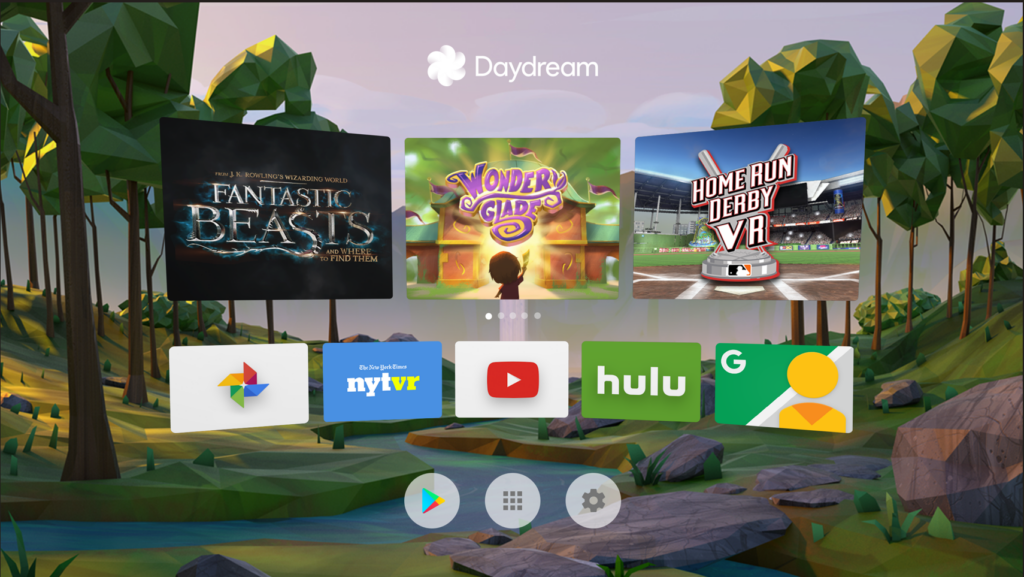
Daydream by Google provides a dedicated platform for Android users to immerse themselves in virtual reality. Tailored for Android devices, it offers a smooth interface for VR content, justifying its reputation as the go-to solution for Android VR experiences.
Why I Picked Daydream: In the quest to determine the best VR platforms, Daydream immediately captured my attention. After comparing various tools, I formed the opinion that Daydream stands out due to its deep integration with Android, the world's most widespread OS. This integration, coupled with Google's strong backing, makes it a clear winner for Android VR experiences.
Standout features & integrations:
Daydream boasts a curated collection of VR content that ranges from video game experiences to immersive VR tours. Its development toolset is enriched with an open-source SDK, enabling creators to craft VR content tailored for the Android ecosystem. Furthermore, Daydream integrates flawlessly with the Google Play Store, making VR app discovery and installation effortless for users.
Pros and Cons
Pros:
- Broad VR content available, from virtual tours to high-quality video games.
- Strong support and resources from Google, including tutorials and software development kits.
- Deep integration with Android, ensuring a cohesive VR experience.
Cons:
- Lacks the advanced development capabilities of platforms like Unreal Engine or CryEngine.
- Hardware compatibility is primarily with select Android phones.
- Limited to the Android platform, excluding iOS users.


Leap Motion is a pioneer in the realm of hand-tracking technology, enabling users to interact with digital content using natural hand and finger movements. Its precise tracking system offers an intuitive interface for both virtual reality and augmented reality applications, solidifying its position as a leader in hand-tracking innovations.
Why I Picked Leap Motion: Upon evaluating various hand-tracking solutions, Leap Motion emerged as the undeniable frontrunner. My decision to select it was driven by its unparalleled precision and the rave reviews from the VR community. When comparing its capabilities, Leap Motion clearly shines, offering an experience that transforms the way users interact within a virtual environment, making it the best in hand-tracking technology.
Standout features & integrations:
Leap Motion's software development kits empower creators with the tools they need to integrate hand-tracking into their VR and AR projects. With real-time hand and finger recognition, it sets the bar high for immersive VR experiences. It integrates with various VR hardware including Oculus Rift, HTC Vive, and other reality headsets, ensuring compatibility across platforms.
Pros and Cons
Pros:
- Comprehensive SDKs for developers to tailor hand-tracking features within their applications.
- Wide compatibility with major VR and AR headsets, including Oculus Rift and HTC Vive.
- High-precision hand and finger tracking elevates immersive experiences.
Cons:
- Dependence on external light conditions for optimal performance.
- Limited to hand interactions, excluding full-body tracking solutions.
- Might have a learning curve for beginners unfamiliar with hand-tracking technology.


Varwin is a dedicated virtual reality software tailored for streamlining project management within the VR domain. Offering a comprehensive suite of tools, it simplifies VR content creation and coordination, making it an indispensable asset for VR project management.
Why I Picked Varwin: In my quest to select the right tool for VR project management, Varwin consistently stood out from the pack. By comparing and judging various platforms, I formed the opinion that Varwin offers a unique blend of functionality tailored specifically for VR workflow optimization. This specialization and focus on the intricacies of VR project coordination are the reasons I firmly believe it's the "Best for VR project management."
Standout features & integrations:
Varwin integrates advanced VR content creation tools with project management functionalities, enabling real-time collaboration in a 3D environment. Its SDK offers flexibility for custom development, ensuring adaptability to specific project needs. The software is compatible with major VR headsets such as Oculus Rift and HTC Vive and also supports integration with game engines and other VR development tools.
Pros and Cons
Pros:
- Broad compatibility with major VR hardware and development platforms.
- SDK allows for customization, catering to unique project requirements.
- Comprehensive VR project management tools streamline the entire workflow.
Cons:
- Integration with non-standard tools might require additional scripting or adjustments.
- Requires specific VR hardware for optimal performance.
- May be overwhelming for beginners due to its extensive features.


Cognitive3D delivers comprehensive analytics for immersive VR experiences. This tool delves deep into user interactions within virtual environments, enabling creators to draw meaningful insights.
Why I Picked cognitive3D: In my journey to discover the top tools in the VR analytics realm, cognitive3D emerged distinctly from the rest. After judiciously comparing numerous platforms, I opined that its profound data analysis approach and visualization tools truly differentiated it. I firmly believe that for those in search of in-depth analytics from their VR content, cognitive3D is unequivocally the "Best for VR analytics and insights."
Standout features & integrations:
Cognitive3D showcases an impressive ability to capture high-quality data in real-time from a user's interactions in VR environments. Its SDKs can be integrated into various development platforms, improving the scope of data collection. Furthermore, cognitive3D's compatibility with major VR headsets such as HTC Vive, Oculus Rift, and PlayStation VR ensures a broader reach for creators and analysts.
Pros and Cons
Pros:
- Comprehensive visualization tools that aid in deciphering complex data.
- Broad compatibility with leading VR headsets and development platforms.
- Real-time data collection from immersive VR experiences.
Cons:
- The need for frequent updates to stay in sync with rapidly evolving VR hardware.
- Dependence on third-party integrations for certain data sources.
- May be overwhelming for beginners venturing into VR analytics.


Cardboard, an initiative by Google, is a simple yet revolutionary tool that democratizes the VR experience. Offering a low-cost entry into the realm of virtual reality, it's perfectly poised for those seeking affordable VR solutions.
Why I Picked Cardboard: In the vast landscape of VR tools, Cardboard caught my attention due to its sheer simplicity and cost-effectiveness. After determining and comparing multiple options, it became evident that Cardboard’s straightforward approach to delivering virtual reality experiences was unparalleled. Its accessibility and affordability are why I'm convinced it's the "Best for affordable VR experiences."
Standout features & integrations:
Cardboard offers a user-friendly interface that allows users to dive into VR with just their smartphones. Its compatibility extends to various VR content, from 3D animations to virtual tours. Cardboard integrates with a variety of VR apps on both iOS and Android, making it a flexible tool for many.
Pros and Cons
Pros:
- Extensive library of VR apps available for iOS and Android.
- Compatible with a wide range of smartphones.
- Incredibly affordable compared to other VR headsets.
Cons:
- Relies heavily on the user’s smartphone capabilities.
- Limited in terms of advanced features or integrations.
- Not as immersive as high-end VR headsets like HTC Vive or Oculus Rift.


VisualCamp specializes in offering gaze-tracking analytics for immersive VR environments. This tool provides insights into user focus areas, enabling content creators to fine-tune their VR experiences accordingly.
Why I Picked VisualCamp: When delving into the plethora of gaze analytics tools, VisualCamp captured my attention due to its robust features and user-friendly interface. I determined that its capability to extract precise data on where users are looking in a virtual space sets it apart from its competitors. Given this precision and thoroughness, it was clear to me that VisualCamp is the "Best for gaze analytics and tracking."
Standout features & integrations:
One of VisualCamp's stellar features is its real-time gaze tracking, offering insights the moment they're generated within the VR environment. Additionally, it boasts compatibility with leading VR headsets, including Oculus Rift and HTC Vive, ensuring comprehensive data capture. To facilitate workflows, VisualCamp integrates effortlessly with popular game engines and development platforms.
Pros and Cons
Pros:
- Integrates with popular game engines and software development kits.
- Broad compatibility with major VR headsets.
- Accurate real-time gaze tracking within VR content.
Cons:
- Frequent updates may be required to maintain compatibility with evolving VR hardware.
- Limited to gaze analytics and may need pairing with other tools for broader insights.
- Might require a learning curve for beginners.
Weitere Virtual-Reality-Software
Hier sind einige weitere Virtual-Reality-Software-Optionen, die es zwar nicht auf meine Shortlist geschafft haben, aber trotzdem einen Blick wert sind:
- Sketchbox
For 3D design collaboration
- eevo
For interactive video creation
- MARUI-PlugIn
For VR integration with Autodesk Maya
- Chetu
Good for custom VR software solutions
- VR Builder
Good for Unity VR development
- A-Frame
Good for web-based VR experiences
- MakeVR Pro
Good for VR-based 3D modeling
- Forge
Good for cross-platform VR development
- Uptale
Good for immersive learning experiences
- StellarX
Good for VR scenario creation and training
- InstaVR
Good for quick VR application design
- Volograms
Good for converting videos into holograms
- OpenSpace 3D
Good for 3D app and VR game creation
- Build-vr
Good for real estate VR visualization
- CLDXR
Good for cloud-based VR deployment


Auswahlkriterien für Virtual-Reality-Software
Bei der Auswahl der besten Virtual-Reality-Software, die in diese Liste aufgenommen werden sollte, habe ich häufige Käuferbedürfnisse und zentrale Schmerzpunkte wie die einfache Integration in bestehende Systeme und die Zugänglichkeit für Remote-Teams berücksichtigt. Außerdem habe ich das folgende Bewertungsraster verwendet, um meine Analyse strukturiert und fair zu gestalten:
Kernfunktionen (25 % der Gesamtbewertung)
Für die Aufnahme in diese Liste musste jede Lösung die folgenden gängigen Anwendungsfälle abdecken:
- Virtuelle Meetings
- Trainingssimulationen
- 3D-Modellierung
- Virtuelle Rundgänge
- Kollaboratives Design
Zusätzliche herausragende Funktionen (25 % der Gesamtbewertung)
Um die Auswahl weiter einzugrenzen, habe ich zudem nach einzigartigen Funktionen Ausschau gehalten, wie zum Beispiel:
- Gestenerkennung
- Mehrbenutzer-Zusammenarbeit
- Integration mit Augmented Reality
- Anpassbare Avatare
- Echtzeit-Analytik
Benutzerfreundlichkeit (10 % der Gesamtbewertung)
Um ein Gefühl für die Benutzerfreundlichkeit jeder Lösung zu bekommen, habe ich Folgendes berücksichtigt:
- Intuitive Benutzeroberfläche
- Einfache Navigation
- Geringe Lernkurve
- Anpassbare Einstellungen
- Responsives Design
Onboarding (10% der Gesamtbewertung)
Zur Bewertung des Onboarding-Erlebnisses für jede Plattform habe ich Folgendes berücksichtigt:
- Verfügbarkeit von Trainingsvideos
- Interaktive Produkttouren
- Zugang zu Webinaren
- Umfassende Vorlagen
- Reaktionsschnelle Chatbots
Kundensupport (10% der Gesamtbewertung)
Um die Kundensupport-Leistungen der einzelnen Softwareanbieter zu beurteilen, habe ich Folgendes berücksichtigt:
- Rund-um-die-Uhr-Verfügbarkeit
- Live-Chat-Support
- Umfassende FAQs
- Antwortzeiten beim E-Mail-Support
- Verfügbarkeit eines dedizierten Account Managers
Preis-Leistungs-Verhältnis (10% der Gesamtbewertung)
Um das Preis-Leistungs-Verhältnis jeder Plattform zu bewerten, habe ich Folgendes berücksichtigt:
- Wettbewerbsfähige Preise
- Verfügbarkeit von kostenlosen Testphasen
- Flexible Abonnement-Modelle
- Funktionen im Basispaket enthalten
- Rabatte bei langfristigen Bindungen
Kundenbewertungen (10% der Gesamtbewertung)
Um einen Eindruck von der allgemeinen Kundenzufriedenheit zu erhalten, habe ich bei der Auswertung von Kundenbewertungen Folgendes berücksichtigt:
- Gesamte Zufriedenheitsbewertungen
- Feedback zur Benutzerfreundlichkeit
- Kommentare zum Kundensupport
- Berichte zur Zuverlässigkeit der Software
- Nutzermeinungen zur Kapitalrendite (ROI)
So wählen Sie Virtual Reality Software aus
Es ist leicht, sich in langen Funktionslisten und komplizierten Preisstrukturen zu verlieren. Damit Sie den Überblick behalten, während Sie Ihren individuellen Auswahlprozess durchlaufen, finden Sie hier eine Checkliste wichtiger Faktoren:
| Faktor | Worauf Sie achten sollten |
|---|---|
| Skalierbarkeit | Kann die Software mit Ihren Anforderungen wachsen? Prüfen Sie, wie gut sie mit einer steigenden Anzahl von Nutzern oder Daten umgeht. Achten Sie auf Anzeichen von Leistungseinbrüchen bei wachsendem Einsatz. |
| Integrationen | Lässt sie sich mit Ihren bestehenden Tools verbinden? Stellen Sie sicher, dass sie sich problemlos in Ihre aktuellen Systeme integriert, um Unterbrechungen des Workflows zu vermeiden. |
| Anpassungsfähigkeit | Können Sie die Software an Ihre Prozesse anpassen? Prüfen Sie, ob Anpassungen möglich sind, um sie auf Ihre spezifischen Arbeitsabläufe und Ihr Branding zuzuschneiden. |
| Benutzerfreundlichkeit | Wie intuitiv ist die Benutzeroberfläche? Wählen Sie Tools, die eine geringe Einarbeitungszeit erfordern und für Ihr Team ohne umfangreiche Schulungen nutzbar sind. |
| Implementierung und Onboarding | Wie schnell können Sie starten? Prüfen Sie, welche Ressourcen für die Einrichtung benötigt werden und wie gut die Onboarding-Unterstützung (Guides, Tutorials) ist. |
| Kosten | Sind die Preispläne innerhalb Ihres Budgets? Vergleichen Sie verschiedene Preisstrukturen und achten Sie auf versteckte Gebühren oder laufende Kosten. |
| Sicherheitsvorkehrungen | Wie gut werden Ihre Daten geschützt? Achten Sie auf Verschlüsselung, Datensicherungen und die Einhaltung geltender Datenschutzbestimmungen, um Ihre Daten zu sichern. |
| Verfügbarkeit des Supports | Wann ist der Support erreichbar? Achten Sie auf die Supportzeiten und die angebotenen Kanäle, damit Sie Hilfe erhalten, wenn Sie sie benötigen. |
Was ist Virtual Reality Software?
Virtual Reality Software ist eine Technologie, die immersive digitale Umgebungen erschafft, mit denen Nutzer interagieren können. Fachleute wie Designer, Lehrkräfte und Trainer setzen diese Tools häufig ein, um Lernerfahrungen und Zusammenarbeit zu verbessern. Funktionen wie virtuelle Meetings, Trainingssimulationen und 3D-Modellierung unterstützen eine effektive Kommunikation und Kompetenzentwicklung. Insgesamt bieten diese Tools innovative Wege, Inhalte anschaulich zu machen und zu erleben – insbesondere in Verbindung mit fortschrittlicher Spracherkennungssoftware.
Funktionen
Achten Sie bei der Auswahl von Virtual Reality Software auf folgende Hauptfunktionen:
- Virtuelle Meetings: Ermöglichen die Zusammenarbeit und Kommunikation in Echtzeit zwischen verteilten Teams und fördern Teamarbeit und Ideenaustausch.
- Trainingssimulationen: Bieten immersive Lernerfahrungen zur Entwicklung und Einübung von Fähigkeiten in einer sicheren Umgebung.
- 3D-Modellierung: Ermöglicht es den Nutzern, dreidimensionale Objekte zu erstellen und zu bearbeiten – für Design- und Visualisierungszwecke.
- Zusammenarbeit mehrerer Nutzer: Unterstützt Interaktionen und gemeinsame Aktivitäten mehrerer Personen innerhalb desselben virtuellen Raums.
- Gestenerkennung: Erhöht die Nutzerinteraktion, indem Steuerung und Manipulation der virtuellen Umgebung durch natürliche Handbewegungen ermöglicht werden.
- Integration von Augmented Reality: Verbindet virtuelle Elemente mit der realen Welt und bietet so ein nahtloses, erweitertes Nutzererlebnis.
- Anpassbare Avatare: Bietet Personalisierungsoptionen, damit Nutzer sich in virtuellen Räumen individuell digital repräsentieren können.
- Echtzeit-Analysen: Liefert Erkenntnisse und Daten zu Benutzerinteraktionen und Leistungen innerhalb der virtuellen Umgebung.
- Interaktive Produkttouren: Erleichtert das Onboarding und Lernen durch geführte Rundgänge zu Funktionen und Möglichkeiten einer Software.
- Sicherheitsmaßnahmen: Gewährleistet Datenschutz und Privatsphäre durch Verschlüsselung sowie Einhaltung relevanter Vorschriften.
Vorteile
Die Implementierung von VR-Engine-Software bringt zahlreiche Vorteile für Ihr Team und Ihr Unternehmen. Hier sind einige, auf die Sie sich freuen können:
- Verbesserte Zusammenarbeit: Virtuelle Meetings und Funktionen zur Mehrbenutzer-Zusammenarbeit ermöglichen Teams eine effektive Zusammenarbeit – unabhängig vom Standort.
- Effizienteres Training: Trainingssimulationen bieten einen sicheren Raum für das Üben von Fähigkeiten und reduzieren Fehler in realen Situationen.
- Steigerung der Beteiligung: Interaktive und immersive Erfahrungen fesseln die Aufmerksamkeit der Nutzer und fördern deren aktive Teilnahme.
- Kosteneinsparungen: Durch den Einsatz virtueller Umgebungen für Schulungen und Meetings können Unternehmen Reise- und Ressourcenkosten einsparen.
- Personalisierungsmöglichkeiten: Anpassbare Avatare und Umgebungen ermöglichen es den Nutzern, ihre Erfahrungen individuell anzupassen und so Zufriedenheit und Benutzerfreundlichkeit zu erhöhen.
- Datenbasierte Erkenntnisse: Echtzeit-Analysen liefern wertvolles Feedback über die Interaktion der Nutzer und helfen Teams bei fundierten Entscheidungen.
- Innovation und Kreativität: Funktionen wie 3D-Modellierung und die Integration von Augmented Reality regen neue Ideen und innovative Lösungen an.
Kosten & Preise
Die Wahl von Virtual-Reality-Software erfordert ein Verständnis der verschiedenen Preisgestaltungen und verfügbaren Modelle. Die Kosten variieren je nach Funktionen, Teamgröße, Erweiterungen und mehr. Die folgende Tabelle fasst gängige Pläne, Durchschnittspreise und typische Funktionen von VR-Softwarelösungen zusammen:
Vergleichstabelle der Virtual-Reality-Software-Tarife
| Tarifart | Typische Funktionen | |
|---|---|---|
| Kostenloser Tarif | $0 | Grundlegende virtuelle Meetings, eingeschränkte 3D-Modellierung und Basis-Benutzersupport. |
| Persönlicher Tarif | $10-$30/user/month | Virtuelle Meetings, Trainingssimulationen und anpassbare Avatare. |
| Business-Tarif | $50-$100/user/month | Zusammenarbeit mehrerer Nutzer, Echtzeit-Analytik und erweiterte Sicherheitsmaßnahmen. |
| Enterprise-Tarif | $150-$300/user/month | Erweiterte Integrationen, Augmented Reality und dedizierter Kundensupport. |
FAQs zur Virtual-Reality-Software
Hier finden Sie Antworten auf häufig gestellte Fragen zur Virtual-Reality-Software:
Kann Virtual-Reality-Software für die Remote-Arbeit genutzt werden?
Ja, Virtual-Reality-Software kann die Remote-Arbeit verbessern, indem sie virtuelle Meetingräume und Kollaborationstools bereitstellt. Teams können so in immersiven Umgebungen interagieren, was die Zusammenarbeit aus der Ferne ansprechender macht. Werkzeuge wie virtuelle Whiteboards und die Bearbeitung von 3D-Objekten können die Kommunikation und den Ideenaustausch fördern.
Ist Virtual-Reality-Software für kleine Unternehmen geeignet?
Ja, insbesondere für Schulungs- und Designzwecke können kleine Unternehmen von Virtual-Reality-Software profitieren. Viele Anbieter haben preisgünstige Tarife mit grundlegenden Funktionen im Programm. Analysieren Sie Ihren konkreten Bedarf und wählen Sie eine skalierbare Lösung, die zu Ihrem Budget und Ziel passt.
Wie stelle ich mit Virtual-Reality-Software den Datenschutz sicher?
Prüfen Sie, ob die Software den Datenschutzbestimmungen wie der DSGVO entspricht. Achten Sie auf Funktionen wie Verschlüsselung und sichere Datenspeicherung. Es ist außerdem wichtig, die Datenschutzerklärung des Anbieters zu prüfen, um nachzuvollziehen, wie Ihre Daten verwendet und geschützt werden.
Wie geht es weiter?
Wenn Sie gerade dabei sind, Virtual-Reality-Software zu recherchieren, verbinden Sie sich kostenlos mit einem SoftwareSelect-Berater für Empfehlungen.
Sie füllen ein Formular aus und führen ein kurzes Gespräch, in dem Ihre spezifischen Anforderungen ermittelt werden. Anschließend erhalten Sie eine Shortlist mit passenden Softwarelösungen. Auf Wunsch begleitet Sie das Team während des gesamten Kaufprozesses bis hin zu Preisverhandlungen.