
Top 10 Versionskontrollsysteme – Der Kaufratgeber

10 Beste Versionskontrollsysteme im Überblick
Here's my pick of the 10 best software from the 19 tools reviewed.


Den Überblick über Code-Änderungen zu behalten und die Zusammenarbeit im Team zu organisieren, kann für Entwicklungsteams eine Herausforderung sein. Mehrere Personen arbeiten am selben Projekt, und jede Änderung nachzuvollziehen wird schnell zur Schwierigkeit. Genau hier kommen Versionskontrollsysteme ins Spiel.
Nach meiner Erfahrung sind diese Tools unerlässlich, um Ordnung und Effizienz in Ihren Entwicklungsprozess zu bringen. Sie helfen Ihnen dabei, Änderungen nachzuverfolgen, Beiträge von Teammitgliedern zu verwalten und Konflikte zu vermeiden.
In diesem Artikel teile ich meine objektive Bewertung der führenden Versionskontrollsysteme. Sie erhalten Einblicke in Funktionen, Benutzerfreundlichkeit und vieles mehr. Egal ob kleines Start-up oder großes Unternehmen – hier finden Sie garantiert die passende Lösung. Tauchen wir ein in die besten Optionen, damit Sie eine fundierte Entscheidung treffen können.
Why Trust Our Software Reviews
Zusammenfassung der besten Versionskontrollsysteme
Diese Vergleichstabelle fasst die Preisinformationen meiner Top-Auswahl an Versionskontrollsystemen zusammen, damit Sie das passende System für Ihr Budget und Ihre Geschäftsanforderungen finden.
| Tool | Best For | Trial Info | Price | ||
|---|---|---|---|---|---|
| 1 | Best for integration with Atlassian tools | Free plan available | From $3.30/user/month | Website | |
| 2 | Best for integrating with Microsoft tools | 30-day free trial available | From $6/user/month | Website | |
| 3 | Best for game development workflows | Free plan available | Pricing upon request | Website | |
| 4 | Best for AWS-centric projects | Free tier available | Pricing upon request | Website | |
| 5 | Best for granular access control | Not available | Website | ||
| 6 | Best for mainframe source code management | Not available | Pricing upon request | Website | |
| 7 | Best for open-source collaboration | Not available | Free To Use | Website | |
| 8 | Best for scalable version management | Free plan available | Pricing upon request | Website | |
| 9 | Best for large code repositories | Free demo available | Free to use | Website | |
| 10 | Best for distributed software control | Not available | Free, open-source software | Website |
-

Site24x7
Visit WebsiteThis is an aggregated rating for this tool including ratings from Crozdesk users and ratings from other sites.4.6 -
Docker
Visit WebsiteThis is an aggregated rating for this tool including ratings from Crozdesk users and ratings from other sites.4.6 -
Pulumi
Visit WebsiteThis is an aggregated rating for this tool including ratings from Crozdesk users and ratings from other sites.4.8





Bewertungen der besten Versionskontrollsysteme
Im Folgenden finden Sie meine ausführlichen Zusammenfassungen der besten Versionskontrollsysteme, die es auf meine Shortlist geschafft haben. Meine Bewertungen geben Ihnen einen detaillierten Einblick in die wichtigsten Funktionen, Vor- und Nachteile, Integrationen sowie ideale Anwendungsbereiche, damit Sie die perfekte Lösung für Ihre Anforderungen finden.

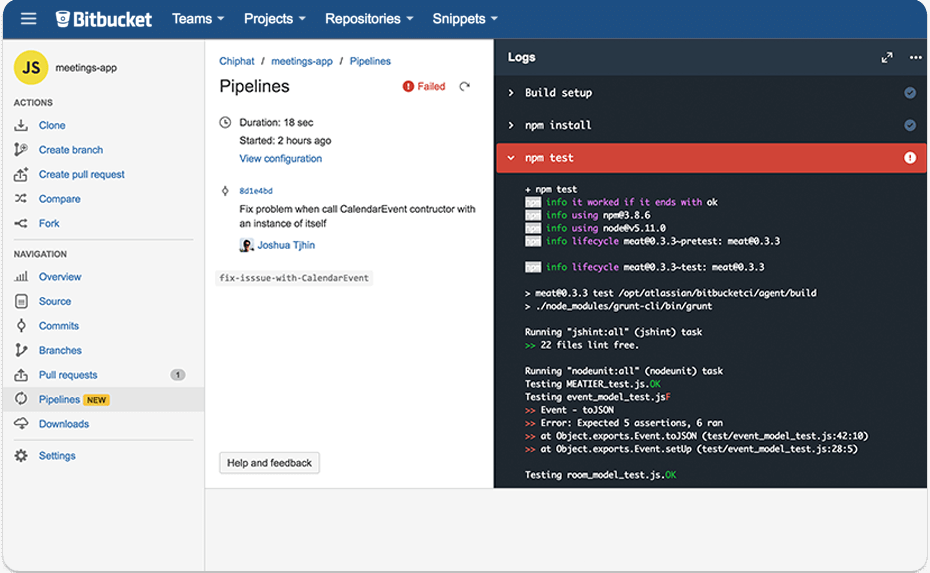
Bitbucket, a product of Atlassian, offers a robust version control system combined with the best features of Git and Mercurial. It not only serves as a repository for code but also integrates with the larger Atlassian ecosystem, making it particularly advantageous for teams already using tools like Jira or Confluence.
Why I Picked Bitbucket: When I was selecting a version control platform, Bitbucket stood out due to its strong ties and compatibility with Atlassian's suite of tools. I've determined that for teams deeply embedded in the Atlassian environment, this integration can be a game-changer, streamlining workflows and promoting efficiency.
It's this synergy with the Atlassian ecosystem that justifies its position as "Best for integration with Atlassian tools".
Standout Features & Integrations:
Bitbucket boasts built-in continuous integration with Bitbucket Pipelines, allowing teams to build, test, and deploy directly from the platform. It also provides pull requests and code branching features, facilitating smooth code reviews and collaboration among team members.
Key integrations include Jira for task and bug tracking, Trello for project management, and Bamboo for continuous integration and deployment.
Pros and Cons
Pros:
- Advanced code collaboration with pull requests
- Built-in continuous integration capabilities
- Deep integration with Atlassian products
Cons:
- Potential performance issues with very large repositories
- Limited third-party integrations outside the Atlassian ecosystem
- Can be complex for new users unfamiliar with Atlassian tools


Azure DevOps Server is a comprehensive software development solution designed to aid in the entire application lifecycle, from ideation to deployment. This tool shines particularly when utilized within a Microsoft-centric ecosystem, given its innate capability to mesh with other Microsoft tools.
Why I Picked Azure DevOps Server: I chose Azure DevOps Server for this list primarily due to its deep-rooted ties with the Microsoft ecosystem. From my observations, there are few, if any, tools that offer as tight integration with Microsoft products as Azure DevOps Server does.
I determined that it's "Best for integrating with Microsoft tools" because of the intrinsic synergy it manifests when working alongside Microsoft's suite of products.
Standout Features & Integrations:
Azure DevOps Server offers continuous integration and continuous delivery (CI/CD) capabilities, allowing for more frequent and reliable releases. It provides customizable dashboards, which offer insights and analytics to refine project management and delivery.
In terms of integrations, the tool naturally meshes well with Microsoft products such as Microsoft Teams, Visual Studio, and Power BI, ensuring a cohesive development and collaboration environment.
Pros and Cons
Pros:
- Robust CI/CD capabilities enhance delivery efficiency
- Tight-knit integration with a myriad of Microsoft products
- Provides a consolidated solution encompassing the entire application lifecycle
Cons:
- Licensing model could be complex for those unfamiliar with Microsoft's pricing structures
- Non-Microsoft users might face a learning curve
- Might be overkill for smaller projects or teams


Unity Version Control provides tools and systems specifically designed for the unique needs of game developers. Its version control system is tailored to handle large files and assets typically associated with game development, making it a prime choice for developers in the gaming space.
Why I Picked Unity Version Control: When I was selecting a version control system for game developers, Unity Version Control stood out from the crowd. Its specialization in managing and versioning game-related assets made it an evident choice.
Given the unique challenges game developers face, especially with vast amounts of assets and files, I judged Unity Version Control to be the "Best for game development workflows."
Standout Features & Integrations:
Unity Version Control offers robust handling of large binary files common in game development, reducing the risks of merging conflicts. Additionally, it integrates deeply with the Unity Editor, allowing developers to manage assets without leaving their development environment. This version control also boasts integrations with popular third-party tools and services used in the game development pipeline.
Pros and Cons
Pros:
- Supports third-party tools common in game development
- Deep integration with Unity Editor promotes a smooth workflow
- Specialized for game development assets and binaries
Cons:
- Some advanced features might require additional setup
- Might not be the best fit for non-gaming projects
- Primarily suitable only for Unity-based projects

AWS CodeCommit is a fully-managed source control service that makes it easy for teams to host secure and scalable Git repositories. Designed within the AWS ecosystem, it's especially adept at serving projects that are deeply intertwined with AWS services and infrastructure.
Why I Picked AWS CodeCommit: Choosing the right tool often comes down to the environment in which it will operate. I selected AWS CodeCommit because of its deep integration with the AWS ecosystem. Upon comparing, I determined that its intrinsic connection with AWS services gives it a distinct edge, making it the top pick for projects centered around AWS.
Standout Features & Integrations:
AWS CodeCommit supports all Git commands and works without requiring any Git configuration, providing flexibility for developers. It also boasts powerful encryption both in-transit and at-rest, ensuring robust security. AWS CodeCommit integrates with other AWS services, especially developer tools like AWS CodeBuild, AWS CodeDeploy, and AWS Lambda, offering a coherent experience for AWS-centric projects.
Pros and Cons
Pros:
- Scalable and managed, eliminating operational overheads
- Robust security features with AWS's acclaimed encryption
- Deep integration with AWS services
Cons:
- Initial onboarding might be challenging for those unfamiliar with AWS
- Can become costly for larger teams given the AWS pricing model
- Might not be the best fit for non-AWS projects


IBM Rational ClearCase is a version control system that provides scalable and software configuration management. It is renowned for offering detailed, granular access control, ensuring the right personnel access the right parts of the software development life cycle.
Why I Picked IBM Rational ClearCase: When selecting a tool that offered advanced version control capabilities, IBM Rational ClearCase consistently appeared on my radar. What makes this tool particularly distinct is its emphasis on providing granular access control, allowing for a refined level of access management.
I judged, after much comparison and consideration, that IBM Rational ClearCase is "best for granular access control" because of its ability to deliver precise permissions and restrictions within the software management process.
Standout Features & Integrations:
IBM Rational ClearCase offers dynamic views that facilitate real-time workspace updates and private workspaces to support parallel development. Its UCM (Unified Change Management) feature streamlines task-based development, ensuring organized and efficient workflows.
As for integrations, it pairs well with IBM Rational's suite of tools and can integrate with popular IDEs and other third-party tools for a more extensive development process.
Pros and Cons
Pros:
- Dynamic views offer real-time updates, aiding in a synchronized development process
- Supports both centralized and distributed version control models
- Precision in access control provides enhanced security
Cons:
- The configuration can be resource-intensive, requiring adequate infrastructure
- Licensing can be complex and might be expensive for smaller teams
- Comes with a steeper learning curve for newcomers


CA Panvalet is a central library facility that aids in the management, control and efficient utilization of mainframe applications. Recognized for its competence in the domain of mainframe source code management, it addresses the specific challenges related to large-scale, legacy systems.
Why I Picked CA Panvalet: In the process of determining the most apt tools for specific version control needs, CA Panvalet consistently emerged as the choice for mainframe code management. Its reputation and specific tailoring for mainframe systems distinguish it from other version control systems.
After making comparisons and considering the unique demands of mainframe management, I judged CA Panvalet to be "Best for mainframe source code management."
Standout Features & Integrations:
CA Panvalet boasts features that cater to mainframe ecosystems, such as a centralized library for source assets and security measures tailored to mainframe environments. It provides intuitive tools to streamline the management of mainframe applications, from editing to the final stage of deployment.
For integrations, it's designed to work efficiently within the mainframe ecosystem and can interface with other mainframe-specific tools and solutions.
Pros and Cons
Pros:
- Incorporates security measures apt for mainframes
- Offers centralized management of source assets
- Specialized for mainframe environments
Cons:
- Less flexible compared to newer, distributed version control systems
- Requires mainframe expertise for optimal utilization
- May not be suitable for non-mainframe ecosystems


Git is a distributed version control system, primarily used to track changes in source code during software development. Its decentralized nature and strong branching capabilities have made it especially popular among open-source communities, fostering collaboration among developers worldwide.
Why I Picked Git: In the myriad of version control systems available, choosing one can be a daunting task. However, after examining a host of options, I picked Git because it embodies the spirit of open-source collaboration. The fact that it powers platforms like GitHub and GitLab, and its overwhelming adoption by open-source communities, confirms its unique position in fostering collaborative software development.
Standout Features & Integrations:
Git is renowned for its lightweight yet powerful branching mechanisms which allow for multiple parallel developments effortlessly. Its distributed architecture means that every contributor has a full copy of the repository, ensuring resilience and redundancy. Furthermore, Git integrates easily with numerous continuous integration and deployment tools, enhancing the development pipeline.
Pros and Cons
Pros:
- Easily integrates with popular platforms like GitHub and GitLab
- Wide adoption ensures vast community support and resources
- Distributed architecture fosters collaboration and redundancy
Cons:
- Its flexibility means there's often more than one way to achieve something, potentially leading to confusion
- Some operations, especially on large repositories, can be time-consuming
- Initial learning curve can be steep for beginners


Helix Core by Perforce is a version control system that excels at handling large codebases and digital assets across various team sizes. Given its capacity to handle thousands of users and millions of daily transactions, Helix Core emerges as a strong choice for those prioritizing scalability in version management.
Why I Picked Helix Core: In my journey of selecting a version control system that could cater to larger operations, Helix Core was a consistent name. I chose it not only for its reputation but also because it demonstrated capabilities beyond the norm. Comparing it with other tools, Helix Core's exceptional scaling capabilities made it the prime candidate as the "Best for scalable version management."
Standout Features & Integrations:
Helix Core provides atomic commits, ensuring data integrity even when dealing with vast amounts of data. It also offers a visual client for versioning large binary files and assets. One of Helix Core’s strengths is its broad integrations, including ties with Jenkins, JIRA, and other CI/CD tools, easing its incorporation into diverse development ecosystems.
Pros and Cons
Pros:
- Broad integrations ease its adoption in varied development environments
- Supports a wide array of file types, including large binaries
- Can handle extensive operations without performance degradation
Cons:
- Some features might have a steeper learning curve
- Initial setup can be more complex than other solutions
- Might be overkill for small teams or projects


Mercurial is a distributed version control system that's designed to handle projects of all sizes efficiently. Its strength lies in managing large code repositories, ensuring that developers can collaborate without the typical bottlenecks found in large-scale development projects.
Why I Picked Mercurial: In my journey of selecting the most proficient tools, Mercurial consistently appeared as a top contender, particularly when it came to overseeing expansive code repositories. Comparing it side by side with other systems, its capacity to proficiently manage substantial repositories is what truly made it stand apart.
Thus, I am confident in stating it's "best for large code repositories".
Standout Features & Integrations:
Mercurial stands out with its performance optimization for large projects, providing efficient handling even when dealing with gigabytes of data. It also supports an array of extensions, making it highly customizable for specific workflow needs.
For integrations, Mercurial can connect with numerous tools such as Jenkins, Bamboo, and TortoiseHG, ensuring a well-rounded development ecosystem.
Pros and Cons
Pros:
- Integrates with many popular development tools
- Supports a wide variety of extensions
- High-performance handling of vast repositories
Cons:
- Less widespread community support compared to its counterparts
- Certain features need extensions to be fully functional
- Might require some time to get used to for those new to DVCS


Fossil SCM is a unique version control system known for its lightweight, self-contained nature. What sets Fossil apart is its focus on distributed software control, providing developers the flexibility to work independently while easily merging their efforts into a unified codebase.
Why I Picked Fossil SCM: During my search for efficient version control systems, Fossil SCM caught my attention due to its distinctive approach to distributed software control. I've judged it against other tools and it distinctly shines in allowing teams to work in a decentralized manner, yet still maintain cohesion. This is precisely why I hold it in high regard as "Best for distributed software control".
Standout Features & Integrations:
Fossil SCM is renowned for its built-in wiki and bug-tracking system which reduces the need for third-party tools. Its capability to record the entire history of the project in a single disk file simplifies backup and transport.
As for integrations, while Fossil maintains a self-contained philosophy, it does allow import/export functionalities with Git, making it adaptable for teams transitioning or using multiple VCS.
Pros and Cons
Pros:
- Compatibility features for Git users
- Entire project history stored in one disk file
- All-in-one VCS with integrated wiki and bug tracking
Cons:
- Limited third-party integrations due to its self-contained nature
- Lacks some advanced features of larger VCS platforms
- Might have a learning curve for users familiar with mainstream VCS
Weitere Versionskontrollsysteme
Hier sind einige weitere Optionen für Versionskontrollsysteme, die es zwar nicht in meine Shortlist geschafft haben, aber dennoch einen Blick wert sind:
- Vault
For centralized version control
- Plastic SCM
For GUI-driven version management
- Subversion
Good for centralized version control with atomic commits
- Gerrit
Good for code review and project governance
- Beanstalk
Good for simplified code hosting and deployments
- Veracity
Good for distributed versioning with bug tracking
- GNU RCS
Good for local revision control of single files
- IBM Source Code Control System
Good for AIX operating environment integration
- Darcs SCM
Good for patch-based revision control without conflicts


Auswahlkriterien für Versionskontrollsysteme
Bei der Auswahl der besten Versionskontrollsysteme für diese Liste habe ich gängige Käuferbedürfnisse und Herausforderungen wie effiziente Zusammenarbeit und Änderungsverfolgung berücksichtigt. Außerdem habe ich zur strukturierten und fairen Bewertung folgendes Schema verwendet:
Kernfunktionen (25 % der Gesamtbewertung)
Um in meine Auswahl aufgenommen zu werden, musste jede Lösung folgende gängige Anwendungsfälle erfüllen:
- Änderungen am Code nachverfolgen
- Mehrere Versionen verwalten
- Teamzusammenarbeit ermöglichen
- Code aus verschiedenen Zweigen zusammenführen
- Auf frühere Versionen zurücksetzen
Zusätzliche besondere Funktionen (25 % der Gesamtbewertung)
Um die Auswahl weiter einzugrenzen, habe ich auch auf folgende besondere Funktionen geachtet:
- Automatisierte Konfliktlösung
- Optionen zur Cloud-Integration
- Erweiterte Sicherheitsfunktionen
- Echtzeit-Kollaborationstools
- Anpassbare Workflows
Benutzerfreundlichkeit (10 % der Gesamtbewertung)
Um die Benutzerfreundlichkeit jedes Systems einschätzen zu können, habe ich folgende Aspekte geprüft:
- Intuitive Benutzeroberfläche
- Einfache Navigation
- Anpassbare Einstellungen
- Zugänglichkeit auf verschiedenen Geräten
- Integration mit anderen Tools
Onboarding (10 % der Gesamtbewertung)
Um die Onboarding-Erfahrung jeder Plattform zu bewerten, habe ich Folgendes berücksichtigt:
- Verfügbarkeit von Einführungsvideos
- Interaktive Produkttouren
- Zugang zu Vorlagen
- Webinare für neue Nutzer
- Chatbot-Unterstützung
Kundensupport (10 % der Gesamtbewertung)
Um die Supportdienste der einzelnen Softwareanbieter zu beurteilen, habe ich Folgendes berücksichtigt:
- 24/7 Support-Verfügbarkeit
- Mehrere Kontaktmöglichkeiten
- Zugang zur Wissensdatenbank
- Reaktionszeit auf Anfragen
- Verfügbarkeit von Live-Chat
Preis-Leistungs-Verhältnis (10 % der Gesamtbewertung)
Um das Preis-Leistungs-Verhältnis jeder Plattform zu beurteilen, habe ich Folgendes berücksichtigt:
- Konkurrenzfähige Preisgestaltung
- In jeder Preisstufe enthaltene Funktionen
- Rabattmöglichkeiten bei langfristigen Bindungen
- Kosten für zusätzliche Features
- Verfügbarkeit einer kostenlosen Testphase
Kundenbewertungen (10 % der Gesamtbewertung)
Um einen Eindruck von der allgemeinen Kundenzufriedenheit zu bekommen, habe ich beim Lesen von Kundenbewertungen Folgendes berücksichtigt:
- Feedback zur Benutzerfreundlichkeit
- Qualität des Support-Services
- Zufriedenheit mit den Funktionen
- Wahrnehmung des Preis-Leistungs-Verhältnisses
- Allgemeine Zufriedenheitsbewertungen
So wählen Sie ein Versionskontrollsystem aus
Es ist leicht, sich in langen Funktionslisten und komplexen Preisstrukturen zu verlieren. Damit Sie bei Ihrem individuellen Auswahlprozess für Software den Überblick behalten, finden Sie hier eine Checkliste mit Faktoren, die Sie im Auge behalten sollten:
| Faktor | Worauf achten |
|---|---|
| Skalierbarkeit | Kann das System mit Ihrem Team wachsen? Berücksichtigen Sie Nutzerlimits und Datenverarbeitungs-Kapazitäten. Stellen Sie sicher, dass das System zukünftigen Erweiterungen standhält. |
| Integrationen | Funktioniert es mit Ihren bestehenden Tools wie IDEs und CI/CD-Pipelines? Prüfen Sie die Kompatibilität, um Arbeitsablaufunterbrechungen zu vermeiden. |
| Anpassbarkeit | Können Sie Arbeitsabläufe auf Ihre Bedürfnisse zuschneiden? Suchen Sie nach flexiblen Einstellungen, die zu den Abläufen Ihres Teams passen. |
| Benutzerfreundlichkeit | Ist die Benutzeroberfläche intuitiv? Testen Sie sie mit Teammitgliedern, um sicherzustellen, dass sie ohne ständige Unterstützung damit umgehen können. |
| Implementierung und Onboarding | Wie schnell können Sie starten? Überprüfen Sie die Einrichtungszeit und verfügbare Ressourcen wie Tutorials und Support. |
| Kosten | Passt die Preisgestaltung zu Ihrem Budget? Vergleichen Sie die Kosten mit den angebotenen Funktionen. Achten Sie auf versteckte Gebühren oder Einschränkungen in den Preismodellen. |
| Sicherheitsvorkehrungen | Sind Mechanismen zum Datenschutz vorhanden? Stellen Sie sicher, dass die Lösung Ihren Sicherheitsstandards entspricht, um Ihren Code zu schützen. |
Was sind Versionskontrollsysteme?
Versionskontrollsysteme sind Werkzeuge, die Entwicklern helfen, Änderungen am Quellcode im Zeitverlauf zu verwalten. Softwareentwickler, Ingenieure und IT-Teams nutzen diese Tools, um Codehistorie nachzuverfolgen, effizient zusammenzuarbeiten und Konflikte zu vermeiden. Funktionen wie Änderungsverfolgung, Versionsmanagement und die Unterstützung der Zusammenarbeit sorgen für Code-Integrität und die Produktivität des Teams. Diese Tools sind unerlässlich, um Projekte zu organisieren und eine reibungslose Zusammenarbeit zwischen Teammitgliedern zu gewährleisten.
Funktionen
Achten Sie bei der Auswahl von Versionskontrollsystemen auf folgende Schlüsselfunktionen:
- Änderungsverfolgung: Zeichnet jede Änderung am Code auf, sodass Entwickler nachvollziehen können, was geändert wurde und wann.
- Verzweigungen und Zusammenführungen: Ermöglicht parallele Entwicklung, indem mehrere Zweige erstellt und ohne Konflikte zusammengeführt werden können.
- Kollaborationstools: Erleichtert Teamarbeit, indem mehrere Mitwirkende gleichzeitig am selben Projekt arbeiten können.
- Versionshistorie: Hält ältere Versionen fest, sodass bei Bedarf einfach auf frühere Zustände zurückgekehrt werden kann.
- Konfliktlösung: Stellt Mechanismen bereit, um Codekonflikte, die durch gleichzeitiges Bearbeiten entstehen, zu behandeln und aufzulösen.
- Integrationsfähigkeit: Verbindet sich mit anderen Tools wie IDEs und CI/CD-Pipelines, um die Effizienz des Workflows zu steigern.
- Zugriffskontrolle: Verwaltet Benutzerrechte, um den Code vor unautorisierten Änderungen zu schützen.
- Backup und Wiederherstellung: Sichert die Codesicherheit, indem einfache Backup- und Wiederherstellungsoptionen bereitgestellt werden.
- Skalierbarkeit: Unterstützt Wachstum, indem mehr Daten und Nutzeranforderungen ohne Leistungseinbußen verarbeitet werden.
- Benutzeroberfläche: Bietet eine intuitive und leicht zu navigierende Oberfläche zur Verbesserung der Nutzererfahrung und Verkürzung der Lernzeit.
Vorteile
Die Einführung von Versionskontrollsystemen bietet Ihrem Team und Unternehmen zahlreiche Vorteile. Hier einige, auf die Sie sich freuen können:
- Verbesserte Zusammenarbeit: Erlaubt es mehreren Entwicklern, gleichzeitig am selben Projekt zu arbeiten, ohne die Änderungen der anderen zu überschreiben.
- Höhere Codequalität: Verfolgt Änderungen und liefert eine Bearbeitungshistorie, was dabei hilft, hohe Standards zu halten und Fehler schnell zu erkennen.
- Effiziente Konfliktlösung: Bietet Werkzeuge zum Management und zur Behebung von Konflikten im Code, wodurch Ausfallzeiten und Frust reduziert werden.
- Projektorganisation: Hält alle Versionen und Änderungen an einem Ort, was das Projektmanagement und das Zurücksetzen auf vorherige Stände erleichtert.
- Skalierbarkeit: Unterstützt Expansion durch effiziente Handhabung von mehr Nutzern und Daten – das System wächst mit Ihrem Team.
- Sicherheit und Zugriffskontrolle: Schützt Ihren Code durch Nutzerrechte und Backup-Optionen vor unberechtigten Änderungen.
- Integration in Arbeitsabläufe: Verbindet sich mit anderen Entwicklungstools für einen reibungslosen Workflow, steigert die Produktivität und reduziert manuelle Aufgaben.
Kosten & Preise
Bei der Auswahl eines Versionskontrollsystems ist es wichtig, die verschiedenen Preisstrukturen und verfügbaren Modelle zu verstehen. Die Kosten variieren je nach Leistungsumfang, Teamgröße, Zusatzfunktionen und mehr. Die folgende Tabelle fasst übliche Tarife, Durchschnittspreise und typische Merkmale von Lösungen für Versionskontrollsysteme zusammen:
Tarifvergleichstabelle für Versionskontrollsysteme
| Tarifart | Durchschnittlicher Preis | Typische Merkmale |
|---|---|---|
| Free Plan | $0 | Grundlegende Änderungsverfolgung, begrenzte Nutzer, Community-Support. |
| Personal Plan | $5-$15/user/month | Komplette Versionshistorie, Verzweigungen und Zusammenführungen, grundlegende Integrationen. |
| Business Plan | $15-$30/user/month | Erweiterte Kollaborationstools, verbesserte Sicherheit, priorisierter Support. |
| Enterprise Plan | $30-$60/user/month | Anpassbare Workflows, dediziertes Account-Management, umfassender Support. |
Häufig gestellte Fragen zu Versionskontrollsystemen
Hier finden Sie Antworten auf häufig gestellte Fragen zu Versionskontrollsystemen:
Können Versionskontrollsysteme auch für Nicht-Software-Projekte genutzt werden?
Wie unterstützen Versionskontrollsysteme Remote-Teams?
Gibt es spezielle Versionskontrollsysteme für große Unternehmen?
Wie geht es weiter:
Wenn Sie gerade dabei sind, Versionskontrollsysteme zu recherchieren, verbinden Sie sich mit einem SoftwareSelect-Berater für kostenlose Empfehlungen.
Sie füllen ein Formular aus und führen ein kurzes Gespräch, in dem auf Ihre spezifischen Anforderungen eingegangen wird. Anschließend erhalten Sie eine Auswahlliste passender Software. Die Berater unterstützen Sie sogar während des gesamten Kaufprozesses, einschließlich Preisverhandlungen.