

15 Beste Tools für Funktionstests im Jahr 2026 bewertet

Beste Funktionstest-Tools Auswahlliste
Hier ist meine Auswahlliste der besten Funktionstest-Tools:


Die fehlerfreie Funktionsweise Ihrer Anwendungen steht an oberster Stelle. Funktionstest-Tools sind Ihre zuverlässigen Helfer, um Fehler zu erkennen und die Softwarequalität zu verbessern. Sie sparen Zeit und reduzieren den Aufwand manueller Tests.
Ich habe verschiedene Funktionstest-Tools unabhängig getestet und bewertet, um Ihnen eine objektive Liste der besten Lösungen zu präsentieren. Sie erhalten Einblicke darin, was diese Tools bieten, wie sie zu den Anforderungen Ihres Teams passen und warum sie sich von der Konkurrenz abheben.
Egal, ob Sie ein erfahrener Entwickler oder Teil eines dynamischen Tech-Teams sind – dieser Leitfaden hilft Ihnen, fundierte Entscheidungen über die Tools zu treffen, die Ihren Testprozess auf das nächste Level heben.
Why Trust Our Software Reviews
We’ve been testing and reviewing software since 2023. As tech leaders ourselves, we know how critical and difficult it is to make the right decision when selecting software.
We invest in deep research to help our audience make better software purchasing decisions. We’ve tested more than 2,000 tools for different tech use cases and written over 1,000 comprehensive software reviews. Learn how we stay transparent & our software review methodology.
Zusammenfassung der besten Funktionstest-Tools
Diese Vergleichstabelle fasst die Preisinformationen meiner Top-Auswahl an Funktionstest-Tools zusammen, damit Sie die passende Lösung für Ihr Budget und Ihre geschäftlichen Anforderungen finden.
| Tool | Best For | Trial Info | Price | ||
|---|---|---|---|---|---|
| 1 | Best for risk-based testing | Free trial available + free demo | Pricing upon request | Website | |
| 2 | Best for team collaboration | Free demo available | Pricing upon request | Website | |
| 3 | Best for full-cycle testing | 14-day free trial | Pricing upon request | Website | |
| 4 | Best for AI-driven test automation | Free trial available + free demo | Pricing upon request | Website | |
| 5 | Best for checklist-driven manual test plans | 30-day free trial | From $49/month (billed annually) | Website | |
| 6 | Best for managed testing services | Not available | Pricing upon request | Website | |
| 7 | Best for AI-driven element targeting | 14-day free trial | From $212/month | Website | |
| 8 | Best for no-code test creation | Free open source access available + 14-day free trial | Pricing upon request | Website | |
| 9 | Best for cross-platform testing | Free plan available + free demo | From $183/user/month | Website | |
| 10 | Best for performance monitoring | Free trial + free demo available | Pricing upon request | Website | |
| 11 | Best for cross-browser testing | 28-day free trial + free demo available | From $39/month (billed annually) | Website | |
| 12 | Best for mobile app testing | Free trial available | From $83/month | Website | |
| 13 | Best for API testing | Free trial available | Pricing upon request | Website | |
| 14 | Best for visual test automation | Free trial available + free demo | Pricing upon request | Website | |
| 15 | Best for requirements-to-test traceability | 30-day free trial available | Pricing upon request | Website |
-

Site24x7
Visit WebsiteThis is an aggregated rating for this tool including ratings from Crozdesk users and ratings from other sites.4.7 -
GitHub Actions
Visit WebsiteThis is an aggregated rating for this tool including ratings from Crozdesk users and ratings from other sites.4.8 -
Docker
Visit WebsiteThis is an aggregated rating for this tool including ratings from Crozdesk users and ratings from other sites.4.6





Bewertungen der besten Funktionstest-Tools
Nachfolgend finden Sie meine ausführlichen Zusammenfassungen der besten Funktionstest-Tools, die es auf meine Auswahlliste geschafft haben. Meine Bewertungen bieten einen detaillierten Einblick in die wichtigsten Funktionen, Vor- und Nachteile, Integrationen und Anwendungsfälle, damit Sie das passende Tool für sich finden.


Tricentis SeaLights is a quality intelligence platform designed for development and QA teams. It focuses on providing insights into test coverage and identifying high-risk areas in software releases.
Why I picked Tricentis SeaLights: It offers a unique approach to risk-based testing, allowing your team to prioritize testing efforts based on the potential impact. The platform's analytics provide a clear view of test coverage, helping you identify gaps and areas needing attention. SeaLights' change impact analysis highlights the parts of your application that require retesting after code changes. This feature helps your team focus on what matters most, optimizing testing resources effectively.
Standout features & integrations:
Features include test gap analysis, which helps your team pinpoint untested code areas. The platform provides real-time dashboards that offer insights into test progress. SeaLights also supports test optimization by identifying redundant tests.
Integrations include Jenkins, Bamboo, Azure DevOps, GitHub, GitLab, Bitbucket, Jira, and Slack.
Pros and Cons
Pros:
- Focused on risk-based testing
- Highlights high-impact areas
- Real-time analytics
Cons:
- May require initial setup time
- Complexity for small teams


QA Wolf is a cloud-based test automation platform aimed at development and QA teams. It facilitates the creation and execution of end-to-end tests, helping teams collaborate on test development and maintenance.
Why I picked QA Wolf: It's designed to enhance team collaboration with its shared workspace feature. Your team can create, manage, and execute tests together, fostering a collaborative environment. The platform's parallel test execution speeds up the testing process, allowing you to run multiple tests simultaneously. Built-in reporting tools help you track progress and identify areas for improvement.
Standout features & integrations:
Features include video recordings of test runs, which help your team analyze failures easily. The auto-retry feature reruns failed tests to confirm issues. QA Wolf also offers cloud-based test execution, eliminating the need for local setup.
Integrations include GitHub, GitLab, CircleCI, Slack, Trello, Jira, Azure DevOps, Bitbucket, Bamboo, and TeamCity.
Pros and Cons
Pros:
- Team collaboration tools
- Parallel test execution
- Video recordings of tests
Cons:
- May need initial training
- Not ideal for all industries
New Product Updates from QA Wolf

QA Wolf Adds Android Emulator Infrastructure for Device Testing
QA Wolf introduces Android emulator infrastructure with expanded device and OS testing support. These updates enable teams to test across real-world device conditions and improve test coverage. For more information, visit QA Wolf’s official site.
 .
.

Kualitee is a functional test management tool designed to support the entire software testing lifecycle. It caters to QA teams and enterprises seeking structured test case management, defect tracking, and requirement traceability. Kualitee offers both manual and automation support, making it a strong solution for teams looking to manage functional testing with efficiency and clarity.
Why I picked Kualitee: I chose Kualitee for its strong foundations in test case management and built-in defect tracking, both essential for effective functional testing. Its AI-powered test case generation streamlines the planning process, while customizable dashboards and requirement traceability help teams stay organized and aligned. With support for reusable test libraries and mobile access, Kualitee is well-suited for teams that need flexible, collaborative QA workflows. Its broad integration options also make it easier to embed testing processes into existing development environments.
Standout features & integrations:
Features include flexible role-based access controls to manage permissions across teams, reusable test repositories for faster regression testing, mobile app access for managing tests on-the-go, and robust reporting tools for visualizing project status and test execution results. It also provides integration with CI/CD pipelines to automate test workflows and improve deployment confidence.
Integrations include Jira, Jenkins, Selenium, Slack, Azure DevOps, GitHub, GitLab, Trello, Asana, Monday.com, Bitbucket, and CircleCI.
Pros and Cons
Pros:
- Allows reusability of test cases
- Supports both manual and automated testing
- Customizable dashboards improve project visibility
Cons:
- Performance can lag with larger projects
- Occasional issues with integration functionality


Tricentis Testim is an AI-powered test automation tool designed for web, mobile, and Salesforce applications. Its main users include developers and QA teams who need to create tests rapidly and maintain quality in software releases.
Why I picked Tricentis Testim: This tool excels with its AI-driven capabilities, making test automation faster and more efficient. Its low-code test creation allows your team to build tests without extensive coding knowledge. The self-healing AI locators reduce maintenance by automatically adjusting tests as the application evolves. Integrated TestOps provides an organized approach to test management, ensuring your team stays on top of the testing process.
Standout features & integrations:
Features include advanced analytics for test results, customizable dashboards for monitoring, and a test scheduler to automate test runs. These features help your team track performance and plan testing activities efficiently.
Integrations include Jira, GitHub, Jenkins, Slack, GitLab, Azure DevOps, CircleCI, Bitbucket, Bamboo, and TeamCity.
Pros and Cons
Pros:
- AI-driven test creation
- Low-code test authoring
- Efficient test management
Cons:
- Limited customization options
- Higher cost for small teams
New Product Updates from Tricentis Testim

Testim's Agentic Test Automation for Salesforce
Testim introduces agentic test automation for Salesforce, simplifying test creation with natural language. For more information, visit Tricentis Testim's official site.


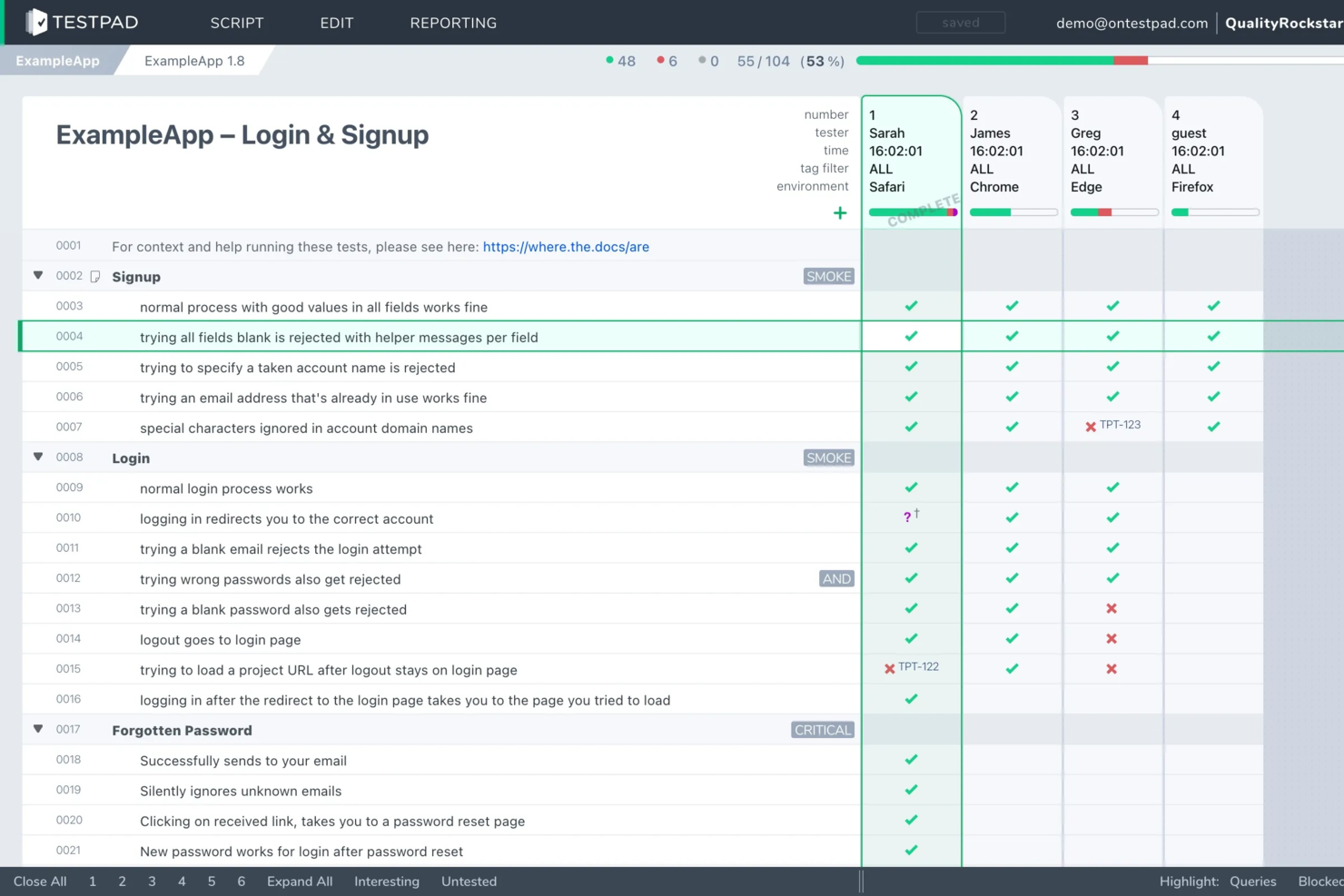
Testpad is a manual test management tool designed for QA teams and software testers who want a flexible, checklist-driven approach to functional testing and collaborative test execution.
Who Is Testpad Best For?
QA leads and software teams at startups or SMBs who want a straightforward way to manage and execute manual functional tests.
Why I Picked Testpad
I picked Testpad as one of the best because its checklist-driven approach to manual test plans fits how my team likes to organize functional testing. I can quickly create and edit test scripts as checklists, making it easy to adapt tests on the fly. My team uses the drag-and-drop interface to reorder steps and group related tests, which helps us keep our test plans clear and actionable.
Testpad Key Features
- Guest tester access: Invite external testers to participate without requiring them to create accounts.
- Live progress reporting: See real-time updates as tests are run and results are logged.
- Bulk test editing: Update multiple test cases at once to save time on large projects.
- CSV import/export: Move test plans and results in and out of Testpad using CSV files for easy data handling.
Testpad Integrations
Integrations include GitHub, NVIDIA, Bell, Digital Genius, Foxhole QA, Legrand, Ideas2Executables, TestLauncher, OpenROV, and Numed Healthcare. An API is also available for custom integrations.
Pros and Cons
Pros:
- CSV import/export for test data handling
- Bulk editing for fast test case updates
- Checklist-driven manual test management
Cons:
- Lacks built-in defect tracking functionality
- Reporting options are basic compared to peers

Testlio is a managed software testing service designed for businesses seeking comprehensive testing solutions. It serves enterprises and startups alike, offering functional, usability, and localization testing.
Why I picked Testlio: It provides managed testing services that cater to your specific needs, ensuring thorough coverage. The platform connects you with a global network of testers, allowing for diverse testing environments. Real-time collaboration tools enable your team to work seamlessly with testers. Detailed reporting and analytics help you make informed decisions about your software's quality.
Standout features & integrations:
Features include on-demand testing services, which allow you to scale testing efforts as needed. Testlio's platform offers detailed test case management for organized tracking. Additionally, you can access comprehensive test reports that provide insights into software performance.
Integrations include Jira, Slack, GitHub, Trello, Asana, Azure DevOps, TestRail, Bugzilla, Jenkins, and Zephyr.
Pros and Cons
Pros:
- Access to global tester network
- Flexible testing options
- Real-time collaboration features
Cons:
- Limited control over tester selection
- Potentially complex for small teams


Reflect is a no-code testing tool that lets you build functional web tests just by describing what you want to happen. You don’t need to mess with selectors or write any scripts—it handles that for you using AI. It stands out for its AI-driven element targeting, which replaces brittle CSS selectors with natural-language instructions that adapt as your UI changes.
Why I picked Reflect: I picked Reflect because it saves time where it usually gets wasted. You can write tests in plain English, and it turns them into repeatable test steps. When your UI changes, Reflect adapts—so you're not constantly fixing broken tests. I also like how it pairs UI and API testing in one flow, which is something most tools don't do as cleanly.
Standout features & integrations:
Features include the ability to write tests using prompts, record actions directly in a browser, and run those tests across different browsers. Reflect also captures videos for every run and sends alerts if something breaks. It supports test data input, retries flaky runs, and works well in CI/CD pipelines.
Integrations include Slack, Jira, Linear, Azure DevOps, Bitbucket, CircleCI, GitHub, Jenkins, and Codefresh.
Pros and Cons
Pros:
- No-code test creation
- AI-powered test maintenance
- Comprehensive CI/CD integration
Cons:
- Limitations to mobile app testing
- Could offer more customization options for test configurations

testRigor is an AI-powered test automation tool that caters to developers and QA teams. It allows users to create tests using plain English, focusing on web, mobile, and desktop applications.
Why I picked testRigor: The tool provides a unique no-code testing experience, allowing you to write tests in plain English. This feature minimizes the technical barrier, making it accessible for teams without extensive coding skills. Automatic test generation based on user behavior further enhances its usability. Its ultra-stable tests reduce maintenance time, setting it apart from other solutions.
Standout features & integrations:
Features include API testing, form-based UI testing, and the ability to handle complex workflows. It also offers ultra-stable tests that do not rely on XPath. These features help your team achieve high test coverage with minimal effort.
Integrations include GitHub, Jenkins, Jira, Slack, TestRail, Azure DevOps, CircleCI, Bitbucket, Bamboo, and TeamCity.
Pros and Cons
Pros:
- No-code test creation
- Plain English instructions
- Automatic test generation
Cons:
- Pricing not publicly available
- Limited support for game testing

Katalon Studio is a test automation platform that supports web, mobile, API, and desktop applications. It’s built for teams who want one solution to design, execute, and manage tests across different platforms without heavy setup.
Why I picked Katalon Studio: I picked Katalon Studio because it lets you test across platforms in one workspace, helping you unify web, mobile, API, and desktop testing. You can build and run tests with low-code options while still keeping scripting available when you need more control. It also gives you detailed reports that make it easier to track results across environments.
Standout features & integrations:
Features include test recording to quickly create scripts without coding from scratch. You can also use smart wait handling that reduces flakiness in test runs. Another feature is data-driven testing, which helps you run multiple scenarios with the same script by pulling in different datasets.
Integrations include Jira, TestRail, qTest, Slack, Git, Jenkins, Azure DevOps, CircleCI, Travis CI, and Bamboo.
Pros and Cons
Pros:
- Smart wait reduces flaky test runs
- Low-code and scripting in one platform
- Covers web, mobile, API, and desktop
Cons:
- Slow execution with big test suites
- High resource use on large projects


New Relic is a performance monitoring and observability platform primarily used by developers and IT operations teams. It helps you track application performance, detect issues, and gain insights into your software's health.
Why I picked New Relic: It offers comprehensive performance monitoring that provides real-time insights into your applications. You can use its distributed tracing feature to follow requests through a complex system. The platform's anomaly detection alerts you to potential problems before they impact users. Its customizable dashboards give your team a clear view of performance metrics.
Standout features & integrations:
Features include real-time user monitoring, which helps you understand user interactions and improve experiences. Customizable alerting allows your team to set specific performance thresholds. New Relic's infrastructure monitoring provides insights into server and cloud resources.
Integrations include AWS, Azure, Google Cloud Platform, Kubernetes, Docker, PagerDuty, Slack, Jira, Microsoft Teams, and GitHub.
Pros and Cons
Pros:
- Real-time performance insights
- Distributed tracing capabilities
- User interaction tracking
Cons:
- Can be complex to set up
- Higher cost for small teams

Sauce Labs is a cloud-based testing platform tailored for developers and QA teams. It offers cross-browser testing, helping you ensure your web applications perform optimally across different browsers and devices.
Why I picked Sauce Labs: It provides extensive cross-browser testing capabilities with a wide range of browser and OS combinations. The platform offers a real device cloud, allowing your team to test on actual devices rather than simulators. Automated testing features let you run tests at scale, speeding up the testing process. Comprehensive analytics give you insights into test performance and application behavior.
Standout features & integrations:
Features include live testing capabilities that allow your team to interact with applications in real time. Sauce Labs also offers continuous testing with CI/CD support, helping integrate testing into your development workflow. The platform's secure testing environment ensures data safety during test execution.
Integrations include Jenkins, Bamboo, Travis CI, CircleCI, Jira, GitHub, GitLab, Bitbucket, Slack, and Microsoft Teams.
Pros and Cons
Pros:
- Extensive browser and OS support
- Real device testing available
- Automated testing at scale
Cons:
- May require technical expertise
- Limited offline access

Kobiton is a mobile testing platform aimed at developers and QA teams. It facilitates the testing of mobile applications on real devices, ensuring your apps perform well across different environments.
Why I picked Kobiton: Its focus on real device testing provides an authentic user experience, which is crucial for mobile apps. The platform's support for both manual and automated testing gives your team flexibility in testing approaches. Kobiton's device lab management lets you access a wide range of devices without the need for physical hardware. Its performance monitoring features help identify and resolve issues quickly.
Standout features & integrations:
Features include instant health checks that provide quick insights into app performance. The platform offers automated scriptless testing, enabling your team to create tests without coding. Kobiton also provides detailed session reports to help analyze test results.
Integrations include Jenkins, Jira, CircleCI, Travis CI, GitHub, GitLab, Bitbucket, Slack, and Microsoft Teams.
Pros and Cons
Pros:
- Real device testing access
- Supports manual and automated testing
- Device lab management available
Cons:
- Requires internet for full functionality
- Initial setup can be time-consuming


SoapUI is a testing tool specifically designed for API testing, used by developers and QA teams. It focuses on functional testing of APIs, offering both automated and manual testing capabilities.
Why I picked SoapUI: It excels in API testing, providing a comprehensive suite of tools for testing REST and SOAP APIs. Your team can create and execute tests with ease using its user-friendly interface. The tool supports data-driven testing, which allows you to test multiple scenarios efficiently. Its test coverage feature helps ensure all aspects of your APIs are thoroughly tested.
Standout features & integrations:
Features include the ability to simulate API responses, which aids in testing without needing a live server. The platform offers test debugging tools to help identify and fix issues quickly. SoapUI also supports asynchronous testing, allowing your team to test APIs that work with asynchronous calls.
Integrations include Jenkins, Maven, JIRA, Git, Bamboo, Azure DevOps, TFS, and TeamCity.
Pros and Cons
Pros:
- Extensive API testing tools
- Supports both REST and SOAP
- Data-driven testing capabilities
Cons:
- Steeper learning curve for beginners
- Complexity in advanced features


Leapwork is a visual test automation platform designed for testers and developers. It enables users to automate testing processes without writing code, making it accessible for teams with varying technical skills.
Why I picked Leapwork: The tool offers a unique visual approach to test automation, allowing your team to create tests through a flowchart-based interface. This method simplifies the testing process, especially for those not familiar with coding. Leapwork's built-in reporting tools provide insights into test results. Its cross-platform capabilities let you test on different environments, enhancing flexibility.
Standout features & integrations:
Features include reusable components that save time by allowing your team to create once and use across multiple tests. The platform supports parallel execution, speeding up the testing process. Leapwork also offers video-based debugging to help identify and resolve issues quickly.
Integrations include Jenkins, Azure DevOps, Jira, GitHub, Slack, ServiceNow, Salesforce, SAP, and Dynamics 365.
Pros and Cons
Pros:
- Visual interface for test automation
- No coding required
- Parallel execution support
Cons:
- Limited offline functionality
- Resource-intensive for large tests

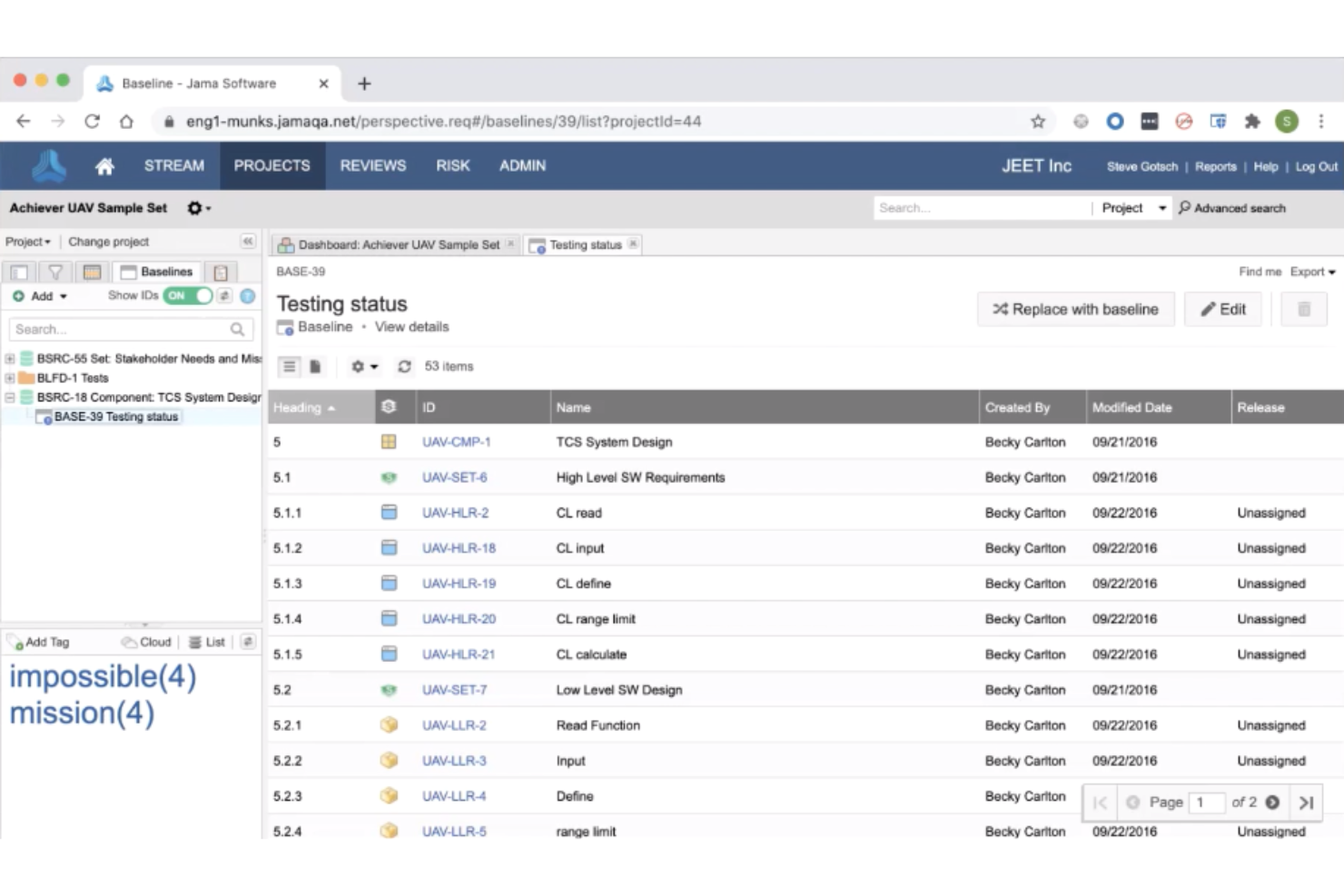
Jama Connect is a SaaS platform that excels in requirements management and collaboration, making it a strong contender for teams seeking functional testing solutions. It is particularly appealing to professionals in software development, engineering, and product management who aim to enhance their testing processes and improve product quality. By integrating requirements management with testing workflows, Jama Connect addresses the need for streamlined processes and better collaboration among teams.
Why I Picked Jama Software
I picked Jama Connect for its unique ability to integrate requirements management with functional testing workflows. The platform's robust traceability features ensure that every requirement is linked to its corresponding test case, providing clear visibility into the testing process. Additionally, its real-time collaboration tools foster communication among team members, which is crucial for resolving issues quickly and maintaining project momentum. These features make Jama Software a practical choice for teams looking to improve their functional testing efficiency and accuracy.
Jama Software Key Features
In addition to traceability and collaboration, Jama Connect offers:
- Test Case Management: This feature allows your team to create, edit, and manage test cases directly within the platform, ensuring that all testing activities are aligned with project requirements.
- Requirements Traceability: With this feature, you can easily track the relationship between requirements and test cases, ensuring comprehensive coverage and facilitating impact analysis.
- Change Management: Jama Connect enables you to manage changes to requirements and test cases, minimizing the risk of errors and ensuring that all team members are aware of updates.
- Integration with Automated Testing Tools: The platform supports integration with popular automated testing tools, allowing you to incorporate automated test results into your workflows seamlessly.
Jama Software Integrations
Integrations include Jira, Windchill, Azure DevOps, Git, Automated Testing, Xray, TestRail, Parasoft, CATIA Magic, and Sparx Systems EA. Jama Connect also offers a robust API for custom integrations.
Pros and Cons
Pros:
- Real-time collaboration improves team communication and efficiency
- Quick implementation supports high adoption rates
- Strong requirements traceability ensures comprehensive test coverage
Cons:
- Some UI limitations or navigation quirks are noted by users
- Reporting and data aggregation could be improved
Weitere Funktionstest-Tools
Hier sind weitere Funktionstest-Tools, die es zwar nicht auf meine Auswahlliste geschafft haben, die aber dennoch einen Blick wert sind:
- BugBug
For supporting diverse testing
- Owlity
For autonomous test generation
- Avo Assure
For no-code automation
- Telerik Test Studio
For automated UI testing
- SmartBear ReadyAPI
For API load testing
- IBM Rational Functional Tester (RFT)
For testing GUI and data-driven apps
- TestComplete
For script and scriptless testing
- Watir
For browser-based testing
- JUnit
For Java unit testing
- Selenium
For open-source testing
- Micro Focus Unified Functional Testing (UFT)
For enterprise-grade testing
- Ranorex Studio
For beginners with codeless automation
- Digivante
For crowdtesting services
- Micro Focus Silk Test
For testing across web and mobile
- Tricentis Tosca Testsuite
For continuous testing across platforms
- Rapise
For testing ERP and CRM apps
- AutoIt
For automating Windows desktop tasks


Auswahlkriterien für Funktionstest-Tools
Bei der Auswahl der besten Funktionstest-Tools für diese Liste habe ich gängige Käuferbedürfnisse und Herausforderungen wie Testabdeckung und einfache Integration berücksichtigt. Außerdem habe ich das folgende Bewertungsraster verwendet, um meine Auswahl strukturiert und fair zu gestalten:
Kernfunktionen (25 % der Gesamtwertung)
Für die Aufnahme in diese Liste musste jede Lösung folgende Anwendungsfälle abdecken:
- Automatisierte Testdurchführung
- Unterstützung mehrerer Testumgebungen
- Detaillierte Testberichte
- Testmanagement erleichtern
- Plattformübergreifende Kompatibilität sicherstellen
Zusätzliche herausragende Funktionen (25 % der Gesamtwertung)
Zur Eingrenzung der Auswahl habe ich auch auf besondere Merkmale geachtet, zum Beispiel:
- KI-gestützte Testgenerierung
- Selbstheilende Testskripte
- Visuelle Testautomatisierung
- Echtzeitanalysen
- Risikobasierte Test-Einblicke
Benutzerfreundlichkeit (10 % der Gesamtwertung)
Um die Benutzerfreundlichkeit jedes Systems einzuschätzen, habe ich folgende Aspekte berücksichtigt:
- Intuitive Benutzeroberfläche
- Einfache Navigation
- Anpassbare Dashboards
- Minimale Einarbeitungszeit
- Übersichtliche Dokumentation
Onboarding (10 % der Gesamtbewertung)
Um die Onboarding-Erfahrung für jede Plattform zu bewerten, habe ich Folgendes berücksichtigt:
- Verfügbarkeit von Schulungsvideos
- Interaktive Produkttouren
- Zugang zu Vorlagen
- Webinare für neue Nutzer
- Reaktionsschnelle Chatbots
Kundensupport (10 % der Gesamtbewertung)
Um den Kundensupport jedes Softwareanbieters einzuschätzen, habe ich Folgendes berücksichtigt:
- Verfügbarkeit von 24/7 Support
- Live-Chat-Funktionalität
- Umfassende Wissensdatenbank
- Dedizierte Kundenbetreuer
- Schnelle Reaktionszeiten
Preis-Leistungs-Verhältnis (10 % der Gesamtbewertung)
Um das Preis-Leistungs-Verhältnis jeder Plattform zu bewerten, habe ich Folgendes berücksichtigt:
- Transparenz bei der Preisgestaltung
- Konkurrenzfähige Preise
- Vielfalt der Preisstufen
- Inklusive Funktionen im Basistarif
- Rabatte bei jährlicher Abrechnung
Kundenbewertungen (10 % der Gesamtbewertung)
Um einen Eindruck der allgemeinen Kundenzufriedenheit zu erhalten, habe ich beim Lesen von Kundenbewertungen Folgendes berücksichtigt:
- Rückmeldungen zur Wirksamkeit der Funktionen
- Zufriedenheit der Nutzer mit dem Support
- Leichtigkeit der Integration
- Leistungszuverlässigkeit
- Allgemeine Wahrnehmung des Werts
So wählen Sie Functional Testing Tools aus
Es ist leicht, sich in langen Funktionslisten und komplexen Preisstrukturen zu verlieren. Damit Sie bei Ihrem individuellen Auswahlprozess den Überblick behalten, finden Sie hier eine Checkliste an Faktoren, die Sie im Auge behalten sollten:
| Faktor | Was zu beachten ist |
| Skalierbarkeit | Stellen Sie sicher, dass das Tool mit Ihrem Team mitwachsen kann. Achten Sie auf Funktionen, die ein wachsendes Testvolumen und eine steigende Nutzerzahl ohne Leistungseinbußen unterstützen. |
| Integrationen | Prüfen Sie, ob es sich nahtlos in bestehende Software wie JIRA, Jenkins, Git oder andere Website-Testtools integrieren lässt. Dies sorgt für einen effizienten Workflow und reduziert manuelle Dateneingabe. |
| Anpassbarkeit | Vergewissern Sie sich, dass das Tool Anpassungen an Ihre individuellen Testprozesse ermöglicht. Eigene Skripte oder Dashboards können einen echten Unterschied machen. |
| Benutzerfreundlichkeit | Achten Sie auf eine benutzerfreundliche Oberfläche, die keine umfangreichen Schulungen benötigt. So wird Ihr Team schnell eingearbeitet und die Onboarding-Zeit verkürzt. |
| Budget | Bewerten Sie, ob die Preisstruktur zu Ihrem Budget passt. Überlegen Sie, welche Funktionen in den verschiedenen Preisstufen enthalten sind und ob diese Ihre Anforderungen erfüllen. |
| Sicherheitsvorkehrungen | Stellen Sie sicher, dass das Tool über robuste Sicherheitsfunktionen zum Schutz sensibler Daten verfügt. Achten Sie auf Verschlüsselung und die Einhaltung von Datenschutzvorschriften. |
| Support | Prüfen Sie, ob ein 24/7-Kundensupport verfügbar ist. Eine schnelle Problemlösung spart Zeit und reduziert Frustration im Team. |
| Testabdeckung | Bewerten Sie, ob die Software Lösungen für eine breite Palette an Testanforderungen bietet, darunter Tools für Barrierefreiheitstests im Web, mobile Kompatibilität und API-Testing, um eine umfassende Testabdeckung sicherzustellen. |
Trends bei Functional Testing Tools
Für meine Recherche habe ich zahlreiche Produktneuheiten, Pressemitteilungen und Release-Notes unterschiedlicher Anbieter von Functional Testing Tools ausgewertet. Hier sind einige der aufkommenden Trends, die ich besonders im Blick behalte:
- KI-gesteuertes Testen: KI wird eingesetzt, um intelligentere Testprozesse zu schaffen. Sie hilft bei der prädiktiven Analyse und selbstheilenden Testscripten, was den Wartungsaufwand reduziert. Anbieter wie Tricentis integrieren KI, um die Testgenauigkeit und Effizienz zu steigern.
- Shift-left-Testing: Testen findet immer früher im Entwicklungsprozess statt, um Fehler frühzeitig zu erkennen. Dieser Trend ermöglicht es Teams, Probleme anzugehen, bevor sie eskalieren, was Zeit und Ressourcen spart. Tools unterstützen nun die Integration in Entwicklungsumgebungen, um diesen Wandel zu erleichtern.
- Testumgebungsmanagement: Die Verwaltung von Testumgebungen gewinnt an Bedeutung, um Konsistenz und Zuverlässigkeit zu gewährleisten. Dieser Trend konzentriert sich darauf, stabile und reproduzierbare Umgebungen fürs Testen bereitzustellen. Einige Tools enthalten inzwischen Funktionen zur effizienten Verwaltung und Bereitstellung von Umgebungen, wie zum Beispiel Webanwendungstest-Tools.
- Codeless Testing: Immer mehr Tools bieten die Möglichkeit, Tests ohne Programmierung zu erstellen, um das Testen auch Nicht-Entwicklern zugänglich zu machen. Dieser Trend ermöglicht es Teams mit unterschiedlichen Fähigkeiten, sich an Testaufgaben zu beteiligen. Lösungen wie Leapwork sind in diesem Bereich führend mit visueller Testautomatisierung.
- Kontinuierliches Testen: Mit dem Aufstieg von DevOps wird kontinuierliches Testen immer wichtiger. Es sorgt dafür, dass das Testen Teil der CI/CD-Pipeline ist und ermöglicht so schnellere Releases. Anbieter erweitern ihre Tools, um CI/CD-Workflows besser zu unterstützen.
Was sind funktionale Testtools?
Funktionale Testtools sind Softwareanwendungen, die dazu verwendet werden, die Funktionalität von Softwareprodukten zu prüfen und sicherzustellen, dass sie wie beabsichtigt funktionieren. Entwickler, QS-Teams und Tester nutzen diese Tools in der Regel, um Fehler zu erkennen und zu überprüfen, ob Anwendungen die festgelegten Anforderungen erfüllen. Automatisierte Testausführung, Testmanagement und Tools für visuelles Regressions-Testen unterstützen effiziente Testprozesse und helfen Teams, zuverlässige Software zu liefern. Insgesamt steigern diese Tools die Softwarequalität und verringern den manuellen Testaufwand.
Funktionen von funktionalen Testtools
Bei der Auswahl funktionaler Testtools sollten Sie auf folgende Schlüsselfunktionen achten:
- Automatisiertes Testen: Automatisiert die Testausführung, um Zeit zu sparen und menschliche Fehler zu reduzieren.
- Plattformübergreifende Kompatibilität: Stellt sicher, dass Tests auf verschiedenen Geräten und Betriebssystemen ausgeführt werden können.
- Testmanagement-Tools: Organisiert und verfolgt Testaktivitäten, damit Ihr Team stets abgestimmt arbeitet.
- Datenbasiertes Testen: Verwendet verschiedene Testdaten-Eingaben für unterschiedliche Szenarien und verbessert so die Testabdeckung.
- Parallele Ausführung: Führt mehrere Tests gleichzeitig aus und beschleunigt so den Testprozess.
- KI-gesteuerte Einblicke: Liefert prädiktive Analysen und selbstheilende Scripte zur Verbesserung der Testgenauigkeit.
- Codeless-Test-Erstellung: Ermöglicht es auch Nicht-Entwicklern, Tests zu erstellen und fördert so die Beteiligung im Team.
- Echtzeit-Analysen: Bietet sofortiges Feedback zu Testergebnissen, damit Probleme schnell erkannt werden.
- Integrationsmöglichkeiten: Verbindet sich mit anderen Tools wie CI/CD-Pipelines, um kontinuierliches Testen zu unterstützen.
- Sicherheitsmaßnahmen: Schützt sensible Daten während des Testens durch Verschlüsselung und Compliance-Features.
Vorteile funktionaler Testtools
Der Einsatz funktionaler Testtools bietet Ihrem Team und Unternehmen zahlreiche Vorteile. Moderne KI-basierte Testautomatisierungstools gehen noch einen Schritt weiter und bieten intelligente Testgenerierung und selbstheilende Fähigkeiten. Hier sind einige Vorteile, auf die Sie sich freuen können:
- Zeitersparnis: Parallele Testausführung und automatisiertes Testen verringern den Zeitaufwand für manuelles Testen.
- Kosteneffizienz: Frühzeitige Fehlererkennung verhindert teure Nachbesserungen.
- Bessere Zusammenarbeit: Durch die codelose Erstellung können Teammitglieder mit unterschiedlichem Hintergrund zum Testen beitragen.
- Verbesserte Softwarequalität: Automatisierte Testtools erkennen Fehler frühzeitig und stellen sicher, dass Ihre Anwendungen wie vorgesehen funktionieren.
- Größere Testabdeckung: Plattformübergreifende Kompatibilität und datenbasiertes Testen ermöglichen umfassendere Szenarien für gründliche Tests.
- Schnellere Releases: Die Integration mit CI/CD-Pipelines unterstützt kontinuierliches Testen und beschleunigt den Release-Zyklus.
- Bessere Entscheidungsfindung: Echtzeit-Analysen liefern Einblicke, die es Ihrem Team ermöglichen, Probleme zeitnah anzugehen.
Kosten und Preise von funktionalen Testtools
Die Auswahl von Funktionstest-Tools erfordert ein Verständnis der verschiedenen Preismodelle und verfügbaren Tarife. Die Kosten variieren je nach Funktionsumfang, Teamgröße, Add-ons und weiteren Faktoren. Die folgende Tabelle fasst gängige Tarifarten, deren Durchschnittspreise und typische Features, die in Lösungen für Funktionstest-Tools enthalten sind, zusammen:
Vergleichstabelle für Funktionstest-Tool-Tarife
| Tarifart | Durchschnittspreis | Häufige Features |
| Gratis-Tarif | $0 | Grundlegende Testdurchführung, limitierte Testfälle und Community-Support. |
| Persönlicher Tarif | $10-$30 /Nutzer /Monat | Automatisierte Tests, plattformübergreifende Unterstützung und grundlegende Analysen. |
| Geschäftstarif | $40-$75 /Nutzer /Monat | Erweiterte SaaS-Test-Tools, Integrationen mit CI/CD-Tools und verbesserte Analysen. |
| Enterprise-Tarif | $100+/Nutzer/Monat | Anpassbare Dashboards, dedizierter Support und erweiterte Sicherheitsfunktionen. |
Funktionstest-Tools: FAQ
Hier sind einige Antworten auf häufig gestellte Fragen zu Funktionstest-Tools:
Kann man Funktionstests automatisieren?
Ja, Funktionstests können automatisiert werden, indem Tools und Skripte eingesetzt werden, um die Funktionalität einer Anwendung zu überprüfen. Dieser Ansatz simuliert die Interaktionen von Nutzern mit der Software und vergleicht die tatsächlichen Ergebnisse mit den erwarteten Resultaten. Automatisierung hilft, manuellen Aufwand zu reduzieren und die Genauigkeit der Tests zu erhöhen.
Ist Funktionstest dasselbe wie UAT?
Nein, Funktionstests und UAT (User Acceptance Testing) sind nicht identisch. Funktionstests konzentrieren sich auf die Überprüfung einzelner Funktionen und Komponenten, während UAT die Benutzerfreundlichkeit und die Eignung der Software für Endanwender bewertet. UAT dient als abschließende Kontrolle, um sicherzustellen, dass die Software die Nutzeranforderungen vor dem Release erfüllt.
Welche Tools werden für Funktionstests verwendet?
Beliebte Tools für Funktionstests sind Selenium, Playwright und Applitools. Diese Werkzeuge helfen, Testprozesse zu automatisieren, die Genauigkeit zu steigern und Einblicke in die Softwarefunktionalität zu bieten. Entwickler und QA-Teams setzen sie breit ein, um die Softwarequalität zu gewährleisten.
Was sind die zwei häufigsten Methoden zur Durchführung von Funktionstests?
Die zwei gängigsten Methoden für Funktionstests sind Unit-Testing und Smoke-Testing. Unit-Testing-Tools prüfen die einzelnen Komponenten auf ihre Funktion, während Smoke-Tests die grundlegende Stabilität nach jedem Softwarebuild sicherstellen. Beide Methoden tragen zur Durchgängigkeit der Softwarequalität während der Entwicklung bei.
Worin unterscheidet sich Funktionstest von Nicht-Funktionstest?
Funktionstests legen den Fokus darauf, bestimmte Funktionen und Abläufe der Software zu überprüfen und sicherzustellen, dass diese wie erwartet arbeiten. Nicht-Funktionstests hingegen bewerten Aspekte wie Performance, Sicherheit und Benutzerfreundlichkeit. Beide Typen sind entscheidend für ein umfassend getestetes Softwareprodukt.
Welche Herausforderungen können bei Funktionstest-Tools auftreten?
Zu den Herausforderungen bei Funktionstest-Tools zählen Integrationsprobleme, die Wartung von Testskripten und der Umgang mit komplexen Testszenarien. Es ist wichtig, Tools zu wählen, die zu den Arbeitsabläufen des Teams passen und unterstützende Funktionen für diese Aufgaben bieten. Regelmäßige Updates und Community-Support können hierbei ebenfalls hilfreich sein.
Wie geht es weiter?
Wenn Sie gerade Funktionstest-Tools recherchieren, nehmen Sie Kontakt zu einem SoftwareSelect-Berater auf und erhalten Sie kostenfreie Empfehlungen.
Sie füllen ein Formular aus und führen ein kurzes Gespräch, bei dem Ihre Anforderungen konkretisiert werden. Anschließend erhalten Sie eine Shortlist mit passenden Softwarelösungen zur Überprüfung. Sie werden sogar durch den gesamten Kaufprozess begleitet, inklusive Preisverhandlungen.