
Die 25 besten Systeme zur Erkennung und Verhinderung von Eindringversuchen 2026

10 Beste Intrusions-Erkennungs- und -Verhinderungssysteme – Auswahlliste
Here's my pick of the 10 best software from the 25 tools reviewed.


In der schnelllebigen IT-Welt steht die Sicherheit Ihres Netzwerks an oberster Stelle. Intrusions-Erkennungs- und -Verhinderungssysteme (IDPS) sind Ihre wichtigste Verteidigungslinie gegen unbefugte Zugriffe und Cyberbedrohungen. Sie helfen dabei, Schwachstellen zu erkennen und schnell zu reagieren.
Ich habe verschiedene IDPS-Lösungen getestet und bewertet, um Ihnen die beste Auswahl für Ihr Team zu präsentieren. Meine Erfahrung in der SaaS-Entwicklung sorgt dafür, dass Sie von objektiven und gründlich recherchierten Einblicken profitieren.
In diesem Artikel finden Sie die besten Lösungen für Intrusions-Erkennung und -Verhinderung, die jeweils spezielle Funktionen für Ihre individuellen Anforderungen bieten. Erfahren Sie, wie diese Tools Ihre Netzwerksicherheit verbessern und für Beruhigung sorgen können.
Table of Contents
- Beste Software-Kurzliste
- Warum wir vertrauenswürdig sind
- Spezifikationen vergleichen
- Bewertungen
- Weitere Systeme zur Erkennung und Verhinderung von Eindringversuchen
- Verwandte Bewertungen
- Auswahlkriterien
- Wie wählt man aus
- Was ist ein System zur Erkennung und Verhinderung von Eindringversuchen?
- Funktionen
- Vorteile
- Kosten & Preise
- Häufige Fragen
Why Trust Our Software Reviews
Zusammenfassung der besten Intrusions-Erkennungs- und -Verhinderungssysteme
| Tool | Best For | Trial Info | Price | ||
|---|---|---|---|---|---|
| 1 | Best for real-time monitoring and auditing | Free demo available | Pricing upon request | Website | |
| 2 | Best for advanced threat detection | Free trial + free demo available | Pricing upon request | Website | |
| 3 | Best for advanced threat protection | Not available | Pricing upon request | Website | |
| 4 | Best for integrating with existing Cisco infrastructures | Not available | From $38/user/month (billed annually) | Website | |
| 5 | Best for granular control over security policies | Not available | From $10/user/month | Website | |
| 6 | Best for integrating threat intelligence feeds | Not available | From $14/user/month | Website | |
| 7 | Best for providing a proactive security posture | Not available | Pricing upon request | Website | |
| 8 | Best for customizable intrusion detection rules | Free demo available | From $29.99/year (billed annually) | Website | |
| 9 | Best for continuous security monitoring | Not available | From $2500/user/month | Website | |
| 10 | Best for open-source network threat detection | Free | Pricing upon request | Website |
-

Site24x7
Visit WebsiteThis is an aggregated rating for this tool including ratings from Crozdesk users and ratings from other sites.4.6 -
Docker
Visit WebsiteThis is an aggregated rating for this tool including ratings from Crozdesk users and ratings from other sites.4.6 -
Pulumi
Visit WebsiteThis is an aggregated rating for this tool including ratings from Crozdesk users and ratings from other sites.4.8





Bewertungen der besten Intrusions-Erkennungs- und -Verhinderungssysteme


ManageEngine Log360 is a comprehensive security information and event management (SIEM) solution designed to provide extensive visibility and control over an organization's IT infrastructure. It integrates log management and auditing capabilities across various platforms, including Windows servers, AWS, and Azure cloud services.
Why I Picked ManageEngine Log360:
I like its real-time monitoring and auditing capabilities for Active Directory, file systems, and Windows servers. This ensures that any unauthorized access or suspicious activity is detected and addressed promptly. The platform also integrates Data Loss Prevention (DLP) and Cloud Access Security Broker (CASB) functionalities, which are crucial for monitoring data access and managing cloud security.
Another significant advantage of Log360 is its use of advanced technologies such as machine learning and user and entity behavior analytics (UEBA). These technologies enable behavior-based detection, which is essential for identifying insider threats.
Standout Features and Integrations:
The platform's integration with the MITRE ATT&CK Framework helps prioritize threats based on their position in the attack chain, enhancing threat response strategies. Additionally, the Vigil IQ engine offers advanced threat detection, investigation, and response capabilities, providing real-time visibility into security threats through correlation, adaptive alerts, and intuitive analytics.
Integrations include Microsoft Exchange, Amazon Web Services (AWS), Microsoft Entra ID, Microsoft Azure, and Active Directory.
Pros and Cons
Pros:
- User-friendly interface
- Customizable reporting options
- Comprehensive visibility across systems
Cons:
- Potential performance issues when handling large volumes of data
- Initial setup and configuration can be complex

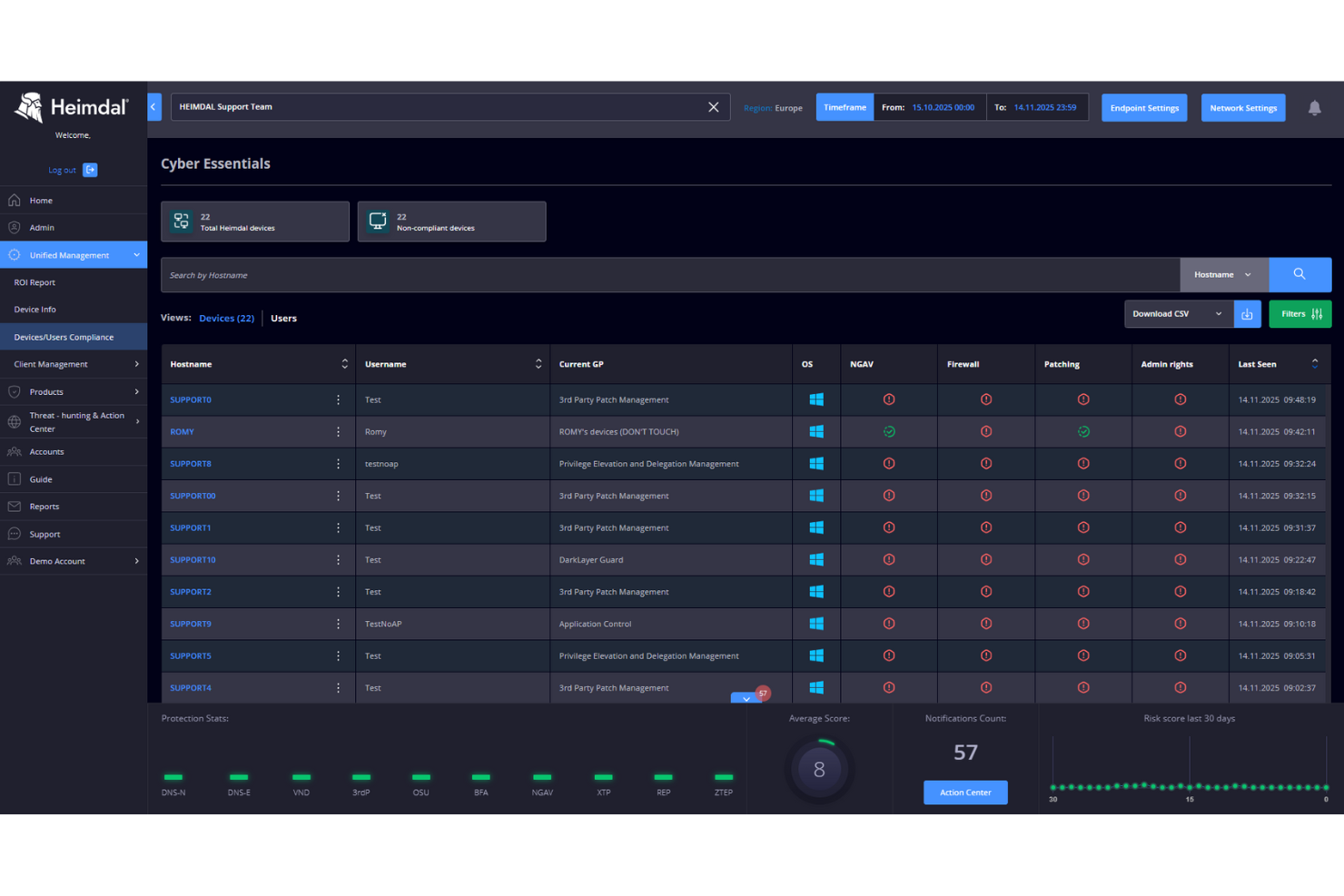
Heimdal is a cybersecurity platform designed for businesses seeking to bolster their security posture against cyber threats. It appeals to industries like healthcare, education, and SMBs, offering solutions that address compliance and data governance challenges. By integrating intrusion detection and prevention systems, Heimdal helps streamline threat detection, vulnerability management, and overall cybersecurity measures for organizations facing complex security requirements.
Why I Picked Heimdal
I picked Heimdal for its focus on advanced threat detection and response capabilities. The platform’s Endpoint Detection and Response (EDR) and Extended Detection and Response (XDR) features provide comprehensive monitoring and protection against cyber threats. Heimdal’s ability to integrate managed services and automate security processes addresses the common challenge of alert fatigue, making it a reliable choice for businesses looking to enhance their cybersecurity framework.
Heimdal Key Features
In addition to its robust detection and response capabilities, Heimdal offers a suite of additional features:
- DNS Security: Protects against DNS hijacking and ensures safe web browsing by blocking malicious sites.
- Automated Patch Management: Streamlines the patching process for software vulnerabilities, reducing the risk of exploitation.
- Ransomware Protection: Provides multi-layered defense against ransomware attacks, safeguarding critical data and systems.
- Privileged Account and Session Management: Ensures secure access control and monitoring of privileged accounts to prevent unauthorized access.
Heimdal Integrations
Native integrations are not currently listed by Heimdal; however, the platform supports API-based custom integrations.
Pros and Cons
Pros:
- Detailed asset and license visibility
- Strong vulnerability and threat detection
- Automates patching across endpoints
Cons:
- Interface requires onboarding time
- No native integrations available


Trend Micro TippingPoint is a network security solution providing robust protection against advanced threats. It brings real-time network protection and operational simplicity to your diversified network environment, making it particularly adept at advanced threat protection.
Why I Picked Trend Micro TippingPoint:
TippingPoint earned a spot on this list because of its specialized capabilities for protecting networks against advanced threats. The combination of threat intelligence and network-level protection sets it apart from other cybersecurity tools.
When considering the tool's best use case, advanced threat protection is a standout due to its comprehensive approach to managing both known and unknown vulnerabilities.
Standout Features and Integrations:
TippingPoint offers several notable features including high-performance inspection, ThreatLinQ Security Intelligence, and customizable dashboards for network visibility. Furthermore, its Advanced Threat Protection Framework ensures a proactive security stance.
As for integrations, TippingPoint fits seamlessly into Trend Micro's security ecosystem. It integrates with other Trend Micro solutions, providing a unified approach to security. Additionally, it supports integrations with third-party vendors like SIEM systems for centralized security management.
Pros and Cons
Pros:
- Seamless integration with other Trend Micro solutions
- High-performance network inspection
- Comprehensive advanced threat protection framework
Cons:
- Might be overkill for smaller organizations with less complex network infrastructures
- May require technical expertise to manage effectively
- Pricing information is not readily available


Cisco Secure Firewall provides robust threat defense and high visibility, effectively safeguarding network infrastructures from potential security breaches. Given its deep integration capabilities with existing Cisco infrastructures, it serves as an invaluable addition to the cybersecurity toolkit for companies already leveraging Cisco's broad range of products.
Why I Picked Cisco Secure Firewall:
In the process of selecting the right tools, the integration capabilities of Cisco Secure Firewall with existing Cisco infrastructures stood out. It provides a compelling advantage for businesses that rely heavily on Cisco's ecosystem.
Thus, I determined it to be the "best for integrating with existing Cisco infrastructures" based on its compatibility and the operational ease it brings to an already familiar environment.
Standout Features and Integrations:
Cisco Secure Firewall incorporates features such as next-generation intrusion preventions system (NGIPS), advanced malware protection, and URL filtering to protect the network. The most notable feature is its threat intelligence supported by Cisco Talos, one of the largest commercial threat intelligence teams in the world.
Cisco Secure Firewall integrates seamlessly with other Cisco security products, including SecureX platform, Cisco Secure Endpoint, SolarWinds security event manager, and Cisco Secure Email gateways, providing a comprehensive security solution.
Pros and Cons
Pros:
- Comprehensive security features such as intrusion prevention and malware protection
- Access to robust threat intelligence from Cisco Talos
- Excellent integration with existing Cisco infrastructures
Cons:
- Limited integration with non-Cisco products
- Complexity may require IT expertise to manage effectively
- Pricing can be high, especially for small businesses

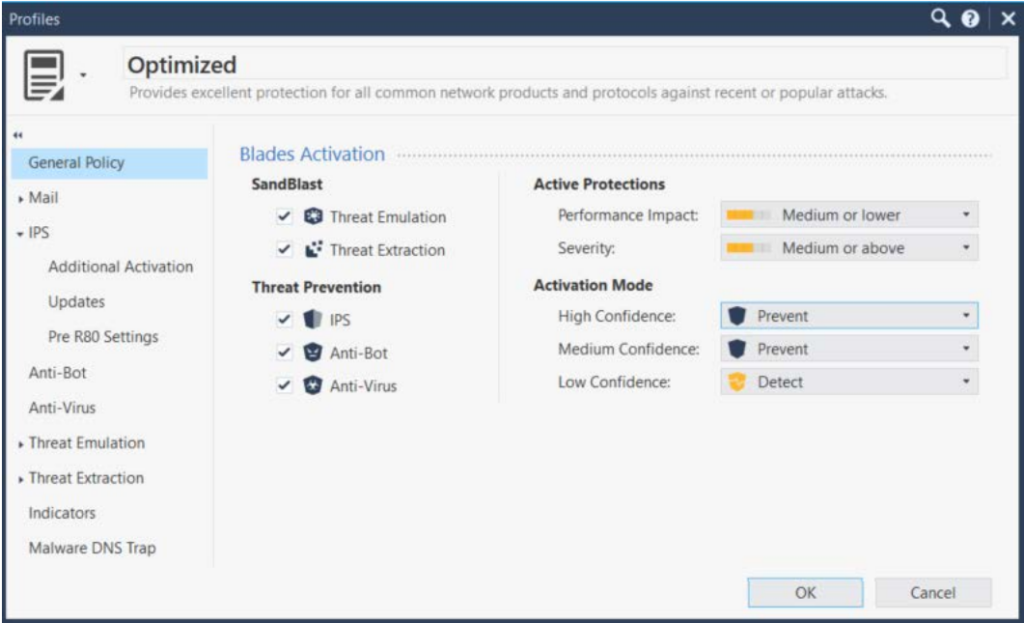
Check Point IPS acts as a vigilant sentinel, providing robust security solutions to protect your digital landscape. The tool's ability to offer granular control over security policies is a critical strength that sets it apart from the competition.
Why I Picked Check Point IPS:
In my quest for top-tier intrusion detection and prevention systems, Check Point IPS caught my eye for its impressive policy control features. It shines for its ability to offer precise, granular control over security policies, effectively mitigating potential vulnerabilities.
This granular control allows businesses to finely tune their security posture, making it the best choice for organizations requiring a customizable security policy.
Standout Features and Integrations:
Check Point IPS comes loaded with several potent features, including comprehensive threat intelligence, built-in antivirus, anti-bot, and sandboxing. It’s also an intuitive management console and an automated policy tuner. The threat intelligence feature provides in-depth information on possible threats, while the automated policy tuner streamlines policy management, ensuring efficient operation.
Check Point IPS also integrates smoothly with several prominent platforms. Notably, it connects with existing Check Point security solutions, allowing for unified threat management and streamlined operations.
Pros and Cons
Pros:
- Efficient integrations with other Check Point security solutions
- Granular control over security policies
- Detailed threat intelligence
Cons:
- Could be complex for smaller organizations or those new to cybersecurity
- Requires a minimum of 5 seats
- High starting price point

Best for integrating threat intelligence feeds

Palo Alto Networks Next-Generation Firewall (NGFW) sets the benchmark in securing your digital domain name system (DNS), boasting powerful intrusion detection and prevention capabilities. Its standout feature is its ability to seamlessly integrate threat intelligence feeds, a unique capability that makes it a strong contender in the cybersecurity realm.
Why I Picked Palo Alto Networks NGFW:
When I first evaluated Palo Alto Networks NGFW, I was drawn to its unrivaled ability to integrate threat intelligence feeds. This feature, in my opinion, sets it apart from the crowd, offering a distinct advantage for organizations that heavily rely on threat intelligence for proactive defense.
Given the escalating cybersecurity threat landscape, the capacity to integrate threat intelligence feeds is invaluable, which is why Palo Alto Networks NGFW stands as the best option for this purpose.
Standout Features and Integrations:
Palo Alto Networks NGFW boasts a suite of impressive features, including application identification, user-based policy enforcement, and multi-factor authentication. Its application identification feature offers an in-depth view of network traffic, while the multi-factor authentication feature adds an extra layer of security.
In terms of integrations, Palo Alto Networks NGFW smoothly integrates with a wide variety of platforms, including popular cloud service providers. These integrations help organizations extend their security posture beyond the traditional network boundary and into the cloud.
Pros and Cons
Pros:
- Provides excellent cloud integrations
- Comes with a suite of impressive features
- Integrates well with threat intelligence feeds
Cons:
- Interface may be complex for newcomers to cybersecurity
- Requires a minimum of 10 seats
- High starting price point

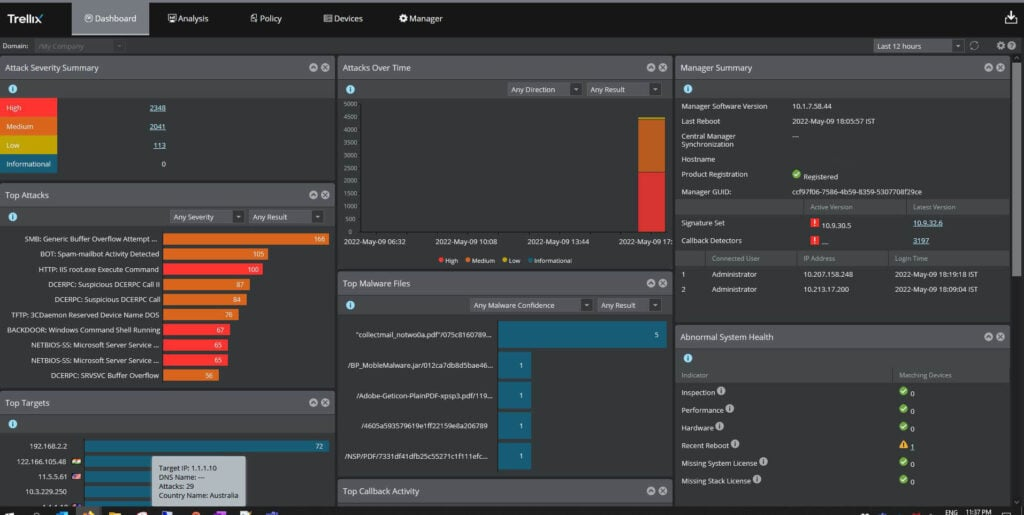
Trellix Intrusion Prevention System (IPS) is a cybersecurity tool that aims to protect enterprise networks from various threats. By detecting and preventing intrusions, it helps organizations maintain a proactive security posture.
Why I Picked Trellix Intrusion Prevention System:
I selected Trellix IPS for this list because of its strong emphasis on proactive protection. Its unique approach to threat detection and prevention helps set it apart from many other cybersecurity tools.
With its ability to maintain a proactive security posture, it's best suited for organizations looking to take a preemptive approach to cybersecurity, thwarting potential threats before they cause harm.
Standout Features and Integrations:
Trellix IPS is built with several key features that help establish a proactive security stance. Its in-depth traffic analysis, advanced threat detection algorithms, and real-time response capabilities enable comprehensive protection.
For integrations, the Trellix IPS solution works well with the broader Trellix platform, ensuring organizations can leverage a unified, layered security strategy. It can also integrate with third-party tools such as McAfee ePO for an expanded, tailored security environment.
Pros and Cons
Pros:
- Easy integration with Trellix platform and third-party tools
- Real-time response capabilities
- Proactive security approach
Cons:
- Reliance on other Trellix products for full functionality
- The learning curve may be steep for those unfamiliar with intrusion prevention systems
- Lack of transparent pricing information

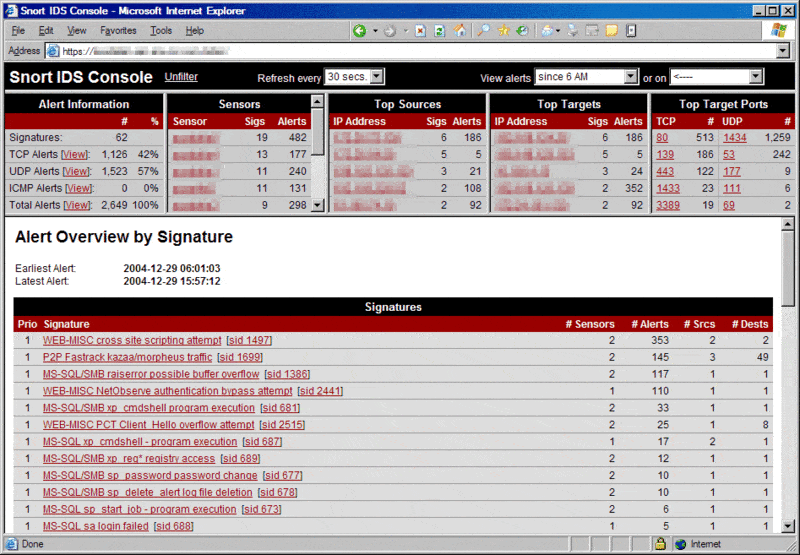
Snort is an open-source network intrusion detection system (IDS) designed to identify and prevent network intrusions. It allows users to create and customize rules for detecting suspicious activities, making it excellent for organizations that require adaptable and tailored intrusion detection solutions.
Why I Picked Snort:
I chose Snort because of its high degree of customization. The ability to set specific detection rules differentiates Snort from many intrusion detection tools, allowing organizations to refine their network security based on their unique requirements.
Therefore, it stands out as the best tool for customizable intrusion detection rules.
Standout Features and Integrations:
Snort's key feature is its rule-based detection system, which allows users to define unique rules for detecting suspicious network activity. In addition, its real-time traffic analysis and packet logging functionality contribute to a comprehensive intrusion detection solution.
Integration-wise, Snort has been built to function smoothly with other security and networking tools. It is often used in combination with other network monitoring tools to provide an integrated security solution.
Pros and Cons
Pros:
- Can integrate with other network monitoring tools
- Real-time traffic analysis
- Highly customizable intrusion detection rules
Cons:
- Might be overwhelming for small networks due to extensive features
- Free version lacks commercial support
- Might require advanced technical knowledge to fully utilize

Best for continuous security monitoring

Alert Logic MDR offers an integrated solution that pairs advanced technology with human expertise to deliver continuous security monitoring. It provides real-time threat detection and incident response services, offering businesses peace of mind in their cybersecurity operations.
Why I Picked Alert Logic MDR:
Alert Logic MDR grabbed my attention due to its unique blend of technology and human expertise. I believe the value of human involvement in identifying complex threats complements the speed and precision of automated systems, which makes Alert Logic MDR stand out.
Considering its strength in providing continuous, round-the-clock security monitoring, I determined it to be the "best for continuous security monitoring".
Standout Features and Integrations:
Alert Logic MDR includes features such as asset discovery, vulnerability assessment, intrusion detection, log management, and incident management. The most impressive part is its threat intelligence backed by a global team of security experts who actively monitor and respond to threats.
Integrations play a key role in Alert Logic MDR's functionality. It works well with popular cloud platforms like AWS, Azure, and Google Cloud, ensuring smooth operations and high security in these environments.
Pros and Cons
Pros:
- Integrates well with popular cloud platforms
- Provides a blend of technology and human expertise
- Offers continuous, round-the-clock security monitoring
Cons:
- Requires a minimum commitment period for contracts
- Does not offer a free trial or free plan
- High starting price may be a barrier for small businesses


Suricata takes a robust stand in the realm of intrusion detection and prevention systems with its open-source capabilities. It's specially crafted to provide state-of-the-art network threat detection, ensuring security teams get the insights they need.
Why I Picked Suricata:
Among the reasons why Suricata made it to my list, the first that stands out is its open-source nature. This means that it provides a platform for continuous updates and improvements driven by an active community of security experts.
I identified Suricata as "best for open-source network-based threat detection" because it combines affordability with an ever-evolving set of features to stay ahead of security threats.
Standout Features and Integrations:
Suricata comes with key features such as real-time intrusion detection, network security monitoring, and offline PCAP processing. Its inline intrusion prevention ability can halt malicious activity at the network level before it impacts the systems.
Suricata boasts a high degree of compatibility with a range of log management and SIEM systems like ELK Stack, OSSEC HIDS, and Splunk, allowing for easier assimilation of data for security teams.
Pros and Cons
Pros:
- Compatible with multiple SIEM systems
- Real-time intrusion detection capability
- Open-source with an active community for continuous updates
Cons:
- Being open-source, it requires community input for new features, which may take time
- Might require some technical know-how to set up and configure
- Professional support comes at an additional cost
Weitere Intrusions-Erkennungs- und -Verhinderungssysteme
Nachfolgend finden Sie eine Liste zusätzlicher Intrusions-Erkennungs- und -Verhinderungssysteme, die ich in die engere Wahl genommen habe, die es jedoch nicht in die Top 10 geschafft haben. Sie sind auf jeden Fall einen Blick wert.
- Zeek
For extensive network visibility and diagnostics
- Apiiro
For providing a risk-based approach to security
- Nanitor
For network vulnerability scanning
- Quantum Armor
For predictive breach detection capabilities
- Security Onion
Good for open-source intrusion detection, network security monitoring, and log management
- Corelight
Good for providing network visibility with the help of the Zeek framework
- GFI Languard
Good for network security, patch management, and vulnerability scanning
- Sophos Firewall
Good for integrating network protection with endpoint security
- IBM Security QRadar Suite
Good for detecting unusual network behavior through advanced analytics
- Dell Security
Good for enterprise-level protection against cybersecurity threats
- Juniper Networks® SRX Series Firewalls
Good for scalable, high-performance network security
- Cisco Sourcefire
Good for achieving high-security effectiveness with advanced threat intelligence
- SonicWall Network Security Appliance (NSA)
Good for mid-range network security and intrusion prevention
- WatchGuard Firebox
Good for small to midsize businesses seeking comprehensive network security
- Fidelis Network
Good for deep visibility into network activities for threat hunting


Ähnliche Bewertungen
Kriterien für die Auswahl von Intrusions-Erkennungs- und -Verhinderungssystemen
Bei der Auswahl der besten Intrusions-Erkennungs- und -Verhinderungssysteme für diese Liste habe ich die häufigsten Käuferbedürfnisse und Herausforderungen wie die Erkennung von Bedrohungen in Echtzeit und eine einfache Integration in bestehende Infrastrukturen berücksichtigt. Außerdem habe ich folgendes Bewertungsraster verwendet, um meine Auswahl strukturiert und fair zu halten:
Kernfunktionalität (25 % der Gesamtwertung)
Damit eine Lösung in diese Liste aufgenommen wurde, musste sie die folgenden Anwendungsfälle abdecken:
- Unbefugten Zugriff erkennen
- Netzwerkverkehr überwachen
- Bei verdächtigen Aktivitäten alarmieren
- Sicherheitsereignisse protokollieren
- Bekannte Bedrohungen verhindern
Besondere Zusatzfunktionen (25 % der Gesamtwertung)
Um die Auswahl weiter zu fokussieren, habe ich auch nach einzigartigen Funktionen gesucht, wie zum Beispiel:
- Integration mit anderen Sicherheitstools
- Funktionen für maschinelles Lernen
- Cloud-basierte Bereitstellungsoptionen
- Anpassbare Alarmeinstellungen
- Compliance-Reporting-Tools
Benutzerfreundlichkeit (10 % der Gesamtwertung)
Um ein Gefühl für die Benutzerfreundlichkeit jeder Lösung zu bekommen, habe ich auf Folgendes geachtet:
- Intuitive Benutzeroberfläche
- Einfache Navigation
- Anpassbare Dashboards
- Minimale Einarbeitungszeit
- Responsives Design
Onboarding (10 % der Gesamtwertung)
Um das Onboarding-Erlebnis jeder Plattform zu beurteilen, habe ich auf Folgendes geachtet:
- Verfügbarkeit von Schulungsvideos
- Interaktive Produkttouren
- Zugang zu Vorlagen
- Webinare für neue Nutzer
- Chatbot-Unterstützung
Kundensupport (10% der Gesamtpunktzahl)
Um die Kundensupport-Dienste jedes Softwareanbieters zu bewerten, habe ich Folgendes berücksichtigt:
- 24/7-Support-Verfügbarkeit
- Mehrere Support-Kanäle
- Ressourcen in der Wissensdatenbank
- Reaktionszeit auf Anfragen
- Verfügbarkeit von dedizierten Account-Managern
Preis-Leistungs-Verhältnis (10% der Gesamtpunktzahl)
Um das Preis-Leistungs-Verhältnis jeder Plattform zu evaluieren, habe ich Folgendes berücksichtigt:
- Wettbewerbsfähige Preisgestaltung
- Flexible Lizenzierung
- Funktionsumfang im Verhältnis zum Preis
- Verfügbarkeit von kostenlosen Testphasen
- Rabatte für langfristige Verträge
Kundenbewertungen (10% der Gesamtpunktzahl)
Um ein Bild der allgemeinen Kundenzufriedenheit zu erhalten, habe ich bei der Auswertung von Kundenbewertungen Folgendes beachtet:
- Feedback zur Einrichtungsfreundlichkeit
- Zufriedenheit mit der Leistungsfähigkeit
- Erfahrungen mit dem Kundenservice
- Rückmeldungen von Langzeitnutzern
- Vergleiche mit Wettbewerbern
So wählen Sie ein Intrusion Detection and Prevention System aus
Es ist leicht, sich in langen Funktionslisten und komplexen Preisstrukturen zu verlieren. Damit Sie während Ihres individuellen Auswahlprozesses den Überblick behalten, finden Sie hier eine Checkliste mit wichtigen Faktoren, die Sie berücksichtigen sollten:
| Faktor | Worauf achten? |
|---|---|
| Skalierbarkeit | Kann das System mit Ihrem Unternehmen wachsen? Berücksichtigen Sie zukünftige Erweiterungen und Benutzergrenzen. |
| Integrationen | Funktioniert es mit Ihren aktuellen Tools? Überprüfen Sie die Kompatibilität für einen nahtlosen Betrieb. |
| Anpassbarkeit | Können Sie das System an Ihre Anforderungen anpassen? Achten Sie auf flexible Einstellungen und Optionen. |
| Benutzerfreundlichkeit | Ist das System für Ihr Team intuitiv? Berücksichtigen Sie die Lernkurve und Oberfläche. |
| Implementierung und Onboarding | Wie schnell können Sie starten? Bewerten Sie die Einrichtungsdauer und verfügbare Unterstützung. |
| Kosten | Passt es in Ihr Budget? Vergleichen Sie Preismodelle und versteckte Gebühren. |
| Sicherheitsmaßnahmen | Gibt es starke Sicherheitsvorkehrungen? Achten Sie auf die Einhaltung von Branchenstandards. |
Was ist ein Intrusion Detection and Prevention System?
Intrusion Detection und Prevention Systeme sind Werkzeuge, die darauf ausgelegt sind, den Netzwerkverkehr auf verdächtige Aktivitäten und unbefugten Zugriff zu überwachen. IT-Fachkräfte und Sicherheitsteams nutzen diese Tools, um die Netzwerksicherheit zu erhöhen und sensible Daten zu schützen.
Echtzeit-Bedrohungserkennung, die Integration mit bestehenden Sicherheitstools und anpassbare Warnmeldungen helfen dabei, Bedrohungen zu identifizieren und schnell zu reagieren. Insgesamt bieten diese Werkzeuge einen essenziellen Schutz für einen sicheren und zuverlässigen Netzwerkbetrieb.
Funktionen
Achten Sie bei der Auswahl von Intrusion Detection und Prevention Systemen auf die folgenden Schlüsselfunktionen:
- Echtzeit-Bedrohungserkennung: Überwacht kontinuierlich den Netzwerkverkehr, um verdächtige Aktivitäten sofort zu identifizieren und zu melden.
- Integrationsfähigkeit: Funktioniert nahtlos mit vorhandenen Sicherheitstools zusammen, um eine einheitliche Sicherheitsstrategie zu gewährleisten.
- Anpassbare Benachrichtigungen: Ermöglicht es Anwendern, spezifische Auslöser und Benachrichtigungen für verschiedene Bedrohungstypen festzulegen.
- Skalierbarkeit: Unterstützt das Unternehmenswachstum, indem es eine größere Netzwerkausdehnung und höhere Nutzeranforderungen ohne Leistungsverlust ermöglicht.
- Benutzerfreundliche Oberfläche: Bietet ein intuitives Layout, das die Navigation vereinfacht und die Einarbeitungszeit für neue Nutzer verkürzt.
- Compliance-Berichte: Erstellt Berichte, um die Einhaltung von Branchenstandards und gesetzlichen Anforderungen zu erleichtern.
- Fähigkeiten im Bereich maschinelles Lernen: Nutzt fortschrittliche Algorithmen, um die Bedrohungserkennung mit der Zeit anzupassen und zu verbessern.
- Cloud-basierte Bereitstellung: Ermöglicht flexiblen Zugang und Verwaltung der Sicherheitsfunktionen von überall aus.
- 24/7 Kundensupport: Sichert Unterstützung, wann immer Fragen oder Probleme auftreten.
- Schulungsressourcen: Bietet Tutorials, Webinare und andere Lernmaterialien, um Nutzern zu helfen, das volle Potenzial des Tools auszuschöpfen.
Vorteile
Die Implementierung von Systemen zur Erkennung und Verhinderung von Eindringversuchen bietet zahlreiche Vorteile für Ihr Team und Ihr Unternehmen. Hier sind einige, auf die Sie sich freuen können:
- Erhöhte Sicherheit: Durch die Erkennung von Bedrohungen in Echtzeit helfen diese Systeme, unbefugten Zugriff und Datenverstöße zu verhindern.
- Betriebliche Effizienz: Dank Integrationsoptionen kann Ihr Team die Sicherheit in bestehende Arbeitsabläufe einbinden und so Zeit und Aufwand sparen.
- Einhaltung gesetzlicher Vorschriften: Funktionen zur Compliance-Berichterstattung helfen, branchenspezifische Regelungen und Standards einzuhalten.
- Skalierbarkeit: Mit dem Wachstum Ihres Unternehmens lassen sich diese Systeme an erhöhte Anforderungen anpassen, ohne die Leistung zu beeinträchtigen.
- Kosteneinsparungen: Durch das Verhindern von Sicherheitsvorfällen und die Minimierung von Ausfallzeiten helfen diese Tools, potenzielle finanzielle Verluste zu reduzieren.
- Fundierte Entscheidungsfindung: Anpassbare Benachrichtigungen und detaillierte Berichte liefern wertvolle Einblicke zur Optimierung Ihrer Sicherheitsstrategie.
- Stärkung der Nutzer: Schulungsmöglichkeiten und benutzerfreundliche Oberflächen erleichtern es Ihrem Team, das System effektiv zu nutzen.
Kosten & Preise
Die Auswahl von Systemen zur Erkennung und Verhinderung von Eindringversuchen erfordert ein Verständnis der verschiedenen angebotenen Preismodelle und Pläne. Die Kosten variieren je nach Funktionen, Teamgröße, Zusatzoptionen und mehr. Die folgende Tabelle fasst gängige Pläne, deren durchschnittliche Preise und typische Funktionen zusammen, die in Lösungen zur Erkennung und Verhinderung von Eindringversuchen enthalten sind:
Vergleichstabelle für Systeme zur Erkennung und Verhinderung von Eindringversuchen
| Plan-Typ | Durchschnittlicher Preis | Häufige Funktionen |
|---|---|---|
| Gratisplan | $0 | Grundlegende Bedrohungserkennung, eingeschränkte Benachrichtigungen und Community-Support. |
| Privatplan | $5-$25/user/month | Echtzeitüberwachung, anpassbare Benachrichtigungen und Basisberichte. |
| Geschäftsplan | $30-$60/user/month | Erweiterte Analysen, Integrationsfähigkeit und Compliance-Berichte. |
| Unternehmensplan | $70-$150/user/month | Volle Individualisierung, dedizierter Kontosupport und Fähigkeiten im Bereich maschinelles Lernen. |
Häufig gestellte Fragen zu Intrusion Detection and Prevention Systems
Wie gehen Intrusion Detection Systems mit verschlüsseltem Datenverkehr um?
Verschlüsselter Datenverkehr stellt für IDS eine Herausforderung dar, da die Inhalte der Datenpakete durch die Verschlüsselung verborgen bleiben. Einige Systeme können den Datenverkehr zur Inspektion entschlüsseln, was allerdings die Performance beeinträchtigen kann. Achten Sie auf Lösungen, die bei verschlüsselten Daten sowohl Sicherheit als auch Geschwindigkeit in Einklang bringen.
Können Intrusion Detection Systems Angriffe verhindern?
Ein IDS verhindert Angriffe nicht selbst, sondern alarmiert Sie bei möglichen Bedrohungen. Um Angriffe zu blockieren, integrieren Sie das IDS mit einem Intrusion Prevention System (IPS), das auf Basis von IDS-Alarmen aktiv Maßnahmen ergreift, um Bedrohungen zu stoppen.
Welche Erkennungsmethoden werden von den meisten IDPS-Plattformen verwendet?
Die meisten IDPS-Plattformen nutzen signaturbasierte, anomaliebasierte oder hybride Erkennungsmethoden. Die signaturbasierte Erkennung gleicht bekannte Angriffsmuster ab, während anomaliebasierte Modelle Verhaltensweisen erkennen, die von den normalen Ausgangswerten abweichen. Wie effektiv und flexibel das System in einem realen Netzwerk ist, hängt häufig von der Kombination beider Methoden ab.
Werden diese Systeme inline oder out-of-band implementiert?
Manche Plattformen bieten eine Inline-Implementierung, bei der sie den Datenverkehr aktiv blockieren können, während andere out-of-band arbeiten und sich ausschließlich auf die Erkennung konzentrieren. Viele Systeme unterstützen beide Betriebsarten – jedoch können sich Performance und Komplexität dadurch unterscheiden. Inline-Systeme erfordern oft eine sorgfältigere Konfiguration, um Latenzen oder Störungen zu vermeiden.
Wie protokollieren und speichern diese Plattformen Daten?
IDPS-Tools protokollieren in der Regel alle erkannten Ereignisse, darunter Quell-IP-Adressen, Zeitstempel, Nutzlasten und Angriffsarten. Die Speicheroptionen sind unterschiedlich – einige Tools speichern die Protokolle lokal, andere integrieren sich in zentrale SIEM-Systeme. Aufbewahrungsrichtlinien und Protokollformate beeinflussen, wie leicht sich die Daten analysieren oder prüfen lassen.
Was kommt als Nächstes?
Wenn Sie gerade dabei sind, sich über Intrusion Detection and Prevention Systems zu informieren, verbinden Sie sich mit einem SoftwareSelect-Berater für kostenlose Empfehlungen.
Sie füllen ein Formular aus und führen ein kurzes Gespräch, bei dem auf Ihre individuellen Anforderungen eingegangen wird. Anschließend erhalten Sie eine Auswahlliste von Softwarelösungen zur Prüfung. Der Service begleitet Sie sogar durch den gesamten Kaufprozess – inklusive Preisverhandlungen.