
24 Beste Software für Quellcodeverwaltung im Jahr 2026 getestet

10 Beste Software für Quellcodeverwaltung Shortlist
Here's my pick of the 10 best software from the 24 tools reviewed.


Im Bereich der Software zur Quellcodeverwaltung habe ich mich intensiv mit den Anforderungen sowohl auf Windows- als auch Mac-Systemen auseinandergesetzt. Als jemand, der tief in Entwicklerteams eingebunden ist, weiß ich, wie wichtig effizientes Bugtracking, Zugriffskontrolle und leistungsfähige Kollaborationstools sind – egal, ob man Fan der Kommandozeile ist oder lieber eine grafische Oberfläche nutzt.
Mit Tools wie Open-Source-Software-Lösungen und Team Foundation Server können Teams Verzeichnisse präzise verwalten und sicherstellen, dass Entwicklungsprojekte reibungslos voranschreiten. Glauben Sie mir: Das ist der Unterschied zwischen ständiger Brandbekämpfung und einem strukturierten, erfolgreichen Projektmanagement in der Softwareentwicklung.
Why Trust Our Software Reviews
Beste Software für Quellcodeverwaltung Zusammenfassung
Diese Vergleichstabelle fasst die Preisinformationen meiner Top-Auswahl an Software zur Quellcodeverwaltung zusammen, damit Sie die für Ihr Budget und Ihre geschäftlichen Anforderungen passende Lösung finden.
| Tool | Best For | Trial Info | Price | ||
|---|---|---|---|---|---|
| 1 | Best for Jira software integration | Free plan available | From $3.30/user/month | Website | |
| 2 | Best for cloud-based version control | Free trial available | From $12.50/user/month | Website | |
| 3 | Best for artifact storage in the AWS ecosystem | No | From $0.09/GB/month | Website | |
| 4 | Best for combined CI/CD and code management | 30-day free trial + Free demo | From $19/user/month | Website | |
| 5 | Best for diverse language support and plugins | Free, open-source | Free to use | Website | |
| 6 | Best for scalability in large enterprises | Free demo available | Free plan available | Website | |
| 7 | Best for code security and compliance checks | 14-day free trial | Customized price upon request. | Website | |
| 8 | Best for visual versioning and distributed teams | 30-day free trial | From $23/user/month (billed annually) | Website | |
| 9 | Best for Salesforce code analysis | No | From $15/user/month (billed annually) | Website | |
| 10 | Best for intuitive Git GUI interactions | No | Customized price upon request. | Website |
-

Site24x7
Visit WebsiteThis is an aggregated rating for this tool including ratings from Crozdesk users and ratings from other sites.4.6 -
Docker
Visit WebsiteThis is an aggregated rating for this tool including ratings from Crozdesk users and ratings from other sites.4.6 -
Pulumi
Visit WebsiteThis is an aggregated rating for this tool including ratings from Crozdesk users and ratings from other sites.4.8





Beste Software für Quellcodeverwaltung – Bewertungen
Unten finden Sie meine ausführlichen Zusammenfassungen der besten Quellcode-Management-Tools, die es auf meine Shortlist geschafft haben. Meine Bewertungen bieten einen detaillierten Überblick über die wichtigsten Funktionen, Vorteile & Nachteile, Integrationen und ideale Anwendungsfälle jedes Tools, um Ihnen die richtige Wahl zu erleichtern.

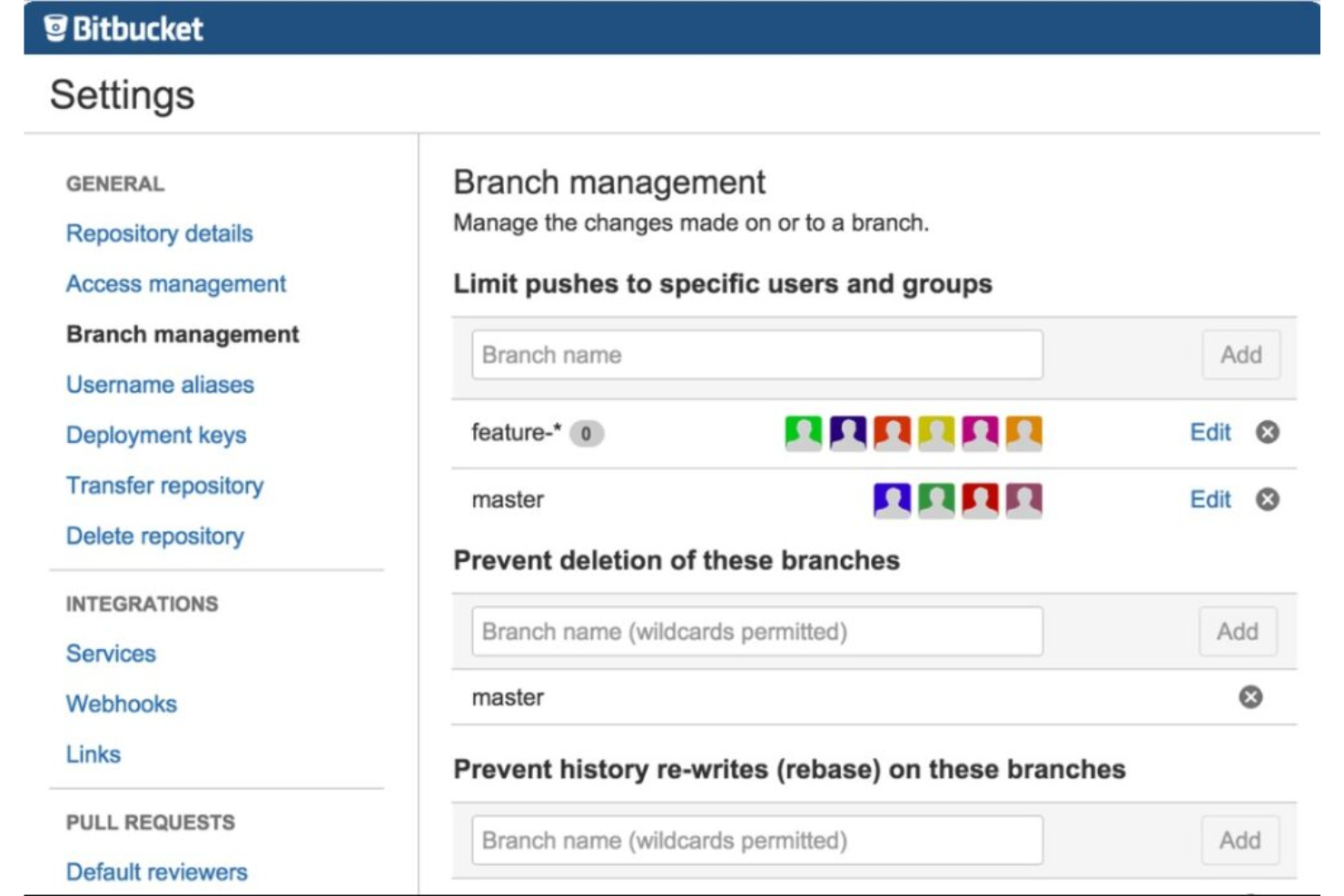
Bitbucket, developed by Atlassian, serves as a Git repository management platform. With its close ties to other Atlassian products, it offers tight integration with Jira software, providing teams with a cohesive development environment.
Why I Picked Bitbucket:
In my search for version control tools that align well with Jira, Bitbucket consistently emerged as a top contender. My decision to pick it stems from its direct affiliation with Atlassian, ensuring a built-in compatibility that others might not offer. After a thorough comparison of different platforms, I determined that for teams deeply invested in Jira, Bitbucket provides the most integrated experience.
Standout Features and Integrations:
Bitbucket stands out with its built-in continuous integration and continuous delivery (CI/CD) capabilities, making deployments efficient. It offers pull request insights and inline commenting, facilitating smoother team collaboration. Integrations are one of Bitbucket's strengths, and while Jira integration is a highlight, it also integrates easily with tools like Bamboo, Trello, and Slack.
Pros and Cons
Pros:
- A range of extensions and integrations available in the Atlassian marketplace
- Inbuilt CI/CD pipelines streamline the development process
- Deep integration with Jira Software
Cons:
- Some users may find performance issues during peak times
- As the number of users grows, costs can ramp up
- The interface may seem complex for newcomers


Assembla offers a robust cloud platform to manage version control, streamlining the process of code storage and collaboration. With its cloud orientation, Assembla provides users with a centralized space for their codebases, justifying its reputation for top-tier cloud-based version control.
Why I Picked Assembla:
Among the myriad of tools I assessed, Assembla carved its niche due to its dedicated cloud environment for version control. When comparing and forming opinions on diverse platforms, Assembla's cloud-centric approach was distinct.
I chose Assembla as it offers secure, cloud-based repositories that cater to teams that prioritize remote access and collaboration. Thus, it truly stands as the best for cloud-based version control.
Standout Features and Integrations:
Assembla's primary strength lies in its secure cloud repositories which are designed to prevent code vulnerabilities. It also offers features like audit trails and IP whitelisting to improve repository security.
Integration-wise, Assembla supports key platforms like Slack, Trello, and Jira, enabling streamlined workflows and efficient communication among developers.
Pros and Cons
Pros:
- Effective integrations with key project management tools
- Advanced security features like IP whitelisting
- Secure cloud repositories mitigate code vulnerabilities
Cons:
- Advanced features come with a steeper learning curve
- Migration from other platforms may require adjustments
- The interface can be initially overwhelming for some users

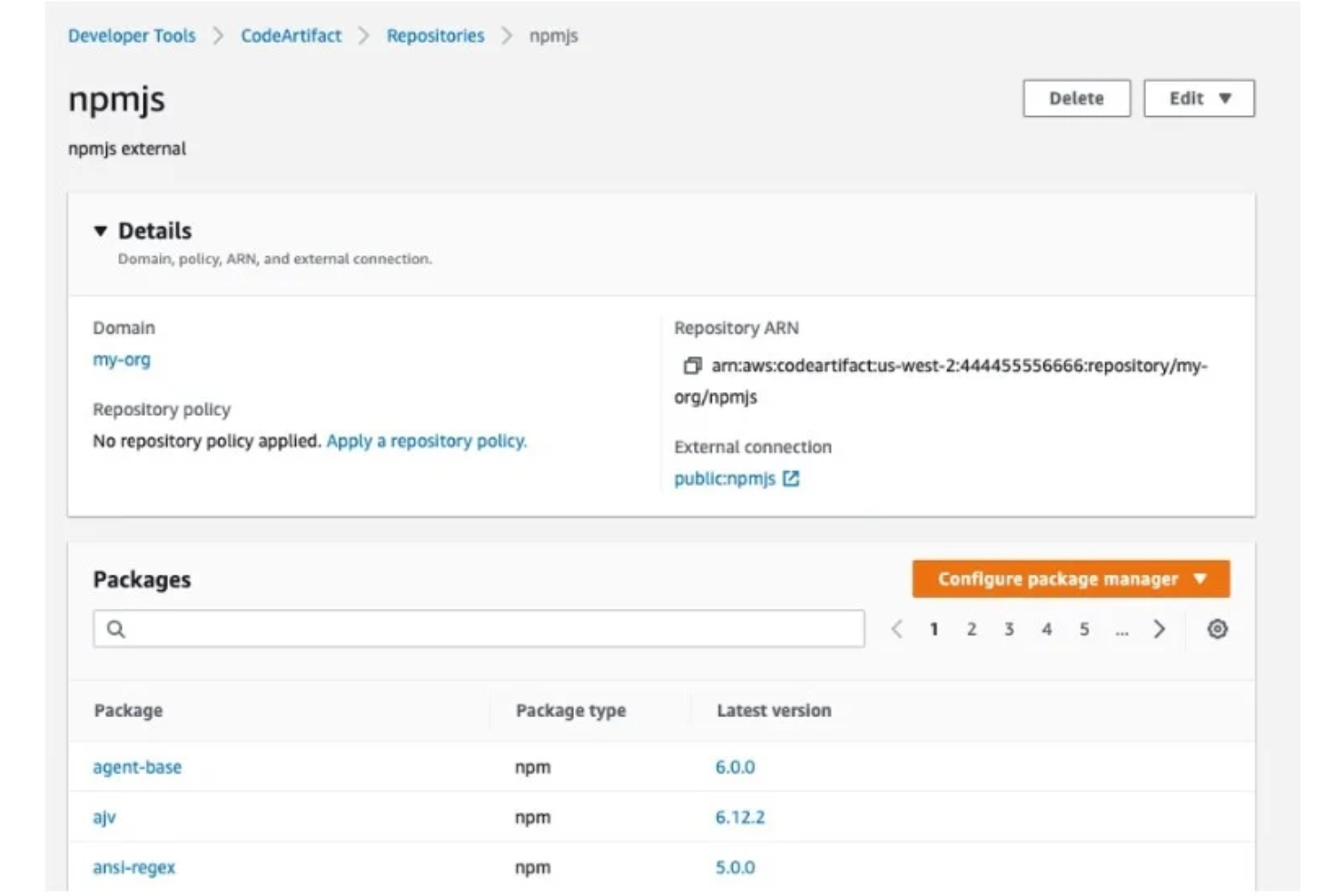
AWS CodeArtifact is a managed artifact repository service that lets developers share and reuse software components within their organization. Given its deep integration into the AWS landscape, it becomes the go-to choice for artifact management for teams already embedded in the AWS ecosystem.
Why I Picked AWS CodeArtifact:
When choosing tools for this list, AWS CodeArtifact caught my attention due to its integration within the AWS framework. Its specialized design to cater to AWS users makes it distinct from other artifact repositories. I hold the perspective that for teams already on AWS, having an in-house solution like CodeArtifact can streamline processes.
This aligns with its unique selling proposition as the "best for artifact storage in the AWS ecosystem."
Standout Features and Integrations:
AWS CodeArtifact stands out for its ability to store software packages from various package managers, ensuring versatility for developers. The tool supports npm, PyPI, and Maven repositories, giving a wide spectrum of artifact management capabilities.
In terms of integrations, it is designed to work effortlessly with tools in the AWS suite like AWS CodeBuild and AWS CodePipeline.
Pros and Cons
Pros:
- Managed service, removing the need for infrastructure management
- Supports a wide range of package managers including npm, PyPI, and Maven
- Deep integration with the AWS toolset, ensuring cohesive workflows
Cons:
- Limited third-party integrations outside of the AWS ecosystem
- The pricing model can be more complex than flat-rate competitors
- Might be overkill for teams not heavily invested in AWS


GitLab serves as a comprehensive platform, offering both continuous integration/continuous deployment (CI/CD) capabilities and robust code management solutions. Its integrative approach offers developers an experience, merging code repository management with CI/CD, aligning well with its reputation for being "best for combined CI/CD and code management."
Why I Picked GitLab:
In the realm of code management and CI/CD platforms, my selection of GitLab was driven by its all-encompassing approach. I determined that among the array of tools available, GitLab truly stands out due to its ability to merge two crucial aspects of the development process.
I've always held the opinion that efficient development requires tools that reduce context switching, and GitLab's combined functionality does precisely that, making it the "best for combined CI/CD and code management."
Standout Features and Integrations:
GitLab boasts an integrated CI/CD system that automates the software delivery process. Its Auto DevOps feature automatically configures CI/CD pipelines, reducing manual setup efforts. Integration-wise, GitLab is compatible with popular platforms like Kubernetes, making container orchestration straightforward and efficient.
Pros and Cons
Pros:
- Robust Kubernetes integration aids in container orchestration
- Auto DevOps reduces the need for manual CI/CD configurations
- A comprehensive platform that combines CI/CD and code management
Cons:
- Some users may prefer dedicated tools for CI/CD and code management
- The extensive suite of tools might introduce a learning curve for newcomers
- Can be overwhelming for users seeking simpler, standalone solutions
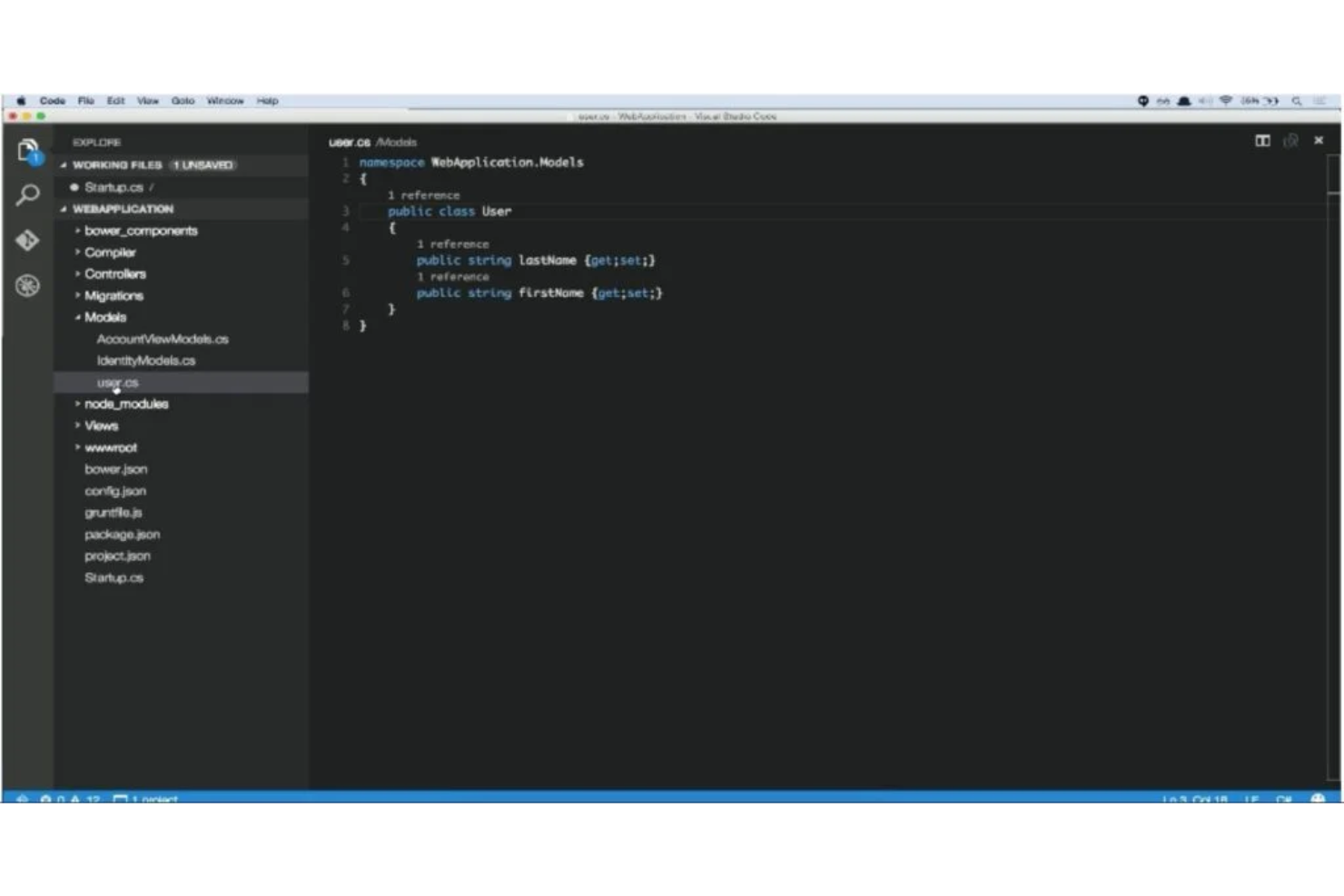
Visual Studio Code (VS Code) is a lightweight, powerful source code editor developed by Microsoft. It's renowned for its broad language support and expansive library of plugins, making it a versatile choice for developers across different languages and frameworks.
Why I Picked Visual Studio Code:
I selected Visual Studio Code for this list after comparing it with many other code editors. One of the primary determinants was its unmatched support for a myriad of programming languages out of the box.
Additionally, the extensibility through its vast marketplace of plugins is exceptional. These combined attributes positioned it as the "best for diverse language support and plugins."
Standout Features and Integrations:
Visual Studio Code shines with features like IntelliSense for code completion, debugging capabilities straight from the editor, and Git commands built-in. Its marketplace boasts thousands of extensions, allowing customization and improvements to fit any developer's needs.
Integration-wise, it melds well with popular frameworks, libraries, and cloud services, offering a holistic development experience.
Pros and Cons
Pros:
- Built-in Git commands streamline version control tasks
- Massive marketplace for extensions catering to various development needs
- Comprehensive language support ensures adaptability
Cons:
- Some advanced features require familiarity with configurations
- Performance can occasionally lag with multiple extensions
- Might be overwhelming for beginners due to the numerous features

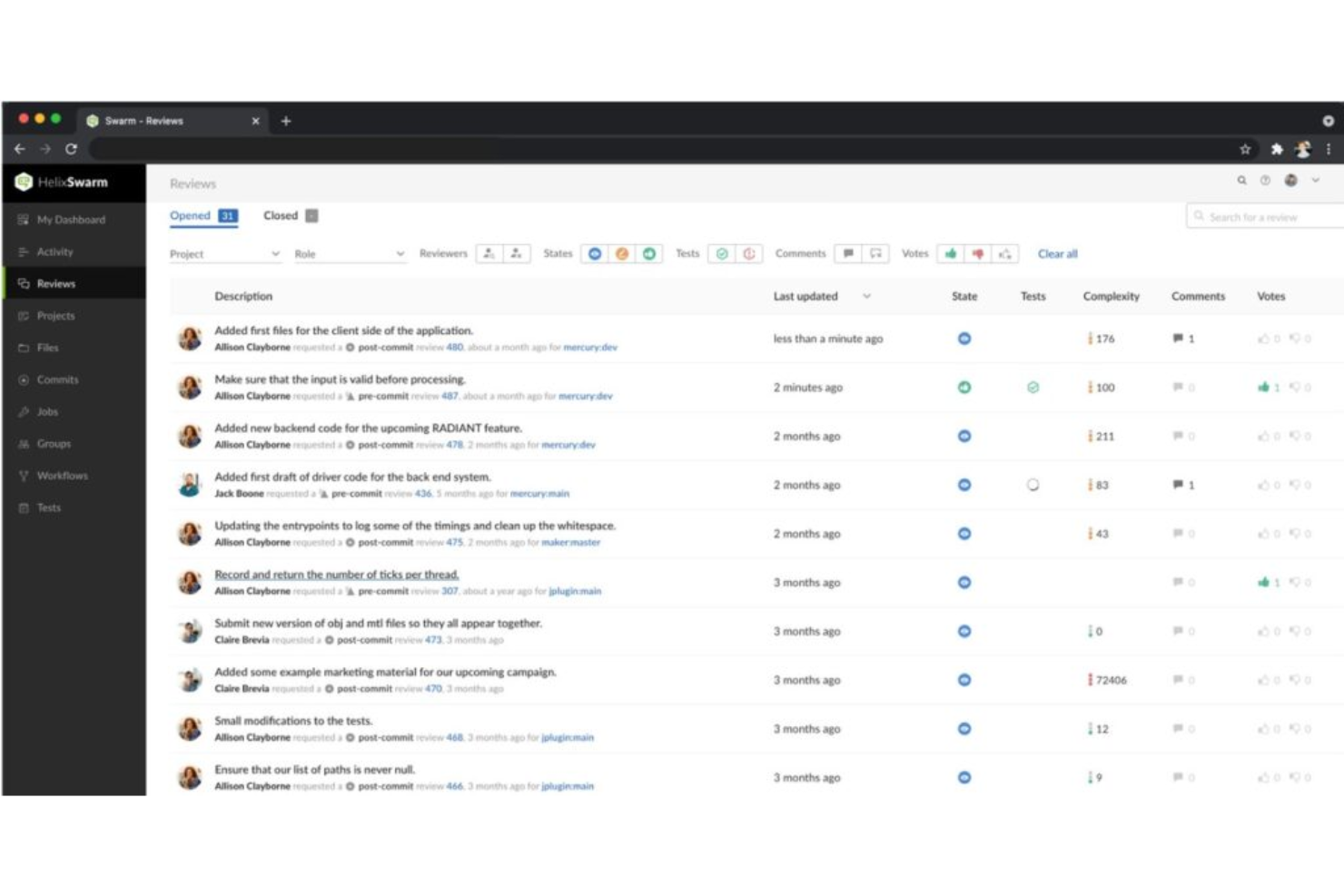
Perforce Helix Core is a robust version control system designed specifically to handle the demands of large-scale enterprises. Its powerful features allow it to manage vast codebases, ensuring streamlined operations even as businesses grow exponentially.
Why I Picked Perforce Helix Core:
I selected Perforce Helix Core for this list because it continuously rose to prominence in discussions concerning large enterprise needs. Its capacity to handle vast quantities of data without compromising on performance was a distinguishing factor.
After comparing various tools, I judged that Perforce Helix Core stands as the top choice when scalability in big corporations is paramount.
Standout Features and Integrations:
One of Helix Core's prime features is its fast commit and build testing, which significantly reduces integration times. Its workspace management allows users to handle multiple codebases efficiently.
Integration-wise, Helix Core smoothly interacts with tools like Jenkins, Jira, and Bamboo, ensuring that the entire development lifecycle is interconnected.
Pros and Cons
Pros:
- Easy integration with a variety of development tools
- Efficient workspace management for multiple codebases
- Exceptional performance even with vast data sets
Cons:
- Its rich feature set can present a steeper learning curve
- The interface might not be as user-friendly for beginners
- Might be overwhelming for smaller teams or startups

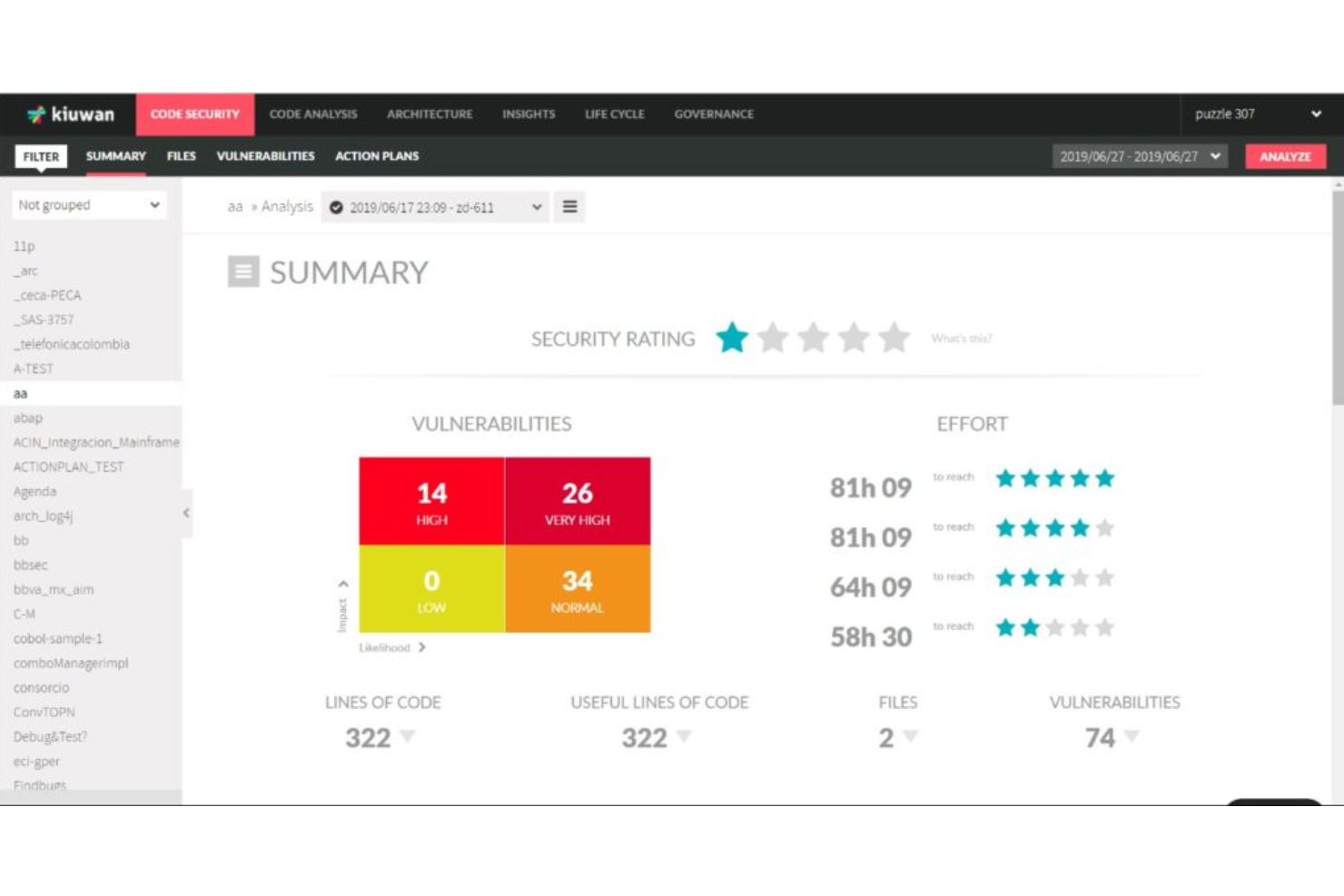
Kiuwan is a software analytics platform focusing on enforcing coding standards and detecting vulnerabilities. Catering primarily to businesses and developers, its core strength lies in code security and ensuring compliance with various coding and industry standards.
Why I Picked Kiuwan:
While exploring tools that emphasize code security, Kiuwan's reputation for rigorous compliance checks consistently stood out. I selected it due to its extensive set of features that prioritize not just security but also code quality. From my analysis, I've determined that for organizations that prioritize both coding standards and security, Kiuwan is the most appropriate choice.
Standout Features and Integrations:
Kiuwan brings to the table an in-depth code security analysis, detecting vulnerabilities across multiple programming languages. Its Life Cycle tool aids in end-to-end application security, from source code to software composition. Additionally, its integrations are tailored to fit easily into most SDLC tools, enhancing its usability.
Pros and Cons
Pros:
- Extensive dashboard and reporting capabilities, aiding in audit and compliance
- Ability to define custom rules for checks, ensuring flexibility
- Comprehensive security analysis spanning multiple languages
Cons:
- Limited community support compared to some competitors
- Some users might find the interface less intuitive
- Steeper learning curve for newcomers to software security analysis

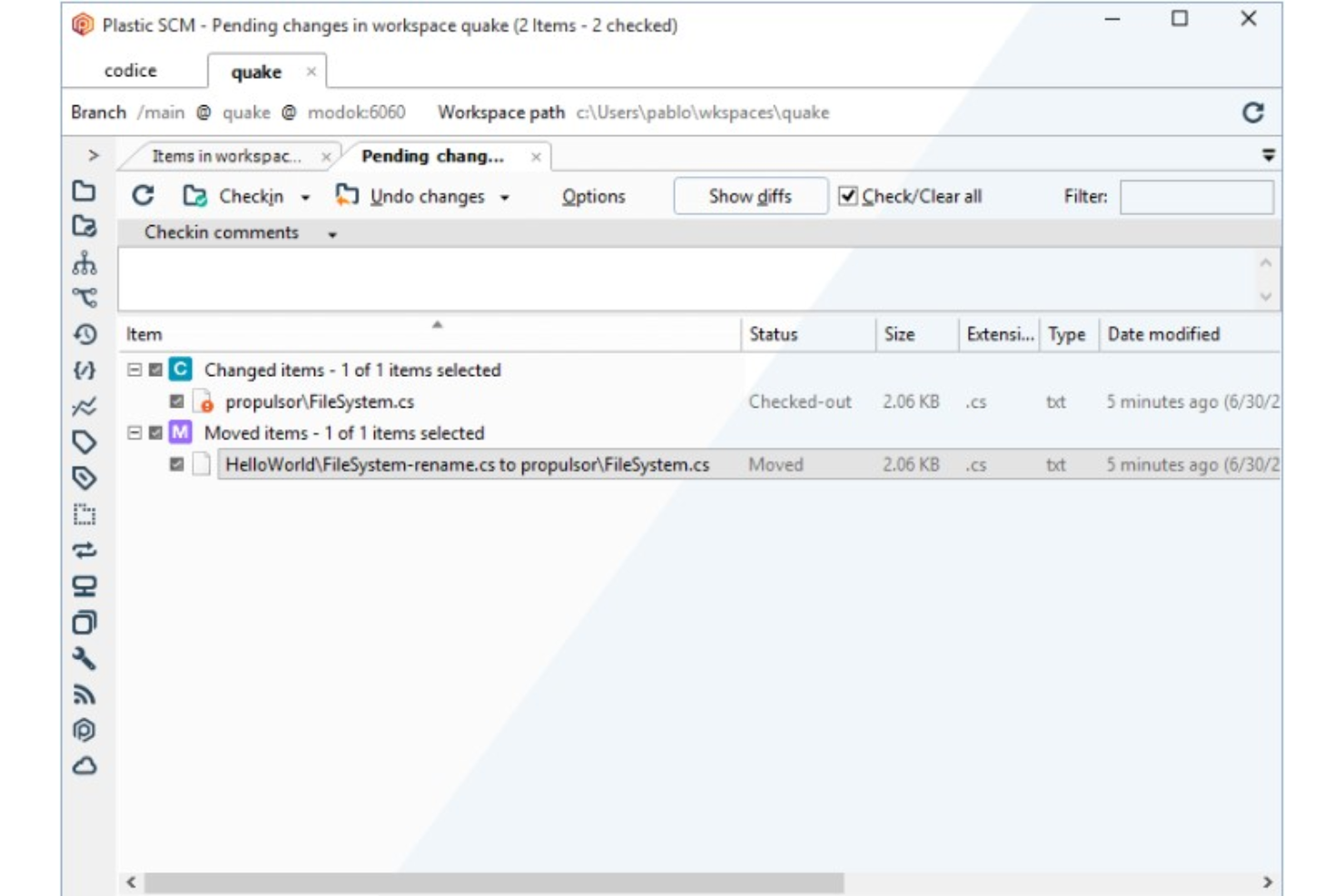
Plastic SCM excels in presenting version control in a visually intuitive manner, making it accessible for both novices and experts. Its capabilities extend to efficiently accommodating distributed teams, ensuring collaboration remains fluid and cohesive regardless of geographical barriers.
Why I Picked Plastic SCM:
In my journey of tool selection, Plastic SCM stood out for its emphasis on visual versioning—a feature not commonly foregrounded in other tools. This focus on presenting data visually, combined with its robust support for distributed teams, captured my interest.
Drawing on this unique blend, I determined that Plastic SCM is best for teams that lean heavily on visual aids for version control and those scattered across different locations.
Standout Features and Integrations:
One of Plastic SCM's most commendable features is its visual branch explorer, allowing users to see intricate details of branching and merging with ease. Additionally, its semantic merge capability discerns the intent behind code changes rather than just lines of code.
For integrations, Plastic SCM pairs efficiently with tools like Jira, Jenkins, and Bamboo, ensuring a broad spectrum of workflow compatibility.
Pros and Cons
Pros:
- Broad integration capabilities with mainstream tools
- Semantic merge offers intelligent code merging
- Visual branch explorer offers a clear view of version history
Cons:
- Some features might have a learning curve for those new to version control
- Initial setup can be intricate for smaller teams
- Maybe more feature-rich than some teams require


CodeScan is a dedicated static code analysis tool tailored specifically for Salesforce codebases. Its capabilities ensure that Salesforce developers are equipped with the essential tools and insights needed to maintain code quality and enforce best practices.
Why I Picked CodeScan:
During my comprehensive search for Salesforce code analysis tools, CodeScan consistently emerged at the forefront. Through a process of judging and comparing, I found its specificity to Salesforce to be its standout trait. Its deep integration with the Salesforce platform is what truly differentiates it.
I chose it primarily because of its adeptness at addressing the unique challenges presented by Salesforce, justifying its title as "best for Salesforce code analysis."
Standout Features and Integrations:
CodeScan impresses with its extensive rule set, numbering over 350 rules, ensuring thorough and precise code reviews. Additionally, its ability to visualize technical debt helps teams prioritize refactoring tasks.
For integrations, CodeScan connects with key developer tools and platforms such as GitHub, Bitbucket, and Azure DevOps, enhancing its utility in diverse developer ecosystems.
Pros and Cons
Pros:
- Broad integration capabilities with major developer platforms and tools
- Visualization capabilities aid in understanding and addressing technical debt
- Extensive rule set tailored for Salesforce development ensures thorough code reviews
Cons:
- Requires consistent updates to keep in line with Salesforce's frequent releases
- Specificity to Salesforce may limit its applicability in multi-platform projects
- Might have a learning curve for developers unfamiliar with static code analysis

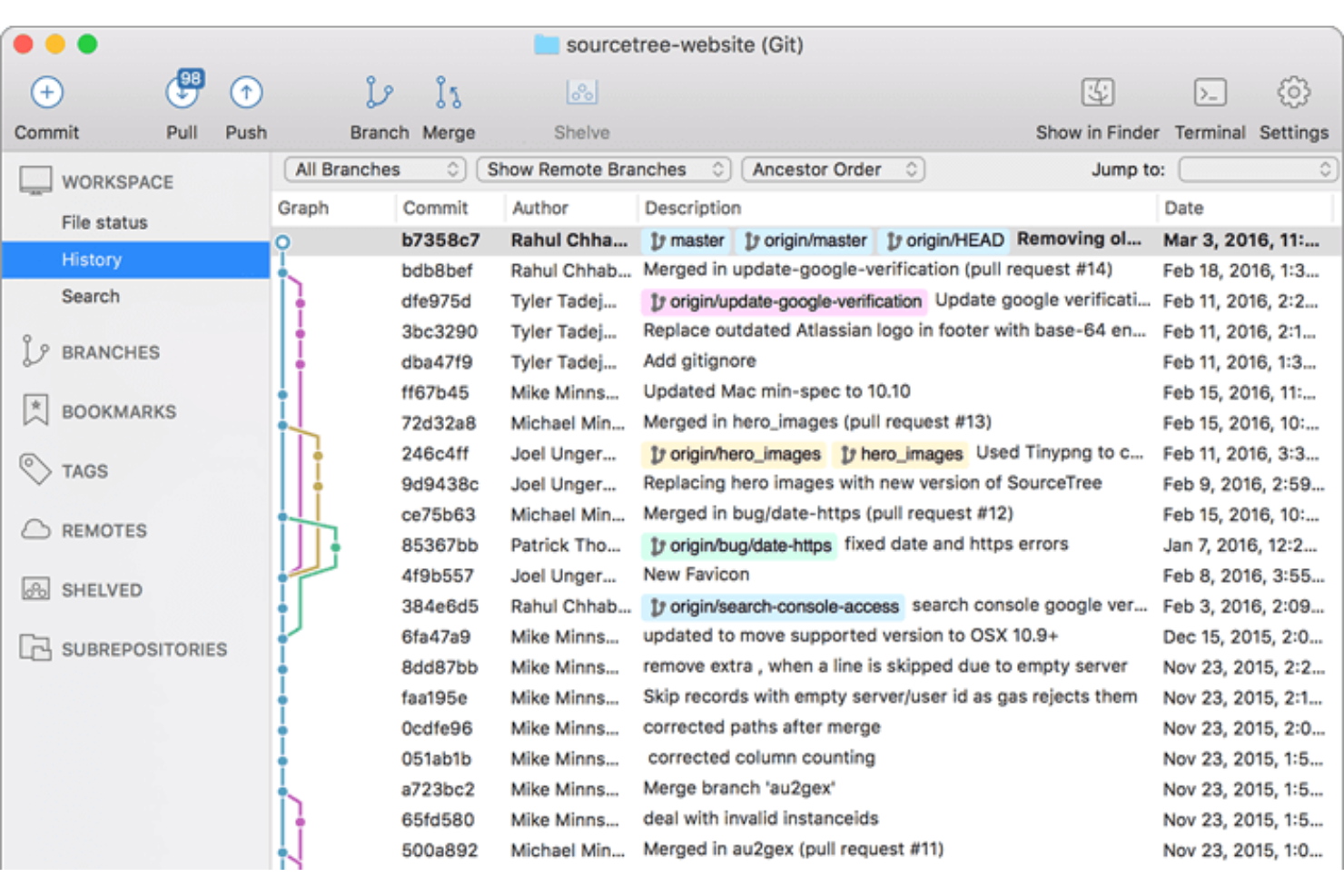
Sourcetree provides a graphical user interface (GUI) to manage Git repositories. It is designed to make complex Git tasks visually simple, aligning with its strength in offering intuitive Git GUI interactions.
Why I Picked Sourcetree:
In my selection process, Sourcetree stood apart due to its user-friendly design that makes Git operations visually accessible. While judging and comparing various tools, it became clear that Sourcetree had an edge in simplifying Git for users. I believe it's best for intuitive Git GUI interactions because it improves intricate Git commands into a comprehendible visual format, which is particularly beneficial for those new to Git.
Standout Features and Integrations:
One of Sourcetree's core features is its ability to visualize commits, branches, and merges, making it easier for users to understand their code's history. Additionally, it offers an interactive rebase tool, providing a more manageable way to modify commits. For integrations, Sourcetree is adept at connecting with major platforms like Bitbucket and GitHub, allowing developers to pull and push changes without leaving the application.
Pros and Cons
Pros:
- The interactive rebase tool aids in refining commits
- Effective integration with Bitbucket and GitHub
- Comprehensive visualization tools for Git operations
Cons:
- Certain features can be complex to configure
- Performance can sometimes lag with extensive repositories
- Might seem complex to absolute beginners
Weitere Software für Quellcodeverwaltung
Nachfolgend finden Sie eine Liste weiterer Tools zur Quellcodeverwaltung, die ich in die engere Auswahl genommen, aber nicht in die Top 10 aufgenommen habe. Sie sind definitiv einen Blick wert.
- PhPStorm
For PHP-specific coding environments
- Beanstalk
For centralized version control with deployment tools
- Codacy
Good for automated code review and code quality monitoring
- IBM Rational ClearCase
Good for enterprise-level configuration management
- AWS CodeCommit
Good for scalable source control in the AWS cloud
- Git
Good for decentralized version control and collaboration
- SourceGear Vault
Good for teams transitioning from Visual SourceSafe
- RhodeCode
Good for unified management of Git, Mercurial, and Subversion
- Subversion
Good for centralized version control with atomic commits
- GitKraken
Good for a visually appealing Git GUI
- Azure DevOps
Good for end-to-end project management in the Microsoft ecosystem
- Mercurial SCM
Good for efficient handling of large projects
- Team Foundation Version Control (TFVC)
Good for centralized version control in the Azure environment
- SmartSVN
Good for a graphical interface on top of Apache Subversion


Auswahlkriterien für Quellcodeverwaltung
Bei der Auswahl der besten Quellcodeverwaltungs-Software für diese Liste habe ich gängige Käuferbedürfnisse und Herausforderungen wie Versionskontrolle und effiziente Zusammenarbeit berücksichtigt. Um die Bewertung strukturiert und fair zu halten, habe ich folgendes Framework verwendet:
Kernfunktionen (25% der Gesamtbewertung)
Um in diese Liste aufgenommen zu werden, musste jede Lösung folgende typische Anwendungsfälle abdecken:
- Versionskontrolle
- Branch-Management
- Zusammenführen von Code
- Zugriffskontrolle
- Verfolgung der Codehistorie
Zusätzliche Besonderheiten (25% der Gesamtbewertung)
Um die Auswahl weiter einzuschränken, habe ich auch nach besonderen Funktionen gesucht, wie zum Beispiel:
- Integrierte CI/CD-Pipelines
- Erweiterte Code-Review-Tools
- Cloud-Speicheroptionen
- Unterstützung für Plugins und Erweiterungen
- KI-gestützte Codevorschläge
Benutzerfreundlichkeit (10% der Gesamtbewertung)
Um ein Gefühl für die Benutzerfreundlichkeit der einzelnen Systeme zu bekommen, habe ich auf folgendes geachtet:
- Intuitives Design der Benutzeroberfläche
- Einfache Navigation
- Anpassbare Dashboards
- Reaktionsschnelle Performance
- Minimale Lernkurve
Onboarding (10% der Gesamtbewertung)
Um die Onboarding-Erfahrung jeder Plattform zu bewerten, habe ich Folgendes berücksichtigt:
- Verfügbarkeit von Schulungsvideos
- Interaktive Produkttouren
- Vordefinierte Vorlagen
- Chatbots zur Unterstützung
- Zugang zu Webinaren
Kundensupport (10% der Gesamtpunktzahl)
Um die Kundensupport-Dienstleistungen jedes Softwareanbieters zu beurteilen, habe ich Folgendes berücksichtigt:
- 24/7 Support-Verfügbarkeit
- Live-Chat-Optionen
- Umfassendes Hilfezentrum
- Reaktionszeit auf Anfragen
- Verfügbarkeit eines festen Kundenbetreuers
Preis-Leistungs-Verhältnis (10% der Gesamtpunktzahl)
Um das Preis-Leistungs-Verhältnis jeder Plattform zu bewerten, habe ich Folgendes berücksichtigt:
- Wettbewerbsfähige Preise
- Flexible Abonnementpläne
- Verfügbarkeit einer kostenlosen Testphase
- Kosten im Verhältnis zu den angebotenen Funktionen
- Rabatte bei langfristigen Verpflichtungen
Kundenbewertungen (10% der Gesamtpunktzahl)
Um ein Gefühl für die allgemeine Kundenzufriedenheit zu bekommen, habe ich beim Lesen von Kundenbewertungen Folgendes beachtet:
- Positives Feedback zur Funktionalität
- Zufriedenheit mit dem Kundenservice
- Leichte Integration mit anderen Tools
- Berichte der Nutzer zur Zuverlässigkeit
- Allgemeine Weiterempfehlungsrate
Wie wählt man eine Source Code Management Software?
Lange Funktionslisten und komplexe Preismodelle können leicht überwältigen. Damit Sie im Auswahlprozess für Ihre individuelle Softwarestrategie den Überblick behalten, finden Sie hier eine Checkliste wichtiger Faktoren, die Sie im Hinterkopf behalten sollten:
| Faktor | Worauf Sie achten sollten |
|---|---|
| Skalierbarkeit | Kann die Software mit Ihrem Team wachsen? Achten Sie auf Lösungen, die steigende Nutzer- und Projektzahlen problemlos unterstützen. Vermeiden Sie Werkzeuge, die künftiges Wachstum einschränken könnten. |
| Integrationen | Lässt sich die Software gut in Ihre bestehenden Tools einbinden? Prüfen Sie, ob sie sich mit Ihrer Entwicklungsumgebung, CI/CD-Pipelines und weiteren wichtigen Tools integrieren lässt. |
| Anpassbarkeit | Können Sie die Software an die Arbeitsweise Ihres Teams anpassen? Stellen Sie sicher, dass Sie Workflows, Berechtigungen und Benachrichtigungen individuell konfigurieren können. |
| Benutzerfreundlichkeit | Ist die Bedienung intuitiv? Bewerten Sie Oberfläche und Navigation. Ein schwer nutzbares Tool kann Ihr Team ausbremsen. |
| Implementierung und Onboarding | Wie schnell können Sie starten? Berücksichtigen Sie Zeit und Ressourcen für Einrichtung und Schulung. Bevorzugen Sie Plattformen mit starkem Onboarding-Support. |
| Kosten | Passt das Produkt in Ihr Budget? Vergleichen Sie die Preismodelle und bedenken Sie die Gesamtkosten inklusive möglicher versteckter Gebühren oder langfristiger Einsparungen. |
| Sicherheitsmaßnahmen | Ist Ihr Quellcode geschützt? Bewerten Sie die Sicherheitsfunktionen wie Verschlüsselung und Zugriffskontrolle, um Ihren Code abzusichern. |
| Support-Verfügbarkeit | Erhalten Sie Unterstützung, wenn Sie sie benötigen? Prüfen Sie, ob der Anbieter 24/7-Support und verschiedene Kontaktmöglichkeiten wie Chat, E-Mail oder Telefon bietet. |
Was ist Source Code Management Software?
Source Code Management Software, oft auch als Versionskontrollsoftware bezeichnet, organisiert und verfolgt Veränderungen am Programmiercode. Entwickler nutzen diese Tools, um gemeinsam an Projekten zu arbeiten und sicherzustellen, dass von verschiedenen Teammitgliedern vorgenommene Codeänderungen nicht kollidieren. Über die Zusammenarbeit hinaus halten diese Plattformen auch die Historie der Codeversionen fest, sodass Teams auf frühere Zustände zurückgreifen, Änderungen aus verschiedenen Quellen zusammenführen und sicherstellen können, dass der finale Code konsistent und fehlerfrei bleibt.
Das Hauptziel ist es, die Effizienz zu steigern, das Risiko von Überschreibungen zu minimieren und die gleichzeitige Zusammenarbeit an großen Projekten zu erleichtern. Ein System zur Versionskontrolle ermöglicht es Entwicklungsteams nicht nur, Änderungen nachzuverfolgen und Abhängigkeiten zu verwalten, sondern schützt zudem frühere Versionen von Softwareprojekten. Ob es um genaue Zugriffsberechtigungen, die Verwaltung von Abhängigkeiten oder die Nutzung moderner Funktionen aus Open-Source-Software geht – das richtige Source Code Management System verwandelt umständliche Aufgaben in intuitive Prozesse.
Funktionen
Achten Sie bei der Auswahl von Source Code Management Software auf die folgenden Schlüsselfunktionen:
- Versionskontrolle: Verfolgt Änderungen am Code im Laufe der Zeit und ermöglicht es mehreren Entwicklern, gleichzeitig zu arbeiten, ohne die Arbeit der anderen zu überschreiben.
- Branch-Management: Ermöglicht Entwicklern das Erstellen separater Code-Branches für neue Funktionen oder Fehlerbehebungen, was eine organisierte Entwicklung und Tests erleichtert.
- Code-Zusammenführung: Kombiniert Code-Änderungen aus verschiedenen Branches und sorgt für ein einheitliches Endprodukt, während Konflikte gelöst werden.
- Zugriffsverwaltung: Steuert, wer den Code ansehen oder ändern darf, und erhält so Sicherheit und Integrität im Entwicklerteam.
- Nachverfolgung des Codeverlaufs: Stellt ein detailliertes Protokoll aller Code-Änderungen bereit, was den Entwicklern hilft, die Entwicklung des Codes nachzuvollziehen.
- Integrationsunterstützung: Verbindet sich mit anderen Entwicklungstools wie CI/CD-Pipelines für einen reibungsloseren Arbeitsablauf.
- Anpassbarkeit: Erlaubt Teams, das Tool an ihre spezifischen Arbeitsabläufe anzupassen und steigert so Produktivität und Effizienz.
- Benutzerfreundliche Oberfläche: Vereinfacht die Navigation und verkürzt die Einarbeitungszeit, sodass das Team das Tool schneller übernehmen kann.
- Sicherheitsvorkehrungen: Schützt den Code durch Funktionen wie Verschlüsselung und Zugriffskontrollen, um unbefugten Zugriff zu verhindern.
- Ressourcen für die Einarbeitung: Bietet Schulungsmaterialien und Unterstützung, damit neue Benutzer schnell und effektiv starten können.
Vorteile
Die Implementierung von Software zur Quellcodeverwaltung bietet mehrere Vorteile für Ihr Team und Ihr Unternehmen. Hier sind einige, auf die Sie sich freuen können:
- Verbesserte Zusammenarbeit: Ermöglicht es mehreren Entwicklern, am gleichen Projekt ohne Konflikte zu arbeiten – dank Versionskontrolle und Branch-Management.
- Code-Integrität: Sichert eine zuverlässige Codebasis, indem Änderungen nachverfolgt und ein detaillierter Verlauf angeboten wird, sodass nichts verloren geht oder überschrieben wird.
- Erhöhte Sicherheit: Schützt Ihren Code mit Zugriffskontrollen und Verschlüsselung und verringert das Risiko unbefugten Zugriffs.
- Effiziente Entwicklung: Optimiert den Entwicklungsprozess durch Integration mit anderen Tools und Funktionen wie Code-Zusammenführung.
- Schnellere Einarbeitung: Unterstützt neue Teammitglieder durch Schulungsmaterialien und eine benutzerfreundliche Oberfläche beim schnellen Einstieg.
- Individuelle Arbeitsablauf-Anpassung: Erlaubt Anpassungen, um auf die speziellen Bedürfnisse Ihres Teams einzugehen und steigert so Produktivität und Effizienz.
- Historische Einblicke: Bietet wertvolle Erkenntnisse über die Entwicklung des Codes, unterstützt das Verständnis vergangener Entscheidungen und verbessert die zukünftige Entwicklung.
Kosten und Preise
Die Auswahl von Software zur Quellcodeverwaltung erfordert ein Verständnis der verschiedenen verfügbaren Preismodelle und -pläne. Die Kosten variieren je nach Funktionen, Teamgröße, Erweiterungen und mehr. Die folgende Tabelle fasst gängige Pläne, ihre Durchschnittspreise sowie typische Funktionen von Lösungen zur Quellcodeverwaltung zusammen:
Vergleichstabelle von Plänen für Software zur Quellcodeverwaltung
| Plantyp | Durchschnittlicher Preis | Gängige Funktionen |
|---|---|---|
| Kostenloser Plan | $0 | Basis-Versionskontrolle, begrenzter Speicherplatz und grundlegendes Branch-Management. |
| Persönlicher Plan | $5-$25/user/month | Erweiterte Versionskontrolle, mehr Speicherplatz und Basissupport. |
| Business-Plan | $25-$50/user/month | Erhöhte Sicherheit, Integrationen, Prioritätssupport und mehr Speicherplatz. |
| Enterprise-Plan | $50-$100/user/month | Anpassbare Funktionen, dedizierter Support, erweiterte Analysen und unbegrenzter Speicherplatz. |
FAQs zur Source Code Management Software
Hier finden Sie Antworten auf häufig gestellte Fragen zur Source Code Management Software:
Wie kann Source Code Management die Zusammenarbeit mehrerer Programmierer an einem Code verbessern?
SCM ermöglicht es Entwicklern, parallel am Code zu arbeiten und verhindert so das Überschreiben von Änderungen. Es verwaltet das Zusammenführen von Code, verfolgt Änderungen und erleichtert Fehlerbehebungen und Releases. Diese Funktionen sorgen für effiziente Teamarbeit und halten den Entwicklungsprozess organisiert und konfliktfrei.
Welchen Zweck erfüllt Source Code Management im DevOps-Bereich?
SCM im DevOps-Bereich erleichtert eine schnelle Zusammenarbeit innerhalb von Workflows. Teams können effizient arbeiten, Codeänderungen verwalten und sich nahtlos mit anderen DevOps-Tools integrieren. Diese Integration hilft, konsistente Entwicklungspraktiken aufrechtzuerhalten und unterstützt Continuous Delivery.
Welche sind die günstigsten und teuersten SCM-Tools?
Das kann sich ändern, wenn neue SCM-Tools auf den Markt kommen und bestehende Tools ihre Preise anpassen. Nach meinem letzten Stand bieten Tools wie Git und Mercurial SCM kostenlose Versionen an. Am oberen Ende der Preisskala finden sich Enterprise-Lösungen von Anbietern wie IBM Rational ClearCase, die oft eine individuelle Preisanfrage erfordern.
Gibt es kostenlose Optionen?
Ja, mehrere SCM-Tools bieten kostenlose Versionen an. Git zum Beispiel ist Open Source und kostenlos nutzbar. Auch Mercurial SCM ist kostenlos. Es ist jedoch zu beachten, dass zwar die Kernfunktionen gratis sind, einige zusätzliche Features oder Integrationen aber kostenpflichtig sein können.
Welche Herausforderungen treten häufig beim Einsatz von Source Code Management Software auf?
Herausforderungen können komplexe Integrationen, die Gewährleistung der Datensicherheit und das Management der Lernkurve für neue Nutzer umfassen. Es ist wichtig, einen klaren Onboarding-Plan und Schulungsmaterialien bereitzustellen, um diese Themen anzugehen und einen reibungslosen Übergang für das Team zu ermöglichen.
Wie geht es weiter:
Wenn Sie gerade Source Code Management Software recherchieren, verbinden Sie sich mit einem SoftwareSelect-Berater für kostenlose Empfehlungen.
Sie füllen ein Formular aus und führen ein kurzes Gespräch, in dem Ihre spezifischen Anforderungen besprochen werden. Anschließend erhalten Sie eine Auswahlliste passender Software zur Überprüfung. Die Berater unterstützen Sie sogar während des gesamten Kaufprozesses, einschließlich Preisverhandlungen.