
22 Beste Process Mining Software im Test 2026

10 Beste Process Mining Software Übersicht
Here's my pick of the 10 best software from the 22 tools reviewed.


Haben Sie es satt, sich durch riesige Datenberge zu kämpfen, ohne klare Erkenntnisse zu gewinnen? Process Mining Software könnte die Lösung für Sie sein. Sie hilft Ihnen, Ineffizienzen und Engpässe in Ihren Abläufen aufzudecken, was Zeit und Ressourcen spart.
Aus meiner Erfahrung beim Testen und Bewerten von Software weiß ich: Die richtigen Tools können den Umgang Ihres Teams mit Prozessmanagement grundlegend verändern. Ich führe Sie durch die besten Process Mining Lösungen und teile objektive Einblicke, damit Sie fundierte Entscheidungen treffen können.
Sie erfahren, wie diese Tools zu Ihren individuellen Anforderungen passen – egal, ob Sie ein kleines Start-up oder ein großes Unternehmen sind. Freuen Sie sich auf einen detaillierten Blick auf Features, Vor- und Nachteile, und was jede Option besonders macht.
Why Trust Our Software Reviews
Zusammenfassung: Beste Process Mining Software
Diese Vergleichstabelle fasst die Preisdetails meiner Top-Auswahl an Process Mining Software zusammen, um Ihnen die beste Lösung für Ihr Budget und Ihre geschäftlichen Anforderungen aufzuzeigen.
| Tool | Best For | Trial Info | Price | ||
|---|---|---|---|---|---|
| 1 | Best for harmonizing RPA and process mining | 60-day free trial | From $25/month | Website | |
| 2 | Best for AI-driven process insights | Free plan + free demo available | Pricing upon request | Website | |
| 3 | Best for connecting operations to customer experiences | Not available | Pricing upon request | Website | |
| 4 | Best for root cause analysis | Not available | From $90/user/month (billed annually) | Website | |
| 5 | Best for scalability and enterprise integration | Not available | From $150/user/month (min 10 seats) | Website | |
| 6 | Best for integrating financial insights | Not available | Pricing upon request | Website | |
| 7 | Best for combining RPA with process analytics | Not available | From $750/user/month (billed annually) | Website | |
| 8 | Best for real-time process performance | Not available | From $120/user/month | Website | |
| 9 | Best for rapid process discovery | Not available | From $99/user/month (billed annually) | Website | |
| 10 | Best for comprehensive process visualization | Not available | Pricing upon request | Website |
-

Site24x7
Visit WebsiteThis is an aggregated rating for this tool including ratings from Crozdesk users and ratings from other sites.4.6 -
Docker
Visit WebsiteThis is an aggregated rating for this tool including ratings from Crozdesk users and ratings from other sites.4.6 -
Pulumi
Visit WebsiteThis is an aggregated rating for this tool including ratings from Crozdesk users and ratings from other sites.4.8





Tests: Beste Process Mining Software
Unten finden Sie meine ausführlichen Zusammenfassungen der besten Process Mining Software, die es auf meine Übersicht geschafft haben. Meine Bewertungen geben Ihnen einen ausführlichen Überblick über die wichtigsten Funktionen, Vor- & Vorteile, Integrationen und Anwendungsbeispiele, damit Sie die passende Lösung finden.

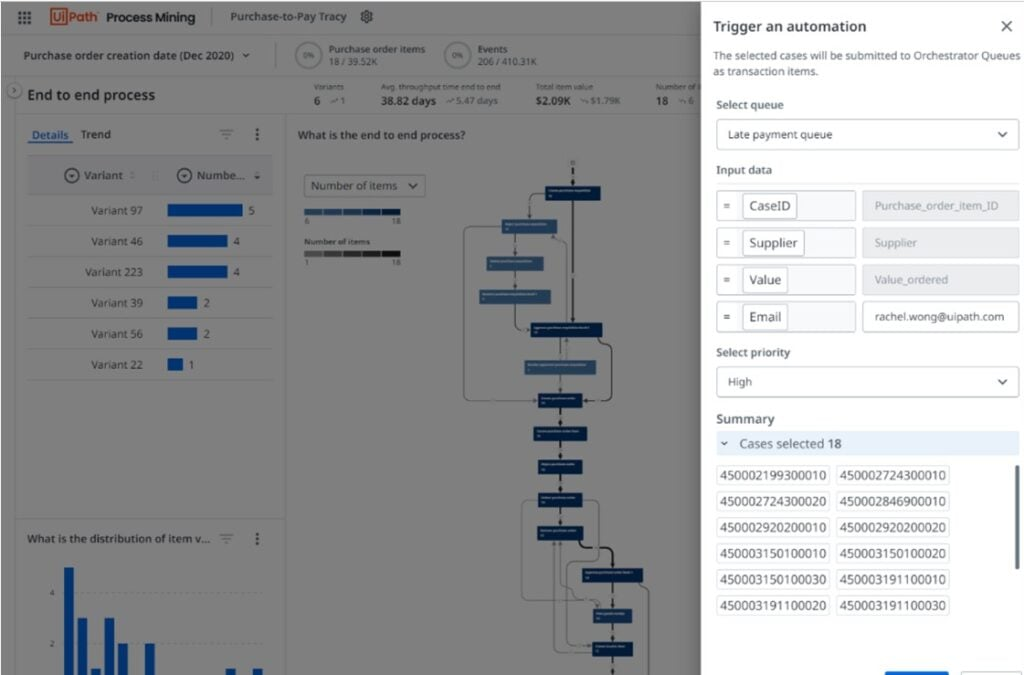
UiPath excels in its commitment to bringing RPA (Robotic Process Automation) and process mining together under one platform. This harmonization ensures organizations can automate tasks while simultaneously gaining insights into their processes.
Why I Picked UiPath: UiPath came to my attention due to its unique blend of RPA and process mining. In weighing the offerings of multiple tools, I determined that UiPath provided a harmonious blend not commonly found elsewhere. It's this synchronization of automation and insights that convinced me it's "best for harmonizing RPA and process mining."
Standout Features & Integrations:
Central to UiPath's offering is its Orchestrator, a platform that coordinates software robots ensuring they're deployed where most needed. Additionally, the UiPath Studio empowers users to craft custom workflows. Integration-wise, UiPath offers compatibility with a wide array of applications, including SAP, Oracle, and Salesforce.
Pros and Cons
Pros:
- Custom workflow creation with UiPath Studio
- Orchestrator platform for efficient bot deployment
- A unique fusion of RPA and process mining
Cons:
- Licensing model can be complex for some users
- Might be overkill for small-scale operations
- The steeper learning curve for those new to RPA


Celonis stands as a beacon for organizations leaning into the future, harnessing the power of AI to derive deep insights from their processes. The AI core of Celonis sets it apart, driving smarter process decisions and forward-thinking strategies.
Why I Picked Celonis: The decision to include Celonis stemmed from its strong AI-driven analytics. Among the myriad of tools available, Celonis particularly stood out due to its AI core, which I believe is pivotal for future-ready businesses. It’s this AI-centric approach that led me to deem it "best for AI-driven process insights."
Standout Features & Integrations:
At the heart of Celonis is its AI engine that powers deep process insights, pushing businesses to optimize at every turn. The platform also supports process simulations, enabling hypothetical scenario testing. On the integration front, Celonis is versatile, interfacing with a multitude of data sources from ERPs to CRMs.
Pros and Cons
Pros:
- Broad integration capabilities with diverse data sources
- Process simulation for strategic planning
- AI engine for deep, predictive insights
Cons:
- Priced on the higher side for smaller businesses
- Advanced features can be daunting to newcomers
- Might require a shift in mindset to fully harness AI benefits


Pega Platform stands out not just as a process mining tool but as a holistic platform connecting operational processes to customer experiences. When the goal is to see how backend operations impact front-end customer interactions, Pega is the go-to choice.
Why I Picked the Pega Platform: My selection of Pega was influenced by its unique approach to blending operational processes with customer experience. Unlike many other tools, Pega offers a bridge between back-end operations and front-end customer touchpoints. This dual focus led me to choose it as "best for connecting operations to customer experiences."
Standout Features & Integrations:
Pega connects BPM, case management, and real-time analytics. This trio ensures that businesses can tweak processes based on customer feedback in real-time. As for integrations, Pega has built-in connectors for leading CRM, ERP, and data warehousing tools.
Pros and Cons
Pros:
- Built-in connectors for leading business tools
- Real-time analytics for quick decision-making
- Synchronous view of operations and customer experience
Cons:
- Requires dedicated training to maximize its potential
- Can be overwhelming with its myriad of features
- Higher price point compared to some competitors


QPR ProcessAnalyzer stands as a tool that doesn’t just showcase processes but delves deep into the 'why' behind process behaviors. For organizations that aim to understand the root causes of process variations, QPR offers invaluable insights.
Why I Picked QPR ProcessAnalyzer: In comparing tools, QPR ProcessAnalyzer's prowess in root cause analysis became evident. Many tools can showcase 'what' is happening, but few can consistently identify 'why' it's happening. It was this strength in root cause determination that made me label it as "best for root cause analysis."
Standout Features & Integrations:
The tool is equipped with advanced diagnostic tools, making root cause analysis precise. It also supports AI-based predictions for process outcomes. When it comes to integrations, QPR easily syncs with most major ERPs and data warehouses.
Pros and Cons
Pros:
- Efficient integration with major ERPs
- AI-based predictions for enhanced Foresight
- Precision in root cause analysis
Cons:
- Some features might be redundant for smaller setups
- AI predictions require clean datasets for accuracy
- Might be a learning curve for non-technical users


IBM Process Mining offers businesses a robust solution to analyze, monitor, and optimize their operations. Tailored for larger enterprises, this tool stands out for its scalability and deep integration capabilities.
Why I Picked IBM Process Mining:
When selecting tools, the scalability and integration capabilities of IBM Process Mining caught my eye. Given IBM's longstanding reputation in the enterprise space, it's no surprise that they have a tool designed with scalability at its core.
It's this focus on large-scale operations and enterprise compatibility that led me to believe it's "best for scalability and enterprise integration."
Standout Features & Integrations:
IBM's tool provides a comprehensive view of business operations, offering metrics-driven insights. It also includes a simulation feature, allowing for hypothetical scenario analyses. The platform integrates with IBM's vast ecosystem but also offers connectors to other enterprise-grade software solutions.
Pros and Cons
Pros:
- Extensive integration capabilities with enterprise software
- Metrics-driven insights for data-driven decisions
- Designed with large enterprises in mind
Cons:
- The cost might be prohibitive for some organizations
- Requires a deep understanding to utilize its full potential
- It might be overwhelming for small businesses


PwC's process mining solution is more than just a visualization tool; it bridges the gap between processes and financial insights. This melding of process data with financial analytics makes PwC unparalleled when it comes to financial-centric process mining.
Why I Picked PwC: In my comparative analysis, I noticed a gap: few tools effectively connect process mining with financial insights. PwC filled this void perfectly. I chose PwC as "best for integrating financial insights" due to its prowess in merging process data with financial metrics, offering a holistic view of business operations.
Standout Features & Integrations:
PwC boasts features that connect operational processes directly with financial performance indicators. Additionally, it has risk assessment tools that tie financial risks to processes. As for integrations, PwC's tool integrates with most enterprise financial systems and ERPs.
Pros and Cons
Pros:
- Broad compatibility with financial systems
- Risk assessment features tied to financial metrics
- Deep integration of process data with financial insights
Cons:
- The pricing model might be on the higher side for some
- The interface can be intricate for first-timers
- It might be overkill for smaller businesses

Best for combining RPA with process analytics

Automation Anywhere merges the realms of Robotic Process Automation (RPA) with the analytical dimension, presenting a holistic tool for businesses looking to automate and analyze simultaneously. Its dual capability serves organizations that prioritize both automation and insights derived from their processes.
Why I Picked Automation Anywhere: When deliberating on tools with the potential to not only automate but also offer process insights, Automation Anywhere rose to the top of my list. Most tools specialize in one or the other, but Automation Anywhere successfully combines both, which is a rare find. Based on this integrated approach, I tagged it as "best for combining RPA with process analytics."
Standout Features & Integrations:
The tool's strength resides in its Bot Insight feature, which presents real-time analytics directly from the bots. Additionally, the platform's IQ Bot employs AI to learn from human users and makes decisions based on that learning. Integration-wise, Automation Anywhere interfaces smoothly with most enterprise software, from ERPs to CRMs.
Pros and Cons
Pros:
- Adaptive AI learning with IQ Bot
- Real-time insights through the Bot Insight feature
- Dual capability of RPA and process analytics
Cons:
- Comprehensive features might be overwhelming
- High price point for small businesses
- The steeper learning curve for beginners


ARIS Process Mining delves into processes, uncovering inefficiencies and offering real-time visibility into how processes are performing. Its commitment to real-time insights ensures organizations always have an up-to-date view of their operations.
Why I Picked ARIS Process Mining: I chose ARIS for its undeniable emphasis on real-time process analytics. In my opinion, having immediate visibility into processes is invaluable. Thus, seeing ARIS’s dedication to offering real-time insights, I felt it deserved the label "best for real-time process performance."
Standout Features & Integrations:
ARIS emphasizes real-time process discovery, allowing businesses to understand and adapt processes on the fly. Its conformance checking ensures processes adhere to predefined models. Regarding integrations, ARIS connects efficiently with major ERP systems and various other data sources.
Pros and Cons
Pros:
- Efficient integration with leading ERP systems
- Conformance checking against set models
- Immediate visibility into process performance
Cons:
- Some features might be excessive for simpler operations
- May be complex for non-technical users
- Requires proper training for full utility


Disco by Fluxicon is an agile tool designed to dive swiftly into your data and showcase processes with minimal setup time. Its speed and efficiency make it the prime choice for organizations aiming for rapid process discovery.
Why I Picked Disco by Fluxicon: When deliberating over which tool would serve businesses looking for quick results, Disco stood out. Its efficiency in dissecting large datasets quickly without compromising on accuracy was remarkable. I labeled it "best for rapid process discovery" as its nimbleness allows businesses to get actionable insights in record time.
Standout Features & Integrations:
Disco shines with its speed, capable of analyzing vast datasets in moments. Its visualization tools are intuitive, making the interpretation straightforward. For integrations, Disco supports a variety of data formats and connects effortlessly with major ERPs and IT systems.
Pros and Cons
Pros:
- Supports multiple data formats for ease of integration
- Intuitive visualization tools for quick interpretation
- Exceptional speed in process data analysis
Cons:
- Annual billing might not be preferable for all organizations
- Pricing can be a barrier for smaller businesses
- Lacks some of the deeper analytics tools of competitors


iGrafx Process Explorer 360 is a dynamic tool designed to extract, analyze, and visually represent business processes from a plethora of data sources. Its main forte is turning raw process data into easily digestible visual diagrams, making it best for those seeking comprehensive process visualization.
Why I Picked iGrafx Process Explorer 360: When I was weighing the numerous contenders in process mining, iGrafx Process Explorer 360 was a choice I kept circling back to. What set it apart in my eyes was its adeptness at rendering intricate processes into understandable visual narratives.
I chose it as "best for comprehensive process visualization" not just for its prowess in diagrammatic representation, but because it made sense of the chaos, providing clarity where others only added to the noise.
Standout Features & Integrations:
At the core of iGrafx's offerings is its exceptional visualization capability, enabling businesses to fathom even the most convoluted processes. It's equipped with features for real-time analysis and simulative scenarios, empowering users to test potential process changes.
On the integration front, iGrafx shines with its adaptability to major ERP systems, ensuring a cohesive and efficient data pull for analysis.
Pros and Cons
Pros:
- Integration with leading ERP systems
- Capabilities for real-time scenario testing
- Advanced visualization tools for intricate processes
Cons:
- A lack of transparent pricing can deter potential users.
- The interface could be daunting to some users
- Might pose a learning challenge for newcomers
Weitere Process Mining Software
Hier sind weitere Process Mining Software-Optionen, die es zwar nicht in meine Übersicht geschafft haben, aber dennoch einen Blick wert sind:
- Apromore
For open-source process analytics
- Minit
For detailed process insights
- Nintex
Good for drag-and-drop workflow design
- Process Street
Good for checklist-driven workflows
- Appian
Good for rapid application development
- SAP Signavio
Good for collaborative process design
- Silico
Good for predictive process analytics
- Kofax TotalAgility
Good for bridging process management and automation
- UpFlux Process Mining
Good for optimizing cycle times
- Kofax Insight
Good for visual business intelligence analytics
- Scout Platform
Good for automating process discovery
- mpmX
Good for performance-driven process insights


Process Mining Software Auswahlkriterien
Bei der Auswahl der besten Process Mining Software für diese Liste habe ich wiederkehrende Käuferbedürfnisse und Herausforderungen wie Datenintegrationsfähigkeiten und benutzerfreundliche Oberflächen berücksichtigt. Zudem bin ich anhand des folgenden Schemas strukturiert und fair vorgegangen:
Kernfunktionen (25% der Gesamtbewertung)
Um in diese Liste aufgenommen zu werden, musste jede Lösung diese gängigen Anwendungsfälle abdecken:
- Prozesserkennung
- Übereinstimmungsprüfung (Conformance Checking)
- Leistungsanalyse
- Datenvisualisierung
- Integration mit bestehenden Systemen
Hervorzuhebende Zusatzfunktionen (25% der Gesamtbewertung)
Um die Auswahl weiter zu verfeinern, habe ich außerdem nach einzigartigen Eigenschaften gesucht wie:
- Anpassbare Dashboards
- Prädiktive Analysen
- Echtzeitüberwachung
- KI-basierte Erkenntnisse
- Branchenspezifische Vorlagen
Benutzerfreundlichkeit (10% der Gesamtbewertung)
Um einen Eindruck der Benutzerfreundlichkeit jeder Lösung zu bekommen, habe ich Folgendes berücksichtigt:
- Intuitive Benutzeroberfläche
- Einfache Navigation
- Geringe Einarbeitungszeit
- Responsives Design
- Barrierefreiheitsfunktionen
Onboarding (10 % der Gesamtbewertung)
Zur Bewertung des Onboarding-Erlebnisses jeder Plattform habe ich Folgendes berücksichtigt:
- Verfügbarkeit von Schulungsvideos
- Interaktive Produkttouren
- Umfassende Vorlagen
- Webinare und Workshops
- 24/7-Chat-Support
Kundensupport (10 % der Gesamtbewertung)
Zur Beurteilung der Kundensupportdienste der jeweiligen Softwareanbieter habe ich Folgendes berücksichtigt:
- Verfügbarkeit von Live-Chat
- Reaktionszeit des E-Mail-Supports
- Zugriff auf eine Wissensdatenbank
- Community-Foren
- Personalisierte Support-Optionen
Preis-Leistungs-Verhältnis (10 % der Gesamtbewertung)
Um das Preis-Leistungs-Verhältnis jeder Plattform zu bewerten, habe ich Folgendes berücksichtigt:
- Preise im Vergleich zu Mitbewerbern
- Funktionen im Basispaket enthalten
- Skalierbarkeit der Preismodelle
- Rabatte für Langzeitanwender
- Verfügbarkeit einer kostenlosen Testphase
Kundenbewertungen (10 % der Gesamtbewertung)
Um ein Gesamtbild der Kundenzufriedenheit zu erhalten, habe ich bei der Lektüre von Kundenbewertungen auf Folgendes geachtet:
- Zufriedenheitsbewertungen von Anwendern
- Feedback zu Kernfunktionen
- Berichte über technische Probleme
- Lob für den Kundenservice
- Leichte Implementierung
Wie wählt man Process Mining Software aus?
Es ist leicht, sich in langen Funktionslisten und komplexen Preisstrukturen zu verlieren. Damit Sie bei Ihrem individuellen Softwareauswahlprozess fokussiert bleiben, finden Sie hier eine Checkliste relevanter Faktoren:
| Faktor | Was ist zu beachten? |
|---|---|
| Skalierbarkeit | Wächst die Software mit Ihrem Unternehmen mit? Überprüfen Sie, ob steigende Datenmengen und Benutzerzahlen ohne Performance-Einbußen bewältigt werden. |
| Integrationen | Lässt sie sich mit Ihren bestehenden Systemen verbinden? Achten Sie auf eine einfache Integration mit Tools wie ERP, CRM und Datenbanken. |
| Anpassbarkeit | Können Sie die Software auf Ihre Abläufe zuschneiden? Überprüfen Sie, ob Workflows an Ihre Bedürfnisse angepasst werden können. |
| Benutzerfreundlichkeit | Ist sie für Ihr Team intuitiv nutzbar? Berücksichtigen Sie die Einarbeitungszeit und ob die Benutzeroberfläche für den Alltag geeignet ist. |
| Implementierung und Onboarding | Wie lange dauert die Einrichtung? Bewerten Sie Zeit- und Ressourcenaufwand für den Rollout, einschließlich Schulungen und Support. |
| Preis | Passt sie in Ihr Budget? Vergleichen Sie Abogebühren, Zusatzkosten und prüfen Sie, ob eine kostenlose Test- oder Demoversion verfügbar ist. |
| Sicherheitsmaßnahmen | Sind Ihre Daten geschützt? Achten Sie auf Verschlüsselung, Einhaltung von Datenschutzvorschriften und Sicherheitszertifikate des Anbieters. |
| Support-Verfügbarkeit | Ist bei Bedarf Hilfe erreichbar? Prüfen Sie 24/7-Support, Reaktionszeiten und Qualität der Serviceoptionen. |
Was ist Process Mining Software?
Process Mining Software ist ein Tool, das Geschäftsprozesse analysiert, um Ineffizienzen und Engpässe zu identifizieren. Solche Tools werden typischerweise von Fachleuten wie Business-Analysten, Prozessmanagern und IT-Spezialisten verwendet, um Einblicke zu gewinnen und Abläufe zu optimieren. Funktionen wie Datenvisualisierung, Prozessentdeckung und Leistungsanalyse helfen dabei, Abläufe zu verstehen und Prozesse zu verbessern. Insgesamt liefern diese Tools wertvolle Erkenntnisse, die zu effizienteren und kostengünstigeren Abläufen führen.
Funktionen
Achten Sie bei der Auswahl von Process Mining Software auf die folgenden Schlüsselfunktionen:
- Prozesserkennung: Kartiert automatisch Geschäftsprozesse zur besseren Verständlichkeit und Analyse.
- Konformitätsprüfung: Vergleicht aktuelle Prozesse mit gewünschten Modellen, um Abweichungen zu erkennen.
- Leistungsanalyse: Bewertet Effizienz und Geschwindigkeit der Prozesse, um Engpässe zu identifizieren.
- Datenvisualisierung: Bietet klare und interaktive Diagramme und Grafiken, um Daten verständlicher zu machen.
- Integrationsmöglichkeiten: Verbindet sich nahtlos mit bestehenden Geschäftssystemen wie ERP und CRM.
- Anpassbare Dashboards: Ermöglichen es Nutzern, Ansichten und Berichte an spezifische Geschäftsanforderungen anzupassen.
- Prädiktive Analysen: Liefert Prognosen und Erkenntnisse, um zukünftige Prozessergebnisse vorherzusehen.
- Echtzeitüberwachung: Stellt Live-Updates bereit, um Prozesse in Echtzeit zu verfolgen und sofortige Einblicke zu erhalten.
- KI-gesteuerte Erkenntnisse: Nutzt künstliche Intelligenz für tiefere Analysen und Empfehlungen.
- Sicherheitsvorkehrungen: Gewährleistet Datenschutz durch Verschlüsselung und Einhaltung von Vorschriften.
Vorteile
Die Implementierung von Process Mining-Software bietet zahlreiche Vorteile für Ihr Team und Ihr Unternehmen. Hier sind einige, auf die Sie sich freuen können:
- Verbesserte Effizienz: Identifiziert Engpässe und Ineffizienzen und beschleunigt so Prozesse.
- Bessere Entscheidungsfindung: Bietet Einblicke und Datenvisualisierungen zur Unterstützung fundierter Entscheidungen.
- Erhöhte Compliance: Stellt durch Konformitätsprüfung sicher, dass Prozesse den Vorschriften entsprechen.
- Kosteneinsparungen: Reduziert Verschwendung und optimiert Ressourcennutzung durch Leistungsanalyse.
- Mehr Transparenz: Ermöglicht durch Echtzeitüberwachung einen klaren Einblick in Prozesse.
- Prädiktive Erkenntnisse: Hilft, zukünftige Trends und Ergebnisse mithilfe prädiktiver Analysen vorherzusehen.
- Individualisierung: Passen Sie Dashboards und Berichte individuell an spezifische Geschäftsanforderungen an und erhöhen Sie so die Benutzerfreundlichkeit.
Kosten & Preise
Die Auswahl einer Process Mining-Software erfordert ein Verständnis der verschiedenen verfügbaren Preismodelle und Tarife. Die Kosten variieren je nach Funktionen, Teamgröße, Zusatzoptionen und weiteren Faktoren. Die folgende Tabelle fasst gängige Pläne, ihre durchschnittlichen Preise und typische Funktionen von Process Mining-Softwarelösungen zusammen:
Vergleichstabelle für Process Mining-Software
| Tariftyp | Durchschnittlicher Preis | Übliche Funktionen |
|---|---|---|
| Gratis-Tarif | $0 | Grundlegende Prozesserkennung, eingeschränkte Datenvisualisierung und Community-Support. |
| Persönlicher Tarif | $10-$50/user/month | Prozesserkennung, Leistungsanalyse und grundlegende Datenintegration. |
| Business-Tarif | $50-$150/user/month | Erweiterte Datenvisualisierung, Echtzeitüberwachung und anpassbare Dashboards. |
| Unternehmens-Tarif | $150+/user/month | Prädiktive Analysen, KI-gesteuerte Einblicke, priorisierter Support und vollständige Integrationsmöglichkeiten. |
Häufig gestellte Fragen zu Process Mining Software
Hier finden Sie Antworten auf häufig gestellte Fragen rund um Process Mining Software:
Welche häufigen Herausforderungen gibt es bei der Einführung von Process Mining Software?
Zu den typischen Herausforderungen zählen Probleme mit der Datenqualität, komplexe Integration und Widerstand innerhalb der Teams gegenüber Veränderungen. Es ist entscheidend, eine präzise Datenerfassung sicherzustellen und die Vorteile von Process Mining klar an das Team zu kommunizieren, um diese Hürden zu überwinden.
Wie unterstützt Process Mining Software bei der Einhaltung von Vorschriften?
Process Mining Software unterstützt die Einhaltung von Vorgaben durch Funktionen zur Konformitätsprüfung. Diese ermöglichen es Ihnen, aktuelle Prozesse mit regulatorischen Standards zu vergleichen, Abweichungen zu identifizieren und zu beheben, um die Einhaltung branchenspezifischer Vorschriften zu gewährleisten.
Ist es möglich, Process Mining Software individuell an spezielle Anforderungen anzupassen?
Viele Process Mining Tools bieten Anpassungsmöglichkeiten wie konfigurierbare Dashboards und Berichte. So können Sie die Software auf Ihre spezifischen Geschäftsprozesse und Anforderungen abstimmen, damit sie optimal zu Ihren betrieblichen Bedürfnissen passt.
Wie geht es weiter:
Wenn Sie gerade dabei sind, Process Mining Software zu recherchieren, verbinden Sie sich mit einem SoftwareSelect-Berater für eine kostenlose Empfehlung.
Sie füllen ein Formular aus und führen ein kurzes Gespräch, in dem Ihre spezifischen Anforderungen besprochen werden. Anschließend erhalten Sie eine Shortlist mit passenden Softwarelösungen zur Auswahl. Sie werden sogar während des gesamten Kaufprozesses unterstützt, einschließlich Preisverhandlungen.