

Die 15 besten Plattformen für künstliche Intelligenz 2026

Shortlist der besten Plattformen für Künstliche Intelligenz
Hier ist meine Shortlist der besten Plattformen für Künstliche Intelligenz:


Die Navigation in der Welt der Plattformen für Künstliche Intelligenz kann überwältigend sein. Sie stehen vor Herausforderungen wie Datenmanagement, Automatisierung und Entscheidungsfindung. Genau hier kommen KI-Plattformen ins Spiel, die Lösungen für diese Probleme bieten.
Meiner Erfahrung nach kann die Wahl der richtigen Plattform die Arbeitsweise Ihres Teams grundlegend verändern. Ich habe verschiedene Optionen getestet und bewertet, wobei ich mich auf das konzentriert habe, was für Technik-Expert:innen wie Sie wirklich zählt.
In diesem Artikel finden Sie eine objektive Bewertung der führenden KI-Plattformen. Ich gehe auf Funktionen, Vorteile und die Alleinstellungsmerkmale jeder Plattform ein. Egal, ob Sie Effizienz steigern oder die Genauigkeit verbessern wollen, hier finden Sie passende Optionen. Tauchen wir ein in die Möglichkeiten, die die Fähigkeiten Ihres Teams auf ein neues Niveau heben können.
Table of Contents
Why Trust Our Software Reviews
Zusammenfassung der besten KI-Plattformen
Diese Vergleichstabelle fasst die Preisinformationen meiner Top-Auswahl an Plattformen für Künstliche Intelligenz zusammen, um Ihnen die Entscheidung für die beste Lösung für Ihr Budget und Ihre Geschäftsanforderungen zu erleichtern.
| Tool | Best For | Trial Info | Price | ||
|---|---|---|---|---|---|
| 1 | Best for simplifying complex ML processes | Free trial available + free demo | Pricing upon request | Website | |
| 2 | Best for end-to-end AI deployment | Not available | From $0.19/user/hour for training models with standard machines | Website | |
| 3 | Best for AI-driven business intelligence | Free demo available | Pricing upon request | Website | |
| 4 | Best for MLOps acceleration | 14-day free trial | Pricing upon request | Website | |
| 5 | Best for conversational AI applications | Not available | Pricing upon request | Website | |
| 6 | Best for research-driven AI models | Not available | Customized price upon request | Website | |
| 7 | Best for scalable AI solutions in the cloud | Not available | From $20/user/month (billed annually) | Website | |
| 8 | Best for real-time database management | 30-day free trial + free demo available | From $150/user/month (billed annually) | Website | |
| 9 | Best for integrating AI into cloud services | Not available | From $0.19/hour | Website | |
| 10 | Best for combining data lakes and data warehouses | 14-day free trial available | Plans start at $0.07/Databricks Unit (DBU) | Website | |
| 11 | Best for dynamic neural network graphs | Not available | Pricing upon request | Website | |
| 12 | Best for deep learning model flexibility | Not available | Pricing upon request | Website | |
| 13 | Best for data blending and advanced analytics | Not available | Pricing upon request | Website | |
| 14 | Best for automated machine learning | Free demo available | Pricing upon request | Website | |
| 15 | Best for monitoring machine learning in production | Not available | Pricing upon request | Website |
-

Site24x7
Visit WebsiteThis is an aggregated rating for this tool including ratings from Crozdesk users and ratings from other sites.4.6 -
GitHub Actions
Visit WebsiteThis is an aggregated rating for this tool including ratings from Crozdesk users and ratings from other sites.4.8 -
Docker
Visit WebsiteThis is an aggregated rating for this tool including ratings from Crozdesk users and ratings from other sites.4.6





Überblick über die besten Plattformen für Künstliche Intelligenz
Nachfolgend finden Sie meine ausführlichen Zusammenfassungen der besten Plattformen für Künstliche Intelligenz, die es auf meine Shortlist geschafft haben. Meine Bewertungen geben detaillierte Einblicke in die wichtigsten Funktionen, Vor- & Nachteile, Integrationen sowie die idealen Einsatzgebiete jedes Tools, damit Sie das beste für Ihre Anforderungen finden können.


Nanonets is an AI platform that automates document processing and data extraction using Optical Character Recognition (OCR) and deep learning models.
Why I Picked Nanonets: Nanonets stands out with its ability to simplify complex machine-learning processes, making them accessible without demanding extensive technical expertise. This is particularly beneficial for businesses seeking to integrate AI technologies into their operations without the need for in-depth knowledge or resources. Nanonets' features, such as object detection, image classification, text extraction, and Optical Character Recognition (OCR), are designed to enhance data quality and streamline workflows.
Standout Features & Integrations:
Features include AI data extraction from various document types like invoices, bills of lading, purchase orders, and receipts, and automated workflows for a range of tasks like invoice processing, data extraction, document approvals, and accounts payable. It also utilizes AI to transform unstructured data into actionable insights.
Pros and Cons
Pros:
- Simple API for easy integration
- Customizable workflows for document processing
- Automated data extraction features
Cons:
- While generally customizable, there are limitations for specific use-cases
- Potential performance issues during high load operations


Vertex AI is a managed machine learning (ML) platform provided by Google Cloud, facilitating the entire process of building, deploying, and maintaining AI models. Given its comprehensive toolset that supports every stage of ML development, it's notably effective for businesses aiming for a streamlined, end-to-end AI deployment journey.
Why I Picked Vertex AI: In my quest to identify tools that excel in AI deployment, Vertex AI stood out for its cohesive environment. I determined that its unified interface for training, validation, and prediction makes the ML process more intuitive. Furthermore, I judged Vertex AI to be the tool that aligns perfectly with the need for an end-to-end AI deployment solution, based on its offerings and user feedback.
Standout Features & Integrations:
Vertex AI offers AutoML capabilities, enabling users to train high-quality custom ML models with minimal code. It also features Vertex Pipelines, which simplifies the ML workflow by orchestrating the entire ML process. Integration-wise, Vertex AI connects with other Google Cloud services, particularly BigQuery and Dataflow, which further enriches its data processing and training capabilities.
Pros and Cons
Pros:
- Strong integration with other Google Cloud services
- In-built tools like AutoML simplify model creation
- Comprehensive suite that supports all phases of the ML process
Cons:
- Dependency on the Google Cloud ecosystem can be limiting for some
- Pricing can be intricate based on the breadth of services used
- Might be overwhelming for newcomers to the ML field


Athenic is an artificial intelligence platform designed to change how you interact with your data. By leveraging advanced AI models, it lets you gain rapid insights and make data-driven decisions across various sectors including SaaS, CPG, and manufacturing.
Why I Picked Athenic: I picked Athenic because of its AI-driven business intelligence, which provides instant and accurate answers to complex data inquiries, thanks to its use of a knowledge graph. This feature is particularly beneficial as it enables your team to make informed decisions without waiting for lengthy data processing times. Additionally, the platform is tailored to meet specific business needs, allowing for customized data analysis that aligns with your unique objectives.
Another reason for choosing Athenic is its focus on accessibility for non-technical users. The platform's design promotes wider data access across teams, empowering everyone to create visualizations and conduct in-depth analyses. This democratization of data not only enhances business intelligence adoption but also fosters a culture of informed decision-making within your organization.
Standout Features & Integrations:
Features include the platform's ability to autonomously conduct deep research, which means you can rely on it to handle complex data analysis without manual intervention. It delivers findings in a user-friendly format, using tables and charts that make data interpretation straightforward. Athenic is also known for its speed, offering analysis times that are significantly faster than traditional methods, which is crucial for timely decision-making.
Integrations include Google Sheets, Facebook, Slack, Salesforce CRM, Notion, Stripe, AWeber, Asana, Zoho CRM, Google Calendar, Smartlead, and Getsitecontrol.
Pros and Cons
Pros:
- User-friendly interface simplifies data analysis for non-technical users.
- Supports product and customer growth planning
- Functions as an AI-powered English-to-SQL translator, enhancing data querying
Cons:
- Requires internet access for optimal functionality
- Limited features compared to more advanced analytics tools


The Iguazio MLOps Platform is a comprehensive tool designed to accelerate and scale the development, deployment, and management of machine learning and generative AI applications. It offers end-to-end automation of machine and deep learning pipelines, allowing users to transform AI projects into real-world business outcomes
Why I Picked Iguazio: I like the platform's methodology for accelerating MLOps through various mechanisms. For example, its integrated feature store automates offline and online feature engineering for real-time and batch data while its serverless technology facilitates the rapid development of scalable data and ML pipelines in real-time.
Iguazio also integrates CI/CD across code, data, and models and supports mainstream ML frameworks, enabling users to automate the testing and deployment of ML models and their associated data pipelines.
Standout Features & Integrations:
Iguazio provides robust monitoring and re-training capabilities, including codeless model monitoring, drift detection, and automated re-training to ensure model accuracy over time.
Integrations include major cloud platforms such as AWS, Microsoft Azure, and Google, as well as NVIDIA, NetApp, Dell, and MongoDB.
Pros and Cons
Pros:
- Central metadata management
- Dynamic scaling capacity
- Real-time data and model pipeline
Cons:
- The user interface could be easier to navigate
- Proprietary backup solutions may be limiting


IBM Watson Assistant is a robust solution that facilitates the design, development, and deployment of AI-powered chatbots and virtual assistants. Given its tailored focus on creating conversational interfaces, it is uniquely positioned for businesses seeking a leading edge in conversational AI applications.
Why I Picked IBM Watson Assistant: During my process of selecting tools, IBM Watson Assistant became a prime contender due to its depth in handling natural language processing tasks. I judged its capabilities to be a cut above many of its peers, especially in the conversational AI domain.
This tool aligns with the need for conversational AI applications, as it not only understands user inputs but also learns from them to offer better responses over time.
Standout Features & Integrations:
IBM Watson Assistant supports multi-turn conversations, ensuring users receive context-aware responses. With its integrated analytics dashboard, businesses can monitor and improve their bot's performance by analyzing user interactions.
As for integrations, Watson Assistant can be integrated with most messaging channels, CRM solutions, and voice channels, making it versatile for diverse business needs.
Pros and Cons
Pros:
- Comprehensive analytics dashboard for performance insights
- upports multi-turn conversations for context-rich interactions
- In-depth natural language understanding
Cons:
- The platform can be resource-intensive for larger implementations
- Some users might find its configuration options complex
- Steeper learning curve for beginners


OpenAI is a renowned organization that propels the boundaries of artificial intelligence through research and development. Given its commitment to evolving AI in an open and ethical manner, OpenAI stands as a forerunner for those wanting cutting-edge, research-driven AI models.
Why I Picked OpenAI: When determining which platform offered the pinnacle of research-driven AI models, OpenAI was my choice. This organization has consistently demonstrated dedication to pushing the envelope of AI research, making it distinct from its counterparts. For those who seek the forefront of AI development rooted in extensive research, OpenAI is undoubtedly the best.
Standout Features & Integrations:
OpenAI boasts a myriad of state-of-the-art models, most notably the GPT series, which have set benchmarks in natural language processing. They have also made significant strides in reinforcement learning and robotics. Integration-wise, OpenAI has made its models accessible via APIs, ensuring developers can embed these powerful tools into various applications and platforms.
Pros and Cons
Pros:
- API accessibility facilitates smooth integration into diverse applications
- Commitment to open research ensures continuous innovation
- State-of-the-art models like the GPT series redefine the capabilities of A
Cons:
- API rate limits can sometimes hinder heavy-duty tasks
- The cutting-edge nature may demand users to stay constantly updated
- Cost structure can be ambiguous without direct inquiry


Microsoft Azure AI is a comprehensive suite of cloud-based AI services and tools. It is designed to help organizations build, train, and deploy machine learning models at scale, positioning it as a strong contender for businesses looking to scale AI solutions efficiently in the cloud.
Why I Picked Microsoft Azure AI: In comparing various platforms for AI in the cloud, Microsoft Azure AI resonated with me the most. The platform's extensive set of tools and services, combined with the reliability of Azure's infrastructure, makes it a standout choice.
I believe that for businesses aiming to achieve scalability with their AI initiatives, Microsoft Azure AI is the best for delivering on that promise.
Standout Features & Integrations:
Azure AI offers tools like Azure Machine Learning for building, training, and deploying models, and Azure Cognitive Services, which provides pre-built AI functionalities. Furthermore, with Azure Databricks, users can quickly build big data and AI solutions.
The integrative strength of Azure AI is seen in its compatibility with popular open-source frameworks and tools, coupled with the ability to work across Azure's vast array of cloud services.
Pros and Cons
Pros:
- Support for popular open-source AI frameworks facilitates flexibility
- Tight integration with other Azure services improves functionality
- Comprehensive suite of AI tools and services catering to various needs
Cons:
- Initial setup might require more configuration compared to some other platforms
- Pricing can be complex due to the varied set of tools and services
- Steeper learning curve for those new to the Azure ecosystem


SAP HANA Cloud is a fully managed in-memory cloud database offering from SAP. It provides capabilities for data processing, storage, and integration, all while ensuring real-time insights. Its prowess in real-time database management makes it essential for businesses in need of instant data access and decision-making.
Why I Picked SAP HANA Cloud: When selecting a platform for database management, SAP HANA Cloud emerged prominently in my assessment. Its unique in-memory computing capability coupled with the trustworthiness of the SAP brand sets it apart from many in the industry.
Given its proficiency in managing databases in real-time, I am of the opinion that it's the best tool for businesses striving for immediacy in data-driven insights.
Standout Features & Integrations:
SAP HANA Cloud's core strength lies in its in-memory computing, which permits lightning-fast data access. Additionally, the platform boasts advanced analytics processing capabilities, facilitating both OLTP and OLAP on a single data copy.
When considering integrations, SAP HANA Cloud aligns well with SAP's broad ecosystem, from SAP S/4HANA to various third-party applications, ensuring smooth data flow across systems.
Pros and Cons
Pros:
- Robust integration within the broader SAP ecosystem
- Versatility in handling both transactional and analytical business processes
- In-memory computing allows for rapid data retrieval
Cons:
- Might require additional configuration for specific use cases
- Licensing and pricing structure might be intricate for some users
- Can be complex for newcomers to the SAP environment


Google Cloud AI offers a suite of powerful AI tools and solutions that work harmoniously within the Google Cloud ecosystem. These tools provide businesses the ability to implement machine learning and artificial intelligence functionalities into their cloud applications. Given its innate capability to meld AI with cloud services, it's particularly suited for organizations seeking integration-centric AI solutions.
Why I Picked Google Cloud AI: Among the array of AI tools I reviewed, Google Cloud AI resonated strongly due to its vast, integrated feature set within the Google Cloud Platform. Its innate capacity to meld AI functionalities within existing cloud infrastructures is a distinct advantage. Thus, I hold the opinion that Google Cloud AI stands out as the premier choice for those prioritizing AI integration into cloud services.
Standout Features & Integrations:
Google Cloud AI provides a rich set of tools including AutoML, which allows users to train custom machine-learning models with minimal effort. It also boasts of Vision AI, enabling the analysis of images using machine learning, and Video AI which can analyze and extract information from videos.
As for integrations, Google Cloud AI naturally integrates with various Google Cloud services such as BigQuery, Google Kubernetes Engine, and more, offering a cohesive data processing and analytics experience.
Pros and Cons
Pros:
- Extensive documentation and support from Google's vast developer community
- Fluid integration with other Google Cloud services ensures efficient data flow
- Comprehensive suite of AI tools catering to diverse needs
Cons:
- Some advanced features might necessitate expertise in machine learning
- Cost structures can be complex depending on the services used
- Learning curve for users unfamiliar with the Google Cloud ecosystem


Databricks Lakehouse offers a unified approach to data engineering, machine learning, and analytics. By bridging the gap between data lakes and data warehouses, it enables businesses to streamline their data management and analytics processes.
Why I Picked Databricks Lakehouse: When it came to choosing a solution that efficiently combines the strengths of data lakes and data warehouses, Databricks Lakehouse emerged as a clear leader. I determined that its architecture was revolutionary, particularly in how it marries the scale of data lakes with the performance of data warehouses.
I find that it truly stands out for businesses that aim to harness the benefits of both data lakes and data warehouses, making it the best choice for such integrations.
Standout Features & Integrations:
Databricks Lakehouse uses Delta Lake, ensuring ACID transactions even on vast datasets. With its auto-optimizing capabilities, businesses can handle large volumes of data without compromising performance.
In terms of integrations, Databricks Lakehouse offers compatibility with popular BI tools, data sources, and even provides native connectors for various enterprise applications, reinforcing its versatility.
Pros and Cons
Pros:
- Extensive integration options with leading BI tools and data sources
- Auto-optimizing capabilities for large datasets
- Uses Delta Lake for reliable and performant transactions
Cons:
- The cost might be prohibitive for smaller businesses
- Certain advanced configurations require deeper expertise
- Might be complex for those new to the data ecosystem


PyTorch is an open-source machine learning framework designed to provide a flexible platform for deep learning developments. One of its major strengths is its support for dynamic computation graphs, which offers adaptability when constructing and modifying neural networks in real-time.
Why I Picked PyTorch: In the realm of machine learning tools, the selection process often requires meticulous judgment. After comparing various platforms, PyTorch distinctly stood out because of its dynamic computation graph capabilities. I chose PyTorch because of its unique advantage in providing real-time adaptability in neural network modeling. This is the very reason I believe PyTorch is best for those focused on dynamic neural network graphs.
Standout features & integrations:
Among the myriad of features PyTorch offers, its interactive TorchScript mode is invaluable for Python-friendly debugging. The library, torchvision, is another asset that provides users with pre-trained models and datasets for numerous vision tasks. When it comes to integrations, PyTorch dovetails well with popular Python frameworks such as NumPy, SciPy, and Cython, making the development process more fluid.
Pros and Cons
Pros:
- Effective integrations with prominent Python libraries
- Torchvision provides pre-trained models and datasets
- Supports dynamic computation graphs
Cons:
- Limited deployment options for mobile platforms
- Can be memory-intensive relative to certain alternatives
- Might be challenging for beginners


Keras is a high-level neural networks API that’s built on top of TensorFlow, Theano, and Microsoft Cognitive Toolkit. This makes it uniquely versatile, accommodating various backends and catering to those looking to experiment and refine deep learning models.
Why I Picked Keras: I selected Keras due to its rich history of catering to both beginners and advanced users in the AI community. Its sheer flexibility in terms of backend support makes it distinct. When determining which platform is most accommodating for deep learning model flexibility, Keras consistently surfaced in comparisons.
It truly stands out in allowing users to quickly prototype and iterate on their neural network designs, which is why I consider it best for those wanting model flexibility.
Standout Features & Integrations:
Keras offers model visualization utilities, which allow users to visualize their neural network architectures graphically. With support for multi-GPU and distributed training, scaling up deep learning operations becomes straightforward. Importantly, being integrated with TensorFlow means it can tap into TensorFlow's vast ecosystem and extensions.
Pros and Cons
Pros:
- Comprehensive documentation and active community support
- User-friendly API which speeds up the prototyping process
- Supports multiple backends (TensorFlow, Theano, Microsoft Cognitive Toolkit)
Cons:
- Some advanced features require a deep understanding of underlying backends
- Relies on backend libraries, which might introduce additional dependencies
- Might be too high-level for users wanting granular control


Alteryx Intelligence Suite is a powerful analytics tool that provides users with the capability to merge diverse data sources and gain profound insights. With an emphasis on both data blending and advanced analytics, it uniquely bridges the gap between data preparation and data-driven decision-making.
Why I Picked Alteryx Intelligence Suite: In my quest for robust analytical tools, Alteryx emerged as a clear favorite. Its distinct ability to not just blend data but to then apply advanced analytical methods to that data was unmatched by its peers.
This proficiency is precisely why I determined Alteryx as the ideal platform for those who prioritize data blending alongside in-depth analytics.
Standout Features & Integrations:
Alteryx is renowned for its drag-and-drop workflows which enable users to easily prepare, blend, and analyze data. This user-friendly interface eliminates the need for coding and facilitates rapid data processing.
Integrations-wise, Alteryx is compatible with a host of platforms, including but not limited to Tableau, Microsoft Power BI, and Excel, ensuring that users can transition smoothly between data preparation and visualization stages.
Pros and Cons
Pros:
- The cost can be prohibitive for smaller enterprises
- May seem complex for beginners due to its extensive feature set
- Compatibility with major visualization tools ensures a streamlined analytics process
- Comprehensive suite caters to both data blending and advanced analytics needs
- Drag-and-drop workflows simplify data processes
Cons:
- Reliance on third-party tools for some advanced visualization needs


DataRobot is a pioneering AI platform designed to democratize data science. It offers an environment where users can develop machine learning models without diving deeply into the underlying algorithms, especially suiting those who desire an automated approach to machine learning.
Why I Picked DataRobot: In my journey of comparing AI platforms, DataRobot consistently emerged as a favorite for users seeking automated machine-learning solutions. Among the myriad of tools I evaluated, DataRobot has a distinctive approach, enabling users to streamline the machine learning lifecycle.
This unique automation capability is precisely why I deem it the best platform for those diving into automated machine learning.
Standout Features & Integrations:
DataRobot is not just about simplifying model creation. It also offers tools for model validation, deployment, and monitoring. The platform boasts built-in feature engineering, ensuring better model performance.
In terms of integrations, DataRobot pairs effectively with platforms like Tableau for visualization, as well as data storage solutions like Snowflake and AWS Redshift, which facilitates smoother data workflows.
Pros and Cons
Pros:
- Strong integration capabilities with popular data and visualization platforms
- Robust set of tools spanning the entire machine learning lifecycle
- Automated machine learning process, simplifying model creation
Cons:
- Pricing can become steep as more features are unlocked
- Heavy automation might limit granular control for advanced users
- Might be overwhelming for absolute beginners

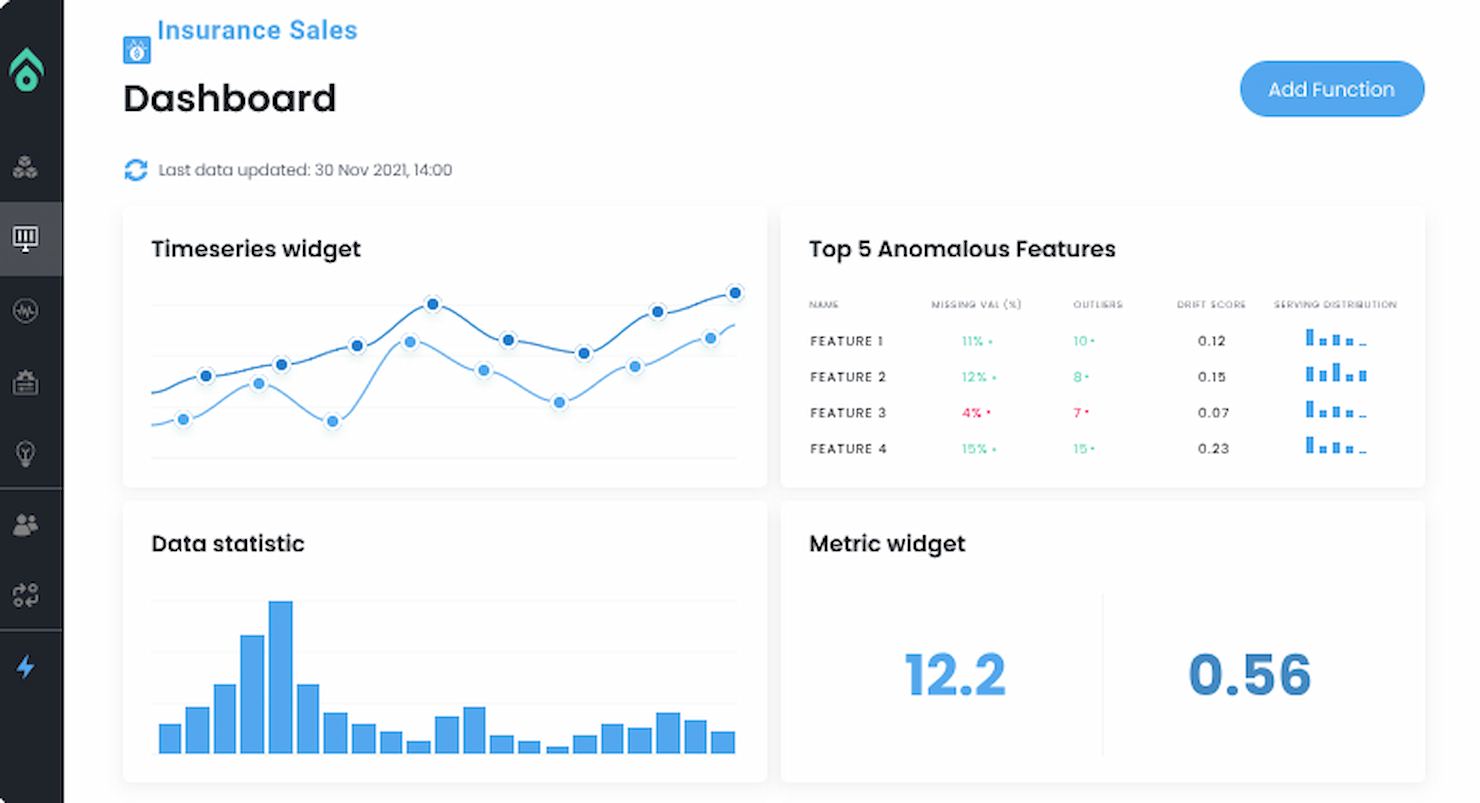
Aporia offers an advanced platform tailored to monitor machine-learning models once they are deployed into production environments. With its deep focus on providing visibility and understanding into how models behave in real-world scenarios, it's evident why Aporia is a top choice for those prioritizing machine learning monitoring.
Why I Picked Aporia: In the process of selecting the most fitting tool for ML model monitoring, Aporia consistently came up on top. The platform has a unique combination of features that provide a holistic view of model performance, setting it apart from many other tools in the market.
Given its specific design and capabilities, I have determined that Aporia is truly the best for those needing detailed insights into their machine-learning models in production.
Standout Features & Integrations:
Aporia's platform allows users to track model drift, anomalies, and performance degradation over time. Additionally, it offers custom alerting to notify stakeholders when the model's behavior deviates from the expected.
On the integration front, Aporia supports a variety of machine learning frameworks and platforms, ensuring compatibility and ease of implementation.
Pros and Cons
Pros:
- Broad support for multiple machine learning frameworks
- Custom alerting ensures timely responses to potential issues
- Comprehensive monitoring of model drift and performance
Cons:
- Advanced features might be overwhelming for basic use cases
- Pricing details can be less transparent without direct communication
- Some learning curve for those new to model monitoring
Weitere empfehlenswerte Plattformen für Künstliche Intelligenz
Hier sind einige weitere KI-Plattformen, die es zwar nicht auf meine Shortlist geschafft haben, aber dennoch einen Blick wert sind:
- elvex
For enterprise AI adoption
- TestGrid
For software testing
- RapidMiner
Good for collaborative data science operations
- H2O.ai
Good for scalable open-source machine learning
- TensorFlow
Good for large-scale machine learning deployments
- AWS SageMaker
Good for full-cycle machine learning workflows
- SAS Model Manager
Good for robust model management and governance
- BigML
Good for visual-based machine learning models
- NVIDIA Deep Learning AI
Good for GPU-accelerated deep learning performance
- Intel AI
Good for leveraging hardware-optimized AI processing
- Salesforce Einstein AI
Good for CRM-integrated AI insights


Auswahlkriterien für Plattformen für Künstliche Intelligenz
Bei der Auswahl der besten Plattformen für Künstliche Intelligenz für diese Liste habe ich die typischen Bedürfnisse und Schmerzpunkte von Käufer:innen wie Datenintegration und benutzerfreundliche Oberflächen berücksichtigt. Um die Bewertung strukturiert und fair zu gestalten, habe ich zudem folgendes Bewertungsraster genutzt:
Kernfunktionen (25% der Gesamtwertung)
Jede Lösung musste für die Aufnahme in diese Liste diese häufigen Anwendungsfälle abdecken:
- Datenanalyse
- Vorausschauende Analytik
- Verarbeitung natürlicher Sprache
- Integration von maschinellem Lernen
- Automatisierung von Routineaufgaben
Zusätzliche herausragende Funktionen (25% der Gesamtwertung)
Um die Auswahl weiter einzugrenzen, habe ich auch nach besonderen Eigenschaften gesucht, wie zum Beispiel:
- Anpassbare Algorithmen
- Echtzeit-Datenverarbeitung
- Erweiterte Sicherheitsmaßnahmen
- Integration mit IoT-Geräten
- Mehrsprachige Unterstützung
Benutzerfreundlichkeit (10% der Gesamtwertung)
Um die Benutzerfreundlichkeit jedes Systems einzuschätzen, habe ich folgende Punkte berücksichtigt:
- Intuitive Benutzeroberfläche
- Einfache Navigation
- Geringe Einarbeitungszeit
- Responsives Design
- Anpassbare Dashboards
Onboarding (10% der Gesamtbewertung)
Um die Onboarding-Erfahrung jeder Plattform zu bewerten, habe ich Folgendes berücksichtigt:
- Verfügbarkeit von Schulungsvideos
- Interaktive Produkttouren
- Zugang zu Vorlagen
- Webinare und Live-Demos
- Chatbots für sofortige Unterstützung
Kundensupport (10% der Gesamtbewertung)
Zur Beurteilung der Kundensupport-Dienste jedes Softwareanbieters habe ich Folgendes berücksichtigt:
- 24/7 Support-Verfügbarkeit
- Multi-Channel-Supportoptionen
- Reaktionszeit
- Zugang zur Wissensdatenbank
- Personalisierter Support
Preis-Leistungs-Verhältnis (10% der Gesamtbewertung)
Um das Preis-Leistungs-Verhältnis jeder Plattform zu bewerten, habe ich Folgendes berücksichtigt:
- Konkurrenzfähige Preisgestaltung
- Flexible Abonnementpläne
- Verfügbarkeit einer kostenlosen Testphase
- Kosten im Verhältnis zum Funktionsumfang
- Rabatte für Langzeitnutzung
Kundenbewertungen (10% der Gesamtbewertung)
Um einen Eindruck von der allgemeinen Kundenzufriedenheit zu bekommen, habe ich beim Lesen von Kundenbewertungen Folgendes berücksichtigt:
- Allgemeine Zufriedenheitsbewertungen
- Häufig gemeldete Probleme
- Lob für bestimmte Funktionen
- Trends im Feedback im Laufe der Zeit
- Empfehlungen von Nutzern
Wie wählt man eine Plattform für künstliche Intelligenz aus?
Es ist leicht, sich in langen Funktionslisten und komplexen Preisstrukturen zu verlieren. Damit Sie sich während Ihres individuellen Auswahlprozesses nicht aus dem Blick verlieren, hier eine Checkliste mit Faktoren, die Sie im Hinterkopf behalten sollten:
| Faktor | Worauf achten? |
|---|---|
| Skalierbarkeit | Kann die Plattform mit Ihrem Unternehmen wachsen? Überlegen Sie, wie sie mit zunehmenden Datenmengen und Nutzern umgeht. Achten Sie auf Leistungsabfälle bei größerem Umfang. |
| Integrationen | Lässt sie sich mit Ihren bestehenden Tools verbinden? Prüfen Sie, ob Ihre Software-Landschaft unterstützt wird oder Umgehungslösungen erforderlich sind, die Arbeitsabläufe erschweren. |
| Anpassbarkeit | Können Sie die Lösung an Ihre Anforderungen anpassen? Achten Sie auf Flexibilität, ohne dass umfangreiche Programmierkenntnisse oder externe Hilfe notwendig sind. |
| Benutzerfreundlichkeit | Ist die Oberfläche für Ihr Team intuitiv? Vermeiden Sie steile Lernkurven, die die Einführung verzögern und die Produktivität mindern. |
| Implementierung und Onboarding | Wie lange dauert die Inbetriebnahme? Achten Sie auf verfügbare Ressourcen wie Schulungsmaterialien und Unterstützung während der Umstiegsphase. |
| Kosten | Passt die Preisgestaltung zu Ihrem Budget? Vergleichen Sie Kosten und gebotene Funktionen und achten Sie auf versteckte Gebühren, die die Gesamtausgaben erhöhen können. |
| Sicherheitsmaßnahmen | Wie wird Ihre Daten geschützt? Achten Sie auf die Einhaltung branchenüblicher Sicherheitsstandards und umfassende Datenschutzmaßnahmen. |
| Support-Verfügbarkeit | Erhalten Sie Unterstützung, wenn Sie sie benötigen? Prüfen Sie, ob der Support mit Ihren Arbeitszeiten und bevorzugten Kommunikationskanälen übereinstimmt. |
Was ist eine Plattform für künstliche Intelligenz?
Eine Plattform für künstliche Intelligenz ist eine Software, die die Entwicklung, Bereitstellung und Verwaltung von KI-Modellen und -Anwendungen ermöglicht. Diese Tools werden häufig von Data Scientists, Entwicklern und IT-Fachleuten eingesetzt, um Entscheidungsprozesse zu verbessern und Aufgaben zu automatisieren. Datenanalyse, prädiktive Analysen und die Integration von maschinellem Lernen helfen dabei, große Datensätze zu verarbeiten, die Genauigkeit zu erhöhen und komplexe Prozesse zu automatisieren. Insgesamt bieten diese Tools erheblichen Mehrwert durch Effizienzsteigerung und datengestützte Einblicke.
Funktionen
Wenn Sie eine Plattform für künstliche Intelligenz auswählen, achten Sie auf folgende zentrale Funktionen:
- Datenanalyse: Bietet Werkzeuge zur Verarbeitung und Interpretation großer Datensätze, damit Benutzer aussagekräftige Erkenntnisse gewinnen können.
- Prädiktive Modellierung: Verwendet Algorithmen, um zukünftige Trends vorherzusagen und unterstützt damit proaktives Entscheiden.
- Integration von Machine Learning: Unterstützt den Aufbau und die Bereitstellung von Machine-Learning-Modellen und ermöglicht die Automatisierung komplexer Aufgaben.
- Konversationelle Intelligenz-Software: Ermöglicht Systemen, menschliche Sprache zu verstehen und darauf zu reagieren, wodurch die Interaktion mit Nutzer:innen verbessert wird.
- Anpassbare Algorithmen: Bietet Flexibilität, KI-Funktionen ohne umfangreiche Programmierung an individuelle Geschäftsanforderungen anzupassen.
- Echtzeit-Datenverarbeitung: Gewährleistet eine sofortige Auswertung von Daten und liefert aktuelle Erkenntnisse für zeitnahe Entscheidungen.
- Erweiterte Visualisierungstools: Hilft dabei, Daten visuell darzustellen und komplexe Informationen leichter verständlich zu machen.
- Mehrsprachige Unterstützung: Erleichtert die Arbeit mit vielfältigen Datensätzen durch die Unterstützung mehrerer Sprachen.
- Cloud-basierte Skalierbarkeit: Ermöglicht eine nahtlose Erweiterung der Funktionen entsprechend dem Unternehmenswachstum – ohne Hardware-Einschränkungen.
- Sicherheitsmaßnahmen: Schützt sensible Daten mittels Verschlüsselung und Einhaltung von Industriestandards.
Vorteile
Die Implementierung von KI-Software bringt zahlreiche Vorteile für Ihr Team und Ihr Unternehmen mit sich. Hier sind einige, auf die Sie sich freuen können:
- Verbesserte Entscheidungsfindung: Prädiktive Modellierung und Datenanalyse ermöglichen schnelle, fundierte Entscheidungen.
- Erhöhte Effizienz: Die Automatisierung von Aufgaben durch Machine Learning Integration reduziert manuellen Aufwand und spart Zeit.
- Verbesserte Nutzerinteraktion: Die Verarbeitung natürlicher Sprache ermöglicht bessere Kommunikation und Interaktion mit Nutzer:innen.
- Skalierbarkeit: Cloud-basierte Skalierbarkeit erlaubt es Ihrem Unternehmen, ohne Hardware-Limitierungen zu wachsen und sich veränderten Anforderungen anzupassen.
- Datensicherheit: Integrierte Sicherheitsmaßnahmen schützen sensible Informationen und stellen die Einhaltung von Industriestandards sicher.
- Kosteneinsparungen: Effiziente Datenverarbeitung und Automatisierung können langfristig zu geringeren Betriebskosten führen.
Kosten und Preise
Für die Auswahl einer Plattform für Künstliche Intelligenz ist es wichtig, verschiedene Preismodelle und Tarife zu kennen. Die Kosten variieren je nach Funktionsumfang, Teamgröße, Add-ons und weiteren Faktoren. Die folgende Tabelle fasst die gängigen Pläne, deren Durchschnittspreise sowie typische Funktionen zusammen, die in Lösungen für Plattformen für Künstliche Intelligenz enthalten sind:
Vergleichstabelle der Pläne für Plattformen für Künstliche Intelligenz
| Plan-Typ | Durchschnittspreis | Typische Funktionen |
|---|---|---|
| Gratis-Tarif | $0 | Grundlegende Datenanalyse, begrenzte Machine Learning-Modelle und Community-Support. |
| Persönlicher Tarif | $10-$30/user/month | Erweiterte Datenverarbeitung, anpassbare Algorithmen und E-Mail-Support. |
| Business-Tarif | $50-$100/user/month | Echtzeit-Datenverarbeitung, mehrsprachige Unterstützung und bevorzugter Kundendienst. |
| Enterprise-Tarif | $150-$300/user/month | Umfassende Integrationsmöglichkeiten, persönliche Ansprechperson und verbesserte Sicherheit. |
Häufig gestellte Fragen zu Plattformen für Künstliche Intelligenz
Hier finden Sie Antworten auf häufig gestellte Fragen zu Plattformen für Künstliche Intelligenz:
Wie gewährleiste ich Datenschutz bei KI-Plattformen?
Um Ihre Daten zu schützen, vermeiden Sie es, vertrauliche oder persönliche Informationen in KI-Systeme einzugeben. Deaktivieren Sie gegebenenfalls Datenerfassungsfunktionen und nutzen Sie eindeutige Anmeldedaten anstelle von Social-Media-Konten. Überprüfen und widerrufen Sie regelmäßig App-Berechtigungen, um unbefugten Zugriff zu verhindern.
Gibt es rechtliche Bedenken bei der Nutzung von KI-generierten Inhalten?
Ja, die Nutzung von KI-generierter Kunst oder Inhalten kann insbesondere im Hinblick auf das Urheberrecht rechtliche Auswirkungen haben. Prüfen Sie stets die Nutzungsbedingungen der jeweiligen Plattform und verzichten Sie auf eine kommerzielle Verwendung von KI-generierten Bildern, solange die rechtlichen Vorgaben unklar sind.
Was sollte ich bei der Integration von KI in bestehende Systeme beachten?
Stellen Sie sicher, dass die KI-Plattform nahtlos mit Ihren aktuellen Tools und Arbeitsabläufen zusammenarbeitet. Kompatibilität ist entscheidend, um Datensilos zu vermeiden und einen effizienten Betrieb zu gewährleisten. Testen Sie Integrationen während einer Testphase, um die Funktionalität zu überprüfen und frühzeitig Probleme zu beheben.
Wie kann sich eine KI-Plattform finanziell auf mein Unternehmen auswirken?
KI-Plattformen können die Effizienz steigern und Kosten senken, jedoch können Datenpannen erhebliche finanzielle Folgen haben. Investieren Sie in Plattformen mit starken Sicherheitsmaßnahmen und aktualisieren Sie Ihre Systeme regelmäßig, um potenzielle Bedrohungen abzuwehren.
Was sind typische Stolpersteine bei der Einführung von KI-Plattformen?
Häufige Probleme sind unzureichende Schulungen für Ihr Team und eine unterschätzte Implementierungsdauer. Planen Sie einen ausführlichen Onboarding-Prozess und reservieren Sie Ressourcen für laufende Schulungen und Support, um eine erfolgreiche Einführung zu gewährleisten.
Wie erreiche ich die besten Ergebnisse mit KI-Tools?
Sorgfältige Eingaben und Faktenchecks sind entscheidend für optimale Ergebnisse. Nutzen Sie mehrere KI-Plattformen für vielfältiges Feedback und ziehen Sie bei rechtlichen oder Personalfragen professionelle Beratung hinzu, um Genauigkeit und Compliance sicherzustellen.
Wie geht es weiter:
Wenn Sie sich noch über Plattformen für Künstliche Intelligenz informieren, verbinden Sie sich mit einem SoftwareSelect-Berater für kostenlose Empfehlungen.
Sie füllen ein Formular aus und haben ein kurzes Gespräch, in dem Ihre spezifischen Anforderungen besprochen werden. Anschließend erhalten Sie eine Shortlist mit passenden Softwarelösungen. Auf Wunsch begleiten sie Sie durch den gesamten Kaufprozess – inklusive Preisverhandlungen.