
32 Beste Kollaborative Programmierplattformen 2026

10 Beste Plattformen für kollaboratives Coding – Shortlist
Here's my pick of the 10 best software from the 32 tools reviewed.


Kollaborative Coding-Plattformen ermöglichen es Entwicklern, in Echtzeit am selben Code zu arbeiten – egal ob sie nebeneinander oder weltweit verteilt sitzen.
Diese Tools sind unverzichtbar, wenn Bildschirmfreigabe nicht mehr ausreicht, Versionskontrolle unübersichtlich wird oder man Zeit beim Debuggen über den Chat verliert. Funktionen wie gemeinsames Editieren in Echtzeit, geteilte Terminals und browserbasiertes Zusammenarbeiten erleichtern die Problemlösung im Team, ohne dauernd den Kontext wechseln oder Missverständnisse klären zu müssen.
Ich habe mit Teams gearbeitet, die diese Tools für alles Mögliche nutzen – von Peer-Reviews über Onboarding bis hin zu Full-Stack-Debugging-Sessions. Dieser Leitfaden basiert auf diesen Erfahrungen und soll dir helfen, eine Plattform auszuwählen, die zu deinem Team und dessen Code-Workflow passt.
Table of Contents
Why Trust Our Software Reviews
Zusammenfassung: Beste Plattformen für kollaboratives Coding
| Tool | Best For | Trial Info | Price | ||
|---|---|---|---|---|---|
| 1 | Best for seamless team communication and collaboration | Free demo available | From $15/user/month (billed annually) | Website | |
| 2 | Best for code skill assessments and training | Free trial available | From $199/user/month | Website | |
| 3 | Best for secure file sharing and storage | Free plan + 14-day free trial available | From $28/user/month (billed annually) | Website | |
| 4 | Best for remote team task management | Free plan available | From $10.99/user/month (billed annually) | Website | |
| 5 | Best for centralized team knowledge sharing | Free plan + 7-day free trial available | From $6.70/user/month | Website | |
| 6 | Best for internal technical knowledge base | Not available | From $10/user/month | Website | |
| 7 | Best for live collaborative coding sessions | Not available | From $9.90/user/month (billed annually) | Website | |
| 8 | Best for integrating code documentation with coding tasks | Free demo available | From $20/user/month (billed annually) | Website | |
| 9 | Best for visual brainstorming and idea mapping | Free plan available | From $8/member/month (billed annually) | Website | |
| 10 | Best for workflow automation and visualization | Free plan available | From $9/user/month (billed annually) | Website |


-

Site24x7
Visit WebsiteThis is an aggregated rating for this tool including ratings from Crozdesk users and ratings from other sites.4.6 -
Docker
Visit WebsiteThis is an aggregated rating for this tool including ratings from Crozdesk users and ratings from other sites.4.6 -
Pulumi
Visit WebsiteThis is an aggregated rating for this tool including ratings from Crozdesk users and ratings from other sites.4.8





Bewertungen: Beste Plattformen für kollaboratives Coding


Nextiva is a unified communications platform that combines VoIP phone services, team messaging, video conferencing, and customer management tools. Given its comprehensive communication suite that facilitates smooth collaboration among team members, it aligns perfectly with the need for team communication and collaboration.
Why I Picked Nextiva:
I picked Nextiva as a part of this list due to its versatile functionality that spans various aspects of business communication. It has a broad range of features contributing to its distinction, from cloud phone service to team chat to customer service tools. Because of this extensive range of communication and collaboration capabilities, I see Nextiva as an ideal team communication tool.
Standout features and integrations:
Some critical elements of Nextiva include VoIP phone services, team messaging, video conferencing, and customer relationship management tools. Its advanced analytics and reporting further enhance its utility for businesses. Nextiva integrates well with commonly used business tools such as Microsoft Teams, Google Workspace, Salesforce, and Zendesk.
Pros and Cons
Pros:
- Smooth integration with many third-party business applications
- Advanced analytics and reporting
- A comprehensive suite of communication tools
Cons:
- Setup can be somewhat complicated for non-technical users.
- Requires high-speed internet for optimal performance
- The pricing structure can be complex for new users.


Coderbyte is a web-based platform aimed at helping individuals improve their coding skills through practice and testing. With an extensive collection of coding challenges and preparatory courses for coding interviews, it is particularly beneficial for skills assessment and training.
Why I Picked Coderbyte:
When it came to picking a platform for coding skills assessments and training, Coderbyte seemed a natural choice. Additionally, its comprehensive library of coding challenges for various difficulty levels makes it stand out. The fact that these challenges cater to different programming languages strengthens my judgment that Coderbyte is the best platform for code skill assessments and training.
Standout features and integrations:
Critical features of Coderbyte include a diverse set of coding challenges, an in-built code editor for practice, and solutions provided by the community. It also offers official solutions and a video walkthrough for some of its challenges, facilitating better understanding. Though direct integrations are limited, it supports various programming languages, allowing users to practice and learn in the language of their preference.
Pros and Cons
Pros:
- Community solutions and video walkthroughs are available
- Supports multiple programming languages
- Wide range of coding challenges
Cons:
- The interface could be improved for a better user experience.
- High starting price for individual users
- Limited direct integrations

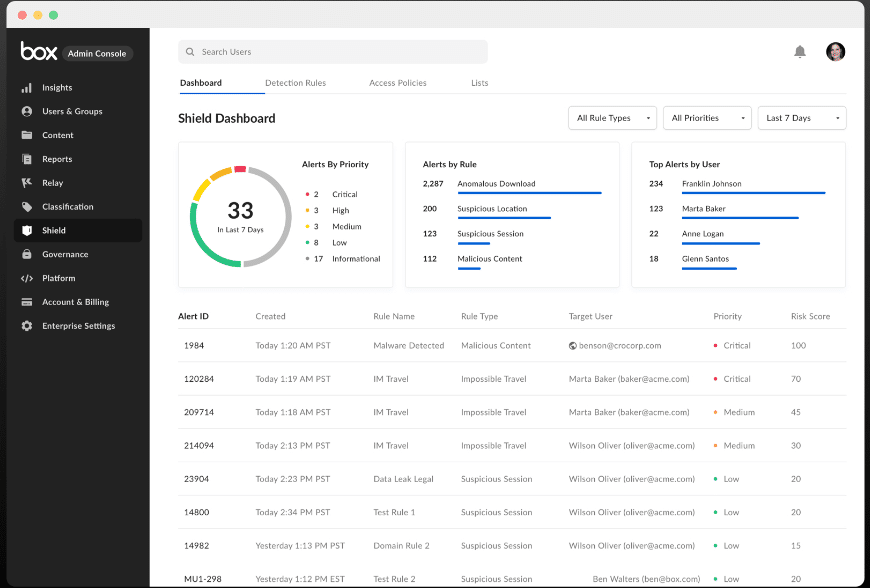
The box is a cloud-based storage and collaboration tool that allows users to securely store, share, and access files online. Its robust security features make it an ideal choice for businesses seeking to securely share sensitive files and data, making it particularly suitable for secure file sharing and storage.
Why I Picked Box:
During my selection process, I chose Box because of its dedication to data security and ease of use. It's an essential storage solution and a comprehensive platform offering robust data encryption and detailed access controls. The box is the best for secure file sharing and storage due to its steadfast commitment to data protection.
Standout features and integrations:
Box offers real-time collaboration, automatic file sync, and version history. But what makes it truly stand out is its security features, including granular access controls, advanced encryption, and compliance with various global privacy standards. Box also integrates well with many business apps, including Office 365, G Suite, Salesforce, and Slack.
Pros and Cons
Pros:
- Real-time collaboration on documents
- Integrates with a wide range of third-party applications
- Robust security features offer strong data protection.
Cons:
- The search functionality could be improved for ease of use.
- The file size limit in the basic plan
- The user interface can be confusing for first-time users.


Asana is a task and project management tool that helps teams organize, track, and manage their work. It's instrumental in remote work settings, where coordinating tasks and maintaining project visibility can also be very challenging.
Why I Picked Asana:
Asana's prowess in facilitating remote team task management quickly emerged when considering various tools. Its comprehensive feature set, coupled with an intuitive interface, helps it outshine competitors. I chose Asana because it bridges the gap in communication and project oversight often experienced in remote teams, making it the best for this use case.
Standout features and integrations:
Asana offers various features, including timeline views, task dependencies, and custom fields to add project-specific details. Additionally, it provides Kanban boards for visual project management. Asana integrates well with numerous third-party applications such as Slack, Google Drive, and Zoom, enhancing its utility in a typical remote work setup.
Pros and Cons
Pros:
- A broad range of third-party integrations
- Versatile view options, including lists, boards, and timelines
- Advanced task management with features like dependencies and custom fields
Cons:
- Advanced features like workload and goals are only available in the business plan.
- Limited functionality in the free plan
- It can be overwhelming for new users due to its numerous features.


Confluence is a robust collaborative software platform designed to centralize team knowledge sharing. It's a digital workspace where teams can also create, share, and collaborate on projects in one accessible location.
Why I Picked Confluence:
Confluence's ability to foster a unified knowledge-sharing space caught my attention in assessing multiple collaborative platforms. It's not just about creating and editing documents, but it's the way Confluence makes knowledge accessible and organized for every team member. The platform's distinctiveness lies in its ability to bridge information gaps within a team, which justifies why I consider it the best for centralized team knowledge sharing.
Standout features and integrations:
Confluence's page and space structure help teams effectively organize their work and knowledge. The platform also offers powerful search functionality, ensuring critical information is always available. On the integration side, Confluence works well with tools such as Jira, Trello, Slack, and many other tools, facilitating a smooth work process with your existing toolset.
Pros and Cons
Pros:
- Excellent integration with other Atlassian products and a host of external tools
- Robust search functionality for quick access to information
- Provides a centralized platform for team knowledge sharing
Cons:
- Customization options may seem limited for complex project needs.
- The user interface could benefit from a design overhaul.
- The learning curve might be steep for non-technical users.
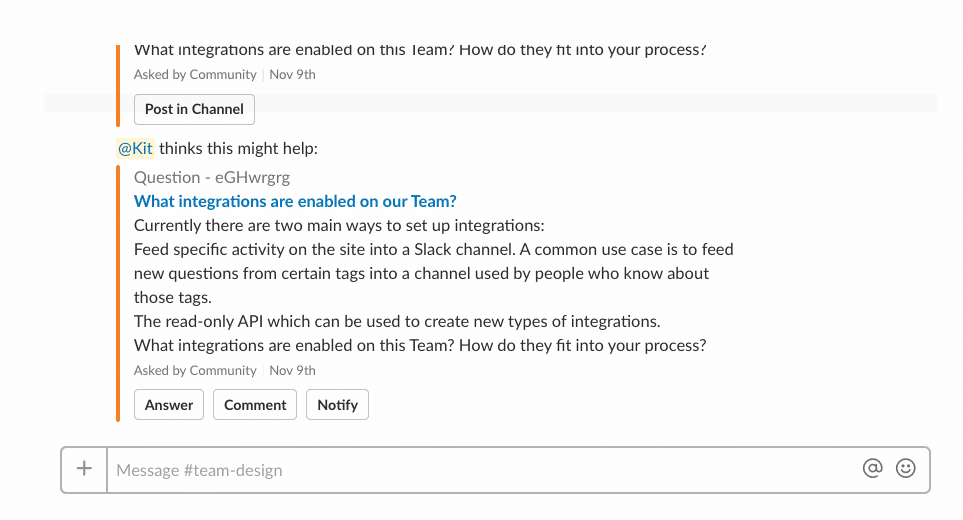
Stack Overflow for Teams is an internal knowledge-sharing and collaboration platform primarily targeting technical teams. It thrives as a private, secure space where couples can ask questions and get answers, making it an ideal tool for creating an internal technical knowledge base.
Why I Picked Stack, Overflow for Teams:
I chose Stack Overflow for Teams for this list due to its strong reputation for facilitating efficient knowledge sharing within technical teams. Also, what makes it different is its familiar Q&A format that so many developers and technical staff are accustomed to, which increases adoption and utilization rates. For these reasons, I determined Stack Overflow for Teams to be the best tool for creating an internal technical knowledge base.
Standout features and integrations:
Stack Overflow for Teams provides features like tagging, instant search, and an integrated interface, making knowledge accumulation and retrieval swift and efficient. Its integrations with everyday tools such as Slack and Microsoft Teams ensure that essential updates and discussions are noticed.
Pros and Cons
Pros:
- Valuable integrations with tools like Slack and Microsoft Teams
- Efficient search and tagging system for ease of information retrieval
- Familiar Q&A format that's easy to adopt
Cons:
- No option for a single-user plan
- Less suited for non-technical teams
- The cost might be prohibitive for smaller teams.


Code With Me is a service by JetBrains that enables developers to share the project in their IDE with others, facilitating real-time, joint coding. It stands out for its live coding sessions, where multiple participants can simultaneously observe and adjust the code.
Why I Picked Code With Me:
Code With Me stood out in selecting tools for this list because it takes coding collaboration to the next level with its live coding sessions. The ability to share a project from one's IDE in real time sets it apart from other collaboration tools. Given these unique characteristics, I've determined Code With Me to be the top choice for live collaborative coding sessions.
Standout features and integrations:
Critical features of Code With Me include its simultaneous collaborative editing as well as its integrated voice and video chat, and a follow-participant feature that allows you to view someone else's actions in real time. Integration with popular IDEs like IntelliJ IDEA, PyCharm, WebStorm, and others is a significant advantage, allowing developers to work in an environment they are comfortable with.
Pros and Cons
Pros:
- Integration with popular JetBrains IDEs
- Integrated voice and video chat for better communication
- Real-time collaborative coding is possible.
Cons:
- Pricing could be a barrier for smaller teams.
- Some learning curves to use efficiently.
- It might be overkill for simple collaborative tasks.

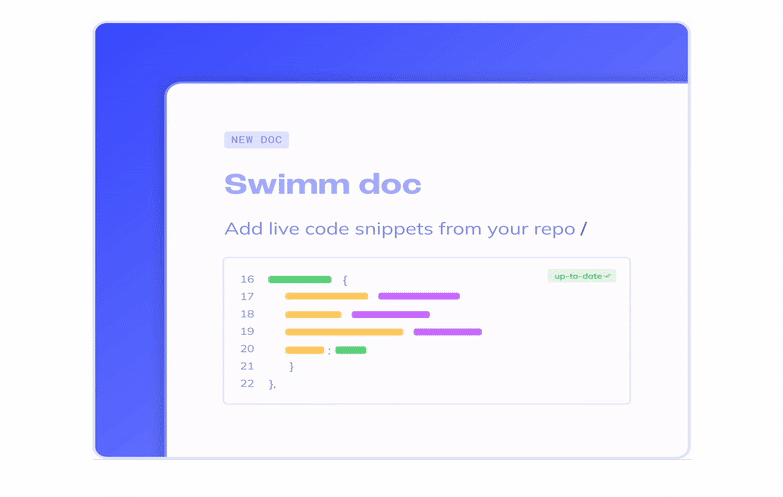
Swimm is a tool that ensures documentation stays synced with your codebase. It provides an environment for writing and managing documents and allows developers to link parts of their papers to relevant code snippets. This unique feature positions Swimm as a fantastic tool for integrating code documentation with coding tasks.
Why I Picked Swimm:
Swimm stood out in selecting tools for this list for its innovative approach to keeping code documentation up-to-date, a frequent challenge in dynamic development environments. Also, i appreciate how Swimm creates a symbiosis between code and documentation, making it the ideal choice for integrating code documentation with coding tasks.
Standout features and integrations:
Critical features of Swimm also include its automated syncing between documentation and codebase, the ability to write unit tests in documentation, and the creation of interactive learning materials. As for integrations, Swimm works well with Github, allowing for seamless connection with your repositories.
Pros and Cons
Pros:
- Supports the creation of interactive learning materials
- The ability to write unit tests in documentation
- Code and documentation stay in sync.
Cons:
- A limited number of direct integrations
- A bit of a learning curve for non-technical team members
- Higher starting price point compared to some competitors


Miro is an interactive online whiteboard platform that boosts team collaboration and creativity. It's a digital canvas where teams can brainstorm, map out ideas, and turn them into tangible actions.
Why I Picked Miro:
Miro's capacity to encourage visual brainstorming and idea mapping stood out in my selection process. Also, its ability to foster creativity and collaboration in a virtual environment makes it unique in a pool of similar tools. Miro is particularly adept at transforming abstract concepts into explicit visual representations, leading me to deem it as the best for visual brainstorming and idea mapping.
Standout features and integrations:
Miro offers numerous templates, such as brainstorming, flowcharts, and mind maps, facilitating efficient idea generation. The infinite canvas can accommodate expansive ideas without restrictions. Miro also integrates well with applications like Google Drive, Dropbox, Slack, and even more specialized tools like Jira and Sketch, allowing for a cohesive workflow.
Pros and Cons
Pros:
- Seamless integrations with various productivity tools
- Extensive selection of templates for different use cases
- Infinite canvas for unrestricted idea generation and mapping
Cons:
- Advanced features are locked behind higher-tier plans
- Real-time collaboration can be laggy with a large number of participants.
- The interface might feel overwhelming to new users.
New Product Updates from Miro

Miro Enhances AI Workflows and Tables for Task Planning
Miro enhances AI workflows and Tables with AI-generated planning boards and web-aware automation. These updates help teams organize tasks faster and analyze external content within workflows. For more information, visit Miro’s official site.

Monday.com is a cloud-based project management platform designed to help teams organize and track their work. With its distinctive workflow automation and visualization capacity, it's ideally suited for businesses that need to streamline their processes and visualize their workflows.
Why I Picked Monday.com:
When selecting a tool for this list that excels in workflow automation and visualization, I considered Monday.com because of its comprehensive project management capabilities. Moreover, the platform is renowned for its dynamic workflow templates and board designs, enabling teams to visualize project progress in real time. This makes it the ideal choice for businesses that aim to streamline their operations and also get a clear picture of their workflows.
Standout features and integrations:
Monday.com offers many features, including customizable workflows, automated notifications, and progress tracking. It also stands out with its range of visualization options, from timelines and Gantt charts to Kanban boards and maps. Notable integrations include Slack, Google Drive, and Outlook, further improving workflow continuity.
Pros and Cons
Pros:
- Seamless integration with other tools
- Wide variety of visualization options
- Customizable workflows and automations
Cons:
- Customization can require a learning curve.
- The price might be high for small teams.
- The platform can be overwhelming for new users.
New Product Updates from monday.com
monday.com Launches MCP Framework for AI Agents
monday.com introduces its MCP framework and hosted MCP service for AI agents. This enables secure access to structured data and workflow actions directly within monday.com. For more information, visit monday.com's official site.
Weitere Plattformen für kollaboratives Coding
Unten findest du eine Liste weiterer kollaborativer Coding-Plattformen, die ich in die engere Auswahl genommen habe, die es aber noch nicht in die Top 10 geschafft haben. Sie sind trotzdem einen Blick wert.
- Lucidspark
For real-time collaborative brainstorming
- Zoho Projects
For large-scale project management
- ReviewStudio
Good for collaborative creative project reviews
- Connecteam
Good for managing and engaging with non-desk teams
- Zulip
Good for organized, topic-based team communication
- Kontentino
Good for managing and approving social media content
- Trello
Good for visually organizing project workflows
- Wrike
Good for customizable project management needs
- Backlog
Good for comprehensive project and code management
- Ziflow
Good for automating creative content review and approval processes
- Project.co
Good for coordinating and tracking project communications
- Elium
Good for knowledge sharing and collaboration within teams
- Birdview PSA
Good for streamlining project, service, and client management
- YouTrack
Good for Agile project management and issue tracking
- ConnectWise ScreenConnect
Good for secure remote control solutions
- Visual Planning
Good for streamlining resource scheduling
- BOAST
Good for all-in-one business operations and project management
- Pexip Secure Collaboration
Good for video conferencing with a focus on security
- StartMeeting
Good for affordable video and audio conferencing
- RealityMAX
Good for remote work and training via virtual reality
- Trackfront
Good for managing vendor and purchase order processes
- Ledger
Good for managing projects, resources, and finances in one platform


Weitere Bewertungen kollaborativer Coding-Plattformen
- Website-Entwicklungssoftware
- App-Entwicklungssoftware
- Software für mobile App-Entwicklung
- Cloud-Entwicklungsplattformen
Auswahlkriterien für kollaborative Coding-Plattformen
Bei der Auswahl der besten kollaborativen Coding-Plattformen für diese Liste habe ich typische Anforderungen und Probleme von Nutzern betrachtet – darunter Versionskontrolle und Teamkommunikation. Um die Bewertung objektiv und strukturiert zu gestalten, habe ich mich an folgendes Schema gehalten:
Kernfunktionen (25 % der Gesamtwertung)
Um auf die Liste zu kommen, musste jede Lösung diese Anwendungsfälle abdecken:
- Echtzeit-Kollaboration
- Integration mit Versionskontrollsystemen
- Code-Review-Prozess
- Unterstützung mehrerer Programmiersprachen
- Funktionen einer integrierten Entwicklungsumgebung (IDE)
Zusätzliche besondere Funktionen (25 % der Gesamtwertung)
Um die Auswahl weiter einzugrenzen, habe ich zudem auf folgende Alleinstellungsmerkmale geachtet:
- Künstliche Intelligenz zur Unterstützung des Codings
- Anpassbare Workflows
- Integrierte Testwerkzeuge
- Offline-Bearbeitungsmöglichkeiten
- Erweiterte Sicherheitsmaßnahmen
Benutzerfreundlichkeit (10 % der Gesamtwertung)
Um die Benutzerfreundlichkeit der Systeme zu bewerten, habe ich folgende Aspekte betrachtet:
- Intuitive Benutzeroberfläche
- Geringe Einarbeitungszeit
- Responsives Design
- Individuell anpassbare Einstellungen
- Effiziente Navigation
Onboarding (10 % der Gesamtwertung)
Um das Onboarding-Erlebnis jeder Plattform zu prüfen, habe ich folgende Kriterien berücksichtigt:
- Verfügbarkeit von Schulungsvideos
- Interaktive Produkttouren
- Zugang zu Vorlagen
- Hilfreiche Chatbots
- Live-Webinare zur Anleitung
Kundensupport (10 % der Gesamtbewertung)
Um die Kundensupport-Dienste jedes Softwareanbieters zu bewerten, habe ich Folgendes berücksichtigt:
- 24/7 Erreichbarkeit
- Multikanal-Supportmöglichkeiten
- Kompetentes Supportpersonal
- Schnelle Reaktionszeiten
- Umfassendes Hilfezentrum
Preis-Leistungs-Verhältnis (10 % der Gesamtbewertung)
Um das Preis-Leistungs-Verhältnis jeder Plattform zu bewerten, habe ich Folgendes berücksichtigt:
- Wettbewerbsfähige Preise
- Verhältnis von Funktionen zu Preis
- Flexible Abonnementpläne
- Transparente Preisstruktur
- Verfügbarkeit einer kostenlosen Testversion
Kundenbewertungen (10 % der Gesamtbewertung)
Um einen Eindruck von der allgemeinen Kundenzufriedenheit zu erhalten, habe ich beim Lesen der Kundenbewertungen Folgendes beachtet:
- Konsistent positives Feedback
- Hohe Bewertungen auf verschiedenen Plattformen
- Regelmäßige Updates und Verbesserungen
- Lob für den Kundenservice
- Von Nutzern bestätigte Benutzerfreundlichkeit
Wie wählt man eine kollaborative Coding-Plattform aus?
Es ist leicht, sich in langen Funktionslisten und komplexen Preisstrukturen zu verlieren. Damit Sie während Ihres individuellen Auswahlprozesses den Überblick behalten, finden Sie hier eine Checkliste von Faktoren, die Sie berücksichtigen sollten:
| Faktor | Worauf achten? |
|---|---|
| Skalierbarkeit | Kann die Plattform mit Ihrem Team wachsen? Prüfen Sie, ob sie eine wachsende Anzahl von Nutzern und Projekten ohne Leistungsprobleme unterstützt. |
| Integration | Lässt sie sich mit anderen von Ihnen genutzten Tools verbinden? Überprüfen Sie die Kompatibilität mit Ihrer bestehenden Software-Landschaft, zum Beispiel Projektmanagement- oder CI/CD-Tools. |
| Anpassbarkeit | Können Sie die Plattform an Ihre Workflows anpassen? Suchen Sie nach Plattformen, die Anpassungen an die spezifischen Programmierpraktiken und Vorlieben Ihres Teams ermöglichen. |
| Benutzerfreundlichkeit | Ist die Plattform intuitiv? Achten Sie auf eine benutzerfreundliche Oberfläche, die die Einarbeitungszeit minimiert und Ihr Team produktiv hält. |
| Implementierung und Einarbeitung | Wie reibungslos ist die Umstellung? Bewerten Sie die verfügbaren Ressourcen zur Einarbeitung, etwa Schulungsmaterialien und Kundensupport während der Einrichtung. |
| Kosten | Passt die Lösung in Ihr Budget? Vergleichen Sie Preismodelle, berücksichtigen Sie Zusatzkosten und suchen Sie nach einer Lösung mit dem besten Preis-Leistungs-Verhältnis. |
| Sicherheitsstandards | Sind Ihre Projekte geschützt? Überprüfen Sie die Sicherheitsmaßnahmen der Plattform, insbesondere Datenverschlüsselung und Zugriffskontrollen, damit Ihr Code sicher bleibt. |
Was ist eine kollaborative Coding-Plattform?
Eine kollaborative Coding-Plattform ist ein Tool, das es mehreren Entwicklern ermöglicht, gemeinsam in Echtzeit Code zu schreiben, zu bearbeiten und zu debuggen. Sie wird von Softwareingenieuren, verteilten Teams und Programmierdozenten genutzt, die ohne räumliche Nähe zusammenarbeiten müssen.
Funktionen wie gemeinsame Terminals, Live-Codebearbeitung und integrierter Chat helfen, Fehler schneller zu lösen, Code im Team zu prüfen und stets auf dem gleichen Stand zu bleiben. Diese Tools erleichtern das gemeinsame Coden, ohne sich gegenseitig auszubremsen.
Funktionen
Achten Sie bei der Auswahl einer kollaborativen Coding-Plattform auf die folgenden Schlüsselfunktionen:
- Echtzeit-Zusammenarbeit: Ermöglicht mehreren Entwicklern, gleichzeitig am selben Code zu arbeiten, was die Teamkommunikation und Effizienz verbessert.
- Integration von Versionskontrollsystemen: Verbindet sich mit Versionskontrollsystemen wie Git und ermöglicht eine einfache Nachverfolgung von Codeänderungen und -historie.
- Code-Review-Prozess: Erleichtert die Überprüfung des Codes durch Kollegen und stellt so Qualität und Konsistenz im Code vor der Bereitstellung sicher.
- Mehrsprachiger Support: Bietet Kompatibilität mit verschiedenen Programmiersprachen und ist dadurch vielseitig für verschiedene Projekte und Teams einsetzbar.
- Funktionen einer integrierten Entwicklungsumgebung (IDE): Stellt integrierte Programmierwerkzeuge und Editoren zur Verfügung, um den Entwicklungsprozess zu optimieren.
- KI-gestützte Programmierung: Schlägt Code-Vervollständigungen und Optimierungen vor und unterstützt Entwickler dabei, schneller und mit weniger Fehlern zu programmieren.
- Individuell anpassbare Workflows: Ermöglicht Teams, die Plattform an ihre spezifischen Programmierpraktiken und Projektanforderungen anzupassen.
- Offline-Bearbeitungsmöglichkeiten: Entwickler können am Code arbeiten, auch ohne Internetverbindung, und so ihre Produktivität in jeder Situation sichern.
- Erweiterte Sicherheitsmaßnahmen: Schützt Code und Daten durch Verschlüsselung und Zugriffskontrollen und sorgt für Projektsicherheit.
- Interaktive Produkttouren: Bietet geführte Rundgänge für neue Nutzer, vereinfacht das Onboarding und verkürzt die Einarbeitungszeit.
Vorteile
Die Einführung einer kollaborativen Coding-Plattform bringt zahlreiche Vorteile für Ihr Team und Ihr Unternehmen mit sich. Hier sind einige, auf die Sie sich freuen können:
- Verbesserte Zusammenarbeit: Echtzeit-Zusammenarbeitsfunktionen ermöglichen Ihrem Team, effektiver zusammenzuarbeiten, Missverständnisse zu reduzieren und die Produktivität zu steigern.
- Höhere Codequalität: Durch Code-Review-Prozesse wird aller Code auf Fehler und Konsistenz geprüft, was zu besserer Qualität und zuverlässigerer Software führt.
- Mehr Flexibilität: Dank Mehrsprachensupport kann Ihr Team an verschiedenen Projekten arbeiten, ohne durch Programmiersprachen eingeschränkt zu sein.
- Optimierte Workflows: Individuell anpassbare Workflows erlauben Ihrem Team, die Plattform auf die jeweiligen Anforderungen zuschneiden – für mehr Effizienz im Projektmanagement.
- Schnellere Entwicklung: KI-gestützte Programmierung beschleunigt den Entwicklungsprozess durch Vorschläge und Automatisierung von Routineaufgaben, sodass Ihr Team sich auf Innovation konzentrieren kann.
- Höhere Sicherheit: Erweiterte Sicherheitsmaßnahmen schützen Ihren Code und Ihre Daten und geben Ihnen das beruhigende Gefühl von Projektsicherheit.
- Einfaches Onboarding: Interaktive Produkttouren und Ressourcen helfen neuen Anwendern, schnell durchzustarten, reduzieren Ausfallzeiten und steigern die Teamproduktivität.
Kosten & Preise
Die Auswahl einer kollaborativen Coding-Plattform erfordert ein Verständnis der verschiedenen Preismodelle und verfügbaren Tarife. Die Kosten variieren je nach Funktionsumfang, Teamgröße, Zusatzoptionen und mehr. Die folgende Tabelle fasst gängige Pläne, deren Durchschnittspreise sowie typische Funktionen zusammen, die bei Lösungen für kollaborative Coding-Plattformen enthalten sind:
Tabellarischer Vergleich der Tarife für kollaborative Coding-Plattformen
| Tarifart | Durchschnittlicher Preis | Typische Funktionen |
|---|---|---|
| Free Plan | $0 | Grundlegende Zusammenarbeit, begrenzter Speicherplatz und Community-Support. |
| Personal Plan | $5-$25/user/month | Erweiterte Kollaborationswerkzeuge, mehr Speicherplatz und grundlegende Integrationen. |
| Business Plan | $25-$50/user/month | Erweiterte Integrationen, erhöhte Sicherheitsfunktionen und priorisierter Support. |
| Enterprise Plan | $50-$100/user/month | Individuell anpassbare Lösungen, persönliche Betreuung und Enterprise-Support. |
Häufig gestellte Fragen zur kollaborativen Programmierplattform (FAQs)
Können Sie Ihre Erfahrungen mit kollaborativen Programmierumgebungen oder Gruppenprojekten beschreiben?
In kollaborativen Programmierprojekten tragen Teammitglieder dazu bei, Code zu erstellen und zu überprüfen. Die Arbeit in Paaren oder Teams führt in der Regel zu weniger Fehlern, höherer Codequalität und einer schnelleren Fertigstellung des Projekts. Dieser Ansatz nutzt unterschiedliche Fähigkeiten und Perspektiven, was den gesamten Entwicklungsprozess verbessert.
Wie gehen Sie mit Konflikten beim kollaborativen Programmieren um?
Das Management von Konflikten erfordert eine effektive Versionskontrolle und klare Kommunikation. Tools wie Git helfen dabei, indem sie Teammitgliedern ermöglichen, Änderungen zusammenzuführen und Konflikte systematisch zu lösen. Regelmäßige Teamsitzungen und eine klare Dokumentation spielen ebenfalls eine entscheidende Rolle, um Missverständnisse zu minimieren.
Warum ist Versionskontrolle beim kollaborativen Programmieren wichtig?
Versionskontrolle ist entscheidend, da sie Änderungen nachverfolgt, den Projektverlauf dokumentiert und mehreren Teammitgliedern ermöglicht, gleichzeitig am gleichen Codebestand zu arbeiten, ohne sich gegenseitig zu überschreiben. Sie stellt sicher, dass frühere Versionen bei Bedarf wiederhergestellt werden können und bietet Entwicklungsteams eine wichtige Sicherheit.
Wie geht es weiter:
Wenn Sie gerade eine kollaborative Programmierplattform recherchieren, verbinden Sie sich mit einem SoftwareSelect-Berater für kostenlose Empfehlungen.
Sie füllen ein Formular aus und führen ein kurzes Gespräch, in dem Ihre spezifischen Anforderungen besprochen werden. Anschließend erhalten Sie eine Auswahlliste von Softwarelösungen zur Prüfung. Sie werden sogar während des gesamten Kaufprozesses unterstützt, einschließlich Preisverhandlungen.