
Die 26 besten Data Loss Prevention Software-Lösungen 2026

10 Die beste Data-Loss-Prevention-Software im Überblick
Here's my pick of the 10 best software from the 26 tools reviewed.


In der heutigen digitalen Welt steht der Schutz Ihrer Daten an oberster Stelle. Datenverlust kann für Sie und Ihr Team zum Albtraum werden und zu Zeitverlust, finanziellen Einbußen und Vertrauensverlust führen. Genau hier kommt Data-Loss-Prevention-Software zum Einsatz – sie hilft Ihnen, vertrauliche Informationen zu schützen und die Einhaltung gesetzlicher Vorschriften sicherzustellen.
Ich teste und bewerte Software unabhängig und konzentriere mich dabei auf das, was Technik-Expert:innen wie Ihnen wirklich wichtig ist. Aus meiner Erfahrung kann die richtige Data-Loss-Prevention-Lösung entscheidend sein, um Ihr Unternehmen zu schützen.
In diesem Artikel stelle ich Ihnen meine Top-Empfehlungen für Data-Loss-Prevention-Software vor. Sie erhalten einen objektiven Überblick über Funktionen, Vor- und Nachteile und wie diese Tools Ihre Herausforderungen bewältigen können. Lassen Sie uns gemeinsam die beste Lösung für Ihre Anforderungen finden.
Why Trust Our Software Reviews
Zusammenfassung der besten Data-Loss-Prevention-Software
| Tool | Best For | Trial Info | Price | ||
|---|---|---|---|---|---|
| 1 | Best for insider threat detection | Free trial + free demo available | From $14/user/month (billed annually) | Website | |
| 2 | Best for threat detection and response | Not available | From $15/user/month (billed annually) | Website | |
| 3 | Best for large-scale enterprise data protection | Not available | Customized price upon request | Website | |
| 4 | Best for holistic data protection across hybrid cloud environments | Not available | Pricing upon request | Website | |
| 5 | Best for database security and compliance | 30-day free trial available | Pricing upon request | Website | |
| 6 | Best for advanced machine learning-based protection | Not available | Pricing upon request | Website | |
| 7 | Best for context-aware data security | Not available | From $10/user/month (billed annually) | Website | |
| 8 | Best for integrated endpoint and network security | Not available | From $15/user/month | Website | |
| 9 | Best for cloud-native environments | Not available | From $10/user/month (billed annually) | Website | |
| 10 | Best for USB and peripheral device control | Not available | From $17.99/user/month (billed annually) | Website |
-

Site24x7
Visit WebsiteThis is an aggregated rating for this tool including ratings from Crozdesk users and ratings from other sites.4.6 -
Docker
Visit WebsiteThis is an aggregated rating for this tool including ratings from Crozdesk users and ratings from other sites.4.6 -
Pulumi
Visit WebsiteThis is an aggregated rating for this tool including ratings from Crozdesk users and ratings from other sites.4.8





Bewertungen der besten Data-Loss-Prevention-Software


Teramind is a security tool that helps monitor user behavior and protect sensitive data from leaking or being misused. It works as an endpoint-based solution that watches what users do on their devices, applications, networks, and files. Its data loss prevention (DLP) capability focuses on detecting and blocking risky actions in real time to prevent unauthorized data exfiltration.
Why I Picked Teramind:
I picked Teramind because it blends behavior analytics with content awareness to catch insider threats that simple rules often miss. It tracks baseline user behavior so it can spot anomalies (e.g., someone suddenly transferring large volumes of sensitive files) rather than relying solely on fixed rules. Its zero-trust data governance monitors data access continuously, even for privileged users, helping you enforce least-privilege policies. When a risky behavior is detected, Teramind lets you intervene immediately—with notifications, blocking, or session termination—to stop data loss before damage happens.
Standout features and integrations:
Other features include a comprehensive content analysis engine that can find sensitive data even in complex file formats or in embedded text (not just in plain documents). It also supports full forensic-ready incident response by capturing detailed timelines, session playback, and screen recordings so you can trace exactly what happened. Integrations include ServiceNow, Splunk, HP ArcSight, IBM QRadar, McAfee, LogRhythm, NetIQ, Microsoft Purview, JIRA, Zendesk, Redmine, and Active Directory.
Pros and Cons
Pros:
- Blocks data leaks proactively, not just detect after
- Granular risk scoring helps reduce false positives
- Catches insider threats missed by rule-only systems
Cons:
- Requires endpoint agent installation on every device
- No database fingerprinting of structured data
New Product Updates from Teramind

Teramind Enhances Tracking Flexibility, Mac Parity, and Security Controls
Teramind introduces flexible monitoring configuration, expanded Mac agent capabilities, and stronger security and data protection controls. These updates give organizations more precise tracking, improved cross-platform monitoring, and tighter privacy-focused security. For more information, visit Teramind’s official site.
 .
.

Proofpoint Enterprise DLP is a comprehensive data security solution that excels in threat detection and response. It leverages advanced analytics to swiftly identify and respond to threats, ensuring the safety of sensitive data. It’s exceptional threat detection and response performance makes it a perfect choice for organizations that prioritize immediate action against data breaches.
Why I Picked Proofpoint Enterprise Data Loss Prevention:
I selected Proofpoint Enterprise DLP for its excellence in threat detection and response. This tool stands apart because of its ability to swiftly detect potential data loss threats and respond proactively, thereby reducing the potential damage from data breaches. It is "best for" the threat detection and response use case because it focuses on swiftly identifying and remedying threats.
Standout features and integrations:
Proofpoint Enterprise DLP is renowned for its advanced threat detection, comprehensive visibility, and rapid response capabilities. Additionally, the tool integrates with other Proofpoint solutions like Proofpoint endpoint DLP and provides efficient email and cloud application security.
Pros and Cons
Pros:
- Provides comprehensive visibility into data security.
- Integrates with other Proofpoint solutions.
- Exceptional threat detection and response capabilities.
Cons:
- May be complex for small businesses to deploy and manage.
- Extra costs may apply for advanced features.
- Higher starting price compared to other DLP solutions.

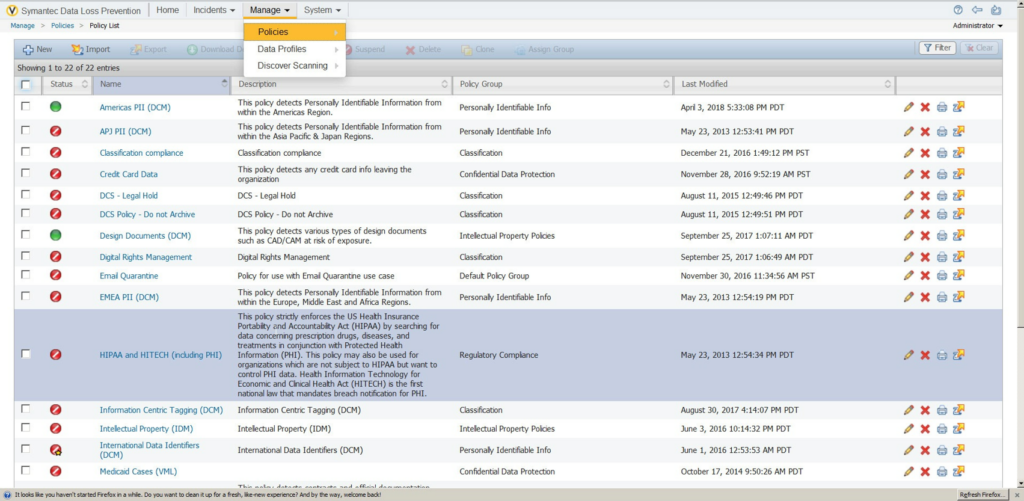
Symantec Data Loss Prevention (Broadcom Symantec DLP) is a comprehensive solution designed to discover, monitor, and protect sensitive information across all business points. With its capability to scale and meet the needs of large enterprises, it excels in enterprise data protection.
Why I Picked Symantec Data Loss Prevention:
I selected Symantec Data Loss Prevention for its robust capabilities in large-scale data protection. Its high scalability makes it a fit choice for extensive enterprises. Judging its potential, I determined it to be the best tool for large-scale enterprise data protection as it can efficiently handle the complex and vast data structures that large businesses typically have.
Standout features and integrations:
Critical features of Symantec Data Loss Prevention include precise incident detection, unified policy management, and detailed data risk analysis. Its deep integration with other Symantec products, like Symantec Endpoint Protection and Symantec CloudSOC, makes it a highly versatile tool.
Pros and Cons
Pros:
- Integrates deeply with other Symantec products.
- Offers unified policy management.
- Can handle large-scale enterprise requirements.
Cons:
- Setup and management could be time-consuming.
- It might be too complex for smaller organizations.
- Pricing information is not readily available.

Best for holistic data protection across hybrid cloud environments

IBM Data Security provides a comprehensive solution for managing and protecting data across diverse environments. It's specifically designed for hybrid cloud environments, providing robust security measures to safeguard sensitive information, making it ideally suited for businesses that rely on these systems.
Why I Picked IBM Data Security:
I chose IBM Data Security for this list mainly because of its comprehensive approach to data protection across hybrid cloud environments. Unlike other data security tools, IBM's solution stands out for its holistic, integrative strategy encompassing a wide range of data protection functionalities. I concluded that it is the best for hybrid cloud environments based on its dedicated features and capabilities tailored to these specific setups.
Standout features and integrations:
IBM Data Security offers a variety of notable features, including data activity monitoring, data risk analysis, and a unified data security platform. As for integrations, IBM Data Security provides compatibility with various IBM solutions and other third-party systems, which can be crucial for businesses operating in complex, hybrid cloud environments.
Pros and Cons
Pros:
- Wide range of compatible integrations.
- Offers a unified platform for all data security needs.
- Comprehensive solution for data protection in hybrid cloud environments.
Cons:
- Potential learning curve due to its wide array of features.
- It may be too complex for small businesses.
- Pricing information is not readily available.


Imperva is a cybersecurity software that protects your data and applications comprehensively. It focuses on safeguarding databases, often prime targets for attackers, and offers tools for achieving compliance with regulatory standards.
Why I Picked Imperva:
Imperva caught my attention because of its strong emphasis on database security. While many tools protect data at rest and in transit, Imperva stands out due to its specific focus on databases, a crucial component of data security often overlooked by other platforms. I've selected it as "best for" database security and compliance due to its robust features that protect database environments and aid in meeting compliance regulations.
Standout features and integrations:
Imperva provides robust database security features like data risk analytics, real-time activity monitoring, and automated threat responses. It also integrates with other security tools and technologies, enhancing its overall threat-detection capabilities and making it a comprehensive solution for data security.
Pros and Cons
Pros:
- Integrates with other security tools for comprehensive protection.
- Helps in achieving compliance with regulatory standards.
- Strong focus on database security.
Cons:
- Depending on the size of the database, system performance may be affected.
- Customization options may be complex for beginners.
- Pricing might be high for small businesses.


Forcepoint Data Loss Prevention is a powerful tool that helps companies protect sensitive data through advanced machine learning capabilities. It is designed to ensure secure business operations while maintaining regulatory compliance, and its machine-learning prowess makes it exceptional in recognizing and preventing potential data breaches.
Why I Picked Forcepoint Data Loss Prevention:
I chose Forcepoint Data Loss Prevention due to its impressive use of advanced machine learning techniques. Comparing it with others in the market, it stands out because of its intelligent algorithms that can understand, recognize, and prevent a vast array of data threats. Users can protect personally identifiable information (PII) and protected health information (PHI), company financials, trade secrets, credit card data, etc., even in images. It will let users follow intellectual property in both structured and unstructured forms. It’s best for advanced machine learning-based protection as its technology goes beyond traditional methods, offering superior protection against data loss.
Standout features and integrations:
Forcepoint DLP's features include incident risk ranking, data discovery, and an advanced policy engine. It integrates effectively with other Forcepoint solutions like Web Security, Email Security, Check Point DLP, and User and Entity Behavior Analytics, creating a holistic approach to data protection.
Pros and Cons
Pros:
- Provides integrations with other Forcepoint solutions.
- Offers a comprehensive suite of features.
- Utilizes advanced machine learning for protection.
Cons:
- Machine learning models may require time for optimal calibration.
- It might be overly complex for smaller businesses.
- Pricing is not transparent and requires direct contact.


Egress Data Loss Prevention offers robust data security solutions that are context-aware, allowing for efficient protection of sensitive data in varying contexts. Its dynamic approach to data loss prevention adjusts to the specific context of your data, thereby enhancing security.
Why I Picked Egress Data Loss Prevention:
I chose Egress Data Loss Prevention due to its dynamic, context-aware approach to data security. This tool stands out as it intelligently adjusts its data protection mechanisms based on the context of your data, unlike many traditional, static DLP tools. It’s the best solution for context-aware data security as it intricately understands the various contexts in which data loss can occur and adjusts its strategies accordingly.
Standout features and integrations:
Egress Data Loss Prevention boasts context-aware data protection, accidental send prevention, and sophisticated machine-learning algorithms for better threat detection. These features work in harmony to provide robust data protection. The software also integrates well with common platforms such as Microsoft 365 and Google Workspace, allowing for a smooth flow of work and data.
Pros and Cons
Pros:
- Utilizes advanced machine learning for threat detection.
- Integrates well with Microsoft 365 and Google Workspace.
- Offers context-aware data security.
Cons:
- The setup might require a learning curve.
- It may be overwhelming for small businesses.
- Advanced features might result in extra costs.


Trellix Data Loss Prevention (formally McAfee Enterprises and FireEye, rebranded as Trellix following the 2021 merger) is a solution that helps organizations protect their sensitive information across all endpoints and network traffic. This tool provides integrated security for endpoints and networks, making it ideal for businesses seeking a comprehensive security solution.
Why I Picked Trellix Data Loss Prevention:
I picked Trellix for its integrated approach to data loss prevention. Many solutions focus primarily on either endpoint security or network security, but Trellix combines both aspects, ensuring comprehensive data protection. I deemed it best for integrated endpoint and network security due to its well-rounded feature set that covers both areas effectively.
Standout features and integrations:
Trellix Data Loss Prevention offers robust features, including real-time visibility into data movement, customizable security policies, and automatic enforcement actions. It integrates with several other security platforms and IT systems, enhancing its ability to protect sensitive data effectively.
Pros and Cons
Pros:
- Easy integration with other security and IT platforms.
- Real-time visibility into data movement.
- Provides both endpoint and network security.
Cons:
- The interface may require help to navigate for beginners.
- Requires time for setup and policy configuration.
- It might be pricey for smaller businesses.


Nightfall DLP is a robust cloud DLP solution that shines in cloud-based environments. Specializing in protecting cloud data platforms, it's perfect for organizations that heavily use cloud services and need a secure, effective way to prevent data loss.
Why I Picked Nightfall DLP:
Among the myriad data loss prevention tools available, Nightfall DLP's unique focus on cloud-based operations caught my attention. I selected it because it is capable of securing critical data within cloud-native environments, which sets it apart from many other data loss prevention tools. Thus, Nightfall DLP is the best tool for cloud-native environments, considering its adeptness at providing protection for data residing in the cloud.
Standout features and integrations:
Nightfall DLP comes with noteworthy features such as machine learning-powered detection, policy automation, and comprehensive compliance controls, which all contribute to its strength in cloud-native security. It provides essential integrations with popular cloud storage platforms and other Software-as-a-Service (SaaS) apps, enhancing its ability to protect data across diverse cloud environments.
Pros and Cons
Pros:
- Extensive cloud platform integrations.
- Machine learning-enhanced detection.
- Excellent cloud-native environment protection.
Cons:
- The user interface may take time to master.
- Some advanced features might come with extra costs.
- It might be over-specialized for non-cloud-native businesses.

Best for USB and peripheral device control

Endpoint Protector DLP Software is a data protection tool that provides robust security measures for USB and peripheral devices. The software ensures data security by monitoring and controlling data transfers through peripheral devices, thereby excelling in preventing data leakage via these channels.
Why I Picked Endpoint Protector DLP Software:
I chose Endpoint Protector DLP Software for its superior USB and peripheral device control. The tool sets itself apart with its focused approach to data transfers through peripheral devices, a feature many other market tools do not offer. I believe it is "best for" organizations that handle sensitive data regularly transferred through peripheral devices.
Standout features and integrations:
Endpoint Protector DLP Software has features like content discovery, device control, and content-aware protection. Moreover, the tool can integrate with existing IT environments, supporting Windows, Linux, and Mac to streamline data protection processes.
Pros and Cons
Pros:
- Compatible with Windows, Linux, and Mac.
- Content-aware protection enhances data security.
- Excellent control over USB and peripheral devices.
Cons:
- It could be complex to configure for first-time users.
- Additional costs for more advanced features.
- Higher starting price compared to some competitors.
Weitere Data-Loss-Prevention-Software
Nachfolgend finden Sie eine Liste zusätzlicher Data-Loss-Prevention-Software, die ich in meine Auswahl aufgenommen habe, die es aber nicht in die Top 10 geschafft haben. Es lohnt sich trotzdem, diese zu prüfen.
- Safetica ONE
For data leak prevention via behavioral analysis
- 2B Advice PrIME
For privacy and compliance management
- GTT DLP
For comprehensive data visibility
- LastPass
Good for password management in businesses of all sizes
- Varonis Data Security Platform
Good for extensive data security and threat detection
- NordLayer
Good for advanced network security with threat prevention
- Spirion
Good for businesses needing precise personal data discovery and protection
- Laminar
Good for businesses seeking automated threat detection and response
- StorageGuard
Good for businesses looking for proactive data storage protection
- Digital Guardian DLP
Good for businesses requiring context-aware data loss prevention
- Tessian
Good for preventing data loss through emails and human interactions
- GTB Data Loss Prevention
Good for comprehensive data loss protection across various platforms
- Cyberhaven
Good for organizations needing behavioral data loss prevention
- Teramind DLP
Good for user-focused data loss prevention and user behavior analytics
- Clearswift Data Loss Prevention
Good for adaptable and dynamic data loss prevention
- Fidelis Network
Good for organizations looking for network traffic analysis and data leakage prevention


Weitere Rezensionen
Auswahlkriterien für Data-Loss-Prevention-Software
Bei der Auswahl der besten Data-Loss-Prevention-Software für diese Liste habe ich gängige Bedürfnisse und Probleme potenzieller Käufer berücksichtigt, wie zum Beispiel Datensicherheit und die Einhaltung von Vorschriften. Zudem habe ich das folgende Bewertungsraster verwendet, um meine Auswahl strukturiert und fair zu gestalten:
Kernfunktionalität (25 % der Gesamtbewertung)
Um in diese Liste aufgenommen zu werden, musste jede Lösung die folgenden Anwendungsfälle abdecken:
- Sensible Daten schützen
- Datenzugriffe überwachen
- Datenübertragungen steuern
- Richtlinien zur Einhaltung von Vorschriften durchsetzen
- Datenpannen erkennen
Besondere Zusatzfunktionen (25 % der Gesamtbewertung)
Um die Auswahl weiter einzugrenzen, habe ich außerdem nach einzigartigen Features gesucht, wie zum Beispiel:
- Echtzeit-Bedrohungserkennung
- Fortgeschrittene Analysen
- Anpassbare Warnmeldungen
- Integration mit Cloud-Diensten
- Funktionen für maschinelles Lernen
Benutzerfreundlichkeit (10 % der Gesamtbewertung)
Um die Benutzerfreundlichkeit jeder Lösung zu bewerten, habe ich Folgendes berücksichtigt:
- Intuitive Benutzeroberfläche
- Einfache Navigation
- Individuell anpassbare Dashboards
- Minimale Einarbeitungszeit
- Reaktionsschnelles Design
Onboarding (10 % der Gesamtbewertung)
Um das Onboarding-Erlebnis jeder Plattform zu beurteilen, habe ich folgende Aspekte einbezogen:
- Verfügbarkeit von Schulungsvideos
- Interaktive Produkttouren
- Zugang zu Webinaren
- Umfassende Dokumentation
- Vorlagen für eine schnelle Einrichtung
Kundensupport (10% der Gesamtpunktzahl)
Um die Kundensupport-Dienste der einzelnen Softwareanbieter zu bewerten, habe ich Folgendes berücksichtigt:
- 24/7 Support-Verfügbarkeit
- Verschiedene Kontaktkanäle
- Reaktionszeit
- Kompetentes Personal
- Zugang zu einem Community-Forum
Preis-Leistungs-Verhältnis (10% der Gesamtpunktzahl)
Um das Preis-Leistungs-Verhältnis der jeweiligen Plattform zu beurteilen, habe ich Folgendes berücksichtigt:
- Konkurrenzfähige Preise
- Flexible Abo-Modelle
- Funktionsumfang im Verhältnis zu den Kosten
- Rabatte bei längeren Laufzeiten
- Zusatzkosten für Erweiterungen
Kundenbewertungen (10% der Gesamtpunktzahl)
Um ein Gefühl für die allgemeine Kundenzufriedenheit zu gewinnen, habe ich beim Lesen von Kundenrezensionen Folgendes beachtet:
- Allgemeine Zufriedenheitswerte
- Häufigkeit von Updates
- Leichte Implementierung
- Reaktionsschnelligkeit des Supports
- Benutzerfeedback zu den Funktionen
Wie man Data Loss Prevention Software auswählt
Es ist leicht, sich in langen Funktionslisten und komplizierten Preisstrukturen zu verlieren. Damit Sie bei Ihrer individuellen Softwareauswahl den Überblick behalten, finden Sie hier eine Checkliste mit Faktoren, die Sie berücksichtigen sollten:
| Faktor | Worauf achten |
|---|---|
| Skalierbarkeit | Wächst die Software mit Ihrem Unternehmen? Achten Sie auf Benutzerobergrenzen, Datenkapazität und darauf, wie einfach sich Funktionen upgraden oder erweitern lassen, wenn Ihr Bedarf wächst. |
| Integrationen | Funktioniert sie mit Ihren bestehenden Tools? Prüfen Sie die Kompatibilität mit Ihren aktuellen Systemen und geplanter Technologie. |
| Anpassbarkeit | Lässt sich die Software an Ihre Prozesse anpassen? Suchen Sie nach Möglichkeiten, Einstellungen, Workflows und Berichte an die spezifischen Bedürfnisse Ihres Teams anzupassen. |
| Benutzerfreundlichkeit | Ist die Benutzeroberfläche intuitiv? Stellen Sie sicher, dass Ihr Team die Software ohne umfangreiche Schulungen bedienen kann. Testen Sie das Design und die Nutzerführung. |
| Implementierung und Onboarding | Wie schnell ist die Einrichtung? Bewerten Sie Zeit- und Ressourcenaufwand für den Start, inklusive Schulungsmaterialien und Unterstützung in der Anfangsphase. |
| Kosten | Passt die Software in Ihr Budget? Vergleichen Sie Preisstrukturen wie Abo vs. Einmalzahlung und berücksichtigen Sie versteckte Kosten wie Erweiterungen oder Updates. |
| Sicherheitsmaßnahmen | Wie schützt die Software Ihre Daten? Bewerten Sie Verschlüsselungsstandards, Backup-Möglichkeiten und Zugriffskontrollen auf ihre Robustheit. |
| Compliance-Anforderungen | Entspricht sie gesetzlichen Vorgaben? Prüfen Sie, ob die Software branchenspezifische Vorschriften wie DSGVO oder HIPAA erfüllt. |
Was ist Data Loss Prevention Software?
Data Loss Prevention Software ist ein Tool, das entwickelt wurde, um sensible Daten vor Verlust, Diebstahl oder unbefugtem Zugriff zu schützen. Diese Werkzeuge werden in der Regel von IT-Fachleuten, Compliance-Beauftragten und Teams für Datensicherheit eingesetzt, um Informationen zu sichern und die Einhaltung gesetzlicher Vorgaben zu gewährleisten.
Überwachungsfunktionen, Datenverschlüsselung und Zugriffskontrollen helfen, Datenverstöße zu verhindern und die Datenintegrität zu bewahren. Wenn es dennoch zu Vorfällen kommt, kann Digital Forensics Software bei der Untersuchung und Analyse von Sicherheitsvorfällen unterstützen. Insgesamt sorgen diese Werkzeuge dafür, dass Ihre sensiblen Informationen geschützt bleiben und Compliance-Anforderungen erfüllt werden.
Funktionen
Achten Sie bei der Auswahl von Data Loss Prevention Software besonders auf folgende Hauptfunktionen:
- Datenüberwachung: Verfolgt Datenbewegungen und -zugriffe, um ungewöhnliche Aktivitäten zu erkennen und unbefugten Zugriff zu verhindern.
- Verschlüsselung: Schützt sensible Informationen, indem sie in unlesbaren Code umgewandelt werden, sodass Datensicherheit selbst bei Zugriff gewährleistet ist.
- Zugriffssteuerung: Begrenzt, wer Daten einsehen oder bearbeiten kann, und verringert so das Risiko interner und externer Verstöße.
- Compliance-Management: Hilft bei der Einhaltung von Branchenvorschriften wie DSGVO oder HIPAA, um kostspielige Bußgelder und Strafen zu vermeiden.
- Echtzeit-Benachrichtigungen: Benachrichtigt Benutzer umgehend über potenzielle Datenverstöße oder Richtlinienverletzungen, sodass schnell reagiert werden kann.
- Integrationsfähigkeiten: Arbeitet nahtlos mit bestehenden Systemen und Software zusammen und verbessert so die gesamte Sicherheitsinfrastruktur.
- Datenklassifizierung: Kategorisiert Daten nach Sensibilität, um Schutzmaßnahmen gezielt zu priorisieren.
- Anpassbare Richtlinien: Ermöglicht die Anpassung von Sicherheitsmaßnahmen an spezifische Anforderungen und Arbeitsabläufe der Organisation.
- Prüfpfade: Bietet detaillierte Protokolle über Datenzugriffe und -änderungen und unterstützt so forensische Analysen und Verantwortlichkeit.
- Unterstützung für Anwenderschulungen: Bietet Ressourcen und Tools, um Mitarbeitende in Datenschutzpraktiken zu schulen und menschliche Fehler zu verringern.
Vorteile
Die Implementierung einer Data Loss Prevention-Software bringt zahlreiche Vorteile für Ihr Team und Ihr Unternehmen mit sich. Hier sind einige, auf die Sie sich freuen können:
- Erhöhte Sicherheit: Schützt sensible Informationen mit Verschlüsselung und Zugriffssteuerungen und senkt das Risiko von Datenlecks.
- Regulatorische Compliance: Hilft Ihrem Unternehmen, Branchenstandards wie DSGVO oder HIPAA einzuhalten und teure Bußgelder und Strafen zu vermeiden.
- Echtzeit-Reaktion: Sendet sofortige Benachrichtigungen bei verdächtigen Aktivitäten, damit Ihr Team schnell reagieren und potenzielle Bedrohungen abwehren kann.
- Datenübersicht: Bietet Einblicke in Datenbewegungen und -zugriffe und hilft, Informationen effektiv zu überwachen und zu verwalten.
- Kosteneinsparungen: Verhindert Datenverluste und damit verbundene Kosten, indem die Datenintegrität erhalten und unbefugter Zugriff unterbunden wird.
- Individuell abgestimmter Schutz: Bietet anpassbare Richtlinien für Ihre spezifischen Geschäftsanforderungen, um gezielte und effiziente Datensicherheitsmaßnahmen zu gewährleisten.
- Verantwortlichkeit der Benutzer: Verfolgt Datenzugriffe und -änderungen mittels Prüfpfaden und fördert so ein Verantwortungsbewusstsein und Transparenz im Team.
Kosten & Preise
Die Auswahl einer Data Loss Prevention-Software erfordert das Verständnis verschiedener Preismodelle und Tarifoptionen. Die Kosten variieren abhängig von Funktionen, Teamgröße, Zusatzoptionen und mehr. Die nachfolgende Tabelle fasst gängige Tarife, deren Durchschnittspreise und typische in Data Loss Prevention-Software enthaltene Funktionen zusammen:
Tarifvergleichstabelle für Data Loss Prevention-Software
| Tariftyp | Durchschnittlicher Preis | Häufige Funktionen |
|---|---|---|
| Gratis-Tarif | $0 | Grundlegende Überwachung, eingeschränkter Datenschutz und Basisberichte. |
| Persönlicher Tarif | $5-$25/user/month | Erweiterte Verschlüsselung, Zugriffsverwaltung und Standard-Compliance-Tools. |
| Business-Tarif | $30-$75/user/month | Erweiterte Analysen, anpassbare Richtlinien und Integrationsmöglichkeiten. |
| Enterprise-Tarif | $100-$200/user/month | Echtzeit-Benachrichtigungen, umfassende Prüfpfade und dedizierter Support. |
Meistgestellte Fragen zu Data Loss Prevention Software (FAQs)
Wie funktionieren DLP-Richtlinien?
DLP-Richtlinien legen Regeln und Maßnahmen fest, um Daten vor unbefugtem Zugriff oder Datenlecks zu schützen. Sie überwachen Datenaktivitäten, erkennen Verstöße und ergreifen Korrekturmaßnahmen wie Blockierungen oder Warnmeldungen. Diese Richtlinien sind entscheidend, um die Datensicherheit zu gewährleisten und Verstöße zu verhindern.
Welche vier Arten von DLP gibt es?
Die vier Hauptarten von DLP sind Netzwerk-, Endpunkt-, Cloud- und Anwendungs-DLP. Netzwerk-DLP überwacht Daten bei der Übertragung, Endpunkt-DLP sichert Daten auf Geräten, Cloud-DLP schützt in der Cloud gespeicherte Daten und Anwendungs-DLP konzentriert sich auf die Sicherung von Daten innerhalb bestimmter Anwendungen.
Wie implementiert man DLP-Software?
Die Implementierung von DLP-Software umfasst die Bewertung Ihres Datenschutzbedarfs, die Auswahl einer geeigneten Lösung und die Konfiguration von Richtlinien zur Beseitigung von Schwachstellen. Schulen Sie Ihr Team in der Nutzung und überwachen Sie das System regelmäßig, um sicherzustellen, dass sensible Informationen effektiv geschützt werden.
Was sind DLP-Richtlinien?
DLP-Richtlinien helfen dabei, sensible Daten im Ruhezustand, bei der Übertragung und bei der Nutzung zu identifizieren, zu überwachen und zu schützen. Sie bestimmen den Umgang mit Daten an verschiedenen Speicherorten und Übertragungswegen. Die Umsetzung dieser Richtlinien stellt sicher, dass sensible Informationen sicher und im Einklang mit Vorschriften bleiben.
Wie geht es weiter:
Wenn Sie gerade Data Loss Prevention Software recherchieren, verbinden Sie sich mit einem SoftwareSelect-Berater für kostenlose Empfehlungen.
Sie füllen ein Formular aus und führen ein kurzes Gespräch, bei dem Ihre individuellen Anforderungen besprochen werden. Anschließend erhalten Sie eine Shortlist mit Softwarevorschlägen zur Überprüfung. Die Berater unterstützen Sie sogar während des gesamten Kaufprozesses, einschließlich Preisverhandlungen.