
20 Beste Continuous-Testing-Tools im Test für 2026

10 Beste Continuous Testing Tools Kurzliste
Here's my pick of the 10 best software from the 20 tools reviewed.


Bei so vielen verschiedenen Continuous Testing Tools ist es schwierig, das passende für sich zu finden. Sie wissen, dass Sie die Ausführung von Tests in jeder Phase der Entwicklung automatisieren möchten, sind sich aber noch unsicher, welches Tool am besten ist. Ich kann Ihnen helfen! In diesem Beitrag erleichtere ich Ihnen die Auswahl, indem ich meine persönlichen Erfahrungen mit Dutzenden verschiedener Continuous Testing Software-Tools in diversen Teams und Projekten teile und Ihnen meine Favoriten vorstelle.
Why Trust Our Software Reviews
Zusammenfassung der besten Continuous Testing Tools
| Tool | Best For | Trial Info | Price | ||
|---|---|---|---|---|---|
| 1 | Best for 24-hour test monitoring and maintenance | Free demo available | Pricing upon request | Website | |
| 2 | Best ML-powered continuous testing solution | 14-day free trial + free plan + free demo available | From $21/user/month | Website | |
| 3 | Best for AI-generated test creation | 14-day free trial | From $212/month | Website | |
| 4 | Best for lowering continuous testing setup time | Not available | Free to use | Website | |
| 5 | Best codeless continuous testing software | Free plan + 14-day free trial available | From $15/host/month (billed annually) | Website | |
| 6 | Best continuous testing tool for running maintenance-free testing | Free trial + free demo available | From $8/user/month (billed annually) | Website | |
| 7 | Best open-source continuous testing tool | Not available | Free To Use | Website | |
| 8 | Best for implementing GUI and data-driven testing | Free demo available | Pricing upon request | Website | |
| 9 | Best for automated UI testing | 14-day free trial | From $3,419/user/year | Website | |
| 10 | Best for real-time traffic analysis | Free demo available | From $29.99/year (billed annually) | Website |
-

Site24x7
Visit WebsiteThis is an aggregated rating for this tool including ratings from Crozdesk users and ratings from other sites.4.6 -
Docker
Visit WebsiteThis is an aggregated rating for this tool including ratings from Crozdesk users and ratings from other sites.4.6 -
Pulumi
Visit WebsiteThis is an aggregated rating for this tool including ratings from Crozdesk users and ratings from other sites.4.8





Bewertungen der besten Continuous Testing Tools
Hier finden Sie eine kurze Beschreibung jeder Continuous Testing Software, die ihren besten Anwendungsfall, ihre bemerkenswerten Funktionen sowie einige Vor- und Nachteile zeigt. Screenshots sind ebenfalls enthalten, damit Sie einen Eindruck der Benutzeroberfläche bekommen.


QA Wolf is a testing tool and platform that provides automated end-to-end test coverage for web applications. It offers accessibility, performance, and Salesforce testing, and is designed for teams looking for external expert support.
Why I picked QA Wolf: What makes QA Wolf unique is that it's a platform-enabled service, meaning you'll have a team of experts continuously monitoring and maintaining your tests, ensuring they're always up-to-date. This feature is essential for preserving the reliability of a continuous testing process. Additionally, QA Wolf offers parallel test execution and seamless integration with CI/CD pipelines, ensuring that automated end-to-end tests run with every code change.
QA Wolf Standout Features and Integrations
Standout features include automatic test maintenance, a test matrix for every user flow, unlimited parallel test runs, 24-hour expert support, real-time human-verified bug reporting, customizable test plans, and comprehensive test coverage reports.
Integrations include GitHub, GitLab, Bitbucket, Jenkins, CircleCI, Jira, Asana, Linear, Slack, Microsoft Teams, Travis CI, and Azure DevOps.
Pros and Cons
Pros:
- Human-verified bug reports
- Slack and Teams integration for direct communication with QA Wolf team
- 24-hour test maintenance and support
Cons:
- Potential limitations for scalability
- Reliance on an external team may not be ideal for teams who want full control


PagerDuty is a real-time operations monitoring system that enables developers to improve visibility and agility across their coding infrastructure with machine data and human intelligence. It provides automated capabilities that keep you connected to your code in production and offers the visibility you need to ensure quality.
Why I picked PagerDuty: This solution provides the insights you need to assess and resolve incidents quickly with the help of runbook automation. PagerDuty helps you avert future issues by learning from past issues, identifying repeat defects, and delivering better code or products through continuous testing and learning. With this software, you can quickly pinpoint the root cause of a defect and resolve issues speedily.
PagerDuty Standout Features and Integrations
Standout features: PagerDuty uses machine learning to group defect or bug alerts in ways that are easy to analyze. This helps you make sense of notifications quickly and take action accordingly. There are alert suppression and grouping capabilities that enable you to isolate and prioritize according to your needs.
With PagerDuty, you can automate incident responses. It allows you to automate remediation processes and assign tasks to the right teams within a short time.
Integrations include Slack, AWS, Zoom, Zendesk, Okta, ServiceNow, Datadog, Jira, GitHub Actions, and Docker. Other ways you can integrate tools with PagerDuty include Email integration, custom API, and PagerDuty Agent.
Pros and Cons
Pros:
- Great reporting features
- A range of notification or escalation options
- Seamless integrations
Cons:
- It’s a bit expensive
- Some things are hard to set up


Reflect is a continuous testing tool that uses AI to help you build and maintain end-to-end browser tests without writing code. You can create tests by describing actions in plain English, and Reflect takes care of translating them into executable steps—automatically adapting as your app changes.
Why I picked Reflect: I picked Reflect because it simplifies testing without sacrificing control. You can quickly build robust tests using natural language and scale them with features like parameterization and JavaScript assertions. It’s a strong fit for teams that want fast feedback from their CI/CD pipelines but don’t want to manage brittle test scripts.
Reflect Standout Features and Integrations
Standout features include Reflect’s AI that handles test maintenance by adjusting to UI changes in real time, so your tests don’t constantly break. You’ll also get visual regression testing, API testing built into your flows, and detailed results with Slack and email alerts to help your team catch issues early.
Integrations include GitHub, Jenkins, CircleCI, Bitbucket, Azure DevOps, Jira, Slack, Codefresh, Linear, TestRail, Cloudflare, AWS, Shopify, Google Analytics, LinkedIn Insight, and more.
Pros and Cons
Pros:
- No-code test creation
- AI-powered test maintenance
- Comprehensive CI/CD integration
Cons:
- Limitations to mobile app testing
- Could offer more customization options for test configurations


Vagrant is a platform that helps teams build complete development environments. It provides workflow automation that empowers users to ensure code quality.
Why I picked Vagrant: The tool offers an easy-to-use workflow that enables DevOps teams to get things done with ease. Vagrant’s streamlined workflow helps in building and managing virtual machine environments. This workflow helps improve the productivity and flexibility of your team. It provides a reliable environment and consistent workflow for building and testing scripts on remote clouds like AWS and RackSpace.
Vagrant Standout Features and Integrations
Standout features: Vagrant is designed to enable users to easily and quickly create virtualized environments. From operators to designers and developers, the software provides easy-to-configure, reproducible, and portable work environments. Additionally, Vagrant comes with documentation and tutorials that provide new users with the support they need to get started quickly.
Integrations include Wing Python IDE, ClusterControl, Icinga, JFrog Pipelines, Dash, Ozone, ManageIQ, GenRocket, ConnectALL, and Solus.
Pros and Cons
Pros:
- Good user support team
- Tutorial library
- Community forum
Cons:
- Requires some levels of technical expertise
- There are some complex configurations


Datadog offers fast, codeless continuous testing, which allows you to ship features with confidence. With Datadog, you can optimize code quality continuously by seeing inside any stack or any app at any scale and from anywhere.
Why I picked Datadog: I added this tool to my list because it conserves engineering resources and accelerates continuous testing by allowing you to test and troubleshoot on the same unified platform. Datadog provides time-saving and scalable features that empower you to run tests according to your needs without wasting your QA efforts. It helps you achieve wide test coverage as a result of its support for a wide range of protocols, frameworks, and APIs.
Datadog Standout Features and Integrations
Standout features include a codeless web recorder, parallel test runs, and built-in multi-location testing. Datadog enables you to improve test reliability by removing the need to implement code with codeless tests, reducing false positives via self-healing, and automating cross-browser testing.
Integrations include CI providers, such as GitHub, GitLab, Jenkins, Azure DevOps, and CircleCI, and collaboration tools, like Slack and Jira. Other top integrations include Ably, Active Directory, Agora Analytics, and Airbrake.
Pros and Cons
Pros:
- Time-saving and cost-effective
- Testing with ease and speed
- Scalable and reliable
Cons:
- Long customer support response time
- New users find some settings challenging

Best continuous testing tool for running maintenance-free testing

This is a test automation system that helps DevOps teams perform continuous testing for web apps, mobile apps, and APIs in minutes. Used by some leading brands, like Cisco and Samsung, Testsigma provides a unified platform that helps you replace multiple frameworks with testing solutions that are 5X faster.
Why I picked Testsigma: It is an AI-driven continuous testing software that lets you automate end-to-end testing for your products with ease. It’s very easy to use; no setup or coding skills are required. Testsigma uses simple natural language to write automated tests. This allows your non-technical team members and other stakeholders to collaborate and take part in automation testing.
Another thing that makes this tool stand out is that it enables maintenance-free testing with English scripts that self-heal. You can put maintenance on auto-pilot with the help of artificial intelligence. Testsigma resolves broken tests automatically, heals dynamically changing elements, and makes suggestions on how failed tests can be fixed.
Testsigma Standout Features and Integrations
Standout features include reusable test groups, schedulers, automatic bug reporting, and visual testing. It provides scalable test environments on the cloud, which enable you to perform tests on many operating systems, browsers, and real mobile devices. With Testsigma Lab, you can execute continuous tests in parallel. This helps you to fix bugs faster and achieve quicker feedback time.
Integrations are available with CI/CD, bug tracking, and productivity tools. Integrations with CI/CD solutions include Atlassian Bamboo, Azure DevOps, Circle CI, Jenkins, AWS, and Codeship CI. Other popular integrations include Jira, YouTrack, Slack, and Saucepans.
Pros and Cons
Pros:
- Team collaboration
- Actionable and fast feedback
- Easy to use
Cons:
- Limited customization
- Customer support needs to be improved


This is a continuous integration tool and an extensible framework used by DevOps teams to create a custom continuous build process. It’s open-source and written in Java; CruiseControl can be used on a wide variety of projects.
Why I picked CruiseControl: I included this software because it’s free to use. CruiseControl, hosted by Sourceforge, is an OSI Certified open-source tool. It includes a wide range of plugins that allow you to connect to dozens of source controls, build technologies, and alerting systems (such as email and instant messaging). The notification schemes help you and your stakeholders stay in the know about your continuous testing activities.
CruiseControl Standout Features and Integrations
Standout features include a web interface that provides details of the current and previous builds. This gives you an overview of your continuous test cases, test status, and other necessary information that help you make data-based decisions. CruiseControl features a rich selection of third-party tools, so you can extend its capabilities by integrating your favorite tools.
Integrations include Perforce, Telerik JustMock, Apache Kafka, GitHub, Ant, NAnt, Maven, Phing, Rake, and Xcode.
Pros and Cons
Pros:
- Good notifications system
- Highly extensible
- It’s free
Cons:
- The documentation needs more content
- No large community of users

Best for implementing GUI and data-driven testing

IBM Rational Functional Tester (RFT) offers continuous testing capabilities for functional, regression, GUI, and data-driven testing. The platform supports a variety of applications, such as web-based, .Net, SAP, Java, Siebel, and terminal emulator-based applications.
Why I picked IBM Rational Functional Tester: It helps you streamline test visualization and editing with natural language and rendered screenshots. In addition to its standard continuous testing features, RFT takes the game to the next level with support for team collaboration. You can share tests with team members and keep testers in the loop.
It offers advanced visual editing through screenshots. This capability enables users to make sense of test flow and edit actions with no need for reading and authoring test script code. RFT streamlines the continuous testing process with multiple customization options and intelligent test maintenance capabilities.
IBM Rational Functional Tester Standout Features and Integrations
Standout features: RFT comes with advanced ScriptAssure technology, which helps you manage frequent user interface changes and prevent an increase in the cost of test maintenance. There is also an automatic data detection feature that lets you detect data imputed during test recording and get the test ready for data-driven testing.
Integrations: IBM Rational Functional Tester provides IBM Jazz integration to support collaborative application lifecycle testing and management.
Pros and Cons
Pros:
- Support for a range of applications
- It improves collaboration
- Streamlined continuous testing processes
Cons:
- Needs more detailed resources
- Steep learning curve


This is an easy-to-use software that helps you ensure the quality of your application without sacrificing speed or agility. TestComplete is a GUI test automation tool that uses AI capabilities to enable you to test desktop, web, and mobile applications with ease.
Why I picked TestComplete: With TestComplete’s simplified Command Line Interface and REST API, you can easily integrate your automated tests into your DevOps ecosystem for seamless continuous testing. It streamlines the entire process by letting you record your tests once and play them back across various platforms, like desktop, web, and mobile apps.
You can get real-time reports on the progress and status of your test by seamlessly integrating with bug tracking and feedback tools. TestComplete lets you enjoy the power of automated test reuse. You can save time and money and increase test coverage by reusing your automated UI tests across projects and platforms.
TestComplete Standout Features and Integrations
Standout features that make TestComplete a leading continuous testing tool include an AI-powered object recognition engine and keyword-driven testing. With AI-based visual recognition, you can streamline test creation and maintenance by properly identifying dynamic UI elements. The built-in keyword-based testing framework makes it easy to build automated functional UI tests without any coding language.
Additionally, TestComplete offers free training and support. From onboarding to ongoing support, there is a responsive team to provide guidance and help you solve problems.
Integrations: It lets you integrate with continuous integration, source control, bug tracking, and test management tools. Major integrations include Azure DevOps, Jenkins, Git, Zephyr, Jira, BitBar, ReadyAPI, GitLab, Bamboo, and TeamCity.
Pros and Cons
Pros:
- Improved test coverage
- Easy to get started
- Detailed documentation
Cons:
- Needs more customization
- Expensive for small teams

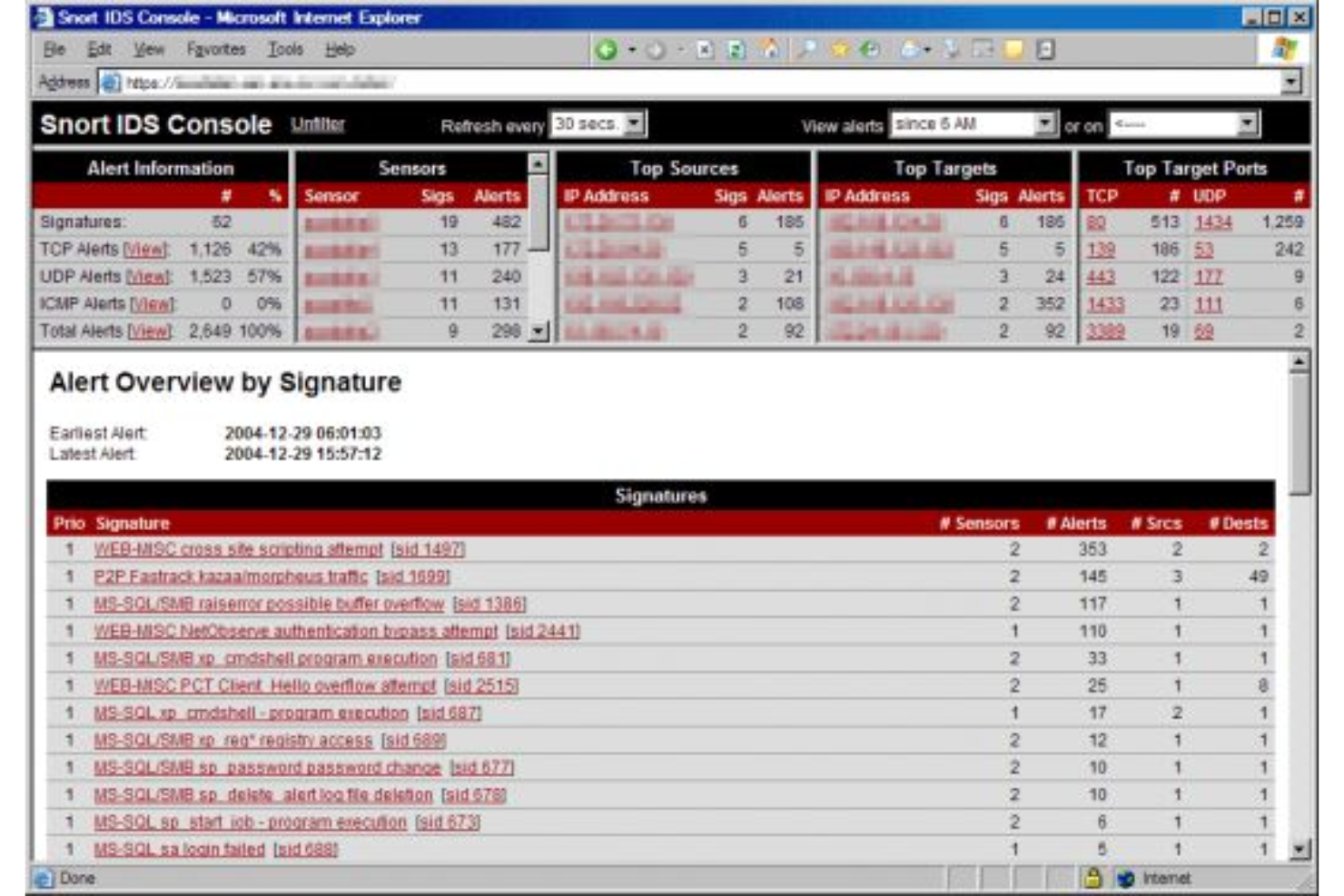
This is an open-source network intrusion detection and prevention system. Snort monitors your infrastructure and generates alerts to help you maintain quality and security.
Why I picked Snort: It is an intrusion prevention solution capable of real-time traffic analysis. Snort can help you monitor your products in real time. This capability lets you know when there are defects or issues with your applications. By monitoring your infrastructure continuously, you can ensure quality by getting rid of defects or bugs as soon as they are identified.
Snort Standout Features and Integrations
Standout features: Snort has an effective alerting system, which it uses to notify users when there is a trigger. The tool keeps tabs on your product’s performance and sends a notification when it discovers something wrong. This real-time monitoring and alerting provide the visibility you need to maintain quality no matter the complexity of your infrastructure.
Integrations include ServicePilot, Elastic Observability, Cyrebro, Panaseer, ThreatQ, Securonix Security, EndaceProbe, Joe Sandbox, and Picus.
Pros and Cons
Pros:
- Guidance on how to get started
- User community
- It’s open-source
Cons:
- Steep learning curve
- Difficult configurations and workflows
Weitere Continuous Testing Tools
Hier sind noch ein paar weitere empfehlenswerte Optionen, die es nicht auf die Liste der besten Continuous Testing Tools geschafft haben:
- Stackify Retrace
For real-time code monitoring
- Travis CI
For testing on Mac, Linux, and iOS
- AppVerify
Tool for continuous delivery in Citrix environments
- Worksoft
For scheduling and running remote testing
- Owlity
For autonomous test generation
- Katalon Studio
Tool for real-time visibility, actionable insights, and self-healing
- Selenium
For automating web applications for testing purposes
- Tricentis Tosca
Automated software testing tool for Salesforce
- Watir
Open-source Ruby library for automating tests
- Appium
Continuous testing tool for facilitating UI automation of many application platforms


Auswahlkriterien für Continuous Testing Tools
Bei der Auswahl der besten Continuous Testing Tools für diese Liste habe ich typische Käuferbedürfnisse und Schmerzpunkte berücksichtigt – wie die Integration in bestehende CI/CD-Pipelines und die Benutzerfreundlichkeit für nicht-technische Teammitglieder. Außerdem habe ich einen strukturierten Bewertungsrahmen verwendet, um die Bewertung möglichst objektiv zu halten:
Kernfunktionen (25 % der Gesamtwertung)
Um in diese Liste aufgenommen zu werden, musste jede Lösung folgende allgemeine Anwendungsfälle erfüllen:
- Automatisierte Testausführung
- Integration mit CI/CD-Pipelines
- Unterstützung mehrerer Test-Frameworks
- Echtzeit-Reporting
- Verwaltung von Testumgebungen
Besondere Zusatzfunktionen (25 % der Gesamtwertung)
Um die Auswahl weiter einzugrenzen, habe ich auch auf einzigartige Funktionen geachtet, wie:
- KI-gestützte Testgenerierung
- Nahtlose Integration von Cloud-Diensten
- Unterstützung für Mobile Testing
- Erweiterte Analysen und Auswertungen
- Anpassbare Dashboards
Benutzerfreundlichkeit (10 % der Gesamtwertung)
Um ein Gefühl für die Bedienbarkeit jedes Systems zu bekommen, habe ich folgende Aspekte betrachtet:
- Intuitive Benutzeroberfläche
- Einfache Navigation
- Geringe Einarbeitungszeit
- Anpassbare Workflows
- Verfügbarkeit auf verschiedenen Geräten
Onboarding (10 % der Gesamtwertung)
Um das Onboarding-Erlebnis jeder Plattform zu bewerten, habe ich die folgenden Kriterien berücksichtigt:
- Verfügbarkeit von Schulungsvideos
- Interaktive Produkttouren
- Umfassende Dokumentation
- Zugang zu Webinaren und Tutorials
- Unterstützende Community-Foren
Kundensupport (10% der Gesamtbewertung)
Um die Kundensupport-Dienste der jeweiligen Softwareanbieter zu bewerten, habe ich Folgendes berücksichtigt:
- 24/7 Verfügbarkeit
- Mehrere Support-Kanäle
- Schnelle Reaktionszeiten
- Zugang zu einem dedizierten Account Manager
- Verfügbarkeit einer Wissensdatenbank
Preis-Leistungs-Verhältnis (10% der Gesamtbewertung)
Zur Bewertung des Preis-Leistungs-Verhältnisses jeder Plattform habe ich Folgendes bedacht:
- Konkurrenzfähige Preisgestaltung
- Flexible Abo-Modelle
- Verfügbarkeit einer kostenlosen Testversion
- Rabatte bei langfristiger Bindung
- Gesamtkosten im Vergleich zum Funktionsumfang
Kundenbewertungen (10% der Gesamtbewertung)
Um ein Bild der allgemeinen Kundenzufriedenheit zu erhalten, habe ich beim Lesen der Kundenbewertungen auf Folgendes geachtet:
- Allgemeine Zufriedenheitsbewertungen
- Häufigkeit positiver Rückmeldungen
- Häufig gemeldete Probleme
- Feedback zum Kundensupport
- Von Nutzern gemeldeter ROI und Nutzen
Wie wählt man ein Continuous Testing Tool aus?
Es ist leicht, sich von langen Funktionslisten und komplexen Preisstrukturen überwältigen zu lassen. Damit Sie beim Auswahlprozess für Ihre individuelle Softwarelösung den Fokus behalten, finden Sie hier eine Checkliste der wichtigsten Überlegungen:
| Faktor | Worauf achten? |
|---|---|
| Skalierbarkeit | Kann das Tool mit Ihrem Team mitwachsen? Berücksichtigen Sie die Anzahl der Benutzer und Testfälle, die es handhaben kann. Achten Sie auf Tools, die eine problemlose Skalierung ohne hohe Zusatzkosten ermöglichen. |
| Integrationen | Funktioniert es mit Ihren vorhandenen Tools? Überprüfen Sie die Kompatibilität mit Ihren CI/CD-Pipelines, Versionsverwaltungssystemen und anderer wichtiger Software, um Unterbrechungen im Arbeitsablauf zu vermeiden. |
| Anpassbarkeit | Lässt sich das Tool auf Ihre Prozesse zuschneiden? Suchen Sie nach Lösungen, bei denen Sie Einstellungen, Workflows und Berichte an die Anforderungen Ihres Teams anpassen können. |
| Benutzerfreundlichkeit | Ist die Benutzeroberfläche intuitiv? Achten Sie darauf, dass Teammitglieder das Tool ohne umfangreiche Schulungen nutzen können. Ein kompliziertes Tool kann die Akzeptanz und Produktivität beeinträchtigen. |
| Implementierung und Onboarding | Wie schnell können Sie starten? Überprüfen Sie die für die Einrichtung benötigten Ressourcen – etwa Zeit, Schulung und Support. Ein schneller Start sorgt für einen rascheren Return on Investment. |
| Kosten | Passt es in Ihr Budget? Vergleichen Sie Abonnementmodelle und versteckte Gebühren. Setzen Sie Kosten ins Verhältnis zu benötigten Funktionen und Skalierbarkeit. |
| Sicherheitsvorkehrungen | Wie wird Ihre Daten geschützt? Prüfen Sie Verschlüsselungsstandards, Zugriffskontrollen und die Einhaltung von Datenschutzvorgaben. |
| Verfügbarkeit des Supports | Ist schnelle Hilfe verfügbar? Achten Sie auf Anbieter, die 24/7-Support über verschiedene Kanäle bieten. Schneller und effizienter Support spart Zeit und Nerven. |
Was sind Continuous Testing Tools?
Continuous Testing Tools sind Softwarelösungen, die die Durchführung von Tests im gesamten Softwareentwicklungsprozess automatisieren. Entwickler, QA-Ingenieure und DevOps-Profis setzen diese Tools in der Regel ein, um Fehler frühzeitig zu erkennen und die Qualität ihrer Projekte sicherzustellen.
Automatisierung, die Integration in CI/CD-Pipelines sowie Cloud Testing Tools in Echtzeit helfen Teams, effizient zu bleiben und die Softwarequalität zu steigern. Insgesamt sparen diese Tools Zeit und reduzieren Fehler, indem sie Codeänderungen kontinuierlich validieren.
Funktionen
Achten Sie bei der Auswahl von Continuous Testing Tools auf folgende zentrale Funktionen:
- Automatisierung: Automatisiert sich wiederholende Aufgaben, reduziert manuellen Aufwand und beschleunigt den Testprozess.
- CI/CD-Integration: Verbindet sich nahtlos mit bestehenden Pipelines, um kontinuierliche Qualitätsprüfungen bei jeder Codeänderung sicherzustellen.
- Echtzeit-Berichterstattung: Liefert sofortiges Feedback zu Testergebnissen und hilft Teams, Probleme schnell zu erkennen und zu beheben.
- Testumgebungsverwaltung: Vereinfacht die Einrichtung und Verwaltung von Testumgebungen und sorgt für Konsistenz bei Testdurchläufen.
- Plattformübergreifende Unterstützung: Ermöglicht das Testen auf verschiedenen Plattformen und Geräten und gewährleistet eine breite Kompatibilität und Abdeckung.
- Anpassbare Workflows: Ermöglicht es Teams, Prozesse und Berichte an ihre spezifischen Bedürfnisse und Abläufe anzupassen.
- KI-gesteuerte Erkenntnisse: Nutzt künstliche Intelligenz zur Analyse von Testdaten und liefert umsetzbare Erkenntnisse zur Verbesserung.
- Sicherheitsfunktionen: Gewährleistet Datenschutz durch Verschlüsselung und Einhaltung von Datenschutzbestimmungen.
- Benutzerfreundliche Oberfläche: Bietet ein intuitives Design, das den Nutzern eine einfache Navigation und effiziente Bedienung des Tools ermöglicht.
- Skalierbarkeit: Unterstützt das Wachstum Ihres Teams und Ihrer Projekte, indem eine steigende Anzahl von Nutzern und Testfällen bewältigt werden kann.
Vorteile
Die Implementierung von Continuous-Testing-Tools bietet Ihrem Team und Ihrem Unternehmen zahlreiche Vorteile. Hier sind einige, auf die Sie sich freuen können:
- Früherkennung von Fehlern: Erfasst Probleme früh im Entwicklungsprozess, wodurch der Aufwand und die Kosten für spätere Korrekturen reduziert werden.
- Schnellere Release-Zyklen: Automatisiert Testprozesse, sodass Ihr Team Updates und neue Funktionen schneller veröffentlichen kann.
- Verbesserte Softwarequalität: Sorgt für umfassende Testabdeckung, was zu zuverlässigeren und stabileren Softwareprodukten führt.
- Verbesserte Teamzusammenarbeit: Integriert sich in bestehende Workflows und erleichtert die effiziente Zusammenarbeit zwischen Entwicklern, Testern und Betrieb.
- Effizienterer Ressourceneinsatz: Reduziert den manuellen Arbeitsaufwand für Ihr Team, sodass mehr Zeit für strategische Aufgaben und Innovationen bleibt.
- Unterstützung der Skalierbarkeit: Passt sich wachsenden Projektanforderungen an und bewältigt eine höhere Auslastung, ohne die Leistung zu beeinträchtigen.
- Informierte Entscheidungsfindung: Liefert detaillierte Berichte und Erkenntnisse, sodass Ihr Team datengestützte Entscheidungen treffen und Prioritäten setzen kann.
Kosten & Preise
Die Auswahl von Continuous-Testing-Tools erfordert ein Verständnis der verschiedenen verfügbaren Preismodelle und -pläne. Die Kosten variieren je nach Funktionen, Teamgröße, Zusatzoptionen und mehr. Die folgende Tabelle fasst gängige Pläne, deren Durchschnittspreise sowie typische enthaltene Funktionen von Lösungen für Continuous Testing Tools zusammen:
Vergleichstabelle für Continuous-Testing-Tools-Pläne
| Plan-Typ | Durchschnittlicher Preis | Gängige Funktionen |
|---|---|---|
| Kostenloser Plan | $0 | Grundlegende Testautomatisierung, eingeschränkte Integrationsmöglichkeiten und Community-Support. |
| Persönlicher Plan | $10-$30/user/month | Erweiterte Automatisierungsfunktionen, grundlegende Berichtswerkzeuge und E-Mail-Support. |
| Business-Plan | $40-$80/user/month | Erweiterte Berichterstellung, CI/CD-Integration, Mobile Testing und Prioritätssupport. |
| Enterprise-Plan | $100+/user/month | Anpassbare Lösungen, dediziertes Kontomanagement, vollständige Integrationsmöglichkeiten und 24/7-Support. |
FAQs zu Continuous Testing Tools
Hier finden Sie Antworten auf häufig gestellte Fragen zu Continuous Testing Tools:
Wer nutzt Continuous Testing Tools?
Softwaretester, Qualitätssicherungsteams und DevOps-Teams nutzen Continuous Testing Lösungen, um ihre Softwaretests zu verwalten und den Auslieferungsprozess zu beschleunigen.
Welche Testarten werden von diesen Tools unterstützt?
Die meisten DevOps-Testing-Tools unterstützen standardmäßig Unit-, Integrations- und Regressionstests. Einige bieten zudem Funktionen für End-to-End-, Funktional- oder API-Tests. Die Bandbreite der unterstützten Testarten hängt oft von der Architektur des Tools und seiner Integration in Ihren Entwicklungsworkflow ab.
Funktionieren sie mit CI/CD-Plattformen?
Ja, die meisten Continuous Testing Tools sind so entwickelt, dass sie sich reibungslos in CI/CD-Plattformen wie Jenkins, GitHub Actions oder GitLab integrieren lassen. Manche bieten eigene Plugins für eine schnelle Einrichtung und Automatisierung. Andere benötigen eventuell eine manuelle Konfiguration oder eine API-basierte Integration, abhängig von Ihrer Pipeline.
Sind diese Tools cloudbasiert oder vor Ort installierbar?
Das ist je nach Tool unterschiedlich. Einige sind vollständig cloud-native und bieten browserbasierten Zugriff bei minimaler Einrichtung, während andere für On-Premises- oder hybride Implementierungen ausgelegt sind. Die richtige Option hängt oft von Ihren Infrastruktur-Anforderungen und dem benötigten Grad an Kontrolle oder Anpassung ab.
Können diese Tools in mehreren Umgebungen ausgeführt werden?
Ja, die meisten Tools können Tests in verschiedenen Umgebungen wie Entwicklung, Staging und QA durchführen. So können Teams Änderungen validieren, bevor sie in die Produktion überführt werden. Wahrscheinlich müssen Sie dafür umgebungsspezifische Einstellungen wie Variablen oder Abhängigkeiten konfigurieren.
Welche Reporting-Funktionen bieten diese Tools?
Die Tools erstellen in der Regel Protokolle, detaillierte Testergebnisse und Performance-Dashboards. Der Umfang der Einblicke und Exportoptionen variiert – manche liefern Rohdaten, andere bieten visuelle Zusammenfassungen und Trendanalysen.
Wie geht es weiter:
Wenn Sie gerade dabei sind, Continuous Testing Tools zu recherchieren, nehmen Sie Kontakt zu einem SoftwareSelect-Berater auf und erhalten Sie kostenlose Empfehlungen.
Sie füllen ein Formular aus und führen ein kurzes Gespräch, in dem Ihre konkreten Anforderungen besprochen werden. Anschließend erhalten Sie eine Shortlist passender Software zum Prüfen. Sie werden sogar während des gesamten Kaufprozesses unterstützt – einschließlich Preisverhandlungen.