

10 Beste Continuous Deployment Tools im Jahr 2026

10 Bester Continuous Deployment Tools Kurzliste
Here's my pick of the 10 best software from the 24 tools reviewed.


In der Softwareentwicklung sind Continuous Deployment Tools Ihre verlässlichen Partner. Im Kern verweben sie geschickt neue Funktionen sowohl in lokale Windows-Anwendungen als auch in umfassende Cloud-basierte Systeme. Sie sind ein Leuchtturm beim Management von Abhängigkeiten, sorgen für einfache Software-Bereitstellungen und minimieren Ausfallzeiten während Software-Releases und Upgrades.
Ich habe mich mit den Details von Quellcode beschäftigt, Automatisierungstools eingesetzt und eine dynamische CD-Plattform etabliert. Ich kenne die Herausforderungen von Microservices, die Dringlichkeit von bedarfsgesteuerten Änderungen und die Unberechenbarkeit von Rollbacks. Wenn Sie von unvorhersehbaren Deployments oder komplexen Abhängigkeiten überfordert sind, lesen Sie weiter und verlassen Sie sich auf diese Tools. Erleben Sie die Vorteile aus erster Hand und revolutionieren Sie Ihre Softwareentwicklung.
Why Trust Our Software Reviews
Zusammenfassung der besten Continuous Deployment Tools
Diese Vergleichstabelle fasst die Preisinformationen meiner wichtigsten Continuous Deployment Tools zusammen, damit Sie die beste Lösung für Ihr Budget und Ihre Geschäftsanforderungen finden.
| Tool | Best For | Trial Info | Price | ||
|---|---|---|---|---|---|
| 1 | Best for automating complex deployments | 30-day free trial | From $30/user/month (billed annually) | Website | |
| 2 | Best for rapid deployment cycles | Free plan available | From $90/month | Website | |
| 3 | Best for customizable build pipelines | Free download available | Free to use | Website | |
| 4 | Best for scalable continuous delivery | Free demo available | Pricing upon request | Website | |
| 5 | Best for Azure platform compatibility | Not available | From $6/user/month (billed annually) | Website | |
| 6 | Best for flexible deployment integrations | Free plan + demo available | From $15/month | Website | |
| 7 | Best for Atlassian environment integration | 30-day free trial | From $1,200 | Website | |
| 8 | Best for continuous testing automation | 14-day free trial | Pricing upon request | Website | |
| 9 | Best for deployment-as-a-service model | Not available | From $20/user/month | Website | |
| 10 | Best for Kubernetes-native deployments | Free plan available | Free | Website |
-

Site24x7
Visit WebsiteThis is an aggregated rating for this tool including ratings from Crozdesk users and ratings from other sites.4.6 -
GitHub Actions
Visit WebsiteThis is an aggregated rating for this tool including ratings from Crozdesk users and ratings from other sites.4.8 -
Docker
Visit WebsiteThis is an aggregated rating for this tool including ratings from Crozdesk users and ratings from other sites.4.6





Bester Continuous Deployment Tools Testberichte
Nachfolgend finden Sie meine ausführlichen Zusammenfassungen der besten Continuous Deployment Tools, die es auf meine Shortlist geschafft haben. Meine Bewertungen bieten einen detaillierten Einblick in die wichtigsten Funktionen, Vorteile & Nachteile, Integrationen und idealen Anwendungsfälle jedes Tools, um Ihnen die Auswahl zu erleichtern.

Octopus Deploy is a continuous deployment and delivery platform built to simplify complex release management workflows across on-premises, cloud, and container environments. It helps DevOps teams automate deployments, manage multiple environments, and improve software delivery reliability.
Why I Picked Octopus Deploy: I chose Octopus Deploy for its ability to automate intricate deployment tasks across diverse environments. Compared to other tools, it excels in tenant management, allowing teams to manage deployments for multiple customers simultaneously. Its built-in runbook automation, coupled with environment progression features, makes it especially effective for reducing manual errors and ensuring consistent deployments. This robust support for complex use cases makes it the Best for automating complex deployments.
Standout Features & Integrations:
Octopus Deploy includes features such as deployment automation, runbook automation for operational tasks, and tenanted deployments for supporting multiple customers at scale. Its environment progression feature helps teams move applications through dev, test, and production stages with full oversight. Octopus also supports config as code and integrates with leading CI/CD tools and cloud providers, including GitHub Actions, Jenkins, Azure DevOps, AWS, Google Cloud, Terraform, and Kubernetes.
Pros and Cons
Pros:
- Strong Kubernetes and CI tool integrations
- Runbook automation reduces manual errors
- Scales across multi-tenant deployments
Cons:
- Integration depth varies across third-party tools
- Setup and onboarding can take time

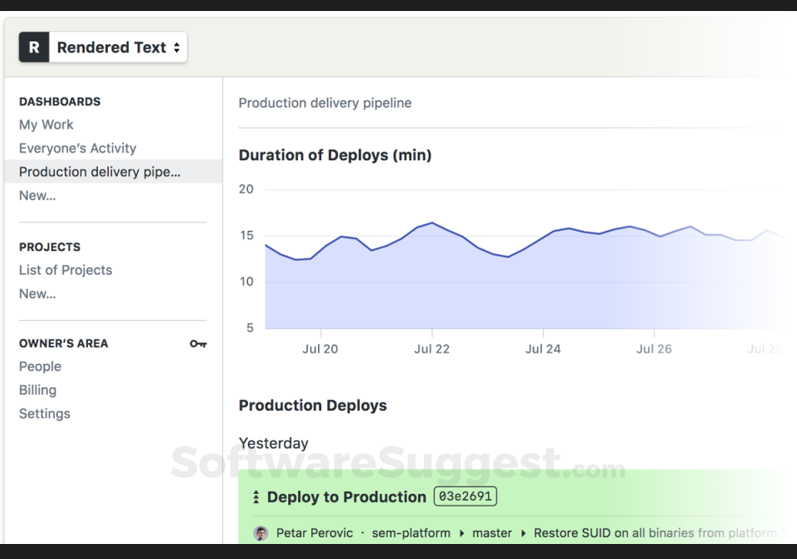
Semaphore is a top tool for automating software development. It excels in CI/CD, speeding up deployment cycles by quickly moving code from repository to live environment. Developers love Semaphore for its efficiency and effectiveness.
Why I Picked Semaphore: I chose Semaphore after carefully comparing its performance with other tools in the market. I determined that Semaphore is best for rapid deployment cycles, as it consistently delivers updates and patches quickly, making it an ideal solution for teams that need to respond to changes swiftly.
Standout Features & Integrations:
Semaphore's workflow visualization and parallel execution enable developers to deploy code more efficiently, thus reducing the time between updates. Its Docker Layer Caching, automatic scaling, and lightweight agent further enhance its rapid deployment capabilities. Important integrations include GitHub, Bitbucket, Docker, Slack, and various cloud providers, creating a cohesive ecosystem for continuous deployment.
Pros and Cons
Pros:
- Highly customizable parallel execution
- Integrates with popular platforms like GitHub and Docker
- Quick deployment without loss of quality
Cons:
- Limited customer support availability
- Steeper learning curve for beginners
- Pricing can be on the higher side for small teams

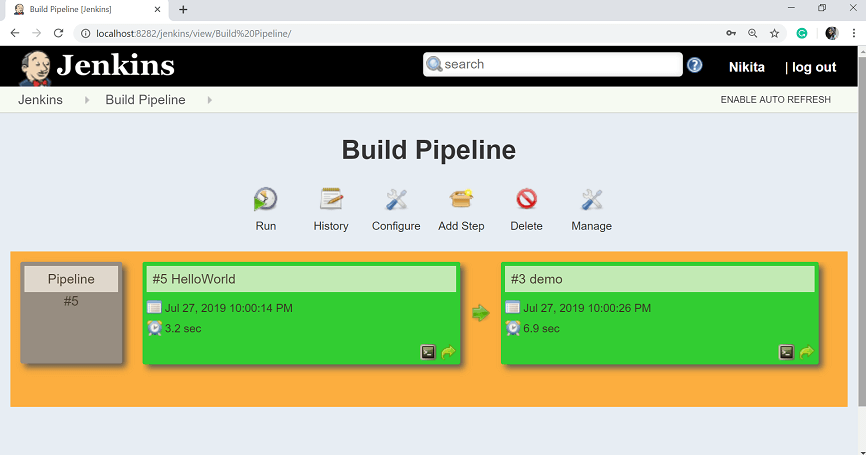
Jenkins is an open-source automation server widely used to streamline the building, testing, and deployment of applications. Its powerful customization capabilities through plugins and scripting allow developers to create pipelines that suit the specific needs of their projects.
Why I Picked Jenkins: I chose Jenkins after comparing its extensive customization options and considering the opinions of various development professionals. This level of customization is why I determined that Jenkins is "Best for..." customizable build pipelines; it allows developers to shape their channels according to the unique requirements of each project.
Standout Features & Integrations:
Jenkins offers many features such as a rich plugin architecture, pipeline-as-code, and integration with virtually all version control systems. It has a broad community that contributes plugins for different integrations, including Git, Docker, Slack, JIRA, and various cloud services. These integrations allow developers to create cohesive and automated workflows that can be finely tuned to their needs.
Pros and Cons
Pros:
- Integrates well with a wide variety of tools and platforms
- Active community support and abundant resources
- Extensive customization through plugins and scripting
Cons:
- Requires careful management and can be resource-intensive on larger projects
- Some plugins may be poorly maintained
- Can be complex to set up, particularly for beginners
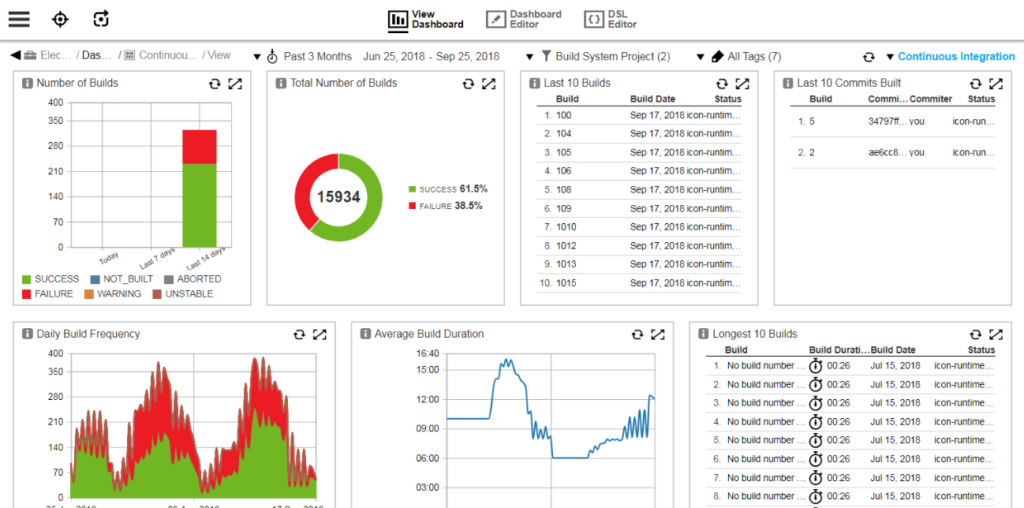
CloudBees is a continuous delivery software platform designed to provide scalable solutions for businesses of varying sizes. With an emphasis on agility, CloudBees supports the ability to scale and adapt for scalable continuous delivery.
Why I Picked CloudBees: I chose CloudBees for this list after comparing it to various continuous delivery platforms. Its ability to scale effortlessly, coupled with an extensive array of features, caught my attention. I judged it best for scalable continuous delivery due to the ease with which it adapts to organizational growth, its extensive feature set, and its robust scalability options that align with varying business needs.
Standout Features & Integrations:
CloudBees provides features like pipeline automation, real-time analytics, and security compliance. These capabilities facilitate efficient development cycles and enhance the entire delivery process. The tool also integrates with popular platforms like GitHub, Jira, and Jenkins, creating a cohesive development environment that can evolve along with the business.
Pros and Cons
Pros:
- Integrations with popular development tools
- Robust set of features for continuous delivery
- Exceptional scalability to suit different business sizes
Cons:
- Some learning curves for new users
- Pricing can be high for startups
- May be complex for smaller teams


Microsoft Azure DevOps Server is a collaborative software development tool with a centralized version control system with integrated project management features. Its tight integration with the Azure cloud platform makes it an ideal solution for organizations that rely on Azure services, justifying the statement that it's best for Azure platform compatibility.
Why I Picked Microsoft Azure DevOps Server: After judging and comparing various development tools focusing on Azure compatibility, I chose Microsoft Azure DevOps Server. In my opinion, it's "Best for..." Azure platform compatibility, as it leverages the inherent strengths and services of Azure, providing a cohesive development experience.
Standout Features & Integrations:
Microsoft Azure DevOps Server offers features like version control, reporting, requirements management, project management, automated builds, and release management. Integrating with other Microsoft products like Visual Studio, Microsoft Teams, and Power BI enhances collaboration and data analytics.
Pros and Cons
Pros:
- Availability of extensions for third-party integrations
- Extensive project management and development capabilities
- Integration with Azure and other Microsoft services
Cons:
- Potential limitations for those not heavily invested in the Azure platform
- Steeper learning curve if not familiar with Microsoft’s ecosystem
- Might be overwhelming for small teams or individual developers

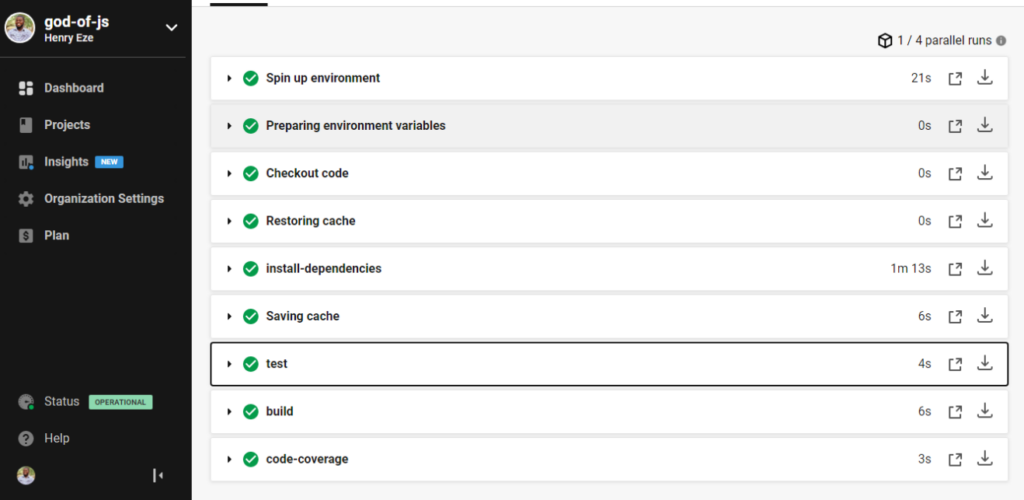
CircleCI is a tool designed to offer Continuous Integration and Continuous Deployment (CI/CD) capabilities. It's especially geared towards automating the process of integrating code changes and deploying applications. Because of its focused approach to both integration and deployment, CircleCI has carved a niche as the best tool for integration and deployment automation.
Why I Picked CircleCI: I chose CircleCI after a detailed analysis and comparison with other continuous deployment tools. Its emphasis on both integration and deployment processes, coupled with powerful automation features, makes it distinct. I judged it to be the best integration and deployment automation tool due to its efficiency in handling complex workflows and connecting various parts of the development process.
Standout Features & Integrations:
CircleCI offers customizable workflows, reusable commands, and jobs, which all contribute to a streamlined deployment process. Its first-class Docker support further aids in automating the build process. Key integrations include GitHub, Bitbucket, AWS, Slack, and Google Cloud, fostering a well-connected development ecosystem.
Pros and Cons
Pros:
- Support for Docker and parallel execution
- Real-time feedback on the development process
- Wide array of integrations with popular tools and platforms
- Wide range of integrations with leading platforms
- Strong Docker support and customizable workflows
- Robust integration and deployment automation
Cons:
- Could be over-featured for very small or simple projects
- Configuration might be complex for some users
- May require some learning curve for newcomers
- Documentation might be overwhelming for new users
- Pricing may be a barrier for small teams
- Can become complex for smaller projects


Bamboo is a continuous integration and deployment tool that is crafted to fit into the Atlassian ecosystem. With cohesive workflow with tools like Jira and Bitbucket, Bamboo stands tall as the best option for Atlassian environment integration.
Why I Picked Bamboo: I picked Bamboo after closely evaluating its deep-rooted connection with the Atlassian environment. It's not just another deployment tool; it's one built to function harmoniously with Atlassian products. I determined Bamboo to be best for Atlassian environment integration as it brings powerful build and deployment capabilities and unifies the Atlassian suite into a more productive and collaborative experience.
Standout Features & Integrations:
Bamboo's features include automated build and test processes, deployment projects, and customized triggers. It supports numerous languages like Java and Python and testing frameworks. The real gem in Bamboo's crown is its integration with other Atlassian tools like Jira Software, Bitbucket, and Fisheye. These integrations make it an integral part of the Atlassian ecosystem, providing streamlined tracking and collaboration.
Pros and Cons
Pros:
- Flexible deployment options
- Robust build and test automation capabilities
- Deep integration with Atlassian tools
Cons:
- Higher cost compared to some other continuous deployment tools
- Limited third-party integrations outside of Atlassian
- Steeper learning curve for non-Atlassian users


Tricentis is a continuous testing platform designed to automate and manage the entire testing process within a software development lifecycle.
Why I Picked Tricentis: I chose Tricentis after carefully determining its standout qualities among other testing automation platforms. Tricentis is best for continuous testing automation because of its advanced capabilities, ability to reduce manual testing effort, and adaptive nature to various testing scenarios and environments.
Standout Features & Integrations:
Tricentis offers a variety of features such as scriptless test automation, real-time insight into testing progress, and cross-platform support. These features allow for a more streamlined and efficient testing process without requiring extensive coding knowledge. The platform integrates with leading development and project management tools such as Jira, Jenkins, and Selenium, further enhancing flexibility and usefulness within an existing development ecosystem.
Pros and Cons
Pros:
- Cross-platform support for various testing needs
- Integration with popular development tools
- Comprehensive automation capabilities
Cons:
- Some advanced features might be overkill for smaller projects
- May have a steeper learning curve for beginners
- Pricing information may be less transparent

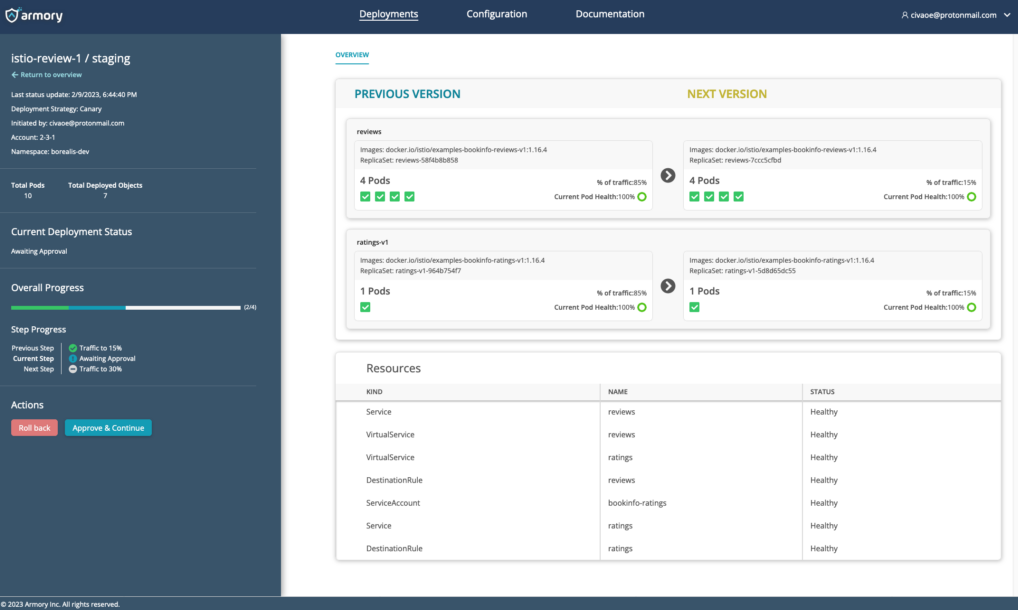
Armory is a continuous delivery platform that enables businesses to deploy software quickly and efficiently across cloud environments. The platform's focus on deployment-as-a-service automates and simplifies deployment processes.
Why I Picked Armory: I chose Armory because of its dedication to the deployment-as-a-service model, having compared it with other platforms on the market. Its emphasis on continuous integration and delivery and support for various cloud providers makes it stand out in the field. This unique focus on deployment-as-a-service and the provided support for collaboration across different teams makes it the "Best for..." deployment-as-a-service model.
Standout Features & Integrations:
Armory offers robust deployment features like automated canary analysis, single-pane-of-glass visibility, and support for multi-cloud environments. It integrates with popular CI/CD tools, cloud providers, and container orchestration platforms, including Jenkins, AWS, Google Cloud, and Kubernetes, providing a deployment experience.
Pros and Cons
Pros:
- Strong support for deployment-as-a-service model
- Integration with popular CI/CD tools and container orchestration platforms
- Flexible deployment options across different cloud providers
Cons:
- Limited documentation and community support compared to more established platforms
- Some features might require a steep learning curve
- Pricing may be high for smaller organizations

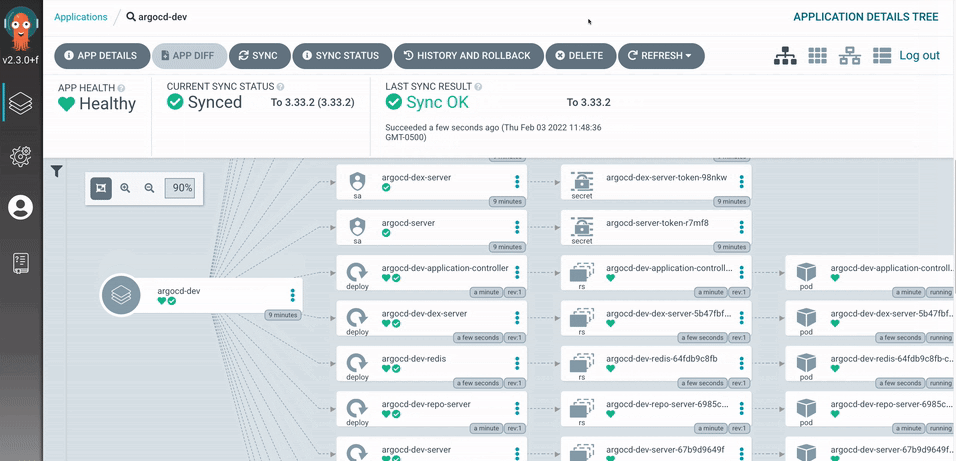
Argo CD is a declarative, GitOps continuous delivery tool designed explicitly for Kubernetes environments. It helps in managing and maintaining Kubernetes resources using Git repositories. Argo CD stands out as the best tool for Kubernetes-native deployments, given its specialized focus on Kubernetes, Argo CD stands out as the best tool for Kubernetes-native deployments.
Why I Picked Argo CD: I chose Argo CD due to its targeted approach to Kubernetes, distinguishing itself from many other deployment tools. By emphasizing Kubernetes-native deployments, it fills a niche that aligns well with contemporary DevOps practices. I determined Argo CD as the best for Kubernetes-native deployments, thanks to its deep integration with Kubernetes and its ability to leverage the full potential of Kubernetes features.
Standout Features & Integrations:
Argo CD's standout features include declarative and version-controlled application definitions, automated synchronization, and visualizations of Kubernetes objects. It also allows self-service application management. As a Kubernetes-native tool, it integrates with Helm, Kustomize, and Jsonnet, fostering a powerful and efficient deployment environment.
Pros and Cons
Pros:
- Strong integration with Kubernetes ecosystem tools
- Open-source with an active community support
- Specifically designed for Kubernetes-native deployments
Cons:
- Requires more maintenance compared to other all-in-one solutions
- Limited functionality for non-Kubernetes environments
- Can be challenging for those not familiar with Kubernetes
Weitere Continuous Deployment Tools
Nachfolgend finden Sie eine Liste weiterer Continuous Deployment Tools, die ich zwar auf die Shortlist gesetzt habe, die es aber nicht in die Top 10 geschafft haben. Auf jeden Fall einen Blick wert.
- NinjaOne
For streamlined software deployment
- ManageEngine Endpoint Central
For unified endpoint management
- DeployHQ
For zero downtime deployments
- GitHub
Good for version control and community-driven development
- LaunchDarkly
Good for feature flag management
- TeamCity
Good for extensible and customizable continuous integration
- Split
Good for controlled feature rollouts
- Buildkite
Good for scalable and flexible build automation
- Travis CI
Good for continuous integration in open-source projects
- GitLab
Good for continuous integration and collaboration
- Spinnaker
Good for multi-cloud continuous delivery
- Flosum
Good for native Salesforce application lifecycle management
- Drone CI
Good for container-native continuous integration
- Gearset
Good for Salesforce DevOps automation


Auswahlkriterien für Continuous Deployment Tools
Bei der Auswahl der besten Continuous Deployment Tools für diese Liste habe ich auf gängige Nutzeranforderungen und Herausforderungen wie Bereitstellungsgeschwindigkeit und Integrationsfähigkeit geachtet. Außerdem habe ich folgendes Bewertungsraster verwendet, um die Beurteilung strukturiert und fair zu gestalten:
Kernfunktionalität (25% der Gesamtbewertung)
Um in diese Liste aufgenommen zu werden, musste jede Lösung folgende Anwendungsszenarien abdecken:
- Automatisierte Deployments
- Management von Build-Pipelines
- Integration mit Versionsverwaltung
- Continuous Integration
- Rollback-Fähigkeiten
Zusätzliche herausragende Funktionen (25% der Gesamtbewertung)
Um die Auswahl weiter einzuschränken, habe ich zudem auf besondere Funktionen geachtet wie:
- Canary Deployments
- Blue-Green Deployments
- Echtzeitüberwachung
- Anpassbare Dashboards
- Erweiterte Sicherheitsfunktionen
Benutzerfreundlichkeit (10% der Gesamtbewertung)
Um das Nutzererlebnis jedes Systems einzuschätzen, habe ich Folgendes berücksichtigt:
- Intuitive Benutzeroberfläche
- Einfache Navigation
- Minimale Einarbeitungszeit
- Gut verständliche Dokumentation
- Responsives Design
Onboarding (10% der Gesamtbewertung)
Um das Onboarding-Erlebnis für jede Plattform zu bewerten, habe ich Folgendes betrachtet:
- Verfügbarkeit von Schulungsvideos
- Interaktive Produkttouren
- Zugriff auf Vorlagen
- Live-Webinare
- Chatbot-Unterstützung
Kundensupport (10 % der Gesamtwertung)
Um die Kundensupportleistungen der einzelnen Softwareanbieter zu bewerten, habe ich Folgendes berücksichtigt:
- 24/7-Supportverfügbarkeit
- Reaktionszeit
- Zugriff auf Live-Chat
- Verfügbarkeit von Support-Tickets
- Umfassende Wissensdatenbank
Preis-Leistungs-Verhältnis (10 % der Gesamtwertung)
Um das Preis-Leistungs-Verhältnis der jeweiligen Plattform zu beurteilen, habe ich Folgendes berücksichtigt:
- Wettbewerbsfähige Preise
- Im Basistarif enthaltene Funktionen
- Flexibilität der Preismodelle
- Rabatte bei jährlicher Abrechnung
- Kosten-Nutzen-Analyse
Kundenbewertungen (10 % der Gesamtwertung)
Um einen Eindruck von der allgemeinen Kundenzufriedenheit zu bekommen, habe ich bei der Auswertung von Kundenbewertungen Folgendes beachtet:
- Gesamte Zufriedenheitsbewertungen
- Feedback zur Zuverlässigkeit
- Kommentare zur Benutzerfreundlichkeit
- Erfahrungen mit dem Kundensupport
- Nutzerempfehlungen
Wie wählt man Continuous Deployment Tools aus?
Es ist leicht, sich in langen Funktionslisten und komplexen Preisstrukturen zu verlieren. Damit Sie bei Ihrem individuellen Auswahlprozess für Software den Fokus behalten, finden Sie hier eine Checkliste relevanter Faktoren:
| Faktor | Worauf Sie achten sollten |
|---|---|
| Skalierbarkeit | Wächst das Tool mit Ihrem Team mit? Prüfen Sie, ob es steigende Arbeitsbelastungen und Nutzerzahlen ohne Leistungseinbußen bewältigen kann. Achten Sie auf Lösungen, die skalierbare Ressourcen und ein passendes Preismodell entsprechend Ihrem Wachstum bieten. |
| Integrationen | Überprüfen Sie, ob das Tool mit Ihren bestehenden Systemen verbunden werden kann. Es sollte Ihre Versionskontrolle, CI/CD- und Kollaborations-Tools unterstützen. Fehlende Integrationen können Arbeitsabläufe stören. |
| Anpassbarkeit | Bewerten Sie, ob Sie das Tool an Ihre Prozesse anpassen können. Anpassbare Workflows und Dashboards helfen Ihnen, das Tool auf Ihre spezifischen Anforderungen abzustimmen, und vermeiden starre Lösungen, die Sie zur Prozessanpassung zwingen. |
| Benutzerfreundlichkeit | Stellen Sie fest, wie intuitiv das Tool für Ihr Team ist. Eine komplexe Benutzeroberfläche kann die Akzeptanz verlangsamen und die Produktivität senken. Suchen Sie nach Tools mit klarer Dokumentation und anwenderfreundlichem Design. |
| Implementierung und Onboarding | Wie schnell kann Ihr Team das Tool nutzen? Bewerten Sie die Verfügbarkeit von Tutorials, Schulungen und Unterstützung während der Einführungsphase, um Unterbrechungen zu minimieren und einen reibungslosen Übergang zu gewährleisten. |
| Kosten | Analysieren Sie die Gesamtkosten, nicht nur den Einstiegspreis. Berücksichtigen Sie versteckte Kosten wie Zusatzfunktionen, Supportgebühren oder erforderliche Upgrades. Stellen Sie sicher, dass das Tool in Ihr Budget passt, ohne auf wichtige Funktionen zu verzichten. |
| Sicherheitsvorkehrungen | Stellen Sie sicher, dass das Tool Ihre Sicherheitsstandards erfüllt. Achten Sie auf Funktionen wie rollenbasierte Zugriffskontrolle, Datenverschlüsselung und Einhaltung von Branchenstandards, um Ihre Daten zu schützen und Sicherheitsverletzungen zu vermeiden. |
| Verfügbarkeit von Support | Bewerten Sie das angebotene Support-Level. Prüfen Sie, ob es einen 24/7-Support, kurze Antwortzeiten und verschiedene Kontaktwege wie Chat, E-Mail oder Telefon gibt. Zuverlässiger Support spart Zeit und löst Probleme schneller. |
Was sind Continuous Deployment Tools?
Continuous Deployment Tools sind Softwarelösungen, die den Prozess der Bereitstellung von Codeänderungen in Produktivumgebungen automatisieren. Entwickler:innen, DevOps-Ingenieur:innen und IT-Teams verwenden Deployment-Automatisierungstools, um die Effizienz der Bereitstellung zu steigern und manuelle Fehler zu reduzieren. Automatisierte Tests, Integration der Versionskontrolle und Deployment-Pipelines unterstützen das Management von Codeänderungen und sorgen für verlässliche Releases. Insgesamt ermöglichen diese Tools erhebliche Zeiteinsparungen und erhöhen die Zuverlässigkeit von Softwarebereitstellungen.
Funktionen
Achten Sie bei der Auswahl von Continuous Deployment Tools auf folgende zentrale Funktionen:
- Automatisiertes Testen: Stellt die Codequalität sicher, indem Tests vor der Bereitstellung automatisch ausgeführt werden und das Risiko von Fehlern in der Produktion minimiert wird.
- Versionskontroll-Integration: Verbindet sich mit Ihrem Versionskontrollsystem, um Codeänderungen zu verwalten und den Verlauf nahtlos zu verfolgen.
- Bereitstellungspipelines: Automatisiert den Prozess vom Entwickeln bis zur Produktion, sorgt für Konsistenz und Geschwindigkeit.
- Canary-Bereitstellungen: Ermöglicht das Ausrollen neuer Änderungen zunächst an eine kleine Nutzergruppe, um Risiken zu minimieren, indem die Leistung vor vollständiger Einführung überwacht wird.
- Rollback-Funktionen: Ermöglicht bei Problemen eine schnelle Rückkehr zu vorherigen Versionen, garantiert Systemstabilität und minimiert Ausfallzeiten.
- Anpassbare Workflows: Erlaubt die Anpassung des Bereitstellungsprozesses an die individuellen Anforderungen Ihres Teams, erhöht Flexibilität und Kontrolle.
- Echtzeitüberwachung: Bietet Einblicke in die Leistung der Bereitstellung und den Systemzustand, damit Teams schnell auf Probleme reagieren können.
- Sicherheitsvorkehrungen: Schützt Ihre Bereitstellungen durch Funktionen wie Zugriffskontrolle und Datenverschlüsselung, sorgt für Compliance und Datensicherheit.
- Skalierbarkeit: Unterstützt wachsende Arbeitslasten und Nutzerzahlen ohne Leistungseinbußen und gewährleistet langfristige Einsatzfähigkeit.
- Integrationsunterstützung: Bietet Anbindungen an gängige Tools und Plattformen, erweitert die Funktionalität und passt sich vorhandene Abläufe an.
Vorteile
Die Implementierung von Continuous Deployment Tools bietet Ihrem Team und Unternehmen zahlreiche Vorteile. Hier sind einige, auf die Sie sich freuen können:
- Höhere Effizienz: Die Automatisierung der Bereitstellungspipelines reduziert manuellen Aufwand, sodass Ihr Team sich auf strategischere Aufgaben konzentrieren kann.
- Verbesserte Codequalität: Automatisierte Tests stellen sicher, dass nur gut getesteter Code in die Produktion gelangt und Fehler minimiert werden.
- Schnellere Release-Zyklen: Optimierte Abläufe ermöglichen häufigere Veröffentlichungen und halten Ihre Software aktuell und wettbewerbsfähig.
- Bessere Zusammenarbeit: Die Integration mit Versionskontrollsystemen und Echtzeitüberwachung fördert bessere Kommunikation und Teamarbeit.
- Geringeres Risiko: Funktionen wie Canary-Bereitstellungen und Rollbacks helfen, Risiken bei Releases abzufedern und sorgen für Stabilität.
- Skalierbarkeit: Die Fähigkeit, wachsende Arbeitslasten zu bewältigen, stellt sicher, dass Ihre Bereitstellungsprozesse mit den Anforderungen Ihres Unternehmens wachsen können.
- Bessere Sicherheit: Sicherheitsvorkehrungen schützen Ihre Deployments, sorgen für Compliance und sichern vertrauliche Daten.
Kosten & Preise
Die Auswahl von Continuous Deployment Tools erfordert ein Verständnis der verschiedenen Preismodelle und verfügbaren Pläne. Die Kosten variieren je nach Funktionen, Teamgröße, Add-Ons und mehr. Die folgende Tabelle fasst gängige Pläne, deren Durchschnittspreise und typische enthaltene Funktionen von Continuous Deployment Tool-Lösungen zusammen:
Vergleichstabelle für Continuous Deployment Tool-Pläne
| Plan-Typ | Durchschnittlicher Preis | Häufige Funktionen |
|---|---|---|
| Kostenloser Plan | $0/user/month | Grundlegende Bereitstellungsfunktionen, begrenzte Integrationen und Community-Support. |
| Persönlicher Plan | $5-$25/user/month | Erweiterte Tests, Integration von Versionskontrolle und anpassbare Workflows. |
| Business-Plan | $30-$75/user/month | Echtzeitüberwachung, erweiterte Sicherheitsfunktionen und priorisierter Support. |
| Enterprise-Plan | $100-$200/user/month | Vollständige Skalierbarkeit, dediziertes Account-Management und umfassende Analysen. |
FAQs zu Continuous Deployment Tools
Hier finden Sie Antworten auf häufig gestellte Fragen zu Continuous Deployment Tools:
Was passiert, wenn eine Bereitstellung mit diesen Tools fehlschlägt?
Wenn Sie Continuous Deployment Tools verwenden, muss Ihre Pipeline in der Lage sein, Fehler zu erkennen und automatisch zurückzusetzen oder anzuhalten. Das bedeutet, Ihr Tool sollte versionierte Artefakte unterstützen, ein automatisches Rollback oder das erneute Bereitstellen einer vorherigen Version sowie Alarmierung/Monitoring ermöglichen, damit Sie das Problem schnell bemerken. Wenn Sie dies ignorieren, kann eine fehlgeschlagene Veröffentlichung online bleiben und Ihre Nutzer beeinträchtigen.
Wie gehen diese Tools mit mehreren Umgebungen (Dev/Staging/Production) um?
Ihre Deployment-Tools sollten es Ihnen ermöglichen, separate Umgebungen mit eigenen Konfigurationen, Variablen und ggf. Freigaberichtlinien zu definieren. Die besten Tools erlauben zudem die Promotion von einer Umgebung zur nächsten (Dev → Staging → Produktion) und halten diese synchron. Wenn Ihr Tool keine explizite Umgebungstrennung unterstützt, kommt es wahrscheinlich zu Konfigurationsabweichungen oder versteckten Fehlern beim Wechsel zur Produktion.
Wie kann ich Sicherheit und Compliance in Continuous Deployment Tools integrieren?
Ihre Toolchain sollte Sicherheitsüberprüfungen (z. B. statische Codeanalyse, Schwachstellenscans) und Compliance-Prüfungen (Audit-Logging, rollenbasierte Freigaben) integrieren, sogar in einer überwiegend automatisierten Pipeline. Das Deployment-Tool sollte Hooks oder Plugins für solche Prüfungen bereitstellen und Transparenz darüber bieten, was wann und von wem ausgerollt wurde. Wenn Sie dies vernachlässigen, kann die erhöhte Geschwindigkeit zu einem größeren Risiko führen.
Welche Veränderungen in Teamkultur oder Prozessen sind beim Einsatz dieser Tools erforderlich?
Der Wechsel zu häufigen, automatisierten Deployments bedeutet, dass Ihr Team von der Denkweise der “großen Releases” abrücken muss. Es sind kleinere Änderungen, schnellere Feedbackzyklen und Eigenverantwortung für laufenden Code gefragt. Entwickler, Tester und Operations müssen eng zusammenarbeiten und akzeptieren, dass Produktion Teil des Prozesses ist und kein nachgelagerter Schritt. Ohne entsprechende Anpassung der Prozesse decken Deployment-Tools eher Schwächen auf, statt sie zu beheben.
Welche versteckten Kosten oder Risiken bei Continuous Deployment Tools sollte ich beachten?
Zusätzlich zu Lizenz- oder Infrastrukturkosten bestehen Risiken wie: der Betrieb mehrerer produktionsähnlicher Umgebungen (die Geld kosten), die Pflege von Testsuiten und Pipelines, je größer Ihr System wird, erhöhter Bedarf an Monitoring und möglicherweise häufigere Zwischenfälle, wenn Releases nicht gut gesteuert werden. Außerdem kann es vorkommen, dass sich das Tooling und die Automatisierung zu eigenen Projekten entwickeln, statt rein unterstützend zu sein. Wenn Sie dies nicht einplanen, kann die Tool-Einführung Ihr Team ausbremsen.
Wie geht es weiter:
Wenn Sie gerade auf der Suche nach Continuous Deployment Tools sind, kontaktieren Sie einen SoftwareSelect-Berater für kostenlose Empfehlungen.
Sie füllen ein Formular aus und führen ein kurzes Gespräch, in dem Ihre spezifischen Anforderungen besprochen werden. Anschließend erhalten Sie eine Shortlist mit Software-Vorschlägen. Die Berater begleiten Sie zudem durch den gesamten Kaufprozess – inklusive Preisverhandlungen.