
15 Beste Code-Visualisierungs-Tools im Test 2026

Kurzliste der besten Code-Visualisierungstools
Hier ist meine Kurzliste der besten Code-Visualisierungstools:


Wenn Sie jemals einen unübersichtlichen Codebestand übernommen, Schwierigkeiten gehabt haben, Ihre Architektur einem neuen Teammitglied zu erklären, oder beim Debuggen nicht weiterkamen, weil nichts Sinn ergab – dann wurden Code-Visualisierungstools genau für Sie entwickelt. Es geht nicht nur um Diagramme – sondern darum, abstrakte Logik in etwas zu verwandeln, das Ihr Team tatsächlich nachvollziehen kann.
In den letzten Jahren habe ich mit Entwicklungsteams sowohl in schnell wachsenden Entwicklungsunternehmen als auch in Altsystemen zusammengearbeitet. Ich habe sie dabei unterstützt, Tools auszuwählen, die wirklich zeigen, wie ihr Code funktioniert. Ich habe alles getestet – von schlanken Dateimappern bis zu fortschrittlichen, graphenbasierten Visualisierern –, um herauszufinden, was das Verständnis tatsächlich fördert und nicht nur in einer Präsentation optisch überzeugt.
In diesem Leitfaden teile ich die Code-Visualisierungstools, die herausragten – Tools, die helfen, Komplexität abzubilden, Einarbeitungszeiten zu verkürzen und Debugging sowie Zusammenarbeit intuitiver zu gestalten.
Why Trust Our Software Reviews
Zusammenfassung der besten Code-Visualisierungstools
Diese Vergleichstabelle fasst die Preisinformationen meiner Top-Auswahl an Code-Visualisierungstools zusammen, um Ihnen zu helfen, das passende Tool für Ihr Budget und Ihre geschäftlichen Anforderungen zu finden.
| Tool | Best For | Trial Info | Price | ||
|---|---|---|---|---|---|
| 1 | Best for uncovering code vulnerabilities | Free plan available (up to 5 users) | From $65/month | Website | |
| 2 | Best for collaborative code diagrams | Free plan available | From $9/user/month (billed annually) | Website | |
| 3 | Best for developer onboarding | Free demo available | Pricing upon request | Website | |
| 4 | Best for Visual Studio integration | Not available | Free | Website | |
| 5 | Best for remote development | Free plan available | From $0.18/2 core machine/2 usage multiplier | Website | |
| 6 | Best for 3D code visualization | Not available | Free to use | Website | |
| 7 | Best for behavioral code analysis | Free trial + demo available | From €18/active author/month (billed annually) | Website | |
| 8 | Best for visualizing project history | Not available | Free to use | Website | |
| 9 | Best for storytelling with code | Not available | Free to use | Website | |
| 10 | Best for large codebases | Free trial available + free demo | From $99/user/month (billed annually) | Website | |
| 11 | Best for code exploration | Not available | Free to use | Website | |
| 12 | Best for C++ code analysis | 30-day free trial | From $417/user/year (billed annually) | Website | |
| 13 | Best for detecting anti-patterns | Not available | From $20/user/month (billed annually) | Website | |
| 14 | Best for security insights | Free demo available | From $15/user/month (min 5 seats) | Website | |
| 15 | Best for GitHub analytics | Not available | Free to use | Website |
-

Site24x7
Visit WebsiteThis is an aggregated rating for this tool including ratings from Crozdesk users and ratings from other sites.4.6 -
GitHub Actions
Visit WebsiteThis is an aggregated rating for this tool including ratings from Crozdesk users and ratings from other sites.4.8 -
Docker
Visit WebsiteThis is an aggregated rating for this tool including ratings from Crozdesk users and ratings from other sites.4.6





Bewertungen der besten Code-Visualisierungstools
Nachfolgend finden Sie meine ausführlichen Zusammenfassungen der besten Code-Visualisierungstools, die es auf meine Kurzliste geschafft haben. Meine Reviews geben Ihnen einen detaillierten Überblick über die wichtigsten Funktionen, Vor- & Nachteile, Integrationen und idealen Einsatzzwecke jedes Tools, damit Sie das beste für sich finden.


SonarQube is a valuable tool for developers and organizations striving to maintain impeccable code quality and security. Designed for both individual developers and large enterprises, SonarQube addresses the need for automated code reviews and real-time feedback, supporting over 35 programming languages. By integrating seamlessly with popular DevOps platforms and offering advanced security features, SonarQube helps you detect vulnerabilities early in the development process, ensuring robust and secure codebases.
Why I Picked SonarQube
I chose SonarQube for its unique ability to offer detailed static analysis that uncovers code vulnerabilities and quality issues across multiple languages. Its Static Application Security Testing (SAST) feature provides real-time feedback and AI-powered remediation suggestions, making it an invaluable tool for developers aiming to visualize and improve their code's security posture. Additionally, the Taint Analysis feature effectively tracks data flow to identify potential injection vulnerabilities, minimizing false positives and enhancing code safety. These features align well if you're interested in comprehensive code visualization tools that prioritize security and quality.
SonarQube Key Features
In addition to its standout security features, SonarQube provides.
- Secrets detection: This feature identifies leaked API keys and passwords, safeguarding sensitive information with high accuracy.
- Infrastructure as Code (IaC) scanning: Scans configurations in tools like Terraform and Kubernetes, helping secure cloud environments.
- Multi-language metric support: Aggregates visual quality metrics across 35+ languages and frameworks so you can track trends in polyglot codebases from one place.
- Security Hotspots view: Highlights security-sensitive code that needs human review, giving security and platform teams a focused place to review and prioritize remediation.
SonarQube Integrations
Integrations include GitHub, GitLab, Azure DevOps, Bitbucket, Jenkins, Bamboo, Maven, Gradle, Visual Studio, and IntelliJ IDEA.
Pros and Cons
Pros:
- Supports over 35 programming languages for comprehensive coverage
- Quality gates in pipelines block merges that fail quality thresholds
- Dashboards visualize coverage, technical debt, and complexity across projects
Cons:
- Scan times may be long on very large codebases
- Can generate false positives, requiring manual verification
New Product Updates from SonarQube
SonarQube Cloud Introduces Architecture Management
SonarQube Cloud now offers architecture management to automatically map your project's structure, ensuring design integrity and resolving deviations seamlessly. For more information, visit SonarQube's official site.
 .
.

Lucidchart is designed for IT professionals, engineers, and project managers seeking a tool that simplifies complex code structures into visual diagrams. By transforming intricate coding into easily digestible diagrams, it helps teams better understand and collaborate on projects. Its ability to integrate with existing workflows and enhance team communication makes it an essential tool for those aiming to optimize their coding processes and improve project outcomes.
Why I Picked Lucidchart
I picked Lucidchart because it excels in transforming complex code into intuitive visual diagrams, a feature that is crucial for any code visualization tool. Its "diagram as code" capability allows you to create and update diagrams directly from your codebase, ensuring that your visualizations are always up-to-date. Additionally, the real-time collaboration feature means your team can work together seamlessly, sharing insights and making decisions quickly. These features address the common challenge of understanding and managing complex codebases, making Lucidchart an ideal choice for developers and project managers.
Lucidchart Key Features
In addition to its code visualization capabilities, Lucidchart offers several features that enhance its utility for teams:
- Intelligent Diagramming: Automatically generates diagrams from complex data, simplifying the visualization process.
- Data Linking: Connects diagrams to live data sources, ensuring that your visualizations reflect the most current information.
- Conditional Formatting: Allows you to apply rules to diagrams, highlighting specific data points or changes.
- Extensive Templates: Provides a variety of templates tailored to different industries and use cases, helping you get started quickly.
Lucidchart Integrations
Integrations include Microsoft Teams, Google Workspace, Atlassian Confluence, Jira, Slack, Salesforce, AWS, Azure, Asana, and BambooHR.
Pros and Cons
Pros:
- Strong template library
- Real-time team collaboration
- Diagram as code support
Cons:
- Can feel complex initially
- Limited offline access

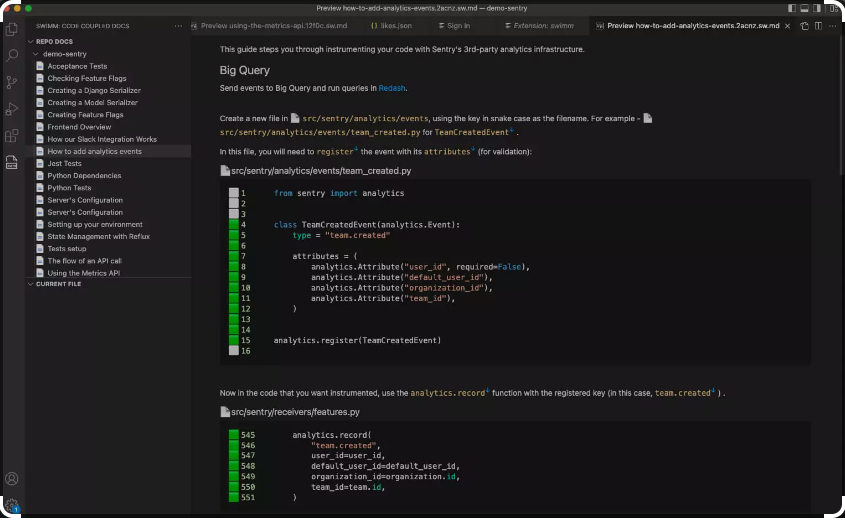
Swimm is a code visualization tool designed to enhance developer onboarding by automating code documentation. It's tailored for development teams looking to improve code comprehension and collaboration. The platform provides tools to create interactive documentation that integrates directly into your codebase.
Why I picked Swimm: It focuses on developer onboarding by offering features like live documentation and code tutorials. Swimm enables your team to create walkthroughs that guide new developers through codebases. The tool supports various programming languages, making it versatile for different projects. Its ability to update documentation automatically as code changes sets it apart.
Standout features & integrations:
Features include code tutorials, live documentation, and auto-updated guides. Swimm allows you to embed explanations directly into your code editor, helping your team understand complex code. It also supports various programming languages, ensuring flexibility in different environments.
Integrations include GitHub, GitLab, Bitbucket, VS Code, JetBrains, and Slack.
Pros and Cons
Pros:
- Supports multiple programming languages
- Auto-updates documentation with code changes
- Excellent for onboarding new developers
Cons:
- May require initial setup time
- Limited to certain integrations


Code Graph is a Visual Studio extension that helps developers explore and understand complex codebases. It’s built for teams who want to visualize dependencies and relationships directly within their coding environment. The tool supports better project navigation by turning code structures into interactive graphs.
Why I picked Code Graph:
This tool lets you see code relationships as interactive maps, which makes it easier to follow logic across large projects. You can explore classes, functions, and dependencies without leaving your editor, which saves time. The graphs update as your code changes, so you always have an accurate picture of your project. It’s especially useful if you’re managing multiple projects or dealing with legacy code.
Standout features & integrations:
Features include interactive graph navigation that lets you drill into details without losing context. You can search and filter large graphs to quickly find the parts of code you care about. It also supports customized graph layouts so you can view code in the way that works best for you.
Integrations include Visual Studio.
Pros and Cons
Pros:
- Helps with legacy project analysis
- Visual maps update in real time
- Easy code navigation inside editor
Cons:
- Can slow performance on big codebases
- Limited outside Visual Studio


GitHub Codespaces is a cloud-hosted development environment built for developers who want to work from anywhere. It runs in your browser or through Visual Studio Code and makes it easier to create, edit, and manage projects without setting up a local environment. The tool helps teams keep development fast and consistent across devices.
Why I picked GitHub Codespaces:
You can spin up a full dev environment in minutes, which saves time on setup. The environment comes preconfigured with your project’s dependencies so you don’t have to worry about local conflicts. You can run, test, and debug code all inside the same workspace. It’s helpful if your team works on multiple machines or needs quick onboarding for new members.
Standout features & integrations:
Features include browser-based coding that runs directly in your IDE. You can connect storage and repos without leaving the workspace. It also supports flexible machine types so you can choose the right resources for your project.
Integrations include GitHub, Visual Studio Code, and Visual Studio.
Pros and Cons
Pros:
- Preconfigured with project dependencies
- Works in browser or desktop IDE
- Instant dev environment setup
Cons:
- Learning curve for workspace config
- Costs add up on heavy use

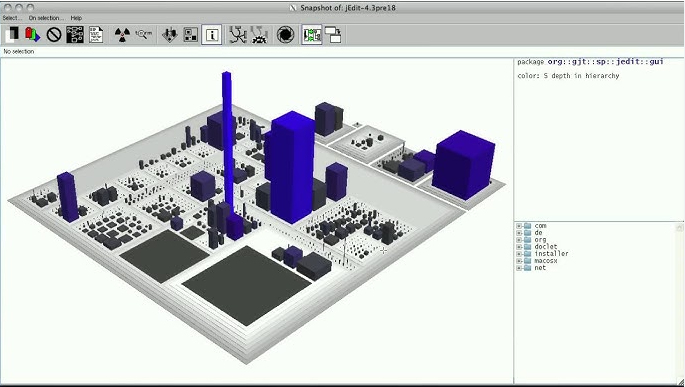
CodeCity is a software visualization environment that represents codebases as interactive 3D cities. It’s built for developers and researchers who want to explore object-oriented software structures more intuitively. The tool transforms software metrics and hierarchies into spatial metaphors, making complex systems easier to grasp.
Why I picked CodeCity: It offers a visual layout that maps code classes as buildings and packages as districts, all in 3D. The height and base size reflect metrics like a number of methods and lines of code. This makes it easier to spot anomalies or complexity at a glance. If your team works with large codebases, this spatial view can help you detect patterns you’d likely miss in text. It’s especially useful when doing architectural reviews or code audits.
Standout features & integrations:
Features include customizable metrics mapping so you can define which software metrics to visualize as building properties. It supports navigation through the city with zoom and pan to explore structures in depth. You can also export and snapshot visualizations for reporting or documentation.
Integrations include Moose, FAMIX, and Smalltalk environments
Pros and Cons
Pros:
- Helps spot code complexity fast
- Supports custom metric mapping
- Works well for legacy codebases
Cons:
- Requires Moose for full functionality
- Only supports object-oriented languages

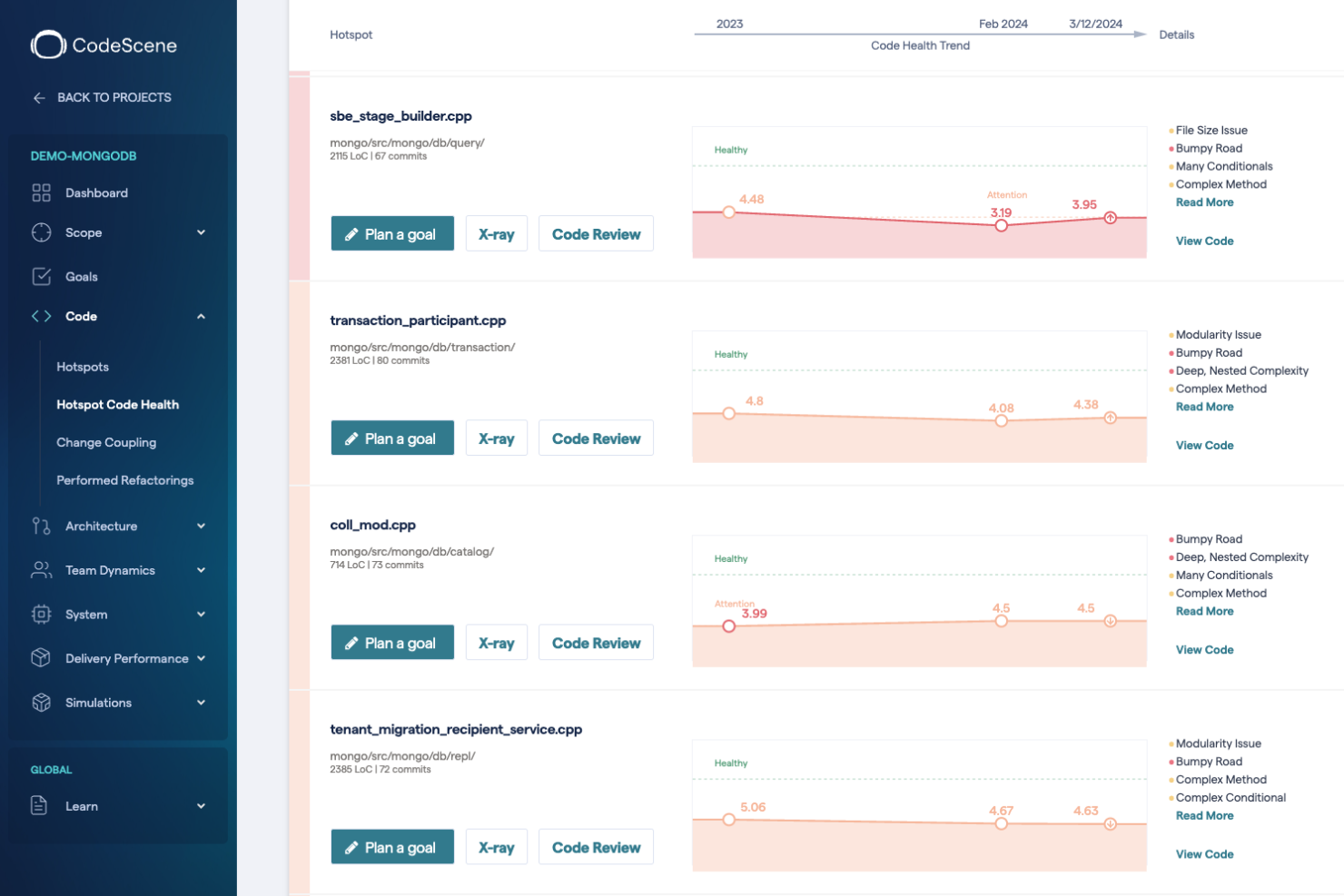
CodeScene is a behavioral code analysis tool aimed at developers and project managers who want to understand the impact of code changes on team productivity and software quality. It offers insights into code complexity, team dynamics, and technical debt.
Why I picked CodeScene: It focuses on behavioral code analysis, providing a unique view of how code changes affect team performance and project outcomes. CodeScene identifies hotspots in your codebase, helping you prioritize refactoring efforts. It also offers predictive analytics that guides your team in managing technical debt. This focus on behavioral metrics helps in making informed decisions about code improvements.
Standout features & integrations:
Features include identifying code hotspots, providing predictive analytics, and offering insights into team dynamics. CodeScene helps you manage technical debt by highlighting areas that need attention. It also supports multiple version control systems, allowing flexibility in different environments.
Integrations include GitHub, GitLab, Bitbucket, Azure DevOps, and Jenkins.
Pros and Cons
Pros:
- Supports multiple version control systems
- Identifies code hotspots
- Offers predictive analytics
Cons:
- Requires learning curve
- Complexity in large codebases

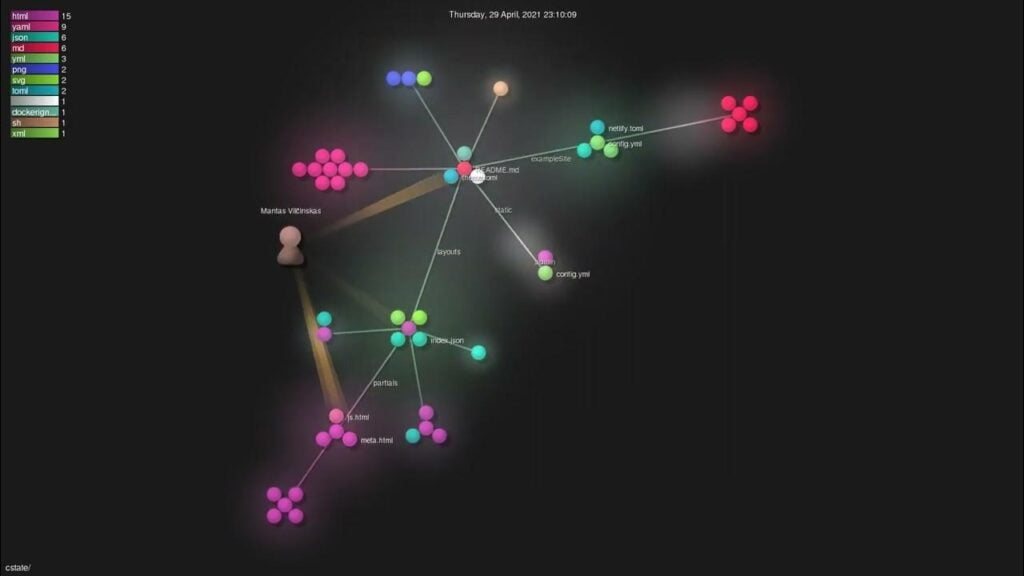
Gource is a tool designed to visualize the history of a project in a tree-like structure. It's primarily used by developers and project managers who want to see a visual representation of changes in their repositories over time.
Why I picked Gource: It specializes in visualizing project history, offering an animated view of your repository's evolution. Gource provides a unique perspective by displaying commits as a dynamic tree structure, helping your team understand project progress. It supports various version control systems, allowing flexibility in different environments. This visualization helps in identifying patterns and trends in project development.
Standout features & integrations:
Features include creating animated visualizations of project history, supporting multiple version control systems, and displaying commits in a tree-like structure. Gource allows you to customize the visuals to highlight specific aspects of your project's evolution. It provides a unique way to analyze development activity over time.
Integrations include Git, SVN, Mercurial, and Bazaar.
Pros and Cons
Pros:
- Customizable visual outputs
- Supports multiple version control systems
- Unique project history visualization
Cons:
- No real-time collaboration
- Limited to visual analysis


CodeStory is an AI-powered modification of Visual Studio Code (VSCode) that enhances the coding experience by integrating advanced artificial intelligence into the development process. It allows developers to interact with their code by describing desired changes, which the AI agent then implements, streamlining tasks like editing, searching, debugging, and refactoring within the IDE.
Why I picked CodeStory: It provides code explanations with the surrounding context, auto-generated pull request summaries, and changelogs created with full context. The tool also offers intuitive search capabilities, eliminating concerns about syntax. If your team works with large codebases, this approach can help you manage and understand changes more effectively.
Standout features & integrations:
Features include AI-powered code editing that allows you to implement changes by simply describing them. It generates pull request summaries and changelogs automatically, keeping your documentation up to date.
Integrations include seamless compatibility with Visual Studio Code, allowing you to migrate effortlessly while retaining your favorite extensions, shortcuts, and customizations.
Pros and Cons
Pros:
- Auto-creates pull request summaries and changelogs
- AI-driven code editing simplifies modifications
- Generates contextual explanations for code changes
Cons:
- Dependence on accurate AI interpretations
- Limited to environments compatible with VSCode

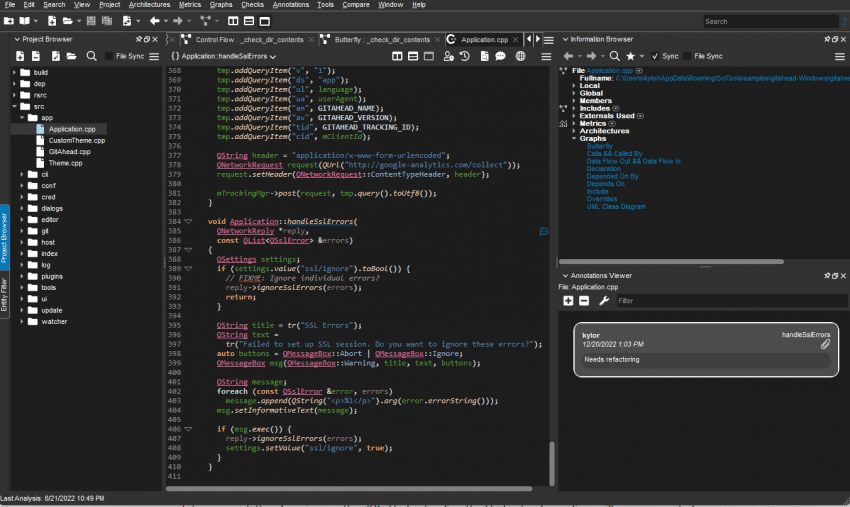
Understand is a static analysis tool designed for developers working with large codebases. It provides detailed insights into code structure, dependencies, and quality, helping teams manage complex projects efficiently.
Why I picked Understand: It excels in handling large codebases, offering features like code metrics and dependency analysis. It helps you visualize complex code structures, making it easier to identify issues. The tool supports multiple programming languages, providing flexibility for diverse projects. Its ability to generate comprehensive reports aids in maintaining code quality.
Standout features & integrations:
Features include generating detailed code metrics, performing dependency analysis, and visualizing code structures. It supports multiple programming languages, providing flexibility for various projects. It also offers comprehensive reporting, helping your team maintain code quality.
Integrations include Eclipse, Visual Studio, Jenkins, Git, SVN, and Subversion.
Pros and Cons
Pros:
- Offers comprehensive reporting
- Supports multiple programming languages
- Handles large codebases efficiently
Cons:
- Not ideal for small projects
- Limited to static analysis


Sourcetrail is a code visualization tool aimed at developers seeking to explore and understand complex codebases. It serves programmers working with multiple languages and frameworks, offering insights into code structure and dependencies.
Why I picked Sourcetrail: It excels in code exploration by providing a visual representation of code dependencies and structures. Sourcetrail supports multiple programming languages like JavaScript, Python, and C++. Its interactive user interface allows you to navigate through codebases efficiently. The tool also highlights relationships between code elements, making it easier for your team to understand complex systems.
Standout features & integrations:
Features include visualizing code dependencies, interactive code navigation, and support for various programming languages. The tool highlights relationships between code elements, helping your team understand complex systems. Sourcetrail's interface is designed to make code exploration intuitive and efficient.
Integrations include compatibility with JavaScript, Python, Java, C++, C#, and Ruby.
Pros and Cons
Pros:
- Interactive code navigation
- Visualizes code dependencies
- Supports multiple programming languages
Cons:
- May require learning time
- Limited customization options

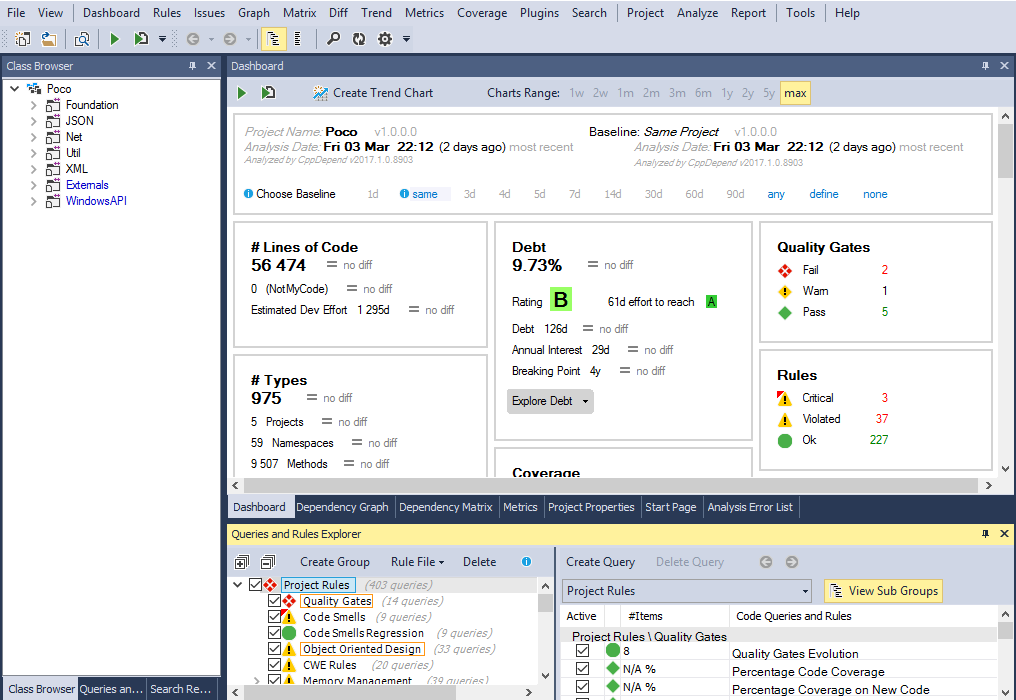
CppDepend is a code analysis tool specifically designed for C++ developers. It provides insights into code quality and architecture, helping teams maintain clean and efficient codebases.
Why I picked CppDepend: It focuses on C++ code analysis, offering features like code metrics and dependency graphs. CppDepend helps you identify code smells and technical debt, enhancing code quality. It also provides custom rules, allowing your team to tailor analysis to fit specific project needs. The tool's ability to visualize code dependencies makes it valuable for understanding complex C++ projects.
Standout features & integrations:
Features include generating code metrics, identifying code smells, and visualizing dependencies. CppDepend allows you to create custom rules to suit your project's requirements. It also provides insights into technical debt, helping you maintain a clean codebase.
Integrations include Visual Studio, Azure DevOps, TeamCity, Jenkins, SonarQube, and NDepend.
Pros and Cons
Pros:
- Identifies technical debt
- Detailed C++ code analysis
- Custom rule creation
Cons:
- Initial setup can be complex
- Limited to C++ projects

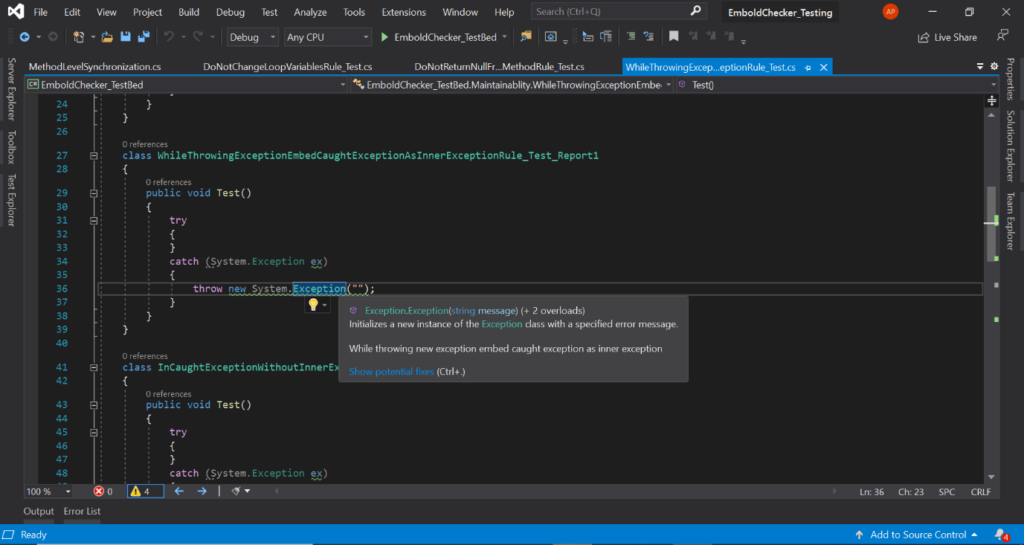
Embold is a software analytics platform that leverages AI to provide deep and actionable insights into your code quality. It scrutinizes your code across multiple dimensions, offering suggestions for improvement, which is why it's ideal for AI-assisted code quality analysis.
Why I Picked Embold: It stood out due to its advanced application of AI in code analysis. This unique feature enables Embold to analyze and assess code quality more thoroughly than traditional methods, providing more nuanced and actionable feedback. As a result, I have determined that Embold is the best tool for AI-assisted code quality analysis.
Standout Features & Integrations:
Features include anti-pattern detection, design issues, and code duplication checks. Its most significant feature, however, is its AI-powered predictive analytics, which can identify potential issues before they cause problems.
Integrations include GitHub, Bitbucket, GitLab, and Jira.
Pros and Cons
Pros:
- Wide range of integrations with popular platforms
- Predictive analytics identify issues early
- Uses AI for comprehensive code analysis
Cons:
- Annual billing may not suit all budgets
- The AI-assisted features may require a learning curve

Cider is an application security platform designed to provide engineering and security teams with comprehensive visibility into their software development lifecycle. It enables users to identify and remediate security risks across code, CI/CD pipelines, and third-party dependencies.
Why I picked Cider: It features maps out all assets and technologies, helping your team understand relationships and potential vulnerabilities. The platform analyzes your CI/CD systems to identify exploitable risks and provides remediation plans tailored to your environment. It also offers scanner orchestration, allowing you to implement necessary scanners without disrupting existing processes.
Standout features & integrations:
Features include the creation of a "Technical DNA" of your software engineering ecosystem, providing dynamic visualization of your attack surface. It offers scanner orchestration policies to ensure continuous coverage of your technical stack. Additionally, it allows for the implementation of custom workflows to shift prioritized security risks to their designated owners.
Integrations include GitHub, GitLab, Bitbucket, Jenkins, CircleCI, Travis CI, Azure DevOps, AWS, GCP, and Kubernetes.
Pros and Cons
Pros:
- Integrates seamlessly with existing tools
- Provides comprehensive visibility into development lifecycle
- Identifies and remediates security risks effectively
Cons:
- Potential learning curve for new users
- May require time to fully implement

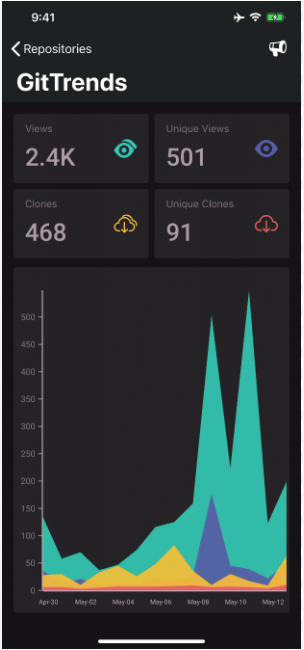
GitTrends is a code visualization tool designed to help developers and project managers track and analyze GitHub repository activity. It is particularly useful for those managing multiple repositories, providing insights into views, clones, stars, and issues.
Why I picked GitTrends: It offers specialized GitHub analytics that help you keep track of repository activity. GitTrends notifies you of significant changes, allowing you to stay updated on your project's status. The tool visualizes data such as views, clones, and stars, making it easier to understand the performance of your repositories. This focus on GitHub metrics makes it a valuable choice for developers managing large projects.
Standout features & integrations:
Features include tracking repository views, clones, and stars. GitTrends provides notifications for significant changes, ensuring you're always informed. It also offers visualizations that help you understand your repository's performance at a glance.
Integrations include GitHub.
Pros and Cons
Pros:
- Visualizes repository performance
- Detailed GitHub analytics
- Real-time notifications
Cons:
- No advanced customization
- Limited to GitHub data
Weitere Code-Visualisierungstools
Hier sind einige weitere Optionen für Code-Visualisierungstools, die es nicht auf meine Kurzliste geschafft haben, aber trotzdem einen Blick wert sind:
- Sourcemeter
For multi-language analysis
- CodeGalaxy
For learning to code
- Sourcegraph
For universal code search
- Code Maat
For code evolution metrics
- CodeFlower
For visualizing code structure
- CodeViz
For call graph generation
- Polyspace
For static code verification
- SourceMiner
For code analysis plugins


Auswahlkriterien für Code-Visualisierungstools
Bei der Auswahl der besten Code-Visualisierungstools für diese Liste habe ich die typischen Bedürfnisse und Herausforderungen der Käufer berücksichtigt – wie das Verstehen komplexer Codebasen und die Verbesserung der Teamzusammenarbeit. Zusätzlich habe ich den folgenden Rahmen genutzt, um meine Bewertung strukturiert und fair zu gestalten:
Kernfunktionen (25% der Gesamtbewertung)
Um in diese Liste aufgenommen zu werden, musste jede Lösung diese typischen Anwendungsfälle erfüllen:
- Visualisierung der Code-Struktur
- Ermitteln von Code-Abhängigkeiten
- Analyse der Code-Komplexität
- Hervorheben von Code-Änderungen
- Unterstützung mehrerer Programmiersprachen
Weitere herausragende Funktionen (25% der Gesamtbewertung)
Um die Auswahl weiter einzugrenzen, habe ich zudem auf folgende besondere Features geachtet:
- Echtzeit-Kollaborationstools
- Interaktive Code-Durchläufe
- Anpassbare Visualisierungen
- Verhaltensbasierte Code-Analysetools
- Integration mit Versionskontrollsystemen
Benutzerfreundlichkeit (10% der Gesamtbewertung)
Um mir ein Bild von der Benutzerfreundlichkeit jeder Lösung zu machen, habe ich Folgendes berücksichtigt:
- Intuitives Oberflächendesign
- Einfache Navigation
- Geringe Einarbeitungszeit
- Responsives Design
- Anpassbare Benutzereinstellungen
Onboarding (10% der Gesamtbewertung)
Um das Onboarding-Erlebnis jeder Plattform zu bewerten, habe ich Folgendes berücksichtigt:
- Verfügbarkeit von Trainingsvideos
- Interaktive Produkttouren
- Umfassende Dokumentation
- Zugang zu Webinaren
- Personalisierte Onboarding-Unterstützung
Kundensupport (10% der Gesamtbewertung)
Um die Kundenservice-Leistungen jedes Softwareanbieters zu beurteilen, habe ich folgende Kriterien angelegt:
- 24/7 Support-Verfügbarkeit
- Mehrere Supportkanäle
- Reaktionszeit
- Technische Expertise
- Verfügbarkeit einer Wissensdatenbank
Preis-Leistungs-Verhältnis (10% der Gesamtbewertung)
Um das Preis-Leistungs-Verhältnis jeder Plattform zu bewerten, habe ich folgende Aspekte geprüft:
- Wettbewerbsfähige Preisgestaltung
- Funktionsumfang auf jeder Preisstufe
- Verfügbarkeit von kostenlosen Testversionen
- Skalierbarkeit der Preismodelle
- Kosten im Vergleich zu ähnlichen Tools
Kundenbewertungen (10% der Gesamtbewertung)
Um ein Gefühl für die allgemeine Kundenzufriedenheit zu bekommen, habe ich bei der Analyse von Kundenrezensionen Folgendes berücksichtigt:
- Allgemeine Zufriedenheitsbewertungen
- Feedback zur Benutzerfreundlichkeit
- Kommentare zum Kundensupport
- Meldungen zu Fehlern oder Problemen
- Häufigkeit von Aktualisierungen und Verbesserungen
Wie man Code-Visualisierungstools auswählt
Es ist leicht, sich in langen Funktionslisten und komplexen Preismodellen zu verlieren. Um Ihnen dabei zu helfen, während Ihres individuellen Softwareauswahlprozesses den Überblick zu behalten, finden Sie hier eine Checkliste mit Faktoren, die Sie berücksichtigen sollten:
| Faktor | Worauf achten |
| Skalierbarkeit | Stellen Sie sicher, dass das Tool mit Ihrem Team wachsen und größere Codebasen bewältigen kann, wenn Ihre Projekte wachsen. Suchen Sie nach Lösungen mit skalierbaren Funktionen und Preismodellen. |
| Integrationen | Überprüfen Sie, ob das Tool sich in Ihre bestehende Software wie Git oder Jenkins integrieren lässt. Nahtlose Integration kann Arbeitsabläufe vereinfachen und die Produktivität steigern. |
| Anpassbarkeit | Berücksichtigen Sie, wie stark Sie das Tool an die spezifischen Bedürfnisse Ihres Teams anpassen können. Anpassbare Dashboards und Berichte erhöhen die Benutzerfreundlichkeit und Relevanz. |
| Bedienkomfort | Suchen Sie nach einer intuitiven Benutzeroberfläche, die die Einarbeitung minimiert. Ein benutzerfreundliches Tool spart Zeit und reduziert Frustration im Team. |
| Budget | Bewerten Sie die Kosten im Hinblick auf Ihr Budget. Berücksichtigen Sie sowohl die anfänglichen Ausgaben als auch den langfristigen Nutzen, einschließlich Wartung und möglicher Upgrades. |
| Sicherheitsmaßnahmen | Stellen Sie sicher, dass das Tool den branchenspezifischen Sicherheitsstandards entspricht, um Ihren Code und Ihre Daten zu schützen. Achten Sie auf Funktionen wie Verschlüsselung und Zugriffskontrollen. |
| Support | Der Zugang zu zuverlässigem Support ist essenziell. Prüfen Sie auf 24/7-Erreichbarkeit, verschiedene Supportkanäle und eine umfassende Wissensdatenbank. |
| Funktionen | Setzen Sie Prioritäten bei den Funktionen, die die größten Probleme Ihres Teams lösen, beispielsweise die Visualisierung von Code-Abhängigkeiten oder die Analyse der Komplexität. Konzentrieren Sie sich auf das, was wirklich Mehrwert bietet. |
Trends bei Code-Visualisierungstools
Während meiner Recherche habe ich unzählige Produktaktualisierungen, Pressemitteilungen und Release-Logs von verschiedenen Anbietern von Code-Visualisierungstools ausgewertet. Hier sind einige aufkommende Trends, die ich im Blick behalte:
- Echtzeit-Zusammenarbeit: Teams möchten auch aus der Ferne in Echtzeit zusammenarbeiten. Tools erweitern ihre Funktionen, sodass mehrere Nutzer Visualisierungen gleichzeitig ansehen und bearbeiten können, was die Teamarbeit fördert. Einige Anbieter bieten jetzt Live-Zusammenarbeitsfunktionen an, die Änderungen sofort widerspiegeln.
- Verhaltensanalysen: Das Verständnis dafür, wie Codeänderungen die Teamdynamik beeinflussen, gewinnt an Bedeutung. Tools integrieren Analysen, die zeigen, wie Programmiermuster die Produktivität und Qualität beeinflussen. Dieser Trend hilft Führungskräften, fundierte Entscheidungen über Teamprozesse zu treffen.
- 3D-Visualisierung: Immer mehr Tools bieten 3D-Ansichten von Codebasen, um komplexe Strukturen anschaulicher darzustellen. Dieser Trend wird beliebt, da er das Verständnis großer Codebasen vereinfacht. Anbieter setzen 3D-Grafiken ein, um Beziehungen im Code anschaulich und ansprechend darzustellen.
- Technische Schuldenverwaltung: Das Management technischer Schulden ist entscheidend für langfristigen Erfolg. Tools bieten Funktionen, um technische Schulden zu identifizieren, zu verfolgen und zu priorisieren, sodass Teams sich auf das Wesentliche konzentrieren können. Dieser Trend ist besonders nützlich, um die Codequalität langfristig zu sichern.
- Erweiterte Sicherheitsfunktionen: Mit zunehmenden Cyberbedrohungen steht Sicherheit im Fokus. Tools integrieren Funktionen, die den Code auf Schwachstellen analysieren und die Einhaltung von Sicherheitsstandards gewährleisten. Dieser Trend ist wichtig für Unternehmen, die ihr geistiges Eigentum schützen wollen.
Was sind Code-Visualisierungstools?
Code-Visualisierungstools sind Softwarelösungen, die komplexe Code-Strukturen in visuelle Formate wie Diagramme und Grafiken umwandeln. Softwareentwickler, Projektleiter und IT-Profis nutzen diese Tools in der Regel, um Codebasen besser zu verstehen und zu verwalten.
Funktionen wie Echtzeit-Zusammenarbeit, Verhaltensanalysen und 3D-Visualisierung fördern die Teamzusammenarbeit, erleichtern das Verständnis von Programmiermustern und vereinfachen große Codebasen. Insgesamt bieten diese Tools einen erheblichen Mehrwert, indem sie Code für Teams zugänglicher und leichter verwaltbar machen.
Funktionen von Code-Visualisierungstools
Achten Sie bei der Auswahl von Code-Visualisierungstools auf folgende Schlüsselfunktionen:
- Echtzeit-Zusammenarbeit: Mehrere Nutzer können Visualisierungen gleichzeitig einsehen und bearbeiten, was die Teamarbeit verbessert.
- Verhaltensanalysen: Liefert Einblicke, wie Programmiermuster die Produktivität des Teams und die Softwarequalität beeinflussen.
- 3D-Visualisierung: Verschafft einen besseren Überblick über komplexe Code-Strukturen und erleichtert das Verständnis großer Codebasen.
- Technische Schuldenverwaltung: Erkennt und priorisiert technische Schulden, damit Teams die Codequalität langfristig aufrechterhalten können.
- Sicherheitsanalyse: Analysiert den Code auf Schwachstellen und stellt die Einhaltung von Sicherheitsstandards sicher, um geistiges Eigentum zu schützen.
- Abhängigkeitsvisualisierung: Stellt Abhängigkeiten im Code dar und erleichtert damit das Verständnis von Codebeziehungen.
- Anpassbare Dashboards: Nutzer können Visualisierungen und Berichte individuell an ihre Anforderungen und Präferenzen anpassen.
- Interaktive Code-Walkthroughs: Führt Nutzer mit interaktiven Tutorials durch den Code und erleichtert so das Onboarding und das Lernen.
- Versionierungsintegration: Integriert sich nahtlos in Versionskontrollsysteme wie Git, um Änderungen nachzuverfolgen und die Codehistorie zu verwalten.
- Umfassende Berichte: Erstellt detaillierte Berichte über Code-Metriken und -Qualität, um fundierte Entscheidungen zu unterstützen.
Vorteile von Code-Visualisierungstools
Mit der Einführung von Code-Visualisierungstools ergeben sich für Ihr Team und Ihr Unternehmen zahlreiche Vorteile. Hier sind einige, auf die Sie sich freuen können:
- Besseres Verständnis: Die Visualisierung von Code-Strukturen und -Abhängigkeiten erleichtert es Ihrem Team, komplexe Codebasen zu erfassen.
- Verbesserte Zusammenarbeit: Funktionen zur Echtzeit-Zusammenarbeit ermöglichen es Teammitgliedern, auch remote effektiv zusammenzuarbeiten.
- Reduzierte technische Schulden: Tools, die technische Schulden erkennen und verwalten, helfen, die Codequalität zu erhalten und künftige Probleme zu vermeiden.
- Höhere Sicherheit: Die Analyse des Codes auf Schwachstellen stellt sicher, dass Ihre Software Sicherheitsstandards erfüllt und Ihr Unternehmen geschützt ist.
- Bessere Entscheidungen: Umfassende Berichte und Verhaltensanalysen liefern Erkenntnisse, die fundierte Verbesserungsentscheidungen im Code unterstützen.
- Effizientes Onboarding: Interaktive Code-Walkthroughs und Tutorials beschleunigen die Einarbeitung neuer Teammitglieder.
- Zeitersparnis: Die Automatisierung von Code-Analyse- und Visualisierungsaufgaben entlastet Ihr Team, sodass es sich auf Entwicklung und Innovation konzentrieren kann.
Kosten und Preise von Code-Visualisierungstools
Die Auswahl von Code-Visualisierungstools erfordert ein Verständnis der verschiedenen verfügbaren Preismodelle und Pläne. Die Kosten variieren je nach Funktionen, Teamgröße, Zusatzoptionen und mehr. Die folgende Tabelle fasst gängige Pläne, ihre Durchschnittspreise und typische Funktionen von Lösungen zur Code-Visualisierung zusammen:
Vergleichstabelle der Pläne für Code-Visualisierungstools
| Typ des Plans | Durchschnittspreis | Übliche Funktionen |
| Kostenloser Plan | $0 | Basis-Visualisierung, begrenzter Speicherplatz und Community-Support. |
| Persönlicher Plan | $5-$25/user/month | Erweiterte Visualisierungsoptionen, persönliche Dashboards und E-Mail-Support. |
| Geschäftsplan | $30-$75/user/month | Team-Kollaborationstools, technischer Support und Integration mit Versionskontrolle. |
| Unternehmensplan | $100-$200/user/month | Anpassbare Lösungen, dedizierter Account Manager und erweiterte Sicherheitsfunktionen. |
Code-Visualisierungstools: Häufig gestellte Fragen
Hier finden Sie Antworten auf häufig gestellte Fragen zu Code-Visualisierungstools:
Wie kann man die Struktur von Code visualisieren?
Die Visualisierung der Codestruktur umfasst das Erstellen von Diagrammen, die Beziehungen und Abhängigkeiten innerhalb Ihres Codes abbilden. Solche Tools können Klassendiagramme, Flussdiagramme oder Abhängigkeitsgraphen generieren, um zu veranschaulichen, wie verschiedene Teile Ihres Codes miteinander interagieren. Ist die Integration mit Profiling-Tools erfolgt, bleibt dieser Prozess auch mit der Systemarchitektur konsistent.
Wie funktioniert die Zusammenarbeit in Echtzeit bei diesen Tools?
Echtzeit-Zusammenarbeit ermöglicht es mehreren Teammitgliedern, Codevisualisierungen gleichzeitig anzusehen und zu bearbeiten. Diese Funktion ist besonders für verteilte Teams nützlich, da sie eine standortunabhängige Zusammenarbeit fördert. Alle Beteiligten sehen Aktualisierungen sofort, was Teamwork und Produktivität steigert.
Welche Sicherheitsfunktionen bieten Code-Visualisierungstools?
Sicherheitsfunktionen in diesen Tools beinhalten häufig die Codeanalyse auf Schwachstellen sowie die Einhaltung von Branchenstandards. Sie helfen, die Sicherheit Ihres Codes zu gewährleisten, indem sie potenzielle Risiken aufdecken und Lösungen anbieten. Dies ist entscheidend für den Schutz des geistigen Eigentums und das Vertrauen der Kunden.
Wie helfen Code-Visualisierungstools beim Umgang mit technischer Verschuldung?
Diese Tools identifizieren Bereiche im Code, die zu technischer Verschuldung führen könnten, wie beispielsweise Code Smells oder hohe Komplexität. Durch die Hervorhebung solcher Probleme unterstützen sie die Priorisierung von Refaktorierungsmaßnahmen. Dieser proaktive Ansatz trägt zur Erhaltung der Codequalität und zur Vermeidung künftiger Schwierigkeiten bei.
Können diese Tools mit Versionskontrollsystemen integriert werden?
Ja, viele Code-Visualisierungstools lassen sich in beliebte Versionskontrollsysteme wie Git, SVN und Mercurial integrieren. Das ermöglicht eine nahtlose Nachverfolgung von Codeänderungen und der Historie, was für das Management großer Projekte und die Zusammenarbeit im Team unerlässlich ist.
Welche Art von Support bieten die Anbieter?
Der Support variiert je nach Anbieter, in der Regel erhalten Sie jedoch Zugang zu Dokumentationen, Tutorials und Kundenservice über mehrere Kanäle. Manche bieten 24/7-Support, Live-Chat und dedizierte Account Manager für Ihre Anliegen oder Fragen.
Wie geht es weiter?
Wenn Sie sich gerade über Code-Visualisierungstools informieren, nehmen Sie Kontakt mit einem SoftwareSelect-Berater auf und erhalten Sie kostenlose Empfehlungen.
Sie füllen ein Formular aus und führen ein kurzes Gespräch, in dem auf Ihre spezifischen Anforderungen eingegangen wird. Anschließend erhalten Sie eine Shortlist geeigneter Softwarelösungen zur Prüfung. Die Berater unterstützen Sie sogar während des gesamten Kaufprozesses, inklusive Preisverhandlungen.