

Die Auswahl der richtigen Tools für Cloud-Sicherheit kann die Erkennung von Bedrohungen deutlich vereinfachen und die Compliance verbessern – unabhängig davon, ob Sie sensible Daten schützen, Multi-Cloud-Umgebungen absichern oder die Reaktion auf Sicherheitsvorfälle automatisieren möchten.
Ich habe verschiedene Lösungen unabhängig getestet und bewertet und mich dabei auf das konzentriert, was für Sie und Ihr Team wirklich wichtig ist. Ich möchte Ihnen eine unvoreingenommene, gründlich recherchierte Perspektive bieten, damit Sie fundierte Entscheidungen treffen können.
In diesem Artikel finden Sie meine Empfehlungen für die besten Tools für Cloud-Sicherheit, die jeweils aufgrund ihrer besonderen Vorteile ausgewählt wurden. Ganz gleich, ob Sie sich um Datenschutz oder Compliance sorgen – hier finden Sie Erkenntnisse, die auf Ihre spezifischen Anforderungen eingehen. Sehen wir uns die Optionen an und finden die beste Lösung für Ihr Unternehmen.
Warum Sie unseren Software-Empfehlungen vertrauen können
6,700+
Reviews
20
Industry experts
16+
Evaluation factors
14
Years
Unser Team testet und bewertet Software seit 2012. Als Tech-Führungskräfte wissen wir selbst, wie schwierig – und wichtig – es ist, die richtige Software auszuwählen.
Für diesen Leitfaden haben wir Tools mithilfe von praktischen Tests und unabhängiger Recherche bewertet und dabei unsere Bewertungskriterien angewendet.
Unsere Bewertungen spiegeln unser menschliches redaktionelles Urteilsvermögen wider, keine Verkaufsstrategie.
Expertenprüfer:
- Paulo Gardini MiguelTech-Direktor
 Tim FisherVP für KI
 Gabriel RosasTech Lead & Software-Architekt
 Christhian GruhnTech Lead & Plattform-Architekt

Vergleichstabelle für Tools zur Cloud-Sicherheit
Diese Vergleichstabelle fasst die Preisinformationen meiner besten ausgewählten Tools für Cloud-Sicherheit zusammen.
| Tool | Best For | Trial Info | Price | ||
|---|---|---|---|---|---|
| 1 | Am besten geeignet für Endpunktschutz | 15-tägige kostenlose Testphase | Ab $25/Monat mit einem Jahresplan | Website | |
| 2 | Am besten für CSPM und Identitätsrisiken in Multi-Cloud-Umgebungen | 30-tägige kostenlose Testversion + kostenlose Demo verfügbar | Preis auf Anfrage | Website | |
| 3 | Am besten geeignet für das Absichern globaler Geräteflotten | Kostenlose Demo verfügbar | ab $5/Person/Monat | Website | |
| 4 | Am besten für Zero-Trust-Zugangskontrolle | Kostenloser Tarif verfügbar | Ab $5/Nutzer/Monat (jährlich abgerechnet) | Website | |
| 5 | Am besten für einheitliches SIEM mit DLP und CASB | Kostenlose Demo verfügbar | Preis auf Anfrage | Website | |
| 6 | Am besten geeignet für umfassendes Cloud Posture Management | Kostenloser Plan verfügbar + kostenlose Demo | Ab $350/Monat | Website | |
| 7 | Am besten geeignet für die Verwaltung privilegierter Konten | Kostenlose Testversion + kostenlose Demo verfügbar | Preis auf Anfrage | Website | |
| 8 | Am besten geeignet für erkenntnisbasierte Verteidigung | 30 Tage kostenlos testen | Ab $795/50 Endpunkte/Jahr | Website | |
| 9 | Bestes Spektrum an Scan-Diensten | 14-tägige kostenlose Testversion + kostenlose Demo verfügbar | Ab $149/Monat | Website | |
| 10 | Am besten für proaktive Bedrohungserkennung | 30-tägige kostenlose Testversion + kostenlose Demo verfügbar | Ab $338.50/Jahr | Website |


Bewertungen der besten Tools für Cloud-Sicherheit
Nachfolgend finden Sie meine ausführlichen Zusammenfassungen der besten Tools für Cloud-Sicherheit, die es in meine Auswahl geschafft haben. Meine Bewertungen bieten einen detaillierten Überblick über die wichtigsten Funktionen, Vor- und Nachteile, Integrationen und idealen Einsatzmöglichkeiten jedes Tools, damit Sie die beste Lösung für sich finden.
 Am besten geeignet für Endpunktschutz
- 15-tägige kostenlose Testphase
- Ab $25/Monat mit einem Jahresplan
Visit WebsiteCustomer Rating:4.6/5
Das Dashboard von CrowdStrike Falcon zeigt Cloud- und Container-Workload-Transparenz. CrowdStrike ist ein intelligenter, ressourcenschonender Agent, der Malware-Angriffe verhindert und gleichzeitig Aktivitäten an Endpunkten aufzeichnet und erfasst. Die Endpoint-Sicherheitslösung nutzt künstliche Intelligenz und Deep-Link-Analysen, um erweiterte Erkennung und Reaktion für Ihre Cloud-Architektur bereitzustellen.
Warum ich mich für CrowdStrike Falcon entschieden habe: Ich habe CrowdStrike gewählt, weil es modernen Endgeräteschutz mit einem kontinuierlich verwalteten Bedrohungserkennungsdienst kombiniert. Besonders geschätzt habe ich die Fähigkeit der Erkennungs- und Wiederherstellungstools, Cloud-Workloads in allen Phasen vom Development bis zur Produktion abzusichern.
Herausragende Funktionen und Integrationen von CrowdStrike Falcon:
Funktionen umfassen KI-gestützte Bedrohungserkennung, die in Echtzeit Einblicke in Endpunktaktivitäten bietet, um potenzielle Angriffe zu erkennen und zu verhindern, bevor sie entstehen. Dank der cloudnativen Architektur ist eine schnelle Implementierung und Skalierbarkeit sichergestellt, wodurch sich die Lösung für Organisationen jeder Größe eignet. Darüber hinaus lässt sich CrowdStrike Falcon nahtlos mit anderen Sicherheitswerkzeugen integrieren und bietet eine einheitliche Plattform für Endpoint Detection and Response (EDR), Threat Hunting und Managed Security Services — für einen umfassenden Schutz mit minimalem Overhead.
Integrationen sind nativ verfügbar für Splunk, IBM QRadar, ArcSight, AWS, Microsoft Azure, Okta und ServiceNow.
Pros and Cons
Pros:
- Echtzeit-Erkennung und -Reaktion
- Integration mit anderen Sicherheitswerkzeugen
- Umfangreiche Berichte
Cons:
- Mögliche Fehlalarme
- Eingeschränkte Anpassungsmöglichkeiten
Learn more about CrowdStrike Falcon: Am besten für CSPM und Identitätsrisiken in Multi-Cloud-Umgebungen
- 30-tägige kostenlose Testversion + kostenlose Demo verfügbar
- Preis auf Anfrage
Visit WebsiteCustomer Rating:4.5/5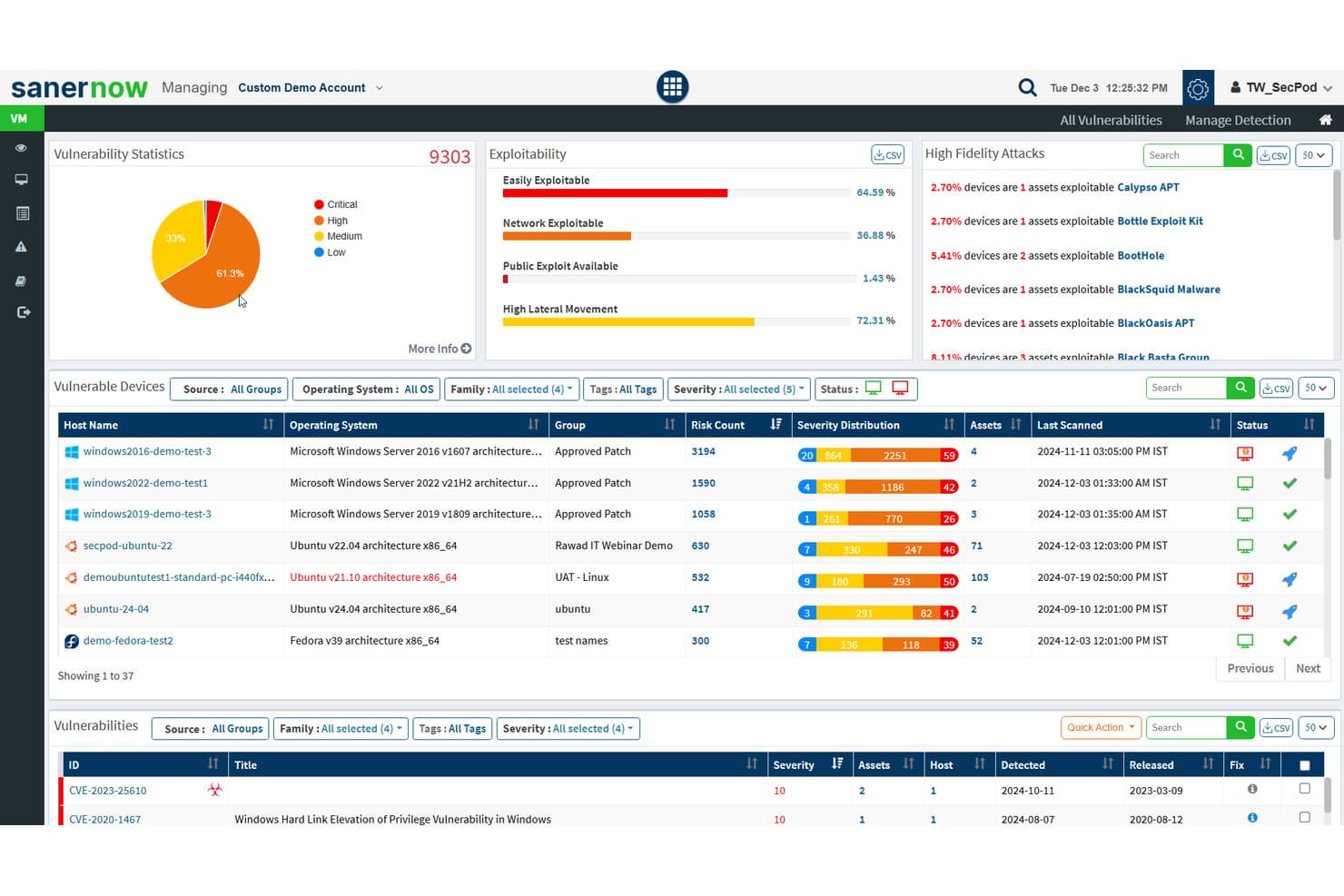
SecPod (Saner Platform) erfasst Schwachstellenstatistiken und Ausnutzbarkeit in Cloud-Assets. Saner Cloud ist eine cloudnative Plattform zum Schutz von Anwendungen von SecPod, die Cloud-Posture-Management, Berechtigungsmanagement für Infrastrukturen, Anomalieerkennung und die Erfassung der Asset-Exposition über AWS, Azure und GCP hinweg vereinheitlicht.
Für wen eignet sich SecPod (Saner Platform) am besten?
Saner Cloud eignet sich für Sicherheits- und Compliance-Teams, die Identitäten, Berechtigungen und die Sicherheitslage in Multi-Cloud-Umgebungen über AWS, Azure und GCP hinweg verwalten.
Warum ich mich für SecPod (Saner Platform) entschieden habe
Ich habe Saner Cloud als eine der besten Lösungen ausgewählt, weil die CIEM-Funktion über das bloße Melden weitreichender Berechtigungen hinausgeht: Sie bildet exakt ab, wie Identitäten, Rollen und Richtlinien zusammenwirken, um den Zugriff über AWS, Azure und GCP zu gewähren. Anschließend zeigt sie inaktive Konten, verwaiste Zuordnungen und Ihre 10 Benutzer mit den umfangreichsten Berechtigungen auf – inklusive Belegen, die erklären, warum jede Zuweisung riskant ist. In Kombination mit CSPM-Prüfungen anhand von mehr als 1.000 Regeln sorgt die an CISA's SSVC-Modell ausgerichtete Risikopriorisierung dafür, dass sich Ihr Team auf ausnutzbare Risiken konzentriert und nicht nur auf Fehlkonfigurationen.
Wichtige Funktionen von SecPod (Saner Platform)
- Anomalieerkennung mit Konfidenzbewertung: Die Anomalieerkennung der Cloud-Sicherheitslage von Saner Cloud gruppiert erkannte Abweichungen von der Sicherheitslage über AWS, Azure und GCP hinweg in Kategorien mit hoher, mittlerer und niedriger Konfidenz.
- Planung automatisierter Behebungen: Teams können Regeln für Behebungen so konfigurieren, dass sie nach Scans oder täglich, wöchentlich beziehungsweise monatlich automatisch ausgeführt werden, einschließlich Statusverfolgung.
- Inventar der Cloud-Asset-Exposition: Saner Cloud verwaltet ein zentrales Asset-Inventar, das öffentlich zugängliche Ressourcen kennzeichnet und veraltete oder nicht mehr unterstützte Cloud-Assets nachverfolgt.
- An CISA SSVC ausgerichtete Risikopriorisierung: Ergebnisse werden anhand der CISA-SSVC-Entscheidungsfaktoren priorisiert – Ausnutzbarkeit, Automatisierung, technische Auswirkungen und Kritikalität der Ressource –, um aufzuzeigen, was sofortige Aufmerksamkeit erfordert.
Integrationen von SecPod (Saner Platform)
SecPod (Saner Platform) lässt sich für Daten zur Cloud-Sicherheitslage, zu Identitäten und zu Assets in Amazon Web Services (AWS), Microsoft Azure und Google Cloud Platform (GCP) integrieren. Die Anzahl nativer Integrationen und die Verfügbarkeit einer API sind nicht dokumentiert.
Pros and Cons
Pros:
- Bewertet Cloud-Risiken nach Auswirkungen und Ausnutzbarkeit
- Ordnet Identitätsberechtigungen über drei Clouds hinweg zu
- Bewertungen zufolge schnelle erste Einrichtung
Cons:
- Scanbasierte Warnungen können vorübergehende Änderungen übersehen
- Die Abdeckung von hybriden und lokalen Umgebungen ist weiterhin nicht dokumentiert
Learn more about SecPod (Saner Platform): Am besten geeignet für das Absichern globaler Geräteflotten
- Kostenlose Demo verfügbar
- ab $5/Person/Monat
Visit WebsiteCustomer Rating:4.9/5
Das IT-Dashboard von Deel bietet Ihnen eine globale Übersicht über Gerätesicherheit, Geräteverfolgung und Asset-Verteilung in Ihrer gesamten Belegschaft. Deel bietet eine Suite von cloudbasierten Sicherheitstools, die jedes Gerät in Ihrem Unternehmen vor Cyberbedrohungen schützen. Die Endpoint Protection Plattform sichert Laptops, Tablets und Mobilgeräte über Ihre weltweite Belegschaft hinweg ab.
Warum ich Deel ausgewählt habe: Ich habe mich für Deel entschieden, weil hier Cloud-Sicherheit direkt in das Workforce-Management-Ökosystem integriert wird und Endgeräteschutz mit Geräteverwaltung und Zugriffskontrolle kombiniert. Das cloudnative System von Deel erkennt und verhindert kontinuierlich Malware, Ransomware und unbefugte Zugriffe in Echtzeit—ohne aufwändige manuelle Überwachung. Die automatisierte Bedrohungsabwehr isoliert betroffene Geräte sofort, wodurch Störungen und Datenverluste minimiert werden.
Herausragende Funktionen und Integrationen von Deel:
Funktionen sind unter anderem automatisierte Bedrohungserkennung, die sich in Echtzeit an sich entwickelnde Cyberrisiken anpasst und dafür sorgt, dass jedes Endgerät geschützt bleibt. Die schlanke Architektur der Plattform ermöglicht die sofortige Eindämmung von Sicherheitsbedrohungen, ohne die Geräte oder Arbeitsabläufe zu verlangsamen. Zudem bietet Deel plattformübergreifende Abdeckung, sodass Ihr IT-Team konsistenten Schutz und Übersicht über sämtliche Betriebssysteme und Gerätetypen erhält.
Integrationen umfassen BambooHR, Personio, NetSuite, Slack, Google Workspace, Zoom, SAP SuccessFactors, Xero, QuickBooks, Workday, Greenhouse und Lever.
Pros and Cons
Pros:
- Echtzeit-Erkennung und Reaktion auf Bedrohungen
- Schützt alle Geräte an verschiedenen Standorten
- Automatisierte Eindämmung reduziert manuellen Aufwand
Cons:
- Keine vollständige Lösung für Enterprise-Sicherheit
- Fehlen umfassenderer Cloud-Sicherheitstools über das Gerätemanagement hinaus
Learn more about Deel IT: Am besten für Zero-Trust-Zugangskontrolle
- Kostenloser Tarif verfügbar
- Ab $5/Nutzer/Monat (jährlich abgerechnet)
Visit WebsiteCustomer Rating:4.8/5
Twingate bietet Geräteübersicht für ein besseres Netzwerkmanagement. Twingate ist eine Cloud-Sicherheitslösung, die traditionelle VPNs durch ein Zero Trust Network Access (ZTNA)-Modell ersetzt. Sie trägt dazu bei, den Fernzugriff auf private Ressourcen zu sichern, indem sie das Prinzip der minimalen Berechtigung durchsetzt, Geräte verifiziert und intelligente Datenverkehrskontrollen anwendet.
Warum ich Twingate ausgewählt habe: Ich habe Twingate wegen seiner starken Zero-Trust-Implementierung gewählt, die sicherstellt, dass Nutzer nur auf die Ressourcen zugreifen können, die sie benötigen. Durch die Authentifizierung sowohl der Nutzeridentität als auch des Gerätestatus hilft Twingate, unbefugte laterale Bewegungen im Netzwerk zu verhindern. Besonders wertvoll fand ich die automatisierten Zugriffskontrollen, da sie den Prozess der Vergabe oder Entziehung von Berechtigungen in dynamischen Arbeitsumgebungen vereinfachen können. Für verteilte Teams erleichtern diese Funktionen die Aufrechterhaltung der Sicherheit, ohne das Nutzererlebnis einzuschränken.
Herausragende Funktionen und Integrationen von Twingate:
Funktionen umfassen intelligente Geräteüberprüfung, die über Integrationen mit Diensten wie CrowdStrike und Jamf funktioniert, sowie DNS-Filterung und Inhaltsfilterung, um die Exposition gegenüber schädlichen Websites zu reduzieren. Die Orchestrierungsschicht kann die Sicherheit zentralisieren, ohne eine Neukonfiguration des Netzwerks zu erfordern, während Integrationen mit Identitätsanbietern wie Azure AD und Okta das Zugriffsmanagement effizienter gestalten.
Integrationen umfassen CrowdStrike, Intune, Kandji, Jamf, Azure AD, Okta, Google Workspace, OneLogin, KeyCloak, JumpCloud, virtuelle Maschinen und Kubernetes.
Pros and Cons
Pros:
- Flexible Integrationen von Identitätsanbietern
- Starke Geräteüberprüfungen
- Zentralisierte Zero-Trust-Orchestrierung
Cons:
- Einarbeitungszeit für die Einrichtung
- Begrenzte erweiterte Analytik
Learn more about Twingate: Am besten für einheitliches SIEM mit DLP und CASB
- Kostenlose Demo verfügbar
- Preis auf Anfrage
Visit WebsiteCustomer Rating:4.2/5
ManageEngine Log360 bietet anpassbare Berichtsfunktionen für Sicherheitsereignisse, Compliance und operative Einblicke. ManageEngine Log360 ist eine umfassende Lösung für Sicherheitsinformations- und Ereignismanagement (SIEM), die Protokollverwaltung, Bedrohungserkennung, Compliance-Berichterstattung und Sicherheitswarnungen in Echtzeit bietet. Ziel ist es, die Transparenz im Netzwerk eines Unternehmens zu erhöhen, die Sicherheitsmaßnahmen zu verbessern und eine benutzerfreundliche Erfahrung bereitzustellen.
Warum ich ManageEngine Log360 gewählt habe: Ich habe mich für ManageEngine Log360 entschieden, weil es umfassenden Schutz für Cloud-Umgebungen bietet. Die Integration von SIEM-Funktionen mit Cloud Access Security Broker (CASB) und Data Loss Prevention (DLP) gewährleistet eine robuste Bedrohungserkennung und -reaktion. Darüber hinaus ermöglicht die auf maschinellem Lernen basierende Anomalieerkennung in Verbindung mit Analysen in Echtzeit eine dynamische und proaktive Cloud-Sicherheit, was es zur idealen Wahl für den Schutz von Cloud-Ressourcen und -Daten macht.
ManageEngine Log360 Auffällige Funktionen und Integrationen:
Funktionen umfassen einheitliche Protokollverwaltung und SIEM-Funktionalitäten, die eine Bedrohungserkennung in Echtzeit und Compliance-Berichterstattung über eine zentrale Konsole ermöglichen. Die Integration mit gängigen IT- und Sicherheitstools verbessert die Transparenz in hybriden IT-Umgebungen und vereinfacht die Einhaltung von Vorschriften wie der DSGVO und HIPAA. Zudem bieten Log360s automatisierte Protokollkorrelation und Anomalieerkennung umsetzbare Einblicke, um potenzielle Sicherheitsrisiken schnell zu erkennen und abzumildern.
Integrationen umfassen Microsoft Active Directory, Office 365, Google Workspace, AWS, Azure, Salesforce, Box, ServiceNow, Jira, Slack, IBM QRadar, Splunk, SolarWinds, Palo Alto Networks, Fortinet, Cisco und Sophos.
Pros and Cons
Pros:
- Ganzheitliche Sicherheitsübersicht über lokale, Cloud- und hybride Netzwerke
- Vorfallmanagement-Konsole
- Einhaltung gesetzlicher Vorschriften
Cons:
- Komplex in der Einrichtung und Konfiguration
- Protokolle können schwer zu lesen und zu verstehen sein
Learn more about ManageEngine Log360: Am besten geeignet für umfassendes Cloud Posture Management
- Kostenloser Plan verfügbar + kostenlose Demo
- Ab $350/Monat
Visit WebsiteCustomer Rating:4.7/5
Aikido Security bietet ein einheitliches Dashboard, um Probleme nach Typ, Schweregrad und Scanquelle zu priorisieren und zu filtern. Aikido Security ist eine umfassende DevSecOps-Plattform, die vollständige Sicherheitsabdeckung vom Code bis zur Cloud bietet. Sie integriert verschiedene Sicherheits-Scan-Funktionen, darunter SAST, DAST, SCA, CSPM, IaC und Container-Scanning, um hochriskante Schwachstellen im Quellcode, in Containern und Cloud-Umgebungen zu identifizieren und zu verwalten.
Warum ich Aikido Security gewählt habe: Mir gefällt das Cloud Posture Management (CSPM), das Risiken in der Cloud-Infrastruktur über alle großen Cloud-Anbieter hinweg erkennt. Diese Funktion stellt sicher, dass Ihre Cloud-Umgebung kontinuierlich auf Schwachstellen, Fehlkonfigurationen und Compliance-Probleme überwacht wird und somit einen robusten Schutz vor potenziellen Sicherheitsverletzungen bietet. Darüber hinaus bietet Aikido Security Infrastructure as Code (IaC) Scans, die Terraform-, CloudFormation- und Kubernetes-Konfigurationen auf Sicherheitsrisiken überprüfen.
Hervorstechende Funktionen und Integrationen von Aikido Security:
Funktionen beinhaltet einen innovativen Ansatz zur Aufdeckung von Angriffspfaden, indem potenzielle Sicherheitslücken in Ihrer Cloud-Infrastruktur visualisiert werden, was eine proaktive Behebung ermöglicht. Die Priorisierung von Risiken liefert umsetzbare Einblicke basierend auf Echtzeit-Kontext und potenziellen Auswirkungen, damit Teams sich auf die wichtigsten Bedrohungen konzentrieren können. Aikido Security lässt sich in CI/CD-Pipelines und gängige DevOps-Tools integrieren, sodass Sicherheitsprüfungen problemlos in Entwicklungsabläufe eingebunden werden können, ohne die Produktivität zu beeinträchtigen.
Integrationen umfassen Amazon Web Services (AWS), Google Cloud, Microsoft Azure Cloud, Drata, Vanta, AWS Elastic Container Registry, Docker Hub, Jira, Asana und GitHub.
Pros and Cons
Pros:
- Benutzerfreundliche Oberfläche
- Unterstützt beim Compliance-Tracking und Reporting
- Bietet umsetzbare Einblicke und Empfehlungen
Cons:
- Ignoriert Schwachstellen, wenn kein Fix verfügbar ist
- Bietet keine Endpunktsicherheit oder Intrusion Detection Funktionen
Learn more about Aikido Security: Am besten geeignet für die Verwaltung privilegierter Konten
- Kostenlose Testversion + kostenlose Demo verfügbar
- Preis auf Anfrage

Heimdal bietet ein umfassendes Dashboard für das IT-Asset-Management. Im Bereich der Cloud-Sicherheit bietet Heimdal eine dynamische Lösung für Unternehmen, die ihre digitalen Umgebungen schützen möchten. Speziell für Branchen wie Gesundheitswesen, Bildung und den öffentlichen Sektor zugeschnitten, adressiert es Herausforderungen wie die Einhaltung von Standards wie ISO 27001 und DSGVO. Das Tool schützt nicht nur vor Bedrohungen wie Ransomware und Phishing, sondern vereinfacht auch das Sicherheitsmanagement, was es zu einer wertvollen Ressource für IT-Teams macht.
Warum ich Heimdal gewählt habe
Ich habe Heimdal wegen seiner außergewöhnlichen Integration fortschrittlicher Sicherheitsmaßnahmen ausgewählt, die speziell für Cloud-Umgebungen entwickelt wurden. Seine Extended Detection & Response (XDR)-Fähigkeiten bieten umfassenden Bedrohungsschutz für Endpunkte und Netzwerke und erfüllen so den Bedarf an kontinuierlicher Überwachung. Darüber hinaus schützt Heimdals DNS-Sicherheit vor webbasierten Bedrohungen und sorgt dafür, dass Ihr Netzwerk sicher bleibt. Diese Funktionen sind besonders attraktiv für Unternehmen, die Wert auf Compliance und Datenschutz legen.
Heimdal Hauptfunktionen
Neben seinen herausragenden Fähigkeiten bietet Heimdal weitere bemerkenswerte Funktionen, die das Cloud-Sicherheitsangebot ergänzen:
- Verwaltung privilegierter Konten & Sitzungen: Diese Funktion sichert den Zugriff, indem sie privilegierte Konten verwaltet und überwacht und so das Risiko unbefugter Zugriffe reduziert.
- Patch- & Asset-Management: Automatisiert den Patch-Prozess und stellt sicher, dass Systeme aktuell und konform zu Sicherheitsstandards sind.
- Schutz vor Ransomware-Verschlüsselung: Bietet eine zusätzliche Verteidigungsebene gegen Ransomware-Angriffe und schützt kritische Daten und Systeme.
- E-Mail-Sicherheit: Schützt vor E-Mail-basierten Bedrohungen wie Phishing und Malware, indem Kommunikation gefiltert und überwacht wird.
Heimdal-Integrationen
Native Integrationen werden von Heimdal derzeit nicht angegeben, jedoch unterstützt die Plattform API-basierte, individuelle Integrationen.
Pros and Cons
Pros:
- Automatisiertes Patch-Management über alle Endpunkte
- Starke Erkennung von Schwachstellen und Bedrohungen
- Detaillierte Übersicht über Assets und Lizenzen
Cons:
- Keine nativen Integrationen verfügbar
- Benutzeroberfläche erfordert Einarbeitungszeit
Learn more about Heimdal: Am besten geeignet für erkenntnisbasierte Verteidigung
- 30 Tage kostenlos testen
- Ab $795/50 Endpunkte/Jahr
Visit WebsiteCustomer Rating:4.3/5
Erhalten Sie detaillierte Übersichten zum Systemzustand mit ManageEngine Desktop Central. ManageEngine Desktop Central ist ein umfassendes Tool, das einheitliches Endpoint-Management und Cloud-Sicherheit für alle Geräte in einer Organisation bietet und sich ideal für IT-Profis, Managed Service Provider (MSPs) und Unternehmen verschiedenster Größen eignet. Ziel ist es, Server, Laptops, Desktops, Smartphones und Tablets von einem zentralen Standort aus zu verwalten.
Warum ich ManageEngine Desktop Central gewählt habe: Die Software bietet durch umfangreiche Datenerhebung und Analysefunktionen eine erkenntnisbasierte Verteidigung, die IT-Administratoren mit umsetzbaren Erkenntnissen versorgt, um Sicherheitsbedrohungen proaktiv zu begegnen. Ein zentrales Merkmal, das diesen Ansatz unterstützt, ist die Systemüberwachung und Alarmierung in Echtzeit. ManageEngine Desktop Central gewährleistet darüber hinaus vollständige Sichtbarkeit und Kontrolle sowie Datenhärtung.
Besondere Merkmale und Integrationen von ManageEngine Desktop Central:
Funktionen umfassen das Endpoint-Management über Geräte und Betriebssysteme hinweg und gewährleisten eine nahtlose Verwaltung von Desktops, Servern und mobilen Geräten. Die Integration mit Tools wie ServiceDesk Plus ermöglicht einen effizienten IT-Betrieb durch die Verknüpfung von Ticketing- und Geräteverwaltungs-Workflows. Darüber hinaus bietet die Software fortschrittliche Automatisierung für Patch-Management und die Durchsetzung von Konfigurationen, was die Sicherheit erhöht und den manuellen Aufwand reduziert.
Integrationen umfassen ServiceNow, Jira, Zoho Desk, Zendesk, Jira Service Desk, Microsoft SCCM, IBM BigFix, Slack, Microsoft Teams, Trello, Zapier, ManageEngine ServiceDesk Plus, Microsoft Intune und mehr.
Pros and Cons
Pros:
- Funktionen für die Fernsteuerung von Desktops
- Patch-Management für Software-Updates
- Active Directory-Verwaltung
Cons:
- Für einige fortgeschrittene Funktionen ist zusätzliche Einarbeitung erforderlich
- Nutzer können sich von den vielen konfigurierbaren Funktionen überwältigt fühlen
Learn more about ManageEngine Endpoint Central: Bestes Spektrum an Scan-Diensten
- 14-tägige kostenlose Testversion + kostenlose Demo verfügbar
- Ab $149/Monat
Visit WebsiteCustomer Rating:4.8/5
Intruder bietet ein Dashboard zur zentralisierten Schwachstellenverwaltung. Intruder ist ein Cloud-Sicherheitstool, das Unternehmen dabei unterstützt, Schwachstellen zu verwalten und ihre digitalen Vermögenswerte zu schützen. Es konzentriert sich auf kontinuierliches Schwachstellenmanagement und die Verwaltung der Angriffsfläche und bietet einen umfassenden Ansatz zur Identifizierung und Behebung von Sicherheitslücken.
Warum ich Intruder gewählt habe: Ich habe mich für Intruder entschieden, weil es in der Lage ist, verschiedene Scan-Dienste durchzuführen, darunter externe, interne, Cloud-, Webanwendungs- und API-Schwachstellenscans. Diese Funktionen ermöglichen es Ihnen, die Sicherheitslage Ihres Unternehmens in Echtzeit zu überwachen und sicherzustellen, dass kritische Schwachstellen priorisiert und umgehend behoben werden. Darüber hinaus bietet die Plattform von Intruder ein Exposure-Management durch den Einsatz mehrerer Scan-Engines, was hilft, Probleme zu identifizieren, die von anderen Tools möglicherweise übersehen werden.
Herausragende Funktionen und Integrationen von Intruder:
Funktionen umfassen die Möglichkeit, Schwachstellen je nach potenziellen Auswirkungen zu priorisieren, sodass Sie sich auf die dringendsten Probleme konzentrieren können. Intruder bietet außerdem klare Anleitungen zur Behebung, sodass Ihr Team die erkannten Probleme leichter adressieren kann. Darüber hinaus verfügt die Plattform über umfassende Berichtsfunktionen, mit denen Sie Ihre Sicherheitslage im Zeitverlauf verfolgen und die Einhaltung von Branchenstandards nachweisen können.
Integrationen umfassen AWS, GitLab, GitHub, Jira, Azure, Teams, Slack, Azure DevOps, Cloudflare, Google Cloud, Microsoft Sentinel und Okta.
Pros and Cons
Pros:
- Die Plattform scannt proaktiv nach neu bekannt gewordenen Schwachstellen
- Bietet detaillierte Berichte
- Die Priorisierung von Problemen hilft, den Fokus auf kritische Bedrohungen zu legen
Cons:
- Einige finden die Anpassungsoptionen für Scans möglicherweise eingeschränkt
- Die Überwachung der Angriffsfläche ist auf den Premium-Plan beschränkt
Learn more about Intruder: Am besten für proaktive Bedrohungserkennung
- 30-tägige kostenlose Testversion + kostenlose Demo verfügbar
- Ab $338.50/Jahr
Visit WebsiteCustomer Rating:4.6/5
Die proaktive Bedrohungserkennung von ESET PROTECT ist in einem einzigen Dashboard sichtbar. ESET PROTECT Complete ist eine umfassende cloudbasierte Sicherheitslösung, die einen mehrschichtigen Schutz für Unternehmensendpunkte wie Computer, Laptops und mobile Geräte bietet. Die Lösung verfügt über Cloud-Sandboxing-Technologie, um Zero-Day-Bedrohungen entgegenzuwirken, und beinhaltet eine vollständige Festplattenverschlüsselung zur Verbesserung des Datenschutzes.
Warum ich ESET PROTECT Complete ausgewählt habe: Als Cloud-Sicherheitstool bietet ESET PROTECT einen robusten Schutz, der speziell auf die besonderen Sicherheitsherausforderungen des Cloud-Computings zugeschnitten ist. Darüber hinaus ermöglicht die cloudbasierte Konsole der Plattform Administratoren, die Sicherheit nahtlos über verteilte Cloud-Umgebungen hinweg zu verwalten und verbessert die Übersicht sowie Kontrolle über alle Ressourcen.
Herausragende Funktionen und Integrationen von ESET PROTECT Complete:
Funktionen umfassen eine einheitliche Plattform für das Sicherheitsmanagement mit erweiterten Funktionen zur Bedrohungserkennung und -reaktion, sodass IT-Teams Endpunkte, Server und Netzwerke in Echtzeit überwachen können. ESETs mehrschichtiger Sicherheitsansatz umfasst Endpunktschutz, Datenverschlüsselung und Cloud-Sandboxing, was einen umfassenden Schutz vor bekannten und Zero-Day-Bedrohungen gewährleistet. Die Integration mit nativen Cloud-Tools und eine unkomplizierte Bereitstellung machen die Lösung besonders benutzerfreundlich für Unternehmen, die effiziente und skalierbare Cybersecurity-Lösungen suchen.
Integrationen umfassen ConnectWise Automate, Microsoft Windows Defender Antivirus, Microsoft Azure, Datto RMM, NinjaOne, Kaseya VSA und ATERA.
Pros and Cons
Pros:
- Geringe Systembelastung sorgt für minimale Auswirkungen auf die Leistung
- Erweiterte Bedrohungserkennung und Reaktionsfunktionen
- Umfassende Reporting-Tools für detaillierte Sicherheitsanalysen
Cons:
- Die Preisgestaltung kann für kleinere Unternehmen hoch sein
- Erfordert technisches Wissen für die Nutzung fortgeschrittener Funktionen
Learn more about ESET PROTECT Complete:
Weitere Tools für Cloud-Sicherheit
Hier finden Sie einige weitere Optionen für Tools zur Cloud-Sicherheit, die es nicht in meine Auswahl geschafft haben, aber dennoch einen Blick wert sind:
- 11CyberarkAm besten für durchgängige Identitätssicherheit
- 12Astra PentestAm besten für kontinuierliches Scannen mit Expertenunterstützung
- 13QualysAm besten für Schwachstellenmanagement in hybriden Umgebungen
- 14ZygonAm besten geeignet für SaaS-Zugriffssicherheit
- 15SplunkBeste einheitliche Plattform für Sicherheit und Beobachtbarkeit
- 16ZscalerBeste Zero-Trust-Lösung
- 17Trend MicroAm besten geeignet für Extended Detection and Response (XDR)
- 18Barracuda CloudGen FirewallBeste Firewall für Cloud- und Hybridnetzwerke
- 19WizAm besten geeignet für mittlere bis große Unternehmen
- 20Forcepoint ONEAm besten geeignet für Unternehmen mit hybrider Belegschaft
- 21RubrikAm besten für Unternehmens-Backup und -Wiederherstellung von Daten geeignet
- 22Orca SecurityBeste agentenlose Cloud-Sicherheitslösung
- 23PenteraAm besten für automatisierte Sicherheitsvalidierung geeignet
- 24CakewalkAm besten geeignet für Zugriffsmanagement
- 25OPSWAT Security ScoreAm besten für schnelle Sicherheitsüberprüfungen
- 26Rippling ITAm besten geeignet zur Verwaltung cloudbasierter Geräte und Anwendungen
- 27Stream SecurityAm besten geeignet für die Echtzeiterkennung von Cloud-Expositionen
- 28UnderDefenseAm besten geeignet für 24/7 Bedrohungserkennung und -reaktion
So bewerte ich Cloud-Sicherheitstools
Ich unterteile meine Bewertung in grundlegende Kriterien – wie Multi-Cloud-CSPM-Abdeckung und IAM-Analyse – und in Differenzierungsmerkmale, die Tools für den Unternehmenseinsatz von solchen für kleinere Teams unterscheiden.
Kernfunktionen (Grundvoraussetzungen für diese Liste)
Wenn ich Tools für meine Liste auswähle, bewerte ich jedes einzelne auf einer Skala von 0 (bietet die Funktionalität nicht an) bis 5 (hervorragend in diesem Bereich) hinsichtlich jeder unten aufgeführten Kernfunktion. Anschließend berechne ich die Gesamtpunktzahl des Tools in Prozent. Jedes Tool muss eine Mindestgesamtpunktzahl von 75 % erreichen, um berücksichtigt zu werden.
- Cloud Posture Management: Ich bewerte, wie gut ein Tool Fehlkonfigurationen wie offene S3-Buckets, zu weit gefasste Sicherheitsgruppen und unverschlüsselte Speicherbereiche über Cloud-Konten hinweg erkennt.
- Multi-Cloud-Abdeckung: Die Unterstützung von AWS, Azure und GCP durch jedes Tool ist entscheidend, insbesondere die Funktionsgleichheit, damit Teams nicht mit Lücken zwischen Anbietern umgehen müssen.
- Compliance- & Richtliniendurchsetzung: Ich achte auf integrierte Frameworks wie die CIS Benchmarks, SOC 2 und HIPAA sowie auf die Möglichkeit, eigene Richtlinien für interne Standards zu erstellen.
- Workload- & Schwachstellenscans: Die Abdeckung von VMs, Containern und Kubernetes-Clustern ist entscheidend, auch ob ein Tool laufende Workloads oder nur ruhende Images scannen kann.
- Identitäts- & Berechtigungsmanagement: Ich überprüfe, ob das Tool IAM-Berechtigungen abbildet, überprivilegierte Dienstkonten kennzeichnet und Empfehlungen für Minimalberechtigungen in Cloud-Umgebungen gibt.
- Bedrohungserkennung & Reaktion: Echtzeitwarnungen bei verdächtigen Aktivitäten wie ungewöhnlichen API-Aufrufen oder lateralen Bewegungen haben Priorität, ebenso wie Workflows zur Behebung von Problemen oder Integrationen in SIEM/SOAR.
Sobald ich eine Liste von Tools habe, die diese Kriterien erfüllen, prüfe ich, was jede Plattform besonders macht.
Differenzierungsmerkmale (Was Anbieter unterscheidet)
So vergleiche und kontrastiere ich verschiedene Anbieter:
Herausragende Funktionen
Die Analyse von Angriffspfaden ist ein wichtiger Unterschiedsfaktor. Ich achte auf Tools, die aufzeigen, wie z. B. eine fehlkonfigurierte Speicher-Bucket in Kombination mit einer überprivilegierten Rolle Angreifern einen Weg zu Produktionsdatenbanken eröffnen könnte. Die Überprüfung von Infrastructure as Code (IaC) ist ebenfalls wichtig, denn das rechtzeitige Erkennen einer Fehlkonfiguration in Terraform oder CloudFormation vor der Bereitstellung spart später stundenlange Nacharbeit. Ich bewerte außerdem, ob ein Tool CSPM, CWPP und CIEM in einer einheitlichen CNAPP-Konsole zusammenführt – das reduziert Kontextwechsel und verschafft Sicherheitsteams einen korrelierenden Risikoblick anstatt isolierter Warnmeldungen.
Über Funktionen hinaus
Integrationen spielen hier eine große Rolle. Ich prüfe, ob sich ein Tool nativ mit SIEM/SOAR-Plattformen wie Splunk oder Sentinel und Ticketsystemen wie Jira verbinden lässt, denn Sicherheitsfunde müssen in bestehende Incident-Response-Workflows eingebunden werden. Auch Preistransparenz fließt in die Bewertung ein – einige Anbieter verrechnen nach Workloads, andere nach Cloud-Konten, und unvorhersehbare Kosten bei steigendem Cloud-Footprint können den Mehrwert schnell schmälern. Zudem bewerte ich die Skalierbarkeit, insbesondere ob eine Plattform mit hunderten Cloud-Konten umgehen kann, mit richtigem RBAC und Multi-Tenant-Support für verteilte Sicherheitsteams.
So wählen Sie Tools für Cloud-Sicherheit aus
Bei langen Funktionslisten und komplexen Preisstrukturen verliert man leicht den Überblick. Damit Sie sich bei der Auswahl der für Sie passenden Software auf das Wesentliche konzentrieren können, finden Sie hier eine Checkliste mit wichtigen Faktoren:
| Faktor | Was Sie beachten sollten |
|---|---|
| FaktorSkalierbarkeit | Was Sie beachten solltenKann das Tool mit Ihrem Team und Ihren Datenanforderungen wachsen? Achten Sie auf Optionen, die wachsende Workloads und Benutzerzahlen ohne deutliche Kostensteigerung unterstützen. |
| FaktorIntegrationen | Was Sie beachten solltenFunktioniert das Tool mit Ihren bestehenden DevSecOps-Tools und Plattformen zum Schutz von Cloud-Workloads? Prüfen Sie die Kompatibilität mit Ihrem aktuellen Software-Stack, um Unterbrechungen zu vermeiden und einen reibungslosen Betrieb sicherzustellen. |
| FaktorAnpassbarkeit | Was Sie beachten solltenKönnen Sie das Tool an Ihre Arbeitsabläufe anpassen? Ziehen Sie Tools in Betracht, die ausreichend Flexibilität bieten, um Einstellungen und Funktionen an Ihre spezifischen Anforderungen anzupassen. |
| FaktorBenutzerfreundlichkeit | Was Sie beachten solltenIst das Tool für Ihr Team einfach zu bedienen? Testen Sie die Benutzeroberfläche auf eine intuitive Navigation, damit alle Teammitglieder das Tool schnell nutzen können. |
| FaktorImplementierung und Einarbeitung | Was Sie beachten solltenWas ist für den Einstieg erforderlich? Achten Sie auf Ressourcen wie Tutorials und Support, um die Umstellung zu erleichtern und Ausfallzeiten während der Einrichtung zu reduzieren. |
| FaktorKosten | Was Sie beachten solltenPasst die Preisgestaltung zu Ihrem Budget? Vergleichen Sie Abonnementtarife, versteckte Gebühren und den langfristigen Nutzen, um eine bezahlbare Lösung zu finden, ohne auf wichtige Funktionen zu verzichten. |
| FaktorSicherheitsmaßnahmen | Was Sie beachten solltenSind wirksame Sicherheitsmaßnahmen vorhanden? Bevorzugen Sie Tools mit Verschlüsselung, Zugriffskontrollen und regelmäßigen Aktualisierungen, um Ihre Daten zu schützen. |
Was sind Cloud-Sicherheitstools?
Cloud-Sicherheitstools sind Lösungen, die darauf ausgelegt sind, cloudbasierte Daten und Anwendungen vor Bedrohungen und unbefugtem Zugriff zu schützen. IT-Fachleute, Cybersicherheitsexperten und Compliance-Beauftragte verwenden diese Tools in der Regel, um sensible Informationen zu schützen und die Einhaltung gesetzlicher Vorschriften sicherzustellen. Funktionen zum Datenschutz, zur Bedrohungserkennung und zur Zugriffskontrolle helfen dabei, Umgebungen abzusichern, Compliance-Anforderungen zu erfüllen und Risiken zu verwalten. Insgesamt bieten diese Tools unverzichtbare Sicherheit und sorgen für mehr Vertrauen in Cloud-Umgebungen.
Funktionen
Achten Sie bei der Auswahl von Cloud-Sicherheitstools auf die folgenden wichtigen Funktionen:
- Datenschutz: Schützt sensible Informationen vor unbefugtem Zugriff und Datenverletzungen und gewährleistet die Datenintegrität.
- Bedrohungserkennung: Identifiziert potenzielle Sicherheitsbedrohungen in Echtzeit und benachrichtigt Benutzer darüber, einschließlich solcher, die von integrierten Tools zur Überwachung des Darknets erkannt werden.
- Zugriffskontrolle: Verwaltet, wer auf bestimmte Daten und Anwendungen zugreifen kann, und verringert so das Risiko von Insider-Bedrohungen.
- Compliance-Management: Unterstützt Unternehmen bei der Einhaltung von Branchenvorschriften und -standards und hilft, rechtliche Sanktionen zu vermeiden.
- Sicherheitsüberwachung: Überwacht Cloud-Umgebungen kontinuierlich auf verdächtige Aktivitäten und erhält dadurch das Sicherheitsniveau aufrecht.
- KI-gestützte Bedrohungsanalyse: Nutzt künstliche Intelligenz, um potenzielle Bedrohungen vorherzusagen und zu analysieren und dadurch den Schutz zu verbessern.
- Unterstützung für mehrere Clouds: Bietet Sicherheit über mehrere Cloud-Plattformen hinweg und ermöglicht dadurch Flexibilität und Skalierbarkeit.
- Erweiterte Verschlüsselung: Schützt Daten durch starke Verschlüsselungsmethoden und gewährleistet Vertraulichkeit und Sicherheit.
- Echtzeitwarnungen: Benachrichtigt Benutzer sofort über Sicherheitsvorfälle und ermöglicht schnelles Handeln zur Risikominderung.
- Anpassbare Dashboards: Ermöglicht Benutzern, ihre Ansicht der Sicherheitskennzahlen individuell anzupassen, und verbessert so Überwachung und Entscheidungsfindung.
Vorteile
Die Implementierung von Cloud-Sicherheitstools bietet Ihrem Team und Ihrem Unternehmen mehrere Vorteile. Hier sind einige, auf die Sie sich freuen können:
- Verbesserte Datensicherheit: Schützt sensible Informationen mit Funktionen wie Datenschutz und erweiterter Verschlüsselung vor Datenverletzungen.
- Einhaltung gesetzlicher Vorschriften: Unterstützt Ihr Unternehmen dabei, durch Compliance-Management und Integrationen mit Tools für Cloud-Governance die Branchenvorschriften einzuhalten.
- Geringeres Bedrohungsrisiko: Identifiziert und entschärft potenzielle Sicherheitsbedrohungen mithilfe von Bedrohungserkennung und Echtzeitwarnungen schnell.
- Verbesserte Zugriffskontrolle: Begrenzt durch Funktionen zur Zugriffskontrolle den unbefugten Zugriff und schützt Ihre Daten vor internen Bedrohungen.
- Skalierbarkeit und Flexibilität: Unterstützt mit der Möglichkeit zur Nutzung mehrerer Clouds das Wachstum und Veränderungen im Unternehmen und passt sich Ihren sich wandelnden Anforderungen an.
- Schnelle Reaktion auf Vorfälle: Ermöglicht durch Echtzeitwarnungen und Überwachung schnelles Handeln bei Sicherheitsvorfällen.
- Fundierte Entscheidungsfindung: Anpassbare Dashboards liefern klare Einblicke in Sicherheitskennzahlen und unterstützen die strategische Planung.
Kosten & Preise
Bei der Auswahl von Cloud-Sicherheitstools ist ein Verständnis der verschiedenen verfügbaren Preismodelle und Tarife erforderlich. Die Kosten variieren je nach Funktionen, Teamgröße, Zusatzoptionen und weiteren Faktoren. Die folgende Tabelle fasst gängige Tarife, ihre Durchschnittspreise und typische in Lösungen für Cloud-Sicherheitstools enthaltene Funktionen zusammen:
Vergleichstabelle der Tarife für Cloud-Sicherheitstools
| Tariftyp | Durchschnittspreis | Übliche Funktionen |
|---|---|---|
| TariftypKostenloser Tarif | Durchschnittspreis$0 | Übliche FunktionenGrundlegende Bedrohungserkennung, eingeschränkte Zugriffskontrolle und grundlegender Datenschutz. |
| TariftypPersönlicher Tarif | Durchschnittspreis$5-$25/user/month | Übliche FunktionenVerbesserter Datenschutz, Echtzeitwarnungen und grundlegendes Compliance-Management. |
| TariftypGeschäftstarif | Durchschnittspreis$30-$60/user/month | Übliche FunktionenErweiterte Bedrohungserkennung, Unterstützung für mehrere Clouds und anpassbare Dashboards. |
| TariftypUnternehmenstarif | Durchschnittspreis$70-$150/user/month | Übliche FunktionenUmfassende Compliance-Tools, KI-gestützte Bedrohungsanalyse und vollständige Zugriffskontrolle. |
FAQs zu Tools für Cloud-Sicherheit
Hier finden Sie Antworten auf häufige Fragen zu Tools für Cloud-Sicherheit:
Erfordern Tools für Cloud-Sicherheit eine laufende Wartung?
Ja, sie benötigen häufig Aktualisierungen, eine Anpassung von Richtlinien und die Pflege von Integrationen. Einige Plattformen bieten automatische Aktualisierungen oder verwaltete Dienste an, um den manuellen Aufwand zu reduzieren. Der Wartungsaufwand hängt vom Bereitstellungsmodell und der Komplexität der Einrichtung ab.
Können Tools für Cloud-Sicherheit in bestehende Systeme integriert werden?
Ja, viele Tools für Cloud-Sicherheit bieten Integrationen für bestehende IT-Systeme und Software. Dies gewährleistet einen reibungslosen Arbeitsablauf und die Synchronisierung von Daten. Prüfen Sie die Kompatibilität mit Ihren aktuellen Systemen, um die Effizienz zu maximieren und Unterbrechungen zu vermeiden.
Welche Arten von Cloud-Umgebungen werden von diesen Tools unterstützt?
Die meisten Tools sind für den Einsatz in öffentlichen, privaten und hybriden Cloud-Umgebungen konzipiert. Einige sind für bestimmte Anbieter wie AWS, Azure oder Google Cloud optimiert. Die Kompatibilität kann davon abhängen, wie das Tool bereitgestellt und konfiguriert wird.
Wie erkennen Tools für Cloud-Sicherheit Bedrohungen?
Sie basieren in der Regel auf automatisierten Systemen, die Protokolle, Netzwerkaktivitäten und Zugriffsmuster analysieren. Zu den Erkennungsmethoden können regelbasierte Engines, Modelle für maschinelles Lernen oder Verhaltensanalysen gehören. Die Erkennungslogik variiert je nach Architektur zwischen den Plattformen.
Sind Tools für Cloud-Sicherheit plattformspezifisch oder plattformübergreifend?
Einige wurden speziell für einen Cloud-Anbieter entwickelt, während andere mehrere Plattformen unterstützen. Plattformübergreifende Tools verfügen häufig über zentrale Dashboards für eine einheitliche Übersicht. Die Anforderungen an die Bereitstellung und die Integrationstiefe unterscheiden sich je nach Tool.
Was sind die 4 C der Cloud-Sicherheit?
Die vier C der Cloud-nativen Sicherheit sind Cloud, Cluster, Code und Container. Sie repräsentieren verschiedene Sicherheitsebenen, die zum Schutz Cloud-nativer Anwendungen erforderlich sind. Berücksichtigen Sie, wie jede Ebene mit Ihrer Cloud-Umgebung interagiert und deren übergeordnete Sicherheitsstrategie unterstützt.
Wie unterstützen Tools für Cloud-Sicherheit die Compliance?
Tools für Cloud-Sicherheit unterstützen die Compliance durch Funktionen wie Prüfprotokolle, Datenverschlüsselung und Zugriffskontrollen. Sie tragen dazu bei, dass Ihre Organisation die Branchenvorschriften erfüllt. Achten Sie auf Tools, die Ihren spezifischen Compliance-Anforderungen entsprechen, um mögliche Strafen zu vermeiden.