
20 Beste Anwendungssicherheits-Software im Jahr 2026

Beste Application Security Software Shortlist
Here's my pick of the 10 best software from the 20 tools reviewed.


In der heutigen digitalen Landschaft ist die Absicherung Ihrer Anwendungen wichtiger denn je. Sie sind mit unzähligen Bedrohungen konfrontiert, die Ihre Daten gefährden und Ihre Geschäftsabläufe stören können. Genau hier setzt Application Security Software an. Sie hilft, Ihre Systeme vor Schwachstellen zu schützen und Ihre Daten sicher zu halten.
Ich habe Zeit damit verbracht, diese Tools zu testen und zu bewerten, um Ihnen einen unvoreingenommenen Überblick über die besten verfügbaren Optionen zu geben. In diesem Artikel stelle ich meine Favoriten vor und gehe darauf ein, was jedes einzelne Tool besonders macht. Sie erhalten Einblicke in Funktionen, Nutzererfahrungen und wie sich die Software in den Arbeitsablauf Ihres Teams integrieren lässt.
Lassen Sie uns eintauchen und die passende Lösung für Ihre Anforderungen finden.
Why Trust Our Software Reviews
Beste Application Security Software Zusammenfassung
Diese Vergleichstabelle fasst die Preisinformationen meiner Auswahl der besten Application Security Software zusammen, damit Sie die passende Lösung für Ihr Budget und Ihre geschäftlichen Anforderungen finden können.
| Tool | Best For | Trial Info | Price | ||
|---|---|---|---|---|---|
| 1 | Best for automated threat mitigation | 30-day free trial + free demo available | Pricing upon request | Website | |
| 2 | Best for catching context-aware vulnerabilities | Free plan available | From $200/month | Website | |
| 3 | Best for locking application execution environments | Not available | Pricing upon request | Website | |
| 4 | Best for web code integrity | Free trial available | Pricing upon request | Website | |
| 5 | Best for integrated DevSecOps | Not available | Pricing upon request | Website | |
| 6 | Best for comprehensive mobile security | Not available | From $12/user/month (billed annually) | Website | |
| 7 | Best for JavaScript-focused protection | Not available | From $10/user/month (billed annually) | Website | |
| 8 | Best for .NET code protection | Not available | Pricing upon request | Website | |
| 9 | Best for Android and Java app fortification | Not available | Pricing upon request | Website | |
| 10 | Best for real-time app security monitoring | Not available | Pricing upon request | Website |

-

Site24x7
Visit WebsiteThis is an aggregated rating for this tool including ratings from Crozdesk users and ratings from other sites.4.6 -
Docker
Visit WebsiteThis is an aggregated rating for this tool including ratings from Crozdesk users and ratings from other sites.4.6 -
Pulumi
Visit WebsiteThis is an aggregated rating for this tool including ratings from Crozdesk users and ratings from other sites.4.8





Beste Application Security Software Bewertung
Nachfolgend finden Sie meine detaillierten Zusammenfassungen der besten Application Security Software, die es auf meine Shortlist geschafft haben. Meine Bewertungen bieten einen genauen Blick auf die wichtigsten Funktionen, Vorteile & Nachteile, Integrationen und ideale Anwendungsfälle jedes Tools, damit Sie das passende Produkt für sich finden können.


Radware provides an advanced application security platform that protects web applications, mobile apps, and APIs from automated attacks. It uses AI, machine learning, and behavioral analysis to detect and block malicious bots responsible for credential stuffing, scraping, and DDoS attempts. By automating detection and response, Radware helps you maintain application integrity while ensuring legitimate users can access services without disruption.
Why I Picked Radware: I picked Radware because it excels at stopping automated threats before they impact your systems. Its AI-driven detection models learn continuously from traffic behavior, helping you stay ahead of evolving attack methods. I also appreciate its real-time monitoring and reporting features, which give you visibility into bot activity and help reduce false positives. For teams looking to strengthen protection without constant manual oversight, Radware is a strong fit.
Radware standout features and integrations:
Features include AI-based cross-correlation for detecting coordinated bot patterns, Secure Identity and Integrated Device Authentication to stop spoofing and replay attacks, and JavaScript challenges to verify legitimate users, without annoying CAPTCHAs. Its mobile app protection ensures secure performance without degrading user experience.
Integrations include Akamai CDN and Edge Side Includes (ESI) caching, which enhance both speed and defense.
Pros and Cons
Pros:
- Comprehensive web and mobile coverage
- Strong defense against account takeover
- Real-time automated threat detection
Cons:
- Limited third-party integrations available
- Interface could be more intuitive


ZeroPath gives your engineering team a way to bake real application security into your development workflow from the first commit. It’s built for dev and DevSecOps teams handling modern codebases — whether in startups scaling up or large enterprises — and helps surface and fix vulnerabilities that escape traditional static analyzers, including issues like broken auth, business-logic flaws, and risky dependencies.
Why I Picked Zeropath
I picked ZeroPath because it brings context-aware scanning and automatic fixes straight into your pull-request workflow — meaning you see only real, exploitable security issues rather than a flood of noise, and you get ready-to-merge patches that match your code style. Its SAST engine goes beyond pattern matching by understanding code intent and business logic, catching subtle vulnerabilities like auth bypass or logic flaws that traditional tools often miss.
Zeropath Key Features
In addition to its core capabilities, you get several useful features that support a full AppSec workflow:
- Software Composition Analysis (SCA) with reachability analysis: identifies vulnerable third-party libraries and flags only those actually reachable from your code.
- Secrets detection: finds hard-coded keys, leaked tokens, or credentials that appear in your codebase.
- Infrastructure as Code (IaC) scanning: detects misconfigurations in Terraform, Kubernetes, CloudFormation and similar files.
- Automated PR reviews: runs a scan on every pull request and surfaces security findings (with suggested fixes) directly in your version control flow.
Zeropath Integrations
Integrations include GitHub, GitLab, Azure DevOps, Bitbucket, Jenkins, and Jira. An API is also available for custom integrations.
Pros and Cons
Pros:
- It catches logic flaws and hidden risks you might miss in normal scans.
- Cuts down noisy findings so your team can focus on real issues.
- Gives you clear fixes that speed up your security reviews.
Cons:
- You may need time to adjust your workflow around its automation.
- Integration options may not be extensive enough for complex enterprise environments.

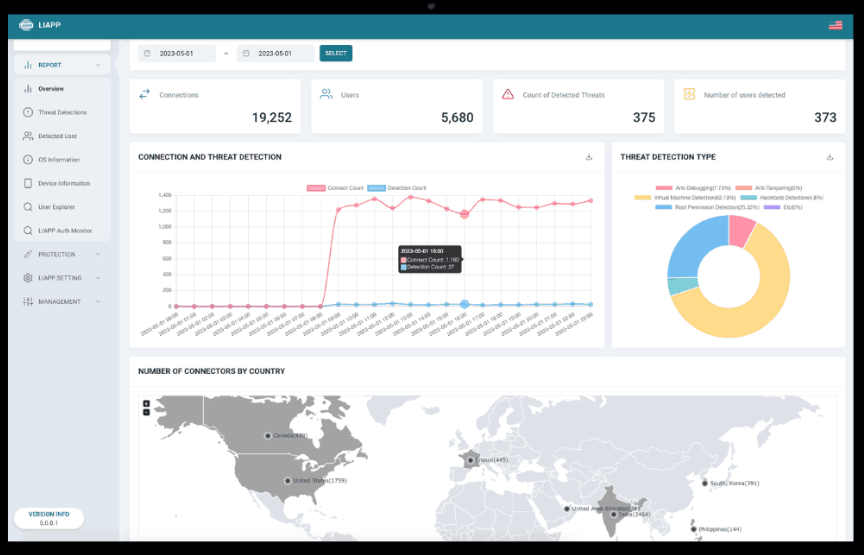
LIAPP is a security tool designed to restrict and control the execution environments for mobile applications. Ensuring that applications run only in predefined settings. LIAPP offers compatibility with numerous mobile management platforms for integrations and offers a robust line of defense against unauthorized usage and tampering.
Why I Picked LIAPP:
When determining which tools to highlight, I considered the pressing need for locked application execution in today's cyber landscape. LIAPP, through my research and comparisons, appeared distinct in its offerings. I chose it not just for its technical prowess but because it aptly addresses a niche yet significant challenge: ensuring apps run solely in designated environments.
Standout Features & Integrations:
LIAPP's core capability lies in its environment validation system, which vets the legitimacy of an application's runtime setting. Additionally, its tamper-detection mechanisms are well-regarded, quickly identifying and halting unauthorized changes. For integrations, LIAPP offers compatibility with numerous mobile management platforms, simplifying deployment across an organization's device fleet.
Pros and Cons
Pros:
- Compatible with various mobile management platforms
- Efficient tamper-detection mechanisms
- Strong environment validation system
Cons:
- Limited to mobile application protection, not for desktop or web apps
- Might require a learning curve for those unfamiliar with application execution controls
- More geared toward large-scale deployments than individual use


Jscrambler is a formidable solution dedicated to ensuring the integrity of web code. By leveraging advanced techniques, it protects and obfuscates JavaScript code, ensuring it remains resilient against tampering and theft, aligning perfectly with the essence of web code integrity.
Why I Picked Jscrambler:
In the process of selecting tools, Jscrambler consistently rose to the top of my list. What differentiates it from the pack is its sophisticated code protection techniques coupled with real-time monitoring of web applications. While organizations emphasize web code integrity, Jscrambler holds a distinct edge, hence making it the best for this specific use case.
Standout Features & Integrations:
Jscrambler offers a suite of protection transformations including code obfuscation, polymorphic behavior, and domain locking. In addition, it boasts real-time monitoring capabilities that alert users of any suspicious activities or threats on their web applications. The tool integrates with popular build tools, CI/CD platforms, and other development tools, ensuring it can fit into almost any web development workflow.
Pros and Cons
Pros:
- Integrates smoothly with popular development tools and platforms
- Real-time monitoring offers insights into potential threats
- Specialized techniques for robust code protection
Cons:
- Depending on configuration, there might be minor impacts on code performance
- Premium features can be pricey
- Might come off as complex for beginners


Digital.ai Application Protection offers a holistic solution, tailored to fortify applications through the lifecycle of DevSecOps. Ensuring robust security without compromising the agility of development and operations, it excels at integrated DevSecOps.
Why I Picked Digital.ai Application Protection:
I chose Digital.ai after diligently comparing a plethora of security solutions. Its uniqueness lies in its integration with the DevSecOps lifecycle. After evaluating its features and user feedback, my judgment clearly pointed to Digital.ai as a frontrunner for those seeking a tool that adeptly bridges development, security, and operations.
Standout Features & Integrations:
At the heart of Digital.ai Application Protection is its real-time threat analysis, ensuring that applications remain impervious to breaches at every stage of their lifecycle. It also offers a detailed vulnerability assessment, aiding developers in swiftly addressing potential risks. Digital.ai boasts impressive integrations, especially with popular CI/CD tools and major cloud platforms, further enhancing its position in DevSecOps.
Pros and Cons
Pros:
- Easy integrations with CI/CD tools and cloud platforms
- Detailed vulnerability assessments
- Comprehensive real-time threat analysis
Cons:
- The documentation could benefit from more detailed use-case scenarios
- Advanced features might be overkill for smaller applications
- Might have a steeper learning curve for newcomers

Best for comprehensive mobile security
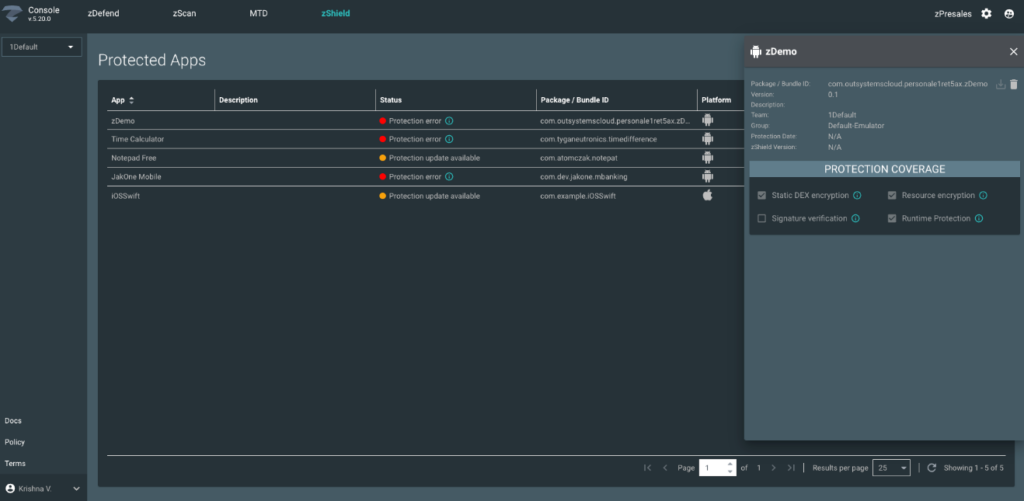
Zimperium MAPS offers complete protection for mobile apps against different threats. It detects and addresses vulnerabilities beforehand, serving as a reliable guardian for mobile platforms and ensuring overall mobile security.
Why I Picked Zimperium MAPS:
When determining the tools for this list, Zimperium MAPS continually struck me as a leader in the mobile security realm. What made me choose it above others is its innate ability to offer end-to-end protection, from code development to deployment. For organizations seeking a complete mobile security solution, Zimperium MAPS is unparalleled, hence its status as the best for this category.
Standout Features & Integrations:
Zimperium MAPS provides a rich feature set that includes proactive threat detection, vulnerability assessments, and in-depth analysis of mobile risks. Additionally, its integration capability with mobile application development platforms ensures that security can be embedded from the earliest stages of app creation. Its noteworthy integrations include those with popular CI/CD platforms and mobile operating systems.
Pros and Cons
Pros:
- Rich insights into mobile application vulnerabilities
- Integrates with major app development platforms
- Comprehensive mobile threat detection and response
Cons:
- Requires understanding of mobile security to maximize benefits
- Some advanced features come at a premium cost
- May be perceived as a bit overwhelming for small app developers


JSDefender is explicitly designed to fortify JavaScript applications against potential threats. Recognizing JavaScript's ubiquitous presence and significance in web development, this tool offers a niche protection mechanism tailored for JavaScript environments.
Why I Picked JSDefender App Protection for JavaScript:
JSDefender is specialized in JavaScript, making it a great choice for organizations heavily reliant on it. It's ideally suited for JavaScript-focused protection due to the unique challenges posed by JavaScript vulnerabilities.
Standout Features & Integrations:
The tool brings advanced code obfuscation techniques that hinder reverse-engineering attempts. Furthermore, its runtime protection capabilities monitor the application's behavior, ensuring it doesn't deviate due to external manipulations. Its integrations, significant among them integrations with major JavaScript frameworks and popular build tools, cement its position in the JavaScript development lifecycle.
Pros and Cons
Pros:
- Integrates well with popular JavaScript frameworks
- Advanced obfuscation techniques deter code tampering
- Tailored protection mechanisms for JavaScript environments
Cons:
- Some obfuscation settings might cause compatibility issues with certain JavaScript libraries
- Initial configuration can be intricate
- Might be over-specialized for some broader application needs


Dotfuscator is a renowned tool that protects .NET applications from potential threats, reverse engineering, and unauthorized tampering. Its core focus on .NET platforms ensures that developers retain code integrity and prevent intellectual property theft.
Why I Picked Dotfuscator:
When selecting tools that could offer top-tier protection for .NET applications, Dotfuscator was a name that consistently came to the forefront. Judging by its capabilities, features, and feedback from the developer community, I determined that Dotfuscator holds an edge over many competitors. Based on these comparisons, I firmly believe that Dotfuscator is optimal for those prioritizing .NET code protection.
Standout Features & Integrations:
Dotfuscator boasts various features like code obfuscation, tamper detection, and shelf-life functionality, ensuring applications are safe post-deployment. Additionally, its capabilities shield Xamarin applications, providing holistic .NET protection. Integrations-wise, Dotfuscator blends easily with popular CI/CD platforms, allowing for an integrated development experience.
Pros and Cons
Pros:
- Tamper detection ensures post-deployment safety
- Integrates with leading CI/CD tools
- Comprehensive .NET protection including Xamarin apps
Cons:
- The focus is primarily on .NET, limiting its versatility for multi-platform projects
- The initial setup could be complex for some users
- Might be overkill for smaller .NET projects


DashO App Protection is designed to enhance the security of Android and Java applications. It offers specialized security features that protect these apps from potential security threats, including reverse engineering. This tool is essential for ensuring the paramount need for security in these development environments.
Why I Picked DashO App Protection for Android & Java:
In selecting tools for this list, the vast ecosystem of Android and Java apps called for a dedicated security solution. Among the options, DashO stood out because of its specific focus and deep expertise in these two environments. I chose this tool as it uniquely addresses the security nuances of Android and Java, making it an obvious pick for "Best for Android and Java app fortification".
Standout Features & Integrations:
DashO App Protection offers strong code obfuscation, which makes it incredibly difficult for malicious actors to decipher app logic. Additionally, its runtime checks provide an extra layer of security by ensuring apps are running in a secure environment. When it comes to integrations, DashO fits well into the Android Studio and Eclipse development environments, facilitating a smoother workflow for developers.
Pros and Cons
Pros:
- Easy integration with popular development environments like Android Studio and Eclipse
- Efficient code obfuscation mechanisms
- Dedicated protection for Android and Java applications
Cons:
- Potential performance impact due to rigorous security checks
- Requires developers to be familiar with its configuration for maximum efficacy
- Might not cater to languages outside of Java and Android


AppSealing provides an intuitive platform designed specifically for monitoring app security in real-time. Offering continuous watch over application vulnerabilities and ensuring swift threat responses, proves instrumental for those prioritizing real-time app security monitoring.
Why I Picked AppSealing:
In my journey of determining tools for this list, AppSealing emerged as a prime contender due to its specialized focus on real-time security insights. AppSealing’s uniqueness in providing immediate threat responses became evident when judging and comparing available options. Hence, I think that AppSealing is unparalleled when it comes to real-time app security monitoring.
Standout Features & Integrations:
AppSealing stands out with features that facilitate on-the-go vulnerability detection and real-time alert mechanisms. Additionally, its dashboard offers a comprehensive view of app health, making it easy for teams to act promptly. On the integrations front, AppSealing works well with major app development platforms, ensuring a smooth workflow for developers.
Pros and Cons
Pros:
- Compatible with leading app development platforms
- Comprehensive dashboard for a unified view of app security
- Real-time vulnerability alerts and responses
Cons:
- Limited documentation available for some features
- While it offers real-time insights, historical data might not be as detailed
- The user interface might be challenging for beginners
Weitere Application Security Software
Hier sind einige weitere Optionen für Application Security Software, die es nicht auf meine Shortlist geschafft haben, aber dennoch einen Blick wert sind:
- Data Theorem
For data-centric app security
- RedShield
For active web vulnerability shielding
- Forces Unseen
For deep threat analysis
- Endcrypt
For end-to-end encryption needs
- Trusted Software
Good for mainframe-based security enhancements
- Quarks AppShield
Good for multi-layered app defense
- Promon SHIELD
Good for in-depth runtime protection
- Verimatrix App Shield
Good for scalable mobile app shielding
- whiteCryption
Good for robust code and key protection
- StarForce ProActive for Business
Good for comprehensive software licensing management


Auswahlkriterien für Application Security Software
Bei der Auswahl der besten Application Security Software für diese Liste habe ich gängige Käuferbedürfnisse und typische Probleme wie Datenschutz und Schwachstellenmanagement berücksichtigt. Zudem habe ich das folgende Rahmenwerk verwendet, um meine Bewertung strukturiert und fair zu gestalten:
Kernfunktionen (25% der Gesamtbewertung)
Um in diese Liste aufgenommen zu werden, musste jede Lösung die folgenden Anwendungsfälle abdecken:
- Erkennung von Schwachstellen
- Bedrohungsanalyse
- Compliance-Berichte
- Anwendungsscans
- Sicherheitsbenachrichtigungen
Besondere Zusatzfunktionen (25% der Gesamtbewertung)
Um die Auswahl weiter einzugrenzen, habe ich auch auf besondere Merkmale geachtet, wie zum Beispiel:
- Integration von Machine Learning
- Echtzeit-Bedrohungsinformationen
- Automatisiertes Patch-Management
- Anpassbare Dashboards
- Plattformübergreifende Kompatibilität
Benutzerfreundlichkeit (10% der Gesamtbewertung)
Um ein Gefühl für die Benutzerfreundlichkeit jedes Systems zu bekommen, habe ich folgende Kriterien einbezogen:
- Intuitive Navigation
- Benutzerfreundliche Oberfläche
- Anpassungsmöglichkeiten
- Minimale Einarbeitungszeit
- Reaktionsfähiges Design
Onboarding (10% der Gesamtbewertung)
Um das Onboarding-Erlebnis jeder Plattform zu bewerten, habe ich folgende Aspekte berücksichtigt:
- Verfügbarkeit von Schulungsvideos
- Interaktive Produktführungen
- Umfassende Dokumentation
- Zugang zu Webinaren
- Unterstützende Chatbots
Kundensupport (10 % der Gesamtbewertung)
Zur Bewertung der Kundensupportdienste der Softwareanbieter habe ich Folgendes berücksichtigt:
- Rund-um-die-Uhr-Erreichbarkeit des Supports
- Kommunikation über verschiedene Kanäle
- Effizienz der Reaktionszeit
- Kompetentes Personal
- Verfügbarkeit von FAQs
Preis-Leistungs-Verhältnis (10 % der Gesamtbewertung)
Um das Preis-Leistungs-Verhältnis jeder Plattform zu bewerten, habe ich Folgendes berücksichtigt:
- Wettbewerbsfähige Preisgestaltung
- Flexible Abonnementmodelle
- Verfügbarkeit einer kostenlosen Testversion
- Rabatte für langfristige Nutzung
- Kosten im Verhältnis zu den angebotenen Funktionen
Kundenbewertungen (10 % der Gesamtbewertung)
Um einen Eindruck von der allgemeinen Kundenzufriedenheit zu erhalten, habe ich beim Lesen der Kundenbewertungen Folgendes berücksichtigt:
- Allgemeine Zufriedenheitsbewertungen
- Feedback zu Supportdiensten
- Erkenntnisse zur Benutzererfahrung
- Kommentare zur Zuverlässigkeit
- Rückmeldungen zur Effektivität der Funktionen
Wie wählt man eine Application Security Software aus?
Man kann sich leicht in langen Funktionslisten und komplexen Preisstrukturen verlieren. Damit Sie bei Ihrem individuellen Auswahlprozess den Fokus behalten, finden Sie hier eine Checkliste wichtiger Faktoren:
| Faktor | Worauf zu achten ist |
|---|---|
| Skalierbarkeit | Kann die Software mit Ihrem Unternehmen wachsen? Prüfen Sie, ob sie eine steigende Nutzerzahl oder mehr Daten unterstützt, ohne dass zusätzliche Kosten entstehen. |
| Integrationen | Funktioniert sie mit Ihrem bestehenden Technologiestack? Stellen Sie die Kompatibilität mit Ihren aktuellen Tools sicher, um einen reibungslosen Workflow zu gewährleisten. |
| Anpassbarkeit | Lässt sich die Software auf Ihre spezifischen Bedürfnisse zuschneiden? Achten Sie auf Optionen, Einstellungen und Funktionen individuell anzupassen. |
| Benutzerfreundlichkeit | Ist sie für Ihr Team einfach zu bedienen? Prüfen Sie, ob die Oberfläche intuitiv ist und neue Nutzer nur wenig Schulung benötigen. |
| Implementierung und Einführung | Wie schnell können Sie starten? Bewerten Sie den Einrichtungsaufwand und die Ressourcen, die für einen erfolgreichen Start notwendig sind, etwa Schulungen oder Supportmaterialien. |
| Kosten | Passt sie zu Ihrem Budget? Vergleichen Sie die Preismodelle und achten Sie auf versteckte Gebühren oder langfristige Zusatzkosten. |
| Sicherheitsmaßnahmen | Sind die Schutzvorkehrungen ausreichend? Achten Sie darauf, dass die Software Verschlüsselung, Zugriffskontrollen und regelmäßige Updates zur Sicherung Ihrer Daten bietet. |
| Compliance-Anforderungen | Entspricht sie den Branchenstandards? Prüfen Sie, ob die Software notwendige Vorschriften wie etwa DSGVO oder HIPAA erfüllt. |
Was ist Application Security Software?
Application Security Software ist darauf ausgelegt, Anwendungen vor externen Bedrohungen und Schwachstellen zu schützen. IT-Fachleute, Entwickler und Sicherheitsteams setzen diese Tools typischerweise ein, um die Sicherheit ihrer Anwendungen zu gewährleisten. Funktionen wie Schwachstellenscans, Compliance-Berichte und Bedrohungsanalysen helfen, Risiken zu erkennen und zu mindern. Diese Werkzeuge bieten einen wichtigen Schutz und sichern Anwendungen effektiv ab.
Funktionen
Achten Sie bei der Auswahl einer Application Security Software auf folgende Schlüsselfunktionen:
- Schwachstellen-Scanning: Erkennt automatisch Schwachstellen in Anwendungen, um potenzielle Sicherheitsverletzungen zu verhindern.
- Bedrohungsbewertung: Bewertet potenzielle Bedrohungen, um die Priorisierung der Sicherheitsmaßnahmen zu unterstützen.
- Compliance-Berichte: Erstellt Berichte, um die Einhaltung von Branchenstandards und Vorschriften sicherzustellen.
- Sicherheitswarnungen: Benachrichtigt Benutzer in Echtzeit über verdächtige Aktivitäten oder Bedrohungen.
- Anwendungsscans: Überwacht kontinuierlich Anwendungen, um Schwachstellen zu erkennen und zu beheben.
- Anpassbare Dashboards: Ermöglicht es den Nutzern, die Oberfläche individuell an spezifische Überwachungsbedürfnisse anzupassen.
- Automatisiertes Patch-Management: Stellt sicher, dass Anwendungen mit den neuesten Sicherheitsupdates versehen sind.
- Echtzeit-Bedrohungsinformationen: Bietet aktuelle Daten zu Bedrohungen, um die Sicherheitsmaßnahmen zu verbessern.
- Plattformübergreifende Kompatibilität: Funktioniert nahtlos mit verschiedenen Betriebssystemen und Umgebungen.
- Integration von maschinellem Lernen: Nutzt KI, um die Erkennung und Reaktion auf Bedrohungen im Laufe der Zeit zu verbessern.
Vorteile
Die Einführung von Anwendungssicherheitssoftware bringt zahlreiche Vorteile für Ihr Team und Ihr Unternehmen. Auf Folgendes können Sie sich freuen:
- Verbesserter Datenschutz: Durch das Erkennen und Beheben von Schwachstellen hilft die Software dabei, sensible Informationen zu schützen.
- Risikoreduzierung: Echtzeit-Bedrohungsinformationen und Bewertungen minimieren die Wahrscheinlichkeit von Sicherheitsverletzungen.
- Einhaltung gesetzlicher Vorschriften: Compliance-Berichte stellen sicher, dass Ihr Unternehmen Branchenstandards und Vorschriften erfüllt.
- Betriebliche Effizienz: Automatisiertes Patch-Management spart Zeit, indem Anwendungen ohne manuellen Aufwand aktuell gehalten werden.
- Fundierte Entscheidungsfindung: Anpassbare Dashboards liefern Einblicke, die Teams bei sicherheitsrelevanten Entscheidungen unterstützen.
- Verbesserte Bedrohungserkennung: Durch die Integration von maschinellem Lernen wird die Fähigkeit zur Identifikation und Reaktion auf neue Bedrohungen gesteigert.
- Plattformübergreifende Unterstützung: Kompatibilität mit verschiedenen Systemen gewährleistet einheitliche Sicherheit in Ihrer technischen Infrastruktur.
Kosten & Preise
Die Auswahl von Anwendungssicherheitssoftware erfordert ein Verständnis der verschiedenen verfügbaren Preismodelle und -tarife. Die Kosten variieren je nach Funktionen, Teamgröße, Zusatzoptionen und mehr. Die folgende Tabelle fasst gängige Tarife, deren Durchschnittspreise und typische enthaltene Funktionen von Anwendungssicherheitssoftware zusammen:
Vergleichstabelle für Anwendungssicherheitssoftware-Tarife
| Tarifart | Durchschnittlicher Preis | Häufige Funktionen |
|---|---|---|
| Gratis-Tarif | $0 | Basis-Schwachstellenscans, eingeschränkte Bedrohungswarnungen und Community-Support. |
| Persönlicher Tarif | $10-$30/user/month | Schwachstellen-Scanning, Basis Datenbanksicherheitssoftware, Compliance-Berichte und E-Mail-Support. |
| Business-Tarif | $50-$100/user/month | Erweiterte Bedrohungsbewertung, Echtzeit-Warnungen, automatisiertes Patch-Management und telefonischer Support. |
| Enterprise-Tarif | $150-$300/user/month | Alle Funktionen der niedrigeren Tarife, Integration von maschinellem Lernen, anpassbare Dashboards und dedizierter Account-Manager. |
FAQ zu Anwendungssicherheitssoftware
Hier finden Sie Antworten auf häufig gestellte Fragen zur Anwendungssicherheitssoftware:
Wie erkennt Anwendungssicherheitssoftware Schwachstellen?
Anwendungssicherheitssoftware überwacht Ihre Anwendungen kontinuierlich, um Schwachstellen in Echtzeit zu identifizieren. Sie nutzt Methoden wie statische Codeanalyse und dynamisches Testen, um Schwachpunkte aufzudecken. Sowohl Drittanbieter-Bibliotheken als auch Ihr eigener Code können für umfassenden Schutz gescannt werden.
Welche Auswirkungen hat die Aktivierung der Anwendungssicherheit auf die Systemleistung?
Die Aktivierung von Anwendungssicherheit kann je nach eingesetzter Software und Lizenzmodell zusätzlichen Aufwand verursachen. Prüfen Sie, ob Ihr System die erhöhte Ressourcenanforderung bewältigen kann, um optimale Leistung bei gleichzeitigem Schutz zu gewährleisten.
Kann Anwendungssicherheitssoftware Schwachstellen automatisch beheben?
Die meisten Lösungen zur Anwendungssicherheit erkennen und überwachen Schwachstellen, beheben sie jedoch nicht automatisch. Sie erhalten Hinweise und Empfehlungen, wie Sie diese Probleme manuell adressieren. Es ist wichtig, dass Ihr Team über einen Plan verfügt, um zeitnah auf diese Informationen zu reagieren.
Wie oft führt Anwendungssicherheitssoftware Scans durch?
Viele Tools zur Anwendungssicherheit bieten eine kontinuierliche Überwachung, anstatt nur geplante Scans durchzuführen. So werden Schwachstellen sofort erkannt, sobald sie auftreten, und Ihr Team kann schnell auf neue Bedrohungen reagieren.
Müssen Anwendungen nach der Behebung von Schwachstellen neu gestartet werden?
In einigen Fällen erfordert die Behebung von Schwachstellen einen Neustart der betroffenen Anwendungsprozesse. Dies gilt insbesondere bei Updates von Drittanbieter-Bibliotheken oder Code-Schwachstellen. Ihr Team sollte darauf vorbereitet sein, solche Neustarts ohne Unterbrechung des Betriebs umzusetzen.
Wie geht es weiter?
Wenn Sie gerade dabei sind, Anwendungssicherheitssoftware zu recherchieren, kontaktieren Sie einen SoftwareSelect-Berater für kostenlose Empfehlungen.
Sie füllen ein Formular aus und führen ein kurzes Gespräch, in dem Ihre spezifischen Anforderungen geklärt werden. Anschließend erhalten Sie eine Auswahlliste passender Software. Sie werden sogar während des gesamten Kaufprozesses unterstützt, einschließlich Preisverhandlungen.