

Leitfaden zu den 10 besten E-Mail-Sicherheitsdiensten 2026

10 Beste E-Mail-Sicherheitsdienste Übersicht
Here's my pick of the 10 best services providers from the 24 we reviewed.


E-Mail ist einer der häufigsten Angriffspunkte für Cyber-Bedrohungen. Ohne die richtigen Sicherheitsmaßnahmen können Phishing-Versuche, Business Email Compromise (BEC) und Kontoübernahmen unbemerkt durchrutschen. Für ein effektives Risikomanagement reichen einfache Spamfilter nicht aus – ob lokal, als SaaS-Lösung oder in hybriden Umgebungen genutzt: Eine gut konfigurierte E-Mail-Sicherheitslösung ist unerlässlich, um vertrauliche Kommunikation zu schützen.
Im Laufe der Jahre habe ich verschiedene E-Mail-Sicherheitsdienste in unterschiedlichen Unternehmensumgebungen getestet und implementiert – dabei ihre Fähigkeit beurteilt, Bedrohungen abzuwehren, sich nahtlos in bestehende Infrastrukturen einzufügen und für möglichst geringe Störungen zu sorgen. In diesem Ratgeber stelle ich die besten verfügbaren Lösungen vor und hebe die wichtigsten Merkmale hervor, auf die es beim Schutz Ihres E-Mail-Systems besonders ankommt.
Was ist ein E-Mail-Sicherheitsdienst?
Ein E-Mail-Sicherheitsdienst bietet eine Vielzahl an Lösungen, um E-Mail-Kommunikation – das Rückgrat des digitalen Austauschs – vor unterschiedlichen Bedrohungen wie Malware, Phishing und unbefugtem Zugriff zu schützen.
Sowohl Unternehmen als auch Privatpersonen setzen solche Dienste ein, um die Vertraulichkeit und Echtheit ihrer E-Mails zu wahren. Ein zentrales Element ist das E-Mail-Sicherheits-Gateway, das Cyberangriffe abwehrt, unerwünschte Nachrichten filtert und sensible E-Mail-Daten schützt. Ziel ist insbesondere die Abwehr spezifischer Bedrohungen wie Business Email Compromise (BEC) und anderer Angriffsmethoden.
Egal ob großes Unternehmen oder einzelner Nutzer mit erhöhtem Sicherheitsbewusstsein – der Nutzen dieser Tools ist offensichtlich: Sie sichern die Integrität und Vertraulichkeit der digitalen Kommunikation. Im Kern fungiert ein E-Mail-Sicherheitsdienst als Schutzschild, der schädliche Absichten abwehrt.
Beste E-Mail-Sicherheitsdienste Zusammenfassung
| Service | Best For | Trial Info | Price | ||
|---|---|---|---|---|---|
| 1 | Best for Google and Microsoft 365 users | Free demo available | From $4/user/month (billed annually) | Website | |
| 2 | Best for quick DMARC enforcement | Not available | From $14/user/month (billed annually) | Website | |
| 3 | Best for detailed DMARC reporting and real-time alerts | 15-day free trial + free demo | From $8/user/month (billed annually) | Website | |
| 4 | Best for AI-powered fraud prevention | Free trial + free demo available | Pricing upon request | Website | |
| 5 | Best for zero-day threat prevention | Free demo available | Pricing upon request | Website | |
| 6 | Best for advanced threat protection | Free demo available | From $15/user/month (billed annually) | Website | |
| 7 | Best for comprehensive mail archiving | Not available | From $12/user/month (billed annually) | Website | |
| 8 | Best for multi-layered defense strategy | Not available | From $15/user/month (billed annually) | Website | |
| 9 | Best for virtual patching capability | Not available | From $10/user/month (billed annually) | Website | |
| 10 | Best for synchronized security communication | Not available | From $12/user/month (billed annually) | Website |
Beste E-Mail-Sicherheitsdienste Bewertungen

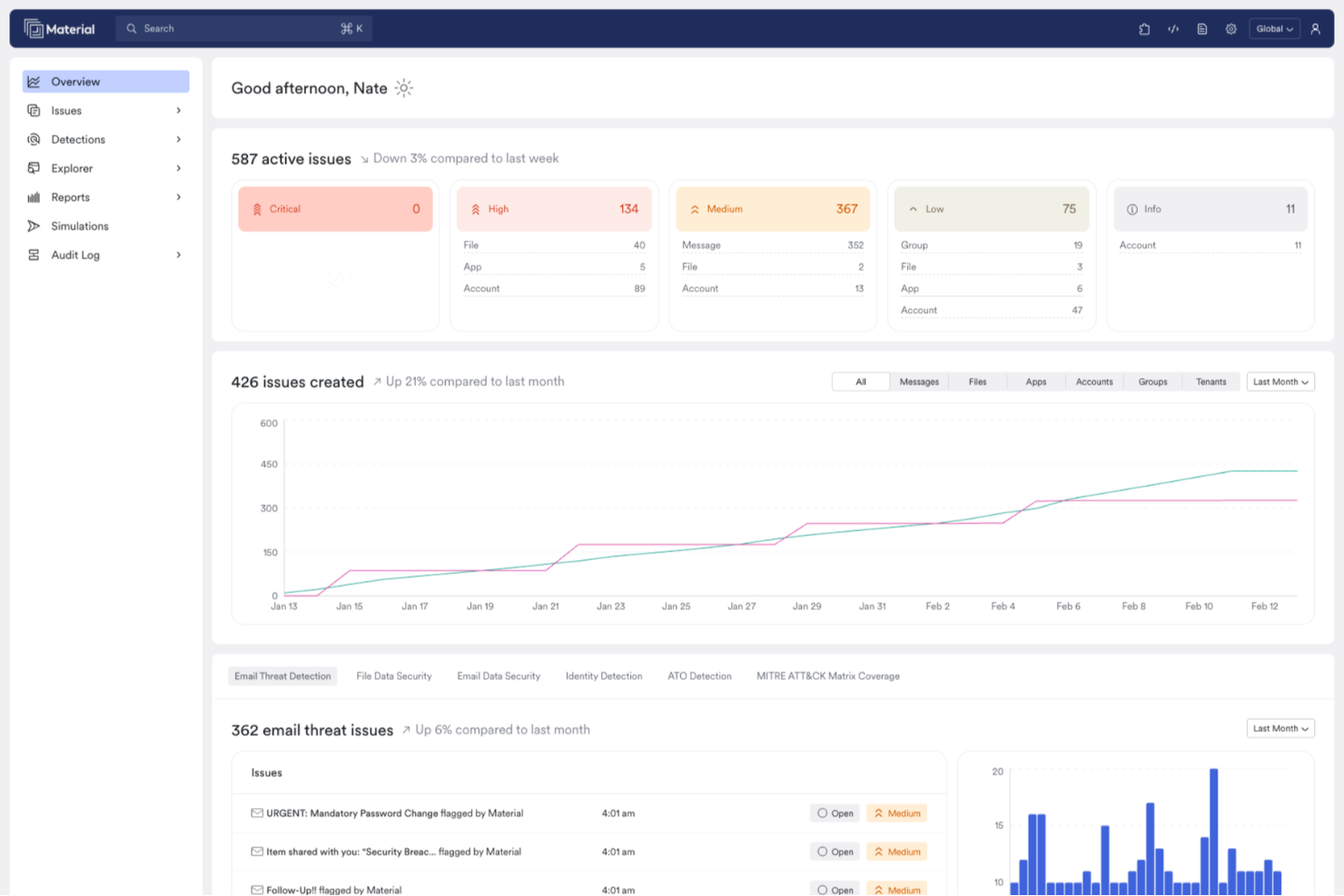
Material Security is tailored for organizations using Google Workspace and Microsoft 365, focusing on enhancing email security services. It appeals to IT security professionals and businesses seeking to protect sensitive data from advanced threats that evade native controls. With its ability to modernize email security and automate phishing responses, this platform addresses the need for efficient security management in cloud environments.
Why I Picked Material Security
I picked Material Security for its unique capability to detect and remediate sophisticated email-based attacks like business email compromise and spear phishing. The platform's AI-powered agent automatically investigates and remediates user-reported threats, enhancing your team's response time.
Additionally, its real-time search and investigation tools allow you to manage incidents efficiently. These features make it an ideal choice for organizations seeking robust email security solutions.
Material Security Key Features
In addition to its advanced threat detection capabilities, Material Security offers several other features:
- Phishing Protection: Guards against phishing attempts by using advanced algorithms to identify and block malicious emails.
- Account Takeover Prevention: Monitors and prevents unauthorized access to user accounts, ensuring sensitive data remains secure.
- Email Data Loss Prevention (DLP): Helps you safeguard critical information by monitoring and controlling email data transfers.
- Incident Investigation Tools: Provides comprehensive tools for analyzing and responding to security incidents in real time.
Material Security Integrations
Integrations include Google Workspace and Microsoft 365.
Pros and Cons
Pros:
- Automates phishing response to improve response times.
- Supports advanced threat protection for email accounts.
- Enables secure file sharing within email communications.
Cons:
- Dependency on cloud infrastructure may introduce latency issues.
- Limited native integrations with other security tools.


Red Sift OnDMARC is a cloud-based email security platform focused on helping organizations implement DMARC, SPF, and DKIM authentication protocols. It’s designed to prevent spoofing, phishing, and business email compromise (BEC) by simplifying policy configuration and proactively monitoring domain health.
Why I Picked Red Sift OnDMARC:
I picked Red Sift OnDMARC for its ability to fast-track DMARC enforcement. That kind of turnaround can make a meaningful difference for companies facing frequent spoofing threats. I also liked the DNS Guardian tool, which flags misconfigurations and vulnerabilities like dormant subdomains or CNAME takeovers—often overlooked weak spots in domain security. Another standout is Dynamic SPF, which consolidates SPF records to bypass the common 10-lookup limit. This makes it a good fit for companies with complex or sprawling email infrastructures.
Standout features and integrations:
OnDMARC includes features like Radar, which helps detect and resolve misalignments in email records, and Brand Trust, which identifies lookalike domains to protect against brand impersonation. You also get Hosted MTA-STS management for enforcing TLS encryption, and support for BIMI and Verified Mark Certificates (VMC) to improve brand visibility in inboxes. Integrations include Microsoft Azure Active Directory, SAML SSO, Okta, Zoominfo, and OnDMARC’s own API. The platform is also used by recognizable names like Domino’s, Capgemini, and Save the Children.
Pros and Cons
Pros:
- Scalable for businesses of all sizes
- Robust cloud-driven DMARC analysis
- Active threat intelligence and real-time monitoring
Cons:
- Requires a good grasp of cloud platforms
- Might not be ideal for firms without cloud infrastructure


PowerDMARC is a comprehensive email security platform designed to protect organizations from email spoofing, phishing, and fraud. It offers a range of features including DMARC (Domain-based Message Authentication, Reporting & Conformance) reporting, analysis, and monitoring, enabling users to track and manage their email authentication protocols effectively.
Why I Picked PowerDMARC:
I picked PowerDMARC for its detailed DMARC reporting, which provides real-time alerts and insights into spoofing attacks. This is powered by a robust Threat Intelligence engine that offers visibility into malicious sources, enabling organizations to take proactive measures against potential threats. Additionally, PowerDMARC offers forensic reporting with encryption, allowing users to access RUF Mail Failures Forensics while ensuring the privacy of sensitive information.
Standout features and integrations:
Additional features of PowerDMARC include hosted Sender Policy Framework (SPF), DomainKeys Identified Mail (DKIM), Brand Indicators for Message Identification (BIMI), and Mail Transfer Agent Strict Transport Security (MTA-STS). It also offers 24/7 monitoring services for proactive email security management.
Pros and Cons
Pros:
- Supports various email security protocols
- Utilizes proprietary AI and threat intelligence for enhanced security
- Strong email authentication controls
Cons:
- Reliance on proprietary technology may limit flexibility and customization options
- Optimal setup and management of the tool may require technical expertise


Heimdal's email security service is designed for organizations seeking to protect their email communications from threats like phishing, ransomware, and business email compromise. This service might appeal to industries such as healthcare, government, and education, where data protection and compliance are critical. By integrating advanced AI and machine learning for threat detection, Heimdal addresses the need for secure, reliable email communication, ensuring both safety and compliance with data governance standards.
Why I Picked Heimdal
I picked Heimdal for its unique approach to email security through advanced threat detection and AI-powered fraud prevention. Its ability to perform real-time attachment scanning provides you with a layer of protection against malware and phishing attempts. Additionally, the integration with major platforms like Microsoft 365 ensures seamless management and compliance with data governance standards. These features collectively address the urgent need for robust email security in today's digital landscape.
Heimdal Key Features
In addition to its standout threat detection capabilities, Heimdal offers several other features that enhance its email security service:
- AI-Powered Fraud Detection: This feature utilizes over 125 analysis vectors to accurately detect and prevent email fraud.
- Forensic Analysis: Provides detailed logging and post-delivery threat alerts, offering you enhanced visibility and security.
- Seamless Platform Integration: Supports major platforms like Microsoft 365 and Google Workspace, ensuring efficient management and compliance.
- Automated Response Capabilities: Enhances security by automating responses to detected threats, reducing the time and effort required for manual intervention.
Heimdal Integrations
Native integrations are not currently listed by Heimdal; however, the platform supports API-based custom integrations.
Pros and Cons
Pros:
- Detailed asset and license visibility
- Strong vulnerability and threat detection
- Automates patching across endpoints
Cons:
- Interface requires onboarding time
- No native integrations available


Check Point is a renowned security software provider that specializes in fortifying systems against advanced cyber threats. Their particular strength lies in countering zero-day threats, which are often the most unpredictable and potentially damaging to organizations.
Why I Picked Check Point:
In my process of determining the most competent email security tools, Check Point made it to the list for its superior zero-day threat prevention mechanisms. It stood out due to its continuous research-driven approach, ensuring that the software is always ahead of emerging threats. This dedication to proactive defense is why I believe Check Point is "Best for zero-day threat prevention."
Standout features and integrations:
Check Point's SandBlast technology, which offers real-time detection and response capabilities against zero-day threats, is a defining feature. The software's ThreatCloud, a collaborative network to fight cybercrime, combines multiple threat detection engines and real-time updates. Integrations are comprehensive, ensuring that Check Point fits well with many enterprise ecosystems, particularly those using cloud platforms like AWS and Azure.
Pros and Cons
Pros:
- Robust integrations with major cloud platforms
- Collaborative ThreatCloud system ensuring constant threat intelligence
- Superior zero-day threat detection with SandBlast technology
Cons:
- Occasional false positives, requiring manual oversight
- Some features might be redundant for basic users
- Might be complex for smaller businesses with limited IT resources


Proofpoint Email Protection stands as a formidable shield against email threats, ensuring that your communications remain uncompromised. Its prowess in addressing advanced cyber threats, particularly sophisticated phishing and malware attacks, solidifies its position as the go-to choice for those seeking top-tier defense against the most intricate of email-based risks.
Why I Picked Proofpoint Email Protection:
Proofpoint Email Protection consistently emerged at the top of my list when I sifted through various email security tools. Its reputation for excellence in identifying and mitigating advanced threats gave it a distinct edge over others. This very capability is why I believe it's "Best for advanced threat protection," providing users an assured defense against sophisticated email-based attacks.
Standout features and integrations:
Proofpoint's granularity in setting policies enables users to fine-tune their defenses to their specific environment. This customization, paired with its dynamic reputation analysis and real-time threat intelligence, makes it a robust solution for all types of businesses. Moreover, it integrates with other enterprise solutions, making it easier for IT teams to manage and monitor the organization's security landscape.
Pros and Cons
Pros:
- Efficient in identifying and neutralizing advanced threats
- Real-time threat intelligence feed
- Granular policy setting for targeted defenses
Cons:
- Interface can be more intuitive
- The initial setup might require expert intervention
- Slightly steeper learning curve for beginners


Mimecast Email Security is renowned for its robust email protection capabilities, ensuring that users are safeguarded against a wide array of digital threats. A distinguishing feature of Mimecast is its exhaustive archiving functionality, making it an invaluable tool for organizations needing extensive mail archival solutions.
Why I Picked Mimecast Email Security:
When selecting the right tools, I often dive deep into their specialties, and Mimecast's commitment to archival excellence caught my attention. Among the array of services I evaluated, Mimecast stood distinct with its emphasis on preserving every piece of mail with impeccable detail. This unparalleled commitment to archiving is the primary reason I'm convinced it's "Best for comprehensive mail archiving."
Standout features and integrations:
Mimecast provides multi-layered security, ensuring every email system, whether inbound or outbound, is scanned and safe. Its archiving feature is not just about storage but offers rapid search capabilities, ensuring quick retrieval of any archived mail. Additionally, Mimecast integrates efficiently with a plethora of enterprise systems, especially with platforms like Microsoft Office 365, enhancing overall user experience and ensuring continuity.
Pros and Cons
Pros:
- Integration with major platforms like Office 365
- Quick search and retrieval within archives
- Multi-layered, detailed email security
Cons:
- Might be overkill for smaller enterprises not needing extensive email archiving
- Migration process may be intricate for some
- Interface could be more user-friendly


Cisco Email Security offers robust protection mechanisms against email threats, with a focus on a depth of defenses. It's not just about filtering out the bad but also about the strategic layers they've built into their system, making it outstanding in countering complex threats with a layered approach.
Why I Picked Cisco Email Security:
In the sea of email security tools, Cisco's emphasis on a well-structured, layered defense approach made me sit up and take notice. In my analysis, I noticed that they've engineered their tool to tackle threats at multiple levels, not just at the surface. This deep-dive, layered approach to email security is why I firmly believe it stands as "Best for multi-layered defense strategy".
Standout features and integrations:
Cisco shines with its advanced threat intelligence, ensuring that emerging threats are detected and blocked promptly. Their sandboxing feature meticulously analyses suspicious files in a secure environment, adding an additional layer of scrutiny. Integration-wise, Cisco works harmoniously with a range of enterprise systems, ensuring that the tool can slide into any company's tech stack, notably with systems like Microsoft Exchange.
Pros and Cons
Pros:
- Strong integrations, especially with enterprise systems
- In-depth sandboxing feature for suspicious files
- Advanced threat intelligence to counter emerging risks
Cons:
- Potential for occasional false positives
- Could be intimidating for smaller organizations
- Requires a certain level of tech-savviness for optimal setup


Trend Micro Email Security is an advanced email protection tool aiming to guard businesses from a vast array of online threats. The platform's dedication to virtual patching capability ensures that vulnerabilities are addressed even before a formal patch is available, offering organizations an added layer of defense.
Why I Picked Trend Micro Email Security:
In the process of determining which email security tools to feature, Trend Micro Email Security stood out due to its unique approach to vulnerability management. The virtual patching capability grabbed my attention as it offers a timely defense against potential threats, bridging the gap until official patches are released. This proactive approach to securing potential vulnerabilities is why I've judged it to be the "Best for virtual patching capability."
Standout features and integrations:
Key features of Trend Micro Email Security include its advanced machine learning technology, which assists in identifying and blocking sophisticated threats. The platform also offers sandbox malware analysis to detect stealthy malware. Integration-wise, it can connect with other Trend Micro solutions and widely-used enterprise tools, ensuring a cohesive security ecosystem.
Pros and Cons
Pros:
- Cohesive integrations with enterprise-grade tools
- Sandbox malware analysis feature
- Advanced machine learning for accurate threat detection
Cons:
- Requires periodic updates for optimal performance
- Some users might prefer a broader range of third-party integrations
- Might be complex for users unfamiliar with cybersecurity nuances


Sophos Email Security is a robust email protection platform designed to thwart various cyber threats targeting email communications. One of its primary attributes is its commitment to synchronized security communication, ensuring a holistic and interconnected security approach across multiple facets of an organization.
Why I Picked Sophos Email Security:
When selecting tools for this list, the synchronized security communication feature of Sophos Email Security stood out prominently. This trait provides a distinct advantage as it ensures that all parts of an organization's security infrastructure communicate effectively, helping detect and respond to threats more cohesively. This capability led me to judge it as the "Best for synchronized security communication.”
Standout features and integrations:
Sophos Email Security boasts AI-powered email analysis, which provides proactive threat detection. It also offers impersonation protection, reducing the risk of phishing email attacks. The platform integrates with the broader Sophos ecosystem, allowing for cohesive data sharing and threat response.
Pros and Cons
Pros:
- Extensive integration with other Sophos solutions
- Impersonation protection against phishing attacks
- AI-powered analysis for efficient threat detection
Cons:
- Not as many third-party integrations as competitors
- Some features could be overwhelming for smaller businesses
- Might require a learning curve for first-time users
Weitere E-Mail-Sicherheitsdienste
- McAfee Email Security
For centralized security management
- Avast Email Server Security
For server-specific protection
- ESET Email Security
For malware detection accuracy
- Barracuda
For integrated cloud-based solutions
- Forcepoint
For human-centric security approach
- Trellix
For adaptive threat intelligence
- Hornetsecurity
Good for layered security mechanisms
- Abnormal Security
Good for behavior-based anomaly detection
- Kaspersky Security
Good for comprehensive malware protection
- Agari Email Security
Good for advanced threat intelligence
- Fortinet Email Security
Good for scalable enterprise solutions
- VIPRE Email Security
Good for cloud-based threat defense
- GreatHorn Email Security
Good for real-time phishing detection
- Ironscales Email Security
Good for automated phishing response


Auswahlkriterien für E-Mail-Sicherheitsdienste
Die Wahl der passenden E-Mail-Sicherheitssoftware ist angesichts der Vielzahl an verfügbaren Lösungen mitunter anspruchsvoll. Im Laufe meiner Karriere habe ich Dutzende Tools getestet und bewertet. Obwohl jedes seine Besonderheiten hat, kristallisierten sich einige Kriterien als entscheidend für die Auswahl heraus. Darauf habe ich geachtet:
Kernfunktionen:
- Filterung eingehender und ausgehender E-Mails: Fähigkeit, sowohl ein- als auch ausgehende Mails zu prüfen, um Bedrohungen zu verhindern und Compliance zu gewährleisten.
- Erweiterter Bedrohungsschutz: Schutz vor ausgeklügelten Angriffen wie Ransomware, Phishing und gezieltem Spear-Phishing.
- Schutz vor Datenverlust (Data Loss Prevention): Sicherstellen, dass sensible Informationen nicht unbeabsichtigt nach außen gelangen. E-Mail-Verschlüsselungssoftware ist oft die beste Möglichkeit, sensible Daten zu schützen.
Wichtige Funktionen:
- Echtzeit-Scan: Sofortige Überprüfung von E-Mails, um Bedrohungen zu erkennen, bevor sie den Empfänger erreichen.
- Intelligentes Lernen: Ein System, das sich an jede Bedrohung anpasst und daraus lernt, um seine Schutzfunktionen kontinuierlich zu verbessern.
- Identitätsschutz: Funktionen, die vor Identitätsdiebstahl schützen, wie Anti-Phishing und Verhinderung von Domain-Betrug. Dies kann durch DNS-Sicherheitsdienste und andere Tools erreicht werden.
- Mehrschichtige Verteidigung: Unterschiedliche Sicherheitsebenen, die sicherstellen, dass Bedrohungen auf jeder Ebene erkannt und neutralisiert werden.
- Automatisierte Vorfallreaktion: Automatisierte Abläufe, die bei Erkennung einer Bedrohung ausgelöst werden, wodurch manuelle Eingriffe minimiert und die Reaktionszeit verkürzt wird.
Benutzerfreundlichkeit:
- Intuitives Dashboard: Ein zentrales Kontrollpanel, das einen klaren Überblick über erkannte Bedrohungen, in Quarantäne verschobene Objekte und den Systemzustand bietet.
- Rollenbasierte Zugriffskontrolle: Organisationen können bestimmten Nutzern oder Gruppen spezifische Berechtigungen zuweisen, sodass nur autorisierte Personen Änderungen an den Sicherheitseinstellungen vornehmen können.
- Geführtes Onboarding: Aufgrund der kritischen Bedeutung der E-Mail-Sicherheit sollte die Software einen geführten Einrichtungsprozess bieten, um sicherzustellen, dass alle Sicherheitsebenen von Anfang an korrekt konfiguriert sind.
- Hilfreicher Support: Zugriff auf ein kompetentes Support-Team, das besonders in Krisensituationen schnell helfen kann. Es ist entscheidend, dass dieses E-Mail-Test-Tool von Fachexperten unterstützt wird, die bei komplexen Sicherheitsvorfällen weiterhelfen können.
- Umfassende Schulungsressourcen: Ob durch Webinare, Dokumentationen oder Videoanleitungen – den Nutzern sollten Ressourcen zur Verfügung stehen, damit sie alle Funktionen sowie Best Practices für das Security Awareness Training verstehen.
Durch die Eingrenzung dieser essenziellen Kriterien fiel es mir leichter, die Vielzahl an Tools zu durchforsten und diejenigen auszuwählen, die den E-Mail-Sicherheitsbedürfnissen einer Organisation wirklich gerecht werden.
Häufig gestellte Fragen zu E-Mail-Sicherheitsdiensten (FAQs)
Was sind die Vorteile von E-Mail-Sicherheitsdiensten?
Die Vorteile der Nutzung von E-Mail-Sicherheitsdiensten sind vielfältig. Dazu gehören:
- Schutz vor Malware und Ransomware: DMARC-Software durchsucht Anhänge und Links in Echtzeit, sodass schädliche Inhalte erkannt und isoliert werden, bevor sie Schaden anrichten können.
- Reduzierung von Spam: Diese Tools nutzen fortschrittliche Algorithmen zur Filterung von Spam, halten den Posteingang übersichtlich und sorgen dafür, dass wichtige E-Mails nicht untergehen.
- Schutz vor Phishing und Betrug: Sie erkennen und blockieren Phishing-Versuche und gefälschte E-Mails, die Nutzer dazu verleiten könnten, sensible Informationen preiszugeben.
- Verhinderung von Datenverlust: Viele dieser Dienste erkennen sensible Informationen in E-Mails und können entweder die E-Mail blockieren oder verschlüsseln, damit vertrauliche Daten in der Organisation bleiben.
- Einhaltung gesetzlicher Vorschriften: Für Branchen mit strengen Auflagen zum Datenschutz und zur Kommunikation sorgen E-Mail-Sicherheitsdienste für die Einhaltung von Compliance-Anforderungen und minimieren das Risiko rechtlicher Konsequenzen.
Wie viel kosten E-Mail-Sicherheitsdienste in der Regel?
Die Preise für E-Mail-Sicherheitsdienste können stark variieren – je nach Funktionsumfang, der Größe des Unternehmens und dem gewünschten Schutzniveau.
Welche gängigen Preismodelle gibt es für diese Tools?
Es gibt verschiedene Preismodelle, unter anderem:
- Pro Nutzer/Monat: Eine feste Gebühr pro Nutzer im Unternehmen, monatlich abgerechnet.
- Jahreslizenzen: Eine einmalige Gebühr für die jährliche Nutzung. Für diese Bindung bieten einige Anbieter Rabatte an.
- Gestaffelte Preise: Wachsen die Anforderungen des Unternehmens (wie Nutzeranzahl oder verarbeitete E-Mails), erfolgt ein Wechsel in eine höhere Preisstufe mit zusätzlichen Funktionen.
Wie sehen die typischen Preisspannen aus?
In der Regel bewegen sich die Preise zwischen $1 und $50 pro Nutzer und Monat, abhängig von Umfang und Leistung des Dienstes.
Welche Softwareoptionen sind die günstigsten und teuersten?
Die konkreten Preise können variieren und sich im Laufe der Zeit ändern. Historisch betrachtet gehören beispielsweise Tools wie MailGuard und GreatHorn Email Security zu den günstigeren Lösungen, während Enterprise-Lösungen wie Agari Email Security mit einem umfangreichen Funktionsspektrum im höheren Preissegment angesiedelt sind.
Gibt es auch kostenlose Tools?
Ja, einige Tools bieten kostenlose Versionen oder Testphasen an. Diese sind jedoch in der Regel im Funktionsumfang begrenzt und eignen sich besonders für Einzelpersonen oder kleine Unternehmen. Es ist stets empfehlenswert, mit einer kostenlosen Version oder Testphase zu starten, um die Wirksamkeit des Tools vor einem kostenpflichtigen Abschluss zu bewerten.
Weitere E-Mail-Sicherheitssoftware-Bewertungen
Zusammenfassung
In der sich rasant entwickelnden digitalen Welt bleibt der Schutz der E-Mail-Kommunikation für Unternehmen jeder Größe oberste Priorität. E-Mail-Sicherheitsdienste spielen eine entscheidende Rolle bei der Abwehr von Cyberbedrohungen und sorgen dafür, dass sensible Daten eines Unternehmens vertraulich bleiben und nicht missbräuchlich verwendet werden.
Wichtigste Erkenntnisse:
- Kernfunktionen sind entscheidend: Nicht alle E-Mail-Sicherheitsdienste sind gleich. Es ist wichtig, einen Service zu wählen, der einen umfassenden Funktionsumfang bietet, der auf Ihre spezifischen Anforderungen zugeschnitten ist – etwa beim Filtern von schädlichen E-Mails, beim Schutz vor Ransomware oder bei der Erkennung von Phishing-Versuchen.
- Benutzerfreundlichkeit und Support beachten: Eine intuitive Benutzeroberfläche ist nicht nur ein Pluspunkt, sondern eine Notwendigkeit. E-Mail-Sicherheit sollte den Schutz vereinfachen und nicht erschweren. Zudem kann ein reaktionsschneller Kundensupport einen großen Unterschied machen, besonders wenn sich Bedrohungen weiterentwickeln und zeitnahes Eingreifen notwendig ist.
- Unterschiedliche Preismodelle: Auch wenn die Kosten nicht das einzige Entscheidungskriterium sein sollten, kann das Verständnis des Preismodells – etwa pro Nutzer, pro Monat oder als Jahreslizenz – Ihre Wahl beeinflussen. Einige Anbieter verlangen einen Grundpreis und berechnen Zusatzfunktionen extra, andere bieten ein umfassendes Paket zu einem Festpreis an. Stellen Sie sicher, dass Sie genau wissen, wofür Sie bezahlen und dass das Angebot zu den Anforderungen Ihrer Organisation passt.
Was denken Sie?
Obwohl ich mich bemüht habe, eine umfassende Liste der besten E-Mail-Sicherheitsdienste zusammenzustellen, ist die digitale Landschaft groß, und es gibt möglicherweise E-Mail-Verschlüsselungsdienste sowie andere versteckte Schätze, die ich noch nicht entdeckt habe. Falls Sie auf ein E-Mail-Sicherheitstool gestoßen sind, das erwähnt werden sollte, oder besonders gute Erfahrungen mit einem hier nicht aufgeführten Service gemacht haben, teilen Sie bitte Ihre Erkenntnisse mit mir. Ihre Empfehlungen helfen mir und der gesamten Community, fundiertere Entscheidungen zu treffen!