

Web scraping tools are applications that automate the extraction of data from websites, making it simple to collect information without manual copy-pasting. If you’re searching for the best web scraping tools, you probably need to gather large volumes of web data reliably—without running into roadblocks like anti-bot defenses or changing site structures.
With so many options on the market, it’s tough to know which tool will actually fit your tech stack, handle your target sites, and scale with your needs. This guide breaks down the top tools so you can compare features, approaches, and find exactly what works for your IT projects.
Why Trust Our Software Recommendations
6,700+
Reviews
20
Industry experts
16+
Evaluation factors
14
Years
Our team has been testing and reviewing software since 2012. As tech leaders ourselves, we know how difficult—and important—it is to choose the right software.
For this guide, we evaluated tools using hands-on testing and independent research, scoring tools using our selection criteria.
Our reviews reflect our human editorial judgment, not a sales pitch.
Expert reviewers:
- Paulo Gardini MiguelTech Director
 Tim FisherVP of AI
 Gabriel RosasTech Lead & Software Architect
 Christhian GruhnTech Lead & Platform Architect

Comparison Table: Web Scraping Tools
This comparison table summarizes pricing details for my top web scraping tool selections.
| Tool | Best For | Trial Info | Price | ||
|---|---|---|---|---|---|
| 1 | Best for built-in headless browser control | Free plan available | From $30/month | Website | |
| 2 | Best for stealth scraping and bypassing detection | 14-day free trial | From $69/month | Website | |
| 3 | Best for handling dynamic JavaScript websites | Free plan available | From $189/month | Website | |
| 4 | Best for direct pipeline integration | 30-day free trial | From $199/month (billed annually) | Website | |
| 5 | Best for prebuilt robot automation templates | Free plan available | From $19/month (billed annually) | Website | |
| 6 | Best for point-and-click interface users | Free plan available | From $69/month (billed annually) | Website | |
| 7 | Best for managed anti-bot data collection | Free trial available | From $0.5/1,000 records | Website | |
| 8 | Best for enterprise-scale proxy infrastructure | Free plan available | From $1.5/1,000 records/month | Website | |
| 9 | Best for automatic data schema detection | 30-day free trial | From $0.13/1,000 requests | Website | |
| 10 | Best for simple API-driven scraping workflows | Free plan available | From $49/month | Website |


Best Web Scraping Tools Reviews
Below are my detailed summaries of the best web scraping tools that made it onto my shortlist. My reviews offer a detailed look at the features, integrations, and best use cases of each tool to help you find the best one for you.
 Best for built-in headless browser control
- Free plan available
- From $30/month
Visit WebsiteCustomer Rating:4.9/5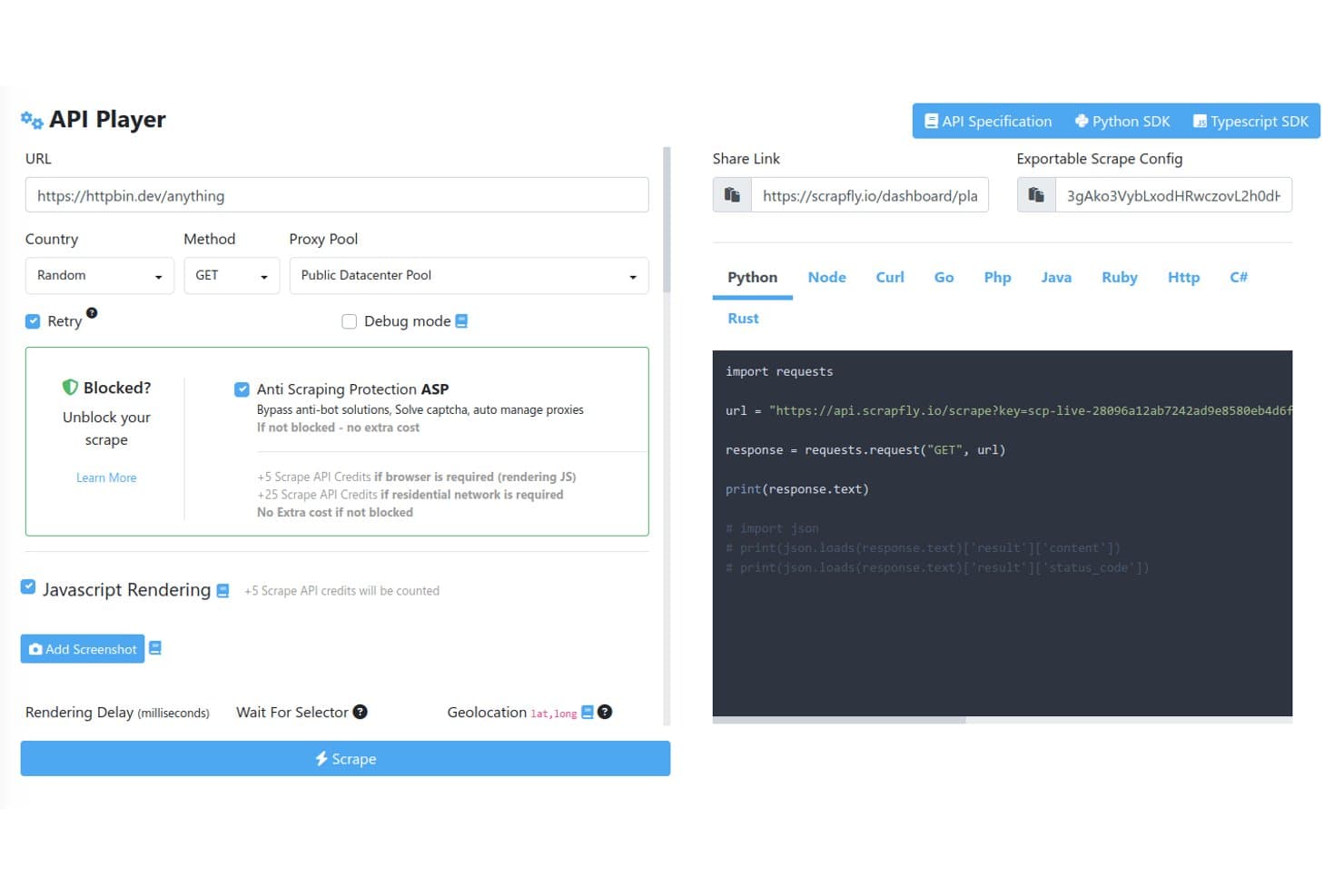
Scrapfly offers an interactive API Player with configurable scraping options including proxy pools, anti-scraping protection bypass, JavaScript rendering, and auto-generated code snippets in multiple languages. Scrapfly is a web scraping API that combines proxy rotation, anti-bot bypass, headless browser rendering, site crawling, screenshot capture, and LLM-powered data extraction under a single API key.
Who Is Scrapfly Best For?
Scrapfly is a strong fit for developers and data engineers who want a code-first scraping API with SDKs in Python, TypeScript, Go, and Rust.
Why I Picked Scrapfly
I picked Scrapfly because its dual-engine browser architecture is unlike anything else I've tested. Curlium handles byte-perfect Chrome JA4 fingerprinting for speed, while Scrapium runs stealth Chromium over CDP with matching fingerprints so sessions can swap mid-crawl without triggering detection. I also like that Scrapium is fully compatible with Playwright and Puppeteer, meaning I can write custom JS Scenarios and wait-for rules without touching my existing browser automation code.
Scrapfly Key Features
- Multi-method extraction API: Extracts structured data using CSS, XPath, regex, JSON schema, and LLM-powered templates.
- Integrated proxy pools: Provides managed datacenter and residential proxies with geo-targeting and BYO proxy support.
- Crawler API: Traverses entire sites with control over crawl depth, rate limits, and project partitioning.
- Native scheduling integrations: Supports Zapier, Make, and n8n for automated workflows, recurring jobs, and webhook triggers.
Scrapfly Integrations
Scrapfly offers native integrations with Zapier, Make, n8n, LlamaIndex, LangChain, CrewAI, and OpenClaw. It also provides SDKs for Python, TypeScript, Go, and Rust. An API is available for custom integrations.
Pros and Cons
Pros:
- Extraction templates for common site types
- Bypasses Cloudflare, DataDome, and Imperva
- Dual stealth browser engines
Cons:
- Not suited for non-technical users
- No native in-product job scheduler
Learn more about Scrapfly: Best for stealth scraping and bypassing detection
- 14-day free trial
- From $69/month
Visit WebsiteCustomer Rating:4.7/5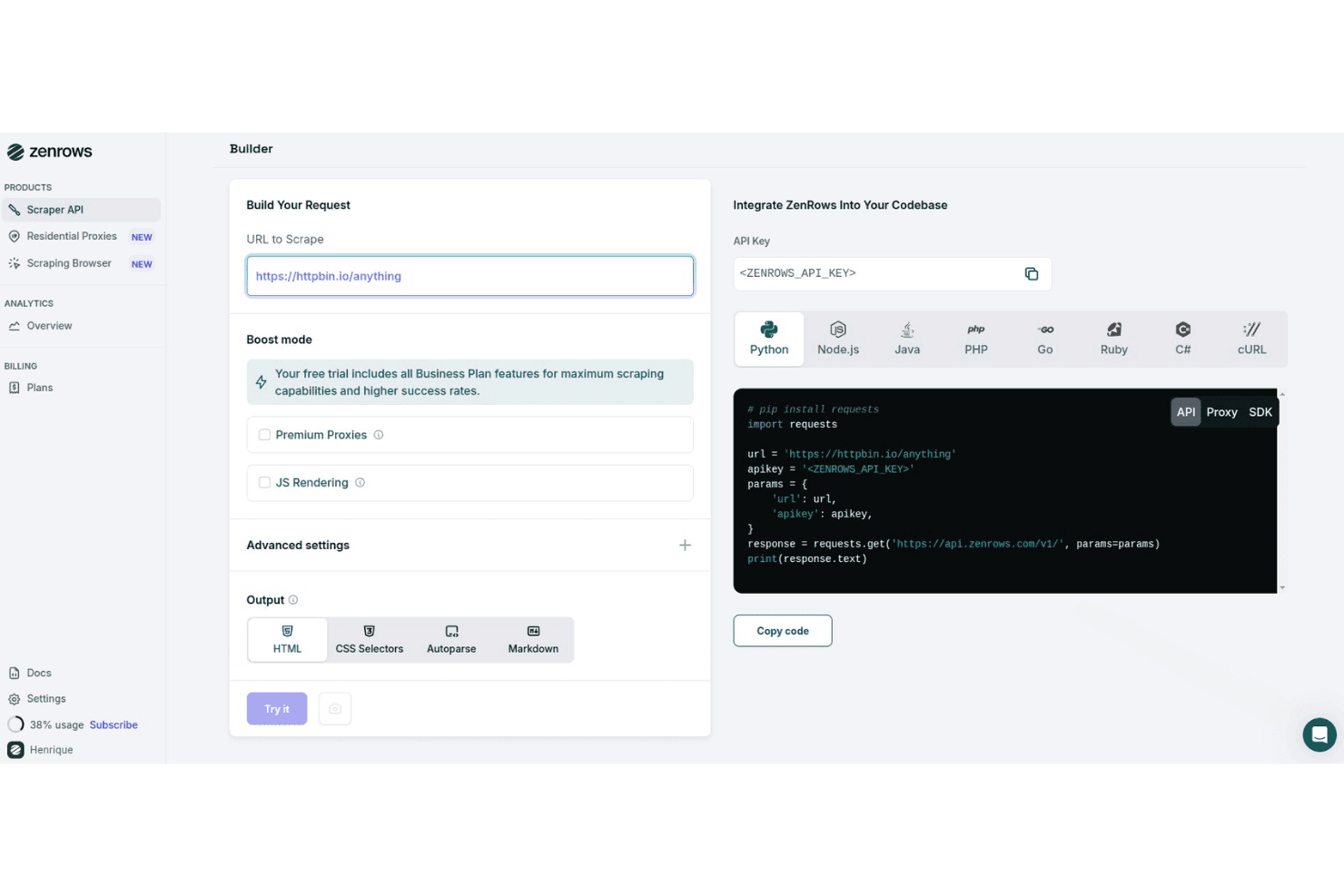
ZenRows offers a visual request builder with multi-language code generation, boost mode options, and output format selection for web scraping. ZenRows is a web scraping API and cloud browser platform that combines anti-bot bypass, residential proxy rotation, JavaScript rendering, and structured data extraction into a single developer-facing toolkit.
Who Is ZenRows Best For?
ZenRows is a strong fit for developers and data engineers who need to scrape sites with aggressive anti-bot protection at scale.
Why I Picked ZenRows
ZenRows earns its spot on my shortlist because of how it handles anti-bot protection. I've scraped Cloudflare-protected sites where standard tools consistently fail, and ZenRows gets through using fingerprinting bypass and automatic CAPTCHA solving without any manual configuration. The Scraping Browser goes further, running full Chromium sessions with stealth headers that closely mimic real user behavior to avoid detection on sites using DataDome or PerimeterX.
ZenRows Key Features
- Universal Scraper API: Make requests using a single endpoint that adapts to different site structures and scraping requirements.
- Residential proxy infrastructure: Choose from a pool of over 55 million residential IPs across 185+ countries for geo-targeted crawling.
- Auto-parsing for structured output: Extract and receive data in JSON, HTML, or Markdown automatically with built-in parsing for popular sites.
- Multi-language SDKs: Access official SDKs for Python, Node.js, Go, PHP, Ruby, Java, and C# to integrate with development workflows.
ZenRows Integrations
ZenRows offers native integrations with Playwright, Puppeteer, n8n, Make, Clay, and Zapier. An API is available for custom integrations.
Pros and Cons
Pros:
- Full headless browser sessions with stealth mode
- High success rate on protected pages
- Bypasses Cloudflare and DataDome reliably
Cons:
- Costs escalate quickly at high request volumes
- No native scheduling or job orchestration
Learn more about ZenRows: Best for handling dynamic JavaScript websites
- Free plan available
- From $189/month
Visit WebsiteCustomer Rating:4.4/5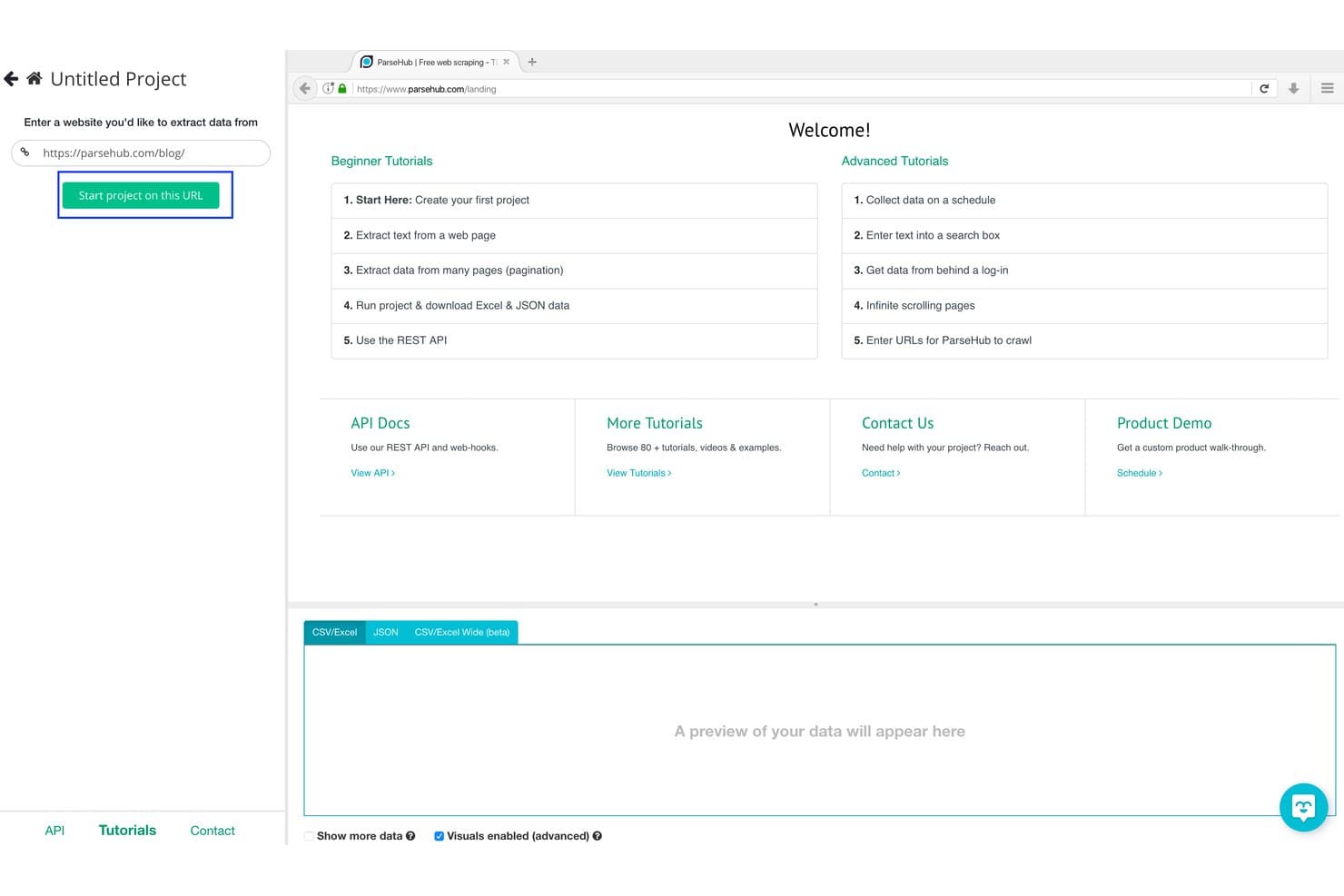
ParseHub offers a visual project setup interface where users enter a URL and click 'Start project on this URL' to begin scraping data from websites. ParseHub is a visual web scraping tool that extracts data from dynamic websites using a click-based interface, with support for JavaScript, AJAX, infinite scroll, form inputs, and scheduled cloud-based runs.
Who Is ParseHub Best For?
ParseHub is a good fit for competitive intelligence analysts and non-technical researchers who need to collect data from JavaScript-heavy sites without writing code.
Why I Picked ParseHub
ParseHub earns its spot as one of the best on my shortlist because it handles the JavaScript rendering challenges that break most no-code scrapers. I've used it to extract data from pages with infinite scroll and dropdown-triggered content, where static HTML scrapers return empty results. Its machine learning engine detects page structure automatically, which means I can build a working scraper for an AJAX-heavy product catalog without writing a single line of XPath.
ParseHub Key Features
- Point-and-click visual builder: Select and extract page elements without manual selector coding.
- Cloud-based scheduling: Schedule recurring scraping tasks on ParseHub's cloud infrastructure.
- REST API access: Manage, trigger, and download scrape results programmatically using the API.
- Automatic IP rotation: Reduce blocking by rotating outbound IPs on cloud-based runs.
ParseHub Integrations
ParseHub offers native integrations with Google Sheets, Tableau, Dropbox, and AWS S3. An API is available for custom integrations and workflow automation.
Pros and Cons
Pros:
- Scrapes run automatically on cloud infrastructure
- Visual builder requires no selector coding
- Handles JavaScript, AJAX, and infinite scroll natively
Cons:
- No built-in CAPTCHA solving
- Caps out on large concurrent scraping jobs
Learn more about ParseHub: Best for direct pipeline integration
- 30-day free trial
- From $199/month (billed annually)
Visit WebsiteCustomer Rating:4.2/5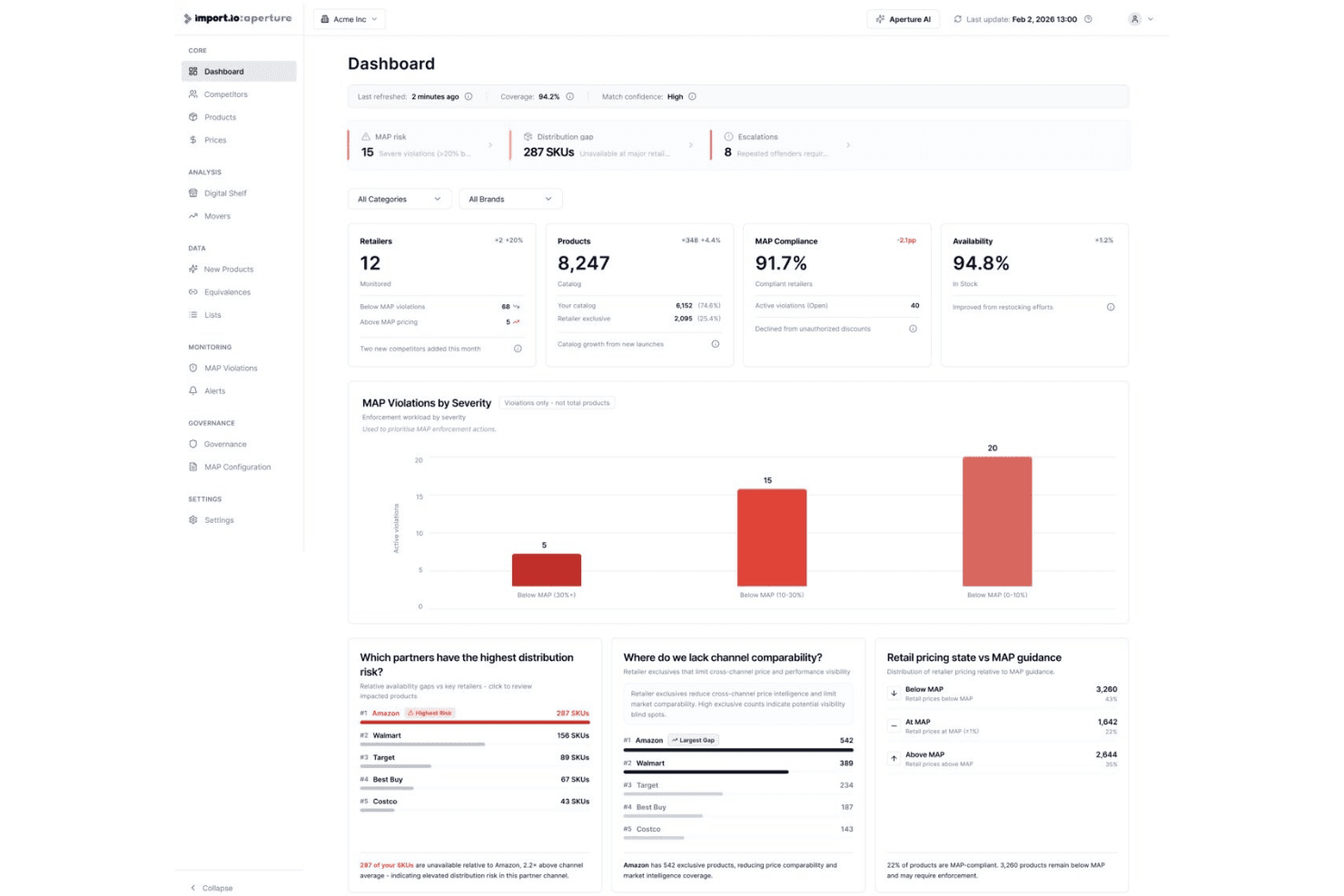
Import.io's Aperture platform offers a dashboard displaying MAP compliance, product availability, retailer distribution gaps, and pricing violations. Import.io is an AI-native, managed web scraping platform that extracts structured data from websites at enterprise scale, handling JavaScript-rendered pages, protected sources, and direct delivery into data pipelines and analytics systems.
Who Is Import.io Best For?
Import.io suits data engineering and competitive intelligence teams at mid-to-large enterprises that need maintained data pipelines without building or managing scrapers in-house.
Why I Picked Import.io
Import.io earns its spot on my shortlist because structured data moves directly from the web into your warehouse, dashboard, or API endpoint without a manual export step in between. I like that webhooks and API delivery are native to the platform, not an afterthought. What I find most valuable are the self-healing pipelines: they automatically adapt when target sites restructure, so I don't have to rebuild extractors every time a retailer updates their page layout.
Import.io Key Features
- AI-assisted extraction models: Automatically detect page structures and adapt schema as websites change.
- Enterprise proxy management: Supports premium and residential proxies for scraping protected or geo-restricted sites.
- Point-and-click visual builder: Select and extract data from complex web pages without writing code.
- Automatic PII masking: Identifies and removes personally identifiable information within scraped datasets for compliance.
Import.io Integrations
Import.io offers native integrations with Google Sheets, Power BI, Tableau, and Excel, and provides an API for custom integrations and webhooks into other systems.
Pros and Cons
Pros:
- Managed extraction reduces in-house engineering workload
- Handles heavily protected and login-walled sites
- Self-healing pipelines auto-adapt to site changes
Cons:
- Limited suitability for small-scale scraping tasks
- Limited transparency on underlying scraping infrastructure
Learn more about Import.io: Best for prebuilt robot automation templates
- Free plan available
- From $19/month (billed annually)
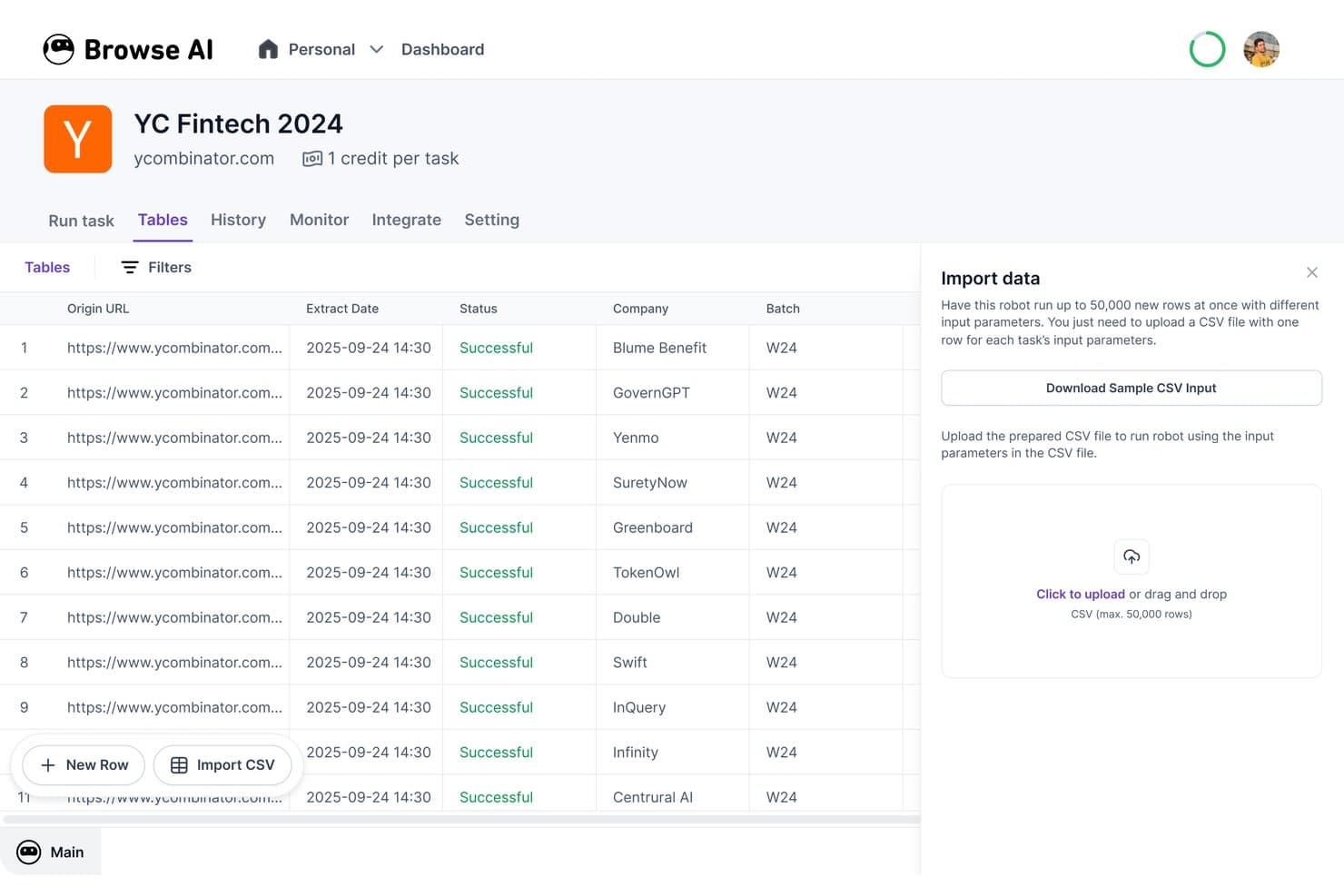
Browse AI offers a no-code web scraping dashboard where users can extract structured data from websites like Y Combinator and export results as CSV files. Browse AI is a no-code web scraping and website monitoring platform that combines a visual point-and-click data extractor with 250+ prebuilt robot templates for automated, scheduled data collection from websites.
Who Is Browse AI Best For?
Browse AI is a strong fit for competitive intelligence analysts and non-technical teams who need to collect structured web data without writing code.
Why I Picked Browse AI
Browse AI earns its spot on my shortlist because of how far ahead its prebuilt robot library is. I can pull structured listings from Amazon, Google Maps, or Indeed without building a scraper from scratch, and each robot already handles pagination and dynamic content for that specific site. What I also appreciate is the AI-powered layout adaptation, which automatically updates a robot when a target site changes its page structure, so scrapes don't silently break mid-pipeline.
Browse AI Key Features
- JavaScript rendering: Automates extraction from modern, JavaScript-heavy websites and single-page applications.
- Residential proxy support: Rotates residential IPs automatically to bypass anti-bot systems without manual proxy setup.
- Webhooks and API access: Allows programmatic submission of scraping tasks and retrieval of data for integration with internal systems.
- Automated change detection: Monitors websites for visual or content changes and sends alerts when updates are detected.
Browse AI Integrations
Browse AI offers native integrations with Google Sheets, Airtable, AWS S3, Zapier, and Make.com. API and webhook access are available for custom integrations.
Pros and Cons
Pros:
- Handles CAPTCHAs and dynamic pages natively
- Auto-adapts when target site layouts change
- 250+ prebuilt robots ready to deploy
Cons:
- Credit costs scale quickly at high volume
- Limited selector-level control for developers
Learn more about Browse AI: Best for point-and-click interface users
- Free plan available
- From $69/month (billed annually)
Visit WebsiteCustomer Rating:4.7/5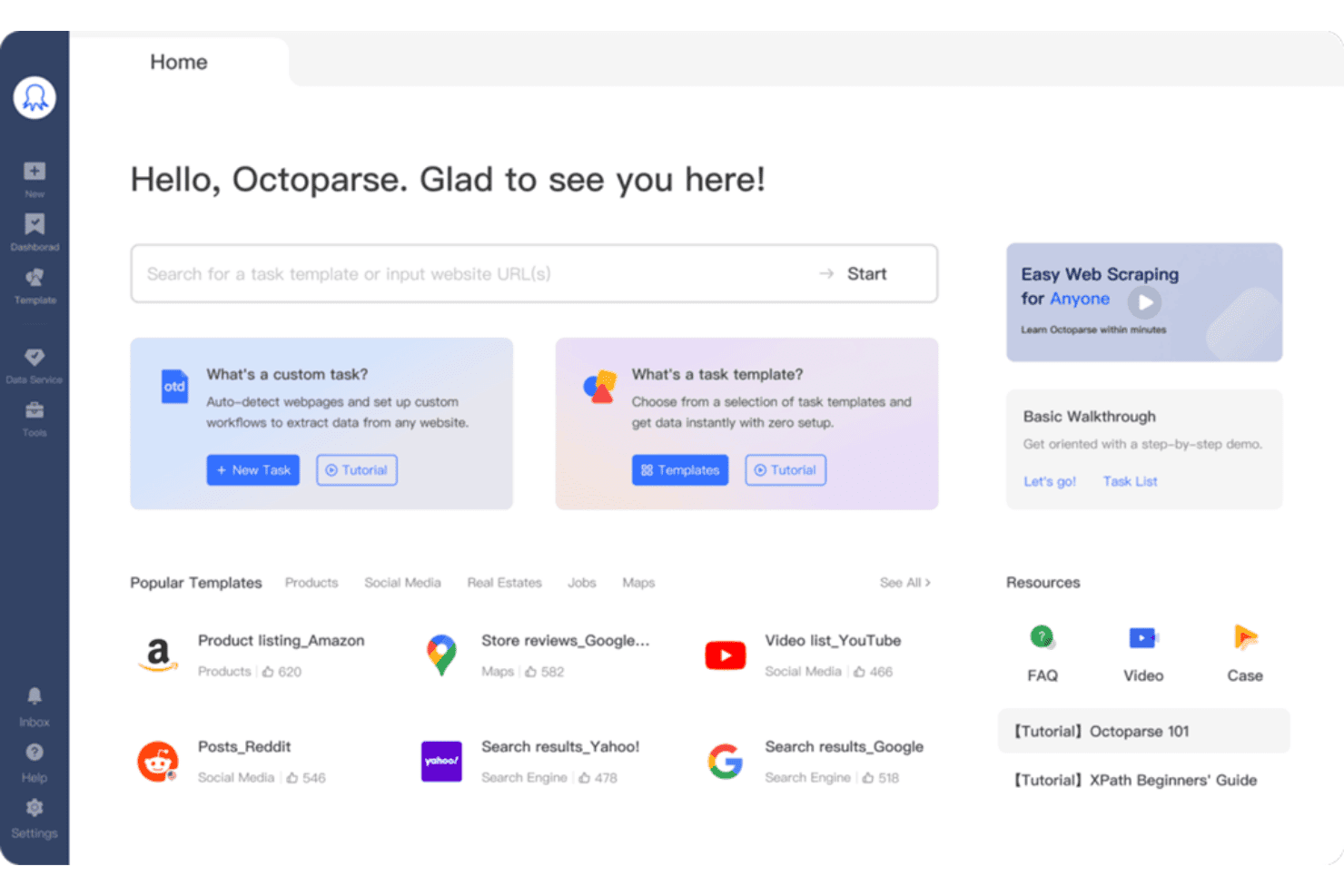
Octoparse offers a home dashboard with popular scraping templates, custom task creation, and quick-start resources for web data extraction. Octoparse is a no-code web scraping tool that combines a visual workflow builder, AI-powered auto-detection, cloud-based extraction, and support for JavaScript-rendered pages to collect structured data from websites.
Who Is Octoparse Best For?
Octoparse is a strong fit for competitive intelligence analysts and business users who need to collect web data regularly but don't have a coding background.
Why I Picked Octoparse
Octoparse earns its spot on my shortlist because the point-and-click workflow builder genuinely removes the technical barrier to web scraping. I like that the AI Auto-detect feature drafts a full extraction workflow by analyzing the target page automatically, so I'm not manually mapping selectors from scratch. The 500+ preset templates for sites like Amazon or Google Maps mean I can get a working scraper running in minutes on the most common targets.
Octoparse Key Features
- Cloud-based concurrent runs: Execute up to 20 scraping tasks in parallel using Octoparse’s cloud engine for faster data collection.
- IP rotation and residential proxies: Rotate IP addresses automatically and access residential proxies to reduce blocking and bypass anti-bot measures.
- Database and cloud exports: Export extracted data directly to MySQL, SQL Server, PostgreSQL, Oracle, Google Sheets, Dropbox, Amazon S3, or via API.
- Automatic CAPTCHA solving: Solve common CAPTCHAs during scraping tasks to maintain scraping continuity and minimize manual intervention.
Octoparse Integrations
Octoparse offers native integrations with Google Sheets, Google Drive, Dropbox, Amazon S3, MySQL, SQL Server, PostgreSQL, and Oracle. It also connects with Zapier and provides an API for custom integrations.
Pros and Cons
Pros:
- Handles infinite scroll, Ajax, and dynamic pages
- AI auto-detects and extracts drafts
- 500+ pre-built templates for common websites
Cons:
- Capped at 20 concurrent cloud processes
- Desktop client runs on Windows only
Learn more about Octoparse: Best for managed anti-bot data collection
- Free trial available
- From $0.5/1,000 records
Visit WebsiteCustomer Rating:4.5/5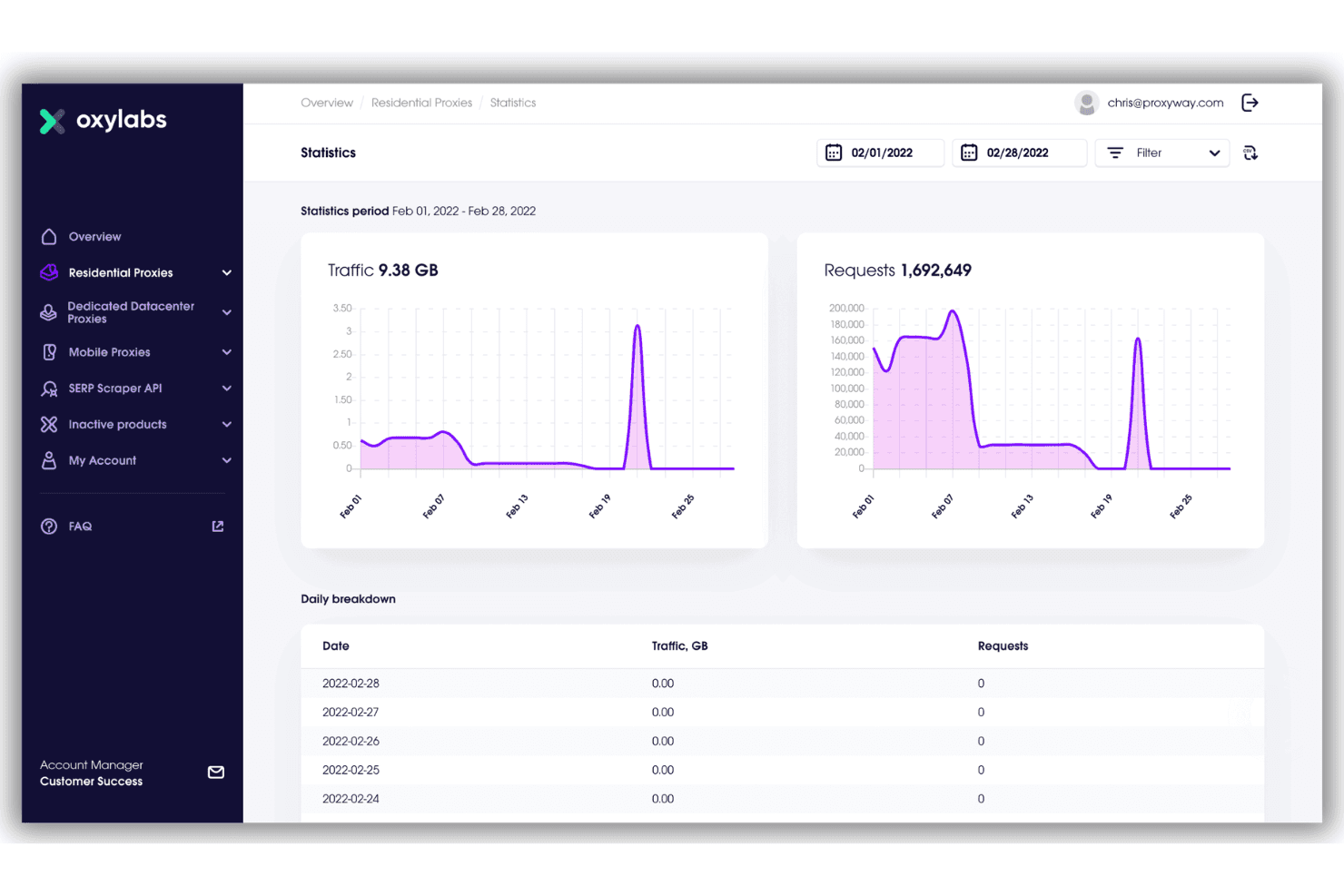
Oxylabs offers a detailed statistics dashboard for residential proxies, showing traffic and request metrics over a selected date range in February 2022. Oxylabs is a web scraper API that handles proxy management, CAPTCHA solving, JavaScript rendering, and structured data extraction across 50+ pre-configured website targets.
Who Is Oxylabs Best For?
Data engineers and backend developers running large-scale, mission-critical scraping pipelines who need enterprise-grade infrastructure and anti-bot reliability.
Why I Picked Oxylabs
Oxylabs earns its spot on my shortlist because of how it handles the hardest part of web scraping: getting past bot detection without managing it yourself. The API handles CAPTCHA solving, proxy rotation across 177M+ residential IPs, and automatic retries without any custom error-handling logic on my end. I also like the success-based pricing model, where only 2xx and 4xx responses count against your quota, so system-side failures don't burn through your results.
Oxylabs Key Features
- Custom parser: Define CSS or XPath selectors to extract precisely structured data from page content.
- OxyCopilot AI assistant: Generate scraping instructions and parse logic using natural language prompts.
- Pre-built target connectors: Use dedicated endpoints for Amazon, Google, eBay, Walmart, Zillow, and other major sites.
- Cloud storage integrations: Export results directly to AWS S3 and Google Cloud Storage for use in data pipelines.
Oxylabs Integrations
Oxylabs offers native integrations with AWS S3, Google Cloud Storage, LangChain, LlamaIndex, CrewAI, n8n, Make.com, and Zapier. An API and SDKs for Python and Go are available for custom integrations.
Pros and Cons
Pros:
- Pre-built endpoints for 50+ major sites
- Success-based pricing avoids wasted request quota
- 177M+ residential IPs across 195 countries
Cons:
- No visual, no-code scraper interface available
- Higher cost than self-managed scraping tools
Learn more about Oxylabs: Best for enterprise-scale proxy infrastructure
- Free plan available
- From $1.5/1,000 records/month
Visit WebsiteCustomer Rating:4.7/5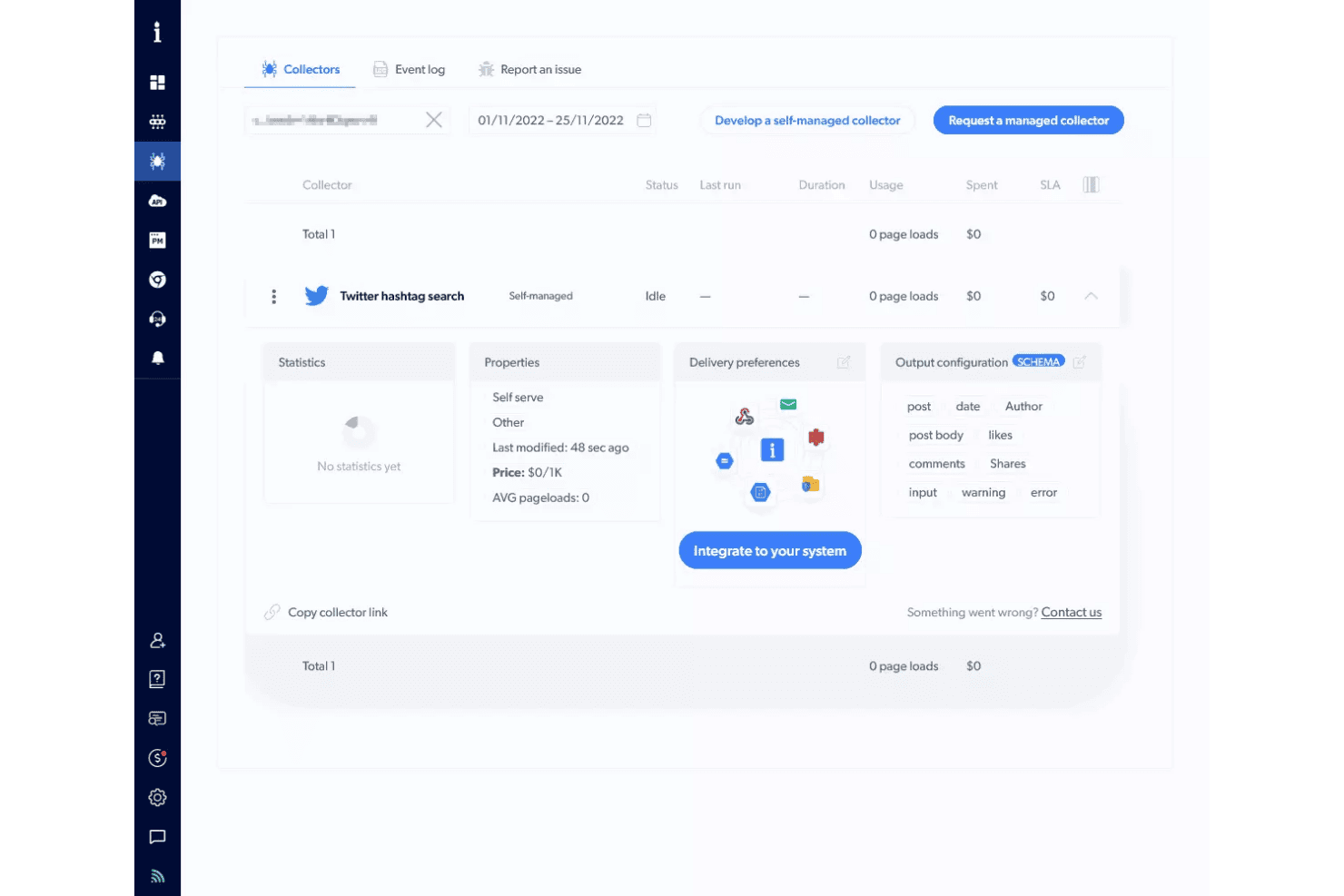
Bright Data's Collectors dashboard offers a Twitter hashtag search collector with self-managed status, output configuration, and system integration options. Bright Data is a web scraping API and no-code scraper platform that combines proxy management, JavaScript rendering, CAPTCHA solving, and structured data delivery across 1,278+ pre-built scrapers for popular websites.
Who Is Bright Data Best For?
Data engineers and backend developers at mid-to-large organizations who need to collect structured web data at scale without managing proxy infrastructure themselves.
Why I Picked Bright Data
Bright Data earns its spot on my shortlist because of the sheer scale of its proxy network: 400M+ residential IPs across 195 countries, with automatic rotation, CAPTCHA solving, and Web Unlocker built to defeat Cloudflare, Akamai, and DataDome without any configuration. I've scraped LinkedIn Sales Navigator and Amazon at volume using Bright Data and hit zero blocks across thousands of requests. The AI Scraper Studio also lets me generate a working scraper API for any new domain in minutes.
Bright Data Key Features
- Pre-built scraper templates: Over 1,200 ready-made scrapers are available for quick deployment across major platforms like LinkedIn, Amazon, and YouTube.
- AI-powered schema detection: AI Scraper Studio generates custom output schemas and automates data mapping from new domains.
- Job management APIs: Provides batch scheduling, recurring runs, and webhook triggers for integrating with workflow automation tools.
- Direct data delivery: Supports exporting data to JSON, NDJSON, CSV, XLSX, or directly pushing to S3, Snowflake, GCS, PubSub, or SFTP.
Bright Data Integrations
Bright Data offers native integrations with Amazon S3, Google Cloud Storage, Azure Blob Storage, Snowflake, and Pub/Sub, and provides an API for custom integrations.
Pros and Cons
Pros:
- Web Unlocker bypasses Cloudflare and DataDome
- Pre-built scrapers for 1,200+ popular websites
- 400M+ residential IPs across 195 countries
Cons:
- Overly complex for non-developer buyers
- Users report billing disputes on failed scrapes
Learn more about Bright Data: Best for automatic data schema detection
- 30-day free trial
- From $0.13/1,000 requests
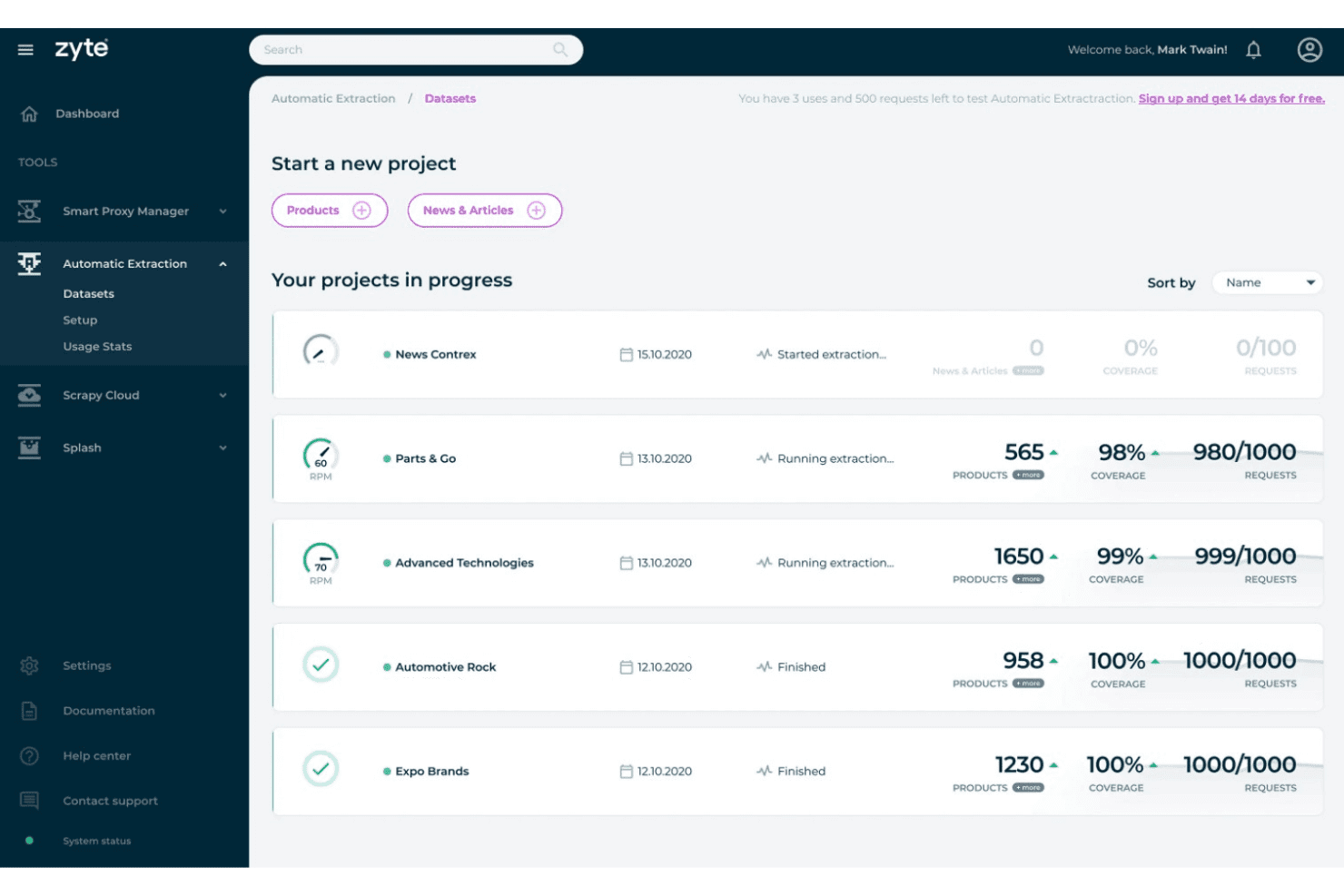
Zyte's Automatic Extraction feature offers ongoing and completed data extraction projects with coverage, product counts, and request usage metrics. Zyte API is a web scraping API that combines headless browser rendering, automatic proxy rotation, CAPTCHA solving, and AI-powered data extraction into a single endpoint.
Who Is Zyte API Best For?
Zyte API is a strong fit for data engineers and Python developers building production-scale scraping pipelines that feed ML models or analytics systems.
Why I Picked Zyte API
Zyte API earns its spot on my shortlist because of how it handles automatic schema detection. Point it at a product page or article, and its LLM-powered extraction layer returns typed, structured JSON without a single CSS selector or XPath expression on my end. When a site updates its layout, the AI adapts, which means I'm not constantly patching parsers every time a competitor redesigns their catalog page.
Zyte API Key Features
- Instant browser rendering: Zyte API spins up pre-warmed headless browsers to load dynamic sites on demand.
- Full proxy infrastructure: Rotates residential, datacenter, and mobile IP addresses automatically with every request.
- Session management: Maintains persistent cookies and user sessions for workflows that require authentication or multi-step actions.
- Cloud delivery integrations: Pushes scraped data directly to destinations like AWS S3, Google Cloud, or Azure for further processing.
Zyte API Integrations
Zyte API offers native integrations with Scrapy, Scrapy Cloud, and Python SDKs, and provides an API for custom integrations. It also supports cloud delivery to AWS S3, Google Cloud, and Azure.
Pros and Cons
Pros:
- Pre-warmed browsers eliminate cold start delays
- Bypasses anti-bot protections without extra configuration
- AI auto-detects schemas without manual selectors
Cons:
- Requires coding knowledge to implement
- Recurring job scheduling needs external tooling
Learn more about Zyte API: Best for simple API-driven scraping workflows
- Free plan available
- From $49/month
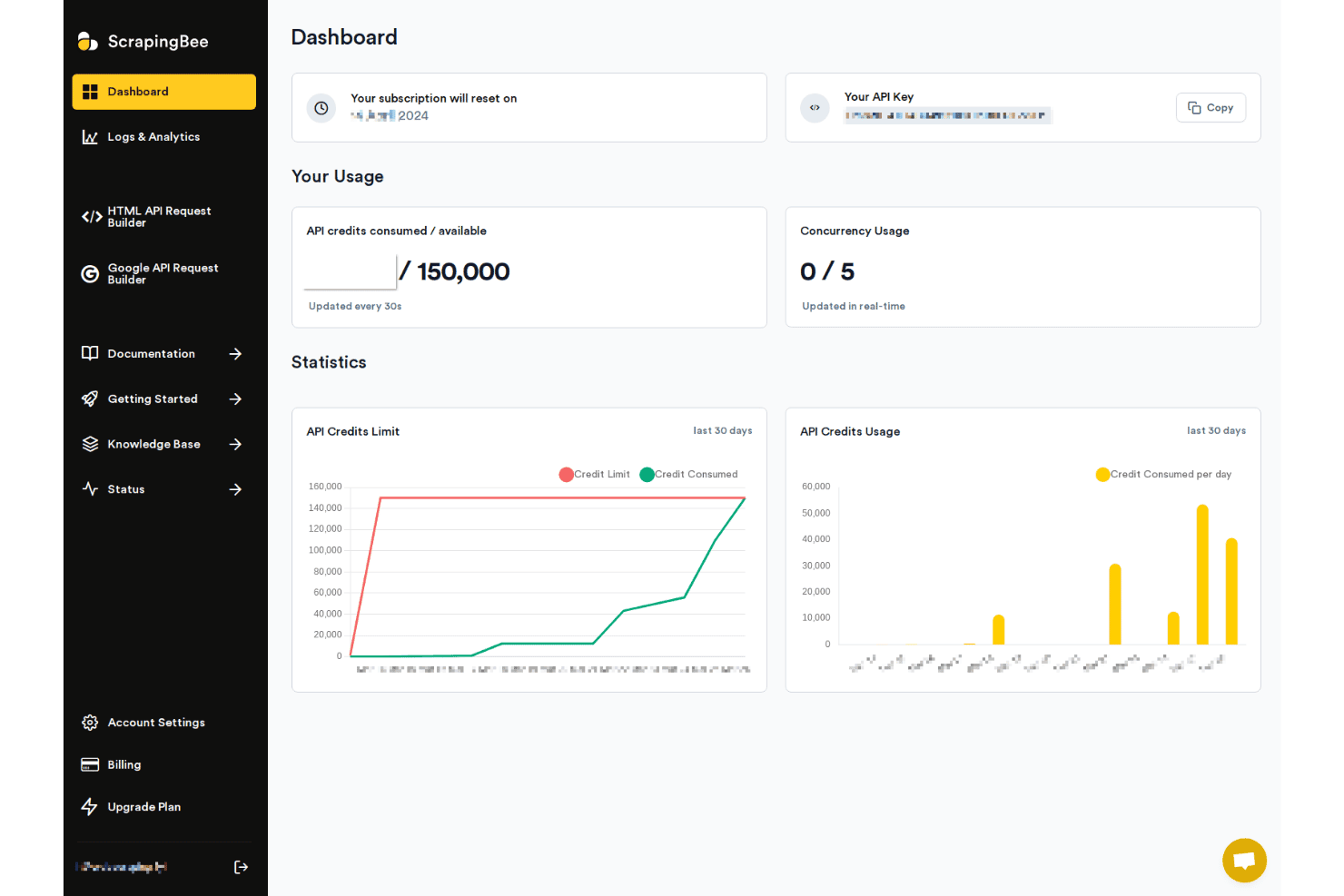
ScrapingBee offers a dashboard with API credit usage, concurrency stats, and 30-day usage charts for monitoring scraping activity. ScrapingBee is a web scraping API that handles headless Chrome rendering, proxy rotation, and anti-bot bypassing, with dedicated extraction APIs for platforms like Google, Amazon, and Walmart.
Who Is ScrapingBee Best For?
ScrapingBee is a strong fit for developers and data engineers who need a reliable, code-first API for extracting web data without building proxy or browser infrastructure from scratch.
Why I Picked ScrapingBee
ScrapingBee earns its spot on my shortlist because of how cleanly its API abstracts away the complexity of modern web scraping. A single request handles headless Chrome rendering, stealth proxy rotation, and JavaScript execution, so I'm not writing browser management code or configuring proxy pools separately. I also like the AI Query feature, which lets me describe what to extract in plain language rather than writing CSS or XPath selectors for every new site I target.
ScrapingBee Key Features
- Dedicated scraping APIs: Choose pre-built endpoints for platforms like Amazon, Walmart, and Google Search to simplify common data collection tasks.
- AI Query extraction: Describe what data to extract in plain language and generate structured results automatically.
- Markdown scraper: Convert any webpage into Markdown or plain text for fast ingestion by downstream AI models or databases.
- No-code integrations: Connect with Make, n8n, and Zapier to automate workflows without writing custom scheduling scripts.
ScrapingBee Integrations
ScrapingBee offers native integrations with Make, n8n, and Zapier, and provides an API for custom integrations.
Pros and Cons
Pros:
- Dedicated APIs for Amazon and Google
- Handles headless Chrome without extra setup
- Only charges for successful requests
Cons:
- Credit costs rise fast at scale
- No native built-in job scheduler
Learn more about ScrapingBee:
Other Web Scraping Tools
Here are some additional web scraping tool options that didn’t make it onto my shortlist, but are still worth checking out:
- 11ScraperAPIBest for hassle-free IP rotation at scale
- 12CrawlbaseBest for API access to global data sources
- 13ScrapyBest for customizable Python scraping frameworks
- 14ScrapingdogBest for rapid deployment with minimal setup
How I Evaluate Web Scraping Tools
I split my evaluation into two layers: the baseline a tool needs to handle real-world scraping—JS rendering, proxy rotation, scheduled jobs—and the differentiators that set the best options apart.
Core Functionality (Table Stakes For This List)
When I'm selecting tools for my list, I rank each one on a scale from 0 (does not offer the functionality) to 5 (excels in this area) for each core functionality listed below. Then, I calculate the tool's total score into a percentage. Each tool needs to achieve a minimum total score of 65% to be considered for inclusion.
- Data Extraction Engine: I evaluate whether a tool supports multiple selector methods like CSS, XPath, and regex, or offers a visual builder for teams that prefer point-and-click setup.
- JavaScript Rendering: Sites built on React, Vue, or Angular need headless browser support. I check for reliable rendering with configurable wait conditions.
- Proxy & Anti-Bot Handling: I look for built-in proxy rotation, CAPTCHA solving, and bypass mechanisms that handle protections like Cloudflare or DataDome without extra setup.
- Scheduling & Automation: Recurring scrapes should run unattended. I evaluate whether the tool supports cron-style scheduling, webhook triggers, and failure retry logic.
- Structured Data Export: I check what output formats are available and whether the tool can push data directly to destinations like S3, Google Sheets, databases, or APIs.
- Scalability & Concurrency: Large jobs across thousands of pages need parallel requests. I look at concurrency limits and whether the tool supports distributed crawling.
Once I have a list of tools that meet the criteria, I consider what sets each platform apart.
Differentiating Factors (What Sets Vendors Apart)
Here's how I compare and contrast different vendors:
Standout Features
Anti-bot bypass is where I see the biggest gap between tools. I look for built-in CAPTCHA solving and browser fingerprinting that handles protections like Cloudflare or DataDome without requiring you to source third-party proxy services. Auto-detection templates also matter a lot—tools like Bright Data and Zyte offer prebuilt scrapers for common targets like Amazon or Google SERPs, which saves hours of manual selector configuration. I also evaluate scheduling and monitoring capabilities, especially failure alerts and automatic retries that keep data pipelines running when target sites change their layouts overnight.
Beyond Features
Pricing models vary widely in this space—some vendors bill per API request, others by bandwidth or successful pages returned. I evaluate whether costs stay predictable when you scale into millions of pages per month. Proxy infrastructure is another key differentiator. I check whether a tool includes residential and datacenter proxy pools with city-level geo-targeting built in, since sourcing separate proxy contracts adds cost and complexity. Compliance posture also matters, especially for teams scraping in regulated industries where GDPR and robots.txt handling need to be clearly documented.
How to Choose Web Scraping Tools
It’s easy to get bogged down in long feature lists and complex pricing structures. To help you stay focused as you work through your unique software selection process, here’s a checklist of factors to keep in mind:
| Factor | What to Consider |
|---|---|
| FactorScalability | What to ConsiderCan the tool handle your expected volume increases and parallel crawls without major cost spikes or rate limits? |
| FactorIntegrations | What to ConsiderWill the tool deliver data directly to your target systems (cloud storage, databases, workflows) or require manual steps? |
| FactorCustomizability | What to ConsiderAre you able to tailor extraction logic for unique site structures, or are you limited to preset templates and rules? |
| FactorEase of use | What to ConsiderCan both technical and non-technical users manage scrapes, or will you need ongoing developer involvement to make changes? |
| FactorImplementation and onboarding | What to ConsiderHow quickly can your team set up a first data pipeline, and what support or documentation is available if you get stuck? |
| FactorCost | What to ConsiderIs the pricing predictable as usage grows? Be realistic about bursts, retry logic, and false positives in your workload. |
| FactorSecurity safeguards | What to ConsiderDoes the tool expose your business or workflow to compliance risks, data leakage, or unauthorized access points? |
| FactorCompliance requirements | What to ConsiderDoes the vendor’s approach align with your internal and regional rules (e.g., GDPR, robots.txt adherence, handling PII)? |
What Are Web Scraping Tools?
Web scraping tools are software platforms that automate the retrieval and extraction of structured data from websites. These tools let you capture information from pages—including dynamic and JavaScript-generated content—for use in analytics, reporting, or integrating with internal databases. Most offer options for configuring extraction rules and exporting data in developer-friendly formats.
Features of Web Scraping Tools
When selecting web scraping tools, keep an eye out for the following key features:
- Data extraction engine: Lets you define how content is collected from websites using CSS selectors, XPath, or point-and-click interfaces for structured results.
- JavaScript rendering: Loads dynamic or single-page apps by executing JavaScript, ensuring data that doesn’t appear in the static HTML is captured.
- Proxy management: Rotates IP addresses, often using residential proxy services, to bypass geo-blocks, rate limits, or bot protection so you can scrape sites reliably at scale.
- CAPTCHA handling: Automatically detects and solves or bypasses CAPTCHA challenges to keep data pipelines running when anti-bot measures are triggered.
- Scheduling and automation: Sets recurring scrapes or triggers jobs based on specific intervals, allowing unattended operation and integration into data pipelines.
- Structured data export: Supports output to JSON, CSV, XML, or direct delivery to cloud storage, APIs, or databases, eliminating manual conversion and upload steps.
- Change detection and alerts: Monitors target sites for content updates, price changes, or new listings, and notifies you if results differ from previous runs.
- Concurrency controls: Manages multiple requests in parallel for faster scraping sessions and accommodates large-scale crawl jobs across thousands of pages.
- Error handling and logging: Tracks failed extractions, connection drops, or site changes, providing detailed error logs to quickly diagnose and fix scraping issues.
- User access controls: Restricts who can edit projects, manage jobs, or view exports to maintain security and prevent accidental or unauthorized changes.
Common Web Scraping Tools AI Features
Beyond the standard web scraping tools features listed above, many of these solutions are incorporating AI with features like:
- Auto-detection of data fields: Uses AI to automatically identify and map relevant data fields on complex or unfamiliar web pages, reducing manual selector setup.
- Adaptive site structure recognition: Learns and adjusts to changes in website layouts, minimizing downtime and maintenance when target sites update their design.
- Intelligent anti-bot evasion: Applies AI to mimic human browsing patterns and adapt scraping strategies in real time, helping bypass advanced bot detection systems.
- Natural language content parsing: Leverages AI to extract, summarize, or categorize unstructured text, making it easier to analyze reviews, articles, or forum posts.
- Automated template generation: Builds reusable scraping templates for similar sites by analyzing page structure and content patterns with machine learning.
- Smart error correction: Detects and resolves common extraction errors or anomalies using AI-driven diagnostics, reducing the need for manual troubleshooting.
Benefits of Web Scraping Tools
Implementing web scraping tools provides several benefits for your team and your business. Here are a few you can look forward to:
- Data collection at scale: Automate the extraction of information from many sites and pages, making large datasets available for analysis or machine learning.
- Real-time market insights: Monitor competitor pricing, product catalogs, and website changes instantly with scheduling, change detection, and alert capabilities.
- Resource efficiency: Schedule and automate jobs, reducing manual effort while allowing developers to focus on higher-value projects.
- Consistent data quality: Export structured data in reliable formats like JSON or CSV, minimizing tedious data cleaning and integration work.
- Bypass anti-bot roadblocks: Use built-in proxy rotation or external rotating proxy services, along with CAPTCHA handling and anti-bot evasion, to access content that other solutions can’t reach.
- Adaptability to site changes: Rely on smart error handling and (for AI-enabled tools) auto-adapting extraction when website layouts or structures change.
- Secure access and compliance: Protect data pipelines with user permissions, audit logging, and alignment with compliance frameworks or privacy regulations.
Costs and Pricing of Web Scraping Tools
Selecting web scraping tools requires an understanding of the various pricing models and plans available. Costs vary based on features, team size, add-ons, and more. The table below summarizes common plans, their average prices, and typical features included in web scraping tool solutions:
Plan Comparison Table for Web Scraping Tools
| Plan Type | Average Price | Common Features |
|---|---|---|
| Plan TypeFree Plan | Average Price$0-$10/month | Common FeaturesLimited extraction runs, basic scheduling, community support, and starter data export formats. |
| Plan TypePersonal Plan | Average Price$15-$40/month | Common FeaturesMore extraction credits, JavaScript rendering, API access, and basic error handling. |
| Plan TypeBusiness Plan | Average Price$55-$150/month | Common FeaturesHigher concurrency, proxy rotation, advanced scheduling, team collaboration tools, and priority support. |
| Plan TypeEnterprise Plan | Average Price$250+/month | Common FeaturesCustom integrations, SLA guarantees, geo-targeted proxies, managed onboarding, and dedicated account management. |
Web Scraping Tools FAQs
Here are some answers to common questions about web scraping tools:
Do I need coding skills to use web scraping tools?
No, you do not necessarily need programming expertise. Many visual tools provide a no-code solution, such as a point-and-click Chrome extension, that allows non-technical users to build extraction routines visually and navigate a site’s sitemap to gather records for tasks like lead generation.
However, custom logic, complex data pipelines, or high-volume scraping typically rely on programming tools:
- Python: A traditional Python library like BeautifulSoup is ideal for parsing static HTML documents cleanly.
- JavaScript: A specialized Node.js library (such as Puppeteer or Playwright) allows developers to programmatically interact with dynamic web elements.
Can web scraping tools handle dynamic and JavaScript-heavy websites?
Yes, most modern tools provide JavaScript rendering engines to scrape dynamic content from single-page applications (SPAs) and interactive sites.
How do web scraping tools address website anti-bot measures?
To overcome anti-bot protections, sophisticated tools deploy several evasion strategies:
- Rotating Proxies: Distributing requests across vast IP pools (datacenter and residential) to avoid rate limits or IP bans.
- Automated CAPTCHA Solvers: Solving or bypassing visual and behavioral challenges.
- Browser Fingerprint Masking: Modifying browser headers, canvas footprints, and user agents in engines (such as WebKit or Chromium) to mimic human interactions across major browsers like Firefox or Chrome.
Is web scraping legal?
Web scraping legality depends on what data you collect, how you use it, and the website’s terms of service. Always review legal guidelines and compliance requirements before proceeding.
How do I receive and store the scraped data?
You can typically export data to formats like CSV, JSON, Excel, or push directly to cloud storage, webhooks, or databases, depending on the tool’s integration options.