

Residential proxy providers give you access to residential IP addresses from around the world. As a result, you can mask your location and reduce blocks when browsing, scraping, or testing online. They can also support secure data collection, location-based research, and access to restricted networks. In this guide, I’ll show you which residential proxy providers offer reliable IP pools, useful rotation options, and controls that fit your workflow.
Why Trust Our Software Recommendations
6,700+
Reviews
20
Industry experts
16+
Evaluation factors
14
Years
Our team has been testing and reviewing software since 2012. As tech leaders ourselves, we know how difficult—and important—it is to choose the right software.
For this guide, we evaluated tools using hands-on testing and independent research, scoring tools using our selection criteria.
Our reviews reflect our human editorial judgment, not a sales pitch.
Expert reviewers:
- Paulo Gardini MiguelTech Director
 Tim FisherVP of AI
 Gabriel RosasTech Lead & Software Architect
 Christhian GruhnTech Lead & Platform Architect

Best Residential Proxy Providers Comparison Table
This comparison table summarizes pricing details for my top residential proxy providers for professional services selections:
| Tool | Best For | Trial Info | Price | ||
|---|---|---|---|---|---|
| 1 | Best for long-lasting sticky sessions | Not available | From $4.69/GB/month | Website | |
| 2 | Best for large-scale residential IP access | 7-day trial for $4 | From $4/GB (pay-as-yoy-go) | Website | |
| 3 | Best for ethically sourced residential IPs | Free demo available | From $4.90/GB | Website | |
| 4 | Best for self-service proxy management | Free plan available | From $7/month | Website | |
| 5 | Best for enterprise proxy management | Free trial available | From $0.50/GB | Website | |
| 6 | Best for granular location selection | Free plan available | From $200/month | Website | |
| 7 | Best for high-volume data extraction | Free trial available | From $0.5/1,000 records | Website | |
| 8 | Best for advanced targeting options | Free plan available | From $1.5/1,000 records/month | Website | |
| 9 | Best for flexible rotation controls | 3-day free trial | From $2/GP | Website | |
| 10 | Best for flexible session management | Not available | From $7/month | Website |


Best Residential Proxy Providers Reviews
Below are my detailed summaries of the best residential proxy providers that made it onto my shortlist. My reviews offer a detailed look at the features, capabilities, and pros and cons of each platform to help you find the best one for you.
 Best for long-lasting sticky sessions
- Not available
- From $4.69/GB/month
Visit WebsiteCustomer Rating:4.9/5
NodeMaven offers a detailed proxy setup dashboard with options for connection type, IP version, location, session type, and proxy access configuration. NodeMaven is a residential proxy network offering 30M+ real-user IPs across 190+ countries, with a proprietary IP Quality Filter, configurable sticky sessions, and geo-targeting down to city, ZIP, and ASN level.
Who Is NodeMaven Best For?
NodeMaven suits web scraping engineers and ad verification teams that need stable, long-running proxy sessions without frequent IP rotation interruptions.
Why I Picked NodeMaven
NodeMaven earns its spot on my shortlist because sticky sessions here last up to 24 hours, far beyond the industry norm. I also like that the IP Quality Filter, which screens IPs by reputation and behavior history, activates specifically during sticky sessions, so you get cleaner IPs precisely when session continuity matters most. And with up to 1,000 named port bindings configurable in the dashboard, managing multiple concurrent sticky sessions across different geos is genuinely practical.
NodeMaven Key Features
- IP Quality Filter: Automatically blocks low-quality or suspicious proxy IPs based on reputation and behavior metrics.
- Granular geo-targeting: Supports targeting by country, state, city, ZIP code, ISP, and ASN for refined access control.
- Residential and mobile pool access: Provides a single dashboard to configure and use both residential and mobile IPs.
- Flexible proxy protocols: Offers compatibility with HTTP(S) and SOCKS5 protocols for integration with a wide range of tools.
NodeMaven Integrations
NodeMaven offers native integrations with Multilogin, Dolphin Anty, AdsPower, GoLogin, Selenium, Playwright, Puppeteer, Scrapy, and n8n. An API is available for custom integrations.
Pros and Cons
Pros:
- ZIP and ASN-level geo-targeting
- IP Quality Filter blocks flagged or abused IPs
- Sticky sessions configurable up to 24 hours
Cons:
- Mixed user feedback on IP pool freshness
- No Know Your Customer verification or compliance certifications
Learn more about NodeMaven: Best for large-scale residential IP access
- 7-day trial for $4
- From $4/GB (pay-as-yoy-go)
Visit WebsiteCustomer Rating:4.8/5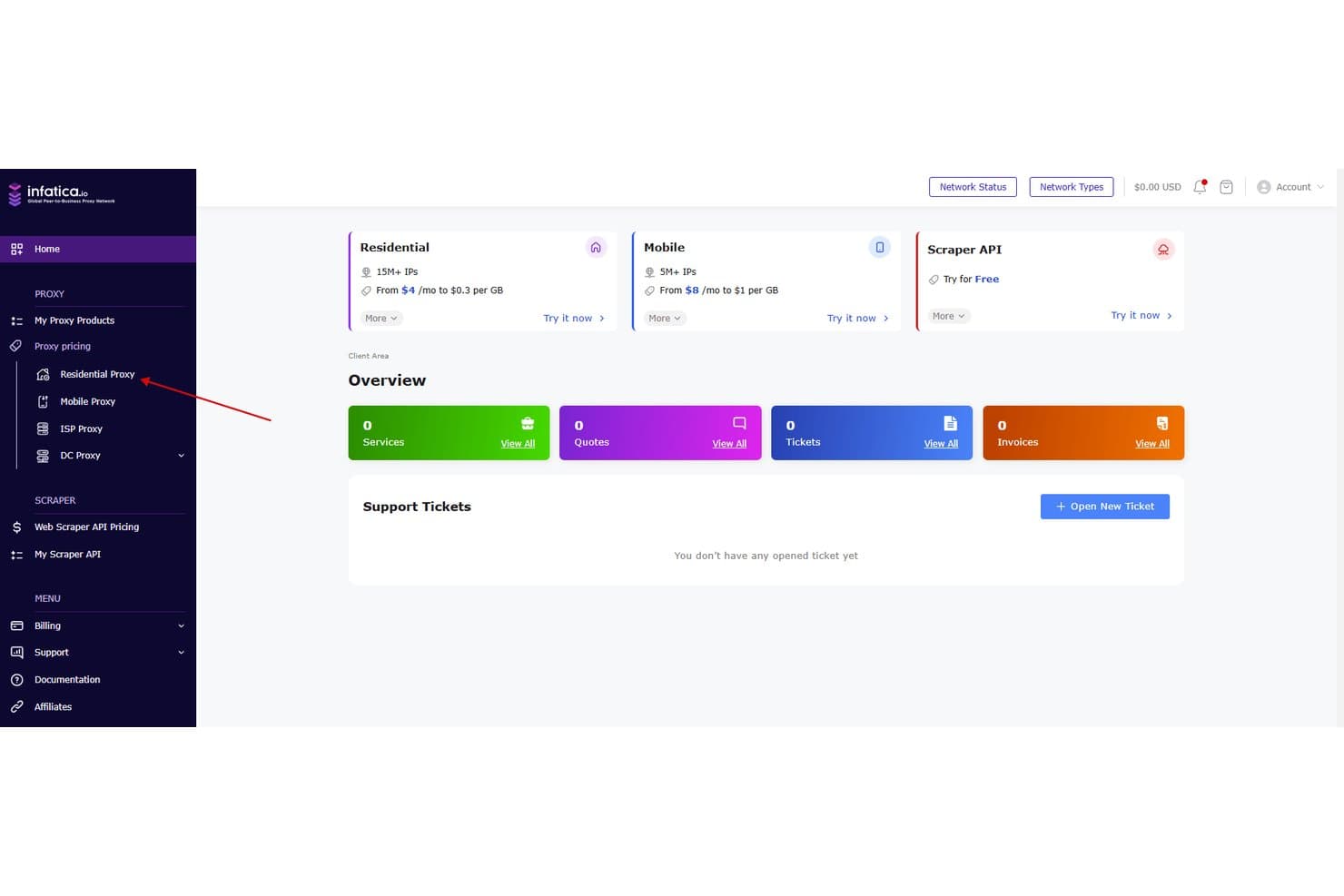
Infatica offers a client dashboard with residential proxy navigation, displaying services, quotes, tickets, and invoices overview. Infatica is a peer-to-peer residential proxy network with 40M+ ethically sourced IPs across 195 countries, offering rotating and sticky session control, city and ISP-level geo-targeting, and an integrated web scraping API suite.
Who Is Infatica Best For?
Infatica suits web scraping engineers and ad verification teams that need reliable residential IPs at scale, with ISO-certified sourcing for enterprise procurement compliance.
Why I Picked Infatica
I've included Infatica in my top picks because its 40M+ IP pool across 195 countries pairs genuinely residential sourcing with city and ISP-level targeting on every plan. The port-based proxy list architecture (1,000 ports per list) lets my team run high-concurrency jobs across multiple geos without extra configuration overhead. Proxyway's 2025 benchmarks ranked Infatica the fastest residential provider tested, clocking a 0.32-second response time against a field averaging 0.55+ seconds.
Infatica Key Features
- Web scraper API suite: Collect structured data using APIs that handle CAPTCHAs and JavaScript rendering.
- Mobile proxy support: Access millions of real mobile device IPs for application testing and ad verification.
- Detailed geo and ISP targeting: Filter proxies by country, city, ASN, or ISP to match precise requirements.
- Multiple authentication options: Enable both username/password and IP allowlisting across HTTP(S) and SOCKS5 protocols.
Infatica Integrations
Infatica offers integration libraries for Go, React, JavaScript, Python, Node.js, C/C++, C#, and Ruby, plus provides an API for custom integrations.
Pros and Cons
Pros:
- Fastest residential proxy benchmarked by Proxyway
- ISO 27001 and 27701 certifications
- City and ISP-level targeting controls
Cons:
- KYC verification required before purchasing
- No unlimited bandwidth plan available
Learn more about Infatica: Best for ethically sourced residential IPs
- Free demo available
- From $4.90/GB
Visit WebsiteCustomer Rating:4.6/5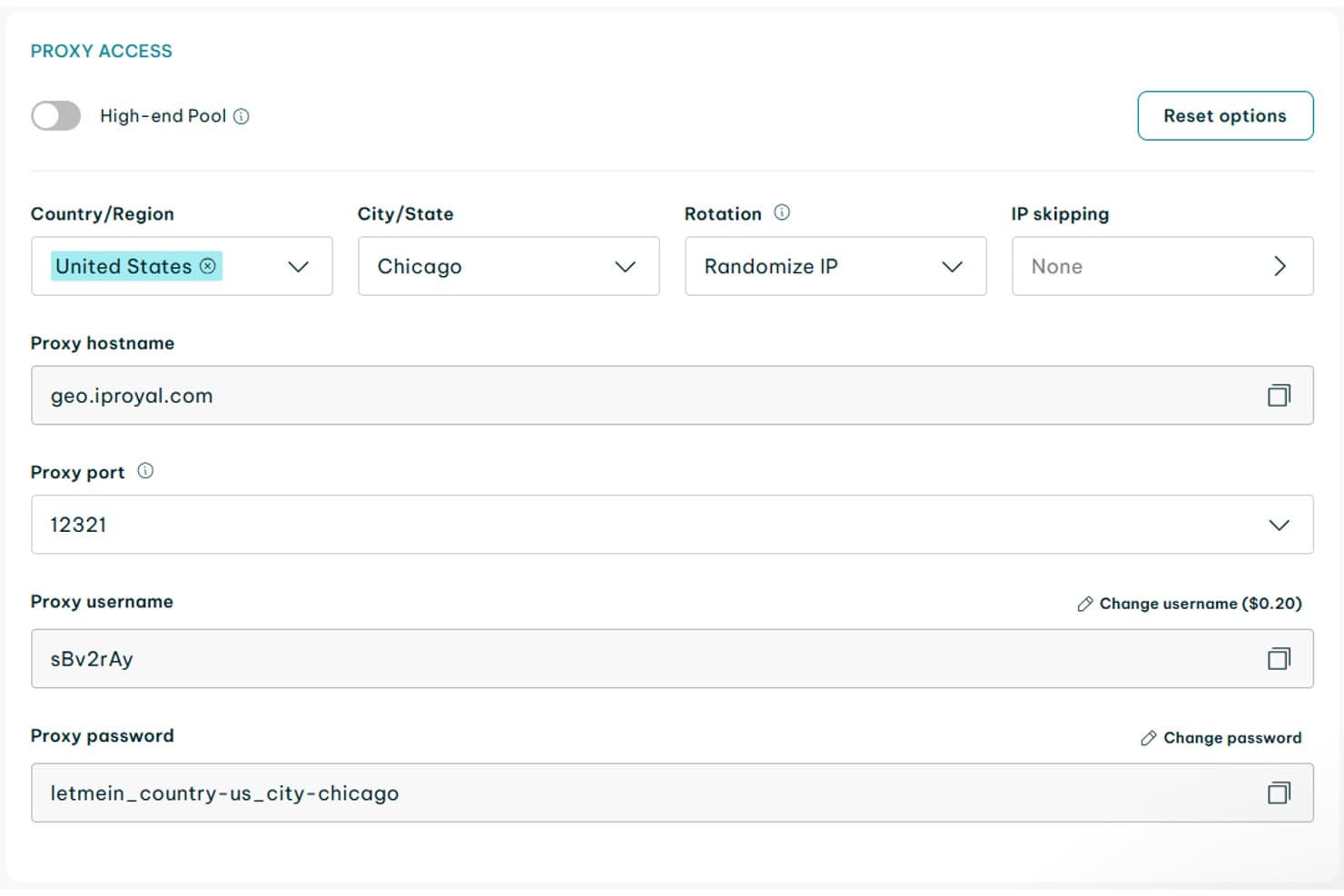
IPRoyal offers granular proxy access configuration including country, city, rotation settings, hostname, port, username, and password fields. IPRoyal is a residential proxy service built on a consent-based IP network, offering 64M+ rotating and sticky residential IPs across 195+ countries with country, state, and city-level geo-targeting.
Who Is IPRoyal Best For?
IPRoyal suits developers and small-to-mid-sized teams running web scraping, SEO monitoring, or price tracking workflows on a budget.
Why I Picked IPRoyal
I've included IPRoyal in my top picks because its Pawns network is one of the few proxy sourcing models where real users explicitly opt in to share bandwidth for compensation. That consent-based approach means the IPs come from genuine ISP-assigned devices, which matters when navigating GDPR or CCPA requirements. I also like that sticky sessions can hold the same IP for up to 7 days, which I've used for account management workflows that need session continuity.
IPRoyal Key Features
- Rotating residential proxy pool: Lets you access 64M+ IPs from real residential devices in 195+ countries.
- City-level geo-targeting: Allows requests to target specific cities for granular regional access.
- Protocol support: Compatible with HTTP(S) and SOCKS5 for flexible integration with various tools.
- Unlimited concurrent sessions: Supports as many simultaneous connections as your workflow demands.
IPRoyal Integrations
IPRoyal supports integrations with tools like Selenium, Puppeteer, Scrapy, Multilogin, and GoLogin, and provides an API for custom integrations.
Pros and Cons
Pros:
- Supports unlimited concurrent proxy sessions
- Granular city-level geo-targeting options
- Ethically sourced consent-based residential IPs
Cons:
- No ASN or ZIP code targeting available
- IP pool cleanliness varies on some targets
Learn more about IPRoyal:

Webshare Proxy List for managing, replacing, and configuring proxy servers. Webshare is a residential proxy platform offering rotating and static residential IPs across an 80M+ IP pool in 195 countries, with a self-service dashboard, RESTful API, and pay-per-GB plans that require no sales engagement to access.
Who Is Webshare Best For?
Webshare is a strong fit for developers and scraping engineers who need immediate, no-friction access to residential proxies without sales calls or lengthy procurement processes.
Why I Picked Webshare
I picked Webshare as one of the best because its self-service model removes every bottleneck I'd normally face with residential proxy providers. Geo-targeting is handled entirely through the credential string, so switching to city-level resolution (like country-us-city-newyork) requires zero dashboard interaction or support tickets. The Proxy API also lets me automate provisioning and pull real-time bandwidth stats programmatically, without touching the UI at all.
Webshare Key Features
- 80M+ residential IP pool: Access a large and globally distributed network of residential IPs in 195 countries.
- City-level geo-targeting: Select IPs at the city level for precise regional data collection.
- SOCKS5 and HTTP support: Use your proxies with both SOCKS5 and HTTP-compatible tools and environments.
- Chrome extension: Manage proxy switching and configuration directly from your browser.
Webshare Integrations
Webshare offers a Chrome extension for proxy management and provides an API for custom integrations.
Pros and Cons
Pros:
- Rotating and sticky sessions both supported
- Offers city-level residential proxy targeting
- User self-service onboarding without sales contact
Cons:
- Social media targets have higher block risk
- Pool thinner in Latin America regions
Learn more about Webshare:

Rayobyte offers a dashboard displaying multiple proxy products including Residential, Web Unblocker, Rotating ISP, and Rotating Data Center Proxies with available bandwidth and action buttons. Rayobyte is a residential proxy provider with a pool of 40M+ ethically sourced IPs across 163+ countries, offering rotating and sticky sessions, city- and ASN-level geo-targeting, and unlimited concurrent connections.
Who Is Rayobyte Best For?
Rayobyte is a strong fit for enterprise teams and web scraping engineers running high-volume data collection operations that demand scale, geo-precision, and reliable uptime.
Why I Picked Rayobyte
I've included Rayobyte in my top picks because it handles enterprise proxy management better than most. Unlimited concurrent connections and custom bandwidth billing starting at 5,000+ GB/month mean there's no artificial ceiling on scale. What I particularly like is that city, state, and ASN targeting are all included at no extra cost, which keeps spending predictable even when running large geo-targeted scraping jobs.
Rayobyte Key Features
- Ethically sourced residential IPs: All IP addresses are obtained with explicit user consent and published sourcing policies.
- Personal usage dashboard: Manage proxy usage, whitelist IPs, and monitor bandwidth in a dedicated interface.
- 24/7 live support: Access around-the-clock customer support for proxy setup and troubleshooting needs.
- HTTP(S) protocol support: Connect via standard HTTP(S) protocols for compatibility with most scraping and automation tools.
Rayobyte Integrations
Rayobyte offers native integrations with Selenium, Puppeteer, Multilogin, and GoLogin, and provides an API for custom integrations.
Pros and Cons
Pros:
- Extensive city and ASN-level geo-targeting
- Ethically sourced and consent-based residential IPs
- Unlimited concurrent connections for all plans
Cons:
- Limited city-level targeting outside the US
- No support for SOCKS5 protocol on residential proxies
Learn more about Rayobyte: 6Best for granular location selection
SOAX
- Free plan available
- From $200/month
Visit WebsiteCustomer Rating:4.8/5
SOAX lets users target proxy locations by country with global coverage. SOAX is a residential proxy network that gives you access to 155M+ ethically sourced IPs across 195+ countries, with rotating and sticky session control, city- and ASN-level geo-targeting, and HTTP(S)/SOCKS5 protocol support.
Who Is SOAX Best For?
SOAX is a strong fit for web scraping engineers and ad verification teams that need precise geo-targeted access at scale across multiple regions.
Why I Picked SOAX
SOAX earns its spot on my shortlist because no other provider I've tested matches its targeting depth. I can filter proxies by country, city, ISP, and ASN simultaneously, which matters when I need to pull localized SERP data from a specific carrier network in a specific city. The MaxIP feature also lets me cycle through the widest range of unique IPs during high-rotation scraping jobs, keeping ban rates low across repeated requests.
SOAX Key Features
- Session control flexibility: Set custom session durations for both rotating and sticky proxy connections.
- HTTP(S) and SOCKS5 support: Use proxies across tools and frameworks with both major proxy protocols.
- Unlimited concurrent sessions: Run large-scale scraping and verification projects without connection limits.
- API access: Integrate proxy management and automation directly into your workflows using the SOAX API.
SOAX Integrations
SOAX offers native integrations with anti-detect browsers and multi-account tools including Multilogin, GoLogin, AdsPower, Dolphin Anty, Octobrowser, Hidemyacc, and Kameleo. An API is available for custom integrations.
Pros and Cons
Pros:
- Unlimited concurrent proxy sessions
- Ethically sourced residential IP pool
- Extensive geo-targeting down to city/ASN
Cons:
- Certification audits not yet independently completed
- No truly small or pay-as-you-go plans
Learn more about SOAX: Best for high-volume data extraction
- Free trial available
- From $0.5/1,000 records
Visit WebsiteCustomer Rating:4.5/5
Oxylabs AI parsing extracts structured product data from web pages. Oxylabs is an enterprise-grade residential proxy provider with a 175M+ IP pool spanning 195 countries, offering rotating and sticky sessions, city- and ZIP-level geo-targeting, and SOCKS5/HTTP(S) protocol support for large-scale web data collection.
Who Is Oxylabs Best For?
Oxylabs is a strong fit for engineering and data teams at mid-size to enterprise companies running high-volume scraping, price monitoring, or ad verification pipelines.
Why I Picked Oxylabs
Oxylabs earns its spot on my shortlist because no other residential proxy provider comes close to its raw scale for high-volume extraction work. With 175M+ IPs, a 99.95% average success rate, and unlimited concurrent sessions, I can run parallel scraping pipelines across dozens of targets without throttling. The Web Unblocker adds dynamic fingerprinting that mimics real browser behavior, which matters when scraping heavily protected sites like retailer product pages or SERP results at volume.
Oxylabs Key Features
- City and ZIP code geo-targeting: Choose proxies by country, state, city, or ZIP code for granular data collection.
- SOCKS5 protocol support: Use both HTTP(S) and SOCKS5 protocols for flexible integration with different tools.
- Managed ethical IP sourcing: Operates a consent-based network with full GDPR and SOC 2 Type 2 compliance.
- Multiple proxy user accounts: Assign up to three separate proxy user credentials per plan for team access and management.
Oxylabs Integrations
Oxylabs offers native integrations with Scrapy, Selenium, Puppeteer, and Playwright, and provides SDKs for Python, Java, Node.js, and Go. An API is available for custom integrations.
Pros and Cons
Pros:
- Strong compliance and ethical sourcing credentials
- City and ZIP-level geo-targeting options
- Massive 175M+ residential IP pool
Cons:
- Some verticals restricted by terms of service
- No self-service trial for residential proxies
Learn more about Oxylabs: Best for advanced targeting options
- Free plan available
- From $1.5/1,000 records/month
Visit WebsiteCustomer Rating:4.7/5
Bright Data lets users select and manage proxy IPs for targeted routing. Bright Data is a residential proxy network offering 400M+ ethically sourced IPs across 195 countries, with rotating and sticky session control, granular geo-targeting, and HTTP/HTTPS/SOCKS5 protocol support.
Who Is Bright Data Best For?
Bright Data is a strong fit for enterprise teams and web scraping engineers running high-volume data collection across multiple regions.
Why I Picked Bright Data
Bright Data earns its spot as one of the best on my shortlist because of how far its geo-targeting goes. Most residential proxy providers stop at city-level, but Bright Data reaches ZIP code and ASN level. I've used ASN targeting to isolate IPs from a specific carrier when testing ISP-dependent content delivery, and carrier-level targeting has come through in situations where city-level proxies returned inconsistent results.
Bright Data Key Features
- Residential IP pool: Access over 400 million ethically sourced IPs from real residential devices.
- Sticky and rotating sessions: Switch between per-request rotation and long-duration sticky sessions as needed.
- HTTP/HTTPS/SOCKS5 protocol support: Route traffic through multiple supported protocols for flexible integration.
- Unified control panel: Manage proxy usage, analytics, and permissions from a centralized dashboard.
Bright Data Integrations
Bright Data provides native SDKs for Python, Java, C#, Node.js, and Shell, offers a browser extension, and supports AWS Marketplace payments. An API is available for custom integrations.
Pros and Cons
Pros:
- Sticky sessions and rotation options included
- Extremely large global residential IP pool
- City, ZIP code, and ASN level targeting
Cons:
- Premium pricing compared to other providers
- Requires identity verification before access
Learn more about Bright Data:

Decodo (formerly Smartproxy) offers a residential proxy dashboard with configurable location, session type, and endpoint settings displaying proxy addresses, ports, usernames, and passwords. Decodo is a residential proxy service with a 115M+ IP pool spanning 195+ locations, offering rotating and sticky sessions, HTTP(S)/SOCKS5 support, and city-, ZIP-, and ASN-level geo-targeting.
Who Is Decodo Best For?
Decodo is a strong fit for web scraping engineers and data teams that need granular session control and large-scale IP rotation across multiple geographies.
Why I Picked Decodo
Decodo earns its spot on my shortlist because the session control options are more configurable than most providers I've tested. I can switch between per-request IP rotation and sticky sessions that hold the same IP for up to 24 hours, which covers everything from high-frequency SERP scraping to multi-step checkout flows. Pairing that with ASN-level targeting lets me pin sessions to a specific network, not just a city or ZIP code.
Decodo Key Features
- City, ZIP code, and ASN-level geo-targeting: Select proxy endpoints by precise geographic or network criteria.
- HTTP(S) and SOCKS5 protocol support: Connect your applications through both popular web and desktop protocols.
- Chrome and Firefox browser extensions: Manage proxy usage directly from your browser with dedicated add-ons.
- 115M+ ethically sourced IPs: Access one of the largest residential proxy pools spanning 195+ countries.
Decodo Integrations
Decodo offers native integrations with AdsPower, Multilogin, MarketerBrowser, ScrapeBox, Scrapy, Postman, FoxyProxy, SwitchyOmega, Shadowrocket, and LangChain. An API is available for custom integrations.
Pros and Cons
Pros:
- Reliable pool with high success rate
- Extensive city and ASN-level targeting
- Flexible session rotation up to 24 hours
Cons:
- No granular bandwidth usage per sub-user
- Occasional slower speeds in peak regions
Learn more about Decodo (formerly Smartproxy):

ProxyEmpire Proxy Profiles for managing and testing multiple proxy connections. ProxyEmpire is a residential proxy network that combines rotating residential, mobile, and static ISP proxies with granular country, region, city, and ISP targeting across 170+ countries—alongside a bandwidth rollover model and unlimited concurrent connections.
Who Is ProxyEmpire Best For?
ProxyEmpire is a strong fit for web scraping engineers and data teams who need precise geo-targeting and variable monthly bandwidth without losing unused data.
Why I Picked ProxyEmpire
I picked ProxyEmpire as one of the best because the session control is genuinely configurable in ways most residential proxy networks don't match. I can rotate on every request, hold a sticky session for a custom duration up to 24 hours, or set timed rotation anywhere in between. In practice, that means running account management workflows and large-scale scraping jobs on the same network, with each task getting exactly the session behavior it needs.
ProxyEmpire Key Features
- Bandwidth rollover: Unused bandwidth automatically rolls over into the next month.
- Granular geo-targeting: Target proxies by country, region, city, and ISP across 170+ countries.
- Browser extension: Use Chrome or Firefox extensions to manage proxies and switch locations.
- Unlimited concurrent connections: Run as many proxy sessions as needed without throttling or caps.
ProxyEmpire Integrations
ProxyEmpire offers native integrations with Multilogin, GoLogin, Kameleo, Dolphin Anty, and OctoBrowser, and provides an API for custom integrations.
Pros and Cons
Pros:
- High percentage of clean residential IPs
- Supports carrier, city, and ISP targeting
- Bandwidth rolls over month to month
Cons:
- Cannot authenticate via IP whitelisting
- Requires KYC for fintech site access
Learn more about ProxyEmpire:
Other Residential Proxy Providers
Here are some additional residential proxy providers options that didn’t make it onto my shortlist, but are still worth checking out:
- 11NimblewayBest for AI-driven proxy automation
- 12DataImpulseBest for unlimited concurrent sessions
- 13Proxy-SellerBest for configurable residential proxies
- 14EvomiBest for adaptive proxy rotation
How I Evaluate Residential Proxy Providers
I evaluate residential proxy providers across two layers: core requirements like IP pool size and geo-targeting, and the differentiators that matter for scraping engineers and ad verification teams.
Core Functionality (Table Stakes for This List)
When I'm selecting tools for my list, I rank each one on a scale from 0 (does not offer the functionality) to 5 (excels in this area) for each core functionality listed below. Then, I calculate the tool's total score into a percentage. Each tool needs to achieve a minimum total score of 65% to be considered for inclusion.
- Residential IP Pool: I check the size and geographic spread of a provider's IP pool, since running large-scale scraping jobs against major ecommerce sites demands millions of clean, ISP-assigned IPs.
- Geo-Targeting Granularity: Providers should let you target by country, state, city, or ASN so you can verify localized ad placements or test region-locked content with precision.
- Session Control: I look for both rotating and sticky session options, because account management workflows need a stable IP while high-volume scraping benefits from per-request rotation.
- Authentication & Integration: Standard auth methods like username/password and IP whitelisting matter, along with HTTP(S) and SOCKS5 support for plugging into tools like Scrapy or Puppeteer.
- Concurrency & Bandwidth Scaling: High-volume operations like SERP monitoring across thousands of keywords need unlimited concurrent connections and bandwidth plans that scale with demand.
- Ethical IP Sourcing: I evaluate whether a provider documents consent-based sourcing practices and holds relevant compliance certifications, which is key for enterprise procurement approval.
Once I have a list of tools that meet the criteria, I consider what sets each platform apart.
Differentiating Factors (What Sets Vendors Apart)
Here's how I compare and contrast different vendors:
Standout Features
Built-in unblocker tools with integrated CAPTCHA solving and JavaScript rendering save scraping teams from building that logic into their own stack. I also evaluate real-time dashboards that show success rates, bandwidth usage, and per-project allocation. These help you catch failing jobs early and keep costs under control. Session configurability matters too—holding a sticky IP for extended durations is key for workflows like managing multiple retail accounts.
Beyond Features
Pricing structure is a big differentiator—GB-based billing suits high-volume scraping, while request-based models work better for account management with low bandwidth per session. I also check for compliance certifications like SOC 2 Type II and documented KYC processes, since enterprise procurement teams will ask for these. Developer experience matters too; quality API docs and pre-built integrations with frameworks like Scrapy or Playwright can cut onboarding time significantly.
How to Choose Residential Proxy Providers
It’s easy to get bogged down in long feature lists and complex pricing structures. To stay focused, use this checklist as you compare providers:
| Factor | What to Consider |
|---|---|
| FactorScalability | What to ConsiderFirst, consider whether the provider can handle your current and future data volumes without forcing an expensive upgrade. easily handle your current and future data volumes without forcing an expensive upgrade? |
| FactorIntegrations | What to ConsiderAlso, check whether the provider works with your scraping frameworks or automation stack without heavy custom work. |
| FactorCustomizability | What to ConsiderFor example, can you adjust proxy settings, session length, and geo-targeting to match your operational needs? |
| FactorEase of use | What to ConsiderNext, consider whether the dashboard is easy for both technical and non-technical team members to use. |
| FactorImplementation and onboarding | What to ConsiderIn addition, ask how quickly you can run live proxy sessions after signup and what onboarding resources are available. |
| FactorCost | What to ConsiderMeanwhile, check whether the billing model fits your project needs and whether usage caps, surcharges, or other price variables apply. |
| FactorSecurity safeguards | What to ConsiderMore importantly, review how the provider protects account access, traffic, and sensitive data. |
| FactorCompliance requirements | What to ConsiderFinally, confirm whether the vendor explains its privacy practices and can support any compliance requirements your organization has. |
What Are Residential Proxy Providers?
Residential proxy providers give businesses access to IP addresses associated with residential internet connections. As a result, teams can route web traffic through those IPs to view location-specific content, reduce IP-based blocks, and test websites or ads from different regions. For example, web scraping teams, ad verification specialists, and cybersecurity analysts may use residential proxies for data collection, ad tracking, and regional testing.
Features of Residential Proxy Providers
When selecting residential proxy providers, look for the following key features:
- Residential IP pool: Access to a large pool of residential IP addresses can help distribute requests. As a result, your team may face fewer IP-based blocks during scraping or verification.
- Geo-targeting options: Choose proxies by country, state, city, or ASN to view region-specific content. For example, you can use this feature to run localized ad checks.
- Session control: Use rotating or sticky IP sessions depending on your needs. In particular, rotating sessions can suit frequent requests, while sticky sessions can support longer tasks.
- Authentication methods: Username/password authentication and IP allowlisting can help control account access. Additionally, these options can make it easier to manage access across your team.
- Protocol support: HTTP, HTTPS, and SOCKS5 support can help you connect proxies with different tools. Therefore, you can use the provider with a wider range of automation workflows.
- Bandwidth scalability: Flexible bandwidth and concurrency options can support larger projects as demand grows. However, check for limits or additional usage charges before you scale.
- Ethical sourcing: Look for providers that explain how participants join their network and how consent is obtained. This can help your team assess potential privacy and reputation risks.
- Usage monitoring: Dashboards for traffic, usage, and success rates can help teams monitor performance. Meanwhile, cost data can make it easier to manage spending.
- Web-unblocking tools: Some providers offer automatic retries, browser rendering, or CAPTCHA handling for difficult websites. However, these features are not included with every residential proxy service.
- Developer resources: Clear API documentation, setup guides, and code examples can speed up implementation. Finally, strong technical resources can reduce the time your team spends troubleshooting.
Benefits of Residential Proxy Providers
Using residential proxy providers can offer several benefits for your team and business:
- Fewer IP-based blocks: Residential IP addresses can make requests appear more like typical user traffic. As a result, they may help reduce blocks on public websites.
- Location-specific testing: Geo-targeting helps you check ads, search results, websites, and apps from different locations. For example, you can confirm what users see in a specific city or country.
- Scalable data collection: Large IP pools and concurrency controls can support projects with higher request volumes. In addition, they can help teams run multiple tasks at once.
- More control over traffic: Session settings, authentication, and usage limits help teams manage how proxies are used. Therefore, teams can set rules that fit different projects.
- Simpler automation: Proxy management tools can reduce the manual work involved in rotating IPs and monitoring requests. As a result, teams can spend less time managing routine proxy tasks.
- Better cost visibility: Usage dashboards make it easier to track bandwidth consumption and project spend. Meanwhile, alerts can help teams spot unexpected usage.
- Flexible connections: Multiple protocols and authentication options support a wider range of scraping and testing tools. Finally, this flexibility can make it easier to fit proxies into an existing workflow.
Costs and Pricing of Residential Proxy Providers
Selecting residential proxy providers requires an understanding of the pricing models available. Costs often depend on bandwidth, location targeting, IP type, concurrency, and add-on services. The table below gives a general guide, but you should always confirm current pricing directly with each provider.
Plan Comparison Table for Residential Proxy Providers
| Plan Type | Average Price | Common Features |
|---|---|---|
| Plan TypeFree Plan | Average Price$0 | Common FeaturesLimited bandwidth, access to a small IP pool, basic geo-targeting, and community support. |
| Plan TypePersonal Plan | Average Price$25–$100/month | Common FeaturesModerate bandwidth, access to global IPs, session control options, standard dashboard, and email support. |
| Plan TypeBusiness Plan | Average Price$100–$800/month | Common FeaturesHigh bandwidth, larger IP pools, advanced geo-targeting, real-time analytics, priority support, and team accounts. |
| Plan TypeEnterprise Plan | Average Price$800+/month | Common FeaturesCustom bandwidth, dedicated account manager, compliance certifications, API integrations, custom SLAs, and audit logs. |
Residential Proxy Providers FAQs
Here are some answers to common questions about residential proxy providers:
How do residential proxy providers differ from datacenter proxies?
Residential proxy providers use IP addresses assigned to real households, while datacenter proxies come from server farms. Residential IPs are less likely to get blocked because they resemble everyday users, making them better for web scraping, ad verification, and market research.
Can I use residential proxies for geo-restricted content?
Yes, residential proxies let you access geo-restricted or region-locked content by routing your requests through real devices in your target location. This is especially useful for testing ad placements, price comparisons, or ensuring content displays correctly in different areas.
Are there legal risks with residential proxies?
Residential proxies can be used for legitimate purposes, but you should comply with applicable laws, website terms of service, and your provider’s acceptable use policies.
What should I look for in a residential proxy provider?
Look for a large, ethically sourced IP pool, strong geo-targeting options, real-time analytics, transparent pricing, and documented compliance. Reliable support and integration with your existing tools are also signs of a mature provider
How does pricing typically work for residential proxy providers?
Most providers offer GB-based, request-based, or subscription pricing models. Prices depend on features, bandwidth, and geographic targeting. It’s important to check for hidden costs around premium locations, session types, or usage overages.