

Linux patch management software helps you automate the detection, deployment, and tracking of patches across your Linux systems. If you're searching for these solutions, you probably need a way to keep your environments secure and compliant without adding endless manual overhead. Unpatched systems increase security risk and make audits a nightmare, so getting the right tool is a big deal. In this guide, you’ll find an overview of the best options out there, learn what distinguishes each one, and get practical details to help you pick the tool that fits your team’s infrastructure.
Why Trust Our Software Recommendations
6,700+
Reviews
20
Industry experts
16+
Evaluation factors
14
Years
Our team has been testing and reviewing software since 2012. As tech leaders ourselves, we know how difficult—and important—it is to choose the right software.
For this guide, we evaluated tools using hands-on testing and independent research, scoring tools using our selection criteria.
Our reviews reflect our human editorial judgment, not a sales pitch.
Expert reviewers:
- Paulo Gardini MiguelTech Director
 Tim FisherVP of AI
 Gabriel RosasTech Lead & Software Architect
 Christhian GruhnTech Lead & Platform Architect

Linux Patch Management Software Comparison Table
This comparison table summarizes pricing details for my top Linux patch management software selections.
| Tool | Best For | Trial Info | Price | ||
|---|---|---|---|---|---|
| 1 | Best for cloud-native remote patching | Free plan + free demo available | Pricing upon request | Website | |
| 2 | Best for policy-based cross-platform updating | 15-day free trial + free demo available | From $1/endpoint/month (billed annually) | Website | |
| 3 | Best for multi-OS patch deployment simplicity | 30-day free trial + free demo | Pricing upon request | Website | |
| 4 | Best for compliance-driven patch automation | 30-day free trial + free demo | Pricing upon request | Website | |
| 5 | Best for real-time vulnerability remediation | 30-day free trial | Pricing upon request | Website | |
| 6 | Best for automated lifecycle management at scale | Free trial | Pricing upon request | Website | |
| 7 | Best for centralized Ubuntu administration | 30-day free trial | From $25/machine/year | Website | |
| 8 | Best for open-source provisioning workflows | Free plan | Free plan | Website | |
| 9 | Best for multi-distribution Linux management | Free demo | Pricing upon request | Website | |
| 10 | Best for open source automation and orchestration | Free plan | Free plan | Website |


Best Linux Patch Management Software Reviews
Below are my detailed summaries of the best Linux patch management software that made it onto my shortlist. My reviews offer a detailed look at the features, use cases, and integrations of each platform to help you find the best one for you.
 Best for cloud-native remote patching
- Free plan + free demo available
- Pricing upon request
Visit WebsiteCustomer Rating:4.9/5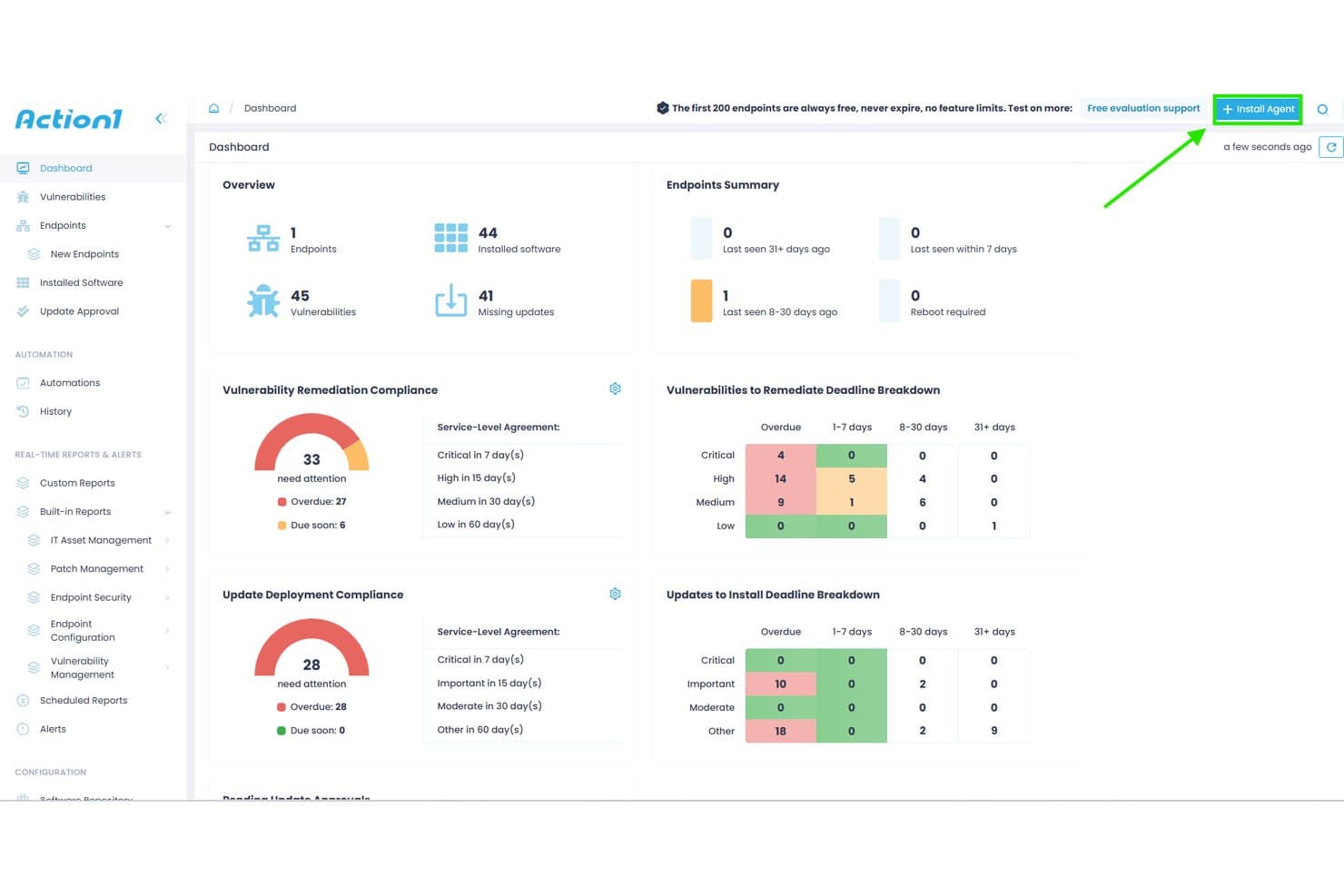
Action1 offers a centralized dashboard displaying vulnerability remediation compliance, update deployment compliance, and endpoint summaries for patch management. Action1 is a cloud-native endpoint management platform that automates OS and third-party patch deployment across Windows, macOS, and Linux systems, with CVE-mapped vulnerability assessment, ring-based staged rollouts, and compliance reporting.
Who Is Action1 Best For?
Action1 is a strong fit for IT teams in small to mid-sized organizations managing mixed-OS environments with distributed or remote endpoints across cloud and on-prem infrastructure.
Why I Picked Action1
I picked Action1 as one of the best because its cloud-native, VPN-less architecture means I can push patches to remote Debian and Ubuntu Linux endpoints without standing up any on-prem infrastructure. What I particularly like is the ring-based staged rollout system, which automatically halts deployment if a patch causes issues mid-rollout. The peer-to-peer patch distribution also handles bandwidth pressure when pushing updates across large, geographically distributed fleets simultaneously.
Action1 Key Features
- Real-time vulnerability assessment: Continuously identifies missing patches and matches vulnerabilities to CVEs on managed Linux endpoints.
- Unified cross-OS console: Manage patching for Linux, Windows, and macOS systems through a single web-based dashboard.
- 100+ audit-ready report templates: Generate compliance and remediation reports exportable in CSV and HTML formats.
- ServiceNow CMDB integration: Enriches ServiceNow CMDB with inventory and operational data from managed Linux endpoints.
Action1 Integrations
Action1 offers native integrations with ServiceNow, Microsoft Entra ID, Okta, Duo, Google, Active Directory, Rapid7, Tenable, CrowdStrike, Microsoft Defender, and provides an API for custom integrations.
Pros and Cons
Pros:
- Automated ring-based patch deployment
- Real-time vulnerability scanning for Linux endpoints
- Cloud-native platform with remote patching
Cons:
- Requires agent installation on every endpoint
- Only supports Debian and Ubuntu Linux
Learn more about Action1: Best for policy-based cross-platform updating
- 15-day free trial + free demo available
- From $1/endpoint/month (billed annually)
Visit WebsiteCustomer Rating:4.7/5
Automox offers a centralized dashboard displaying compliant devices, patch status, outstanding patches by severity, and device troubleshooting insights for Linux and cross-platform patch management. Automox is a cloud-native endpoint management platform that automates OS and third-party patching across Linux, Windows, and macOS systems using policy-driven rules and Bash-scriptable Worklets.
Who Is Automox Best For?
Automox is a strong fit for IT and security teams managing distributed endpoint fleets across mixed operating systems without on-premises patching infrastructure.
Why I Picked Automox
Automox earns its spot on my shortlist because of how its policy engine handles Linux patching across distros at scale. I can build severity-based policies targeting Ubuntu, RHEL, and Debian endpoints separately, so critical patches get prioritized without applying the same blanket rule to every host. When a package falls outside Automox's 580+ natively supported titles, Worklets let me push custom Bash scripts directly from the console without switching tools.
Automox Key Features
- Cross-platform patching console: Manage patching for Linux, Windows, and macOS devices from a single unified dashboard.
- Linux distribution support: Supports a wide range of Linux distros, including RHEL, Ubuntu, Debian, Oracle Linux, Fedora, Rocky, and AlmaLinux.
- Third-party application patching: Offers native patching for hundreds of Linux-compatible third-party software packages.
- Role-based access controls (RBAC): Set granular permissions for users to segment responsibilities and restrict actions within the platform.
Automox Integrations
Automox offers native integrations with Splashtop for remote access and supports vulnerability scanners. An API is available for custom integrations, and custom Bash or PowerShell scripts extend functionality to other tools.
Pros and Cons
Pros:
- Patch scheduling and reboot coordination controls
- Policy-based automation for Linux fleet management
- Wide distro coverage including Rocky and AlmaLinux
Cons:
- Limited out-of-the-box compliance reporting tools
- Reporting options are limited for compliance needs
 Best for multi-OS patch deployment simplicity
- 30-day free trial + free demo
- Pricing upon request
Visit WebsiteCustomer Rating:4.4/5
ManageEngine Patch Manager Plus offers a dedicated Install Linux Patch configuration interface with deployment policy settings and patch listing controls. ManageEngine Patch Manager Plus is a multi-OS patch management platform that automates patch detection, testing, and deployment across Linux, Windows, and macOS endpoints, with dedicated support for eight major Linux distributions.
Who Is ManageEngine Patch Manager Plus Best For?
It's a strong fit for IT administrators and security teams in mid-to-large enterprises that need centralized patch control across heterogeneous server and endpoint fleets.
Why I Picked ManageEngine Patch Manager Plus
ManageEngine Patch Manager Plus earns its spot on my shortlist because it patches eight Linux distros (RHEL, Ubuntu, Debian, SUSE, Oracle Linux, Rocky Linux, CentOS, and Amazon Linux) alongside Windows and macOS from one console. I particularly like the Automated Patch Deployment (APD) feature, which runs the full scan-to-install cycle without per-host intervention. The built-in patch testing and approval workflow also lets my team validate updates before they reach production servers.
ManageEngine Patch Manager Plus Key Features
- Patch rollback: Quickly revert Linux patches if issues arise after deployment.
- Custom deployment templates: Create and reuse specific patch deployment configurations for Linux environments.
- Real-time audit logs: Track every patch event and administrative action for compliance and troubleshooting.
- Bandwidth optimization: Download Linux patches once and distribute them to endpoints using internal servers.
ManageEngine Patch Manager Plus Integrations
ManageEngine Patch Manager Plus offers native integrations with Tenable.io, Tenable.sc, ServiceDesk Plus, and Jira, and provides an API for custom integrations.
Pros and Cons
Pros:
- Automated patch testing and approval workflow
- Centralized console for Linux, Windows, macOS
- Supports eight major Linux distributions
Cons:
- Limited native regulatory compliance mapping
- Initial server configuration is complex
Learn more about ManageEngine Patch Manager Plus: Best for compliance-driven patch automation
- 30-day free trial + free demo
- Pricing upon request

SecPod SanerNow Cyberhygiene Platform offers a Patch Management Status dashboard displaying remediation job details, device host statuses, patch sizes, and overall patch installation results across multiple Windows devices. SecPod SanerNow is a cloud-native cyberhygiene platform that combines patch management, vulnerability detection, and compliance monitoring across 37+ Linux variants, Windows, macOS, and 550+ third-party applications from a single lightweight agent.
Who Is SecPod SanerNow Cyberhygiene Platform Best For?
It's a strong fit for IT security and compliance teams at mid-size to large enterprises operating under regulatory frameworks like HIPAA, PCI, or NIST.
Why I Picked SecPod SanerNow Cyberhygiene Platform
SanerNow earns its spot on my shortlist because of how it maps patch status directly to compliance frameworks like HIPAA, PCI, and NIST in real time. I particularly like that its 190,000+ SCAP-based vulnerability feed auto-maps CVEs to missing Linux patches and layers EPSS exploit probability scores on top of CVSS severity. Pre-tested Linux patches ship within 24 hours of release, so my team isn't waiting on slow vendor cycles when a critical CVE drops.
SecPod SanerNow Cyberhygiene Platform Key Features
- Cloud-native patching console: Manage patch operations from a unified web console for Linux, Windows, macOS, and third-party apps.
- Single lightweight agent: Deploy patches, scan for vulnerabilities, and monitor compliance with one multifunctional agent across all endpoints.
- Policy-driven patch automation: Set custom rules to automate scan frequency, patch approval, and deployment based on business requirements.
- Pre-deployment test area: Isolate and test Linux patches before rolling them out to production systems globally.
SecPod SanerNow Cyberhygiene Platform Integrations
SanerNow offers native integrations with Freshservice, ServiceNow, SymphonyAI Summit, AWS Marketplace, and Azure Marketplace. An API is available for custom integrations.
Pros and Cons
Pros:
- Supports 37+ Linux distributions, including legacy
- Automated Linux patch rollback and staging
- Real-time compliance reporting for Linux endpoints
Cons:
- Public pricing not available on the website
- No native agentless Linux patching option
Learn more about SecPod SanerNow Cyberhygiene Platform: Best for real-time vulnerability remediation
- 30-day free trial
- Pricing upon request
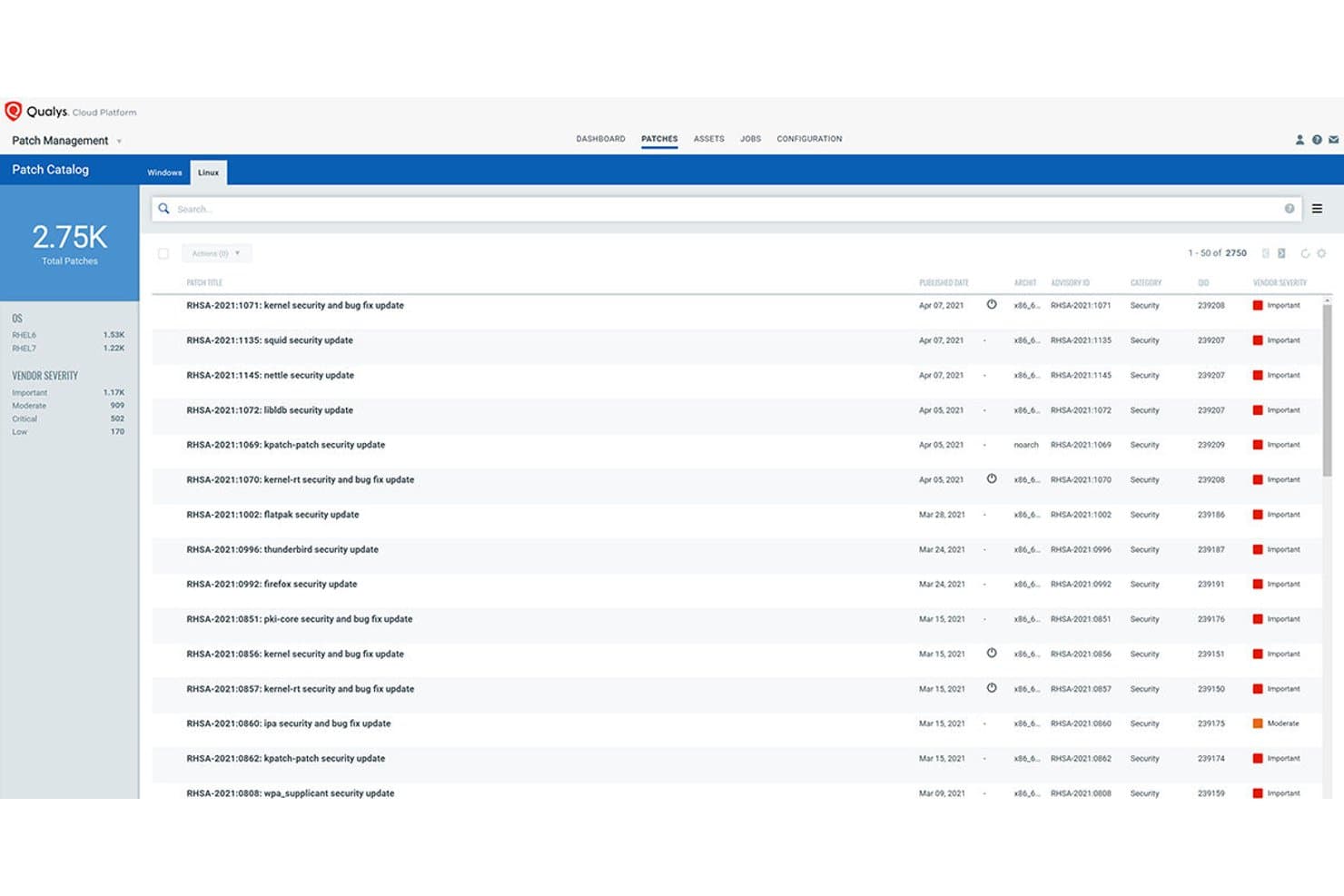
Qualys Patch Management offers a Linux Patch Catalog displaying 2,750 total patches with vendor severity ratings, advisory IDs, and published dates for RHEL systems. Qualys Patch Management is a cloud-native patch management solution that integrates directly with vulnerability detection to identify, prioritize, and deploy patches across Linux and Windows systems through a single lightweight agent.
Who Is Qualys Patch Management Best For?
It's a strong fit for security-focused IT and infrastructure teams in mid-to-large enterprises that need to tie patch deployment directly to vulnerability risk data.
Why I Picked Qualys Patch Management
I picked Qualys Patch Management as one of the best because its VMDR integration is unlike anything else in this category. When a new CVE drops, the platform automatically maps it to the relevant patch, scores it using TruRisk, and flags whether it's tied to active ransomware campaigns. From there, Zero-Touch Patch Jobs can trigger deployment across Linux fleets without manual intervention.
Qualys Patch Management Key Features
- Multi-distro Linux patching: Supports patch deployment for RHEL, CentOS, Ubuntu, Debian, SUSE, Oracle Linux, Rocky Linux, Alma Linux, and Amazon Linux.
- Pre- and post-patch scripting: Lets you configure custom scripts to run automatically before and after patch jobs.
- Yum repository management: Integrates with internal Yum repositories to manage patch staging and dependency handling for Linux systems.
- Patch compliance dashboards: Offers real-time dashboards for tracking patch status and compliance posture across all managed Linux endpoints.
Qualys Patch Management Integrations
Qualys Patch Management offers native integration with the broader Qualys Cloud Platform, including VMDR and Global AssetView. An API is available for custom integrations, and native integrations with Splunk and ServiceNow are also supported.
Pros and Cons
Pros:
- Provides risk-based patch prioritization scoring
- Supports multi-distro Linux patch orchestration
- Maps real-time CVEs directly to patches
Cons:
- Limited air-gapped or agentless deployment options
- Requires installation of Qualys Cloud Agent
Learn more about Qualys Patch Management: Best for automated lifecycle management at scale
- Free trial
- Pricing upon request

Red Hat Satellite offers a Red Hat Repositories interface where admins can browse, filter, and enable recommended RPM repositories for RHEL 8 x86_64 patch management. Red Hat Satellite is an infrastructure management platform built for RHEL environments that centralizes patch deployment, CVE remediation, compliance enforcement, and system provisioning across physical, virtual, and cloud infrastructure.
Who Is Red Hat Satellite Best For?
Red Hat Satellite is a strong fit for large enterprises managing 1,000 or more RHEL systems with dedicated infrastructure staff to maintain the platform.
Why I Picked Red Hat Satellite
Red Hat Satellite earns its spot on my shortlist because of how it structures patching across lifecycle environments. I can curate distinct Content Views for Dev, QA, and Production, promoting a tested patch set through each stage before it touches production servers. The CVE prioritization engine, powered by Red Hat Insights, also ranks vulnerabilities by actual risk to your environment rather than generic severity scores alone.
Red Hat Satellite Key Features
- Centralized security hub: Issue and manage patches from a single interface across large RHEL environments.
- OpenSCAP integration: Scan and remediate servers for compliance using industry-standard security protocols.
- Unified provisioning workflows: Provision bare-metal and virtual hosts with automated integration for DNS, DHCP, and identity.
- Agent-based and agentless execution: Manage endpoints with both lightweight agents and remote SSH-based workflows.
Red Hat Satellite Integrations
Red Hat Satellite offers native integrations with Red Hat Ansible Automation Platform, OpenSCAP, Red Hat Insights, VMware vSphere, and DNS, DHCP, and identity services. An API is available for custom integrations.
Pros and Cons
Pros:
- Offers air-gapped and disconnected mode support
- Granular patch promotion across staged environments
- Tailored for large RHEL and CentOS environments
Cons:
- Limited native support for Debian distributions
- Native support limited to Red Hat-based distros
Learn more about Red Hat Satellite: Best for centralized Ubuntu administration
- 30-day free trial
- From $25/machine/year

Ubuntu Landscape offers a centralized patch management dashboard displaying upgrade statuses, security updates, and instance health across thousands of Linux machines. Canonical Landscape is Ubuntu's native systems management platform, built by Canonical, that centralizes patch deployment, compliance reporting, and repository management across Ubuntu desktops, servers, cloud instances, and airgapped environments.
Who Is Canonical Landscape Best For?
Canonical Landscape suits IT teams that have standardized on Ubuntu across their server and desktop fleets, particularly in regulated industries needing built-in compliance reporting.
Why I Picked Canonical Landscape
I picked Canonical Landscape as one of the best because no other tool patches Ubuntu fleets with the same depth of native integration. I particularly like how policy-based patch rules apply across up to 40,000 machines from a single instance, and Livepatch handles critical kernel CVEs without scheduling a reboot. The built-in compliance reporting maps directly to frameworks like DISA-STIG, PCI-DSS, and CIS Benchmark out of the box.
Canonical Landscape Key Features
- Custom profiles: Manage different Ubuntu machine classes with tailored update and patch policies.
- Scriptable API: Automate patching tasks and integrate systems using a REST API.
- APT repository mirroring: Mirror and manage both internal and external software repositories securely.
- Dynamic search groups: Create real-time asset groups for targeted patching or compliance actions.
Canonical Landscape Integrations
Canonical Landscape offers native integrations with Canonical Livepatch, Ubuntu Pro, Azure Active Directory, Google, Okta, and IBM for identity management, and supports API access for custom integrations.
Pros and Cons
Pros:
- Handles airgapped and public cloud environments
- Automated compliance reports for major standards
- Deep Ubuntu CVE and security patching integration
Cons:
- Lacks granular patch rollback capabilities
- No support for non-Ubuntu distributions
Learn more about Ubuntu Landscape:

Foreman offers a centralized monitoring dashboard displaying host configuration status, run distribution, task status, and a configuration sync chart for Linux patch management. Foreman is an open-source lifecycle management platform that handles provisioning, configuration, and patch management for Linux servers across bare-metal, virtual, and cloud environments through its Katello plugin.
Who Is Foreman Best For?
Foreman suits Linux system administrators and infrastructure teams managing large server fleets who have the in-house sysadmin expertise to configure and maintain an open-source toolchain.
Why I Picked Foreman
I picked Foreman as one of the best because its Katello plugin gives you a structured, promotion-based patching workflow that's rare in the open-source space. I can define content views that freeze a snapshot of packages, then promote them through lifecycle environments (Dev, QA, Production) before anything touches a live server. The remote execution plugin handles the actual patching via SSH across host groups, with scheduling and concurrency controls that prevent a single job from overwhelming production systems.
Foreman Key Features
- OpenSCAP compliance scanning: Integrates with OpenSCAP to automate system compliance and vulnerability assessments.
- Discovery plugin: Automatically detects and registers new hardware on the network for rapid onboarding.
- Multi-distro repository management: Supports hosting and syncing package repositories for RHEL, CentOS, Debian, Ubuntu, and more.
- Role-based access control: Provides granular permissions management with user, role, and organization-level access settings.
Foreman Integrations
Foreman has native integrations with Ansible, Puppet, Chef, Salt, VMware vCenter, oVirt, Amazon EC2, Google Compute Engine, OpenStack, and FreeIPA, and provides a RESTful API for custom integrations.
Pros and Cons
Pros:
- OpenSCAP compliance and CVE reporting
- Supports RHEL, CentOS, Debian, Ubuntu, Fedora
- Lifecycle-based promotion for patch workflows
Cons:
- No native Windows patch management support
- Requires strong Linux sysadmin knowledge
Learn more about Foreman: Best for multi-distribution Linux management
- Free demo
- Pricing upon request
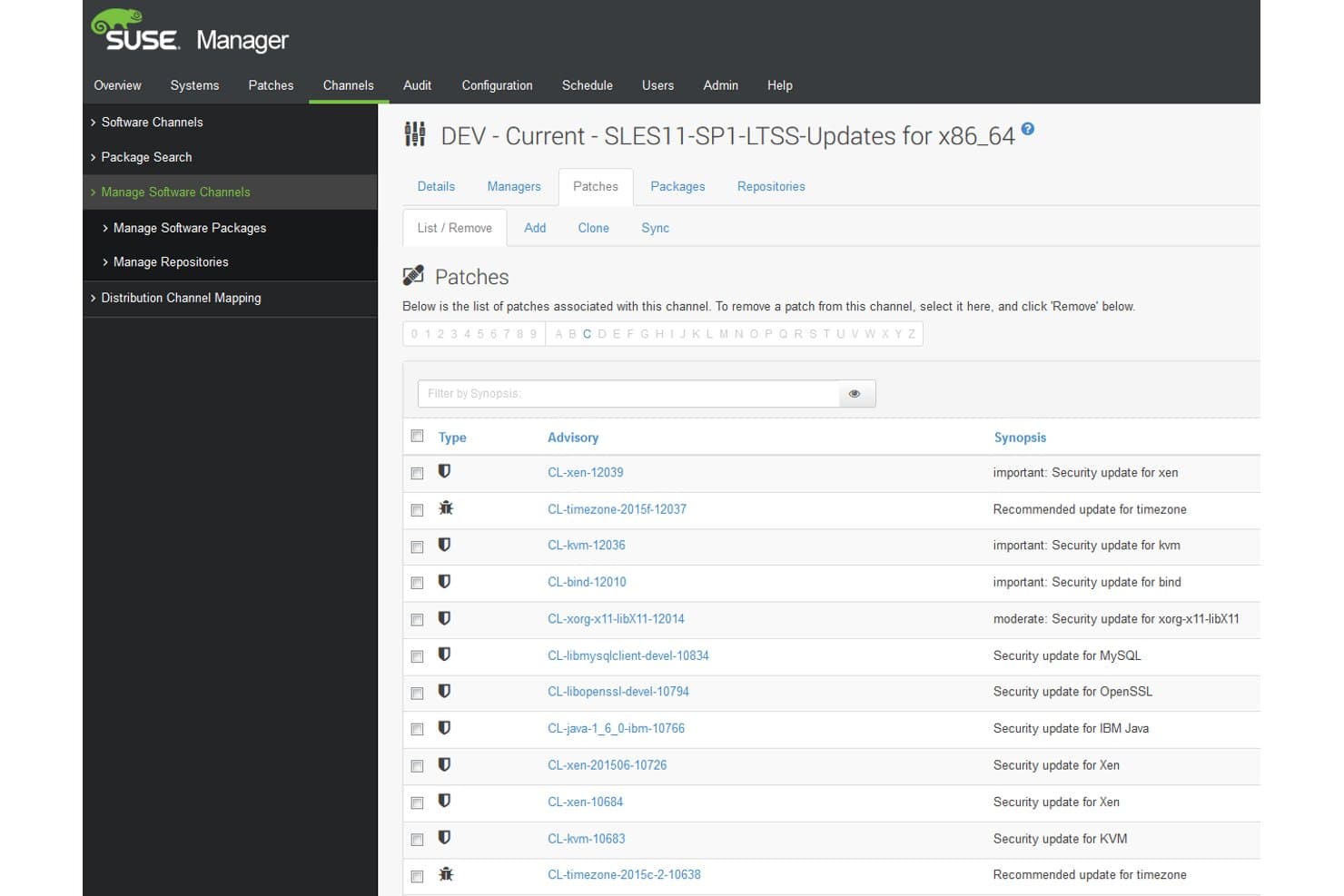
SUSE Multi-Linux Manager offers a detailed patch management interface listing security and recommended updates with advisory codes, types, and synopses for a specific software channel. SUSE Multi-Linux Manager is an open-source Linux patch management platform that centralizes patch deployment, CVE remediation, configuration management, and OpenSCAP-based compliance auditing across 16+ Linux distributions from a single console.
Who Is SUSE Multi-Linux Manager Best For?
It's a strong fit for enterprise IT and infrastructure teams managing large, mixed-distro Linux environments across on-prem, cloud, and hybrid infrastructure.
Why I Picked SUSE Multi-Linux Manager
SUSE Multi-Linux Manager earns its spot on my shortlist because it handles multi-distro patching at a scale I haven't seen matched elsewhere. My team can manage RHEL, Ubuntu, Debian, Oracle Linux, and 12+ other distributions from a single console, without maintaining separate toolchains per distro. I also rely on the Content Lifecycle Management feature to stage patches through dev and test environments before pushing them to production systems.
SUSE Multi-Linux Manager Key Features
- OpenSCAP-based compliance auditing: Run automated security scans using OpenSCAP and apply remediation scripts or Ansible playbooks for compliance standards.
- Salt and Ansible integration: Manage configuration and automation across systems using both SaltStack and native Ansible playbooks.
- Containerized architecture: Deploy the management server and proxies as containers for quick redeployment and reliability.
- Cloud marketplace availability: Access and deploy SUSE Multi-Linux Manager through AWS, Azure, Google Cloud, and Oracle Cloud marketplaces.
SUSE Multi-Linux Manager Integrations
SUSE Multi-Linux Manager offers native integrations with Ansible, SaltStack, OpenSCAP, SCAP Security Guide, and is available in the AWS, Azure, Google Cloud, and Oracle Cloud marketplaces. An API is available for custom integrations.
Pros and Cons
Pros:
- Multi-stage patch lifecycle and approvals
- Automated OpenSCAP compliance auditing available
- Supports 16+ Linux distributions natively
Cons:
- Requires high system resources for deployment
- No native iOS or Android mobile app
Learn more about SUSE Multi-Linux Manager:
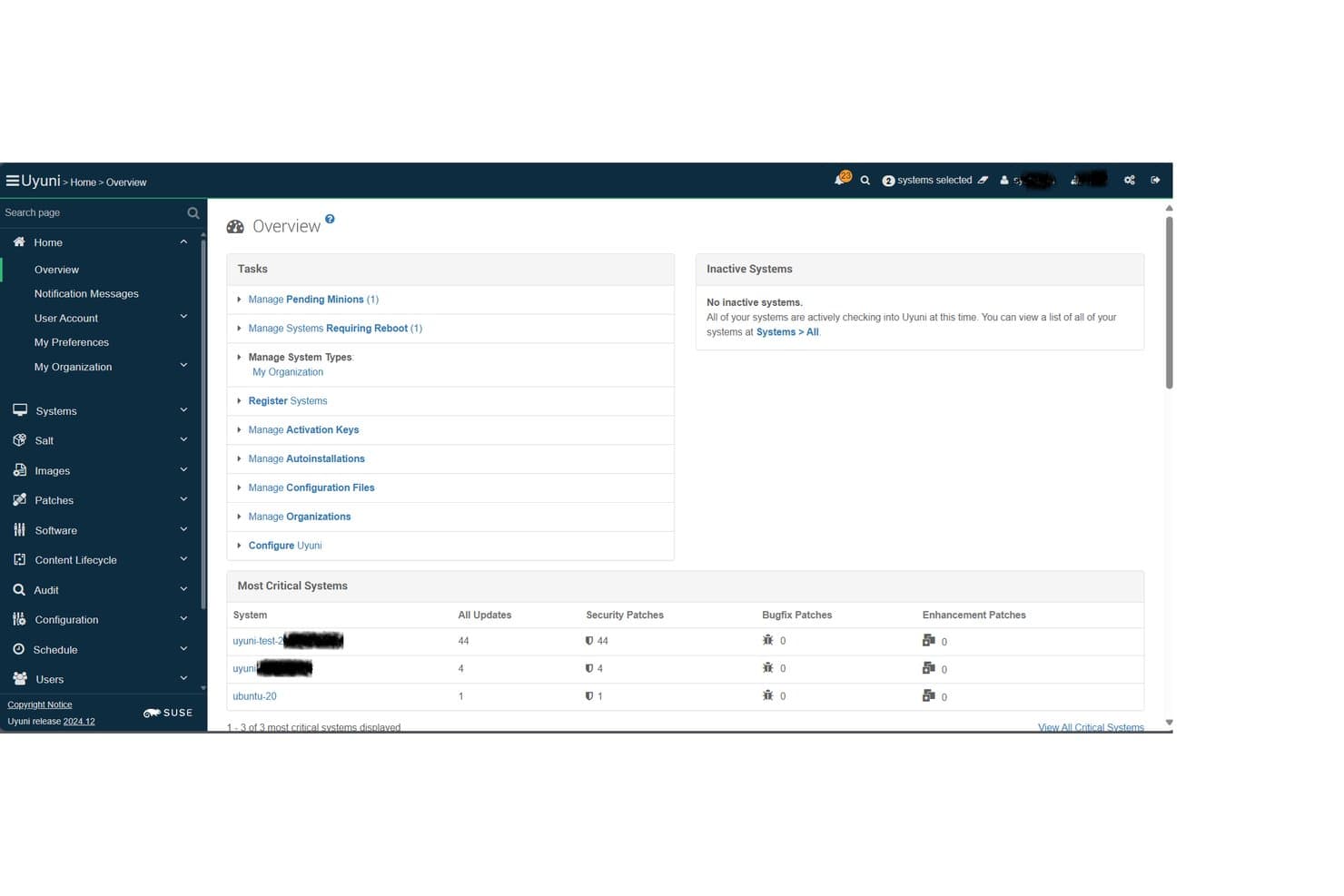
Uyuni offers a centralized Overview dashboard displaying critical system patch counts, pending minions, and security updates across managed Linux systems. Uyuni is an open-source Linux infrastructure management platform built on Salt that combines multi-distro patch management, compliance auditing, provisioning, and configuration management across physical, virtual, cloud, and container environments.
Who Is Uyuni Best For?
Uyuni is a strong fit for Linux system administrators and infrastructure teams managing large, mixed-distro server fleets who need enterprise-grade patch control without a commercial license.
Why I Picked Uyuni
I picked Uyuni as one of the best because its Salt-based orchestration engine sets it apart from every other open-source option in this space. The Uyuni Server runs as a full Salt Master, so my team can execute patch actions across thousands of Linux nodes simultaneously without per-host manual intervention. I also rely on its content lifecycle management to stage patches through dev, test, and production channels before anything reaches live systems.
Uyuni Key Features
- Multi-distro client support: Manage and patch a wide variety of Linux distributions, including SUSE, Red Hat, Ubuntu, Debian, AlmaLinux, Rocky Linux, and more.
- Compliance auditing and reporting: Track hardware and software changes, audit compliance status, and generate detailed reports for your Linux environments.
- Drift detection: Identify and alert on systems that deviate from defined hardened baselines or security templates.
- Visualization and grouping: Organize servers using tags and view their relationships with graphical dashboards for easier system oversight.
Uyuni Integrations
Uyuni offers native integrations with Salt (SaltStack) for configuration management and Cobbler for provisioning. It supports a range of Linux distributions as managed clients and provides an API for custom integrations.
Pros and Cons
Pros:
- Open source with no vendor lock-in
- Salt-based bulk automation for patch tasks
- Supports many enterprise and community Linux distros
Cons:
- No built-in PCI or HIPAA compliance templates
- Steep operational setup for new users
Learn more about Uyuni:
Other Linux Patch Management Software
Here are some additional Linux patch management software options that didn’t make it onto my shortlist, but are still worth checking out:
- 11Ivanti Neurons for Patch ManagementBest for predictive patching with risk insights
- 12AWS Systems Manager Patch ManagerBest for managing patching within AWS environments
- 13Red Hat Ansible Automation PlatformBest for playbook-driven update routines
- 14TaniumBest for real-time endpoint patch deployment
- 15Heimdal SecurityBest for integrated threat and update control
- 16Progress ChefBest for infrastructure as code patch automation
- 17Puppet EnterpriseBest for codified patch policy management
- 18NinjaOneBest for intuitive multi-site patch workflows
- 19HCL BigFixBest for scalable enterprise patch enforcement
- 20Jetpatch Patch ManagementBest for agent-based patch orchestration
How I Evaluate Linux Patch Management Software
I split my evaluation into two layers: the baseline requirements a tool must meet—like multi-distro support and CVE mapping—and the differentiators that separate good tools from great ones.
Core Functionality (Table Stakes for This List)
When I'm selecting tools for my list, I rank each one on a scale from 0 (does not offer the functionality) to 5 (excels in this area) for each core functionality listed below. Then, I calculate the tool's total score as a percentage. Each tool needs to achieve a minimum total score of 65% to be considered for inclusion.
- Multi-Distro Support: I check whether a tool can patch across the distributions your fleet actually runs—RHEL, Ubuntu, Debian, SUSE, and Oracle Linux at a minimum.
- Automated Patch Deployment: The tool should handle detection, download, and installation without you SSH-ing into each host manually or stitching together cron jobs and scripts.
- CVE Remediation: I evaluate how well the platform maps missing patches to specific CVEs and whether it lets you prioritize by severity so you fix the urgent ones first.
- Scheduling & Maintenance Windows: Good tools let you define patch windows, stagger rollouts across server groups, and orchestrate reboots so production traffic isn't interrupted.
- Compliance Reporting: I look for audit trails and dashboards that show patch status across your fleet—the kind of evidence auditors ask for during PCI or SOC 2 reviews.
- Agent or Agentless Coverage: Whether a platform uses lightweight agents, agentless SSH connections, or both, it should cover on-prem servers, cloud instances, and hybrid setups.
Once I have a list of tools that meet the criteria, I consider what sets each platform apart.
Differentiating Factors (What Sets Vendors Apart)
Here's how I compare and contrast different vendors:
Standout Features
Live kernel patching is a big differentiator. If a tool supports kpatch or KernelCare, your team can apply kernel updates on production servers without scheduling a reboot. I also evaluate third-party package patching, since most Linux fleets run Apache, NGINX, Docker, or MySQL alongside the OS. Unpatched third-party packages create real gaps. Automated rollback is another separator—snapshot-based or transactional rollbacks let you recover when a patch breaks something in staging or production.
Beyond Features
Deployment model matters a lot. Some teams need air-gapped or disconnected installs for regulated environments, while others want SaaS with zero infrastructure overhead. I evaluate whether a platform fits into existing toolchains—integrations with Jira or ServiceNow for change management, and with scanners like Tenable or Rapid7 for vulnerability context. Scalability across hybrid setups is another factor I check, especially bandwidth-efficient patch distribution for fleets spread across cloud regions and on-prem data centers.
How to Choose Linux Patch Management Software
It’s easy to get bogged down in long feature lists and complex pricing structures. To help you stay focused as you work through your unique software selection process, here’s a checklist of factors to keep in mind:
| Factor | What to Consider |
|---|---|
| FactorScalability | What to ConsiderWill the software handle your current and anticipated server count? Ask about growth limits, node grouping, and ability to patch in hybrid environments. |
| FactorIntegrations | What to ConsiderDoes the tool work with your ticketing, SIEM, or vulnerability scanners? Check for compatibility with the key platforms in your monitoring and ops stack. |
| FactorCustomizability | What to ConsiderCan you fine-tune patching workflows to fit your maintenance windows, change controls, or approval processes? Look for policy flexibility, not “one size fits all.” |
| FactorEase of use | What to ConsiderIs the UI straightforward? Can new admins onboard quickly? Beware of complex workflows that slow down patch cycles or create mistakes in production. |
| FactorImplementation and onboarding | What to ConsiderHow much time and internal expertise will setup require? Look into available documentation, dedicated onboarding support, and migration tools for large fleets. |
| FactorCost | What to ConsiderWhat’s the pricing model—per node, per site, subscription? Consider ongoing license costs, minimum commitments, and the total cost at full deployment scale. |
| FactorSecurity safeguards | What to ConsiderWhat authentication, encryption, and access controls are built in? Confirm that the tool aligns with your organization’s security and audit requirements. |
| FactorCompliance requirements | What to ConsiderDoes the software support your compliance needs (PCI, HIPAA, SOC 2)? Ask about compliance report templates, patch audit trails, and evidence for external audits. |
What Are Linux Patch Management Software?
Linux patch management software automates the process of identifying, deploying, and tracking updates and security patches across Linux systems. These tools help your team maintain consistent security, address vulnerabilities, and manage compliance requirements across different Linux distributions from a central dashboard. Patch management software is designed to fit into diverse infrastructure environments, supporting everything from on-premises servers to cloud and hybrid setups.
Features of Linux Patch Management Software
When selecting Linux patch management software, keep an eye out for the following key features:
- Multi-distro support: Manage updates across several major Linux distributions from the same dashboard, reducing overhead for mixed-environment teams.
- Automated patch deployment: Quickly identify, download, and install updates without manual intervention, ensuring systems stay current and secure.
- CVE prioritization: Map patches to specific CVEs and prioritize update rollouts based on vulnerability severity for stronger security and compliance.
- Maintenance window scheduling: Set customizable maintenance windows for patching and automated reboots to minimize impact on production workloads.
- Patch compliance reporting: Generate dashboards and reports showing patch status, history, and audit trails for internal reviews or regulatory compliance checks.
- Third-party package patching: Update non-OS packages like NGINX, PostgreSQL, or Docker repositories alongside standard system updates.
- Rollback capability: Restore previous system states if an update causes issues, using snapshot-based or transactional rollback features.
- Agent-based or agentless coverage: Choose agent-based deployment for deeper control or agentless methods (SSH) for quick coverage of distributed hosts.
- API integrations: Connect with ITSM, monitoring, or automation tools to sync workflows, trigger notifications, or automate patch approval processes.
- Role-based access control (RBAC): Define granular permissions for team members, limiting who can schedule, approve, or deploy patches across systems.
Benefits of Linux Patch Management Software
Implementing Linux patch management software provides several benefits for your team and your business. Here are a few you can look forward to:
- Improved security posture: Automated vulnerability detection and patching help you quickly close gaps before attackers exploit known CVEs.
- Consistent compliance: Built-in reporting and audit trails make it easier to prove regulatory compliance with frameworks like PCI, HIPAA, or SOC 2.
- Reduced manual effort: Automation and scheduling eliminate the need for tedious, repetitive patching tasks across large server fleets.
- Minimized downtime: Maintenance window controls and live kernel patching features allow your team to update critical systems with little to no operational disruption.
- Broad environment coverage: Centrally manage updates across cloud, on-premises, and hybrid setups, supporting multiple Linux distributions and endpoints.
- Faster incident response: Integrated CVE mapping and prioritization enable quicker remediation when new vulnerabilities are discovered.
- Granular control and visibility: Role-based access and detailed dashboards help you manage permissions, track progress, and keep stakeholders informed.
Costs and Pricing of Linux Patch Management Software
Selecting Linux patch management software requires an understanding of the various pricing models and plans available. Costs vary based on features, team size, add-ons, and more. The table below summarizes common plans, their average prices, and typical features included in Linux patch management software solutions:
Plan Comparison Table for Linux Patch Management Software
| Plan Type | Average Price | Common Features |
|---|---|---|
| Plan TypeFree Plan | Average Price$0 | Common FeaturesBasic patching for limited hosts, manual updates, and community support. |
| Plan TypePersonal Plan | Average Price$5-$15/server/month | Common FeaturesAutomated patching, support for multiple Linux distros, basic compliance reports, and email notifications. |
| Plan TypeBusiness Plan | Average Price$20-$40/server/month | Common FeaturesAdvanced scheduling, third-party package patching, CVE prioritization, API access, and standard support. |
| Plan TypeEnterprise Plan | Average Price$50-$100/server/month | Common FeaturesRole-based access controls, compliance auditing tools, live kernel patching, 24/7 premium support, and integrations with ITSM tools. |
Linux Patch Management Software FAQs
Here are some answers to common questions about Linux patch management software:
How does Linux patch management software help with security?
Linux patch management software automates identifying and applying security patches across your IT infrastructure, strengthening overall endpoint security and vulnerability management. Replacing manual patching with automated security fixes reduces exposure, protecting systems against data breaches while allowing your team to deploy urgent security updates and respond rapidly to new CVEs.
Can I manage multiple Linux distributions from one tool?
Yes, platforms support distributions like Ubuntu, Red Hat Enterprise Linux, Debian, SUSE, and Oracle Linux using native package managers like dnf or zypper. Many tools function as an RMM or unified endpoint management solution, allowing you to control deployment policies, schedule patch management policy rules, and manage updates across environments from a single screen.
What reporting features should I expect?
You should expect compliance dashboards, audit logs, and customizable reports showing patch compliance across your fleet. These features help you prepare for a security audit, track overall asset management, aid with regulatory mandates, and provide full transparency for management and security teams.
Is agentless patching possible with these tools?
Yes, many solutions offer agentless patching through SSH connections and remote access, simplifying deployment while avoiding custom scripting. However, installing local agents can provide deeper system visibility, better psa platform alignment, and more flexible automation across complex network environments.
What kind of support do vendors typically provide?
Vendors often offer several support tiers, ranging from community forums and documentation with free plans to 24/7 premium support and dedicated customer success managers for enterprise clients. Always confirm available channels and response times before committing.