

Data lake tools let you store, organize, and analyze vast amounts of structured and unstructured data across your business. If you’re comparing the best data lake tools, you can’t afford to guess—which platform will keep your team in control of costs, compliance, and performance as your data grows?
In this guide, I’ll walk you through proven options that help IT leaders deliver governance, scalability, integration, and future-readiness, so you can confidently choose the right foundation for analytics and AI workloads in 2026.
Why Trust Our Software Recommendations
6,700+
Reviews
20
Industry experts
16+
Evaluation factors
14
Years
Our team has been testing and reviewing software since 2012. As tech leaders ourselves, we know how difficult—and important—it is to choose the right software.
For this guide, we evaluated tools using hands-on testing and independent research, scoring tools using our selection criteria.
Our reviews reflect our human editorial judgment, not a sales pitch.
Expert reviewers:
- Paulo Gardini MiguelTech Director
 Tim FisherVP of AI
 Gabriel RosasTech Lead & Software Architect
 Christhian GruhnTech Lead & Platform Architect

Data Lake Tools Comparison Table
This comparison table summarizes pricing details for my top data lake tools selections:
| Tool | Best For | Trial Info | Price | ||
|---|---|---|---|---|---|
| 1 | Best for auto-optimized Apache Iceberg lakehouses | 30-day free trial | From $300/month (billed annually) | Website | |
| 2 | Best for regulated enterprise hybrid lake governance | 60-day free trial | From $0.04/CCU/hour | Website | |
| 3 | Best for open Iceberg lakehouse without lock-in | 30-day free trial | From $0.20/DCU | Website | |
| 4 | Best for regulated-industry data lake governance | Free demo available | Pricing upon request | Website | |
| 5 | Best for cross-engine governance on open lake tables | 90-day free trial | From $0.12 per DCU-hour | Website | |
| 6 | Best for GCP-native lakehouse with tiered storage | Free plan available | From $0.020/GB/month | Website | |
| 7 | Best for zero-copy data sharing across clouds | 30-day free trial | Pricing upon request | Website | |
| 8 | Best for lakehouse built on open table formats | 14-day free trial | From $0.22/DBU | Website | |
| 9 | Best for object storage at the core of AWS data lakes | Not available | From $0.023/GB/month | Website | |
| 10 | Best for Microsoft-native enterprise data lakes | $200 credit for 30 days (no dedicated free tier) | From $0.023/GB/month | Website |





Data Lake Tools Reviews
Below are my detailed summaries of the best data lake tools that made it onto my shortlist. My reviews offer a detailed look at the features, capabilities, and best use cases of each platform to help you find the best one for you.
 1Best for auto-optimized Apache Iceberg lakehouses
Qlik
- 30-day free trial
- From $300/month (billed annually)
Visit WebsiteCustomer Rating:4.4/5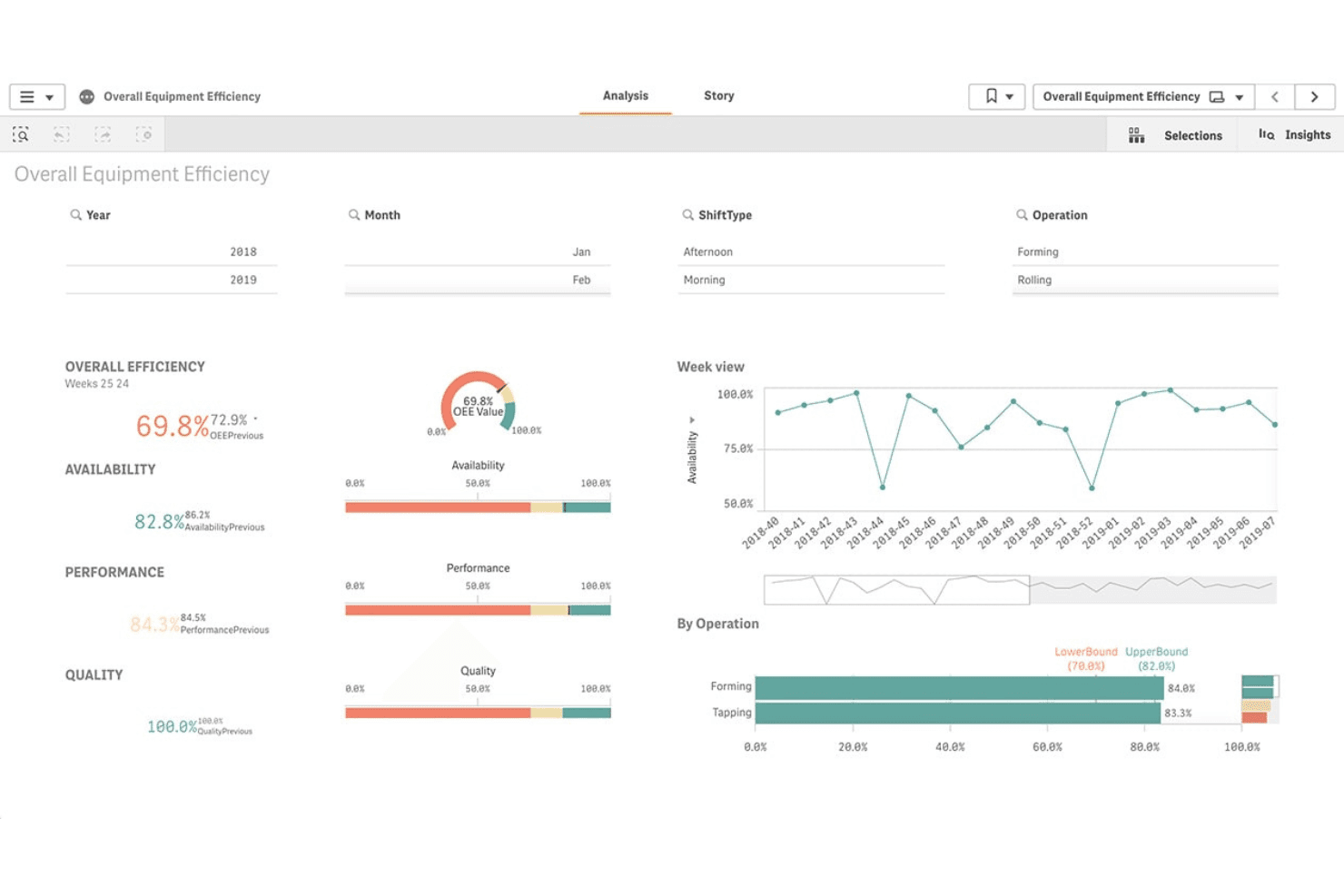
Qlik tracks overall equipment efficiency with live KPI dashboards. Qlik is a data integration and lakehouse platform built natively on Apache Iceberg that combines CDC-based ingestion, automated schema evolution, multi-format data pipelines, and built-in governance across cloud object storage environments.
Who Is Qlik Best For?
Qlik is a strong fit for large enterprises in regulated industries that need end-to-end data integration, governance, and lakehouse management on a single platform.
Why I Picked Qlik
I picked Qlik because its Adaptive Iceberg Optimizer sets it apart: it continuously runs compaction, indexing, and snapshot cleanup on your Iceberg tables without any manual tuning, delivering 2.5x–5x faster query speeds and up to 50% storage cost savings. I also rely on its zero-copy mirroring to push live Iceberg tables directly into Snowflake without duplicating data or adding pipeline complexity.
Qlik Key Features
- Log-based CDC replication: Qlik Replicate captures changes directly from database transaction logs with no agents required, keeping lake data current without impacting source system performance.
- Multi-format ingestion pipeline: Ingest data in Parquet, Avro, ORC, JSON, and CSV from 200+ sources—including databases, SaaS apps, SAP, mainframes, and streaming platforms like Kafka and Kinesis.
- Column-level lineage and impact analysis: Track data from source to consumption at the column level, giving you a clear audit trail for governance and compliance reporting.
- Automated bronze/silver/gold zone management: Qlik Compose for Data Lakes automates schema generation, Hive Catalog creation, and continuous zone updates via CDC—eliminating manual pipeline coding for multi-tier lake architectures.
Qlik Integrations
Qlik supports 200+ ingestion sources, including Amazon S3, Azure Data Lake Storage, Google Cloud Storage, Snowflake, Kafka, Oracle, SAP, and Salesforce. Its Iceberg tables integrate with Spark, Amazon Athena, Trino, Presto, Databricks, Dremio, and Tableau.
Pros and Cons
Pros:
- Deep enterprise compliance and governance controls
- Advanced real-time log-based CDC replication
- Auto-optimized Apache Iceberg table management
Cons:
- Opaque licensing and cost estimation process
- Complex platform with steep technical requirements
Learn more about Qlik: Best for regulated enterprise hybrid lake governance
- 60-day free trial
- From $0.04/CCU/hour
Visit WebsiteCustomer Rating:4.1/5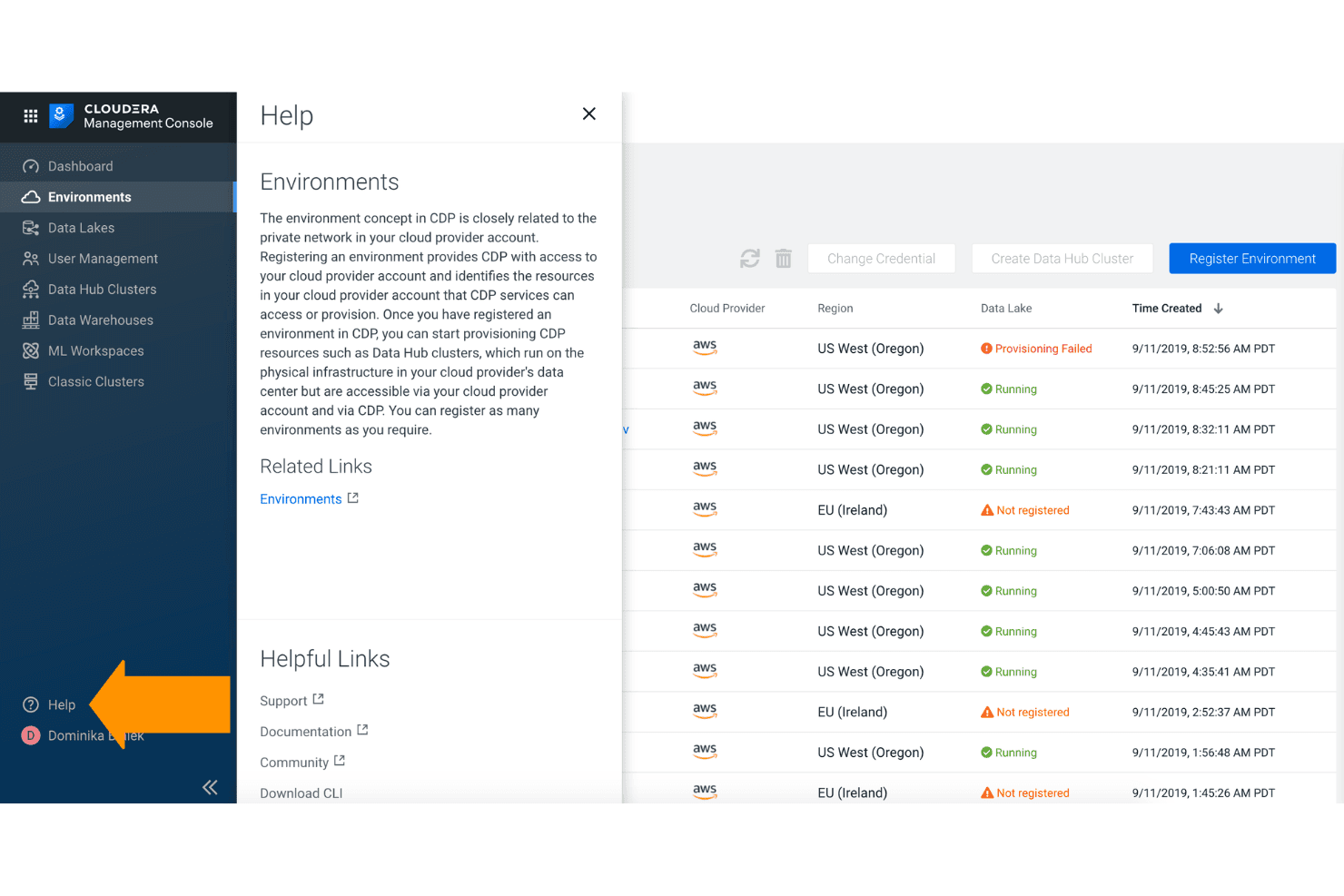
Cloudera lets users manage and monitor cloud environments across regions. Cloudera is an open data lakehouse platform that covers scalable multi-cloud and on-premises storage, multi-format data ingestion via 450+ connectors, Apache Iceberg-based schema-on-read, and centralized governance across hybrid environments.
Who Is Cloudera Best For?
Cloudera is a strong fit for large enterprises in regulated industries—banking, government, telecom—that need unified governance across on-premises and multi-cloud environments.
Why I Picked Cloudera
Cloudera earns its spot on my shortlist because no other platform matches its governance depth across hybrid environments. I'm particularly impressed by Cloudera SDX, which applies Apache Ranger and Apache Atlas policies once and enforces them everywhere, whether your data sits in an on-premises HDFS cluster, Azure ADLS, or AWS S3. Banks and government agencies running mixed infrastructure can define column-level masking rules and ABAC policies centrally, with FedRAMP Moderate and PCI DSS 4.0 certifications backing the compliance story.
Cloudera Key Features
- Apache Iceberg time travel: Query historical snapshots of your data at any point in time using Iceberg's built-in versioning and time travel capabilities.
- Lakehouse Optimizer: Automates Iceberg table compaction, Z-ordering, and partition pruning to improve query performance and reduce compute costs.
- Cloudera Data Flow (NiFi) visual pipeline builder: Design and deploy data ingestion pipelines using a drag-and-drop interface with 450+ pre-built processors and connectors.
- Zero-copy data sharing via Iceberg REST Catalog: External engines like Databricks, Snowflake, and Athena can query Cloudera-managed Iceberg tables directly without data movement or duplication.
Cloudera Integrations
Cloudera Data Flow provides 450+ pre-built connectors, including Apache Kafka, MongoDB, Salesforce, Snowflake, and Google BigQuery. It also integrates with AWS, Microsoft Azure, Google Cloud Platform, Databricks, Tableau, and Power BI through its Iceberg REST Catalog.
Pros and Cons
Pros:
- Zero-copy sharing across external query engines
- Enterprise governance for strict compliance needs
- Hybrid and on-premises support is unmatched
Cons:
- Metadata management satisfaction below competitor average
- Initial configuration often requires expert skills
Learn more about Cloudera:
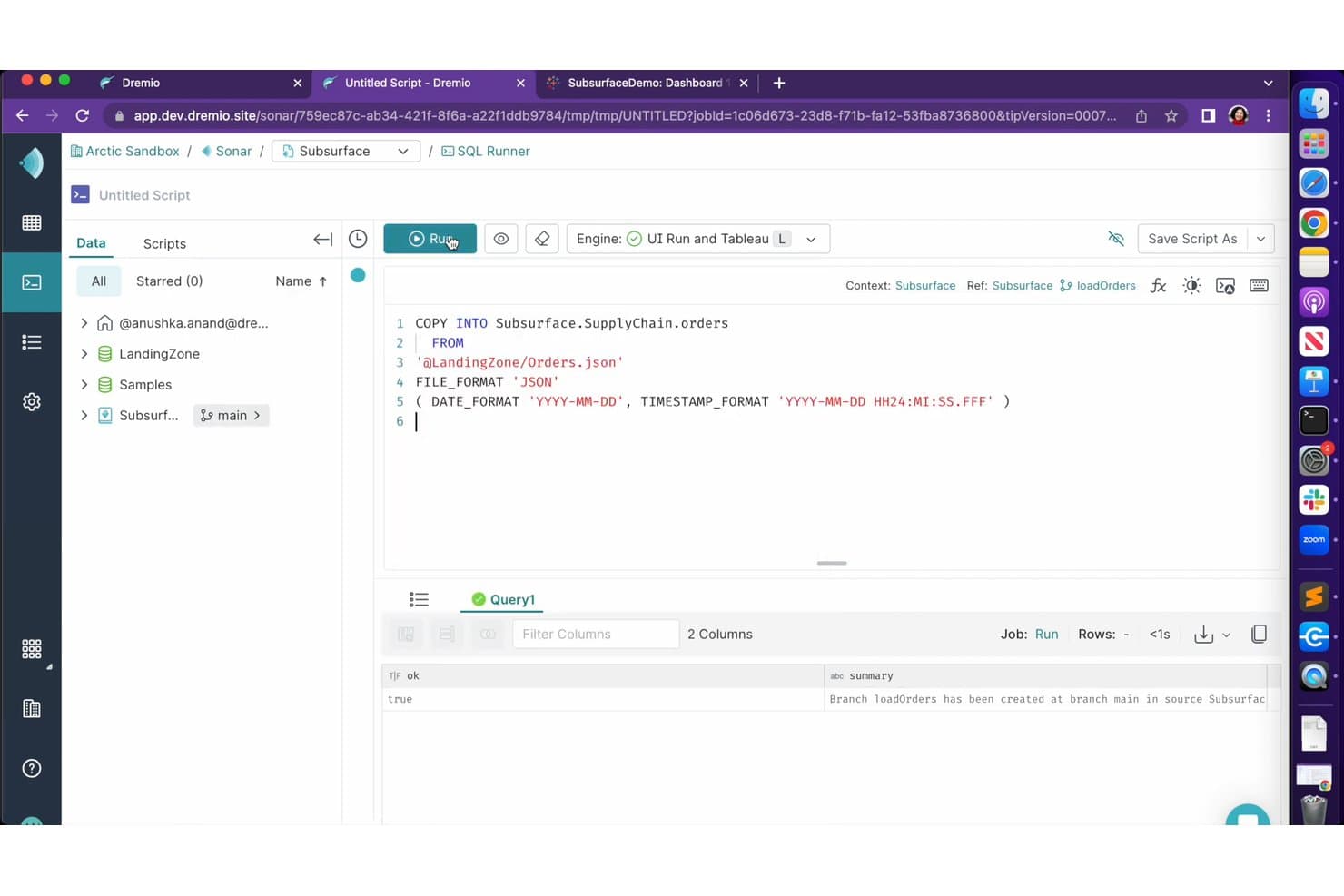
Dremio lets users load JSON data into tables using SQL COPY INTO commands. Dremio is an open lakehouse platform built natively on Apache Iceberg and Apache Arrow, combining a SQL query engine, federated data access, automated query acceleration, Git-style data versioning, and a multi-engine open catalog.
Who Is Dremio Best For?
Dremio is a strong fit for data engineering and architecture teams building open lakehouses on Apache Iceberg who need multi-engine query access without being locked into a proprietary catalog or storage format.
Why I Picked Dremio
Dremio earns its spot on my shortlist because it's built natively on Apache Iceberg, meaning your data stays in your own S3 or ADLS buckets and any engine (Spark, Flink, Trino, DuckDB) can read and write it through the open Polaris catalog without format conversion. I especially like Autonomous Reflections, which silently observe query patterns and materialize accelerations in the background, so your BI dashboards get fast results without manual tuning or proprietary extracts.
Dremio Key Features
- Open Catalog (Apache Polaris): A multi-engine catalog built on Apache Polaris that lets Spark, Flink, Trino, and DuckDB read and write Iceberg tables through a standard REST API.
- Data as Code branching: Git-style version control via Project Nessie creates zero-copy isolated data branches for development, testing, and ML experimentation with atomic merges and rollbacks.
- COPY INTO ingestion: A native SQL command that bulk-loads CSV, JSON, and Parquet files from object storage directly into Iceberg tables with schema evolution and partition handling.
- Fine-grained access control: Row-level security and column masking enforced at query time, applied consistently across every engine querying the catalog.
Dremio Integrations
Dremio integrates with Apache Spark, Apache Flink, Trino, DuckDB, Tableau, Power BI, dbt Core, Amazon S3, Azure Data Lake Storage, and Google Cloud Storage. Its Polaris REST Catalog, ODBC, JDBC, and Arrow Flight interfaces support custom engine and application connections.
Pros and Cons
Pros:
- Open REST catalog connects any query engine
- Git-style data branching for time travel
- Processes Apache Iceberg natively with no conversion
Cons:
- No dedicated built-in ML feature store
- Administration complexity higher than peer tools
Learn more about Dremio: Best for regulated-industry data lake governance
- Free demo available
- Pricing upon request
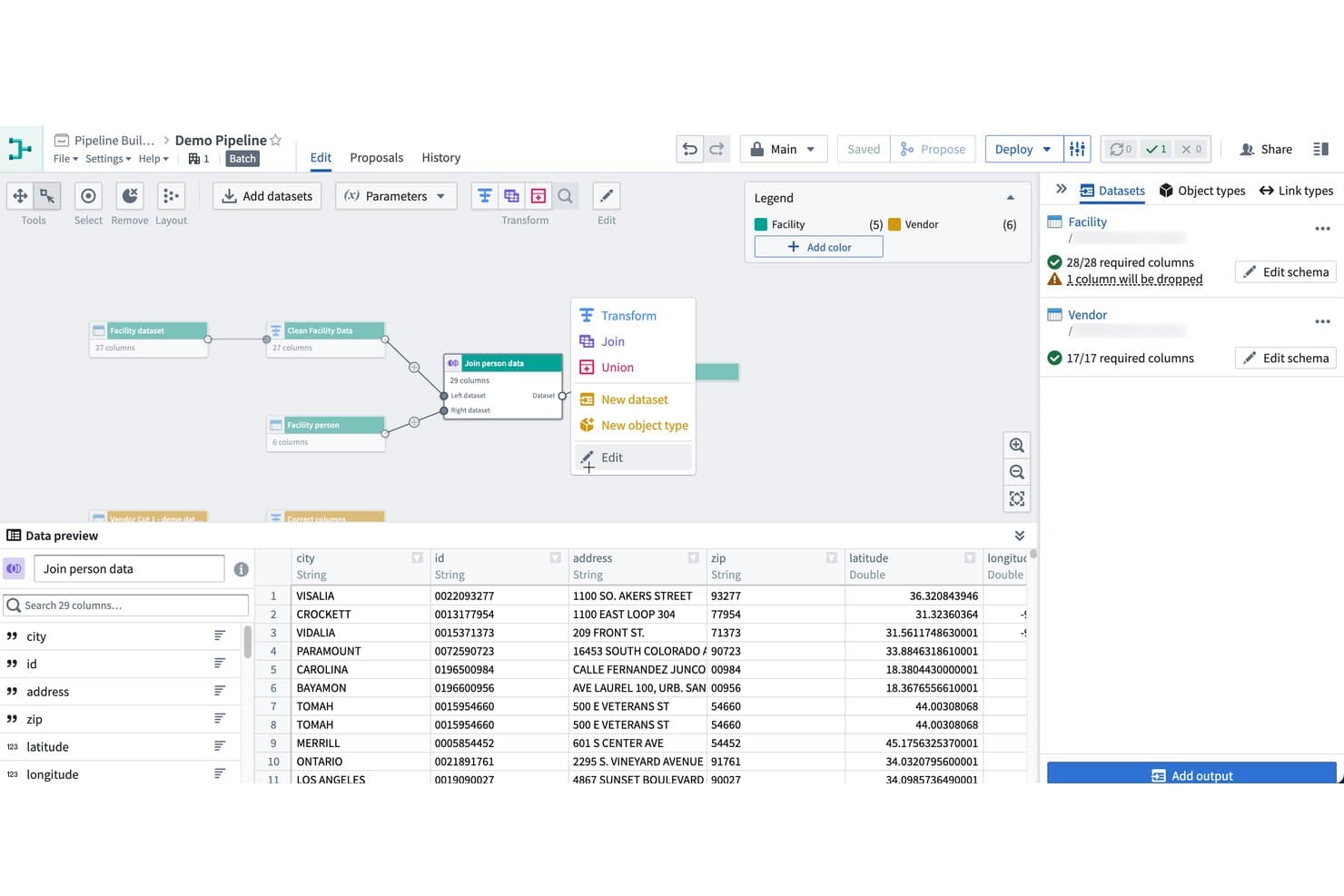
Palantir Foundry lets users build and join datasets visually in pipelines. Palantir Foundry is a data lake platform that combines multi-format ingestion, pipeline orchestration, semantic data modeling via its Ontology layer, and built-in governance controls across cloud, on-premises, and air-gapped environments.
Who Is Palantir Foundry Best For?
Palantir Foundry is purpose-built for large enterprises in regulated industries—finance, healthcare, defense, and government—that need granular data governance across complex, multi-source environments.
Why I Picked Palantir Foundry
I picked Palantir Foundry because its governance architecture genuinely has no peer in regulated industries. The platform layers purpose-based, classification-based, and role-based access controls together, with data markings that propagate automatically through lineage so a PII tag on a source dataset follows the data through every downstream transform. Pair that with FedRAMP High, HIPAA, ITAR, and SOC 2 Type 2 certifications, and the Ontology layer that maps raw lake data to auditable business objects, and you have a platform built from the ground up for environments where governance isn't optional.
Palantir Foundry Key Features
- 200+ prebuilt data connectors: Connect to databases, data warehouses, streaming platforms, ERP systems, cloud storage, IoT sources, and geospatial tools through a single ingestion interface.
- Apache Iceberg REST Catalog: Expose Foundry datasets to external Iceberg-compatible compute engines—including Trino, Spark, Flink, Databricks, and Snowflake—without duplicating data.
- Virtual tables for zero-copy federation: Query external tables in Databricks, Snowflake, and S3-compatible stores directly from Foundry without ingesting or moving the underlying data.
- AIP model studio: Build, train, evaluate, and serve ML models within Foundry, with native access to LLMs and support for Python and R development environments.
Palantir Foundry Integrations
Palantir Foundry offers 200+ native data connectors, including Amazon S3, Snowflake, Databricks, PostgreSQL, SAP, Apache Kafka, Amazon Kinesis, Tableau, and Power BI. It also supports custom connectivity through its S3-compatible API, Iceberg REST Catalog, and virtual tables.
Pros and Cons
Pros:
- Zero-copy data sharing with virtual tables
- Ontology layer enables business-user data access
- Best-in-class data governance for compliance
Cons:
- Platform lock-in risk due to proprietary models
- High contract pricing with unclear totals
Learn more about Palantir Foundry: Best for cross-engine governance on open lake tables
- 90-day free trial
- From $0.12 per DCU-hour
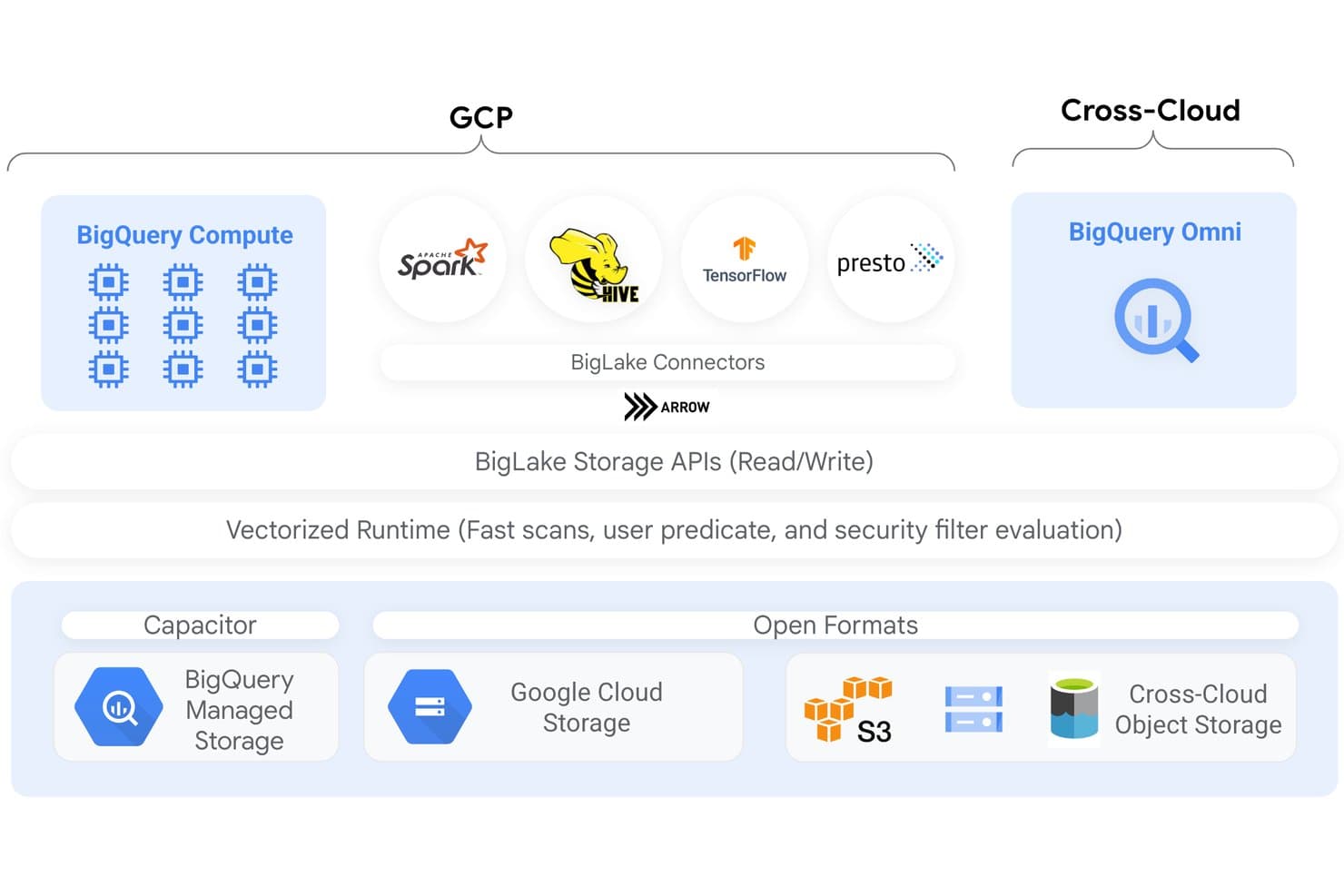
BigLake unifies compute and storage across GCP and cross-cloud environments. BigLake is Google Cloud's lakehouse platform that extends BigQuery with open-format table support, cross-engine query access, unified metadata management, and fine-grained governance across GCS, S3, and Azure Blob Storage.
Who Is BigLake Best For?
BigLake is a strong fit for data engineering and architecture teams already invested in Google Cloud who need consistent governance across multiple query engines and open table formats.
Why I Picked BigLake
I picked BigLake as one of the best because it's the only lakehouse platform I've seen that enforces row- and column-level access policies consistently across BigQuery, Spark, Trino, and Presto, not just within a single engine. That means a policy tag applied to a sensitive column follows the data regardless of which engine your team queries it through. The Lakehouse Iceberg REST Catalog makes this possible by serving as a single governance-aware endpoint for all open-source engines reading and writing the same Iceberg tables.
BigLake Key Features
- Automated table maintenance: BigLake automatically handles file compaction, clustering, garbage collection, and metadata generation for Iceberg tables stored in GCS.
- Multi-format ingestion: Ingest data in Parquet, ORC, Avro, CSV, JSON, and open table formats like Apache Iceberg, Delta Lake, and Apache Hudi via manifest files.
- BigQuery Omni cross-cloud querying: Run BigQuery SQL queries directly against data stored in Amazon S3 or Azure Data Lake Storage Gen 2 without moving it to GCS.
- Change Data Capture replication: Stream operational data from Cloud Spanner, AlloyDB, and Cloud SQL directly into BigLake tables for near-real-time analytics.
BigLake Integrations
BigLake has native integrations with BigQuery, Apache Spark, Apache Flink, Trino, Presto, Google Cloud Storage, Amazon S3, Azure Data Lake Storage Gen2, Looker, and Vertex AI. Its Iceberg REST Catalog connects open-source engines to shared lake tables.
Pros and Cons
Pros:
- Catalog federation for multi-cloud metadata management
- Open table formats with full Iceberg support
- Row and column security enforced across engines
Cons:
- CMEK unavailable for S3 or Azure cached tables
- DML not supported for non-Iceberg external tables
Learn more about BigLake: Best for GCP-native lakehouse with tiered storage
- Free plan available
- From $0.020/GB/month
Visit WebsiteCustomer Rating:4.7/5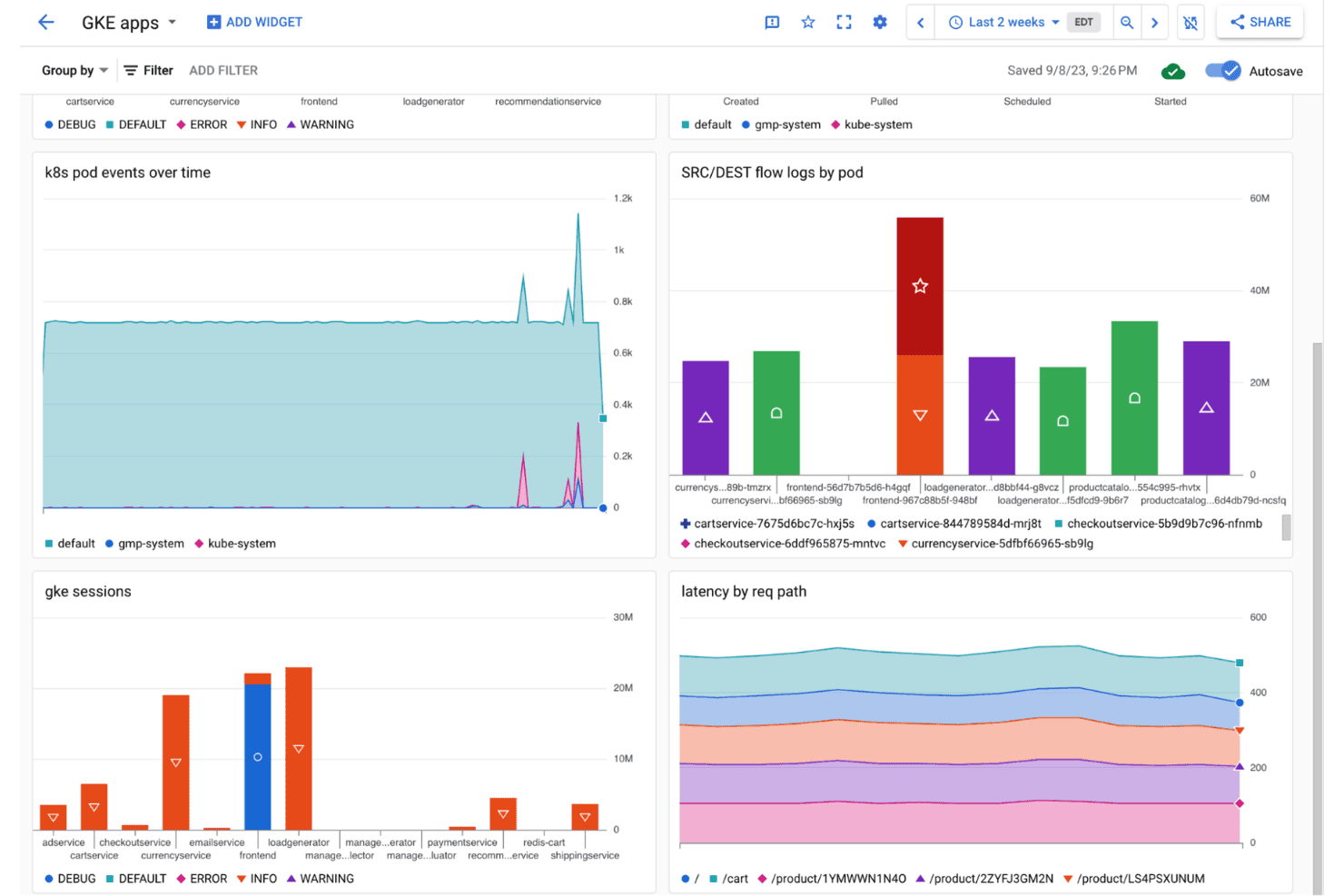
Google Cloud Storage displays GKE app monitoring dashboards with pod events and latency metrics. Google Cloud Storage is a managed object storage service built for data lake architectures, offering tiered storage classes, open table format support via Apache Iceberg and BigLake, and deep integration with BigQuery, Dataflow, Dataproc, and Vertex AI.
Who Is Google Cloud Storage Best For?
Google Cloud Storage is a strong fit for data engineering and infrastructure teams already operating within the GCP ecosystem who need a scalable object store as the foundation of a lakehouse architecture.
Why I Picked Google Cloud Storage
I picked Google Cloud Storage because it's the native foundation for a GCP-based lakehouse, with tiered storage classes (Standard down to Archive at $0.0012/GB/month) and Autoclass automatically shifting objects between tiers based on access patterns. What I find compelling is BigLake: it layers ACID transactions, time travel, and schema evolution directly onto GCS-backed Apache Iceberg tables, turning raw object storage into a queryable lakehouse without moving data. BigQuery then queries those same Iceberg tables in place, with no export required.
Google Cloud Storage Key Features
- Multi-format ingestion: Storage Transfer Service, Dataflow, Pub/Sub, and Datastream support batch, streaming, and CDC ingestion from databases like MySQL, PostgreSQL, and Oracle into GCS.
- Governance and access controls: IAM-based permissions, CMEK/CSEK encryption, VPC Service Controls, Cloud DLP, and audit logging enforce security across all stored data.
- Metadata discovery via Knowledge Catalog: Dataplex automatically scans GCS buckets to extract schemas, build business glossaries, and generate end-to-end data lineage across GCS and BigQuery.
- Multi-engine query support: GCS-backed Iceberg tables are queryable by BigQuery, Serverless Spark, Trino, Flink, and Presto via the Iceberg REST Catalog.
Google Cloud Storage Integrations
Google Cloud Storage has native integrations with BigQuery, Dataproc, Dataflow, Pub/Sub, Datastream, Vertex AI, Looker, and Knowledge Catalog. REST, XML, gRPC, and client-library APIs support custom integrations with data platforms and processing engines.
Pros and Cons
Pros:
- Automated archival and storage tiering options
- Multi-engine analytics with BigQuery and Spark
- Lakehouse support with Apache Iceberg tables
Cons:
- Complex billing with separate operation and egress fees
- Most features require multiple GCP services
Learn more about Google Cloud Storage: Best for zero-copy data sharing across clouds
- 30-day free trial
- Pricing upon request
Visit WebsiteCustomer Rating:4.6/5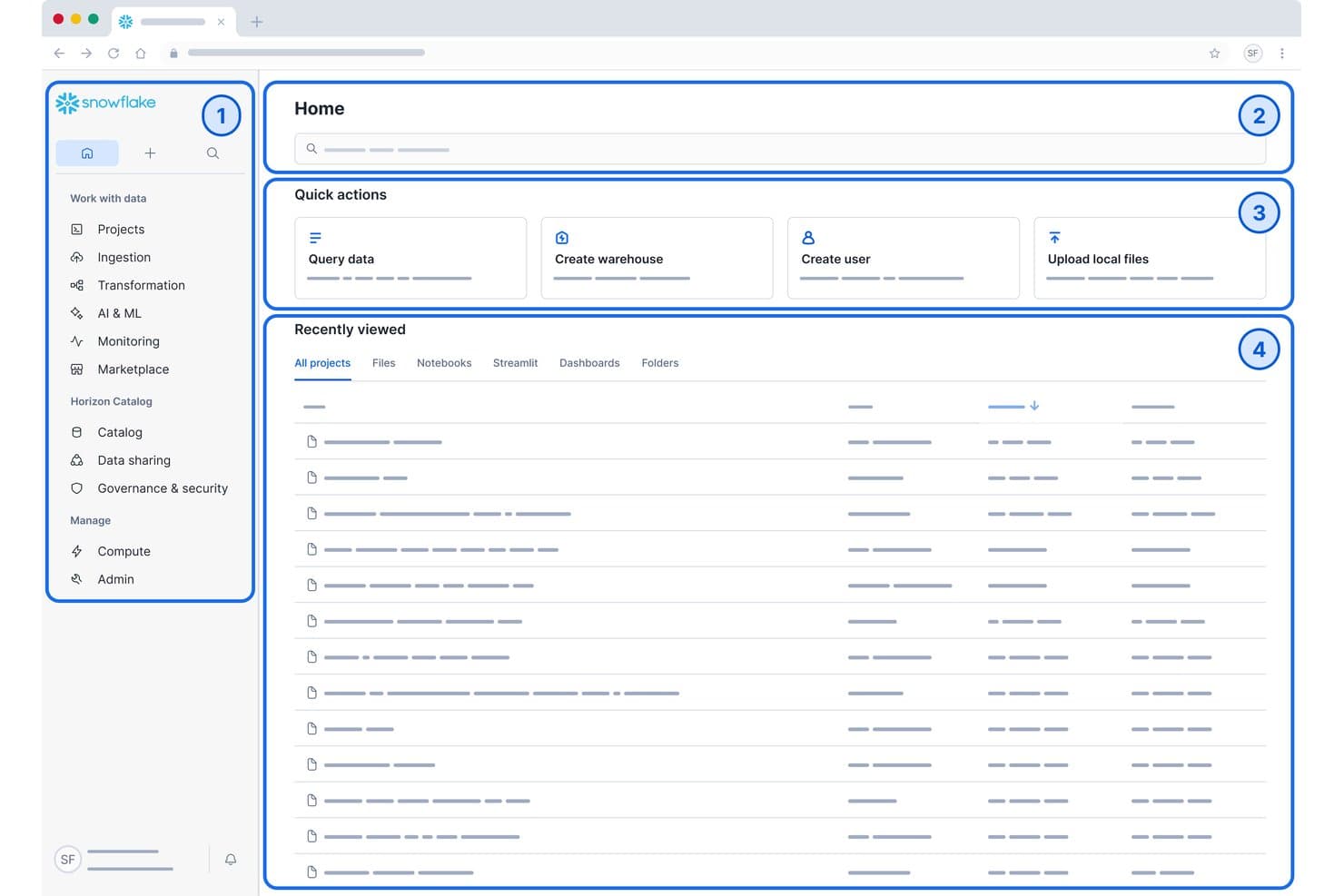
Snowflake's home dashboard centralizes data queries, warehouse creation, and recent projects. Snowflake is a cloud-native data lake and analytics platform that combines elastic storage, a built-in SQL query engine, Snowpark for Python/Java/Scala workloads, Apache Iceberg support, and zero-copy data sharing across AWS, Azure, and GCP.
Who Is Snowflake Best For?
Snowflake is a strong fit for enterprise data teams managing large-scale, multi-cloud environments where governance, compliance, and cross-organizational data sharing are non-negotiable requirements.
Why I Picked Snowflake
Snowflake earns its spot on my shortlist because its zero-copy data sharing lets you share live datasets across AWS, Azure, and GCP accounts without duplicating or moving a single byte. I've worked with its Snowflake Marketplace, which connects to 820+ data providers, and the cross-cloud auto-fulfillment makes sharing across regions genuinely frictionless. Pair that with native Apache Iceberg support and Snowpipe Streaming handling over 1M TPS, and you get a lake platform built for real enterprise scale.
Snowflake Key Features
- Snowpark multi-language runtime: Write data engineering and ML workloads in Python, Java, or Scala and run them directly inside Snowflake's query engine without moving data out.
- Apache Iceberg table support: Store and manage data in open Iceberg table format on Snowflake-managed storage, with schema evolution, Time Travel, and interoperability with Spark, Trino, and Flink.
- Horizon Catalog: A built-in governance layer with column-level lineage tracking, automated PII classification, AI-assisted metadata enrichment, and Data Metric Functions for continuous data quality monitoring.
- Snowpipe Streaming: Ingest row-level data in real time at over 1M transactions per second directly into Snowflake or Apache Iceberg tables without batching delays.
Snowflake Integrations
Snowflake offers native integrations with Apache Kafka, dbt, Tableau, Microsoft Power BI, Looker, and Apache Airflow. It connects to Apache Spark, Trino, Amazon S3, Azure Blob Storage, and Google Cloud Storage, with APIs for custom integrations.
Pros and Cons
Pros:
- Elastic separation of storage and compute
- Built-in governance and column-level lineage
- Zero-copy data sharing across clouds
Cons:
- Cost tracking can be challenging
- No on-premises deployment support
Learn more about Snowflake: Best for lakehouse built on open table formats
- 14-day free trial
- From $0.22/DBU
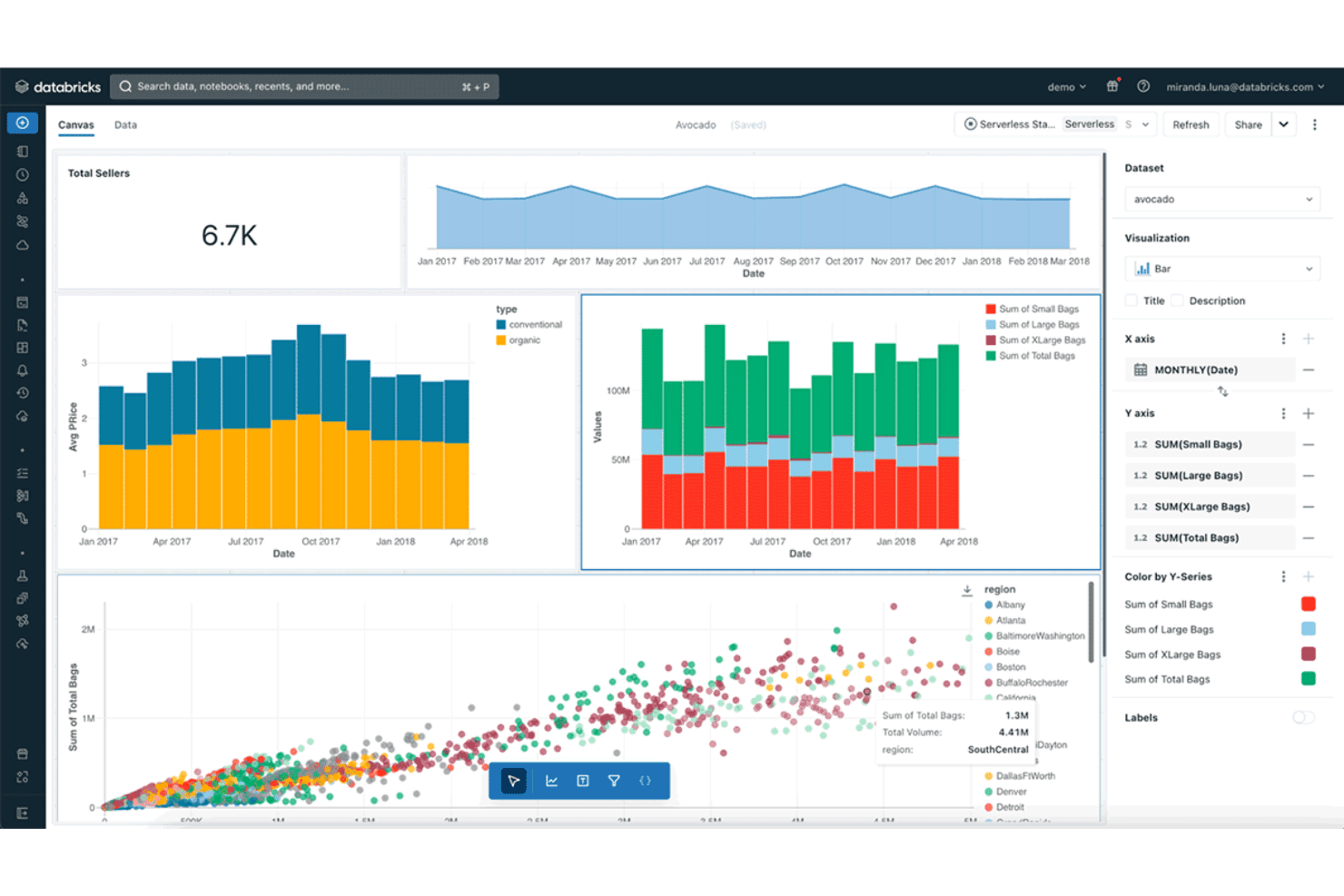
Databricks visualizes avocado sales data across interactive dashboard charts. Databricks Lakehouse Platform is a cloud-native data lakehouse platform that unifies data engineering, SQL analytics, machine learning, and AI development on open table formats like Delta Lake, Apache Iceberg, and Apache Hudi.
Who Is Databricks Lakehouse Platform Best For?
Databricks is a strong fit for enterprise data and ML teams that need to run engineering pipelines, SQL analytics, and AI workloads on a single platform without moving data between systems.
Why I Picked Databricks Lakehouse Platform
Databricks earns its spot on my shortlist because it's the team that literally invented Delta Lake, and that origin story matters when you're evaluating open table format support. I've worked with the platform's native Delta Lake, Iceberg, and Hudi support, and what sets it apart is that ACID transactions, time travel, and schema evolution aren't bolt-ons. Unity Catalog layers automated column-level lineage and attribute-based access control directly on top, so governance travels with the data across clouds.
Databricks Lakehouse Platform Key Features
- Lakeflow Connect: A managed, serverless ingestion layer with 100+ native connectors for SaaS apps, databases, cloud storage, and streaming sources including Kafka, Kinesis, and Event Hubs.
- Apache Spark Declarative Pipelines: A framework for building batch and real-time streaming ETL pipelines with built-in constraint-based data quality enforcement and automated CDC.
- Databricks SQL Warehouses: A Photon-accelerated SQL engine that supports ANSI SQL for analytics workloads, with JDBC/ODBC connectivity for BI tools like Tableau, Power BI, and Looker.
- MLflow integration: A managed MLflow environment for experiment tracking, model registry, and deployment, co-located with your lake data and connected to the Feature Store and Model Serving.
Databricks Lakehouse Platform Integrations
Databricks offers 100+ native Lakeflow Connect connectors, including Salesforce Sales Cloud, Workday, HubSpot, Jira, ServiceNow, Microsoft SQL Server, Google Drive, and Google Analytics. It also connects to Kafka, Kinesis, Event Hubs, S3, ADLS, and GCS, with JDBC/ODBC and APIs for custom connectivity.
Pros and Cons
Pros:
- Built-in MLflow and unified AI platform
- Automated column-level lineage with Unity Catalog
- Native Delta Lake, Iceberg, and Hudi support
Cons:
- No on-premises deployment option available
- DBU plus cloud costs can escalate quickly
Learn more about Databricks Lakehouse Platform: Best for object storage at the core of AWS data lakes
- Not available
- From $0.023/GB/month
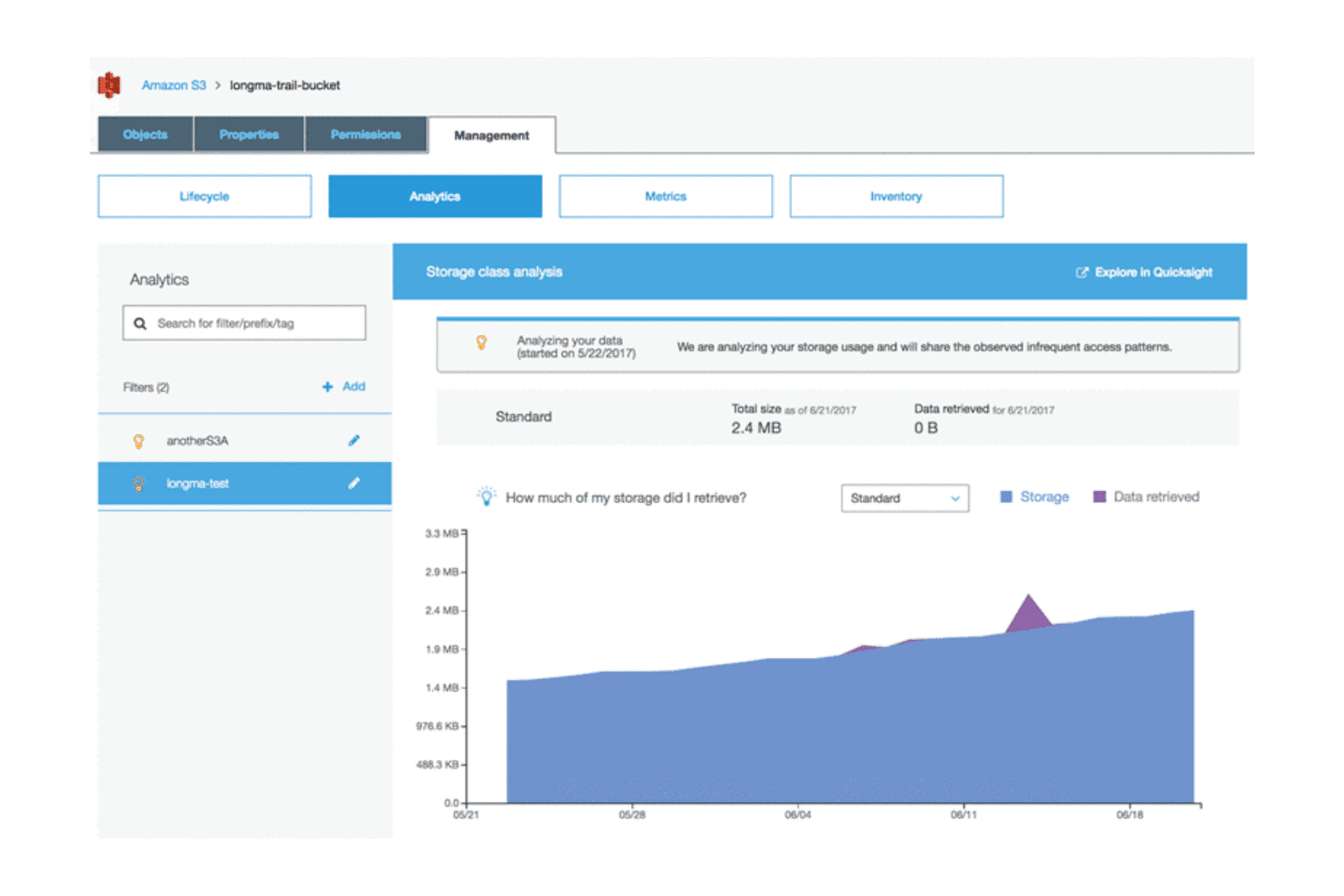
Amazon S3 analyzes storage usage patterns to optimize data retrieval costs. Amazon S3 is AWS's object storage service that functions as the foundational storage layer for data lakes, supporting any data format at exabyte scale with tiered storage classes, native Apache Iceberg table management via S3 Tables, and deep integration across the AWS analytics ecosystem.
Who Is Amazon S3 Best For?
Amazon S3 is the right fit for data engineering and infrastructure teams building analytics pipelines on AWS who need a proven, exabyte-scale storage foundation that connects directly to the rest of the AWS ecosystem.
Why I Picked Amazon S3
Amazon S3 earns its spot on my shortlist because it's the object storage layer that most production data lakes are already built on. I love that S3 Tables delivers native Apache Iceberg support with ACID transactions, time travel, and auto-compaction built in, solving the small-files problem that plagues most lake architectures. Pair that with S3 Intelligent-Tiering automatically shifting cold data down to $0.00099/GB/month, and you get serious storage cost control without manual intervention.
Amazon S3 Key Features
- Multi-format ingestion: S3 accepts any file type—Parquet, ORC, Avro, JSON, CSV, and unstructured formats—via batch uploads, streaming through Kinesis and MSK, or event-driven triggers using S3 Event Notifications.
- Lake Formation fine-grained access control: Enforce data access policies at the table, column, row, and cell level across your entire S3-backed data lake without duplicating data.
- S3 Vectors: A native vector index storage and querying service built directly into S3, designed for semantic search and retrieval-augmented generation workloads at up to 90% lower cost than traditional approaches.
- S3 Inventory: Generate scheduled reports on object attributes, storage class, encryption status, and replication state across your buckets for auditing and governance workflows.
Amazon S3 Integrations
Amazon S3 offers native integrations across AWS, including AWS Glue, Amazon Athena, Amazon EMR, AWS Lake Formation, Amazon Kinesis, Amazon Redshift Spectrum, and Amazon SageMaker. It also connects with Apache Spark, Trino, Snowflake, Databricks, Tableau, and Power BI through documented connectors and APIs.
Pros and Cons
Pros:
- 143 compliance certifications and object-level access control
- Built-in ACID Iceberg tables with auto-compaction
- Exabyte-scale object storage supports any data format
Cons:
- Data lake builds require assembling multiple AWS services
- Pricing is complex and requires close management
Learn more about Amazon S3: Best for Microsoft-native enterprise data lakes
- $200 credit for 30 days (no dedicated free tier)
- From $0.023/GB/month
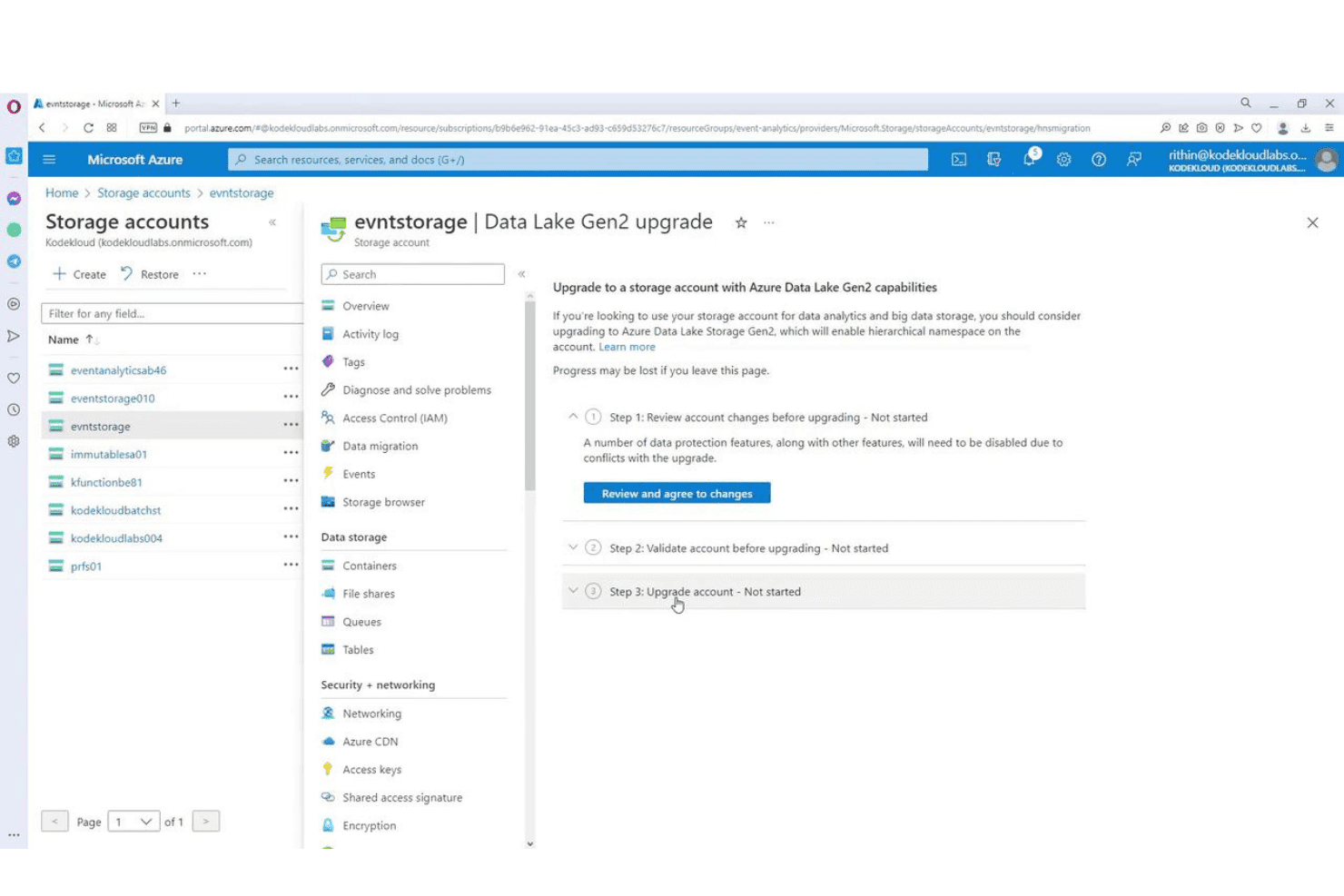
Azure Storage lets users upgrade accounts to Data Lake Gen2 capabilities. Azure Data Lake Storage Gen2 is Microsoft's cloud-based data lake storage service, built on Azure Blob Storage with a hierarchical namespace, that supports exabyte-scale storage, multi-format data ingestion, POSIX-compliant access controls, and native integration with Azure's analytics and ML ecosystem.
Who Is Azure Data Lake Storage Best For?
Azure Data Lake Storage Gen2 is the natural fit for enterprise IT and data teams already running on Microsoft Azure who need exabyte-scale storage tightly wired into Synapse, Databricks, and Microsoft Fabric.
Why I Picked Azure Data Lake Storage
I picked Azure Data Lake Storage Gen2 as one of the best because it's the native storage foundation for the entire Microsoft analytics stack, and that tight wiring matters at enterprise scale. When your org runs Synapse, Databricks, and Microsoft Fabric, ADLS Gen2 is already the substrate underneath all of it, meaning one copy of data is queryable by every engine via the ABFS driver. I especially like the POSIX-compliant ACLs, which let you set read/write/execute permissions at the individual file and directory level, not just the container.
Azure Data Lake Storage Key Features
- Automated lifecycle tiering: Set policies that automatically move data across Hot, Cool, Cold, and Archive tiers based on age or last-access time to manage storage costs at scale.
- ABFS driver compatibility: The Azure Blob File System driver gives Hadoop, Spark, Hive, and HDFS-based workloads native read/write access to ADLS Gen2 without code changes.
- OneLake Shortcuts: Create live references to data in other OneLake workspaces, Amazon S3, or Azure Blob Storage containers without copying or moving the underlying data.
- Azure Machine Learning datastore integration: Register ADLS Gen2 containers directly as datastores in Azure ML workspaces, giving data scientists direct access to lake data for model training and experimentation.
Azure Data Lake Storage Integrations
Azure Data Lake Storage has native integrations across the Microsoft ecosystem, including Azure Data Factory, Azure Databricks, Azure Synapse Analytics, Microsoft Fabric, Microsoft Purview, Azure Machine Learning, and Azure Event Hubs. It also supports Apache Spark and Kafka through documented connectors, plus ABFS and APIs for custom data access.
Pros and Cons
Pros:
- Open table formats via compute layer
- Hierarchical namespace supports granular access control
- Native integration across Microsoft analytics tools
Cons:
- Only available on Microsoft Azure
- Requires Purview for advanced data cataloging
Learn more about Azure Data Lake Storage:
Other Data Lake Tools
Here are some additional data lake tools options that didn’t make it onto my shortlist, but are still worth checking out:
- 11IBM watsonx.dataBest for open lakehouse with mainframe data access
- 12Microsoft FabricBest for Microsoft-stack data lake integration
- 13StarburstBest for federated SQL across multi-cloud lakes
- 14Alibaba Cloud Hybrid CloudBest for APAC hybrid cloud data lake deployments
- 15Teradata VantageBest for AI/ML workloads on petabyte-scale lake data
- 16MinIOBest for AI and on-prem lakehouse storage
How I Evaluate Data Lake Tools
When a pipeline needs to land petabytes of raw events reliably and make them queryable without locking your team into one vendor's schema, the platform underneath that decision matters enormously—so I split my evaluation into baseline capabilities every tool must cover and the differentiators that separate a good fit from the wrong one.
Core Functionality (Table Stakes For This List)
When I'm selecting tools for my list, I rank each one on a scale from 0 (does not offer the functionality) to 5 (excels in this area) for each core functionality listed below. I then calculate the tool's total score into a percentage, using 75% as a benchmark to help assess its overall fit for the list.
- Scalable Object Storage: I check whether the platform can handle petabyte-scale volumes and support tiered or cold storage options across cloud and on-prem environments.
- Schema-on-Read Support: The tool needs to let teams land raw data and apply structure at query time, with schema evolution and format-level versioning like Delta Lake or Iceberg.
- Multi-Format Data Ingestion: I look for broad format coverage (Parquet, Avro, JSON, ORC, CSV) plus both batch and real-time streaming ingestion with prebuilt connectors.
- Query Engine Integration: Each tool should integrate with engines like Spark, Trino, Presto, or Athena so analytics and ML teams can query lake data without extra middleware.
- Metadata and Catalog Management: I evaluate whether the platform offers a data catalog with search, lineage tracking, and tagging to keep lake assets discoverable as data volumes grow.
- Governance and Access Controls: Fine-grained permissions matter here—row- and column-level access, encryption, audit logging, and compliance certifications like HIPAA or SOC 2.
Once I have a list of tools that meet the criteria, I consider what sets each platform apart.
Differentiating Factors (What Sets Vendors Apart)
Here's how I compare and contrast different vendors:
Standout Features
I check whether a platform supports open table formats like Delta Lake or Apache Iceberg, since ACID transactions and time travel on object storage turn a basic lake into a reliable lakehouse. Zero-copy data sharing matters just as much—when teams can share live datasets across business units or clouds without duplicating data, you cut storage costs and eliminate pipeline sprawl. I also evaluate auto-optimization capabilities like file compaction, partition pruning, and query cost governance, because at petabyte scale, performance and budgets fall apart without them.
Beyond Features
I evaluate each platform's deployment model first—whether it runs across AWS, Azure, GCP, and on-prem matters when your data residency requirements span multiple regions. Compliance posture is just as important; I check for SOC 2 Type II, HIPAA, and GDPR certifications, plus customer-managed encryption keys, since a missing certification can disqualify a tool before you even trial it. I also look at ecosystem depth, specifically native connectors to orchestrators like Airflow and BI tools like Tableau, because gaps there mean your team builds and maintains custom glue code indefinitely.
How to Choose a Data Lake Tools
Which factors actually impact whether a data lake tool can deliver the scale, governance, and integration your team needs for real-world analytics workloads?
| If your priority is... | Look for... |
|---|---|
| If your priority is...Regulatory compliance | Look for...Built-in audit logging and access policies |
| If your priority is...Multi-cloud or hybrid deployment | Look for...Native support for multiple cloud providers |
| If your priority is...Vendor independence | Look for...Open table format compatibility |
| If your priority is...Analytics performance at scale | Look for...Tiered storage and native query integration |
| If your priority is...AI and ML readiness | Look for...Direct connectors to AI/ML tools and engines |
How to Vet Your Shortlist
- Confirm governance features: Request admin console screenshots displaying role-based access control and audit log setup.
- Test open format support: Run a live ingest of Parquet or Iceberg files and verify schema evolution in a trial environment.
- Validate multi-cloud claims: Ask for public documentation showing deployment steps on at least two cloud providers.
- Check analytics integration: Request a workflow example or config for Spark, Trino, or Presto, with documented query results.
- Tradeoff—Enterprise suite vs. open lakehouse: Decide if you need turnkey suite compliance and support, or if flexibility and open stack compatibility are more valuable for your architecture.
What Are Data Lake Tools?
Data lake tools are platforms and software that help you store, manage, and analyze large volumes of structured and unstructured data in a centralized repository. These tools let your team ingest raw data, apply schema when needed, and organize assets for analytics or AI projects. You can expect features to support governance, scalability, and integration with popular query engines and analytics platforms.
Features of Data Lake Tools
When selecting data lake tools, keep an eye out for the following key features:
- Scalable object storage: Lets you store and manage petabytes of structured and unstructured data, with options for tiered or cold storage to control costs as your storage needs grow.
- Schema-on-read support: Allows you to land raw data first and apply a schema later at query time, making it easier to handle diverse, evolving datasets without reloading.
- Multi-format data ingestion: Supports importing data in various formats like Parquet, Avro, JSON, ORC, and CSV, and accommodates both batch and streaming data sources for greater flexibility in how data arrives.
- Query engine integration: Provides compatibility with engines such as Spark, Trino, Presto, or Athena, so you can run analytics and reporting workloads directly against your data lake without extra middleware.
- Metadata and catalog management: Includes tools for data cataloging, asset search, lineage tracking, and tagging, helping you keep data organized and findable as new datasets are added.
- Governance and access controls: Offers fine-grained permissions, encryption, and audit logging so you can control who accesses what data, monitor usage, and comply with regulatory requirements.
- Data versioning and time travel: Lets you track changes, roll back to earlier versions of datasets, and maintain historical views, which is valuable for auditing, recovery, and reproducibility.
- Integration with orchestration tools: Connects natively with workflow orchestrators like Apache Airflow, allowing you to automate data pipelines and coordinate tasks across systems.
- Monitoring and cost management tools: Provides dashboards and alerts for storage usage, access patterns, and costs, so you can keep your environment efficient and budget-friendly.
- Support for open table formats: Accommodates formats like Delta Lake or Apache Iceberg, enabling advanced features like ACID transactions and interoperability with multiple analytics tools.
Common Data Lake Tools AI Features
Beyond the standard data lake tools features listed above, many of these solutions are incorporating AI with features like:
- Automated data classification: Uses AI models to scan and categorize incoming data based on content, sensitivity, or compliance requirements. This helps your team organize assets faster and apply the right access controls without manual tagging.
- Anomaly detection for data quality: Applies machine learning algorithms to monitor data streams and flag unusual patterns, missing values, or outliers. This lets you catch data integrity issues early and reduce the risk of bad analytics or downstream errors.
- Predictive workload optimization: Leverages AI to analyze historical query patterns and storage usage, then recommends or automatically applies optimizations like partitioning, caching, or resource scaling. This helps you maintain performance and control costs as usage grows.
- Natural language query interfaces: Integrates AI-powered chat or search tools that let users ask questions about data in plain language. This lowers the barrier for non-technical users to explore datasets and generate insights without writing SQL or code.
- Automated metadata enrichment: Uses AI to extract context, relationships, and business terms from raw data, then populates the data catalog with richer descriptions and lineage information. This makes it easier for teams to discover, trust, and reuse data assets.
Benefits of Data Lake Tools
Implementing data lake tools provides several benefits for your team and your business. Here are a few you can look forward to:
- Centralized data management: Data lake tools let you store structured and unstructured data in one place, making it easier to organize assets and support analytics or AI projects.
- Scalability for petabyte-scale workloads: These platforms can handle massive data volumes and support both cloud and on-prem storage tiers, so you can adapt to growing demands without re-architecting.
- Flexible data ingestion: You can ingest data from a wide range of formats and sources, and handle both batch and real-time streams, thanks to built-in connectors and format support.
- Granular governance and access control: Fine-grained permissions, encryption, and audit logging help you maintain security and compliance with standards like HIPAA, SOC 2, and GDPR.
- Integration with analytics and AI tools: Native compatibility with query engines like Spark, Trino, and Presto—as well as direct connectors to AI/ML tools—means you can analyze data without delays or extra integration work.
- Automated metadata and data quality management: Many platforms include catalogs, lineage tracking, and AI-driven tools that help you enrich metadata, classify data, and detect anomalies to maintain data integrity.
- Support for open table formats and advanced use cases: Features like Delta Lake or Apache Iceberg compatibility enable ACID transactions, data versioning, and zero-copy data sharing to support more advanced analytics and multi-cloud architectures.
Costs and Pricing of Data Lake Tools
Selecting data lake tools requires an understanding of the various pricing models and plans available. Costs vary based on features, team size, add-ons, and more. The table below summarizes common plans, their average prices, and typical features included in data lake tools solutions:
Plan Comparison Table for Data Lake Tools
| Plan Type | Average Price | Common Features |
|---|---|---|
| Plan TypeFree Plan | Average Price$0 | Common FeaturesBasic object storage, limited data ingestion, schema-on-read support, and integration with one query engine. |
| Plan TypePersonal Plan | Average Price$50–$300/month | Common FeaturesLarger storage limits, support for multiple data formats, basic cataloging, and integration with analytics tools. |
| Plan TypeBusiness Plan | Average Price$1,000–$5,000/month | Common FeaturesPetabyte-scale storage, advanced governance controls, multi-cloud options, and data cataloging capabilities. |
| Plan TypeEnterprise Plan | Average Price$10,000+/month | Common FeaturesUnlimited storage, full compliance features, AI-powered automation, integration with orchestration tools, and premium support. |
Data Lake Tools FAQs
Here are some answers to common questions about data lake tools:
How do data lake tools handle security and compliance requirements?
Data lake tools apply security with access controls, encryption, and audit logging. Most leading platforms support granular permissions down to the row or column, plus integrations with SSO and identity providers. For compliance, look for vendor certifications like SOC 2, HIPAA, or GDPR, and options for customer-managed encryption keys. These features help you meet regulatory needs without building extra layers.
Can data lake tools integrate with existing analytics or BI platforms?
Yes, most data lake tools offer direct connectors for analytics and BI platforms. You should expect out-of-the-box support for Spark, Trino, Presto, and Athena, plus integrations with Tableau and Power BI. If your teams use specialized tools, check for open APIs or ODBC/JDBC drivers that allow you to connect custom workflows.
What’s the difference between data lake tools and data warehouses?
Data lake tools focus on storing raw, semi-structured, and unstructured data using schema-on-read, while data warehouses store structured data with predefined schemas (schema-on-write). Data lakes are better for flexible ingestion and AI/ML workloads, whereas warehouses suit curated analytics with optimized query performance. Some vendors now offer lakehouse architectures that combine both approaches.
Do data lake tools support multiple data formats and ingestion types?
Yes, most data lake tools accept a wide range of formats such as Parquet, Avro, JSON, ORC, and CSV. You’ll also find support for both batch and streaming data sources, which makes it possible to handle everything from daily ingest jobs to real-time event streams using prebuilt or custom connectors.
How do you evaluate data lake tools for scalability?
I look at each platform’s object storage options, performance under petabyte-scale loads, and multi-cloud support. The ability to tier storage, process data across regions, and avoid bottlenecks with formats like Delta Lake or Iceberg is key. Make sure to check documented benchmarks and gather references from customers with similar data volumes to yours.
Are open table formats like Delta Lake or Apache Iceberg important?
Yes, open table formats matter if you want ACID transactions, versioning, and vendor-neutral data management. They let you enable features like time travel and zero-copy data sharing. If you’re aiming for a lakehouse model or want to future-proof your architecture, insist on open format compatibility within your data lake tool.