

Cele mai bune instrumente de orchestrare DevOps ajută echipele să automatizeze implementările, să coordoneze sarcinile din fluxurile de lucru și să mențină stabile fluxurile de livrare în mediile de dezvoltare și producție. Atunci când scripturile se defectează fără avertisment, transferurile manuale încetinesc lansările sau sistemele deconectate creează lipsuri de vizibilitate, viteza și fiabilitatea implementării se pot deteriora rapid.
Platforma de orchestrare potrivită oferă echipelor de inginerie fluxuri de lucru clare, declanșatoare automate și căi de execuție consecvente, astfel încât acestea să poată detecta problemele mai devreme și să transfere codul prin fluxul de lucru cu mai puține întreruperi. În calitate de director tehnologic, cu peste 20 de ani de experiență în testarea și implementarea instrumentelor de orchestrare DevOps în medii reale de producție, am evaluat soluțiile de top pe baza calității integrărilor, scalabilității și ușurinței de utilizare în timpul ciclurilor active de dezvoltare.
Acest ghid prezintă cele mai bune instrumente de orchestrare DevOps care simplifică fluxurile de livrare, îmbunătățesc colaborarea și susțin lansări previzibile și eficiente. Fiecare recenzie acoperă funcțiile, avantajele și dezavantajele, precum și cazurile de utilizare potrivite, pentru a vă ajuta echipa să aleagă instrumentul potrivit.
Why Trust Our Software Recommendations
6,700+
Reviews
20
Industry experts
16+
Evaluation factors
14
Years
Our team has been testing and reviewing software since 2012. As tech leaders ourselves, we know how difficult—and important—it is to choose the right software.
For this guide, we evaluated tools using hands-on testing and independent research, scoring tools using our selection criteria.
Our reviews reflect our human editorial judgment, not a sales pitch.
Expert reviewers:
- Paulo Gardini MiguelTech Director
 Tim FisherVP of AI
 Gabriel RosasTech Lead & Software Architect
 Christhian GruhnTech Lead & Platform Architect

Tabel comparativ al instrumentelor de orchestrare DevOps
Acest tabel comparativ rezumă detaliile privind prețurile pentru selecția mea de instrumente de top pentru orchestrare DevOps:
Sorted by: Default
| Tool | Starting Price | Website | |
|---|---|---|---|
Best for SAP job scheduling | 4.7 out of 5 | Pricing upon request Free demo available | Website |
Best for complex workload automation | 4.6 out of 5 | $10,000 Free trial available | Website |
Best for chat-based cloud self-service | Not rated | $3,500/month Free demo available | Website |
Best for automation and configuration | 4.6 out of 5 | Pricing upon request 60-day free trial | Website |
Best for enterprise Kubernetes | 4.5 out of 5 | Pricing upon request Free demo available | Website |
Best for native Docker clustering | Not rated | Free to use | Website |
Best for AWS integration | Not rated | Pricing upon request Free trial available | Website |
Best for Azure users | Not rated | Pricing upon request | Website |
Best for Kubernetes management at scale | Not rated | Pricing upon request Free plan available | Website |
Best for multi-cloud deployment | Not rated | Pricing upon request Free plan available | Website |


Recenzii ale celor mai bune instrumente de orchestrare DevOps
Mai jos sunt prezentate rezumatele mele detaliate ale celor mai bune instrumente de orchestrare DevOps care au ajuns pe lista mea scurtă. Recenziile mele oferă o perspectivă detaliată asupra funcțiilor principale, avantajelor și dezavantajelor, integrărilor și cazurilor ideale de utilizare ale fiecărui instrument, pentru a vă ajuta să îl găsiți pe cel mai potrivit pentru dumneavoastră.
 Best for SAP job scheduling
- Free demo available
- Pricing upon request
Visit WebsiteCustomer Rating:4.7/5
RunMyJobs Catalog showing available integration connectors and their install status. In DevOps orchestration, RunMyJobs provides a structured way to automate and coordinate enterprise workflows. It is well-suited for teams managing SAP environments or running processes across multiple systems and technologies. By centralizing job scheduling and dependencies, RunMyJobs helps organizations reduce manual handoffs, improve reliability, and keep operations running consistently as environments scale.
Why I Picked RunMyJobs
I picked RunMyJobs for its exceptional ability to automate and orchestrate enterprise-level workloads, particularly for SAP systems. One standout feature is its SaaS platform, which facilitates the integration and automation of mission-critical business processes. Additionally, its SAP job scheduling capabilities are designed to enhance process efficiency and reliability. These features are particularly beneficial for businesses looking to optimize their DevOps strategies while maintaining high operational standards.
RunMyJobs Key Features
In addition to its SAP job scheduling capabilities, RunMyJobs offers:
- Predictive Analytics: This feature leverages AI to identify potential operational bottlenecks, enabling your team to address issues before they affect performance.
- Role-Based Access Controls: Ensures that access to automation processes is secure and compliant with organizational policies by restricting permissions based on user roles.
- Event-Driven Orchestration: Automates workflows by responding to specific triggers or events, enhancing the agility and responsiveness of your operations.
- Self-Service Portal: Empowers end users to manage and execute workflows independently, reducing reliance on IT teams and streamlining operations.
RunMyJobs Integrations
Integrations include SAP ERP S/4HANA, ServiceNow, Databricks, Oracle, AWS, IBM z/OS, OpenVMS DCL, Oracle Data Integrator, and PeopleSoft.
Pros and Cons
Pros:
- Handles large data volumes efficiently, boosting productivity
- Effective incident management with automatic recording of details
- Seamless automation across multiple platforms enhances efficiency
Cons:
- Occasional performance lags reported during peak usage times
- Difficulties in creating customized reports and data extraction
Learn more about RunMyJobs by Redwood: Best for complex workload automation
- Free trial available
- From $10,000 (one-time license)
Visit WebsiteCustomer Rating:4.6/5
ActiveBatch supports complex workload automation across IT systems and workflows. ActiveBatch is designed to appeal to IT professionals and businesses looking to automate their DevOps processes through integration. This tool is particularly useful for organizations that need to automate complex workflows across diverse environments, including on-premises, cloud, or hybrid setups. By addressing challenges such as managing workload, automation, and job scheduling, ActiveBatch helps teams focus on strategic initiatives rather than routine tasks.
Why I Picked ActiveBatch
I chose ActiveBatch for its ability to simplify complex workload automation in DevOps environments, offering a unique job-step library that eliminates the need for extensive scripting. The platform's event-driven job scheduling is particularly compelling, enabling your team to automate processes based on specific triggers and enhancing flexibility. Additionally, ActiveBatch's robust security and governance features ensure controlled access and data safety across various environments, making it a reliable choice for organizations prioritizing security.
ActiveBatch Key Features
In addition to complex workload automation, ActiveBatch offers:
- User-Friendly Interfaces: These interfaces facilitate information capture and workflow management without extensive training.
- Cloud Provisioning: ActiveBatch optimizes cloud infrastructure resources, supporting efficient cloud management.
- SLA Management: The platform automates the management and monitoring of service level agreements to ensure optimal service delivery.
- High Availability: ActiveBatch features a scalable architecture to maintain operations during outages, ensuring business continuity.
ActiveBatch Integrations
Integrations include Microsoft Azure, VMware, SharePoint, ServiceNow, Oracle EBS, SAP BusinessObjects Data Services, Microsoft SQL Server, and more. Additionally, ActiveBatch supports custom integrations via its API, providing greater flexibility for connecting disparate systems.
Pros and Cons
Pros:
- Offers robust logging and alert capabilities
- Supports multi-platform scheduling and central monitoring
- Provides real-time visibility and control over operations
Cons:
- Difficulty in modifying workflows as per user needs
- Occasional trigger failures reported by users
Learn more about ActiveBatch:
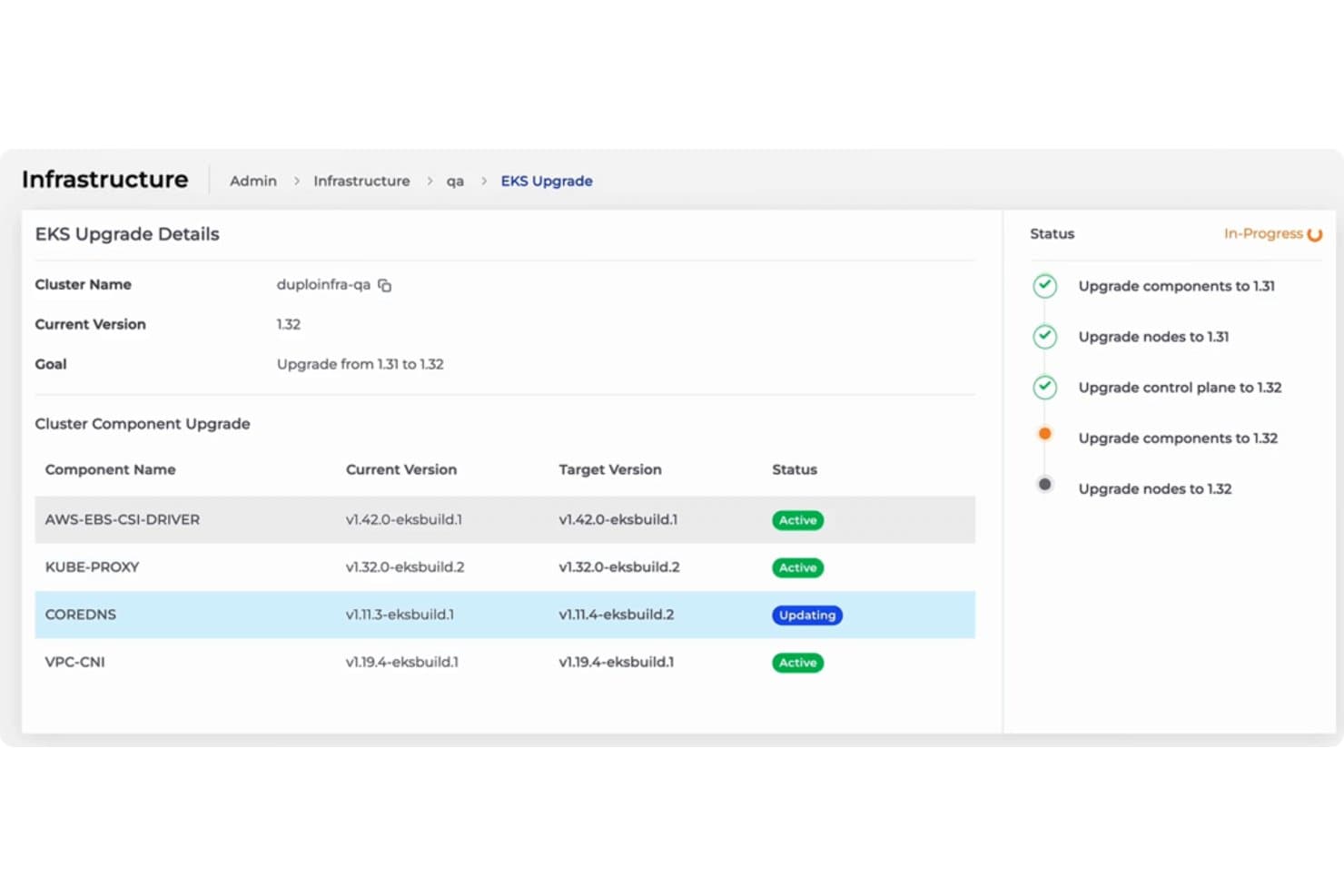
DuploCloud automates EKS cluster upgrades with real-time component tracking. DuploCloud is an AI-powered DevOps platform that combines cloud infrastructure provisioning, deployment orchestration, CI/CD integration, and self-service workflows across AWS, Azure, and Google Cloud Platform.
Who Is DuploCloud Best For?
DuploCloud is a strong fit for platform engineering and DevOps teams in compliance-heavy organizations that need self-service cloud infrastructure without building an internal developer platform from scratch.
Why I Picked DuploCloud
I picked DuploCloud as one of the best because its chat-based self-service model genuinely changes how teams interact with cloud infrastructure. I love that developers can request environment provisioning or trigger a full Terraform workflow directly from Slack, with DuploCloud handling PR creation, approval gating, and Jira updates automatically. The built-in AI agent layer also lets platform teams encode organization-specific policies as reusable skills, so guardrails travel with every request without requiring a central ops ticket.
DuploCloud Key Features
- Multi-cloud infrastructure provisioning: Deploy and manage cloud resources across AWS, Microsoft Azure, and Google Cloud Platform from a single interface.
- Argo Workflows integration: Create reusable workflow templates, launch workflow runs, and inspect step-level execution logs directly in the DuploCloud portal.
- Policy-as-code governance: Apply tenant-level RBAC, command approval policies, and a rules-based drift-reconciliation engine to enforce infrastructure standards automatically.
- Built-in compliance controls: Access pre-mapped compliance frameworks including SOC 2, HIPAA, PCI, and NIST with automated controls for encryption, logging, and audit trails.
DuploCloud Integrations
DuploCloud integrates with GitHub, GitHub Actions, Jenkins, GitLab, Terraform, Kubernetes, Jira, Slack, AWS, Azure, and Google Cloud Platform. It provides API, CLI, and MCP interfaces for custom connectivity and supports CI/CD workflows through external tools.
Pros and Cons
Pros:
- Workflow logs show deployment progress and failures
- Compliance guardrails suit regulated cloud environments
- Self-service provisioning cuts operations-ticket delays
Cons:
- Reviewers report unexpected deletion of managed resources
- External pipeline tools remain necessary for builds
Learn more about DuploCloud: Best for automation and configuration
- 60-day free trial
- Pricing upon request
Visit WebsiteCustomer Rating:4.6/5
An Ansible Tower dashboard depicting management operations. Ansible is an open-source automation tool designed for individuals who need to automate configuration management, application deployment, and task automation. It simplifies complex tasks, allowing teams to manage systems more efficiently.
Why I picked Ansible: It's ideal for automation and configuration, providing a simple way to automate repetitive tasks and manage configurations. Ansible's agentless architecture reduces the overhead on your team and simplifies deployment. With its playbook system, you can define the desired state of your infrastructure, ensuring consistency across environments. The tool's extensive library of modules allows for flexible integration and automation of various tasks.
Standout features & integrations:
Features include a straightforward YAML syntax that makes writing and reading automation scripts easy for your team. The tool supports idempotency, ensuring that repeated executions won't alter the system state unexpectedly. Ansible also provides role-based access control, enhancing security in your operations.
Integrations include Amazon Web Services, Microsoft Azure, Google Cloud Platform, VMware, Docker, Kubernetes, GitHub, Jenkins, Red Hat Enterprise Linux, and Cisco.
Pros and Cons
Pros:
- Agentless architecture
- Extensive module library
- Supports idempotency
Cons:
- Limited GUI options
- Requires YAML knowledge
Learn more about Ansible: Best for enterprise Kubernetes
- Free demo available
- Pricing upon request
Visit WebsiteCustomer Rating:4.5/5
The Red Hat OpenShift view, displaying installed products. Red Hat OpenShift is a container orchestration platform designed for enterprises that require a scalable and secure Kubernetes environment. It provides tools for developers and IT operations to build, deploy, and manage containerized applications.
Why I picked Red Hat OpenShift: It's ideal for enterprise Kubernetes, offering a secure and scalable environment for your applications. The platform provides automated operations, reducing the manual tasks your team needs to handle. With integrated developer tools, you can streamline application development and deployment. OpenShift's consistent security and compliance features ensure your enterprise meets industry standards.
Standout features & integrations:
Features include a built-in CI/CD pipeline that helps you automate your software delivery process. The platform offers multi-cluster management, allowing you to oversee multiple environments from a single interface. It also provides advanced networking capabilities to enhance your application's connectivity.
Integrations include Jenkins, Prometheus, Grafana, Ansible, Red Hat Enterprise Linux, Kubernetes, Docker, GitHub, JBoss, and Apache Kafka.
Pros and Cons
Pros:
- Strong security and compliance features
- Integrated developer tools
- Automated operations reduce manual tasks
Cons:
- Complex initial setup
- May incur additional costs
Learn more about Red Hat OpenShift:

Swarmpit provides an effective and efficient way to manage a Docker Swarm cluster. Docker Swarm is a container orchestration tool designed for developers and IT operations teams. It simplifies the management of containerized applications, allowing for easy deployment and scaling.
Why I picked Docker Swarm: It is ideal for native Docker clustering, providing a simple way to manage multiple containers as a single system. The tool's built-in load balancing ensures that your applications run smoothly across nodes. Docker Swarm's declarative service model allows you to define the desired state of your services, making it easy to maintain consistency. With its seamless integration with Docker tools, your team can quickly deploy and manage containers without additional complexity.
Standout features & integrations:
Features include a straightforward command-line interface that makes it easy for your team to deploy and manage services. The tool offers rolling updates, allowing you to update applications without downtime. It also supports automatic rescheduling, ensuring your containers are always running.
Integrations include Docker Compose, Docker CLI, Docker Hub, Jenkins, Prometheus, Grafana, Kubernetes, AWS Fargate, Azure Container Instances, and Google Cloud Run.
Pros and Cons
Pros:
- Easy to set up
- Native Docker integration
- Supports rolling updates
Cons:
- Limited scalability options
- Lacks advanced features
Learn more about Docker Swarm: Best for AWS integration
- Free trial available
- Pricing upon request

An EKS cluster created in AWS EKS console. Amazon Elastic Kubernetes Service (EKS) is a managed Kubernetes service designed for developers and IT teams who want to run Kubernetes on the AWS cloud. It simplifies deploying, managing, and scaling containerized applications using Kubernetes.
Why I picked Amazon Elastic Kubernetes Service (EKS): It excels in AWS integration, providing seamless connectivity with other AWS services. The tool offers managed control planes, which reduce the operational burden on your team. With built-in security features like IAM for authentication, it ensures your applications are protected. EKS also supports automatic scaling, making it easy to handle varying workloads without manual intervention.
Standout features & integrations:
Features include automatic patching, which keeps your Kubernetes environment up to date without downtime. The tool provides multi-region availability, ensuring your applications are resilient and highly available. It also offers managed node groups, simplifying the process of managing and scaling worker nodes.
Integrations include Amazon VPC, IAM, Amazon CloudWatch, AWS CloudTrail, Amazon RDS, Amazon S3, AWS Lambda, Amazon EC2, AWS Fargate, and Elastic Load Balancing.
Pros and Cons
Pros:
- Automatic security updates
- Supports multi-region availability
- Managed node groups feature
Cons:
- Initial setup can be complex
- Requires AWS expertise
Learn more about Amazon Elastic Kubernetes Service (EKS):

Azure depicting the Kubernetes Services toolbox. Azure Kubernetes Services (AKS) is a managed Kubernetes service ideal for developers and IT teams working within the Microsoft Azure ecosystem. It simplifies deploying, managing, and scaling containerized applications using Kubernetes.
Why I picked Azure Kubernetes Services: It's tailored for Azure users, offering deep integration with Azure's suite of tools and services. AKS handles the complexities of Kubernetes management, reducing the operational workload for your team. The service provides automated upgrades and patching, ensuring your clusters remain secure and up-to-date. With built-in monitoring and logging, you can maintain visibility over your applications and resources.
Standout features & integrations:
Features include automated scaling, which adjusts the number of nodes based on demand. The tool offers a user-friendly portal that simplifies cluster management tasks. It also provides network security features to protect your applications and data.
Integrations include Azure Active Directory, Azure Monitor, Azure DevOps, Azure Blob Storage, Azure Virtual Network, Azure Policy, Azure Security Center, Azure Log Analytics, Azure Container Registry, and Azure App Services.
Pros and Cons
Pros:
- Deep integration with Azure tools
- Automated upgrades and patching
- Supports automated scaling
Cons:
- May require Azure expertise
- Can incur additional Azure costs
Learn more about Azure Kubernetes Services:

A Rancher dashboard displaying system events and resource usage. Rancher is a Kubernetes management platform designed for IT operations and development teams that need to manage Kubernetes clusters at scale.
Why I picked Rancher: It excels in Kubernetes management at scale, offering features that simplify cluster operations for your team. With its centralized management console, you can oversee multiple clusters from a single interface. Rancher's security features ensure your clusters are protected, while its multi-cluster management capabilities allow for efficient resource allocation. The platform also supports a range of deployment environments, giving your team flexibility.
Standout features & integrations:
Features include a user-friendly interface that makes managing Kubernetes clusters straightforward. The platform offers built-in monitoring and alerting to keep your applications running smoothly. It also provides automated upgrades, ensuring your clusters remain up-to-date with minimal effort.
Integrations include GitHub, Jenkins, Docker, Prometheus, Grafana, Helm, AWS, Microsoft Azure, Google Cloud Platform, and VMware.
Pros and Cons
Pros:
- Centralized management console
- Strong security features
- Flexible deployment environments
Cons:
- Requires Kubernetes expertise
- Initial setup can be complex
Learn more about Rancher:

Nomad display showing the capacity scaling abilities. Nomad is a flexible workload orchestrator designed for DevOps teams that manage applications across multiple cloud environments. It helps deploy and manage containerized and non-containerized applications efficiently.
Why I picked Nomad: It excels in multi-cloud deployment, allowing your team to run workloads across various cloud providers with ease. Its single binary architecture simplifies setup and management, making it accessible for teams of all sizes. The tool supports a wide range of workloads, from containers to legacy applications, ensuring compatibility with existing systems. Nomad's scalability ensures that your applications can grow without the need for complex reconfigurations.
Standout features & integrations:
Features include automatic bin packing, which optimizes resource usage across your infrastructure. The tool offers dynamic application scaling, allowing your team to adjust resources based on demand. It also provides a straightforward API that simplifies integration with other tools in your environment.
Integrations include Consul, Vault, Terraform, Prometheus, Grafana, Jenkins, Kubernetes, Docker, AWS, and Azure.
Pros and Cons
Pros:
- Supports multi-cloud environments
- Handles non-containerized workloads
- Simple architecture
Cons:
- Requires some learning curve
- Fewer built-in features
Learn more about Nomad:
Alte instrumente de orchestrare DevOps
Iată câteva opțiuni suplimentare de instrumente de orchestrare DevOps care nu au ajuns pe lista mea scurtă, dar merită totuși analizate:
- 11SpaceliftBest for policy-driven infrastructure automation
- 12ContainershipBest for Kubernetes management
- 13QuerySurgeBest for data testing integration
- 14NowSecureBest for mobile app security in DevOps
- 15TestRailBest for test case management
- 16KubernetesBest for container orchestration
- 17QA WolfBest for automated browser testing
- 18CloudifyBest for multi-cloud orchestration
- 19MinikubeBest for local Kubernetes testing
- 20GKEBest for Google Cloud integration
How I Evaluate DevOps Orchestration Tools
I split my evaluation into two layers: core pipeline orchestration capabilities a tool must have, and differentiators like GitOps support or DORA metrics that set the best options apart.
Core Functionality (Table Stakes For This List)
When I'm selecting tools for my list, I rank each one on a scale from 0 (does not offer the functionality) to 5 (excels in this area) for each core functionality listed below. Then, I calculate the tool's total score into a percentage. Each tool needs to achieve a minimum total score of 65% to be considered for inclusion.
- Pipeline Automation & Orchestration: I evaluate whether a tool can chain multi-stage workflows with parallel steps, conditional logic, and cross-pipeline triggers—like coordinating a build, scan, and deploy sequence across services.
- Multi-Tool Integrations: The connector catalogue matters here—I check for native links to SCM platforms, container registries, cloud providers, and monitoring tools that fit a real-world DevOps toolchain.
- Infrastructure & Environment Management: I look for dynamic provisioning of containers, VMs, or cloud resources within the pipeline itself, such as spinning up ephemeral Kubernetes namespaces for integration testing.
- Deployment Strategies & Release Control: Support for blue-green, canary, and rolling deployments with automated rollback tells me whether a tool can handle production-grade release workflows.
- Workflow-as-Code & Version Control: Pipelines defined in YAML or a DSL and stored in Git are what I expect—tools like Jenkins, GitLab CI/CD, and Argo Workflows each handle this differently, so I assess template reuse and modularity.
- Observability & Audit Logging: Real-time dashboards, structured logs per stage, and exportable audit trails are what I look for—especially for teams operating under compliance requirements that demand deployment traceability.
Once I have a list of tools that meet the criteria, I consider what sets each platform apart.
Differentiating Factors (What Sets Vendors Apart)
Here's how I compare and contrast different vendors:
Standout Features
Policy-as-code governance is a major differentiator—I check whether a tool lets you enforce security and compliance rules automatically using frameworks like OPA, blocking deployments that violate policy before they hit production. Value stream analytics also separates contenders. Tools that surface DORA metrics and lead time data give engineering leaders real visibility into delivery performance. Self-service developer portals round this out, letting teams provision pipelines and environments from templates without waiting on the platform team.
Beyond Features
Deployment model matters—I evaluate whether a tool offers SaaS, self-hosted, and hybrid options, since teams in regulated industries often need on-prem or air-gapped setups. Security and compliance posture is closely tied to this. I look for SOC 2 Type II certification, RBAC, SSO/SAML support, and supply chain security features like SBOM generation. Pricing predictability also weighs heavily. Some tools charge per user, others by compute minutes or concurrent pipelines, and the cost difference at scale across a 200-person engineering org can be significant.
Cum să alegeți un instrument de orchestrare DevOps
Este ușor să vă pierdeți în liste lungi de funcții și structuri complexe de prețuri. Pentru a vă ajuta să rămâneți concentrați în timp ce parcurgeți procesul unic de selecție a software-ului, iată o listă de verificare a factorilor de care trebuie să țineți cont:
| Factor | Aspecte de luat în considerare |
| Scalabilitate | Asigurați-vă că instrumentul poate evolua odată cu nevoile echipei dumneavoastră. Căutați soluții care pot gestiona volume de lucru în creștere fără scăderi de performanță, mai ales dacă intenționați să vă extindeți. |
| Integrări | Verificați compatibilitatea cu sistemele existente. Instrumentul ar trebui să se integreze cu ușurință cu software-ul de containerizare pe care îl utilizați deja, precum Docker, Jenkins sau furnizorii de servicii cloud. |
| Posibilități de personalizare | Căutați opțiuni care vă permit să adaptați fluxurile de lucru la procesele specifice. Scripturile personalizate și automatizarea pot face echipa mai eficientă. |
| Ușurința de utilizare | Alegeți un instrument cu o interfață intuitivă. Echipa dumneavoastră nu ar trebui să întâmpine dificultăți la navigare sau la utilizarea funcțiilor de bază — ușurința de utilizare poate economisi timp și reduce frustrarea. |
| Buget | Luați în considerare costul total de deținere, inclusiv eventualele taxe ascunse. Asigurați-vă că prețul se încadrează în bugetul dumneavoastră și căutați planuri de plată flexibile. |
| Măsuri de securitate | Asigurați-vă că instrumentul oferă funcții de securitate solide, precum criptarea și controalele de acces. Protejați-vă datele și aplicațiile împotriva amenințărilor potențiale. |
| Asistență | Evaluați disponibilitatea serviciului de asistență pentru clienți. Asistența fiabilă poate fi esențială atunci când apar probleme, așa că luați în considerare instrumentele care oferă asistență 24/7. |
| Opțiuni de implementare | Luați în considerare dacă platformele de orchestrare cloud, implementarea locală sau opțiunile de implementare hibride sunt cele mai potrivite pentru afacerea dumneavoastră. Alegeți în funcție de infrastructura echipei și de nevoile de conformitate. |
Tendințe în instrumentele de orchestrare DevOps
În cercetarea mea, am colectat nenumărate actualizări de produse, comunicate de presă și jurnale de lansare de la diferiți furnizori de instrumente de orchestrare DevOps. Iată câteva dintre tendințele emergente pe care le urmăresc:
- Informații bazate pe inteligență artificială: Instrumentele folosesc inteligența artificială pentru a furniza analize predictive și informații utile. Acest lucru ajută echipele să anticipeze problemele înainte ca acestea să apară. Furnizori precum Amazon EKS integrează funcții de inteligență artificială pentru a îmbunătăți procesul decizional și a optimiza alocarea resurselor.
- Interfețe de utilizator îmbunătățite: Se pune accent pe crearea unor interfețe mai intuitive și mai ușor de utilizat. Furnizorii își reproiectează tablourile de bord și navigarea pentru a se asigura că utilizatorii pot accesa cu ușurință instrumentele de care au nevoie, fie că este vorba despre instrumente DevOps pentru Salesforce sau despre crearea de aplicații, îmbunătățind experiența generală a utilizatorilor.
- Capabilități fără server: Tot mai multe instrumente includ opțiuni fără server, permițând scalarea flexibilă fără gestionarea serverelor. Această tendință oferă o modalitate eficientă din punct de vedere al costurilor de a gestiona sarcini de lucru variabile, după cum demonstrează ofertele Azure Kubernetes Services.
- Funcții de securitate îmbunătățite: Securitatea devine tot mai avansată, cu verificări de conformitate integrate și detectarea amenințărilor în timp real. Instrumente precum Red Hat OpenShift își îmbunătățesc protocoalele de securitate pentru a proteja datele și aplicațiile sensibile.
- Compatibilitate cu calculul la marginea rețelei: Pe măsură ce calculul la marginea rețelei se dezvoltă, instrumentele adaugă funcții pentru gestionarea sarcinilor de lucru mai aproape de sursele de date. Acest lucru reduce latența și îmbunătățește performanța, iar furnizori precum Rancher se află în avangarda acestui domeniu.
Ce sunt instrumentele de orchestrare DevOps?
Instrumentele de orchestrare DevOps coordonează și automatizează sarcinile de-a lungul fluxului de dezvoltare și implementare. Acestea sunt utilizate de dezvoltatori, ingineri de operațiuni și echipe de platformă care au nevoie de procese fiabile ce mută codul de la compilare la lansare fără muncă manuală suplimentară.
Capabilitățile de automatizare, scalabilitate și integrare contribuie la simplificarea proceselor de implementare, la gestionarea eficientă a resurselor și la asigurarea funcționării fără probleme pe diverse platforme, inclusiv prin instrumente DevOps pentru baze de date specializate în fluxurile de gestionare a datelor. În general, aceste instrumente oferă o valoare semnificativă prin reducerea efortului manual și creșterea fiabilității livrării software-ului.
Caracteristicile instrumentelor de orchestrare DevOps
Atunci când selectați instrumente de orchestrare DevOps, urmăriți următoarele caracteristici esențiale:
- Capabilități de automatizare: Automatizați sarcinile repetitive pentru a reduce munca manuală și a crește eficiența.
- Scalabilitate: Gestionați cu ușurință sarcinile de lucru în creștere și extindeți resursele după cum este necesar, fără probleme de performanță.
- Funcții de securitate: Oferiți criptare, controale de acces și verificări de conformitate pentru a proteja datele sensibile.
- Interfață ușor de utilizat: Oferiți un tablou de bord intuitiv care simplifică navigarea și accesul la instrumentele esențiale.
- Monitorizare în timp real: Urmăriți performanța aplicațiilor și utilizarea resurselor pentru a identifica și rezolva rapid problemele.
- Compatibilitate cu integrările: Conectați-vă fără probleme la sistemele existente și la platforme DevOps precum Docker, Jenkins sau serviciile cloud.
- Compatibilitate cu mai multe clouduri: Gestionați aplicații în diverse medii cloud pentru o flexibilitate sporită.
- Controlul accesului bazat pe roluri: Îmbunătățiți securitatea permițând acordarea unor permisiuni specifice în funcție de rolurile utilizatorilor.
- Analize predictive: Folosiți inteligența artificială pentru a anticipa posibilele probleme și a optimiza alocarea resurselor.
- Compatibilitate cu calculul la marginea rețelei: Procesați datele mai aproape de sursa lor, reducând latența și îmbunătățind performanța.
Beneficiile instrumentelor de orchestrare DevOps
Implementarea instrumentelor de orchestrare DevOps oferă mai multe beneficii pentru echipa și compania dumneavoastră. Iată câteva dintre avantajele de care vă puteți bucura:
- Eficiență sporită: Capabilitățile de automatizare reduc sarcinile manuale, economisind timp și efort pentru echipa dumneavoastră.
- Colaborare îmbunătățită: Compatibilitatea cu integrările asigură colaborarea fără probleme între diferite instrumente și echipe.
- Securitate îmbunătățită: Funcțiile de securitate, precum criptarea și controlul accesului bazat pe roluri, vă protejează datele.
- Flexibilitate sporită: Compatibilitatea cu mai multe clouduri vă permite să implementați și să gestionați aplicații folosind software de orchestrare a containerelor în diverse medii.
- Rezolvarea proactivă a problemelor: Monitorizarea în timp real și analizele predictive ajută la identificarea și remedierea problemelor înainte ca acestea să afecteze utilizatorii.
- Scalabilitate: Ajustați cu ușurință resursele pentru a răspunde cererii, asigurând o performanță constantă pe măsură ce compania dumneavoastră se dezvoltă.
- Proces decizional mai bun: Informațiile oferite de analizele predictive furnizează recomandări bazate pe date pentru optimizarea resurselor.
Costurile și prețurile instrumentelor de orchestrare DevOps
Selectarea instrumentelor de orchestrare DevOps necesită înțelegerea diferitelor modele și planuri de preț disponibile. Costurile variază în funcție de caracteristici, dimensiunea echipei, suplimente și alți factori. Tabelul de mai jos prezintă pe scurt planurile obișnuite, prețurile medii ale acestora și caracteristicile incluse de obicei în soluțiile de instrumente pentru ciclul de viață DevOps:
Tabel comparativ al planurilor pentru instrumentele de orchestrare DevOps
| Tip de plan | Preț mediu | Caracteristici comune |
| Plan gratuit | $0 | Automatizare de bază, scalabilitate limitată și asistență din partea comunității. |
| Plan personal | $5-$25 /utilizator /lună | Automatizare îmbunătățită, integrări de bază și asistență limitată. |
| Plan pentru companii | $30-$60 /utilizator /lună | Instrumente avansate de orchestrare a lansărilor, monitorizare în timp real și controlul accesului bazat pe roluri. |
| Plan pentru întreprinderi | $70-$150 /utilizator /lună | Scalabilitate completă, analiză predictivă, asistență dedicată și suport pentru mai multe clouduri. |
Întrebări frecvente despre instrumentele de orchestrare DevOps
Iată câteva răspunsuri la întrebările frecvente despre instrumentele de orchestrare DevOps:
Cum gestionează instrumentele de orchestrare DevOps mediile cu mai multe clouduri?
Instrumentele de orchestrare DevOps oferă adesea suport pentru gestionarea aplicațiilor în cadrul mai multor furnizori de cloud. Aceasta înseamnă că puteți implementa și gestiona sarcini de lucru în clouduri diferite dintr-o singură interfață. Căutați soluții care oferă integrări cu servicii cloud importante, precum Azure, Google Cloud și instrumentele AWS DevOps, pentru a asigura compatibilitatea cu infrastructura existentă.
Care sunt provocările frecvente la implementarea instrumentelor de orchestrare DevOps?
La implementarea instrumentelor de orchestrare DevOps, vă puteți confrunta cu provocări precum integrarea cu sistemele existente, complexitatea configurării și curba de învățare pentru echipa dumneavoastră. Este important să planificați temeinic și să oferiți instruire adecvată pentru a depăși aceste obstacole. Alegerea unui instrument cu asistență și documentație de calitate poate, de asemenea, să facă tranziția mai ușoară.
Pot instrumentele de orchestrare DevOps să îmbunătățească viteza implementării?
Da, instrumentele de orchestrare DevOps pot îmbunătăți semnificativ viteza implementării prin automatizarea sarcinilor și proceselor repetitive. De exemplu, automatizarea oferită de instrumentele de testare DevOps reduce intervenția manuală, minimizează erorile și accelerează întregul ciclu de implementare. Astfel, echipa dumneavoastră se poate concentra pe sarcini mai strategice, în loc să fie blocată de operațiunile de rutină.
Cum protejează funcțiile de securitate din instrumentele de orchestrare DevOps aplicațiile?
Funcțiile de securitate din instrumentele de orchestrare DevOps protejează aplicațiile oferind criptare, controale de acces și verificări de conformitate. Aceste instrumente contribuie la asigurarea faptului că numai utilizatorii autorizați pot accesa datele și resursele sensibile. Actualizările și corecțiile regulate joacă, de asemenea, un rol esențial în menținerea securității și protejarea împotriva vulnerabilităților.
Ce ar trebui să luați în considerare atunci când alegeți un instrument de orchestrare DevOps pentru o echipă mică?
Pentru o echipă mică, luați în considerare un instrument care oferă ușurință în utilizare, scalabilitate și eficiență din punct de vedere al costurilor. De exemplu, dacă aveți aplicații containerizate, implementarea unui software de gestionare a containerelor poate ajuta echipele mici să-și sporească eficiența. Veți dori un instrument intuitiv, care să nu necesite instruire extinsă. De asemenea, verificați dacă instrumentul se poate extinde odată cu echipa dumneavoastră pe măsură ce nevoile cresc și asigurați-vă că se încadrează în limitele bugetului disponibil.
Cum sprijină instrumentele de orchestrare DevOps procesele CI/CD?
Instrumentele de orchestrare DevOps sprijină procesele CI/CD prin automatizarea etapelor de integrare și livrare a dezvoltării software. Acestea ajută la gestionarea modificărilor de cod, automatizează testarea și asigură implementarea fără probleme în mediul de producție. Rezultatul constă în cicluri de lansare mai rapide și o colaborare îmbunătățită între echipele de dezvoltare și operațiuni.