

Zendesk este o platformă de servicii pentru clienți foarte populară, dar este posibil să nu fie alegerea perfectă pentru fiecare companie. Indiferent dacă sunteți în căutarea unei opțiuni mai accesibile, a unor funcții specifice pe care Zendesk nu le oferă sau a unei interfețe de utilizare mai simple, există numeroase alternative care merită luate în considerare.
În această recenzie, vom analiza unele dintre cele mai bune alternative la Zendesk, comparându-le funcțiile principale, prețurile și beneficiile unice, pentru a vă ajuta să găsiți soluția potrivită pentru nevoile dumneavoastră de servicii pentru clienți.
Ce este Zendesk?
Zendesk este un software de servicii pentru clienți conceput pentru a ajuta companiile să gestioneze și să răspundă eficient solicitărilor clienților pe mai multe canale. Acesta centralizează gestionarea tichetelor, permițând echipelor de asistență să urmărească, să prioritizeze și să rezolve prompt problemele.
Oferind suport pentru interacțiuni prin e-mail, chat, telefon și rețele sociale, Zendesk asigură o comunicare fără probleme pentru a răspunde diverselor nevoi ale clienților.
Why Trust Our Software Recommendations
6,700+
Reviews
20
Industry experts
16+
Evaluation factors
14
Years
Our team has been testing and reviewing software since 2012. As tech leaders ourselves, we know how difficult—and important—it is to choose the right software.
For this guide, we evaluated tools using hands-on testing and independent research, scoring tools using our selection criteria.
Our reviews reflect our human editorial judgment, not a sales pitch.
Expert reviewers:
- Paulo Gardini MiguelTech Director
 Tim FisherVP of AI
 Gabriel RosasTech Lead & Software Architect
 Christhian GruhnTech Lead & Platform Architect

Tabel comparativ: alternative la Zendesk
Acest tabel comparativ rezumă detaliile privind prețurile pentru selecția mea de top de alternative la Zendesk.
Sorted by: Default
| Tool | Starting Price | Website | |
|---|---|---|---|
Best for omnichannel support | 4.4 out of 5 | $19/agent/month 14-day free trial + free demo available | Book Demo |
Best for unified IT helpdesk & asset management | 4.6 out of 5 | $19/user/month 14-day free trial | Book Demo |
Best for AI-driven ticket routing | 4.4 out of 5 | $45/user/month 14-day free trial + free demo available | Website |
Best for AI-driven knowledge base setup | 4.6 out of 5 | $16/agent/month Free plan + 14-day trial + free demo available | Website |
Best for managing support channels from Gmail inbox | 4.7 out of 5 | $25/user/month 7-day free trial + free demo available | Book Demo |
Best for Microsoft Teams integration | 4.8 out of 5 | $12/user/month Free plan + 21-day trial + demo available | Website |
Best for leading customer interactions | 4.5 out of 5 | $45/month Free plan + 14-day trial + demo available | Website |
Best for instant live chat support across platforms | 4.5 out of 5 | $29/user/month 14-day free trial + free demo available | Website |
Best for centralized customer data | 4.5 out of 5 | Pricing upon request Free demo available | Website |
Best for unlimited free users | 4.5 out of 5 | $75/user/month Free demo available | Website |


Recenzii ale celor mai bune alternative la Zendesk
Iată analizele mele detaliate ale fiecărei alternative la Zendesk, care acoperă avantajele și dezavantajele, funcțiile principale și cele mai bune cazuri de utilizare, pentru a vă ajuta să luați o decizie informată.
 Best for omnichannel support
- 14-day free trial + free demo available
- From $19/agent/month (billed annually)
Visit WebsiteCustomer Rating:4.4/5
Freshdesk’s ticket view shows priority, SLA status, and agent assignment in one place, helping support teams manage issues without Zendesk-style complexity. Freshdesk is an AI-powered customer support platform built for teams that want enterprise-grade functionality without Zendesk’s complexity or cost. It brings ticketing, automation, and omnichannel support into a single workspace, making it easier for technical leaders to scale support operations efficiently. For CTOs and support managers, Freshdesk focuses on reducing manual work while maintaining visibility across customer interactions.
Why I Picked Freshdesk
I picked Freshdesk because it gives you practical AI tools that improve support efficiency without forcing a complete overhaul of your workflows. Freddy AI can automate repetitive tickets, surface insights, and assist agents in real time, which helps your team focus on higher-impact issues. I also like how Freshdesk centralizes conversations across channels, so you get a clearer operational view than many Zendesk setups with multiple add-ons. For CTOs evaluating Zendesk alternatives, Freshdesk offers strong automation with a lower adoption barrier.
Freshdesk Key Features
In addition to its standout AI capabilities, Freshdesk offers several other valuable features:
- Omnichannel Support: This feature allows you to manage customer interactions across multiple channels, such as email, chat, phone, and social media, from a single interface.
- Centralized Command Center: You can oversee support operations in real-time, making it easier to allocate resources and monitor performance.
- Advanced Ticketing: This system automates ticket prioritization and routing, ensuring that queries are addressed promptly and efficiently.
- Customizable Workflows: Tailor processes to your team's needs, boosting productivity and ensuring consistent customer service delivery.
Freshdesk Integrations
Freshdesk integrates with Slack, Microsoft Teams, Shopify, Playvox, Salesforce, Jira, Google Workspace, Microsoft 365, QuickBooks, and Mailchimp.
Pros and Cons
Pros:
- Flexible workflows and SLA controls
- Omnichannel support in one workspace
- Strong AI-powered ticket automation
Cons:
- Interface complexity for new users
- AI features require higher tiers
Learn more about Freshdesk: Best for unified IT helpdesk & asset management
- 14-day free trial
- From $19/user/month (billed annually)
Visit WebsiteCustomer Rating:4.6/5
Freshservice provides a centralized view of agent availability and tickets. Freshservice gives your IT or internal service team a more structured way to manage incoming requests and support work than a general support platform like Zendesk, especially when you need task automation, incident and change tracking, and asset visibility all in one place. It’s designed for teams that want to move beyond simple ticket handling to service management that follows established IT practices, helping you organize, automate, and analyze service work across departments as needs grow.
Why I Picked Freshservice
I picked Freshservice as an alternative to Zendesk because it wraps core issue tracking with IT service management depth that’s useful when you need more than just handling tickets. You’ll benefit from ITIL-aligned incident, problem, and change workflows that help your team maintain standards as service work scales.
Its built-in automation and SLA policies help reduce manual ticket touchpoints and keep teams aligned on expectations. For organizations that need to tie tickets to assets and structured service delivery (not just respond to customer inquiries), these features make Freshservice a solid Zendesk alternative.
Freshservice Key Features
Aside from the core ITSM workflows and service automation mentioned above, you’ll find these additional features that make Freshservice a compelling choice as a Zendesk alternative:
- Asset management: Track hardware, software, and cloud assets along with their lifecycle in a configuration management database.
- Self-service portal: Provide users with a portal to raise their own tickets, browse knowledge base articles, and request services without agent intervention.
- Customizable service catalog: Let teams define and offer services with clear request forms and fulfillment logic to speed up common work.
- Analytics and reporting: Build custom dashboards and reports so you can track service performance and identify trends.
Freshservice Integrations
Integrations include Microsoft Teams, Slack, Jira, SecPod, Azure AD, TeamViewer, Dropbox, Google Workspace, ServiceNow, and Trello.
Pros and Cons
Pros:
- Self-service portal reduces incoming manual requests.
- Integrated ticketing and asset management improves context.
- Strong ITIL-aligned workflows for structured service delivery.
Cons:
- Asset management can get expensive as you scale.
- Mobile app has limited functionality for some users.
Learn more about Freshservice: Best for AI-driven ticket routing
- 14-day free trial + free demo available
- From $45/user/month (billed annually)
Visit WebsiteCustomer Rating:4.4/5
eDesk customizes the display in the mailbox. eDesk is an AI-powered customer support platform designed for ecommerce businesses. It centralizes customer inquiries, order details, and product information to improve customer loyalty through quick and accurate responses.
Why I picked eDesk: I chose eDesk as a solid Zendesk alternative because of its AI-driven features like intelligent ticket routing and automated replies. These capabilities ensure that your team can handle customer inquiries quickly, enhancing the overall customer experience. Additionally, the platform's 24/7 AI chatbot provides real-time support, making it a reliable option for businesses that need around-the-clock service.
Another reason eDesk stands out is its Smart Inbox, which allows for faster response times by organizing and prioritizing messages effectively. This feature is crucial for managing high volumes of customer interactions without overwhelming your team. With tools for measuring support metrics and managing customer feedback, eDesk provides the insights you need to continually improve your customer service operations.
Standout features & integrations:
Features include a knowledge base that helps reduce the number of queries by providing customers with self-service options. eDesk also offers tools for measuring support metrics, allowing you to track your team's performance and identify areas for improvement. You can also manage customer feedback to ensure you're meeting their needs and expectations, fostering long-term loyalty.
Integrations include Shopify, Amazon, eBay, Magento, Walmart, WooCommerce, Mirakl, Brightpearl, Klaviyo, ChannelAdvisor, and ShipStation.
Pros and Cons
Pros:
- Quick access to customer information and order details, saving time in managing queries.
- App store integrations are simple and intuitive, enhancing user experience.
- Easy setup with sufficient text/video guides and webinars to help new users get started.
Cons:
- Users have noted that the spam filter doesn't work effectively.
- Limited automation features, which may require more manual intervention.
Learn more about eDesk: Best for AI-driven knowledge base setup
- Free plan + 14-day trial + free demo available
- From $16/agent/month (billed annually)
Visit WebsiteCustomer Rating:4.6/5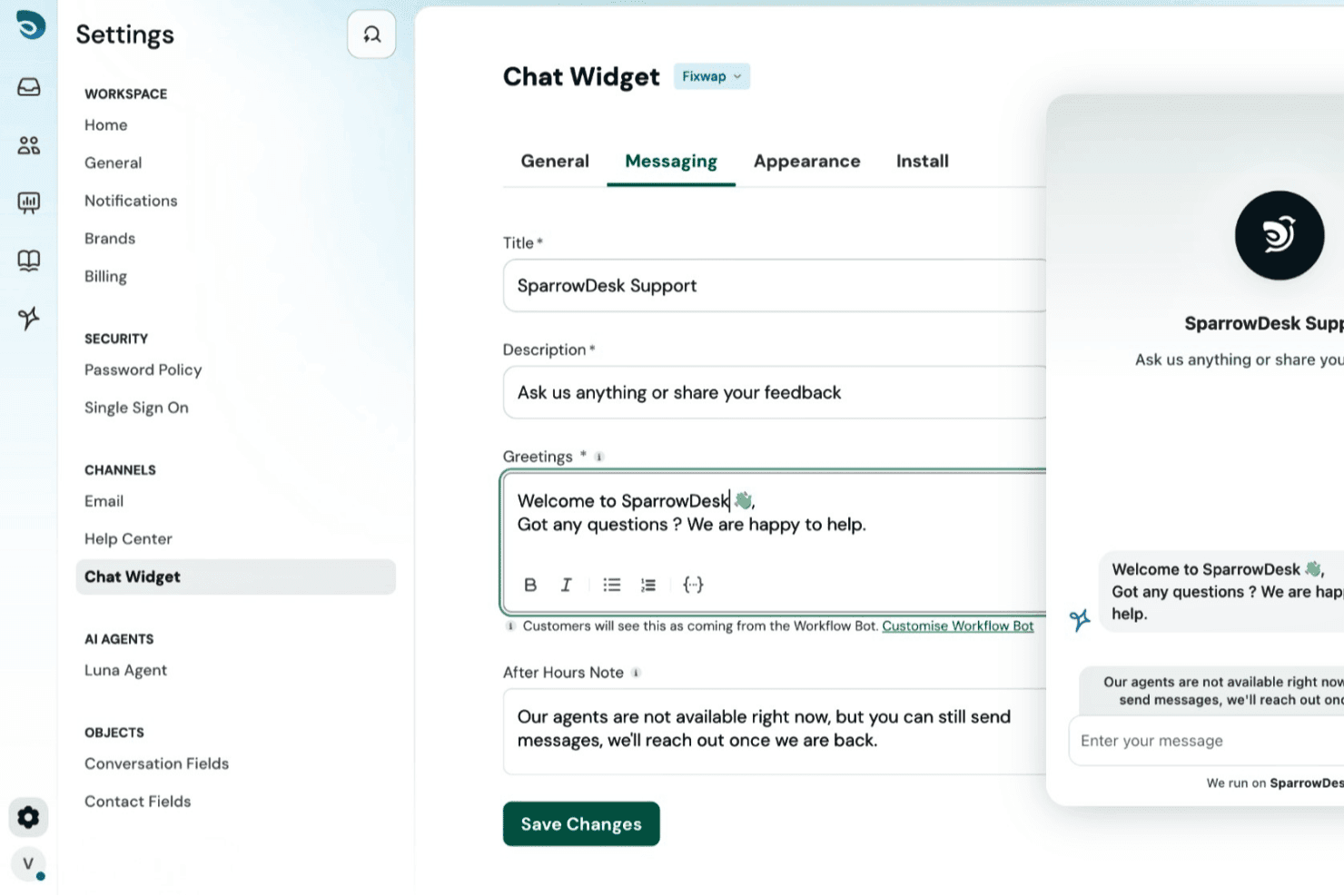
SparrowDesk offers a customizable chat widget with configurable title, description, greeting messages, and after-hours notes via its settings panel. SparrowDesk is an AI-first customer support platform built for teams that want to automate ticket resolution — not just triage it — combining an autonomous AI agent, omnichannel inbox, and built-in help center in one tool.
Who Is SparrowDesk Best For?
SparrowDesk suits startups and SMBs dealing with high ticket volume that want AI to handle routine queries before they ever reach a human agent.
Why SparrowDesk Is a Good Zendesk Alternative
I picked SparrowDesk as one of the best because of how fast Zoona, its AI agent, gets up to speed on your product. You train it by pointing it at your existing docs, PDFs, and past conversations, and it starts resolving tickets on its own, no scripting required. I appreciate that the same knowledge base that trains Zoona also powers a branded, searchable help center your customers can use directly.
SparrowDesk Key Features
- Omnichannel inbox: Manage email, live chat, and WhatsApp customer conversations in one streamlined interface.
- AI Copilot for agents: Get instant ticket summaries and suggested replies directly inside your help desk workflow.
- SLA management: Set custom service level agreements with proactive breach notifications to keep teams accountable.
- Customizable ticket views: Organize, filter, and prioritize support tickets using dynamic rules and team-based views.
SparrowDesk Integrations
SparrowDesk offers native integrations with Shopify, HubSpot, Linear, Slack, Salesforce, and WhatsApp. An API is available for custom integrations.
Pros and Cons
Pros:
- Built-in AI copilot speeds up agent responses
- Knowledge base doubles as AI training data
- Zoona AI resolves tickets without human input
Cons:
- Limited reporting depth for enterprise teams
- Smaller integration library
Learn more about SparrowDesk: Best for managing support channels from Gmail inbox
- 7-day free trial + free demo available
- From $25/user/month (billed annually)
Visit WebsiteCustomer Rating:4.7/5
Hiver provides customer support management directly integrated with Gmail. Hiver integrates directly with Gmail to manage customer support teams, making it ideal for handling queries within the Google Workspace environment without switching platforms.
Why it's a good Zendesk alternative: Hiver simplifies email management by integrating directly with Gmail, eliminating the need for a separate help desk system. This makes it a strong alternative to Zendesk for teams already using Google Workspace, as it reduces the learning curve and streamlines workflows.
Standout features & integrations:
Features include multi-channel support, email management, workflow automation, and analytics, enabling teams to collaborate, automate repetitive tasks, and monitor performance directly within the Gmail interface.
Integrations include Slack, WhatsApp, Aircall, Asana, Salesforce, QuickBooks, Jira, Zapier, Okta, and Google Workspace.
Pros and Cons
Pros:
- Comprehensive email management features
- Easy to use with minimal setup
- Direct integration with Gmail
Cons:
- Limited customization options compared to some competitors
- Limited to Google Workspace users
Learn more about Hiver: Best for Microsoft Teams integration
- Free plan + 21-day trial + demo available
- From $12/user/month (billed annually)
Visit WebsiteCustomer Rating:4.8/5
Desk365 provides a unified ticketing dashboard where agents can filter, prioritize, and track customer support tickets by priority, category, and status in real time. For businesses looking for an alternative to Zendesk, Desk365 presents itself as a compelling option with its AI-driven helpdesk capabilities. Tailored for organizations of all sizes, it addresses support challenges by automating routine tasks, offering a unified inbox for efficient ticket management, and enhancing customer interactions through customizable workflows.
Why I Picked Desk365
I picked Desk365 because of its unique integration with Microsoft Teams, which allows your team to handle support queries directly within a familiar platform. This feature, combined with its AI-powered ticketing system, ensures that your team can automate repetitive tasks and focus on more complex customer issues. Additionally, Desk365's unified inbox consolidates all support requests in one place, streamlining your team's workflow and ensuring no ticket is overlooked.
Desk365 Key Features
In addition to its standout Microsoft Teams integration, Desk365 offers other valuable features:
- AI Agent: This feature uses machine learning to assist in drafting responses and managing tickets efficiently.
- Automations: Automate repetitive tasks and workflows to save time and reduce manual errors.
- SLAs: Monitor and manage service level agreements to ensure your team meets performance standards.
- Knowledge Base: Create and manage a repository of information for self-service support.
Desk365 Integrations
Integrations include Microsoft Teams, Jira, Azure DevOps, Asana, MS Planner, Microsoft 365 Copilot, Power BI, and API support for custom integrations.
Pros and Cons
Pros:
- Integration with Microsoft Teams enhances collaboration
- AI-powered ticketing system automates repetitive tasks
- Unified inbox centralizes support requests for easy management
Cons:
- Multilingual options not clearly documented
- Limited mobile accessibility
Learn more about Desk365: Best for leading customer interactions
- Free plan + 14-day trial + demo available
- From $45/month
Visit WebsiteCustomer Rating:4.5/5
Crisp offers an all-in-one messaging platform with automation and real-time customer support capabilities. Crisp is an all-in-one business messaging platform tailored for startups to efficiently manage customer interactions by centralizing communication channels in one place.
Why it's a good Zendesk alternative: Crisp offers an advanced suite of tools that are particularly beneficial for startups. Its all-in-one messaging platform stands out by integrating multiple communication channels into a single interface, which simplifies customer relationship management. Additionally, Crisp provides seamless integrations with popular tools and offers a more personalized support experience, making it easier for team members to engage with their customers effectively.
Standout features & integrations:
Features include a shared inbox, chatbots, CRM, and co-browsing capabilities, allowing businesses to automate tasks and provide real-time customer assistance.
Integrations include Slack, WhatsApp, Instagram, Zapier, Aircall, Shopify, WordPress, Segment, Salesforce, and Pipedrive.
Pros and Cons
Pros:
- Affordable pricing for small teams
- Easy integration with multiple communication channels
- Comprehensive feature set for startups
Cons:
- May require some time to set up and customize
- Limited advanced features compared to larger platforms
Learn more about Crisp: Best for instant live chat support across platforms
- 14-day free trial + free demo available
- From $29/user/month
Visit WebsiteCustomer Rating:4.5/5
HappyFox offers an intuitive help desk software solution with effective ticketing and automation features. HappyFox is an advanced help desk and customer support software solution. It excels in providing instant live chat support across mobile, desktop, and web platforms for omnichannel support.
Why it's a good Zendesk alternative: HappyFox is known for its strong live chat capabilities, which are important for businesses requiring real-time customer interaction. Its multi-platform support ensures accessibility across devices, offering a versatile alternative to Zendesk. Additionally, HappyFox provides excellent customer support, ensuring that businesses receive the help they need to maximize the platform’s potential.
Standout features & integrations:
Features include a strong ticketing system, AI-driven support, end-to-end process automation, and instant live chat for enhanced customer engagement and support efficiency.
Integrations include Salesforce, Aircall, Microsoft Teams, Slack, Facebook, Jira, Okta, Azure, Asana, and HubSpot.
Pros and Cons
Pros:
- Multi-platform live chat support
- AI-driven support features
- Comprehensive ticketing system
Cons:
- Limited customization options
- Higher starting price compared to some competitors
Learn more about HappyFox: Best for centralized customer data
- Free demo available
- Pricing upon request
Visit WebsiteCustomer Rating:4.5/5
Kustomer offers advanced AI-driven CRM capabilities for optimized customer service management. Kustomer is a customer service CRM platform that uses AI to improve customer interactions and streamline support processes. This makes it ideal for businesses looking to efficiently manage customer service with AI capabilities.
Why it's a good Zendesk alternative: Kustomer offers users with strong AI capabilities that significantly improve customer service efficiency. It provides a single view of customer interactions across various channels, enabling support teams to resolve issues more efficiently. Additionally, Kustomer excels with its several automation and workflow customization options, making it ideal for businesses that need a more tailored support experience.
Standout features & integrations:
Features include AI chatbots, AI agent copilot, and a unified customer timeline for swift and precise issue resolution, offering comprehensive insights into customer interactions.
Integrations include Slack, Salesforce, Shopify, Magento, BigCommerce, Zapier, Mailchimp, Google Analytics, Facebook Messenger, and Instagram.
Pros and Cons
Pros:
- Proactive support capabilities
- Unified customer view
- AI-driven automation
Cons:
- Limited customization options
- Complex setup for small businesses
Learn more about Kustomer: Best for unlimited free users
- Free demo available
- From $75/user/month (billed annually)
Visit WebsiteCustomer Rating:4.5/5
The main dashboard of Issuetrak provides an overview of ongoing issues and tasks, helping users manage and track their projects efficiently. Issuetrak is a versatile platform designed to help your team manage and resolve issues efficiently. It offers tools for tracking tickets, managing workflows, and handling customer support requests.
Why it's a good Zendesk alternative: It supports omnichannel ticket submission, allowing for organized management of customer interactions across various platforms, which aids in the effectiveness of support teams. Automated ticket assignments and collaborative task flows are additional features that enhance process efficiency and improve response times. Unlike Zendesk, Issuetrak offers full feature access without tiered pricing, providing features such as unlimited free users and customizable branding without additional costs.
Standout features & integrations:
Features include a knowledge base, custom forms, user-defined fields, detailed reporting, task management, workflow branching, billing module, surveys module, issue escalation, priority management, SLA management, and email notifications.
Integrations include Microsoft 365, Google Analytics, Gmail, Salesforce, Power BI, and thousands more through Zapier. You can also access the Issuetrak API for even more connections.
Pros and Cons
Pros:
- Effective in organizing and managing tickets
- Cloud and on-premises deployment options
- Highly customizable system
Cons:
- Asset management is a paid add-on
- Certain features may be complex to set up
Learn more about Issuetrak:
Alte alternative la Zendesk
Mai jos este o listă cu alternative suplimentare la Zendesk pe care le-am selectat. Deși nu au ajuns în top 10, acestea sunt în continuare valoroase și merită cercetate mai aprofundat.
- 11HubSpot Service HubBest for scalable customer service tools
- 12ProProfsBest for training and customer support tools
- 13Jira Service ManagementBest for high-velocity service management
- 14eGainBest for knowledge management
- 15ServiceNow Customer Service ManagementBest for AI-driven proactive digital operations
- 16TrengoBest multichannel inbox
- 17SAAS FirstBest for AI-powered customer support
- 18LiveAgentBest for hybrid ticket streams
- 19TidioBest for contextual AI chatbot support
- 20Help ScoutBest for customer-first support
- 21NextivaBest for unified customer experience management
- 22IntercomBest for personalized customer messaging
- 23GrooveBest for small business support teams
- 24AttioBest for CRM and customer data management
- 25BoldDeskBest for customizable help desk solutions
Recenzii asociate despre software și instrumente
Dacă încă nu ați găsit aici ceea ce căutați, consultați aceste alte tipuri de instrumente pe care le-am testat și evaluat.
- Software de monitorizare a rețelei
- Software de monitorizare a serverelor
- Soluții SD-Wan
- Instrumente de monitorizare a infrastructurii
- Analizor de pachete
- Instrumente de monitorizare a aplicațiilor
How I Evaluate Zendesk Alternatives
I split my evaluation into core functionality every Zendesk alternative must offer—like multi-channel ticketing and SLA automation—and the differentiators that separate a good fit from the right one.
Core Functionality (Table Stakes For This List)
When I'm selecting tools for my list, I rank each one on a scale from 0 (does not offer the functionality) to 5 (excels in this area) for each core functionality listed below. Then, I calculate the tool's total score into a percentage. Each tool needs to achieve a minimum total score of 65% to be considered for inclusion.
- Ticket Management & Lifecycle Tracking: I look for full ticket lifecycle support—creation, assignment, threading, status tracking, and linking—so agents can handle scenarios like escalating a server outage from a single alert through to a post-incident review.
- Automation & Workflow Rules: Each tool should let you build routing rules, SLA triggers, and escalation paths. For example, auto-assigning high-priority infrastructure tickets to on-call engineers based on shift schedules and skill tags.
- Knowledge Base & Self-Service Portal: I evaluate whether the platform offers a searchable, agent- and end-user-facing knowledge base. Teams that deflect common requests like password resets or VPN setup through a self-service portal see meaningful ticket reduction.
- Multi-Channel Ticket Intake: I check how many channels feed into a unified agent workspace. A service desk that pulls in email, chat, web forms, and Slack messages—the way tools like Freshdesk and Jira Service Management handle it—keeps agents from toggling between platforms.
- Reporting & SLA Dashboards: Dashboards should cover ticket volume trends, agent workload, SLA compliance rates, and CSAT scores. I look for the ability to build custom reports, since IT leaders often need to present resolution metrics to stakeholders in a specific format.
- Integrations & API Access: The platform should connect natively with tools your team already uses, like Jira, Slack, PagerDuty, or monitoring systems. A well-documented REST API matters too, especially when you need to push ticket data into internal dashboards or trigger workflows from external events.
Once I have a list of tools that meet this criteria, I consider what sets each platform apart.
Differentiating Factors (What Sets Vendors Apart)
Here's how I compare and contrast different vendors:
Standout Features
ITIL-aligned workflows are a major differentiator for IT teams. I evaluate whether a platform supports incident, problem, and change management natively—not just basic ticketing with custom labels. AI capabilities also matter. Tools that offer agent-assist features like ticket summarization or suggested responses can cut resolution times during high-volume incidents. I also check whether a platform runs both an internal IT help desk and a customer-facing portal from one instance. Many tech teams support employees and external users, and managing two separate systems adds unnecessary overhead.
Beyond Features
Security and compliance certifications carry real weight here. I check for SOC 2 Type II, ISO 27001, and SSO/SAML support as a baseline—teams in regulated industries should also confirm HIPAA or FedRAMP readiness. Migration support is another factor I evaluate closely. Moving off Zendesk means preserving years of ticket history, macros, and user data, so I look for native migration tools or documented import paths. Pricing transparency matters too, especially since Zendesk's add-on model is a common reason teams start shopping for alternatives in the first place.
De ce să căutați o alternativă la Zendesk?
Deși Zendesk este un instrument valoros, este posibil să nu fie potrivit pentru echipa dumneavoastră. Există mai multe motive pentru care ați putea începe să căutați o alternativă la Zendesk, printre care:
- Cost: Prețurile Zendesk pot fi destul de ridicate, în special pentru companiile mici sau startupurile cu bugete limitate. Prin urmare, este posibil să căutați o alternativă mai accesibilă, care să ofere în continuare funcții solide de servicii pentru clienți.
- Complexitate: Zendesk poate fi copleșitor prin multitudinea de funcții oferite, care este posibil să nu fie necesare pentru toate echipele. Dacă echipa dumneavoastră are nevoie de o platformă mai simplă și mai intuitivă, o alternativă mai puțin complexă ar putea fi mai potrivită.
- Personalizare: Deși Zendesk oferă opțiuni de personalizare, acestea pot să nu fie suficiente pentru toate nevoile unei companii. Dacă aveți nevoie de mai multă flexibilitate pentru a adapta platforma la procesele unice ale companiei dumneavoastră, ați putea căuta o soluție mai personalizabilă.
- Integrare: Este posibil ca Zendesk să nu se integreze perfect cu unele dintre celelalte instrumente și programe software pe care se bazează compania dumneavoastră. Dacă o integrare mai fluidă cu fluxul de lucru existent este esențială, poate fi necesar să luați în considerare alternative care oferă o compatibilitate mai bună.
- Asistență: Unii utilizatori consideră că serviciul de asistență pentru clienți al Zendesk poate fi uneori lent sau impersonal. Dacă acordați prioritate unei asistențe mai prompte sau personalizate, poate doriți să explorați alte opțiuni care oferă un nivel mai ridicat de atenție acordată clienților.
Alternativele la Zendesk pot oferi prețuri mai accesibile, interfețe mai simple, posibilități mai ample de personalizare, capacități mai bune de integrare și asistență mai promptă, abordând unele dintre limitările cu care v-ați putea confrunta în cazul Zendesk. Aceste alternative se pot alinia mai bine nevoilor și preferințelor dumneavoastră specifice.
Funcțiile principale ale alternativelor la Zendesk
Iată câteva funcții principale ale Zendesk pe care software-ul alternativ ar trebui să le poată reproduce sau îmbunătăți pentru a fi o alegere potrivită.
- Sistem de gestionare a tichetelor: Gestionează solicitările clienților, transformându-le în tichete pentru eficientizarea asistenței.
- Asistență pe mai multe canale: Integrează e-mailul, rețelele sociale, telefonul și widgeturile web pentru interacțiuni fără întreruperi cu clienții.
- Portal de autoservire și/sau bază de cunoștințe: Le permite clienților să găsească singuri răspunsuri prin articole, ghiduri și întrebări frecvente.
- Chat și mesagerie live: Oferă asistență prin chat în timp real și se integrează cu aplicații de mesagerie precum Facebook Messenger și WhatsApp, pentru o utilizare facilă.
- Analiză și raportare: Oferă tablouri de bord pentru monitorizarea performanței și instrumente de analiză pentru măsurarea satisfacției clienților și a eficienței asistenței.
- Automatizare și fluxuri de lucru: Automatizează crearea și direcționarea tichetelor și permite utilizarea unor fluxuri de lucru personalizate pentru îmbunătățirea eficienței.
- Personalizare și integrări: Oferă compatibilitate cu aplicații terțe și integrări personalizate pentru adaptarea platformei la nevoile specifice ale companiei.
- Chatboți bazați pe inteligență artificială: Implementează roboți inteligenți pentru a gestiona solicitările obișnuite ale clienților și pentru a oferi răspunsuri instantanee.
- Instrumente de colaborare: Facilitează colaborarea internă prin vizualizări partajate, macrocomenzi și comentarii private ale agenților de asistență.
- Securitate și confidențialitate: Asigură protecția datelor și conformitatea cu standardele din industrie prin funcții de securitate avansate.