

Cele mai bune soluții de gestionare a accesului privilegiat ajută echipele să controleze permisiunile administrative, să reducă riscurile accesului neautorizat și să protejeze sistemele sensibile împotriva amenințărilor interne și externe. Aceste instrumente facilitează aplicarea politicilor privind privilegiile minime, monitorizarea activităților cu risc ridicat și securizarea acreditărilor în medii distribuite.
Atunci când configurările greșite expun sisteme critice, procesele manuale de aprobare încetinesc activitățile urgente sau conturile privilegiate nu sunt monitorizate, organizațiile se confruntă cu lacune de securitate mai mari și cu riscuri operaționale sporite. Aceste probleme îngreunează menținerea vizibilității de către echipele de securitate și IT, desfășurarea auditurilor și răspunsul rapid la comportamente suspecte.
Având peste 20 de ani de experiență în industrie ca director tehnologic, am testat și evaluat zeci de soluții de gestionare a accesului privilegiat în medii reale, pentru a le analiza controalele de securitate, funcțiile de audit și calitatea integrărilor. Acest ghid evidențiază cele mai bune soluții de gestionare a accesului privilegiat. Fiecare recenzie acoperă funcțiile, avantajele și dezavantajele, precum și cazurile de utilizare ideale, pentru a vă ajuta să alegeți instrumentul potrivit.
Why Trust Our Software Recommendations
6,700+
Reviews
20
Industry experts
16+
Evaluation factors
14
Years
Our team has been testing and reviewing software since 2012. As tech leaders ourselves, we know how difficult—and important—it is to choose the right software.
For this guide, we evaluated tools using hands-on testing and independent research, scoring tools using our selection criteria.
Our reviews reflect our human editorial judgment, not a sales pitch.
Expert reviewers:
- Paulo Gardini MiguelTech Director
 Tim FisherVP of AI
 Gabriel RosasTech Lead & Software Architect
 Christhian GruhnTech Lead & Platform Architect

Tabel comparativ: soluții de gestionare a accesului privilegiat
Acest tabel comparativ rezumă detaliile privind prețurile pentru selecțiile mele cu cele mai bune soluții de gestionare a accesului privilegiat.
Sorted by: Default
| Tool | Starting Price | Website | |
|---|---|---|---|
Best with built-in dark web breach monitoring | 4.8 out of 5 | Pricing upon request 14-day free trial | Website |
Best for smart privilege elevation | Not rated | Pricing upon request Free trial + free demo available | Website |
Best for secure password vault | 4.7 out of 5 | $3.33/month Free trial + demo available | Website |
Best for compliance with data regulations | 4.6 out of 5 | Pricing upon request Free trial + free demo available | Website |
Best for enterprise-level integration | 4.5 out of 5 | Pricing upon request Free demo available | Website |
Best for agentless PAM approach | 4.5 out of 5 | $2/user/month 30-day free trial | Website |
Best for privileged access without blind spots | 4.9 out of 5 | $3/user/month 30-day free trial | Website |
Best for small to medium businesses | 4.2 out of 5 | Pricing upon request Free demo available | Website |
Best for scalability across industries | Not rated | Pricing upon request | Website |
Best for seamless third-party integrations | Not rated | $35/month Free trial available | Website |


Recenzii ale celor mai bune soluții de gestionare a accesului privilegiat
Mai jos sunt rezumatele mele detaliate ale celor mai bune soluții de gestionare a accesului privilegiat care au ajuns pe lista mea scurtă. Recenziile mele oferă o analiză detaliată a funcțiilor principale, avantajelor și dezavantajelor, integrărilor și cazurilor de utilizare ideale pentru fiecare instrument, pentru a vă ajuta să îl găsiți pe cel mai potrivit pentru dumneavoastră.
 Best with built-in dark web breach monitoring
- 14-day free trial
- Pricing upon request
Visit WebsiteCustomer Rating:4.8/5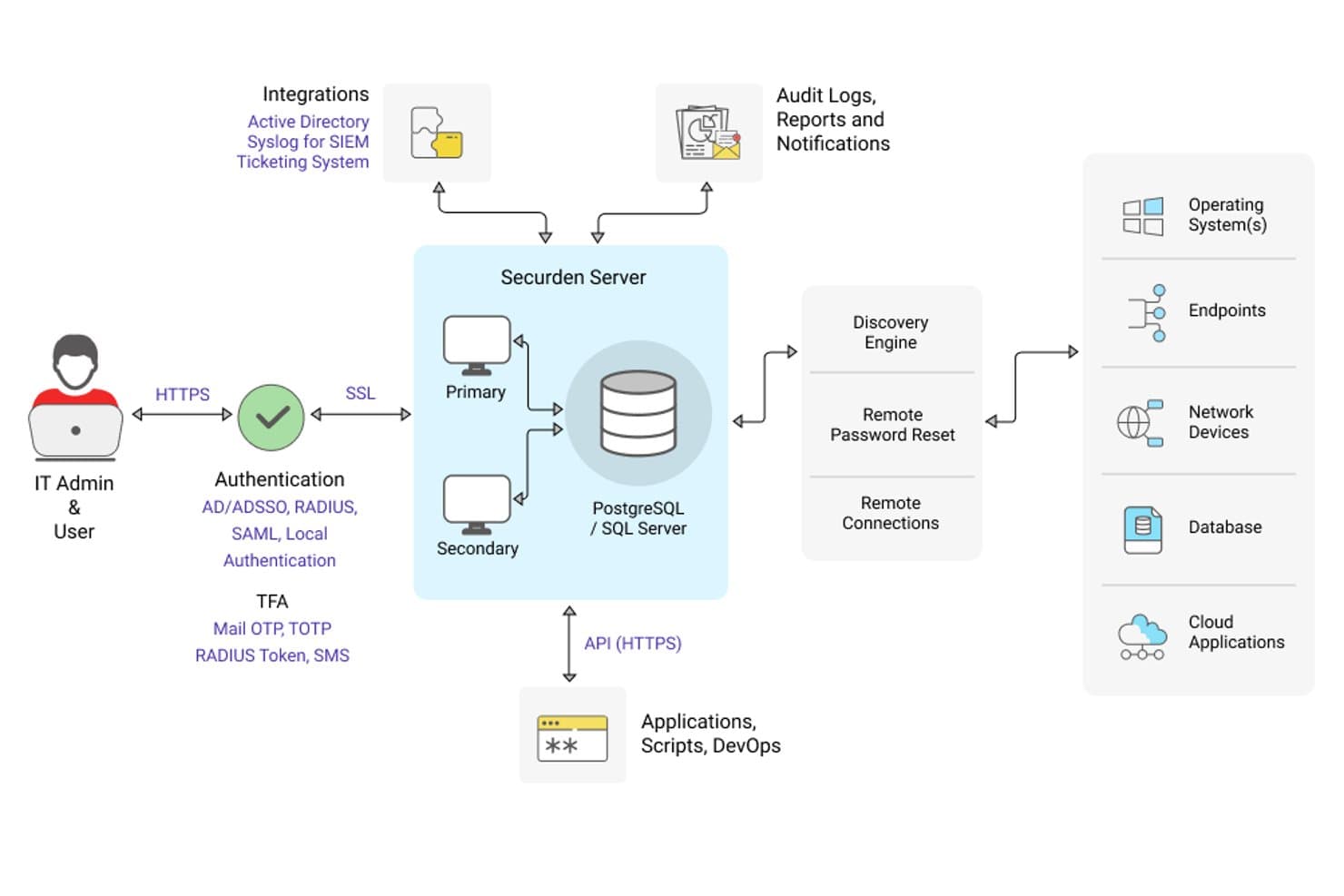
Securden Unified PAM offers a comprehensive architecture diagram showing server components, authentication methods, integrations, and target system connections. Securden Unified PAM is a privileged access management platform that combines credential vaulting, session monitoring, endpoint privilege control, and just-in-time access management across on-prem, cloud, and hybrid environments.
Who Is Securden Unified PAM Best For?
IT security and compliance teams that need a full PAM stack without the complexity or cost of legacy enterprise vendors.
Why I Picked Securden Unified PAM
I picked Securden Unified PAM as one of the best because of its built-in dark web breach monitoring, which flags compromised credentials stored in the vault before attackers can exploit them. Unlike tools that need third-party add-ons for breach intelligence, Securden checks partial password hashes against breached databases and fires instant alerts. I also like how this pairs with automated password rotation, so a flagged credential gets cycled out immediately rather than just flagged and forgotten.
Securden Unified PAM Key Features
- Automated privileged account discovery: Scans endpoints, servers, databases, and cloud platforms to identify and onboard privileged accounts.
- Endpoint privilege management: Removes local admin rights with policy-based elevation for approved applications and tasks.
- Built-in compliance reporting: Generates audit-ready reports mapped to major regulations like HIPAA, PCI DSS, and NIST frameworks.
- SIEM and ITSM integration: Connects with solutions like IBM QRadar and ServiceNow for centralized monitoring and workflow automation.
Securden Unified PAM Integrations
Securden Unified PAM offers native integrations with ServiceNow, IBM QRadar, AWS, Google Cloud Platform, Microsoft Entra ID, Okta, OneLogin, Duo, YubiKey, RADIUS, and Freshservice, and provides an API for custom integrations.
Pros and Cons
Pros:
- Endpoint privilege management included natively
- Covers on-prem, cloud, and hybrid deployments
- Built-in dark web breach monitoring included
Cons:
- Advanced reporting requires significant manual customization
- UI feels dated compared to competitors
Learn more about Securden Unified PAM: Best for smart privilege elevation
- Free trial + free demo available
- Pricing upon request

Heimdal dashboard showing centralized monitoring of privileged activity, access controls, and threat insights. In the realm of privileged access management solutions, Heimdal stands out by addressing the unique security challenges faced by various industries, including healthcare, government, and education. Designed for organizations that prioritize compliance and data governance, it offers a robust framework for managing access to sensitive accounts and systems. By eliminating shared admin passwords and blocking unauthorized software installs, Heimdal provides your team with the tools needed to maintain a secure and compliant IT environment.
Why I Picked Heimdal
I picked Heimdal for its innovative approach to privileged access management, specifically its Smart Privilege Elevation and Delegation Management feature. This tool automates admin requests, allowing you to grant temporary admin rights that automatically expire, reducing the risk of privilege creep. Additionally, Heimdal's Application Control with AppFencing blocks unauthorized software installations, ensuring only approved applications run on your network. These features collectively help your organization maintain security without compromising on efficiency.
Heimdal Key Features
In addition to its standout privilege management tools, I also found several other features that enhance its value:
- Privileged Account & Session Management: This feature records and audits all privileged sessions, providing a clear trail for compliance and security audits.
- Just-in-Time Access: Offers temporary access to critical systems only when necessary, reducing the risk of privilege abuse.
- Mobile Approvals: Allows administrators to approve requests on the go, ensuring that your team maintains control over access even when they're away from their desks.
- Instant Compliance Reporting: Generates detailed reports to help your organization meet various regulatory standards, such as ISO 27001 and HIPAA.
Heimdal Integrations
Integrations include ConnectWise RMM, Autotask PSA, and other third-party cybersecurity tools. Additionally, Heimdal offers an API for custom integrations, allowing you to tailor the solution to fit your specific needs.
Pros and Cons
Pros:
- Comprehensive session monitoring logs
- Smart privilege elevation automation
- Granular role-based access controls
Cons:
- Pricing not publicly disclosed
- Interface may feel complex
Learn more about Heimdal: Best for secure password vault
- Free trial + demo available
- From $3.33/month (billed annually)
Visit WebsiteCustomer Rating:4.7/5
With Keeper Security you can secure file and password sharing. Keeper Security is a password management and privileged access management solution designed for businesses and individuals. It focuses on securing passwords and sensitive data, providing features that enhance security and compliance.
Why I picked Keeper Security: Its secure password vault differentiates Keeper Security from other solutions. The platform uses zero-trust and zero-knowledge architecture, ensuring end-to-end encryption for user data. Features like password sharing and secrets management enhance security for your team. Keeper Security is FedRAMP authorized, meeting stringent government standards, making it ideal for high-security environments.
Standout features & integrations:
Features include password sharing, secrets management, and secure file sharing. Your team can benefit from passwordless authentication, reducing the risk of breaches. Keeper Security also offers compliance with certifications like HIPAA, GDPR, and PCI DSS.
Integrations include Microsoft Azure, Active Directory, LDAP, SSO, SAML, Google Workspace, Okta, Duo Security, Slack, and Splunk.
Pros and Cons
Pros:
- Passwordless authentication
- FedRAMP authorized
- Zero-knowledge architecture
Cons:
- Limited customization options
- May be complex for small teams
Learn more about Keeper Security: Best for compliance with data regulations
- Free trial + free demo available
- Pricing upon request
Visit WebsiteCustomer Rating:4.6/5
This is CyberArk's view of its identity security intelligence. Cyberark is a leading provider of identity security and privileged access management solutions, serving industries like banking, healthcare, and government. It focuses on securing privileged access and enhancing security through features like single sign-on and multi-factor authentication.
Why I picked Cyberark: It excels in compliance with data regulations, making it a top choice for regulated industries. Cyberark's Identity Security Platform offers intelligent privilege controls and secrets management to meet stringent compliance requirements. It provides robust security measures without compromising productivity. The platform's emphasis on compliance ensures your team can meet regulatory standards effectively.
Standout features & integrations:
Features include single sign-on, multi-factor authentication, and secrets management. Your team can benefit from endpoint identity security to protect devices. Cyberark also offers machine identity security to safeguard automated processes.
Integrations include Splunk, ServiceNow, SailPoint, Okta, Microsoft Azure, AWS, Google Cloud, SAP, Oracle, and IBM.
Pros and Cons
Pros:
- Extensive industry coverage
- Machine identity security
- Strong compliance support
Cons:
- Requires technical expertise
- High resource requirements
Learn more about Cyberark: Best for enterprise-level integration
- Free demo available
- Pricing upon request
Visit WebsiteCustomer Rating:4.5/5
Here is a view of BeyondTrust's PRA real-time dashboard. BeyondTrust is a privileged access management solution tailored for large enterprises. It focuses on securing and managing access across complex IT environments, providing tools that enhance control and compliance.
Why I picked BeyondTrust: It excels in enterprise-level integration, making it ideal for large organizations with diverse systems. Features like session monitoring and real-time threat analytics help you maintain oversight and security. BeyondTrust's ability to integrate with various enterprise systems ensures smooth operations. The tool offers granular access controls, enhancing security for your team.
Standout features & integrations:
Features include session monitoring, real-time threat analytics, and granular access controls. Your team can use vulnerability management to identify and address potential risks. BeyondTrust also provides detailed audit trails for compliance purposes.
Integrations include Microsoft Active Directory, LDAP, ServiceNow, Splunk, SailPoint, CyberArk, Okta, Duo Security, RSA, and Google Workspace.
Pros and Cons
Pros:
- Strong enterprise-level integration
- Real-time threat analytics
- Detailed audit trails
Cons:
- Complex for small businesses
- Initial setup can be time-consuming
Learn more about BeyondTrust: Best for agentless PAM approach
- 30-day free trial
- From $2/user/month
Visit WebsiteCustomer Rating:4.5/5
miniOrange PAM dashboard showing real-time session overview, user counts, and privileged resource activity from a centralized admin console. miniOrange PAM is a modern, identity-first privileged access management solution built for organizations that require strong privileged security controls. It is well-suited for regulated industries such as finance, healthcare, manufacturing, and government, where protecting sensitive data and meeting compliance requirements are essential. With capabilities like password vaulting, session monitoring, and just-in-time access, miniOrange PAM helps reduce risk and protect privileged accounts from evolving cyber threats.
Why I Picked miniOrange PAM
I picked miniOrange PAM because it offers modern, mature PAM capabilities with a strong identity-first foundation. It is a cloud-first solution that also supports on-premises and hybrid environments, giving you flexibility across infrastructure models. I value its advanced features such as just-in-time access management, privileged session monitoring and recording, granular access controls, password vaulting, and automated credential rotation. These capabilities support real-time auditing of privileged activity and allow temporary elevation of privileges based on verified needs, aligning with the principle of least privilege. Its agentless PAM architecture also makes deployment simpler and more scalable, which can be especially helpful if you want to strengthen privileged security without managing endpoint agents.
miniOrange PAM Key Features
In addition to its robust privileged access management capabilities, I also found several key features that enhance its value:
- Session Monitoring and Control: Provides real-time tracking and recording of privileged sessions, allowing intervention if unauthorized or risky activity is detected.
- Strong Identity-Based Authentication: Enforces access using native SSO and identity-level MFA, incorporating device trust, location, and risk signals to strengthen verification.
- Just-In-Time Privileged Access and EPM: Grants time-bound privileged access through approval workflows and automatically revokes rights after expiration, while Endpoint Privilege Management removes unnecessary admin rights and enforces least privilege on endpoints.
- AI-Driven Threat Detection: Uses anomaly detection, automated responses, and continuous learning to identify suspicious behaviour and improve privileged account protection.
miniOrange PAM Integrations
Integrations include Salesforce, Google Workspace, Microsoft 365, AWS, Azure, Slack, Jira, ServiceNow, Zoom, Dropbox, SSH, RDP, and VPN and VDI solutions. An API is also available to support custom integrations.
Pros and Cons
Pros:
- Solid endpoint privilege management
- Agentless PAM simplifies deployment
- Cloud-first and hybrid flexibility
Cons:
- Legacy migrations may need planning
- Complex setups may need specialists
Learn more about miniOrange: Best for privileged access without blind spots
- 30-day free trial
- From $3/user/month (billed annually)
Visit WebsiteCustomer Rating:4.9/5
Zygon’s app inventory dashboard showing approved apps, access sources, contract types, and renewal timelines. Zygon is a modern identity governance platform that helps IT and security teams control user identities, manage access, and detect shadow IT. It combines identity lifecycle management, access reviews, and governance workflows to strengthen security across SaaS environments.
Why I picked Zygon: I picked Zygon because it gives you fast, automated visibility into all apps and user identities, which is crucial for reducing access sprawl. You can build a consolidated inventory of cloud accounts quickly, even across shadow IT, helping you secure privileged access without blind spots. Zygon also automates deprovisioning, access reviews, and compliance workflows, making it a solid option for teams aiming to save time while staying audit-ready.
Standout features & integrations:
Features include a real-time cloud identity inventory, agentless and SCIM-less deprovisioning, and bulk access reviews. Zygon also offers a browser extension for managing apps without API connections and an Auto-Provisioning Atlas to track authentication methods.
Integrations include Google Workspace, Microsoft 365, Entra ID, Okta, n8n, Make, Slack, and Microsoft Teams.
Pros and Cons
Pros:
- Bulk access reviews
- Browser extension for non-API apps
- Agentless and SCIM-less deprovisioning
Cons:
- Smaller integration library
- Limited advanced reporting
Learn more about Zygon: Best for small to medium businesses
- Free demo available
- Pricing upon request
Visit WebsiteCustomer Rating:4.2/5
Here is a screenshot of ManageEngine PAM360's password dashboard. ManageEngine PAM360 is a privileged access management solution designed for small to medium-sized businesses. It provides centralized control over IT infrastructure, helping manage and secure privileged accounts effectively.
Why I picked ManageEngine PAM360: Its suitability for small to medium businesses sets it apart. The tool offers comprehensive password management and session monitoring, making it accessible for teams with limited IT resources. It also provides automated compliance reporting to keep your business aligned with regulations. The intuitive dashboard simplifies management, allowing your team to focus on core tasks without getting bogged down in complex processes.
Standout features & integrations:
Features include automated compliance reporting, session monitoring, and an intuitive dashboard. Your team can benefit from real-time alerts to identify potential security threats. ManageEngine PAM360 also offers audit trails to track user activities and ensure accountability.
Integrations include Microsoft Active Directory, LDAP, ServiceNow, Jira, Azure, AWS, Google Cloud, Oracle, VMware, and SAP.
Pros and Cons
Pros:
- Intuitive user interface
- Automated compliance reporting
- Suitable for small businesses
Cons:
- Limited advanced features
- Basic reporting capabilities
Learn more about ManageEngine PAM360:

This is a view of Broadcom's software for Symantec privileged access management (pam) overview. Broadcom is a privileged access management solution catering to enterprises across various industries. It focuses on providing scalable security solutions to manage and protect privileged accounts effectively.
Why I picked Broadcom: Its scalability across industries makes it versatile for different enterprise environments. Broadcom offers centralized policy management and access controls, ensuring consistent security measures. It provides automated threat detection to identify and respond to potential risks. The platform's flexibility allows it to adapt to your organization's specific needs, making it suitable for diverse operational requirements.
Standout features & integrations:
Features include centralized policy management, automated threat detection, and flexible access controls. Your team can use detailed audit logs to track user activities. Broadcom also offers real-time analytics to monitor security events.
Integrations include Microsoft Active Directory, LDAP, ServiceNow, SAP, Oracle, IBM, AWS, Azure, Google Cloud, and Splunk.
Pros and Cons
Pros:
- Centralized policy management
- Automated threat detection
- Flexible access controls
Cons:
- Complex initial setup
- Ongoing maintenance needed
Learn more about Broadcom:

Auth0 offers simple tools to manage user identities and admin tasks. Auth0 is an identity management platform aimed at developers and IT teams. It provides authentication and authorization services, helping businesses secure user access and manage identities efficiently.
Why I picked Auth0: It excels in seamless third-party integrations, making it versatile for various applications. Auth0's extensive integration options allow your team to connect with existing systems effortlessly. The platform supports multiple authentication methods, enhancing security without complicating the user experience. Its comprehensive API support ensures flexibility, allowing you to tailor the solution to your specific needs.
Standout features & integrations:
Features include multiple authentication methods, comprehensive API support, and customizable login screens. Your team can benefit from real-time security monitoring to detect potential threats. Auth0 also provides detailed analytics to track user activity and improve security measures.
Integrations include Microsoft Azure, AWS, Google Cloud Platform, Salesforce, Slack, Twilio, Zendesk, GitHub, Zoom, and Dropbox.
Pros and Cons
Pros:
- Extensive third-party integrations
- Multiple authentication methods
- Comprehensive API support
Cons:
- Can be resource-intensive
- May have a steep learning curve
Learn more about Auth0:
Alte soluții de gestionare a accesului privilegiat
- 11SailPointBest for identity governance
- 12One IdentityBest for cloud-based solutions
- 13WallixBest for managing remote access
- 14CakewalkBest for user-friendly interface
- 15Rippling ITBest for automated app provisioning
- 16JumpCloudBest for comprehensive device management across different operating systems
- 17OktaBest for identity management in large organizations
- 18WorkatoBest for workflow automation
- 19DelineaBest for efficient privilege management
- 20Microsoft Entra Verified IDBest for verifying digital identities
- 21StrongDMBest for privileged session management
- 22SilverfortBest for adaptive multi-factor authentication
- 23DuoBest for user-friendly two-factor authentication
- 24SafeNet Trusted AccessBest for managing remote access
- 25NokiaBest for large-scale network environments
- 26IBM Security Verify PrivilegeBest for hybrid cloud integration
- 27Azure AD (Microsoft Entra ID)Best for seamless integration with Microsoft services
- 28EkranBest for insider threat detection
- 29IdencyBest for on-premise deployments
- 30PrivXBest for cloud-native environments
How I Evaluate Privileged Access Management Solutions
I split my evaluation into two layers: the baseline requirements—credential vaulting, session recording, and JIT access—a tool must meet, and the differentiators that set the best tools apart.
Core Functionality (Table Stakes For This List)
When I'm selecting tools for my list, I rank each one on a scale from 0 (does not offer the functionality) to 5 (excels in this area) for each core functionality listed below. Then, I calculate the tool's total score into a percentage. Each tool needs to achieve a minimum total score of 65% to be considered for inclusion.
- Privileged Credential Vaulting: I check whether the vault handles automated rotation for passwords, SSH keys, and API tokens—not just stores them—across platforms like Active Directory, Linux servers, and databases.
- Session Management & Monitoring: Real-time session recording and live monitoring matter here, especially the ability to terminate a suspicious RDP or SSH session mid-stream before damage is done.
- Least-Privilege & JIT Access: I evaluate how each tool handles time-bound privilege elevation, like granting a DBA temporary access to a production database through an approval workflow rather than standing permissions.
- Multi-Factor Authentication: Each tool should integrate with major identity providers for MFA at the point of privileged access, not just at initial login, including step-up authentication for sensitive actions.
- Audit Logging & Compliance Reporting: I look for tamper-proof audit trails paired with prebuilt report templates mapped to frameworks like SOX, PCI-DSS, and HIPAA that compliance teams can pull without custom queries.
- Privileged Account Discovery: Automated scanning across endpoints, cloud environments, and directories is what I evaluate here—tools should find orphaned and unmanaged accounts, not rely on manual entry alone.
Once I have a list of tools that meet this criteria, I consider what sets each platform apart.
Differentiating Factors (What Sets Vendors Apart)
Here's how I compare and contrast different vendors:
Standout Features
Secrets management for DevOps is a key differentiator—I look for tools that inject credentials into CI/CD pipelines and Kubernetes without hardcoding them in scripts. Endpoint privilege management matters too, especially for teams that need to strip local admin rights while still letting users elevate permissions for approved tasks. Remote vendor access is another factor I evaluate, since granting a contractor temporary, audited access without a VPN or shared credentials is a common need across IT teams.
Beyond Features
Integration ecosystem is a big one—I check whether a tool connects natively with your SIEM (Splunk, Sentinel) and ITSM platforms like ServiceNow so alerts flow into existing incident workflows. Compliance certifications also carry weight; SOC 2 Type II and FedRAMP authorization signal that a vendor meets strict audit standards your compliance team will ask about. Deployment model matters too, since some organizations require self-hosted or air-gapped options while others prefer SaaS for faster rollouts.
Cum să alegeți o soluție de gestionare a accesului privilegiat
Este ușor să vă pierdeți în liste lungi de funcții și structuri complexe de prețuri. Pentru a vă ajuta să rămâneți concentrați în timp ce parcurgeți procesul unic de selectare a software-ului, iată o listă de factori de care trebuie să țineți cont:
| Factor | Ce trebuie luat în considerare |
| Scalabilitate | Asigurați-vă că soluția poate crește odată cu organizația dumneavoastră. Verificați dacă poate gestiona un număr mai mare de utilizatori și date fără pierderi de performanță. |
| Integrări | Verificați dacă se integrează cu sistemele existente, precum Active Directory, serviciile cloud și alte software-uri de furnizare a utilizatorilor folosite de echipa dumneavoastră. |
| Posibilități de personalizare | Căutați opțiuni pentru adaptarea soluției la fluxurile de lucru și politicile de securitate specifice. |
| Ușurință în utilizare | Evaluați dacă interfața este intuitivă pentru echipa dumneavoastră, reducând la minimum timpul de instruire și erorile utilizatorilor. |
| Buget | Evaluați dacă prețul se încadrează în limitele dumneavoastră financiare, inclusiv eventualele costuri ascunse pentru module suplimentare sau upgrade-uri. |
| Măsuri de protecție a securității | Verificați dacă soluția oferă gestionarea robustă a criptării (software PKI), autentificare multifactor și conformitate cu standarde precum GDPR. |
| Servicii de asistență | Luați în considerare disponibilitatea asistenței pentru clienți, inclusiv prin chat live, telefon și e-mail, pentru a primi ajutor atunci când apar probleme. |
| Monitorizarea performanței | Asigurați-vă că instrumentul oferă informații în timp real despre performanța sistemului și activitățile utilizatorilor, pentru a soluționa rapid problemele potențiale. |
Tendințe în soluțiile de gestionare a accesului privilegiat
În cadrul cercetării mele, am consultat nenumărate actualizări de produse, comunicate de presă și jurnale de lansare de la diferiți furnizori de soluții de gestionare a accesului privilegiat. Iată câteva dintre tendințele emergente pe care le urmăresc:
- Arhitectură Zero Trust: Tot mai mulți furnizori adoptă modele Zero Trust, care pornesc de la presupunerea că amenințările pot fi atât externe, cât și interne. Această abordare necesită verificarea continuă a utilizatorilor și dispozitivelor, sporind securitatea. Soluții precum CyberArk au integrat această abordare în ofertele lor.
- Analiza comportamentală: Furnizorii integrează analiza comportamentală pentru a monitoriza acțiunile utilizatorilor și a detecta anomalii. Aceasta ajută la identificarea timpurie a activităților suspecte. De exemplu, Ekran utilizează analiza comportamentală pentru a îmbunătăți monitorizarea securității.
- Soluții native pentru cloud: Se observă o orientare către arhitecturi native pentru cloud, care oferă flexibilitate și scalabilitate. Aceste soluții sunt concepute să funcționeze fără probleme în mediile cloud, așa cum se întâmplă în cazul furnizorilor precum PrivX.
- Autentificarea fără parolă: Trecerea la metode de autentificare fără parolă câștigă teren. Această tendință reduce riscul furtului de acreditări și îmbunătățește experiența utilizatorilor. Furnizori precum BeyondTrust explorează opțiuni fără parolă în soluțiile lor.
- Gestionarea unificată a punctelor finale: Furnizorii se concentrează pe gestionarea tuturor punctelor finale printr-o singură platformă, ceea ce simplifică gestionarea securității. Această tendință este evidentă în cele mai bune soluții software pentru portaluri care oferă control și monitorizare centralizate, precum cele furnizate de One Identity.
Ce sunt soluțiile de gestionare a accesului privilegiat?
Soluțiile de gestionare a accesului privilegiat securizează și gestionează conturile privilegiate din cadrul unei organizații. Administratorii IT, profesioniștii în securitate și responsabilii de conformitate utilizează de obicei aceste instrumente pentru a proteja informațiile sensibile și a menține conformitatea cu reglementările.
Funcții precum arhitectura Zero Trust, analiza comportamentală și autentificarea fără parolă contribuie la securizarea accesului, detectarea anomaliilor și îmbunătățirea experienței utilizatorilor. În general, aceste instrumente asigură accesul doar al utilizatorilor autorizați la sistemele critice, reducând riscul breșelor de securitate a datelor.
Funcțiile soluțiilor de gestionare a accesului privilegiat
Atunci când selectați soluții de gestionare a accesului privilegiat, urmăriți următoarele funcții esențiale:
- Arhitectură Zero Trust: Necesită verificarea continuă a utilizatorilor și dispozitivelor, sporind securitatea prin presupunerea că amenințările pot fi atât externe, cât și interne.
- Analiză comportamentală: Monitorizează acțiunile utilizatorilor pentru a detecta anomalii, ajutând la identificarea timpurie a activităților suspecte.
- Autentificare fără parolă: Reduce riscul furtului de acreditări și îmbunătățește experiența utilizatorilor, eliminând necesitatea parolelor.
- Controale de acces bazate pe roluri: Asigură nivelurile de acces corespunzătoare pentru utilizatori, îmbunătățind securitatea și conformitatea.
- Raportare automată privind conformitatea: Simplifică procesul de generare a rapoartelor pentru a asigura respectarea standardelor de reglementare de către organizația dumneavoastră.
- Monitorizarea sesiunilor: Urmărește sesiunile utilizatorilor în timp real pentru a menține supravegherea și a detecta activitățile neautorizate.
- Arhitectură nativă pentru cloud: Oferă flexibilitate și scalabilitate, fiind ideală pentru mediile care se bazează pe servicii cloud.
- Gestionarea unificată a punctelor finale: Oferă control și monitorizare centralizate pentru toate punctele finale, simplificând gestionarea securității.
- Certificarea accesului: Revizuiește și certifică periodic drepturile de acces pentru a menține securitatea și conformitatea.
- Detectarea amenințărilor în timp real: Identifică potențialele amenințări de securitate pe măsură ce apar, permițând un răspuns și măsuri de remediere rapide.
Beneficiile soluțiilor de gestionare a accesului privilegiat
Implementarea soluțiilor de gestionare a accesului privilegiat oferă mai multe beneficii pentru echipa și compania dumneavoastră. Iată câteva dintre acestea:
- Securitate îmbunătățită: Prin utilizarea arhitecturii Zero Trust și a analizei comportamentale, aceste instrumente reduc riscul accesului neautorizat și al breșelor de securitate a datelor.
- Conformitate cu reglementările: Raportarea automată privind conformitatea și certificarea accesului contribuie la asigurarea respectării standardelor și reglementărilor din domeniu de către organizația dumneavoastră.
- Experiență îmbunătățită a utilizatorilor: Autentificarea fără parolă și controalele de acces bazate pe roluri facilitează accesul utilizatorilor la sistemele de care au nevoie, fără a compromite securitatea.
- Eficiență operațională: Furnizarea automată a accesului și monitorizarea sesiunilor simplifică procesele, reducând volumul de muncă al echipelor IT și menținând în același timp supravegherea.
- Scalabilitate: Arhitecturile native pentru cloud și gestionarea unificată a punctelor finale permit dezvoltarea organizației fără a sacrifica securitatea sau performanța.
- Răspuns în timp real: Detectarea amenințărilor în timp real permite identificarea și remedierea rapidă a potențialelor amenințări de securitate, minimizând impactul asupra companiei dumneavoastră.
- Control centralizat: Gestionarea unificată a identităților și accesului în diverse medii simplifică gestionarea securității și îmbunătățește guvernanța generală.
Costurile și prețurile soluțiilor de gestionare a accesului privilegiat
Selectarea soluțiilor de gestionare a accesului privilegiat necesită înțelegerea diferitelor modele și planuri de tarifare disponibile. Costurile variază în funcție de funcții, dimensiunea echipei, suplimente și alți factori. Tabelul de mai jos sintetizează planurile obișnuite, prețurile medii ale acestora și funcțiile incluse de obicei în soluțiile de gestionare a accesului privilegiat:
Tabel comparativ al planurilor pentru soluțiile de gestionare a accesului privilegiat
| Tipul planului | Preț mediu | Caracteristici comune |
| Plan gratuit | $0 | Control de bază al accesului, gestionarea limitată a utilizatorilor și raportare de bază. |
| Plan personal | $5-$25 /user /month | Acces pentru un singur utilizator, gestionarea parolelor și funcții de securitate de bază. |
| Plan pentru companii | $25-$50 /user /month | Asistență pentru mai mulți utilizatori, monitorizarea sesiunilor, acces bazat pe roluri și raportare privind conformitatea. |
| Plan pentru întreprinderi | $50-$100 /user /month | Analize avansate de securitate, integrare cu alte sisteme, utilizatori nelimitați și asistență dedicată. |
Întrebări frecvente despre soluțiile de gestionare a accesului privilegiat
Iată câteva răspunsuri la întrebările frecvente despre soluțiile de gestionare a accesului privilegiat:
Cum funcționează o soluție PAM?
Soluțiile PAM securizează datele de autentificare ale conturilor privilegiate prin stocarea acestora într-un seif securizat. Administratorii trebuie să treacă prin sistemul PAM pentru a accesa aceste date de autentificare, asigurând autentificarea și înregistrând fiecare acces. Acest proces contribuie la protejarea conturilor sensibile împotriva utilizării neautorizate.
Care este diferența dintre ZTNA și PAM?
PAM se concentrează pe securizarea și gestionarea accesului la sistemele critice, în timp ce ZTNA impune controale stricte ale accesului în rețele întregi. Ambele sunt esențiale pentru securitatea cibernetică, dar răspund unor nevoi de securitate diferite. PAM gestionează accesul privilegiat, în timp ce ZTNA verifică permanent accesul utilizatorilor în rețele.
Care sunt cerințele pentru gestionarea accesului privilegiat?
Gestionarea eficientă a accesului privilegiat necesită autentificare multifactorială, măsuri de securitate automatizate și eliminarea accesului utilizatorilor de la punctele finale. Stabilirea unor linii de bază și monitorizarea abaterilor sunt, de asemenea, esențiale pentru menținerea securității. Aceste practici contribuie la prevenirea accesului neautorizat și la asigurarea conformității.
Care este riscul gestionării accesului privilegiat?
Neglijarea gestionării accesului privilegiat poate duce la breșe de date, escaladarea privilegiilor și amenințări interne. Atacatorii pot exploata drepturile de acces extinse, provocând daune operaționale și financiare. Implementarea PAM reduce aceste riscuri prin securizarea conturilor sensibile și monitorizarea accesului.
Cum reduce PAM amenințările interne?
PAM reduce amenințările interne prin limitarea accesului la conturile sensibile și monitorizarea activităților utilizatorilor. Impune controale stricte asupra persoanelor care pot accesa anumite resurse, contribuind la prevenirea utilizării necorespunzătoare a privilegiilor. Prin înregistrarea tuturor accesărilor, PAM descurajează potențialele acțiuni rău intenționate.
Se pot integra soluțiile PAM cu sistemele de securitate existente?
Da, soluțiile PAM se integrează adesea cu sisteme de securitate existente, precum IAM, SIEM și alte instrumente IT. Această integrare îmbunătățește securitatea generală prin oferirea unei abordări unificate pentru gestionarea accesului și monitorizarea activităților pe diferite platforme.