

As vulnerabilidades de segurança não são apenas um risco—são um desafio constante. A sua equipa precisa de encontrar as fragilidades antes dos atacantes, mas os testes manuais consomem muito tempo, as análises automatizadas podem inundá-lo com falsos positivos e acompanhar a evolução das ameaças não é fácil. Quer esteja a proteger aplicações na nuvem, a testar APIs ou a garantir a conformidade, escolher o instrumento de teste de segurança adequado é fundamental.
Foi por isso que passei algum tempo a testar e avaliar instrumentos de segurança que ajudam realmente as equipas a identificar vulnerabilidades, automatizar testes e concentrar-se nas ameaças reais sem abrandar o desenvolvimento. Neste guia, encontrará informações detalhadas sobre os melhores instrumentos de teste de segurança disponíveis atualmente, juntamente com as suas principais funcionalidades, os utilizadores ideais e a forma como podem ajudar a proteger os seus sistemas.
Why Trust Our Software Recommendations
6,700+
Reviews
20
Industry experts
16+
Evaluation factors
14
Years
Our team has been testing and reviewing software since 2012. As tech leaders ourselves, we know how difficult—and important—it is to choose the right software.
For this guide, we evaluated tools using hands-on testing and independent research, scoring tools using our selection criteria.
Our reviews reflect our human editorial judgment, not a sales pitch.
Expert reviewers:
- Paulo Gardini MiguelTech Director
 Tim FisherVP of AI
 Gabriel RosasTech Lead & Software Architect
 Christhian GruhnTech Lead & Platform Architect

Tabela Comparativa de Instrumentos de Teste de Segurança
Esta tabela comparativa destaca as principais funcionalidades, vantagens e desvantagens, integrações e casos de utilização ideais dos meus principais instrumentos de teste de segurança.
| Tool | Best For | Trial Info | Price | ||
|---|---|---|---|---|---|
| 1 | Best for proactive vulnerability detection | Free plan available | From $350/month | Website | |
| 2 | Best for vulnerability scanning | Free demo available | Up to $1,000/dev/year (billed annually) | Website | |
| 3 | Best for code quality analysis | Free trial available | Pricing upon request | Website | |
| 4 | Best for auto-triage features | Free plan available | From $34/developer/month | Website | |
| 5 | Best for context-aware code analysis | Free plan available | From $200/month | Website | |
| 6 | Best for team collaboration | Free demo available | From 1¢/AI credit | Website | |
| 7 | Best for comprehensive vulnerability analysis | Free demo available | From $69/month | Website | |
| 8 | Best for real-time monitoring | Free plan available | From $10/user/month | Website | |
| 9 | Best for open-source management | 14-day free trial + free plan + free demo available | From $135/user/month + consumption (billed annually) | Website | |
| 10 | Best for web vulnerability scanning | Pricing upon request | Website |


Análises dos Melhores Instrumentos de Teste de Segurança
Apresentamos abaixo os meus resumos detalhados dos melhores instrumentos de teste de segurança que entraram na minha lista. As minhas análises oferecem uma visão detalhada das principais funcionalidades, vantagens & desvantagens, integrações e casos de utilização ideais de cada instrumento, para o ajudar a encontrar a melhor opção para si.
 Best for proactive vulnerability detection
- Free plan available
- From $350/month
Visit WebsiteCustomer Rating:4.7/5
Aikido Security provides a unified dashboard to triage and filter issues by type, severity, and scan source. Aikido Security is a comprehensive platform designed to secure your entire stack, from code to cloud. It consolidates various security scanners into one centralized system, allowing you to monitor and protect your applications.
Why I picked Aikido Security: I like that it offers static application security testing (SAST). Aikido scans your source code for security risks before issues can be merged, helping you catch vulnerabilities early in the development process. This proactive approach ensures that potential threats are addressed promptly, reducing the likelihood of security breaches. Another notable feature is Aikido's cloud posture management (CSPM). It detects cloud infrastructure risks, such as misconfigurations and vulnerabilities in virtual machines and container images, across major cloud providers.
Standout features & integrations:
Features include open source dependency scanning (SCA), which continuously monitors your code for known vulnerabilities and generates software bills of materials (SBOMs). Additionally, Aikido's surface monitoring (DAST) dynamically tests your web application's front-end and APIs to identify vulnerabilities through simulated attacks.
Integrations include GitHub, GitLab, BitBucket, Azure Pipelines, Drata, Vanta, Asana, ClickUp, Monday.com, Microsoft Teams, and Jira.
Pros and Cons
Pros:
- Has a comprehensive dashboard and customizable reports
- Offers actionable insights
- Scalable for growing teams
Cons:
- Ignores vulnerabilities if no fix is available
- Does not have endpoint security or intrusion detection capabilities
Learn more about Aikido Security: Best for vulnerability scanning
- Free demo available
- Up to $1,000/dev/year (billed annually)
Visit WebsiteCustomer Rating:4.7/5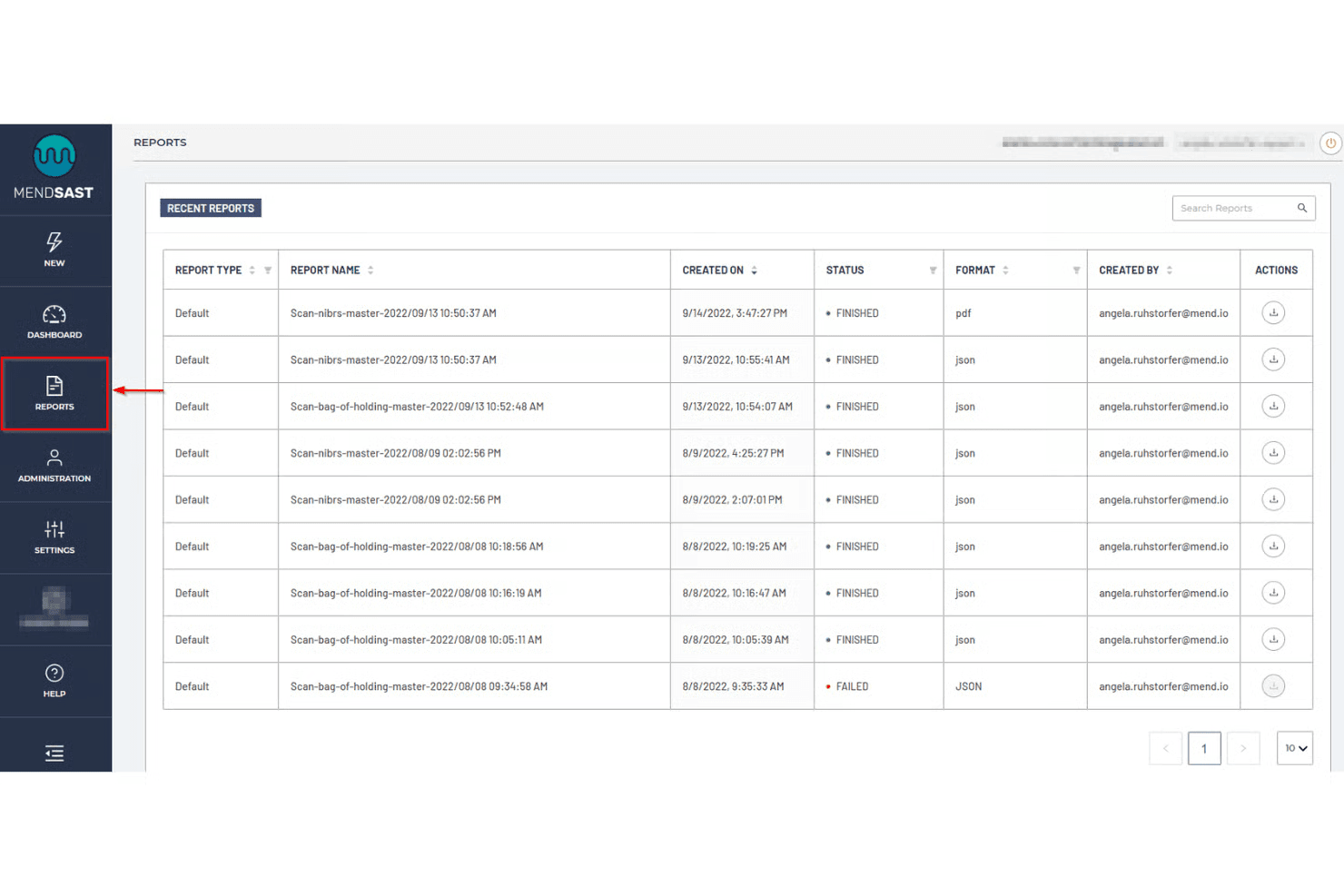
Mend.io lets users view and download recent SAST scan reports. Mend.io is an application security platform that helps you identify and remediate vulnerabilities across your custom code, open-source components, and deployed applications. It combines static and dynamic security testing with software composition analysis to give you broad coverage across your entire application stack.
Why I picked Mend.io: I added Mend.io because of how it uses hybrid scanning to cover both source code and running applications. Its static analysis can catch coding vulnerabilities early, while its dynamic testing checks for security gaps once the application is live. I also liked its AI-powered remediation suggestions, which can reduce the time your team spends on triage and fixes. This dual approach allows you to address issues across multiple stages of development without adding multiple tools into your stack.
Standout features & integrations:
Features include automated dependency updates, which help you keep third-party libraries current as new vulnerabilities are disclosed. You also get SBOM creation for supply chain visibility, risk factor scoring to prioritize issues, and license compliance reporting to meet regulatory requirements.
Integrations include Azure DevOps, Bitbucket Cloud, GitHub.com, GitHub Enterprise, GitLab, Mend for Azure Repos, Mend for Bitbucket Data Center, and Mend for GitLab.
Pros and Cons
Pros:
- Supports CI/CD integrations directly
- Hybrid static and dynamic testing
- Covers full application security stack
Cons:
- Limited language support for some
- Some integrations need manual setup
Learn more about Mend.io: Best for code quality analysis
- Free trial available
- Pricing upon request
Visit WebsiteCustomer Rating:4.4/5
SonarQube’s Quality Gate report indicates whether code adheres to an organization’s quality policy. SonarQube is a fully featured integrated code security (SAST, SCA) and code quality solution for both self-managed and cloud deployments. It analyzes first-party, AI-generated, and open source code to detect vulnerabilities, bugs, and maintainability issues early in the development lifecycle. The platform also provides AI-powered fix suggestions to reduce manual debugging and includes built-in secrets detection covering over 400 patterns.
Why I picked SonarQube: I selected SonarQube for its balanced focus on code quality and security across multiple programming languages. It delivers clear insights into reliability and maintainability while fitting naturally into CI/CD pipelines. Its combination of customizable quality gates and security analysis helps teams uphold consistent and secure coding standards.
Standout features & integrations:
Features include support for 35 programming languages, customizable quality gates, detailed static analysis, and secrets detection for more than 400 patterns.
Integrations include Jenkins, GitHub, GitLab, Bitbucket, Azure DevOps, Bamboo, Travis CI, CircleCI, TeamCity, and Visual Studio. A free SonarQube IDE extension is available for VS Code, JetBrains IDEs, Cursor, Windsurf, and others..
Pros and Cons
Pros:
- Extensive language support
- Enhances coding standards
- Integrates with CI/CD pipelines
Cons:
- Requires setup and configuration
- Can be resource-intensive
Learn more about SonarQube:

Corgea flags a high severity SQL injection issue and suggests a parameterized fix directly within a GitHub pull request. Corgea enhances your team's security capabilities by pinpointing and fixing insecure code, making it an ideal solution for CTOs seeking to safeguard their digital assets. Its AI-driven technology appeals to industries that require stringent security measures, such as finance and healthcare, by addressing vulnerabilities that could compromise sensitive data. By integrating into your existing workflows, Corgea helps your team efficiently manage security risks, ensuring peace of mind and allowing you to focus on innovation.
Why I Picked Corgea
I picked Corgea for its AI-driven Static Application Security Testing (SAST), which excels in identifying complex vulnerabilities that traditional methods might miss. The auto-triage feature significantly reduces false positives, saving your team time and allowing them to focus on actual threats. Additionally, Corgea's customizable detection policies let you tailor the tool to your specific security needs, ensuring comprehensive protection against emerging threats.
Corgea Key Features
In addition to its core strengths, Corgea offers several other features that enhance its utility:
- Dependency Scanning: This feature checks for vulnerabilities in your project's dependencies across multiple programming languages.
- SAST Auto-Fix: Automatically generates security patches, reducing the manual effort required to secure your codebase.
- Privacy Leak Detection: Identifies sensitive information such as AWS keys and authentication credentials to prevent privacy breaches.
- Multi-Language Support: Supports a wide range of programming languages, including Java, Python, and Ruby, ensuring compatibility with your projects.
Corgea Integrations
Integrations include GitHub Actions, GitLab CI, Jenkins, Azure DevOps, JIRA, Slack, Zapier, and webhooks.
Pros and Cons
Pros:
- Broad CI/CD integrations
- Automated secure code fixes
- AI detects complex vulnerabilities
Cons:
- Focused mainly on code security
- Setup required for CI integrations
Learn more about Corgea: Best for context-aware code analysis
- Free plan available
- From $200/month
Visit WebsiteCustomer Rating:4.5/5
ZeroPath provides a unified security dashboard that highlights scan activity, vulnerability types, issue severity, and top critical findings at a glance. ZeroPath is designed for development teams and security professionals who want to embed deeper vulnerability detection into their codebase without sifting through countless false alarms. You’re likely in a fast-moving engineering environment where developers need actionable feedback and your security team wants meaningful results instead of noise. ZeroPath appeals to organizations building complex applications (for example, fintech, healthcare, or SaaS) where business logic, authorization flows, and modern threat classes matter.
Why I Picked Zeropath
I picked ZeroPath because it puts context-aware code analysis at the heart of application security. It uses an AI SAST engine that understands your application’s logic and can surface authorization bypasses, dependency risks and complex flaws rather than generic issues. It also offers autofix capabilities—once it finds a vulnerability, it can suggest or even generate pull-request patches you can review. These features align if your goal is to move faster while keeping risk in check.
Zeropath Key Features
In addition to those core strengths, you’ll find these features useful for your team:
- Version Control Integration: Native support for GitHub, GitLab, Bitbucket, and Azure DevOps allows for quick setup and seamless integration into your workflow.
- IaC misconfiguration detection: Infrastructure-as-Code issues (e.g., Terraform, CloudFormation, Kubernetes configs) are scanned for security flaws.
- Secrets scanning: It detects leaked secrets or hard-coded credentials across your repositories and alerts you to them.
- Automated Compliance Reporting: Generate compliance reports for standards like SOC 2 and ISO 27001, ensuring your organization meets regulatory requirements.
Zeropath Integrations
Integrations include GitHub, GitLab, Bitbucket, Azure DevOps, Jira, Linear, Slack, and existing security tools like Snyk, Semgrep, and Checkmarx.
Pros and Cons
Pros:
- It catches logic flaws and hidden risks you might miss in normal scans.
- Cuts down noisy findings so your team can focus on real issues.
- Gives you clear fixes that speed up your security reviews.
Cons:
- Integration options may not be extensive enough for complex enterprise environments.
- You may need time to adjust your workflow around its automation.
Learn more about Zeropath:

The dashboard offered on QA Wolf's platform offers insight into recent test activity and bug alerts that need to be addressed. QA Wolf is a security testing tool designed for teams seeking efficient collaboration in quality assurance. This tool is ideal for teams aiming to enhance their testing capabilities and reduce deployment times.
Why I picked QA Wolf: QA Wolf offers unique features that facilitate team collaboration. Its ability to automate 80% of test coverage within four months stands out. The platform supports unlimited parallel test runs, reducing QA cycle times significantly. Additionally, its integration of AI to investigate failed tests adds value to its collaborative approach, ensuring speed and accuracy. It combines AI efficiency with human oversight, making it a reliable choice for team collaboration.
Standout features & integrations:
Features include automated testing using Playwright for web and Appium for mobile, which allows for quick automation of tests. The tool supports unlimited parallel test runs, significantly cutting down QA cycle times. It also employs AI to investigate failed tests, ensuring quick identification and resolution of issues.
Integrations include Jenkins, CircleCI, GitHub Actions, Azure DevOps, Travis CI, GitLab CI, Bamboo, TeamCity, and Bitbucket Pipelines.
Pros and Cons
Pros:
- Rapid test automation
- Significant time savings
- Efficient bug reporting
Cons:
- Limited pricing transparency
- Potential learning curve for new users
Learn more about QA Wolf: Best for comprehensive vulnerability analysis
- Free demo available
- From $69/month
Visit WebsiteCustomer Rating:4.5/5
Astra Pentest offers a comprehensive dashboard for monitoring security assessments. Astra Pentest is a security testing tool designed to safeguard your digital assets. It provides a thorough analysis of your web applications, networks, and more, ensuring vulnerabilities are identified and addressed.
Why I Picked Astra Pentest: I chose Astra Pentest because it offers both automated and manual testing, enabling a thorough evaluation of your system's security. This feature ensures that you get a comprehensive analysis of vulnerabilities, which is crucial for maintaining robust security standards. Additionally, Astra Pentest provides a detailed vulnerability management dashboard, helping you to efficiently track and manage any issues that are discovered. Another reason I picked Astra Pentest is its focus on compliance testing. It helps you ensure that your systems meet international security standards like SOC2 and HIPAA. This compliance feature is particularly beneficial for organizations that need to adhere to strict regulatory requirements. Moreover, Astra Pentest offers continuous scanning and re-testing, providing peace of mind that your systems remain secure over time.
Standout features & integrations:
Features include a publicly verifiable pentest certificate, which adds an extra layer of trust and assurance for your stakeholders. The tool’s integration with CI/CD pipelines allows for automated security checks during the development process, minimizing vulnerabilities before they reach production. Furthermore, Astra Pentest offers real-time remediation support, enabling your team to quickly resolve any identified issues.
Integrations include Slack, JIRA, GitHub, GitLab, Circle CI, Jenkins, and others that are not explicitly listed in the retrieved data.
Pros and Cons
Pros:
- Provides compliance-specific security scans
- Integrates with major CI/CD tools
- Combines automated and manual testing
Cons:
- Customer support response time varies
- Performance issues during heavy scans
Learn more about Astra Pentest: Best for real-time monitoring
- Free plan available
- From $10/user/month
Visit WebsiteCustomer Rating:4.3/5
Vulnerability insights right in the context of your telemetry data. New Relic is a comprehensive observability platform designed for businesses requiring real-time monitoring and application performance enhancement.
Why I picked New Relic: The platform excels in real-time monitoring with its Application Performance Monitoring (APM) and Interactive Application Security Testing (IAST). It supports over 780 integrations, making it highly adaptable for various tech stacks. Its usage-based pricing model offers flexibility, catering to different organizational needs. The proactive threat management and zero-day vulnerability alerts are key features that align with its USP of real-time monitoring.
Standout features & integrations:
Features include end-to-end observability, which allows for comprehensive monitoring of applications. The platform offers real-time threat management to address vulnerabilities as they arise. Users also benefit from zero-day vulnerability alerts, enhancing security measures.
Integrations include AWS, Azure, Google Cloud Platform, Kubernetes, Docker, Jenkins, GitHub, Slack, PagerDuty, and Microsoft Teams.
Pros and Cons
Pros:
- Extensive integration options
- Real-time threat alerts
- Enhances team collaboration
Cons:
- May overwhelm with data
- Limited support for smaller teams
Learn more about New Relic: Best for open-source management
- 14-day free trial + free plan + free demo available
- From $135/user/month + consumption (billed annually)

Sonatype’s policy management system gives AppSec teams control of their software during each stage of development. Sonatype is a security testing tool focusing on open-source management and software supply chain security. It serves development teams and enterprises by ensuring the safety and compliance of open-source components.
Why I picked Sonatype: Sonatype excels in open-source management with its Nexus platform, which automates security checks and compliance. It provides real-time monitoring of open-source components, helping your team address vulnerabilities quickly. The tool also offers detailed insights into component health, ensuring you make informed decisions. Its ability to integrate with various development environments enhances its utility for managing open-source security.
Standout features & integrations:
Features include automated policy enforcement, which helps maintain compliance across your projects. It offers component intelligence, giving you insights into the quality and security of open-source components. The platform also provides real-time alerts on vulnerabilities, allowing you to act swiftly.
Integrations include Jenkins, GitHub, GitLab, Bitbucket, Bamboo, Azure DevOps, Jira, Eclipse, IntelliJ IDEA, and Visual Studio.
Pros and Cons
Pros:
- Strong focus on open-source security
- Real-time vulnerability alerts
- Detailed component insights
Cons:
- Can be complex to configure
- High learning curve for beginners
Learn more about Sonatype:

Users can download easy-to-read HTML vulnerability reports after each scan. Wapiti is an open-source web application vulnerability scanner designed for security professionals and developers. It identifies vulnerabilities in web applications by performing black-box testing, which simulates attacks on your web applications to expose weaknesses.
Why I picked Wapiti: Wapiti offers a straightforward approach to web vulnerability scanning with its black-box testing methodology. It can detect a variety of vulnerabilities, such as SQL injection and cross-site scripting, ensuring comprehensive coverage for your web applications. The tool's ability to perform both GET and POST HTTP attack methods enhances its effectiveness. Its command-line interface allows for flexible and customizable scanning options, making it a valuable tool for web vulnerability scanning.
Standout features & integrations:
Features include the ability to detect a wide range of vulnerabilities, providing thorough security assessments. The tool supports both GET and POST HTTP attack methods, ensuring comprehensive testing. Wapiti's command-line interface allows for flexible and customizable scanning options, catering to your specific needs.
Integrations include compatibility with various web technologies and platforms, such as HTML5, XML, JSON, SOAP, and AJAX.
Pros and Cons
Pros:
- Supports multiple attack methods
- Customizable scanning options
- Simple command-line interface
Cons:
- Limited user interface
- Can be resource-intensive
Learn more about Wapiti:
Outros Instrumentos de Teste de Segurança
Eis algumas opções adicionais de instrumentos de teste de segurança que não entraram na minha lista, mas que vale a pena consultar:
- 11Zed Attack Proxy (ZAP)Best for penetration testing
- 12SQLMapBest for SQL injection testing
- 13ImmuniWebBest for AI-driven security
- 14BeEF (Browser Exploitation Framework)Best for browser security testing
- 15VegaBest for web app security
- 16NowSecureBest for automated mobile app security testing
- 17SnykBest for developer-first security
- 18Astra PentestBest for continuous pentesting
- 19InvictiBest for automated web app testing
- 20IntruderBest for continuous vulnerability scanning
- 21ProbelyBest for scalable security assessments
- 22TenableBest for continuous vulnerability assessment
- 23Burp SuiteBest for manual security testing
- 24UnderDefenseBest for managed detection and response
- 25CyberpionBest for external attack surface management
- 26WfuzzBest for web application fuzzing
- 27Google NogotofailBest for network traffic testing
How I Evaluate Security Testing Tools
I split my evaluation into two layers: baseline capabilities a tool must have to qualify, and differentiators that separate options for teams scanning CI/CD pipelines or running pentests.
Core Functionality (Table Stakes For This List)
When I'm selecting tools for my list, I rank each one on a scale from 0 (does not offer the functionality) to 5 (excels in this area) for each core functionality listed below. Then, I calculate the tool's total score into a percentage. Each tool needs to achieve a minimum total score of 75% to be considered for inclusion.
- Vulnerability Scanning: I check whether the tool runs automated scans against up-to-date CVE and OWASP databases across web apps, APIs, and network targets.
- SAST, DAST, or IAST Testing: I look for support across at least one testing method with broad language and framework coverage for real codebases.
- Penetration Testing Capabilities: Whether automated or manual, the tool should go beyond listing vulnerabilities and validate exploitability through attack simulation.
- CI/CD Pipeline Integration: Native connectors to tools like Jenkins, GitHub Actions, or GitLab CI matter here, so security scans run as part of every build.
- Risk Reporting & Prioritization: Findings need CVSS-based severity scoring and actionable remediation guidance, not just raw vulnerability dumps that overwhelm triage.
- Compliance Framework Mapping: I evaluate whether scan results map to standards like PCI-DSS, HIPAA, or ISO 27001 with audit-ready output.
Once I have a list of tools that meet this criteria, I consider what sets each platform apart.
Differentiating Factors (What Sets Vendors Apart)
Here's how I compare and contrast different vendors:
Standout Features
API security testing is a key differentiator I look for, since most teams now expose dozens of REST and GraphQL endpoints that traditional scanners miss entirely. Container and IaC scanning matters just as much—teams deploying through Terraform or Kubernetes need tools that catch misconfigurations before they hit production. I also evaluate developer remediation workflows, like in-IDE fix suggestions or auto-generated pull requests, which close the gap between finding a vulnerability and actually resolving it.
Beyond Features
Deployment flexibility is something I always check—teams in regulated industries often need self-hosted or air-gapped options, not just SaaS. The integration ecosystem matters too, especially bidirectional sync with SIEM platforms like Splunk or ticketing tools like Jira, where findings need to flow into existing workflows. I also evaluate vendor threat research backing, since tools supported by active security research teams tend to ship faster signature updates and better coverage of emerging CVEs.
Como Escolher Instrumentos de Teste de Segurança
É fácil ficar perdido entre longas listas de funcionalidades e estruturas de preços complexas. Para o ajudar a manter-se concentrado enquanto percorre o seu processo específico de seleção de software, eis uma lista de fatores a ter em conta:
| Fator | O que considerar |
| Escalabilidade | Certifique-se de que o instrumento consegue acompanhar o crescimento da sua equipa. Considere se consegue lidar com cargas de trabalho e exigências dos utilizadores crescentes. |
| Integrações | Procure compatibilidade com os seus instrumentos existentes, como pipelines de CI/CD e sistemas de controlo de versões. |
| Personalização | Verifique se o instrumento permite adaptar as definições às suas necessidades e fluxos de trabalho de teste específicos. |
| Facilidade de utilização | Escolha um instrumento com uma interface intuitiva. Deve minimizar a curva de aprendizagem da sua equipa. |
| Orçamento | Alinhe o custo do instrumento com as suas restrições financeiras. Avalie se oferece uma boa relação qualidade-preço. |
| Proteções de segurança | Verifique as capacidades do instrumento para proteger dados sensíveis e cumprir as normas de conformidade. |
| Suporte | Considere a disponibilidade do apoio ao cliente e de recursos como tutoriais e guias. |
| Desempenho | Avalie a velocidade e a precisão do instrumento na deteção de vulnerabilidades sem afetar o desempenho do sistema. |
Tendências nos Instrumentos de Teste de Segurança
Na minha investigação, consultei inúmeras atualizações de produtos, comunicados de imprensa e registos de lançamento de diferentes fornecedores de ferramentas de testes de segurança. Eis algumas das tendências emergentes que estou a acompanhar:
- IA e aprendizagem automática: Estas tecnologias estão a ser utilizadas para melhorar a deteção e a análise de vulnerabilidades. Conseguem identificar padrões e prever potenciais ameaças mais rapidamente do que os métodos tradicionais. Fornecedores como a ImmuniWeb estão a incorporar IA para disponibilizar avaliações de ameaças mais inteligentes.
- Foco na segurança da nuvem: Com cada vez mais empresas a migrarem para a nuvem, as ferramentas estão agora a dar ênfase a testes de segurança específicos para a nuvem. Isto garante que os ambientes na nuvem são tão seguros como os ambientes no local. Soluções como a Snyk estão a adaptar as suas ofertas para responder às vulnerabilidades da nuvem.
- Informações sobre ameaças em tempo real: Os utilizadores pretendem obter informações atualizadas ao minuto sobre potenciais ameaças. As ferramentas estão a integrar fontes de informações sobre ameaças em tempo real para fornecer alertas e recomendações imediatos. Esta tendência é crucial para que as empresas reajam rapidamente a incidentes de segurança.
- Integração de ferramentas DevSecOps: Os testes de segurança estão a tornar-se parte integrante do ciclo de vida de DevOps. As ferramentas são agora concebidas para se integrarem perfeitamente nos pipelines de CI/CD, promovendo uma abordagem de segurança «shift-left». Esta integração ajuda a detetar problemas mais cedo no processo de desenvolvimento.
- Análise do comportamento dos utilizadores: A análise do comportamento dos utilizadores está a tornar-se uma funcionalidade essencial para detetar anomalias que possam indicar violações de segurança. Esta tendência ajuda a identificar ameaças internas e padrões de acesso invulgares. Está a tornar-se uma parte vital das estratégias de segurança abrangentes.
O que são ferramentas de testes de segurança?
As ferramentas de testes de segurança são soluções de software concebidas para identificar vulnerabilidades e pontos fracos em sistemas, aplicações e redes. Estas ferramentas são normalmente utilizadas por profissionais de segurança, programadores e equipas de TI para reforçar a postura de segurança das suas organizações. Funcionalidades como a deteção de vulnerabilidades, as informações sobre ameaças em tempo real e o foco na segurança da nuvem ajudam a proteger dados sensíveis e a garantir a conformidade. De um modo geral, estas ferramentas fornecem um apoio essencial à manutenção de ambientes de TI seguros e resilientes.
Funcionalidades das ferramentas de testes de segurança
Ao selecionar ferramentas de testes de segurança, procure as seguintes funcionalidades essenciais:
- Deteção de vulnerabilidades: Identifica pontos fracos e falhas de segurança nas aplicações, ajudando a prevenir potenciais violações.
- Informações sobre ameaças em tempo real: Fornece alertas atualizados ao minuto sobre ameaças emergentes, permitindo uma resposta e uma mitigação imediatas.
- Foco na segurança da nuvem: Garante a proteção dos ambientes na nuvem, respondendo aos desafios específicos dos sistemas baseados na nuvem.
- Integração com DevSecOps: Integra-se nos pipelines de CI/CD, permitindo verificações de segurança ao longo do processo de desenvolvimento para detetar problemas numa fase inicial.
- Análise do comportamento dos utilizadores: Monitoriza e analisa as atividades dos utilizadores para detetar padrões invulgares que possam indicar ameaças à segurança.
- Análise automatizada: Realiza avaliações de segurança regulares e automatizadas, reduzindo a necessidade de intervenção manual e poupando tempo.
- Painéis personalizáveis: Disponibiliza vistas e relatórios adaptados, permitindo que as equipas se concentrem nas métricas e informações de segurança mais relevantes.
- Capacidades de IA e aprendizagem automática: Melhoram a deteção e a análise de ameaças, proporcionando avaliações de segurança mais inteligentes e rápidas.
- Suporte à conformidade: Ajuda a garantir que os sistemas cumprem os regulamentos e as normas específicos do setor, reduzindo o risco de incumprimento.
- Ferramentas de testes manuais: Disponibiliza opções para avaliações manuais aprofundadas destinadas a profissionais de segurança que necessitam de uma análise detalhada.
Benefícios das ferramentas de testes de segurança
A implementação de ferramentas de testes de segurança proporciona vários benefícios à sua equipa e à sua empresa. Eis alguns dos benefícios que pode esperar:
- Postura de segurança reforçada: Ao identificar e corrigir vulnerabilidades, estas ferramentas ajudam a proteger os seus sistemas contra potenciais ameaças.
- Poupança de tempo: A análise automatizada reduz a necessidade de verificações manuais, permitindo que a sua equipa se concentre noutras tarefas.
- Conformidade melhorada: As ferramentas com suporte para conformidade garantem que cumpre as normas do setor, reduzindo o risco de sanções.
- Deteção precoce de problemas: A integração com outras ferramentas de segurança DevOps permite realizar verificações de segurança ao longo do desenvolvimento, detetando os problemas antes que se agravem.
- Tomada de decisões informada: Os painéis personalizáveis e os relatórios detalhados fornecem informações que orientam as suas estratégias de segurança.
- Gestão proativa de ameaças: A inteligência sobre ameaças em tempo real mantém-no informado sobre ameaças emergentes, permitindo uma ação rápida.
- Escalabilidade: À medida que a sua empresa cresce, estas ferramentas podem adaptar-se ao aumento das exigências, garantindo uma cobertura de segurança contínua.
Custos e preços das ferramentas de testes de segurança
A seleção de ferramentas de testes de segurança requer uma compreensão dos vários modelos de preços e planos disponíveis. Os custos variam consoante as funcionalidades, o tamanho da equipa, os complementos, entre outros fatores. A tabela abaixo resume os planos mais comuns, os respetivos preços médios e as funcionalidades normalmente incluídas nas soluções de ferramentas de testes de segurança:
Tabela de comparação de planos para ferramentas de testes de segurança
| Tipo de plano | Preço médio | Funcionalidades comuns |
| Plano gratuito | $0 | Análise básica de vulnerabilidades, suporte limitado e acesso à comunidade. |
| Plano pessoal | $10-$30 /utilizador /mês | Capacidades avançadas de análise, geração de relatórios básica e suporte por e-mail. |
| Plano empresarial | $50-$100 /utilizador /mês | Análise abrangente, alertas em tempo real, verificações de conformidade e suporte telefónico. |
| Plano empresarial de grande escala | $150-$300/utilizador /mês | Conjunto completo de funcionalidades, gestão de conta dedicada, integrações personalizadas e suporte 24/7. |
Perguntas frequentes sobre ferramentas de testes de segurança
Eis algumas respostas a perguntas comuns sobre ferramentas de testes de segurança:
Que ferramenta é utilizada para testes de segurança?
Os testes de segurança envolvem ferramentas como o Burp Suite e o OWASP ZAP para aplicações Web, e o Nmap e o Wireshark para análise de redes. Estas ferramentas detetam e atenuam problemas de segurança em diferentes domínios. Oferecem capacidades avançadas essenciais para testes de segurança completos.
Quais são os três tipos de testes de segurança?
Os três principais tipos de testes de segurança são a análise de vulnerabilidades, os testes de penetração e a análise estática. A análise de vulnerabilidades utiliza ferramentas automatizadas para identificar pontos fracos. Os testes de penetração simulam ataques para encontrar falhas de segurança. A análise estática examina o código-fonte em busca de potenciais vulnerabilidades.
Os testes de segurança são funcionais ou não funcionais?
Os testes de segurança são considerados uma forma de testes não funcionais. Focam-se no comportamento de um sistema em condições inesperadas, em vez de se centrarem em funcionalidades específicas. Os testes não funcionais, incluindo os testes de segurança, avaliam a resiliência do sistema e a sua capacidade para lidar com ameaças.
Quais são os seis princípios básicos dos testes de segurança?
Os seis princípios básicos são a confidencialidade, a integridade, a disponibilidade, a autenticação, a autorização e o não repúdio. Estes princípios garantem que os dados estão protegidos contra acessos não autorizados, permanecem exatos e acessíveis e que as ações são responsabilizáveis. Constituem a base de testes de segurança eficazes.
Com que frequência devem ser realizados testes de segurança?
A realização regular de testes de segurança é crucial para manter um ambiente seguro. Idealmente, os testes devem ser realizados pelo menos trimestralmente e após quaisquer alterações significativas no sistema. Isto ajuda a identificar novas vulnerabilidades e garante uma proteção contínua contra ameaças em evolução.
As ferramentas de testes de segurança podem integrar-se em pipelines de CI/CD?
Sim, muitas ferramentas de testes de segurança permitem a integração com pipelines de CI/CD. Esta integração possibilita a realização contínua de verificações de segurança durante o processo de desenvolvimento. Ajuda a detetar vulnerabilidades numa fase inicial e garante que a segurança faz parte do ciclo de vida de desenvolvimento de software.