

As melhores ferramentas de testes de software ajudam as equipas a automatizar testes repetitivos, gerir casos de teste de forma eficiente e detetar problemas atempadamente, antes de afetarem a produção. Facilitam a manutenção da qualidade das versões, melhoram a visibilidade ao longo dos ciclos de testes e garantem que o feedback chega rapidamente aos programadores.
Muitas equipas de QA começam a procurar novas ferramentas quando ficam presas à manutenção de conjuntos de testes manuais, têm de gerir folhas de cálculo para a criação de relatórios ou enfrentam dificuldades em coordenar testes em vários ambientes. Estes desafios conduzem a erros não detetados, resultados inconsistentes e lançamentos adiados que frustram tanto os programadores como as partes interessadas.
Trabalhei com responsáveis de QA e equipas de engenharia para avaliar plataformas de testes em pipelines de implementação reais, analisando a forma como lidam com a automatização, os relatórios e a colaboração em grande escala.
Neste guia, ficará a saber quais as ferramentas de testes de software que efetivamente reduzem o trabalho manual, melhoram a precisão e ajudam a sua equipa a disponibilizar versões estáveis com confiança.
Why Trust Our Software Recommendations
6,700+
Reviews
20
Industry experts
16+
Evaluation factors
14
Years
Our team has been testing and reviewing software since 2012. As tech leaders ourselves, we know how difficult—and important—it is to choose the right software.
For this guide, we evaluated tools using hands-on testing and independent research, scoring tools using our selection criteria.
Our reviews reflect our human editorial judgment, not a sales pitch.
Expert reviewers:
- Paulo Gardini MiguelTech Director
 Tim FisherVP of AI
 Gabriel RosasTech Lead & Software Architect
 Christhian GruhnTech Lead & Platform Architect

Tabela Comparativa de Ferramentas de Testes de Software
A tabela abaixo compara os preços mensais, a disponibilidade de períodos de avaliação gratuitos e as opções de planos gratuitos das minhas principais ferramentas de testes de software.
| Tool | Best For | Trial Info | Price | ||
|---|---|---|---|---|---|
| 1 | Best for visual bug tracking | Free trial available | From $50/month | Website | |
| 2 | Best for test case management + bug tracking | Free plan available | From $9/user/month (billed annually) | Website | |
| 3 | Best for checklist-style test management | Free trial available | From $49/month (billed annually) | Website | |
| 4 | Best for browser testing | 14-day free trial + free plan available | From $99/month (billed annually) | Website | |
| 5 | Best for Jira users | Free plan available | From $15.42/user/month (billed annually) | Website | |
| 6 | Best for checking APIs within UI journeys | Free plan + free demo available | From $15/month (billed annually) | Website | |
| 7 | Best for parallel test execution | Free trial available | From $199/month/year (minimum of 4 seats) | Website | |
| 8 | Best for risk-based testing | 60-day free trial | From $59/seat/month | Website | |
| 9 | Best for team collaboration | Free demo available | From 1¢/AI credit | Website | |
| 10 | Best for scalable automation | Free trial available + free demo | Pricing upon request | Website |


Avaliações das Melhores Ferramentas de Testes de Software
Eis uma breve descrição de cada uma das ferramentas de testes de software, destacando o melhor caso de utilização de cada ferramenta, algumas funcionalidades importantes e capturas de ecrã que oferecem uma visão geral da interface.


BugHerd displays all website feedback as trackable tasks on a clear Kanban-style board. BugHerd gives QA teams and web development professionals a way to report, track, and manage bugs directly on live websites, helping teams quickly identify and resolve issues during software testing.
Who Is BugHerd Best For?
BugHerd suits web development teams and agencies that need a straightforward way to collect and manage client feedback alongside QA bug reports.
Why I Picked BugHerd
BugHerd earns its spot on my shortlist because of how it handles visual bug tracking—specifically, the ability to pin feedback directly onto individual page elements. When my team runs QA on a live site, that pin stays attached to the element even if the page layout changes, preserving context between report and fix. Every pin automatically captures a screenshot, browser, OS, screen resolution, and the exact selector code, so developers get everything they need to reproduce the bug without a back-and-forth. The built-in Kanban board routes every reported bug straight into a trackable task, preventing issues from slipping through during a testing cycle.
BugHerd Key Features
- Video feedback capture: Record and attach video directly to a bug report to show exactly what's happening on the page.
- PDF and image annotation: Annotate websites, PDFs, and images within the same platform, so feedback stays centralized.
- Public feedback widget: Embed a widget on a live site to collect ongoing bug reports and feedback from site visitors after launch.
- No-login guest access: Clients can submit feedback and bug reports without needing to create an account or log in.
BugHerd Integrations
BugHerd offers native integrations with Jira, Asana, ClickUp, Monday.com, Trello, Linear, Productive, Teamwork, GitHub, FullStory, LogRocket, LambdaTest, Harvest, Time Doctor, Slack, Microsoft Teams, WordPress, Drupal, Firmao, and connects with Zapier. An API and webhooks are available for custom integrations.
Pros and Cons
Pros:
- Supports Kanban-style task management inside the tool.
- Saves time by turning website feedback into actionable tasks with screenshots and context.
- Allows non-technical users (clients, PMs) to report bugs directly on the webpage.
Cons:
- Less suitable for comprehensive full-stack or backend bug tracking outside web UI issues.
- No mobile-app is provided, limiting ease of use on phones.
Learn more about BugHerd: Best for test case management + bug tracking
- Free plan available
- From $9/user/month (billed annually)
Visit WebsiteCustomer Rating:4.6/5
Kualitee’s Build Traceability Report visualizes links between requirements, test scenarios, test cases, and defects across a selected sprint. Kualitee is a cloud-based software testing platform designed for QA teams and software development organizations who need to manage test cases, track bugs, and collaborate across the testing lifecycle.
Who Is Kualitee Best For?
Kualitee is a strong fit for QA teams in small to mid-sized software companies that need a dedicated testing platform without the complexity of enterprise-grade tools.
Why I Picked Kualitee
I picked Kualitee as one of the best because of how tightly it connects test case management and bug tracking into a single workflow. When my team executes a test and finds a failure, we can log a defect instantly—right from within the test execution view—without switching tools or losing context. I also like Kualitee's requirement traceability feature, which links bugs directly back to specific requirements and test cases, so you always know exactly what's affected and where a defect originated. The built-in defect categorization also lets us assign severity, priority, and status to every bug, which keeps the QA and dev sides of the team working from the same picture.
Kualitee Key Features
- AI-powered test case generation: Kualitee's Hootie AI assistant generates test cases from requirements, descriptions, or uploaded images.
- Automated test execution: Hootie runs test cases automatically, updates statuses in real time, and logs defects without manual intervention.
- Customizable reporting: Build, save, and schedule reports using custom templates tailored to different team roles.
- Role-based access control: Create custom roles and assign specific privileges to keep team permissions organized across projects.
Kualitee Integrations
Kualitee offers native integrations with Jira, Selenium, Azure DevOps, and Tricentis Tosca, and provides an API for building custom integrations.
Learn more about Kualitee: Best for checklist-style test management
- Free trial available
- From $49/month (billed annually)
Visit WebsiteCustomer Rating:4.1/5
Testpad allows users to create and manage test plans easily with its keyboard-driven editor. Testpad is a manual test management tool for QA teams and software testers who want a flexible, collaborative way to organize, execute, and track testing without the overhead of traditional test case management systems.
Who Is Testpad Best For?
Testpad suits small to mid-sized QA teams and independent testers who need a lightweight, no-frills tool for manual and exploratory testing.
Why I Picked Testpad
Testpad is one of my top picks because I love how its hierarchical checklist structure lets my team build out test plans the way we actually think—starting high-level and drilling down into detail as we go, almost like a 1D mindmap. When I'm running a regression pass, I can type out hundreds of test prompts in minutes using the keyboard-driven editor without ever touching the mouse. I also rely heavily on the guest testing feature, which lets me pull in developers or product managers at crunch time by sharing a link—no logins, no onboarding required. The ability to edit tests mid-session is something I haven't found in heavier test case management tools, and it makes a real difference when exploratory testing surfaces new scenarios on the fly.
Testpad Key Features
- Instant reports: Generate and share live progress reports that show what passed, failed, and hasn't been checked yet, with no report-generation process to kick off.
- Tag and filter tests: Apply tags to tests and filter down to specific subsets, so you can run targeted test passes without working through an entire plan.
- Developer-friendly API: Connect your CI/CD pipeline to inject automated test results and report manual and automated tests together in one place.
- Simple version control: Copy test plans between releases and archive old plans with their results, keeping a clear record of what was tested and when.
Testpad Integrations
Testpad offers a native API for connecting with CI/CD pipelines and custom integrations, and also supports integration with Zapier.
Learn more about Testpad: Best for browser testing
- 14-day free trial + free plan available
- From $99/month (billed annually)
Visit WebsiteCustomer Rating:4.8/5
BugBug runs web app tests directly in the browser. BugBug is a no-code test automation platform designed for QA teams and software testers who need to create, schedule, and run browser-based tests without complex setup or coding.
Who Is BugBug Best For?
BugBug is a good fit for small to mid-sized development and QA teams that need a straightforward way to automate browser testing without dedicated automation engineers.
Why I Picked BugBug
BugBug earns its spot on my shortlist because of how well it handles browser-based test automation without requiring any scripting knowledge. I particularly like the Chrome extension test recorder, which captures stable selectors automatically—no XPath or CSS needed—so my team can record full user flows just by clicking through the app. The built-in email testing inbox is a feature I haven't seen in many other tools; it lets you test signup and login flows end-to-end without juggling external email accounts. The visual regression feature catches unintended UI changes by comparing screenshots across test runs, which is useful when shipping frequent updates.
BugBug Key Features
- Parallel testing: Run thousands of tests simultaneously on BugBug's cloud infrastructure instead of waiting for sequential execution.
- Variables & profiles: Manage test data and environment configurations dynamically across different test scenarios.
- Reusable components: Build test building blocks once and reuse them across multiple test suites to avoid duplicating steps.
- Conditional logic: Add if/else branching to tests so they can handle dynamic content and variable application states.
BugBug Integrations
BugBug offers native integrations with Slack, GitHub, GitLab, Bitbucket, Jira, and Trello, and connects with Zapier. An API and command line interface are available for custom integrations and CI/CD pipeline automation.
Pros and Cons
Pros:
- Detailed test reporting
- Easy test scheduling
- No coding required
Cons:
- May not support all browsers
- Limited mobile testing features
Learn more about BugBug: Best for Jira users
- Free plan available
- From $15.42/user/month (billed annually)
Visit WebsiteCustomer Rating:4.9/5
Check the status of test cases, monitor the progress of test runs, and view logs to determine the cause of failures. Testiny is a software testing tool that QA professionals use to ensure that software products meet the highest level of quality and functionality.
Why I picked Testiny: The software performs various tests, including functional, regression, and performance testing. It offers insights on code coverage and risk assessment, making pinpointing technical issues easy. Teams can create a shared repository of test cases, enabling team members to view, edit, and reuse any test cases. Moreover, Testiny facilitates remote testing, allowing teams to test and debug software independently or work together from any location.
Testiny enables the QA team to efficiently identify defects and streamline workflow, providing real-time and historical data on each test case run. This test run view presents the results of the test cases in an organized format that facilitates quick and easy analysis. QA analysts can obtain detailed insights into the overall performance of the software under test, including the percentage of passed and failed test cases, average execution time, and the root cause of errors or failures.
Testiny Standout Features & Integrations
Features include automation testing, cross-browser testing, comments and annotations for collaboration, advanced reporting and analytics features that enable QA teams to identify defects and track performance metrics, and granular permissions per user.
Integrations include a Jira extension that allows you to run tests and automatically update Jira issues using the result. The tool can also display for you the status of Jira issues that you have linked with Testiny.
Learn more about Testiny: Best for checking APIs within UI journeys
- Free plan + free demo available
- From $15/month (billed annually)
Visit WebsiteCustomer Rating:4.9/5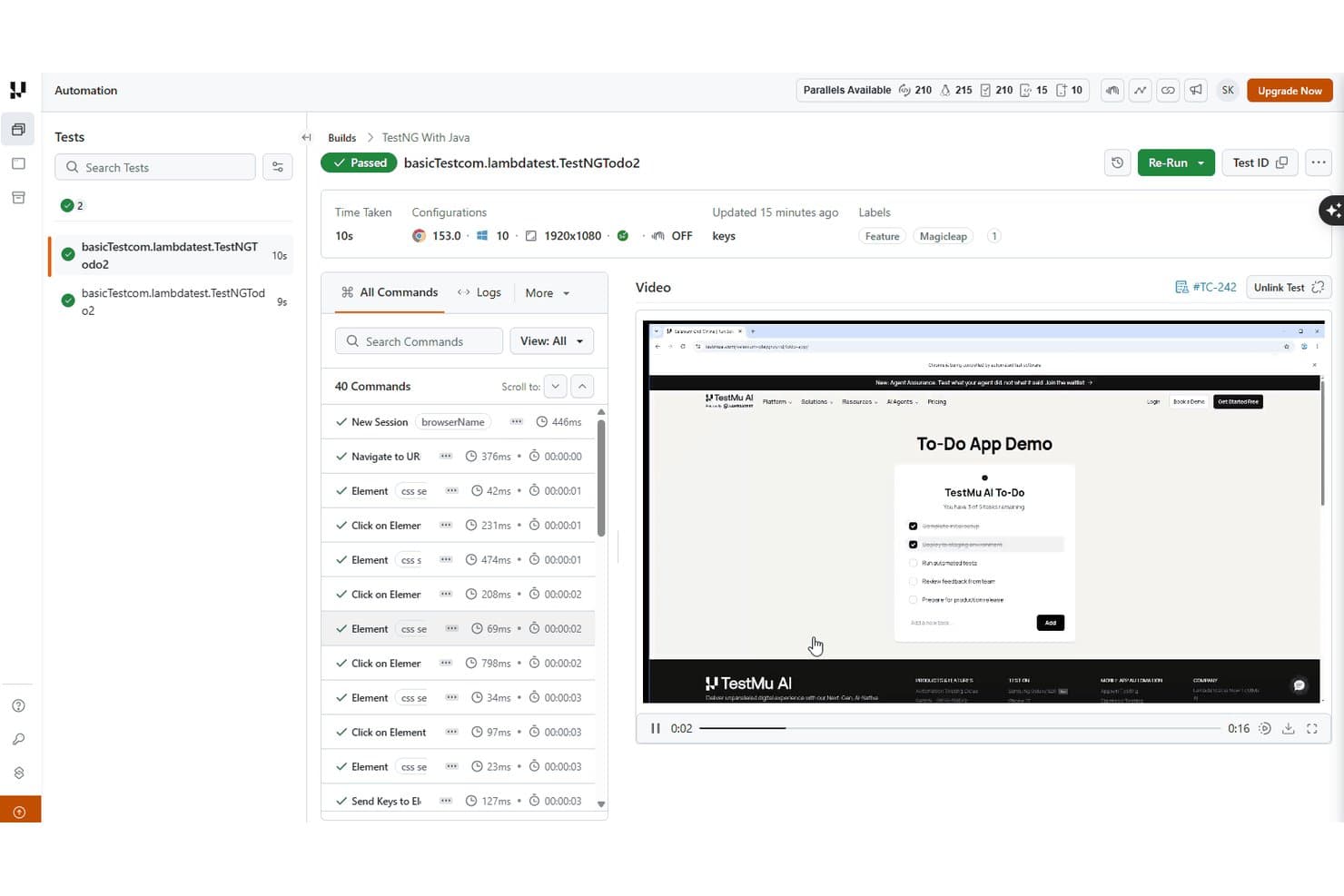
TestMu AI lets users review automation test results with video playback. TestMu AI is an AI-native software testing platform that lets you author, run, and evolve tests across web and mobile apps using natural language, with built-in API checks, visual regression, and CI/CD pipeline support.
Who Is TestMu AI Best For?
TestMu AI is a strong fit for QA engineers and testers who need to validate API behavior as part of end-to-end UI flows, without switching tools mid-test.
Why I Picked TestMu AI
I picked TestMu AI as one of the best because its KaneAI agent lets you check API behavior inline during a UI run, without switching to a separate API testing tool. While a form is submitting or a checkout flow is running, KaneAI monitors for broken endpoints, slow responses, and failed payloads in the same session. I've also found the natural-language test authoring genuinely useful here: you describe the flow in plain English, and KaneAI handles both the UI steps and the network checks together.
TestMu AI Key Features
- Natural-language test authoring: Describe a test flow in plain English and KaneAI generates, runs, and evolves the test across web and mobile apps.
- Self-healing tests: KaneAI detects UI or locator changes, updates the affected steps, and surfaces those changes for your review.
- CI/CD pipeline support: Kane CLI integrates with GitHub Actions, GitLab CI, Jenkins, and Bitbucket Pipelines, returning typed exit codes so your pipeline can act on results.
- Test scheduling: Run tests on demand or set a fixed schedule, with flake and failure insights surfaced across projects after each run.
TestMu AI Integrations
TestMu AI reports 120+ integrations, including Jira, Azure DevOps, GitHub, GitHub Actions, GitLab CI, Jenkins, and Bitbucket Pipelines. Kane CLI also works with Claude Code, Cursor, Codex, and Gemini CLI.
Pros and Cons
Pros:
- Broad browser and device access
- Plain-English test authoring cuts repetitive setup
- Checks API behavior within UI journeys
Cons:
- Healing can route around broken controls
- Can stall during routine UI interactions
Learn more about TestMu AI: Best for parallel test execution
- Free trial available
- From $199/month/year (minimum of 4 seats)
Visit WebsiteCustomer Rating:4.9/5
The TestGrid dashboard provides an overview of testing activities and results, critical for monitoring and management of test executions. TestGrid is a cloud-based software testing platform designed for QA teams and developers who need to automate web and mobile testing on real devices, helping businesses accelerate release cycles and improve test coverage.
Who Is TestGrid Best For?
TestGrid suits QA engineers and DevOps teams at mid-size to enterprise companies that require scalable, automated testing for web and mobile applications.
Why I Picked TestGrid
I picked TestGrid because it handles parallel test execution across real devices and browsers very well. The parallel sessions feature lets my team run multiple test suites simultaneously instead of queuing them, cutting total execution time during pre-release sprints. Iterative test case execution lets us batch and run cases in parallel across different OS and browser combinations in a single pass. The scriptless test case creation means we don't spend time writing boilerplate code just to queue a test.
TestGrid Key Features
- AI auto-heal: Automatically detects and fixes broken test locators when UI elements change, reducing manual maintenance between releases.
- Visual testing: Runs visual checks alongside functional tests to catch UI defects like layout shifts and rendering issues across browsers and devices.
- Test data parameterization: Reuses test data sets across multiple test cases, so you can run the same test logic against different data inputs without duplicating scripts.
- Session video and screenshots: Records video and captures screenshots during test execution for post-run debugging and audit trails.
TestGrid Integrations
TestGrid offers native integrations with Jenkins, Jira, GitHub, GitLab, Slack, and Azure DevOps, and Zapier, plus supports CI/CD workflows through its API.
Learn more about TestGrid:

Appsurify TestBrain targets high-risk code to optimize testing. Appsurify TestBrain helps QA teams and software engineers speed up testing cycles by intelligently selecting and prioritizing tests, making it easier to catch issues early and optimize continuous integration workflows.
Who Is Appsurify TestBrain Best For?
Appsurify TestBrain is a good fit for development and QA teams at software companies that run large test suites and need to reduce CI/CD pipeline bottlenecks.
Why I Picked Appsurify TestBrain
I picked Appsurify TestBrain as one of the best because its patented AI-driven risk-based testing approach directly solves one of the most common CI/CD bottlenecks QA teams face: running full test suites on every commit. Instead of executing every test, TestBrain analyzes each developer commit and selects only the tests relevant to the changed code areas. I also like the flaky test management feature, which uses a separate AI model to distinguish real defects from flaky failures—so my team isn't chasing false positives that break builds without any underlying code change. The Model Insights page gives full visibility into how the AI performs on a per-run basis, helping build trust before relying on automated test selection in a production CI pipeline.
Appsurify TestBrain Key Features
- Test run analytics dashboard: View real-time data on test run performance, time savings, and risk-based test selection results across your projects.
- Model maturity wheel: Track how well the AI model has learned your codebase over time, with a visual indicator of model readiness per project.
- Smart subset scheduling: Configure periodic full test runs alongside daily smart subset runs to catch any defects the AI-selected subset may have deferred.
- Code-language agnostic test support: Run UI, E2E, API, integration, and unit tests across any code language without framework-specific configuration.
Appsurify TestBrain Integrations
Appsurify TestBrain offers native integrations with GitHub, Bitbucket, Microsoft TFVC, Perforce, SVN, Jenkins, Buildkite, CircleCI, Bitrise, Azure DevOps, Bamboo, Selenium, Appium, Cucumber, and several more tools. An API is available for custom integrations.
Pros and Cons
Pros:
- Reduces test cycle times
- Smart test selection
- Focuses on high-risk areas
Cons:
- Complexity in large environments
- Technical expertise needed
Learn more about Appsurify TestBrain:

QA Wolf enables collaborative cloud-based test automation for teams. QA Wolf is a cloud-based test automation platform designed for QA teams and software engineers who need fast, scalable, and easy-to-maintain end-to-end testing for web applications.
Who Is QA Wolf Best For?
QA Wolf is a good fit for mid-size to enterprise engineering teams that need a shared, scalable test automation environment across QA and development functions.
Why I Picked QA Wolf
QA Wolf is one of my top picks because I love how it keeps the entire engineering team connected throughout the testing process. Slack and Microsoft Teams integrations push real-time test results directly to the channels your team already uses, so no one has to go hunting for pass/fail updates. When a test fails, detailed bug reports with videos, traces, and logs get sent straight to your issue tracker—whether that's Jira, Linear, or Asana—so developers can act immediately. I also like that QA Wolf embeds human QA engineers alongside your team, which means collaboration isn't just a feature, it's built into the service model.
QA Wolf Key Features
- Mapping AI: An AI agent that explores your app and automatically maps every feature to build a complete picture of what needs to be tested.
- Parallel run orchestration: Runs your entire test suite concurrently, with automatic retries on failures to eliminate flakes caused by network or environment issues.
- 24-hour test maintenance: QA Wolf's team handles test upkeep around the clock, so broken tests get diagnosed and fixed without pulling your engineers away from development.
- CI/CD pipeline integration: Trigger test runs directly from GitHub, GitLab, or Bitbucket and use QA Wolf as a final release gate before deploying to production.
QA Wolf Integrations
QA Wolf offers native integrations with GitHub, GitLab, Bitbucket, Jira, Linear, Asana, ClickUp, Netlify, Vercel, Microsoft Teams, Slack, and Discord. An API is available for custom integrations.
Pros and Cons
Pros:
- Supports parallel test execution
- Real-time test notifications
- Managed testing services
Cons:
- Limited offline functionality
- High entry price
Learn more about QA Wolf: Best for scalable automation
- Free trial available + free demo
- Pricing upon request
Visit WebsiteCustomer Rating:4.5/5
Tricentis Testim offers scalable automation for growing QA teams. Tricentis Testim is an AI-powered test automation platform for QA teams and software engineers who need to accelerate web application testing and reduce maintenance headaches.
Who Is Tricentis Testim Best For?
Tricentis Testim is a strong fit for mid-size to enterprise QA teams that need to run large volumes of automated web app tests across fast-moving development cycles.
Why I Picked Tricentis Testim
Tricentis Testim earns its spot on my shortlist because of how well it handles test automation at scale without letting maintenance overhead spiral out of control. I really like the TestOps feature, which supports teams managing growing test suites—it helps organize tests, manage changes across teams, and prioritize what gets run. Additionally, the AI-powered smart locators self-heal when app elements change, so my team isn't constantly patching broken tests after every release. That combination of scalable test management and self-healing stability is what makes Testim stand out for high-velocity QA environments.
Tricentis Testim Key Features
- Root cause analysis: Diagnose failed tests using highlighted screenshots, console logs, and network logs to pinpoint the exact source of a failure.
- Agentic test automation: Describe your testing needs in natural language and Testim automatically builds complete, best-practice tests without manual intervention.
- Cross-browser and device execution: Run tests locally, on Testim's grid, or any Selenium-compatible grid, on demand, on a schedule, or triggered from CI pipelines.
- Testim Copilot: Generate custom JavaScript test steps by providing a plain-language description, reducing the coding expertise needed to build complex test logic.
Tricentis Testim Integrations
Tricentis Testim offers native integrations with Jira, Trello, GitHub, Slack, and email, supports webhooks for custom workflows, and can trigger tests from continuous integration tools; an API is also available for building custom integrations.
Pros and Cons
Pros:
- Supports parallel testing
- Visual test editor
- Scalable test execution
Cons:
- Internet dependency for full features
- Advanced features can be complex
Learn more about Tricentis Testim:
Outras Ferramentas de Testes de Software
Eis mais algumas soluções que não entraram na lista principal. Se precisar de sugestões adicionais de ferramentas de testes de software úteis, consulte estas opções.
- 11ReflectBest for no-code testing
- 12EndtestBest for scriptless automation
- 13testRigorBest for no-code test automation
- 14New RelicBest for real-time performance monitoring
- 15TestsigmaBest for open-source testing
- 16Tricentis NeoLoadBest for load testing
- 17Tricentis SeaLightsBest for release quality
- 18Tricentis ToscaBest for model-based testing
- 19SquishBest for object-based testing
- 20AutifyBest for AI-driven testing
How I Evaluate Software Testing Tools
I split my evaluation into two layers: the baseline a tool must clear to make the list, and the differentiators—CI/CD depth, AI test authoring, real-device coverage—that separate tools.
Core Functionality (Table Stakes For This List)
When I'm selecting tools for my list, I rank each one on a scale from 0 (does not offer the functionality) to 5 (excels in this area) for each core functionality listed below. Then, I calculate the tool's total score into a percentage. Each tool needs to achieve a minimum total score of 75% to be considered for inclusion.
- Test Automation Capabilities: I evaluate whether a tool supports automated testing across UI, API, and mobile layers, and whether it offers both coded and codeless approaches for teams with mixed skill sets.
- Test Case Management: Organizing and versioning test cases matters, so I look for suites, tagging, reusable modules, and traceability back to requirements or user stories.
- Multi-Environment Test Execution: I check how each tool handles cross-browser and cross-device runs—whether that's a native cloud grid or support for Selenium Grid and similar infrastructure.
- CI/CD & DevOps Integrations: A tool should plug into pipelines like Jenkins, GitHub Actions, or GitLab CI with minimal friction, triggering tests automatically on each commit or merge.
- Defect Tracking & Reporting: Dashboards, failure analytics, and tight connections to issue trackers like Jira or Azure DevOps are what I evaluate here to gauge how fast teams can act on results.
- Test Data & Scripting Support: I look for parameterization, data-driven test execution from sources like CSV or databases, and flexible scripting to handle complex, real-world test scenarios.
Once I have a list of tools that meet this criteria, I consider what sets each platform apart.
Differentiating Factors (What Sets Vendors Apart)
Here's how I compare and contrast different vendors:
Standout Features
AI-powered self-healing is a big differentiator I evaluate. When front-end teams ship frequent UI changes, tests that auto-adjust broken locators save hours of maintenance work each sprint. Codeless test authoring also matters because it lets manual QA contributors build automated tests without writing code, which expands coverage fast. For mobile-heavy products, I check whether a tool provides real device cloud access—emulators often miss rendering bugs and performance issues that only surface on actual hardware.
Beyond Features
Scalability and parallel execution are top of mind—I evaluate how well a tool handles enterprise-scale suites during high-frequency CI runs without ballooning costs. That ties directly into licensing model, where I check whether pricing scales by user, test run, or parallel thread, since the wrong model can make costs spike as teams grow. I also consider security posture, especially SOC 2 compliance, SSO/SAML support, and whether a tool offers self-hosted deployment for teams in regulated industries like healthcare or finance.
Como Escolher Ferramentas de Testes de Software
É fácil ficar atolado em longas listas de funcionalidades e estruturas de preços complexas. Para se manter focado enquanto analisa o seu processo específico de seleção de software, eis uma lista de verificação dos fatores a ter em conta:
| Fator | O que considerar |
|---|---|
| FatorEscalabilidade | O que considerarCertifique-se de que a ferramenta consegue processar mais casos de teste, utilizadores e ambientes à medida que os seus projetos crescem, sem sacrificar o desempenho ou a velocidade. |
| FatorIntegrações | O que considerarProcure uma compatibilidade perfeita com o seu pipeline de CI/CD, sistemas de controlo de versões, ferramentas de gestão de projetos e ferramentas de testes exploratórios. |
| FatorPersonalização | O que considerarEscolha uma ferramenta que lhe permita adaptar scripts de teste, relatórios e painéis de controlo aos fluxos de trabalho e às práticas de desenvolvimento da sua equipa. |
| FatorFacilidade de utilização | O que considerarOpte por uma ferramenta intuitiva tanto para utilizadores técnicos como não técnicos. Uma interface simples reduz o tempo de integração e os erros. |
| FatorOrçamento | O que considerarVerifique se os preços são transparentes. Certifique-se de que as funcionalidades incluídas em cada nível correspondem à dimensão da sua equipa e às suas necessidades atuais de testes. |
| FatorMedidas de segurança | O que considerarConfirme que a ferramenta protege os dados de teste através de encriptação e controlos de acesso seguros, e que cumpre todos os requisitos regulamentares aplicáveis. |
| FatorColaboração | O que considerarConsidere ferramentas que permitam a vários testadores trabalharem em simultâneo e que incluam funcionalidades integradas de comunicação ou feedback. |
| FatorCobertura de testes | O que considerarProcure software de testes de ALM que suporte uma vasta gama de tipos de testes, como testes de IU, API, regressão e desempenho, para que a sua equipa não tenha de gerir várias ferramentas. |
Tendências nas ferramentas de teste de software
As ferramentas de teste de software que utiliza e a forma como as utiliza dependerão, em grande medida, das tendências do setor. Eis algumas tendências que poderão ser úteis enquanto define o seu conjunto ideal de ferramentas de QA:
- Maior ênfase na IA e aprendizagem automática: ferramentas avançadas integraram algoritmos de IA e aprendizagem automática para análise preditiva e geração inteligente de casos de teste. Esta tendência evidencia uma mudança para processos de teste mais automatizados e eficientes, nos quais a IA ajuda a identificar potenciais problemas antes de estes ocorrerem.
- Maior foco nas capacidades de integração: As ferramentas de teste de software melhoraram a sua integração com pipelines de CI/CD e sistemas de controlo de versões. A integração perfeita garante que os testes são uma parte integrante do processo de desenvolvimento, facilitando os testes e a implementação contínuos.
- Crescimento da gestão de ambientes de teste: A introdução de funcionalidades sofisticadas de gestão de ambientes de teste nestas ferramentas responde à necessidade de ambientes de teste mais controlados e escaláveis. Esta funcionalidade permite aos testadores simular vários ambientes, melhorando a fiabilidade dos resultados dos testes.
- Relatórios e painéis de controlo melhorados em tempo real: As ferramentas de teste de software disponibilizam agora painéis de controlo mais dinâmicos e interativos. Os relatórios em tempo real permitem obter feedback imediato e tomar decisões baseadas em dados, o que é essencial em ciclos de desenvolvimento rápidos.
- Experiência do utilizador e testes de usabilidade: Com a importância crescente da experiência do utilizador, estas ferramentas incorporaram funcionalidades de testes de usabilidade. Esta mudança realça a necessidade de testar não só a funcionalidade, mas também a interface e a experiência do utilizador.
- Diminuição das funcionalidades de testes manuais: O crescimento das capacidades de automatização está a conduzir a uma menor ênfase nas funcionalidades de testes manuais. Isto indica uma tendência mais ampla do setor para a automatização e a eficiência, com os testes manuais a assumirem um papel menos central em muitas estratégias de teste.
O que são ferramentas de teste de software?
As ferramentas de teste de software são aplicações que ajudam as equipas a verificar se o software funciona conforme previsto, identificando erros, acompanhando problemas e verificando o desempenho. São utilizadas por engenheiros de QA, programadores e gestores de projetos que precisam de formas fiáveis de manter a qualidade durante atualizações e lançamentos frequentes.
As funcionalidades de automatização, elaboração de relatórios e gestão de casos de teste ajudam a reduzir o esforço manual, melhorar a precisão e manter todos alinhados quanto ao progresso dos testes. De um modo geral, estas ferramentas facilitam a entrega mais rápida de software estável e de elevada qualidade.
Funcionalidades das ferramentas de teste de software
Eis algumas funcionalidades importantes que poderá encontrar no software desta lista, bem como a sua finalidade e importância:
- Execução automatizada de testes: Automatiza tarefas de teste repetitivas. Esta funcionalidade poupa tempo e esforço significativos, permitindo que as equipas se concentrem em cenários de teste mais complexos e garantindo consistência na execução dos testes.
- Integração com ferramentas de desenvolvimento: Liga-se de forma integrada a IDEs, sistemas de controlo de versões e pipelines de CI/CD. A integração simplifica os fluxos de trabalho, garantindo que os testes são parte integrante de todo o ciclo de vida do desenvolvimento de software.
- Gestão de casos de teste: As ferramentas de testes BDD organizam e gerem casos de teste e scripts. Uma boa gestão de casos de teste ajuda a manter a estrutura e a ordem, facilitando a revisão da cobertura dos testes e a reutilização dos casos de teste.
- Relatórios e análises em tempo real: Fornece feedback instantâneo sobre o progresso e os resultados dos testes. Os dados em tempo real são essenciais para tomar decisões informadas rapidamente e ajustar as estratégias conforme necessário.
- Rastreio e gestão de erros: Regista, acompanha e gere defeitos de forma eficiente. Uma gestão eficaz dos erros é fundamental para dar prioridade aos problemas e resolvê-los rapidamente, reduzindo o risco de defeitos no produto final.
- Testes de escalabilidade e desempenho: Avalia o desempenho do software sob carga. Esta funcionalidade é essencial para garantir que o software consegue suportar cenários de utilização reais sem degradação do desempenho.
- Interface intuitiva: Disponibiliza uma interface intuitiva e fácil de utilizar. Uma ferramenta de utilização simples aumenta a produtividade e reduz a curva de aprendizagem dos novos membros da equipa.
- Compatibilidade entre plataformas: Suporta testes em várias plataformas e dispositivos. Isto garante que o software funciona de forma integrada em ambientes diversificados, satisfazendo as necessidades de um vasto leque de utilizadores. Por exemplo, as ferramentas de teste de aplicações Web podem preparar aplicações baseadas na Web para a maior variedade possível de compatibilidade com dispositivos ou navegadores.
- Fluxos de trabalho personalizáveis: Adapta-se a diferentes metodologias e processos de teste. A flexibilidade dos fluxos de trabalho permite que as equipas adaptem a ferramenta às necessidades específicas do projeto e às suas abordagens de teste.
- Funcionalidades de colaboração: Facilita o trabalho em equipa e a comunicação. As funcionalidades de colaboração eficazes são essenciais para coordenar os esforços dos membros da equipa e manter o alinhamento ao longo do processo de teste.
Benefícios das ferramentas de teste de software
A utilização de ferramentas de teste de software oferece muitos benefícios, incluindo:
- Maior eficiência: Automatiza tarefas repetitivas e demoradas. Ao automatizar estas tarefas, as ferramentas de teste de software reduzem significativamente o tempo e o esforço necessários para os testes, permitindo que as equipas de QA se concentrem nos aspetos mais complexos e de maior valor dos testes.
- Maior precisão: Minimiza os erros humanos nos testes. Os testes automatizados executam sempre exatamente os mesmos passos, eliminando assim a probabilidade de erros que podem ocorrer durante os testes manuais.
- Maior cobertura dos testes: Expande o âmbito e a profundidade dos testes. As ferramentas de teste SaaS permitem realizar mais testes no mesmo período, melhorando a cobertura geral e aumentando as probabilidades de encontrar potenciais problemas.
- Melhores informações e análises: Fornece relatórios e análises detalhados. Estas ferramentas oferecem informações abrangentes sobre o processo de teste, ajudando os responsáveis de QA a tomar decisões informadas com base numa análise orientada por dados.
- Entrada mais rápida no mercado: Acelera o ciclo de testes. Com a eficiência e a automatização proporcionadas por estas ferramentas, todo o ciclo de vida do desenvolvimento de software é acelerado, permitindo lançar os produtos mais rapidamente.
Custos e preços das ferramentas de teste de software
A seleção de ferramentas de teste de software exige uma compreensão dos vários modelos de preços e planos disponíveis. Os custos variam consoante as funcionalidades, o tamanho da equipa, os complementos, entre outros fatores. A tabela abaixo resume os planos comuns, os seus preços médios e as funcionalidades normalmente incluídas nas soluções de ferramentas de teste de software:
Tabela de comparação de planos para ferramentas de teste de software
| Tipo de plano | Preço médio | Funcionalidades comuns |
|---|---|---|
| Tipo de planoPlano gratuito | Preço médio$0 | Funcionalidades comunsCriação básica de casos de teste, execução limitada de testes, suporte da comunidade e integrações limitadas. |
| Tipo de planoPlano pessoal | Preço médio$10–$30/user/month | Funcionalidades comunsAcesso a mais tipos de teste, como ferramentas de teste de regressão visual, relatórios básicos, suporte por e-mail e algumas integrações de terceiros. |
| Tipo de planoPlano empresarial | Preço médio$30–$100/user/month | Funcionalidades comunsAutomatização avançada de testes, integrações de CI/CD, funcionalidades de colaboração em equipa, acesso à API e permissões baseadas em funções. |
| Tipo de planoPlano empresarial de grande escala | Preço médio$100–$300/user/month | Funcionalidades comunsExecução ilimitada de testes, integrações personalizadas, suporte premium, controlos de segurança, funcionalidades de conformidade e assistência na integração. |
Perguntas frequentes sobre ferramentas de testes de software
Ainda tem dúvidas sobre como selecionar a ferramenta de testes de software perfeita? A nossa secção de perguntas frequentes aborda as dúvidas mais comuns para o orientar ao longo deste processo crucial de tomada de decisão.
Quais são os erros comuns a evitar ao selecionar uma ferramenta de testes de software?
Os erros comuns incluem não considerar as estruturas suportadas pela ferramenta, ignorar a compatibilidade com a linguagem de script e não avaliar se a ferramenta está alinhada com o seu plano de gestão de testes.
Certifique-se sempre de que a ferramenta escolhida suporta as estruturas e linguagens que utiliza, como Python ou Ruby, e que se integra no seu plano de testes geral.
Em que diferem as ferramentas de testes de software baseadas na nuvem das soluções locais?
As ferramentas de testes na nuvem oferecem maior flexibilidade e são frequentemente mais escaláveis, o que as torna ideais para testar aplicações móveis.
As soluções locais podem proporcionar maior controlo sobre os dados de teste, mas exigem frequentemente um ambiente Windows ou Linux dedicado. Avalie cuidadosamente as suas necessidades antes de fazer uma escolha.
Quais são as considerações de segurança ao escolher uma ferramenta de testes de software?
A segurança é fundamental, especialmente ao testar aplicações que processam dados sensíveis dos utilizadores finais. Certifique-se de que a ferramenta selecionada cumpre as normas de segurança do setor e disponibiliza funcionalidades como o armazenamento encriptado de dados de teste. Se trabalhar num ambiente Linux, procure ferramentas que tenham funcionalidades de segurança robustas para esse sistema operativo.
Como avalio o retorno do investimento de uma ferramenta de testes de software?
Para avaliar o retorno do investimento, considere o tempo poupado na execução dos testes e a redução de erros durante o conjunto de testes. Tenha em conta os custos, incluindo o licenciamento de ferramentas proprietárias ou os plug-ins de uma ferramenta de código aberto. Avalie também o grau de integração da ferramenta com as suas estruturas de testes existentes, para garantir que acrescenta valor.
Como se integram as ferramentas de testes de software com outras ferramentas do pipeline de DevOps?
A maioria das ferramentas modernas de testes de software disponibiliza plug-ins ou APIs que permitem uma integração simples no pipeline de DevOps. Procure ferramentas compatíveis com BDD (Desenvolvimento orientado por comportamento) e que possam integrar-se com a sua ferramenta de gestão de testes para simplificar o plano de testes e a execução do conjunto de testes.
Posso personalizar uma ferramenta de testes de software para satisfazer as necessidades específicas do meu projeto?
Sim, muitas ferramentas permitem a personalização através de plug-ins ou scripts. Por exemplo, se estiver a trabalhar em testes de GUI, procure uma ferramenta como a UFT, que disponibiliza opções de personalização para adaptar o conjunto de testes às necessidades específicas do seu projeto. Para aplicações baseadas na Web, ferramentas abrangentes de testes de websites podem garantir a compatibilidade entre navegadores, a estabilidade e muito mais.
É possível migrar dados e definições de uma ferramenta de testes de software para outra?
A migração de dados é frequentemente possível, especialmente se as ferramentas em questão suportarem formatos comuns como XML ou PHP para dados de teste. No entanto, as definições de reprodução e outras configurações específicas da ferramenta podem não ser facilmente transferíveis. Consulte sempre a documentação ou o fornecedor antes de efetuar a mudança.
Quais são os tipos de ferramentas de testes de software?
Existe software de testes diferente para diferentes áreas do ciclo de vida do desenvolvimento de software. Eis alguns dos principais tipos de ferramentas de testes de software que poderá encontrar durante os testes de aplicações. As soluções de testes de software podem especializar-se numa destas áreas de testes ou abranger várias.
Ferramentas de testes funcionais
Os testes funcionais podem ser subdivididos em categorias como testes unitários, testes de integração, testes de interface, testes beta/de aceitação, entre outros.
As ferramentas de testes funcionais serão responsáveis por identificar defeitos antes do lançamento no mercado, ajudar os clientes a testar o software acabado de entregar e/ou testar a compatibilidade retroativa com software mais antigo e a compatibilidade com diferentes navegadores Web e sistemas operativos.
Ferramentas de testes não funcionais
Os testes não funcionais podem ser subdivididos em categorias como testes de desempenho, testes de carga, testes de segurança, testes de instalação, entre outros.
As ferramentas de testes de software desta categoria podem ser responsáveis por testar o processo de instalação em diferentes componentes de hardware e sistemas operativos, verificar se o software apresenta problemas de segurança ou possíveis pontos fracos e/ou testar a capacidade de carga de determinado software para verificar se consegue suportar um determinado volume de utilizadores que realizam um determinado volume de ações.
Ferramentas de testes automatizados
As ferramentas de testes automatizados foram concebidas para avaliar o resultado esperado e compará-lo com o resultado real. Os testes automatizados baseiam-se em scripts ou software que executam ações repetitivas e monótonas e comunicam os resultados. Os testes de software automatizados podem ser utilizados para executar ações difíceis de reproduzir manualmente.
Ferramentas de testes ágeis
O desenvolvimento ágil é uma metodologia que concebe um produto em etapas organizadas e incrementais. Por conseguinte, os testes ágeis são uma solução de testes de software que testa de forma semelhante, em etapas incrementais, testando as funcionalidades à medida que são desenvolvidas.
O que são ferramentas de testes de software no contexto da engenharia de software?
A engenharia de software é o processo de utilizar conhecimentos de informática para planear, desenvolver, programar e testar produtos de software, como jogos, aplicações, SaaS e software empresarial. As ferramentas de testes de software são um componente importante do trabalho de qualquer engenheiro de software, uma vez que o ajudam a verificar a existência de defeitos.
Estou sobrecarregado! Posso subcontratar os meus testes de software?
Sim! Existem muitas empresas de testes de software que podem assumir os processos de testes. Normalmente, enviam relatórios de erros e até sugestões de correção. Isto pode poupar-lhe bastante tempo e até alargar os seus testes para incluir a experiência do utilizador ou testes de UI. As ferramentas de testes de software são aplicações que ajudam as equipas a verificar se o software funciona conforme esperado, encontrando erros, acompanhando problemas e verificando o desempenho. São utilizadas por engenheiros de QA, programadores e gestores de projetos que precisam de formas fiáveis de manter a qualidade durante atualizações e lançamentos frequentes. As funcionalidades de automatização, elaboração de relatórios e gestão de casos de teste ajudam a reduzir o esforço manual, melhorar a precisão e manter todos alinhados quanto ao progresso dos testes. No geral, estas ferramentas facilitam a entrega mais rápida de software estável e de elevada qualidade.
Ferramentas de testes adicionais
- Melhor software de rastreio de erros
- Melhores ferramentas de análise estática de código
- Melhor software de testes de esforço
- Melhores ferramentas de teste de API
- Melhores ferramentas de teste de caixa preta
- Melhores ferramentas de teste entre navegadores
- Melhor software de servidor web
- Melhores ferramentas de automatização de testes móveis
- Melhores ferramentas gratuitas de gestão de testes