

As ferramentas de implementação DevOps ajudam a reduzir o caos, automatizando e simplificando os processos de implementação e tornando a vida um pouco mais fácil para a sua equipa. Na minha experiência, escolher a ferramenta certa pode transformar o seu fluxo de trabalho e melhorar a colaboração.
Neste artigo, partilharei as minhas principais escolhas de ferramentas de implementação DevOps. Testei e analisei cada uma delas para garantir que obtém informações imparciais e devidamente fundamentadas. Quer esteja à procura de escalabilidade, funcionalidades específicas do setor ou interfaces fáceis de utilizar, encontrará aqui o que precisa.
Why Trust Our Software Recommendations
6,700+
Reviews
20
Industry experts
16+
Evaluation factors
14
Years
Our team has been testing and reviewing software since 2012. As tech leaders ourselves, we know how difficult—and important—it is to choose the right software.
For this guide, we evaluated tools using hands-on testing and independent research, scoring tools using our selection criteria.
Our reviews reflect our human editorial judgment, not a sales pitch.
Expert reviewers:
- Paulo Gardini MiguelTech Director
 Tim FisherVP of AI
 Gabriel RosasTech Lead & Software Architect
 Christhian GruhnTech Lead & Platform Architect

Tabela comparativa das ferramentas de implementação DevOps
Esta tabela comparativa resume os detalhes de preços das minhas principais escolhas de ferramentas de implementação DevOps:
| Tool | Best For | Trial Info | Price | ||
|---|---|---|---|---|---|
| 1 | Best for deployment without a DevOps team | Free demo available | From $3,500/month | Website | |
| 2 | Best for infrastructure monitoring | Free plan + 30-day trial + demo available | From $10/month | Website | |
| 3 | Best AI-powered observability tool for cloud infrastructure and app monitoring | 15-day free trial | From $7/month | Website | |
| 4 | Best for AI-powered anomaly detection | Free plan available | From $10/user/month | Website | |
| 5 | Best open-source DevOps automation server | Not available | Pricing upon request | Website | |
| 6 | Best low-Code CI/CD built for Salesforce | 15-day free trial | $99/user/month | Website | |
| 7 | Best DevOps platform for change management | Pricing upon request | Website | ||
| 8 | Best for building IT automation deployment scripts | Free To Use | Website | ||
| 9 | Best Scrum-ready and Agile deployment leader | Free plan available | From $6/user/month | Website | |
| 10 | Best for protecting critical data during deployment by monitoring database problems | From $1200+ per license | Website |


Análises das melhores ferramentas de implementação DevOps
Abaixo encontrará os meus resumos detalhados das melhores ferramentas de implementação DevOps que chegaram à minha seleção. As minhas análises apresentam uma visão detalhada das principais funcionalidades, vantagens & desvantagens, integrações e casos de utilização ideais de cada ferramenta, para o ajudar a encontrar a melhor opção para si.
 Best for deployment without a DevOps team
- Free demo available
- From $3,500/month
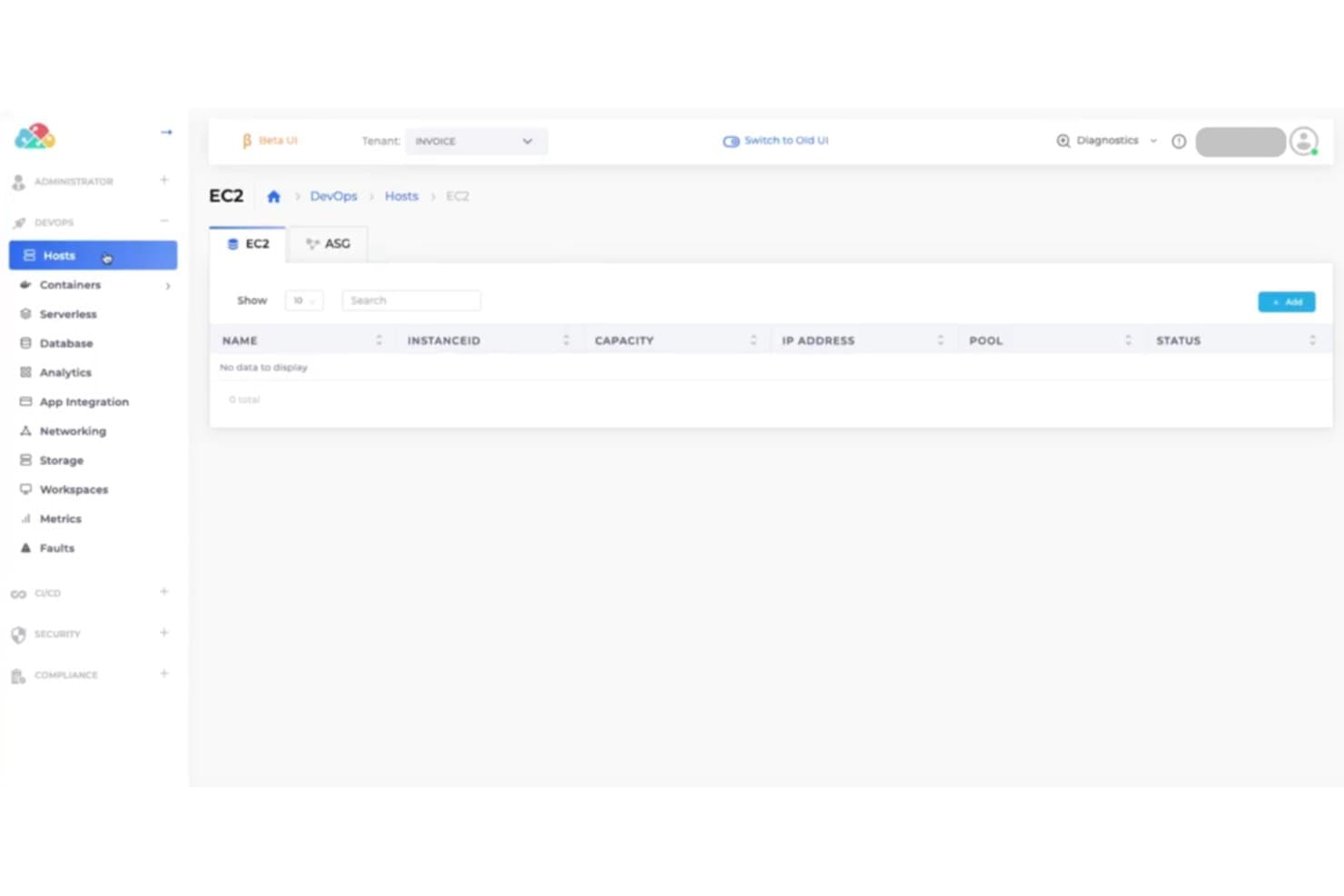
DuploCloud manages EC2 hosts within a DevOps environment via a clean UI. DuploCloud is an AI-powered DevOps automation platform that handles cloud infrastructure provisioning, deployment orchestration, CI/CD pipelines, security, compliance, and observability across AWS, Azure, and Google Cloud Platform.
Who Is DuploCloud Best For?
DuploCloud is a strong fit for engineering teams that need to manage cloud infrastructure and deployments without a dedicated DevOps function.
Why I Picked DuploCloud
I picked DuploCloud as one of the best because it's built specifically for engineering teams that need to ship to production without a dedicated DevOps function. Over half its customers have no DevOps team at all, and the platform handles what that missing function would normally own: provisioning cloud infrastructure across AWS, Azure, and Google Cloud Platform, orchestrating Kubernetes deployments, and managing compliance controls like SOC 2 and HIPAA out of the box. Rolling upgrades pause automatically when a health check fails, so a bad container doesn't silently propagate across your environment.
DuploCloud Key Features
- FluxCD GitOps integration: Syncs your Kubernetes cluster state directly with Git, so configuration changes in your repository automatically propagate to your environments.
- Terraform provider: A certified provider lets you provision and manage cloud infrastructure across AWS, Azure, and Google Cloud Platform through declarative code with managed state backends.
- Diagnostics and fault detection: The platform generates faults for health-check failures, container crashes, and deployment failures, with alerting routed to Sentry or PagerDuty.
- Secrets and credential management: Supports AWS Secrets Manager, SSM Parameter Store, Kubernetes Secrets, and ECS Task Definition secret fields for injecting sensitive values into containers at runtime.
DuploCloud Integrations
DuploCloud documents integrations with GitHub Actions, GitLab, CircleCI, Jenkins, Terraform, Kubernetes, Datadog, and Prometheus. REST, MCP, and CLI interfaces support custom integrations and deployment workflows.
Pros and Cons
Pros:
- Searchable audit trails filter deployment changes
- Health checks pause unsafe rolling upgrades
- Self-service environments reduce DevOps bottlenecks
Cons:
- Each cloud account needs a separate portal instance
- External CI tools handle image builds
Learn more about DuploCloud: Best for infrastructure monitoring
- Free plan + 30-day trial + demo available
- From $10/month
Visit WebsiteCustomer Rating:4.7/5
Site24x7 displays real time server performance metrics across CPU, memory, disk, and processes, helping DevOps teams spot infrastructure issues early. For teams seeking a DevOps deployment solution, Site24x7 offers a platform designed to enhance your operational efficiency. This tool is particularly appealing to IT professionals and businesses focused on optimizing their deployment processes across hybrid cloud environments. By addressing challenges such as real-time monitoring, proactive issue detection, and efficient log management, Site24x7 empowers your team to maintain smooth operations and improve overall performance.
Why I Picked Site24x7
I picked Site24x7 for its unique approach to integrating AIOps into DevOps deployment tools, which stands out in the industry. The platform's AI-powered insights help detect issues early, reducing the mean time to repair and optimizing system performance. Additionally, Site24x7's comprehensive monitoring solutions, including application and network monitoring, ensure that your team can maintain optimal performance across various environments. These features make it a compelling choice for those looking to enhance their DevOps practices.
Site24x7 Key Features
In addition to its AIOps capabilities, Site24x7 offers several features that enhance its value as a DevOps deployment tool:
- Infrastructure Monitoring: Provides monitoring for servers, cloud platforms like AWS, Azure, and GCP, and Kubernetes to ensure optimal performance across environments.
- Log Management: Streamlines troubleshooting and performance analysis with efficient log management capabilities.
- Network Monitoring: Includes tools for managing network performance, traffic, and configurations, ensuring efficient network operations.
- User Experience Monitoring: Offers Real User Monitoring (RUM) and synthetic monitoring to enhance digital experiences and identify performance bottlenecks.
Site24x7 Integrations
Integrations include AWS, Azure, Google Cloud Platform, Kubernetes, Docker, Slack, Microsoft Teams, Jira, PagerDuty, and ServiceNow. An API is available for custom integrations.
Pros and Cons
Pros:
- Strong integrations with DevOps tools
- AI-driven alerts reduce incident response
- Broad infrastructure and application monitoring
Cons:
- Alert tuning requires ongoing effort
- Initial setup can be complex
Learn more about Site24x7: Best AI-powered observability tool for cloud infrastructure and app monitoring
- 15-day free trial
- From $7/month
Visit WebsiteCustomer Rating:4.5/5
Dynatrace dashboard displaying various metrics With the growing trend toward cloud computing, Dynatrace has become an important part of the DevOps toolkit, providing valuable insight into cloud infrastructure and container activity.
Why I Picked Dynatrace: Dynatrace goes beyond mere intelligent observability and infrastructure monitoring. Dynatrace also offers insight into the black box of AI explainability, bolstering the ethics governance into the effects and consequences of algorithms.
With its AIOps, Dynatrace has signaled that it’s gone big on artificial intelligence and automation by adopting machine learning models. In addition, it seamlessly pairs cloud automation with business analytics alongside log management and automatic discovery capabilities.
Dynatrace’s Standout Features & Integrations
Features include infrastructure monitoring, application lifecycle management, AI-powered automation, application security, and distributed tracing.
Integrations include all the major cloud computing and Kubernetes platforms. So, DevOps can use Dynatrace to monitor AWS, Azure, Google Cloud Compute, ServiceNow, OpenShift, and VMware Tanzu monitoring.
Dynatrace has also forged out-of-the-box integrations with test automation frameworks like JMeter, LoadRunner, and Neotys.
Dynatrace Pricing
Dynatrace costs vary by package and start at $15-74/host/month.
Pros and Cons
Pros:
- Analytics with seamless integration.
- Provides good visibility through good executive-level dashboards.
- The most popular observability platform.
Cons:
- Some users complain of receiving false alarms.
- Steep learning curve because of so much functionality.
- The user interface needs to be more intuitive.
 Best for AI-powered anomaly detection
- Free plan available
- From $10/user/month
Visit WebsiteCustomer Rating:4.3/5
New Relic's provides automated scanning and analysis of applications and infrastructure to identify and address security vulnerabilities. New Relic is a DevOps deployment tool that provides real-time monitoring and analytics for your software applications. It's designed to help you understand how your applications are performing, identify bottlenecks, and troubleshoot issues quickly.
Why I picked New Relic: New Relic excels in DevOps deployment due to its unique combination of comprehensive monitoring capabilities, distributed tracing, AI-powered anomaly detection, seamless integrations with DevOps tools, scalability, and collaboration features. It provides real-time visibility into application performance and infrastructure health, allowing teams to quickly identify and resolve issues.
New Relic utilizes AI-powered anomaly detection to automatically identify and alert users about abnormal patterns or deviations in application performance data. This functionality leverages machine learning algorithms that analyze large volumes of real-time and historical data to establish baseline performance metrics. By continuously monitoring metrics such as response times, error rates, and throughput, New Relic's AI algorithms can detect deviations from normal behavior. When an anomaly is detected, it triggers alerts or notifications, enabling DevOps teams to investigate.
New Relic Standout Features & Integrations
Features include backend monitoring, Kubernetes monitoring, mobile monitoring, model performance monitoring, infrastructure monitoring, log management, error tracking, network monitoring, vulnerability management, and browser monitoring.
Integrations include over 500 apps, like AWS, Google Cloud, and Microsoft Azure, CI/CD tools like Jenkins, CircleCI, and Travis CI, communication tools like Slack and PagerDuty, and other monitoring and analytics tools like Grafana, Datadog, and Splunk. It also has an API you can use to build custom integrations.
New Relic Pricing
New Relic costs from $49/user/month and offers a free plan for 1 user and 100 GB/month of data ingest.
Pros and Cons
Pros:
- AI-powered anomaly detection and intelligent alerting
- Integrates seamlessly with popular dev tools
- Wide range of monitoring capabilities
Cons:
- Added complexity from reliance on agents installed on application servers
Learn more about New Relic: Best open-source DevOps automation server
- Not available
- Pricing upon request
Visit WebsiteCustomer Rating:4.4/5
Jenkins with quality metrics on an agile project Jenkins is one of the most ubiquitous tools in the DevOps ecosystem. As an open-source automation server, Jenkins is supported by a robust community that provides solutions like plugins that allow users to automate different aspects of DevOps activities and the software delivery pipeline.
Why I Picked Jenkins: One of the most attractive features of Jenkins is its massive collection of 1800+ plugins that support various aspects of the software lifecycle with little effort on your part, from building, testing, deploying, and automating projects.
Jenkins' core use case is continuous integration and continuous delivery (CI/CD), so some of its activities include static code analysis, automated testing, distributed builds and packaging, documentation, deployment, and more.
Jenkins is written in Java, but Jenkins servers give you the liberty to set up CI/CD environments for multiple programming languages and different OS platforms. It is also mature and battle-tested.
Jenkins started as an automation server to test the validity of Java code before committing them to the repository and breaking builds. As a result, it can work in a “pull” or “push” mode, checking for repository changes when triggered by commit events.
Jenkins Standout Features & Integrations
Features include plugins, easy configuration, source code and build management, systems analytics and monitoring, build pipelines, and flexible and distributed architecture.
Integrations including Jira, GitHub, Microsoft Azure, Build Failure Analyzer, and Copy Artifact Plugin.
Jenkins Pricing
Jenkins is free to use and open source.
Pros and Cons
Pros:
- Easy to set up with great flexibility
- Provides seamless integration
- Great community that provides DevOps support and solutions
Cons:
- Jenkins doesn’t permit server-to-server federation, which has a huge potential to create performance issues in large-scale environments
- Teams using Jenkins are susceptible to Jenkins sprawl, creating lots of Jenkins servers difficult to manage
 Best low-Code CI/CD built for Salesforce
- 15-day free trial
- $99/user/month
Visit WebsiteCustomer Rating:4.4/5
Copado dashboard showing value stream metrics. Copado is a low-code platform focused on helping sales teams deliver CI/CD pipeline deployments. Developed by Salesforce, Copado is designed to make deployments on its secure platform easier to execute for DevOps.
Why I Picked Copado: Copado is built for system administrators, architects, and developers to implement and quickly release software changes at half the risk. Copado provides an end-to-end development lifecycle that makes your software more resilient by integrating AI-driven test automation into deployed code.
Because Copado is natively built on Salesforce, developers quickly scan code and move from working on a sandbox to deploying Salesforce metadata and seamlessly syncing with their Salesforce organization.
Copado is focused on bringing value stream management to its Salesforce customer so that a team can visualize the delivery process through value stream maps, its unified DevOps platform, flexible architecture, and improved agile adoption.
Copado Standout Features & Integrations
Features include monitoring, managing CI/CD pipelines, low-code automation, value stream management, easy integration between your product into other Salesforce application lifecycle management (ALM) tools, and track changes capabilities in your Salesforce environment.
Integrations include the ability to sync items like user stories with Jira and Azure boards in agile two-way integrations to simplify feature planning and facilitate better Agile sprints. These include built-in integrations such as Git and Vlocity. Its add-on integrations include Jenkins, Bitbucket, OwnBackup, and Welkin Suite.
Copado Pricing
Copado starts at $1000/month. They offer a free Essential version.
Pros and Cons
Pros:
- Accelerates since data is contained in a single location
- Presents DevOps practices to non-technical users
- Ideal for executing deployments with smaller teams
Cons:
- Requires a significant learning curve to execute
Learn more about Copado:

ServiceNow Kanban-style board ServiceNow DevOps is designed to facilitate change management operations through automating the planning, developing, testing, deployment tasks. Moreover, ServiceNow DevOps provides teams with native SNOW capabilities.
Why I Picked ServiceNow DevOps: ServiceNow DevOps is equipped with useful features, such as the incident module for tracking events. This means it offers organizations in-built, exceptional knowledge management and helpdesk features. It collects data across the spectrum of DevOps activities and subsequently makes it easy to deploy applications quickly while reducing the risk of compromising quality.
ServiceNow DevOps facilitates service management activities that deliver IT services. DevOps data model allows you to move, map, and transform data while migrating from source to target destination.
ServiceNow DevOps provides visibility across a DevOps toolchain from a single dashboard while reducing your operations' costs, complexity, and risk through automation.
ServiceNow DevOps Standout Features & Integrations
Features include change and incident management, using automatic ticketing, event-driven automation, and ideal for the IT infrastructure library (ITIL).
Integrations are made possible via their IntegrationHub, an API-enabled system to integrate products quickly . Jira Software, Azure Boards, Azure Repos, Bitbucket Server/Enterprise, Azure Pipelines, GitHub, Jenkins, and GitHub Enterprise, are some of the platforms and tools that integrate with ServiceNow DevOps.
Pricing
Contact ServiceNow DevOps’ sales department for a price quote.
Pros and Cons
Pros:
- Offers a lot of customizable change management solutions
- Proves advantageous for several use cases such as help desk and knowledge management
Cons:
- Some users complain it takes more than the normal time to complete transactions
- It is expensive, so many organizations can’t afford it
Learn more about DevOps by ServiceNow:

Capistrano with ruby deployment Capistrano is a free, open-source utility that makes software deployment easy with its ability to create multiple CI/CD pipeline environments, including staging and production. Moreover, it allows you to create tasks that are applied to roles on host machines.
Why I Picked Capistrano: Capistrano performs IT automation, like backing up multiple releases seamlessly. But one of its most vital use cases is making it feasible to automate the deployment of web-based applications to distributed environments.
Although it is written in Ruby, you can use it to deploy other programming languages. Frameworks and languages easily used for scripting deployments with Capistrano include Java, Rails, and PHP. In practice, Capistrano functions as a remote server automation tool. It allows you to execute commands in parallel, via SSH, on multiple remote systems.
Without needing to use copy-and-paste gimmicks, Capistrano allows you to use parameterized deployments for multiple staging with single deployment definitions.
Capistrano Standout Features & Integrations
Features include task runner deployment/delivery, automate and script arbitrary workflows, and multiple staging.
Integrations can be built using their open source code.
Capistrano Pricing
Capistrano is free to use.
Pros and Cons
Pros:
- Easy automation of common DevOps tasks
- Enabling you to use gateways machines to support tunneling to perform operations behind VPNs and firewalls
- The ability to automate the deployment of web applications to distributed environments
Cons:
- Difficult to use if authenticated by one user and running commands as another
- Difficult to use if your deployment requires sudo or interactive prompts
- Expects POSIX shell like Bash or Sh., can try tchs, csh, etc. but may not work
Learn more about Capistrano: Best Scrum-ready and Agile deployment leader
- Free plan available
- From $6/user/month

Azure DevOps with Kanban board depicting features such as user stories Azure DevOps provides DevOps teams, especially those using Microsoft tech stack, with an integrated suite of modern dev services. It provides a comprehensive ecosystem of services that is easy to implement. Yet, you aren’t beholden to it because Azure DevOps allows you to select which elements you wish to integrate into existing workflows.
Why I Picked Azure DevOps: Azure DevOps is scrum ready and facilitates collaboration, allowing teams to create and deploy applications while working on projects seamlessly.
Azure DevOps provides both cloud-based and on-premise usage. Its ecosystem provides users with various tools like Azure Boards, Azure Pipeline, and Azure Test Plans. These keep you connected from idea to release.
In addition to CD/CI capabilities, Azure DevOps provides traceability through its comprehensive tracking ability, keeping everyone abreast of activities in their project.
Azure DevOps Standout Features & Integrations
Features include code management capabilities, tracking and project management across teams, control and manage source code repository, integrated + exploratory app testing.
Integrations include Jenkins, Ansible, Chef, Puppet, and Terraform. It can also be used with developer tools such as Maven, Eclipse, and IntelliJ.
Azure DevOps Pricing
Azure DevOps offers free trials for its products. Contact Azure DevOps sales for pricing quotes.
Pros and Cons
Pros:
- Provides tremendous flexibility when managing projects
- Great for organizations who follow the Agile methodology
- Enhanced team collaboration tools
- Easy to setup and deploy
Cons:
- Its interface can be cluttered
- Significant learning curve
Learn more about Microsoft Azure DevOps Services: 10Best for protecting critical data during deployment by monitoring database problems
Redgate
- From $1200+ per license

Redgate SQL Toolbelt interface Redgate is a software tool that helps DevOps automate database deployments. It ensures frequent deployments are handled with effective database compliance.
Why I Picked Redgate: Redgate provides organizations with end-to-end database development tools that drastically reduce release cycles from months to days. It equips management and IT leadership with the insight to standardize DevOps best practices.
Redgate enables teams to accelerate development delivery times and business requirements of projects while increasing code quality.
Redgate also shines as a database performance monitoring and availability tool. Not only does it provide the ability to scale operations across servers, but it ensures problems are pinpointed before they impact end-users.
Redgate Standout Features & Integrations
Features include standardize team-based development, database monitoring, version control and change management, and SQL provisioning.
Integrations include AWS’s EC2 and RDS. It also has integrations with ServiceNow, Jira Software, Bamboo, Jenkins, Slack, Microsoft Teams, and many others. Redgate’s Fly offers integrations with Maven, Docker, Cake, Chef, JUnit, and IntelliJ IDEA.
Redgate Pricing
Redgate has an array of products in its stable that range from $1200+ per license.
Pros and Cons
Pros:
- A lot of customization options
- Intuitive UI and flexible SDK
- Fast and lightweight
Cons:
- Products lack free trial and free version
Learn more about Redgate:
Outras ferramentas de implementação DevOps
Eis algumas opções adicionais de ferramentas de implementação DevOps que não chegaram à minha seleção, mas que vale a pena conhecer:
- 11Atlassian OpenDevOpsBest integrated DevOps mission-control center for agile and toolchain tracking
- 12CodefreshBest GitOps-friendly tool for CI/CD pipeline and workflow automation
- 13Travis CIBest parallel build processing capabilities
- 14IncredibuildBest for C++ code compilation and distributed processing
- 15Octopus DeployBest in facilitating fast, repeatable, and multi-tenancy deployment
- 16DatadogBest for server monitoring and observability for cloud-scale applications
- 17OzoneBest modern delivery orchestrator for Docker containers
- 18GoCDA continuous delivery server for modeling complex workflows
- 19Blue CanvasBest DevOps solution for Salesforce software development
- 20DeployBotCloud-based code deployment and management tool
How I Evaluate DevOps Deployment Tools
I split my evaluation into baseline requirements—like pipeline automation and rollback support—and differentiators that separate tools teams actually trust in production.
Core Functionality (Table Stakes For This List)
When I'm selecting tools for my list, I rank each one on a scale from 0 (does not offer the functionality) to 5 (excels in this area) for each core functionality listed below. Then, I calculate the tool's total score into a percentage. Each tool needs to achieve a minimum total score of 75% to be considered for inclusion.
- Automated Deployment Pipelines: I look for multi-stage pipeline orchestration with support for parallel stages, approval gates, and reusable templates across projects.
- CI/CD Integration: Each tool's connectivity with major SCM and CI platforms matters—whether that's GitHub Actions, GitLab CI, or Jenkins.
- Multi-Environment Support: I evaluate how a tool manages config separation across dev, staging, and production, including variable injection and promotion workflows.
- Rollback & Version Control: Quick recovery is everything when a bad release hits production, so I check for versioned releases and one-click or automated rollback options.
- Infrastructure & Cloud Compatibility: Deployment targets vary widely—Kubernetes, AWS, Azure, GCP, on-prem VMs—so I look at breadth of supported platforms.
- Deployment Monitoring & Logging: Real-time deployment status, log streaming, and integrations with observability tools like Datadog or Prometheus all factor into my evaluation.
Once I have a list of tools that meet this criteria, I consider what sets each platform apart.
Differentiating Factors (What Sets Vendors Apart)
Here's how I compare and contrast different vendors:
Standout Features
GitOps support is a big differentiator—I look for tools that treat a Git repo as the single source of truth for deployment state, which makes audit trails and drift detection much simpler. Progressive delivery capabilities like canary and blue-green deployments also matter when teams need to limit blast radius during releases. I evaluate policy-as-code governance too, since teams in regulated industries need codified approval gates and compliance checks baked directly into their pipelines.
Beyond Features
Security and compliance readiness is something I always check—teams deploying in regulated industries need RBAC, SSO/SAML, audit logging, and certifications like SOC 2 or ISO 27001 built in. Deployment model flexibility also matters. Some organizations require self-hosted or air-gapped options, while others prefer SaaS. I evaluate integration ecosystem depth too, since a deployment tool that connects with your existing SCM, artifact registry, ITSM, and observability stack avoids the friction of stitching workflows together manually.
Como escolher uma ferramenta de implementação DevOps
É fácil perder-se em listas extensas de funcionalidades e estruturas de preços complexas. Para o ajudar a manter o foco enquanto percorre o seu processo específico de seleção de software, eis uma lista de verificação dos fatores a ter em conta:
| Fator | O que considerar |
|---|---|
| FatorEscalabilidade | O que considerarA ferramenta consegue acompanhar o crescimento da sua equipa? Considere os limites de utilizadores, o processamento de dados e as necessidades futuras. Procure ferramentas que apoiem o seu crescimento a longo prazo sem custos adicionais. |
| FatorIntegrações | O que considerarFunciona com os seus sistemas atuais? Verifique a compatibilidade com ferramentas existentes, como sistemas de controlo de versões e serviços na nuvem, para evitar interrupções no fluxo de trabalho. |
| FatorPersonalização | O que considerarPode adaptá-la aos seus processos? Avalie a flexibilidade da ferramenta para se adaptar ao fluxo de trabalho e aos requisitos específicos da sua equipa. |
| FatorFacilidade de utilização | O que considerarÉ fácil de utilizar pela sua equipa? Considere a curva de aprendizagem e se a sua equipa consegue navegar facilmente na interface sem formação extensa. |
| FatorImplementação e integração inicial | O que considerarCom que rapidez pode começar? Avalie o processo de configuração, a disponibilidade de tutoriais e o apoio durante a transição para minimizar o tempo de inatividade. |
| FatorCusto | O que considerarEnquadra-se no seu orçamento? Compare os planos de preços, as taxas ocultas e o valor oferecido. Considere os custos a longo prazo face aos benefícios para a sua equipa. |
| FatorSalvaguardas de segurança | O que considerarOs seus dados estão protegidos? Certifique-se de que a ferramenta cumpre as normas de segurança e disponibiliza funcionalidades como encriptação e controlos de acesso para proteger informações sensíveis. |
Tendências nas ferramentas de implementação DevOps
O panorama das ferramentas de implementação DevOps demonstra uma evolução significativa, impulsionada pelas exigências cada vez maiores de velocidade, fiabilidade e segurança nos processos de desenvolvimento e implementação de software. Uma análise das atualizações mais recentes dos produtos, dos comunicados de imprensa e dos registos de versões das principais ferramentas do mercado revela tendências fundamentais que estão a moldar o futuro das práticas DevOps.
Eis uma visão geral concisa destas tendências, que reflete as necessidades e os desafios em mudança enfrentados pelos testadores de software de QA e pelos profissionais de DevOps:
- Integração com estruturas de teste avançadas: Existe uma tendência crescente para uma integração mais estreita com estruturas e serviços de teste sofisticados, salientando a importância dos testes contínuos juntamente com as ferramentas de implementação contínua.
- Evidência: As ferramentas de implementação oferecem agora plug-ins e integrações de API com as principais estruturas de teste, para automatizar e simplificar a execução de testes de software no pipeline de implementação.
- Adoção de IA e aprendizagem automática: As capacidades de IA e aprendizagem automática estão a evoluir rapidamente nas ferramentas DevOps, proporcionando análise preditiva para o sucesso das implementações, atribuição inteligente de recursos e deteção e resolução automatizadas de problemas.
- Evidência: Várias ferramentas de IA para DevOps introduziram funcionalidades que analisam dados históricos de implementação para prever potenciais estrangulamentos e sugerir otimizações.
- Funcionalidades de segurança e conformidade melhoradas: A segurança continua a ser uma prioridade máxima, com as ferramentas de implementação a incorporarem cada vez mais análises de segurança avançadas, verificações de conformidade e correção automatizada de vulnerabilidades no processo de implementação.
- Evidência: As novas versões concentram-se na integração de avaliações de segurança abrangentes diretamente no pipeline de implementação, oferecendo feedback em tempo real e correções automatizadas para os problemas detetados.
- Escalabilidade e suporte nativo da nuvem: À medida que as organizações adotam arquiteturas nativas da nuvem, verifica-se uma mudança notória no sentido de ferramentas que suportam implementações escaláveis e baseadas em contentores, bem como uma integração perfeita com a nuvem.
- Evidência: As ferramentas de implementação estão a melhorar o suporte para Docker, Kubernetes e outras plataformas de orquestração de contentores, oferecendo funcionalidades como a implementação, o dimensionamento e a gestão automatizados de contentores.
- Capacidades de autosserviço e automatização: Para capacitar as equipas de desenvolvimento e reduzir a dependência de recursos DevOps especializados, as ferramentas estão a introduzir mais opções de autosserviço e fluxos de trabalho automatizados para tarefas comuns de implementação.
- Evidência: Estão a tornar-se mais comuns as funcionalidades que permitem aos programadores iniciar implementações, reversões e operações de dimensionamento através de interfaces fáceis de utilizar ou bots de conversação.
Funcionalidades que estão a tornar-se menos importantes
- Processos de implementação manuais: A necessidade de intervenção manual nos processos de implementação está a diminuir, à medida que a automatização e a inteligência assumem um papel central, reduzindo a necessidade de funcionalidades que exigem uma configuração e supervisão manuais significativas.
- Evidência: A ênfase está a afastar-se dos acionadores e aprovações manuais, passando para pipelines totalmente automatizados que conseguem gerir de forma inteligente as implementações com base em políticas predefinidas e análises em tempo real.
Estas tendências destacam um movimento mais amplo no sentido de tornar as ferramentas de implementação DevOps mais integradas, inteligentes, seguras e fáceis de utilizar, em alinhamento com o esforço do setor para alcançar uma maior eficiência, um lançamento mais rápido no mercado e uma segurança reforçada. As organizações que procuram implementar soluções abrangentes devem considerar a avaliação de ferramentas do ciclo de vida DevOps que respondam a estes requisitos em evolução. Para os testadores de software de QA e as equipas DevOps, estes desenvolvimentos oferecem oportunidades promissoras para simplificar os seus fluxos de trabalho, melhorar a fiabilidade das implementações e garantir que o software cumpre os mais elevados padrões de qualidade e segurança.
O que são ferramentas de implementação DevOps?
As ferramentas de implementação DevOps são soluções de software que automatizam e gerem a implementação de aplicações em vários ambientes. Estas ferramentas são normalmente utilizadas por programadores, equipas de operações de TI e administradores de sistemas para melhorar a colaboração e a eficiência. As funcionalidades de automatização, integração e escalabilidade ajudam a reduzir as tarefas manuais, a melhorar o fluxo de trabalho e a apoiar o crescimento. De um modo geral, estas ferramentas proporcionam um valor significativo ao simplificar os processos de implementação e promover uma melhor colaboração entre as equipas.
Funcionalidades
Ao selecionar ferramentas de implementação DevOps, tenha em atenção as seguintes funcionalidades principais:
- Automatização: Simplifica as tarefas repetitivas de implementação, reduzindo o esforço manual e os erros.
- Capacidades de integração: Liga-se perfeitamente a ferramentas existentes, como sistemas de controlo de versões e serviços na nuvem.
- Escalabilidade: Suporta o crescimento ao processar cargas de trabalho e números de utilizadores maiores sem custos adicionais.
- Salvaguardas de segurança: Protege os dados através de encriptação e controlos de acesso, garantindo a conformidade com as normas de segurança.
- Personalização: Permite aos utilizadores adaptar a ferramenta a fluxos de trabalho específicos e aos requisitos da equipa.
- Colaboração em tempo real: Permite que os membros da equipa trabalhem em conjunto de forma eficiente, mesmo em ambientes distribuídos.
- Monitorização e análise: Fornece informações sobre as métricas de implementação para otimizar o desempenho e identificar problemas.
- Interface intuitiva: Garante uma utilização simples através de um design intuitivo que reduz ao mínimo a curva de aprendizagem.
- Integração e entrega contínuas: Facilita os testes e a implementação automatizados, garantindo lançamentos mais rápidos.
Suporte e recursos: Disponibiliza tutoriais, visitas guiadas ao produto e suporte ao cliente rápido e eficiente para ajudar na integração e na resolução de problemas.
Benefícios
A implementação de ferramentas de implementação DevOps proporciona vários benefícios à sua equipa e à sua empresa. Eis alguns dos benefícios que pode esperar:
- Maior eficiência: Automatiza tarefas repetitivas, libertando tempo e reduzindo os erros no processo de implementação.
- Melhor colaboração: As funcionalidades de colaboração em tempo real ajudam os membros da equipa a trabalharem em conjunto de forma mais eficaz, mesmo remotamente.
- Lançamentos mais rápidos: A integração e a entrega contínuas aceleram o processo de testes e implementação, disponibilizando as atualizações mais rapidamente.
- Segurança reforçada: As salvaguardas de segurança protegem os dados sensíveis, garantindo a conformidade com as normas do setor.
- Escalabilidade: Suporta o crescimento ao processar cargas de trabalho e números de utilizadores maiores sem custos adicionais.
- Informações mais úteis: A monitorização e a análise fornecem dados valiosos sobre o desempenho da implementação, ajudando a identificar áreas a melhorar.
- Personalização: As funcionalidades personalizáveis permitem que as equipas adaptem a ferramenta aos seus fluxos de trabalho e requisitos específicos.
Custos e preços
Navegar pelo vasto panorama das ferramentas de implementação DevOps é uma tarefa importante para as organizações que procuram melhorar o seu processo de entrega de software. Estas ferramentas variam significativamente em termos de funcionalidades, escalabilidade e modelos de preços, sendo concebidas para responder às necessidades de diferentes tipos de utilizadores, desde pequenas empresas emergentes até grandes empresas. Compreender as várias opções de planos disponíveis é essencial para selecionar uma ferramenta que não só responda aos requisitos atuais do seu projeto, como também tenha potencial para acompanhar o crescimento da sua organização.
Tabela de comparação de planos para ferramentas de implementação DevOps
| Tipo de plano | Preço médio | Funcionalidades normalmente incluídas |
|---|---|---|
| Tipo de planoGratuito | Preço médio$0 | Funcionalidades normalmente incluídas- Funcionalidades básicas de implementação - Número limitado de implementações por mês - Suporte da comunidade |
| Tipo de planoInicial | Preço médio$10 - $50 por mês | Funcionalidades normalmente incluídas- Funcionalidades básicas de implementação - Suporte para vários projetos - Suporte por e-mail - Integração com um número limitado de ferramentas CI/CD |
| Tipo de planoProfissional | Preço médio$50 - $200 por mês | Funcionalidades normalmente incluídas- Funcionalidades avançadas de automatização da implementação - Maior número de implementações - Suporte prioritário - Integrações CI/CD mais abrangentes |
| Tipo de planoEmpresarial | Preço médio$200+ / Preços personalizados | Funcionalidades normalmente incluídas- Implementações ilimitadas - Funcionalidades e fluxos de trabalho personalizáveis - Suporte dedicado 24/7 - Opções no local e funcionalidades de segurança avançadas |
| Tipo de planoOpção gratuita | Preço médio$0 | Funcionalidades normalmente incluídas- Funcionalidade básica de implementação - Acesso para um número limitado de utilizadores - Fóruns da comunidade para suporte |
Ao considerar qual o plano a escolher para uma ferramenta de implementação DevOps, é essencial avaliar não só o custo inicial, mas também o valor a longo prazo que a ferramenta acrescenta ao seu processo de entrega de software. Procure planos que ofereçam flexibilidade para aumentar a escala à medida que as suas necessidades evoluem e que proporcionem um equilíbrio sólido entre custo, funcionalidades e suporte. A ferramenta certa não só se ajustará ao seu orçamento, como também contribuirá significativamente para simplificar o seu fluxo de trabalho de implementação e melhorar a sua eficiência operacional geral.
Perguntas frequentes sobre ferramentas de implementação DevOps
Eis algumas respostas a perguntas comuns sobre ferramentas de implementação DevOps: