

As plataformas DevOps ajudam as equipas a gerir código, automatizar compilações e fornecer software de forma mais fiável.
Poderá começar a procurar uma alternativa ao GitLab se estiver a deparar-se com integrações limitadas, pipelines lentos ou uma interface de utilizador que não se adapta ao fluxo de trabalho da sua equipa. Mudar de ferramentas nunca é fácil, mas a plataforma certa pode melhorar a colaboração, acelerar as implementações e apoiar práticas de desenvolvimento mais consistentes.
Trabalhei com equipas de engenharia e DevOps para avaliar plataformas com base nas exigências reais dos projetos, desde o dimensionamento de CI/CD até à melhoria da experiência dos programadores. Este guia baseia-se nessas experiências para o ajudar a escolher uma ferramenta que se adapte à forma como a sua equipa trabalha realmente.
O que é o GitLab?
O GitLab é uma plataforma DevOps que suporta todo o ciclo de vida do desenvolvimento de software. É normalmente utilizado por programadores, gestores de projetos e equipas de operações informáticas que procuram melhorar a colaboração e a eficiência.
As funcionalidades de gestão do código-fonte, integração contínua e acompanhamento de problemas ajudam a organizar os projetos e a aumentar a produtividade da equipa. No geral, o GitLab oferece uma plataforma unificada que simplifica o processo de desenvolvimento da sua equipa.
Porque pode confiar nas nossas recomendações de software
6,700+
Reviews
20
Industry experts
16+
Evaluation factors
14
Years reviewing software
A nossa equipa testa e analisa software desde 2012. Como líderes de tecnologia, sabemos o quão difícil — e importante — é escolher o software certo.
Para este guia, avaliámos as ferramentas através de testes práticos e pesquisa independente, pontuando-as de acordo com os nossos critérios de seleção.
As nossas análises refletem o juízo da nossa equipa editorial, e não um discurso de vendas.
Revisores especialistas:
- Paulo Gardini MiguelTech Director
 Tim FisherVP of AI
 Gabriel RosasTech Lead & Software Architect
 Christhian GruhnTech Lead & Platform Architect

Tabela de comparação das alternativas ao GitLab
Esta tabela de comparação resume os detalhes de preços das minhas principais escolhas de alternativas ao GitLab:
Score legend (out of 5)
- Excellent4.5–5
- Good4–4.4
- Average3–3.9
- Below average2–2.9
- Poor1–1.9
Sorted by: Default
| Tool | Starting Price | Website | |||||||
|---|---|---|---|---|---|---|---|---|---|
Best for AI-assisted coding | 4.3 out of 5 | 4 | 4 | 5 | 4 | 4 | 5 | $4/user/month Free plan available | Website |
Best for Jira integration | 3.5 out of 5 | 4 | 4 | 4 | 2 | 3 | 4 | $3.65/user/month Free plan available | Website |
Best for CI/CD automation | Not rated | 4 | 4 | Not rated | Not rated | 1 | 3 | Pricing upon request Not available | Website |
Best for continuous integration | Not rated | 5 | 4 | Not rated | 2 | 2 | 4 | $540/year Free plan + 14-day trial + demo available | Website |
Best for open-source projects | Not rated | Not rated | 2 | 2 | 4 | 1 | 2 | Pricing upon request Free plan available | Website |
Best for project management | Not rated | 1 | 4 | Not rated | 5 | 1 | 4 | $8.48/user/month Free plan + 7-day trial available | Website |
Best for Atlassian pipelines | 2.3 out of 5 | 4 | 3 | 2 | 2 | 1 | 2 | Pricing upon request 30-day free trial | Website |
Best for AWS integration | Not rated | 2 | 3 | 4 | Not rated | 4 | 3 | $1/user/month Free plan available | Website |
Best for Microsoft integration | 4.0 out of 5 | 4 | 4 | 5 | 4 | 3 | 4 | $6/user/month Free plan available | Website |
Best for fast build testing | Not rated | 5 | 4 | Not rated | 1 | 2 | 4 | $15/month Free plan + free demo available | Website |


Análises das melhores alternativas ao GitLab
Segue-se o meu resumo detalhado das melhores alternativas ao GitLab que entraram na minha lista restrita. As minhas análises apresentam uma visão detalhada das principais funcionalidades, vantagens & desvantagens, integrações e casos de utilização ideais de cada ferramenta, para o ajudar a encontrar a melhor opção para si.

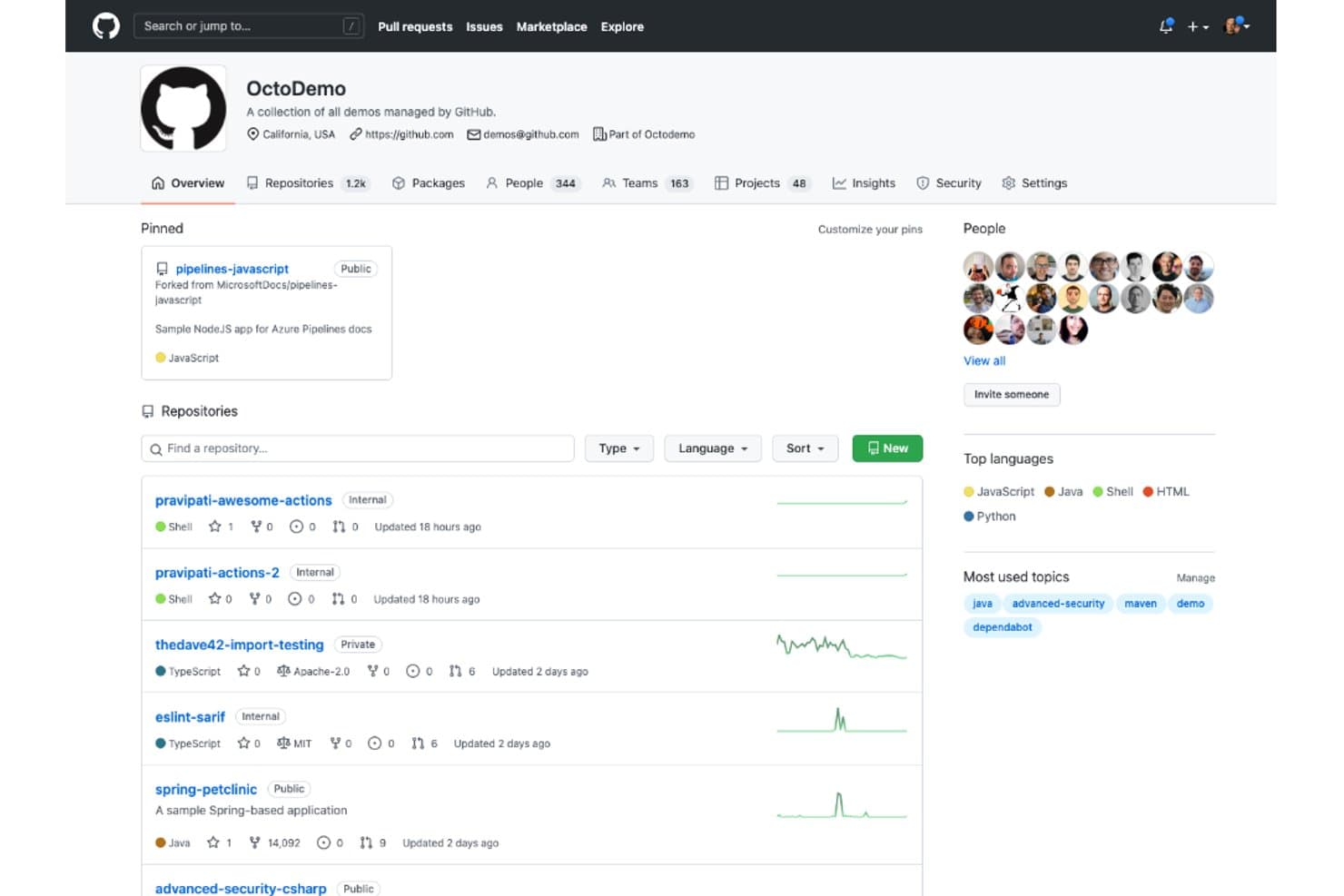
GitHub organizes repositories, teams, and topics within an org profile. GitHub gives software and IT teams a shared platform for source control, code review, issue tracking, and CI/CD, helping them coordinate changes and move builds toward release.
Who Is GitHub Best For?
GitHub is a good fit for developers and engineering teams that want AI coding assistance alongside their repository workflows.
Why I Picked GitHub
I picked GitHub as a GitLab alternative because it’s my pick for Best for AI-assisted coding. Copilot’s inline suggestions and chat help developers draft or explain code in supported IDEs. I like that developers can then submit those changes through GitHub pull requests for review.
GitHub Key Features
- Repository hosting: Store Git repositories with branch and access controls.
- GitHub Actions: Define CI/CD workflows that run on repository events.
- Issue tracking: Track bugs and tasks with labels, milestones, and assignments.
- GitHub Projects: Organize work in table, board, or roadmap views.
GitHub Integrations
GitHub’s Marketplace offers apps for Jira, Slack, CircleCI, Azure Pipelines, Linear, and Snyk. GitHub also provides REST and GraphQL APIs and webhooks for building custom integrations.
Pros and Cons
Pros:
- Large open-source community makes project discovery easier
- Pull requests keep code review beside changes
- Copilot suggests code inside everyday editor workflows
Cons:
- Self-hosting requires Enterprise Server administration
- CI/CD workflows require more assembly than GitLab

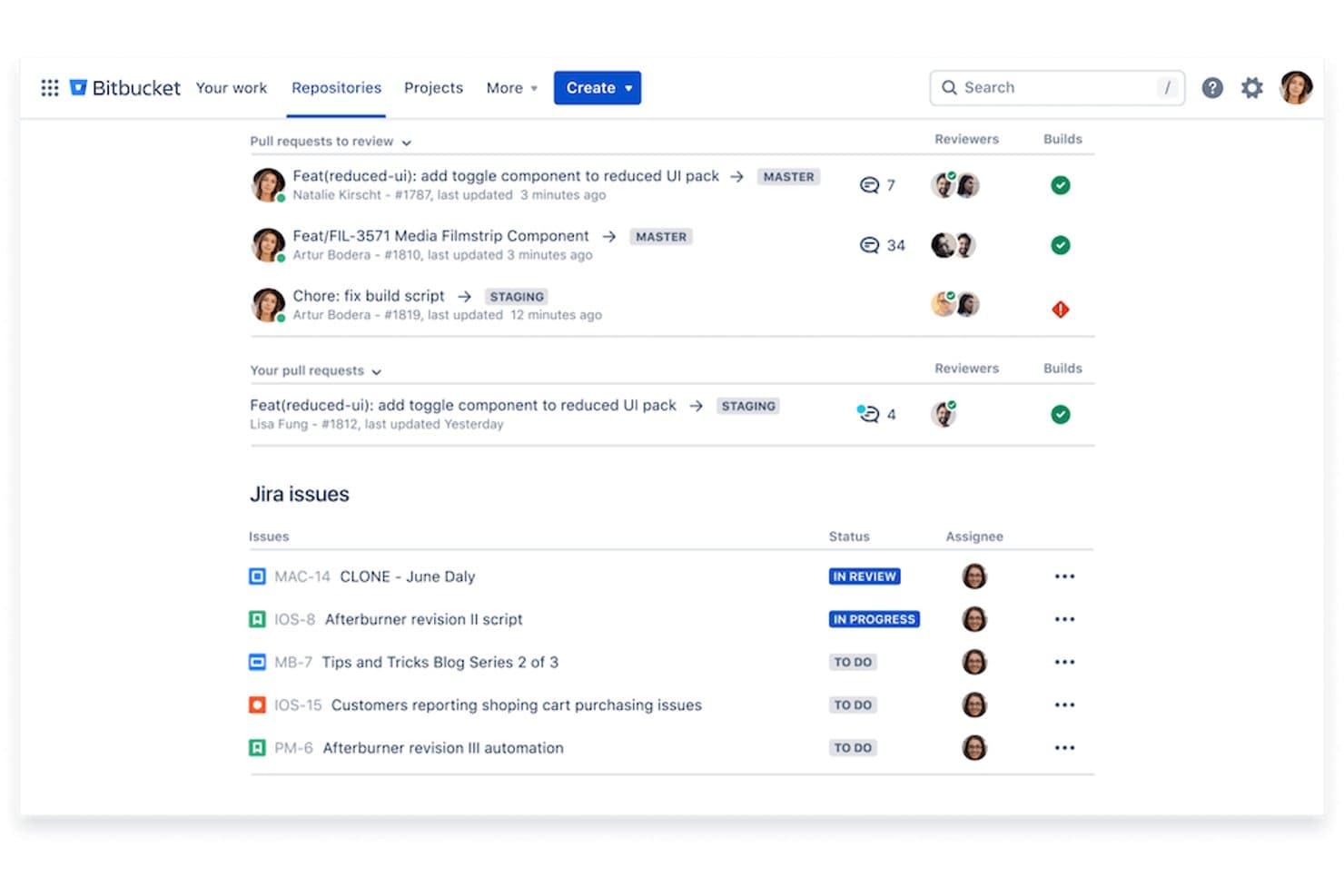
Bitbucket centralizes pull requests and Jira issues in one dashboard. Built for software teams managing shared codebases, Bitbucket provides Git repository hosting and collaboration tools that help developers review changes, control access, and organize releases.
Who Is Bitbucket Best For?
Software teams that manage development work in Jira and want Git repositories and code reviews connected to issue tracking.
Why I Picked Bitbucket
I picked Bitbucket as a GitLab alternative for teams that track development work in Jira. Jira issue keys in branches and commits link code changes to tickets, while Bitbucket pull requests appear in Jira’s development panel. I rate it Best for Jira integration when you need to trace a ticket from code review back to the work.
Bitbucket Key Features
- Bitbucket Pipelines: Run CI/CD workflows from repository configuration files.
- Branch permissions: Restrict who can write to or merge specific branches.
- Merge checks: Require conditions such as successful builds before merges.
- Git LFS: Track large files outside the main Git repository.
Bitbucket Integrations
Bitbucket has native integrations with Jira and Slack, linking code changes to Jira work items and sending repository and pipeline updates to Slack. It also supports Atlassian Marketplace apps and offers a REST API for custom integrations.
Pros and Cons
Pros:
- Granular branch permissions limit write access
- Pull requests surface build status
- Merge checks enforce repository policies
Cons:
- Pipeline reuse and scaling draw complaints
- Large repositories can slow pull requests
Learn more about Bitbucket:
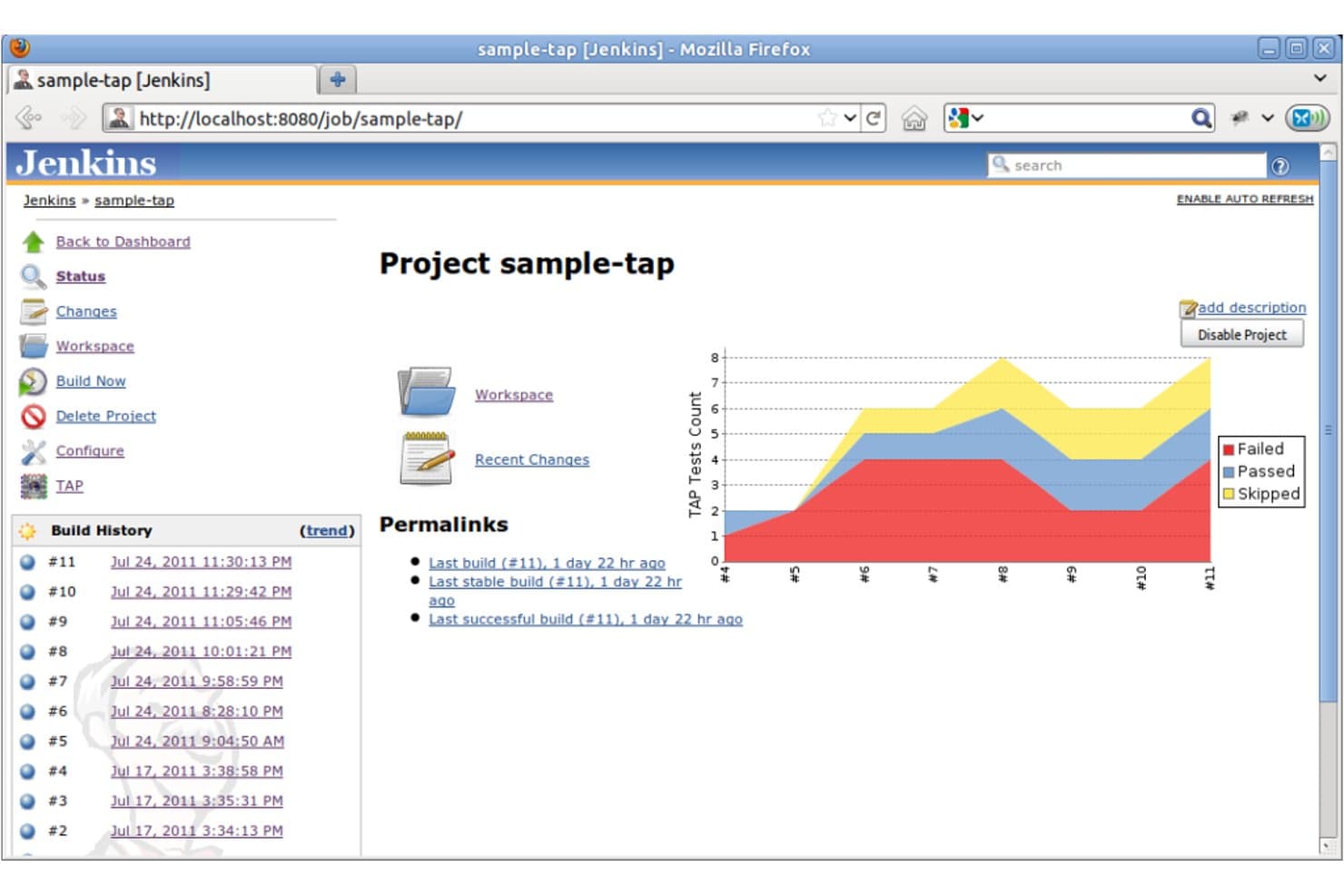
Jenkins tracks TAP test results across builds with a visual trend chart. Jenkins is an open-source automation server for development and IT teams that need flexible CI/CD pipelines to build, test, and deploy software across varied tools and environments.
Who Is Jenkins Best For?
Jenkins suits DevOps teams that want hands-on control over CI/CD pipelines and need to connect builds with a wide range of development tools.
Why I Picked Jenkins
I picked Jenkins, tagged “Best for CI/CD automation,” as a GitLab alternative because its pipelines can live as code in a Jenkinsfile alongside your application. I like that pipeline stages can run across distributed agents, so your team can test Linux and Windows builds in parallel before promoting a release.
Jenkins Key Features
- Plugin ecosystem: Add plugins for source control, notifications, testing, and other integrations.
- Build triggers: Start jobs on a schedule, after upstream jobs, or when source changes are detected.
- Credential management: Store secrets centrally and reference them in job configurations.
- Build history: Review job results, logs, and past runs in the Jenkins web interface.
Jenkins Integrations
Jenkins offers 2,300+ community-contributed plugins through its plugin ecosystem, including plugins for GitHub, Git, and Slack. Its Remote Access API supports custom integrations.
Pros and Cons
Pros:
- Scripted pipelines handle complex release workflows
- Parallel agents run builds across environments
- Versioned Jenkinsfiles keep pipeline changes reviewable
Cons:
- Controller and agent upkeep stays your responsibility
- Plugin updates can break dependent pipelines
 Best for continuous integration
- Free plan + 14-day trial + demo available
- From $540/year (billed annually)
Visit WebsiteCustomer Rating:4.3/5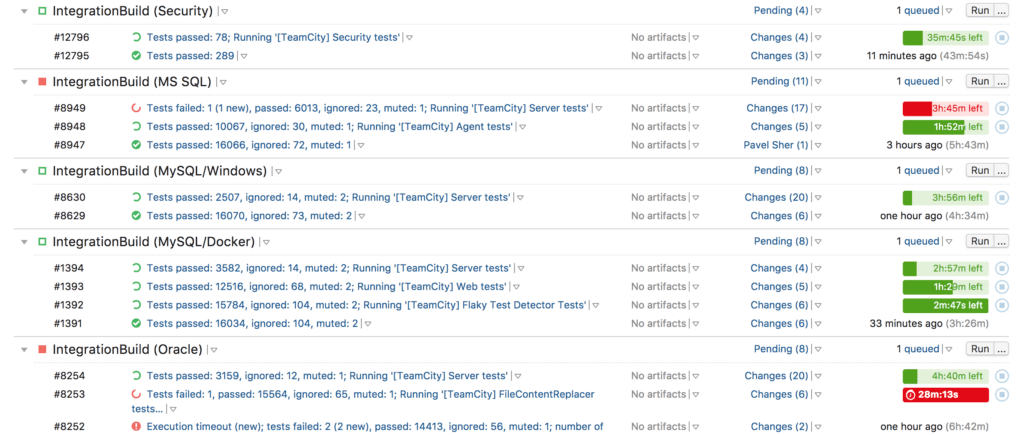
This is TeamCity's continuous integration where you can remotely run and pre-tested commit and also with on-the-fly build progress reporting. JetBrains TeamCity is a build management platform for development and IT teams that connects version control systems with testing and deployment workflows, helping manage code changes and releases across projects.
Who Is TeamCity Best For?
Development and IT teams that need to automate builds and tests across projects will find TeamCity a good fit, especially when they want control over CI infrastructure.
Why I Picked TeamCity
I picked TeamCity as Best for continuous integration because it separates CI orchestration from GitLab while reacting to repository changes. Its VCS triggers launch builds on commits or pull requests, and build chains coordinate dependent jobs while independent tests run in parallel. I like that setup for validating changes before deployment.
TeamCity Key Features
- Build configuration templates: Reuse shared settings across multiple build configurations.
- Kotlin DSL: Define build configurations as versioned Kotlin code.
- Test history: Review test results and trends across builds.
- Code coverage reports: View coverage results collected during builds.
TeamCity Integrations
TeamCity supports integrations with GitHub, GitLab, Bitbucket, Azure DevOps, Perforce, Subversion, Jira, YouTrack, Slack, and AWS. Its REST API provides access to builds, projects, and pipelines for custom integrations.
Pros and Cons
Pros:
- Build history helps trace test failures and regressions
- Templates standardize settings across build configurations
- Build chains coordinate dependent jobs and parallel tests
Cons:
- Upgrades can be cumbersome and time-consuming
- Reviewers describe the interface as dated
Learn more about TeamCity: Best for open-source projects
- Free plan available
- Pricing upon request
Visit WebsiteCustomer Rating:4.3/5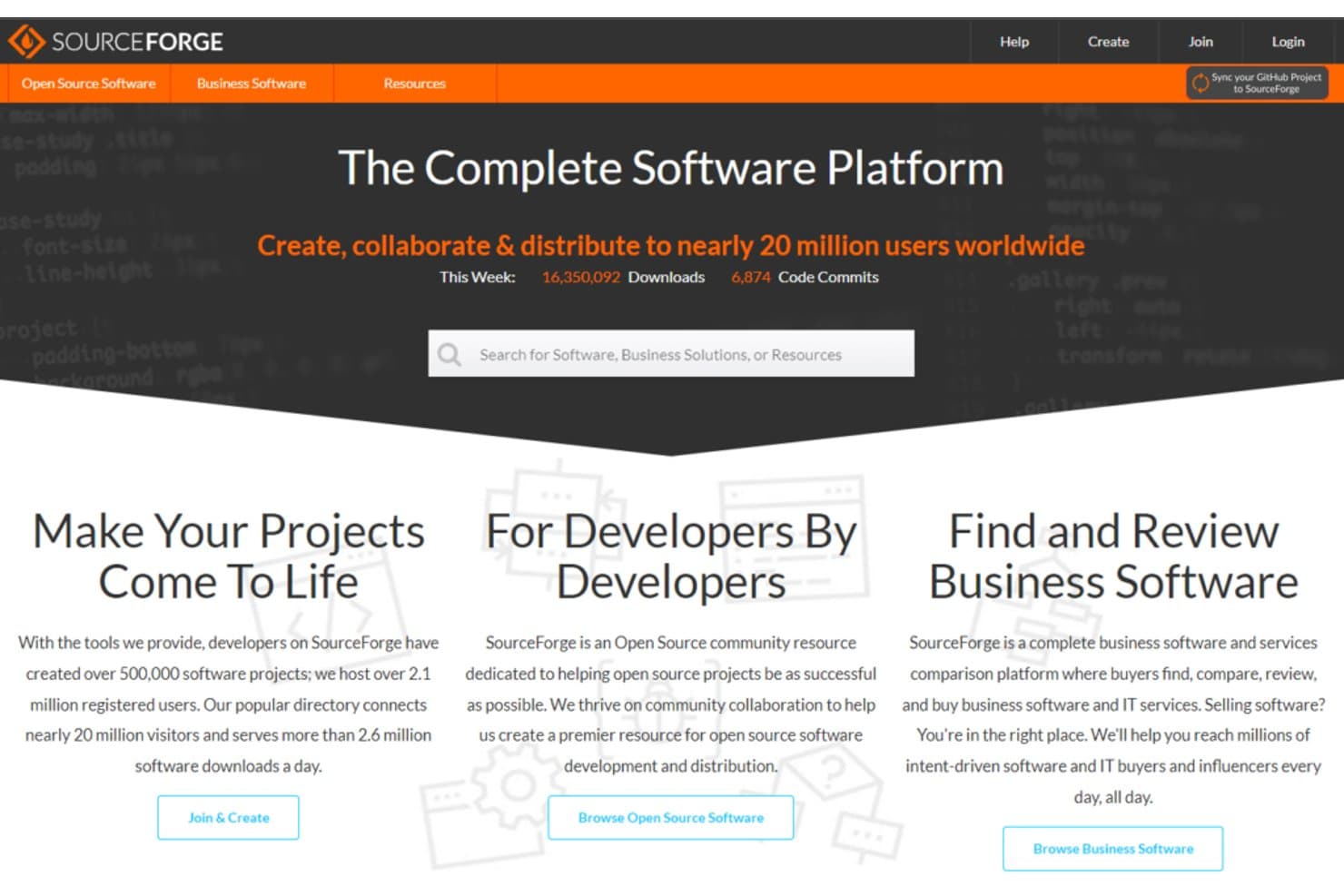
SourceForge helps users create, collaborate, and distribute open source software. SourceForge gives development teams tools to host code, manage project files, and distribute software, helping IT groups coordinate open-source development and releases outside a full DevOps suite.
Who Is SourceForge Best For?
SourceForge suits volunteer and independent open-source maintainers who need a public home for project updates and community downloads.
Why I Picked SourceForge
I picked SourceForge for its “Best for open-source projects” fit as a GitLab alternative. I like that maintainers can host code, manage project files, and distribute software from a public project hub. They can also share project updates and community downloads alongside release files.
SourceForge Key Features
- Issue tracking: Create tickets with milestones, custom fields, labels, and file attachments.
- Mailing lists: Let project members subscribe and follow discussions through email.
- Wiki documentation: Write Markdown pages with attachments and code syntax highlighting.
- Forums: Enable email or RSS subscriptions, with moderation and spam protection.
SourceForge Integrations
SourceForge doesn’t clearly document native integrations for its open-source project hosting; Zapier support is documented for buyer-intent data. It offers Allura and download statistics APIs for custom connections.
Pros and Cons
Pros:
- Tickets, forums, and mailing lists support project communities
- Download statistics help maintainers track release interest
- Code repositories and release hosting share one project hub
Cons:
- No comparable built-in CI/CD pipeline suite
- Some reviewers describe the interface as dated
Learn more about SourceForge: 6Best for project management
Jira
- Free plan + 7-day trial available
- From $8.48/user/month
Visit WebsiteCustomer Rating:4.3/5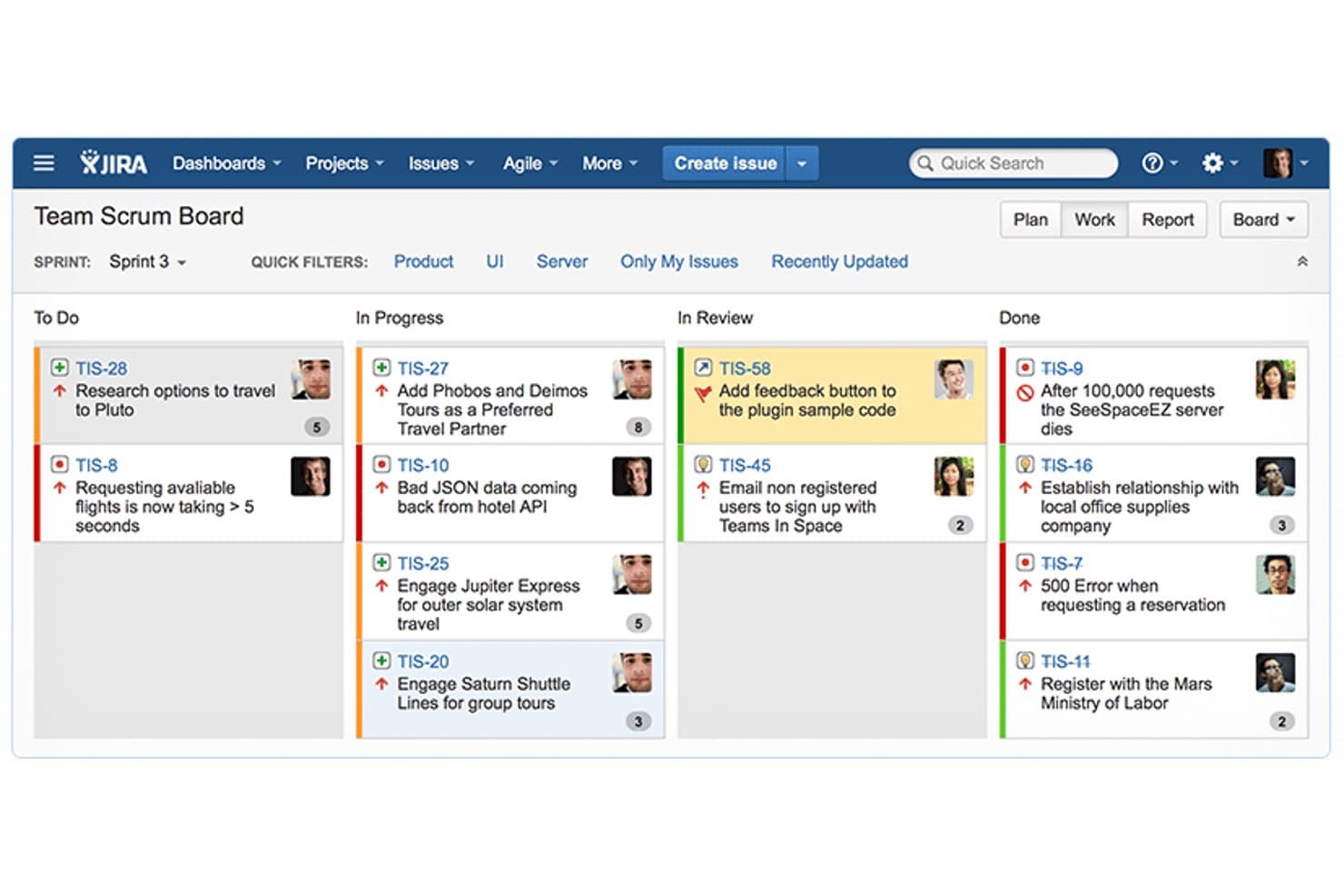
Jira's Team Scrum Board tracks sprint issues across To Do, In Progress, In Review and Done columns. Jira is Atlassian's issue and project tracking tool that gives DevOps and IT teams boards, workflows, and permissions, and it links to GitLab commits, merge requests, and pipelines, though it doesn't host code or run CI/CD.
Who Is Jira Best For?
Jira suits DevOps and IT admin teams that already run code and pipelines in GitLab and need a place to plan, track, and govern the work around them.
Why I Picked Jira
I picked Jira because it handles the project management side that GitLab's built-in boards only cover lightly. Its permission schemes and audit logs let me control who can change workflows across spaces. When a Jira key appears in a GitLab commit or merge request title, the work item updates with build and deployment data. It doesn't replace GitLab, but it governs the work around it.
Jira Key Features
- Automation rules: Build no-code rules that update work items, assign tasks, and post alerts when GitLab or Jenkins events fire.
- Timeline and dependency views: Map work dependencies across projects and teams so release plans show what blocks what.
- Atlassian Guard SSO and SCIM: Enforce SAML single sign-on and automate user provisioning from your identity provider.
- Data residency: Pin work items, attachments, and project configuration to a chosen region such as the EU or Australia.
Jira Integrations
Jira offers more than 3,000 apps and integrations, including Marketplace integrations for GitLab, GitHub, Bitbucket, Jenkins, Slack, and Microsoft Teams. Its REST API v3 supports custom integrations.
Pros and Cons
Pros:
- Permission schemes govern project-level work
- Dashboards make delivery progress visible
- Flexible workflows clarify work ownership
Cons:
- Merge requests lack built-in review controls
- No Git repositories or native pipelines
Learn more about Jira:
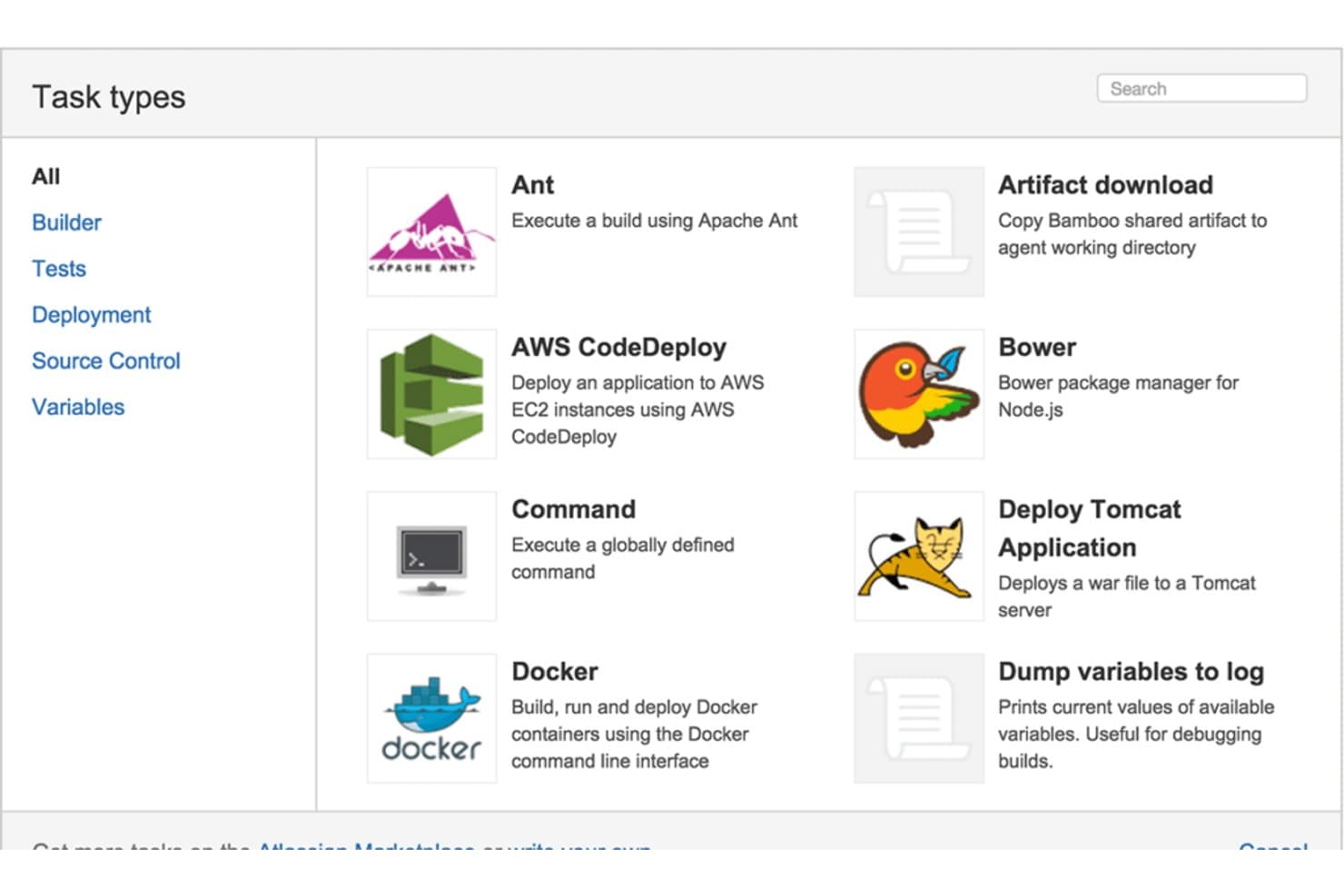
Bamboo lets users choose from multiple task types when building pipelines. Bamboo is a CI/CD server for software teams that need to automate builds, tests, and deployments while coordinating release work across development and operations.
Who Is Bamboo Best For?
Bamboo suits software delivery teams that use Atlassian tools and want to connect build and deployment workflows with their existing development processes.
Why I Picked Bamboo
I picked Bamboo for the “Best for Atlassian pipelines” slot because it ties build and deployment work to Atlassian development workflows. Its automated workflows cover the path from code to deployment, while Bitbucket and Jira Software connections help track a feature request through to release.
Bamboo Key Features
- Build agents: Run jobs on local or remote agents.
- Deployment projects: Organize releases into environments and track deployments.
- Plan branches: Create branch-specific build plans as Bamboo detects repository branches.
- Build artifacts: Define files to preserve and share between build jobs.
Bamboo Integrations
Bamboo has native integrations with Bitbucket and Jira Software, linking repository changes and issues to builds and deployments. It also offers a REST API for custom integrations.
Pros and Cons
Pros:
- Remote agents distribute build and deployment workloads
- Deployment projects organize releases by environment
- Branch-specific plans track repository changes
Cons:
- Data Center support ends in 2029
- Pipeline-as-code can frustrate routine maintenance
Learn more about Bamboo:
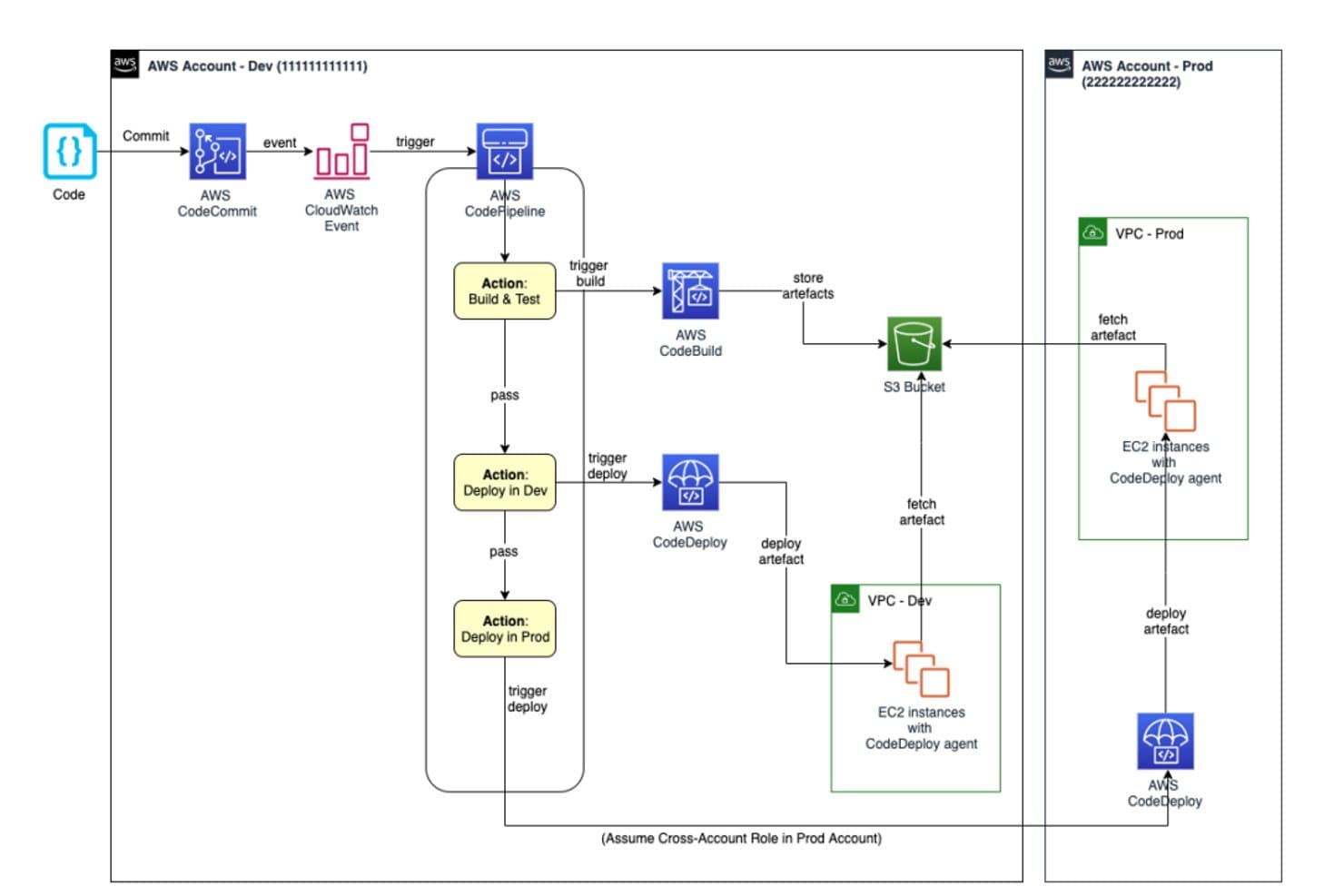
AWS CodeCommit enables cross-account CI/CD pipelines to dev and prod environments. AWS CodeCommit gives software teams a managed Git repository service for organizing code changes, coordinating contributions, and maintaining source control as projects grow.
Who Is AWS CodeCommit Best For?
AWS CodeCommit suits development and IT teams already working in AWS who want their source control to fit their cloud environment.
Why I Picked AWS CodeCommit
I picked AWS CodeCommit as a GitLab alternative for Best for AWS integration. I like that IAM policies control repository access, while CloudTrail records API activity for audits. Repository triggers can also invoke AWS Lambda or send Amazon SNS notifications, such as when developers push changes.
AWS CodeCommit Key Features
- Git compatibility: Use familiar Git commands and tools with CodeCommit repositories.
- Pull requests: Review proposed changes, discuss code, and approve or reject updates.
- Branch management: Create branches to develop changes separately from the main code line.
- Encryption: Protect repository data with encryption at rest and in transit.
AWS CodeCommit Integrations
AWS CodeCommit integrates with 12 AWS services, including AWS Amplify, AWS CloudTrail, Amazon CloudWatch Events, AWS CodeBuild, Amazon CodeGuru Reviewer, AWS CodePipeline, AWS Key Management Service, AWS Lambda, Amazon SNS, and AWS CloudFormation. It also provides an API for custom integrations.
Pros and Cons
Pros:
- Familiar Git workflows need no proprietary client
- No source-control servers to maintain
- Repository permissions follow AWS IAM policies
Cons:
- Search and repository browsing feel limited
- Pull-request reviews feel clunky beside GitLab
Learn more about AWS CodeCommit:
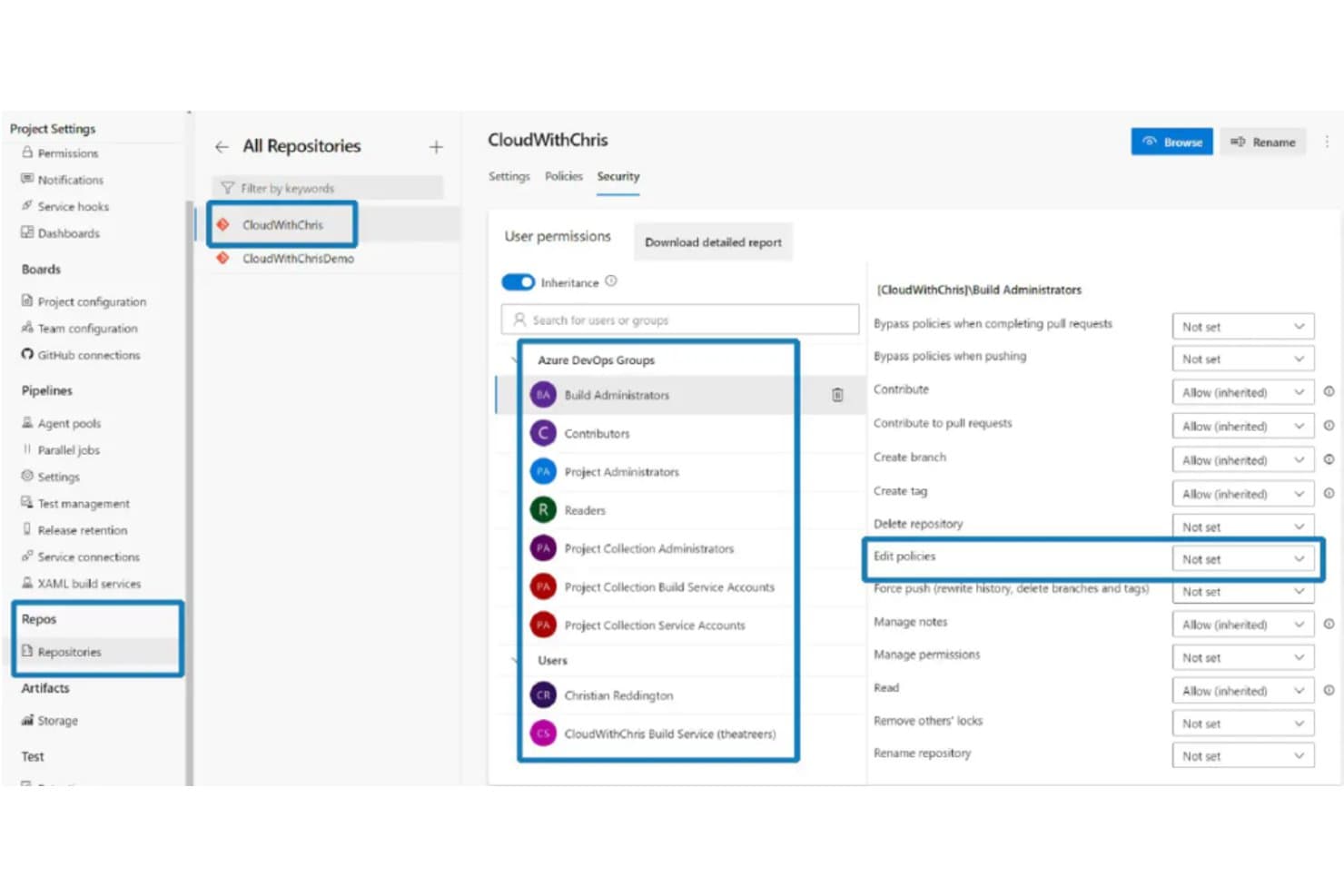
Azure DevOps lets users manage repository security permissions by group. Azure DevOps is a software delivery platform for development and IT teams that need to coordinate work, manage code, automate builds and releases, and address bottlenecks across complex projects.
Who Is Azure DevOps Best For?
Azure DevOps suits software and IT teams working in the Microsoft ecosystem that want development and delivery tools connected to their existing workflows.
Why I Picked Azure DevOps
I picked Azure DevOps as a GitLab alternative because it’s Best for Microsoft integration. I like how Azure Boards links work items to code changes and pipeline runs, so I can trace a support fix from ticket through release. Azure Pipelines also builds and deploys Azure workloads from the same project.
Azure DevOps Key Features
- Azure Repos: Host Git repositories and review changes with pull requests.
- Azure Test Plans: Create test cases and run manual or exploratory tests.
- Azure Artifacts: Create, host, and share packages with your team.
- Dashboards: Build project dashboards with configurable charts and widgets.
Azure DevOps Integrations
Azure DevOps supports integrations with Slack and Microsoft Teams for Azure Boards and Repos, and with ServiceNow and Jenkins for Azure Pipelines; service hooks also connect with Datadog, Grafana, and Trello. Marketplace extensions and REST APIs support additional integrations and custom connections.
Pros and Cons
Pros:
- Boards support configurable backlogs and sprint tracking
- Runs CI/CD across Linux, macOS, and Windows
- Links work items, code changes, and releases
Cons:
- Backlog templates and reporting remain limited
- Clunky navigation slows routine project work
Learn more about Azure DevOps:
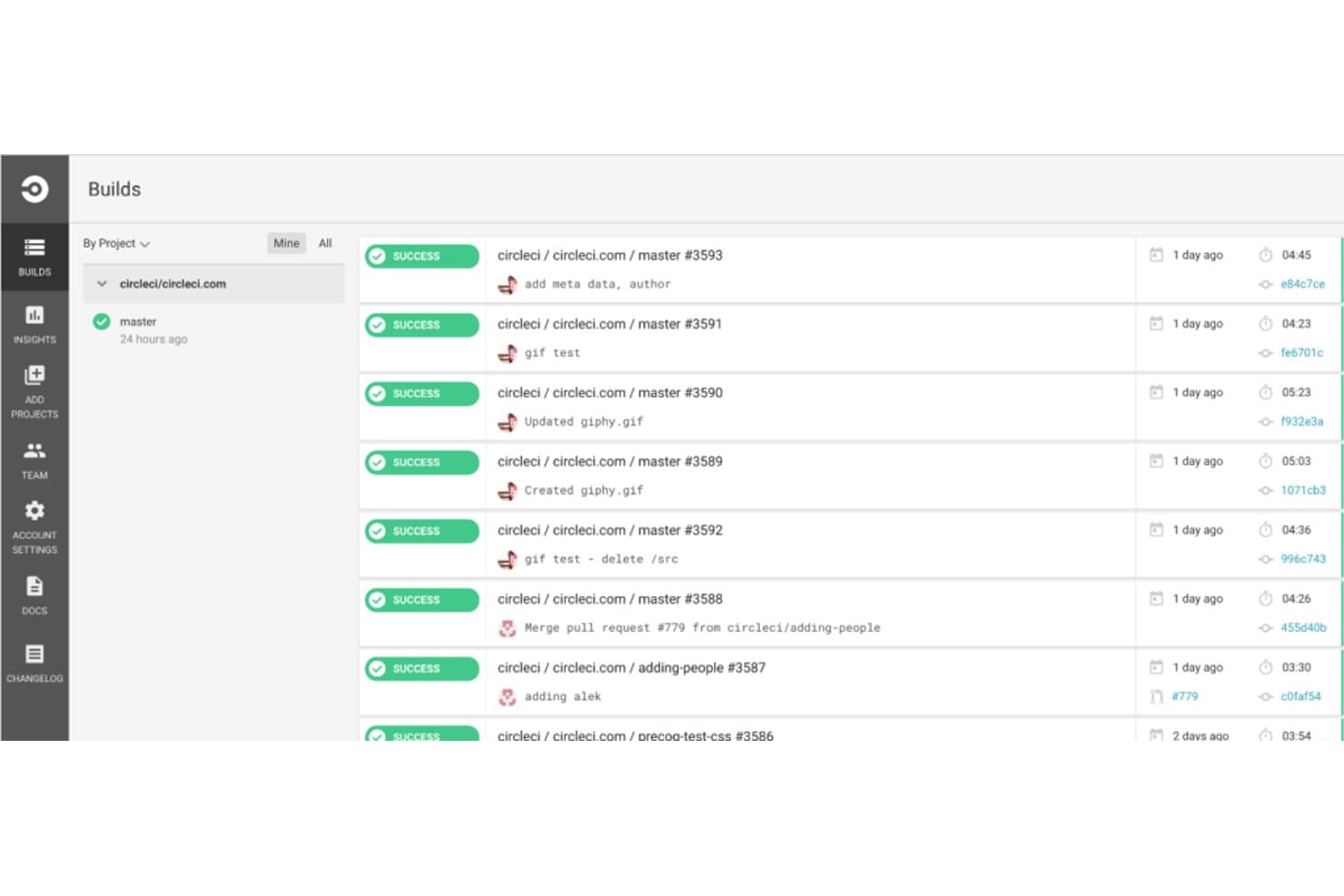
CircleCI displays real-time build statuses across project branches. For engineering teams that need dependable software releases, CircleCI is a CI/CD platform that automates build, test, and deployment workflows across code repositories.
Who Is CircleCI Best For?
Software engineering and DevOps teams can use CircleCI to validate code changes across repositories before merging or deployment.
Why I Picked CircleCI
I picked CircleCI as a GitLab alternative because it’s Best for fast build testing. Parallel jobs and test splitting distribute suites across executors, while dependency caching avoids rebuilding unchanged packages. I like this setup for pull requests with lengthy test suites, where faster feedback helps developers catch regressions before merging.
CircleCI Key Features
- Workflows: Define job sequences, dependencies, and approval steps in a pipeline.
- Orbs: Import reusable configuration packages for common tools and tasks.
- Docker executor: Run jobs in Docker containers with a specified image.
- Contexts: Store environment variables and restrict access to approved projects or users.
CircleCI Integrations
CircleCI connects with GitHub, Bitbucket Cloud, and GitLab for repository access and build triggers, and offers an official Slack app for workflow notifications. Its API v2 supports custom integrations.
Pros and Cons
Pros:
- Workflows support job dependencies and approvals
- Docker layer caching avoids repeated builds
- Test splitting shortens long suites
Cons:
- Large pipelines can create repetitive configuration
- Caching requires manual key management
Learn more about CircleCI:
Outras alternativas ao GitLab
Eis algumas alternativas adicionais ao GitLab que não entraram na minha lista restrita, mas que continuam a valer a pena conhecer:
- 11MercurialBest for distributed version control
- 12Travis CIBest for GitHub CI pipelines
- 13RhodeCodeBest for enterprise security
- 14TuleapBest for agile project management
- 15PerforceBest for large-scale projects
- 16Plastic SCMBest for game development teams
- 17IBM Rational ClearCaseBest for complex software builds
- 18Subversion (SVN)Best for centralized version control
- 19LaunchpadBest for open-source collaboration
- 20Crucible (by Atlassian)Best for peer code reviews
How I Evaluate GitLab Alternatives
I look at GitLab alternatives in two layers: must-haves like native CI/CD, merge request workflows, and self-hosted options, then differentiators like AI assistance and deployment flexibility.
Core Functionality (Table Stakes For This List)
When I'm selecting tools for my list, I rank each one on a scale from 0 (does not offer the functionality) to 5 (excels in this area) for each core functionality listed below. Then, I calculate the tool's total score into a percentage. Each tool needs to achieve a minimum total score of 75% to be considered for inclusion.
- Git Repository Management: I evaluate how each platform handles branching strategies, merge workflows, and repo-level permissions—things like monorepo support, LFS, and repository mirroring.
- Built-In CI/CD Pipelines: Each tool needs native pipeline automation configured via code, so I check for features like parallel jobs, matrix builds, and self-hosted runners.
- Issue & Project Tracking: I look at how tightly issues connect to commits and pull requests, and whether the tool supports boards, milestones, and sprint-style planning.
- Code Review & Collaboration: Strong review workflows matter, so I evaluate inline commenting, approval gates, branch protection rules, and features like code owners assignments.
- Security & DevSecOps Scanning: Tools like GitHub, Bitbucket, and Gitea handle this differently, so I check for native SAST, dependency scanning, secret detection, or container scanning.
- Deployment Flexibility: I look at whether the platform offers both SaaS and self-managed options, since many teams need on-premises hosting for compliance or data residency reasons.
Once I have a list of tools that meet this criteria, I consider what sets each platform apart.
Differentiating Factors (What Sets Vendors Apart)
Here's how I compare and contrast different vendors:
Standout Features
AI-powered code suggestions and review summaries are increasingly built into platforms like GitHub and Bitbucket, and I evaluate how deeply these features integrate into the daily development workflow. I also check for built-in package and artifact registries—teams running containerized workloads benefit from hosting Docker images and Helm charts alongside their code. Value stream analytics is another differentiator, since DORA metrics and cycle time dashboards help engineering managers pinpoint delivery bottlenecks without stitching together external reporting tools.
Beyond Features
Migration tooling is one of the first things I evaluate, since moving repositories, CI configs, and issue histories from GitLab can be a major undertaking without automated import support. Security and compliance certifications also weigh heavily—teams in regulated industries need coverage like SOC 2 Type II or ISO 27001, and I check whether each vendor supports SSO, SAML, and SCIM for enterprise identity management. Ecosystem fit matters too, so I look at integrations with tools like Jira, Slack, and major cloud providers that most teams already rely on.
Por que procurar uma alternativa ao GitLab?
A interface sobrecarregada do GitLab pode demorar algum tempo a aprender, os projetos e pipelines de grandes dimensões podem parecer lentos e executar a plataforma por conta própria requer equipamento potente, o que se torna relevante à medida que as equipas e as bases de código crescem. Eis quando outra ferramenta poderá adaptar-se melhor:
- Quer que os programadores sejam produtivos desde o primeiro dia. Alguns utilizadores consideram a interface do GitLab confusa e difícil de navegar nas definições, especialmente os recém-chegados. Antes de decidir, peça aos novos membros da equipa que executem uma fusão e um pipeline reais em cada período de avaliação.
- Precisa de compilações mais rápidas em projetos de grande dimensão. Alguns utilizadores referem atrasos em repositórios e pipelines de grande dimensão, o que abranda o feedback para os programadores. Ferramentas como o CircleCI aceleram as compilações através do armazenamento em cache de camadas do Docker, da divisão de testes e de tarefas paralelas.
- Quer uma configuração de pipelines mais fácil de acertar. Alguns utilizadores consideram difícil configurar corretamente os pipelines, com pequenos erros a interromper as compilações e falhas difíceis de rastrear. Plataformas como o TeamCity utilizam modelos de compilação para uniformizar as definições e manter um histórico de compilações que ajuda a rastrear as falhas.
- Prefere não gerir os seus próprios servidores. O ponto de partida recomendado pelo GitLab para uma instalação alojada localmente é um servidor bem equipado, e os problemas de infraestrutura estão fora do âmbito do Suporte do GitLab. Opções como o AWS CodeCommit permitem utilizar fluxos de trabalho Git familiares sem ter de manter servidores de controlo de código.
O GitLab continua a ser a escolha certa se quiser criar, proteger e executar software numa única aplicação, com código, pipelines de CI/CD e análise de segurança num só lugar. Para as equipas que preferem não interligar várias ferramentas, isto pode compensar uma curva de aprendizagem acentuada e pipelines mais lentos em projetos de grande dimensão.
Principais funcionalidades do GitLab
Eis algumas das principais funcionalidades do GitLab para ajudar a estabelecer um contraste e comparar o que as soluções alternativas oferecem:
- Ferramentas de planeamento: gira portefólios e acompanhe o progresso com épicos e marcos.
- Gestão do código-fonte: permita o controlo de versões e a colaboração no código.
- Integração/entrega contínuas: automatize os processos de teste e implementação.
- Segurança e conformidade: gira a segurança da cadeia de fornecimento de software.
- Observabilidade e medição: obtenha informações sobre o desempenho dos projetos.
- Gestão de tarefas: organize as tarefas dividindo os problemas em componentes mais pequenos.
- Análise de problemas: analise os problemas ao nível do grupo para obter informações práticas.
- Integração com o Jira: estabeleça ligação ao Jira para melhorar a gestão de projetos.
- Controlo do tempo: registe o tempo despendido em problemas e pedidos de fusão.
- GitLab Pages: implemente websites estáticos com funcionalidades como domínios personalizados e suporte para HTTPS.