

Testing av mobilapper på tvers av ulike enheter, operativsystemer og brukeradferd er komplekst. Fragmentering av enheter og ytelsesflaskehalser kan forsinke lanseringer, frustrere brukere og svekke appens suksess. Uten de riktige testverktøyene er det vanskelig å levere en pålitelig brukeropplevelse.
Jeg har jobbet med mobilutvikling og testing i flere år og har håndtert disse utfordringene på nært hold. Fra feilsøking med XCode til optimalisering av ytelse vet jeg hva som fungerer. Denne veiledningen gir detaljerte vurderinger av de beste verktøyene for automatisering av mobiltesting, slik at du kan automatisere tester, simulere virkelige brukermiljøer og sikre kompatibilitet på tvers av plattformer.
Hvorfor du kan stole på våre programvareanbefalinger
6,700+
Reviews
20
Industry experts
16+
Evaluation factors
14
Years
Teamet vårt har testet og anmeldt programvare siden 2012. Vi er selv teknologiledere, så vi vet hvor vanskelig og hvor viktig det er å velge riktig programvare.
I denne guiden har vi vurdert verktøyene gjennom praktisk testing og uavhengig research og gitt dem poeng ut fra våre utvelgelseskriterier.
Anmeldelsene våre bygger på vår egen redaksjonelle vurdering. De er ikke et salgsargument.
Ekspertanmeldere:
- Paulo Gardini MiguelTech Director
 Tim FisherVP of AI
 Gabriel RosasTech Lead & Software Architect
 Christhian GruhnTech Lead & Platform Architect

Sammendrag av de beste verktøyene for mobiltesting
| Tool | Best For | Trial Info | Price | ||
|---|---|---|---|---|---|
| 1 | Best for AI-powered real device testing | Free trial available | From $15/month (billed annually) | Website | |
| 2 | Best for unified web, API, and mobile automation | 14-day free trial | Pricing upon request | Website | |
| 3 | Best for scalable cloud-based infrastructure | Free plan + free demo available | From $15/month (billed annually) | Website | |
| 4 | Best for versatile app testing | Free demo available | From 1¢/AI credit | Website | |
| 5 | Best for real device testing | Free trial available | From $29/user/month (billed annually) | Website | |
| 6 | Best for qualitative feedback from real users | Free demo available | Pricing upon request | Website | |
| 7 | Best for codeless automation testing | Free plan + 30-day free trial + free demo available | From $180/seat/month | Website | |
| 8 | Best for synthetic testing | Free plan available | From $10/user/month | Website | |
| 9 | Best for AI-driven test maintenance | Free plan available | From $99/month (billed annually) | Website | |
| 10 | Best for device cloud management | Free trial + free demo available | From $83/month | Website |


Anmeldelser av de beste verktøyene for mobiltesting
Nedenfor finner du mine detaljerte sammendrag av de beste verktøyene for automatisering av mobiltesting som kom med på kortlisten. Anmeldelsene mine gir et detaljert innblikk i de viktigste funksjonene, fordelene & ulempene, integrasjonene og ideelle bruksområdene for hvert verktøy, slik at du kan finne det beste for deg.
 Best for AI-powered real device testing
- Free trial available
- From $15/month (billed annually)
Visit WebsiteCustomer Rating:4.5/5
Pcloudy lets you test the functional experience of apps on various devices. Pcloudy is an advanced mobile application testing platform offering a comprehensive suite for evaluating apps on real mobile devices. You can run tests concurrently across multiple devices, making it great if you're looking for parallel test execution options.
Why I Picked Pcloudy: I picked Pcloudy because its AI-powered real-device testing gives your team smarter ways to catch issues that traditional mobile testing often overlooks. Its AI engine analyzes test sessions on actual Android and iOS devices to highlight failure patterns, UI anomalies, and performance concerns without you having to sift through logs manually. You also get AI-assisted test execution that selects optimal devices and surfaces likely problem areas, helping you focus on high-risk scenarios.
Standout features & integrations:
One of Pcloudy's most notable features is its support for scriptless automation, allowing even those without deep programming knowledge to conduct tests. It also offers real-time debugging and boasts compatibility with emulators and real devices.
Regarding integrations, Pcloudy is adaptable with Jenkins for continuous testing, and it also interfaces effectively with tools like Jira and Selenium, improving the flexibility of the testing platform.
Pros and Cons
Pros:
- Supports parallel test execution on a wide array of devices, from iOS to Android.
- Integrates effortlessly with popular tools such as Jenkins, Jira, and Selenium.
- Supports parallel test execution on a wide array of devices, from iOS to Android.
Cons:
- Requires stable internet connectivity for optimal real-device cloud performance.
- Advanced analytics may take a bit of time to interpret for new users.
Learn more about Pcloudy: Best for unified web, API, and mobile automation
- 14-day free trial
- Pricing upon request
Visit WebsiteCustomer Rating:4.8/5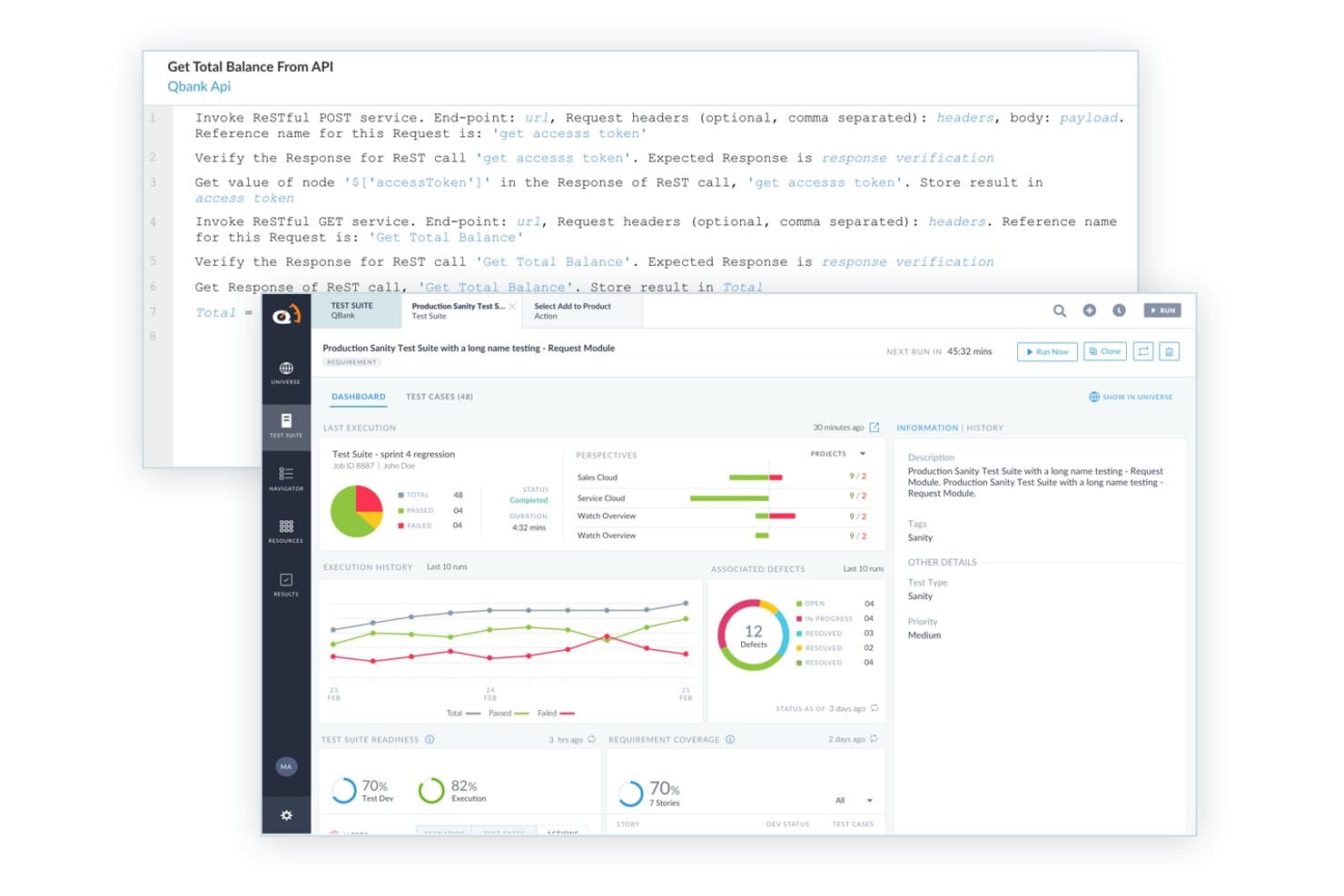
ACCELQ offers a codeless API testing interface with RESTful service invocation, test suite dashboards, execution history, and defect tracking built in. ACCELQ is a codeless, AI-powered test automation platform that covers mobile, web, API, and desktop testing in a single cloud-native environment, with support for native, hybrid, and browser apps on both iOS and Android.
Who Is ACCELQ Best For?
ACCELQ is a strong fit for QA teams in mid-to-large enterprises that need both technical and non-technical contributors involved in test automation across Agile or DevOps workflows.
Why I Picked ACCELQ
ACCELQ earns its spot as one of the best on my shortlist because it genuinely unifies mobile, web, and API testing in one environment, with no separate toolchains to manage. I like its Autonomous Self-Healing feature, which auto-updates element references when the app changes, keeping iOS and Android test suites stable. The Business Process Scenario Builder lets my team write end-to-end mobile flows in natural language, so QA and non-technical contributors work in the same space.
ACCELQ Key Features
- Native, hybrid, and web app automation: Automates testing across mobile native, hybrid, and browser-based applications for iOS and Android.
- Device farm integration: Connects to cloud or on-premises device labs for real-device and simulator coverage.
- No-code logic editor: Lets teams create and update test logic visually without scripting knowledge.
- Jira and CI/CD integrations: Syncs requirements and defects and automates test runs within popular DevOps pipelines.
ACCELQ Integrations
ACCELQ offers native integrations with Jira, Jenkins, TeamCity, Bamboo, Azure DevOps, Slack, and Microsoft Teams, and provides an API for custom integrations.
Pros and Cons
Pros:
- Stable self-healing tests across iOS and Android
- Codeless approach reduces reliance on specialists
- Covers both web, API, and mobile testing
Cons:
- Requires local agent for execution on-prem
- No offline test creation or execution support
Learn more about ACCELQ: Best for scalable cloud-based infrastructure
- Free plan + free demo available
- From $15/month (billed annually)
Visit WebsiteCustomer Rating:4.9/5
Here's a screenshot of the LambdaTest app testing console page. LambdaTest offers cloud-based testing services that allow developers to run tests on various browser and OS combinations. Its scalable cloud infrastructure is essential for businesses targeting a global audience with diverse device preferences, making it the ideal solution for this field.
Why I Picked LambdaTest: LambdaTest caught my attention among other testing tools due to its extensive cloud infrastructure, which is ideal for business scaling. Its comprehensive testing solution sets it apart from other platforms that offer limited browser or OS selection. LambdaTest's cloud-based infrastructure is a top choice for businesses needing a tool that can adapt to their testing requirements.
Standout features & integrations:
LambdaTest shines with features such as real-time browser testing, screenshots for quick visual verifications, and automation testing capabilities. The platform supports testing for both mobile web and native apps across a range of iOS and Android devices.
Furthermore, it integrates effortlessly with CI/CD tools like Jenkins, popular bug tracking tools such as Jira, and test automation frameworks including Selenium.
Pros and Cons
Pros:
- Real-time testing allows for immediate feedback and quicker debugging.
- Integration with popular development and testing tools improves the overall testing process.
- Extensive browser and OS combination coverage ensures comprehensive testing.
Cons:
- Cost might be a factor for startups or businesses with limited budgets.
- Initial setup and familiarization may be needed for those new to cloud-based testing.
- While cloud-based, internet connectivity might affect the responsiveness of the platform.
Learn more about TestMu AI: Best for versatile app testing
- Free demo available
- From 1¢/AI credit
Visit WebsiteCustomer Rating:4.9/5
QA Wolf's centralized dashboard provides updates on various tests. QA Wolf is a service that delivers automated end-to-end test coverage for web and mobile applications. By automating tests, QA Wolf helps your team focus on shipping features without worrying about bugs.
Why I Picked QA Wolf: QA Wolf's ability to test any mobile app, including native, web, view-based hybrid, React Native, Flutter, Xamarin, responsive/adaptive apps, progressive web apps (PWA), and single-page applications (SPA), makes it a versatile choice for mobile testing. This flexibility ensures that no matter what technology your app is built on, QA Wolf can handle the testing process.
Standout features & integrations:
Other standout features include QA Wolf's comprehensive coverage. They build tests that cover gestures, camera functions, sensor interactions, and everything else, ensuring that every aspect of your app is thoroughly tested. QA Wolf also continuously updates your tests to align with new functionality as your app evolves, ensuring they remain relevant and effective.
Integrations include Jira, Asana, Linear, Slack, Microsoft Teams, GitHub, GitLab, Bitbucket, Jenkins, CircleCI, Travis CI, and Azure DevOps.
Pros and Cons
Pros:
- 24-hour test maintenance
- All bugs are human-verified
- Easy to collaborate with the QA Wolf team via Slack or Teams
Cons:
- Less flexibility to customize testing
- Not ideal for development teams wanting full control over tests
Learn more about QA Wolf: Best for real device testing
- Free trial available
- From $29/user/month (billed annually)
Visit WebsiteCustomer Rating:4.5/5
Here's the App Live manual mobile testing session in BrowserStack for iPhone 14 Pro Max device running on iOS 16. BrowserStack is a software testing platform that offers access to authentic desktop and mobile devices for real-time testing. It's ideal for developers and QA teams looking to evaluate websites and mobile applications across multiple browsers and devices. Its extensive infrastructure makes it particularly useful for real device testing.
Why I Picked BrowserStack: In the course of determining the best tools for the list, BrowserStack consistently stood out. One of the pivotal reasons I chose it was due to its unmatched library of real mobile devices and browsers. Its capability to provide a genuine, tangible testing environment on both Android and iOS devices is unparalleled, which solidified my opinion that it's the best for real device testing.
Standout features & integrations:
BrowserStack offers a vast array of real devices, ensuring the compatibility and performance testing of applications is genuine. It supports both manual testing and automation testing, making it versatile for different testing needs.
When it comes to integrations, BrowserStack works harmoniously with Jenkins for continuous testing, ties with Jira for bug tracking, and supports WebDriver for creating browser automation scripts.
Pros and Cons
Pros:
- Offers integrations with popular tools like Jenkins, Jira, and WebDriver.
- Enables both manual and automation testing on its platform.
- Provides access to a wide variety of real devices from Android to iOS.
Cons:
- Real device availability can sometimes be limited during peak usage times.
- The vast number of features might be overwhelming for some new users.
- Might be considered costly for smaller teams with limited budgets.
Learn more about BrowserStack: Best for qualitative feedback from real users
- Free demo available
- Pricing upon request
Visit WebsiteCustomer Rating:4.5/5
Here's UserTesting's customer dashboard, which allows the customer to manage their tests. UserTesting is a platform that allows companies to obtain direct feedback from real users regarding their products or services. This tool focuses on the qualitative aspects of user experience, making it invaluable for those who prioritize genuine user insights and sentiments.
Why I Picked UserTesting: While sifting through numerous tools, UserTesting caught my eye due to its emphasis on harnessing genuine user perspectives. I chose it because, compared to other platforms, UserTesting provides a unique avenue to tap into raw, unfiltered feedback from actual users. This makes it different and invaluable. Given its robust approach to capturing qualitative data, it stands as the best tool for sourcing detailed feedback from real users.
Standout features & integrations:
UserTesting boasts real-time video feedback, where businesses can see and hear users interact with their products. They also offer segmented user panels, ensuring feedback is sourced from relevant user demographics.
Integrations-wise, UserTesting syncs well with tools like Jira for actionable feedback-to-task translation and various platforms for mobile application testing, catering to both iOS and Android devices.
Pros and Cons
Pros:
- Effective integrations, especially with Jira, streamline the feedback loop and action items.
- Provides access to segmented user panels, ensuring that feedback is relevant and actionable.
- Offers real-time video feedback, allowing businesses to visually and audibly understand user interactions.
Cons:
- The platform might require a slight learning curve for those unfamiliar with user experience testing tools.
- Focused on qualitative feedback, it might not cater to those looking for extensive quantitative data.
- May not be as cost-effective for small businesses or startups.
Learn more about UserTesting: Best for codeless automation testing
- Free plan + 30-day free trial + free demo available
- From $180/seat/month
Visit WebsiteCustomer Rating:4.4/5
Here's an illustration on how to execute the test suite and view the result in Katalon Studio. Katalon Studio offers a comprehensive platform for software testing, both for web and mobile applications. Emphasizing ease of use, Katalon shines in its ability to provide robust testing solutions without requiring users to write a single line of code, making it especially beneficial for those seeking codeless automation testing.
Why I Picked Katalon Studio: If you're looking for an automation testing solution that doesn't require coding, Katalon Studio is a great choice. It's user-friendly and straightforward to use.
Standout features & integrations:
One of Katalon's most distinguishing features is its intuitive interface, tailored to guide users through the testing process with plain English commands. Complementing this, it offers compatibility for both iOS and Android applications, ensuring wide-reaching mobile test automation.
As for integrations, Katalon collaborates with Jenkins for continuous testing, Jira for task management, and ties into Selenium and Appium frameworks, further bolstering its capabilities.
Pros and Cons
Pros:
- Deep integrations with widely-used tools like Jenkins and Jira
- Compatibility across multiple platforms, including iOS devices and Android devices
- Intuitive no-code testing platform suitable for all users
Cons:
- Some advanced features might be locked behind higher pricing tiers.
- Limited custom scripting opportunities due to its codeless nature
- Might require some initial orientation for complete novices
Learn more about Katalon Studio:

The mobile monitoring dashboard in New Relic provides a high-level summary of mobile application performance metrics. New Relic is an observability platform that helps you monitor and improve your software's performance. With its suite of tools, you can keep an eye on applications, infrastructure, and customer experiences to ensure everything runs smoothly.
Why I Picked New Relic: For mobile testing, New Relic's synthetic monitoring stands out because it allows you to emulate mobile devices. This means you can simulate how your mobile app performs on various devices and browsers, helping you identify and fix issues specific to mobile users. By setting up these synthetic tests, you can proactively monitor your app's availability and functionality, ensuring a seamless experience for your users.
Standout features & integrations:
Features include the ability to run automated, scriptable tests on your mobile applications. You can create custom scripts to simulate user interactions, allowing you to monitor critical business transactions and API endpoints. You can also test from multiple global locations, allowing you to monitor your app's performance from different regions.
Integrations include AWS, Google Cloud Platform, Microsoft Azure, Slack, Atlassian Jira, AWS EventBridge, Email Notifications, Mobile Push Notifications, Opsgenie, PagerDuty, ServiceNow, and Prometheus.
Pros and Cons
Pros:
- Good synthetic monitoring and testing features
- Provides real-time monitoring and insights
- Effective alerting functionality promptly notifies users of issues
Cons:
- Dashboards may require customization for specific use cases
- The user interface can be overwhelming for new users
Learn more about New Relic: Best for AI-driven test maintenance
- Free plan available
- From $99/month (billed annually)
Visit WebsiteCustomer Rating:4.8/5
The test scenario page in Autify shows all the screenshots taken when the scenario was created. Autify is a no-code testing platform designed for users of varying skill levels, enabling the automation of software testing processes. It caters to businesses ranging from small startups to large enterprises, focusing on improving efficiency and the quality of applications.
Why I Picked Autify: I like its ability to run tests on both real devices and emulators simultaneously. This means you don't need to prepare physical devices for testing, saving you time and resources. By maximizing test frequency and coverage, your team can ensure your app performs well across different environments. Another valuable feature is Autify's machine learning capabilities that support maintaining UIs that change frequently. As your app evolves, Autify's AI detects changes in the source code and UI, automatically correcting test scenarios at every run.
Standout features & integrations:
Features include environment variables that let you pass data during test creation and execution, terminal operations that capture actions like shaking the device or moving the app to the background and foreground, and visual regression testing that automatically spots differences in the UI to help you maintain consistency across app versions.
Integrations include GitHub Actions, CircleCI, Jenkins, Bitrise, and Autify CLI.
Pros and Cons
Pros:
- Detects visual changes to maintain UI consistency
- Cross-browser and multi-device testing
- Test creation without coding knowledge
Cons:
- Lacks integrated tracking for issues discovered during tests
- Offers a narrower range of integrations compared to some competitors
Learn more about Autify: 10Best for device cloud management
Kobiton
- Free trial + free demo available
- From $83/month
Visit WebsiteCustomer Rating:4.3/5
Here's a screenshot of the HTTP commands page in Kobiton. Kobiton is a dynamic mobile testing platform offering an extensive device cloud, encompassing real mobile devices and emulators for comprehensive application testing. Its prowess in managing a vast array of devices remotely makes it an indispensable tool, particularly when emphasizing device cloud management.
Why I Picked Kobiton: It's not easy to find the best tool among so many options. After comparing different platforms that offer similar services, I chose Kobiton. What sets Kobiton apart is its detailed approach to device management and its all-encompassing device cloud. The ability to access many iOS and Android devices in real-time makes Kobiton the top choice for device cloud management.
Standout features & integrations:
Kobiton delivers stellar performance with features like real-time testing on iOS and Android devices, aiding in mobile test automation and manual testing. Additionally, the platform provides detailed logs, screenshots, and videos, which are indispensable for debugging.
Regarding integrations, Kobiton meshes well with Jenkins for continuous testing, Jira for efficient task management and supports Selenium scripts for those delving into web application testing.
Pros and Cons
Pros:
- Versatile integrations including Jenkins and Jira, improving the testing process
- In-depth reporting with logs, screenshots, and video recordings aiding in debugging
- Broad spectrum of real mobile devices and emulators for extensive testing
Cons:
- Some advanced features may require higher-tier plans.
- Occasional latency reported on certain emulators
- Might pose a learning curve for beginners unfamiliar with device cloud platforms
Learn more about Kobiton:
Andre verktøy for mobiltesting du bør vurdere
Her er noen flere verktøy for automatisering av mobiltesting som ikke kom med på kortlisten, men som likevel er verdt å undersøke:
- 11AppiumBest for open-source community support
- 12TestimBest for machine learning test maintenance
- 13Perfecto Mobile App Testing ToolBest for enterprise-grade security
- 14Ranorex Mobile Automation TestingBest for cross-platform support
- 15LoadmillBest for testing real user network conditions
- 16Micro Focus Unified Functional Testing (UFT)Best for integrated API testing
- 17testomat.ioBest for grouped mobile test execution
- 18QA.techBest for PR-triggered AI test generation
- 19Sauce LabsGood for continuous integration workflows
- 20testRigorGood for minimal code test creation
- 21GenymotionGood for virtual device testing
- 22EspressoGood for native Android UI testing
- 23TestComplete MobileGood for script-free test design
- 24SofyGood for AI-powered test scenarios.
- 25MonkeyTalkGood for behavior-driven testing
Relaterte anmeldelser av IT-programvare
Hvis du fortsatt ikke har funnet det du leter etter her, kan du se nærmere på disse alternative verktøyene som vi har testet og evaluert.
- Programvare for nettverksovervåking
- Programvare for serverovervåking
- SD-WAN-løsninger
- Verktøy for infrastrukturovervåking
- Pakkesniffer
- Verktøy for applikasjonsovervåking
Kriterier for valg av verktøy for automatisering av mobiltesting
Da jeg valgte ut de beste verktøyene for automatisering av mobiltesting til denne listen, tok jeg hensyn til vanlige kjøperbehov og utfordringer, som håndtering av fragmentering av enheter og sikring av kompatibilitet på tvers av plattformer. Jeg brukte også følgende rammeverk for å holde evalueringen strukturert og rettferdig:
Kjernefunksjonalitet (25 % av totalscoren)
For å bli vurdert for inkludering på denne listen måtte hver løsning oppfylle disse vanlige bruksområdene:
- Automatisere funksjons- og ytelsestesting
- Teste på tvers av flere enheter og plattformer
- Generere detaljerte testrapporter
- Støtte feilsøking i sanntid
- Integreres med CI/CD-pipelines
Ytterligere fremtredende funksjoner (25 % av totalscoren)
For å snevre inn konkurransen ytterligere så jeg også etter unike funksjoner, for eksempel:
- AI-drevet testgenerering
- Parallell testkjøring
- Smart analyse av testfeil
- Simulering av nettverksforhold
- Gjenbruk av testskript på tvers av plattformer
Brukervennlighet (10 % av totalscoren)
For å få et inntrykk av brukervennligheten til hvert system vurderte jeg følgende:
- Intuitivt brukergrensesnitt
- Lav læringskurve
- Tydelig og detaljert dokumentasjon
- Fleksible skriptalternativer
- Enkelt testvedlikehold
Introduksjon (10 % av totalscore)
For å evaluere introduksjonsopplevelsen for hver plattform vurderte jeg følgende:
- Tilgjengelighet av opplæringsvideoer
- Interaktive produktomvisninger
- Ferdiglagde testmaler
- Introduksjonsstøtte fra leverandøren
- Rask konfigurering av testmiljøet
Kundestøtte (10 % av totalscore)
For å vurdere kundestøttetjenestene til hver programvareleverandør vurderte jeg følgende:
- Tilgjengelighet av støtte døgnet rundt, alle dager
- Responstid hos kundestøtteteamet
- Kunnskapsbase og brukerfellesskap
- Støtte i flere kanaler (e-post, chat, telefon)
- Tilgjengelighet av produktoppdateringer og oppdateringsfiler
Valuta for pengene (10 % av totalscore)
For å evaluere valutaen for pengene til hver plattform vurderte jeg følgende:
- Fleksible prismodeller
- Tilgjengelighet av gratis prøveperiode
- Skalerbare abonnementer for ulike teamstørrelser
- Alternativer for betaling etter forbruk
- Åpenhet om lisensiering
Kundeanmeldelser (10 % av totalscore)
For å få et inntrykk av den generelle kundetilfredsheten vurderte jeg følgende da jeg leste kundeanmeldelser:
- Adopsjonsrater og langsiktig bruk
- Samlet tilfredshetsscore
- Tilbakemeldinger om produktets pålitelighet
- Kommentarer om brukervennlighet
- Rapporter om kvaliteten på kundestøtten
Slik velger du verktøy for automatisering av mobiltesting
Det er lett å gå seg vill i lange funksjonslister og komplekse prisstrukturer. For å hjelpe deg med å holde fokus mens du arbeider deg gjennom din unike prosess for valg av programvare, er her en sjekkliste over faktorer du bør ha i mente:
| Faktor | Hva du bør vurdere |
|---|---|
| FaktorSkalerbarhet | Hva du bør vurdereKontroller at verktøyet kan håndtere store testvolumer og støtte et økende antall enheter og brukere uten ytelsesproblemer. |
| FaktorIntegrasjoner | Hva du bør vurdereSe etter kompatibilitet med CI/CD-pipelines, verktøy for feilsporing og skybaserte testtjenester for å effektivisere utviklingsarbeidsflyten. |
| FaktorTilpasningsmuligheter | Hva du bør vurdereVerktøyet bør la deg endre testtilfeller og rapporter slik at de samsvarer med teamets behov og kan tilpasses ulike appmiljøer. |
| FaktorBrukervennlighet | Hva du bør vurderePrioriter verktøy med et intuitivt grensesnitt, lav læringskurve og tydelig dokumentasjon, slik at teamet raskt kan komme i gang. |
| FaktorBudsjett | Hva du bør vurdereVurder totalkostnaden, inkludert lisensavgifter, pris per bruker og tilleggskostnader for premiumfunksjoner eller støtte. |
| FaktorSikkerhetstiltak | Hva du bør vurdereKontroller at verktøyet følger bransjestandarder for databeskyttelse, inkludert kryptering og sikre tilgangskontroller. |
| FaktorTestrapportering | Hva du bør vurdereSe etter programvare for mobilanalyse med detaljerte, tilpassbare testrapporter som fremhever problemer, suksessrater og ytelsesmålinger. |
| FaktorParallelltesting | Hva du bør vurdereEt verktøy som støtter parallell kjøring av tester på tvers av flere enheter og plattformer, kan bidra til å fremskynde testsyklusen. |
Trender innen verktøy for automatisering av mobiltesting
I undersøkelsen min hentet jeg inn utallige produktoppdateringer, pressemeldinger og utgivelseslogger fra ulike leverandører av verktøy for automatisering av mobiltesting. Her er noen av de fremvoksende trendene jeg følger med på:
- AI-drevet testing: Verktøy bruker i økende grad AI til å opprette, utføre og oppdatere testtilfeller automatisk. Dette bidrar til å identifisere mønstre og problemer raskere, forbedre nøyaktigheten og redusere manuelt arbeid.
- Selvreparerende testskript: Noen plattformer tilbyr nå selvreparerende funksjoner, der testskript justeres automatisk når appens brukergrensesnitt endres, noe som minimerer vedlikeholdstiden.
- Testing i skyen med fysiske enheter: Flere verktøy gir tilgang til et skybasert miljø med fysiske enheter, slik at team kan teste på tvers av flere maskinvarekonfigurasjoner uten å trenge fysiske enheter.
- Testing til venstre: Verktøy gjør det mulig å teste tidligere i utviklingssyklusen, slik at team kan identifisere og rette feil før de når produksjon, noe som forbedrer den samlede effektiviteten.
- Kompatibilitet på tvers av plattformer: Det er en økende etterspørsel etter verktøy som gjør det mulig å kjøre automatiserte tester konsekvent på tvers av iOS, Android og andre plattformer, slik at behovet for separate testsett reduseres.
Hva er verktøy for automatisering av mobiltesting?
Verktøy for automatisering av mobiltesting gir utviklere og QA-fagfolk løsninger for grundig evaluering av mobilapplikasjoners funksjonalitet, brukervennlighet og ytelse. Disse programvareløsningene simulerer ulike enheter, operativsystemer og nettverksforhold for å sikre at applikasjoner fungerer problemfritt i ulike scenarier.
De brukes hovedsakelig av programvareutviklingsteam, kvalitetssikringstestere og noen ganger produktledere for å oppdage potensielle problemer før appen når sluttbrukerne. Ved å identifisere og løse disse problemene kan man levere en konsekvent brukeropplevelse av høy kvalitet på tvers av ulike mobilplattformer og miljøer.
Funksjoner i verktøy for automatisering av mobiltesting
Når du velger verktøy for automatisering av mobiltesting, bør du se etter følgende viktige funksjoner:
- Støtte på tvers av plattformer: Gjør det mulig å skrive ett enkelt testskript som kjører på både iOS og Android, noe som sparer tid og arbeid.
- Testing på fysiske enheter: Gir tilgang til et skybasert miljø med fysiske enheter for mer nøyaktige testresultater.
- Parallell kjøring: Gjør det mulig å kjøre flere tester samtidig, noe som fremskynder testprosessen og forbedrer effektiviteten.
- Skriptløs automatisering: Gjør det mulig for ikke-utviklere å opprette tester ved hjelp av et visuelt grensesnitt uten å skrive kode.
- Ytelsesovervåking: Måler lastetider, responstider og appens generelle stabilitet under testing.
- AI-drevet oppretting av tester: Bruker AI til automatisk å generere testtilfeller og identifisere potensielle problemer raskere.
- Selvreparerende testskript: Justerer testskript automatisk når appens brukergrensesnitt endres, for å redusere vedlikeholdsbehovet.
- Integrasjon med CI/CD: Integreres sømløst med pipelines for kontinuerlig integrasjon og distribusjon, slik at lanseringer kan gjennomføres raskere.
- Rapportering av testresultater: Genererer detaljerte rapporter via verktøy for rapportering av mobilkrasj, med innsikt i testdekning og feilpunkter.
- Støtte for komplekse bevegelser: Tester flerberøringsbevegelser, sveiping og andre avanserte brukerinteraksjoner.
Fordeler med verktøy for automatisering av mobiltesting
Implementering av verktøy for automatisering av mobiltesting gir flere fordeler for teamet og virksomheten din. Her er noen av fordelene du kan se frem til:
- Raskere lanseringssykluser: Automatisering reduserer tiden som brukes på manuell testing, slik at du kan lansere oppdateringer og nye funksjoner raskere.
- Økt testdekning: Automatisering gjør det mulig å kjøre flere testtilfeller på tvers av ulike enheter og plattformer, noe som forbedrer den samlede testdekningen.
- Forbedret nøyaktighet: Automatiserte tester eliminerer menneskelige feil og gir mer konsistente resultater.
- Kostnadsbesparelser: Reduserer behovet for store QA-team og omfattende manuell testing, slik at driftskostnadene blir lavere.
- Bedre skalerbarhet: Støtter testing på flere enheter og operativsystemer samtidig, slik at teamet enkelt kan skalere.
- Tidlig oppdagelse av feil: Identifiserer problemer tidligere i utviklingsprosessen, noe som reduserer kostnadene og arbeidet med å rette dem senere.
- Bedre innsikt i ytelsen: Gir detaljerte rapporter og analyser som hjelper teamet med å oppdage mønstre og forbedre appens ytelse.
Kostnader og priser for verktøy for automatisering av mobiltesting
Når du velger verktøy for testautomatisering på mobil, må du forstå de ulike prismodellene og abonnementene som er tilgjengelige. Kostnadene varierer basert på funksjoner, teamstørrelse, tillegg og mer. Tabellen nedenfor oppsummerer vanlige abonnementer, gjennomsnittsprisene deres og typiske funksjoner som er inkludert i løsninger for testautomatisering på mobil:
Sammenligningstabell for verktøy for testautomatisering på mobil
| Plantype | Gjennomsnittspris | Vanlige funksjoner |
|---|---|---|
| PlantypeGratisplan | Gjennomsnittspris$0 | Vanlige funksjonerGrunnleggende testoppretting, begrenset enhetsdekning og brukerstøtte fra fellesskapet. |
| PlantypePersonlig abonnement | Gjennomsnittspris$10–$30/bruker/måned | Vanlige funksjonerTestautomatisering for små prosjekter, testing på flere enheter og brukerstøtte via e-post. |
| PlantypeBedriftsabonnement | Gjennomsnittspris$30–$100/bruker/måned | Vanlige funksjonerAvanserte testrammeverk, parallell testing, analyse og dedikert brukerstøtte. |
| PlantypeStorselskapsabonnement | GjennomsnittsprisTilpasset pris | Vanlige funksjonerUbegrenset testing, API-tilgang, tilpassede integrasjoner og førsteklasses brukerstøtte. |
Vanlige spørsmål om verktøy for testautomatisering på mobil
Her er noen svar på vanlige spørsmål om verktøy for testautomatisering på mobil:
Hvordan håndterer verktøy for testautomatisering på mobil testing på tvers av ulike enheter og operativsystemer?
Verktøy for testautomatisering på mobil tilbyr ofte støtte på tvers av plattformer, slik at du kan skrive ett enkelt testskript som kjøres på flere enheter og operativsystemer. Ved behov kan team også bruke iOS-emulatorer for å sikre samsvar på tvers av alle plattformer og bruksområder. Dette sikrer at applikasjonen fungerer som den skal i ulike miljøer, uten behov for separate tester for hver enhet eller hvert operativsystem.
Kan verktøy for testautomatisering på mobil integreres med arbeidsflyter for kontinuerlig integrasjon/kontinuerlig levering (CI/CD)?
Ja, mange verktøy for testautomatisering på mobil er utviklet for sømløs integrasjon med CI/CD-arbeidsflyter. Denne integrasjonen gjør det mulig for teamet å automatisere testprosessene, slik at nye kodeendringer testes automatisk før de distribueres. Dette bidrar til å opprettholde applikasjonens stabilitet og kvalitet.
Hvilke programmeringsspråk støttes av verktøy for testautomatisering på mobil?
Programmeringsspråkene som støttes av verktøy for testautomatisering på mobil, varierer avhengig av verktøyet. Appium støtter for eksempel språk som Java, Python, Ruby og C#, mens andre verktøy kan ha sine egne støttede språk. Det er viktig å velge et verktøy som passer med teamets eksisterende programmeringsferdigheter.
Hvordan håndterer verktøy for testautomatisering på mobil testing på fysiske enheter sammenlignet med emulatorer?
Verktøy for testautomatisering på mobil gjør det mulig å teste både på fysiske enheter og emulatorer. Testing på fysiske enheter gir mer nøyaktige resultater, ettersom den gjenspeiler faktiske brukerforhold, mens emulatorer er nyttige i tidlige testfaser og kan være mer kostnadseffektive. Noen verktøy tilbyr også skybasert tilgang til et bredt utvalg av fysiske enheter for testing.
Finnes det verktøy for testautomatisering på mobil som støtter testing uten skript eller kode?
Ja, noen verktøy for testautomatisering på mobil tilbyr funksjoner for testing uten skript eller kode, slik at du kan opprette automatiserte tester uten å skrive kode. Denne tilnærmingen kan være nyttig for team med begrenset programmeringskompetanse, fordi testere kan utforme tester ved hjelp av visuelle grensesnitt eller inndata i naturlig språk.
Hvordan håndterer verktøy for testautomatisering på mobil oppdateringer av mobile operativsystemer?
Verktøy for testautomatisering på mobil holdes vanligvis oppdatert for å støtte de nyeste versjonene av mobile operativsystemer. Dette sikrer at de automatiserte testene dine fortsatt er kompatible med nye OS-utgivelser, slik at du raskt kan identifisere og håndtere eventuelle problemer som kan oppstå som følge av OS-oppdateringer.
Konklusjon
Å velge riktig verktøy for mobiltesting er avgjørende for å levere apper av høy kvalitet. Ved å vurdere faktorer som enhetskompatibilitet, funksjoner for testautomatisering og integrasjon med utviklingsarbeidsflyten nøye, kan du forbedre testprosessen betydelig.
Husk at målet ikke bare er å finne feil, men å hindre at de når sluttbrukerne. Ved å investere i de riktige verktøyene og strategiene kan du bygge et robust testrammeverk som sikrer appens pålitelighet, ytelse og brukertilfredshet.
For å holde deg oppdatert på de nyeste trendene og verktøyene innen mobiltesting kan du abonnere på nyhetsbrevet vårt for ekspertinnsikt og anbefalinger.