

Zendesk er en svært populær plattform for kundestøtte, men den passer kanskje ikke perfekt for alle virksomheter. Enten du ser etter et mer budsjettvennlig alternativ, spesifikke funksjoner som Zendesk mangler, eller et enklere brukergrensesnitt, finnes det mange alternativer som er verdt å vurdere.
I denne gjennomgangen utforsker vi noen av de beste Zendesk-alternativene og sammenligner de viktigste funksjonene, prisene og unike fordelene deres for å hjelpe deg med å finne den riktige løsningen for kundestøttebehovene dine.
Hva er Zendesk?
Zendesk er en kundeserviceprogramvare utviklet for å hjelpe virksomheter med å administrere og besvare kundehenvendelser effektivt på tvers av flere kanaler. Den sentraliserer håndteringen av supportsaker, slik at kundestøtteteam raskt kan spore, prioritere og løse problemer.
Med støtte for e-post, chat, telefonsamtaler og interaksjoner i sosiale medier sørger Zendesk for sømløs kommunikasjon som dekker ulike kundebehov.
Why Trust Our Software Recommendations
6,700+
Reviews
20
Industry experts
16+
Evaluation factors
14
Years
Our team has been testing and reviewing software since 2012. As tech leaders ourselves, we know how difficult—and important—it is to choose the right software.
For this guide, we evaluated tools using hands-on testing and independent research, scoring tools using our selection criteria.
Our reviews reflect our human editorial judgment, not a sales pitch.
Expert reviewers:
- Paulo Gardini MiguelTech Director
 Tim FisherVP of AI
 Gabriel RosasTech Lead & Software Architect
 Christhian GruhnTech Lead & Platform Architect

Sammenligningstabell: Zendesk-alternativer
Denne sammenligningstabellen oppsummerer prisopplysningene for mine beste utvalgte Zendesk-alternativer.
| Tool | Best For | Trial Info | Price | ||
|---|---|---|---|---|---|
| 1 | Best for unified customer experience management | Free demo available | From $15/user/month (billed annually) | Website | |
| 2 | Best for unified IT helpdesk & asset management | 14-day free trial | From $19/user/month (billed annually) | Website | |
| 3 | Best for AI-driven ticket routing | 14-day free trial + free demo available | From $39/user/month (billed annually) | Website | |
| 4 | Best for omnichannel support | 14-day free trial | From $19/user/month (billed annually) | Website | |
| 5 | Best for AI-driven knowledge base setup | Free plan available; 14-day free trial | From $16/user/month | Website | |
| 6 | Best for managing support channels from Gmail inbox | Free plan available | From $35/user/month | Website | |
| 7 | Best for Microsoft Teams integration | 21-day free trial + free demo available | From $12/agent/month (billed annually) | Website | |
| 8 | Best for contextual AI chatbot support | Free plan available; 7-day free trial | From $24.17/month (billed annually) | Website | |
| 9 | Best for leading customer interactions | 14-day free trial + free plan available | From $45/month | Website | |
| 10 | Best for instant live chat support across platforms | 14-day free trial | From $24/user/month (billed annually) | Website |


Anmeldelser av de beste Zendesk-alternativene
Her finner du mine detaljerte analyser av hvert Zendesk-alternativ, inkludert fordeler og ulemper, viktige funksjoner og de beste bruksområdene, slik at du kan ta en informert beslutning.
 Best for unified customer experience management
- Free demo available
- From $15/user/month (billed annually)
Visit WebsiteCustomer Rating:4.5/5
Nextiva offers a VoIP and business communication platform with integrated customer support features. Nextiva is a unified customer experience management platform that centralizes all interactions, offering an advanced suite of tools to manage customer experiences across multiple channels.
Why it's a good Zendesk alternative: Nextiva provides strong capabilities in unifying customer interactions across multiple channels, which makes it a viable alternative to Zendesk. Its AI-driven features and advanced analytics provide deep insights into customer behavior, enhancing the overall customer experience.
Standout features & integrations:
Features include AI-powered contact centers, real-time analytics, and intelligent routing, enhancing customer interaction management and personalization.
Integrations include Salesforce, HubSpot, Microsoft Teams, Google Workspace, Slack, Zendesk, Zoho CRM, QuickBooks, Outlook, and Mailchimp.
Pros and Cons
Pros:
- Customizable call flows
- A unified platform for all customer interactions
- Comprehensive AI and analytics capabilities
Cons:
- Complex setup for smaller businesses
- Occasional interface lage
Learn more about Nextiva: Best for unified IT helpdesk & asset management
- 14-day free trial
- From $19/user/month (billed annually)
Visit WebsiteCustomer Rating:4.6/5
Freshservice provides a centralized view of agent availability and tickets. Freshservice gives your IT or internal service team a more structured way to manage incoming requests and support work than a general support platform like Zendesk, especially when you need task automation, incident and change tracking, and asset visibility all in one place. It’s designed for teams that want to move beyond simple ticket handling to service management that follows established IT practices, helping you organize, automate, and analyze service work across departments as needs grow.
Why I Picked Freshservice
I picked Freshservice as an alternative to Zendesk because it wraps core issue tracking with IT service management depth that’s useful when you need more than just handling tickets. You’ll benefit from ITIL-aligned incident, problem, and change workflows that help your team maintain standards as service work scales.
Its built-in automation and SLA policies help reduce manual ticket touchpoints and keep teams aligned on expectations. For organizations that need to tie tickets to assets and structured service delivery (not just respond to customer inquiries), these features make Freshservice a solid Zendesk alternative.
Freshservice Key Features
Aside from the core ITSM workflows and service automation mentioned above, you’ll find these additional features that make Freshservice a compelling choice as a Zendesk alternative:
- Asset management: Track hardware, software, and cloud assets along with their lifecycle in a configuration management database.
- Self-service portal: Provide users with a portal to raise their own tickets, browse knowledge base articles, and request services without agent intervention.
- Customizable service catalog: Let teams define and offer services with clear request forms and fulfillment logic to speed up common work.
- Analytics and reporting: Build custom dashboards and reports so you can track service performance and identify trends.
Freshservice Integrations
Integrations include Microsoft Teams, Slack, Jira, SecPod, Azure AD, TeamViewer, Dropbox, Google Workspace, ServiceNow, and Trello.
Pros and Cons
Pros:
- Self-service portal reduces incoming manual requests.
- Integrated ticketing and asset management improves context.
- Strong ITIL-aligned workflows for structured service delivery.
Cons:
- Asset management can get expensive as you scale.
- Mobile app has limited functionality for some users.
Learn more about Freshservice: Best for AI-driven ticket routing
- 14-day free trial + free demo available
- From $39/user/month (billed annually)
Visit WebsiteCustomer Rating:4.4/5
eDesk customizes the display in the mailbox. eDesk is an AI-powered customer support platform designed for ecommerce businesses. It centralizes customer inquiries, order details, and product information to improve customer loyalty through quick and accurate responses.
Why I picked eDesk: I chose eDesk as a solid Zendesk alternative because of its AI-driven features like intelligent ticket routing and automated replies. These capabilities ensure that your team can handle customer inquiries quickly, enhancing the overall customer experience. Additionally, the platform's 24/7 AI chatbot provides real-time support, making it a reliable option for businesses that need around-the-clock service.
Another reason eDesk stands out is its Smart Inbox, which allows for faster response times by organizing and prioritizing messages effectively. This feature is crucial for managing high volumes of customer interactions without overwhelming your team. With tools for measuring support metrics and managing customer feedback, eDesk provides the insights you need to continually improve your customer service operations.
Standout features & integrations:
Features include a knowledge base that helps reduce the number of queries by providing customers with self-service options. eDesk also offers tools for measuring support metrics, allowing you to track your team's performance and identify areas for improvement. You can also manage customer feedback to ensure you're meeting their needs and expectations, fostering long-term loyalty.
Integrations include Shopify, Amazon, eBay, Magento, Walmart, WooCommerce, Mirakl, Brightpearl, Klaviyo, ChannelAdvisor, and ShipStation.
Pros and Cons
Pros:
- Quick access to customer information and order details, saving time in managing queries.
- App store integrations are simple and intuitive, enhancing user experience.
- Easy setup with sufficient text/video guides and webinars to help new users get started.
Cons:
- Users have noted that the spam filter doesn't work effectively.
- Limited automation features, which may require more manual intervention.
Learn more about eDesk: Best for omnichannel support
- 14-day free trial
- From $19/user/month (billed annually)
Visit WebsiteCustomer Rating:4.4/5
Freshdesk’s ticket view shows priority, SLA status, and agent assignment in one place, helping support teams manage issues without Zendesk-style complexity. Freshdesk is an AI-powered customer support platform built for teams that want enterprise-grade functionality without Zendesk’s complexity or cost. It brings ticketing, automation, and omnichannel support into a single workspace, making it easier for technical leaders to scale support operations efficiently. For CTOs and support managers, Freshdesk focuses on reducing manual work while maintaining visibility across customer interactions.
Why I Picked Freshdesk
I picked Freshdesk because it gives you practical AI tools that improve support efficiency without forcing a complete overhaul of your workflows. Freddy AI can automate repetitive tickets, surface insights, and assist agents in real time, which helps your team focus on higher-impact issues. I also like how Freshdesk centralizes conversations across channels, so you get a clearer operational view than many Zendesk setups with multiple add-ons. For CTOs evaluating Zendesk alternatives, Freshdesk offers strong automation with a lower adoption barrier.
Freshdesk Key Features
In addition to its standout AI capabilities, Freshdesk offers several other valuable features:
- Omnichannel Support: This feature allows you to manage customer interactions across multiple channels, such as email, chat, phone, and social media, from a single interface.
- Centralized Command Center: You can oversee support operations in real-time, making it easier to allocate resources and monitor performance.
- Advanced Ticketing: This system automates ticket prioritization and routing, ensuring that queries are addressed promptly and efficiently.
- Customizable Workflows: Tailor processes to your team's needs, boosting productivity and ensuring consistent customer service delivery.
Freshdesk Integrations
Freshdesk integrates with Slack, Microsoft Teams, Shopify, Playvox, Salesforce, Jira, Google Workspace, Microsoft 365, QuickBooks, and Mailchimp.
Pros and Cons
Pros:
- Flexible workflows and SLA controls
- Omnichannel support in one workspace
- Strong AI-powered ticket automation
Cons:
- Interface complexity for new users
- AI features require higher tiers
Learn more about Freshdesk: Best for AI-driven knowledge base setup
- Free plan available; 14-day free trial
- From $16/user/month
Visit WebsiteCustomer Rating:4.6/5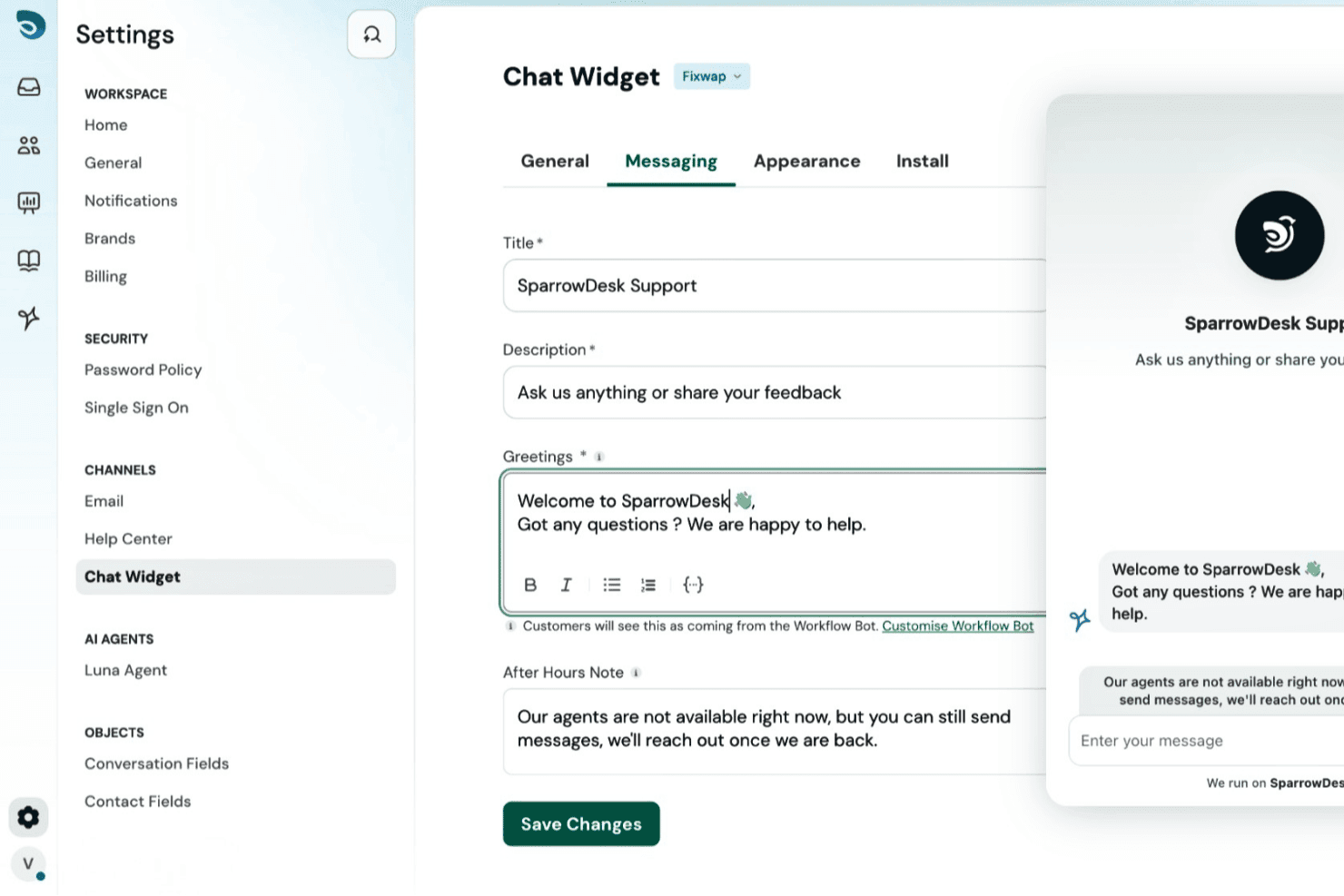
SparrowDesk offers a customizable chat widget with configurable title, description, greeting messages, and after-hours notes via its settings panel. SparrowDesk is an AI-first customer support platform built for teams that want to automate ticket resolution — not just triage it — combining an autonomous AI agent, omnichannel inbox, and built-in help center in one tool.
Who Is SparrowDesk Best For?
SparrowDesk suits startups and SMBs dealing with high ticket volume that want AI to handle routine queries before they ever reach a human agent.
Why SparrowDesk Is a Good Zendesk Alternative
I picked SparrowDesk as one of the best because of how fast Zoona, its AI agent, gets up to speed on your product. You train it by pointing it at your existing docs, PDFs, and past conversations, and it starts resolving tickets on its own, no scripting required. I appreciate that the same knowledge base that trains Zoona also powers a branded, searchable help center your customers can use directly.
SparrowDesk Key Features
- Omnichannel inbox: Manage email, live chat, and WhatsApp customer conversations in one streamlined interface.
- AI Copilot for agents: Get instant ticket summaries and suggested replies directly inside your help desk workflow.
- SLA management: Set custom service level agreements with proactive breach notifications to keep teams accountable.
- Customizable ticket views: Organize, filter, and prioritize support tickets using dynamic rules and team-based views.
SparrowDesk Integrations
SparrowDesk offers native integrations with Shopify, HubSpot, Linear, Slack, Salesforce, and WhatsApp. An API is available for custom integrations.
Pros and Cons
Pros:
- Built-in AI copilot speeds up agent responses
- Knowledge base doubles as AI training data
- Zoona AI resolves tickets without human input
Cons:
- Limited reporting depth for enterprise teams
- Smaller integration library
Learn more about SparrowDesk: Best for managing support channels from Gmail inbox
- Free plan available
- From $35/user/month
Visit WebsiteCustomer Rating:4.7/5
Hiver provides customer support management directly integrated with Gmail. Hiver integrates directly with Gmail to manage customer support teams, making it ideal for handling queries within the Google Workspace environment without switching platforms.
Why it's a good Zendesk alternative: Hiver simplifies email management by integrating directly with Gmail, eliminating the need for a separate help desk system. This makes it a strong alternative to Zendesk for teams already using Google Workspace, as it reduces the learning curve and streamlines workflows.
Standout features & integrations:
Features include multi-channel support, email management, workflow automation, and analytics, enabling teams to collaborate, automate repetitive tasks, and monitor performance directly within the Gmail interface.
Integrations include Slack, WhatsApp, Aircall, Asana, Salesforce, QuickBooks, Jira, Zapier, Okta, and Google Workspace.
Pros and Cons
Pros:
- Comprehensive email management features
- Easy to use with minimal setup
- Direct integration with Gmail
Cons:
- Limited customization options compared to some competitors
- Limited to Google Workspace users
Learn more about Hiver: Best for Microsoft Teams integration
- 21-day free trial + free demo available
- From $12/agent/month (billed annually)
Visit WebsiteCustomer Rating:4.8/5
Desk365 provides a unified ticketing dashboard where agents can filter, prioritize, and track customer support tickets by priority, category, and status in real time. For businesses looking for an alternative to Zendesk, Desk365 presents itself as a compelling option with its AI-driven helpdesk capabilities. Tailored for organizations of all sizes, it addresses support challenges by automating routine tasks, offering a unified inbox for efficient ticket management, and enhancing customer interactions through customizable workflows.
Why I Picked Desk365
I picked Desk365 because of its unique integration with Microsoft Teams, which allows your team to handle support queries directly within a familiar platform. This feature, combined with its AI-powered ticketing system, ensures that your team can automate repetitive tasks and focus on more complex customer issues. Additionally, Desk365's unified inbox consolidates all support requests in one place, streamlining your team's workflow and ensuring no ticket is overlooked.
Desk365 Key Features
In addition to its standout Microsoft Teams integration, Desk365 offers other valuable features:
- AI Agent: This feature uses machine learning to assist in drafting responses and managing tickets efficiently.
- Automations: Automate repetitive tasks and workflows to save time and reduce manual errors.
- SLAs: Monitor and manage service level agreements to ensure your team meets performance standards.
- Knowledge Base: Create and manage a repository of information for self-service support.
Desk365 Integrations
Integrations include Microsoft Teams, Jira, Azure DevOps, Asana, MS Planner, Microsoft 365 Copilot, Power BI, and API support for custom integrations.
Pros and Cons
Pros:
- Integration with Microsoft Teams enhances collaboration
- AI-powered ticketing system automates repetitive tasks
- Unified inbox centralizes support requests for easy management
Cons:
- Multilingual options not clearly documented
- Limited mobile accessibility
Learn more about Desk365: Best for contextual AI chatbot support
- Free plan available; 7-day free trial
- From $24.17/month (billed annually)
Visit WebsiteCustomer Rating:4.7/5
The Tidio AI Support dashboard displays analytics on conversations, resolution rates, and agent performance. Tidio is a customer support platform that combines live chat, AI automation, and help desk tools to help businesses manage customer conversations across multiple channels.
Why it's a good Zendesk alternative: Tidio's Lyro AI Agent is a key feature that makes it a strong alternative to Zendesk. Lyro uses your existing support content to answer customer questions across live chat, email, and messaging apps like WhatsApp and Instagram. Lyro also understands context, asks clarifying questions, and supports multiple languages, making it a versatile tool for customer support.
Standout features & integrations:
Features include a centralized ticket system, live typing preview, automatic chat assignment, visitor tracking, contact data collection, multilingual chat support, customer feedback collection, and working hours display.
Integrations include Shopify, WordPress, Squarespace, WIX, Adobe Commerce, BigCommerce, WooCommerce, Google Analytics, Mailchimp, HubSpot, and Zendesk.
Pros and Cons
Pros:
- Provides insights into team performance and customer satisfaction
- Lyro AI handles a significant portion of customer inquiries
- Multichannel support, including for chats, emails, and social media
Cons:
- Limitations when integrating with certain third-party tools
- Many automation features limited to higher tier plans
Learn more about Tidio: Best for leading customer interactions
- 14-day free trial + free plan available
- From $45/month
Visit WebsiteCustomer Rating:4.5/5
Crisp offers an all-in-one messaging platform with automation and real-time customer support capabilities. Crisp is an all-in-one business messaging platform tailored for startups to efficiently manage customer interactions by centralizing communication channels in one place.
Why it's a good Zendesk alternative: Crisp offers an advanced suite of tools that are particularly beneficial for startups. Its all-in-one messaging platform stands out by integrating multiple communication channels into a single interface, which simplifies customer relationship management. Additionally, Crisp provides seamless integrations with popular tools and offers a more personalized support experience, making it easier for team members to engage with their customers effectively.
Standout features & integrations:
Features include a shared inbox, chatbots, CRM, and co-browsing capabilities, allowing businesses to automate tasks and provide real-time customer assistance.
Integrations include Slack, WhatsApp, Instagram, Zapier, Aircall, Shopify, WordPress, Segment, Salesforce, and Pipedrive.
Pros and Cons
Pros:
- Affordable pricing for small teams
- Easy integration with multiple communication channels
- Comprehensive feature set for startups
Cons:
- May require some time to set up and customize
- Limited advanced features compared to larger platforms
Learn more about Crisp: 10Best for instant live chat support across platforms
HappyFox
- 14-day free trial
- From $24/user/month (billed annually)
Visit WebsiteCustomer Rating:4.5/5
HappyFox offers an intuitive help desk software solution with effective ticketing and automation features. HappyFox is an advanced help desk and customer support software solution. It excels in providing instant live chat support across mobile, desktop, and web platforms for omnichannel support.
Why it's a good Zendesk alternative: HappyFox is known for its strong live chat capabilities, which are important for businesses requiring real-time customer interaction. Its multi-platform support ensures accessibility across devices, offering a versatile alternative to Zendesk. Additionally, HappyFox provides excellent customer support, ensuring that businesses receive the help they need to maximize the platform’s potential.
Standout features & integrations:
Features include a strong ticketing system, AI-driven support, end-to-end process automation, and instant live chat for enhanced customer engagement and support efficiency.
Integrations include Salesforce, Aircall, Microsoft Teams, Slack, Facebook, Jira, Okta, Azure, Asana, and HubSpot.
Pros and Cons
Pros:
- Multi-platform live chat support
- AI-driven support features
- Comprehensive ticketing system
Cons:
- Limited customization options
- Higher starting price compared to some competitors
Learn more about HappyFox:
Andre Zendesk-alternativer
Nedenfor finner du en liste over flere Zendesk-alternativer som jeg valgte ut. Selv om de ikke kom med blant de ti beste, er de fortsatt verdifulle og verdt å undersøke nærmere.
- 11KustomerBest for centralized customer data
- 12IssuetrakBest for unlimited free users
- 13HubSpot Service HubBest for scalable customer service tools
- 14ProProfsBest for training and customer support tools
- 15Jira Service ManagementBest for high-velocity service management
- 16eGainBest for knowledge management
- 17ServiceNow Customer Service ManagementBest for AI-driven proactive digital operations
- 18TrengoBest multichannel inbox
- 19SAAS FirstBest for AI-powered customer support
- 20LiveAgentBest for hybrid ticket streams
- 21Help ScoutBest for customer-first support
- 22IntercomBest for personalized customer messaging
- 23GrooveBest for small business support teams
- 24AttioBest for CRM and customer data management
- 25BoldDeskBest for customizable help desk solutions
Relaterte anmeldelser av programvare og verktøy
Hvis du fortsatt ikke har funnet det du leter etter her, kan du se nærmere på disse andre typene verktøy som vi har testet og evaluert.
- Programvare for nettverksovervåking
- Programvare for serverovervåking
- SD-WAN-løsninger
- Verktøy for infrastrukturovervåking
- Pakkesniffer
- Verktøy for applikasjonsovervåking
How I Evaluate Zendesk Alternatives
I split my evaluation into core functionality every Zendesk alternative must offer—like multi-channel ticketing and SLA automation—and the differentiators that separate a good fit from the right one.
Core Functionality (Table Stakes For This List)
When I'm selecting tools for my list, I rank each one on a scale from 0 (does not offer the functionality) to 5 (excels in this area) for each core functionality listed below. Then, I calculate the tool's total score into a percentage. Each tool needs to achieve a minimum total score of 65% to be considered for inclusion.
- Ticket Management & Lifecycle Tracking: I look for full ticket lifecycle support—creation, assignment, threading, status tracking, and linking—so agents can handle scenarios like escalating a server outage from a single alert through to a post-incident review.
- Automation & Workflow Rules: Each tool should let you build routing rules, SLA triggers, and escalation paths. For example, auto-assigning high-priority infrastructure tickets to on-call engineers based on shift schedules and skill tags.
- Knowledge Base & Self-Service Portal: I evaluate whether the platform offers a searchable, agent- and end-user-facing knowledge base. Teams that deflect common requests like password resets or VPN setup through a self-service portal see meaningful ticket reduction.
- Multi-Channel Ticket Intake: I check how many channels feed into a unified agent workspace. A service desk that pulls in email, chat, web forms, and Slack messages—the way tools like Freshdesk and Jira Service Management handle it—keeps agents from toggling between platforms.
- Reporting & SLA Dashboards: Dashboards should cover ticket volume trends, agent workload, SLA compliance rates, and CSAT scores. I look for the ability to build custom reports, since IT leaders often need to present resolution metrics to stakeholders in a specific format.
- Integrations & API Access: The platform should connect natively with tools your team already uses, like Jira, Slack, PagerDuty, or monitoring systems. A well-documented REST API matters too, especially when you need to push ticket data into internal dashboards or trigger workflows from external events.
Once I have a list of tools that meet this criteria, I consider what sets each platform apart.
Differentiating Factors (What Sets Vendors Apart)
Here's how I compare and contrast different vendors:
Standout Features
ITIL-aligned workflows are a major differentiator for IT teams. I evaluate whether a platform supports incident, problem, and change management natively—not just basic ticketing with custom labels. AI capabilities also matter. Tools that offer agent-assist features like ticket summarization or suggested responses can cut resolution times during high-volume incidents. I also check whether a platform runs both an internal IT help desk and a customer-facing portal from one instance. Many tech teams support employees and external users, and managing two separate systems adds unnecessary overhead.
Beyond Features
Security and compliance certifications carry real weight here. I check for SOC 2 Type II, ISO 27001, and SSO/SAML support as a baseline—teams in regulated industries should also confirm HIPAA or FedRAMP readiness. Migration support is another factor I evaluate closely. Moving off Zendesk means preserving years of ticket history, macros, and user data, so I look for native migration tools or documented import paths. Pricing transparency matters too, especially since Zendesk's add-on model is a common reason teams start shopping for alternatives in the first place.
Hvorfor se etter et Zendesk-alternativ?
Selv om Zendesk er et verdifullt verktøy, passer det kanskje ikke for teamet ditt. Det finnes flere grunner til at du kan begynne å lete etter et Zendesk-alternativ, blant annet:
- Kostnad: Zendesk kan være ganske kostbart, spesielt for små bedrifter eller oppstartsbedrifter med begrensede budsjetter. Derfor ser du kanskje etter et rimeligere alternativ som fortsatt tilbyr gode funksjoner for kundestøtte.
- Kompleksitet: Zendesk kan virke overveldende på grunn av de omfattende funksjonene, som kanskje ikke er nødvendige for alle team. Hvis teamet ditt trenger en enklere og mer intuitiv plattform, kan et mindre komplekst alternativ passe bedre.
- Tilpasning: Selv om Zendesk tilbyr tilpasningsmuligheter, er de kanskje ikke tilstrekkelige for alle virksomheters behov. Hvis du trenger større fleksibilitet til å tilpasse plattformen til de unike prosessene dine, kan det være lurt å se etter en løsning med flere tilpasningsmuligheter.
- Integrasjon: Zendesk integreres kanskje ikke sømløst med noen av de andre verktøyene og programvarene virksomheten din er avhengig av. Hvis en smidigere integrasjon med den eksisterende arbeidsflyten din er viktig, kan det være nødvendig å vurdere alternativer som tilbyr bedre kompatibilitet.
- Støtte: Noen brukere opplever at kundestøtten hos Zendesk til tider kan være treg eller upersonlig. Hvis du prioriterer mer responsiv eller personlig støtte, kan det være lurt å utforske andre alternativer som tilbyr et høyere nivå av kundeservice.
Alternativer til Zendesk kan tilby rimeligere priser, enklere grensesnitt, større tilpasningsmuligheter, bedre integrasjonsfunksjoner og mer responsiv støtte, og dermed løse noen av begrensningene du kan møte med Zendesk. Disse alternativene kan passe bedre med dine spesifikke behov og preferanser.
Viktige funksjoner i alternativer til Zendesk
Her er noen viktige funksjoner i Zendesk som den alternative programvaren din bør kunne gjenskape eller forbedre for å passe godt.
- Saksbehandlingssystem: Håndterer kundehenvendelser ved å konvertere dem til saker for en mer effektiv kundestøtte.
- Støtte på flere kanaler: Integrerer e-post, sosiale medier, telefon og nettmoduler for sømløs samhandling med kundene.
- Selvbetjeningsportal og/eller kunnskapsbase: Gjør det mulig for kunder å finne svar på egen hånd gjennom artikler, veiledninger og vanlige spørsmål.
- Direktechat og meldinger: Gir chatstøtte i sanntid og integreres med SMS-meldingsapper som Facebook Messenger og WhatsApp for enkel bruk.
- Analyse og rapportering: Tilbyr oversikter over ytelse og analyseverktøy for å måle kundetilfredshet og effektiviteten til kundestøtten.
- Automatisering og arbeidsflyter: Automatiserer oppretting og videresending av saker, og støtter tilpassede arbeidsflyter for å forbedre effektiviteten.
- Tilpasning og integrasjoner: Støtter tredjepartsapper og tilpassede integrasjoner slik at plattformen kan skreddersys til spesifikke virksomhetsbehov.
- KI-drevne chatboter: Tar i bruk intelligente boter for å håndtere vanlige kundehenvendelser og gi umiddelbare svar.
- Samarbeidsverktøy: Legger til rette for internt samarbeid med delte visninger, makroer og private kommentarer fra kundestøtteagenter.
- Sikkerhet og personvern: Sikrer databeskyttelse og overholdelse av bransjestandarder gjennom avanserte sikkerhetsfunksjoner.