

Le 10 migliori soluzioni per la gestione dei difetti recensite nel 2026

Migliori Strumenti di Tracciamento dei Difetti - Lista Breve


I migliori software di tracciamento dei difetti aiutano i team di sviluppo a identificare, dare priorità e risolvere i bug in modo efficiente, riducendo i problemi in produzione e migliorando la qualità dei rilasci. Questi strumenti centralizzano la segnalazione, automatizzano l’aggiornamento degli status e assicurano che nulla venga trascurato, anche quando sono coinvolti più progetti o team.
Molti team di ingegneria si affidano a strumenti di tracciamento dei difetti quando si trovano ad affrontare problemi come segnalazioni di bug incomplete, proprietà poco chiare o perdita di tempo passando tra sistemi scollegati. Senza un flusso di lavoro affidabile, piccoli problemi possono trasformarsi in grandi ritardi o in costosi rifacimenti prima del rilascio.
Ho collaborato con ingegneri QA, product manager e sviluppatori nell’implementazione di sistemi di tracciamento delle segnalazioni sia in ambienti agili sia enterprise, testando quanto bene ogni piattaforma si integri con le pipeline CI/CD e supporti iterazioni rapide.
In questa guida vedrai quali strumenti facilitano la gestione dei difetti tra i team, migliorano la comunicazione tra QA e sviluppo e mantengono la qualità del software senza rallentare le consegne.
Perché fidarsi dei nostri consigli sui software
Il nostro team testa e recensisce software dal 2012. In quanto leader tecnologici noi stessi, sappiamo quanto sia difficile — e importante — scegliere il software giusto.
Per questa guida, abbiamo valutato gli strumenti attraverso test praticie ricerche indipendenti, assegnando un punteggio agli strumenti in base ai nostri criteri di selezione.
Le nostre recensioni riflettono il nostro giudizio editoriale umano, non un discorso di vendita.
Revisori esperti:
Riepilogo Migliori Strumenti di Tracciamento dei Difetti
Questa tabella comparativa riassume i dettagli sui prezzi delle mie principali scelte di strumenti per il tracciamento dei difetti, per aiutarti a trovare quello più adatto al tuo budget e alle esigenze della tua azienda.
| Tool | Best For | Trial Info | Price | ||
|---|---|---|---|---|---|
| 1 | Ideale per la gestione dei test | Piano gratuito disponibile | A partire da $12/utente/mese | Website | |
| 2 | Ideale per la collaborazione tra team | Piano gratuito + prova gratuita di 30 giorni disponibile | Da $35/mese (fino a 30 utenti) | Website | |
| 3 | Ideale per il monitoraggio in tempo reale | Piano gratuito disponibile | A partire da $49/utente/mese | Website | |
| 4 | Ideale per il feedback visivo | Prova gratuita di 14 giorni | A partire da $99/mese | Website | |
| 5 | Ideale per la prioritizzazione delle richieste | Prova gratuita di 7 giorni + piano gratuito disponibile | Da $20/mese | Website | |
| 6 | Ideale per l'interfaccia facile da usare | Piano gratuito disponibile | Da $3/mese (fatturazione annuale) | Website | |
| 7 | Ideale per il tracciamento degli errori | Prova gratuita di 14 giorni + demo gratuita disponibile | A partire da $15.83/mese (fatturato annualmente) | Website | |
| 8 | Ideale per opzioni di personalizzazione | Non disponibile | Gratuito | Website | |
| 9 | Ideale per la cattura di schermate | Prova gratuita di 15 giorni | A partire da $39/mese | Website | |
| 10 | Ideale per il feedback sul design | Not available | Prezzi su richiesta | Website |
Recensioni Migliori Strumenti di Tracciamento dei Difetti
Di seguito trovi i miei riepiloghi dettagliati dei migliori strumenti di tracciamento dei difetti che sono entrati nella mia lista breve. Le mie recensioni offrono uno sguardo approfondito alle funzionalità chiave, a pro e contro, integrazioni e casi d’uso ideali per ciascuno strumento, per aiutarti a trovare quello più adatto alle tue esigenze.

Kualitee
Ideale per la gestione dei test
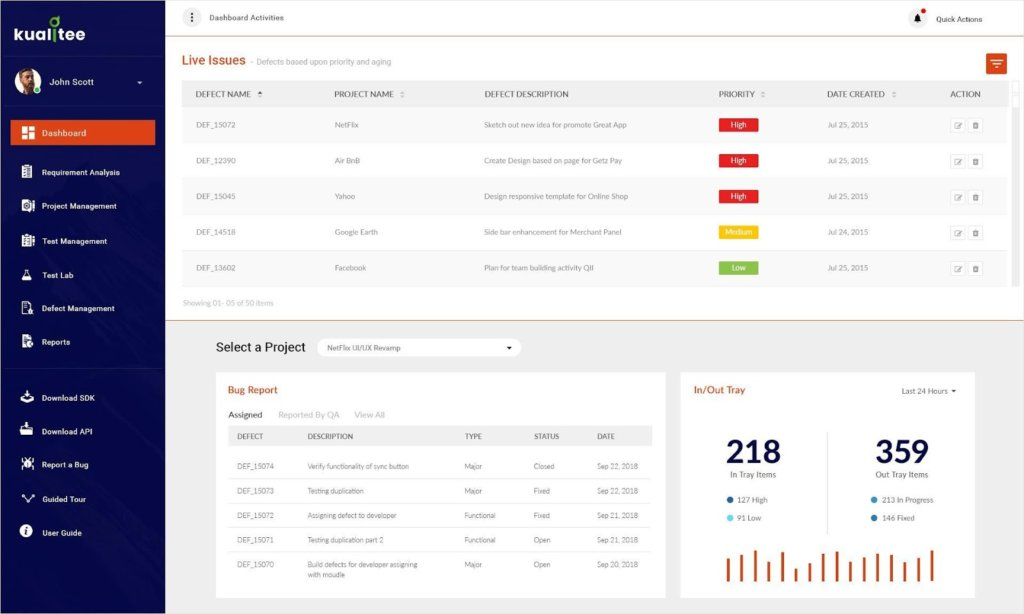
Kualitee è una piattaforma progettata per aiutare i team a organizzare, eseguire e monitorare le proprie attività di testing. Offre strumenti per la gestione dei casi di test, il tracciamento dei difetti e la generazione di report, il tutto all'interno di un sistema centralizzato.
Perché ho scelto Kualitee: Kualitee offre una gamma completa di funzionalità pensate per una gestione efficace dei test. Puoi creare piani di test dettagliati, eseguire cicli di test multipli e gestire i difetti man mano che emergono. La piattaforma include la generazione di casi di test supportata dall'IA, aiutando il tuo team a sviluppare rapidamente scenari di test precisi. Inoltre, report personalizzabili e dashboard personalizzate offrono una visione chiara dei progressi nelle attività di testing.
Funzionalità e integrazioni principali:
Le funzionalità includono la tracciabilità dei requisiti, che consente di monitorare le modifiche e i loro impatti durante l'intero processo di test. Il modulo integrato di gestione dei difetti permette un tracciamento e una risoluzione delle problematiche senza soluzione di continuità. Attraverso ruoli e privilegi, puoi assegnare responsabilità e livelli di accesso specifici ai membri del team, garantendo flussi di lavoro organizzati.
Le integrazioni includono JIRA, Selenium, Jenkins, GitHub, GitLab, Slack, Asana, Trello, Bitbucket e Azure DevOps.
Pros and Cons
Pros:
- Supporta test sia manuali che automatizzati
- Disponibile app mobile per l'accesso in mobilità
- Offre flussi di lavoro e template personalizzabili
Cons:
- Crediti IA limitati nei piani di fascia bassa
- La funzionalità dell'app mobile è più limitata rispetto alla versione web

Backlog
Ideale per la collaborazione tra team
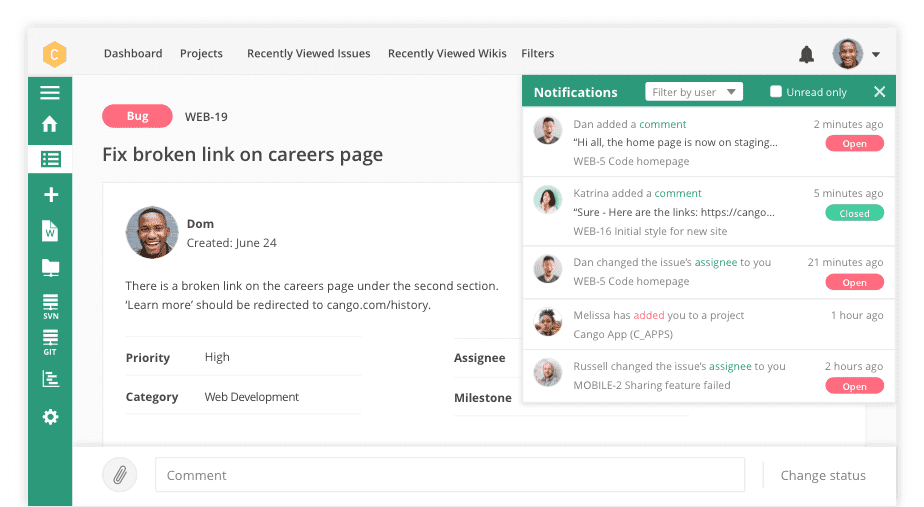
Backlog è uno strumento di project management pensato per i team virtuali, con un focus sulla collaborazione. Supporta la gestione delle attività, il tracciamento dei bug e il controllo delle versioni. È particolarmente utile per i team che devono gestire più progetti in modo efficiente.
Perché ho scelto Backlog: Si distingue nel favorire la collaborazione grazie a funzionalità come la gestione delle attività e i wiki di progetto. Le lavagne Kanban e i diagrammi di Gantt aiutano a visualizzare i flussi di lavoro, facilitando il mantenimento del percorso per il tuo team. Il controllo delle versioni è un'altra funzionalità di spicco, assicurando che tutti lavorino con i file più aggiornati. La semplicità di Backlog nella gestione delle attività e dei bug lo rende unico.
Funzionalità principali e integrazioni:
Funzionalità tra cui gestione delle attività, wiki di progetto e controllo delle versioni. Il tuo team può anche utilizzare i diagrammi di Gantt per una migliore visualizzazione delle tempistiche. Le lavagne Kanban offrono una panoramica chiara delle attività in corso e dello stato di avanzamento.
Integrazioni includono Slack, Microsoft Teams, GitHub, Redmine, Jenkins, Typetalk, Cacoo, Zapier, Google Drive e Dropbox.
Pros and Cons
Pros:
- Controllo versioni intuitivo
- Timeline di progetto visive
- Gestione semplice delle attività
Cons:
- Funzionalità avanzate limitate
- Strumenti di reportistica di base

Ideale per il monitoraggio in tempo reale
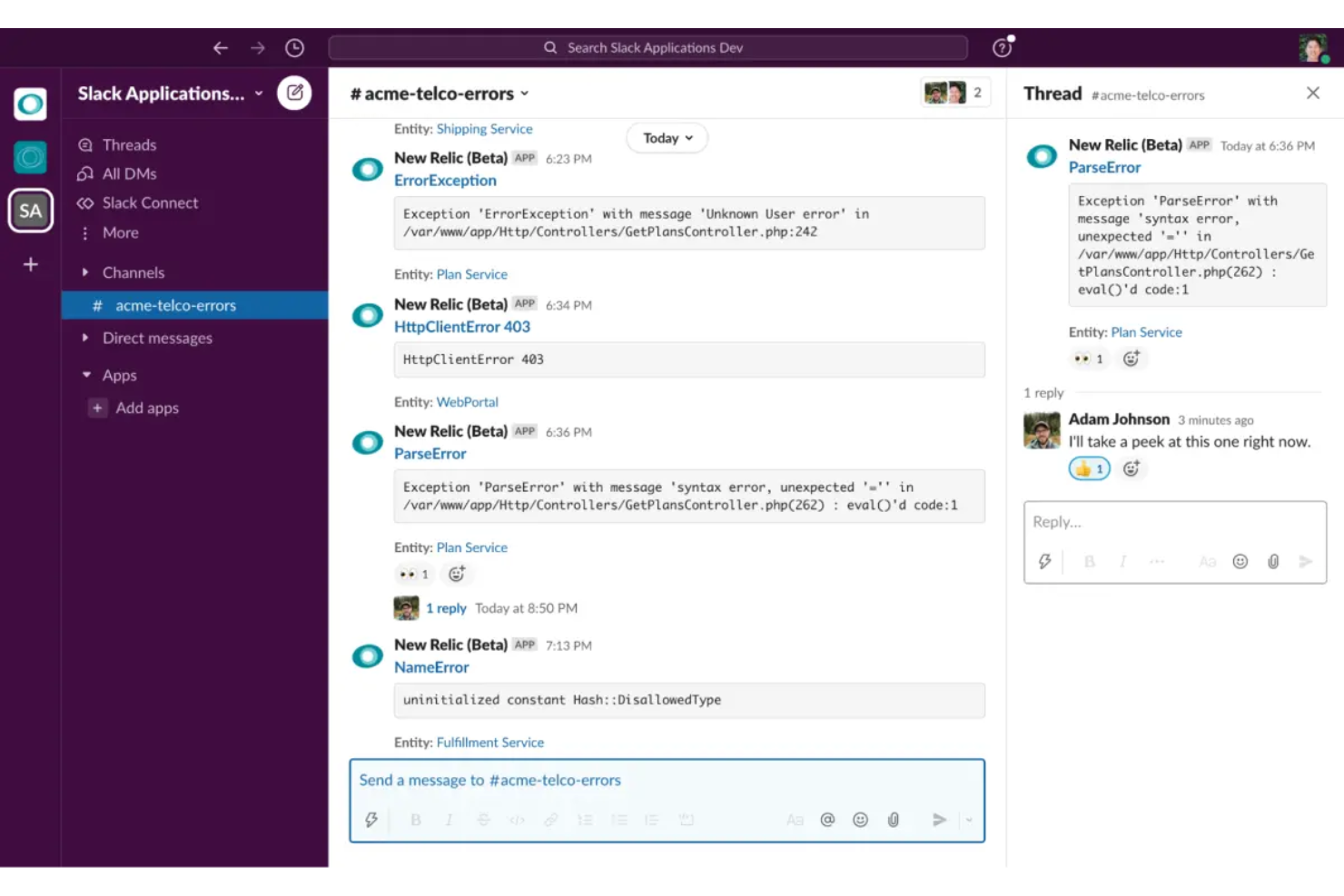
New Relic è una piattaforma di osservabilità pensata per gli sviluppatori, che offre monitoraggio per applicazioni e infrastruttura. È ideale per i team che necessitano di visibilità in tempo reale sulle prestazioni delle app e sulle esperienze degli utenti.
Perché ho scelto New Relic: Il monitoraggio in tempo reale è la caratteristica principale, offrendo agli sviluppatori informazioni immediate sulle prestazioni delle applicazioni. Supporta diversi linguaggi di programmazione e framework, rendendolo versatile per vari stack tecnologici. Gli strumenti di gestione delle prestazioni delle applicazioni consentono di identificare e risolvere rapidamente i problemi. Con oltre 780 integrazioni, si adatta facilmente ai flussi di lavoro esistenti.
Funzionalità e integrazioni principali:
Le funzionalità includono gestione delle prestazioni applicative, monitoraggio dell'infrastruttura e gestione dei log. Le dashboard in tempo reale offrono una visione immediata sulle tue applicazioni. Gli avvisi aiutano il team a rispondere rapidamente ai problemi.
Le integrazioni includono AWS, Azure, Google Cloud, Kubernetes, Docker, GitHub, Jenkins, PagerDuty, Slack e Microsoft Teams.
Pros and Cons
Pros:
- Dati in tempo reale
- Ampie opzioni di integrazione
- Supporta diversi linguaggi di programmazione
Cons:
- Curva di apprendimento ripida
- Può essere intensivo a livello di risorse

zipBoard
Ideale per il feedback visivo
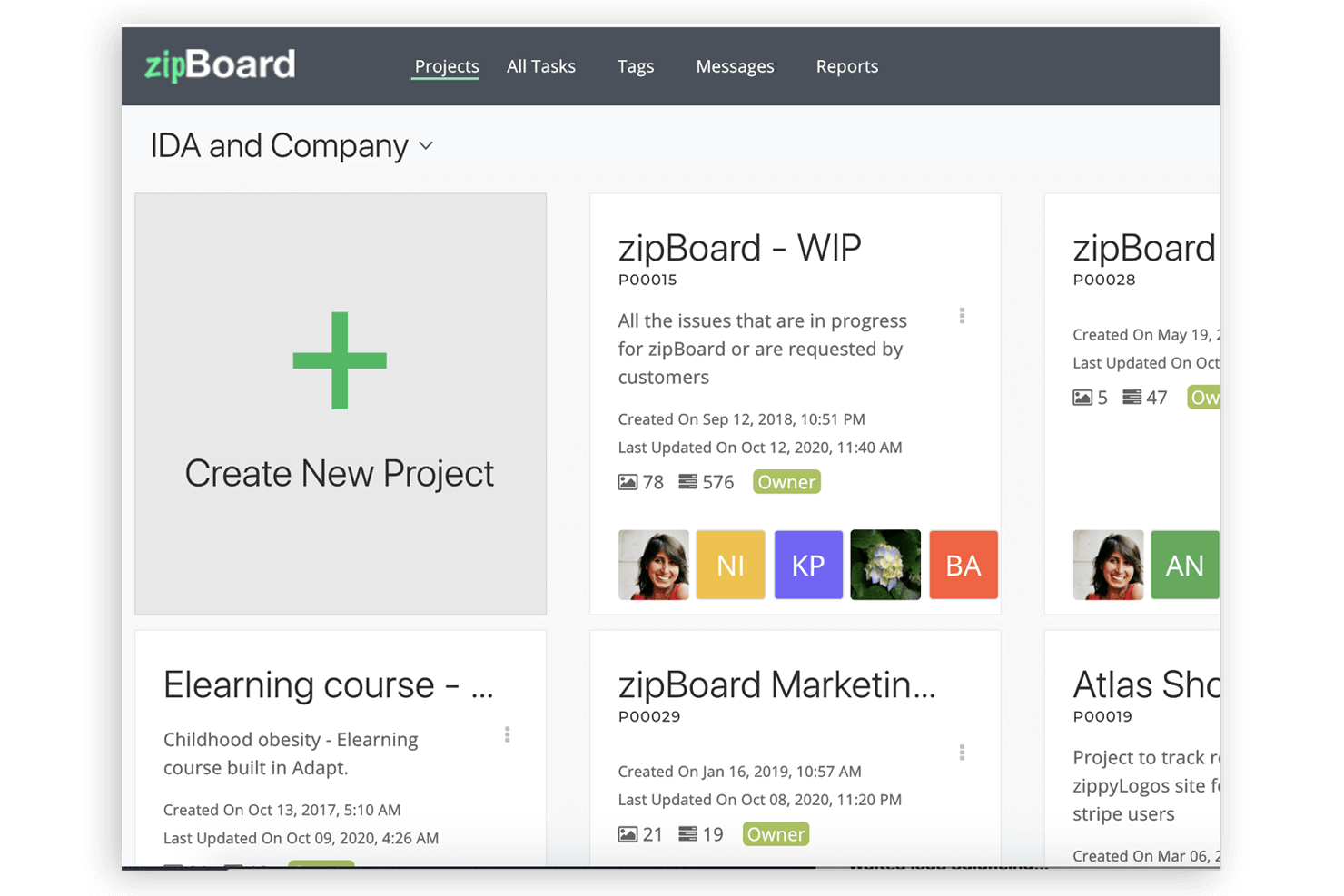
zipBoard è uno strumento di revisione e approvazione di risorse digitali per designer, sviluppatori e project manager. Si concentra sul feedback visivo e sulla revisione collaborativa dei documenti, il che lo rende ideale per team nei settori del design, dell'istruzione e dell'architettura.
Perché ho scelto zipBoard: Il feedback visivo è al centro delle funzionalità di zipBoard, consentendo al tuo team di annotare documenti e risorse digitali. Puoi facilmente convertire i feedback in compiti attuabili, migliorando la collaborazione. Il supporto della piattaforma per commenti, screenshot e annotazioni video aiuta a raccogliere rapidamente informazioni. La sua interfaccia intuitiva facilita la gestione dei progetti e il monitoraggio dei bug.
Funzionalità e integrazioni principali:
Le funzionalità includono annotazione di documenti, feedback visivo e revisione collaborativa dei documenti. Puoi semplificare il monitoraggio dei problemi e ottimizzare i flussi di lavoro. La piattaforma supporta anche la collaborazione da remoto tramite condivisione dello schermo.
Le integrazioni includono Jira, Slack, Microsoft Teams, Trello, Asana, Basecamp, Google Drive, Dropbox, GitHub e Bitbucket.
Pros and Cons
Pros:
- Strumenti di feedback visivo efficaci
- Semplifica il monitoraggio dei problemi
- Supporta la collaborazione da remoto
Cons:
- Potrebbe non essere adatto alle grandi aziende
- Funzionalità offline limitate
Ideale per la prioritizzazione delle richieste
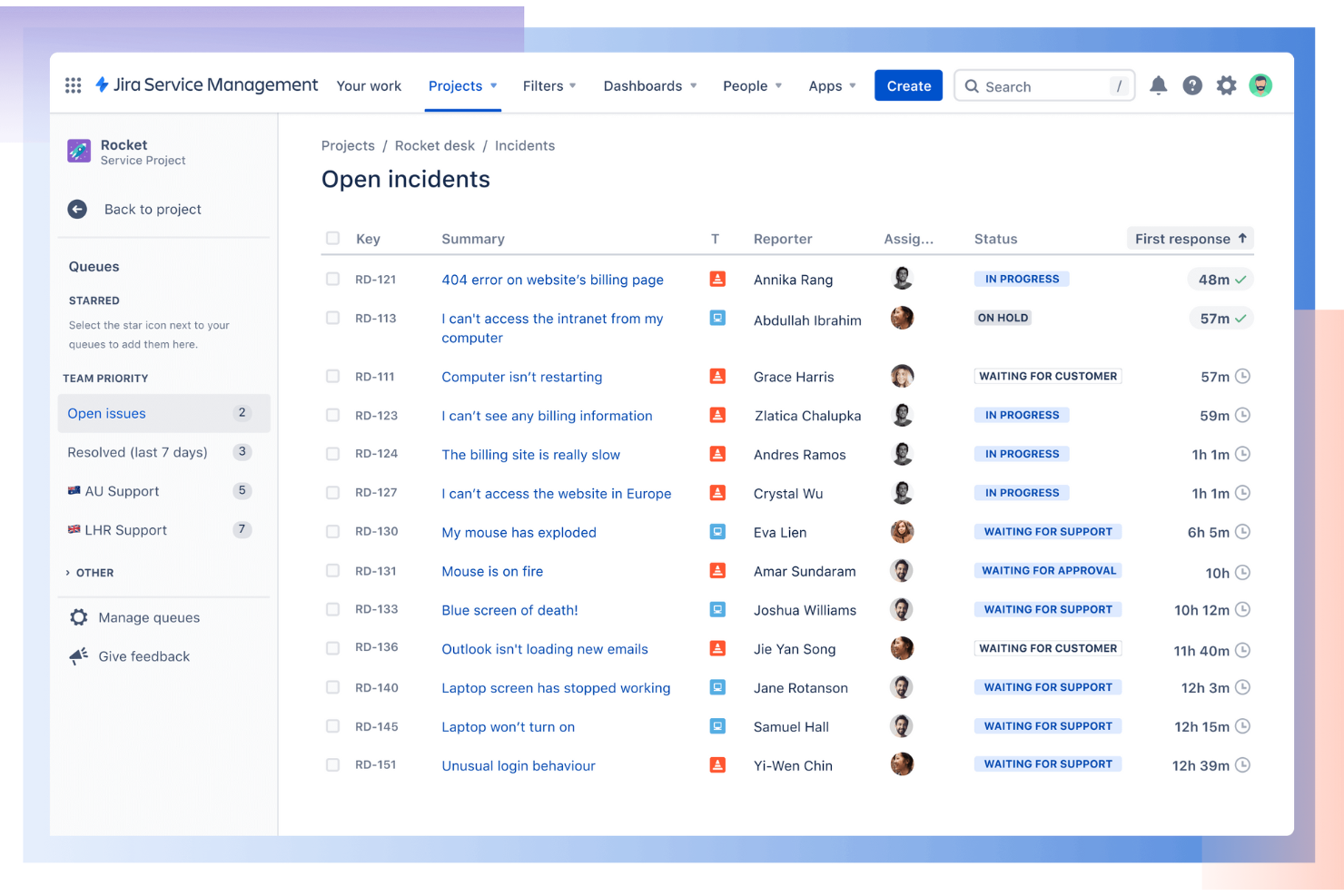
Jira Service Management (JSM), sviluppato da Atlassian, è una piattaforma di gestione dei servizi IT che funziona molto bene anche per il tracciamento dei difetti. Offre ai team un modo strutturato per segnalare, classificare e risolvere i problemi tramite un portale self-service e code di richiesta organizzate.
Perché ho scelto Jira Service Management: Ho scelto JSM per la sua capacità di dare priorità e tracciare i difetti utilizzando le code di richiesta. Questo assicura che i team possano concentrarsi prima sulle questioni urgenti mantenendo comunque visibilità sui bug a priorità inferiore. Il monitoraggio degli SLA (Service Level Agreement) aggiunge responsabilità, rendendo più semplice misurare se i problemi vengono risolti nei tempi previsti. La combinazione di code di richiesta e SLA lo rende particolarmente utile per i team che desiderano una gestione strutturata dei difetti con scadenze chiare.
Funzionalità principali e integrazioni:
Le funzionalità includono il monitoraggio degli SLA per le scadenze di risoluzione dei difetti, ticketing conversazionale tramite Slack e Microsoft Teams, e viste di lavoro unificate per tracciare e assegnare i problemi. I team possono anche sfruttare gli strumenti di reportistica per monitorare le performance e la soddisfazione dei clienti.
Le integrazioni includono Slack, Microsoft Teams, GitHub, Microsoft Azure, ServiceNow, Zapier, Confluence, Bitbucket, Opsgenie, Trello, Salesforce e Google Workspace.
Pros and Cons
Pros:
- Il monitoraggio degli SLA responsabilizza i team
- Il ticketing conversazionale migliora la collaborazione
- La vista di lavoro unificata semplifica il tracciamento dei difetti
Cons:
- Curva di apprendimento per i nuovi utenti
- Alcune funzionalità richiedono componenti aggiuntivi

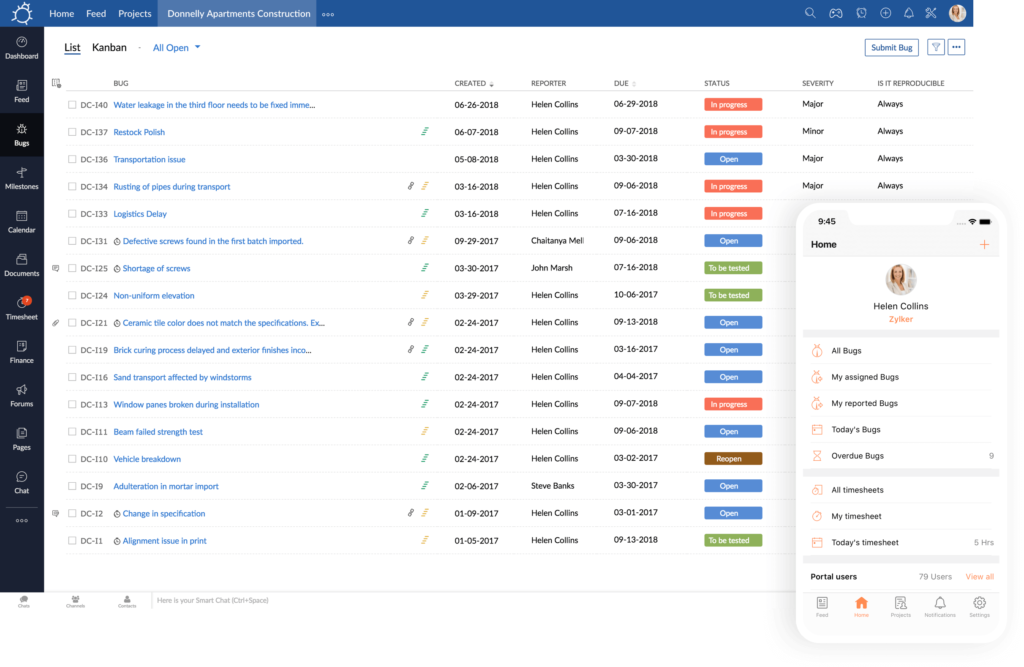
Zoho BugTracker è uno strumento di monitoraggio dei bug basato su cloud progettato per sviluppatori e project manager. Semplifica il tracciamento dei problemi e la gestione dei progetti per team di tutte le dimensioni.
Perché ho scelto Zoho BugTracker: L'interfaccia intuitiva permette al tuo team di navigare e gestire i bug in modo efficiente. I flussi di lavoro personalizzabili ti consentono di adattare i processi alle esigenze del tuo progetto. Le notifiche automatiche mantengono tutti aggiornati e riducono la necessità di solleciti manuali. Puoi anche collaborare facilmente con i membri del team tramite le bacheche di discussione.
Funzionalità e integrazioni principali:
Le funzionalità includono flussi di lavoro personalizzabili, notifiche automatiche e bacheche di discussione. Puoi impostare attività ricorrenti per risparmiare tempo su azioni ripetitive. Lo strumento offre anche il monitoraggio del tempo per aiutare a gestire efficacemente le tempistiche dei progetti.
Le integrazioni includono Zoho CRM, Zoho Projects, Slack, GitHub, Bitbucket, Microsoft Teams, Google Drive, Dropbox, Jira e Zapier.
Pros and Cons
Pros:
- Flussi di lavoro altamente personalizzabili
- Notifiche automatiche sui bug
- Monitoraggio del tempo efficace
Cons:
- Funzionalità avanzate limitate
- A volte può essere lento
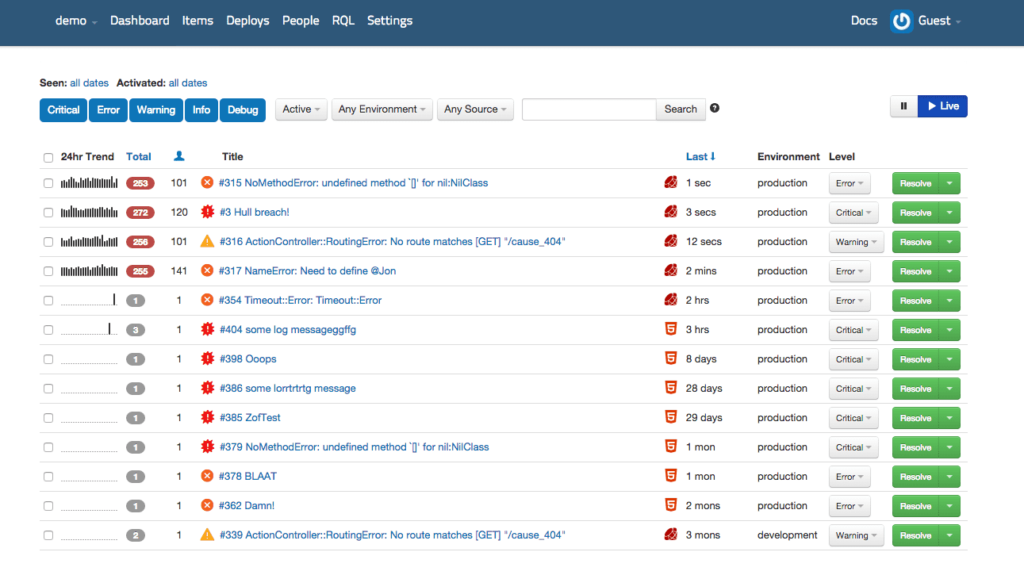
Rollbar è uno strumento di monitoraggio e tracciamento degli errori per sviluppatori e team IT. Aiuta a identificare, dare priorità e risolvere rapidamente i bug, diventando essenziale per mantenere la stabilità delle applicazioni.
Perché ho scelto Rollbar: La sua attenzione al tracciamento degli errori offre al tuo team avvisi e approfondimenti in tempo reale. Puoi facilmente stabilire le priorità delle problematiche in base al loro impatto e frequenza. La capacità di Rollbar di raggruppare errori simili semplifica il processo di debug. I suoi rapporti dettagliati sugli errori aiutano a comprendere la causa principale, risparmiando tempo e fatica.
Funzionalità e integrazioni principali:
Le funzionalità includono avvisi di errore in tempo reale, raggruppamento degli errori e rapporti dettagliati sugli errori. Puoi monitorare lo stato delle distribuzioni per tenere traccia delle modifiche nelle tue applicazioni. Lo strumento offre anche notifiche personalizzabili per mantenere informato il team.
Le integrazioni includono GitHub, Slack, Jira, Trello, Bitbucket, PagerDuty, Microsoft Teams, Asana, Datadog e Heroku.
Pros and Cons
Pros:
- Tracciamento degli errori in tempo reale
- Notifiche personalizzabili
- Raggruppamento efficace degli errori
Cons:
- Può essere intensivo nell'uso dei dati
- Potrebbe non essere adatto a team non tecnici
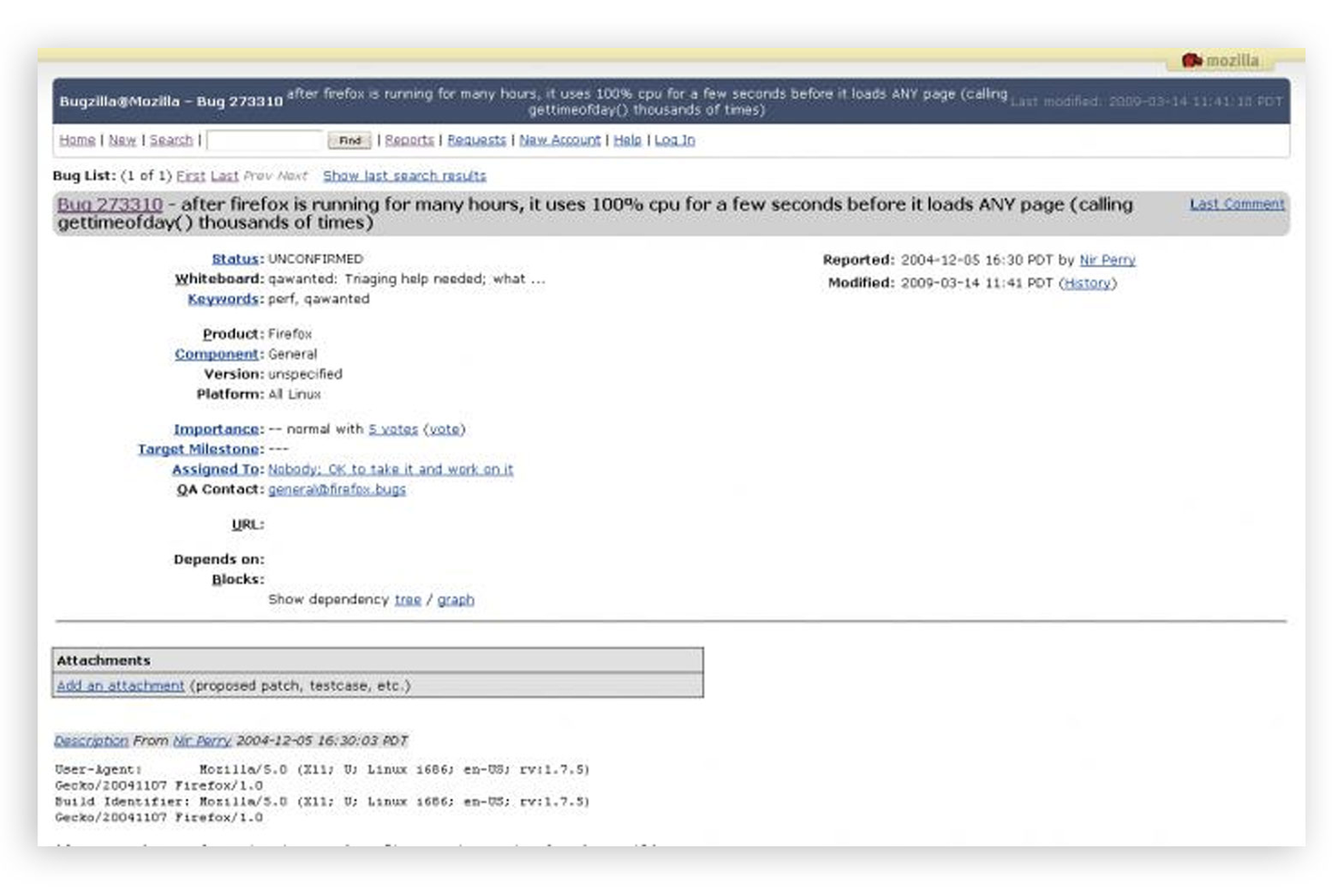
Bugzilla è un sistema open-source per il tracciamento dei bug, progettato per sviluppatori e project manager. Facilita il tracciamento efficiente delle problematiche e la gestione dei progetti per i team che necessitano di un elevato livello di personalizzazione.
Perché ho scelto Bugzilla: Le opzioni di personalizzazione sono ampie, consentendo al tuo team di adattare i flussi di lavoro alle esigenze specifiche del progetto. Puoi modificare campi e permessi, offrendo flessibilità nel tracciamento delle problematiche. Le capacità avanzate di ricerca dello strumento aiutano a trovare rapidamente le informazioni necessarie. Con Bugzilla, puoi anche generare report dettagliati per monitorare l’avanzamento dei progetti.
Funzionalità principali e integrazioni:
Le funzionalità includono ricerca avanzata, reportistica dettagliata e flussi di lavoro personalizzabili. Puoi controllare i permessi utente per aumentare la sicurezza. Lo strumento supporta inoltre il monitoraggio dei tempi per aiutare nella gestione delle scadenze di progetto.
Le integrazioni includono GitHub, Jira, Slack, Trello, Jenkins, Redmine, Asana, Microsoft Teams, Basecamp e Zapier.
Pros and Cons
Pros:
- Campi altamente personalizzabili
- Capacità di ricerca avanzata
- Funzioni di reportistica dettagliata
Cons:
- Richiede conoscenze tecniche
- Funzionalità mobile limitata

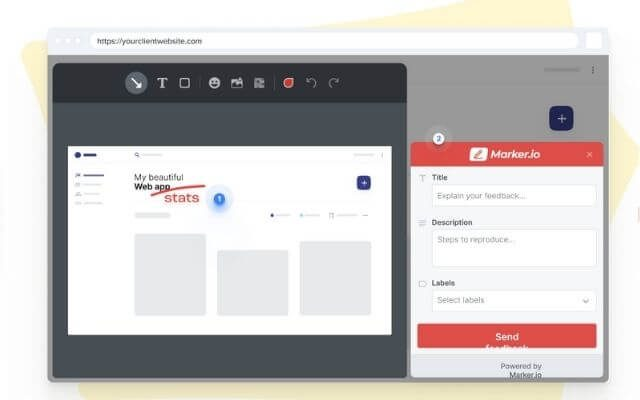
Marker.io è uno strumento di feedback visivo pensato per sviluppatori e designer web. Permette ai team di catturare schermate e annotarle direttamente, facilitando una migliore comunicazione e il tracciamento dei bug.
Perché ho scelto Marker.io: La sua attenzione alla cattura di schermate lo rende uno strumento prezioso per il feedback visivo. Il tuo team può catturare schermate direttamente dal sito web e annotarle con commenti e disegni. Questa funzionalità accelera il ciclo di feedback e riduce le incomprensioni. Con la sua estensione per browser, si integra facilmente nel tuo flusso di lavoro già esistente.
Caratteristiche e integrazioni principali:
Le funzionalità includono la cattura diretta di schermate dal sito web, strumenti di annotazione e un'estensione per il browser. Puoi anche gestire il feedback con flussi di lavoro personalizzabili. Lo strumento supporta la collaborazione di team tramite bacheche condivise per organizzare il feedback.
Le integrazioni includono Jira, Trello, Asana, GitHub, GitLab, Bitbucket, monday.com, ClickUp, Linear e Slack.
Pros and Cons
Pros:
- Cattura di schermate rapida
- Strumenti di annotazione semplici
- Estensione per browser disponibile
Cons:
- Funzionalità avanzate limitate
- Potrebbe non essere adatto a team numerosi

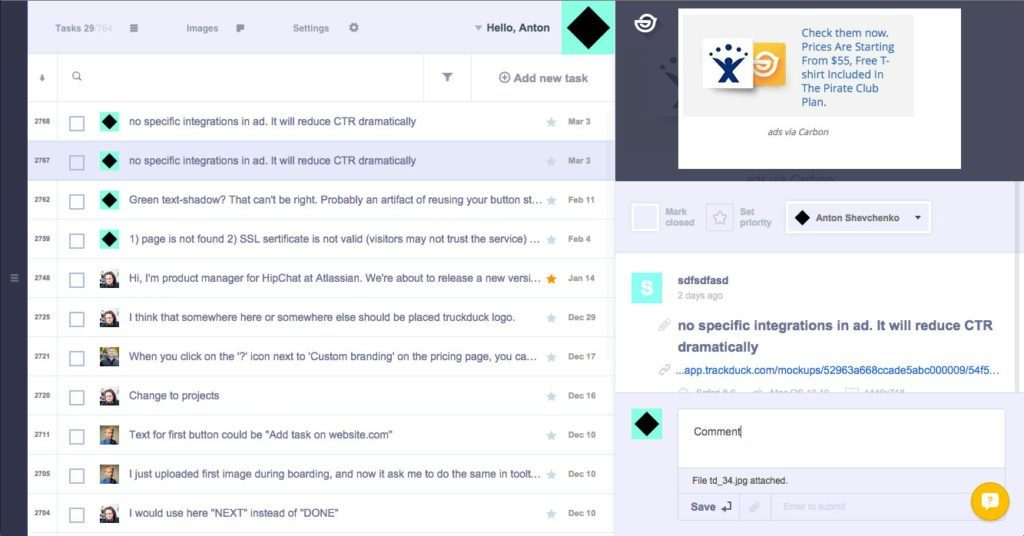
Trackduck è uno strumento di feedback visivo e monitoraggio dei bug per web designer e sviluppatori. Consente ai team di raccogliere feedback sul design direttamente su siti web e applicazioni web, rendendolo perfetto per i progetti incentrati sul design.
Perché ho scelto Trackduck: eccelle nella raccolta di feedback sul design direttamente sulle pagine web, consentendo di aggiungere annotazioni direttamente sul sito. Puoi semplificare la comunicazione con il tuo team trasformando il feedback in attività operative. Lo strumento è facile da integrare nei flussi di lavoro esistenti, riducendo la necessità di scambiarsi email avanti e indietro. Il suo approccio visivo aiuta il team a identificare e risolvere rapidamente i problemi di design.
Caratteristiche distintive & integrazioni:
Le caratteristiche includono l'aggiunta diretta di annotazioni sulla pagina, la gestione delle attività a partire dal feedback e una comunicazione semplificata. Puoi monitorare facilmente modifiche e aggiornamenti grazie al controllo delle versioni. Lo strumento supporta inoltre revisioni collaborative del design per mantenere tutti allineati.
Le integrazioni includono Jira, Trello, Asana, Slack, Basecamp, GitHub, Bitbucket, Microsoft Teams, Dropbox e Google Drive.
Pros and Cons
Pros:
- Annotazioni dirette sulla pagina
- Semplifica il feedback sul design
- Gestione semplice delle attività
Cons:
- Funzionalità avanzate limitate
- Potrebbe non essere adatto alle grandi aziende
Altri Strumenti di Tracciamento dei Difetti
Ecco alcune opzioni aggiuntive di strumenti per il tracciamento dei difetti che non sono rientrate nella mia lista breve, ma che vale comunque la pena valutare:
- MantisHub
Ideale per progetti open-source
- Bugyard
Ideale per piccoli team
- monday AI Workspace
Ideale per l'identificazione dei rischi basata sull'IA
- BugHerd
Ideale per il tracciamento visivo dei bug


Come valuto gli strumenti di defect tracking
Divido la mia valutazione in requisiti di base che ogni sistema di defect tracking deve soddisfare e fattori che differenziano gli strumenti pensati per veri flussi di lavoro QA da quelli che aggiungono semplicemente un registro dei bug.
Funzionalità di base (Requisiti Minimi per questa Lista)
Quando seleziono gli strumenti per la mia lista, li classifico ciascuno su una scala da 0 (la funzionalità non è disponibile) a 5 (eccellenza in quell’area) per ognuna delle funzionalità di base elencate qui sotto. Successivamente, calcolo il punteggio totale dello strumento in percentuale. Ogni strumento deve ottenere un punteggio totale minimo del 65% per essere incluso.
- Registrazione & Acquisizione dei bug: Verifico che ogni strumento supporti record dettagliati di difetti con severità, informazioni sull’ambiente, passaggi di riproduzione e allegati come screenshot o file di log.
- Workflow & Tracciamento dello stato: Ogni strumento dovrebbe permetterti di definire cicli di vita personalizzati dei bug—spostando un difetto da "Nuovo" a "In lavorazione" fino a "Verificato/Fisso"—con una chiara assegnazione della responsabilità in ogni fase.
- Ricerca, filtri & categorizzazione: Valuto quanto sia facile suddividere l’elenco dei difetti per progetto, rilascio, assegnatario o severità, perché trovare una specifica regressione tra centinaia di bug aperti non dovrebbe richiedere di scorrere a lungo.
- Integrazioni con strumenti di sviluppo: Sono importanti le connessioni native con piattaforme di controllo versione come GitHub o GitLab e strumenti CI/CD come Jenkins, perché i dati sui difetti devono fluire dove lavorano già gli sviluppatori.
- Report & dashboard: Cerco dashboard che evidenzino l’anzianità dei difetti, la velocità di risoluzione e i trend di severità, affinché i QA lead e i project manager possano individuare i colli di bottiglia prima che un rilascio subisca ritardi.
- Collaborazione & notifiche: Commenti in tempo reale, @menzioni e notifiche configurabili tengono allineati QA engineer e sviluppatori sulle decisioni di triage senza bisogno di passare a un altro strumento di chat.
Dopo aver raccolto gli strumenti che rispettano questi criteri, considero ciò che rende unica ogni piattaforma.
Fattori Differenzianti (Cosa distingue i fornitori)
Ecco come confronto e valuto i vari fornitori:
Funzionalità Distintive
L’acquisizione visiva dei bug è un vero elemento differenziante—gli strumenti che offrono annotazioni nel browser e metadati del browser allegati automaticamente riducono il botta e risposta tra QA e dev durante il triage. Valuto anche il collegamento dei casi di test, perché collegare un difetto direttamente a un test case fallito o a un requisito offre al QA lead tracciabilità completa dalla scoperta alla risoluzione. Il rilevamento di duplicati basato su AI è importante nei grandi progetti in cui si accumulano centinaia di bug e la deduplicazione manuale fa perdere ore di lavoro.
Oltre alle funzionalità
La conformità e gli standard di sicurezza pesano molto nella mia valutazione—verifico la certificazione SOC 2, il controllo degli accessi basato sui ruoli e il supporto SSO/SAML, poiché i log dei difetti spesso contengono dettagli sensibili sull’architettura di sistema. Anche la flessibilità di distribuzione è importante, soprattutto per i team in settori regolamentati che necessitano di opzioni self-hosted o cloud privato. Considero anche la profondità dell’ecosistema, valutando se l’API e la libreria di plugin di uno strumento possono tenere il passo con l’evoluzione della tua pipeline CI/CD e dell’automazione dei test nel tempo.
Come Scegliere uno Strumento di Tracciamento dei Difetti
È facile perdersi in lunghe liste di funzionalità e strutture di prezzo complesse. Per aiutarti a mantenere la concentrazione durante il tuo processo di selezione software, ecco una checklist di fattori da tenere a mente:
| Fattore | Cosa Considerare |
| Scalabilità | Assicurati che lo strumento possa crescere insieme al tuo team. Valuta se è in grado di gestire un aumento del volume dei dati e del numero di utenti man mano che i tuoi progetti si espandono. |
| Integrazioni | Cerca la compatibilità con il tuo stack tecnologico esistente. Verifica se si integra con strumenti come Jira, GitHub o Slack per flussi di lavoro più fluidi. |
| Personalizzazione | Verifica se puoi personalizzare flussi di lavoro e campi per adattarli ai processi del tuo team. Dashboard personalizzabili possono migliorare la visibilità per esigenze di progetto specifiche. |
| Facilità d'Uso | Un'interfaccia intuitiva riduce al minimo il tempo di formazione. Assicurati che i membri del team possano navigare nello strumento senza confusione, aumentando così la produttività sin dall'inizio. |
| Budget | Considera il costo in relazione al tuo budget. Valuta se le funzionalità giustificano il prezzo e se sono disponibili piani di pagamento flessibili adatti alle tue esigenze. |
| Tutele di Sicurezza | Verifica le misure di sicurezza offerte dallo strumento. Cerca la crittografia dei dati, il controllo degli accessi utente e la conformità agli standard di settore per proteggere le informazioni sensibili. |
| Opzioni di Supporto | Valuta la disponibilità dell’assistenza clienti. Un supporto attivo 24/7 e diversi canali di contatto possono essere cruciali per risolvere rapidamente i problemi. |
| Capacità di Reporting | Analizza la capacità dello strumento di generare report dettagliati. Analisi approfondite possono aiutare a monitorare i progressi e identificare tendenze nella gestione dei difetti. |
Tendenze negli Strumenti di Tracciamento dei Difetti
Nella mia ricerca ho analizzato innumerevoli aggiornamenti di prodotto, comunicati stampa e log di rilascio di diversi fornitori di strumenti di tracciamento dei difetti. Ecco alcune delle tendenze emergenti che sto osservando:
- Analisi basate su AI: L'intelligenza artificiale avanzata viene utilizzata per prevedere e dare priorità automaticamente ai bug. Questo aiuta i team a concentrarsi prima sui problemi più impattanti. Fornitori come Rollbar stanno incorporando il machine learning per offrire raggruppamenti di errori più intelligenti e analisi approfondite.
- Feedback centrato sull’utente: Gli strumenti si concentrano sempre più sulla raccolta del feedback direttamente dagli utenti finali. Questa tendenza aiuta i team a comprendere più rapidamente i problemi reali. BugHerd, ad esempio, consente agli utenti di segnalare i bug direttamente dall’interfaccia del sito web.
- Collaborazione migliorata: Le funzionalità di collaborazione vengono ampliate per supportare meglio i team remoti. Commenti in tempo reale e dashboard condivise stanno diventando la norma. Strumenti come Monday.com stanno migliorando queste caratteristiche per facilitare una comunicazione di squadra più fluida.
- Reportistica visiva dei bug: Si sta affermando un approccio più visivo alla segnalazione dei bug, come screenshot annotati e feedback video. Questo rende più immediata la comprensione dei problemi. Marker.io è leader nell’offrire opzioni per questo tipo di feedback visivo.
- Personalizzazione e flessibilità: Gli utenti richiedono maggiore controllo su flussi di lavoro e dashboard. Gli strumenti stanno offrendo opzioni di personalizzazione molto estese per soddisfare le varie esigenze di progetto. Redmine continua a essere una scelta popolare per chi cerca soluzioni altamente personalizzabili.
Cosa Sono gli Strumenti di Tracciamento dei Difetti?
Gli strumenti di tracciamento dei difetti sono soluzioni software utilizzate per identificare, registrare e gestire i bug nello sviluppo software. Sviluppatori, project manager e team QA generalmente utilizzano questi strumenti insieme a strumenti di gestione backlog per migliorare la qualità e l’efficienza del software.
Funzionalità come la segnalazione dei bug, la definizione delle priorità e la collaborazione in tempo reale aiutano i team ad affrontare rapidamente i problemi e a rispettare le tempistiche di progetto. Nel complesso, questi strumenti offrono un valore significativo migliorando la comunicazione e garantendo un processo di sviluppo più fluido.
Caratteristiche degli Strumenti di Tracciamento dei Difetti
Quando scegli strumenti di tracciamento dei difetti, prendi in considerazione queste caratteristiche chiave:
- Segnalazione dei bug: Permette ai membri del team di registrare rapidamente ed efficacemente i bug, assicurando che nessun problema venga trascurato.
- Definizione delle priorità: Aiuta i team a concentrarsi sulle questioni più critiche classificando i bug in base alla gravità e all’impatto.
- Collaborazione in tempo reale: Consente ai membri del team di comunicare e risolvere insieme i problemi, anche lavorando a distanza.
- Flussi di lavoro personalizzabili: Permette ai team di adattare lo strumento alle esigenze specifiche del progetto, migliorando l’efficienza.
- Reportistica visiva dei bug: Offre funzionalità come screenshot annotati per aiutare gli utenti a comprendere più facilmente i problemi.
- Analisi basate su AI: Utilizza il machine learning per prevedere e dare priorità ai bug, risparmiando tempo e risorse al team.
- Capacità di ricerca avanzata: Consente agli utenti di trovare rapidamente bug o problemi specifici, aumentando la produttività.
- Report dettagliati: Fornisce informazioni sulle tendenze dei bug e sui progressi del progetto, aiutando i team a prendere decisioni informate.
- Feedback centrato sull’utente: Raccoglie segnalazioni di bug direttamente dagli utenti finali, offrendo preziose informazioni sui problemi reali.
- Tracciamento del tempo: Aiuta a gestire le tempistiche di progetto monitorando quanto tempo serve a risolvere i problemi.
Vantaggi degli Strumenti di Tracciamento dei Difetti
L'implementazione di strumenti di tracciamento dei difetti offre numerosi vantaggi per il tuo team e per la tua azienda. Ecco alcuni benefici a cui puoi ambire:
- Comunicazione migliorata: Le funzionalità di collaborazione in tempo reale aiutano il team a rimanere connesso e a risolvere i problemi più rapidamente.
- Gestione efficiente dei bug: La prioritizzazione e i flussi di lavoro personalizzabili assicurano che il team si concentri prima sulle questioni più importanti.
- Aumento della produttività: La ricerca avanzata e i report dettagliati fanno risparmiare tempo e aiutano a prendere decisioni informate rapidamente.
- Miglior controllo di qualità: Feedback orientati all’utente e segnalazione visiva dei bug offrono preziose informazioni su problemi reali, migliorando la qualità del software.
- Risparmio di tempo: Approfondimenti basati su AI e notifiche automatiche aiutano il team a individuare e risolvere i bug in modo efficiente.
- Miglior monitoraggio dei progetti: Funzionalità di monitoraggio del tempo e reportistica mantengono i progetti in linea con la pianificazione e il budget.
- Soluzioni su misura: Le funzionalità personalizzabili consentono di adattare lo strumento alle tue esigenze specifiche, migliorando il flusso di lavoro complessivo.
Costi e Prezzi degli Strumenti di Tracciamento dei Difetti
La scelta degli strumenti di tracciamento dei difetti richiede la comprensione dei diversi modelli e piani tariffari disponibili. I costi variano in base alle funzionalità, alla dimensione del team, agli add-on e altri fattori. La tabella seguente riassume i piani più comuni, i loro costi medi e le funzionalità tipiche incluse nelle soluzioni di strumenti di tracciamento dei difetti:
Tabella Comparativa dei Piani per Strumenti di Tracciamento dei Difetti
| Tipo di Piano | Prezzo Medio | Funzionalità Comuni |
| Piano Gratuito | $0 | Strumenti base di tracciamento bug, accesso limitato agli utenti e reportistica essenziale. |
| Piano Personale | $5-$15/utente/mese | Tracciamento bug, prioritizzazione, integrazioni di base e personalizzazione limitata. |
| Piano Business | $20-$50/utente/mese | Report avanzati, workflow personalizzati, maggiori integrazioni e collaborazione potenziata. |
| Piano Enterprise | $60-$100/utente/mese | Personalizzazione completa, supporto premium, sicurezza avanzata e analisi approfondite. |
Cosa c'è dopo:
Se sei nella fase di ricerca degli strumenti di tracciamento dei difetti, contatta un consulente SoftwareSelect per raccomandazioni gratuite.
Compili un modulo e hai una breve chiacchierata in cui entrano nello specifico delle tue necessità. In seguito riceverai una lista breve di software da valutare. Ti supporteranno anche durante tutto il processo di acquisto, incluse le negoziazioni sui prezzi.