

Testare le app mobili su dispositivi, sistemi operativi e comportamenti degli utenti diversi è complesso. La frammentazione dei dispositivi e i colli di bottiglia nelle prestazioni possono ritardare i lanci, frustrare gli utenti e compromettere il successo di un’app. Senza gli strumenti di testing giusti, offrire un’esperienza utente affidabile è difficile.
Ho trascorso anni nello sviluppo e nel testing mobile, affrontando direttamente queste difficoltà. Dal debugging con XCode all’ottimizzazione delle prestazioni, so cosa funziona. Questa guida offre recensioni dettagliate dei migliori strumenti di automazione dei test mobile per aiutarti ad automatizzare i test, simulare ambienti utente reali e garantire la compatibilità multipiattaforma.
Perché fidarsi dei nostri consigli sui software
6,700+
Reviews
20
Industry experts
16+
Evaluation factors
14
Years
Il nostro team testa e recensisce software dal 2012. In quanto leader tecnologici noi stessi, sappiamo quanto sia difficile — e importante — scegliere il software giusto.
Per questa guida, abbiamo valutato gli strumenti attraverso test praticie ricerche indipendenti, assegnando un punteggio agli strumenti in base ai nostri criteri di selezione.
Le nostre recensioni riflettono il nostro giudizio editoriale umano, non un discorso di vendita.
Revisori esperti:
- Paulo Gardini MiguelDirettore tecnico
 Tim FisherVP dell'IA
 Gabriel RosasTech Lead e architetto software
 Christhian GruhnTech Lead e architetto della piattaforma

Riepilogo dei migliori strumenti per il testing mobile
| Tool | Best For | Trial Info | Price | ||
|---|---|---|---|---|---|
| 1 | Ideale per il testing su dispositivi reali potenziato dall'IA | Prova gratuita disponibile | A partire da $39/mese/test parallelo | Website | |
| 2 | Ideale per l'automazione unificata di web, API e mobile | Prova gratuita di 14 giorni | Prezzo su richiesta | Website | |
| 3 | Ideale per esecuzione raggruppata di test su dispositivi mobili | A partire da $29/utente/mese (min 3 postazioni) | Website | ||
| 4 | Ideale per la generazione di test con IA attivata dalle PR | Demo gratuita disponibile | Prezzi su richiesta | Website | |
| 5 | Ideale per infrastruttura cloud scalabile | Piano gratuito disponibile + demo gratuita | Da $15/utente/mese (fatturato annualmente) | Website | |
| 6 | Ideale per testare app di ogni tipo | Demo gratuita disponibile | Prezzo su richiesta | Website | |
| 7 | Ideale per i test su dispositivi reali | Prova gratuita disponibile | A partire da $39/utente/mese (fatturato annualmente) | Website | |
| 8 | Ideale per feedback qualitativo da utenti reali | Demo gratuita disponibile | Prezzi su richiesta | Website | |
| 9 | Ideale per i test di automazione senza codice | Piano gratuito disponibile + demo gratuita | Da $183/utente/mese | Website | |
| 10 | Ideale per i test sintetici | Disponibile piano gratuito | Da $49/utente/mese | Website |


Recensioni dei migliori strumenti per il testing mobile
Di seguito trovi i miei riepiloghi dettagliati dei migliori strumenti di automazione dei test mobile inclusi nel mio elenco. Le mie recensioni offrono una panoramica dettagliata delle funzionalità principali, dei pro & contro, delle integrazioni e dei casi d’uso ideali di ciascuno strumento, per aiutarti a trovare quello più adatto a te.
 Ideale per il testing su dispositivi reali potenziato dall'IA
- Prova gratuita disponibile
- A partire da $39/mese/test parallelo
Visit WebsiteCustomer Rating:4.5/5This rating combines scores from multiple user review sites to reflect overall customer sentiment about the product.
Pcloudy ti permette di testare l'esperienza funzionale delle app su vari dispositivi. Pcloudy è una piattaforma avanzata per il testing di applicazioni mobili che offre una suite completa per valutare le app su dispositivi mobili reali. Puoi eseguire test in parallelo su più dispositivi contemporaneamente, rendendolo ideale se cerchi opzioni per l'esecuzione di test paralleli.
Perché ho scelto Pcloudy: Ho scelto Pcloudy perché il suo testing su dispositivi reali potenziato dall'intelligenza artificiale offre al tuo team modi più intelligenti per individuare problemi che i test mobili tradizionali spesso non rilevano. Il suo motore IA analizza le sessioni di test su dispositivi Android e iOS reali per evidenziare pattern di fallimento, anomalie dell'interfaccia utente e criticità di performance senza dover analizzare manualmente i log. Ottieni anche un'esecuzione dei test assistita dall'IA, che seleziona i dispositivi ottimali e mette in evidenza le aree problematiche più probabili, aiutandoti a concentrarti sugli scenari ad alto rischio.
Funzionalità e integrazioni di rilievo:
Una delle funzionalità più notevoli di Pcloudy è il supporto all'automazione senza script, che permette di svolgere i test anche a chi non possiede conoscenze di programmazione approfondite. Offre inoltre il debug in tempo reale e garantisce la compatibilità sia con emulatori che dispositivi reali.
Per quanto riguarda le integrazioni, Pcloudy si adatta facilmente a Jenkins per il testing continuo e si interfaccia efficacemente con strumenti come Jira e Selenium, migliorando la flessibilità della piattaforma di test.
Pros and Cons
Pros:
- Supporta l'esecuzione di test paralleli su una vasta gamma di dispositivi, da iOS ad Android.
- Si integra senza problemi con strumenti popolari come Jenkins, Jira e Selenium.
- Supporta l'esecuzione di test paralleli su una vasta gamma di dispositivi, da iOS ad Android.
Cons:
- Le analisi avanzate potrebbero richiedere un po' di tempo per essere interpretate dai nuovi utenti.
- Richiede una connessione internet stabile per prestazioni ottimali del cloud su dispositivi reali.
Learn more about Pcloudy: Ideale per l'automazione unificata di web, API e mobile
- Prova gratuita di 14 giorni
- Prezzo su richiesta
Visit WebsiteCustomer Rating:4.8/5This rating combines scores from multiple user review sites to reflect overall customer sentiment about the product.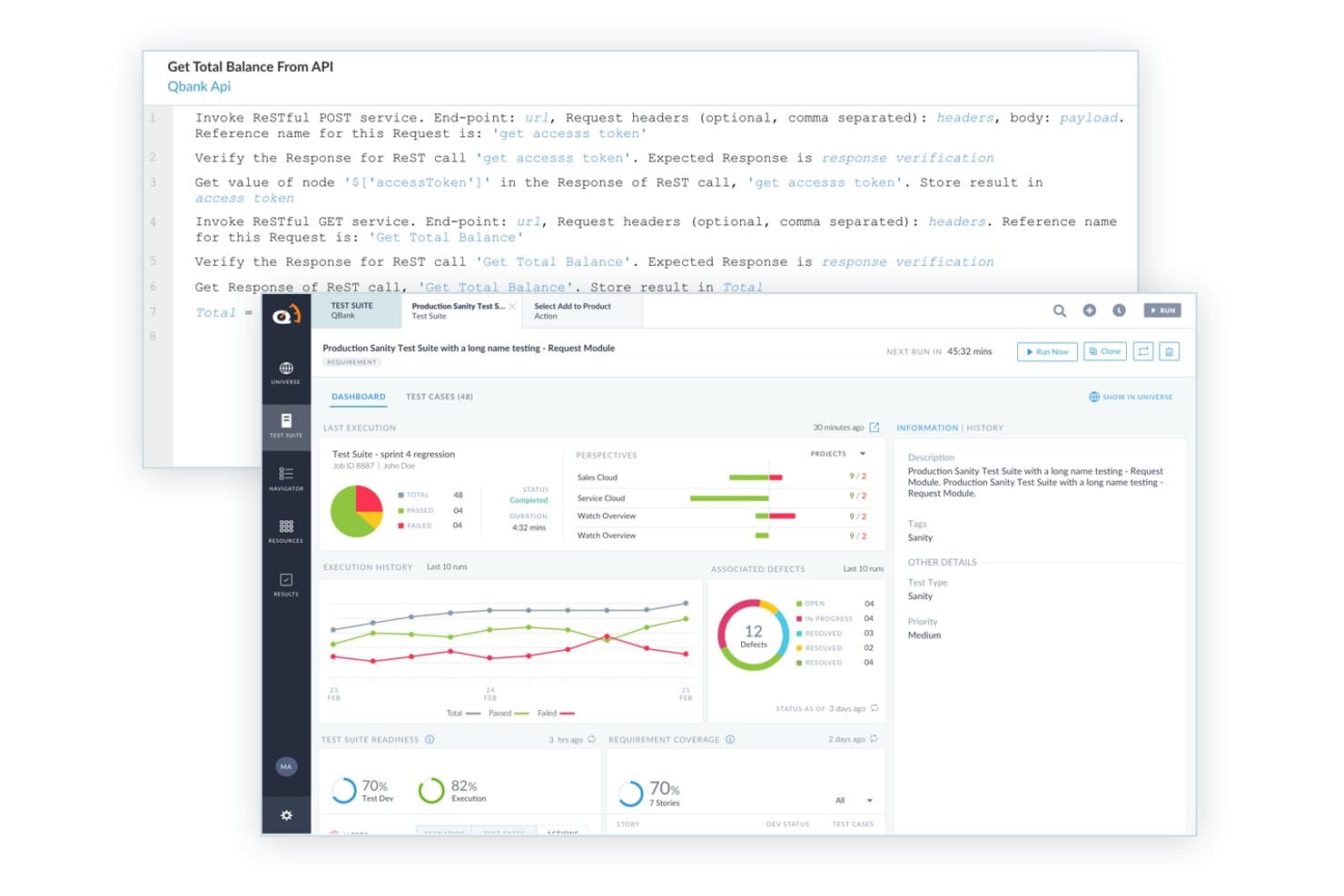
ACCELQ offre un'interfaccia codeless per il testing API con invocazione di servizi RESTful, dashboard di suite di test, cronologia delle esecuzioni e tracciamento dei difetti integrati. ACCELQ è una piattaforma di automazione dei test senza codice, alimentata dall'IA, che copre i test su dispositivi mobili, web, API e desktop in un unico ambiente cloud-native, con supporto per app native, ibride e browser sia su iOS che su Android.
Per chi è ACCELQ?
ACCELQ è particolarmente indicato per i team QA di medie e grandi imprese che necessitano del coinvolgimento sia di collaboratori tecnici che non tecnici nell'automazione dei test all'interno di workflow Agile o DevOps.
Perché ho scelto ACCELQ
ACCELQ si aggiudica un posto tra i migliori della mia lista perché unifica davvero il testing mobile, web e API in un unico ambiente, senza la gestione di toolchain separate. Apprezzo la funzionalità di Auto-Healing Autonomo, che aggiorna automaticamente i riferimenti agli elementi quando l'app cambia, mantenendo stabili le suite di test per iOS e Android. Il Business Process Scenario Builder consente al mio team di scrivere flussi mobile end-to-end in linguaggio naturale, così QA e collaboratori non tecnici lavorano nello stesso spazio.
Funzionalità chiave di ACCELQ
- Automazione di app native, ibride e web: Automatizza i test su applicazioni mobile native, ibride e basate su browser per iOS e Android.
- Integrazione con device farm: Consente il collegamento a laboratori di dispositivi in cloud o on-premises per la copertura sia su dispositivi reali che simulatori.
- Editor logico no-code: Permette ai team di creare e aggiornare la logica dei test visivamente senza conoscenze di scripting.
- Integrazioni con Jira e CI/CD: Sincronizza requisiti e difetti e automatizza l'esecuzione dei test all'interno dei principali pipeline DevOps.
Integrazioni ACCELQ
ACCELQ offre integrazioni native con Jira, Jenkins, TeamCity, Bamboo, Azure DevOps, Slack e Microsoft Teams e fornisce un'API per integrazioni personalizzate.
Pros and Cons
Pros:
- Coprende test su web, API e mobile
- Approccio senza codice che riduce la dipendenza da specialisti
- Test self-healing stabili su iOS e Android
Cons:
- Non supporta creazione o esecuzione di test offline
- Richiede un agente locale per l'esecuzione on-premises
Learn more about ACCELQ: Ideale per esecuzione raggruppata di test su dispositivi mobili
- A partire da $29/utente/mese (min 3 postazioni)
Visit WebsiteCustomer Rating:4.8/5This rating combines scores from multiple user review sites to reflect overall customer sentiment about the product.
Testomat.io visualizza i risultati dei test con metriche chiare di superato/fallito/saltato e dettagli di esecuzione per ciascun caso di test. Testomat.io è un sistema di gestione dei test che gestisce sia i test automatizzati che quelli manuali in un unico posto. È progettato per supportare i flussi di lavoro QA moderni offrendo ai team uno spazio di lavoro condiviso.
Perché ho scelto Testomat.io: Ho scelto Testomat.io per i test su dispositivi mobili perché supporta l'esecuzione dei test su più ambienti—sequenzialmente o in parallelo—e raggruppa automaticamente i risultati in un unico report. Questo rende più facile analizzare le esecuzioni dei test mobili senza dover cambiare strumento. Offre inoltre reportistica in tempo reale durante l'esecuzione di test locali o su CI/CD, allegando artefatti come video e screenshot per aiutare a individuare e risolvere immediatamente i problemi.
Funzionalità principali & integrazioni:
Funzionalità includono la creazione di casi di test tramite editor markdown avanzato e Gherkin dove il tuo team—sviluppatori, QA, persone non tecniche—può scrivere ed eseguire scenari di test mobile con completamento automatico intelligente e parametrizzazione, semplificando la definizione di casi di test mobile strutturati prima o durante le esecuzioni.
Integrazioni includono Playwright, Cypress.io, Webdriver.io, Cucumber, Jest, Codeception, TestCafe, Protractor, CodeceptJS, Mocha, Jira e Slack.
Pros and Cons
Pros:
- Sincronizza i test manuali e automatizzati in un unico posto
- Reportistica in tempo reale con molteplici heatmap e analisi
- Esecuzione dei test flessibile, come multi-ambiente ed esecuzione parallela
Cons:
- L'editor markdown non sempre visualizza correttamente la formattazione
- L'importazione dei test da altri strumenti è poco flessibile
Learn more about testomat.io: Ideale per la generazione di test con IA attivata dalle PR
- Demo gratuita disponibile
- Prezzi su richiesta
Visit WebsiteCustomer Rating:4.7/5This rating combines scores from multiple user review sites to reflect overall customer sentiment about the product.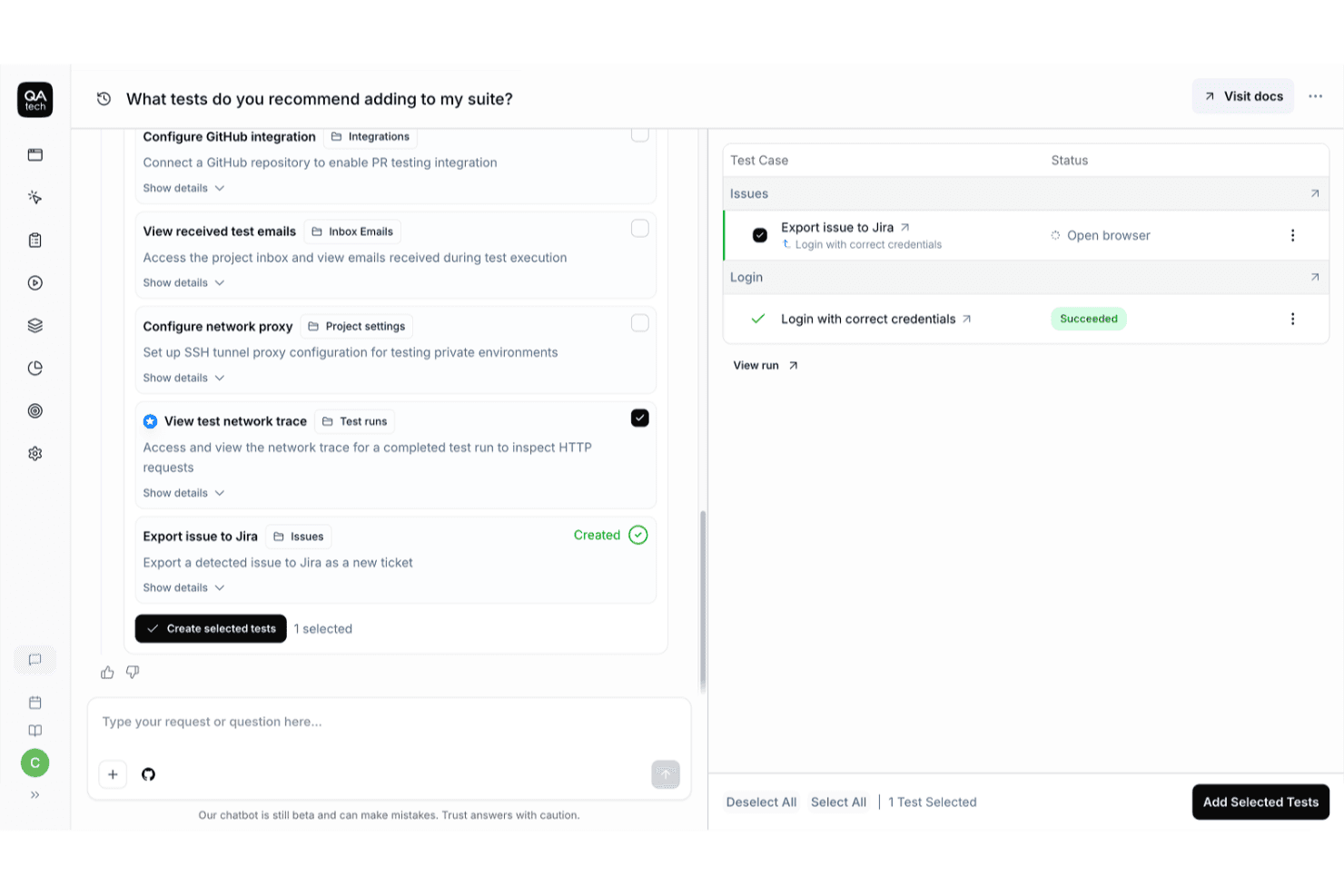
QA.tech utilizza l'interfaccia conversazionale basata sull'IA per consigliare e creare test per il tuo insieme di test. QA.tech è una piattaforma nativa per l'IA dedicata ai test completi che utilizza agenti di IA autonomi per creare, eseguire e gestire test per applicazioni iOS e Android utilizzando obiettivi in linguaggio naturale invece di script o selettori.
Per chi è più adatto QA.tech?
QA.tech è particolarmente adatto ai team di sviluppo per dispositivi mobili che utilizzano React Native o Flutter e desiderano una generazione di test basata sull'IA, collegata direttamente al loro flusso di lavoro CI/CD.
Perché ho scelto QA.tech
Ho scelto QA.tech come una delle soluzioni migliori perché la generazione di test attivata dalle PR affronta direttamente una delle lacune più comuni nei flussi di lavoro CI/CD per dispositivi mobili: test che non tengono il passo con le modifiche al codice. Quando uno sviluppatore apre una richiesta di modifica, QA.tech rileva automaticamente le modifiche visibili agli utenti, genera test iOS e Android pertinenti e pubblica i risultati nella richiesta di modifica come revisione. Mi piace anche il fatto che il suo agente di IA utilizzi un grafo delle funzionalità creato analizzando l'app, così i test generati diventano più efficaci nel tempo senza richiedere una gestione manuale costante.
Funzionalità principali di QA.tech
- Creazione di test in linguaggio naturale: Scrivi i test come obiettivi espressi in linguaggio comune invece di utilizzare script, senza bisogno di selettori o programmazione.
- Assistente conversazionale basato sull'IA: Crea, modifica e gestisci il tuo insieme di test tramite un'interfaccia conversazionale direttamente nella piattaforma.
- Riproduzione della sessione con tracce degli errori: Esamina schermate a livello di singolo passaggio e registrazioni complete della sessione insieme a registri dettagliati per individuare con precisione cosa è andato storto.
- Flussi di test unificati per iOS, Android e API: Esegui un unico obiettivo di test simultaneamente sui livelli per dispositivi mobili e API, coprendo entrambe le piattaforme senza duplicare il lavoro.
Integrazioni di QA.tech
QA.tech offre integrazioni native con sette piattaforme CI/CD, tra cui GitHub Actions, GitLab e Bitrise. Si collega inoltre a Jira, Linear, Trello, Slack e Microsoft Teams, con un'API REST per flussi personalizzati.
Pros and Cons
Pros:
- L'agente di IA genera test dalle richieste di modifica
- Un unico flusso di test copre dispositivi mobili e web
- Riproduzione della sessione con schermate a livello di singolo passaggio
Cons:
- Non è disponibile un piano gratuito per sempre
- L'accesso ai dispositivi reali richiede un piano di livello superiore
Learn more about QA.tech: Ideale per infrastruttura cloud scalabile
- Piano gratuito disponibile + demo gratuita
- Da $15/utente/mese (fatturato annualmente)
Visit WebsiteCustomer Rating:4.9/5This rating combines scores from multiple user review sites to reflect overall customer sentiment about the product.
Ecco uno screenshot della pagina della console di test dell'app LambdaTest. LambdaTest offre servizi di testing basati su cloud che permettono agli sviluppatori di eseguire test su diverse combinazioni di browser e sistemi operativi. La sua infrastruttura cloud scalabile è essenziale per le aziende che mirano a un pubblico globale con preferenze di dispositivi diversificate, rendendola la soluzione ideale in questo ambito.
Perché ho scelto LambdaTest: LambdaTest ha attirato la mia attenzione rispetto ad altri strumenti di testing grazie alla sua vasta infrastruttura cloud, ideale per la crescita aziendale. La sua soluzione di testing completa la distingue da altre piattaforme che offrono una selezione limitata di browser o sistemi operativi. L'infrastruttura cloud-based di LambdaTest è una scelta di punta per le aziende che necessitano di uno strumento in grado di adattarsi alle loro esigenze di testing.
Funzionalità e integrazioni principali:
LambdaTest si distingue per funzionalità come il testing in tempo reale sui browser, screenshot per verifiche visive rapide e capacità di testing automatizzato. La piattaforma supporta il testing sia per il web mobile che per le app native su una vasta gamma di dispositivi iOS e Android.
Inoltre, si integra facilmente con strumenti CI/CD come Jenkins, noti tool di tracciamento bug come Jira e framework di test automation tra cui Selenium.
Pros and Cons
Pros:
- L'ampia copertura di combinazioni browser e sistemi operativi garantisce test approfonditi.
- L'integrazione con i principali strumenti di sviluppo e testing migliora l'intero processo di test.
- Il testing in tempo reale consente feedback immediati e debug più rapidi.
Cons:
- Essendo una piattaforma cloud, la connettività internet può influire sulla reattività della piattaforma.
- È necessario un periodo iniziale di configurazione e apprendimento per chi è nuovo al testing su cloud.
- Il costo potrebbe rappresentare un ostacolo per startup o aziende con budget limitati.
Learn more about TestMu AI: Ideale per testare app di ogni tipo
- Demo gratuita disponibile
- Prezzo su richiesta
Visit WebsiteCustomer Rating:4.9/5This rating combines scores from multiple user review sites to reflect overall customer sentiment about the product.
La dashboard centralizzata di QA Wolf fornisce aggiornamenti su vari test. QA Wolf è un servizio che offre una copertura automatizzata dei test end-to-end per applicazioni web e mobile. Automatizzando i test, QA Wolf aiuta il tuo team a concentrarsi sul rilascio delle funzionalità senza preoccuparsi dei bug.
Perché ho scelto QA Wolf: La capacità di QA Wolf di testare qualsiasi app mobile, comprese app native, web, ibride basate su view, React Native, Flutter, Xamarin, app responsive/adattive, progressive web app (PWA) e single-page application (SPA), lo rende una scelta versatile per il testing mobile. Questa flessibilità assicura che, indipendentemente dalla tecnologia sulla quale la tua app è sviluppata, QA Wolf possa gestire il processo di test.
Funzionalità e integrazioni principali:
Altre funzionalità degne di nota includono la copertura completa di QA Wolf. Vengono realizzati test che coprono gesti, funzioni della fotocamera, interazioni con sensori e tutto il resto, garantendo che ogni aspetto della tua app sia testato a fondo. QA Wolf aggiorna inoltre continuamente i tuoi test in base alle nuove funzionalità man mano che la tua app evolve, assicurandosi che rimangano sempre attuali ed efficaci.
Integrazioni disponibili con Jira, Asana, Linear, Slack, Microsoft Teams, GitHub, GitLab, Bitbucket, Jenkins, CircleCI, Travis CI e Azure DevOps.
Pros and Cons
Pros:
- Facile collaborare con il team di QA Wolf tramite Slack o Teams
- Tutti i bug sono verificati da persone
- Manutenzione dei test 24 ore su 24
Cons:
- Non ideale per i team di sviluppo che desiderano pieno controllo sui test
- Meno flessibilità nella personalizzazione dei test
Learn more about QA Wolf: Ideale per i test su dispositivi reali
- Prova gratuita disponibile
- A partire da $39/utente/mese (fatturato annualmente)
Visit WebsiteCustomer Rating:4.5/5This rating combines scores from multiple user review sites to reflect overall customer sentiment about the product.
Ecco una sessione di test manuale mobile App Live su BrowserStack per il dispositivo iPhone 14 Pro Max con iOS 16. BrowserStack è una piattaforma per il testing software che offre accesso a dispositivi desktop e mobili autentici per test in tempo reale. È l'ideale per sviluppatori e team QA che desiderano valutare siti web e applicazioni mobili su diversi browser e dispositivi. La sua infrastruttura estesa lo rende particolarmente utile per il testing su dispositivi reali.
Perché ho scelto BrowserStack: Durante la selezione dei migliori strumenti per questa lista, BrowserStack si è distinto costantemente. Uno dei motivi principali per cui l'ho scelto è la sua impareggiabile libreria di dispositivi mobili reali e browser. La sua capacità di offrire un ambiente di test genuino e concreto sia su dispositivi Android che iOS è senza rivali, il che ha rafforzato la mia opinione che sia il migliore per i test su dispositivi reali.
Funzionalità principali e integrazioni:
BrowserStack mette a disposizione una vasta gamma di dispositivi reali, garantendo che la compatibilità e i test delle prestazioni delle applicazioni siano realistici. Supporta sia il testing manuale che il testing automatizzato, rendendolo versatile per diverse esigenze di verifica.
Per quanto riguarda le integrazioni, BrowserStack lavora in armonia con Jenkins per il testing continuo, si integra con Jira per il tracciamento dei bug, e supporta WebDriver per la creazione di script di automazione del browser.
Pros and Cons
Pros:
- Fornisce accesso a una grande varietà di dispositivi reali, da Android a iOS.
- Consente sia test manuali che di automazione sulla sua piattaforma.
- Offre integrazioni con strumenti popolari come Jenkins, Jira e WebDriver.
Cons:
- Potrebbe essere considerato costoso per i team più piccoli con budget limitati.
- L'elevato numero di funzionalità può risultare eccessivo per alcuni nuovi utenti.
- La disponibilità di dispositivi reali può essere limitata durante i periodi di maggiore utilizzo.
Learn more about BrowserStack: Ideale per feedback qualitativo da utenti reali
- Demo gratuita disponibile
- Prezzi su richiesta
Visit WebsiteCustomer Rating:4.5/5This rating combines scores from multiple user review sites to reflect overall customer sentiment about the product.
Ecco il pannello di controllo clienti di UserTesting, che consente al cliente di gestire i propri test. UserTesting è una piattaforma che consente alle aziende di ottenere feedback diretto da utenti reali sui loro prodotti o servizi. Questo strumento si concentra sugli aspetti qualitativi dell'esperienza utente, risultando così prezioso per chi dà priorità a intuizioni e sentimenti autentici degli utenti.
Perché ho scelto UserTesting: Mentre esaminavo numerosi strumenti, UserTesting ha attirato la mia attenzione per la sua enfasi sul valore delle vere prospettive degli utenti. L'ho scelto perché, rispetto ad altre piattaforme, UserTesting offre un modo unico per accedere a feedback grezzi e non filtrati provenienti da utenti reali. Questo lo rende diverso e prezioso. Grazie al suo approccio solido nella raccolta di dati qualitativi, si conferma come il miglior strumento per ottenere feedback dettagliati da utenti reali.
Caratteristiche e integrazioni principali:
UserTesting offre feedback video in tempo reale, permettendo alle aziende di vedere e ascoltare gli utenti mentre interagiscono con i loro prodotti. Propone inoltre pannelli utenti segmentati, assicurando che il feedback provenga da segmenti demografici di utenti rilevanti.
Per quanto riguarda le integrazioni, UserTesting si integra perfettamente con strumenti come Jira per tradurre il feedback in azioni concrete e con diverse piattaforme per il testing di applicazioni mobili, rivolgendosi sia a dispositivi iOS che Android.
Pros and Cons
Pros:
- Fornisce feedback video in tempo reale, permettendo alle aziende di comprendere le interazioni degli utenti sia visivamente che a livello auditivo.
- Offre accesso a pannelli utenti segmentati, assicurando che il feedback sia rilevante e utilizzabile.
- Integrazioni efficaci, soprattutto con Jira, che ottimizzano il ciclo di feedback e l'implementazione delle azioni.
Cons:
- Potrebbe non essere particolarmente conveniente per piccole imprese o startup.
- Incentrato sul feedback qualitativo, potrebbe non soddisfare chi cerca dati quantitativi approfonditi.
- La piattaforma potrebbe richiedere un leggero periodo di apprendimento per chi non ha dimestichezza con strumenti di test dell'esperienza utente.
Learn more about UserTesting: Ideale per i test di automazione senza codice
- Piano gratuito disponibile + demo gratuita
- Da $183/utente/mese
Visit WebsiteCustomer Rating:4.4/5This rating combines scores from multiple user review sites to reflect overall customer sentiment about the product.
Ecco un'illustrazione su come eseguire la suite di test e visualizzare il risultato in Katalon Studio. Katalon Studio offre una piattaforma completa per il testing del software, sia per applicazioni web che mobile. Puntando sulla facilità d'uso, Katalon si distingue per la sua capacità di fornire soluzioni di test robuste senza richiedere agli utenti di scrivere una sola riga di codice, risultando particolarmente vantaggioso per chi cerca test di automazione senza codice.
Perché ho scelto Katalon Studio: Se stai cercando una soluzione per il testing automatico che non richiede competenze di programmazione, Katalon Studio è un'ottima scelta. È facile da usare e intuitivo.
Funzionalità e integrazioni principali:
Una delle caratteristiche più distintive di Katalon è la sua interfaccia intuitiva, progettata per guidare gli utenti nel processo di test con comandi in inglese semplice. A ciò si aggiunge la compatibilità sia per applicazioni iOS che Android, garantendo un'ampia automazione dei test su dispositivi mobili.
Per quanto riguarda le integrazioni, Katalon si integra con Jenkins per il testing continuo, Jira per la gestione delle attività, ed è compatibile anche con i framework Selenium e Appium, ampliando ulteriormente le sue capacità.
Pros and Cons
Pros:
- Piattaforma di testing intuitiva e senza codice adatta a tutti gli utenti
- Compatibilità su più piattaforme, compresi dispositivi iOS e Android
- Integrazione profonda con strumenti ampiamente utilizzati come Jenkins e Jira
Cons:
- Potrebbe essere necessario un orientamento iniziale per i principianti assoluti
- Opportunità limitate di scripting personalizzato a causa della sua natura senza codice
- Alcune funzionalità avanzate potrebbero essere disponibili solo nei piani a prezzi più alti.
Learn more about Katalon Studio: Ideale per i test sintetici
- Disponibile piano gratuito
- Da $49/utente/mese
Visit WebsiteCustomer Rating:4.3/5This rating combines scores from multiple user review sites to reflect overall customer sentiment about the product.
Il pannello di controllo del monitoraggio mobile in New Relic offre un riepilogo ad alto livello delle metriche sulle prestazioni delle applicazioni mobili. New Relic è una piattaforma di osservabilità che ti aiuta a monitorare e migliorare le prestazioni del tuo software. Con la sua suite di strumenti, puoi tenere sotto controllo applicazioni, infrastruttura ed esperienze dei clienti per assicurarti che tutto funzioni senza intoppi.
Perché ho scelto New Relic: Per i test su dispositivi mobili, il monitoraggio sintetico di New Relic si distingue perché consente di emulare dispositivi mobili. Questo significa che puoi simulare come la tua app mobile si comporta su diversi dispositivi e browser, aiutandoti a identificare e risolvere problemi specifici per gli utenti mobili. Configurando questi test sintetici, puoi monitorare in modo proattivo la disponibilità e la funzionalità della tua app, garantendo un'esperienza senza interruzioni agli utenti.
Funzionalità e integrazioni principali:
Le funzionalità includono la possibilità di eseguire test automatizzati e programmabili sulle tue applicazioni mobili. Puoi creare script personalizzati per simulare le interazioni degli utenti, permettendoti di monitorare transazioni aziendali critiche e endpoint API. Puoi inoltre eseguire test da più posizioni globali, monitorando così le prestazioni della tua app da diverse regioni.
Le integrazioni includono AWS, Google Cloud Platform, Microsoft Azure, Slack, Atlassian Jira, AWS EventBridge, notifiche via email, notifiche push su dispositivi mobili, Opsgenie, PagerDuty, ServiceNow e Prometheus.
Pros and Cons
Pros:
- Funzionalità di allerta efficace che notifica prontamente gli utenti in caso di problemi
- Fornisce monitoraggio in tempo reale e approfondimenti
- Buone funzionalità di monitoraggio e test sintetici
Cons:
- L'interfaccia utente può risultare complessa per i nuovi utenti
- I pannelli potrebbero richiedere personalizzazioni per casi d'uso specifici
Learn more about New Relic:
Altri strumenti per il testing mobile da prendere in considerazione
Ecco alcuni strumenti aggiuntivi di automazione dei test mobile che non sono entrati nel mio elenco, ma che vale comunque la pena valutare:
- 11AutifyIdeale per il mantenimento dei test guidato dall'IA
- 12KobitonIdeale per la gestione del cloud di dispositivi
- 13AppiumIdeale per il supporto della community open source
- 14TestimIdeale per la manutenzione dei test tramite apprendimento automatico
- 15Perfecto Mobile App Testing ToolIdeale per sicurezza di livello enterprise
- 16Ranorex Mobile Automation TestingIdeale per il supporto multipiattaforma
- 17LoadmillIdeale per testare le condizioni di rete vissute dagli utenti reali
- 18Micro Focus Unified Functional Testing (UFT)Ideale per il testing API integrato
Recensioni correlate di software IT
Se non hai ancora trovato qui quello che cerchi, dai un’occhiata a questi strumenti alternativi che abbiamo testato e valutato.
- Software per il monitoraggio della rete
- Software per il monitoraggio dei server
- Soluzioni SD-Wan
- Strumenti per il monitoraggio dell’infrastruttura
- Analizzatore di pacchetti
- Strumenti per il monitoraggio delle applicazioni
Criteri di selezione degli strumenti di automazione dei test mobile
Nel selezionare i migliori strumenti di automazione dei test mobile da includere in questo elenco, ho considerato le esigenze e i punti critici comuni degli acquirenti, come la gestione della frammentazione dei dispositivi e la garanzia della compatibilità multipiattaforma. Ho inoltre utilizzato il seguente framework per mantenere la mia valutazione strutturata ed equa:
Funzionalità principali (25% del punteggio totale)
Per essere presa in considerazione per l’inclusione in questo elenco, ogni soluzione doveva soddisfare questi casi d’uso comuni:
- Automatizzare i test funzionali e delle prestazioni
- Testare su più dispositivi e piattaforme
- Generare report di test dettagliati
- Supportare il debugging in tempo reale
- Integrarsi con le pipeline CI/CD
Funzionalità aggiuntive distintive (25% del punteggio totale)
Per restringere ulteriormente la selezione, ho cercato anche funzionalità uniche, come:
- Generazione dei test basata sull’intelligenza artificiale
- Esecuzione parallela dei test
- Analisi intelligente dei test falliti
- Simulazione delle condizioni di rete
- Riutilizzabilità degli script di test su più piattaforme
Usabilità (10% del punteggio totale)
Per farmi un’idea dell’usabilità di ogni sistema, ho considerato i seguenti aspetti:
- Interfaccia utente intuitiva
- Curva di apprendimento ridotta
- Documentazione chiara e dettagliata
- Opzioni di scripting flessibili
- Manutenzione semplice dei test
Avvio (10% del punteggio totale)
Per valutare l'esperienza di avvio di ciascuna piattaforma, ho considerato i seguenti aspetti:
- Disponibilità di video di formazione
- Tour interattivi del prodotto
- Modelli di test predefiniti
- Assistenza del fornitore durante l'avvio
- Configurazione rapida dell'ambiente di test
Assistenza clienti (10% del punteggio totale)
Per valutare i servizi di assistenza clienti di ciascun fornitore di software, ho considerato i seguenti aspetti:
- Disponibilità dell'assistenza 24 ore su 24, 7 giorni su 7
- Rapidità di risposta del team di assistenza
- Base di conoscenza e comunità di utenti
- Assistenza multicanale (e-mail, chat, telefono)
- Disponibilità di aggiornamenti e patch del prodotto
Rapporto qualità-prezzo (10% del punteggio totale)
Per valutare il rapporto qualità-prezzo di ciascuna piattaforma, ho considerato i seguenti aspetti:
- Modelli di prezzo flessibili
- Disponibilità di una prova gratuita
- Piani scalabili in base alle dimensioni del team
- Opzioni con pagamento a consumo
- Trasparenza delle licenze
Recensioni dei clienti (10% del punteggio totale)
Per farmi un'idea della soddisfazione complessiva dei clienti, durante la lettura delle recensioni ho considerato i seguenti aspetti:
- Tassi di adozione e utilizzo a lungo termine
- Punteggi di soddisfazione complessiva
- Commenti sull'affidabilità del prodotto
- Commenti sulla facilità d'uso
- Segnalazioni sulla qualità dell'assistenza clienti
Come scegliere gli strumenti di automazione dei test per dispositivi mobili
È facile perdersi in lunghi elenchi di funzionalità e strutture tariffarie complesse. Per aiutarti a rimanere concentrato mentre affronti il tuo processo personalizzato di selezione del software, ecco una lista di controllo dei fattori da tenere presenti:
| Fattore | Cosa considerare |
|---|---|
| FattoreScalabilità | Cosa considerareAssicurati che lo strumento sia in grado di gestire grandi volumi di test e di supportare un numero crescente di dispositivi e utenti senza problemi di prestazioni. |
| FattoreIntegrazioni | Cosa considerareCerca la compatibilità con le pipeline CI/CD, gli strumenti di tracciamento dei bug e i servizi di test basati sul cloud per ottimizzare il flusso di lavoro di sviluppo. |
| FattorePersonalizzazione | Cosa considerareLo strumento dovrebbe consentirti di modificare i casi di test e i report in base alle esigenze del tuo team e di adattarti a diversi ambienti applicativi. |
| FattoreFacilità d'uso | Cosa considerareDai priorità agli strumenti con un'interfaccia intuitiva, una curva di apprendimento ridotta e una documentazione chiara per aiutare il tuo team a iniziare rapidamente. |
| FattoreBudget | Cosa considerareValuta il costo totale, comprese le tariffe di licenza, i prezzi per utente e i costi aggiuntivi per le funzionalità premium o l'assistenza. |
| FattoreMisure di sicurezza | Cosa considerareAssicurati che lo strumento segua gli standard di settore per la protezione dei dati, inclusi la crittografia e i controlli di accesso sicuri. |
| FattoreReport dei test | Cosa considerareCerca software di analisi per dispositivi mobili con report dei test dettagliati e personalizzabili che evidenzino problemi, tassi di successo e metriche delle prestazioni. |
| FattoreTest paralleli | Cosa considerareUno strumento che supporta l'esecuzione parallela dei test su più dispositivi e piattaforme può contribuire ad accelerare il ciclo di test. |
Tendenze negli strumenti di automazione dei test per dispositivi mobili
Durante la mia ricerca, ho raccolto innumerevoli aggiornamenti di prodotto, comunicati stampa e registri delle versioni di diversi fornitori di strumenti di automazione dei test per dispositivi mobili. Ecco alcune delle tendenze emergenti che sto monitorando:
- Test basati sull'IA: Gli strumenti utilizzano sempre più spesso l'IA per creare, eseguire e aggiornare automaticamente i casi di test. Questo aiuta a identificare più rapidamente schemi e problemi, migliorando l'accuratezza e riducendo il lavoro manuale.
- Script di test autoriparanti: Alcune piattaforme offrono ora funzionalità di autoriparazione, grazie alle quali gli script di test si adattano automaticamente quando cambia l'interfaccia utente dell'app, riducendo al minimo il tempo di manutenzione.
- Test nel cloud su dispositivi reali: Un numero crescente di strumenti consente di accedere a un ambiente basato sul cloud con dispositivi reali, aiutando i team a testare diverse configurazioni hardware senza dover disporre di dispositivi fisici.
- Test anticipati: Gli strumenti consentono di eseguire i test nelle fasi iniziali del ciclo di sviluppo, permettendo ai team di identificare e correggere i bug prima che arrivino in produzione e migliorando l'efficienza complessiva.
- Compatibilità multipiattaforma: È in crescita la domanda di strumenti che consentano di eseguire in modo coerente i test automatizzati su iOS, Android e altre piattaforme, riducendo la necessità di suite di test separate.
Cosa sono gli strumenti di automazione dei test per dispositivi mobili?
Gli strumenti di automazione dei test per dispositivi mobili offrono soluzioni a sviluppatori e professionisti del controllo qualità per valutare rigorosamente la funzionalità, l'usabilità e le prestazioni delle applicazioni mobili. Queste soluzioni software simulano diversi dispositivi, sistemi operativi e condizioni di rete, garantendo il corretto funzionamento delle applicazioni in vari scenari.
Vengono utilizzati principalmente dai team di sviluppo software, dai tester del controllo qualità e talvolta dai responsabili di prodotto per individuare potenziali problemi prima che l'app raggiunga gli utenti finali. Identificare e risolvere queste problematiche aiuta a offrire un'esperienza utente coerente e di alta qualità su diverse piattaforme e ambienti mobili.
Funzionalità degli strumenti di automazione dei test per dispositivi mobili
Quando selezioni gli strumenti di automazione dei test per dispositivi mobili, presta attenzione alle seguenti funzionalità chiave:
- Supporto multipiattaforma: Consente di scrivere un unico script di test che funziona sia su iOS sia su Android, risparmiando tempo e fatica.
- Test su dispositivi reali: Offre accesso a un ambiente basato sul cloud con dispositivi reali per ottenere risultati di test più accurati.
- Esecuzione parallela: Permette di eseguire più test contemporaneamente, accelerando il processo di test e migliorando l'efficienza.
- Automazione senza script: Consente ai non sviluppatori di creare test tramite un'interfaccia visiva senza scrivere codice.
- Monitoraggio delle prestazioni: Misura i tempi di caricamento, i tempi di risposta e la stabilità complessiva dell'app durante i test.
- Creazione di test basata sull'IA: Utilizza l'IA per generare automaticamente casi di test e identificare più rapidamente potenziali problemi.
- Script di test autoriparanti: Adatta automaticamente gli script di test quando cambia l'interfaccia utente dell'app, riducendo la manutenzione.
- Integrazione con CI/CD: Si integra perfettamente con le pipeline di integrazione e distribuzione continue per rilasci più rapidi.
- Report dei risultati dei test: Genera report dettagliati tramite strumenti di report degli arresti anomali delle app mobili, con informazioni sulla copertura dei test e sui punti di errore.
- Supporto per gesti complessi: Consente di testare gesti multitouch, scorrimenti e altre interazioni avanzate dell'utente.
Vantaggi degli strumenti di automazione dei test per dispositivi mobili
L'implementazione di strumenti di automazione dei test per dispositivi mobili offre diversi vantaggi al tuo team e alla tua azienda. Ecco alcuni dei benefici che puoi aspettarti:
- Cicli di rilascio più rapidi: L'automazione riduce il tempo dedicato ai test manuali, consentendo di rilasciare più rapidamente aggiornamenti e nuove funzionalità.
- Maggiore copertura dei test: L'automazione consente di eseguire più casi di test su dispositivi e piattaforme diverse, migliorando la copertura complessiva dei test.
- Maggiore accuratezza: I test automatizzati eliminano gli errori umani e forniscono risultati più coerenti.
- Riduzione dei costi: Riduce la necessità di disporre di team di controllo qualità numerosi e di svolgere test manuali estesi, diminuendo i costi operativi.
- Maggiore scalabilità: Supporta i test simultanei su più dispositivi e sistemi operativi, aiutando il team a crescere facilmente.
- Rilevamento precoce dei bug: Identifica i problemi nelle fasi iniziali del processo di sviluppo, riducendo i costi e l'impegno necessari per risolverli in seguito.
- Informazioni migliori sulle prestazioni: Fornisce report e analisi dettagliati, aiutando il team a individuare schemi e migliorare le prestazioni dell'app.
Costi e prezzi degli strumenti di automazione dei test per dispositivi mobili
La selezione degli strumenti di automazione dei test mobili richiede una comprensione dei vari modelli di prezzo e dei piani disponibili. I costi variano in base alle funzionalità, alle dimensioni del team, ai componenti aggiuntivi e ad altri fattori. La tabella seguente riassume i piani più comuni, i relativi prezzi medi e le funzionalità tipicamente incluse nelle soluzioni di automazione dei test mobili:
Tabella comparativa dei piani per gli strumenti di automazione dei test mobili
| Tipo di piano | Prezzo medio | Funzionalità comuni |
|---|---|---|
| Tipo di pianoPiano gratuito | Prezzo medio$0 | Funzionalità comuniCreazione di test di base, copertura limitata dei dispositivi e supporto della comunità. |
| Tipo di pianoPiano personale | Prezzo medio$10–$30/utente/mese | Funzionalità comuniAutomazione dei test per piccoli progetti, test su più dispositivi e supporto via e-mail. |
| Tipo di pianoPiano aziendale | Prezzo medio$30–$100/utente/mese | Funzionalità comuniStrutture di test avanzate, test in parallelo, analisi e supporto dedicato. |
| Tipo di pianoPiano enterprise | Prezzo medioPrezzi personalizzati | Funzionalità comuniTest illimitati, accesso API, integrazioni personalizzate e supporto premium. |
Domande frequenti sugli strumenti di automazione dei test mobili
Ecco alcune risposte alle domande comuni sugli strumenti di automazione dei test mobili:
In che modo gli strumenti di automazione dei test mobili gestiscono i test su dispositivi e sistemi operativi diversi?
Gli strumenti di automazione dei test mobili offrono spesso il supporto multipiattaforma, consentendo di scrivere un singolo script di test eseguibile su più dispositivi e sistemi operativi. Se necessario, i team possono anche utilizzare emulatori iOS per garantire la coerenza su tutte le piattaforme e in tutti i casi d’uso. In questo modo l’applicazione funziona correttamente in diversi ambienti senza dover creare test separati per ogni dispositivo o sistema operativo.
Gli strumenti di automazione dei test mobili possono integrarsi con le pipeline di integrazione continua/distribuzione continua (CI/CD)?
Sì, molti strumenti di automazione dei test mobili sono progettati per integrarsi perfettamente con le pipeline CI/CD. Questa integrazione consente al team di automatizzare i processi di test, assicurando che le modifiche al nuovo codice vengano testate automaticamente prima della distribuzione, contribuendo così a mantenere la stabilità e la qualità dell’applicazione.
Quali linguaggi di programmazione sono supportati dagli strumenti di automazione dei test mobili?
I linguaggi di programmazione supportati dagli strumenti di automazione dei test mobili variano a seconda dello strumento. Ad esempio, Appium supporta linguaggi come Java, Python, Ruby e C#, mentre altri strumenti possono avere linguaggi supportati propri. È importante scegliere uno strumento in linea con le competenze di programmazione già presenti nel team.
In che modo gli strumenti di automazione dei test mobili gestiscono i test su dispositivi reali rispetto agli emulatori?
Gli strumenti di automazione dei test mobili consentono di eseguire test sia su dispositivi reali sia su emulatori. I test sui dispositivi reali forniscono risultati più accurati, poiché riflettono le condizioni effettive degli utenti, mentre gli emulatori sono utili per i test nelle fasi iniziali e possono essere più convenienti. Alcuni strumenti offrono inoltre accesso basato sul cloud a un’ampia gamma di dispositivi reali per i test.
Esistono strumenti di automazione dei test mobili che supportano test senza script o senza codice?
Sì, alcuni strumenti di automazione dei test mobili offrono funzionalità di test senza script o senza codice, consentendo di creare test automatizzati senza scrivere codice. Questo approccio può essere utile per i team con competenze di programmazione limitate, permettendo ai tester di progettare test utilizzando interfacce visive o input in linguaggio naturale.
In che modo gli strumenti di automazione dei test mobili gestiscono gli aggiornamenti dei sistemi operativi mobili?
Gli strumenti di automazione dei test mobili vengono generalmente aggiornati per supportare le versioni più recenti dei sistemi operativi mobili. Ciò garantisce che i test automatizzati rimangano compatibili con le nuove versioni dei sistemi operativi, consentendo di identificare e risolvere tempestivamente eventuali problemi derivanti dagli aggiornamenti del sistema operativo.
Conclusione
La scelta del giusto strumento per i test mobili è fondamentale per offrire app di alta qualità. Considerando attentamente fattori come la compatibilità dei dispositivi, le funzionalità di automazione dei test e l'integrazione con il flusso di lavoro di sviluppo, è possibile migliorare significativamente il processo di test.
Ricorda: l'obiettivo non è solo trovare i bug, ma impedire che raggiungano gli utenti finali. Investendo negli strumenti e nelle strategie giusti, puoi creare una solida struttura di test che garantisca affidabilità, prestazioni e soddisfazione degli utenti.
Per rimanere aggiornato sulle ultime tendenze e sugli strumenti per i test mobili, iscriviti alla nostra newsletter per ricevere approfondimenti e consigli da esperti.