

I migliori strumenti per la gestione del backlog recensiti per il 2026

Elenco dei migliori strumenti per la gestione del backlog


Con così tanti strumenti diversi per la gestione del backlog disponibili, è difficile capire quale sia quello giusto per te. Sai che i tuoi progetti di sviluppo del prodotto stanno diventando complessi da gestire, ma devi capire quale strumento sia più adatto ad aiutarti. Ti aiuto io! In questo post ti aiuterò a rendere semplice la tua scelta, condividendo le mie esperienze personali nell'utilizzo di decine di diversi strumenti per la gestione del backlog con team e progetti di grandi dimensioni, insieme alle mie scelte dei migliori strumenti per la gestione del backlog.
Grazie a funzionalità come la messaggistica intuitiva, le notifiche tempestive e persino un piano gratuito che supporta un numero illimitato di utenti, la gestione dei backlog di prodotto e degli sprint backlog diventa intuitiva. Se fai parte di un team agile e vuoi semplificare iterazioni, autorizzazioni e metriche di collaborazione, questi strumenti offrono la soluzione.
Perché fidarsi dei nostri consigli sui software
Il nostro team testa e recensisce software dal 2012. In quanto leader tecnologici noi stessi, sappiamo quanto sia difficile — e importante — scegliere il software giusto.
Per questa guida, abbiamo valutato gli strumenti attraverso test praticie ricerche indipendenti, assegnando un punteggio agli strumenti in base ai nostri criteri di selezione.
Le nostre recensioni riflettono il nostro giudizio editoriale umano, non un discorso di vendita.
Revisori esperti:
Riepilogo dei migliori strumenti per la gestione del backlog
| Tool | Best For | Trial Info | Price | ||
|---|---|---|---|---|---|
| 1 | Ideale per elenchi infiniti di attività annidate | Prova gratuita di 30 giorni + piano gratuito disponibile | Da $7,65/membro/mese (fatturato annualmente) | Website | |
| 2 | Ideale per soluzioni di project management tutto-in-uno | Piano gratuito + demo gratuita disponibile | Da $5/utente/mese | Website | |
| 3 | Ideale per monitorare progetti, attività e bug in un unico posto | Piano gratuito + prova gratuita di 30 giorni disponibile | A partire da $35/mese per un massimo di 30 utenti | Website | |
| 4 | Ideale per la gestione del prodotto e la visualizzazione della roadmap | Prova gratuita di 14 giorni + piano gratuito + demo gratuita disponibile | A partire da $20/utente/mese (fatturazione annuale) | Website | |
| 5 | Ideale per la collaborazione documentale integrata | Prova gratuita di 7 giorni + piano gratuito disponibile | Da $5/utente/mese (minimo 5 postazioni) | Website | |
| 6 | Ideale per la gestione agile dei progetti con bacheche visive | Prova gratuita di 30 giorni | Da $5/utente/mese (min 5 utenti) | Website | |
| 7 | Ideale per la gestione di progetti open source | Piano gratuito per sempre disponibile | Gratuito (open source) | Website | |
| 8 | Ideale per un'organizzazione semplice dei compiti tramite schede | Piano gratuito disponibile | Da $10/utente/mese (fatturato annualmente) | Website | |
| 9 | Ideale per progetti agili su larga scala | Not available | Prezzo su richiesta | Website | |
| 10 | Ideale per una gestione dettagliata dei progetti software | Piano gratuito disponibile | Da $7/utente/mese | Website |
Recensioni dei migliori strumenti per la gestione del backlog

Quire
Ideale per elenchi infiniti di attività annidate
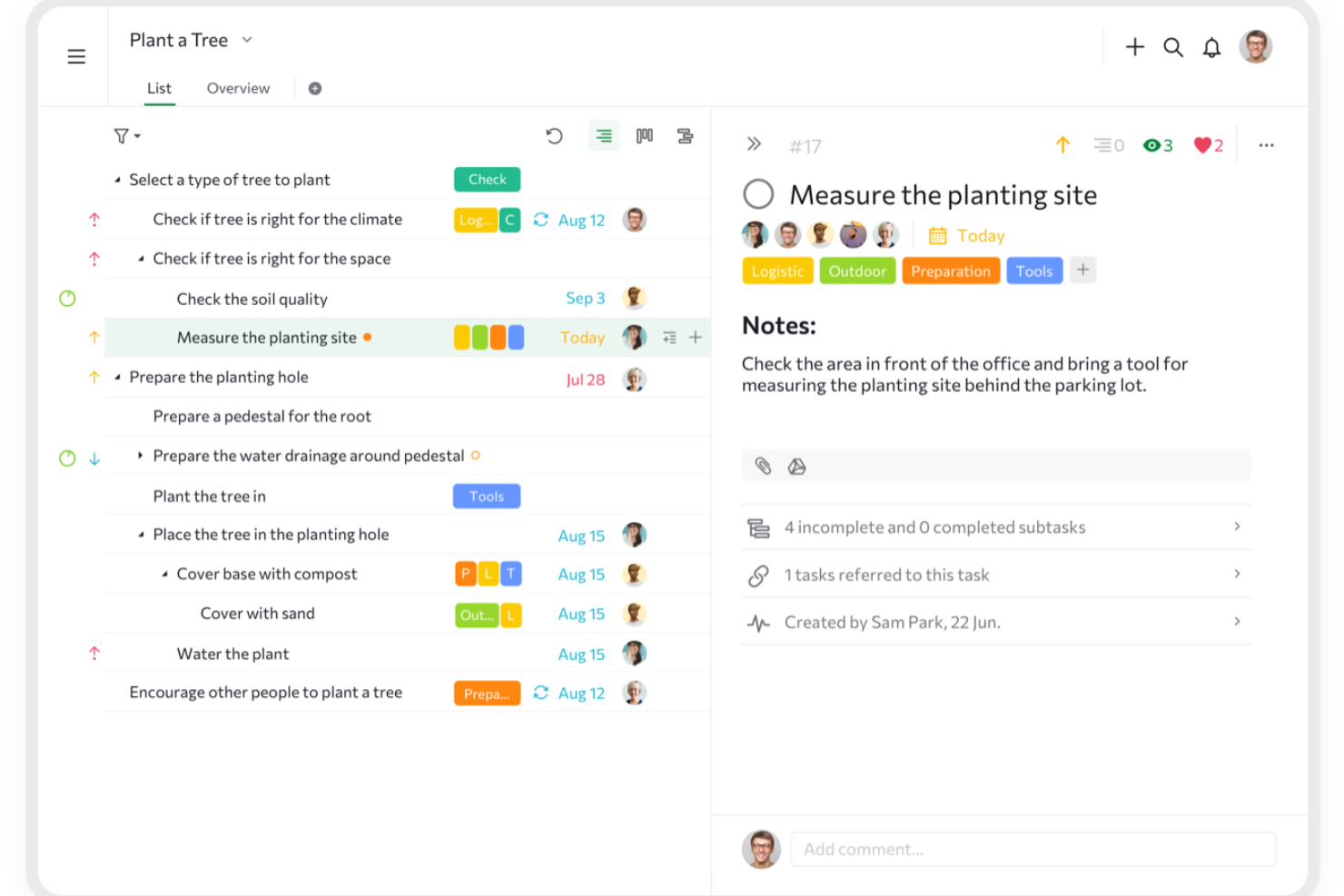
Quire è uno strumento collaborativo di gestione di attività e progetti progettato per aiutare i team a organizzare idee, pianificare progetti e monitorare il lavoro dall'inizio alla fine.
Perché ho scelto Quire:
La vista a elenco annidato infinito di Quire è una funzionalità particolarmente degna di nota per la gestione del backlog. Ti consente di creare una gerarchia di attività e sottoattività, facilitando l'organizzazione e la priorizzazione degli elementi del backlog. Questa struttura aiuta a suddividere grandi progetti in passaggi più piccoli e attuabili, assicurando che nulla venga trascurato. Inoltre, la bacheca Kanban di Quire si integra con la vista a elenco annidato. Questa combinazione permette di visualizzare gli elementi del backlog mentre avanzano attraverso diverse fasi di sviluppo.
Funzionalità principali e integrazioni:
Altre funzionalità includono la possibilità di creare sottoelenchi personalizzati a partire dall'elenco principale delle attività, aiutandoti a concentrarti su compiti o priorità specifiche. Quire offre anche una funzione timeline che permette di visualizzare il percorso del progetto, rispettare le scadenze e raggiungere traguardi importanti. Alcune integrazioni includono Google Calendar, Gmail, Slack, Outlook, Zoho Flow, GitHub, Apple Calendar Sync, Box, Dropbox, Google Drive e Microsoft Teams.
Pros and Cons
Pros:
- Collaborazione facile con i membri del team
- Molteplici visualizzazioni di progetto, inclusi elenchi, bacheche e timeline
- Possibilità di creare attività e sottoattività annidate, permettendo una scomposizione dettagliata del progetto
Cons:
- La versione mobile manca di alcune funzionalità disponibili su desktop
- Possibile sovraccarico di notifiche, specialmente con team numerosi
New Product Updates from Quire

Quire Adds Task and Standalone Reminders
Quire adds task reminders and standalone reminders with shared notifications, recurring schedules, and automatic date tracking. These updates help teams stay ahead of deadlines and manage reminders that do not need a task. For more information, visit Quire’s official site.
 .
.
ClickUp
Ideale per soluzioni di project management tutto-in-uno
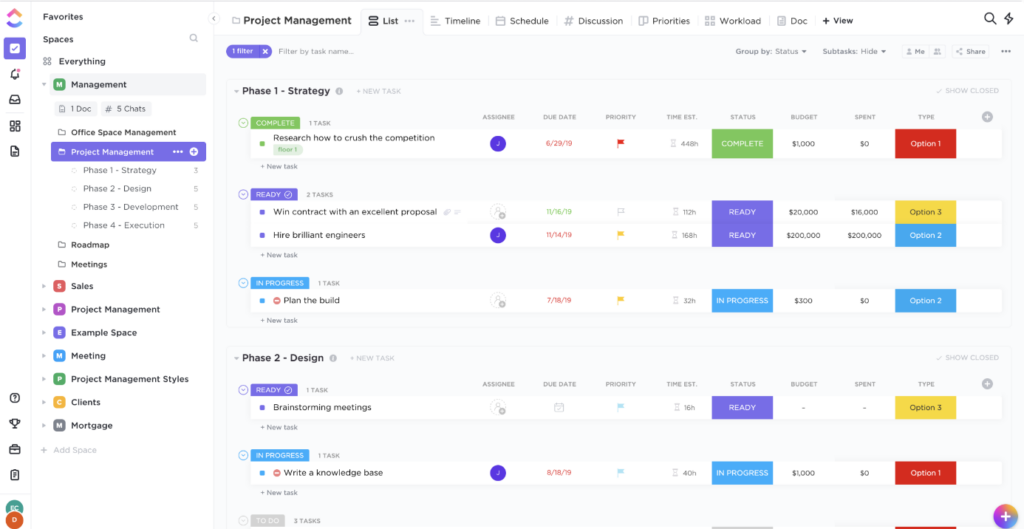
Nell'ampio ambito della gestione dei progetti, ClickUp si distingue come uno strumento completo, offrendo una suite di funzionalità per una vasta gamma di esigenze. È progettato per coprire tutti gli aspetti della gestione dei progetti, aspetto che ne sostiene la posizione come scelta preferita per i team che cercano una soluzione tutto-in-uno.
Perché ho scelto ClickUp:
Tra la moltitudine di strumenti di project management, ho optato per ClickUp principalmente per il suo approccio olistico. Confrontando l'ampiezza delle sue funzionalità e l'adattabilità con altre piattaforme, ClickUp si è distinto chiaramente. Ritengo che ClickUp sia la soluzione ideale per i team che desiderano uno strumento di gestione dei progetti completo senza dover destreggiarsi tra più piattaforme.
Funzionalità e integrazioni principali:
ClickUp eccelle grazie alle sue viste personalizzabili, che spaziano da elenchi, bacheche, a visualizzazioni calendario. Le capacità di monitoraggio degli obiettivi e di mind-mapping arricchiscono ulteriormente il processo di pianificazione dei progetti. Le integrazioni sono numerose: ClickUp si collega facilmente a strumenti come Slack, GitHub e Google Drive.
Pros and Cons
Pros:
- Set completo di funzionalità per esigenze diversificate
- Viste personalizzabili per una gestione su misura
- Numerose opzioni di integrazione
Cons:
- Può risultare complesso per chi è alle prime armi
- L'esperienza dell'app mobile può essere migliorata
- Alcune funzionalità avanzate disponibili solo nei piani a pagamento

Backlog
Ideale per monitorare progetti, attività e bug in un unico posto

Backlog si presenta come una piattaforma centralizzata che intreccia la gestione dei progetti, il monitoraggio delle attività e la risoluzione dei bug. Consolida efficacemente queste funzionalità, rendendola preziosa per i team che desiderano una soluzione integrata per le loro diverse sfide operative.
Perché ho scelto Backlog:
Nella mia ricerca di strumenti che offrano un'esperienza coesa, Backlog è emerso in modo prominente. L'ho scelto dopo aver valutato la sua capacità di unire varie esigenze operative in un'unica piattaforma. Grazie alle sue funzionalità integrative, ritengo che Backlog sia particolarmente adatto ai team che vogliono monitorare progetti, attività e bug da un unico hub.
Funzionalità principali e integrazioni:
Backlog si distingue per il suo sistema di tracciamento dei bug integrato, che assicura l'identificazione e la risoluzione rapida dei problemi. Inoltre, facilita cronologie visive dei progetti e offre ampie funzionalità collaborative come wiki condivisi. Le integrazioni chiave comprendono Slack, Typetalk e Jenkins per una maggiore fluidità operativa.
Pros and Cons
Pros:
- Dashboard completa con viste per progetti, attività e bug
- Sistema wiki integrato per la condivisione delle conoscenze del team
- Funzionalità di diagramma di Gantt e diagramma burndown visivi
Cons:
- L'interfaccia potrebbe risultare meno intuitiva per i nuovi utenti
- Opzioni di personalizzazione limitate rispetto alla concorrenza
- L'esperienza mobile potrebbe essere migliorata

Ideale per la gestione del prodotto e la visualizzazione della roadmap

Ogni team di prodotto efficace necessita di un processo snello per visualizzare e gestire la propria roadmap. ProductBoard soddisfa questa esigenza, offrendo una piattaforma in cui la gestione del prodotto si integra perfettamente con strumenti di visualizzazione. La sua abilità nel mostrare le fasi della gestione del prodotto, insieme alla visualizzazione della roadmap, lo distingue per chi desidera avere una visione d'insieme.
Perché ho scelto ProductBoard:
Durante la valutazione di numerose piattaforme, ho scelto ProductBoard perché ha raggiunto un equilibrio tra gestione del prodotto e chiarezza nella roadmap. Confrontando la sua interfaccia e le sue funzionalità con quelle di altri, si è distinta per la sua visione unica centrata sul prodotto. Il mio giudizio su ProductBoard si basa sulla sua capacità di rendere la gestione del prodotto e la visualizzazione della roadmap coese, garantendo così che sia la soluzione migliore per i team di prodotto che necessitano di questa sinergia.
Funzionalità e integrazioni principali:
ProductBoard eccelle grazie agli strumenti di prioritizzazione delle feature, che consentono ai team di valutare e decidere sui cambiamenti più impattanti. Il suo portale per il feedback degli utenti assicura che i prodotti siano continuamente allineati alle esigenze dei clienti. Sul fronte delle integrazioni, si collega a strumenti come Jira, Trello e Slack, rendendo il flusso dei dati semplice e operativo.
Pros and Cons
Pros:
- Visualizzazione chiara della roadmap di prodotto
- Strumenti efficaci di prioritizzazione delle funzionalità
- Portale diretto per la raccolta del feedback degli utenti
Cons:
- Potrebbe essere eccessivo per team molto piccoli
- Richiede un periodo di apprendimento per un pieno utilizzo
- La fatturazione annuale potrebbe scoraggiare alcuni utenti

Ideale per la collaborazione documentale integrata

Al cuore di ogni team efficiente c'è un solido sistema di documentazione. Confluence si distingue come una piattaforma dedicata proprio a questo scopo, aiutando i team a documentare, collaborare e condividere il lavoro. Il suo principale punto di forza risiede nella collaborazione integrata sulla documentazione, rendendolo la scelta ideale per i team che danno priorità a una gestione documentale strutturata e collaborativa.
Perché ho scelto Confluence:
Nell'enorme panorama degli strumenti collaborativi, ho selezionato Confluence per il suo approccio distintivo alla documentazione. Dopo aver confrontato e valutato diverse piattaforme, Confluence si è distinta per l'enfasi sulla creazione di un ambiente di documentazione integrato. Questo focus centrale sulla documentazione, supportato dalle recensioni degli utenti e dalle sue numerose funzionalità, mi ha convinto che sia davvero la scelta migliore per i team che cercano un hub documentale collaborativo.
Funzionalità principali e integrazioni:
Confluence eccelle nell'offrire template personalizzabili, assicurando che i team possano mantenere standard documentali coerenti. La funzione di modifica in tempo reale è un altro punto di forza, perché permette a più membri del team di lavorare insieme su un documento. In termini di integrazione, si sincronizza perfettamente con l'ecosistema Atlassian, tra cui Jira, Trello e Bitbucket. Inoltre, il suo ampio marketplace assicura ai team una vasta gamma di plugin per personalizzare il proprio spazio di lavoro.
Pros and Cons
Pros:
- Template personalizzabili per una documentazione standardizzata
- La modifica in tempo reale facilita la collaborazione simultanea
- Vasta gamma di plugin disponibili nel marketplace
Cons:
- Potrebbe risultare impegnativo per team piccoli o singoli utenti
- La configurazione iniziale potrebbe richiedere un po' di apprendimento
- Il costo può diventare rilevante per team molto numerosi

Yodiz
Ideale per la gestione agile dei progetti con bacheche visive

Per i team immersi nelle metodologie agili, le bacheche visive diventano uno strumento indispensabile. Yodiz si presenta come una soluzione potente per la gestione agile dei progetti utilizzando bacheche vivaci e intuitive. Con il suo accento sulle rappresentazioni visive dei processi agili, Yodiz trova riscontro tra i team che prediligono un tocco grafico nei loro flussi di lavoro.
Perché ho scelto Yodiz:
Esplorando il panorama degli strumenti di gestione agile, Yodiz ha catturato la mia attenzione grazie alle sue spiccate capacità visive. Ho riscontrato che le sue bacheche visive non sono solo accattivanti, ma anche funzionalmente superiori, semplificando processi agili complessi. Questa combinazione ha rafforzato la mia opinione che Yodiz sia ideale per i team alla ricerca di un'esperienza di gestione agile ricca di elementi visivi.
Funzionalità distintive e integrazioni:
Yodiz offre una bacheca scrum scalabile, adatta a team di varie dimensioni e complessità. Le sue funzionalità di gestione di epic e release sono degne di nota, offrendo una visione ampia sui progetti. Per quanto riguarda le integrazioni, Yodiz supporta collegamenti con piattaforme popolari come Slack, GitHub e Jenkins, aumentando la sua versatilità operativa.
Pros and Cons
Pros:
- Bacheche visive scalabili e intuitive
- Gestione completa di epic e release
- Ampia gamma di integrazioni di terze parti
Cons:
- L'interfaccia può risultare talvolta densa
- La personalizzazione ha i suoi limiti
- La configurazione iniziale richiede tempo e pazienza

Redmine
Ideale per la gestione di progetti open source
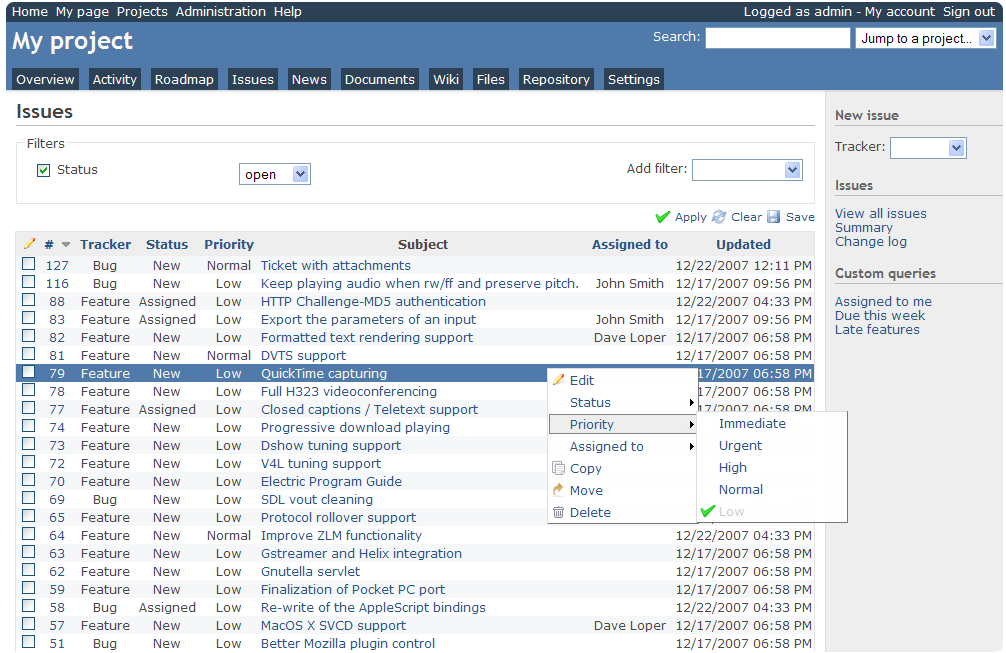
Le soluzioni open source offrono flessibilità e personalizzazione, e Redmine racchiude questi vantaggi nell'ambito della gestione dei progetti. In quanto strumento open source, Redmine offre adattabilità e libertà, rendendolo ideale per i team che danno priorità alla personalizzazione e al controllo diretto.
Perché ho scelto Redmine:
Ho selezionato Redmine per questa lista dopo aver considerato il suo forte supporto della comunità e la sua natura open source. È apparso evidente che il suo potenziale di personalizzazione ed estensibilità supera molti strumenti proprietari. Grazie a questi punti di forza, considero Redmine il migliore per organizzazioni o team che apprezzano le libertà offerte dall'open source.
Funzionalità e integrazioni principali:
Redmine vanta un'architettura modulare, che permette ai team di aggiungere diverse funzionalità secondo le proprie esigenze. Supporta più progetti, offre una vasta gamma di strumenti di tracciamento e possiede un robusto sistema di gestione delle segnalazioni. Per quanto riguarda le integrazioni, la sua natura open source facilita l'integrazione con una miriade di strumenti, tra cui quelli più popolari come Git, Subversion e LDAP.
Pros and Cons
Pros:
- Altamente personalizzabile grazie alla natura open source
- Forte supporto della comunità
- Architettura modulare per set di funzionalità specifici
Cons:
- Può richiedere competenze tecniche per l'installazione
- L'interfaccia utente appare datata
- Supporto ufficiale limitato


Nell'ambito dell'organizzazione dei compiti, la semplicità spesso prevale sulla complessità. Trello incarna questo principio con il suo sistema basato su schede, che permette ai team di gestire le attività in un ambiente intuitivo, tramite trascinamento. Il suo impegno verso la semplicità, unito all'organizzazione tramite schede, è il motivo per cui è il preferito da chi cerca un'esperienza di gestione dei compiti priva di disordine.
Perché ho scelto Trello:
Attraverso un processo di selezione e valutazione, Trello si è distinto come uno strumento che padroneggia l'arte della semplicità. Nei miei confronti, l'organizzazione per schede di Trello si è dimostrata impareggiabile nella capacità di semplificare i flussi di lavoro complessi. Credo che Trello sia senza dubbio il migliore per chi cerca un metodo di organizzazione delle attività semplice e senza fronzoli.
Caratteristiche principali & integrazioni:
Il punto di forza di Trello risiede nelle sue bacheche, liste e schede, che offrono una struttura chiara per la gestione delle attività. La funzione Power-Ups, che consente ai team di integrare e automatizzare i propri flussi di lavoro, rappresenta una svolta. Sul fronte delle integrazioni, Trello si collega senza problemi a strumenti come Dropbox, Google Drive e Slack, arricchendo il suo ecosistema.
Pros and Cons
Pros:
- Sistema a schede intuitivo
- I Power-Ups aggiungono versatilità alle bacheche
- Numerose opzioni di integrazione
Cons:
- Le funzionalità avanzate sono disponibili solo nei piani a pagamento
- Potrebbe non essere abbastanza approfondito per progetti complessi
- Gli strumenti di collaborazione possono risultare basilari per i team più numerosi

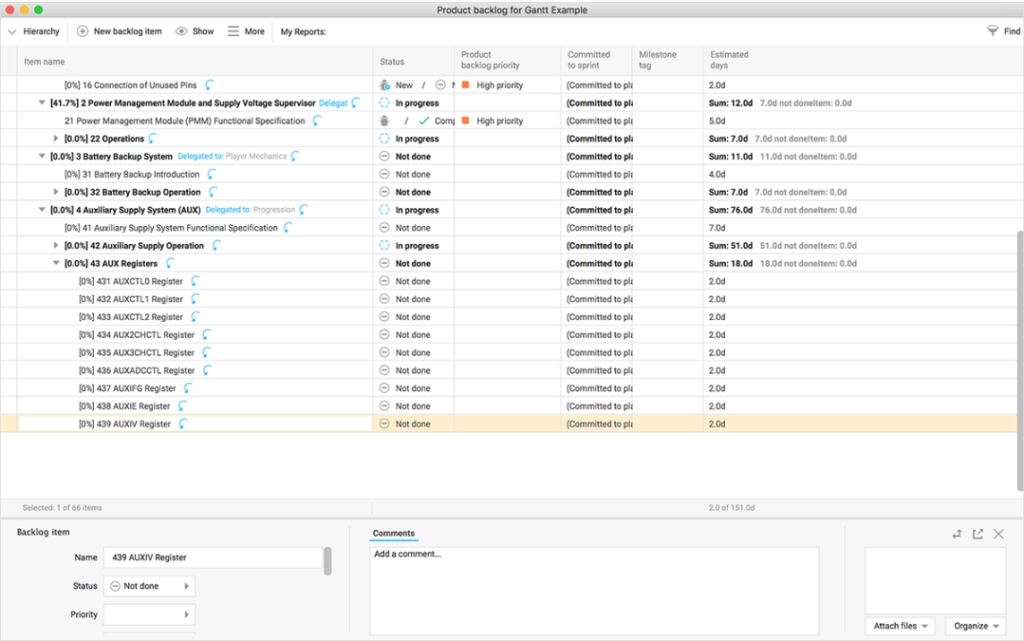
Hansoft, di Perforce, si ritaglia una nicchia nella gestione di progetti agili su larga scala. È pensato per assistere team estesi con framework agili dettagliati, rendendolo un forte concorrente per organizzazioni con progetti vasti che necessitano di metodologie agili.
Perché ho scelto Hansoft:
Nella valutazione degli strumenti per la gestione completa dei progetti, Hansoft si è distinto. La mia scelta ricade su Hansoft per la sua capacità di gestire le complessità dei grandi progetti mantenendo i principi agili. Pertanto, confermo l'opinione che Hansoft sia lo strumento ideale per chi necessita di una soluzione esaustiva per iniziative agili di grandi dimensioni.
Caratteristiche distintive e integrazioni:
Hansoft eccelle nella gestione combinata del backlog e della timeline, permettendo una visione sia ad alto livello che dettagliata. Offre inoltre strumenti per l'allocazione delle risorse e la collaborazione in tempo reale, migliorando la sinergia del team. Sul fronte delle integrazioni, Hansoft si integra efficacemente con Jira, Perforce Helix Core e Jenkins.
Pros and Cons
Pros:
- Combina backlog e visualizzazione timeline per un maggiore controllo
- Strumenti approfonditi per l'allocazione delle risorse
- La collaborazione in tempo reale favorisce la comunicazione nel team
Cons:
- La curva di apprendimento è più ripida per i nuovi utenti
- Il modello di prezzo potrebbe non essere trasparente
- L'interfaccia può sembrare complessa per progetti semplici


Jira, un prodotto Atlassian, è da tempo un punto di riferimento nel panorama della gestione dei progetti software. Offre strumenti dettagliati pensati per il ciclo di vita dello sviluppo software, diventando la scelta ideale per i team di sviluppo che necessitano di un controllo solido sui propri progetti.
Perché ho scelto Jira:
Dopo aver valutato i punti di forza di diversi strumenti, Jira si è distinto nel campo della gestione dei progetti software. L'ho scelto per la sua reputazione consolidata nel settore. Riflettendo sulle sue funzionalità, credo che Jira sia il miglior strumento per i team che cercano un approccio approfondito alla gestione dei progetti software.
Funzionalità principali e integrazioni:
Jira è rinomato per i suoi flussi di lavoro personalizzabili che si adattano a diversi metodi di sviluppo. Il suo tracciamento di problemi e progetti, combinato con strumenti di reportistica agile, offre un controllo dettagliato dei progetti. Tra le integrazioni di rilievo figurano Confluence, Bitbucket e Slack, che rafforzano la sua posizione nell'ecosistema software.
Pros and Cons
Pros:
- Flussi di lavoro personalizzabili per diversi metodi
- Solido tracciamento dei problemi e strumenti di reportistica agile
- Integrazione con altri prodotti Atlassian
Cons:
- Potrebbe essere eccessivo per progetti di piccola scala
- La configurazione può richiedere molto tempo
- Il prezzo può diventare elevato per team numerosi.
Altri strumenti per la gestione del backlog
Di seguito trovi un elenco di ulteriori strumenti per la gestione del backlog che ho selezionato, ma che non sono rientrati tra i primi 12. Vale sicuramente la pena dargli un’occhiata.
- Axosoft
Ideale per team di sviluppo software e pianificazione delle release
- Teamhood
Ideale per la gestione dei backlog con Kanban avanzato
- Celoxis
Ideale per il monitoraggio dei progetti rivolto ai clienti
- Canny
Ideale per dare priorità alle richieste di nuove funzionalità del prodotto
- Wrike
Ideale per la collaborazione in tempo reale e la gestione dei carichi di lavoro
- Craft.io
Ideale per l'organizzazione gerarchica del backlog
- monday.com
Ideale per l'automazione di flussi di lavoro personalizzabili


Recensioni correlate di strumenti e software
Se non hai ancora trovato quello che cerchi, dai un'occhiata a questi altri tipi di strumenti che abbiamo testato e valutato.
- Software per il monitoraggio delle reti
- Software per il monitoraggio dei server
- Soluzioni SD-Wan
- Strumenti per il monitoraggio dell'infrastruttura
- Analizzatore di pacchetti
- Strumenti per il monitoraggio delle applicazioni
Come Valuto gli Strumenti di Gestione del Backlog
Scompongo la mia valutazione in criteri di base—come la pianificazione degli sprint e la gerarchia del backlog—e fattori distintivi che separano gli strumenti adatti a un singolo team Scrum da quelli per portafogli aziendali su larga scala.
Funzionalità Principali (Requisiti di Base per Questa Lista)
Quando seleziono gli strumenti per la mia lista, valuto ciascuno su una scala da 0 (non offre la funzionalità) a 5 (eccelle in quest’area) per ogni funzionalità principale elencata qui sotto. Poi calcolo il punteggio totale dello strumento in percentuale. Ogni strumento deve raggiungere un punteggio minimo totale del 65% per essere preso in considerazione.
- Gestione degli Elementi di Backlog: Verifico se gli strumenti supportano gerarchie strutturate—epic suddivisi in user story, attività e bug—con campi personalizzati per taggare la proprietà del team o i componenti.
- Prioritizzazione e Classifica: Il riordinamento tramite drag-and-drop è il punto di partenza, ma cerco anche sistemi di scoring integrati come WSJF o RICE che aiutino i product owner a prendere decisioni basate sui dati.
- Pianificazione di Sprint e Iterazioni: Valuto come ogni strumento gestisce la creazione degli sprint, la stima dei story point e il monitoraggio della capacità, soprattutto quando i team devono pianificare più sprint in anticipo.
- Visualizzazioni Agile e Board: Che il tuo team lavori con Kanban, Scrum o metodi ibridi, cerco più viste a bordo oltre a layout cronologici o roadmap per garantire visibilità trasversale ai team.
- Gestione delle Dipendenze e delle Relazioni: Collegamenti genitore-figlio, segnalazioni di blocchi e dipendenze tra elementi sono tutti fattori rilevanti, in particolare quando si coordina il lavoro tra più squadre.
- Reportistica e Monitoraggio del Progresso: Devono essere disponibili report agili standard, come burndown chart e trend di velocità, e verifico se le dashboard possono essere personalizzate per le review di sprint.
Dopo aver identificato gli strumenti che rispettano questi criteri, considero ciò che distingue ciascuna piattaforma.
Fattori Distintivi (Cosa Distingue i Fornitori)
Ecco come confronto e metto a confronto i vari fornitori:
Funzionalità Distintive
La visualizzazione della roadmap è un forte elemento differenziante—cerco strumenti che colleghino gli elementi del backlog ai temi strategici, così i product owner possono condividere piani basati sul tempo con gli stakeholder durante la pianificazione trimestrale. Anche la sincronizzazione con gli strumenti di sviluppo è fondamentale. I collegamenti bidirezionali tra elementi di backlog e commit Git in GitHub o GitLab forniscono ai manager tecnici il contesto di consegna in tempo reale. Per le organizzazioni con più squadre, valuto anche le viste di portafoglio trasversali che aggregano backlog separati in dashboard a livello di programma adatte ai flussi SAFe o LeSS.
Oltre le Funzionalità
Le integrazioni determinano quanto bene uno strumento di backlog si inserisce nel tuo flusso di lavoro attuale. Verifico la presenza di connessioni native a pipeline CI/CD, Slack o Microsoft Teams e piattaforme di controllo versione—perché uno strumento scollegato genera solo più aggiornamenti di stato manuali. La scalabilità è un altro fattore chiave. Uno strumento che funziona per una squadra di 5 persone può crollare quando i backlog arrivano a migliaia di elementi su più team. Valuto anche la postura di sicurezza, in particolare il supporto SSO, i permessi basati sui ruoli e la conformità SOC 2, che la maggior parte dei reparti IT aziendali richiedono prima di approvare una nuova piattaforma.
Come scegliere uno strumento per la gestione del backlog
È facile perdersi in lunghi elenchi di funzionalità e strutture tariffarie complesse. Per aiutarti a rimanere concentrato mentre affronti il tuo processo specifico di selezione del software, ecco un elenco di fattori da tenere presenti:
| Fattore | Cosa considerare |
|---|---|
| Scalabilità | Lo strumento può crescere insieme al tuo team? Considera il volume futuro dei progetti e le dimensioni del team. Cerca strumenti che offrano piani scalabili o risorse aggiuntive. |
| Integrazioni | Funziona con i software che già utilizzi? Verifica se si integra con gli strumenti essenziali del tuo team, come Slack, Jira o Trello. |
| Personalizzazione | Puoi adattare lo strumento al tuo flusso di lavoro? Valuta se puoi modificare dashboard, campi e processi in base alle esigenze del tuo team. |
| Facilità d'uso | Lo strumento è intuitivo? Valuta la curva di apprendimento e verifica se il tuo team può adattarsi rapidamente senza una formazione approfondita. |
| Implementazione e onboarding | Quanto è semplice il processo di configurazione? Cerca strumenti con risorse chiare per l'onboarding, come tutorial e assistenza, per rendere operativo rapidamente il tuo team. |
| Costo | Il prezzo rientra nel tuo budget? Confronta i costi di strumenti simili e considera il valore offerto a ogni livello di prezzo. |
| Misure di sicurezza | I tuoi dati e progetti sono al sicuro? Assicurati che lo strumento sia conforme agli standard di sicurezza e offra funzionalità come la crittografia e i controlli degli accessi. |
Cosa sono gli strumenti per la gestione del backlog?
Gli strumenti per la gestione del backlog sono soluzioni software che aiutano i team a organizzare, stabilire le priorità e monitorare attività e progetti. Questi strumenti vengono generalmente utilizzati da project manager, sviluppatori e team di prodotto, offrendo loro un maggiore controllo sui flussi di lavoro e sulle tempistiche dei progetti. La definizione delle priorità delle attività, le funzionalità di integrazione e i flussi di lavoro personalizzabili aiutano a mantenere i progetti organizzati e i team efficienti. In generale, questi strumenti consentono ai team di gestire i carichi di lavoro in modo più efficace e rispettare le scadenze.
Funzionalità
Quando scegli gli strumenti per la gestione del backlog, presta attenzione alle seguenti funzionalità chiave:
- Definizione delle priorità delle attività: Aiuta i team a organizzare le attività in base all'importanza, assicurando che il lavoro più urgente venga completato per primo.
- Funzionalità di integrazione: Consente una connessione fluida con altri strumenti come Slack, Jira e Trello per semplificare i flussi di lavoro.
- Flussi di lavoro personalizzabili: Permette ai team di adattare processi e dashboard alle esigenze specifiche dei loro progetti.
- Collaborazione in tempo reale: Facilita la comunicazione e gli aggiornamenti del team, mantenendo tutti allineati.
- Reportistica avanzata: Fornisce informazioni e analisi per monitorare l'avanzamento dei progetti e le prestazioni del team.
- Scalabilità: Supporta la crescita gestendo un volume maggiore di progetti e team più numerosi.
- Interfaccia intuitiva: Garantisce che i membri del team possano navigare e utilizzare facilmente lo strumento senza una formazione approfondita.
- Misure di sicurezza: Protegge i dati con funzionalità come la crittografia e i controlli degli accessi per garantire la sicurezza delle informazioni.
- Risorse per l'onboarding: Offre tutorial, tour del prodotto e modelli per aiutare i nuovi utenti a iniziare rapidamente.
- Prezzi convenienti: Offre diversi livelli di prezzo che garantiscono valore per budget differenti, rendendo lo strumento accessibile a team di varie dimensioni.
Vantaggi
L'implementazione di strumenti per la gestione del backlog offre diversi vantaggi al tuo team e alla tua azienda. Ecco alcuni dei benefici che puoi aspettarti:
- Maggiore organizzazione: La definizione delle priorità delle attività e i flussi di lavoro personalizzabili aiutano a mantenere organizzati progetti e attività, riducendo il caos.
- Collaborazione migliorata: Le funzionalità di collaborazione in tempo reale mantengono i membri del team connessi e informati, migliorando il lavoro di squadra.
- Maggiore efficienza: Le integrazioni con altri strumenti semplificano i processi e riducono il tempo trascorso a passare da una piattaforma all'altra.
- Decisioni migliori: La reportistica avanzata fornisce informazioni sull'avanzamento dei progetti, aiutando i team a prendere decisioni consapevoli.
- Supporto alla scalabilità: Man mano che il team cresce, gli strumenti scalabili possono gestire volumi maggiori di progetti e team più numerosi.
- Risparmio di tempo: Le interfacce intuitive e le risorse per l'onboarding riducono al minimo il tempo necessario per imparare a utilizzare e implementare lo strumento.
- Sicurezza dei dati: Le misure di sicurezza garantiscono la protezione dei dati del tuo team, favorendo fiducia e conformità.
Costi e prezzi
La scelta degli strumenti per la gestione del backlog richiede una comprensione dei vari modelli e piani tariffari disponibili. I costi variano in base alle funzionalità, alle dimensioni del team, ai componenti aggiuntivi e ad altri fattori. La tabella seguente riassume i piani più comuni, i relativi prezzi medi e le funzionalità tipicamente incluse nelle soluzioni per la gestione del backlog:
Tabella di confronto dei piani per gli strumenti di gestione del backlog
| Tipo di piano | Prezzo medio | Funzionalità comuni |
|---|---|---|
| Piano gratuito | $0 | Gestione di base delle attività, integrazioni limitate e supporto della community. |
| Piano personale | $5-$25/utente/mese | Definizione delle priorità delle attività, reportistica di base e supporto via e-mail. |
| Piano aziendale | $30-$60/utente/mese | Reportistica avanzata, flussi di lavoro personalizzati e integrazioni premium. |
| Piano aziendale | $70-$100/utente/mese | Personalizzazione completa, supporto dedicato e funzionalità di sicurezza avanzate. |
Domande frequenti sugli strumenti di gestione del backlog
Risposte ad alcune delle principali domande relative alle soluzioni per la gestione del backlog.
Quali sono i tipi di strumenti di gestione del backlog?
Sono disponibili strumenti gratuiti per la gestione del backlog?
Il prezzo è un'indicazione della qualità?
Qual è il prossimo passo:
Se stai cercando strumenti per la gestione del backlog, contatta gratuitamente un consulente SoftwareSelect per ricevere consigli.
Compili un modulo e fai una breve conversazione durante la quale vengono analizzati i dettagli delle tue esigenze. In seguito riceverai una lista ristretta di software da valutare. Ti supporteranno anche durante l'intero processo di acquisto, comprese le negoziazioni sul prezzo.