

Trovare il software aziendale giusto per lo sviluppo di videogiochi può essere una sfida. Desideri strumenti che soddisfino le esigenze del tuo team e semplifichino le attività complesse. Che tu debba affrontare problemi di compatibilità multipiattaforma o modellazione 3D complessa, il software giusto fa davvero la differenza.
Secondo la mia esperienza, comprendere questi punti critici aiuta a selezionare le soluzioni migliori. Ho testato e recensito in modo indipendente diversi software, concentrandomi su ciò che conta davvero per sviluppatori come te.
In questo articolo condividerò le mie scelte principali, supportate da una ricerca approfondita. Otterrai informazioni sui punti di forza unici di ogni strumento, così potrai prendere decisioni consapevoli per i tuoi progetti. Esaminiamo le migliori opzioni e vediamo quali sono in linea con i tuoi obiettivi.
Perché fidarsi dei nostri consigli sui software
6,700+
Reviews
20
Industry experts
16+
Evaluation factors
14
Years
Il nostro team testa e recensisce software dal 2012. In quanto leader tecnologici noi stessi, sappiamo quanto sia difficile — e importante — scegliere il software giusto.
Per questa guida, abbiamo valutato gli strumenti attraverso test praticie ricerche indipendenti, assegnando un punteggio agli strumenti in base ai nostri criteri di selezione.
Le nostre recensioni riflettono il nostro giudizio editoriale umano, non un discorso di vendita.
Revisori esperti:
- Paulo Gardini MiguelDirettore tecnico
 Tim FisherVP dell'IA
 Gabriel RosasTech Lead e architetto software
 Christhian GruhnTech Lead e architetto della piattaforma

Tabella comparativa del software aziendale per lo sviluppo di videogiochi
La tabella seguente confronta i dettagli dei prezzi delle mie migliori selezioni di software aziendale per lo sviluppo di videogiochi.
| Tool | Best For | Trial Info | Price | ||
|---|---|---|---|---|---|
| 1 | Ideale per la flessibilità dell'open source | Piano gratuito disponibile | A partire da $800 | Website | |
| 2 | Ideale per i contenuti generati dagli utenti | Prova gratuita di 30 giorni | L'uso di base di Roblox, che include la possibilità di giocare e un certo livello di creazione, è gratuito. Per funzionalità e capacità più avanzate, Roblox offre un abbonamento premium a partire da $4.99/utente/mese. | Website | |
| 3 | Ideale per la prototipazione rapida con un'interfaccia con trascinamento | Prova gratuita disponibile | Il prezzo di Construct parte da $16.99/user/month per il Piano personale (con fatturazione annuale). È disponibile anche un'edizione gratuita con funzionalità limitate. | Website | |
| 4 | Ideale per progetti a codice sorgente aperto | Non disponibile | Prezzo su richiesta | Website | |
| 5 | Ideale per la pubblicazione di giochi 2D su console senza royalty | Piano gratuito disponibile | A partire da $79.99/mese | Website | |
| 6 | Ideale per lo sviluppo multipiattaforma | Prova gratuita di 30 giorni + Piano gratuito disponibile (per studenti e utenti personali) | I prezzi di Unity partono da $40/utente/mese (fatturati annualmente). Questo è il prezzo base per il piano Plus, che offre vantaggi aggiuntivi rispetto al piano gratuito. | Website | |
| 7 | Ideale per grafica fotorealistica | Piano gratuito disponibile | Unreal Engine è gratuito, ma è prevista una royalty del 5% sui ricavi lordi di prodotto per gli utenti che monetizzano i propri giochi o altri prodotti interattivi confezionati e superano 1.000.000 $ di ricavi lordi. | Website | |
| 8 | Ideale per effetti visivi ad alta fedeltà | Piano gratuito disponibile | A partire da una royalty del 5% dopo 5.000 $ di entrate annuali per progetto | Website |


Recensioni del migliore software aziendale per lo sviluppo di videogiochi
Di seguito trovi le mie sintesi dettagliate del migliore software aziendale per lo sviluppo di videogiochi incluso nella mia selezione. Le mie recensioni offrono una panoramica dettagliata delle funzionalità principali, dei pro e dei contro, delle integrazioni e dei casi d’uso ideali di ogni strumento, per aiutarti a trovare quello più adatto a te.
 Ideale per la flessibilità dell'open source
- Piano gratuito disponibile
- A partire da $800
Visit WebsiteCustomer Rating:4.6/5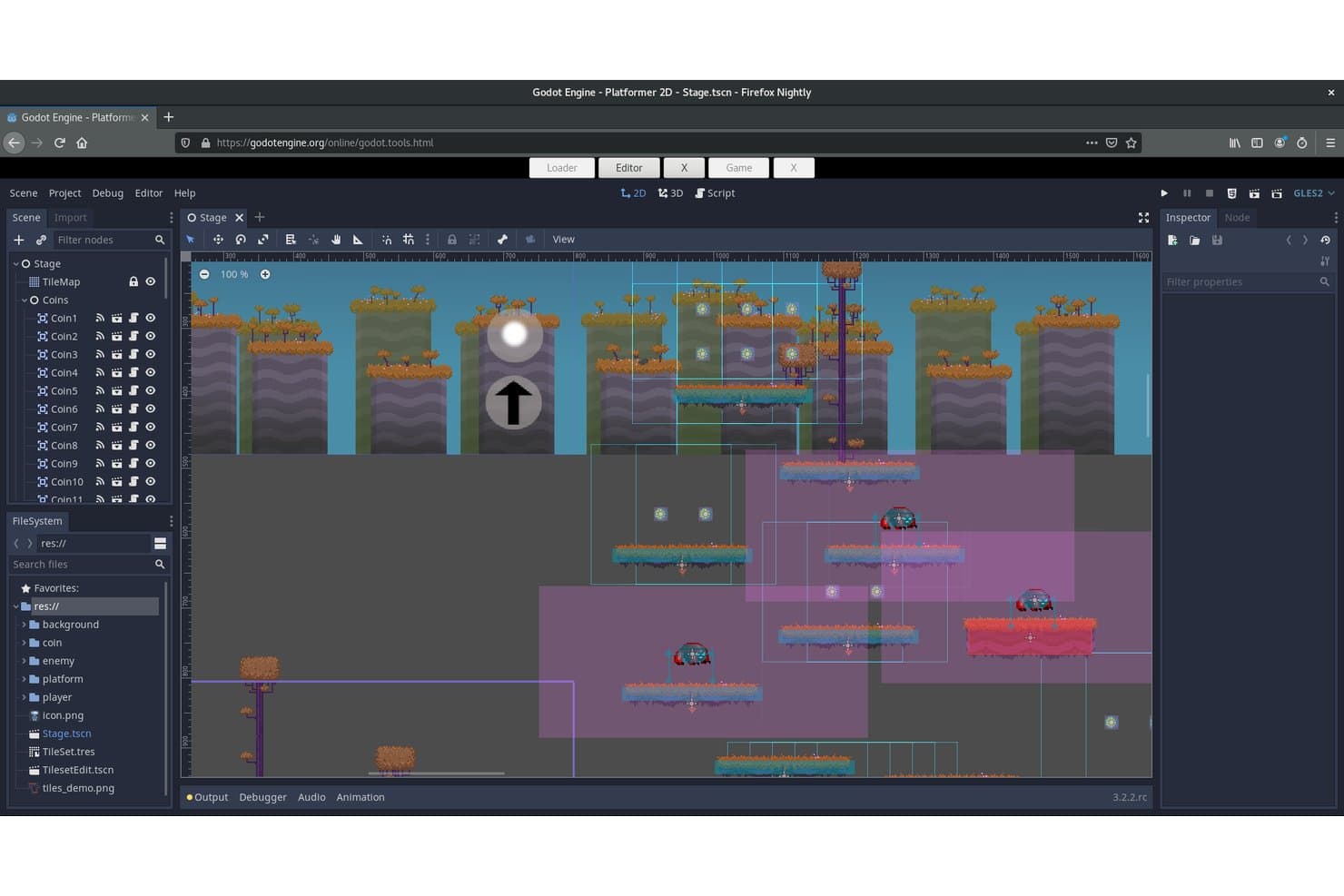
Godot Engine consente agli utenti di creare e visualizzare scene 2D di un platform utilizzando risorse. Godot Engine è un motore di gioco 2D e 3D gratuito e open source che supporta lo scripting multilingue, il rendering basato sulla fisica, la distribuzione multipiattaforma e un'architettura delle scene modulare basata su nodi.
Per chi è più adatto Godot Engine?
Godot Engine è una scelta ideale per gli studi indipendenti e i team di sviluppo di medie dimensioni che desiderano il pieno controllo del proprio motore senza costi di licenza o vincoli verso un fornitore.
Perché ho scelto Godot Engine
Ho incluso Godot Engine tra le mie scelte migliori perché la sua licenza MIT offre agli studi qualcosa che nessun motore commerciale può eguagliare: accesso permanente e incondizionato al codice sorgente, senza alcuna royalty. Apprezzo il fatto che un team che migra da Unity, come ha fatto Mega Crit per Slay the Spire 2, possa creare un fork dell'intera base di codice C++, realizzare livelli personalizzati di rendering o di rete e pubblicare il proprio gioco senza dover mai negoziare un accordo di licenza. L'API GDExtension consente di scrivere estensioni C++ ad alte prestazioni senza ricompilare il motore, rendendo pratica una personalizzazione approfondita della pipeline anche su scala aziendale.
Funzionalità principali di Godot Engine
- Supporto allo scripting multilingue: Scrivi la logica di gioco in GDScript, C# o C++ ad alte prestazioni tramite l'API GDExtension senza ricompilare il motore.
- Integrazione con OpenXR e WebXR: Distribuisci esperienze XR in modo nativo su piattaforme VR e AR, con supporto per il rilevamento delle mani, il rilevamento del corpo e la comprensione spaziale.
- Formato delle scene basato su testo: Il formato
.tscndi Godot memorizza le scene come testo leggibile, rendendo pratici il controllo delle versioni basato su Git e la risoluzione dei conflitti di unione per i team di sviluppo. - Godot Asset Store: Un marketplace integrato in Godot 4.7 che consente ai team di esplorare, valutare e scaricare risorse con download specifici per versione e registri delle modifiche.
Integrazioni di Godot Engine
Godot Engine si integra con W4 Games, Nakama di Heroic Labs, JetBrains Rider, Blender, GitHub, GitLab, OpenXR e WebXR. Gli SDK della community supportano Firebase, PlayFab, Supabase e Talo, mentre GDExtension consente integrazioni personalizzate.
Pros and Cons
Pros:
- Nessuna royalty grazie alla licenza MIT
- Accesso completo al codice sorgente per la personalizzazione
- Supporto nativo alla distribuzione multipiattaforma e XR
Cons:
- Nessun servizio proprietario per le operazioni live o i servizi back-end
- Manca la modifica collaborativa simultanea nativa per più utenti
Learn more about Godot Engine: Ideale per i contenuti generati dagli utenti
- Prova gratuita di 30 giorni
- L'uso di base di Roblox, che include la possibilità di giocare e un certo livello di creazione, è gratuito. Per funzionalità e capacità più avanzate, Roblox offre un abbonamento premium a partire da $4.99/utente/mese.
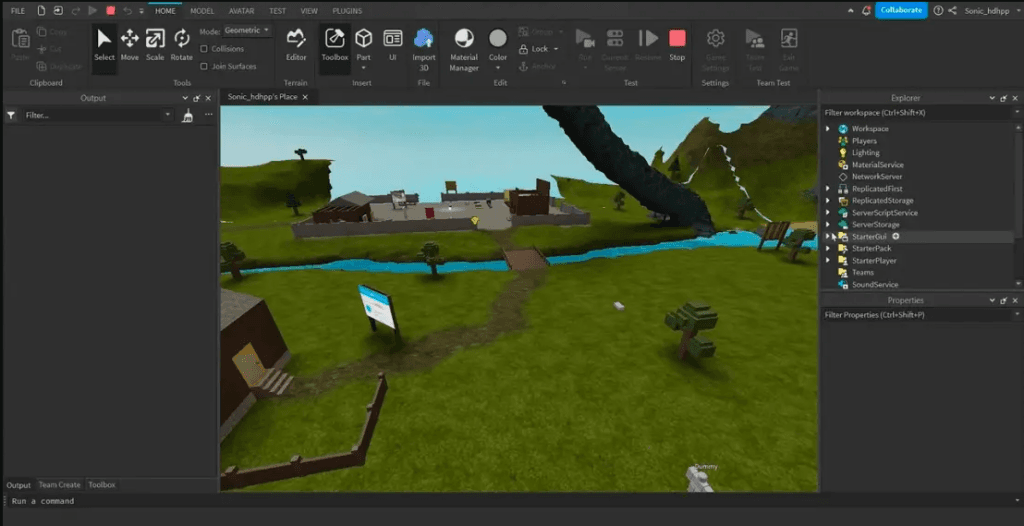
Crea esperienze 3D immersive su Roblox con Roblox Studio. Roblox è una piattaforma di sviluppo di giochi che consente agli utenti di creare e condividere giochi, rivolgendosi principalmente a una comunità composta da sviluppatori amatoriali e professionisti. Offre strumenti per sviluppare un'ampia gamma di giochi ed esperienze, fornendo un ambiente interattivo per la creatività e la collaborazione.
Perché ho scelto Roblox: Roblox non ha eguali nel supportare i contenuti generati dagli utenti, offrendo una piattaforma in cui è possibile creare e condividere giochi con un pubblico globale. I suoi strumenti di sviluppo intuitivi, come Roblox Studio, lo rendono accessibile a creatori di ogni livello. La solida comunità favorisce la collaborazione e l'apprendimento, migliorando le competenze di sviluppo del tuo team. Il mercato integrato di Roblox consente di monetizzare le proprie creazioni, offrendo un'opportunità commerciale unica.
Caratteristiche distintive e integrazioni:
Le caratteristiche includono un ambiente di sviluppo integrato, Roblox Studio, che semplifica la creazione di giochi grazie alla sua funzionalità di trascinamento. La piattaforma supporta lo sviluppo di giochi multigiocatore, consentendo di creare esperienze interattive. Roblox offre inoltre un mercato per acquistare e vendere risorse di gioco, favorendo la creatività e le opportunità di monetizzazione.
Le integrazioni includono Discord, YouTube, Twitch, Twitter, Facebook, Google Analytics, Microsoft Azure, AWS e Unity.
Pros and Cons
Pros:
- Opzioni di monetizzazione integrate
- Favorisce la collaborazione creativa
- Comunità ampia e attiva
Cons:
- Richiede una connessione Internet
- Capacità grafiche limitate
Learn more about Roblox: Ideale per la prototipazione rapida con un'interfaccia con trascinamento
- Prova gratuita disponibile
- Il prezzo di Construct parte da $16.99/user/month per il Piano personale (con fatturazione annuale). È disponibile anche un'edizione gratuita con funzionalità limitate.
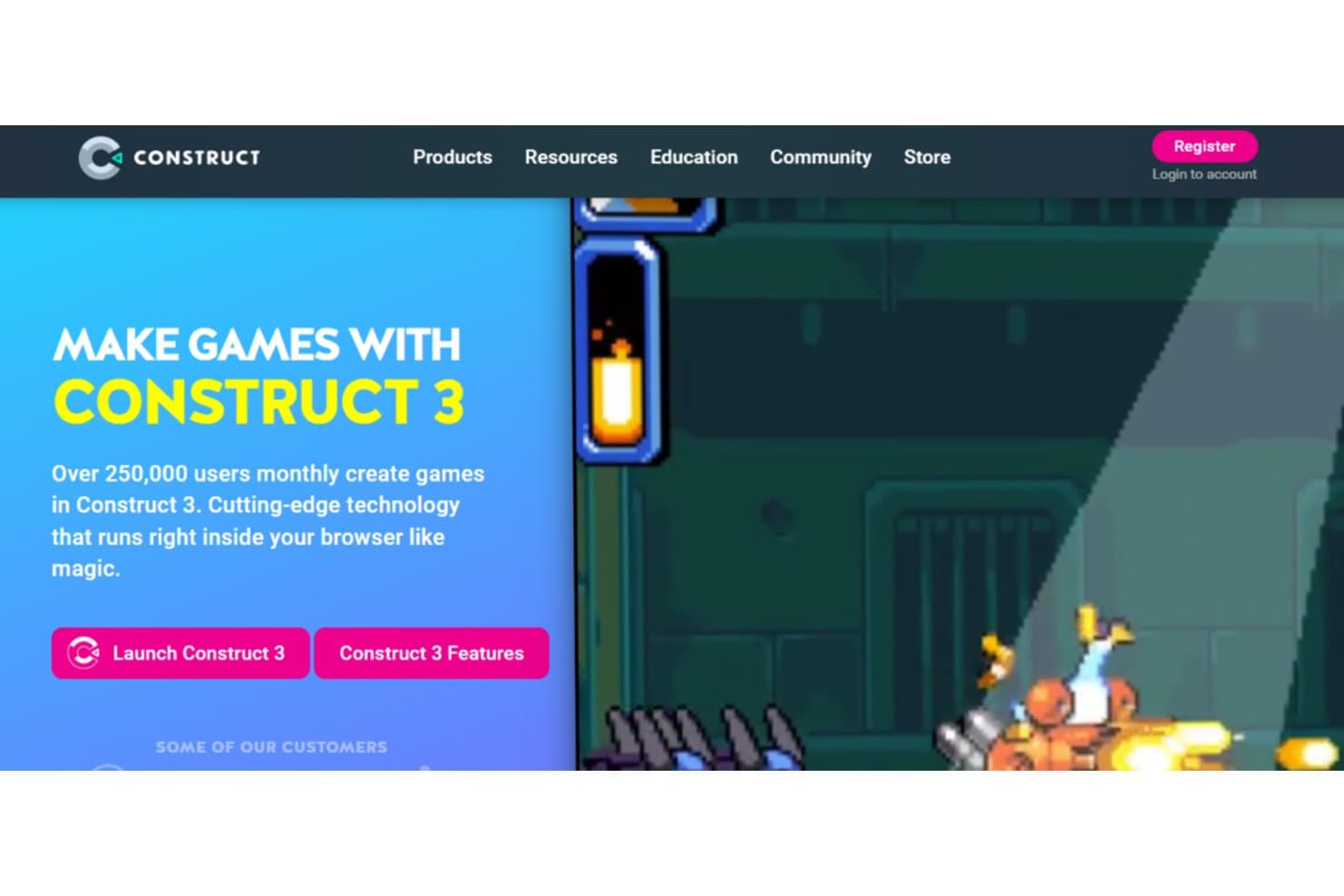
Construct consente agli utenti di creare i propri giochi. Construct è una piattaforma per lo sviluppo di giochi basata su browser, progettata per aiutare i team a creare giochi 2D utilizzando la programmazione visuale. È pensata per gli utenti che vogliono creare e testare rapidamente i progetti senza scrivere molto codice.
Perché ho scelto Construct: Construct utilizza un sistema basato su eventi che evita la programmazione tradizionale, così puoi concentrarti maggiormente sul design e sulla logica. Include un editor di immagini, strumenti per la progettazione dei layout e un'anteprima istantanea, che rendono semplice modificare e testare il progetto al volo. Puoi creare un prototipo completo senza dover analizzare la sintassi o eseguire il debug degli script. È particolarmente utile se il tuo team vuole presentare o testare rapidamente delle idee prima di ampliarle. L'interfaccia con trascinamento consente di lavorare velocemente anche agli utenti meno tecnici.
Funzionalità distintive e integrazioni:
Le funzionalità includono un editor della sequenza temporale per le animazioni, il supporto per plugin personalizzati e un'anteprima multigiocatore nell'editor. Puoi creare e modificare direttamente nel browser senza installare nulla. Supporta anche la collaborazione in tempo reale, consentendo al tuo team di modificare i giochi insieme.
Le integrazioni includono Steam, Google Play, Apple App Store, Facebook Instant Games, Chrome Web Store, itch.io, Android, Windows, Xbox e Amazon Appstore.
Pros and Cons
Pros:
- Sistema di logica visuale rapido da imparare
- Ideale per i test rapidi nelle fasi iniziali
- Non richiede installazione per iniziare
Cons:
- Non adatto a giochi 3D o di grandi dimensioni
- Funzionalità di scripting limitate per gli utenti avanzati
Learn more about Construct: Ideale per progetti a codice sorgente aperto
- Non disponibile
- Prezzo su richiesta
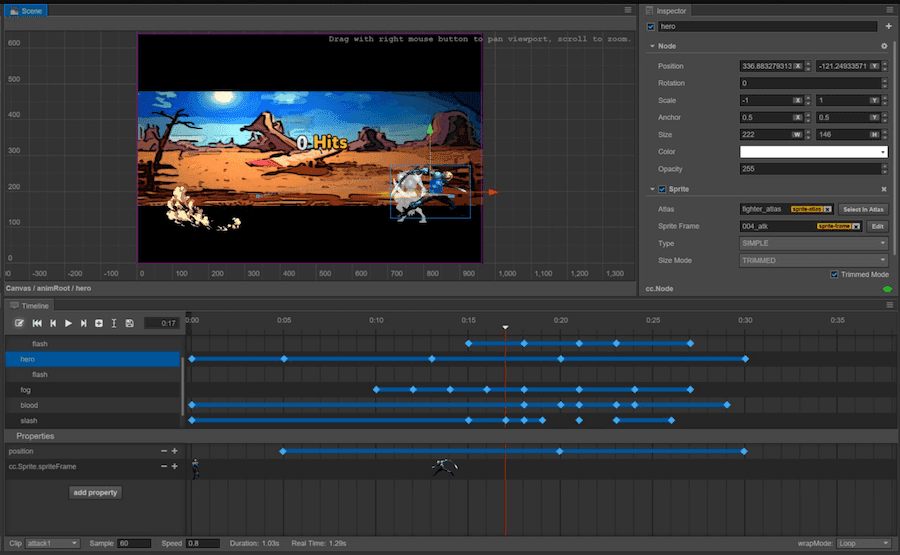
Cocos2d-x offre una soluzione di gioco multipiattaforma a codice sorgente aperto, stabile e personalizzabile. Cocos2d-x è una struttura a codice sorgente aperto per giochi 2D basata su C++ che supporta la distribuzione multipiattaforma su iOS, Android, computer desktop e HTML5, con la scrittura di script in più linguaggi tramite C++, Lua e JavaScript.
Per chi è più adatto Cocos2d-x?
Cocos2d-x è adatto a piccoli team e sviluppatori indipendenti che realizzano giochi mobile 2D e necessitano di una struttura completamente a codice sorgente aperto e priva di royalties, modificabile a livello di codice sorgente.
Perché ho scelto Cocos2d-x
Ho incluso Cocos2d-x tra le mie scelte principali perché la sua licenza MIT offre completa libertà a livello di codice sorgente, una caratteristica rara in questa categoria. Se il tuo team deve modificare la catena di rendering, rimuovere i sottosistemi inutilizzati o pubblicare un titolo mobile 2D senza royalties, Cocos2d-x lo consente senza restrizioni. Valuto molto anche la sua capacità di aggiornamento in tempo reale: la scrittura di script in Lua e JavaScript permette di distribuire aggiornamenti direttamente ai giocatori, evitando completamente i cicli di revisione dei negozi di app.
Funzionalità principali di Cocos2d-x
- Supporto per la scrittura di script in più linguaggi: Scrivi la logica di gioco in C++, Lua o JavaScript all'interno dello stesso progetto, offrendo ai team flessibilità in base alle competenze già disponibili.
- Integrazione della fisica Box2D e Chipmunk: Entrambi i motori fisici sono inclusi direttamente nella struttura, consentendo agli sviluppatori di implementare il rilevamento delle collisioni e la simulazione dei corpi rigidi senza configurazioni di terze parti.
- Ambiente di esecuzione per animazioni scheletriche Spine: Il supporto integrato per gli ambienti di esecuzione Spine (v3.x) e DragonBones consente agli animatori di importare e riprodurre animazioni scheletriche durante l'esecuzione.
- Sistema di compilazione multipiattaforma basato su CMake: Dalla v3.17 in poi, una configurazione CMake unificata gestisce le compilazioni per iOS, Android, Windows, macOS e HTML5 da un'unica configurazione.
Integrazioni di Cocos2d-x
Le integrazioni documentate includono Nakama, Microsoft PlayFab, Spine, DragonBones, Git e SVN. Cocos2d-x include inoltre i motori fisici Box2D e Chipmunk, mentre i team gestiscono le integrazioni esterne tramite file di progetto e codice personalizzato.
Pros and Cons
Pros:
- Completamente a codice sorgente aperto con licenza MIT
- Supporta la scrittura di script in C++, Lua e JavaScript
- Gli aggiornamenti in tempo reale evitano le revisioni dei negozi di app
Cons:
- Nessun editor visivo integrato disponibile
- Sviluppo interrotto da dicembre 2019
Learn more about Cocos2d-x: Ideale per la pubblicazione di giochi 2D su console senza royalty
- Piano gratuito disponibile
- A partire da $79.99/mese
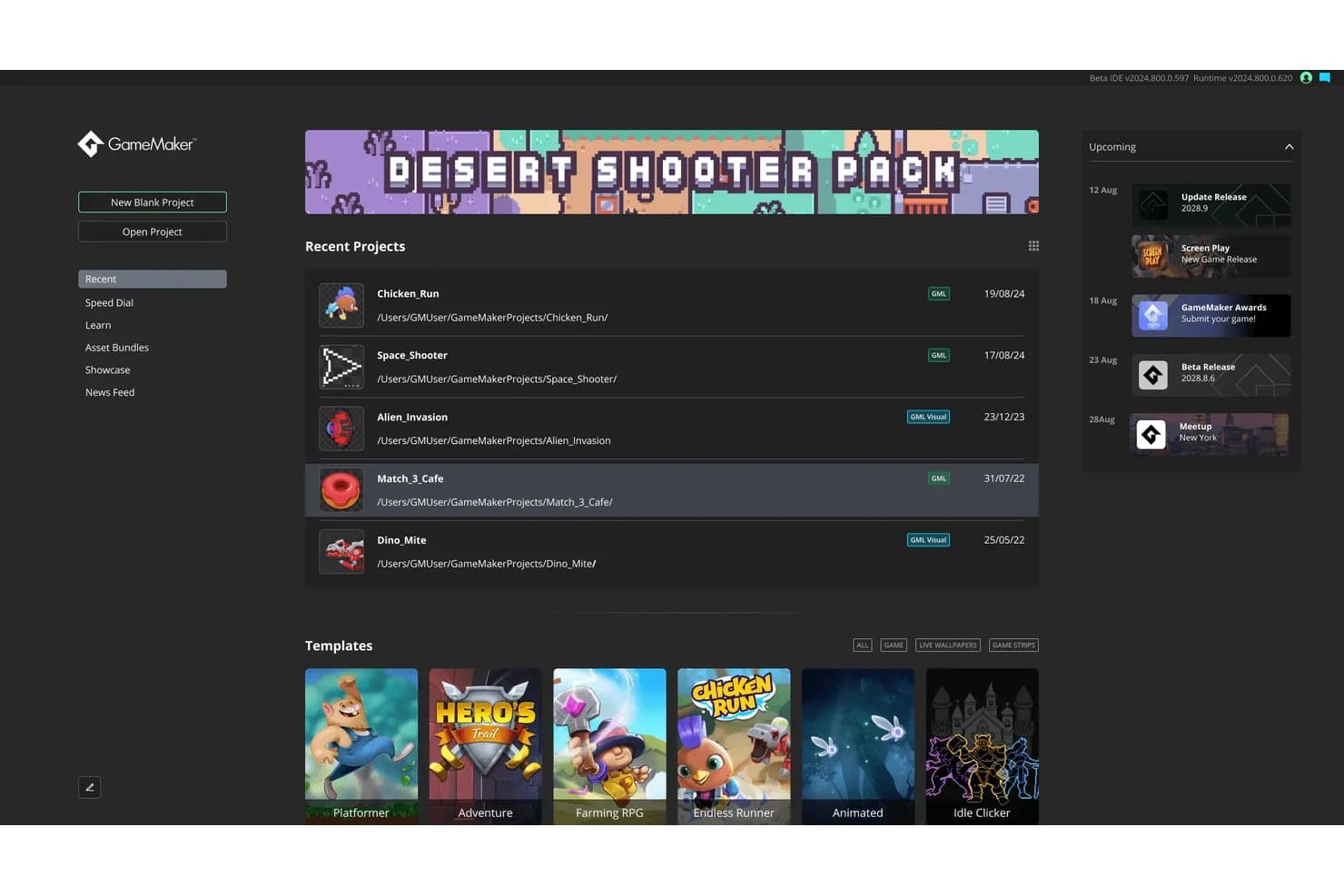
GameMaker consente agli utenti di gestire i progetti recenti e i modelli da un unico pannello di controllo. GameMaker è un motore di gioco 2D che combina un IDE visivo, un linguaggio di scripting proprietario, strumenti per sprite e animazioni ed esportazione multipiattaforma, incluse le piattaforme console, con un modello di licenza senza royalty.
Per chi è più adatto GameMaker?
GameMaker è una soluzione ideale per studi indipendenti e di medie dimensioni che pubblicano commercialmente titoli 2D su console e dispositivi mobili senza pagare royalty.
Perché ho scelto GameMaker
Ho scelto GameMaker come uno dei migliori perché è l'unico motore che conosco in grado di pubblicare su Nintendo Switch, PlayStation 4/5 e Xbox One/Series X|S con un abbonamento fisso e zero royalty. Il livello Enterprise sblocca il codice sorgente completo del motore di esecuzione per piattaforme desktop, mobili e console, così il tuo studio può applicare patch e mantenere le build in autonomia senza attendere i cicli di rilascio ufficiali. Aggiungi l'estensione multiplayer Photon per l'abbinamento dei giocatori e la chat vocale e avrai una pipeline di produzione 2D commerciale affidabile per tutte le principali console.
Funzionalità principali di GameMaker
- Accesso al codice sorgente del motore di esecuzione: gli abbonati Enterprise ricevono il codice sorgente completo di tutti i motori di esecuzione di GameMaker, incluse le piattaforme desktop, mobili, WebAssembly e console.
- Linguaggio di scripting GML: GameMaker utilizza il proprio linguaggio di scripting proprietario, GML, insieme a un'interfaccia visiva con trascinamento per creare la logica di gioco.
- Runtime per animazioni scheletriche Spine: GameMaker include il supporto nativo per Spine Runtime 4.0, consentendo di creare animazioni scheletriche 2D direttamente nell'IDE.
- Plugin per il controllo versione Git: un plugin Git integrato consente ai team di eseguire il commit, il push, il pull e la risoluzione dei conflitti direttamente dall'IDE di GameMaker, senza passare a uno strumento esterno.
Integrazioni di GameMaker
GameMaker offre integrazioni ufficiali con Git, Steamworks, Photon Multiplayer, Namazu Elements, Discord Social SDK e Spine, oltre alla connettività con gli SDK per console di Nintendo, PlayStation e Xbox. Supporta inoltre il networking personalizzato tramite funzioni TCP/UDP e l'API REST di Namazu Elements.
Pros and Cons
Pros:
- Nessuna royalty o condivisione dei ricavi richiesta
- Accesso al codice sorgente del motore di esecuzione per un controllo completo
- Pubblica giochi 2D su tutte le principali console
Cons:
- Strumenti 3D e rendering ad alta fedeltà assenti
- Nessun SLA, SSO o certificazione di conformità
Learn more about GameMaker: Ideale per lo sviluppo multipiattaforma
- Prova gratuita di 30 giorni + Piano gratuito disponibile (per studenti e utenti personali)
- I prezzi di Unity partono da $40/utente/mese (fatturati annualmente). Questo è il prezzo base per il piano Plus, che offre vantaggi aggiuntivi rispetto al piano gratuito.
Visit WebsiteCustomer Rating:4.6/5
Unity consente ai creatori di contenuti di realizzare esperienze RT3D innovative e migliorare diversi settori. Unity è una piattaforma di sviluppo giochi versatile progettata per sviluppatori che desiderano creare giochi 2D e 3D. È ampiamente utilizzata sia da sviluppatori indipendenti che da grandi studi per la sua capacità di distribuire giochi su più piattaforme in modo efficiente.
Perché ho scelto Unity: Unity eccelle nello sviluppo multipiattaforma, permettendoti di creare un gioco e distribuirlo con facilità su varie piattaforme. Le sue soluzioni avanzate di rendering, come URP e HDRP, migliorano le prestazioni visive, facendolo risaltare. L'asset store offre una vasta collezione di risorse, consentendo al tuo team di accelerare lo sviluppo dei progetti. L'interfaccia user-friendly di Unity, unita al supporto per C#, lo rende accessibile a sviluppatori di ogni livello di esperienza.
Funzionalità e integrazioni di rilievo:
Le funzionalità comprendono un sistema di animazione dinamico, soluzioni di rendering personalizzabili e un ricco asset store. Unity supporta lo sviluppo di giochi sia 2D che 3D, rendendolo ideale per progetti di gioco diversi. La sua interfaccia intuitiva garantisce l'accessibilità per sviluppatori di qualsiasi esperienza.
Le integrazioni includono Visual Studio, Autodesk, Facebook SDK, Google Play, Oculus, PlayStation Network, Xbox Live, Steamworks, Unity Ads e Vuforia.
Pros and Cons
Pros:
- Linguaggio C# adatto ai principianti
- Layout dell'interfaccia personalizzabile
- Ampio asset store
Cons:
- Nessun modello di progetto
- Elevato utilizzo di memoria
Learn more about Unity: Ideale per grafica fotorealistica
- Piano gratuito disponibile
- Unreal Engine è gratuito, ma è prevista una royalty del 5% sui ricavi lordi di prodotto per gli utenti che monetizzano i propri giochi o altri prodotti interattivi confezionati e superano 1.000.000 $ di ricavi lordi.

Unreal Engine è uno strumento di sviluppo completo per la tecnologia in tempo reale. Unreal Engine è una piattaforma di sviluppo giochi altamente avanzata, utilizzata principalmente da sviluppatori e studi focalizzati sulla creazione di giochi 3D visivamente straordinari. È rinomata per le sue capacità di rendering in tempo reale e grafica ad alta risoluzione.
Perché ho scelto Unreal Engine: Unreal Engine si distingue per l’offerta di una grafica fotorealistica, fondamentale per creare esperienze di gioco immersive. Il ray tracing in tempo reale del motore consente al tuo team di ottenere illuminazione e ombre realistiche. Il suo potente pipeline di rendering supporta immagini ad altissima fedeltà, rendendolo una scelta preferita per lo sviluppo di giochi AAA. Grazie ai Blueprints, puoi creare meccaniche di gioco complesse senza bisogno di un’estesa conoscenza di programmazione.
Funzionalità e integrazioni principali:
Le funzionalità includono un potente editor di materiali, che ti permette di creare texture e superfici dettagliate. Gli strumenti di animazione supportano movimenti complessi dei personaggi, aumentando il realismo nei giochi. Unreal Engine offre anche un motore audio versatile per creare scenari sonori immersivi nei tuoi progetti.
Le integrazioni comprendono Autodesk Maya, 3ds Max, Blender, Quixel Megascans, Substance Painter, Houdini, Adobe Photoshop, SpeedTree, Oculus e NVIDIA GeForce.
Pros and Cons
Pros:
- Capacità di rendering fotorealistico
- Blueprints per chi non programma
- Strumenti di animazione avanzati
Cons:
- Richiede hardware di fascia alta
- File di grandi dimensioni
Learn more about Unreal Engine: Ideale per effetti visivi ad alta fedeltà
- Piano gratuito disponibile
- A partire da una royalty del 5% dopo 5.000 $ di entrate annuali per progetto
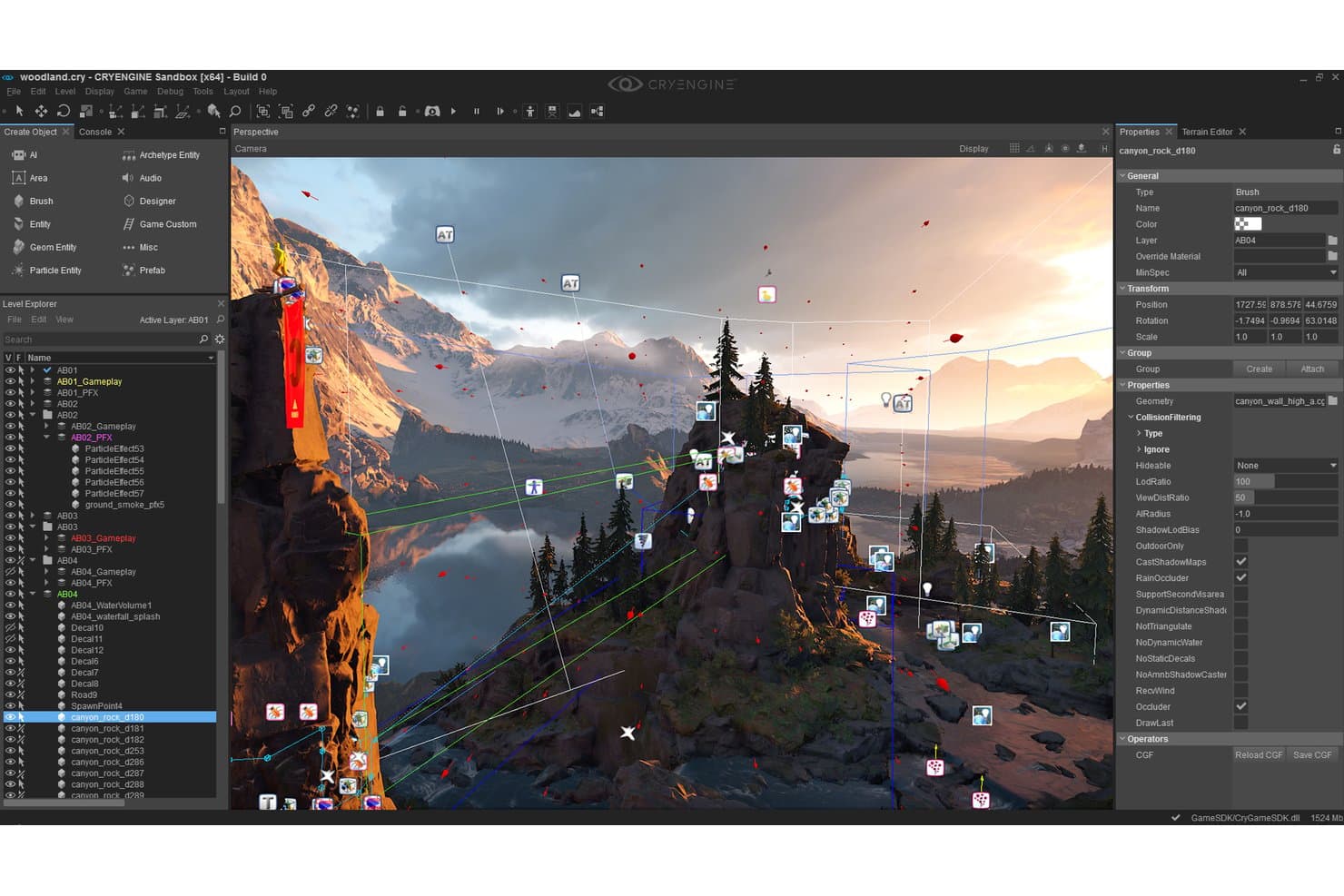
L'editor Sandbox di CryEngine consente agli utenti di creare mondi di gioco 3D dettagliati. CryEngine è un motore di gioco in tempo reale progettato per lo sviluppo AAA, con una pipeline di rendering che offre ray tracing indipendente dall'hardware, illuminazione globale basata su voxel, materiali PBR e un editor Sandbox WYSIWYP per la creazione di scene e risorse.
A chi è più adatto CryEngine?
CryEngine è adatto agli studi AAA e ai team di arte tecnica in cui il rendering fotorealistico e la fedeltà visiva hanno la priorità rispetto alla portata multipiattaforma o all'infrastruttura per servizi live.
Perché ho scelto CryEngine
CryEngine è presente nella mia lista perché nessun altro motore eguaglia la sua fedeltà visiva in tempo reale già pronta all'uso. Sono particolarmente colpito dal sistema SVOGI, che offre un'illuminazione globale dinamica anche in enormi scenari a mondo aperto senza dover precalcolare alcuna luce. Il ray tracing indipendente dall'hardware 'Neon Noir' funziona sia sulle GPU AMD sia su quelle NVIDIA, quindi i team AAA non sono vincolati a un unico ecosistema hardware per ottenere riflessi e rifrazioni fotorealistici.
Funzionalità principali di CryEngine
- Accesso completo al codice sorgente C++: Ogni licenziatario ottiene l'accesso completo al codice sorgente del motore e dell'editor tramite un repository GitHub privato, consentendo una personalizzazione approfondita a qualsiasi livello.
- Sistema di scripting visivo Schematyc: Un ambiente di scripting basato su nodi e costruito su un'architettura Entity Component System, che consente agli sviluppatori di definire la logica di gioco senza scrivere codice C++ grezzo.
- Livello di traduzione audio: Un sistema audio indipendente dal middleware che consente al team di integrare qualsiasi middleware audio, come Wwise o FMOD, senza vincoli a livello di motore.
- Rete di navigazione multilivello: Un sistema avanzato di ricerca dei percorsi per l'IA che supporta ambienti complessi e con più superfici, permettendo movimenti realistici degli NPC attraverso grandi livelli a mondo aperto.
Integrazioni di CryEngine
CryEngine documenta le integrazioni con Adobe Substance, Wwise, Scaleform 4, Steam, Discord, PlayStation, Xbox, Oculus SDK, OSVR e gli SDK di HTC Vive. Non dispone di un'integrazione VCS nativa documentata né di un backend gestito, quindi i team devono configurare separatamente Git, Perforce e i servizi backend.
Pros and Cons
Pros:
- Ray tracing in tempo reale sulle GPU AMD e NVIDIA
- Codice sorgente C++ completo incluso per tutti
- Illuminazione globale di livello superiore per i mondi aperti
Cons:
- Nessuna integrazione nativa con i sistemi di controllo versione
- Non supporta la distribuzione su dispositivi mobili e web
Learn more about CryEngine:
Altri software aziendali per lo sviluppo di videogiochi
Ecco alcune opzioni aggiuntive di software aziendale per lo sviluppo di videogiochi che non sono state incluse nella mia selezione, ma che vale comunque la pena prendere in considerazione:
Come valuto il software per lo sviluppo di giochi aziendali
Quando uno studio distribuisce un gioco su sei piattaforme con un team di 200 persone, gli strumenti devono essere all'altezza della situazione: per questo divido la mia valutazione in requisiti fondamentali e fattori distintivi che separano ciò che è valido da ciò che è eccellente.
Funzionalità fondamentali (requisiti essenziali per questo elenco)
Quando seleziono gli strumenti da includere nel mio elenco, assegno a ciascuno un punteggio su una scala da 0 (non offre la funzionalità) a 5 (eccelle in quest'area) per ognuna delle funzionalità fondamentali elencate di seguito. Calcolo quindi il punteggio totale dello strumento trasformandolo in una percentuale, utilizzando il 65% come parametro di riferimento per valutarne l'idoneità complessiva per l'elenco.
- Motore di gioco e rendering: cerco strumenti che forniscano un motore in tempo reale con rendering 2D/3D, fisica, animazione e scripting per creare esperienze di gioco interattive.
- Distribuzione multipiattaforma: verifico se supportano la creazione e la pubblicazione di giochi sulle principali piattaforme, inclusi PC, console, dispositivi mobili, web e VR/AR.
- Gestione delle risorse e delle scene: valuto gli strumenti in base alla capacità di importare, organizzare e manipolare risorse di gioco, livelli e scene all'interno di un ambiente editor unificato.
- Collaborazione aziendale e controllo delle versioni: ho incluso solo prodotti che consentono realmente a team grandi e distribuiti di collaborare contemporaneamente, con controllo delle versioni, gestione dei progetti e autorizzazioni integrati o compatibili.
- Backend scalabile e gestione delle operazioni live: mi sono assicurato che offrano (o si integrino con) servizi per il networking multigiocatore, il matchmaking, l'analisi dei dati e le operazioni relative ai servizi live su scala aziendale.
- Licenze e sicurezza aziendali: ho dato priorità ai prodotti che forniscono licenze di livello aziendale, accesso al codice sorgente o possibilità di estensione, assistenza dedicata e controlli di conformità e sicurezza adatti alle grandi organizzazioni.
Una volta ottenuto un elenco di strumenti che soddisfano i criteri, considero ciò che distingue ogni piattaforma dalle altre.
Fattori distintivi (ciò che differenzia i fornitori)
Ecco come confronto i diversi fornitori:
Funzionalità di spicco
Vale la pena esaminare attentamente la creazione di contenuti assistita dall'IA, in particolare per capire se gli strumenti di apprendimento automatico gestiscono nativamente il riadattamento delle animazioni e la generazione procedurale o se richiedono plug-in di terze parti. Valuto inoltre i backend integrati per i servizi live, come Epic Online Services o PlayFab, verificando se il matchmaking, i salvataggi nel cloud e la configurazione remota vengono forniti come moduli proprietari o se devono essere assemblati utilizzando SDK esterni. Per gli studi che adottano flussi di lavoro di produzione virtuale, verifico il supporto alla sincronizzazione di più proiettori in stile nDisplay e al collegamento in tempo reale per l'hardware di acquisizione del movimento.
Oltre le funzionalità
La struttura delle licenze influisce sui costi a lungo termine in modi che non sono evidenti inizialmente: modelli basati sulle royalty, abbonamenti per utente e formule con disponibilità del codice sorgente hanno impatti diversi quando un titolo cresce. Valuto inoltre la qualità dell'assistenza aziendale: responsabili tecnici dedicati, SLA di risposta garantiti e visibilità sulla roadmap sono importanti quando uno studio si trova nel bel mezzo di una fase di lavoro intenso o deve gestire un incidente relativo alle operazioni live. Per le piattaforme chiuse, considero quanto bene uno strumento supporti i flussi di lavoro per la certificazione delle console, poiché gli strumenti di conformità TRC/TCR possono ridurre significativamente i rischi in fase di invio.
Come scegliere il software aziendale per lo sviluppo di videogiochi
È facile perdersi in lunghi elenchi di funzionalità e strutture di prezzo complesse. Per aiutarti a rimanere concentrato mentre affronti il tuo processo di selezione del software, unico per le tue esigenze, ecco una lista di fattori da tenere a mente:
| Fattore | Cosa considerare |
| Scalabilità | Assicurati che il software possa crescere insieme al tuo team e gestire progetti di grandi dimensioni. Cerca opzioni che supportino un numero crescente di utenti e l'espansione degli asset di gioco. |
| Integrazioni | Verifica la compatibilità con gli strumenti che già utilizzi, come Unity o Unreal Engine, e con i software per lo sviluppo della realtà virtuale, per mantenere un flusso di lavoro fluido ed evitare interruzioni. |
| Personalizzazione | Scegli un software che ti permetta di adattare le funzionalità alle esigenze specifiche del tuo progetto, offrendo al team flessibilità nella progettazione e nelle funzionalità del gioco. |
| Semplicità d'uso | Scegli strumenti con interfacce intuitive e funzionalità facili da usare, per ridurre al minimo i tempi di formazione e aiutare il team a iniziare rapidamente. |
| Budget | Bilancia i costi con le funzionalità offerte. Considera tutte le spese, inclusi i costi delle licenze e i potenziali componenti aggiuntivi, per assicurarti di ottenere il miglior valore per il tuo investimento. |
| Misure di sicurezza | Dai priorità ai software che garantiscono la protezione dei dati tramite crittografia e controlli di accesso sicuri, mantenendo i tuoi progetti al riparo dagli accessi non autorizzati. |
| Supporto e risorse | Cerca opzioni di assistenza clienti complete, tra cui tutorial, forum e supporto diretto, per aiutare il team a superare le difficoltà in modo efficiente. |
| Prestazioni | Valuta la capacità del software di gestire grafica complessa e requisiti di elaborazione elevati senza rallentamenti, garantendo un processo di sviluppo fluido. |
Tendenze nei software aziendali per lo sviluppo di videogiochi
Durante la mia ricerca, ho raccolto innumerevoli aggiornamenti dei prodotti, comunicati stampa e registri delle versioni di diversi fornitori di software aziendali per lo sviluppo di videogiochi. Ecco alcune delle tendenze emergenti che sto monitorando:
- Collaborazione in tempo reale: oggi i team possono lavorare insieme in tempo reale da sedi diverse. Questa tendenza aumenta la produttività e la creatività, con piattaforme come Unity che integrano funzionalità che consentono a più sviluppatori di apportare modifiche contemporaneamente.
- Integrazione di VR e AR: le funzionalità di realtà virtuale e aumentata sono sempre più diffuse nei software per lo sviluppo di videogiochi per PC. Gli sviluppatori utilizzano strumenti come Unreal Engine per creare esperienze immersive, aggiungendo nuove dimensioni all'esperienza di gioco e alle simulazioni di formazione.
- Generazione procedurale dei contenuti: la generazione automatica dei contenuti di gioco sta prendendo piede. Questo riduce i tempi di sviluppo e consente di creare ambienti di gioco più dinamici. Strumenti come Godot Engine stanno esplorando modalità efficaci per integrare queste funzionalità.
- Sviluppo basato sul cloud: un numero crescente di strumenti offre soluzioni basate sul cloud, consentendo agli sviluppatori di accedere a potenti risorse di calcolo senza dover disporre di hardware locale di fascia alta. Amazon Lumberyard ne è un esempio: offre l'integrazione cloud per supportare progetti di grandi dimensioni.
- Analisi basata sull'intelligenza artificiale: l'integrazione dell'IA per analizzare il comportamento dei giocatori sta diventando uno standard. Questo aiuta gli sviluppatori a comprendere le interazioni degli utenti e a perfezionare l'esperienza di gioco. I fornitori stanno integrando strumenti di IA per offrire informazioni utili a migliorare i giochi e il coinvolgimento degli utenti.
Che cos'è il software aziendale per lo sviluppo di videogiochi?
Il software aziendale per lo sviluppo di videogiochi è una suite di strumenti progettata per supportare la creazione e la gestione di videogiochi, in particolare per progetti di grandi dimensioni. Questi strumenti sono generalmente utilizzati da sviluppatori di videogiochi, designer e studi che desiderano produrre giochi di alta qualità in modo efficiente.
Funzionalità come la collaborazione in tempo reale, l'integrazione con i software per la realtà aumentata e lo sviluppo basato sul cloud aiutano i team a lavorare insieme, creare esperienze immersive e accedere a risorse potenti. Nel complesso, questi strumenti forniscono l'infrastruttura necessaria per sviluppare giochi innovativi e coinvolgenti in un mercato competitivo.
Funzionalità del software aziendale per lo sviluppo di videogiochi
Quando scegli un software aziendale per lo sviluppo di videogiochi, presta attenzione alle seguenti funzionalità chiave:
- Distribuzione multipiattaforma: consente di lanciare i giochi su più dispositivi, ampliando la portata del pubblico.
- Collaborazione in tempo reale: consente ai membri del team di lavorare insieme contemporaneamente, aumentando la produttività e la creatività.
- Integrazione con AR e motore VR: supporta la creazione di esperienze immersive, aggiungendo profondità all'esperienza di gioco e alle applicazioni di formazione.
- Sviluppo basato sul cloud: offre accesso a potenti risorse di calcolo senza richiedere hardware locale di fascia alta.
- Generazione procedurale dei contenuti: crea automaticamente contenuti di gioco, riducendo i tempi di sviluppo e offrendo ambienti dinamici.
- Motore fisico avanzato: simula interazioni e comportamenti realistici, migliorando l'esperienza di gioco. Considera le dimensioni e il livello di attività della community di un software quando fai la tua scelta.
Vantaggi del software aziendale per lo sviluppo di videogiochi
L'implementazione di software aziendale per lo sviluppo di videogiochi offre numerosi vantaggi al tuo team e alla tua azienda. Eccone alcuni che puoi aspettarti:
- Cicli di produzione più rapidi: Le librerie di risorse integrate, i componenti riutilizzabili e gli strumenti per i flussi di lavoro aiutano i team a pubblicare i videogiochi più rapidamente.
- Supporto multipiattaforma: La maggior parte degli strumenti consente di creare una sola volta e distribuire su dispositivi mobili, console, PC e web senza dover ricostruire il progetto.
- Collaborazione del team: Gli ambienti condivisi e le funzionalità di controllo delle versioni facilitano il lavoro di grandi team sullo stesso progetto.
- Monitoraggio delle prestazioni: Gli strumenti di profilazione e diagnosi integrati aiutano a monitorare e risolvere i problemi prima del lancio.
- Scalabilità: Queste piattaforme gestiscono basi di codice e raccolte di risorse più ampie, consentendo agli studi di realizzare progetti ambiziosi senza compromettere il funzionamento.
- Integrazione con gli strumenti aziendali: Il supporto per strumenti come Jira, Git o le compilazioni nel cloud facilita l'integrazione nelle pipeline esistenti.
- Flussi di lavoro personalizzati: Le piattaforme aziendali spesso supportano sistemi di scripting e componenti aggiuntivi, così puoi adattare gli strumenti al modo in cui lavora il tuo team.
Costi e prezzi del software aziendale per lo sviluppo di videogiochi
La scelta di un software per lo sviluppo di videogiochi aziendale richiede la comprensione dei vari modelli e piani tariffari disponibili. I costi variano in base alle funzionalità, alle dimensioni del team, ai componenti aggiuntivi e ad altri fattori. La tabella seguente riassume i piani più comuni, i relativi prezzi medi e le funzionalità tipicamente incluse nelle soluzioni software aziendali per lo sviluppo di videogiochi:
Tabella comparativa dei piani per il software aziendale per lo sviluppo di videogiochi
| Tipo di piano | Prezzo medio | Funzionalità comuni |
| Piano gratuito | $0 | Include l'accesso di base allo strumento di modifica, l'uso limitato delle risorse e una licenza per una singola postazione. |
| Piano personale | $20–$50/utente/mese | Include l'accesso completo allo strumento di modifica, il supporto della comunità, l'uso del negozio di risorse e le compilazioni nel cloud. |
| Piano aziendale | $60–$150/utente/mese | Include strumenti di collaborazione del team, integrazione del controllo delle versioni, analisi e supporto tecnico. |
| Piano per grandi imprese | $200–$500/utente/mese | Include flussi di lavoro personalizzati, supporto dedicato, integrazioni avanzate e licenze per team di grandi dimensioni. |
Software aziendale per lo sviluppo di giochi: domande frequenti
Ecco alcune risposte alle domande più comuni sui software aziendali per lo sviluppo di giochi:
I motori di gioco aziendali sono in grado di gestire giochi multigiocatore di grandi dimensioni?
Sì, la maggior parte dei software per motori di gioco aziendali supporta i giochi multigiocatore di grandi dimensioni. Offre sistemi di rete integrati o l’integrazione con server di terze parti, così il tuo team può sviluppare, testare e gestire le funzionalità online su larga scala. Dovrai comunque pianificare bene il backend, ma gli strumenti sono progettati per gestire questo tipo di carico.
I piani aziendali includono l'automazione delle build sul cloud?
Molti piani aziendali offrono strumenti di build sul cloud. Questi aiutano il tuo team a compilare e distribuire le build più rapidamente senza occupare le macchine locali. Sono particolarmente utili se lavori a versioni multipiattaforma con basi di codice di grandi dimensioni.
In che modo queste piattaforme supportano lo sviluppo di strumenti personalizzati?
Gli strumenti aziendali spesso includono API di scripting e supporto per i plugin destinati a diversi ambienti o strumenti come i software per lo sviluppo della realtà virtuale. Il tuo team può creare strumenti interni, editor personalizzati o estensioni del flusso di lavoro che si integrano direttamente nel motore. È utile avere sviluppatori interni o artisti tecnici in grado di programmare.
Quale tipo di controllo delle versioni è incluso?
Le piattaforme di livello aziendale di solito includono un sistema di controllo delle versioni integrato o supportano sistemi di terze parti come Git o Perforce. Questo mantiene organizzate le modifiche del team, evita i conflitti tra file e supporta il lavoro tra fusi orari diversi. Alcuni piani includono anche strumenti visivi per l’unione delle modifiche.
È possibile migrare un progetto esistente in un motore aziendale?
Sì, ma dipende dal motore di provenienza e dalla configurazione del progetto. Potresti dover rielaborare parti della pipeline degli asset o ricostruire alcuni sistemi. La maggior parte degli strumenti offre funzionalità di importazione, ma durante la migrazione è necessario prevedere un certo lavoro manuale.
Gli strumenti aziendali supportano l'ottimizzazione specifica per piattaforma?
Di solito sì. Puoi configurare profili specifici per piattaforma per gestire gli obiettivi di prestazioni su dispositivi mobili, console e PC. Questi profili consentono al tuo team di modificare le dimensioni delle texture, le impostazioni di rendering o l’utilizzo della memoria per ogni piattaforma senza duplicare l’intero progetto.