

Se gestisci le operazioni IT, conosci le difficoltà legate al mantenimento del corretto funzionamento dei sistemi mentre ci si adatta alle nuove esigenze tecnologiche. Forse hai utilizzato ManageEngine, ma hai riscontrato delle carenze in alcune aree.
Trovare il software giusto per la gestione IT può fare una grande differenza per il tuo team. È utile per tutto, dal monitoraggio dei sistemi alla gestione dei dispositivi e alla garanzia della conformità.
In base alla mia esperienza, valutare delle alternative può portare a un allineamento migliore con le tue esigenze specifiche. Ti presenterò alcune delle migliori alternative a ManageEngine disponibili sul mercato, concentrandomi sugli aspetti che distinguono ciascuna soluzione e su come potrebbero adattarsi alle esigenze della tua azienda.
Esaminiamo queste opzioni per aiutarti a trovare una soluzione che supporti davvero i tuoi obiettivi.
Che cos'è ManageEngine?
ManageEngine è un software per la gestione IT progettato per aiutare le aziende a supervisionare in modo efficiente le proprie operazioni IT. Viene comunemente utilizzato da professionisti IT, amministratori di rete e responsabili dei sistemi che devono gestire infrastrutture IT complesse.
Le sue funzionalità di gestione degli asset, monitoraggio della rete e help desk supportano la capacità del tuo team di mantenere l'integrità dei sistemi e risolvere rapidamente i problemi. Nel complesso, ManageEngine offre una soluzione centralizzata per gestire diverse esigenze IT, rendendo più semplice mantenere i sistemi sotto controllo.
Tabella comparativa delle alternative a ManageEngine
Questa tabella comparativa riassume i dettagli dei prezzi delle migliori alternative a ManageEngine che ho selezionato:
| Tool | Best For | Trial Info | Price | ||
|---|---|---|---|---|---|
| 1 | Ideale per una visibilità estesa dell'infrastruttura | Prova gratuita di 30 giorni | A partire da $200/mese (fatturazione annuale) | Website | |
| 2 | Ideale per strumenti di diagnostica di rete | Prova gratuita di 14 giorni | Da $1,50/mese/dispositivo gestito | Website | |
| 3 | Ideale per il monitoraggio dei flussi di lavoro aziendali | Demo gratuita disponibile | Prezzo su richiesta | Website | |
| 4 | Ideale per la gestione personalizzabile degli asset | Prova gratuita di 7 giorni + demo gratuita disponibile | Prezzo su richiesta | Website | |
| 5 | Ideale per l'auto-riparazione automatizzata | Demo gratuita disponibile | Prezzo su richiesta | Website | |
| 6 | Ideale per l'integrazione nell'ecosistema Microsoft | Prova gratuita di 30 giorni disponibile | A partire da $4/utente/mese (fatturazione annuale) | Website | |
| 7 | Ideale per la gestione dei servizi IT guidata dall'intelligenza artificiale | Demo gratuita disponibile | Prezzi su richiesta | Website | |
| 8 | Ideale per ITSM e collaborazione di team | Prova gratuita di 14 giorni + piano gratuito + demo gratuita disponibile | Da $20/agente/mese | Website | |
| 9 | Ideale per la gestione delle applicazioni SaaS | Demo gratuita disponibile | Prezzo su richiesta | Website | |
| 10 | Ideale per la configurazione semplice dell'accesso remoto | Prova gratuita di 30 giorni + demo gratuita disponibile | A partire da $129/tecnico/mese (fatturazione annuale) | Website |


Perché fidarsi dei nostri consigli sui software
6,700+
Reviews
20
Industry experts
16+
Evaluation factors
14
Years
Il nostro team testa e recensisce software dal 2012. In quanto leader tecnologici noi stessi, sappiamo quanto sia difficile — e importante — scegliere il software giusto.
Per questa guida, abbiamo valutato gli strumenti attraverso test praticie ricerche indipendenti, assegnando un punteggio agli strumenti in base ai nostri criteri di selezione.
Le nostre recensioni riflettono il nostro giudizio editoriale umano, non un discorso di vendita.
Revisori esperti:
- Paulo Gardini MiguelDirettore tecnico
 Tim FisherVP dell'IA
 Gabriel RosasTech Lead e architetto software
 Christhian GruhnTech Lead e architetto della piattaforma

Recensioni delle migliori alternative a ManageEngine
Di seguito trovi i miei riepiloghi dettagliati delle migliori alternative a ManageEngine che sono entrate nel mio elenco. Le mie recensioni offrono un’analisi approfondita delle funzionalità principali, dei pro e dei contro, delle integrazioni e dei casi d’uso ideali di ogni strumento, per aiutarti a trovare quello più adatto a te.
 Ideale per una visibilità estesa dell'infrastruttura
- Prova gratuita di 30 giorni
- A partire da $200/mese (fatturazione annuale)
Visit WebsiteCustomer Rating:4.6/5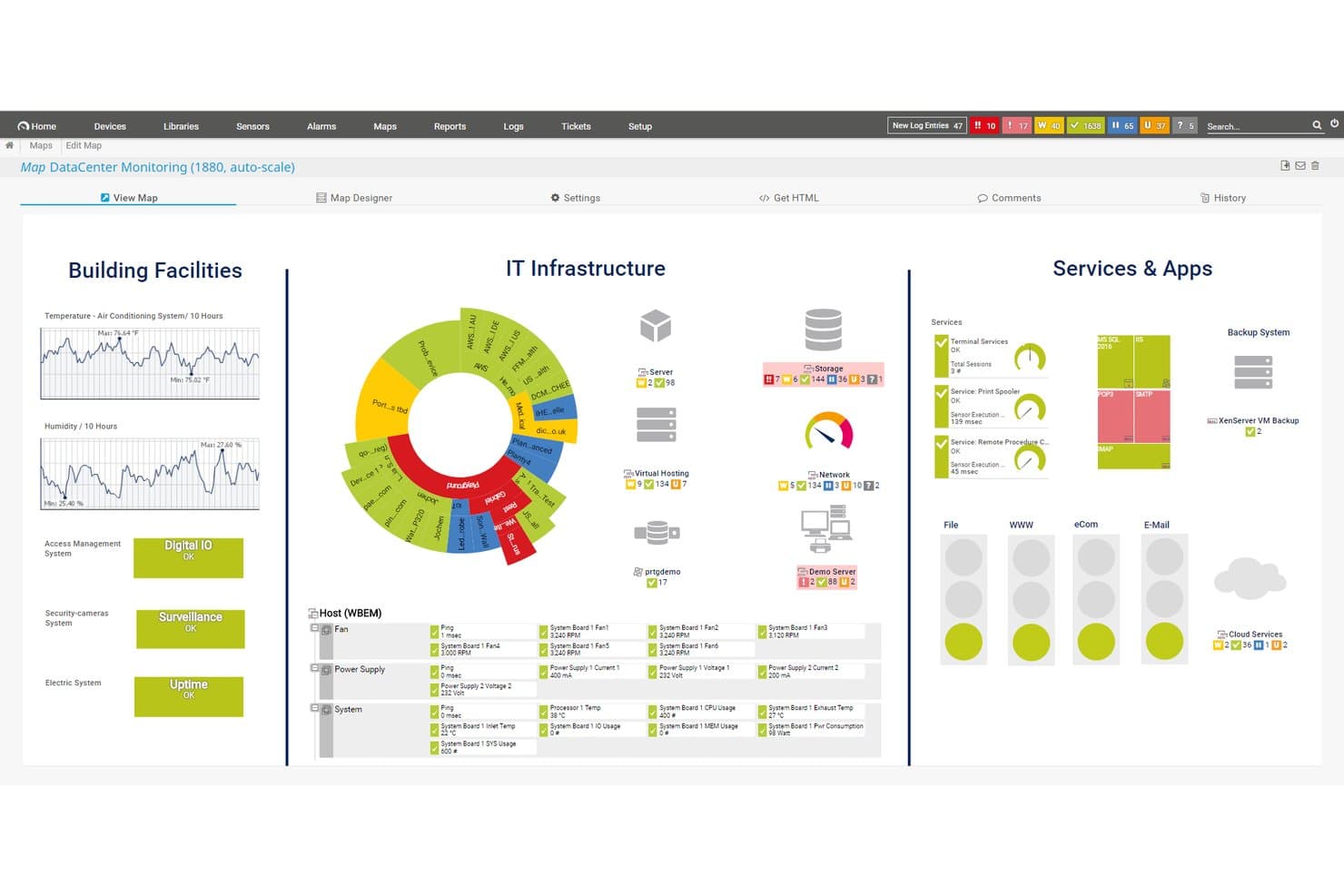
Paessler PRTG offre una mappa di monitoraggio del data center personalizzabile che visualizza strutture degli edifici, infrastruttura IT e servizi e app in un'unica dashboard. Paessler PRTG è una piattaforma di monitoraggio dell'infrastruttura senza agenti, pensata per amministratori di rete e di sistemi che necessitano di una visibilità unificata su dispositivi, server, applicazioni e ambienti cloud senza dover utilizzare strumenti multipli.
Per chi è pensato Paessler PRTG?
È particolarmente adatto a organizzazioni di medie e grandi dimensioni che gestiscono infrastrutture complesse in locale o ibride, operanti in settori come manifatturiero, sanitario e delle telecomunicazioni.
Perché Paessler PRTG è una valida alternativa a ManageEngine
Ho incluso Paessler PRTG tra le mie scelte principali perché la sua architettura basata su sensori copre dispositivi di rete, server, VM, applicazioni e sistemi OT come Modbus e OPC UA da un'unica console. Apprezzo in particolare la funzione di mappatura delle dipendenze, che mostra come i dispositivi sono interconnessi così il mio team può individuare le cause originarie senza inseguire falsi allarmi. Il modello di sonde remote distribuite permette inoltre di monitorare più sedi senza implementare stack di monitoraggio separati in ciascuna postazione.
Funzionalità principali di Paessler PRTG
- Supporto multipiattaforma per le sonde: Esegui sonde distribuite su Linux, Windows, NAS o container per una distribuzione flessibile in ambienti diversi.
- Designer di mappe personalizzabile: Crea mappe e dashboard dell'infrastruttura in tempo reale tramite drag-and-drop per visualizzare stati e relazioni.
- Audit logging: Monitora le azioni degli utenti e gli eventi di sistema direttamente dalla piattaforma per una migliore conformità e supervisione della sicurezza.
- API e sensori personalizzati: Estendi il monitoraggio con accesso HTTP API e crea sensori personalizzati per dispositivi, applicazioni o protocolli specifici.
Integrazioni di Paessler PRTG
Paessler PRTG offre integrazioni native con AWS, Microsoft Azure, VMware, Siemens Industrial Edge, Cisco Meraki, HPE, Dell EMC, OPC UA e MQTT. È disponibile un'API per integrazioni personalizzate.
Pros and Cons
Pros:
- Riduce il carico di implementazione sugli endpoint
- Supporta nativamente protocolli OT e IoT
- Architettura basata su sensori, scalabile su diversi ambienti
Cons:
- Non dispone di un modulo interno di ticketing o ITSM
- Il costo in base al numero di sensori può aumentare sensibilmente su larga scala
Learn more about Paessler PRTG: Ideale per strumenti di diagnostica di rete
- Prova gratuita di 14 giorni
- Da $1,50/mese/dispositivo gestito
Visit WebsiteCustomer Rating:4.9/5
Domotz supporta la diagnostica e il monitoraggio remoto per mantenere reti affidabili Domotz è un software di monitoraggio e gestione della rete pensato per i provider di servizi gestiti e i professionisti IT. Offre strumenti per la diagnostica di rete, il monitoraggio remoto e la risoluzione dei problemi per garantire affidabilità e performance della rete.
Perché è una valida alternativa a ManageEngine: Domotz mette a disposizione strumenti specializzati per la diagnostica di rete che migliorano le capacità di monitoraggio e risoluzione dei problemi della rete. Grazie agli avvisi in tempo reale, è possibile rispondere rapidamente a qualsiasi problema di rete. Le funzionalità di monitoraggio remoto della piattaforma permettono di gestire le reti da qualsiasi luogo. Il focus di Domotz sulla diagnostica di rete lo rende un’alternativa efficace per chi cerca un’analisi dettagliata della rete.
Funzionalità e integrazioni principali:
Funzionalità includono la rilevazione automatica dei dispositivi, che consente di identificare facilmente tutti i dispositivi presenti sulla rete. La piattaforma offre strumenti avanzati di reportistica, fornendo approfondimenti sulle prestazioni della rete e sui potenziali problemi. Inoltre, Domotz supporta la gestione multi-sito, permettendo di supervisionare più reti da un’unica interfaccia.
Integrazioni includono Slack, Amazon Alexa, Google Assistant, Control4, Crestron, Sonos, Luxul, Ruckus, Ubiquiti e Cisco Meraki.
Pros and Cons
Pros:
- Strumenti diagnostici di rete dettagliati e integrati per analisi approfondite
- Notifiche di allerta in tempo reale inviate tramite email, SMS, Slack o app mobile
- Supporta la gestione multi-sito per scalabilità ed efficienza
Cons:
- Richiede conoscenze di gestione di rete
- La configurazione degli agenti virtuali può risultare inconsistente
Learn more about Domotz: Ideale per il monitoraggio dei flussi di lavoro aziendali
- Demo gratuita disponibile
- Prezzo su richiesta
Visit WebsiteCustomer Rating:4.4/5
ServiceNow semplifica i flussi di lavoro aziendali tra IT, HR e altri dipartimenti ServiceNow è una piattaforma cloud pensata per automatizzare e gestire i flussi di lavoro aziendali tra diversi dipartimenti. Aiuta le organizzazioni a gestire l’IT service management, la gestione delle operazioni, le risorse umane, l’assistenza clienti e altri processi aziendali da una piattaforma centralizzata.
Perché è una valida alternativa a ManageEngine: ServiceNow è ideale per i team che cercano una supervisione unificata di numerosi processi e desiderano gestire tutto in un unico posto. La sua automazione dei flussi di lavoro basata sull’AI aiuta a ottimizzare le operazioni, mentre i flussi di lavoro personalizzabili e predefiniti permettono di adattare i processi tra i vari dipartimenti. Con uno spazio di lavoro condiviso per dati, attività e approvazioni, i team ottengono chiara visibilità su lavoro, richieste e avanzamento in tutta l’organizzazione.
Funzionalità e integrazioni principali:
Funzionalità includono un motore di workflow unificato che si adatta a IT, HR, assistenza clienti, sicurezza e operazioni. I suoi strumenti low-code/no-code consentono di creare facilmente moduli, flussi di lavoro e automazioni personalizzati. ServiceNow mette inoltre a disposizione dashboard e un database centrale per visualizzare in un unico posto attività, richieste e stati.
Integrazioni includono Slack, Jira, Azure DevOps, GitHub, Microsoft Teams, Splunk, GitLab, Salesforce, Microsoft Dynamics, SAP, Zendesk, Okta e Datadog.
Pros and Cons
Pros:
- Workflow unificato tra i dipartimenti
- Flussi di lavoro personalizzati senza grande uso di codice
- Automazione dei processi potenziata dall’AI
Cons:
- Configurazioni complesse richiedono competenze tecniche
- Il modulo di reporting è poco flessibile
 Ideale per la gestione personalizzabile degli asset
- Prova gratuita di 7 giorni + demo gratuita disponibile
- Prezzo su richiesta
Visit WebsiteCustomer Rating:4.2/5
Asset Panda offre una dashboard con monitoraggio delle attrezzature, registri inventariali e gestione del ciclo di vita. Asset Panda si distingue per i team IT che desiderano una gestione flessibile di una vasta gamma di hardware, software e infrastrutture. Se hai bisogno di storici dettagliati delle risorse, tracciabilità per audit o flussi di lavoro personalizzati per la gestione degli asset, questa piattaforma offre controllo e trasparenza avanzati.
Per chi è Asset Panda?
Responsabili degli asset IT e team di gestione delle strutture in organizzazioni di medie e grandi dimensioni che cercano una tracciabilità configurabile dell'inventario e capacità di audit.
Perché Asset Panda è una valida alternativa a ManageEngine
Ho scelto Asset Panda perché la sua profondità di personalizzazione lo distingue dalle piattaforme di gestione IT più rigide. Puoi definire campi, azioni e flussi di lavoro personalizzati per ogni tipo di asset—così un laptop, una licenza software e un'apparecchiatura da campo possono avere strutture dati su misura. Trovo inoltre davvero utile la cronologia completa delle azioni per ogni asset: ogni check-in, check-out, riparazione e variazione di stato viene registrato, rendendo le verifiche di conformità molto meno gravose. L'app mobile con scansione di codici a barre consente al mio team di aggiornare i registri direttamente in sede senza dover tornare alla scrivania.
Funzionalità principali di Asset Panda
- Monitoraggio della manutenzione: Pianifica e monitora le attività di manutenzione preventiva con notifiche automatiche prima che l'attrezzatura esca dalla garanzia o superi le scadenze di servizio.
- Kit di asset: Raggruppa più asset in modo che il tuo team possa eseguire azioni su un gruppo di attrezzature in un solo passaggio.
- Raccolta firme: Raccogli digitalmente le firme in qualsiasi punto del flusso di lavoro per garantire la responsabilità nelle assegnazioni e nei trasferimenti degli asset.
- Ruoli e permessi: Limita l'accesso degli utenti a strumenti, gruppi, campi e report specifici in base alle responsabilità lavorative di ciascuno.
Integrazioni Asset Panda
Asset Panda offre oltre 20 integrazioni native con popolari piattaforme business, IT e di produttività. Tra queste ci sono Dell, ArcGIS Online, Oracle NetSuite, Hexnode, Dell Warranty, Google Calendar, Microsoft Entra ID, Microsoft Intune, Google Workspace, Zendesk, Freshservice, ServiceNow, Slack, Jira, QuickBooks, Microsoft Teams e molte altre.
Pros and Cons
Pros:
- Supporta la tracciabilità degli asset su un numero illimitato di sedi
- Campi e flussi di lavoro personalizzabili per gli asset
- App mobile con scansione di codici a barre inclusa
Cons:
- Opzioni di personalizzazione dei report limitate
- Nessun monitoraggio integrato dei dispositivi di rete
Learn more about Asset Panda: Ideale per l'auto-riparazione automatizzata
- Demo gratuita disponibile
- Prezzo su richiesta
Visit WebsiteCustomer Rating:4/5
Ivanti Neurons automatizza le operazioni IT con strumenti per la gestione di incidenti, asset e servizi Ivanti Neurons è una piattaforma di gestione dei servizi IT progettata per le aziende che desiderano migliorare le proprie operazioni IT attraverso l'automazione e informazioni intelligenti. Serve i reparti IT fornendo strumenti per la gestione degli incidenti, la gestione degli asset e l'automazione dei servizi.
Perché è una buona alternativa a ManageEngine: Ivanti Neurons offre capacità proattive di auto-riparazione che aiutano il tuo team a risolvere automaticamente i problemi prima che abbiano impatto sugli utenti. Le sue funzionalità di automazione riducono le attività manuali ripetitive, consentendo al team di concentrarsi su iniziative strategiche. Le informazioni intelligenti della piattaforma forniscono dati preziosi per migliorare il processo decisionale e ottimizzare le prestazioni IT. Con gli strumenti di gestione degli asset è possibile tracciare e gestire in modo efficiente gli asset IT lungo tutto il loro ciclo di vita.
Funzionalità e integrazioni principali:
Funzionalità includono un ampio sistema di gestione degli incidenti che aiuta a risolvere rapidamente i problemi IT. La piattaforma offre anche avanzati strumenti di reportistica, fornendo informazioni sulle prestazioni dei servizi IT e sulle aree da migliorare. Inoltre, le funzionalità di gestione dei cambiamenti di Ivanti Neurons permettono di pianificare e implementare modifiche con interruzioni minime.
Integrazioni includono Microsoft 365, ServiceNow, Salesforce, Google Workspace, Slack, VMware, Cisco e Amazon Web Services.
Pros and Cons
Pros:
- Funzionalità proattive di auto-riparazione
- Strumenti per la gestione degli asset IT e degli asset software
- L'iper-automazione riduce l'intervento manuale dell'IT nelle attività di routine
Cons:
- Configurazione dell'automazione complessa
- Set di dati di grandi dimensioni possono comportare ritardi nei tempi di caricamento
Learn more about Ivanti Neurons: Ideale per l'integrazione nell'ecosistema Microsoft
- Prova gratuita di 30 giorni disponibile
- A partire da $4/utente/mese (fatturazione annuale)

Microsoft Intune offre una dashboard con conformità dei dispositivi, registrazione e informazioni dettagliate. Microsoft Intune offre un controllo centralizzato sulla configurazione dei dispositivi, la gestione delle app e la sicurezza degli endpoint dal cloud. I team IT che gestiscono dispositivi Windows, dispositivi mobili o ambienti BYOD lo utilizzano spesso per far rispettare la conformità, inviare aggiornamenti e proteggere le forze lavoro da remoto.
Per chi è pensato Microsoft Intune?
Reparti IT che gestiscono dispositivi Windows e endpoint mobili in organizzazioni in crescita o distribuite.
Perché Microsoft Intune è una valida alternativa a ManageEngine
Ho scelto Microsoft Intune perché si integra naturalmente in ambienti che utilizzano già infrastrutture Microsoft. L'integrazione di Conditional Access con Microsoft Entra ID è ciò che trovo più pratico: lo stato di conformità del dispositivo entra direttamente nelle decisioni di accesso, quindi un endpoint non conforme viene bloccato dalle risorse aziendali senza alcun intervento manuale. Mi affido inoltre a Windows Autopilot per il provisioning dei dispositivi senza intervento umano, eliminando la necessità di configurare manualmente le macchine prima della distribuzione. Per i team che gestiscono sia dispositivi BYOD sia aziendali, la separazione tra le policy MDM e MAM ti permette di proteggere i dati delle app di lavoro in Outlook o Microsoft Teams senza toccare i dati personali dei dipendenti.
Funzionalità principali di Microsoft Intune
- Endpoint analytics: Monitora lo stato di salute dei dispositivi, le prestazioni di avvio e l'affidabilità delle app su tutta la flotta utilizzando dati in tempo reale.
- Distribuzione e gestione delle app: Distribuisci, aggiorna e rimuovi applicazioni su dispositivi gestiti senza richiedere accesso fisico.
- Gestione dei privilegi degli endpoint: Controlla quali utenti possono eseguire specifiche attività elevate su dispositivi Windows senza concedere privilegi da amministratore locale completi.
- Applicazione delle baseline di sicurezza: Applica policy di sicurezza preconfigurate basate sulle impostazioni consigliate da Microsoft per Windows e altre piattaforme gestite.
Integrazioni di Microsoft Intune
Microsoft Intune offre integrazioni native in tutto l'ecosistema Microsoft, incluso Microsoft 365 e Azure. È disponibile un'API per integrazioni personalizzate. Puoi anche collegarlo a fonti dati come Microsoft Access, SharePoint, SQL Server, Exchange Server e Microsoft Entra ID.
Pros and Cons
Pros:
- Policy di conformità integrate per Microsoft 365
- Patch automatizzati per endpoint Windows
- Integrazione profonda con Azure Active Directory
Cons:
- Supporto limitato per sistemi operativi non Microsoft
- Le opzioni di personalizzazione dei report sono minime
Learn more about Microsoft Intune: Ideale per la gestione dei servizi IT guidata dall'intelligenza artificiale
- Demo gratuita disponibile
- Prezzi su richiesta

BMC Helix aiuta le aziende ad automatizzare e migliorare le operazioni dei servizi IT BMC Helix è una piattaforma di gestione dei servizi IT basata su cloud pensata per le aziende che desiderano automatizzare e potenziare le proprie operazioni IT. Supporta i dipartimenti IT fornendo strumenti per la gestione dei servizi, la gestione delle operazioni e l'automazione.
Perché è una valida alternativa a ManageEngine: BMC Helix sfrutta l'IA per offrire una gestione dei servizi predittiva, aiutando il tuo team ad affrontare proattivamente i problemi prima che impattino sulle operazioni. Le sue funzionalità di automazione riducono la necessità di interventi manuali, consentendo al tuo team di concentrarsi su attività strategiche. Gli strumenti di gestione degli incidenti della piattaforma assicurano una rapida risoluzione dei problemi IT, riducendo al minimo i tempi di inattività. Dashboard intuitive forniscono una visione olistica degli ambienti IT, supportando il processo decisionale.
Funzionalità principali & integrazioni:
Funzionalità includono un modulo di gestione delle modifiche che ti aiuta a pianificare e monitorare i cambiamenti in modo efficiente. La piattaforma offre anche analisi avanzate, fornendo approfondimenti sulle prestazioni dei servizi e sulle aree di miglioramento. Inoltre, il portale self-service di BMC Helix consente agli utenti di risolvere autonomamente i problemi comuni, riducendo il carico sul tuo team IT.
Integrazioni includono Microsoft Azure, Amazon Web Services, Salesforce, ServiceNow, Google Cloud, Cisco, Splunk, IBM, Oracle e VMware.
Pros and Cons
Pros:
- La gestione IT dei servizi guidata dall'IA automatizza il rilevamento degli incidenti, la risoluzione e le raccomandazioni intelligenti
- Creazione automatica di ticket per il monitoraggio degli avvisi in tempo reale
- Intelligenza artificiale e machine learning integrati offrono approfondimenti operativi avanzati
Cons:
- Le prestazioni possono rallentare con grandi set di dati
- Gli aggiornamenti del modulo asset possono essere lenti
Learn more about BMC Helix: Ideale per ITSM e collaborazione di team
- Prova gratuita di 14 giorni + piano gratuito + demo gratuita disponibile
- Da $20/agente/mese

Jira Service Management offre una dashboard con analisi dei ticket e insight sul team. Jira Service Management aiuta i team IT a gestire richieste di servizio, incidenti e processi di cambiamento su un'unica piattaforma collaborativa. È una scelta pratica per le organizzazioni che necessitano di flussi di lavoro personalizzabili e una forte integrazione con gli strumenti di sviluppo.
Per chi è più indicato Jira Service Management?
Team operativi IT e help desk che gestiscono incidenti, cambiamenti e richieste in ambienti aziendali dinamici e collaborativi.
Perché Jira Service Management è una valida alternativa a ManageEngine
Ho scelto Jira Service Management perché il ponte che crea tra operatività IT e team di sviluppo è difficile da replicare altrove. Quando si verifica un incidente, il mio team può coinvolgere direttamente gli ingegneri dai progetti Jira Software collegati, mantenendo il contesto in un unico posto invece di saltare tra sistemi diversi. Mi affido inoltre ai suoi flussi di lavoro per la gestione dei cambiamenti, che mostrano i dati di deploy provenienti dalle pipeline CI/CD collegate così da poter valutare i rischi prima di approvare modifiche. Questo ciclo di feedback tra sviluppo e operation rende Jira Service Management una scelta eccellente come alternativa a ManageEngine per i team che lavorano già in ambienti agili.
- Gestione degli asset: Traccia hardware e software, inclusi proprietà, stato del ciclo di vita e inventario, direttamente all’interno della piattaforma.
- Gestione dei problemi: Raggruppa incidenti correlati in problemi, esegue analisi delle cause radice e documenta soluzioni provvisorie per ridurre le interruzioni ricorrenti.
- Gestione della conoscenza: Crea e pubblica articoli informativi per supportare il self-service e ridurre il volume delle richieste in arrivo.
- Gestione delle configurazioni: Mappa le dipendenze e le relazioni dell’infrastruttura per comprendere l’impatto delle modifiche prima che avvengano.
Integrazioni Jira Service Management
Jira Service Management offre integrazioni native con Jira Software, Confluence, Slack, Microsoft 365, Opsgenie, Trello, GitHub, Bitbucket, AWS, Azure e Google Cloud Platform. È inoltre disponibile un'API per integrazioni personalizzate.
Pros and Cons
Pros:
- Facile escalation ai team di sviluppo software
- Flussi di lavoro solidi per gestione incidenti e cambiamenti
- Portali di richiesta servizio personalizzabili
Cons:
- La configurazione iniziale dei flussi di lavoro può risultare complessa
- Le funzionalità di tracciamento asset sono meno avanzate rispetto ai concorrenti
Learn more about Jira Service Management: Ideale per la gestione delle applicazioni SaaS
- Demo gratuita disponibile
- Prezzo su richiesta

Zluri aiuta i team IT a monitorare, gestire e ottimizzare le app SaaS per l'efficienza Zluri è una piattaforma di gestione SaaS progettata per i team IT e le organizzazioni che devono gestire e ottimizzare le proprie applicazioni software. Offre strumenti per la scoperta delle applicazioni, il monitoraggio dell'utilizzo e l'ottimizzazione dei costi per migliorare l'efficienza del software.
Perché è una valida alternativa a ManageEngine: Zluri eccelle nella gestione delle applicazioni SaaS, offrendo funzionalità che aiutano a individuare e monitorare l'utilizzo del software in tutta l'organizzazione. I suoi strumenti di ottimizzazione dei costi consentono di identificare spese superflue e ottimizzare il budget dedicato al software. La gestione della conformità della piattaforma assicura che tutte le applicazioni rispettino gli standard di settore. Grazie ad analisi dettagliate sull'utilizzo, potrai prendere decisioni informate sugli investimenti software.
Funzionalità e integrazioni principali:
Funzionalità includono la scoperta automatizzata delle applicazioni, che aiuta a identificare tutti gli strumenti SaaS utilizzati all'interno dell'organizzazione. La piattaforma offre anche analisi della spesa, fornendo informazioni sulle spese software e sui potenziali risparmi. Inoltre, il monitoraggio della conformità di Zluri garantisce che le applicazioni rispettino i requisiti normativi.
Integrazioni includono Microsoft 365, Google Workspace, Salesforce, Slack, Zoom, Atlassian, Dropbox, GitHub, Okta e Zendesk.
Pros and Cons
Pros:
- Solida gestione delle applicazioni SaaS lungo l'intero ciclo di vita
- Analisi dettagliate sull'utilizzo con dati in tempo reale sulle attività degli utenti
- Gli strumenti di ottimizzazione dei costi aiutano a ridurre sensibilmente le spese software
Cons:
- I report esportati sono meno avanzati
- La personalizzazione della dashboard non è ampia come in altri strumenti
Learn more about Zluri: 10Ideale per la configurazione semplice dell'accesso remoto
Atera
- Prova gratuita di 30 giorni + demo gratuita disponibile
- A partire da $129/tecnico/mese (fatturazione annuale)
Visit WebsiteCustomer Rating:4.6/5
Atera consente ai team IT di gestire dispositivi, monitorare reti e automatizzare le attività di supporto Atera è una piattaforma all-in-one per la gestione e il supporto IT, pensata per team IT e fornitori di servizi gestiti (MSP). Consente di gestire dispositivi, monitorare reti, gestire ticket di supporto e automatizzare le attività IT da un'unica dashboard.
Perché è una valida alternativa a ManageEngine: Atera è una solida alternativa se desideri operazioni IT unificate con accesso remoto semplificato. Riunisce monitoraggio, supporto e manutenzione in un'unica piattaforma, permettendo al tuo team di accedere ai dispositivi da remoto, distribuire software e patch ovunque e automatizzare attività ricorrenti. Puoi monitorare lo stato dei dispositivi, ricevere avvisi sulla salute del sistema e gestire ticket di supporto senza passare da uno strumento all'altro. L'approccio all-in-one di Atera la rende una soluzione valida per i team che danno priorità alla gestione IT centralizzata e al controllo remoto semplice.
Funzionalità e integrazioni principali:
Funzionalità includono monitoraggio in tempo reale di dispositivi e server con avvisi automatici, accesso remoto, controllo non presidiato per una risoluzione rapida dei problemi e distribuzione automatica dei software con gestione patch trasversale ai sistemi operativi. Fornisce anche un sistema di ticketing e help desk integrato per supportare richieste, tracciare segnalazioni e gestire i flussi di lavoro IT.
Integrazioni includono Splashtop, IT-Glue, Domotz, Bitdefender, Acronis, Keeper e Zapier.
Pros and Cons
Pros:
- Gli utenti di tutti i livelli possono gestire un numero illimitato di dispositivi
- Funzionalità di accesso remoto integrata per una risoluzione e manutenzione efficiente dei problemi
- Patch e installazioni automatiche su Windows, macOS e Linux
Cons:
- Personalizzazione dei report limitata
- Monitoraggio di rete non approfondito
Altre alternative a ManageEngine
Ecco alcune ulteriori alternative a ManageEngine che non sono entrate nel mio elenco, ma che vale comunque la pena prendere in considerazione:
- 11ConnectWiseIdeale per strumenti di automazione IT
- 12SyncroIdeale per l'integrazione della fatturazione MSP
- 13TaniumLa migliore visibilità in tempo reale degli endpoint su scala aziendale
- 14LogMeIn ResolveIdeale per le capacità di supporto remoto
Come Valuto le Alternative a ManageEngine
Divido la mia valutazione in due livelli: le capacità di base che un tool deve avere—ITSM, monitoraggio, gestione degli endpoint—e i fattori differenzianti che distinguono le migliori opzioni.
Funzionalità Principali (Requisiti Minimi per Questa Lista)
Quando seleziono i tool per la mia lista, ne valuto ognuno su una scala da 0 (non offre la funzionalità) a 5 (eccelle in quest'area) per ciascuna delle funzionalità principali elencate sotto. Poi calcolo il punteggio totale dello strumento come una percentuale. Ogni strumento deve raggiungere un punteggio minimo totale del 75% per essere preso in considerazione nell'inclusione.
- Gestione dei Servizi IT: Cerco ticketing, gestione degli incidenti, dei problemi e delle modifiche in allineamento ITIL—il tipo di flussi di lavoro su cui un team service desk conta ogni giorno per tracciare interruzioni ed escalation.
- Gestione degli Endpoint & delle Risorse: Qui sono fondamentali la scoperta automatica, l'inventario e la distribuzione di patch. Verifico se uno strumento può rilevare nuovi dispositivi nella rete e distribuire patch senza intervento manuale.
- Monitoraggio di Rete & Infrastruttura: Valuto allarmi in tempo reale e dashboard delle prestazioni per server, switch e applicazioni—soprattutto quanto rapidamente una piattaforma segnala servizi degradati.
- Supporto Remoto & Controllo: Che i tecnici debbano risolvere problemi su un laptop utente o gestire un server non presidiato, valuto la qualità delle sessioni, il trasferimento file e la copertura multipiattaforma.
- Automazione & Orchestrazione dei Flussi di Lavoro: Verifico se la piattaforma permette di costruire automazioni basate su regole—come l’assegnazione automatica dei ticket per categoria o la pianificazione di manutenzioni ricorrenti sugli endpoint.
- Reportistica & Integrazioni: Connettori preconfigurati con strumenti come Active Directory, Jira, Slack e piattaforme cloud sono importanti. Controllo anche dashboard personalizzate e accesso API per l’importazione di dati in sistemi esterni.
Una volta che ho una lista di strumenti che soddisfano questi criteri, considero ciò che distingue ciascuna piattaforma.
Fattori Differenzianti (Cosa Distingue i Fornitori)
Ecco come confronto e metto a contrasto diversi fornitori:
Funzionalità Distintive
L'architettura multi-tenant è un grande elemento distintivo—soprattutto per gli MSP che gestiscono decine di ambienti clienti da una sola console. Valuto anche se una piattaforma offre operazioni guidate dall'IA come allarmi predittivi o classificazione automatica dei ticket, che possono ridurre significativamente i tempi di triage. Conta molto anche un portale self-service ben realizzato. Quando gli utenti finali possono consultare una knowledge base o inviare richieste tramite un catalogo servizi, il tuo help desk gestisce meno ticket ripetitivi.
Oltre le Funzionalità
La flessibilità di implementazione è una delle prime cose che controllo. Alcuni team hanno bisogno di hosting on-premise per la sovranità dei dati, mentre altri vogliono solo SaaS—strumenti come NinjaOne e Freshservice adottano approcci diversi in questo senso. Anche i modelli di prezzo e di licenza variano molto. Considero se un fornitore addebita per tecnico, per endpoint o per modulo, perché una piattaforma che obbliga a un pacchetto tutto incluso può far lievitare i costi rapidamente. Le certificazioni di conformità come SOC 2 e ISO 27001 completano la mia valutazione, poiché indicano quanto seriamente un fornitore gestisce la sicurezza.
Perché cercare un'alternativa a ManageEngine?
Sebbene ManageEngine sia una piattaforma di gestione IT nota, alcuni team valutano delle alternative quando i propri requisiti superano le funzionalità disponibili o il modello di fornitura attuale. Potresti valutare un'alternativa a ManageEngine se:
- Hai bisogno di una scalabilità maggiore per supportare un ambiente IT in crescita
- La facilità d'uso è una priorità sia per gli amministratori IT sia per gli utenti finali
- La tua organizzazione necessita di funzionalità MDM o di gestione remota dei dispositivi più avanzate
- Devi soddisfare requisiti specifici di cybersicurezza, conformità o SLA
- Desideri strumenti specifici per il settore anziché un approccio ITSM generalizzato
- Il tuo team ha bisogno di un modello di prezzo più flessibile o di un numero inferiore di componenti aggiuntivi
Se queste difficoltà ti sono familiari, gli strumenti ITSM, RMM o di gestione degli endpoint alternativi potrebbero adattarsi meglio alle tue esigenze di fornitura dei servizi.
Funzionalità
Ecco alcune delle principali funzionalità di ManageEngine, utili per confrontare e mettere a paragone ciò che offrono le soluzioni alternative:
- Gestione degli endpoint: gestisce e protegge gli endpoint su più sistemi operativi, supportando ambienti locali e ibridi.
- Gestione delle patch: automatizza la distribuzione e la correzione delle patch per ridurre le vulnerabilità su server, desktop e dispositivi remoti.
- Gestione delle identità e degli accessi: controlla gli accessi e le autorizzazioni degli utenti, aiutando le organizzazioni a soddisfare i requisiti di sicurezza e conformità.
- Gestione degli asset IT: monitora gli asset hardware e software durante tutto il loro ciclo di vita, supportando la gestione della configurazione e il controllo dei costi.
- Gestione delle informazioni e degli eventi di sicurezza (SIEM): monitora gli eventi di sicurezza e i segnali di conformità per aiutare i team a rispondere più rapidamente alle potenziali minacce.
- Monitoraggio delle prestazioni: offre visibilità sullo stato dei sistemi e sulle prestazioni dei servizi, aiutando i team IT a soddisfare le aspettative relative agli SLA.
- Protezione dei dati: aiuta a proteggere i dati sensibili con strumenti per il rilevamento delle minacce, la prevenzione del malware e l'applicazione delle policy.
- Gestione dei costi del cloud: utilizza informazioni basate sull'AI per monitorare e ottimizzare la spesa per il cloud in più ambienti.
- Controllo delle applicazioni: gestisce l'accesso alle applicazioni e i privilegi per ridurre i rischi e migliorare la sicurezza degli endpoint.
- Accesso remoto: consente ai team IT di risolvere i problemi e gestire i sistemi da remoto, supportando i team distribuiti e le forze lavoro a distanza.